# HypeMutationObserver

The cover artwork is not hosted in this repository and ©opyrighted by Max Ziebell
### Usage
This extension called Hype MutationObserver, is a wrapper to [MutationObserver](https://developer.mozilla.org/de/docs/Web/API/MutationObserver). It allows to observer elements and act upon changes on their attributes, childlist and subtree. This Hype specific wrapper takes care to register and unregister the observer. It also helps in keeping the callback mutation events scene specific and offers an update rate feature.
**Basic usage:**
``` javascript
hypeDocument.startMutationObserver(element, function(mutation){
// your code goes here and executes whenever the style attribute changes
}, { attributes: true, attributeFilter: [ "style"]});
```
**Advanced usage (with all options):**
``` javascript
hypeDocument.startMutationObserver(element, function(mutation){
// your code goes here and executes whenever the style attribute changes
}, {
id:'test', /* ID for managing, defaults to callback if not anonymous */
updaterate: 30, /* 1-60 optional limit for updates per second */
scope: window, /* defines scope of execution, defaults to hypeDocument */
/* All options discussed at https://developer.mozilla.org/en-US/docs/Web/API/MutationObserverInit work here */
attributes: true,
attributeFilter: [ "stroke-dashoffset" ],
attributeOldValue: true
});
```
**Hints on using the updaterate**:
Use `updaterate` on the config object to set it up. If you use the `updaterate` feature to limit the amount of triggers on your mutation code, the extension also takes care to apply the first initial update and the last update. If you don't want that you can disable them using the config keys `disableInitialUpdate` and `disableFinalUpdate`
**Further reads:**
https://developer.mozilla.org/de/docs/Web/API/MutationObserver
**Online Examples:**
[HypeMutationObserver.html](https://playground.maxziebell.de/Hype/MutationObserver/HypeMutationObserver.html)
[Magnification Lens](https://forums.tumult.com/t/magnification-lens/17093?u=maxzieb)
Visual explanation of `updaterate`:
---
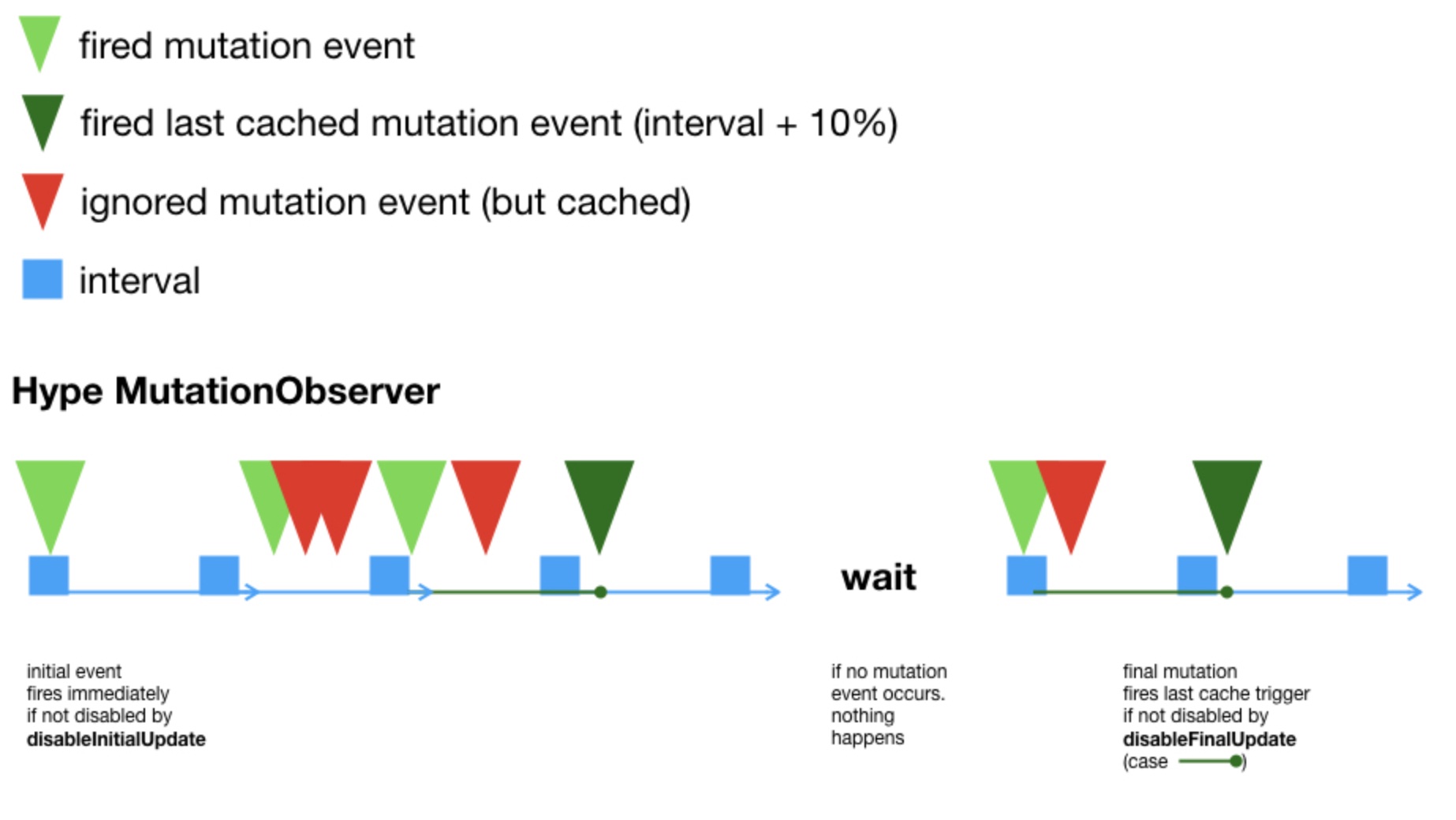
PS: As seen on the right hand side of the visualization, the check against the `updaterate` is not always on the heartbeat of the interval. That is rather what Hype AnimationFrame is for. So if a mutation event falls inbetween to heartbeats (interval) and more time has passed then an interval, it gets fired. That also always sets up a *delayed timeout callback* to fire any cached mutations in the next interval as a final update.
**Version-History:**
`1.0 Initial release under MIT`
`1.1 Added support for Updaterate`
Content Delivery Network (CDN)
--
Latest version can be linked into your project using the following in the head section of your project:
```html
```
Optionally you can also link a SRI version or specific releases.
Read more about that on the JsDelivr (CDN) page for this extension at https://www.jsdelivr.com/package/gh/worldoptimizer/HypeMutationObserver
Learn how to use the latest extension version and how to combine extensions into one file at
https://github.com/worldoptimizer/HypeCookBook/wiki/Including-external-files-and-Hype-extensions