# Hype GlobalBehavior

The cover artwork is not hosted in this repository and ©opyrighted by Max Ziebell
This idea got triggered back in the day :face_with_monocle: when trying to explain Custom Behavior as Tweets. The idea stuck with me …
Mostly I use Hype these days for Widgets in CMS-Projects, hence I thought I share the concept of a unified communication pipeline across individual widget. So, I recreated LocalConnection from the Flash-days with a little Twitter-twist and named it GlobalBehavior:
_**Hint:** The code is an extension. It enables all Hype-Widget loaded on the same page to form a broadcast network. Inside the widget are just plain Custom Behavior calls following the rules mentioned in the example. The code from the JS-files below can also just be pasted into the Head-HTML._
**Demonstration:**\
https://playground.maxziebell.de/Hype/GlobalBehavior/
Explanation
---
It's rather "simple" how it works…
## Flow when triggering a behavior

* Any custom behavior is sent to the local context as is!
* It is also sent to Global Behavior on the page level
* Global Behavior forwards the behavior adding a # infront to all Hype Widgets, even the one sending it in the first place.
## Flow when triggering a targeted behavior
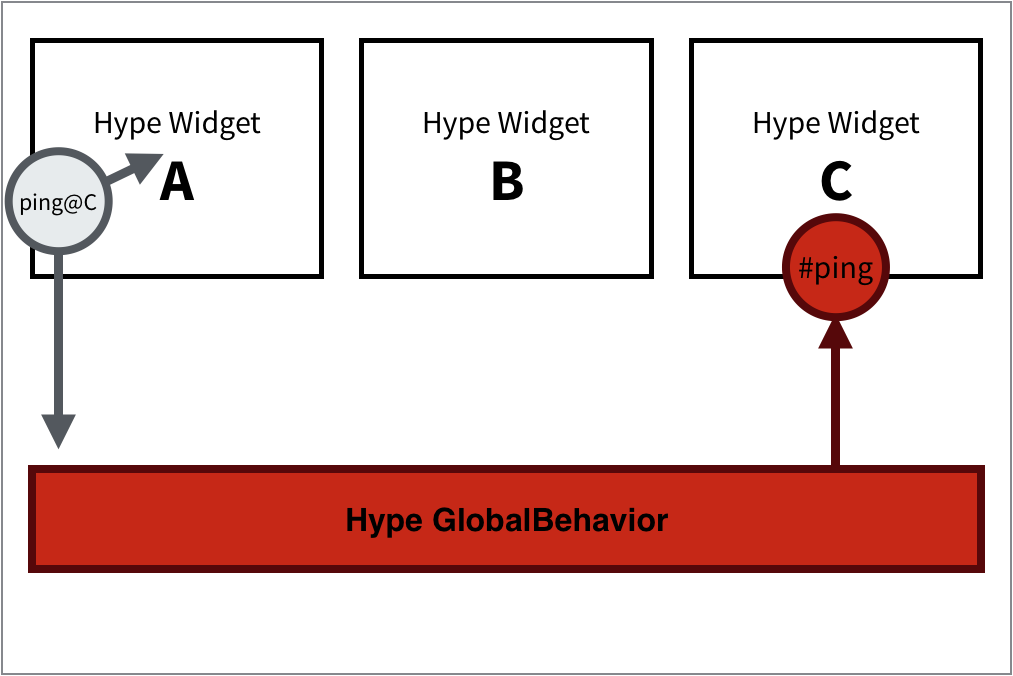
* Using the @ symbol directs the custom behavior to only the specified Hype widgets
* Hint: As in this flow the ping@C is sent to Hype GlobalBehavior and processed there. **A** internally actually only receives the string as is "ping@C" (little grey arrow)
**Version-History:**\
`1.0 Initial release #-syntax, @-syntax based on Hype Observer Pattern`\
`1.1 Added callbacks in JS hypedocument.onGlobalBehavior`\
`1.2 Added iFrame (onedirectional), onedirectional postMessage`\
`1.3 Refactored code to Revealing Module Pattern, compiled against Closure-compiler, Bidirectional postMessage (Bubble Up, Bubble Down, Bubble Branching)`\
`1.4 Refactored to new naming and interface, corrected to american english`\
`1.5 Fixed a bug with iFrame propagation and added a "Singleton" check`\
`1.6 Added Custom Behavior Ticker feature, code cleanup`\
`1.7 Removed a bug when triggering a Hype widget in a iFrame that was not present on the same page level`
## Documentation
There is a [JSDoc](https://en.wikipedia.org/wiki/JSDoc) based documentation of the functions at https://doxdox.org/worldoptimizer/HypeGlobalBehavior
Content Delivery Network (CDN)
--
Latest version can be linked into your project using the following in the head section of your project:
```html
```
Optionally you can also link a SRI version or specific releases.
Read more about that on the JsDelivr (CDN) page for this extension at https://www.jsdelivr.com/package/gh/worldoptimizer/HypeGlobalBehavior
Learn how to use the latest extension version and how to combine extensions into one file at
https://github.com/worldoptimizer/HypeCookBook/wiki/Including-external-files-and-Hype-extensions