# macOS Install Issue: Apple Cannot Verify SkillDock
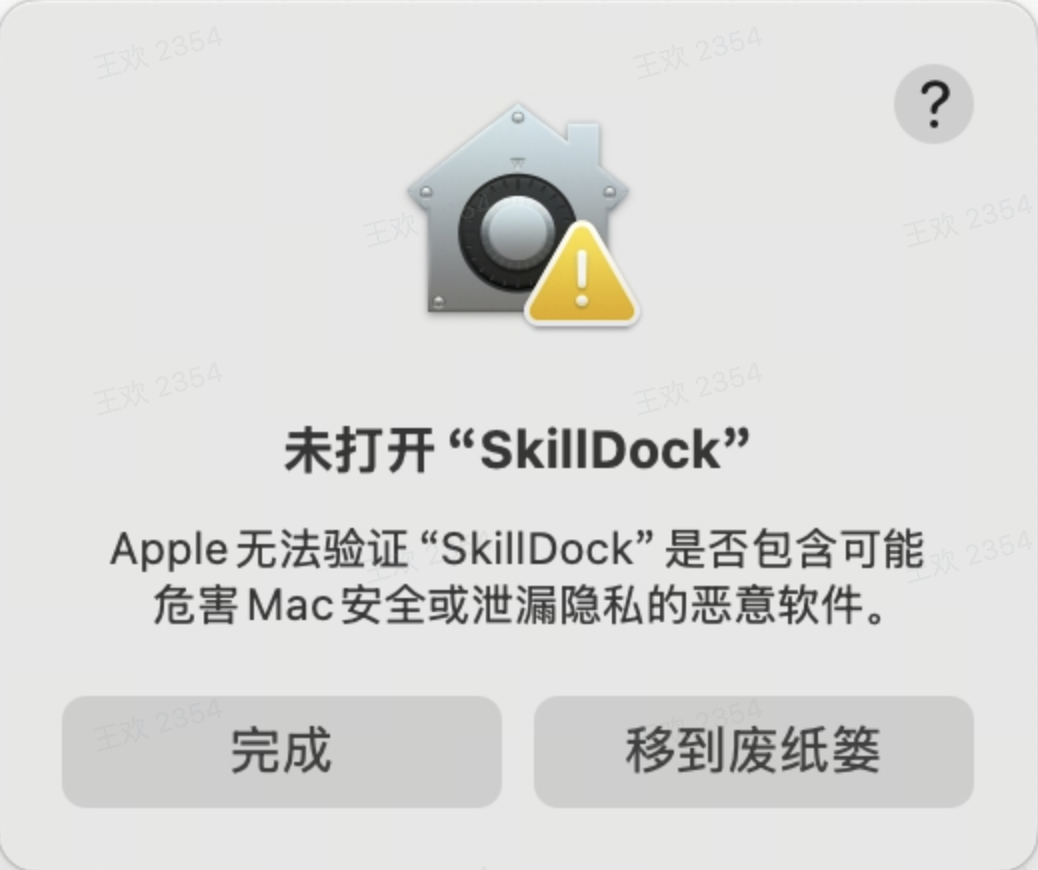
If you see a warning like this the first time you open SkillDock, it is macOS Gatekeeper blocking the app:
- “SkillDock” Not Opened
- Apple cannot verify “SkillDock” is free of malware that may harm your Mac or compromise your privacy.
- System Settings shows that “SkillDock” was blocked to protect your Mac.
 ## Why This Happens
SkillDock is currently distributed through GitHub Releases instead of the Mac App Store. Because of that, macOS may not immediately verify the app source and can require a manual confirmation the first time you open it.
This warning does not mean SkillDock is malicious. If you downloaded the installer from this project's GitHub Releases page, you can continue with the steps below.
Apple documentation:
## How to Open It
### Option 1: Allow It in System Settings
1. In the warning dialog, click `Done`. Do not click `Move to Bin`.
2. Open `System Settings`.
3. Go to `Privacy & Security`.
4. Scroll down to the `Security` section.
5. Find the message saying that `SkillDock` was blocked to protect your Mac.
6. Click `Open Anyway`.
7. Enter your login password, or confirm with Touch ID if prompted.
8. Open SkillDock again.
## Why This Happens
SkillDock is currently distributed through GitHub Releases instead of the Mac App Store. Because of that, macOS may not immediately verify the app source and can require a manual confirmation the first time you open it.
This warning does not mean SkillDock is malicious. If you downloaded the installer from this project's GitHub Releases page, you can continue with the steps below.
Apple documentation:
## How to Open It
### Option 1: Allow It in System Settings
1. In the warning dialog, click `Done`. Do not click `Move to Bin`.
2. Open `System Settings`.
3. Go to `Privacy & Security`.
4. Scroll down to the `Security` section.
5. Find the message saying that `SkillDock` was blocked to protect your Mac.
6. Click `Open Anyway`.
7. Enter your login password, or confirm with Touch ID if prompted.
8. Open SkillDock again.
 After you confirm it once, macOS usually remembers SkillDock as an allowed app and you can open it normally next time.
If you do not see the `Open Anyway` button, try opening SkillDock one more time so macOS blocks it again, then return to `System Settings > Privacy & Security`. That button usually appears only for a short time after a blocked launch attempt.
### Option 2: Remove the Quarantine Attribute in Terminal
Open Terminal and run:
```bash
xattr -dr com.apple.quarantine /Applications/SkillDock.app
```
This removes the quarantine attribute that macOS adds to downloaded apps, so SkillDock is no longer blocked as an unverified download.
Then open SkillDock again.
## Still Cannot Open It?
If it still does not open, please report it in GitHub Issues and include:
- Your macOS version
- Your Mac chip type (`Apple Silicon` or `Intel`)
- The installer filename you downloaded
- A full screenshot of the system warning
After you confirm it once, macOS usually remembers SkillDock as an allowed app and you can open it normally next time.
If you do not see the `Open Anyway` button, try opening SkillDock one more time so macOS blocks it again, then return to `System Settings > Privacy & Security`. That button usually appears only for a short time after a blocked launch attempt.
### Option 2: Remove the Quarantine Attribute in Terminal
Open Terminal and run:
```bash
xattr -dr com.apple.quarantine /Applications/SkillDock.app
```
This removes the quarantine attribute that macOS adds to downloaded apps, so SkillDock is no longer blocked as an unverified download.
Then open SkillDock again.
## Still Cannot Open It?
If it still does not open, please report it in GitHub Issues and include:
- Your macOS version
- Your Mac chip type (`Apple Silicon` or `Intel`)
- The installer filename you downloaded
- A full screenshot of the system warning