# PIGSTY - Self-Host Postgres like a Pro
[](https://pigsty.io)
[](https://pigsty.cc)
[](https://github.com/pgsty/pigsty/releases)
[](https://pigsty.io/docs/about/license/)
[](https://star-history.com/#pgsty/pigsty&Date)
[](https://pigsty.io/ext/list)
[](https://deepwiki.com/pgsty/pigsty)
Enterprise-Grade Open-Source **PostgreSQL** Distribution with HA, PITR, IaC, Monitor, and 555 PG extensions.
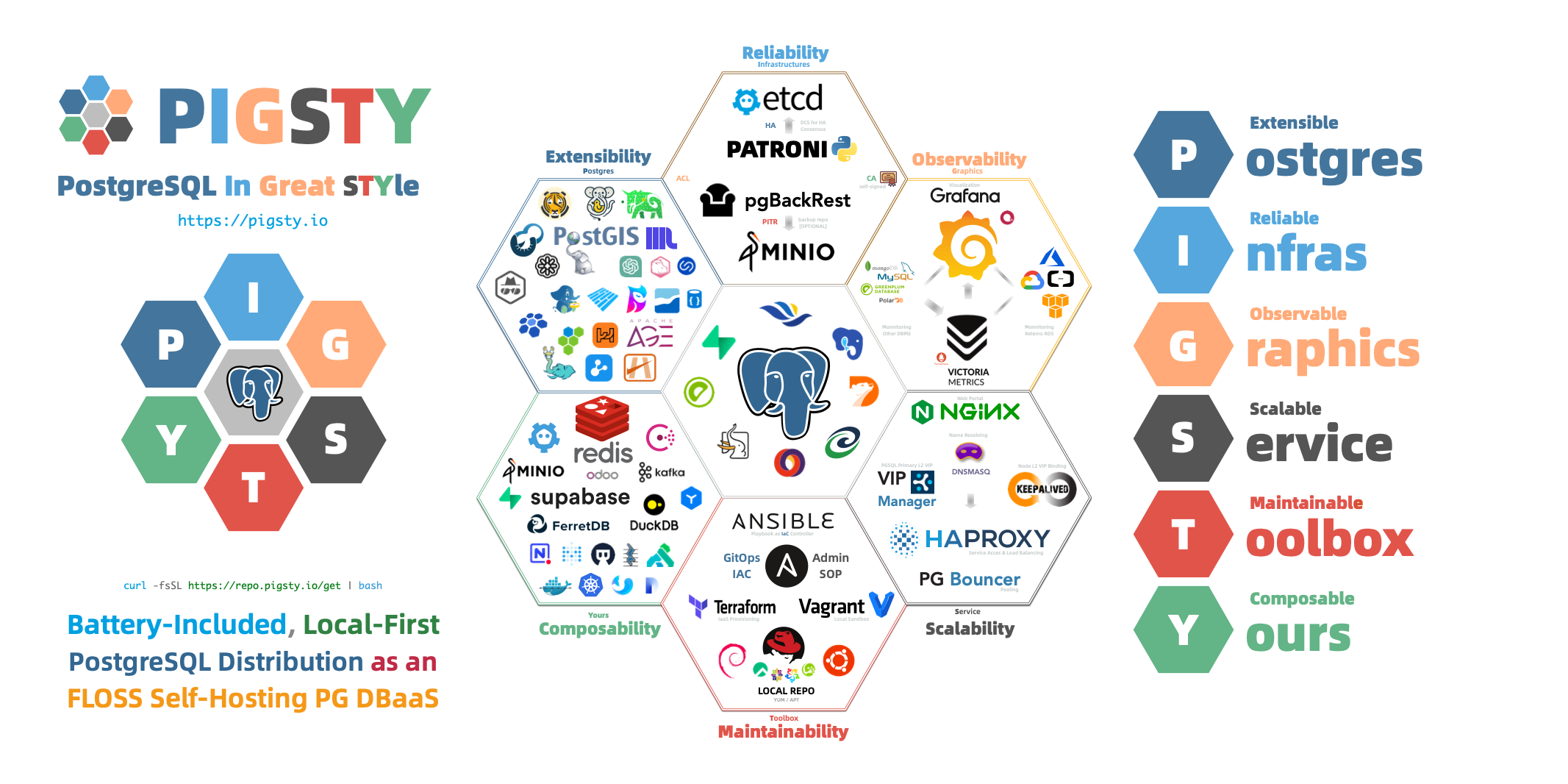
> "**P**ostgreSQL **I**n **G**reat **STY**le": **P**ostgres, **I**nfras, **G**raphics, **S**ervice, **T**oolbox, it's all **Y**ours.
[Website](https://pigsty.io) | [ORG](https://github.com/pgsty) | [PGEXT](https://pigsty.io/ext) | [Piglet](https://pigsty.io/docs/piglet) | [Public Demo](https://demo.pigsty.io) | [Blog](https://pigsty.io/blog/) | [Discuss](https://github.com/orgs/pgsty/discussions) | [Support](https://pigsty.io/price) | [Release Notes](https://pigsty.io/docs/about/release) | [中文](https://pigsty.cc/)
[](https://pigsty.io)
Pigsty scales from [**laptop**](https://pigsty.io/docs/setup) to [**datacenter**](https://pigsty.io/docs/deploy). Enterprise-grade. Developer-friendly. [**Get Started**](https://pigsty.io/docs/setup/install) with the latest [**v4.4.0**](https://github.com/pgsty/pigsty/releases/tag/v4.4.0):
```bash
curl -fsSL https://repo.pigsty.io/get | bash -s v4.4.0
```
## Features
- **Extensible**: **555** [**PG Extensions**](https://pigsty.io/ext/list) & **12** [**PG Kernels**](https://pigsty.io/docs/pgsql/kernel) available, Packed for [**16 Linux Platforms**](https://pigsty.io/docs/ref/linux), Battery-Included.
- **Reliable**: Self-healing [**HA**](https://pigsty.io/docs/concept/ha) clusters with pre-configured [**PITR**](https://pigsty.io/docs/pgsql/backup) and built-in [**ACL**](https://pigsty.io/docs/pgsql/config/acl), [**CA & SSL**](https://pigsty.io/docs/infra/admin/cert) secure best practice.
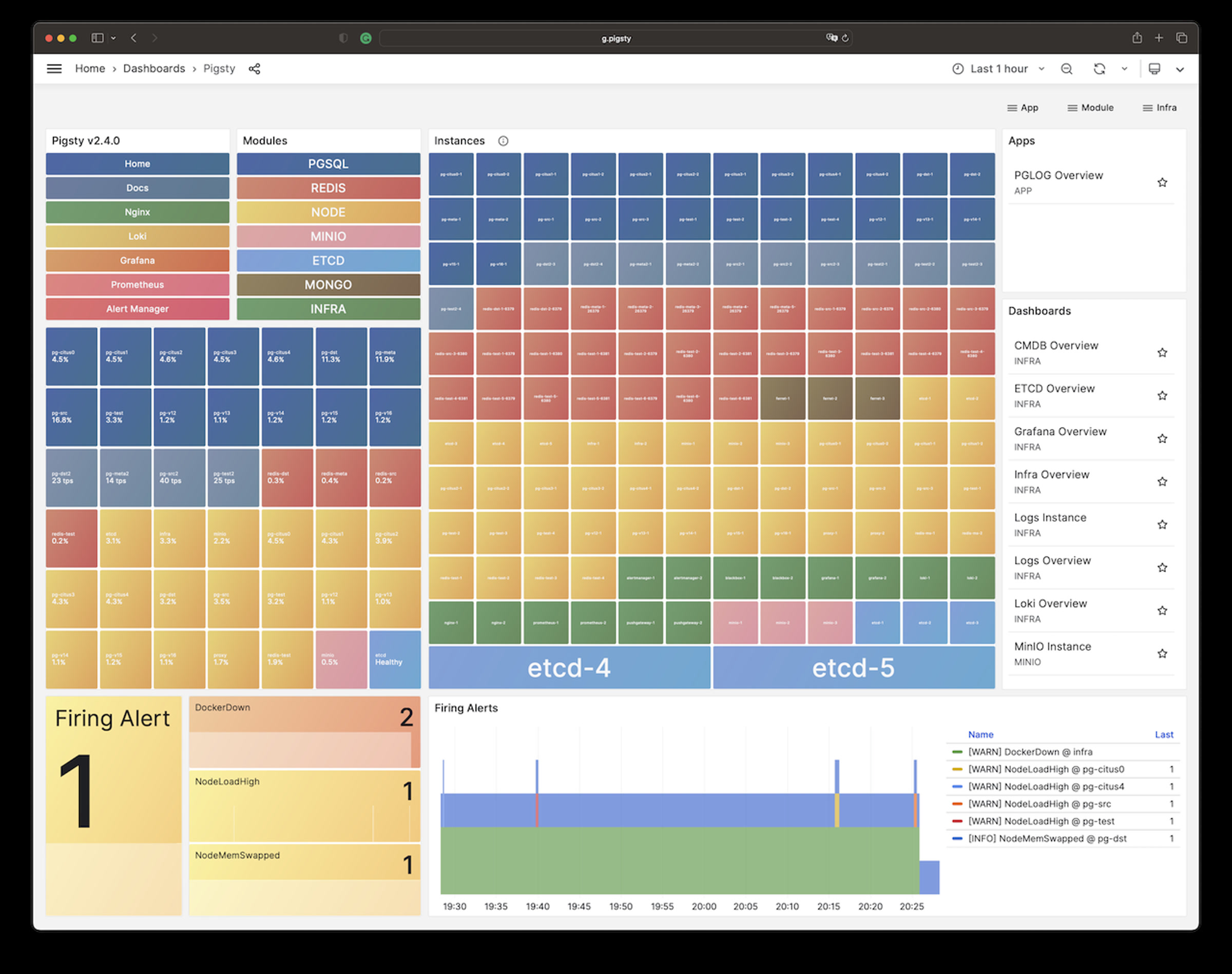
- **Observable**: SOTA monitoring for [**PG**](https://demo.pigsty.io/ui/d/pgrds-instance/pgrds-instance) / [**Infra**](https://pigsty.io/docs/infra) / [**Node**](https://pigsty.io/docs/node) based on the **Victoria** & **Grafana** stack: [**Demo**](https://demo.pigsty.io) & [**Gallery**](https://github.com/pgsty/pigsty/wiki/Gallery).
- **Scalable**: Auto-routed & pooled customizable database [**Services**](https://pigsty.io/docs/pgsql/service) [**Access**](https://pigsty.io/docs/pgsql/service#access-service) with **haproxy**, **pgbouncer**, and **VIP**.
- **Maintainable**: [**One-Cmd Deploy**](https://pigsty.io/docs/setup/install), [**Admin SOP**](https://pigsty.io/docs/pgsql/admin), **Auto-Tune**, **Local Repo**, [**IaC**](https://pigsty.io/docs/pgsql/config) and [**Vagrant**](https://pigsty.io/docs/deploy/vagrant) / [**Terraform**](https://pigsty.io/docs/deploy/terraform) support.
- **Composable**: Bonus [**Modules**](https://pigsty.io/docs/ref/module) such as [**Redis**](https://pigsty.io/docs/redis), [**MinIO**](https://pigsty.io/docs/minio), [**Etcd**](https://pigsty.io/docs/etcd), [**Docker**](https://pigsty.io/docs/app), [**DuckDB**](https://pigsty.io/docs/pilot/duckdb), [**FerretDB**](https://pigsty.io/docs/ferret), [**Supabase**](https://pigsty.io/docs/app/supabase), [**& More**](https://pigsty.io/docs/ref/module).
- **Controllable**: Self-sufficient [**Infra Closure**](https://pigsty.io/docs/infra), Cloud Neutral FOSS. Run on [**bare Linux**](https://pigsty.io/docs/ref/linux) without [**Docker & K8S**](https://vonng.com/en/db/db-in-k8s/).
- **Affordable**: Self-Hosting like a [**Pro**](https://pigsty.io/price/), without the cost of [**RDS**](https://vonng.com/en/cloud/rds/). Empowering Cloud-Exit for Ultra [**Cost Saving!**](https://pigsty.io/docs/about/compare/)
You can even use many exotic [**PG Kernel Forks**](https://pigsty.io/docs/pgsql/kernel) as in-place replacement and wrap it as a full RDS service:
[](https://pigsty.io/docs/pgsql/kernel/postgres)
[](https://pigsty.io/docs/app/supabase)
[](https://pigsty.io/docs/pgsql/kernel/citus)
[](https://pigsty.io/docs/pgsql/kernel/babelfish)
[](https://pigsty.io/docs/pgsql/kernel/ivorysql)
[](https://pigsty.io/docs/pgsql/kernel/openhalo)
[](https://pigsty.io/docs/ferret)
[](https://pigsty.io/docs/pgsql/kernel/percona)
[](https://pigsty.io/docs/pgsql/kernel/orioledb)
[](https://pigsty.io/docs/pgsql/kernel/agensgraph)
[](https://pigsty.io/docs/pgsql/kernel/pgedge)
[](https://pigsty.io/docs/pgsql/kernel/polardb)
[](https://pigsty.io/docs/pgsql/kernel/cloudberry)
| Kernel | Key Feature | Description |
|:------------------------------------------------------------:|:--------------------------------:|:--------------------------------------------------|
| [PostgreSQL](https://pigsty.io/docs/pgsql/kernel/postgres) | **Battery-Included** | Original PGDG PostgreSQL with 555 extensions |
| [Supabase](https://pigsty.io/docs/app/supabase) | **Backend as Service** | BaaS over PostgreSQL, Firebase alternative |
| [Citus](https://pigsty.io/docs/pgsql/kernel/citus) | **Horizontal Scaling** | Distributive PostgreSQL via native extension |
| [Babelfish](https://pigsty.io/docs/pgsql/kernel/babelfish) | **SQL Server Simulation** | Microsoft SQL Server wire-compatibility |
| [IvorySQL](https://pigsty.io/docs/pgsql/kernel/ivorysql) | **Oracle Simulation** | Oracle Grammar and PL/SQL compatible |
| [OpenHalo](https://pigsty.io/docs/pgsql/kernel/openhalo) | **MySQL Simulation** | MySQL wire-protocol compatibility |
| [FerretDB](https://pigsty.io/docs/ferret) | **MongoDB Simulation** | MongoDB wire-protocol compatibility |
| [Percona](https://pigsty.io/docs/pgsql/kernel/percona) | **Transparent Data Encryption** | Percona Distribution with pg_tde |
| [OrioleDB](https://pigsty.io/docs/pgsql/kernel/orioledb) | **OLTP Optimization Engine** | No bloat, No XID Wraparound, S3 Storage |
| [PolarDB](https://pigsty.io/docs/pgsql/kernel/polardb) | **Aurora flavor RAC** | RAC, China domestic compliance |
| [AgensGraph](https://pigsty.io/docs/pgsql/kernel/agensgraph) | **Graph-Native Database** | Transactional graph database based on PostgreSQL |
| [pgEdge](https://pigsty.io/docs/pgsql/kernel/pgedge) | **Multi-Master Distributive** | Geo-Distributive multi-writer Postgres |
| [Cloudberry](https://pigsty.io/docs/pgsql/kernel/cloudberry) | **MPP Data Warehouse** | Greenplum 7 Apache OSS Fork |
And gather the synergistic superpowers of all [**555 PostgreSQL Extensions**](https://pigsty.io/ext/list) all together:
[](https://pigsty.io/ext)
## Get Started
[](https://pigsty.io/docs/pgsql)
[](https://pigsty.io/docs/node)
[](https://pigsty.io/docs/node)
[](https://pigsty.io/docs/ref/linux#el)
[](https://pigsty.io/docs/ref/linux#debian)
[](https://pigsty.io/docs/ref/linux#ubuntu)
[](https://pigsty.io/docs/setup/docker)
[**Prepare**](https://pigsty.io/docs/deploy/prepare) a fresh `x86_64` / `aarch64` node runs any [**compatible**](https://pigsty.io/docs/ref/linux) **Linux** OS Distros, then [**Install**](https://pigsty.io/docs/setup/install#install) **Pigsty** with:
```bash
curl -fsSL https://repo.pigsty.io/get | bash; cd ~/pigsty;
```
Then [**configure**](https://pigsty.io/docs/concept/iac/configure) and run the [**`deploy.yml`**](https://pigsty.io/docs/setup/playbook) playbook with an [**admin user**](https://pigsty.io/docs/deploy/admin) (**nopass** `ssh` & `sudo`):
```bash
./configure -g # generate config and random passwords
./deploy.yml # deploy everything on current node
```
Finally, you will get a pigsty [**singleton node ready**](https://pigsty.io/docs/setup/install), with [**WebUI**](https://pigsty.io/docs/setup/webui) on port `80/443` and [**Postgres**](https://pigsty.io/docs/setup/pgsql) on port `5432`.
For dev/testing purposes, you can also run Pigsty inside [**Docker**](https://pigsty.io/docs/setup/docker) containers: `cd docker; make launch`
--------
> [**Single-Node Setup**](https://pigsty.io/docs/setup/install) | [**Production Deploy**](https://pigsty.io/docs/deploy) | [**Offline Install**](https://pigsty.io/docs/setup/offline) | [**Minimal Install**](https://pigsty.io/docs/setup/slim) | [**Docker Install**](https://pigsty.io/docs/setup/docker) | [**Run Supabase**](https://pigsty.io/docs/app/supabase)
Install with the pig cli
Then you can launch pigsty with `pig sty` sub command:
```bash
curl -fsSL https://repo.pigsty.io/pig | bash # install pig
pig sty init # install latest pigsty src to ~/pigsty
pig sty conf # auto-generate pigsty.yml config file
pig sty deploy # run the deploy.yml playbook
```
Install with get script
```bash
[root@pg-meta ~]# curl -fsSL https://repo.pigsty.io/get | bash -s v4.4.0
[v4.4.0] ===========================================
$ curl -fsSL https://repo.pigsty.io/get | bash
[Docs] https://pigsty.io/docs
[Demo] https://demo.pigsty.io
[Repo] https://github.com/pgsty/pigsty
[Download] ===========================================
[ OK ] version = v4.4.0 (from arg)
curl -fSL https://repo.pigsty.io/src/pigsty-v4.4.0.tgz -o /tmp/pigsty-v4.4.0.tgz
######################################################################## 100.0%
[ OK ] md5sums = xxxxxxxxxxxxxxxxxxxxxxxxxxxxxxxx /tmp/pigsty-v4.4.0.tgz
[Install] ===========================================
[WARN] os user = root , it's recommended to use a non-root sudo-able admin
[ OK ] install = /root/pigsty, from /tmp/pigsty-v4.4.0.tgz
[Bootstrap] ===========================================
[WARN] ansible = not found, bootstrap
bootstrap pigsty v4.4.0 begin
[ OK ] region = china
[ OK ] kernel = Linux
[ OK ] machine = x86_64
[ OK ] package = rpm,dnf
[ OK ] vendor = rocky (Rocky Linux)
[ OK ] version = 10 (10.0)
[ OK ] sudo = root ok
[WARN] ssh = root@127.0.0.1 fixed
[WARN] old repos = moved to /etc/yum.repos.d/backup
[ OK ] repo file = add el10.x86_64 china upstream
[WARN] rpm cache = updating, may take a while
Pigsty PGSQL 10 - x86_64 364 kB/s | 251 kB 00:00
EL 10 BaseOS 10 - x86_64 32 MB/s | 6.4 MB 00:00
EL 10 AppStream 10 - x86_64 11 MB/s | 2.1 MB 00:00
EL 10 CRB 10 - x86_64 1.8 MB/s | 492 kB 00:00
EL 10 EPEL 10.0 - x86_64 27 MB/s | 4.8 MB 00:00
Metadata cache created.
[ OK ] repo cache = created
[ OK ] install el10 utils
Last metadata expiration check: 0:00:02 ago on Wed 07 Jan 2026 05:58:22 PM CST.
.....
Installed:
ansible-2.16.14-1.el10.noarch ansible-collection-ansible-posix-2.0.0-1.el10_0.noarch ansible-collection-community-crypto-2.15.0-1PIGSTY.el10.noarch ansible-collection-community-general-10.2.0-1.el10_0.noarch
ansible-core-1:2.16.14-1.el10.noarch git-core-2.47.3-1.el10.x86_64 python3-cffi-1.16.0-7.el10.x86_64 python3-cryptography-43.0.0-4.el10.x86_64
python3-jmespath-1.0.1-8.el10.noarch python3-ply-3.11-25.el10.noarch python3-pycparser-2.20-16.el10.noarch python3-resolvelib-1.0.1-6.el10.noarch
Complete!
[ OK ] ansible = ansible [core 2.16.14]
[ OK ] boostrap pigsty complete
proceed with ./configure
```
> HINT: To install a specific version, pass the version string as the first parameter:
>
> ```bash
> curl -fsSL https://repo.pigsty.io/get | bash -s v4.4.0
> ```
Clone src with git
You can also download the pigsty source with `git`, remember to check out a specific version tag, the `main` branch is for development.
```bash
git clone https://github.com/pgsty/pigsty; cd pigsty; git checkout v4.4.0
```
Example: Complex PostgreSQL Customization
This config file provides a detailed example of a complex PostgreSQL cluster `pg-meta` with multiple
[databases](https://pigsty.io/docs/pgsql/config/db), [users](https://pigsty.io/docs/pgsql/config/user), and [service](https://pigsty.io/docs/pgsql/service) definition:
```yaml
pg-meta:
hosts: { 10.10.10.10: { pg_seq: 1, pg_role: primary , pg_offline_query: true } }
vars:
pg_cluster: pg-meta
pg_databases: # define business databases on this cluster, array of database definition
- name: meta # REQUIRED, `name` is the only mandatory field of a database definition
baseline: cmdb.sql # optional, database sql baseline path, (relative path among ansible search path, e.g files/)
pgbouncer: true # optional, add this database to pgbouncer database list? true by default
schemas: [pigsty] # optional, additional schemas to be created, array of schema names
extensions: # optional, additional extensions to be installed: array of `{name[,schema]}`
- { name: postgis , schema: public }
- { name: timescaledb }
comment: pigsty meta database # optional, comment string for this database
owner: postgres # optional, database owner, postgres by default
template: template1 # optional, which template to use, template1 by default
encoding: UTF8 # optional, database encoding, UTF8 by default. (MUST same as template database)
locale: C # optional, database locale, C by default. (MUST same as template database)
lc_collate: C # optional, database collate, C by default. (MUST same as template database)
lc_ctype: C # optional, database ctype, C by default. (MUST same as template database)
tablespace: pg_default # optional, default tablespace, 'pg_default' by default.
allowconn: true # optional, allow connection, true by default. false will disable connect at all
revokeconn: false # optional, revoke public connection privilege. false by default. (leave connect with grant option to owner)
register_datasource: true # optional, register this database to grafana datasources? true by default
connlimit: -1 # optional, database connection limit, default -1 disable limit
pool_auth_user: dbuser_meta # optional, all connection to this pgbouncer database will be authenticated by this user
pool_mode: transaction # optional, pgbouncer pool mode at database level, default transaction
pool_size: 64 # optional, pgbouncer pool size at database level, default 64
pool_reserve: 32 # optional, pgbouncer pool size reserve at database level, default 32
pool_size_min: 0 # optional, pgbouncer pool size min at database level, default 0
pool_connlimit: 100 # optional, max database connections at database level, default 100
# shared parameters for CREATE DATABASE (shared with PostgreSQL)
is_template: false # optional, mark this database as template? default false
strategy: wal_log # optional (shared), PostgreSQL 15+, wal_log or file_copy
locale_provider: libc # optional (shared), PostgreSQL 15+, icu or libc
icu_locale: '' # optional (shared), PostgreSQL 15+, ICU locale
icu_rules: '' # optional (shared), PostgreSQL 16+, ICU rules
builtin_locale: '' # optional (shared), PostgreSQL 17+, builtin locale
parameters: {} # optional, database-level parameters with `ALTER DATABASE SET`
- { name: grafana ,owner: dbuser_grafana ,revokeconn: true ,comment: grafana primary database }
- { name: bytebase ,owner: dbuser_bytebase ,revokeconn: true ,comment: bytebase primary database }
- { name: kong ,owner: dbuser_kong ,revokeconn: true ,comment: kong the api gateway database }
- { name: gitea ,owner: dbuser_gitea ,revokeconn: true ,comment: gitea meta database }
- { name: wiki ,owner: dbuser_wiki ,revokeconn: true ,comment: wiki meta database }
pg_users: # define business users/roles on this cluster, array of user definition
- name: dbuser_meta # REQUIRED, `name` is the only mandatory field of a user definition
password: DBUser.Meta # optional, password, can be a scram-sha-256 hash string or plain text
login: true # optional, can log in, true by default (new biz ROLE should be false)
superuser: false # optional, is superuser? false by default
createdb: false # optional, can create database? false by default
createrole: false # optional, can create role? false by default
inherit: true # optional, can this role use inherited privileges? true by default
replication: false # optional, can this role do replication? false by default
bypassrls: false # optional, can this role bypass row level security? false by default
pgbouncer: true # optional, add this user to pgbouncer user-list? false by default (production user should be true explicitly)
connlimit: -1 # optional, user connection limit, default -1 disable limit
expire_in: 3650 # optional, now + n days when this role is expired (OVERWRITE expire_at)
expire_at: '2030-12-31' # optional, YYYY-MM-DD 'timestamp' when this role is expired (OVERWRITTEN by expire_in)
comment: pigsty admin user # optional, comment string for this user/role
roles: [dbrole_admin] # optional, belonged roles. default roles are: dbrole_{admin,readonly,readwrite,offline}
parameters: {} # optional, role level parameters with `ALTER ROLE SET`
pool_mode: transaction # optional, pgbouncer pool mode at user level, transaction by default
pool_connlimit: -1 # optional, max database connections at user level, default -1 disable limit
# shared parameters for CREATE ROLE (shared with PostgreSQL)
# roles can also be defined in extended format for fine-grained control (PostgreSQL 16+)
# roles:
# - dbrole_readwrite # simple format: just grant the role
# - name: dbrole_admin # extended format with options
# state: grant # grant (default) | revoke/absent
# admin: false # grant with admin option? (default false)
# inherit: true # grant with inherit option? (PG16+, default null)
# set: true # grant with set option? (PG16+, default null)
- {name: dbuser_view ,password: DBUser.Viewer ,pgbouncer: true ,roles: [dbrole_readonly], comment: read-only viewer for meta database}
- {name: dbuser_grafana ,password: DBUser.Grafana ,pgbouncer: true ,roles: [dbrole_admin] ,comment: admin user for grafana database }
- {name: dbuser_bytebase ,password: DBUser.Bytebase ,pgbouncer: true ,roles: [dbrole_admin] ,comment: admin user for bytebase database }
- {name: dbuser_kong ,password: DBUser.Kong ,pgbouncer: true ,roles: [dbrole_admin] ,comment: admin user for kong api gateway }
- {name: dbuser_gitea ,password: DBUser.Gitea ,pgbouncer: true ,roles: [dbrole_admin] ,comment: admin user for gitea service }
- {name: dbuser_wiki ,password: DBUser.Wiki ,pgbouncer: true ,roles: [dbrole_admin] ,comment: admin user for wiki.js service }
pg_services: # extra services in addition to pg_default_services, array of service definition
# standby service will route {ip|name}:5435 to sync replica's pgbouncer (5435->6432 standby)
- name: standby # required, service name, the actual svc name will be prefixed with `pg_cluster`, e.g: pg-meta-standby
port: 5435 # required, service exposed port (work as kubernetes service node port mode)
ip: "*" # optional, service bind ip address, `*` for all ip by default
selector: "[]" # required, service member selector, use JMESPath to filter inventory
dest: default # optional, destination port, default|postgres|pgbouncer|, 'default' by default
check: /sync # optional, health check url path, / by default
backup: "[? pg_role == `primary`]" # backup server selector
maxconn: 3000 # optional, max allowed front-end connection
balance: roundrobin # optional, haproxy load balance algorithm (roundrobin by default, other: leastconn)
#options: 'inter 3s fastinter 1s downinter 5s rise 3 fall 3 on-marked-down shutdown-sessions slowstart 30s maxconn 3000 maxqueue 128 weight 100'
pg_hba_rules:
- {user: dbuser_view , db: all ,addr: infra ,auth: pwd ,title: 'allow grafana dashboard access cmdb from infra nodes'}
pg_vip_enabled: true
pg_vip_address: 10.10.10.2/24
pg_crontab: # make a full backup 1 am everyday
- '00 01 * * * /pg/bin/pg-backup full'
```
[](https://pigsty.io/img/pigsty/home.jpg)
Example: Sandbox (4-node) with two PG cluster
The [`conf/full.yml`](https://github.com/pgsty/pigsty/blob/main/conf/full.yml) utilizes four nodes to deploy two PostgreSQL clusters, `pg-meta` and `pg-test`:
```yaml
pg-meta:
hosts: { 10.10.10.10: { pg_seq: 1, pg_role: primary } }
vars:
pg_cluster: pg-meta
pg_users:
- {name: dbuser_meta ,password: DBUser.Meta ,pgbouncer: true ,roles: [dbrole_admin] ,comment: pigsty admin user }
- {name: dbuser_view ,password: DBUser.Viewer ,pgbouncer: true ,roles: [dbrole_readonly] ,comment: read-only viewer for meta database }
pg_databases:
- {name: meta ,baseline: cmdb.sql ,comment: pigsty meta database ,schemas: [pigsty]}
pg_hba_rules:
- {user: dbuser_view , db: all ,addr: infra ,auth: pwd ,title: 'allow grafana dashboard access cmdb from infra nodes'}
pg_vip_enabled: true
pg_vip_address: 10.10.10.2/24
# pgsql 3 node ha cluster: pg-test
pg-test:
hosts:
10.10.10.11: { pg_seq: 1, pg_role: primary } # primary instance, leader of cluster
10.10.10.12: { pg_seq: 2, pg_role: replica } # replica instance, follower of leader
10.10.10.13: { pg_seq: 3, pg_role: replica, pg_offline_query: true } # replica with offline access
vars:
pg_cluster: pg-test # define pgsql cluster name
pg_users: [{ name: test , password: test , pgbouncer: true , roles: [ dbrole_admin ] }]
pg_databases: [{ name: test }]
pg_vip_enabled: true
pg_vip_address: 10.10.10.3/24
```
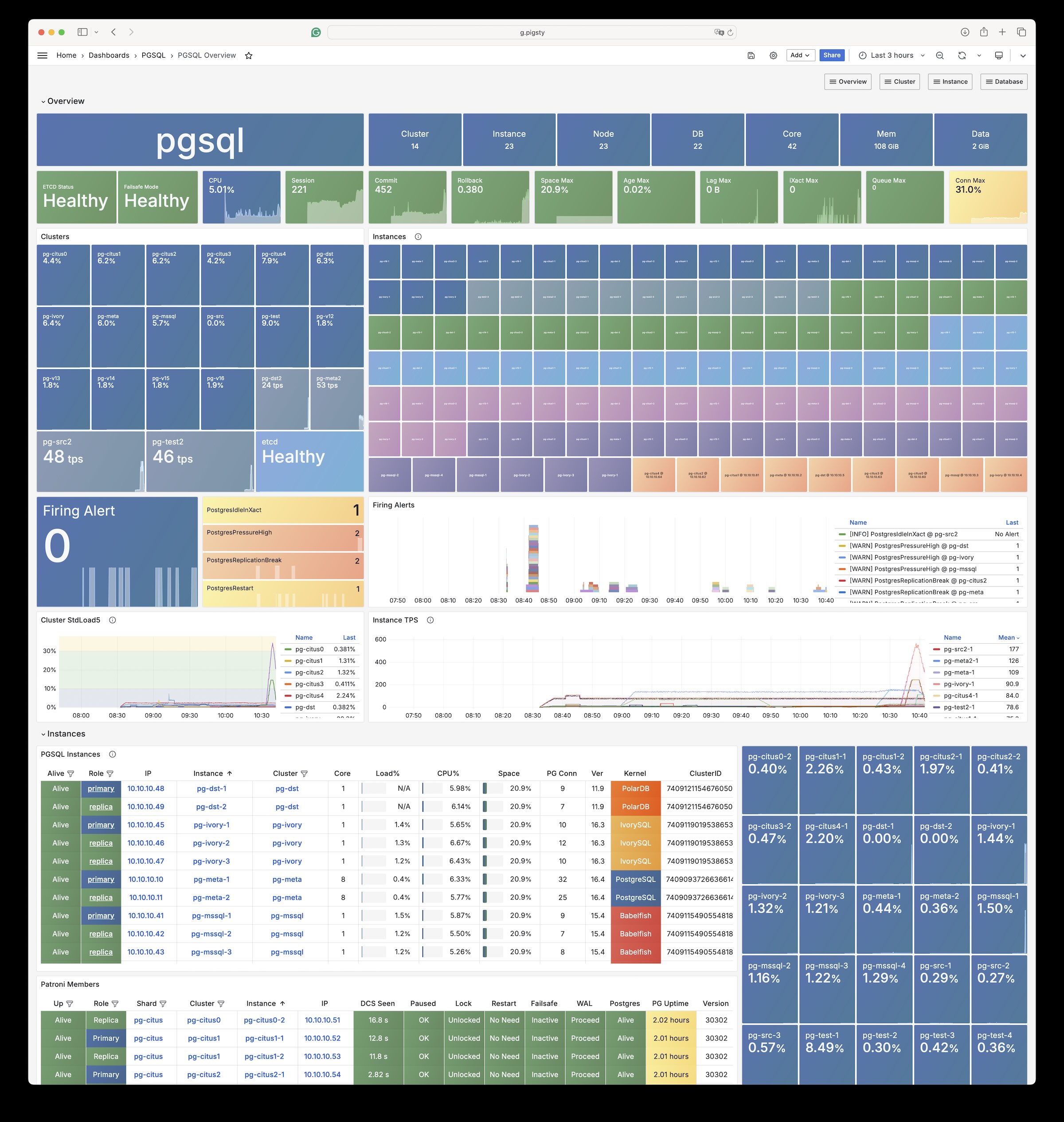
You can even deploy PostgreSQL with different major versions and kernel forks in the same deployment:
[](https://pigsty.io/docs/pgsql/kernel)
Example: Security Setup & Delayed Replica
The following [`conf/safe.yml`](https://github.com/pgsty/pigsty/blob/main/conf/ha/safe.yml) provisions a 4-node [security](https://pigsty.io/docs/deploy/security//) enhanced PostgreSQL cluster `pg-meta` with a delayed replica `pg-meta-delay`:
```yaml
pg-meta: # 3 instance postgres cluster `pg-meta`
hosts:
10.10.10.10: { pg_seq: 1, pg_role: primary }
10.10.10.11: { pg_seq: 2, pg_role: replica }
10.10.10.12: { pg_seq: 3, pg_role: replica , pg_offline_query: true }
vars:
pg_cluster: pg-meta
pg_conf: crit.yml
pg_users:
- { name: dbuser_meta , password: DBUser.Meta , pgbouncer: true , roles: [ dbrole_admin ] , comment: pigsty admin user }
- { name: dbuser_view , password: DBUser.Viewer , pgbouncer: true , roles: [ dbrole_readonly ] , comment: read-only viewer for meta database }
pg_databases:
- {name: meta ,baseline: cmdb.sql ,comment: pigsty meta database ,schemas: [pigsty] ,extensions: [{name: postgis, schema: public}, {name: timescaledb}]}
pg_default_service_dest: postgres
pg_services:
- { name: standby ,ip: "*" ,port: 5435 , dest: default ,selector: "[]" , backup: "[? pg_role == `primary`]" }
pg_vip_enabled: true
pg_vip_address: 10.10.10.2/24
pg_listen: '${ip},${vip},${lo}'
patroni_ssl_enabled: true
pgbouncer_sslmode: require
pgbackrest_method: minio
pg_libs: 'timescaledb, $libdir/passwordcheck, pg_stat_statements, auto_explain' # add passwordcheck extension to enforce strong password
pg_default_roles: # default roles and users in postgres cluster
- { name: dbrole_readonly ,login: false ,comment: role for global read-only access }
- { name: dbrole_offline ,login: false ,comment: role for restricted read-only access }
- { name: dbrole_readwrite ,login: false ,roles: [dbrole_readonly] ,comment: role for global read-write access }
- { name: dbrole_admin ,login: false ,roles: [pg_monitor, dbrole_readwrite] ,comment: role for object creation }
- { name: postgres ,superuser: true ,expire_in: 7300 ,comment: system superuser }
- { name: replicator ,replication: true ,expire_in: 7300 ,roles: [pg_monitor, dbrole_readonly] ,comment: system replicator }
- { name: dbuser_dba ,superuser: true ,expire_in: 7300 ,roles: [dbrole_admin] ,pgbouncer: true ,pool_mode: session, pool_connlimit: 16 , comment: pgsql admin user }
- { name: dbuser_monitor ,roles: [pg_monitor] ,expire_in: 7300 ,pgbouncer: true ,parameters: {log_min_duration_statement: 1000 } ,pool_mode: session ,pool_connlimit: 8 ,comment: pgsql monitor user }
pg_default_hba_rules: # postgres host-based auth rules by default
- {user: '${dbsu}' ,db: all ,addr: local ,auth: ident ,title: 'dbsu access via local os user ident' }
- {user: '${dbsu}' ,db: replication ,addr: local ,auth: ident ,title: 'dbsu replication from local os ident' }
- {user: '${repl}' ,db: replication ,addr: localhost ,auth: ssl ,title: 'replicator replication from localhost'}
- {user: '${repl}' ,db: replication ,addr: intra ,auth: ssl ,title: 'replicator replication from intranet' }
- {user: '${repl}' ,db: postgres ,addr: intra ,auth: ssl ,title: 'replicator postgres db from intranet' }
- {user: '${monitor}' ,db: all ,addr: localhost ,auth: pwd ,title: 'monitor from localhost with password' }
- {user: '${monitor}' ,db: all ,addr: infra ,auth: ssl ,title: 'monitor from infra host with password'}
- {user: '${admin}' ,db: all ,addr: infra ,auth: ssl ,title: 'admin @ infra nodes with pwd & ssl' }
- {user: '${admin}' ,db: all ,addr: world ,auth: cert ,title: 'admin @ everywhere with ssl & cert' }
- {user: '+dbrole_readonly',db: all ,addr: localhost ,auth: ssl ,title: 'pgbouncer read/write via local socket'}
- {user: '+dbrole_readonly',db: all ,addr: intra ,auth: ssl ,title: 'read/write biz user via password' }
- {user: '+dbrole_offline' ,db: all ,addr: intra ,auth: ssl ,title: 'allow etl offline tasks from intranet'}
pgb_default_hba_rules: # pgbouncer host-based authentication rules
- {user: '${dbsu}' ,db: pgbouncer ,addr: local ,auth: peer ,title: 'dbsu local admin access with os ident'}
- {user: 'all' ,db: all ,addr: localhost ,auth: pwd ,title: 'allow all user local access with pwd' }
- {user: '${monitor}' ,db: pgbouncer ,addr: intra ,auth: ssl ,title: 'monitor access via intranet with pwd' }
- {user: '${monitor}' ,db: all ,addr: world ,auth: deny ,title: 'reject all other monitor access addr' }
- {user: '${admin}' ,db: all ,addr: intra ,auth: ssl ,title: 'admin access via intranet with pwd' }
- {user: '${admin}' ,db: all ,addr: world ,auth: deny ,title: 'reject all other admin access addr' }
- {user: 'all' ,db: all ,addr: intra ,auth: ssl ,title: 'allow all user intra access with pwd' }
# OPTIONAL delayed cluster for pg-meta
pg-meta-delay: # delayed instance for pg-meta (1 hour ago)
hosts: { 10.10.10.13: { pg_seq: 1, pg_role: primary, pg_upstream: 10.10.10.10, pg_delay: 1h } }
vars: { pg_cluster: pg-meta-delay }
```
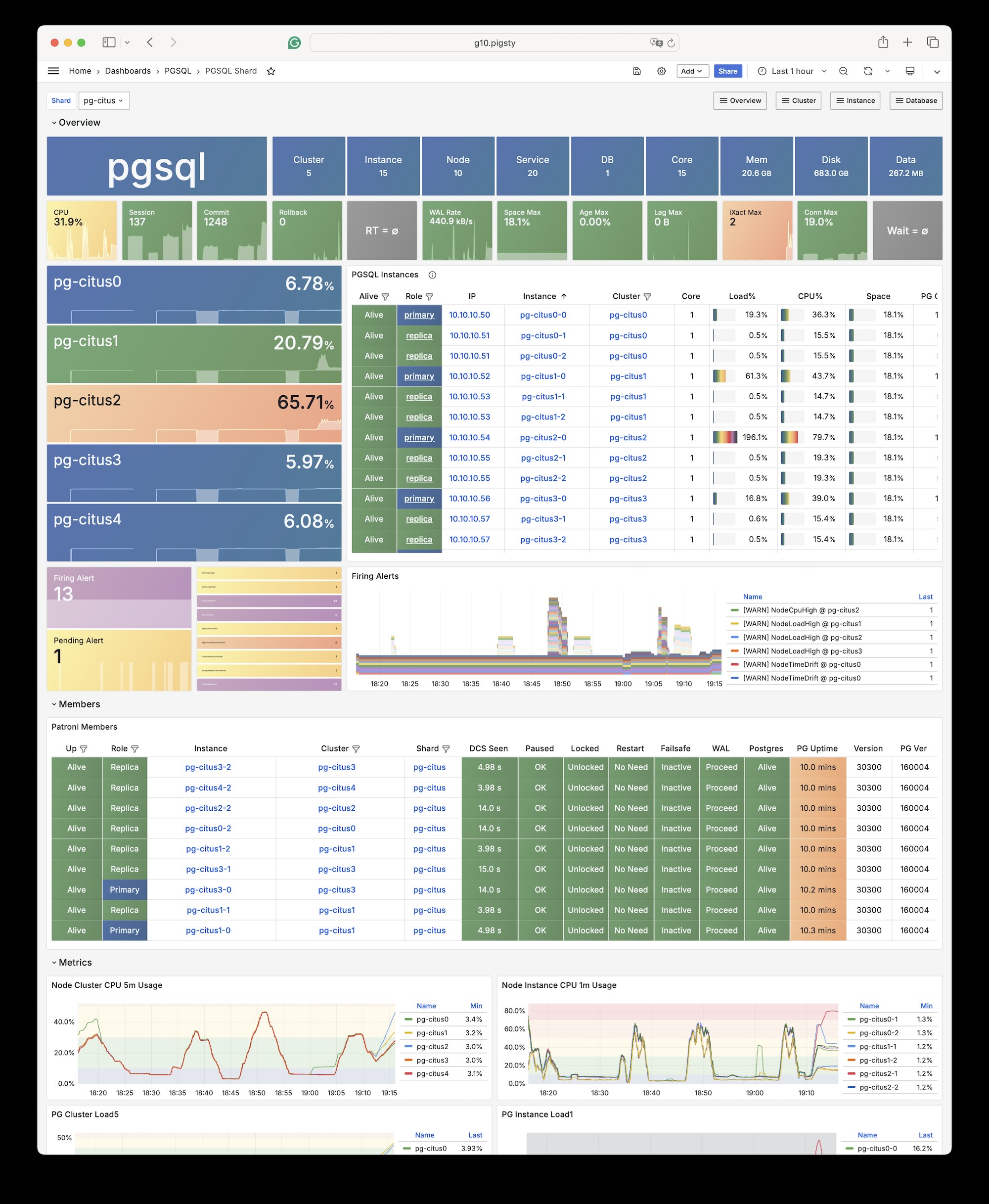
Example: Horizontal Sharding with Citus
You can perform horizontal sharding on vanilla postgres with [**`CITUS`**](https://pigsty.io/docs/pgsql/kernel/citus/).
```yaml
# pg-citus: 10 node citus cluster (5 x primary-replica pair)
pg-citus: # citus group
hosts:
10.10.10.50: { pg_group: 0, pg_cluster: pg-citus0 ,pg_vip_address: 10.10.10.60/24 ,pg_seq: 0, pg_role: primary }
10.10.10.51: { pg_group: 0, pg_cluster: pg-citus0 ,pg_vip_address: 10.10.10.60/24 ,pg_seq: 1, pg_role: replica }
10.10.10.52: { pg_group: 1, pg_cluster: pg-citus1 ,pg_vip_address: 10.10.10.61/24 ,pg_seq: 0, pg_role: primary }
10.10.10.53: { pg_group: 1, pg_cluster: pg-citus1 ,pg_vip_address: 10.10.10.61/24 ,pg_seq: 1, pg_role: replica }
10.10.10.54: { pg_group: 2, pg_cluster: pg-citus2 ,pg_vip_address: 10.10.10.62/24 ,pg_seq: 0, pg_role: primary }
10.10.10.55: { pg_group: 2, pg_cluster: pg-citus2 ,pg_vip_address: 10.10.10.62/24 ,pg_seq: 1, pg_role: replica }
10.10.10.56: { pg_group: 3, pg_cluster: pg-citus3 ,pg_vip_address: 10.10.10.63/24 ,pg_seq: 0, pg_role: primary }
10.10.10.57: { pg_group: 3, pg_cluster: pg-citus3 ,pg_vip_address: 10.10.10.63/24 ,pg_seq: 1, pg_role: replica }
10.10.10.58: { pg_group: 4, pg_cluster: pg-citus4 ,pg_vip_address: 10.10.10.64/24 ,pg_seq: 0, pg_role: primary }
10.10.10.59: { pg_group: 4, pg_cluster: pg-citus4 ,pg_vip_address: 10.10.10.64/24 ,pg_seq: 1, pg_role: replica }
vars:
pg_mode: citus # pgsql cluster mode: citus
pg_shard: pg-citus # citus shard name: pg-citus
pg_primary_db: test # primary database used by citus
pg_dbsu_password: DBUser.Postgres # all dbsu password access for citus cluster
pg_vip_enabled: true
pg_extensions: [ 'citus postgis timescaledb pgvector' ]
pg_libs: 'citus, timescaledb, pg_stat_statements, auto_explain' # citus will be added by patroni automatically
pg_users: [ { name: test ,password: test ,pgbouncer: true ,roles: [ dbrole_admin ] } ]
pg_databases: [ { name: test ,owner: test ,extensions: [ { name: citus }, { name: postgis } ] } ]
pg_hba_rules:
- { user: 'all' ,db: all ,addr: 10.10.10.0/24 ,auth: trust ,title: 'trust citus cluster members' }
- { user: 'all' ,db: all ,addr: 127.0.0.1/32 ,auth: ssl ,title: 'all user ssl access from localhost' }
- { user: 'all' ,db: all ,addr: intra ,auth: ssl ,title: 'all user ssl access from intranet' }
```
[](https://pigsty.io/docs/pgsql/kernel/citus)
Example: Self-hosting Supabase
You can launch a [self-hosting supabase](https://pigsty.io/docs/app/supabase) with MinIO and PostgreSQL with just several commands:
```bash
./configure -c supabase # use supabase config
./deploy.yml # install pigsty
./docker.yml # install docker compose
./app.yml # launch supabase stateless part with docker
```
The [`conf/supabase.yml`](https://github.com/pgsty/pigsty/blob/main/conf/supabase.yml) just describes everything you need:
```yaml
pg-meta:
hosts:
10.10.10.10: { pg_seq: 1, pg_role: primary }
vars:
pg_cluster: pg-meta
pg_users:
# supabase roles: anon, authenticated, dashboard_user
- { name: anon ,login: false }
- { name: authenticated ,login: false }
- { name: dashboard_user ,login: false ,replication: true ,createdb: true ,createrole: true }
- { name: service_role ,login: false ,bypassrls: true }
# supabase users: please use the same password
- { name: supabase_admin ,password: 'DBUser.Supa' ,pgbouncer: true ,inherit: true ,roles: [ dbrole_admin ] ,superuser: true ,replication: true ,createdb: true ,createrole: true ,bypassrls: true }
- { name: authenticator ,password: 'DBUser.Supa' ,pgbouncer: true ,inherit: false ,roles: [ dbrole_admin, authenticated ,anon ,service_role ] }
- { name: supabase_auth_admin ,password: 'DBUser.Supa' ,pgbouncer: true ,inherit: false ,roles: [ dbrole_admin ] ,createrole: true }
- { name: supabase_storage_admin ,password: 'DBUser.Supa' ,pgbouncer: true ,inherit: false ,roles: [ dbrole_admin, authenticated ,anon ,service_role ] ,createrole: true }
- { name: supabase_functions_admin ,password: 'DBUser.Supa' ,pgbouncer: true ,inherit: false ,roles: [ dbrole_admin ] ,createrole: true }
- { name: supabase_replication_admin ,password: 'DBUser.Supa' ,replication: true ,roles: [ dbrole_admin ]}
- { name: supabase_etl_admin ,password: 'DBUser.Supa' ,replication: true ,roles: [ pg_read_all_data, dbrole_readonly ]}
- { name: supabase_read_only_user ,password: 'DBUser.Supa' ,bypassrls: true ,roles: [ pg_read_all_data, dbrole_readonly ]}
pg_databases:
- name: postgres
baseline: supabase.sql
owner: supabase_admin
comment: supabase postgres database
schemas: [ extensions ,auth ,realtime ,storage ,graphql_public ,supabase_functions ,_realtime ]
extensions:
- { name: pgcrypto ,schema: extensions } # cryptographic functions
- { name: pg_net ,schema: extensions } # async HTTP
- { name: pgjwt ,schema: extensions } # json web token API for postgres
- { name: uuid-ossp ,schema: extensions } # generate universally unique identifiers (UUIDs)
- { name: pgsodium ,schema: extensions } # pgsodium is a modern cryptography library for Postgres.
- { name: supabase_vault ,schema: extensions } # Supabase Vault Extension
- { name: pg_jsonschema ,schema: extensions } # pg_jsonschema: Validate json schema
- { name: wrappers ,schema: extensions } # wrappers: FDW collections
- { name: http ,schema: extensions } # http: allows web page retrieval inside the database.
- { name: pg_cron ,schema: extensions } # pg_cron: Job scheduler for PostgreSQL
- { name: timescaledb ,schema: extensions } # timescaledb: Enables scalable inserts and complex queries for time-series data
- { name: pg_tle ,schema: extensions } # pg_tle: Trusted Language Extensions for PostgreSQL
- { name: vector ,schema: extensions } # pgvector: the vector similarity search
- { name: pgmq ,schema: extensions } # pgmq: A lightweight message queue like AWS SQS and RSMQ
- name: _supabase
owner: supabase_admin
comment: supabase internal analytics database
schemas: [ _analytics ]
extensions:
- { name: pgcrypto ,schema: extensions } # cryptographic functions
# supabase required extensions
pg_libs: 'timescaledb, pgsodium, plpgsql, plpgsql_check, pg_cron, pg_net, pg_stat_statements, auto_explain, pg_wait_sampling, pg_tle, plan_filter'
pg_extensions: [ pg18-main ,pg18-time ,pg18-gis ,pg18-rag ,pg18-fts ,pg18-olap ,pg18-feat ,pg18-lang ,pg18-type ,pg18-util ,pg18-func ,pg18-admin ,pg18-stat ,pg18-sec ,pg18-fdw ,pg18-sim ,pg18-etl]
pg_parameters: { cron.database_name: postgres }
pg_hba_rules: # supabase hba rules, require access from docker network
- { user: all ,db: postgres ,addr: intra ,auth: pwd ,title: 'allow supabase access from intranet' ,order: 50 }
- { user: all ,db: postgres ,addr: 172.17.0.0/16 ,auth: pwd ,title: 'allow access from local docker network' ,order: 50 }
- { user: all ,db: _supabase ,addr: intra ,auth: pwd ,title: 'allow supabase internal access from intranet' ,order: 50 }
- { user: all ,db: _supabase ,addr: 172.17.0.0/16 ,auth: pwd ,title: 'allow internal access from local docker network' ,order: 50 }
pg_crontab:
- '00 01 * * * /pg/bin/pg-backup full' # make a full backup every 1am
- '* * * * * /pg/bin/supa-kick' # kick supabase _analytics lag per minute: https://github.com/pgsty/pigsty/issues/581
```
