---
# Table of Contents
- [🇺🇸 🇪🇸 🇮🇩 🇨🇳 🇫🇷 🇧🇷 🇳🇱 🇷🇺 🇩🇪 🇹🇼](#---------)
- [Table of Contents](#table-of-contents)
- [About \& Features](#about--features)
- [Desktop](#desktop)
- [Steam Deck/Home Theater PCs (HTPCs)](#steam-deckhome-theater-pcs-htpcs)
- [Alternative Handhelds](#alternative-handhelds)
- [GNOME](#gnome)
- [Features from Upstream](#features-from-upstream)
- [Universal Blue](#universal-blue)
- [Features from Fedora Linux (Kinoite \& Silverblue)](#features-from-fedora-linux-kinoite--silverblue)
- [Why](#why)
- [Showcase](#showcase)
- [Documentation](#documentation)
- [Verification](#verification)
- [Secure Boot](#secure-boot)
- [Contributor Metrics](#contributor-metrics)
- [Star History](#star-history)
- [Special Thanks](#special-thanks)
- [Build Your Own](#build-your-own)
- [How to Sign Your Images](#how-to-sign-your-images)
- [Join The Community](#join-the-community)
---
## About & Features
[Please see our website](https://bazzite.gg/) for a newcomer-friendly explanation of Bazzite. This readme will cover everything in-depth.
[Bazzite](https://bazzite.gg/) is a custom [Fedora Atomic](https://fedoraproject.org/atomic-desktops/) image built with [cloud native](https://universal-blue.org/#cloud-native) technology that brings the best of Linux gaming to **all of your devices - including your favorite handheld**.
Bazzite is built from [ublue-os/main](https://github.com/ublue-os/main) using [Fedora](https://fedoraproject.org/) technology, which means expanded hardware support and built in drivers are included. Additionally, Bazzite adds the following features:
- Uses the [bazzite kernel](https://github.com/bazzite-org/kernel-bazzite) to achieve HDR and expanded hardware support, among numerous other included patches.
- HDR available in Game mode.
- NVK available on non-Nvidia builds.
- Full hardware accelerated codec support for H264 decoding.
- Full support for AMD's ROCM OpenCL/HIP run-times.
- [xone](https://github.com/medusalix/xone) driver for Xbox controllers.
- Full support for [DisplayLink](https://www.synaptics.com/products/displaylink-graphics).
- Includes Valve's KDE themes from SteamOS.
- [vkBasalt](https://github.com/DadSchoorse/vkBasalt), [MangoHud](https://github.com/flightlessmango/Mangohud), and [OBS VkCapture](https://github.com/nowrep/obs-vkcapture) installed and available by default.
- [ROM Properties Page shell extension](https://github.com/GerbilSoft/rom-properties) included.
- Full support for [Winesync/Fastsync/NTsync](https://github.com/Frogging-Family/wine-tkg-git/issues/936).
- [Distrobox](https://github.com/89luca89/distrobox) preinstalled.
- Simplified Davinci Resolve installation with [davincibox](https://github.com/zelikos/davincibox) (`ujust install-resolve`)
- Automated `duperemove` service for reducing the disk space used by wine prefix contents.
- Support for HDMI CEC via [libCEC](https://libcec.pulse-eight.com/).
- Uses [Google's BBR TCP congestion control](https://github.com/google/bbr) by default.
- [Input Remapper](https://github.com/sezanzeb/input-remapper) preinstalled and enabled. (Available but default-disabled on the Deck variant, may be enabled with `ujust restore-input-remapper`)
- [Bazzite Portal](https://github.com/ublue-os/yafti-gtk) provides an easy way to install numerous applications( and tweaks, including installing [LACT](https://github.com/ilya-zlobintsev/LACT) and IDEs over Brew. It additionally provides easy buttons to update, rebase and even reset the system image to defaults.
- [Waydroid](https://waydro.id/) preinstalled for running Android apps. Set it up with this [quick guide](https://docs.bazzite.gg/Installing_and_Managing_Software/Waydroid_Setup_Guide/).
- Manage applications using [Flatseal](https://github.com/tchx84/Flatseal), [Warehouse](https://github.com/flattool/warehouse), and [Gear Lever](https://github.com/mijorus/gearlever).
- [OpenRGB](https://gitlab.com/CalcProgrammer1/OpenRGB) i2c-piix4 and i2c-nct6775 drivers for controlling RGB on certain motherboards.
- [OpenRazer](https://openrazer.github.io) drivers built in, Select OpenRazer in Bazzite Portal or run `ujust install-openrazer` in a terminal to begin using it.
- [OpenTabletDriver](https://opentabletdriver.net/) udev rules built in, with the full software suite installable via Bazzite Portal or by running `ujust install-opentabletdriver` in a terminal.
- Out of the box support for [Wooting](https://wooting.io/) keyboards.
- Built in support for Southern Islands (HD 7000) and Sea Islands (HD 8000) AMD GPUs under the `amdgpu` driver.
- [Webapp Manager](https://github.com/linuxmint/webapp-manager) is available for creating applications from websites for a variety of browsers, including Firefox.
### Desktop
Common variant available as `bazzite`, suitable for desktop computers.
- Automatic updates for the OS, Flatpaks, and more - powered by [uupd](https://github.com/ublue-os/uupd) and [topgrade](https://github.com/topgrade-rs/topgrade).
> [!IMPORTANT]
> **ISOs can be downloaded from our [website](https://download.bazzite.gg), and a helpful install guide can be found [here](https://docs.bazzite.gg/General/Installation_Guide/).**
Rebase from an existing upstream Fedora Atomic to this image if you want **Open Source GPU Drivers**:
(Please note: Mesa's Open Source option for NVIDIA GPUs, NVK is still prone to errors at the time of writing, for any issues relating to NVK [please submit a report with Mesa]([url](https://docs.mesa3d.org/bugs.html)), not Ublue/Bazzite)
```bash
rpm-ostree rebase ostree-unverified-registry:ghcr.io/ublue-os/bazzite:stable
```
or for devices with Nvidia GPUs wanting the **NVIDIA Proprietary Drivers**:
```bash
rpm-ostree rebase ostree-unverified-registry:ghcr.io/ublue-os/bazzite-nvidia:stable
```
**For users with Secure Boot enabled:** Follow our [secure boot documentation](#secure-boot) prior to rebasing.
### Steam Deck/Home Theater PCs (HTPCs)
Variant designed for usage as an alternative to SteamOS on the Steam Deck, and for a console-like experience on HTPCs, available as `bazzite-deck`:
- Directly boots to Game mode matching SteamOS's behavior.
- **Automatic `duperemove` greatly trims the size of compatdata.**
- **Latest version of Mesa creates smaller shader caches and does not require them to prevent stutter.**
- **Able to be booted even if the drive is full.**
- **Support for every language supported by upstream Fedora.**
- **Uses Wayland on the desktop with [support for Steam input](https://github.com/Supreeeme/extest).**
- Features ported versions of most SteamOS packages, including drivers, firmware updaters, and fan controllers [from the evlaV repository](https://gitlab.com/evlaV).
- Patched Mesa for proper framerate control from Gamescope.
- Comes with patches from [SteamOS BTRFS](https://gitlab.com/popsulfr/steamos-btrfs) for full BTRFS support for the SD card by default.
- Ships with a ported copy of [SDGyroDSU](https://github.com/kmicki/SteamDeckGyroDSU), enabled by default.
- Option to install [Decky Loader](https://github.com/SteamDeckHomebrew/decky-loader), [EmuDeck](https://www.emudeck.com/), [RetroDECK](https://retrodeck.net/), and [ProtonUp-Qt](https://davidotek.github.io/protonup-qt/), among numerous other useful packages on installation.
- Custom update system allows for the OS, Flatpaks, and more to be updated directly from the Game mode UI powered by [uupd](https://github.com/ublue-os/uupd) and [topgrade](https://github.com/topgrade-rs/topgrade).
- Built in support for Windows dual-boot thanks to Fedora's installation of GRUB being left intact.
- Update break something? Easily roll back to the previous version of Bazzite thanks to `rpm-ostree`'s rollback functionality. You can even select previous images at boot.
- Steam and Lutris preinstalled on the image as layered packages.
- Uses ZRAM(4GB) with the LZ4 compression algorithm by default.
- [LAVD](https://crates.io/crates/scx_lavd) and [BORE](https://github.com/firelzrd/bore-scheduler) CPU Schedulers for smooth and responsive gameplay.
- Kyber I/O scheduler to prevent I/O starvation when installing games or during background `duperemove` process.
- Applies SteamOS's kernel parameters.
- Color calibrated display profiles for matte and reflective Steam Deck screens included.
- Default-disabled power-user features, including:
- Service for low-risk undervolting of the Steam Deck as well as AMD Framework Laptops via [RyzenAdj](https://github.com/FlyGoat/RyzenAdj) and [Ryzen SMU](https://gitlab.com/leogx9r/ryzen_smu), see `ryzenadj.service` and `/etc/default/ryzenadj`.
- Built in support for display overclocking. For example, add `CUSTOM_REFRESH_RATES=30-68` to `/etc/environment`. Minimum and maximum refresh rates differ per handheld!
- 32GB RAM mod your Steam Deck? Enjoy double the maximum VRAM amount, automatically applied. (Can you share your soldering skills?)
- Steam Deck hardware-specific services can be disabled by running `ujust disable-bios-updates` and `ujust disable-firmware-updates` in the terminal. These are automatically disabled on non-Deck hardware, and on Decks with DeckHD displays or 32GB RAM mods.
- More information can be found [here](https://docs.bazzite.gg/Handheld_and_HTPC_edition/Steam_Gaming_Mode/) on the Bazzite Steam Deck images.
> [!IMPORTANT]
> **ISOs can be downloaded from our [website](https://download.bazzite.gg), and a helpful install guide can be found [here](https://docs.bazzite.gg/General/Installation_Guide/).**
Rebase from an existing upstream Fedora Atomic to this image:
```bash
rpm-ostree rebase ostree-unverified-registry:ghcr.io/ublue-os/bazzite-deck:stable
```
#### Alternative Handhelds
Please refer to our [Handheld Wiki](https://docs.bazzite.gg/Handheld_and_HTPC_edition/Handheld_Wiki/) for required setting changes and Decky Loader plugins for Steam Gaming Mode on your specific Handheld.
### GNOME
Builds with the GNOME desktop environment are available in both desktop and deck flavors. These builds come with the following additional features:
- [Variable refresh rate support and fractional scaling enabled under Wayland](https://gitlab.gnome.org/GNOME/mutter/-/merge_requests/1154).
- Custom menu in the top bar for returning to game mode, launching Steam, and opening a number of useful utilities.
- [GSConnect](https://extensions.gnome.org/extension/1319/gsconnect/) preinstalled and ready to use.
- [Hanabi extension](https://github.com/jeffshee/gnome-ext-hanabi) included to offer similar features to Wallpaper Engine in KDE.
- Numerous optional extensions pre-installed, including [important user experience fixes](https://www.youtube.com/watch?v=nbCg9_YgKgM).
- Automatic updates for the [Firefox GNOME theme](https://github.com/rafaelmardojai/firefox-gnome-theme) and [Thunderbird GNOME theme](https://github.com/rafaelmardojai/thunderbird-gnome-theme). (If installed)
> [!IMPORTANT]
> **ISOs can be downloaded from our [website](https://download.bazzite.gg), and a helpful install guide can be found [here](https://docs.bazzite.gg/General/Installation_Guide/).**
Rebase from an existing upstream Fedora Atomic to this image:
```bash
rpm-ostree rebase ostree-unverified-registry:ghcr.io/ublue-os/bazzite-gnome:stable
```
To rebase an existing ostree system to a Desktop Environment with the **Proprietary NVIDIA Drivers** release:
```bash
rpm-ostree rebase ostree-unverified-registry:ghcr.io/ublue-os/bazzite-gnome-nvidia:stable
```
To rebase an existing ostree system to the **Steam Deck/HTPC** release:
```bash
rpm-ostree rebase ostree-unverified-registry:ghcr.io/ublue-os/bazzite-deck-gnome:stable
```
**For users with Secure Boot enabled:** Follow our [secure boot documentation](#secure-boot) prior to rebasing.
### Features from Upstream
#### Universal Blue
- Proprietary Nvidia drivers pre-installed. (Only for Nvidia images)
- Flathub is enabled by default.
- [`ujust`](https://github.com/casey/just) commands for convenience.
- Multi-media codecs out of the box.
- Rollback Bazzite from any build within the last 90 days.
#### Features from Fedora Linux (Kinoite & Silverblue)
- A rock solid and stable base.
- System packages stay relatively up to date.
- Can layer Fedora packages to the image without losing them between updates.
- Security focused with [SELinux](https://github.com/SELinuxProject/selinux) preinstalled and configured out of the box.
- The ability to rebase to different Fedora Atomic images, if desired, without losing user data.
- Printing support thanks to [CUPS](https://www.cups.org/) being preinstalled.
## Why
Bazzite started as a project to resolve some of the issues that plague SteamOS, mainly out of date packages (despite an Arch base) and the lack of a functional package manager.
Despite this project also being image-based, you are able to install any Fedora package straight from the command line. These packages will persist across updates (So go ahead and install that obscure VPN software you spent an hour trying to get working in SteamOS). Additionally, Bazzite is updated multiple times a week with packages from upstream Fedora, giving you the best possible performance and latest features - all on a stable base.
Bazzite ships with the latest Linux kernel and SELinux enabled by default with full support for secure boot (Run `ujust enroll-secure-boot-key` and enter the password `universalblue` if prompted to enroll our key) and disk encryption, making this a sensible solution for general computing. (Yes, you can print from Bazzite)
Read the [FAQ](https://docs.bazzite.gg/General/FAQ/) for details on what makes Bazzite stand out from other Linux based operating systems.
## Showcase


## Documentation
- [Installing and Managing Applications](https://docs.bazzite.gg/Installing_and_Managing_Software/)
- [Updates, Rollbacks, and Rebasing](https://docs.bazzite.gg/Installing_and_Managing_Software/Updates_Rollbacks_and_Rebasing/)
- [Gaming Guide](https://docs.bazzite.gg/Gaming/)
View [additional documentation](http://docs.bazzite.gg/) surrounding the project.
## Verification
These images are signed with sigstore's [cosign](https://docs.sigstore.dev/cosign/key_management/overview/). You can verify the signature by downloading the `cosign.pub` key from this repo and running the following command:
```bash
cosign verify --key cosign.pub ghcr.io/ublue-os/bazzite
```
## Secure Boot
> [!WARNING]
> **Steam Deck Users: The Steam Deck does not come with secure boot enabled and does not ship with any keys enrolled by default. Do not enable this unless you absolutely know what you're doing.**
Secure boot is supported with our custom key. The pub key can be found in the root of this repository [here](https://github.com/ublue-os/bazzite/blob/main/secure_boot.der).
If you'd like to enroll this key prior to installation or rebase, download the key and run the following:
```bash
sudo mokutil --timeout -1
sudo mokutil --import secure_boot.der
```
For users already on a Universal Blue image, you may instead run `ujust enroll-secure-boot-key`.
If asked for a password, use `universalblue`.
## Contributor Metrics
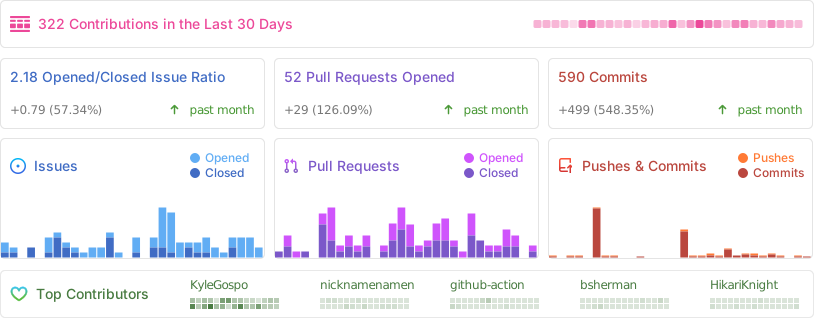
## Star History
## Special Thanks
Bazzite is a community effort and wouldn't exist without everyone's support. Below are some of the people who've helped us along the way:
- [amelia.svg](https://bsky.app/profile/ameliasvg.bsky.social) - For creating our logo and overall branding.
- [SuperRiderTH](https://github.com/SuperRiderTH) - For creating our Steam game mode startup video.
- [evlaV](https://gitlab.com/evlaV) - For making Valve's code available and for being [this person](https://xkcd.com/2347/).
- [ChimeraOS](https://chimeraos.org/) - For gamescope-session and for valuable support along the way.
- [Jovian-NixOS](https://github.com/Jovian-Experiments) - For supporting us with technical issues and for creating a similar project. Seriously, go check it out. It's our Nix-based cousin.
- [sentry](https://copr.fedorainfracloud.org/coprs/sentry/) - For assistance with needed kernel patches and for creating the [kernel-fsync repo](https://copr.fedorainfracloud.org/coprs/sentry/kernel-fsync/) we now use.
- [nicknamenamenick](https://github.com/nicknamenamenick) - For being the MVP nearly single-handedly upkeeping our documentation and support literature, and countless cases of helping users.
- [Steam Deck Homebrew](https://deckbrew.xyz) - For choosing to support distributions other than SteamOS despite the extra work, and a special thanks to [PartyWumpus](https://github.com/PartyWumpus) for getting Decky Loader working with SELinux for us.
- [cyrv6737](https://github.com/cyrv6737) - For the initial inspiration and the base that became bazzite-arch.
## Build Your Own
Bazzite is built entirely via GitHub Actions. Creating your own custom version of it is as easy as forking this repository, adding a private signing key, and enabling the fork's GitHub Actions. Running the `Build Bazzite` workflow will then generate custom images for all variants of Bazzite.
If you only want to generate images for the variants of Bazzite you are using, edit `.github/workflows/build.yml` to comment out the variants you do not wish to build in the `push-ghcr` job's `strategy`'s `matrix` list.
We also ship a config for the popular [pull app](https://github.com/apps/pull) if you'd like to keep your fork in sync with upstream. Enable this app on your repo to keep track of Bazzite changes while also making your own modifications.
### How to Sign Your Images
1. First, [familiarize yourself](https://docs.github.com/en/actions/security-guides/encrypted-secrets) with keeping secrets on GitHub.
2. [Generate a new key pair](https://docs.sigstore.dev/cosign/key_management/signing_with_self-managed_keys/) with Cosign (`cosign generate-key-pair`). This key pair must have no signature.
3. Replace the `cosign.pub` file in your public repo with the one you generated - you and your users will need it to check the signatures.
4. Add the private key (stored as text inside the `cosign.key` file) as a Repository Secret in the fork's settings page, in the `Settings -> Secrets and variables -> Actions` menu. Name the secret `SIGNING_SECRET`.
## Join The Community
You can find us on the [Bazzite Discord](https://discord.gg/f8MUghG5PB) View the [archive](https://www.answeroverflow.com/c/1072614816579063828/1143023993041993769) of support threads without an account.

 ](https://github.com/ublue-os/bazzite) [](https://deepwiki.com/ublue-os/bazzite)
# [🇺🇸](https://github.com/ublue-os/bazzite/blob/main/README.md) [🇪🇸](https://github.com/ublue-os/bazzite/blob/main/README-SPA.md) [🇮🇩](https://github.com/ublue-os/bazzite/blob/main/README-ID.md) [🇨🇳](https://github.com/ublue-os/bazzite/blob/main/README-zh-cn.md) [🇫🇷](https://github.com/ublue-os/bazzite/blob/main/README-FR.md) [🇧🇷](https://github.com/ublue-os/bazzite/blob/main/README-BR.md) [🇳🇱](https://github.com/ublue-os/bazzite/blob/main/README-NL.md) [🇷🇺](https://github.com/ublue-os/bazzite/blob/main/README-RU.md) [🇩🇪](https://github.com/ublue-os/bazzite/blob/main/README-DE.md) [🇹🇼](https://github.com/ublue-os/bazzite/blob/main/README-ZH-TW.md)
](https://github.com/ublue-os/bazzite) [](https://deepwiki.com/ublue-os/bazzite)
# [🇺🇸](https://github.com/ublue-os/bazzite/blob/main/README.md) [🇪🇸](https://github.com/ublue-os/bazzite/blob/main/README-SPA.md) [🇮🇩](https://github.com/ublue-os/bazzite/blob/main/README-ID.md) [🇨🇳](https://github.com/ublue-os/bazzite/blob/main/README-zh-cn.md) [🇫🇷](https://github.com/ublue-os/bazzite/blob/main/README-FR.md) [🇧🇷](https://github.com/ublue-os/bazzite/blob/main/README-BR.md) [🇳🇱](https://github.com/ublue-os/bazzite/blob/main/README-NL.md) [🇷🇺](https://github.com/ublue-os/bazzite/blob/main/README-RU.md) [🇩🇪](https://github.com/ublue-os/bazzite/blob/main/README-DE.md) [🇹🇼](https://github.com/ublue-os/bazzite/blob/main/README-ZH-TW.md)
