# My touchbar. My rules. [](https://github.com/Toxblh/MTMR/releases) [](https://github.com/Toxblh/MTMR/blob/master/LICENSE)  
 _The TouchBar Customization App for your MacBook Pro_
My idea is to create a platform for creating plugins to customize the TouchBar. I very much like BTT and having a full custom TouchBar (my BTT preset), and I wanted to create it.
**Share your presets [here](https://github.com/Toxblh/MTMR-presets)**
**Visial editor for MTMR** -> [MTMR Designer](https://josmanvis.github.io/mtmr-designer)
All thanks to [@josetwentyfour](https://github.com/josmanvis)
_The TouchBar Customization App for your MacBook Pro_
My idea is to create a platform for creating plugins to customize the TouchBar. I very much like BTT and having a full custom TouchBar (my BTT preset), and I wanted to create it.
**Share your presets [here](https://github.com/Toxblh/MTMR-presets)**
**Visial editor for MTMR** -> [MTMR Designer](https://josmanvis.github.io/mtmr-designer)
All thanks to [@josetwentyfour](https://github.com/josmanvis)

-1.png) Discord
Discord
 Telegram




## Installation
- Download latest [release](https://github.com/Toxblh/MTMR/releases) (.dmg) from github
- Or via Homebrew `brew install --cask mtmr`
- [Dario Prski](https://medium.com/@urdigitalpulse) has written a [fantastic article on medium](https://medium.com/@urdigitalpulse/customise-your-macbook-pro-touch-bar-966998e606b5) that goes into more detail on installing MTMR
**On first install** you need to allow access for MTMR in Accessibility otherwise buttons like Esc, Volume, Brightness and other system keys won't work.

🍏→ System Preferences → Security and Privacy → tab Privacy → Accessibility → MTMR
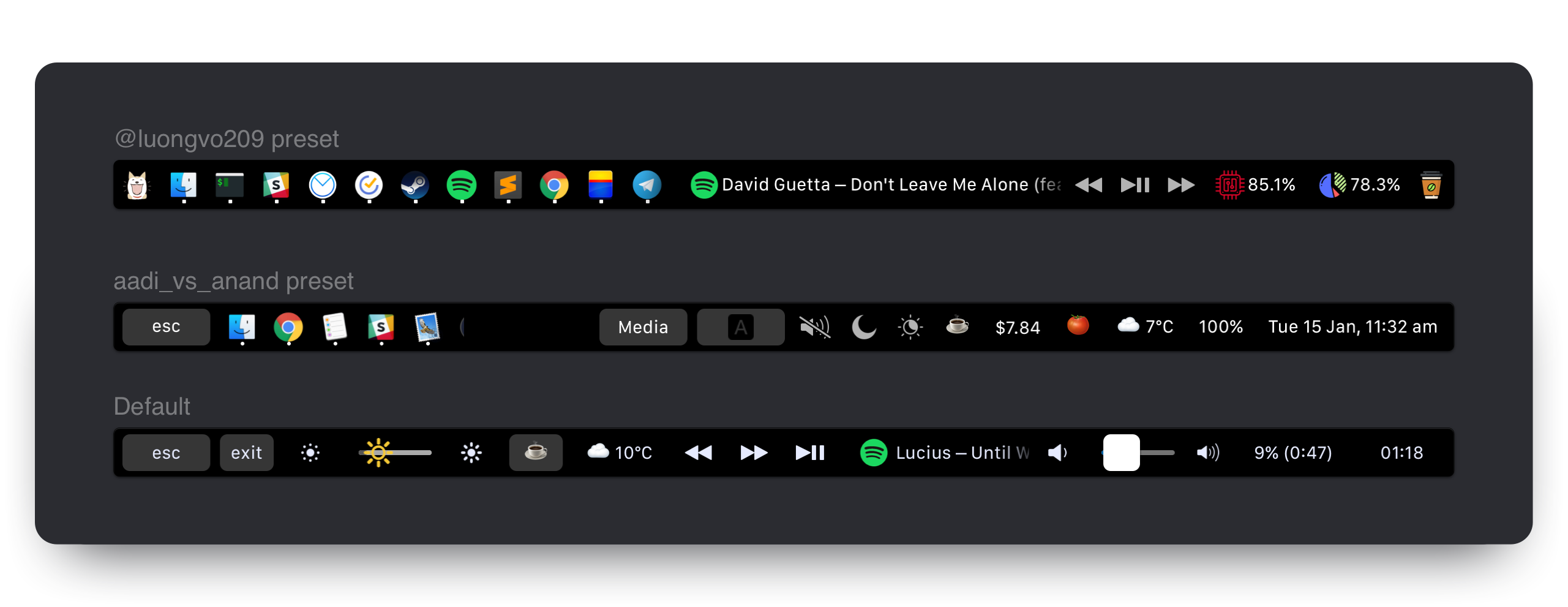
## Examples
[MTMR presets](https://github.com/Toxblh/MTMR-presets)
## Customization
MTMR preferences are stored in `~/Library/Application\ Support/MTMR/items.json`.
The pre-installed configuration contains less or more than you'll probably want, try to configure:
## Built-in button types:
> Buttons
- escape
- exitTouchbar
- brightnessUp
- brightnessDown
- illuminationUp (keyboard illumination)
- illuminationDown (keyboard illumination)
- volumeDown
- volumeUp
- mute
> Native Plugins
- timeButton
- battery
- cpu
- currency
- weather
- yandexWeather
- inputsource
- music (tap for pause, longTap for next)
- dock (half-long click to open app, full-long click to kill app)
- nightShift
- dnd (Don't disturb)
- darkMode
- pomodoro
- network
- upnext (Calendar events)
> Media Keys
- previous
- play
- next
> AppleScript plugins
- sleep
- displaySleep
> Custom buttons
- staticButton
- appleScriptTitledButton
- shellScriptTitledButton
## Gestures
By default you can enable basic gestures from application menu (status bar -> MTMR icon -> Volume/Brightness gestures):
- two finger slide: change you Volume
- three finger slide: change you Brightness
### Custom gestures
You can add custom actions for two/three/four finger swipes. To do it, you need to use `swipe` type:
```json
"type": "swipe",
"fingers": 2, // number of fingers required (2,3 or 4)
"direction": "right", // direction of swipe (right/left)
"minOffset": 10, // optional: minimal required offset for gesture to emit event
"sourceApple": { // optional: apple script to run
"inline": "beep"
},
"sourceBash": { // optional: bash script to run
"inline": "touch /Users/lobster/test"
}
```
You may create as many `swipe` objects in the preset as you want.
## Built-in slider types:
- brightness
- volume
### You can also make custom buttons using these types
#### `staticButton`
```json
"type": "staticButton",
"title": "esc",
```
#### `appleScriptTitledButton`
```js
{
"type": "appleScriptTitledButton",
"refreshInterval": 60, //optional
"source": {
"filePath": "~/Library/Application Support/MTMR/iTunes.nowPlaying.scpt",
// or
"inline": "tell application \"Finder\"\rif not (exists window 1) then\rmake new Finder window\rset target of front window to path to home folder as string\rend if\ractivate\rend tell",
// or
"base64": "StringInbase64"
},
}
```
> Note: You can change appleScriptTitledButton's icon by following these steps:
1. Declare dictionary of icons in `alternativeImages` field
2. Make you script return array of two values - `{"TITLE", "IMAGE_LABEL"}`
3. Make sure that your `IMAGE_LABEL` is declared in `alternativeImages` field
Example:
```js
{
"type": "appleScriptTitledButton",
"source": {
"inline": "if (random number from 1 to 2) = 1 then\n\tset val to {\"title\", \"play\"}\nelse\n\tset val to {\"title\", \"pause\"}\nend if\nreturn val"
},
"refreshInterval": 1,
"image": {
"base64": "iVBORw0KGgoAAAANSUhEUgA..."
},
"alternativeImages": {
"play": {
"base64": "iVBORw0KGgoAAAANSUhEUgAAAAAA..."
},
"pause": {
"base64": "iVBORw0KGgoAAAANSUhEUgAAAIAA..."
}
}
},
```
#### `shellScriptTitledButton`
> Note: script may also use escape sequences to return colors (read https://misc.flogisoft.com/bash/tip_colors_and_formatting for more information)
> "16 Colors" is the only mode supported presently. Buttons will set their own background color to the color returned.
Example of "CPU load" button which also changes color based on load value (Note: The native `cpu` plugin runs runs better):
```js
{
"type": "shellScriptTitledButton",
"width": 80,
"refreshInterval": 2,
"source": {
"inline": "top -l 2 -n 0 -F | egrep -o ' \\d*\\.\\d+% idle' | tail -1 | awk -F% '{p = 100 - $1; if (p > 30) c = \"\\033[33m\"; if (p > 70) c = \"\\033[30;43m\"; printf \"%s%4.1f%%\\n\", c, p}'"
},
"actions": [
{
"trigger": "singleTap",
"action": "appleScript",
"actionAppleScript": {
"inline": "activate application \"Activity Monitor\"\rtell application \"System Events\"\r\ttell process \"Activity Monitor\"\r\t\ttell radio button \"CPU\" of radio group 1 of group 2 of toolbar 1 of window 1 to perform action \"AXPress\"\r\tend tell\rend tell"
}
}
],
"align": "right",
"image": {
// Or you can specify a filePath here.
// Images will be resized to 24x24.
// "filePath": "~/myproject/myimage.jpg" // or "/fixed/path/to/the.png"
"base64":
"iVBORw0KGgoAAAANSUhEUgAAAEAAAABACAMAAACdt4HsAAAABGdBTUEAALGPC/xhBQAAACBjSFJNAAB6JgAAgIQAAPoAAACA6AAAdTAAAOpgAAA6mAAAF3CculE8AAAA/1BMVEUAAADaACbYACfYACfjABzXACjYACfXACjYACfYACfYACfYACfdACLYACfXACjYACfVACv/AADXACjYACfYACfXACjYACfXACjaACXYACfYACfVACvYACfYACfZACbZACbYACfYACfZACb/AADYACfYACfVACrXACjVACu/AEDYACfYACfYACfXACjXACjYACfXACjYACfYACfYACfXACjYACfXACjYACfYACfZACbYACfYACfMADPYACfYACfYACfYACfYACfZACbXACjYACfYACfRAC7XACjYACfZACbWACnXACjXACjYACfTACzZACb/AADYACfYACfYACcAAAA+zneGAAAAU3RSTlMAItK+CVPjh3xUxPwPiGDQGAMtSKmN3Vk+wPQG/e26oIJBnwJCdiuAHgTmw+6BX+IgfaqLUvKOW8VKnagK+vBwYrhlc/urCznvhSyUbOEXPAFjGh/ektAAAAABYktHRACIBR1IAAAACXBIWXMAAA3XAAAN1wFCKJt4AAAAB3RJTUUH4ggWETQWgEDcSgAAAqVJREFUWMPtl4ly2jAQhsUNNlcw5r4SICEHLSQhCQRyX73T/u//LpUlLIyxbMAznWmn/0ywo5U+27tr7ZoQuwLBUJidRKIxPhKLRtgxHAoGiLfiQIKdKFCTxjGpQmEDCSC+BiAFpNlJBsgaxyyQYQNpIPUf8AcAOzktD+iaoQJQNI5FoMAGdCCv5XZclpfKFXiqUi5Jllf1mvdyQzW96gigd4h6o+mhRp1O0x3vvwa1VSWeqrZU1Jyeogy01ggSVQsoO/i/gjq9/u6u+2LDXq2jshqLHNCgdsCVwO0NILdi0oDmuoAmoImhQDzFRPNnb36L7U43NVfc2EH2D9h5t9OePyIF5IU9uIhvkyN7iiXmQUIOj8x/lB6f0bTaQ3ZA+9iaNCH2Lpg6btsBIRJOpJl0E9ABTvof5kqEGeCjMaN/AnRMgM5XJcI2J1J1gf6S48Tb2Ae6JkAjdgmAeJ1XAOJ1Xg8wGJ6elXwAzkeGjy62BgxG3MuXnoCIkmEq8EQyAUPgajyhPxJAga9SIiRqzwMOuAbGZDrDjQRgKkpiqiPgFphM74B7d4BKy2cyy1RcBvSodUb/HiSAIl+VlEfh8cm4wvPL9nnw+gbc+kkkUVioO95etwe8PBuP8vQoBzg7UQAe5t7syZwoCaMA3AN30wlzh3MYJYkkADeYTckYuJYlkiSVBeCKZtSY/gxlqezlxEt+pdFg6zBesPXn1ih8Aj5vkAels9PhYCkPsl++kg0AQu4dyuqmugIQm+qS5Nv6N+D7wm7d1skPc4xu666Fhd6BxU6r+jub8tNaWNxK29EhsdpR/sVn7FlLm0txPdgni+JrFNd3p+K67MQtyrsp3w2G7xbHd5Plv83z3Wj6b3V9N9ssFv7afaa//ZPn3wD4/vje8PP/N7TebS0hgZhEAAAAJXRFWHRkYXRlOmNyZWF0ZQAyMDE4LTA4LTIyVDE3OjUyOjIyKzAyOjAwc2qUYAAAACV0RVh0ZGF0ZTptb2RpZnkAMjAxOC0wOC0yMlQxNzo1MjoyMiswMjowMAI3LNwAAAAZdEVYdFNvZnR3YXJlAHd3dy5pbmtzY2FwZS5vcmeb7jwaAAAAAElFTkSuQmCC"
},
"bordered": false
}
```
## Groups
```js
{
"type": "group",
"align": "center",
"bordered": true,
"title": "stats",
"items": [
{ "type": "play" },
{ "type": "mute" },
...
]
}
```
To close a group, use the button:
```
{
"type": "close",
"width": 64
},
```
## Native plugins
#### `cpu`
> Shows current CPU load in percent, changes color based on load value.
> Has lower power consumption and higher stability than the shell-based solution.
```js
{
"type": "cpu",
"refreshInterval": 3,
"width": 80
}
```
#### `timeButton`
> NOTE: Some values don't work properly: https://en.wikipedia.org/wiki/List_of_time_zone_abbreviations
> formatTemplate examples: https://www.datetimeformatter.com/how-to-format-date-time-in-swift/
> locale examples: https://gist.github.com/jacobbubu/1836273
```js
{
"type": "timeButton",
"formatTemplate": "dd HH:mm",
"locale": "en_GB",
"timeZone": "UTC"
}
```
#### `weather`
> Provider: https://openweathermap.org \
> Note: Register at https://openweathermap.org to get your API key \
> Note: Wait for 20 minutes or so for Openweathermap to activate your API key.\
> Note: Enable MTMR in "Location Services" in the "Security & Privacy" System Preferences pane
```js
"type": "weather",
"refreshInterval": 600, // in seconds
"units": "metric", // or imperial
"icon_type": "text", // or images
"api_key": "" // you can get the key on openweather
```
#### `yandexWeather` (experimental)
> Provider: https://yandex.ru/pogoda. One click to open up weather forecast in your browser. \
> Note: Enable MTMR in "Location Services" in the "Security & Privacy" System Preferences pane
```js
"type": "yandexWeather",
"refreshInterval": 600 // in seconds
```
#### `currency`
> Provider: https://coinbase.com
```js
"type": "currency",
"refreshInterval": 600, // in seconds
"align": "right",
"from": "BTC",
"to": "USD",
"full": true // £‣1.29$
```
#### `music`
```js
{
"type": "music",
"align": "center",
"width": 80, // Optional
"bordered": false, // Optional
"refreshInterval": 2, // in seconds. Optional. Default 5 seconds
"disableMarquee": true // to disable marquee effect. Optional. Default false
},
```
#### `pomodoro`
> Pomodoro plugin. One tap starts the work timer, long-press to start the rest timer. Tap an in-progress timer to reset.
```js
{
"type": "pomodoro",
"workTime": 1200, // set time work in seconds. Default 1500 (25 min)
"restTime": 600 // set time rest in seconds. Default 300 (5 min)
},
```
#### `network`
> Network plugin. The plugin to show network usage
```js
{
"type": "network",
"flip": true,
"units": "dynamic" // or B/s, KB/s, MB/s, GB/s
},
```
#### `dock`
> Dock plugin
```js
{
"type": "dock",
"filter": "(^Xcode$)|(Safari)|(.*player)",
"autoResize": true
},
```
#### `upnext`
> Calendar next event plugin
Displays upcoming events from macOS Calendar. Does not display current event.
```js
{
"type": "upnext",
"from": 0, // Lower bound of search range for next event in hours. Default 0 (current time)(can be negative to view events in the past)
"to": 12, // Upper bounds of search range for next event in hours. Default 12 (12 hours in the future)
"maxToShow": 3, // Limits the maximum number of events displayed. Default 3 (the first 3 upcoming events)
"autoResize": false // If true, widget will expand to display all events. Default false (scrollable view within "width")
},
```
## Actions:
### Example:
```js
"actions": [
{
"trigger": "singleTap",
"action": "hidKey",
"keycode": 53
}
]
```
### Triggers:
- `singleTap`
- `doubleTap`
- `tripleTap`
- `longTap`
### Types
- `hidKey`
> https://github.com/aosm/IOHIDFamily/blob/master/IOHIDSystem/IOKit/hidsystem/ev_keymap.h use only numbers
```json
"action": "hidKey",
"keycode": 53,
```
- `keyPress`
> https://eastmanreference.com/complete-list-of-applescript-key-codes
```json
"action": "keyPress",
"keycode": 1,
```
- `appleScript`
```js
"action": "appleScript",
"actionAppleScript": {
"inline": "tell application \"Finder\"\rif not (exists window 1) then\rmake new Finder window\rset target of front window to path to home folder as string\rend if\ractivate\rend tell",
// "filePath" or "base64" will work as well
},
```
- `shellScript`
```js
"action": "shellScript",
"executablePath": "/usr/bin/pmset",
"shellArguments": ["sleepnow"], // optional
```
- `openUrl`
```js
"action": "openUrl",
"url": "https://google.com",
```
## Additional parameters:
- `width` restrict how much room a particular button will take
```json
"width": 34
```
- `align` can stick the item to the side. default is center
```js
"align": "left" // "left", "right" or "center"
```
- `bordered` you can do button without border
```js
"bordered": "false" // "true" or "false"
```
- `background` allow to specify you button background color
```js
"background": "#FF0000",
```
by using background with color "#000000" and bordered == false you can create button without gray background but with background when the button is pressed
- `title` specify button title
```js
"title": "hello"
```
- `image` specify button icon
```js
"image": {
//Can be either of those
"base64": "iVBORw0KGgoAAAANSUhEUgAAAEAAAABACAMAAACdt4HsAAAABGdB...."
//or
"filePath": "~/img.png"
}
```
- `matchAppId` displays the button only when active app's id matches given regexp
```json
"matchAppId": "Safari"
```
## Troubleshooting
#### If you can't open preferences:
- Opening another program which can't edit text
1. Open Terminal.app
2. Put `open -a TextEdit ~/Library/Application\ Support/MTMR/items.json` command and press Enter
#### Buttons or gestures doesn't work:
- "After the last update my mtmr is not working anymore!"
- "Buttons sometimes do not trigger action"
- "ESC don't work"
- "Gestures don't work"
Re-tick or check a tick for access 🍏→ System Preferences → Security and Privacy → tab Privacy → Accessibility → MTMR
## Credits
Built by [@Toxblh](https://patreon.com/toxblh) and [@ReDetection](http://patreon.com/ReDetection).
[](https://github.com/igrigorik/ga-beacon)