
WhatsNewKit
A Swift Package to easily showcase your new app features.
It's designed from the ground up to be fully customized to your needs.






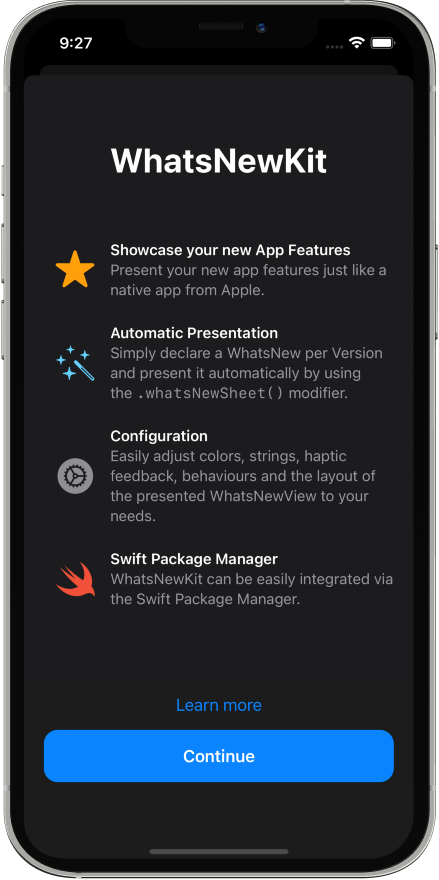 ```swift
import SwiftUI
import WhatsNewKit
struct ContentView: View {
var body: some View {
NavigationView {
// ...
}
.whatsNewSheet()
}
}
```
## Features
- [x] Easily present your new app features 🤩
- [x] Automatic & Manual presentation mode ✅
- [x] Support for SwiftUI, UIKit and AppKit 🧑🎨
- [x] Runs on iOS, macOS and visionOS 📱 🖥 👓
- [x] Adjustable layout 🔧
## Installation
### Swift Package Manager
To integrate using Apple's [Swift Package Manager](https://swift.org/package-manager/), add the following as a dependency to your `Package.swift`:
```swift
dependencies: [
.package(url: "https://github.com/SvenTiigi/WhatsNewKit.git", from: "2.0.0")
]
```
Or navigate to your Xcode project then select `Swift Packages`, click the “+” icon and search for `WhatsNewKit`.
## Example
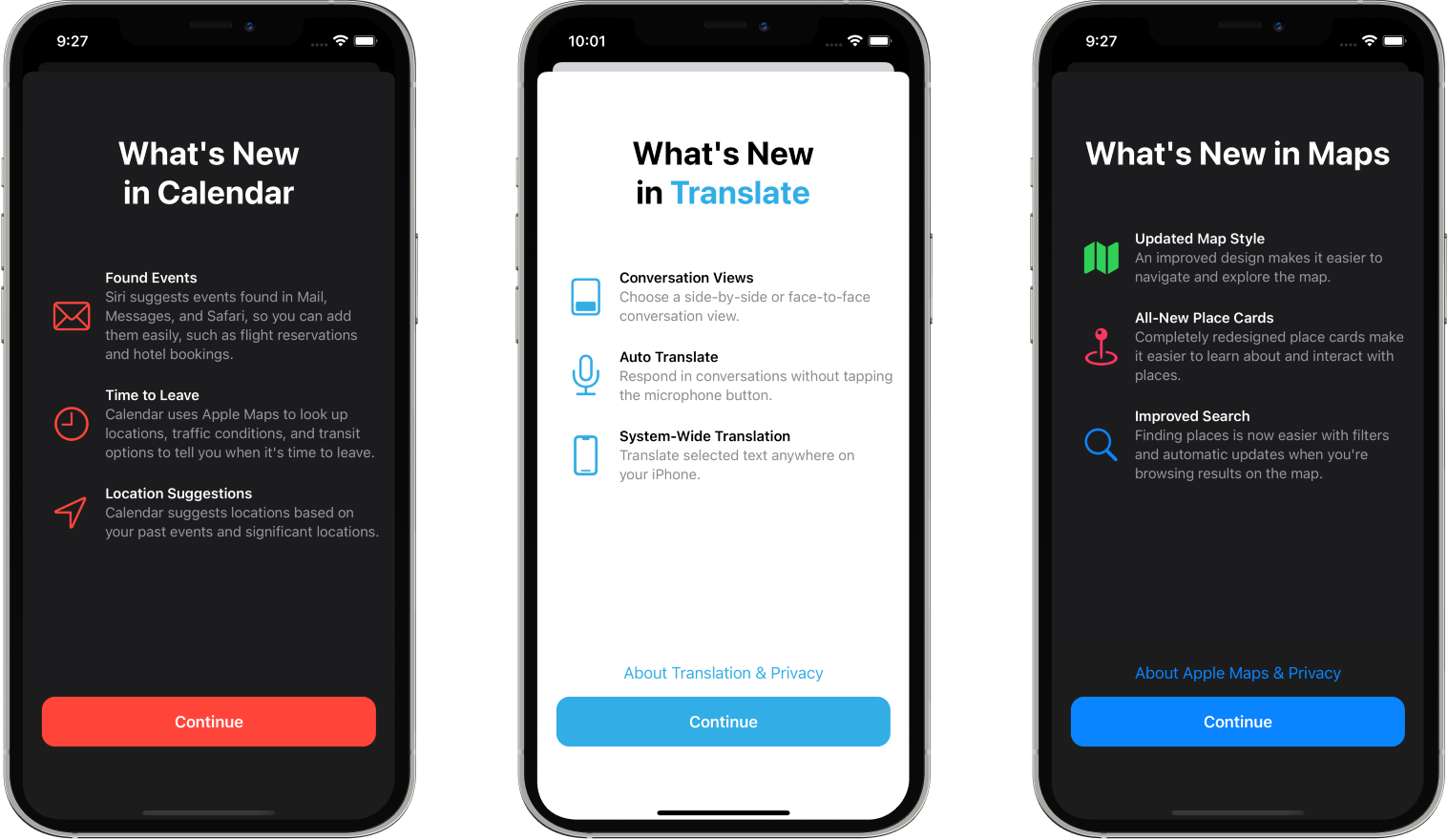
Check out the example application to see WhatsNewKit in action. Simply open the `Example/Example.xcodeproj` and run the "Example" scheme.
```swift
import SwiftUI
import WhatsNewKit
struct ContentView: View {
var body: some View {
NavigationView {
// ...
}
.whatsNewSheet()
}
}
```
## Features
- [x] Easily present your new app features 🤩
- [x] Automatic & Manual presentation mode ✅
- [x] Support for SwiftUI, UIKit and AppKit 🧑🎨
- [x] Runs on iOS, macOS and visionOS 📱 🖥 👓
- [x] Adjustable layout 🔧
## Installation
### Swift Package Manager
To integrate using Apple's [Swift Package Manager](https://swift.org/package-manager/), add the following as a dependency to your `Package.swift`:
```swift
dependencies: [
.package(url: "https://github.com/SvenTiigi/WhatsNewKit.git", from: "2.0.0")
]
```
Or navigate to your Xcode project then select `Swift Packages`, click the “+” icon and search for `WhatsNewKit`.
## Example
Check out the example application to see WhatsNewKit in action. Simply open the `Example/Example.xcodeproj` and run the "Example" scheme.
## Usage
### Table of contents
- [Manual Presentation](https://github.com/SvenTiigi/WhatsNewKit/tree/main#manual-presentation)
- [Automatic Presentation](https://github.com/SvenTiigi/WhatsNewKit/tree/main#automatic-presentation)
- [WhatsNewEnvironment](https://github.com/SvenTiigi/WhatsNewKit/tree/main#whatsnewenvironment)
- [WhatsNewVersionStore](https://github.com/SvenTiigi/WhatsNewKit/tree/main#whatsnewversionstore)
- [WhatsNew](https://github.com/SvenTiigi/WhatsNewKit/tree/main#whatsnew)
- [Layout](https://github.com/SvenTiigi/WhatsNewKit/tree/main#layout)
- [WhatsNewViewController](https://github.com/SvenTiigi/WhatsNewKit/tree/main#whatsnewviewcontroller)
### Manual Presentation
If you wish to manually present a `WhatsNewView` you can make use of the `sheet(whatsNew:)` modifier.
```swift
struct ContentView: View {
@State
var whatsNew: WhatsNew? = WhatsNew(
title: "WhatsNewKit",
features: [
.init(
image: .init(
systemName: "star.fill",
foregroundColor: .orange
),
title: "Showcase your new App Features",
subtitle: "Present your new app features..."
),
// ...
]
)
var body: some View {
NavigationView {
// ...
}
.sheet(
whatsNew: self.$whatsNew
)
}
}
```
### Automatic Presentation
The automatic presentation mode allows you to simply declare your new features via the SwiftUI Environment and WhatsNewKit will take care to present the corresponding `WhatsNewView`.
First add a `.whatsNewSheet()` modifier to the view where the `WhatsNewView` should be presented on.
```swift
struct ContentView: View {
var body: some View {
NavigationView {
// ...
}
// Automatically present a WhatsNewView, if needed.
// The WhatsNew that should be presented to the user
// is automatically retrieved from the `WhatsNewEnvironment`
.whatsNewSheet()
}
}
```
The `.whatsNewSheet()` modifier is making use of the `WhatsNewEnvironment` to retrieve an optional WhatsNew object that should be presented to the user for the current version. Therefore you can easily configure the `WhatsNewEnvironment` via the `environment` modifier.
```swift
extension App: SwiftUI.App {
var body: some Scene {
WindowGroup {
ContentView()
.environment(
\.whatsNew,
WhatsNewEnvironment(
// Specify in which way the presented WhatsNew Versions are stored.
// In default the `UserDefaultsWhatsNewVersionStore` is used.
versionStore: UserDefaultsWhatsNewVersionStore(),
// Pass a `WhatsNewCollectionProvider` or an array of WhatsNew instances
whatsNewCollection: self
)
)
}
}
}
// MARK: - App+WhatsNewCollectionProvider
extension App: WhatsNewCollectionProvider {
/// Declare your WhatsNew instances per version
var whatsNewCollection: WhatsNewCollection {
WhatsNew(
version: "1.0.0",
// ...
)
WhatsNew(
version: "1.1.0",
// ...
)
WhatsNew(
version: "1.2.0",
// ...
)
}
}
```
## WhatsNewEnvironment
The `WhatsNewEnvironment` will take care to determine the matching WhatsNew object that should be presented to the user for the current version.
As seen in the previous example you can initialize a `WhatsNewEnvironment` by specifying the `WhatsNewVersionStore` and providing a `WhatsNewCollection`.
```swift
// Initialize WhatsNewEnvironment by passing an array of WhatsNew Instances.
// UserDefaultsWhatsNewVersionStore is used as default WhatsNewVersionStore
let whatsNewEnvironment = WhatsNewEnvironment(
whatsNewCollection: [
WhatsNew(
version: "1.0.0",
// ...
)
]
)
// Initialize WhatsNewEnvironment with NSUbiquitousKeyValueWhatsNewVersionStore
// which stores the presented versions in iCloud.
// WhatsNewCollection is provided by a `WhatsNewBuilder` closure
let whatsNewEnvironment = WhatsNewEnvironment(
versionStore: NSUbiquitousKeyValueWhatsNewVersionStore(),
whatsNewCollection: {
WhatsNew(
version: "1.0.0",
// ...
)
}
)
```
Additionally, the `WhatsNewEnvironment` includes a fallback for patch versions. For example when a user installs version `1.0.1` and you only have declared a `WhatsNew` for version `1.0.0` the environment will automatically fallback to version `1.0.0` and present the `WhatsNewView` to the user if needed.
If you wish to further customize the behaviour of the `WhatsNewEnvironment` you can easily subclass it and override the `whatsNew()` function.
```swift
class MyCustomWhatsNewEnvironment: WhatsNewEnvironment {
/// Retrieve a WhatsNew that should be presented to the user, if available.
override func whatsNew() -> WhatsNew? {
// The current version
let currentVersion = self.currentVersion
// Your declared WhatsNew objects
let whatsNewCollection = self.whatsNewCollection
// The WhatsNewVersionStore used to determine the already presented versions
let versionStore = self.whatsNewVersionStore
// TODO: Determine WhatsNew that should be presented to the user...
}
}
```
## WhatsNewVersionStore
A `WhatsNewVersionStore` is a protocol type which is responsible for saving and retrieving versions that have been presented to the user.
```swift
let whatsNewVersionStore: WhatsNewVersionStore
// Save presented versions
whatsNewVersionStore.save(presentedVersion: "1.0.0")
// Retrieve presented versions
let presentedVersions = whatsNewVersionStore.presentedVersions
// Retrieve bool value if a given version has already been presented
let hasPresented = whatsNewVersionStore.hasPresented("1.0.0")
```
WhatsNewKit comes along with three predefined implementations:
```swift
// Persists presented versions in the UserDefaults
let userDefaultsWhatsNewVersionStore = UserDefaultsWhatsNewVersionStore()
// Persists presented versions in iCloud using the NSUbiquitousKeyValueStore
let ubiquitousKeyValueWhatsNewVersionStore = NSUbiquitousKeyValueWhatsNewVersionStore()
// Stores presented versions in memory. Perfect for testing purposes
let inMemoryWhatsNewVersionStore = InMemoryWhatsNewVersionStore()
```
If you already have a specific implementation to store user related settings like Realm or Core Data you can easily adopt your existing implementation to the `WhatsNewVersionStore` protocol.
### NSUbiquitousKeyValueWhatsNewVersionStore
If you are making use of the `NSUbiquitousKeyValueWhatsNewVersionStore` please ensure to enable the [iCloud Key-value storage](https://developer.apple.com/library/archive/documentation/General/Conceptual/iCloudDesignGuide/Chapters/DesigningForKey-ValueDataIniCloud.html) capability in the "Signing & Capabilities" section of your Xcode project.

## WhatsNew
The following sections explains how a `WhatsNew` struct can be initialized in order to describe the new features for a given version of your app.
```swift
let whatsnew = WhatsNew(
// The Version that relates to the features you want to showcase
version: "1.0.0",
// The title that is shown at the top
title: "What's New",
// The features you want to showcase
features: [
WhatsNew.Feature(
image: .init(systemName: "star.fill"),
title: "Title",
subtitle: "Subtitle"
)
],
// The primary action that is used to dismiss the WhatsNewView
primaryAction: WhatsNew.PrimaryAction(
title: "Continue",
backgroundColor: .accentColor,
foregroundColor: .white,
hapticFeedback: .notification(.success),
onDismiss: {
print("WhatsNewView has been dismissed")
}
),
// The optional secondary action that is displayed above the primary action
secondaryAction: WhatsNew.SecondaryAction(
title: "Learn more",
foregroundColor: .accentColor,
hapticFeedback: .selection,
action: .openURL(
.init(string: "https://github.com/SvenTiigi/WhatsNewKit")
)
)
)
```
### WhatsNew.Version
The `WhatsNew.Version` specifies the version that has introduced certain features to your app.
```swift
// Initialize with major, minor, and patch
let version = WhatsNew.Version(
major: 1,
minor: 0,
patch: 0
)
// Initialize by string literal
let version: WhatsNew.Version = "1.0.0"
// Initialize WhatsNew Version by using the current version of your bundle
let version: WhatsNew.Version = .current()
```
### WhatsNew.Title
A `WhatsNew.Title` represents the title text that is rendered above the features.
```swift
// Initialize by string literal
let title: WhatsNew.Title = "Continue"
// Initialize with text and foreground color
let title = WhatsNew.Title(
text: "Continue",
foregroundColor: .primary
)
// On >= iOS 15 initialize with AttributedString using Markdown
let title = WhatsNew.Title(
text: try AttributedString(
markdown: "What's **New**"
)
)
```
### WhatsNew.Feature
A `WhatsNew.Feature` describe a specific feature of your app and generally consist of an image, title, and subtitle.
```swift
let feature = WhatsNew.Feature(
image: .init(
systemName: "wand.and.stars"
),
title: "New Design",
subtitle: .init(
try AttributedString(
markdown: "An awesome new _Design_"
)
)
)
```
### WhatsNew.PrimaryAction
The `WhatsNew.PrimaryAction` allows you to configure the behaviour of the primary button which is used to dismiss the presented `WhatsNewView`
```swift
let primaryAction = WhatsNew.PrimaryAction(
title: "Continue",
backgroundColor: .blue,
foregroundColor: .white,
hapticFeedback: .notification(.success),
onDismiss: {
print("WhatsNewView has been dismissed")
}
)
```
> Note: HapticFeedback will only be executed on iOS
### WhatsNew.SecondaryAction
A `WhatsNew.SecondaryAction` which is displayed above the `WhatsNew.PrimaryAction` can be optionally supplied when initializing a `WhatsNew` instance and allows you to present an additional View, perform a custom action or open an URL.
```swift
// SecondaryAction that presents a View
let secondaryActionPresentAboutView = WhatsNew.SecondaryAction(
title: "Learn more",
foregroundColor: .blue,
hapticFeedback: .selection,
action: .present {
AboutView()
}
)
// SecondaryAction that opens a URL
let secondaryActionOpenURL = WhatsNew.SecondaryAction(
title: "Read more",
foregroundColor: .blue,
hapticFeedback: .selection,
action: .open(
url: .init(string: "https://github.com/SvenTiigi/WhatsNewKit")
)
)
// SecondaryAction with custom execution
let secondaryActionCustom = WhatsNew.SecondaryAction(
title: "Custom",
action: .custom { presentationMode in
// ...
}
)
```
> Note: HapticFeedback will only be executed on iOS
## Layout
WhatsNewKit allows you to adjust the layout of a presented `WhatsNewView` in various ways.
The most simple way is by mutating the `WhatsNew.Layout.default` instance.
```swift
WhatsNew.Layout.default.featureListSpacing = 35
```
When using the automatic presentation style you can supply a default layout when initializing the WhatsNewEnvironment.
```swift
.environment(
\.whatsNew,
.init(
defaultLayout: WhatsNew.Layout(
showsScrollViewIndicators: true,
featureListSpacing: 35
),
whatsNew: self
)
)
```
Alternatively you can pass a `WhatsNew.Layout` when automatically or manually presenting the WhatsNewView
```swift
.whatsNewSheet(
layout: WhatsNew.Layout(
contentPadding: .init(
top: 80,
leading: 0,
bottom: 0,
trailing: 0
)
)
)
```
```swift
.sheet(
whatsNew: self.$whatsNew,
layout: WhatsNew.Layout(
footerActionSpacing: 20
)
)
```
## WhatsNewViewController
When using `UIKit` or `AppKit` you can make use of the `WhatsNewViewController`.
```swift
let whatsNewViewController = WhatsNewViewController(
whatsNew: WhatsNew(
version: "1.0.0",
// ...
),
layout: WhatsNew.Layout(
contentSpacing: 80
)
)
```
If you wish to present a `WhatsNewViewController` only if the version of the WhatsNew instance has not been presented you can make use of the convenience failable initializer.
```swift
// Verify WhatsNewViewController is available for presentation
guard let whatsNewViewController = WhatsNewViewController(
whatsNew: WhatsNew(
version: "1.0.0",
// ...
),
versionStore: UserDefaultsWhatsNewVersionStore()
) else {
// Version of WhatsNew has already been presented
return
}
// Present WhatsNewViewController
// Version will be automatically saved in the provided
// WhatsNewVersionStore when the WhatsNewViewController gets dismissed
self.present(whatsNewViewController, animated: true)
```