<p align="center">

```
   ╔═══════════════════════════════════════════════════════════════╗
   ║                                                               ║
   ║     █████╗  ██████╗ ███████╗███╗   ██╗████████╗███████╗       ║
   ║    ██╔══██╗██╔════╝ ██╔════╝████╗  ██║╚══██╔══╝██╔════╝       ║
   ║    ███████║██║  ███╗█████╗  ██╔██╗ ██║   ██║   ███████╗       ║
   ║    ██╔══██║██║   ██║██╔══╝  ██║╚██╗██║   ██║   ╚════██║       ║
   ║    ██║  ██║╚██████╔╝███████╗██║ ╚████║   ██║   ███████║       ║
   ║    ╚═╝  ╚═╝ ╚═════╝ ╚══════╝╚═╝  ╚═══╝   ╚═╝   ╚══════╝       ║
   ║              ██╗███╗   ██╗    █████╗                              ║
   ║              ██║████╗  ██║   ██╔══██╗                             ║
   ║              ██║██╔██╗ ██║   ███████║                             ║
   ║              ██║██║╚██╗██║   ██╔══██║                             ║
   ║              ██║██║ ╚████║   ██║  ██║                             ║
   ║              ╚═╝╚═╝  ╚═══╝   ╚═╝  ╚═╝                             ║
   ║            ██████╗  ██████╗ ██╗  ██╗                              ║
   ║            ██╔══██╗██╔═══██╗╚██╗██╔╝                              ║
   ║            ██████╔╝██║   ██║ ╚███╔╝                               ║
   ║            ██╔══██╗██║   ██║ ██╔██╗                               ║
   ║            ██████╔╝╚██████╔╝██╔╝ ██╗                              ║
   ║            ╚═════╝  ╚═════╝ ╚═╝  ╚═╝                              ║
   ║                                                               ║
   ╚═══════════════════════════════════════════════════════════════╝
```

**A complete ecosystem for AI-assisted development**

</p>

<p align="center">
  <a href="https://github.com/stevengonsalvez/agents-in-a-box/actions/workflows/ci.yml"><img src="https://img.shields.io/github/actions/workflow/status/stevengonsalvez/agents-in-a-box/ci.yml?branch=main&style=flat-square&label=CI&logo=github" alt="CI"></a>
  <a href="https://github.com/stevengonsalvez/agents-in-a-box/actions/workflows/toolkit-validation.yml"><img src="https://img.shields.io/github/actions/workflow/status/stevengonsalvez/agents-in-a-box/toolkit-validation.yml?branch=main&style=flat-square&label=Toolkit&logo=github" alt="Toolkit Validation"></a>
  <a href="https://github.com/stevengonsalvez/agents-in-a-box/releases"><img src="https://img.shields.io/github/v/release/stevengonsalvez/agents-in-a-box?style=flat-square&logo=github" alt="Release"></a>
  <img src="https://img.shields.io/badge/rust-2021_edition-orange?style=flat-square&logo=rust" alt="Rust">
  <img src="https://img.shields.io/badge/platform-macOS%20%7C%20Linux%20%7C%20WSL-blue?style=flat-square" alt="Platform">
  <a href="LICENSE"><img src="https://img.shields.io/badge/license-MIT-green?style=flat-square" alt="License"></a>
</p>

<p align="center">
  <code>115 Rust Modules</code> · <code>91 Skills</code> · <code>37 Agents</code> · <code>9 AI Tools</code> · <code>Knowledge Graph</code>
</p>

---

A terminal-native ecosystem for managing AI coding agents. Built around a Rust TUI that orchestrates Claude Code, Codex, Gemini, and Copilot sessions with git worktree isolation, and a portable toolkit of skills, agents, and workflows that plug into 9 different AI coding tools.

### Related repositories

The portable skills, the `bootstrap.js` installer, and the catalog live in a
separate, standalone repo — `ainb` consumes it as a pinned external source.

| Repo | What it holds |
|---|---|
| **stevengonsalvez/agents-in-a-box** (this repo) | The `ainb` TUI/CLI unit manager (Rust workspace), the v2 plugin system, and the docs. |
| **[stevengonsalvez/ainb-reflect-memory](https://github.com/stevengonsalvez/ainb-reflect-memory)** | `reflect` — the long-term memory engine (GraphRAG + QMD) + its Claude Code plugin, extracted from this monorepo. Engine install: `uv tool install --upgrade 'git+https://github.com/stevengonsalvez/ainb-reflect-memory.git[graph]'`. |
| **[stevengonsalvez/ainb-toolkit](https://github.com/stevengonsalvez/ainb-toolkit)** | The canonical home for the 91 curated skills, 37 agents, workflows, utilities, the `external-dependencies.yaml` manifest, the `bootstrap.js` legacy installer, and the generated `catalog.yaml`. `ainb` browses + installs from it; the release CI pins a tag of it to generate the curated `catalog-index.json`. |

<p align="center">
  <img src="docs/assets/screenshots/dashboard-session.png" alt="ainb TUI — live session dashboard with multi-workspace sidebar" width="900">
  <br>
  <em>Live dashboard: multi-workspace sidebar, session preview pane, and tmux-backed persistent sessions</em>
</p>

<p align="center">
  <img src="docs/assets/screenshots/burndown.png" alt="ainb burndown dashboard — multi-panel analytics with budget, daily activity, project/model breakdowns, optimisation hints" width="900">
  <br>
  <em>Burndown dashboard: daily activity, per-project & per-model breakdowns, top sessions, live budget tracking, and optimisation hints — all in one view</em>
</p>

---

## What's Inside

| Component | What it does | Scale |
|-----------|-------------|-------|
| **[ainb TUI](#ainb--terminal-ui)** | Rust terminal app for managing Claude Code sessions | 115 modules |
| **[Toolkit](#toolkit)** | Portable skills, agents, and workflows for AI coding tools | 91 skills, 37 agents |
| **[Knowledge System](#knowledge-system)** | GraphRAG + QMD learning capture and retrieval | [Architecture docs](docs/knowledge/overview.md) |

---

## Why agents-in-a-box?

Most AI coding setups are a loose collection of dotfiles. This project treats the problem as an engineering system:

- **One toolkit, many tools** — Write a skill once, deploy it to Claude Code, Codex, Gemini, Cursor, Copilot, Amazon Q, Cline, Roo, or Clawdhub
- **Session isolation** — Each coding session gets its own git worktree and tmux session. No cross-contamination
- **Agents that compose** — 37 specialized agents (backend-developer, security-agent, architecture-reviewer, etc.) that can be orchestrated into swarms
- **Memory that persists** — A two-tier knowledge system (GraphRAG + QMD) that captures learnings and retrieves them across sessions and projects
- **Production Rust** — The TUI isn't a shell script. It's 115 modules of typed, tested, async Rust with clippy pedantic/nursery lints

---

## Quick Start

```bash
# Install the TUI (macOS / Linux)
brew tap stevengonsalvez/agents-in-a-box && brew install ainb
# newer Homebrew gates third-party taps — if it says "untrusted tap", run:
#   brew trust stevengonsalvez/agents-in-a-box

# Launch the TUI
ainb

# Register the toolkit as a source, then install the units you want into your
# real tool homes. Install is purely ADDITIVE — units land alongside your
# existing config; your CLAUDE.md, settings, projects/ history and custom
# agents are never touched.
ainb source add gh:stevengonsalvez/ainb-toolkit
AINB_USE_REAL_HOMES=1 ainb skill install gh:stevengonsalvez/ainb-toolkit/skills/commit
```

> **The easy way:** just run `ainb`, press `m` for the Skill Manager, and
> browse + install units with `[i]`. If you already have skills on disk
> (`~/.claude/skills/`, etc.), the first open offers one-keystroke adoption —
> no manual setup. `ainb skill sync` then keeps installed units reconciled with
> the manifest.
>
> To uninstall a unit, run `ainb skill remove <uri>` or press `[r]` on it in the
> Skill Manager. Removal is **per-file and scoped to that unit** — it deletes
> only what ainb deployed and can never wipe your config or session history.

---

## ainb — Terminal UI + CLI

A Rust-based terminal application for managing AI coding sessions with git worktree isolation, model selection, and persistent tmux sessions. Every operation is **available as both an interactive TUI view and a scriptable CLI subcommand** with JSON output — so humans drive it from a dashboard and agents drive it from shell scripts.

### Feature Highlights

- **Multi-provider** — Run Claude Code, Codex CLI, Gemini CLI, or GitHub Copilot in the same workflow, with Sonnet / Opus / Haiku selection per session
- **Git worktree isolation** — Each session runs in its own branch and working directory. No cross-contamination, no stash dance
- **tmux persistence** — Sessions survive terminal disconnects, SSH drops, and laptop sleep. Reattach any time
- **Usage analytics** — Built-in token + session tracking by day, week, provider, and project. Know where your budget went — then cut it with [The Token Optimisation Playbook](https://stevengonsalvez.com/blog/token-optimisation-playbook)
- **Easy onboarding** — First-run setup wizard checks dependencies, configures auth, and gets you creating sessions in minutes
- **Live log streaming** — Real-time viewer with level filtering and search across all running sessions
- **Scriptable CLI** — 30+ commands (every TUI action, plus headless `witr`, `learnings search`, `diff-review --format json`, …) with `--format json` output for every piece of state. **[📘 Full CLI reference →](docs/tui/cli.md)** — a generated, multi-hierarchy man page covering every subcommand.

### Feature Showcase

<table>
  <tr>
    <td width="50%" valign="top">
      <img src="docs/assets/screenshots/home.png" alt="ainb home screen with sidebar and welcome panel" width="100%"><br>
      <strong>📊 Unified dashboard</strong><br>
      <em>Sidebar navigation across Agents, Catalog, Sessions, Recovery, Logs, Stats, Skills, Changelog, and Setup. Keyboard-driven throughout.</em>
    </td>
    <td width="50%" valign="top">
      <img src="docs/assets/screenshots/agent-picker.png" alt="AI agent picker with model selection" width="100%"><br>
      <strong>🤖 Pick your agent, pick your model</strong><br>
      <em>Choose between Claude Code, Shell Only, SSH, Codex CLI, Gemini CLI, GitHub Copilot, or Kiro. Model toggle — Sonnet · Opus · Haiku — right below.</em>
    </td>
  </tr>
  <tr>
    <td width="50%" valign="top">
      <img src="docs/assets/screenshots/new-session.png" alt="New session flow — local, remote, SSH, favorites" width="100%"><br>
      <strong>🚀 Start a session any way you want</strong><br>
      <em>Local repo, clone from GitHub/GitLab, SSH into a remote box, or pull from your Favorites. One-key shortcuts: L / R / S / F.</em>
    </td>
    <td width="50%" valign="top">
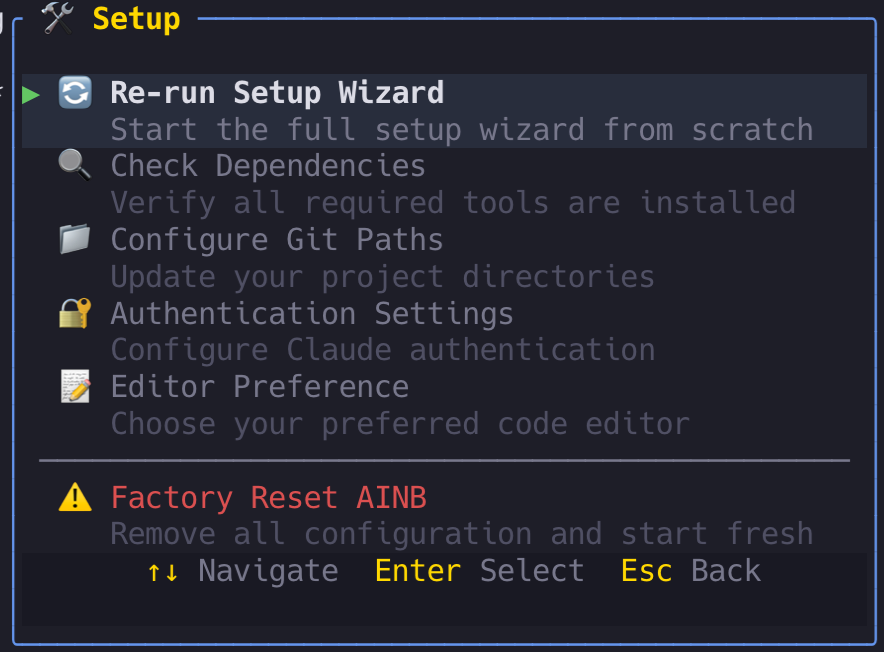
      <img src="docs/assets/screenshots/setup.png" alt="Setup wizard with dependency checks" width="100%"><br>
      <strong>🛠️ Guided first-time setup</strong><br>
      <em>Re-run the wizard, verify dependencies, configure git paths, set auth, pick your editor — or factory-reset in one click.</em>
    </td>
  </tr>
  <tr>
    <td width="50%" valign="top">
      <img src="docs/assets/screenshots/burndown.png" alt="Burndown analytics dashboard — daily activity, per-project, per-model, budget, optimisation" width="100%"><br>
      <strong>📈 Burndown analytics, built in</strong><br>
      <em>Multi-panel dashboard: daily activity, top sessions, per-project + per-model token attribution, live budget tracking, and inline optimisation hints. The observability layer behind <a href="https://stevengonsalvez.com/blog/token-optimisation-playbook">The Token Optimisation Playbook</a> — start with <a href="https://stevengonsalvez.com/tools-tips/token-optimisation-101">Token Optimisation 101</a>.</em>
    </td>
    <td width="50%" valign="top">
      <img src="docs/assets/screenshots/stats-projects.png" alt="Per-project token usage breakdown" width="100%"><br>
      <strong>🎯 Per-project attribution</strong><br>
      <em>See exactly which repos and worktrees consume your context budget. Input, cache, output, and session counts per project.</em>
    </td>
  </tr>
  <tr>
    <td colspan="2" valign="top">
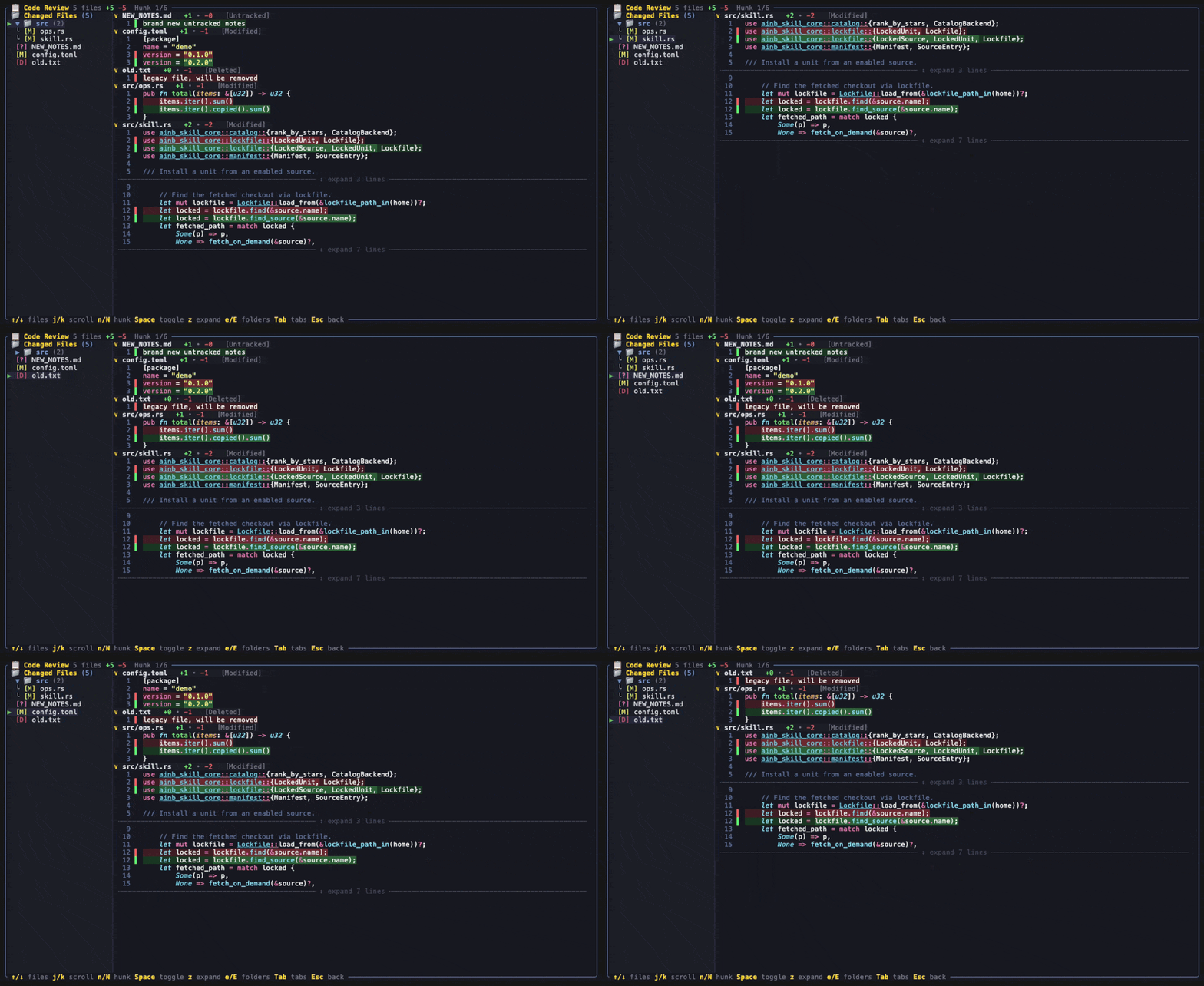
      <img src="docs/assets/screenshots/code-review-diff.gif" alt="Warp-style Code Review diff — file sidebar, per-file collapsible blocks, Dracula syntax highlighting, word-level emphasis, gutter with green/red change bars" width="100%"><br>
      <strong>🔍 Warp-style Code Review diff</strong><br>
      <em>Press <code>g</code> on a session (or run <code>ainb diff-review</code>) for a cohesive review surface — file sidebar, per-file collapsible blocks in one scroll, Dracula syntax highlighting, word-level intra-line emphasis, a line-number gutter with green/red change bars, expandable context, and <code>n</code>/<code>N</code> hunk navigation. <a href="docs/tui/code-review.md">Docs →</a></em>
    </td>
  </tr>
</table>

### CLI — Scriptable Equivalent of Every TUI Feature

For agents, automation, and scripts, `ainb` ships a full CLI. Every command supports `--format json` for piping to `jq`.

```bash
ainb --help                             # Top-level overview
ainb run --repo . --worktree --tool claude --model sonnet
ainb list --format json | jq .
ainb logs my-session --follow
ainb recover list                       # Find orphaned sessions
ainb config set authentication.default_model opus
ainb completion zsh > ~/.zsh/completions/_ainb
```

**20 top-level commands** — `tui`, `run`, `list`, `logs`, `attach`, `status`, `kill`, `auth`, `recover`, `config`, `git`, `favorites`, `init`, `presets`, `usage`, `claudecode`, `completion`, `plugin`, `fleet`, `help` — with nested subcommands for recover / config / git / favorites / presets / plugin / fleet.

**[📘 Full CLI reference → docs/tui/cli.md](docs/tui/cli.md)**

### Installation

**Recommended — Homebrew (macOS / Linux):**

```bash
brew tap stevengonsalvez/agents-in-a-box
brew install ainb
```

> Newer Homebrew versions refuse formulas from untrusted third-party taps. If
> `brew install`/`brew upgrade` errors with *"Refusing to load formula … from
> untrusted tap"*, trust the tap once and retry:
> `brew trust stevengonsalvez/agents-in-a-box`

The tap lives at [`stevengonsalvez/homebrew-agents-in-a-box`](https://github.com/stevengonsalvez/homebrew-agents-in-a-box) and is auto-updated by the release workflow on every tagged release — `brew upgrade ainb` always pulls the latest.

<details>
<summary><b>Other install methods</b></summary>

**One-liner curl install** (any Unix):
```bash
curl -fsSL https://raw.githubusercontent.com/stevengonsalvez/agents-in-a-box/main/ainb-tui/install.sh | bash
```

**Cargo** (any platform with a Rust toolchain):
```bash
cargo install --git https://github.com/stevengonsalvez/agents-in-a-box --branch main ainb
```

**Windows via WSL2** — native Windows is not supported (`ainb` uses Unix-only APIs: PTY, POSIX file modes). Use WSL2:
```powershell
wsl --install                                                                         # 1. Install WSL2
# Inside Ubuntu/Debian:
curl -fsSL https://raw.githubusercontent.com/stevengonsalvez/agents-in-a-box/main/ainb-tui/install.sh | bash
sudo apt update && sudo apt install -y tmux
ainb
```
</details>

<details>
<summary><b>Troubleshooting Homebrew</b></summary>

**`Error: Your Command Line Tools are too outdated`** — this is a Homebrew check on the standalone `CommandLineTools` package, separate from a full Xcode install. If you have a recent Xcode but an old standalone CLT, brew picks the older one. Reinstall the CLT:
```bash
sudo rm -rf /Library/Developer/CommandLineTools
sudo xcode-select --install
```

**`Formulae found in multiple taps`** — if you previously tapped a similarly-named bucket, untap it:
```bash
brew untap stevengonsalvez/ainb   # only if you tapped this earlier
brew install stevengonsalvez/agents-in-a-box/ainb
```

**`Refusing to load formula … from untrusted tap`** — newer Homebrew gates third-party taps behind an explicit trust step. Trust the tap once and retry:
```bash
brew trust stevengonsalvez/agents-in-a-box
brew install ainb   # or brew upgrade ainb
```
</details>

### Plugins

`ainb` boots a plugin host at startup. Some screens — notably **Analytics / Usage (the burndown dashboard)** — are provided by subprocess plugins that the host discovers and loads automatically. **All plugins are enabled by default**; you only need the controls below to turn them off or scope which ones load.

<p align="center">
  <img src="docs/assets/diagrams/plugin-architecture.svg" alt="ainb v2 plugin architecture — host, JSON-RPC stdio, plugin subprocesses, capability gate, event bus" width="860">
</p>

**How it works (in brief):** a v2 plugin is a **native subprocess** that speaks **JSON-RPC 2.0 over Content-Length-framed stdio** — no wasm, no in-process linking. The host (`ainb-core`) discovers each plugin from `dist/plugins/<id>/`, spawns it, and exchanges messages: `plugin/render` (the plugin returns a `WireBuffer` of cells the host blits), `plugin/handle_key`, `plugin/cli_dispatch` (routes `ainb <namespace> …`), plus reverse `host/snapshot/publish` calls over an **event bus**. Each plugin declares its `[capabilities]` in `manifest.toml`; the runtime denies any ungranted host call with JSON-RPC `-32001`. A plugin screen can render **two ways**: in-process via a `WireBuffer` (host owns the terminal — e.g. **burndown**), or as a **host-embedded foreign TTY** where ainb suspends and hands the terminal to an external interactive program (e.g. **witr**'s `witr -i` browser). Full walkthrough: [`docs/plugins/`](docs/plugins/overview.md).

There are four ways to filter plugins, with the following precedence (most specific wins):

| Goal | How | Type |
|------|-----|------|
| All on (default) | *(nothing)* | — |
| All off (kill switch) | `AINB_DISABLE_PLUGINS=1 ainb` | env |
| Load only these | `AINB_ONLY_PLUGINS=burndown ainb` | env allowlist |
| Load all except these | `AINB_DISABLE_PLUGIN=burndown ainb` | env denylist |
| Persistent allowlist | `[plugins].enabled = ["burndown"]` in `config.toml` | config |
| Persistent denylist | `[plugins].disabled = ["burndown"]` in `config.toml` | config |

Resolution order: `AINB_DISABLE_PLUGINS` → `AINB_ONLY_PLUGINS` → `AINB_DISABLE_PLUGIN` → config `enabled` → config `disabled` → default all-on. **Env always beats config**, and an allowlist always beats a denylist.

Config lives at `~/.agents-in-a-box/config/config.toml` under a `[plugins]` table — see [`example.config.toml`](ainb-tui/config/example.config.toml) for the annotated block. When a screen's plugin is disabled, the TUI shows a placeholder naming the exact variable that turned it off, rather than hanging.

### Keyboard Shortcuts

| Key | Action |
|-----|--------|
| `j/k` or `↑/↓` | Navigate sessions |
| `Enter` | Attach to session |
| `n` | New session |
| `d` | Delete session |
| `r` | Restart Claude in session |
| `l` | View logs |
| `q` | Quit |

### Platform Support

| Platform | Status | Method |
|----------|--------|--------|
| macOS Apple Silicon | ✅ | Pre-built binary |
| macOS Intel | ✅ | Build from source |
| Linux x86_64 | ✅ | Pre-built binary |
| Linux ARM64 | ✅ | Build from source |
| Windows (WSL2) | ✅ | Install script |
| Windows (Native) | ❌ | Unsupported — uses Unix-only APIs (PTY, POSIX) |

### Requirements

- **tmux** — persistent session management
- **git** — worktree operations
- **Claude Code CLI** — the `claude` command

### Live window source matrix

| Provider | 5h burn | 7d window | Cost | Reset times | Source |
|---|---|---|---|---|---|
| Claude Code (Pro/Max OAuth + statusline wired) | ✓ | ✓ | ✓ | ✓ | OAuth-grade via Claude Code |
| Claude Code (API key) | ✓ | — | ✓ | — | local JSONL fallback |
| Claude Code (statusline not wired) | ✓ | — | ✓ | — | local JSONL fallback |
| Codex | ✓ | — | ✓ | — | local JSONL fallback |
| Other agents | — | — | — | — | not supported |

**Why the asymmetry**: only Anthropic publishes rate-limit windows over OAuth, and only the Claude Code CLI exposes them to statusline hooks. Wiring `ainb claudecode statusline` brings the OAuth-grade signal into ainb-tui's Burndown panel and session-window top bar.

---

## Toolkit

A portable AI coding agent toolkit: skills, agents, workflows, and configurations that deploy to 9 different AI coding tools from a single source.

**[Full toolkit documentation → stevengonsalvez/ainb-toolkit](https://github.com/stevengonsalvez/ainb-toolkit)**

### Supported AI Tools

| Tool | Deploy target | Method |
|------|--------------|--------|
| **Claude Code** | `~/.claude/` | Home directory |
| **Codex** | `~/.codex/` | Home directory |
| **GitHub Copilot** | `~/.copilot/` | Home directory |
| **Gemini CLI** | `.gemini/` | Project directory |
| **Amazon Q** | `.amazonq/rules/` | Project directory |
| **Cursor** | Project root | Project directory |
| **Cline** | Project root | Project directory |
| **Roo** | Project root | Project directory |
| **Clawdhub** | Project root | Project directory |

### Skills (91)

Skills are reusable capabilities that any supported AI tool can invoke.

<details>
<summary><b>Workflow & Planning</b></summary>

`plan` · `plan-tdd` · `plan-gh` · `implement` · `validate` · `workflow` · `brainstorm` · `critique` · `discuss` · `expose` · `interview`
</details>

<details>
<summary><b>Code Quality & Testing</b></summary>

`commit` · `find-missing-tests` · `webapp-testing` · `security-audit` · `security-scan` · `simplify`
</details>

<details>
<summary><b>DevOps & Infrastructure</b></summary>

`start-local` · `start-ios` · `start-android` · `spawn-agent` · `tmux-monitor` · `tmux-status` · `expose` · `debug-bridge`
</details>

<details>
<summary><b>Knowledge & Learning</b></summary>

`reflect` · `research` · `research-cache` · `instincts` · `compound-docs` · `prime`
</details>

<details>
<summary><b>Session Management</b></summary>

`health-check` · `session-info` · `session-metrics` · `session-summary` · `handover` · `recover-sessions` · `plugins`
</details>

<details>
<summary><b>Swarm Orchestration</b></summary>

`swarm-create` · `swarm-join` · `swarm-inbox` · `swarm-status` · `swarm-shutdown` · `swarm-orchestration` · `swarm-agent-troubleshooting`

> Sizing guidance: [Progressive subagents](https://stevengonsalvez.com/tools-tips/progressive-subagents) — score the work before you spawn eight agents.
</details>

<details>
<summary><b>GitHub & Issues</b></summary>

`gh-issue` · `make-github-issues` · `do-issues` · `merge-agent-work` · `list-agent-worktrees` · `attach-agent-worktree` · `cleanup-agent-worktree`
</details>

<details>
<summary><b>Design & Frontend</b></summary>

`ui-ux-pro-max` · `frontend-design` · `frontend-slides` · `tui-style-guide` · `tui-screen` · `liquid-glass` · `remotion-best-practices`
</details>

<details>
<summary><b>Research & Analysis</b></summary>

`crypto-research` · `oracle` · `notebooklm` · `sentry-cli` · `ats-resume-matcher` · `resume-formatter` · `retro-pdf`
</details>

<details>
<summary><b>Agent Architecture</b></summary>

`skill-creator` · `agent-ops` · `autonomous-loops` · `cost-aware-pipeline` · `media-processing` · `nano-banana-pro` · `sync-learnings`
</details>

### Agents (37)

Specialized AI agents organized by domain. Each agent has a defined persona, tool access, and area of expertise.

| Category | Agents |
|----------|--------|
| **Universal** | `backend-developer` · `frontend-developer` · `superstar-engineer` |
| **Orchestrators** | `tech-lead-orchestrator` · `project-analyst` · `team-configurator` |
| **Engineering** | `api-architect` · `architecture-reviewer` · `code-archaeologist` · `code-reviewer` · `dev-cleanup-wizard` · `devops-automator` · `documentation-specialist` · `gatekeeper` · `integration-tests` · `lead-orchestrator` · `migration` · `performance-optimizer` · `planner` · `playwright-test-validator` · `property-mutation` · `release-manager` · `security-agent` · `service-codegen` · `solution-architect` · `tailwind-css-expert` · `test-writer-fixer` |
| **Design** | `ui-designer` |
| **Swarm** | `swarm-leader` · `swarm-worker` |
| **Meta** | `agentmaker` · `reflect` |
| **Root** | `distinguished-engineer` · `web-search-researcher` |

---

## Knowledge System

A two-tier learning system that captures insights during development and retrieves them across sessions and projects.

| Layer | Technology | Purpose |
|-------|-----------|---------|
| **Fast local** | QMD (Quick Markdown Documents) | Semantic search over structured learning notes |
| **Deep graph** | GraphRAG (nano-graphrag) | Entity-relationship graph with community detection for cross-project knowledge retrieval |

The `/reflect` skill captures learnings. The `/research` and `/prime` skills retrieve them. The [`reflect`](https://github.com/stevengonsalvez/ainb-reflect-memory) Python library (installed as the `reflect` CLI) manages the knowledge base directly — it lives in its own repo, [stevengonsalvez/ainb-reflect-memory](https://github.com/stevengonsalvez/ainb-reflect-memory), and installs via `uv tool install --upgrade 'git+https://github.com/stevengonsalvez/ainb-reflect-memory.git[graph]'`.

**[How the knowledge system works →](docs/knowledge/overview.md)**

---

## Architecture

<p align="center">
  <img src="docs/assets/diagrams/ecosystem-architecture.svg" alt="agents-in-a-box ecosystem architecture — ainb TUI Rust workspace, JSON-RPC plugin host, fleet orchestration, portable toolkit deploying to 9+ tool homes, reflect GraphRAG memory, and the on-disk state that ties them together" width="900">
</p>

```
agents-in-a-box/
│
├── ainb-tui/                   # Rust Cargo workspace
│   ├── crates/
│   │   ├── ainb-core/          #   TUI application (app, components, tmux, git, claude, config)
│   │   ├── ainb-plugin-runtime/        #   Plugin host runtime
│   │   ├── ainb-plugin-protocol/       #   Plugin JSON-RPC protocol
│   │   ├── ainb-plugin-sdk-rust/       #   Rust plugin SDK
│   │   ├── ainb-plugin-types-sessions/ #   Shared session types
│   │   ├── ainb-plugin-burndown/       #   v2 analytics plugin
│   │   ├── ainb-plugin-notifyd/        #   v2 notifications plugin
│   │   ├── ainb-plugin-session-reader/ #   v2 data-backend plugin
│   │   ├── ainb-plugin-cts-v2/         #   Conformance test suite (14 axes)
│   │   └── ainb-plugin-testkit/        #   Plugin author test harness
│   ├── config/                 #   Homebrew formula & packaging
│   └── install.sh              #   One-liner installer
│
# reflect (the `reflect` CLI + GraphRAG/QMD engine and its Claude Code plugin)
# now lives in a SEPARATE repo: github.com/stevengonsalvez/ainb-reflect-memory
# — flattened, with the engine at its repo root and the plugin under plugin/.
#
├── plugins/                    # Claude Code plugins (root-level)
│   ├── ainb-fleet/             #   Backs the `ainb fleet` CLI (standup/broadcast/sequence/needs/daemon)
│   └── ainb-hooks/             #   ainb lifecycle hooks
│
# The portable toolkit (91 skills, 37 agents, workflows, utilities,
# bootstrap.js, external-dependencies.yaml, catalog.yaml) lives in a
# SEPARATE repo: github.com/stevengonsalvez/ainb-toolkit — flattened at
# its repo root. `ainb` consumes it as a pinned external source.
#
├── ainb-tui/                   # `ainb` binary (Rust) — TUI + skill-manager CLI
│   ├── crates/
│   │   ├── ainb-cli/           #   ainb source/skill/doctor subcommands
│   │   ├── ainb-core/          #   ratatui app + manifest/lockfile/URI types
│   │   ├── ainb-fetch/         #   git2 / http / local fetchers
│   │   ├── ainb-adapters-source/  # marketplace / manifest / raw / single
│   │   ├── ainb-adapters-tool/    # 9 tool adapters (claude/codex/copilot/…)
│   │   ├── ainb-diff/          #   Diff render + pager driver
│   │   ├── ainb-skill-core/    #   Manifest/lockfile/URI/paths/error
│   │   └── ainb-usage/         #   JSONL invocation parser + cache
│   └── plans/skill-manager/spec.md   # v1 design + acceptance criteria
│
├── docs/                       # Documentation hub (Markdown source of truth)
│   ├── README.md               #   Docs TOC
│   ├── product/                #   What ainb is, value, architecture
│   ├── tui/                    #   ainb CLI reference, FAQ, keyboard shortcuts
│   ├── toolkit/                #   ainb-toolkit reference (skills/agents/bootstrap)
│   ├── plugins/                #   v2 plugin overview, user guide, authoring, spec
│   ├── knowledge/              #   reflect/recall (GraphRAG + QMD)
│   ├── contributing/           #   Build, CI/CD, release
│   └── reference/              #   Architecture deep-dive, glossary
│
├── website/                    # Website source (Astro + Starlight)
│   └── BRIEF.md                #   Design instruction for stevengonsalvez.github.io
│
└── .github/workflows/
    ├── ci.yml                  #   Rust CI (fmt, clippy, test, deny, machete)
    ├── toolkit-validation.yml  #   Skill Manager & Catalog CI (ainb + ainb-toolkit)
    ├── release.yml             #   Cross-platform binary releases
    └── deploy-pages.yml        #   Build & deploy the website to GitHub Pages
```

---

## CI/CD & Quality

| Check | Tool | What it catches |
|-------|------|-----------------|
| Format | `rustfmt` | Style inconsistencies |
| Lint | `clippy` (pedantic + nursery) | Logic errors, anti-patterns, code smells |
| Test | `cargo-nextest` (Ubuntu + macOS) | Regressions across platforms |
| Security | `cargo-deny` (RustSec) | Known vulnerabilities in dependencies |
| Licenses | `cargo-deny` | Non-compliant dependency licenses |
| Dead deps | `cargo-machete` | Unused crate declarations |
| Toolkit structure | Custom validation | Package counts, template substitution, install verification |

The Rust codebase enforces `unsafe_code = "forbid"` and runs clippy with `pedantic`, `nursery`, and `cargo` lint groups enabled.

---

## Development

### Building from source

```bash
cd ainb-tui
cargo build --release
./target/release/ainb
```

### Running tests

```bash
cd ainb-tui
cargo test                              # Unit tests
cargo test --features visual-debug      # With terminal output
cargo test --features vt100-tests       # VT100 screen verification
cargo nextest run                       # With nextest (parallel)
```

### Linting & checks

```bash
cd ainb-tui
cargo fmt --check                       # Format check
cargo clippy --all-targets              # Lint
cargo deny check                        # Security + licenses
```

### Installing the toolkit

Install is **additive** — units are deployed alongside whatever is already in
your tool homes; nothing is wiped. Writes to the real tool dirs are opt-in via
`AINB_USE_REAL_HOMES=1` (without it, ainb writes to a managed sandbox).

```bash
# Register the toolkit as a source (fetches it and reports its unit count).
ainb source add gh:stevengonsalvez/ainb-toolkit

# Install the units you want into the real tool home dirs.
AINB_USE_REAL_HOMES=1 ainb skill install gh:stevengonsalvez/ainb-toolkit/skills/commit

# Scope an install to specific tools (passed to every mutating verb):
ainb skill install gh:stevengonsalvez/ainb-toolkit/skills/commit --targets claude,codex
ainb skill sync                               # reconcile installed units with the manifest
ainb skill update --check                     # report drift across sources
ainb skill update --all --yes                 # re-fetch + apply
ainb skill remove gh:stevengonsalvez/ainb-toolkit/skills/commit   # per-file uninstall, never touches config
ainb doctor                                   # health-check the deployment
```

> Prefer the TUI? Press `m` for the Skill Manager to browse + install units
> with `[i]` and remove them with `[r]` — no manual URIs.

See `ainb-tui/plans/skill-manager/spec.md` for the full §8 CLI
surface (`source`, `skill`, `doctor`, `usage`).

#### v1.1 — Discovery + adoption + promote

If you already have skills under `~/.<tool>/skills/` (Claude,
Codex, Gemini, …) or plugins installed via Claude Code's
`/plugin install`, you don't have to migrate by hand any more.
v1.1 layers a read-only discovery walker + a one-keystroke
adoption banner on top of v1. Open SkillManager (`m` on Home)
with an empty manifest and `ainb` offers to import what's already
on disk — marketplace plugins, orphan skills, the lot —
including a conflict matrix when the same name shows up in two
places.

A new `ainb skill promote <unit> --to gh:user/repo` command turns
a hand-edited orphan into a git-backed source in one shot:
clones the target repo, copies the unit, commits + pushes, and
rewrites the manifest URI from `local:` to `gh:`.

- [Discovery flow reference →](docs/skill-manager/discovery.md) —
  walker classes, reconciler conflict matrix, banner UX
- [`ainb skill promote` reference →](docs/skill-manager/promote.md) —
  command surface, locked design, failure modes
- [`ainb skill usage` reference →](docs/skill-manager/usage.md) —
  per-unit invocation counts + last-used in the Detail pane (v1.2)
- [`ainb skill sync` reference →](docs/skill-manager/sync.md) —
  bidirectional home ↔ repo reconciliation with `[s]` keybind (v1.2)
- [`ainb skill check` reference →](docs/skill-manager/check.md) —
  drift detection + Units-panel status column (v1.2)

Full spec at `.agents/goals/ainb-skill-manager-v1.1-discovery-spec.md`
and `.agents/goals/ainb-skill-manager-v1.2-rollup-plan.md`.

### Contributing

1. Fork the repository
2. Create a feature branch (`git checkout -b feature/amazing-feature`)
3. Commit your changes (`git commit -m 'feat: add amazing feature'`)
4. Push to the branch (`git push origin feature/amazing-feature`)
5. Open a Pull Request

---

## Links

- [Website](https://stevengonsalvez.github.io/agents-in-a-box/)
- [Releases](https://github.com/stevengonsalvez/agents-in-a-box/releases)
- [Homebrew Tap](https://github.com/stevengonsalvez/homebrew-agents-in-a-box)
- [Issues](https://github.com/stevengonsalvez/agents-in-a-box/issues)
- [Knowledge System Architecture](docs/knowledge/overview.md)
- [Toolkit Repository (ainb-toolkit)](https://github.com/stevengonsalvez/ainb-toolkit)

---

## License

MIT — see [LICENSE](LICENSE) for details.