# Policy-Based Routing OpenWrt Package Documentation
- [Notable version changes](#Notableversionchanges)
- [Version 1.1.7](#Version1.1.7)
- [Version 1.1.6](#Version1.1.6)
- [Description](#Description)
- [Features](#Features)
- [Gateways/Tunnels](#GatewaysTunnels)
- [IPv4/IPv6/Port-Based Policies](#IPv4IPv6Port-BasedPolicies)
- [Domain-Based Policies](#Domain-BasedPolicies)
- [Physical Device Policies](#PhysicalDevicePolicies)
- [DSCP Tag-Based Policies](#DSCPTag-BasedPolicies)
- [DNS Policies](#DNSPolicies)
- [Fw4 Nft File Mode](#Fw4NftFileMode)
- [Custom User Files](#CustomUserFiles)
- [Strict Enforcement](#StrictEnforcement)
- [Use Resolver's Set Support](#UseResolversSetSupport)
- [Use DNSMASQ nft sets Support](#UseDNSMASQnftsetsSupport)
- [Customization](#Customization)
- [Other Features](#OtherFeatures)
- [Screenshots (luci-app-pbr)](#Screenshotsluci-app-pbr)
- [How It Works](#HowItWorks)
- [How It Works (`nft` mode)](#HowItWorksnftmode)
- [Processing Policies](#ProcessingPolicies)
- [Processing Policies (`nft` mode)](#ProcessingPoliciesnftmode)
- [Processing DNS Policies](#ProcessingDNSPolicies)
- [Processing DNS Policies (`nft` mode)](#ProcessingDNSPoliciesnftmode)
- [Policies Priorities](#PoliciesPriorities)
- [Processing Custom User Files](#ProcessingCustomUserFiles)
- [Processing Custom User Files (`nft` mode)](#ProcessingCustomUserFilesnftmode)
- [How To Install](#HowToInstall)
- [How To Install - OpenWrt 23.05 and newer](#HowToInstall-OpenWrt23.05andnewer)
- [How To Install - OpenWrt 22.03 and older](#HowToInstall-OpenWrt22.03andolder)
- [Requirements](#Requirements)
- [How to install dnsmasq-full](#Howtoinstalldnsmasq-full)
- [Unmet dependencies](#Unmetdependencies)
- [How to use](#Howtouse)
- [Helpful Instructional Videos](#HelpfulInstructionalVideos)
- [Service Configuration Settings](#ServiceConfigurationSettings)
- [Default Settings](#DefaultSettings)
- [Policy Options](#PolicyOptions)
- [DNS Policy Options](#DNSPolicyOptions)
- [Custom User Files Include Options](#CustomUserFilesIncludeOptions)
- [Example Policies](#ExamplePolicies)
- [Single IP, IP Range, Local Machine, Local MAC Address](#SingleIPIPRangeLocalMachineLocalMACAddress)
- [SIP Port](#SIPPort)
- [Plex Media Server](#PlexMediaServer)
- [Emby Media Server](#EmbyMediaServer)
- [Ignore Target](#IgnoreTarget)
- [Basic OpenVPN Client Config](#BasicOpenVPNClientConfig)
- [Multiple OpenVPN Clients](#MultipleOpenVPNClients)
- [Local OpenVPN Server + OpenVPN Client (Scenario 1)](#LocalOpenVPNServerOpenVPNClientScenario1)
- [Local OpenVPN Server + OpenVPN Client (Scenario 2)](#LocalOpenVPNServerOpenVPNClientScenario2)
- [Local WireGuard Server + WireGuard Client (Scenario 1)](#LocalWireGuardServerWireGuardClientScenario1)
- [Local WireGuard Server + WireGuard Client (Scenario 2)](#LocalWireGuardServerWireGuardClientScenario2)
- [Local WireGuard Server + Another VPN Client (Scenario 1)](#LocalWireGuardServerAnotherVPNClientScenario1)
- [Local WireGuard Server + Another VPN Client (Scenario 2)](#LocalWireGuardServerAnotherVPNClientScenario2)
- [Netflix Domains](#NetflixDomains)
- [Example Custom User Files Includes](#ExampleCustomUserFilesIncludes)
- [Footnotes/Known Issues](#FootnotesKnownIssues)
- [FAQ](#FAQ)
- [A Word About Default Routing](#AWordAboutDefaultRouting)
- [OpenVPN tunnel configured via uci (/etc/config/openvpn)](#OpenVPNtunnelconfiguredviaucietcconfigopenvpn)
- [OpenVPN tunnel configured with .ovpn file](#OpenVPNtunnelconfiguredwith.ovpnfile)
- [WireGuard tunnel](#WireGuardtunnel)
- [A Word About Cloudflare's 1.1.1.1 App](#AWordAboutCloudflares1.1.1.1App)
- [A Word About DNS-over-HTTPS](#AWordAboutDNS-over-HTTPS)
- [A Word About HTTP/3 (QUIC)](#AWordAboutHTTP3QUIC)
- [A Word About IPv6 Routing](#AWordAboutIPv6Routing)
- [A Word About Routing Netflix/Amazon Prime/Hulu Traffic](#AWordAboutRoutingNetflixAmazonPrimeHuluTraffic)
- [Routing Netflix/Amazon Prime/Hulu Traffic via VPN Tunnel](#RoutingNetflixAmazonPrimeHuluTrafficviaVPNTunnel)
- [Routing Netflix/Amazon Prime/Hulu Traffic via WAN](#RoutingNetflixAmazonPrimeHuluTrafficviaWAN)
- [A Word About Interface Hotplug Script](#AWordAboutInterfaceHotplugScript)
- [Getting Help](#GettingHelp)
- [First Troubleshooting Step](#FirstTroubleshootingStep)
- [Donate](#Donate)
- [Thanks](#Thanks)
## Notable version changes
### Relevant `pbr` version
This README is relevant for the `pbr` version 1.1.7-17. If you're looking for the README for the newer or older version of `pbr`, please check the README links within the `luci-app-pbr`.
### Version 1.1.7
- This release completely drops the iptables/ipset (and resolvers using ipset) support.
- This release uses the [fw4 nft file mode](#Fw4NftFileMode) by default.
- The Wireguard Server & Client user script integrated into the `pbr` service, if Wireguard servers are discovered, their routing is automatically configured to go over WAN.
- To enable targeting a Wireguard server tunnel, explicitly add its interface name to [supported_interface option](#supported_interface).
- If the directory `/etc/pbr.d/` exists, all the files in that directory are processed as [custom user files](#CustomUserFiles) without the need to add them to `pbr` config.
- The `procd_lan_interface` config option allows you to override the default (`br-lan`) used for LAN interface detection.
### Version 1.1.6
- This release has separate code for nft- and iptables-capable versions, the nft version (`pbr` package) no longer supports resolver options with ipset.
- The WAN interface name is no longer auto-detected. If you use a non-standard name for WAN interface, you can set it in [options](#procd_wan_interface).
- If you use a non-standard name for LAN interface you can set it in [options](#procd_lan_interface).
- A new feature of [DNS Policies](#DNSPolicies) (also see [Processing DNS Policies](#ProcessingDNSPolicies)) was added to help ensure name resolution is sent to a specific resolver when needed.
## Description
This service allows you to define rules (policies) for routing traffic via WAN or your L2TP, OpenConnect, OpenVPN, PPTP, Softether or WireGuard tunnels. Policies can be set based on any combination of local/remote ports, local/remote IPv4 or IPv6 addresses/subnets or domains. This service supersedes and obsoletes the `VPN Bypass` ([README at GitHub](https://docs.openwrt.melmac.net/vpnbypass/)/[README at jsDelivr](https://cdn.jsdelivr.net/gh/stangri/docs.openwrt.melmac.net/vpnbypass/README.md)) and `VPN Policy Routing` ([README at GitHub](https://docs.openwrt.melmac.net/vpn-policy-routing/)/[README at jsDelivr](https://cdn.jsdelivr.net/gh/stangri/docs.openwrt.melmac.net/vpn-policy-routing/README.md)) services.
## Features
### Gateways/Tunnels
- Any policy can target either WAN or a VPN tunnel interface.
- L2TP tunnels supported (with protocol names l2tp\*).
- OpenConnect tunnels supported (with protocol names openconnect\*).
- OpenVPN tunnels supported (with device names tun\*).[#1](#footnote1) [#2](#footnote2)
- PPTP tunnels supported (with protocol names pptp\*).
- Tailscale tunnels supported (with device name tailscale\*).
- Tor tunnels supported in nft mode only (interface name must match tor).
- Wireguard tunnels supported (with protocol names wireguard\*).
### IPv4/IPv6/Port-Based Policies
- Policies based on local names, IPs or subnets. You can specify a single IP (as in `192.168.1.70`) or a local subnet (as in `192.168.1.81/29`) or a local device name (as in `nexusplayer`). IPv6 addresses are also supported.
- Policies based on local ports numbers. Can be set as an individual port number (`32400`), a range (`5060-5061`), a space-separated list (`80 8080`) or a combination of the above (`80 8080 5060-5061`). Limited to 15 space-separated entries per policy.
- Policies based on remote IPs/subnets or domain names. Same format/syntax as local IPs/subnets.
- Policies based on remote ports numbers. Same format/syntax and restrictions as local ports.
- You can mix the IP addresses/subnets and device (or domain) names in one field separating them by a space (like this: `66.220.2.74 he.net tunnelbroker.net`).
- See [Policy Options](#PolicyOptions) section for more information.
### Domain-Based Policies
- Policies based on (remote) domain names can be processed in different ways. Please review the [Policy Options](#PolicyOptions) section and [Footnotes/Known Issues](#FootnotesKnownIssues) section, specifically [#5](#footnote5) and any other information in that section relevant to domain-based routing/DNS.
### Physical Device Policies
- Policies based on a local physical device (like a specially created wlan). Please review the [Policy Options](#PolicyOptions) section and [Footnotes/Known Issues](#FootnotesKnownIssues) section, specifically [#6](#footnote6) and any other information in that section relevant to handling physical device.
### DSCP Tag-Based Policies
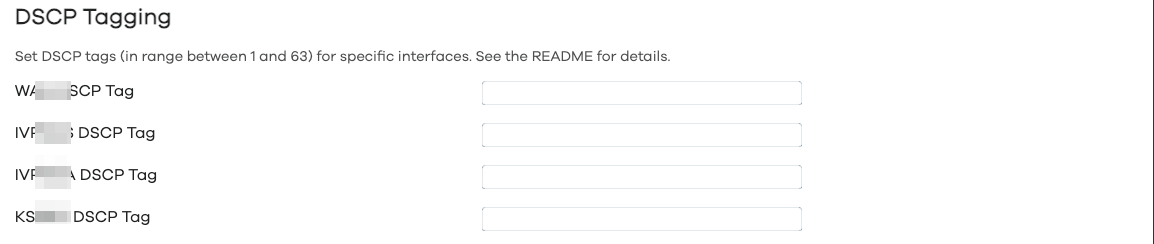
You can also set policies for traffic with a specific DSCP tag. On Windows 10, for example, you can mark traffic from specific apps with DSCP tags (instructions for tagging specific app traffic in Windows 10 can be found [here](http://serverfault.com/questions/769843/cannot-set-dscp-on-windows-10-pro-via-group-policy)).
### DNS Policies
Use of dns policies allows to route dns requests from local devices/IP addresses or MAC addresses thru a specific DNS server. Can either pick first DNS server from a specified interface or use a specific DNS server indicated by its IP address.
### Fw4 Nft File Mode
This mode is the only operating mode in version 1.1.7. Instead of translating each policy into one (or a few) nft commands and running them individually, in this mode, `pbr` creates a single atomic nft file (temporary file located at `/var/run/pbr.nft` and if it contains no errors, the permanent file is installed at `/usr/share/nftables.d/ruleset-post/30-pbr.nft`), containing all the nft commands that `pbr` service needs to set up all the policies, dns policies and process custom user files. This file is then just reloaded on any OpenWrt firewall (`fw4`) reload, without the need to run the `pbr` init script again.
### Custom User Files
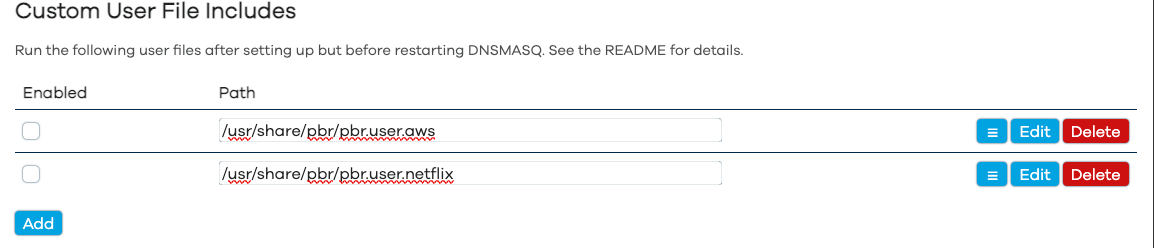
If the custom user file includes are set, the service will load and execute them after setting up routing and the sets and processing policies. This allows, for example, to add large numbers of domains/IP addresses to nft sets without manually adding all of them to the config file.
The following custom user files are provided:
- `/etc/pbr/pbr.user.aws`: provided to pull the Continental US AWS IPv4 addresses into the WAN IPv4 sets that the service sets up.
- `/etc/pbr/pbr.user.netflix`: provided to pull the Continental US Netflix IPv4 addresses into the WAN IPv4 sets that the service sets up.
- `/etc/pbr/pbr.user.wg_server_and_client`: provided to overcome the protocol limitations (see [Local WireGuard Server + WireGuard Client (Scenario 1)](#LocalWireGuardServerWireGuardClientScenario1)), to allow running a WireGuard "server" on your router when a WireGuard "client" is set up as default routing.
If you want to create your own custom user files, please refer to [Processing Custom User Files](#ProcessingCustomUserFiles).
### Strict Enforcement
- Supports strict policy enforcement, even if the policy interface is down -- resulting in network being unreachable for specific policy (enabled by default).
### Use Resolver's Set Support
- If supported on the system, service can be set to utilize resolver's set support. Currently supported resolver's set options are listed below.
#### Use DNSMASQ nft sets Support
- The `pbr` package can be configured to utilize `dnsmasq`'s `nft` `sets` support, which requires the `dnsmasq-full` package with `nft` `sets` support to be installed (see [How to install dnsmasq-full](#Howtoinstalldnsmasq-full)). This significantly improves the start up time because `dnsmasq` resolves the domain names and adds them to the appropriate `nft` `set` in background. `dnsmasq`'s `nft` `set` also automatically adds third-level domains to the `set`: if `domain.com` is added to the policy, this policy will affect all `*.domain.com` subdomains. This also works for top-level domains (TLDs) as well, a policy targeting the `at` TLD for example, will affect all the `*.at` domains.
- Please review the [Footnotes/Known Issues](#FootnotesKnownIssues) section, specifically [#5](#footnote5) and [#7](#footnote7) and any other information in that section relevant to domain-based routing/DNS.
### Customization
- Can be fully configured with `uci` commands or by editing `/etc/config/pbr` file.
- Has a companion package (`luci-app-pbr`) so policies can be configured with Web UI.
### Other Features
- Doesn't stay in memory, creates the routing tables and `iptables` rules/`sets` entries which are automatically updated when supported/monitored interface changes.
- Proudly made in :maple_leaf: Canada :maple_leaf:, using locally-sourced electrons.
## Screenshots (luci-app-pbr)
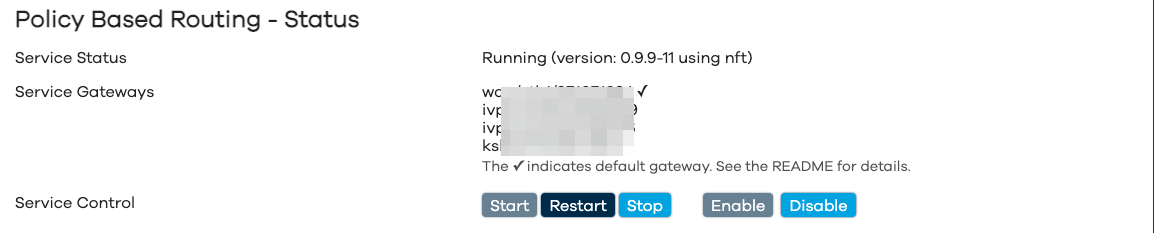
Service Status
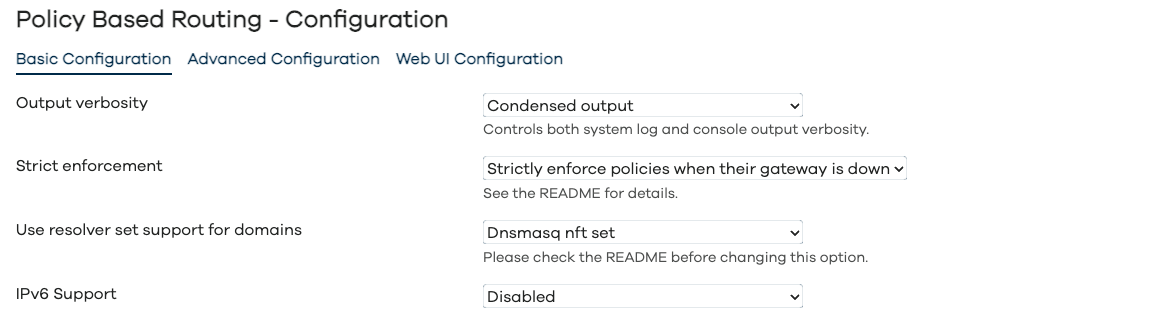
Configuration - Basic Configuration
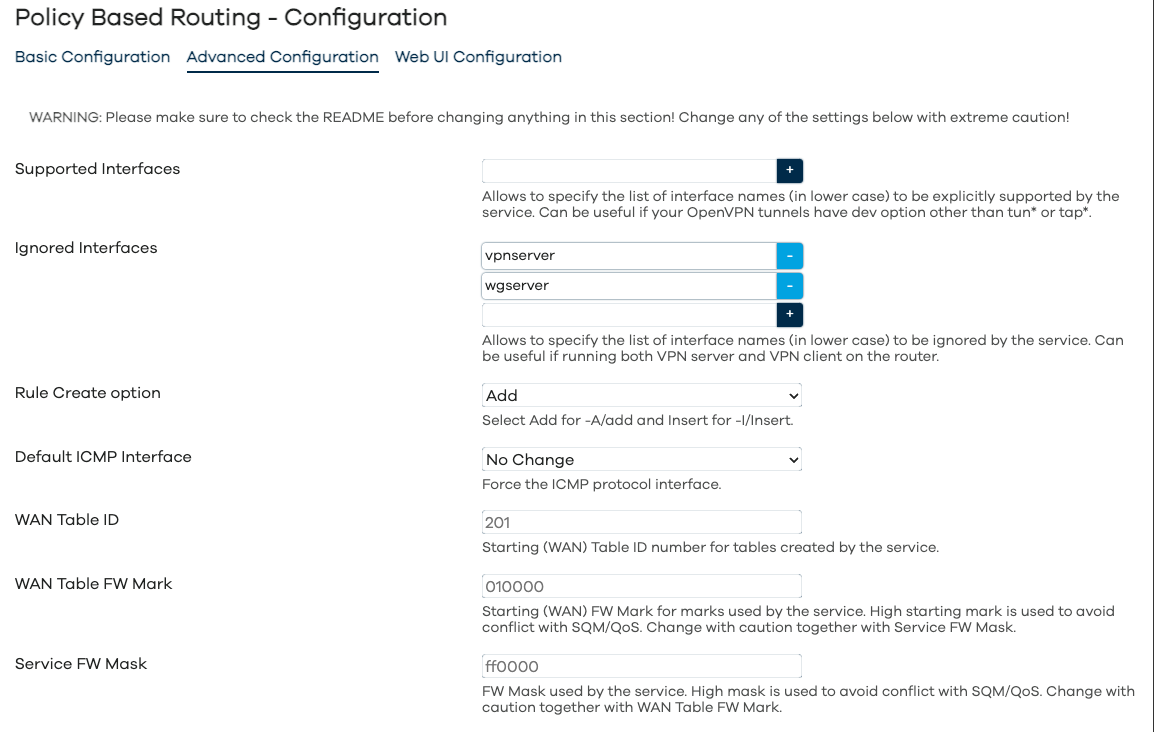
Configuration - Advanced Configuration
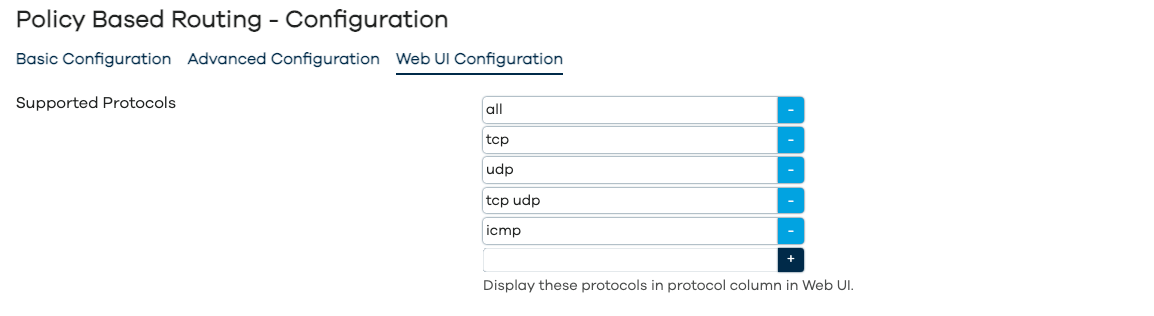
Configuration - WebUI Configuration
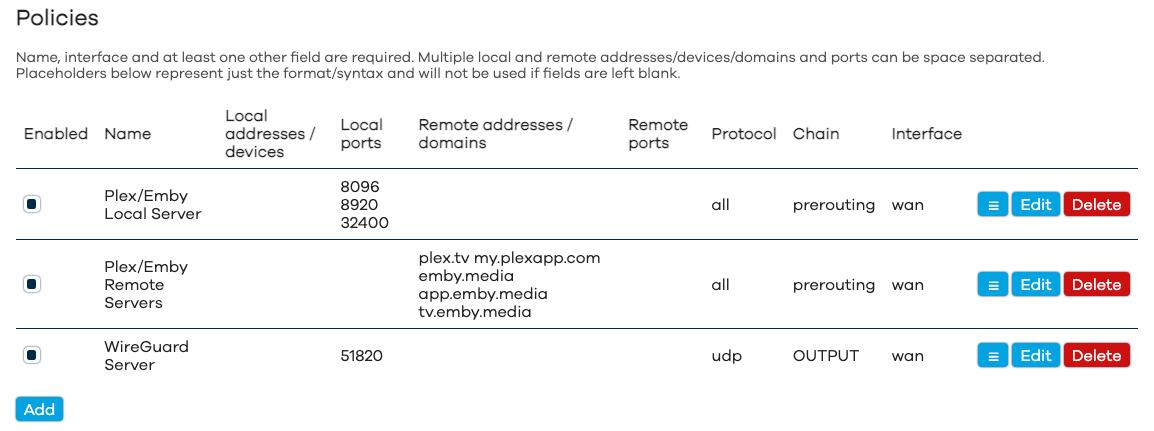
Policies
DSCP Tagging
Custom User File Includes
## How It Works
### How It Works (`nft` mode)
On start, this service creates routing tables for each supported interface (WAN/WAN6 and VPN tunnels) which are used to route specially marked packets. Rules for the policies are created in the service-specific chains set up by the `fw4`-specific `nft` scripts installed with the package. Evaluation of packets happens in these `pbr_*` chains after which the packets are sent for marking to the `pbr_mark_*` chains. Whenever possible, the service also creates named sets for `dest_addr` and `src_addr` entries and anonymous sets for `dest_port` and `src_port`. The service then processes the user-created policies.
### Processing Policies
Each policy can result in a new `nft` rule and possibly an anonymous/in-line or a named `nft` `set` to match `dest_addr` and `src_addr`. Anonymous/in-line sets may be created within `nft` rules for `dest_port` and `src_port`.
#### Processing Policies (`nft` mode)
- Policies with the MAC-addresses, IP addresses, netmasks, local device names or domains will result in a rule targeting named `nft` `sets`.
- Policies with non-empty `dest_port` and `src_port` will be created with anonymous `nft` `sets` within the rule.
- The `dnsmasq` `nftset` entries will be used for domains (if supported and enabled).
### Processing DNS Policies
Each DNS policy can result in either a new `nft` rule and possibly an anonymous/in-line or a named `nft` `set` to match `src_addr`.
If the IP adresses (either legacy IPv4 or IPv6 family or both) are defined in the `dest_dns` setting for the dns policy, than those addresses will be used to explicitly set the resolver address for a specific DNS policy.
If the network interface is defined in the `dest_dns` setting for the dns policy, then the first matching-family (either IPv4 or IPv6) DNS server will be used for a specific DNS policy.
#### Processing DNS Policies (`nft` mode)
- Policies with the MAC-addresses, IP addresses, netmasks or local device names will result in a rule targeting an anonymous/in-line or a named `nft` `sets`.
### Policies Priorities
- The policy priority is the same as its order as listed in Web UI and `/etc/config/pbr`. The higher the policy is in the Web UI and configuration file, the higher its priority is.
- If set, the `DSCP` policies is set up first when creating the interface routing.
- If enabled, it is highly recommended that the policies with `IGNORE` target are at the top of the policies list.
### Processing Custom User Files
If at least one custom user file is enabled, the service will create the following `nft` `sets` and set up the proper routing for them.
#### Processing Custom User Files (`nft` mode)
For each `interface` the service will create `nft` `sets` and routing:
- `pbr_interface_4_dst_ip_user`: for destination/remote IPv4 addresses and IPv4 CIDR netblocks
- `pbr_interface_6_dst_ip_user`: for destination/remote IPv6 addresses and IPv6 CIDR netblocks
- `pbr_interface_4_src_ip_user`: for source/local IPv4 addresses and IPv4 CIDR netblocks
- `pbr_interface_6_src_ip_user`: for source/local IPv6 addresses and IPv6 CIDR netblocks
- `pbr_interface_4_dst_mac_user`: for source/local MAC addresses
- `pbr_interface_6_dst_mac_user`: for source/local MAC addresses
## How To Install
### How To Install - OpenWrt 23.05 and newer
Please make sure that the [requirements](#Requirements) are satisfied and install `pbr` and `luci-app-pbr` from Web UI or connect to your router via ssh and run the following commands:
```sh
opkg update
opkg install pbr luci-app-pbr
```
### How To Install - OpenWrt 22.03 and older
Since this release only supports `nft` riles and `nft` `sets`, it is not recommended to be installed on OpenWrt 22.03 or older. Please use the `pbr-iptables` package version 1.1.6 or earlier on those systems.
### Requirements
Default builds of OpenWrt 23.05 and later are fully compatible with `pbr` and require no additional packages. If you're using a non-standard build, you may have to install the following packages to be installed on your router: `resolveip`, `ip-full` (or a `busybox` built with `ip` support).
To satisfy the requirements, connect to your router via ssh and run the following commands:
```sh
opkg update; opkg install resolveip ip-full
```
### How to install dnsmasq-full
If you want to use `dnsmasq`'s `nft` `sets` support, you will need to install `dnsmasq-full` instead of the `dnsmasq`. To do that, connect to your router via ssh and run the following commands:
```sh
opkg update
opkg install libnettle8 libnetfilter-conntrack3
cd /tmp/ && opkg download dnsmasq-full
opkg remove dnsmasq
opkg install dnsmasq-full --cache /tmp/
rm -f /tmp/dnsmasq-full*.ipk
```
### Unmet dependencies
If you are running a development (trunk/snapshot) build of OpenWrt on your router and your build is outdated (meaning that packages of the same revision/commit hash are no longer available and when you try to satisfy the [requirements](#Requirements) you get errors), please flash either current OpenWrt release image or current development/snapshot image.
## How to use
### Helpful Instructional Videos
If you want to use WebUI to configure `pbr` you may want to review the following YouTube videos:
- [DevOdyssey](https://www.youtube.com/watch?v=FN2qfxNIs2g)
### Service Configuration Settings
As per screenshots above, in the Web UI the `pbr` configuration is split into `Basic`, `Advanced` and `WebUI` settings. The full list of configuration parameters of `pbr.config` section is:
| Web UI Section | Parameter | Type | Default | Description |
| ------------------- | --------------------------------------------------------------- | ----------- | -------------- | ------------------------------------------------------------------------------------------------------------------------------------------------------------------------------------------------------------------------------------------------------------------------------------------------------------------------------------------------------------------------------------------------------------------------------------------------ |
| Basic | enabled | boolean | 0 | Enable/disable the `pbr` service. |
| Basic | verbosity | integer | 2 | Can be set to 0, 1 or 2 to control the console and system log output verbosity of the `pbr` service. |
| Basic | strict_enforcement | boolean | 1 | Enforce policies when their interface is down. See [Strict enforcement](#StrictEnforcement) for more details. |
| Basic | resolver_set | string | dnsmasq.nftset | Configure the use of the resolver's set support for domains. For most policies targeting domains, this must be enabled to guarantee the reliable operation/routing. Enabling it also speeds up service start-up. Currently supported options are `none`, and `dnsmasq.nftset` (see [Use Resolver's Set Support](#UseResolversSetSupport) and [#7](#footnote7) for more details). Make sure the [requirements](#Requirements) are met. |
| | resolver_instance | list | \* | Configure the use of the resolver's set support for specific instances only by setting a list of instance numbers or names. Currently supported for the following `resolver_set` options: `dnsmasq.nftset`. |
| Basic | ipv6_enabled | boolean | 0 | Enable/disable IPv6 support. |
| Advanced | supported_interface | list/string | | Allows to specify the space-separated list of interface names (in lower case) to be explicitly supported by the `pbr` service. Can be useful if your OpenVPN tunnels have dev option other than tun\*. |
| Advanced | ignored_interface | list/string | | Allows to specify the space-separated list of interface names (in lower case) to be ignored by the `pbr` service. Can be useful if running both VPN server and VPN client on the router. |
| Advanced | boot_timeout | number | 30 | Allows to specify the time (in seconds) for `pbr` service to wait for WAN gateway discovery on boot. Can be useful on devices with ADSL modem built in. |
| Advanced | rule_create_option | add/insert | add | Allows to specify the parameter for rules: `add` for `-A` in `iptables` and `add` in `nft` and `insert` for `-I` in `iptables` and `insert` for `nft`. Add is generally speaking more compatible with other packages/firewall rules. Recommended to change to `insert` only to enable compatibility with the `mwan3` package on OpenWrt 21.02 and earlier. |
| Advanced | icmp_interface | string | | Set the default ICMP protocol interface (interface name in lower case). Use with caution. |
| Hidden | wan_ip_rules_priority | integer | 30000 | Starting (WAN) ip rules priority used by the `pbr` service. High starting priority is used to avoid conflict with other services, this can be changed by user. |
| Advanced | wan_mark | hexadecimal | 010000 | Starting (WAN) fw mark for marks used by the `pbr` service. High starting mark is used to avoid conflict with SQM/QoS, this can be changed by user. Change with caution together with `fw_mask`. |
| Advanced | fw_mask | hexadecimal | ff0000 | FW Mask used by the `pbr` service. High mask is used to avoid conflict with SQM/QoS, this can be changed by user. Change with caution together with `wan_mark`. |
| Hidden/Experimental | secure_reload | boolean | 0 | Deprecated in 1.1.7 due to implementation of atomic nft file (fw4 nft file) mode. |
| Web UI | webui_show_ignore_target | boolean | 0 | When enabled, show `ignore` in the list of interfaces. |
| Web UI | webui_supported_protocol | list | 0 | List of protocols to display in the `Protocol` column for policies. |
| | wan_dscp | integer | | Allows use of [DSCP-tag based policies](#DSCPTag-BasedPolicies) for WAN interface. |
| | {interface_name}\_dscp | integer | | Allows use of [DSCP-tag based policies](#DSCPTag-BasedPolicies) for a VPN interface. |
| Hidden | procd_boot_delay | integer | 0 | Time (in seconds) to sleep on boot before trying to start `pbr` service. |
| Hidden | procd_reload_delay | integer | 0 | Time (in seconds) for PROCD_RELOAD_DELAY parameter. |
| Hidden | procd_lan_interface | list | br-lan | Allows you to override the default `br-lan` interface name used for the LAN interface detection. |
| Hidden | procd_wan_ignore_status | boolean | | Ignore `wan` interface status (do not wait for the interface to be up) when starting up. |
| Hidden | procd_wan_interface | | | Override `wan` interface name with this interface. Newer versions do not attempt to auto-detect WAN interface name and setting this from CLI may be required. |
| Hidden | procd_wan6_interface | | | Override `wan6` interface name with this interface. |
| Hidden | nft_rule_counter | boolean | 0 | Use `counter` option when creating all `nft` rules. See [nftables wiki](https://wiki.nftables.org/wiki-nftables/index.php/Sets) for details. |
| Hidden | nft_set_auto_merge | boolean | 1 | Use `auto-merge` option when creating all `nft` sets. See [nftables wiki](https://wiki.nftables.org/wiki-nftables/index.php/Sets) for details. |
| Hidden | nft_set_counter | boolean | 0 | Use `counter` option when creating all `nft` sets. See [nftables wiki](https://wiki.nftables.org/wiki-nftables/index.php/Sets) for details. |
| Hidden | nft_set_flags_interval | boolean | 1 | Use `flags interval` option when creating all `nft` sets. See [nftables wiki](https://wiki.nftables.org/wiki-nftables/index.php/Sets) for details. |
| Hidden | nft_set_flags_timeout | boolean | 0 | Use `flags timeout` option when creating all `nft` sets. See [nftables wiki](https://wiki.nftables.org/wiki-nftables/index.php/Sets) for details. |
| Hidden | nft_set_gc_interval | string | | Use `gc-interval` option when creating all `nft` sets. See [nftables wiki](https://wiki.nftables.org/wiki-nftables/index.php/Sets) for details. |
| Hidden | nft_set_policy | string | performance | Set `policy` option when creating all `nft` sets. See [nftables wiki](https://wiki.nftables.org/wiki-nftables/index.php/Sets) for details. |
| Hidden | nft_set_timeout | string | | Use `timeout` option when creating all `nft` sets. See [nftables wiki](https://wiki.nftables.org/wiki-nftables/index.php/Sets) for details. |
#### Default Settings
Default configuration has service disabled (use Web UI to enable/start service or run `uci set pbr.config.enabled=1; uci commit pbr;`).
#### Policy Options
Each policy may have a combination of the options below, the `name` and `interface` options are required.
The `src_addr`, `src_port`, `dest_addr` and `dest_port` options supports parameter negation, for example if you want to **exclude** remote port 80 from the policy, set `dest_port` to `"!80"` (notice lack of space between `!` and parameter).
| Option | Default | Description |
| ------------- | ---------- | -------------------------------------------------------------------------------------------------------------------------------------------------------------------------------------------------------------------------------------------------------------------------------------------------------------------------------------------------------------------------------------------------------------------------------------------------------------------------------- |
| **name** | | Policy name, it **must** be set. |
| enabled | 1 | Enable/disable policy. To display the `Enable` checkbox column for policies in the WebUI, make sure to select `Enabled` for `Show Enable Column` in the `Web UI` tab. |
| **interface** | | Policy interface, it **must** be set. |
| src_addr | | List of space-separated local/source IP addresses, CIDRs, hostnames or mac addresses (colon-separated). You can also specify a local physical device (like a specially created wlan) prepended by an `@` symbol. Versions 1.1.2 and later allow using URLs to list of addresses. If `curl` is installed you can use the `file://` schema, otherwise you can use `ftp://`, `http://` and `https://` schemas (which are obviously not compatible with the `secure_reload` option). |
| src_port | | List of space-separated local/source ports or port-ranges. |
| dest_addr | | List of space-separated remote/target IP addresses, CIDRs or hostnames/domain names. Versions 1.1.2 and later allow using URLs to list of addresses. If `curl` is installed you can use the `file://` schema, otherwise you can use `ftp://`, `http://` and `https://` schemas. This is obviously not compatible with the `secure_reload` option. |
| dest_port | | List of space-separated remote/target ports or port-ranges. |
| proto | auto | Policy protocol, can be any valid protocol from `/etc/protocols` for CLI/uci or can be selected from the values set in `webui_supported_protocol`. |
| chain | prerouting | Policy chain, can be either `forward`, `input`, `prerouting`, `postrouting` or `output`. This setting is case-sensitive. |
#### DNS Policy Options
Each policy may have a combination of the options below, the `name`, the `src_addr` and `dest_dns` options are required.
| Option | Default | Description |
| ------------ | ------- | ------------------------------------------------------------------------------------------------------------------------------------------------------------------------------------------------------------------------------------------------------------------------------------------------------------------------------------------------------------------------------------------------------------------------------------------------------- |
| **name** | | DNS Policy name, it **must** be set. |
| enabled | 1 | Enable/disable DNS policy. To display the `Enable` checkbox column for policies in the WebUI, make sure to select `Enabled` for `Show Enable Column` in the `Web UI` tab. |
| **src_addr** | | List of space-separated local/source IP addresses, CIDRs, hostnames or mac addresses (colon-separated). You can also specify a local physical device (like a specially created wlan) prepended by an `@` symbol. You can use URLs to list of addresses. If `curl` is installed you can use the `file://` schema, otherwise you can use `ftp://`, `http://` and `https://` schemas (which are obviously not compatible with the `secure_reload` option). |
| **dest_dns** | | List of space-separated IPv4/IPv6 addresses for resolvers used for the DNS policy or a network interface, which DNS server(s) will be used for the DNS policy. |
#### Custom User Files Include Options
| Option | Default | Description |
| -------- | ------- | --------------------------------------------------------------------------- |
| **path** | | Path to a custom user file (in a form of shell script), it **must** be set. |
| enabled | 1 | Enable/disable setting. |
### Example Policies
#### Single IP, IP Range, Local Machine, Local MAC Address
The following policies route traffic from a single IP address, a range of IP addresses, a local machine (requires definition as DHCP host record in DHCP config), a MAC-address of a local device and finally all of the above via WAN.
```text
config policy
option name 'Local IP'
option interface 'wan'
option src_addr '192.168.1.70'
config policy
option name 'Local Subnet'
option interface 'wan'
option src_addr '192.168.1.81/29'
config policy
option name 'Local Machine'
option interface 'wan'
option src_addr 'dell-ubuntu'
config policy
option name 'Local MAC Address'
option interface 'wan'
option src_addr '00:0F:EA:91:04:08'
config policy
option name 'Local Devices'
option interface 'wan'
option src_addr '192.168.1.70 192.168.1.81/29 dell-ubuntu 00:0F:EA:91:04:08'
```
#### SIP Port
The following policy routes standard SIP port traffic via WAN for both TCP and UDP protocols.
```text
config policy
option name 'SIP Ports'
option interface 'wan'
option dest_port '5060'
option proto 'tcp udp'
```
#### Plex Media Server
The following policies route Plex Media Server traffic via WAN. Please note, you'd still need to open the port in the firewall either manually or with the UPnP.
```text
config policy
option name 'Plex Local Server'
option interface 'wan'
option src_port '32400'
config policy
option name 'Plex Remote Servers'
option interface 'wan'
option dest_addr 'plex.tv my.plexapp.com'
```
#### Emby Media Server
The following policy route Emby traffic via WAN. Please note, you'd still need to open the port in the firewall either manually or with the UPnP.
```text
config policy
option name 'Emby Local Server'
option interface 'wan'
option src_port '8096 8920'
config policy
option name 'Emby Remote Servers'
option interface 'wan'
option dest_addr 'emby.media app.emby.media tv.emby.media'
```
#### Ignore Target
The service allows you to set an interface for a specific policy to `ignore` to skip further processing of matched traffic. This option needs to be explicitly enabled for use in WebUI, check [Service Configuration Settings](#ServiceConfigurationSettings) for details. Some use cases are listed below.
##### Ignore Requests
The following policy allows you to skip processing some requests (like traffic to an OpenVPN or WireGuard server running on the router):
```text
config pbr 'config'
...
option webui_show_ignore_target '1'
config policy
option name 'Ignore Local Requests by Destination'
option interface 'ignore'
option dest_addr '192.168.200.0/24'
```
Please note, you need to enable `Show Ignore Target` option for the WebUI to list`ignore\` in the list of gateways.
It's a good idea to keep the policies targeting `ignore` interface at the top of the config file/list of policies displayed in WebUI to make sure they are processed first.
#### Basic OpenVPN Client Config
There are multiple guides online on how to configure the OpenVPN client on OpenWrt "the easy way", and they usually result either in a kill-switch configuration or configuration where the OpenVPN tunnel cannot be properly (and separately from WAN) routed, either way, incompatible with the VPN Policy-Based Routing.
Below is the sample OpenVPN client configuration for OpenWrt which is guaranteed to work. If you have already deviated from the instructions below (ie: made any changes to any of the `wan` or `lan` configurations in either `/etc/config/network` or `/etc/config/firewall`), you will need to start from scratch with a fresh OpenWrt install.
Relevant part of `/etc/config/pbr`:
```text
config pbr 'config'
list supported_interface 'vpnclient'
...
```
The recommended network/firewall settings are below.
Relevant part of `/etc/config/network` (**DO NOT** modify default OpenWrt network settings for either `wan` or `lan`):
```text
config interface 'vpnclient'
option proto 'none'
option device 'ovpnc0'
```
Relevant part of `/etc/config/firewall`:
```text
config zone
option name 'wan'
list network 'wan'
list network 'vpnclient'
...
```
Relevant part of `/etc/config/openvpn` (configure the rest of the client connection for your specifics by either referring to an existing `.ovpn` file or thru the OpenWrt uci settings):
```text
config openvpn 'vpnclient'
option enabled '1'
option client '1'
option dev_type 'tun'
option dev 'ovpnc0'
...
```
#### Multiple OpenVPN Clients
If you use multiple OpenVPN clients on your router, the order in which their devices are named (tun0, tun1, etc) is not guaranteed by OpenWrt. The following settings are recommended in this case.
For `/etc/config/network`:
```text
config interface 'vpnclient0'
option proto 'none'
option device 'ovpnc0'
config interface 'vpnclient1'
option proto 'none'
option device 'ovpnc1'
```
For `/etc/config/openvpn`:
```text
config openvpn 'vpnclient0'
option client '1'
option dev_type 'tun'
option dev 'ovpnc0'
...
config openvpn 'vpnclient1'
option client '1'
option dev_type 'tun'
option dev 'ovpnc1'
...
```
For `/etc/config/pbr`:
```text
config pbr 'config'
list supported_interface 'vpnclient0 vpnclient1'
...
```
#### Local OpenVPN Server + OpenVPN Client (Scenario 1)
If the OpenVPN client on your router is used as default routing (for the whole Internet), make sure your settings are as following (three dots on the line imply other options can be listed in the section as well).
Relevant part of `/etc/config/pbr`:
```text
config pbr 'config'
list ignored_interface 'vpnserver'
...
config policy
option name 'OpenVPN Server'
option interface 'wan'
option proto 'tcp'
option src_port '1194'
option chain 'output'
```
The network/firewall/openvpn settings are below.
Relevant part of `/etc/config/network` (**DO NOT** modify default OpenWrt network settings for either `wan` or `lan`):
```text
config interface 'vpnclient'
option proto 'none'
option device 'ovpnc0'
config interface 'vpnserver'
option proto 'none'
option device 'ovpns0'
option auto '1'
```
Relevant part of `/etc/config/firewall`:
```text
config zone
option name 'lan'
list network 'lan'
list network 'vpnserver'
...
config zone
option name 'wan'
list network 'wan'
list network 'vpnclient'
...
config rule
option name 'Allow-OpenVPN-Inbound'
option target 'ACCEPT'
option src '*'
option proto 'tcp'
option dest_port '1194'
```
Relevant part of `/etc/config/openvpn`:
```text
config openvpn 'vpnclient'
option client '1'
option dev_type 'tun'
option dev 'ovpnc0'
option proto 'udp'
option remote 'some.domain.com 1197' # DO NOT USE PORT 1194 for VPN Client
...
config openvpn 'vpnserver'
option port '1194'
option proto 'tcp'
option server '192.168.200.0 255.255.255.0'
...
```
#### Local OpenVPN Server + OpenVPN Client (Scenario 2)
If the OpenVPN client is **not** used as default routing and you create policies to selectively use the OpenVPN client, make sure your settings are as following (three dots on the line imply other options can be listed in the section as well). Make sure that the policy mentioned below is at the top of your policies list.
Relevant part of `/etc/config/pbr`:
```text
config pbr 'config'
list ignored_interface 'vpnserver'
...
config policy
option name 'Ignore Local Traffic'
option interface 'ignore'
option dest_addr '192.168.200.0/24'
...
```
The network/firewall/openvpn settings are below.
Relevant part of `/etc/config/network` (**DO NOT** modify default OpenWrt network settings for either `wan` or `lan`):
```text
config interface 'vpnclient'
option proto 'none'
option device 'ovpnc0'
config interface 'vpnserver'
option proto 'none'
option device 'ovpns0'
option auto '1'
```
Relevant part of `/etc/config/firewall`:
```text
config zone
option name 'lan'
list network 'lan'
list network 'vpnserver'
...
config zone
option name 'wan'
list network 'wan'
list network 'vpnclient'
...
config rule
option name 'Allow-OpenVPN-Inbound'
option target 'ACCEPT'
option src '*'
option proto 'tcp'
option dest_port '1194'
```
Relevant part of `/etc/config/openvpn`:
```text
config openvpn 'vpnclient'
option client '1'
option dev_type 'tun'
option dev 'ovpnc0'
option proto 'udp'
option remote 'some.domain.com 1197' # DO NOT USE PORT 1194 for VPN Client
list pull_filter 'ignore "redirect-gateway"' # for OpenVPN 2.4 and later
option route_nopull '1' # for OpenVPN earlier than 2.4
...
config openvpn 'vpnserver'
option port '1194'
option proto 'tcp'
option server '192.168.200.0 255.255.255.0'
...
```
#### Local WireGuard Server + WireGuard Client (Scenario 1)
Yes, I'm aware that technically there are no clients nor servers in WireGuard, only peers in terms of topology. When you configure WireGuard, however, one of the instances will have the `listen_port`, so we'd call that one a server and if it doesn't have the `listen_port`, then it's a client. This terminology is similar to the OpenVPN Server + Client setups.
If the WireGuard tunnel on your router is used as default routing (for the whole Internet), sadly no `pbr` rule will allow it to intercept and properly route the `UDP` traffic of the WireGuard server, please either use the OpenVPN server and configure it to use `TCP` protocol or use Scenario 2 below.
#### Local WireGuard Server + WireGuard Client (Scenario 2)
Yes, I'm aware that technically there are no clients nor servers in WireGuard, only peers in terms of topology, When you configure WireGuard, however, one of the instances will have the `listen_port`, so we'd call that one a server and if it doesn't have the `listen_port`, then it's a client. This terminology is similar to the OpenVPN Server + Client setups.
If the WireGuard client is **not** used as default routing and you create policies to selectively use the WireGuard client, make sure your settings are as following (three dots on the line imply other options can be listed in the section as well). Make sure that the policy mentioned below is at the top of your policies list.
Relevant part of `/etc/config/pbr`:
```text
config pbr 'config'
list ignored_interface 'wgserver'
...
config policy
option name 'Ignore Local Traffic'
option interface 'ignore'
option dest_addr '192.168.200.0/24'
...
```
The recommended network/firewall settings are below.
Relevant part of `/etc/config/network` (**DO NOT** modify default OpenWrt network settings for either `wan` or `lan`):
```text
config interface 'wgclient'
option proto 'wireguard'
...
config wireguard_wgclient
list allowed_ips '0.0.0.0/0'
list allowed_ips '::0/0'
option endpoint_port '51820'
...
config interface 'wgserver'
option proto 'wireguard'
option listen_port '61820'
list addresses '192.168.200.1/24'
...
config wireguard_wgserver
list allowed_ips '192.168.200.2/32'
option route_allowed_ips '1'
...
```
Relevant part of `/etc/config/firewall`:
```text
config zone
option name 'lan'
list network 'lan'
list network 'wgserver'
...
config zone
option name 'wan'
list network 'wan'
list network 'wgclient'
...
config rule
option name 'Allow-WG-Inbound'
option target 'ACCEPT'
option src '*'
option proto 'udp'
option dest_port '61820'
```
#### Local WireGuard Server + Another VPN Client (Scenario 1)
Yes, I'm aware that technically there are no clients nor servers in WireGuard, only peers in terms of topology, When you configure WireGuard, however, one of the instances will have the `listen_port`, so we'd call that one a server and if it doesn't have the `listen_port`, then it's a client. This terminology is similar to the OpenVPN Server + Client setups.
If another VPN client is used as default routing (for the whole Internet), sadly no `pbr` rule will allow it to intercept and properly route the `UDP` traffic of WireGuard server, please either use the OpenVPN server and configure it to use `TCP` protocol or use the Scenario 2 below.
#### Local WireGuard Server + Another VPN Client (Scenario 2)
Yes, I'm aware that technically there are no clients nor servers in WireGuard, only peers in terms of topology, When you configure WireGuard, however, one of the instances will have the `listen_port`, so we'd call that one a server and if it doesn't have the `listen_port`, then it's a client. This terminology is similar to the OpenVPN Server + Client setups.
If another VPN client is **not** used as default routing and you create policies to selectively use the VPN client, make sure your settings are as following (three dots on the line imply other options can be listed in the section as well). Make sure that the policy mentioned below is at the top of your policies list.
Relevant part of `/etc/config/pbr`:
```text
config pbr 'config'
list ignored_interface 'wgserver'
...
config policy
option name 'Ignore Local Traffic'
option interface 'ignore'
option dest_addr '192.168.200.0/24'
...
```
#### Netflix Domains
The following policy should route US Netflix traffic via WAN. For capturing international Netflix domain names, you can refer to the getdomainnames.sh-specific instructions on [GitHub](https://github.com/Xentrk/netflix-vpn-bypass/blob/master/README.md#ipset_netflix_domainssh)/[jsDelivr](https://cdn.jsdelivr.net/gh/Xentrk/netflix-vpn-bypass/README.md#ipset_netflix_domainssh) and don't forget to adjust them for OpenWrt. This may not work if Netflix changes things. For more reliable US Netflix routing you may want to consider also using [custom user files](#CustomUserFiles).
```text
config policy
option name 'Netflix Domains'
option interface 'wan'
option dest_addr 'amazonaws.com netflix.com nflxext.com nflximg.net nflxso.net nflxvideo.net dvd.netflix.com'
```
#### Example Custom User Files Includes
```text
config include
option path '/etc/pbr/pbr.user.aws'
option enabled '0'
config include
option path '/etc/pbr/pbr.user.netflix'
option enabled '0'
```
## Footnotes/Known Issues
1. See [note about multiple OpenVPN clients](#MultipleOpenVPNClients).
2. If your `OpenVPN` interface has the device name different from tun\*, is not up and is not explicitly listed in `supported_interface` option, it may not be available in the policies `Interface` drop-down within WebUI.
3. If your default routing is set to the VPN tunnel, then the true WAN interface cannot be discovered using OpenWrt built-in functions, so service will assume your network interface ending with or starting with `wan` is the true WAN interface.
4. The service does **NOT** support the "killswitch" router mode (where there is no firewall forwarding from `lan` interface to `wan` interface, so if you stop the VPN tunnel, you have no Internet connection). For proper operation, leave all the default OpenWrt `network` and `firewall` settings for `lan` and `wan` intact.
5. When using the `dnsmasq.nftset` option, please make sure to flush the DNS cache of the local devices, otherwise domain policies may not work until you do. If you're not sure how to flush the DNS cache (or if the device/OS doesn't offer an option to flush its DNS cache), reboot your local devices when starting to use the service and/or when connecting data-capable device to your WiFi.
6. When using the policies targeting physical devices, you may need to make sure you have the following packages installed: `kmod-br-netfilter`, `kmod-ipt-physdev` and `iptables-mod-physdev`. Also, if your physical device is a part of the bridge, you may have to set `net.bridge.bridge-nf-call-iptables` to `1` in your `/etc/sysctl.conf`.
7. If you're using domain names in the `dest_addr` option of the policy, it is recommended to use `dnsmasq.nftset` options for `resolver_set`. Otherwise, the domain name will be resolved when the service starts up and the resolved IP address(es) will be added to an apropriate set or an `iptables` or `nft` rule. Resolving a number of domains on start is a time consuming operation, while using the `dnsmasq.nftset` options allows transparent and fast addition of the correct domain IP addresses to the apropriate set on DNS request or when resolver is idle.
8. When service is started, it subscribes to the supported interfaces updates thru the PROCD. While I was never able to reproduce the issue, some customers report that this method doesn't always work in which case you may want to [set up iface hotplug script](#AWordAboutInterfaceHotplugScript) to reload service when the relevant interface(s) are updated.
## FAQ
You may find some useful information below.
### A Word About Default Routing
Service does not alter the default routing. Depending on your VPN tunnel settings (and settings of the VPN server you are connecting to), the default routing might be set to go via WAN or via VPN tunnel. This service affects only routing of the traffic matching the policies. If you want to override default routing, follow the instructions below.
#### OpenVPN tunnel configured via uci (/etc/config/openvpn)
To unset an OpenVPN tunnel as default route, set the following to the appropriate section of your `/etc/config/openvpn`:
- For OpenVPN 2.4 and newer client config:
```text
list pull_filter 'ignore "redirect-gateway"'
```
- For OpenVPN 2.3 and older client config:
```text
option route_nopull '1'
```
- For your WireGuard (client) config:
```text
option route_allowed_ips '0'
```
#### OpenVPN tunnel configured with .ovpn file
To unset an OpenVPN tunnel as default route, set the following to the appropriate section of your `.ovpn` file:
- For OpenVPN 2.4 and newer client `.ovpn` file:
```text
pull-filter ignore "redirect-gateway"
```
- For OpenVPN 2.3 and older client `.ovpn` file:
```text
route-nopull
```
#### WireGuard tunnel
To unset a WireGuard tunnel as default route, set the following to the appropriate section of your `/etc/config/network`:
- For your WireGuard (client) config:
```text
option route_allowed_ips '0'
```
- Routing WireGuard traffic may require setting `net.ipv4.conf.wg0.rp_filter = 2` in `/etc/sysctl.conf`. Please refer to [issue #41](https://github.com/stangri/source.openwrt.melmac.net/issues/41) for more details.
### A Word About Cloudflare's 1.1.1.1 App
Cloudflare has released an app for [iOS](https://itunes.apple.com/us/app/1-1-1-1-faster-internet/id1423538627) and [Android](https://play.google.com/store/apps/details?id=com.cloudflare.onedotonedotonedotone), which can also be configured to route traffic thru their own VPN tunnel (WARP+).
If you use Cloudflare's VPN tunnel (WARP+), none of the policies you set up with the VPN Policy Routing will take effect on your mobile device. Disable WARP+ for your home WiFi to keep VPN Policy Routing affecting your mobile device.
If you just use the private DNS queries (WARP), [A Word About DNS-over-HTTPS](#AWordAboutDNS-over-HTTPS) applies. You can also disable WARP for your home WiFi to keep VPN Policy Routing affecting your mobile device.
### A Word About DNS-over-HTTPS
Some browsers, like [Mozilla Firefox](https://support.mozilla.org/en-US/kb/firefox-dns-over-https#w_about-dns-over-https) or [Google Chrome/Chromium](https://blog.chromium.org/2019/09/experimenting-with-same-provider-dns.html) have [DNS-over-HTTPS proxy](https://en.wikipedia.org/wiki/DNS_over_HTTPS) built-in. Their requests to web-sites listed in policies cannot be properly routed if the `resolver_set` is set to `dnsmasq.nftset`. To fix this, you can try either of the following:
1. Disable the DNS-over-HTTPS support in your browser and use the OpenWrt's `net/https-dns-proxy` (README on [GitHub](https://docs.openwrt.melmac.net/https-dns-proxy)/[jsDelivr](https://cdn.jsdelivr.net/gh/stangri/docs.openwrt.melmac.net/https-dns-proxy/)) package with optional `luci-app-https-dns-proxy` WebUI/luci app. You can then continue to use `dnsmasq.nftset` setting for the `resolver_set` in Policy-Based Routing.
2. Continue using DNS-over-HTTPS in your browser (which, by the way, also limits your options for router-level AdBlocking as described in `net/adblock-fast` README on [GitHub](https://docs.openwrt.melmac.net/adblock-fast/#dns-resolution-option)/[jsDelivr](https://cdn.jsdelivr.net/gh/stangri/docs.openwrt.melmac.net/adblock-fast/README.md#dns-resolution-option)), you than would either have to switch the `resolver_set` to `none`. Please note, you will lose all the benefits of the [Resolver Set Support](#UseResolversSetSupport) option.
### A Word About HTTP/3 (QUIC)
If you want to target traffic using HTTP/3 protocol, you can use the `AUTO` as the protocol (the policy will be either protocol-agnostic or `TCP/UDP`) or explicitly use `UDP` as a protocol.
### A Word About IPv6 Routing
Due to the nature of IPv6, it's not supposed to be routed as IPv4 is with this package. A fellow user has graciously contributed a [gist detailing their experience to get IPv6 routing working](https://gist.github.com/aliicex/3bd8413029b1f728c1f00bc1ac0e98b4).
### A Word About Routing Netflix/Amazon Prime/Hulu Traffic
There are two following scenarios with VPN connections and Netflix/Amazon Prime/Hulu traffic.
#### Routing Netflix/Amazon Prime/Hulu Traffic via VPN Tunnel
If you live in a country where Netflix/Amazon Prime/Hulu are not available and want to circumvent geo-fencing, this package can't help you. The Netflix/Amazon Prime/Hulu do a great job detecting VPN usage when accessing their services and circumventing geographical restrictions is not only dubiously legal, it's also technically very challenging.
#### Routing Netflix/Amazon Prime/Hulu Traffic via WAN
If you live in a country where Netflix/Amazon Prime/Hulu are available, you obviously do NOT want to use VPN tunnel for their traffic.
If the VPN tunnel is not used as a default gateway on your router, you should not have a problem accessing Netflix/Amazon Prime/Hulu (just make sure that your DNS requests are not routed via VPN tunnel either).
If the VPN tunnel is used as a default gateway, either:
- send ALL traffic from your multimedia devices (by using their IP addresses or device names in the `src_addr` option in config file or Local addresses /devices field in WebUI) accessing Netflix/Amazon Prime/Hulu to WAN; this is the more reliable and recommended method.
- use the [Netflix/AWS custom user files](#custom-user-files) in combination with the [Netflix](#NetflixDomains)/Amazon Prime/Hulu domains and `dnsmasq.nftset` option to route traffic to Netflix/Amazon via WAN; this is definitely less reliable method and may not work in all regions.
Either way make sure that your DNS requests are not routed via VPN Tunnel!
### A Word About Interface Hotplug Script
Sometimes[#8](#footnote8) the service doesn't get reloaded when supported interfaces go up or down. This can be an annoying experience since the service may start before all supported VPN connections are up and then not get updated when the VPN connections get established. In that case, run the following command from CLI to create the interface hotplug script to cause the service to be reloaded in interface updates:
```sh
mkdir -p /etc/hotplug.d/iface/
cat << 'EOF' > /etc/hotplug.d/iface/70-pbr
#!/bin/sh
logger -t pbr "Reloading $INTERFACE due to $ACTION of $INTERFACE ($DEVICE)"
/etc/init.d/pbr reload_interface "$INTERFACE"
EOF
```
## Getting Help
General discussion of this package is happening at the [OpenWrt forum thread](https://forum.openwrt.org/t/policy-based-routing-pbr-package-discussion/140639).
If things are not working as intended, please first set verbosity to 2 by running these commands
```sh
uci set pbr.config.verbosity='2'; uci commit pbr;
```
and then run the following commands and include their output (you can and should mask sensitive information) in your post:
```sh
ubus call system board
uci export dhcp
uci export firewall
uci export network
uci export pbr
/etc/init.d/pbr status
/etc/init.d/pbr reload
/etc/init.d/pbr status
```
If you want to encrypt the files before sharing them, you can do so with the commands below (you'll need to have OpenSSL installed on your router):
```ssh
openssl rand 214 > /tmp/keyfile.key
wget -O /tmp/dev.melmac.net.pem https://dev.melmac.net/repo/dev.melmac.net.pem
openssl pkeyutl -encrypt -inkey /tmp/dev.melmac.net.pem -pubin -in /tmp/keyfile.key -out /tmp/keyfile.enc
openssl enc -in /etc/config/dhcp -out /tmp/dhcp.enc -e -aes256 -pbkdf2 -kfile /tmp/keyfile.key
openssl enc -in /etc/config/firewall -out /tmp/firewall.enc -e -aes256 -pbkdf2 -kfile /tmp/keyfile.key
openssl enc -in /etc/config/network -out /tmp/network.enc -e -aes256 -pbkdf2 -kfile /tmp/keyfile.key
openssl enc -in /etc/config/pbr -out /tmp/pbr.enc -e -aes256 -pbkdf2 -kfile /tmp/keyfile.key
```
Then share the following files: `/tmp/keyfile.enc`, `/tmp/dhcp.enc`, `/tmp/firewall.enc`, `/tmp/network.enc`, `/tmp/pbr.enc`.
### First Troubleshooting Step
If your router is set to use [default routing via VPN tunnel](#AWordAboutDefaultRouting) and the WAN-targeting policies do not work, you need to stop your VPN tunnel first and ensure that you still have an Internet connection. If your router is set up to use default routing via a VPN tunnel and when you stop the VPN tunnel you have no Internet connection, this package can't help you. You first need to make sure that you do have an Internet connection when the VPN tunnel is stopped.
## Donate
If you find `pbr` useful, please consider donating to support development of this project. I've been developing it in my spare time without any external funding, outside of my GitHub sponsors. You can donate by:
- Sponsoring me on GitHub with [monthly donation](https://github.com/sponsors/stangri?frequency=recurring&sponsor=stangri).
- Sponsoring me on GitHub with [one-time donation](https://github.com/sponsors/stangri?frequency=one-time&sponsor=stangri).
- Sending a donation [thru PayPal](https://paypal.me/stan).
## Thanks
I'd like to thank everyone who helped by providing testing and feedback on this service. Without contributions from [@hnyman](https://github.com/hnyman), [@dibdot](https://github.com/dibdot), [@danrl](https://github.com/danrl), [@tohojo](https://github.com/tohojo), [@cybrnook](https://github.com/cybrnook), [@nidstigator](https://github.com/nidstigator), [@AndreBL](https://github.com/AndreBL), [@dz0ny](https://github.com/dz0ny), [@tew42](https://github.com/tew42), [bogorad](https://forum.openwrt.org/u/bogorad), rigorous testing/bugreporting by [@dziny](https://github.com/dziny), [@bluenote73](https://github.com/bluenote73), [@buckaroo](https://github.com/pgera), [@Alexander-r](https://github.com/Alexander-r), [@n8v8R](https://github.com/n8v8R), [psherman](https://forum.openwrt.org/u/psherman), [@Vale-max](https://github.com/Vale-max), [@aliicex](https://github.com/aliicex), [dscpl](https://forum.openwrt.org/u/dscpl), [@egc112](https://github.com/egc112), [pesa1234](https://forum.openwrt.org/u/pesa1234) and multiple contributions from [@dl12345](https://github.com/dl12345) and [trendy](https://forum.openwrt.org/u/trendy) and feedback from other OpenWrt users it wouldn't have been possible. WireGuard/IPv6 support is courtesy of [IVPN](https://www.ivpn.net/).