







English · 简体中文

711Proxy 提供可靠的住宅代理,适用于网页抓取、用户名查询及公开数据采集。覆盖 200+ 个国家超 1 亿住宅 IP · 高成功率 · 稳定快速。
特别优惠:免费试用!轮换住宅代理低至 $0.55/GB。无并发限制的不限量住宅代理低至 $15/小时。

9Proxy 提供住宅代理,低至 $0.018/IP 或 $0.68/GB。覆盖 90+ 国家超 2000 万 IP,支持长效或轮换会话,可通过桌面或移动端应用管理。
## 目录 - [一分钟上手](#one-minute) - [核心特性](#main-features) - [演示](#demo) - [安装](#installation) - [使用](#usage) - [参与贡献](#contributing) - [商业使用](#commercial-use) - [关于](#about) ## 一分钟上手 请先确认本机的 Python 版本不低于 3.10。 ```bash pip install maigret maigret YOUR_USERNAME ``` 不想本地安装?可以试试[社区 Telegram 机器人](https://sites.google.com/view/maigret-bot-link),或者使用[云端 Shell](#cloud-shells)。 想要一个 Web 界面?参见[启动方式](#web-interface)。 延伸阅读:[快速入门](https://maigret.readthedocs.io/en/latest/quick-start.html)。 ## 核心特性 - 支持 3000+ 站点(完整列表见 [sites.md](https://github.com/soxoj/maigret/blob/main/sites.md))。默认仅检查访问量排名前 500 的站点;加上 `-a` 可全量扫描,或使用 `--tags` 按分类/国家筛选。 - 可作为 Python 库嵌入到自己的项目中——直接 `import maigret` 即可在代码里发起搜索(参见[库使用文档](https://maigret.readthedocs.io/en/latest/library-usage.html))。 - 通过 [socid_extractor](https://github.com/soxoj/socid_extractor) 从个人主页和站点 API 中[提取](https://github.com/soxoj/socid_extractor)账号所有者的所有可获取信息,包括指向其他账号的链接。 - 基于已发现的用户名和其他 ID,执行递归搜索。 - 支持按标签(站点分类、国家)进行筛选。 - 能够检测并部分绕过封锁、审查和 CAPTCHA。 - 每次运行时(每 24 小时一次)从 GitHub 拉取一份[自动更新的站点数据库](https://maigret.readthedocs.io/en/latest/settings.html#database-auto-update);离线时会回退到内置数据库。 - 可访问 Tor 与 I2P 站点;支持检查域名。 - 自带一个 [Web 界面](#web-interface),可在同一页面将结果以图谱方式浏览,并下载各种格式的报告。 - 可选的 [AI 分析模式](#ai-analysis)(`--ai`),通过 OpenAI 兼容 API 将原始搜索结果整理成一份简短的调查摘要。 完整特性列表请见[特性文档](https://maigret.readthedocs.io/en/latest/features.html)。 ### 谁在使用 基于 Maigret 构建的专业 OSINT 与社交媒体分析工具: ### 报告示例
[PDF 报告](https://raw.githubusercontent.com/soxoj/maigret/main/static/report_alexaimephotographycars.pdf)、[HTML 报告](https://htmlpreview.github.io/?https://raw.githubusercontent.com/soxoj/maigret/main/static/report_alexaimephotographycars.html)
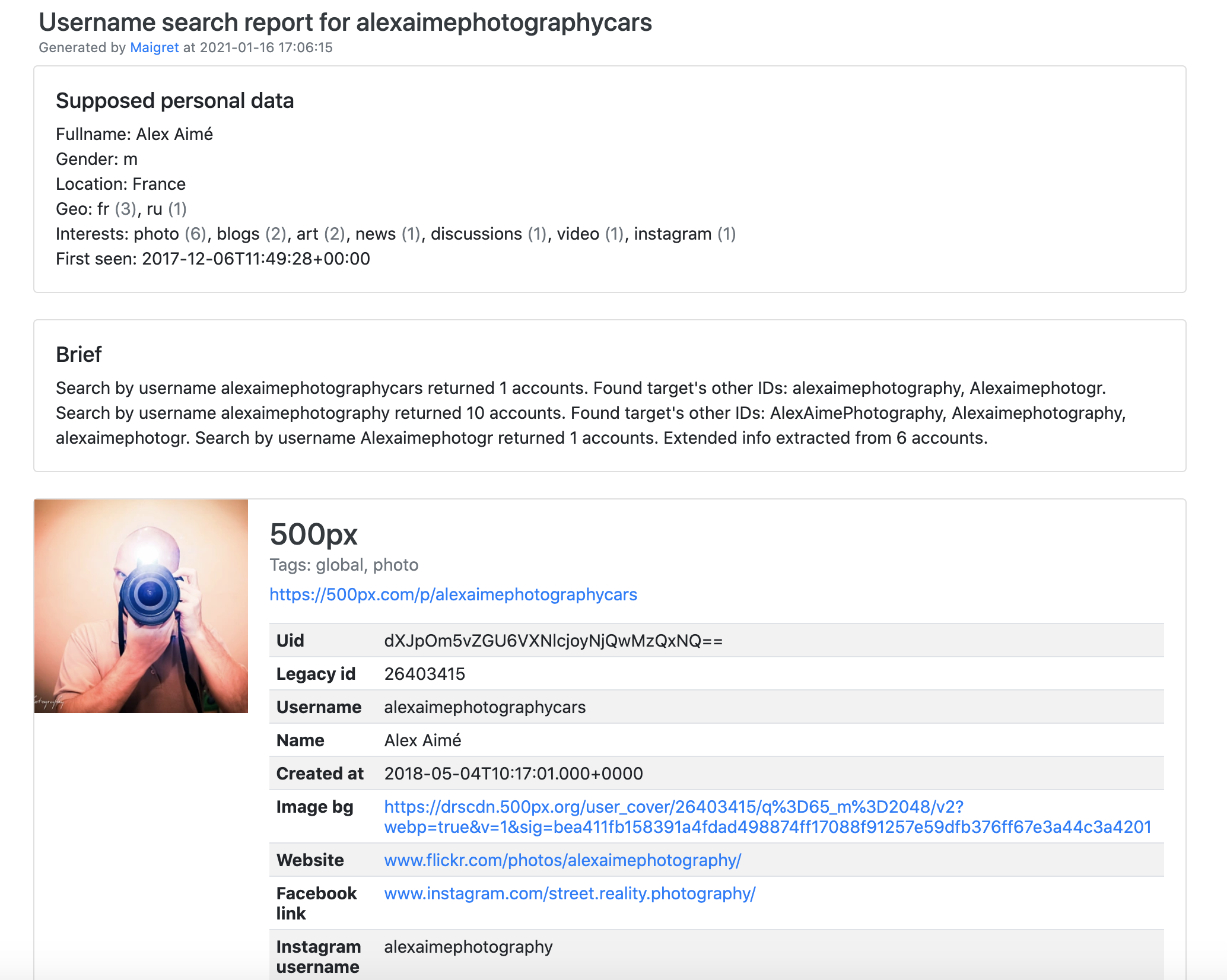
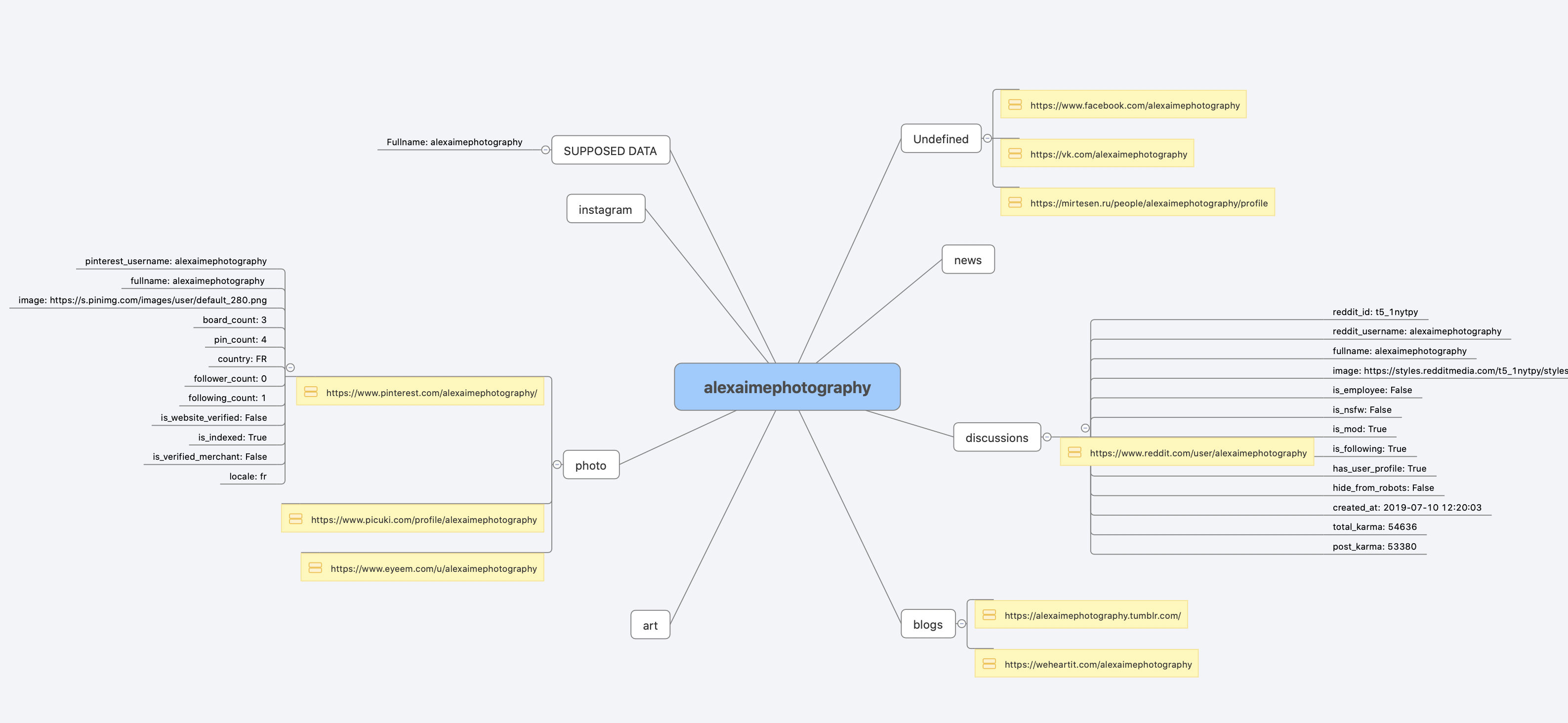
[完整的命令行输出示例](https://raw.githubusercontent.com/soxoj/maigret/main/static/recursive_search.md)
## 安装
如果你已经按[一分钟上手](#one-minute)的步骤跑通了,就无需再装。下面列出几种可选的安装方式。
什么都不想装?直接用[社区 Telegram 机器人](https://sites.google.com/view/maigret-bot-link)。
### Windows
从 [Releases](https://github.com/soxoj/maigret/releases) 下载 `maigret_standalone.exe`。有两种启动方式:
- **双击运行** —— Maigret 会询问用户名、执行一次默认搜索,并在结束时停留,方便你查看报告链接。
- **从终端运行** —— 打开命令提示符(按 `Win+R`,输入 `cmd`,回车)或 PowerShell,以便传入额外参数:
```cmd
cd %USERPROFILE%\Downloads
maigret_standalone.exe USERNAME
maigret_standalone.exe USERNAME --html :: 同时保存 HTML 报告
maigret_standalone.exe --help :: 列出所有选项
```
视频指引:https://youtu.be/qIgwTZOmMmM。
### 云端 Shell
通过云端 Shell 或 Jupyter Notebook 在浏览器里运行 Maigret:
### 报告示例
[PDF 报告](https://raw.githubusercontent.com/soxoj/maigret/main/static/report_alexaimephotographycars.pdf)、[HTML 报告](https://htmlpreview.github.io/?https://raw.githubusercontent.com/soxoj/maigret/main/static/report_alexaimephotographycars.html)


[完整的命令行输出示例](https://raw.githubusercontent.com/soxoj/maigret/main/static/recursive_search.md)
## 安装
如果你已经按[一分钟上手](#one-minute)的步骤跑通了,就无需再装。下面列出几种可选的安装方式。
什么都不想装?直接用[社区 Telegram 机器人](https://sites.google.com/view/maigret-bot-link)。
### Windows
从 [Releases](https://github.com/soxoj/maigret/releases) 下载 `maigret_standalone.exe`。有两种启动方式:
- **双击运行** —— Maigret 会询问用户名、执行一次默认搜索,并在结束时停留,方便你查看报告链接。
- **从终端运行** —— 打开命令提示符(按 `Win+R`,输入 `cmd`,回车)或 PowerShell,以便传入额外参数:
```cmd
cd %USERPROFILE%\Downloads
maigret_standalone.exe USERNAME
maigret_standalone.exe USERNAME --html :: 同时保存 HTML 报告
maigret_standalone.exe --help :: 列出所有选项
```
视频指引:https://youtu.be/qIgwTZOmMmM。
### 云端 Shell
通过云端 Shell 或 Jupyter Notebook 在浏览器里运行 Maigret:


 ### 本地安装(pip)
```bash
# 从 PyPI 安装
pip3 install maigret
# 使用
maigret username
```
### 从源码安装
```bash
# 也可以克隆仓库后手动安装
git clone https://github.com/soxoj/maigret && cd maigret
# 构建并安装
pip3 install .
# 使用
maigret username
```
### Docker
官方提供两个镜像变体:
- `soxoj/maigret:latest` —— CLI 模式(默认)
- `soxoj/maigret:web` —— 自动启动 [Web 界面](#web-interface)
```bash
# 拉取官方镜像(CLI)
docker pull soxoj/maigret
# CLI 用法
docker run -v /mydir:/app/reports soxoj/maigret:latest username --html
# Web UI(在 http://localhost:5000 打开)
docker run -p 5000:5000 soxoj/maigret:web
# 自定义 Web UI 端口
docker run -e PORT=8080 -p 8080:8080 soxoj/maigret:web
# 手动构建
docker build -t maigret . # CLI 镜像(默认 target)
docker build --target web -t maigret-web . # Web UI 镜像
```
### 故障排查
构建报错?请见[故障排查指南](https://maigret.readthedocs.io/en/latest/installation.html#troubleshooting)。
PDF 报告(`--pdf`)是可选扩展 —— 通过 `pip install 'maigret[pdf]'` 安装。在 Linux/macOS 上还需要系统级图形库;各操作系统的安装步骤详见 [PDF 报告章节](https://maigret.readthedocs.io/en/latest/installation.html#optional-pdf-reports-maigret-pdf)。
## 使用
### 示例
```bash
# 生成 HTML、PDF、XMind 8 报告
maigret user --html
maigret user --pdf
maigret user --xmind # 与 XMind 2022+ 不兼容
# 机器可读的导出格式
maigret user --json ndjson # 行分隔 JSON(也支持 --json simple)
maigret user --csv
maigret user --txt
maigret user --graph # 交互式 D3 图谱(HTML)
maigret user --neo4j # Neo4j Cypher 脚本(图数据库)
# 仅在带有 photo 与 dating 标签的站点上搜索
maigret user --tags photo,dating
# 仅在带有 us 标签的站点上搜索
maigret user --tags us
# 同时在所有站点上搜索三个用户名
maigret user1 user2 user3 -a
# AI 辅助调查摘要(需要 OPENAI_API_KEY)
maigret user --ai
```
`--neo4j` 会生成结果图谱的 `*_neo4j.cypher` 脚本;可用 `cypher-shell -u neo4j -p
### 本地安装(pip)
```bash
# 从 PyPI 安装
pip3 install maigret
# 使用
maigret username
```
### 从源码安装
```bash
# 也可以克隆仓库后手动安装
git clone https://github.com/soxoj/maigret && cd maigret
# 构建并安装
pip3 install .
# 使用
maigret username
```
### Docker
官方提供两个镜像变体:
- `soxoj/maigret:latest` —— CLI 模式(默认)
- `soxoj/maigret:web` —— 自动启动 [Web 界面](#web-interface)
```bash
# 拉取官方镜像(CLI)
docker pull soxoj/maigret
# CLI 用法
docker run -v /mydir:/app/reports soxoj/maigret:latest username --html
# Web UI(在 http://localhost:5000 打开)
docker run -p 5000:5000 soxoj/maigret:web
# 自定义 Web UI 端口
docker run -e PORT=8080 -p 8080:8080 soxoj/maigret:web
# 手动构建
docker build -t maigret . # CLI 镜像(默认 target)
docker build --target web -t maigret-web . # Web UI 镜像
```
### 故障排查
构建报错?请见[故障排查指南](https://maigret.readthedocs.io/en/latest/installation.html#troubleshooting)。
PDF 报告(`--pdf`)是可选扩展 —— 通过 `pip install 'maigret[pdf]'` 安装。在 Linux/macOS 上还需要系统级图形库;各操作系统的安装步骤详见 [PDF 报告章节](https://maigret.readthedocs.io/en/latest/installation.html#optional-pdf-reports-maigret-pdf)。
## 使用
### 示例
```bash
# 生成 HTML、PDF、XMind 8 报告
maigret user --html
maigret user --pdf
maigret user --xmind # 与 XMind 2022+ 不兼容
# 机器可读的导出格式
maigret user --json ndjson # 行分隔 JSON(也支持 --json simple)
maigret user --csv
maigret user --txt
maigret user --graph # 交互式 D3 图谱(HTML)
maigret user --neo4j # Neo4j Cypher 脚本(图数据库)
# 仅在带有 photo 与 dating 标签的站点上搜索
maigret user --tags photo,dating
# 仅在带有 us 标签的站点上搜索
maigret user --tags us
# 同时在所有站点上搜索三个用户名
maigret user1 user2 user3 -a
# AI 辅助调查摘要(需要 OPENAI_API_KEY)
maigret user --ai
```
`--neo4j` 会生成结果图谱的 `*_neo4j.cypher` 脚本;可用 `cypher-shell -u neo4j -p