[](https://github.com/soda-inria/tabicl/actions/workflows/testing.yml)
[](https://badge.fury.io/py/tabicl)
[](https://pypistats.org/packages/tabicl)
# TabICLv2: An open tabular foundation model
This repository is the official implementation of **TabICLv2** ([ICML 2026](https://arxiv.org/abs/2602.11139))
and **TabICL** ([ICML 2025](https://arxiv.org/abs/2502.05564)).
**Strong performance without hyperparameter tuning:**
TabICLv2 is a competitive model for tabular classification and regression
on the [TabArena](https://tabarena.ai) and [TALENT](https://arxiv.org/abs/2407.00956) benchmarks.
It does not require hyperparameter tuning
and outperforms heavily tuned XGBoost, CatBoost, or LightGBM on TabArena on ~80% of datasets.
**Easy to use:** TabICL is pip-installable and scikit-learn compliant.
It is also **open source** (including [pre-training](#pre-training)),
with a permissive license.
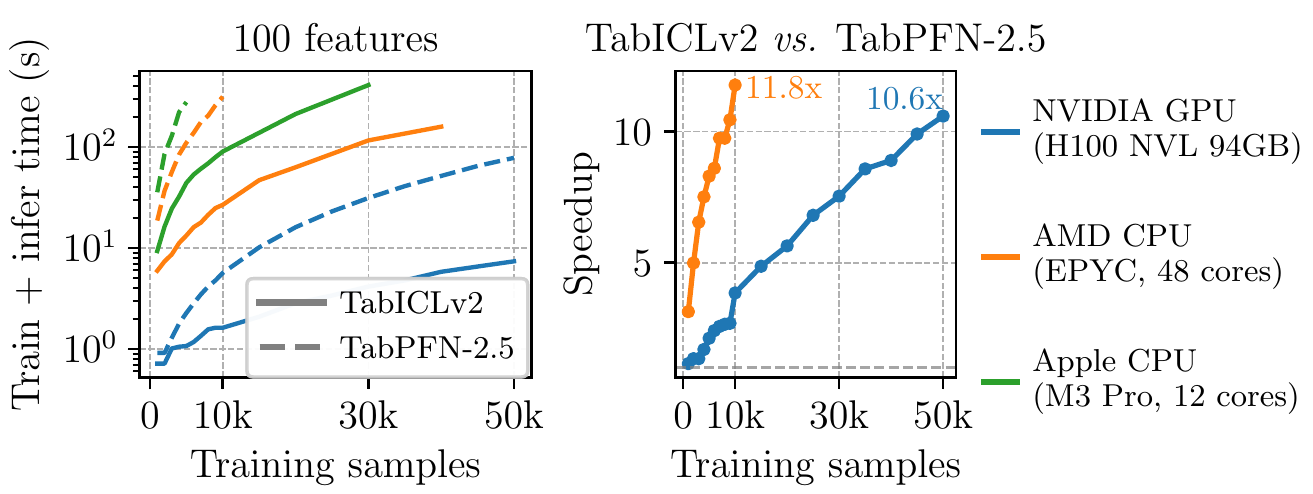
**Speed:** TabICL performs `fit` and `predict` jointly via a single
forward pass through a pre-trained transformer model.
For larger datasets, we recommend a GPU.
On an H100 GPU, TabIClv2 can `fit` and `predict` a dataset
with 50,000 samples and 100 features in under 10 seconds,
which is 10x faster than TabPFN-2.5.
Through KV caching, TabICL supports faster repeated inference on the same training data.
**Scalability:** TabICL shows excellent performance on benchmarks
with 300 to 100,000 training samples and up to 2,000 features.
It can scale to even larger datasets (e.g., 500K samples) through CPU and disk offloading,
though its accuracy may degrade at some point.
 ## Installation
```bash
pip install tabicl
```
Optional dependencies can be installed as needed:
```bash
pip install tabicl[forecast] # time series forecasting
pip install tabicl[shap] # SHAP-based explainability
pip install tabicl[finetune] # fine-tuning on a single dataset
pip install tabicl[pretrain] # pre-training
pip install tabicl[all] # everything
```
On Intel Macs, installing PyTorch via `pip` may fail. In that case, install it first with:
```bash
conda install pytorch -c pytorch
```
Then install `tabicl` as above.
## Basic usage
```python
from tabicl import TabICLClassifier, TabICLRegressor
clf = TabICLClassifier()
clf.fit(X_train, y_train) # downloads checkpoint on first use, otherwise cheap
clf.predict(X_test) # in-context learning happens here
reg = TabICLRegressor()
reg.fit(X_train, y_train)
reg.predict(X_test)
```
To speed up repeated inference on the same training data, enable KV caching. The cache is built during `fit` and reused across `predict` calls. Note that this consumes additional memory to store the cached projections, so consider the trade-off for your use case:
```python
clf = TabICLClassifier(kv_cache=True)
clf.fit(X_train, y_train) # caches key-value projections for training data
clf.predict(X_test) # fast: only processes test data by reusing the cached context
```
Save and load a fitted classifier or regressor:
```python
clf.save(
"classifier.pkl",
save_model_weights=False, # if False, reload from checkpoint on load
save_training_data=True, # if True, include training data; if False, discard it (requires KV cache)
save_kv_cache=True, # if True and KV cache exists, save it
)
clf = TabICLClassifier.load("classifier.pkl")
```
When KV cache exists and is saved, you can set `save_training_data=False` to exclude
cached training data, which may be useful for data privacy.
## Advanced configuration
TabICL offers a set of parameters to customize its behavior. The following example shows all available parameters with their default values and brief descriptions:
```python
from tabicl import TabICLClassifier
clf = TabICLClassifier(
n_estimators=8, # number of ensemble members, more = better but slower
norm_methods=None, # normalization methods to try
feat_shuffle_method="latin", # feature permutation strategy
class_shuffle_method="shift", # class permutation strategy
outlier_threshold=4.0, # z-score threshold for outlier detection and clipping
softmax_temperature=0.9, # temperature to control prediction confidence
average_logits=True, # average logits (True) or probabilities (False)
support_many_classes=True, # handle >10 classes automatically
batch_size=8, # ensemble members processed together, lower to save memory
kv_cache=False, # cache training data KV projections for faster repeated inference
model_path=None, # path to checkpoint, None downloads from Hugging Face
allow_auto_download=True, # auto-download checkpoint if not found locally
checkpoint_version="tabicl-classifier-v2-20260212.ckpt", # pretrained checkpoint version
device=None, # inference device: None auto-selects CUDA → XPU → MPS → CPU
use_amp="auto", # automatic mixed precision for faster inference
use_fa3="auto", # Flash Attention 3 for Hopper GPUs (e.g. H100)
offload_mode="auto", # automatically decide when to use cpu/disk offloading
disk_offload_dir=None, # directory for disk offloading
random_state=42, # random seed for reproducibility
n_jobs=None, # number of PyTorch threads for CPU inference
verbose=False, # print detailed information during inference
inference_config=None, # fine-grained inference control for advanced users
)
```
`TabICLRegressor` accepts the same parameters except for the classification-specific ones:
`class_shuffle_method`, `softmax_temperature`, `average_logits`, and `support_many_classes`.
## Available models
| Model | Classification checkpoint | Regression checkpoint |
|-------|--------------------------|----------------------|
| **TabICLv2** ([arXiv](https://arxiv.org/abs/2602.11139)) | `tabicl-classifier-v2-20260212.ckpt` (default) | `tabicl-regressor-v2-20260212.ckpt` (default) |
| **TabICLv1.1** (May 2025, no paper) | `tabicl-classifier-v1.1-20250506.ckpt` | — |
| **TabICLv1** ([ICML 2025](https://arxiv.org/abs/2502.05564)) | `tabicl-classifier-v1-20250208.ckpt` | — |
- **TabICLv2**: Our latest model, supporting both classification and regression.
Strongly improved accuracy over v1 through better synthetic pre-training data,
architectural improvements, and better pre-training, with comparable runtime.
- **TabICLv1.1**: TabICLv1 post-trained on an early version of the v2 prior. Classification only.
- **TabICLv1**: Original model. Classification only.
TabICLv1 and v1.1 originally used `n_estimators=32`; we reduced the default to 8 afterwards.
## Fine-tuning
Zero-shot in-context learning is TabICL's default, but when a single downstream
dataset is important enough to spend a few minutes adapting to,
`FinetunedTabICLClassifier` and `FinetunedTabICLRegressor` specialize the
pretrained checkpoint with a full PyTorch training loop, including AdamW with a
cosine-with-warmup schedule, gradient clipping, early stopping
against a held-out split, and multi-GPU runs.
Install the fine-tune dependencies first:
```bash
pip install tabicl[finetune]
```
### Usage
```python
from tabicl import FinetunedTabICLClassifier
clf = FinetunedTabICLClassifier(
epochs=50, # max passes over training data; early stopping may cut it short
learning_rate=1e-5, # AdamW LR
n_estimators_finetune=2, # ensemble members per training meta-batch
n_estimators_validation=2, # ensemble size for end-of-epoch validation
n_estimators_inference=8, # ensemble size of the fitted estimator used in predict()
early_stopping=True, # stop when val metric plateaus for `patience` epochs
patience=10, # non-improving epochs tolerated before stopping
eval_metric="roc_auc", # classifier: "roc_auc" | "log_loss" | "accuracy"
random_state=0, # random seed
verbose=True, # tqdm progress bar
)
clf.fit(X_train, y_train, X_val=X_val, y_val=y_val, output_dir="./ckpts")
y_pred = clf.predict(X_test)
```
`FinetunedTabICLRegressor` takes the same parameters (with `eval_metric` one of
`"mse" | "mae" | "r2"`). See each class's docstring for the full surface.
The checkpoint file written to `output_dir` follows the pretraining checkpoint
schema, so it loads directly back into the zero-shot estimators:
```python
from tabicl import TabICLClassifier
clf = TabICLClassifier(model_path="ckpts/best.ckpt")
clf.fit(X_train, y_train)
clf.predict(X_test)
```
Multi-GPU fine-tuning is auto-detected under `torchrun`:
```bash
torchrun --nproc-per-node=2 finetune_script.py
```
The tutorial [`tutorials/finetune_classifier.py`](tutorials/finetune_classifier.py)
walks through the fine-tuning for a binary classification task.
## Installation
```bash
pip install tabicl
```
Optional dependencies can be installed as needed:
```bash
pip install tabicl[forecast] # time series forecasting
pip install tabicl[shap] # SHAP-based explainability
pip install tabicl[finetune] # fine-tuning on a single dataset
pip install tabicl[pretrain] # pre-training
pip install tabicl[all] # everything
```
On Intel Macs, installing PyTorch via `pip` may fail. In that case, install it first with:
```bash
conda install pytorch -c pytorch
```
Then install `tabicl` as above.
## Basic usage
```python
from tabicl import TabICLClassifier, TabICLRegressor
clf = TabICLClassifier()
clf.fit(X_train, y_train) # downloads checkpoint on first use, otherwise cheap
clf.predict(X_test) # in-context learning happens here
reg = TabICLRegressor()
reg.fit(X_train, y_train)
reg.predict(X_test)
```
To speed up repeated inference on the same training data, enable KV caching. The cache is built during `fit` and reused across `predict` calls. Note that this consumes additional memory to store the cached projections, so consider the trade-off for your use case:
```python
clf = TabICLClassifier(kv_cache=True)
clf.fit(X_train, y_train) # caches key-value projections for training data
clf.predict(X_test) # fast: only processes test data by reusing the cached context
```
Save and load a fitted classifier or regressor:
```python
clf.save(
"classifier.pkl",
save_model_weights=False, # if False, reload from checkpoint on load
save_training_data=True, # if True, include training data; if False, discard it (requires KV cache)
save_kv_cache=True, # if True and KV cache exists, save it
)
clf = TabICLClassifier.load("classifier.pkl")
```
When KV cache exists and is saved, you can set `save_training_data=False` to exclude
cached training data, which may be useful for data privacy.
## Advanced configuration
TabICL offers a set of parameters to customize its behavior. The following example shows all available parameters with their default values and brief descriptions:
```python
from tabicl import TabICLClassifier
clf = TabICLClassifier(
n_estimators=8, # number of ensemble members, more = better but slower
norm_methods=None, # normalization methods to try
feat_shuffle_method="latin", # feature permutation strategy
class_shuffle_method="shift", # class permutation strategy
outlier_threshold=4.0, # z-score threshold for outlier detection and clipping
softmax_temperature=0.9, # temperature to control prediction confidence
average_logits=True, # average logits (True) or probabilities (False)
support_many_classes=True, # handle >10 classes automatically
batch_size=8, # ensemble members processed together, lower to save memory
kv_cache=False, # cache training data KV projections for faster repeated inference
model_path=None, # path to checkpoint, None downloads from Hugging Face
allow_auto_download=True, # auto-download checkpoint if not found locally
checkpoint_version="tabicl-classifier-v2-20260212.ckpt", # pretrained checkpoint version
device=None, # inference device: None auto-selects CUDA → XPU → MPS → CPU
use_amp="auto", # automatic mixed precision for faster inference
use_fa3="auto", # Flash Attention 3 for Hopper GPUs (e.g. H100)
offload_mode="auto", # automatically decide when to use cpu/disk offloading
disk_offload_dir=None, # directory for disk offloading
random_state=42, # random seed for reproducibility
n_jobs=None, # number of PyTorch threads for CPU inference
verbose=False, # print detailed information during inference
inference_config=None, # fine-grained inference control for advanced users
)
```
`TabICLRegressor` accepts the same parameters except for the classification-specific ones:
`class_shuffle_method`, `softmax_temperature`, `average_logits`, and `support_many_classes`.
## Available models
| Model | Classification checkpoint | Regression checkpoint |
|-------|--------------------------|----------------------|
| **TabICLv2** ([arXiv](https://arxiv.org/abs/2602.11139)) | `tabicl-classifier-v2-20260212.ckpt` (default) | `tabicl-regressor-v2-20260212.ckpt` (default) |
| **TabICLv1.1** (May 2025, no paper) | `tabicl-classifier-v1.1-20250506.ckpt` | — |
| **TabICLv1** ([ICML 2025](https://arxiv.org/abs/2502.05564)) | `tabicl-classifier-v1-20250208.ckpt` | — |
- **TabICLv2**: Our latest model, supporting both classification and regression.
Strongly improved accuracy over v1 through better synthetic pre-training data,
architectural improvements, and better pre-training, with comparable runtime.
- **TabICLv1.1**: TabICLv1 post-trained on an early version of the v2 prior. Classification only.
- **TabICLv1**: Original model. Classification only.
TabICLv1 and v1.1 originally used `n_estimators=32`; we reduced the default to 8 afterwards.
## Fine-tuning
Zero-shot in-context learning is TabICL's default, but when a single downstream
dataset is important enough to spend a few minutes adapting to,
`FinetunedTabICLClassifier` and `FinetunedTabICLRegressor` specialize the
pretrained checkpoint with a full PyTorch training loop, including AdamW with a
cosine-with-warmup schedule, gradient clipping, early stopping
against a held-out split, and multi-GPU runs.
Install the fine-tune dependencies first:
```bash
pip install tabicl[finetune]
```
### Usage
```python
from tabicl import FinetunedTabICLClassifier
clf = FinetunedTabICLClassifier(
epochs=50, # max passes over training data; early stopping may cut it short
learning_rate=1e-5, # AdamW LR
n_estimators_finetune=2, # ensemble members per training meta-batch
n_estimators_validation=2, # ensemble size for end-of-epoch validation
n_estimators_inference=8, # ensemble size of the fitted estimator used in predict()
early_stopping=True, # stop when val metric plateaus for `patience` epochs
patience=10, # non-improving epochs tolerated before stopping
eval_metric="roc_auc", # classifier: "roc_auc" | "log_loss" | "accuracy"
random_state=0, # random seed
verbose=True, # tqdm progress bar
)
clf.fit(X_train, y_train, X_val=X_val, y_val=y_val, output_dir="./ckpts")
y_pred = clf.predict(X_test)
```
`FinetunedTabICLRegressor` takes the same parameters (with `eval_metric` one of
`"mse" | "mae" | "r2"`). See each class's docstring for the full surface.
The checkpoint file written to `output_dir` follows the pretraining checkpoint
schema, so it loads directly back into the zero-shot estimators:
```python
from tabicl import TabICLClassifier
clf = TabICLClassifier(model_path="ckpts/best.ckpt")
clf.fit(X_train, y_train)
clf.predict(X_test)
```
Multi-GPU fine-tuning is auto-detected under `torchrun`:
```bash
torchrun --nproc-per-node=2 finetune_script.py
```
The tutorial [`tutorials/finetune_classifier.py`](tutorials/finetune_classifier.py)
walks through the fine-tuning for a binary classification task.
 ## Time series forecasting
TabICL can be used for zero-shot time series forecasting via `TabICLForecaster`.
Install the forecast dependencies first:
```bash
pip install tabicl[forecast]
```
`TabICLForecaster` accepts the following parameters:
```python
from tabicl import TabICLForecaster
forecaster = TabICLForecaster(
max_context_length=4096, # max historical timesteps to use as context
temporal_features=None, # None = ["index", "datetime", "periodic"]; also accepts a list mixing string names and TimeTransform instances
point_estimate="mean", # point prediction method: "mean" or "median"
tabicl_config=None, # passed to TabICLRegressor; None uses default settings
)
```
The following example shows how it works for univariate forecasting:
```python
import pandas as pd
from tabicl import TabICLForecaster
from tabicl.forecast import TimeSeriesDataFrame, plot_forecast
df = pd.read_csv(
"https://autogluon.s3.amazonaws.com/datasets/timeseries/australian_electricity_subset/test.csv",
parse_dates=["timestamp"],
)
data = TimeSeriesDataFrame.from_data_frame(df)
prediction_length = 96
selected_items = data.item_ids[:2]
train_data, test_data = data.train_test_split(prediction_length)
context_df = train_data.reset_index()
context_df = context_df[context_df["item_id"].isin(selected_items)]
test_df = test_data.reset_index()
test_df = test_df[test_df["item_id"].isin(selected_items)]
test_df = test_df.groupby("item_id").tail(prediction_length)
forecaster = TabICLForecaster(max_context_length=10240)
pred_df = forecaster.predict_df(context_df, prediction_length=prediction_length)
fig, axes = plot_forecast(context_df=context_df, pred_df=pred_df, test_df=test_df)
```
## Time series forecasting
TabICL can be used for zero-shot time series forecasting via `TabICLForecaster`.
Install the forecast dependencies first:
```bash
pip install tabicl[forecast]
```
`TabICLForecaster` accepts the following parameters:
```python
from tabicl import TabICLForecaster
forecaster = TabICLForecaster(
max_context_length=4096, # max historical timesteps to use as context
temporal_features=None, # None = ["index", "datetime", "periodic"]; also accepts a list mixing string names and TimeTransform instances
point_estimate="mean", # point prediction method: "mean" or "median"
tabicl_config=None, # passed to TabICLRegressor; None uses default settings
)
```
The following example shows how it works for univariate forecasting:
```python
import pandas as pd
from tabicl import TabICLForecaster
from tabicl.forecast import TimeSeriesDataFrame, plot_forecast
df = pd.read_csv(
"https://autogluon.s3.amazonaws.com/datasets/timeseries/australian_electricity_subset/test.csv",
parse_dates=["timestamp"],
)
data = TimeSeriesDataFrame.from_data_frame(df)
prediction_length = 96
selected_items = data.item_ids[:2]
train_data, test_data = data.train_test_split(prediction_length)
context_df = train_data.reset_index()
context_df = context_df[context_df["item_id"].isin(selected_items)]
test_df = test_data.reset_index()
test_df = test_df[test_df["item_id"].isin(selected_items)]
test_df = test_df.groupby("item_id").tail(prediction_length)
forecaster = TabICLForecaster(max_context_length=10240)
pred_df = forecaster.predict_df(context_df, prediction_length=prediction_length)
fig, axes = plot_forecast(context_df=context_df, pred_df=pred_df, test_df=test_df)
```
 `TabICLForecaster` is heavily inspired by [TabPFN-TS](https://arxiv.org/abs/2501.02945v3). We may later improve it to enhance the ability of TabICL for time series forecasting.
## Explainability
TabICL integrates with [SHAP](https://github.com/shap/shap) via `tabicl.shap`. It uses a single all-NaN row as the SHAP background, exploiting TabICL's native NaN handling so that masked features are genuinely removed from the model's perspective instead of being replaced by a reference value.
### SHAP values
```python
from sklearn.datasets import load_breast_cancer
from sklearn.model_selection import train_test_split
from tabicl import TabICLClassifier
from tabicl.shap import get_shap_values, plot_shap
X, y = load_breast_cancer(return_X_y=True)
X_train, X_test, y_train, y_test = train_test_split(X, y, test_size=0.8, random_state=42)
clf = TabICLClassifier()
clf.fit(X_train, y_train)
shap_values = get_shap_values(
estimator=clf, # fitted TabICLClassifier or TabICLRegressor
X_test=X_test[:10], # samples to explain
attribute_names=load_breast_cancer().feature_names, # feature names
)
plot_shap(shap_values)
```
`get_shap_values` also accepts any extra keyword arguments and forwards them to the underlying `shap.Explainer`.
## Pre-training
Pre-training code (including synthetic data generation) is available for **both TabICLv1 and TabICLv2**.
> **Note:** The original pre-training likely used AMP with float16, but this can lead to instabilities
> (https://github.com/soda-inria/tabicl/pull/151#discussion_r3869087460),
> so we're leaving float32 as the default value in the scripts.
> While the code has been vibe-migrated from the original
> (private) pre-training codebase, users have been able to achieve good performance with it.
> On systems with fewer CPU cores, it might speed up the training to reduce n_jobs
> (e.g., to 12 on a 64-core system).
> On 4xH100, it should be possible to reach 0.7-0.8s/step
> for stage 1 with float16 and 1s/step with float32.
The easiest way to pre-train is to run the stage scripts in the `scripts` folder, which contain
the full recipes (they launch `python -m tabicl.train` under `torchrun` with all arguments set).
Adjust the placeholder checkpoint paths, `NUM_GPUS`, and `--n_jobs` at the top of each script for
your hardware, then run the three stages in order, e.g. for the TabICLv2 classifier:
```bash
bash scripts/train_v2_clf_stage1.sh
bash scripts/train_v2_clf_stage2.sh # loads the stage-1 checkpoint
bash scripts/train_v2_clf_stage3.sh # loads the stage-2 checkpoint
```
Available recipes:
- **TabICLv2** ([arXiv](https://arxiv.org/abs/2602.11139), §4.1): classifier [stage 1](./scripts/train_v2_clf_stage1.sh), [stage 2](./scripts/train_v2_clf_stage2.sh),
[stage 3](./scripts/train_v2_clf_stage3.sh); regressor [stage 1](./scripts/train_v2_reg_stage1.sh),
[stage 2](./scripts/train_v2_reg_stage2.sh), [stage 3](./scripts/train_v2_reg_stage3.sh).
- **TabICLv1**: [stage 1](./scripts/train_stage1.sh), [stage 2](./scripts/train_stage2.sh),
[stage 3](./scripts/train_stage3.sh).
By default, `tabicl.train` generates synthetic prior datasets **on the fly** in the DataLoader
workers while training — this is how the TabICLv2 checkpoints were trained (and what the v2
scripts do). Alternatively, datasets can be **pre-generated to disk** with
`python -m tabicl.prior --save_dir /my/prior/dir --num_batches 100000 ...` and loaded during
training via `--prior_dir`, which is how TabICLv1 was trained (the v1 scripts show both variants).
Training supports classification (cross-entropy) and quantile regression (pinball loss, via
`--regression_method quantile`), and both the **AdamW** (default) and **Muon** (`--muon True`)
optimizers. See `python -m tabicl.train --help` for the full set of options.
A note on the v2 training: the paper reports using cautious weight decay, which is
available via `--use_cautious_wd`, but the released checkpoints were trained with it left `False`
(it was not wired into Muon during the reference runs), so the v2 scripts keep it `False` to
reproduce that behavior.
## Nanotabicl: a minimal architecture implementation
We provide a minimal implementation of the TabICLv2 architecture
[here](https://github.com/soda-inria/nanotabicl),
for educational and experimental purposes.
## FAQ
**What is TabICL?**
TabICL is a tabular foundation model (like TabPFN).
It uses in-context learning (ICL) to learn from new data
in a single forward pass through a Transformer model:
`y_pred = model(X_train, y_train, X_test)` (this is called inside `predict()`).
It has acquired strong learning capabilities through
pre-training on millions of synthetic datasets.
**How fast is TabICL?** On datasets with $n$ training rows and $m$ columns,
the runtime complexity of TabICL (v1 and v2) is $O(n^2 + nm^2)$.
On datasets with many rows and columns, it can be 10x faster than TabPFN-2.5.
On modern GPUs, TabICL can handle a million samples
in a few minutes without RAM overflow
thanks to CPU and disk offloading.
`TabICLForecaster` is heavily inspired by [TabPFN-TS](https://arxiv.org/abs/2501.02945v3). We may later improve it to enhance the ability of TabICL for time series forecasting.
## Explainability
TabICL integrates with [SHAP](https://github.com/shap/shap) via `tabicl.shap`. It uses a single all-NaN row as the SHAP background, exploiting TabICL's native NaN handling so that masked features are genuinely removed from the model's perspective instead of being replaced by a reference value.
### SHAP values
```python
from sklearn.datasets import load_breast_cancer
from sklearn.model_selection import train_test_split
from tabicl import TabICLClassifier
from tabicl.shap import get_shap_values, plot_shap
X, y = load_breast_cancer(return_X_y=True)
X_train, X_test, y_train, y_test = train_test_split(X, y, test_size=0.8, random_state=42)
clf = TabICLClassifier()
clf.fit(X_train, y_train)
shap_values = get_shap_values(
estimator=clf, # fitted TabICLClassifier or TabICLRegressor
X_test=X_test[:10], # samples to explain
attribute_names=load_breast_cancer().feature_names, # feature names
)
plot_shap(shap_values)
```
`get_shap_values` also accepts any extra keyword arguments and forwards them to the underlying `shap.Explainer`.
## Pre-training
Pre-training code (including synthetic data generation) is available for **both TabICLv1 and TabICLv2**.
> **Note:** The original pre-training likely used AMP with float16, but this can lead to instabilities
> (https://github.com/soda-inria/tabicl/pull/151#discussion_r3869087460),
> so we're leaving float32 as the default value in the scripts.
> While the code has been vibe-migrated from the original
> (private) pre-training codebase, users have been able to achieve good performance with it.
> On systems with fewer CPU cores, it might speed up the training to reduce n_jobs
> (e.g., to 12 on a 64-core system).
> On 4xH100, it should be possible to reach 0.7-0.8s/step
> for stage 1 with float16 and 1s/step with float32.
The easiest way to pre-train is to run the stage scripts in the `scripts` folder, which contain
the full recipes (they launch `python -m tabicl.train` under `torchrun` with all arguments set).
Adjust the placeholder checkpoint paths, `NUM_GPUS`, and `--n_jobs` at the top of each script for
your hardware, then run the three stages in order, e.g. for the TabICLv2 classifier:
```bash
bash scripts/train_v2_clf_stage1.sh
bash scripts/train_v2_clf_stage2.sh # loads the stage-1 checkpoint
bash scripts/train_v2_clf_stage3.sh # loads the stage-2 checkpoint
```
Available recipes:
- **TabICLv2** ([arXiv](https://arxiv.org/abs/2602.11139), §4.1): classifier [stage 1](./scripts/train_v2_clf_stage1.sh), [stage 2](./scripts/train_v2_clf_stage2.sh),
[stage 3](./scripts/train_v2_clf_stage3.sh); regressor [stage 1](./scripts/train_v2_reg_stage1.sh),
[stage 2](./scripts/train_v2_reg_stage2.sh), [stage 3](./scripts/train_v2_reg_stage3.sh).
- **TabICLv1**: [stage 1](./scripts/train_stage1.sh), [stage 2](./scripts/train_stage2.sh),
[stage 3](./scripts/train_stage3.sh).
By default, `tabicl.train` generates synthetic prior datasets **on the fly** in the DataLoader
workers while training — this is how the TabICLv2 checkpoints were trained (and what the v2
scripts do). Alternatively, datasets can be **pre-generated to disk** with
`python -m tabicl.prior --save_dir /my/prior/dir --num_batches 100000 ...` and loaded during
training via `--prior_dir`, which is how TabICLv1 was trained (the v1 scripts show both variants).
Training supports classification (cross-entropy) and quantile regression (pinball loss, via
`--regression_method quantile`), and both the **AdamW** (default) and **Muon** (`--muon True`)
optimizers. See `python -m tabicl.train --help` for the full set of options.
A note on the v2 training: the paper reports using cautious weight decay, which is
available via `--use_cautious_wd`, but the released checkpoints were trained with it left `False`
(it was not wired into Muon during the reference runs), so the v2 scripts keep it `False` to
reproduce that behavior.
## Nanotabicl: a minimal architecture implementation
We provide a minimal implementation of the TabICLv2 architecture
[here](https://github.com/soda-inria/nanotabicl),
for educational and experimental purposes.
## FAQ
**What is TabICL?**
TabICL is a tabular foundation model (like TabPFN).
It uses in-context learning (ICL) to learn from new data
in a single forward pass through a Transformer model:
`y_pred = model(X_train, y_train, X_test)` (this is called inside `predict()`).
It has acquired strong learning capabilities through
pre-training on millions of synthetic datasets.
**How fast is TabICL?** On datasets with $n$ training rows and $m$ columns,
the runtime complexity of TabICL (v1 and v2) is $O(n^2 + nm^2)$.
On datasets with many rows and columns, it can be 10x faster than TabPFN-2.5.
On modern GPUs, TabICL can handle a million samples
in a few minutes without RAM overflow
thanks to CPU and disk offloading.
 **What dataset sizes work well?**
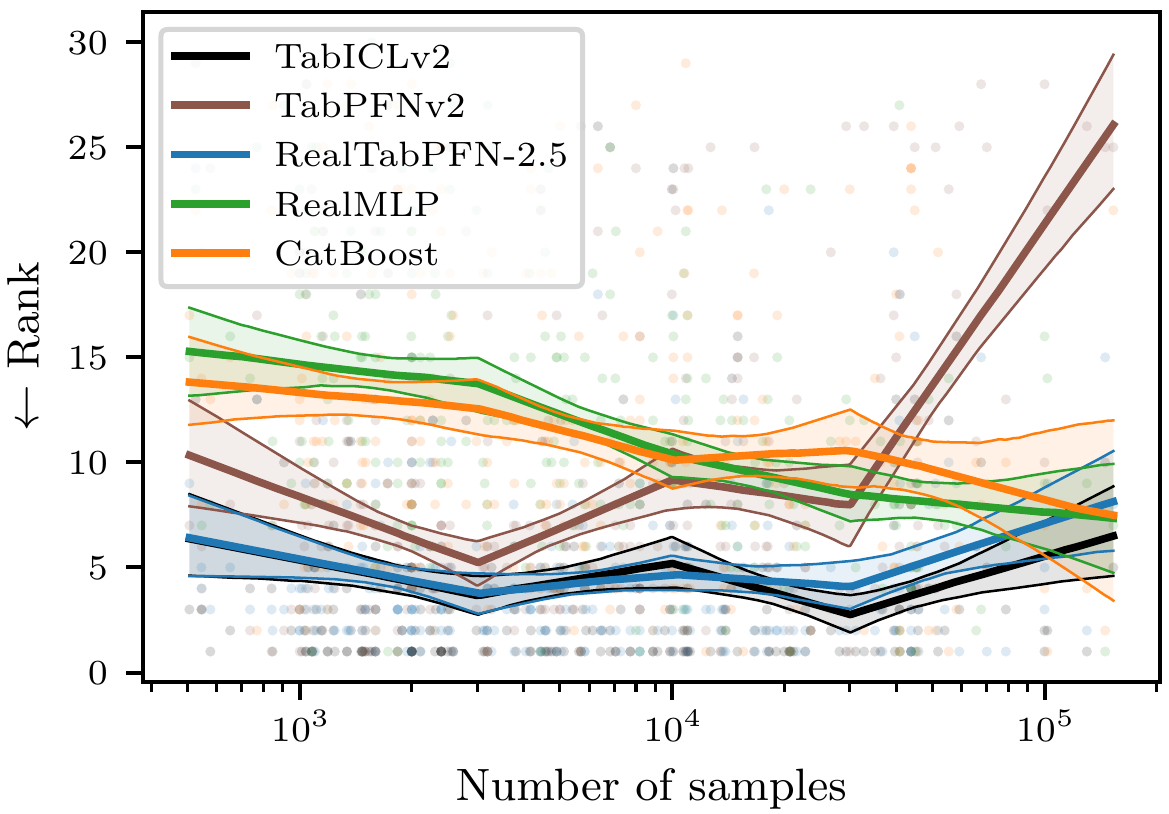
TabICLv2 is pre-trained on datasets between 300 and 48K training samples.
However, it can generalize to larger datasets to some extent,
and we see good results even on some datasets with 600K samples.
We have not tested if TabICL generalizes to datasets smaller than 300 samples.
**What dataset sizes work well?**
TabICLv2 is pre-trained on datasets between 300 and 48K training samples.
However, it can generalize to larger datasets to some extent,
and we see good results even on some datasets with 600K samples.
We have not tested if TabICL generalizes to datasets smaller than 300 samples.
 **What about the number of columns?**
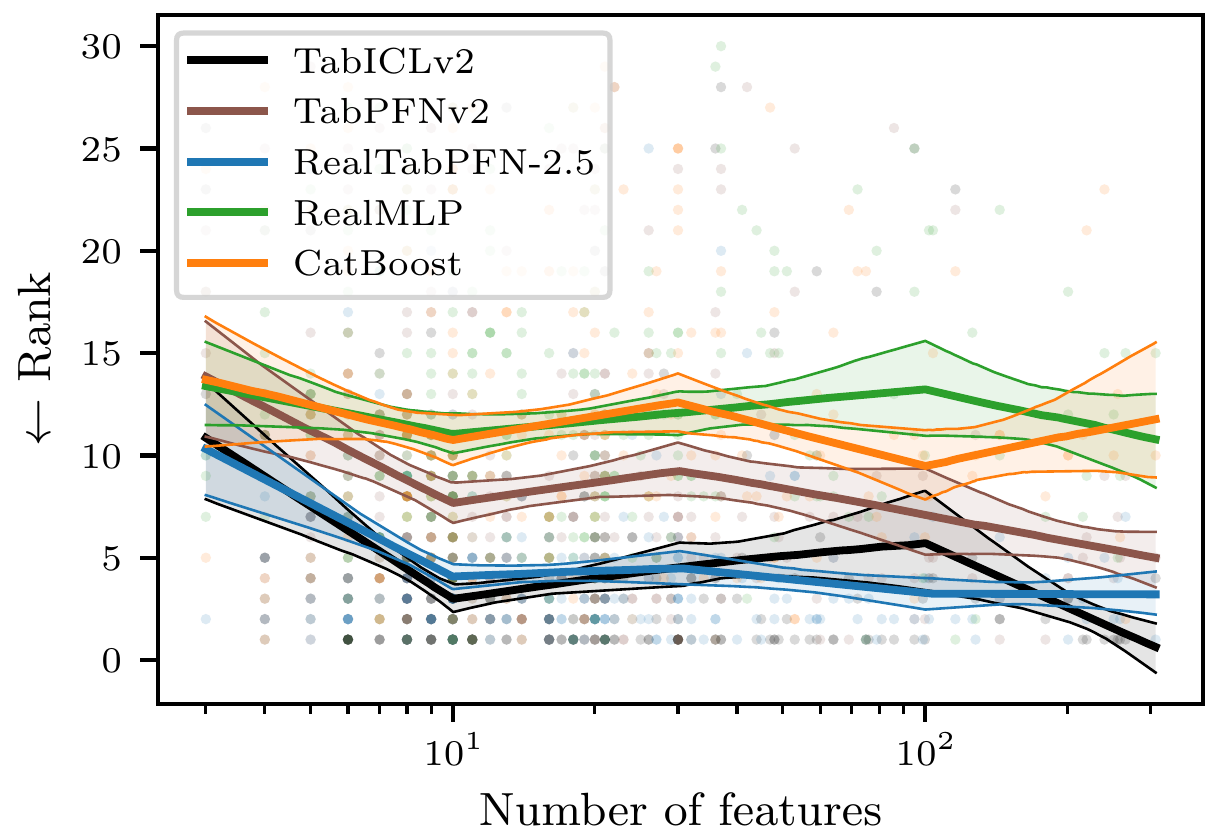
TabICLv2 is pre-trained on datasets between 2 and 100 columns. It can degrade when going much beyond 100 features.
**What about the number of columns?**
TabICLv2 is pre-trained on datasets between 2 and 100 columns. It can degrade when going much beyond 100 features.
 ## Preprocessing
### Simple built-in preprocessing
For `X`, TabICL accepts pandas dataframes or numpy arrays.
It applies the following preprocessing:
- Detect and ordinal encode categorical columns
(including string, object, category, and boolean types). For numpy arrays,
all columns have the same datatype (the one of the array).
Columns with integers are detected as numerical.
- Create a separate category for missing values in categorical features
- Perform mean imputation for missing numerical values (encoded as NaN)
- Outlier detection and removal
- Feature scaling and normalization
- Feature shuffling for ensemble diversity
### Advanced data preprocessing with skrub
## Preprocessing
### Simple built-in preprocessing
For `X`, TabICL accepts pandas dataframes or numpy arrays.
It applies the following preprocessing:
- Detect and ordinal encode categorical columns
(including string, object, category, and boolean types). For numpy arrays,
all columns have the same datatype (the one of the array).
Columns with integers are detected as numerical.
- Create a separate category for missing values in categorical features
- Perform mean imputation for missing numerical values (encoded as NaN)
- Outlier detection and removal
- Feature scaling and normalization
- Feature shuffling for ensemble diversity
### Advanced data preprocessing with skrub  Real-world datasets often contain complex heterogeneous data that benefits from more sophisticated preprocessing. For these scenarios, we recommend [skrub](https://skrub-data.org/stable/index.html), a powerful library designed specifically for advanced tabular data preparation.
**Why use skrub?**
- Handles diverse data types (numerical, categorical, text, datetime, etc.)
- Provides robust preprocessing for dirty data
- Offers sophisticated feature engineering capabilities
- Supports multi-table integration and joins
#### Installation
```bash
pip install skrub -U
```
#### Basic Integration
Use skrub's [TableVectorizer](https://skrub-data.org/stable/reference/generated/skrub.TableVectorizer.html) to transform your raw data before passing it to TabICLClassifier:
```python
from skrub import TableVectorizer
from tabicl import TabICLClassifier
from sklearn.pipeline import make_pipeline
pipeline = make_pipeline(
TableVectorizer(low_cardinality="passthrough"), # Automatically handles various data types
TabICLClassifier()
)
pipeline.fit(X_train, y_train) # X should be a DataFrame
predictions = pipeline.predict(X_test)
```
## Citation
If you use TabICL for research purposes,
please cite our papers for **[TabICL](https://arxiv.org/abs/2502.05564)** and **[TabICLv2](https://arxiv.org/abs/2602.11139)**:
```bibtex
@inproceedings{qu2025tabicl,
title={Tab{ICL}: {A} Tabular Foundation Model for In-Context Learning on Large Data},
author={Qu, Jingang and Holzm{\"u}ller, David and Varoquaux, Ga{\"e}l and Le Morvan, Marine},
booktitle={International Conference on Machine Learning},
year={2025}
}
@article{qu2026tabiclv2,
title={{TabICLv2}: {A} better, faster, scalable, and open tabular foundation model},
author={Qu, Jingang and Holzm{\"u}ller, David and Varoquaux, Ga{\"e}l and Le Morvan, Marine},
booktitle={International Conference on Machine Learning},
year={2026}
}
```
## Contributors
- [Jingang Qu](https://github.com/jingangQu)
- [David Holzmüller](https://github.com/dholzmueller)
- [Marine Le Morvan](https://github.com/marineLM)
## Star history
[](https://star-history.dera.page/#soda-inria/tabicl&type=date&legend=top-left)
Real-world datasets often contain complex heterogeneous data that benefits from more sophisticated preprocessing. For these scenarios, we recommend [skrub](https://skrub-data.org/stable/index.html), a powerful library designed specifically for advanced tabular data preparation.
**Why use skrub?**
- Handles diverse data types (numerical, categorical, text, datetime, etc.)
- Provides robust preprocessing for dirty data
- Offers sophisticated feature engineering capabilities
- Supports multi-table integration and joins
#### Installation
```bash
pip install skrub -U
```
#### Basic Integration
Use skrub's [TableVectorizer](https://skrub-data.org/stable/reference/generated/skrub.TableVectorizer.html) to transform your raw data before passing it to TabICLClassifier:
```python
from skrub import TableVectorizer
from tabicl import TabICLClassifier
from sklearn.pipeline import make_pipeline
pipeline = make_pipeline(
TableVectorizer(low_cardinality="passthrough"), # Automatically handles various data types
TabICLClassifier()
)
pipeline.fit(X_train, y_train) # X should be a DataFrame
predictions = pipeline.predict(X_test)
```
## Citation
If you use TabICL for research purposes,
please cite our papers for **[TabICL](https://arxiv.org/abs/2502.05564)** and **[TabICLv2](https://arxiv.org/abs/2602.11139)**:
```bibtex
@inproceedings{qu2025tabicl,
title={Tab{ICL}: {A} Tabular Foundation Model for In-Context Learning on Large Data},
author={Qu, Jingang and Holzm{\"u}ller, David and Varoquaux, Ga{\"e}l and Le Morvan, Marine},
booktitle={International Conference on Machine Learning},
year={2025}
}
@article{qu2026tabiclv2,
title={{TabICLv2}: {A} better, faster, scalable, and open tabular foundation model},
author={Qu, Jingang and Holzm{\"u}ller, David and Varoquaux, Ga{\"e}l and Le Morvan, Marine},
booktitle={International Conference on Machine Learning},
year={2026}
}
```
## Contributors
- [Jingang Qu](https://github.com/jingangQu)
- [David Holzmüller](https://github.com/dholzmueller)
- [Marine Le Morvan](https://github.com/marineLM)
## Star history
[](https://star-history.dera.page/#soda-inria/tabicl&type=date&legend=top-left)