


Step-based integration test runner for Flutter, controlled by an AI agent
through MCP (Model Context Protocol).
Testwire lets an AI agent **run, observe, debug, and modify** Flutter
integration tests in real time — stepping through actions one by one,
inspecting results, fixing failures via hot reload, and retrying steps without
restarting the test.
## Why?
Without Testwire, an AI agent's workflow with Flutter integration tests looks
like this: write test → `flutter test` → wait for build and deploy → read
a wall of logs → fix → **restart everything from scratch**. Each cycle burns
minutes on rebuild and wastes tokens on re-reading the same verbose output.
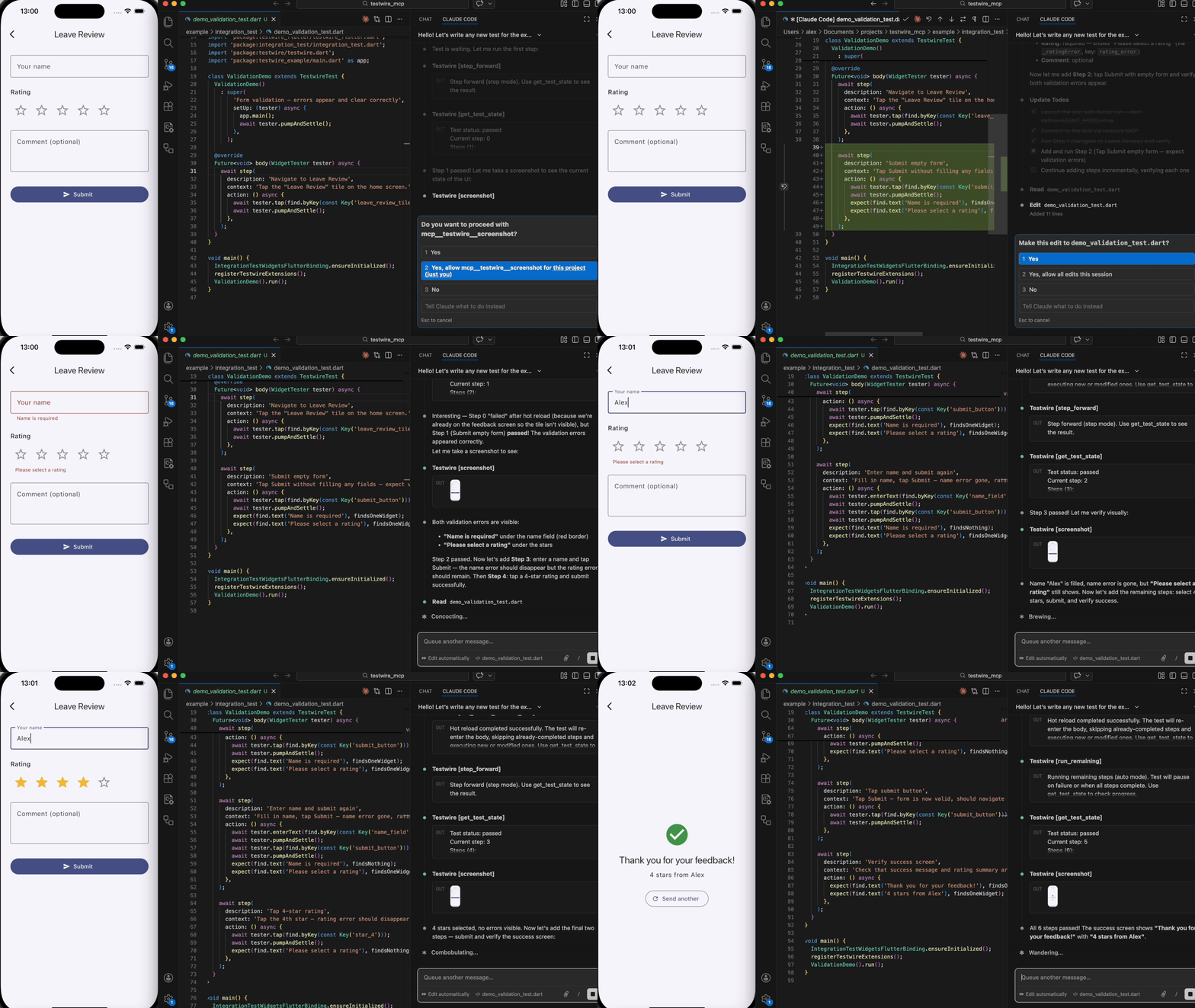
Testwire changes this:
- **No restarts.** Fix a failing step, hot-reload, retry — without rebuilding
or redeploying the app.
- **Structured feedback.** Instead of parsing 200 lines of logs, the agent gets
a clean status per step: what passed, what failed, and why.
- **Less tokens.** Each interaction returns a few lines, not the entire test
output. No repeated context on every retry cycle.
- **Works without the agent.** The same test runs as a normal integration test
in CI when `AGENT_MODE` is not set.
## Packages
| Package | Version | Description |
|---------|---------|-------------|
| [`testwire`](packages/testwire/) | [](https://pub.dev/packages/testwire) | Core library (pure Dart). Provides `step()`, `TestSession`, VM service extensions. |
| [`testwire_flutter`](packages/testwire_flutter/) | [](https://pub.dev/packages/testwire_flutter) | Flutter wrapper. Provides `TestwireTest` (class-based, hot-reload safe) and `testwireTest()` (function-based, simpler). |
| [`testwire_protocol`](packages/testwire_protocol/) | [](https://pub.dev/packages/testwire_protocol) | Shared protocol definitions — extension names, response formats. |
| [`testwire_mcp`](packages/testwire_mcp/) | [](https://pub.dev/packages/testwire_mcp) | MCP server that bridges AI agents to the running test process. |
| [`example`](example/) | — | Example Flutter app with demo integration tests. |
## Which packages do I need?
**For writing tests** (most users):
- Add `testwire_flutter` to your app's `dev_dependencies` — it re-exports
everything you need (`testwire` and `testwire_protocol` are pulled in
automatically).
**For running the MCP server** (connects your AI agent to the test):
- `dart pub global activate testwire_mcp`
That's it — two packages: `testwire_flutter` in your project +
`testwire_mcp` globally.
## How it works
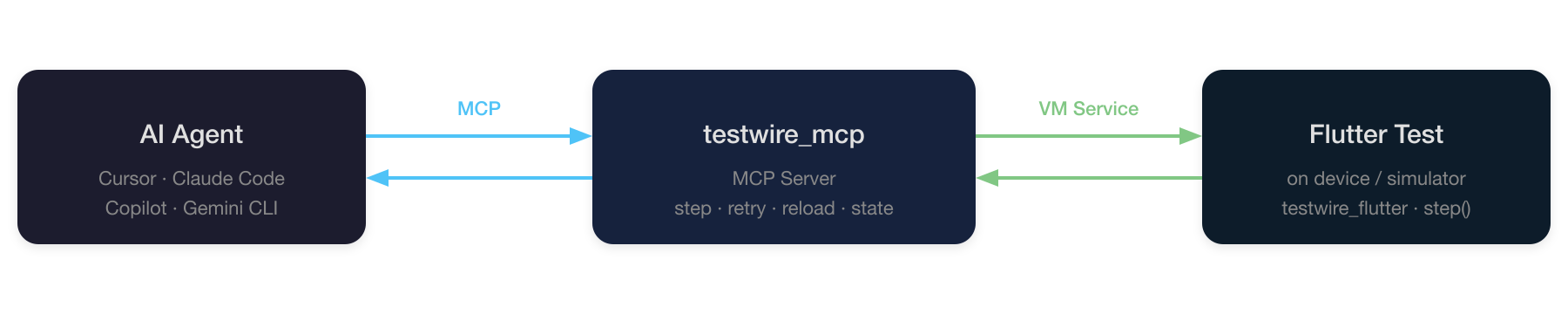
1. **`flutter run`** launches the integration test on a device or simulator
with `--dart-define=AGENT_MODE=true`.
2. The test registers VM service extensions and waits for the agent.
3. The **MCP server** (`testwire_mcp`) connects to the VM service and exposes
tools: `step_forward`, `run_remaining`, `retry_step`, `get_test_state`,
`hot_reload_testwire_test`, `hot_restart_testwire_test`, `screenshot`,
`disconnect`.
4. The **AI agent** calls these tools to control execution step-by-step.
### Key capabilities
- **Step-by-step execution** — run one step at a time or all at once.
- **Hot reload** — edit test code (fix bugs, add steps) and hot-reload without
restarting. Already-completed steps are skipped automatically.
- **Retry** — retry a failed step after fixing the code.
- **Graceful disconnect** — when the agent disconnects, remaining steps run
automatically and the app process terminates.
## Quick start
### Prerequisites
- Flutter SDK (3.10+)
- iOS Simulator, Android emulator, or a physical device
- Any MCP client (Cursor, Windsurf, Claude Desktop, etc.)
### 1. Install the MCP server
Globally:
```sh
dart pub global activate testwire_mcp
```
Or as a project dev dependency:
```sh
dart pub add dev:testwire_mcp
```
### 2. Configure your MCP client
> The examples below use the global command `testwire_mcp`. If you installed
> it as a dev dependency, replace it with `dart run testwire_mcp`.
#### Cursor
[](cursor://anysphere.cursor-deeplink/mcp/install?name=testwire&config=eyJjb21tYW5kIjoidGVzdHdpcmVfbWNwIn0=)
Or manually add to `.cursor/mcp.json`:
```json
{
"mcpServers": {
"testwire": {
"command": "testwire_mcp"
}
}
}
```
#### Claude Code
```sh
claude mcp add --transport stdio testwire -- testwire_mcp
```
#### Gemini CLI
Add to `~/.gemini/settings.json`:
```json
{
"mcpServers": {
"testwire": {
"command": "testwire_mcp"
}
}
}
```
#### Copilot
Add to `mcp.json`:
```json
{
"servers": {
"testwire": {
"command": "testwire_mcp"
}
}
}
```
### 3. Write a test
```dart
import 'package:flutter/material.dart';
import 'package:flutter_test/flutter_test.dart';
import 'package:testwire_flutter/testwire_flutter.dart';
import 'package:integration_test/integration_test.dart';
import 'package:testwire/testwire.dart';
import 'package:my_app/main.dart' as app;
class MyTest extends TestwireTest {
MyTest()
: super(
'My test',
setUp: (tester) async {
app.main();
await tester.pumpAndSettle();
},
);
@override
Future body(WidgetTester tester) async {
await step(
description: 'Tap the button',
context: 'Tap the main action button.',
action: () async {
await tester.tap(find.byKey(const Key('action_button')));
await tester.pumpAndSettle();
},
);
await step(
description: 'Verify result',
context: 'Check that the result text is displayed.',
action: () async {
expect(find.text('Done!'), findsOneWidget);
},
);
}
}
void main() {
IntegrationTestWidgetsFlutterBinding.ensureInitialized();
registerTestwireExtensions();
MyTest().run();
}
```
### 4. Launch the test
```sh
cd example
flutter run \
--dart-define=AGENT_MODE=true \
-d \
integration_test/app_test.dart
```
The console will print a VM Service URI. The agent uses it to connect.
### 5. Agent takes over
The agent connects via the `connect` MCP tool, then drives the test with
`step_forward`, `run_remaining`, `get_test_state`, etc.
## Example demos
The [`example`](example) directory includes ready-to-run
demo scenarios that showcase bug-fixing and incremental development via hot reload.
## Without agent mode
When `AGENT_MODE` is not set (or `false`), all `step()` calls execute
immediately without pausing — the test runs like a normal integration test.
This means the same test file works for both agent-controlled and CI
environments.
## Roadmap
- **`testwire_device`** — a standalone Dart package for controlling the
device/emulator from the host machine via `adb` (Android) and
`xcrun simctl` (iOS Simulator). Permissions (grant/revoke/reset), system
settings, deep links, and more — without native code in the app and without
changing how tests are launched. Works as a library (from tests), as a CLI
(from CI scripts), and as MCP tools (from AI agents).
See [proposal](docs/testwire_device_proposal.md).