
RunAnywhere
On-device AI for every platform.
Run LLMs, speech-to-text, and text-to-speech locally — private, offline, fast.





## See It In Action

Text Generation
LLM inference — 100% on-device
|
|

Voice AI
STT → LLM → TTS pipeline — fully offline
|
|

Image Generation
On-device diffusion model
|
|
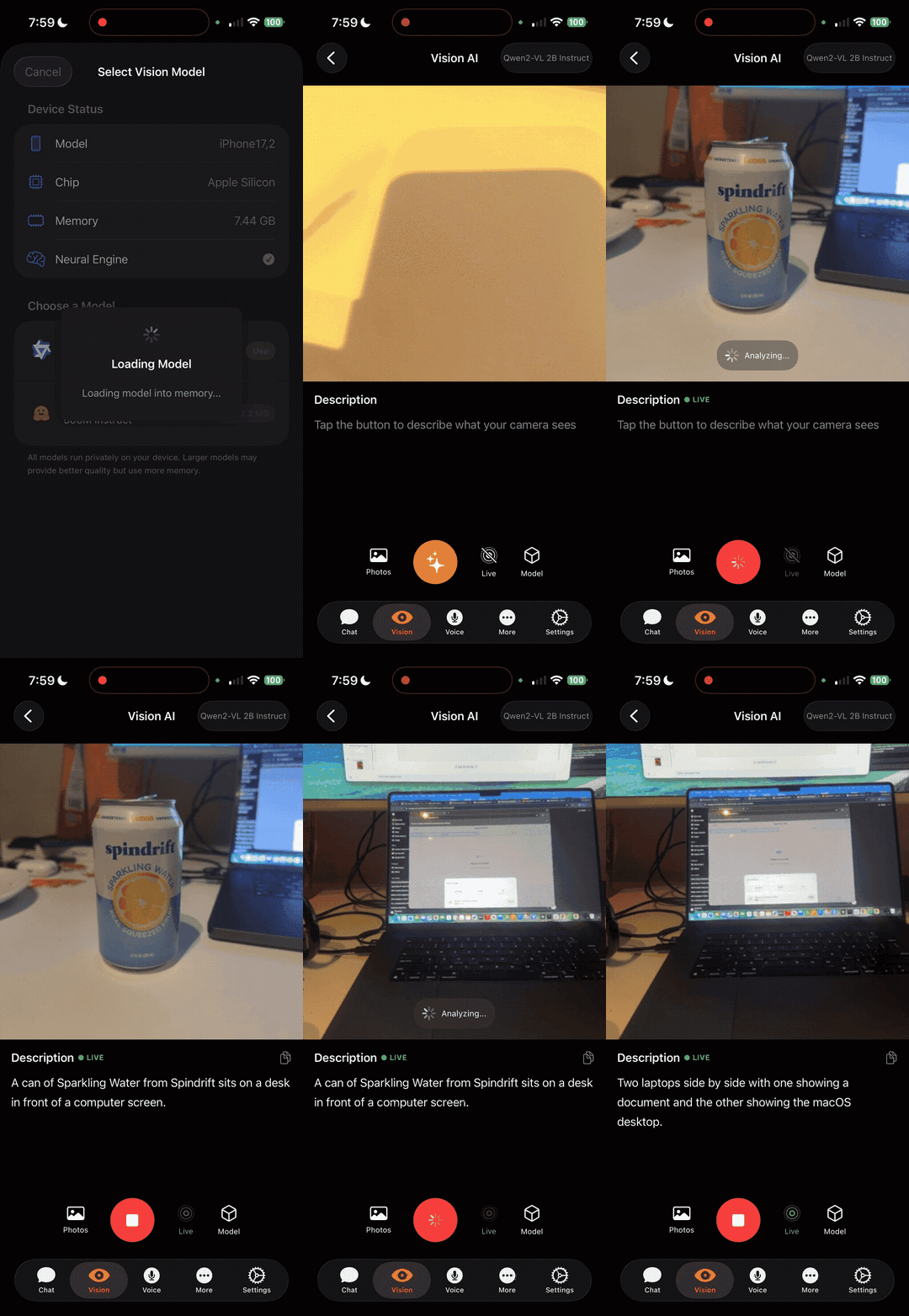
Visual Language Model
Vision + language understanding on-device
|
---
## What is RunAnywhere?
RunAnywhere lets you add AI features to your app that run entirely on-device:
- **LLM Chat** — Llama, Mistral, Qwen, SmolLM, and more
- **Speech-to-Text** — Whisper-powered transcription
- **Text-to-Speech** — Neural voice synthesis
- **Voice Assistant** — Full STT → LLM → TTS pipeline
No cloud. No latency. No data leaves the device.
---
## SDKs
| Platform | Status | Installation | Documentation |
|----------|--------|--------------|---------------|
| **Swift** (iOS/macOS) | Stable | [Swift Package Manager](#swift-ios--macos) | [docs.runanywhere.ai/swift](https://docs.runanywhere.ai/swift/introduction) |
| **Kotlin** (Android) | Stable | [Gradle](#kotlin-android) | [docs.runanywhere.ai/kotlin](https://docs.runanywhere.ai/kotlin/introduction) |
| **Web** (Browser) | Beta | [npm](#web-browser) | [SDK README](sdk/runanywhere-web/) |
| **React Native** | Beta | [npm](#react-native) | [docs.runanywhere.ai/react-native](https://docs.runanywhere.ai/react-native/introduction) |
| **Flutter** | Beta | [pub.dev](#flutter) | [docs.runanywhere.ai/flutter](https://docs.runanywhere.ai/flutter/introduction) |
---
## Quick Start
### Swift (iOS / macOS)
```swift
import RunAnywhere
import LlamaCPPRuntime
// 1. Initialize
LlamaCPP.register()
try RunAnywhere.initialize()
// 2. Load a model (canonical proto request)
var load = RAModelLoadRequest()
load.modelID = "smollm2-360m"
load.category = .language
load.framework = .llamaCpp
_ = await RunAnywhere.loadModel(load)
// 3. Generate
var req = RALLMGenerateRequest()
req.prompt = "What is the capital of France?"
let result = try await RunAnywhere.generate(req)
print(result.text) // "Paris is the capital of France."
```
**Install via Swift Package Manager:**
```
https://github.com/RunanywhereAI/runanywhere-sdks
```
[Full documentation →](https://docs.runanywhere.ai/swift/introduction) · [Source code](sdk/runanywhere-swift/)
---
### Kotlin (Android)
```kotlin
import com.runanywhere.sdk.public.RunAnywhere
import com.runanywhere.sdk.public.extensions.*
// 1. Initialize
LlamaCPP.register()
RunAnywhere.initialize(environment = SDKEnvironment.DEVELOPMENT)
// 2. Load a model
RunAnywhere.downloadModel("smollm2-360m").collect { println("${it.progress * 100}%") }
RunAnywhere.loadLLMModel("smollm2-360m")
// 3. Generate
val response = RunAnywhere.chat("What is the capital of France?")
println(response) // "Paris is the capital of France."
```
**Install via Gradle:**
```kotlin
dependencies {
implementation("com.runanywhere.sdk:runanywhere-kotlin:0.16.1")
implementation("com.runanywhere.sdk:runanywhere-core-llamacpp:0.16.1")
}
```
[Full documentation →](https://docs.runanywhere.ai/kotlin/introduction) · [Source code](sdk/runanywhere-kotlin/)
---
### React Native
```typescript
import { RunAnywhere, SDKEnvironment } from '@runanywhere/core';
import { LlamaCPP } from '@runanywhere/llamacpp';
// 1. Initialize
await RunAnywhere.initialize({ environment: SDKEnvironment.Development });
LlamaCPP.register();
// 2. Load a model
await RunAnywhere.downloadModel('smollm2-360m');
await RunAnywhere.loadModel('smollm2-360m');
// 3. Generate
const response = await RunAnywhere.chat('What is the capital of France?');
console.log(response); // "Paris is the capital of France."
```
**Install via npm:**
```bash
npm install @runanywhere/core @runanywhere/llamacpp
```
[Full documentation →](https://docs.runanywhere.ai/react-native/introduction) · [Source code](sdk/runanywhere-react-native/)
---
### Flutter
```dart
import 'package:runanywhere/runanywhere.dart';
import 'package:runanywhere_llamacpp/runanywhere_llamacpp.dart';
// 1. Initialize
await RunAnywhere.initialize();
await LlamaCpp.register();
// 2. Load a model
await RunAnywhere.downloadModel('smollm2-360m');
await RunAnywhere.loadModel('smollm2-360m');
// 3. Generate
final response = await RunAnywhere.chat('What is the capital of France?');
print(response); // "Paris is the capital of France."
```
**Install via pub.dev:**
```yaml
dependencies:
runanywhere: ^0.16.0
runanywhere_llamacpp: ^0.16.0 # LLM text generation
# runanywhere_onnx: ^0.16.0 # Add this if you need STT, TTS, or Voice features
```
[Full documentation →](https://docs.runanywhere.ai/flutter/introduction) · [Source code](sdk/runanywhere-flutter/)
---
### Web (Browser)
```typescript
import { RunAnywhere } from '@runanywhere/web';
// 1. Initialize
await RunAnywhere.initialize({ environment: 'development' });
// 2. Load a model
await RunAnywhere.loadModel({
id: 'qwen2.5-0.5b',
source: '/models/qwen2.5-0.5b-instruct-q4_0.gguf',
});
// 3. Generate
const result = await RunAnywhere.generate({
prompt: 'What is the capital of France?',
});
console.log(result.text); // "Paris is the capital of France."
```
**Install via npm:**
```bash
npm install @runanywhere/web
```
[Full documentation →](sdk/runanywhere-web/) · [Source code](sdk/runanywhere-web/)
---
## Sample Apps
Full-featured demo applications demonstrating SDK capabilities:
| Platform | Source Code | Download |
|----------|-------------|----------|
| iOS | [examples/ios/RunAnywhereAI](examples/ios/RunAnywhereAI/) | [App Store](https://apps.apple.com/us/app/runanywhere/id6756506307) |
| Android | [examples/android/RunAnywhereAI](examples/android/RunAnywhereAI/) | [Google Play](https://play.google.com/store/apps/details?id=com.runanywhere.runanywhereai) |
| Web | [examples/web/RunAnywhereAI](examples/web/RunAnywhereAI/) | Build from source |
| React Native | [examples/react-native/RunAnywhereAI](examples/react-native/RunAnywhereAI/) | Build from source |
| Flutter | [examples/flutter/RunAnywhereAI](examples/flutter/RunAnywhereAI/) | Build from source |
---
## Starter Examples
Minimal starter projects to get up and running with RunAnywhere on each platform:
| Platform | Repository |
|----------|------------|
| Kotlin (Android) | [RunanywhereAI/kotlin-starter-example](https://github.com/RunanywhereAI/kotlin-starter-example) |
| Swift (iOS) | [RunanywhereAI/swift-starter-example](https://github.com/RunanywhereAI/swift-starter-example) |
| Flutter | [RunanywhereAI/flutter-starter-example](https://github.com/RunanywhereAI/flutter-starter-example) |
| React Native | [RunanywhereAI/react-native-starter-app](https://github.com/RunanywhereAI/react-native-starter-app) |
---
## Playground
Real-world projects built with RunAnywhere that push the boundaries of on-device AI. Each one ships as a standalone app you can build and run.
### [Android Use Agent](Playground/android-use-agent/)
A fully on-device autonomous Android agent that controls your phone. Give it a goal like "Open YouTube and search for lofi music" and it reads the screen via the Accessibility API, reasons about the next action with an on-device LLM (Qwen3-4B), and executes taps, swipes, and text input -- all without any cloud calls. Includes a Samsung foreground boost that delivers a 15x inference speedup, smart pre-launch via Android intents, and loop detection with automatic recovery. Benchmarked across four LLM models on a Galaxy S24. **[Full benchmarks](Playground/android-use-agent/ASSESSMENT.md)**
### [On-Device Browser Agent](Playground/on-device-browser-agent/)
A Chrome extension that automates browser tasks entirely on-device using WebLLM and WebGPU. Uses a two-agent architecture -- a Planner that breaks down goals into steps and a Navigator that interacts with page elements -- with both DOM-based and vision-based page understanding. Includes site-specific workflows for Amazon, YouTube, and more. All AI inference runs locally on your GPU after the initial model download.
### [Swift Starter App](Playground/swift-starter-app/)
A full-featured iOS app demonstrating the RunAnywhere SDK's core AI capabilities in a clean SwiftUI interface. Includes LLM chat with on-device language models, Whisper-powered speech-to-text, neural text-to-speech, and a complete voice pipeline that chains STT, LLM, and TTS together with voice activity detection. A good starting point for building privacy-first AI features on iOS.
### [Linux Voice Assistant](Playground/linux-voice-assistant/)
A complete on-device voice AI pipeline for Linux (Raspberry Pi 5, x86_64, ARM64). Say "Hey Jarvis" to activate, speak naturally, and get responses -- all running locally with zero cloud dependency. Chains Wake Word detection (openWakeWord), Voice Activity Detection (Silero VAD), Speech-to-Text (Whisper Tiny EN), LLM reasoning (Qwen2.5 0.5B Q4), and Text-to-Speech (Piper neural TTS) in a single C++ binary.
### [OpenClaw Hybrid Assistant](Playground/openclaw-hybrid-assistant/)
A hybrid voice assistant that keeps latency-sensitive components on-device (wake word, VAD, STT, TTS) while routing reasoning to a cloud LLM via OpenClaw WebSocket. Supports barge-in (interrupt TTS by saying the wake word), waiting chimes for cloud response feedback, and noise-robust VAD with burst filtering. Built for scenarios where on-device LLMs are too slow but you still want private audio processing.
---
## Features
| Feature | iOS | Android | Web | React Native | Flutter |
|---------|-----|---------|-----|--------------|---------|
| LLM Text Generation | ✅ | ✅ | ✅ | ✅ | ✅ |
| Streaming | ✅ | ✅ | ✅ | ✅ | ✅ |
| Speech-to-Text | ✅ | ✅ | ✅ | ✅ | ✅ |
| Text-to-Speech | ✅ | ✅ | ✅ | ✅ | ✅ |
| Voice Assistant Pipeline | ✅ | ✅ | ✅ | ✅ | ✅ |
| Vision Language Models | ✅ | — | ✅ | — | — |
| Model Download + Progress | ✅ | ✅ | ✅ | ✅ | ✅ |
| Structured Output (JSON) | ✅ | ✅ | ✅ | 🔜 | 🔜 |
| Tool Calling | ✅ | ✅ | ✅ | — | — |
| Embeddings | — | — | ✅ | — | — |
| Apple Foundation Models | ✅ | — | — | — | — |
---
## Supported Models
### LLM (GGUF format via llama.cpp)
| Model | Size | RAM Required | Use Case |
|-------|------|--------------|----------|
| SmolLM2 360M | ~400MB | 500MB | Fast, lightweight |
| Qwen 2.5 0.5B | ~500MB | 600MB | Multilingual |
| Llama 3.2 1B | ~1GB | 1.2GB | Balanced |
| Mistral 7B Q4 | ~4GB | 5GB | High quality |
### Speech-to-Text (Whisper via ONNX)
| Model | Size | Languages |
|-------|------|-----------|
| Whisper Tiny | ~75MB | English |
| Whisper Base | ~150MB | Multilingual |
### Text-to-Speech (Piper via ONNX)
| Voice | Size | Language |
|-------|------|----------|
| Piper US English | ~65MB | English (US) |
| Piper British English | ~65MB | English (UK) |
---
## Repository Structure
```
runanywhere-sdks/
├── sdk/
│ ├── runanywhere-swift/ # iOS/macOS SDK
│ ├── runanywhere-kotlin/ # Android SDK
│ ├── runanywhere-web/ # Web SDK (WebAssembly)
│ ├── runanywhere-react-native/ # React Native SDK
│ ├── runanywhere-flutter/ # Flutter SDK
│ └── runanywhere-commons/ # Shared C++ core
│
├── examples/
│ ├── ios/RunAnywhereAI/ # iOS sample app
│ ├── android/RunAnywhereAI/ # Android sample app
│ ├── web/RunAnywhereAI/ # Web sample app
│ ├── react-native/RunAnywhereAI/ # React Native sample app
│ └── flutter/RunAnywhereAI/ # Flutter sample app
│
├── Playground/
│ ├── swift-starter-app/ # iOS AI playground app
│ ├── on-device-browser-agent/ # Chrome browser automation agent
│ ├── android-use-agent/ # On-device autonomous Android agent
│ ├── linux-voice-assistant/ # Linux on-device voice assistant
│ └── openclaw-hybrid-assistant/ # Hybrid voice assistant (on-device + cloud)
│
└── docs/ # Documentation
```
---
## Requirements
| Platform | Minimum | Recommended |
|----------|---------|-------------|
| iOS | 17.0+ | 17.0+ |
| macOS | 14.0+ | 14.0+ |
| Android | API 24 (7.0) | API 28+ |
| Web | Chrome 96+ / Edge 96+ | Chrome 120+ |
| React Native | 0.74+ | 0.76+ |
| Flutter | 3.10+ | 3.24+ |
**Memory:** 2GB minimum, 4GB+ recommended for larger models
---
## Contributing
We welcome contributions. See our [Contributing Guide](CONTRIBUTING.md) for details.
```bash
# Clone the repo
git clone https://github.com/RunanywhereAI/runanywhere-sdks.git
cd runanywhere-sdks
# Build the native XCFrameworks (generates RACommons + RABackend* xcframeworks
# into sdk/runanywhere-swift/Binaries/). Required for local Swift development.
./sdk/runanywhere-swift/scripts/build-core-xcframework.sh
# Verify `let useLocalNatives = true` in Package.swift so SPM resolves
# against the on-disk XCFrameworks instead of the remote release URLs.
# Run the iOS sample app
cd examples/ios/RunAnywhereAI
open RunAnywhereAI.xcodeproj
```
---
## Support
- **Discord:** [Join our community](https://discord.gg/N359FBbDVd)
- **GitHub Issues:** [Report bugs or request features](https://github.com/RunanywhereAI/runanywhere-sdks/issues)
- **Email:** founders@runanywhere.ai
- **Twitter:** [@RunanywhereAI](https://twitter.com/RunanywhereAI)
---
## License
Apache 2.0 — see [LICENSE](LICENSE) for details.