<h1 align="center">
    <a href="https://www.aishort.top/">
        <img src="static/img/logo.png" alt="AiShort Logo" width="120" height="120" />
    </a>
    <br>
    AiShort (ChatGPT Shortcut) - AI Prompt Management Tool
</h1>

<p align="center">
    <a href="https://github.com/rockbenben/ChatGPT-Shortcut/blob/main/LICENSE">
        <img src="https://img.shields.io/github/license/rockbenben/ChatGPT-Shortcut?color=blue&label=License" alt="License" />
    </a>
    <a href="https://github.com/rockbenben/ChatGPT-Shortcut/stargazers">
        <img src="https://img.shields.io/github/stars/rockbenben/ChatGPT-Shortcut?style=social" alt="GitHub Stars" />
    </a>
    <a href="https://github.com/rockbenben/ChatGPT-Shortcut/releases">
        <img src="https://img.shields.io/github/v/release/rockbenben/ChatGPT-Shortcut?color=green" alt="Version" />
    </a>
    <a href="https://discord.gg/PZTQfJ4GjX">
        <img src="https://img.shields.io/discord/1048780149899939881?color=%2385c8c8&label=Discord&logo=discord&style=flat" alt="Discord" />
    </a>
</p>

<p align="center">
    <img src="https://img.shields.io/badge/Docusaurus-3-2EE6F0?logo=docusaurus&logoColor=white" alt="Docusaurus" />
    <img src="https://img.shields.io/badge/React-19-61DAFB?logo=react&logoColor=white" alt="React" />
    <img src="https://img.shields.io/badge/TypeScript-5-3178C6?logo=typescript&logoColor=white" alt="TypeScript" />
    <img src="https://img.shields.io/badge/Ant_Design-6-0170FE?logo=antdesign&logoColor=white" alt="Ant Design" />
</p>

<p align="center">
    English | <a href="./README-zh.md">简体中文</a> | <a href="./README-lang/README-zh-hant.md">繁體中文</a> |
<a href="./README-lang/README-ja.md">日本語</a> |
<a href="./README-lang/README-ko.md">한국어</a> |
<a href="./README-lang/README-fr.md">Français</a> |
<a href="./README-lang/README-de.md">Deutsch</a> |
<a href="./README-lang/README-es.md">Español</a> |
<a href="./README-lang/README-it.md">Italiano</a> |
<a href="./README-lang/README-ru.md">Русский</a> |
<a href="./README-lang/README-pt.md">Português</a> |
<a href="./README-lang/README-ind.md">Indonesia</a> |
<a href="./README-lang/README-ar.md">العربية</a> |
<a href="./README-lang/README-tr.md">Türkçe</a> |
<a href="./README-lang/README-vi.md">Tiếng Việt</a> |
<a href="./README-lang/README-th.md">ภาษาไทย</a> |
<a href="./README-lang/README-hi.md">हिन्दी</a> |
<a href="./README-lang/README-bn.md">বাংলা</a>
</p>

<p align="center">
    <em>Thousands of battle-tested AI prompts — turn ChatGPT, Cursor, and any AI tool from mediocre to expert-grade.</em>
</p>

## 📖 Table of Contents

- [⚡ Quick Start](#-quick-start)
- [💎 Why AiShort?](#-why-aishort)
- [📸 Screenshots](#-screenshots)
- [🧩 Browser Extension](#-browser-extension)
- [🚀 Deploy](#-deploy)
- [🤝 Contributing](#-contributing)
- [💬 Community](#-community)
- [🌟 Star History](#-star-history)
- [📜 License](#-license)

## ⚡ Quick Start

1. Visit [aishort.top](https://www.aishort.top/en/)
2. Search or browse for the prompt you need
3. Click "Copy" and paste into any AI tool — ChatGPT-style chat pages, coding tools like Cursor, your own API calls, etc.

![AiShort Interface](static/img/docs/interface-home.png)

That's it! For more features, check the [User Guide](https://www.aishort.top/en/docs/guides/getting-started).

## 💎 Why AiShort?

**The gap between using AI and using AI well is one good prompt.**

Same question, different prompts — and AI output goes from generic to genuinely useful. Writing expert-level prompts yourself takes years of iteration. AiShort hands you a curated library of prompts already battle-tested by the community, across writing, coding, office work, learning, design, marketing, and more. Copy → paste → expert-grade output, instantly.

No signup. No paywall. No install. Open and use.

### Core Features

🚀 **Curated Prompts** — Covering writing, coding, office work, and more — ready to copy and use.

🔍 **Tag + Keyword Search** — Filter by scenario tags, or search by keyword.

🌍 **18 Languages** — Full UI and prompt translation, with replies in your native language.

📦 **Ready to Use** — No registration required, just open and go.

### Advanced Features (After Login)

📂 **My Collection** — Drag-and-drop sorting, custom tag classification.

✏️ **Custom Prompts** — Create, edit, and manage your own prompts.

🗳️ **Community** — Share prompts to the community and vote.

📤 **Data Export** — One-click export of all prompts as JSON.

🔐 **Multiple Login Methods** — Password, Google, or passwordless email link.

## 📸 Screenshots

<table>
  <tr>
    <td width="50%"><img src="static/img/docs/my-collection-view.gif" alt="My Collection" /></td>
    <td width="50%"><img src="static/img/docs/extension-sidebar.gif" alt="Browser Extension" /></td>
  </tr>
  <tr>
    <td align="center"><strong>My Collection</strong> — drag, tag, organize</td>
    <td align="center"><strong>Browser Extension</strong> — sidebar in ChatGPT, Gemini, Claude…</td>
  </tr>
  <tr>
    <td width="50%"><img src="static/img/docs/prompt-card.gif" alt="Prompt Card" /></td>
    <td width="50%"><img src="static/img/docs/community-page.png" alt="Community" /></td>
  </tr>
  <tr>
    <td align="center"><strong>Prompt Card</strong> — preview & one-click copy</td>
    <td align="center"><strong>Community</strong> — discover & vote</td>
  </tr>
</table>

## 🧩 Browser Extension

Access AiShort prompts anywhere with our browser extension. Supports Chrome, Edge, and Firefox — open the sidebar with `Alt + Shift + S`.

- **Chrome**: [Chrome Web Store](https://chrome.google.com/webstore/detail/chatgpt-shortcut/blcgeoojgdpodnmnhfpohphdhfncblnj)
- **Edge**: [Microsoft Edge Addons](https://microsoftedge.microsoft.com/addons/detail/chatgpt-shortcut/hnggpalhfjmdhhmgfjpmhlfilnbmjoin)
- **Firefox**: [Firefox Add-ons](https://addons.mozilla.org/addon/chatgpt-shortcut/)
- **GitHub**: [Releases](https://github.com/rockbenben/ChatGPT-Shortcut/releases/latest)

Or use the [ChatGPT Shortcut Anywhere](https://greasyfork.org/scripts/482907-chatgpt-shortcut-anywhere) Tampermonkey script to summon the AiShort sidebar on any website.

## 🚀 Deploy

Deploy your own instance via Vercel, Cloudflare Pages, Docker, or locally. See the [Deployment Guide](https://www.aishort.top/en/docs/deploy) for full details.

[![Deploy with Vercel](https://vercel.com/button)](https://vercel.com/new/clone?repository-url=https%3A%2F%2Fgithub.com%2Frockbenben%2FChatGPT-Shortcut%2Ftree%2Fmain)

> **Tip**: Vercel's one-click deploy creates a new project (not a fork), so the upstream-update check won't work. To get auto-sync, fork the repo first, then import the fork in Vercel — full instructions in the [deploy guide](https://www.aishort.top/en/docs/deploy#%E5%BC%80%E5%90%AF%E5%90%8C%E6%AD%A5%E6%9B%B4%E6%96%B0).

## 🤝 Contributing

Contributions of all kinds are welcome:

- **Suggest a prompt** or **report a bug** → open a [GitHub Issue](https://github.com/rockbenben/ChatGPT-Shortcut/issues/new)
- **Submit a PR** → fork the repo, create a branch, send a pull request
- **Add a translation** or **improve docs** → see the `i18n/` and `docs/` directories
- **Star ⭐ and share** to help others discover useful prompts

For local development setup, see the [Deployment Guide](https://www.aishort.top/en/docs/deploy).

## 💬 Community

Join us for discussions and feedback:

<a href="https://t.me/aishort_top">
    <img src="https://img.shields.io/badge/Telegram-Group-blue?logo=telegram&style=for-the-badge" alt="Telegram" />
</a>
<a href="https://discord.gg/PZTQfJ4GjX">
    <img src="https://img.shields.io/discord/1048780149899939881?color=%2385c8c8&label=Discord&logo=discord&style=for-the-badge" alt="Discord" />
</a>

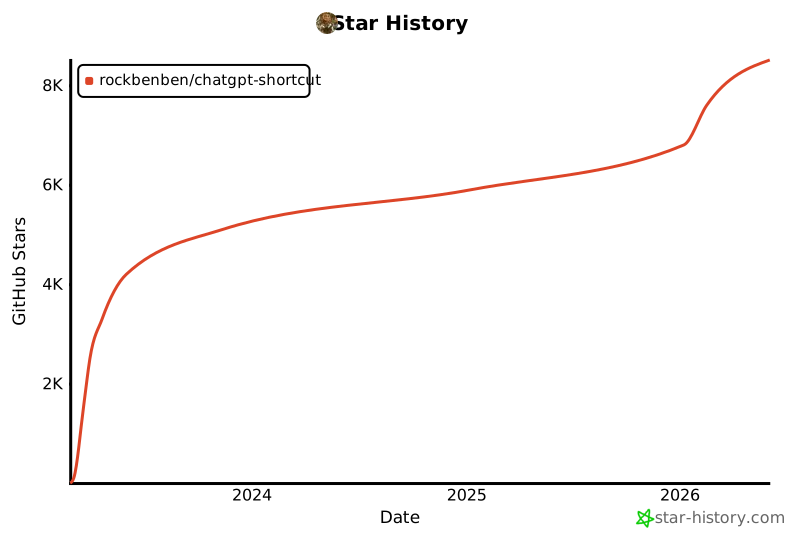
## 🌟 Star History

[![Star History Chart](https://api.star-history.com/svg?repos=rockbenben/ChatGPT-Shortcut&type=Date)](https://star-history.com/#rockbenben/ChatGPT-Shortcut&Date)

## 📜 License

[MIT](LICENSE) © [rockbenben](https://github.com/rockbenben)

---

⭐ Star this project to stay updated on new features!