<div align="center">
<a href="https://ranger.fm/">
<img src="https://ranger.fm/ranger_logo.png" width="200">
</a>

Ranger 1.9.4
============

[![Python lints and tests](https://github.com/ranger/ranger/actions/workflows/python.yml/badge.svg)](https://github.com/ranger/ranger/actions/workflows/python.yml)
<a href="https://repology.org/metapackage/ranger/versions"><img src="https://repology.org/badge/latest-versions/ranger.svg" alt="latest packaged version(s)"></a>
[![Donate via Liberapay](https://img.shields.io/liberapay/patrons/ranger)](https://liberapay.com/ranger)
</div>

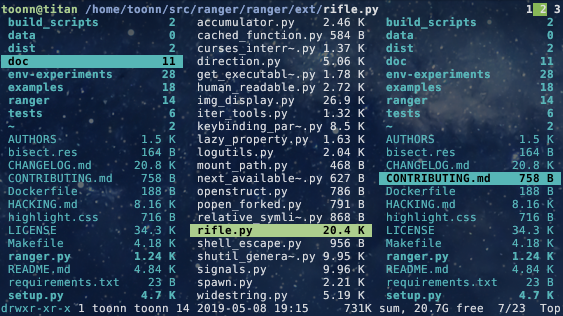
Ranger is a console file manager with VI key bindings.  It provides a
minimalistic and nice curses interface with a view on the directory hierarchy.
It ships with `rifle`, a file launcher that is good at automatically finding
out which program to use for what file type.
![screenshot](https://raw.githubusercontent.com/ranger/ranger-assets/master/screenshots/screenshot.png)

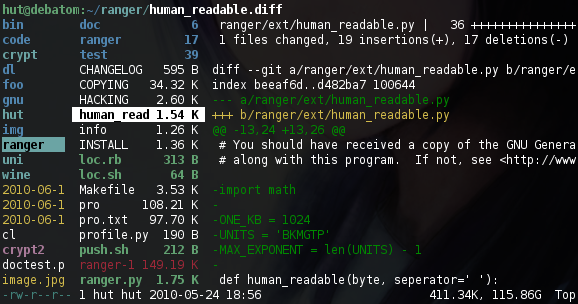
For `mc` aficionados there's also the multi-pane viewmode.
<p>
<img src="https://raw.githubusercontent.com/ranger/ranger-assets/master/screenshots/twopane.png" alt="two panes" width="49%" />
<img src="https://raw.githubusercontent.com/ranger/ranger-assets/master/screenshots/multipane.png" alt="multiple panes" width="49%" />
</p>

This file describes ranger and how to get it to run.  For instructions on the
usage, please read the man page (`man ranger` in a terminal).  See `HACKING.md`
for development-specific information.

For configuration, check the files in `ranger/config/` or copy the
default config to `~/.config/ranger` with `ranger --copy-config`
(see [instructions](#getting-started)).

The `examples/` directory contains several scripts and plugins that demonstrate how
ranger can be extended or combined with other programs.  These files can be
found in the git repository or in `/usr/share/doc/ranger`.

A note to packagers: Versions meant for packaging are listed in the changelog
on the website.


About
-----
* Authors:     see `AUTHORS` file
* License:     GNU General Public License Version 3
* Website:     https://ranger.fm/
* Download:    https://ranger.fm/ranger-stable.tar.gz
* Bug reports: https://github.com/ranger/ranger/issues
* git clone    https://github.com/ranger/ranger.git


Design Goals
------------
* An easily maintainable file manager in a high level language
* A quick way to switch directories and browse the file system
* Keep it small but useful, do one thing and do it well
* Console-based, with smooth integration into the unix shell


Features
--------
* UTF-8 Support  (if your Python copy supports it)
* Multi-column display
* Preview of the selected file/directory
* Common file operations (create/chmod/copy/delete/...)
* Renaming multiple files at once
* VIM-like console and hotkeys
* Automatically determine file types and run them with correct programs
* Change the directory of your shell after exiting ranger
* Tabs, bookmarks, mouse support...


Dependencies
------------
* Python (`>=2.6` or `>=3.1`) with the `curses` module
  and (optionally) wide-unicode support
* A pager (`less` by default)

### Optional dependencies

For general usage:

* `file` for determining file types
* `chardet` (Python package) for improved encoding detection of text files
* `sudo` to use the "run as root" feature
* `python-bidi` (Python package) to display right-to-left file names correctly
  (Hebrew, Arabic)

For enhanced file previews (with `scope.sh`):

* `img2txt` (from `caca-utils`) for ASCII-art image previews
* `w3mimgdisplay`, `ueberzug`, `mpv`, `iTerm2`, `kitty` (or other terminal supporting the Kitty graphics protocol), `terminology` or `urxvt` for image previews
* `convert` (from `imagemagick`) to auto-rotate images and for image previews
* `rsvg-convert` (from [`librsvg`](https://wiki.gnome.org/Projects/LibRsvg))
  for SVG previews
* `ffmpeg`, or `ffmpegthumbnailer` for video thumbnails
* `highlight`, `bat` or `pygmentize` for syntax highlighting of code
* `atool`, `bsdtar`, `unrar` and/or `7zz` to preview archives
* `bsdtar`, `tar`, `unrar`, `unzip` and/or `zipinfo` (and `sed`) to preview
  archives as their first image
* `lynx`, `w3m` or `elinks` to preview html pages
* `pdftotext` or `mutool` (and `fmt`) for textual `pdf` previews, `pdftoppm` to
  preview as image
* `djvutxt` for textual DjVu previews, `ddjvu` to preview as image
* `calibre` or `epub-thumbnailer` for image previews of ebooks
* `transmission-show` for viewing BitTorrent information
* `mediainfo` or `exiftool` for viewing information about media files
* `odt2txt` for OpenDocument text files (`odt`, `ods`, `odp` and `sxw`)
* `python` or `jq` for JSON files
* `sqlite3` for listing tables in SQLite database (and optionally `sqlite-utils` for fancier box drawing.)
* `jupyter nbconvert` for Jupyter Notebooks
* `fontimage` for font previews
* `openscad` for 3D model previews (`stl`, `off`, `dxf`, `scad`, `csg`)
* `draw.io` for [draw.io](https://app.diagrams.net/) diagram previews
  (`drawio` extension)

Installing
----------
Use the package manager of your operating system to install ranger.
You can also install ranger through PyPI: `pip install ranger-fm`.
However, it is recommended to use [`pipx`](https://pypa.github.io/pipx/) instead
(to benefit from isolated environments). Use
`pipx run --spec ranger-fm ranger` to install and run ranger in one step.

<details>
  <summary>
    Check current version:
    <sub>
      <a href="https://repology.org/metapackage/ranger/versions">
        <img src="https://repology.org/badge/tiny-repos/ranger.svg" alt="Packaging status">
      </a>
    </sub>
  </summary>
  <a href="https://repology.org/metapackage/ranger/versions">
    <img src="https://repology.org/badge/vertical-allrepos/ranger.svg" alt="Packaging status">
  </a>
</details>

### Installing from a clone
Note that you don't *have* to install ranger; you can simply run `ranger.py`.

To install ranger manually:
```
sudo make install
```

This translates roughly to:
```
sudo python setup.py install --optimize=1 --record=install_log.txt
```

This also saves a list of all installed files to `install_log.txt`, which you can
use to uninstall ranger.


Getting Started
---------------
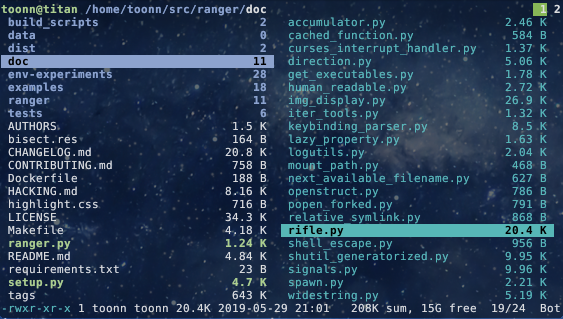
After starting ranger, you can use the Arrow Keys or `h` `j` `k` `l` to
navigate, `Enter` to open a file or `q` to quit.  The third column shows a
preview of the current file.  The second is the main column and the first shows
the parent directory.

Ranger can automatically copy default configuration files to `~/.config/ranger`
if you run it with the switch `--copy-config=( rc | scope | ... | all )`.
See `ranger --help` for a description of that switch.  Also check
`ranger/config/` for the default configuration.


Going Further
---------------
* To get the most out of ranger, read the [Official User Guide](https://github.com/ranger/ranger/wiki/Official-user-guide).
* For frequently asked questions, see the [FAQ](https://github.com/ranger/ranger/wiki/FAQ%3A-Frequently-Asked-Questions).
* For more information on customization, see the [wiki](https://github.com/ranger/ranger/wiki).


Community
---------------
For help, support, or if you just want to hang out with us, you can find us here:
* **IRC**: channel **#ranger** on [Libera.Chat](https://libera.chat/guides/connect). Don't have an IRC client? Join us via the [webchat](https://web.libera.chat/#ranger)!
* **Reddit**: [r/ranger](https://www.reddit.com/r/ranger/)