# 稳定视频抠像 (RVM)

![Teaser](/documentation/image/teaser.gif)

<p align="center"><a href="README.md">English</a> | 中文</p>

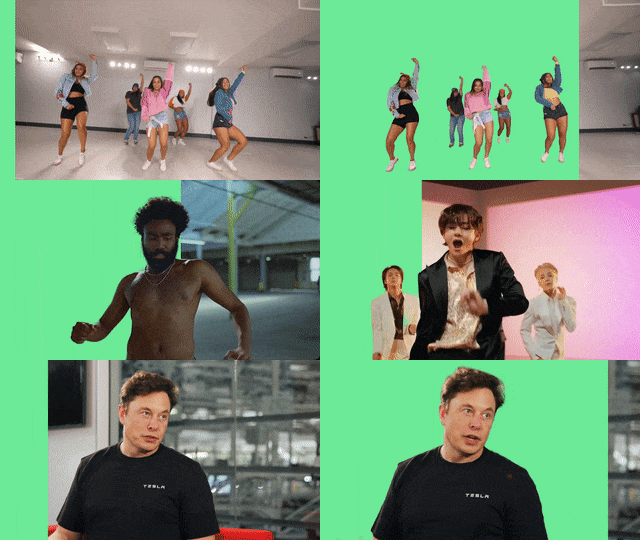
论文 [Robust High-Resolution Video Matting with Temporal Guidance](https://peterl1n.github.io/RobustVideoMatting/) 的官方 GitHub 库。RVM 专为稳定人物视频抠像设计。不同于现有神经网络将每一帧作为单独图片处理，RVM 使用循环神经网络，在处理视频流时有时间记忆。RVM 可在任意视频上做实时高清抠像。在 Nvidia GTX 1080Ti 上实现 **4K 76FPS** 和 **HD 104FPS**。此研究项目来自[字节跳动](https://www.bytedance.com/)。

<br>

## 更新

* [2021年11月3日] 修复了 [train.py](https://github.com/PeterL1n/RobustVideoMatting/commit/48effc91576a9e0e7a8519f3da687c0d3522045f) 的 bug。
* [2021年9月16日] 代码重新以 GPL-3.0 许可发布。
* [2021年8月25日] 公开代码和模型。
* [2021年7月27日] 论文被 WACV 2022 收录。

<br>

## 展示视频
观看展示视频 ([YouTube](https://youtu.be/Jvzltozpbpk), [Bilibili](https://www.bilibili.com/video/BV1Z3411B7g7/))，了解模型能力。
<p align="center">
    <a href="https://youtu.be/Jvzltozpbpk">
        <img src="documentation/image/showreel.gif">
    </a>
</p>

视频中的所有素材都提供下载，可用于测试模型：[Google Drive](https://drive.google.com/drive/folders/1VFnWwuu-YXDKG-N6vcjK_nL7YZMFapMU?usp=sharing)

<br>


## Demo
* [网页](https://peterl1n.github.io/RobustVideoMatting/#/demo): 在浏览器里看摄像头抠像效果，展示模型内部循环记忆值。
* [Colab](https://colab.research.google.com/drive/10z-pNKRnVNsp0Lq9tH1J_XPZ7CBC_uHm?usp=sharing): 用我们的模型转换你的视频。

<br>

## 下载

推荐在通常情况下使用 MobileNetV3 的模型。ResNet50 的模型大很多，效果稍有提高。我们的模型支持很多框架。详情请阅读[推断文档](documentation/inference_zh_Hans.md)。

<table>
    <thead>
        <tr>
            <td>框架</td>
            <td>下载</td>
            <td>备注</td>
        </tr>
    </thead>
    <tbody>
        <tr>
            <td>PyTorch</td>
            <td>
                <a  href="https://github.com/PeterL1n/RobustVideoMatting/releases/download/v1.0.0/rvm_mobilenetv3.pth">rvm_mobilenetv3.pth</a><br>
                <a  href="https://github.com/PeterL1n/RobustVideoMatting/releases/download/v1.0.0/rvm_resnet50.pth">rvm_resnet50.pth</a>
            </td>
            <td>
                官方 PyTorch 模型权值。<a href="documentation/inference_zh_Hans.md#pytorch">文档</a>
            </td>
        </tr>
        <tr>
            <td>TorchHub</td>
            <td>
                无需手动下载。
            </td>
            <td>
                更方便地在你的 PyTorch 项目里使用此模型。<a href="documentation/inference_zh_Hans.md#torchhub">文档</a>
            </td>
        </tr>
        <tr>
            <td>TorchScript</td>
            <td>
                <a  href="https://github.com/PeterL1n/RobustVideoMatting/releases/download/v1.0.0/rvm_mobilenetv3_fp32.torchscript">rvm_mobilenetv3_fp32.torchscript</a><br>
                <a  href="https://github.com/PeterL1n/RobustVideoMatting/releases/download/v1.0.0/rvm_mobilenetv3_fp16.torchscript">rvm_mobilenetv3_fp16.torchscript</a><br>
                <a  href="https://github.com/PeterL1n/RobustVideoMatting/releases/download/v1.0.0/rvm_resnet50_fp32.torchscript">rvm_resnet50_fp32.torchscript</a><br>
                <a  href="https://github.com/PeterL1n/RobustVideoMatting/releases/download/v1.0.0/rvm_resnet50_fp16.torchscript">rvm_resnet50_fp16.torchscript</a>
            </td>
            <td>
                若需在移动端推断，可以考虑自行导出 int8 量化的模型。<a href="documentation/inference_zh_Hans.md#torchscript">文档</a>
            </td>
        </tr>
        <tr>
            <td>ONNX</td>
            <td>
                <a  href="https://github.com/PeterL1n/RobustVideoMatting/releases/download/v1.0.0/rvm_mobilenetv3_fp32.onnx">rvm_mobilenetv3_fp32.onnx</a><br>
                <a  href="https://github.com/PeterL1n/RobustVideoMatting/releases/download/v1.0.0/rvm_mobilenetv3_fp16.onnx">rvm_mobilenetv3_fp16.onnx</a><br>
                <a  href="https://github.com/PeterL1n/RobustVideoMatting/releases/download/v1.0.0/rvm_resnet50_fp32.onnx">rvm_resnet50_fp32.onnx</a><br>
                <a  href="https://github.com/PeterL1n/RobustVideoMatting/releases/download/v1.0.0/rvm_resnet50_fp16.onnx">rvm_resnet50_fp16.onnx</a>
            </td>
            <td>
                在 ONNX Runtime 的 CPU 和 CUDA backend 上测试过。提供的模型用 opset 12。<a href="documentation/inference_zh_Hans.md#onnx">文档</a>，<a href="https://github.com/PeterL1n/RobustVideoMatting/tree/onnx">导出</a>
            </td>
        </tr>
        <tr>
            <td>TensorFlow</td>
            <td>
                <a  href="https://github.com/PeterL1n/RobustVideoMatting/releases/download/v1.0.0/rvm_mobilenetv3_tf.zip">rvm_mobilenetv3_tf.zip</a><br>
                <a  href="https://github.com/PeterL1n/RobustVideoMatting/releases/download/v1.0.0/rvm_resnet50_tf.zip">rvm_resnet50_tf.zip</a>
            </td>
            <td>
                TensorFlow 2 SavedModel 格式。<a href="documentation/inference_zh_Hans.md#tensorflow">文档</a>
            </td>
        </tr>
        <tr>
            <td>TensorFlow.js</td>
            <td>
                <a  href="https://github.com/PeterL1n/RobustVideoMatting/releases/download/v1.0.0/rvm_mobilenetv3_tfjs_int8.zip">rvm_mobilenetv3_tfjs_int8.zip</a><br>
            </td>
            <td>
                在网页上跑模型。<a href="https://peterl1n.github.io/RobustVideoMatting/#/demo">展示</a>，<a href="https://github.com/PeterL1n/RobustVideoMatting/tree/tfjs">示范代码</a>
            </td>
        </tr>
        <tr>
            <td>CoreML</td>
            <td>
                <a  href="https://github.com/PeterL1n/RobustVideoMatting/releases/download/v1.0.0/rvm_mobilenetv3_1280x720_s0.375_fp16.mlmodel">rvm_mobilenetv3_1280x720_s0.375_fp16.mlmodel</a><br>
                <a  href="https://github.com/PeterL1n/RobustVideoMatting/releases/download/v1.0.0/rvm_mobilenetv3_1280x720_s0.375_int8.mlmodel">rvm_mobilenetv3_1280x720_s0.375_int8.mlmodel</a><br>
                <a  href="https://github.com/PeterL1n/RobustVideoMatting/releases/download/v1.0.0/rvm_mobilenetv3_1920x1080_s0.25_fp16.mlmodel">rvm_mobilenetv3_1920x1080_s0.25_fp16.mlmodel</a><br>
                <a  href="https://github.com/PeterL1n/RobustVideoMatting/releases/download/v1.0.0/rvm_mobilenetv3_1920x1080_s0.25_int8.mlmodel">rvm_mobilenetv3_1920x1080_s0.25_int8.mlmodel</a><br>
            </td>
            <td>
                CoreML 只能导出固定分辨率，其他分辨率可自行导出。支持 iOS 13+。<code>s</code> 代表下采样比。<a href="documentation/inference_zh_Hans.md#coreml">文档</a>，<a href="https://github.com/PeterL1n/RobustVideoMatting/tree/coreml">导出</a>
            </td>
        </tr>
    </tbody>
</table>

所有模型可在 [Google Drive](https://drive.google.com/drive/folders/1pBsG-SCTatv-95SnEuxmnvvlRx208VKj?usp=sharing) 或[百度网盘](https://pan.baidu.com/s/1puPSxQqgBFOVpW4W7AolkA)（密码: gym7）上下载。

<br>

## PyTorch 范例

1. 安装 Python 库:
```sh
pip install -r requirements_inference.txt
```

2. 加载模型:

```python
import torch
from model import MattingNetwork

model = MattingNetwork('mobilenetv3').eval().cuda()  # 或 "resnet50"
model.load_state_dict(torch.load('rvm_mobilenetv3.pth'))
```

3. 若只需要做视频抠像处理，我们提供简单的 API:

```python
from inference import convert_video

convert_video(
    model,                           # 模型，可以加载到任何设备（cpu 或 cuda）
    input_source='input.mp4',        # 视频文件，或图片序列文件夹
    output_type='video',             # 可选 "video"（视频）或 "png_sequence"（PNG 序列）
    output_composition='com.mp4',    # 若导出视频，提供文件路径。若导出 PNG 序列，提供文件夹路径
    output_alpha="pha.mp4",          # [可选项] 输出透明度预测
    output_foreground="fgr.mp4",     # [可选项] 输出前景预测
    output_video_mbps=4,             # 若导出视频，提供视频码率
    downsample_ratio=None,           # 下采样比，可根据具体视频调节，或 None 选择自动
    seq_chunk=12,                    # 设置多帧并行计算
)
```

4. 或自己写推断逻辑:
```python
from torch.utils.data import DataLoader
from torchvision.transforms import ToTensor
from inference_utils import VideoReader, VideoWriter

reader = VideoReader('input.mp4', transform=ToTensor())
writer = VideoWriter('output.mp4', frame_rate=30)

bgr = torch.tensor([.47, 1, .6]).view(3, 1, 1).cuda()  # 绿背景
rec = [None] * 4                                       # 初始循环记忆（Recurrent States）
downsample_ratio = 0.25                                # 下采样比，根据视频调节

with torch.no_grad():
    for src in DataLoader(reader):                     # 输入张量，RGB通道，范围为 0～1
        fgr, pha, *rec = model(src.cuda(), *rec, downsample_ratio)  # 将上一帧的记忆给下一帧
        com = fgr * pha + bgr * (1 - pha)              # 将前景合成到绿色背景
        writer.write(com)                              # 输出帧
```

5. 模型和 API 也可通过 TorchHub 快速载入。

```python
# 加载模型
model = torch.hub.load("PeterL1n/RobustVideoMatting", "mobilenetv3") # 或 "resnet50"

# 转换 API
convert_video = torch.hub.load("PeterL1n/RobustVideoMatting", "converter")
```

[推断文档](documentation/inference_zh_Hans.md)里有对 `downsample_ratio` 参数，API 使用，和高阶使用的讲解。

<br>

## 训练和评估

请参照[训练文档（英文）](documentation/training.md)。

<br>

## 速度

速度用 `inference_speed_test.py` 测量以供参考。

| GPU            | dType | HD (1920x1080) | 4K (3840x2160) |
| -------------- | ----- | -------------- |----------------|
| RTX 3090       | FP16  | 172 FPS        | 154 FPS        |
| RTX 2060 Super | FP16  | 134 FPS        | 108 FPS        |
| GTX 1080 Ti    | FP32  | 104 FPS        | 74 FPS         |

* 注释1：HD 使用 `downsample_ratio=0.25`，4K 使用 `downsample_ratio=0.125`。 所有测试都使用 batch size 1 和 frame chunk 1。
* 注释2：图灵架构之前的 GPU 不支持 FP16 推理，所以 GTX 1080 Ti 使用 FP32。
* 注释3：我们只测量张量吞吐量（tensor throughput）。 提供的视频转换脚本会慢得多，因为它不使用硬件视频编码/解码，也没有在并行线程上完成张量传输。如果您有兴趣在 Python 中实现硬件视频编码/解码，请参考 [PyNvCodec](https://github.com/NVIDIA/VideoProcessingFramework)。

<br>

## 项目成员
* [Shanchuan Lin](https://www.linkedin.com/in/shanchuanlin/)
* [Linjie Yang](https://sites.google.com/site/linjieyang89/)
* [Imran Saleemi](https://www.linkedin.com/in/imran-saleemi/)
* [Soumyadip Sengupta](https://homes.cs.washington.edu/~soumya91/)

<br>

## 第三方资源

* [NCNN C++ Android](https://github.com/FeiGeChuanShu/ncnn_Android_RobustVideoMatting) ([@FeiGeChuanShu](https://github.com/FeiGeChuanShu))
* [lite.ai.toolkit](https://github.com/DefTruth/RobustVideoMatting.lite.ai.toolkit) ([@DefTruth](https://github.com/DefTruth))
* [Gradio Web Demo](https://huggingface.co/spaces/akhaliq/Robust-Video-Matting) ([@AK391](https://github.com/AK391))
* [带有 NatML 的 Unity 引擎](https://hub.natml.ai/@natsuite/robust-video-matting) ([@natsuite](https://github.com/natsuite))  
* [MNN C++ Demo](https://github.com/DefTruth/lite.ai.toolkit/blob/main/lite/mnn/cv/mnn_rvm.cpp) ([@DefTruth](https://github.com/DefTruth))
* [TNN C++ Demo](https://github.com/DefTruth/lite.ai.toolkit/blob/main/lite/tnn/cv/tnn_rvm.cpp) ([@DefTruth](https://github.com/DefTruth))

