


OpenOcta — An Open-Source Personal Desktop AI Agent
Website ·
简体中文
Double-click install · run locally · instant boot · your data stays on your machine
**OpenOcta** is an open-source personal desktop AI agent,open-source work mate. Double-click to install on your PC — an Agent that runs on your own machine under your full control. Use natural language for office work, IT ops, marketing, business analysis, and software testing.
**Latest [v1.0.5](https://github.com/openocta/openocta/releases/tag/v1.0.5)** (2026-07-02) — all-platform installers · fix for tool-call chat history · single Go binary with embedded Control UI
[All releases →](https://github.com/openocta/openocta/releases)
---
## ✨ Features
🖥️ **Personal desktop** — built for your PC: files, terminal, browser, and local projects — not just a chat window.
⚡️ **Double-click ready** — install in ~30 seconds with a full Control UI out of the box — no hours of CLI setup.
🪶 **Ultra-lightweight** — ~30MB installers and low runtime memory — ideal for 24/7 background use.
🔒 **Local-first** — sessions and memory stay on your machine; data stays under your control and can run on intranet — no Node / Python in production.
🔧 **Fully self-developed Go** — Gateway, Agent, and Channels are native Go — single binary with embedded Control UI.
🔌 **Skills & MCP** — built-in tools + MCP protocol + [skills marketplace](https://resource.openocta.com) — extend digital employee capabilities on demand.
💬 **IM remote control** — drive tasks from WeChat, WeCom, DingTalk, and Feishu anytime, anywhere.
🧠 **Four-tier memory + L4 evolution** — Knowledge Vault learns your preferences over time ([docs](./docs/knowledge-vault.md)).
 **Open source from China** — maintained by a Chinese team, 100% Apache-2.0 — China's first open-source personal desktop AI agent.
---
## vs. OpenClaw & Hermes
OpenOcta is **personal desktop-first**: double-click install, full client UI, domestic IM, and CN LLM integrations. Versus OpenClaw (Node self-host) and Hermes (Python CLI), OpenOcta ships a **fully self-developed Go runtime** as a **single binary**, with **L4 evolution** and **Knowledge Vault**.
| | OpenOcta | OpenClaw | Hermes |
|---|:---:|:---:|:---:|
| Onboarding | Double-click install | CLI deploy | CLI deploy |
| Runtime | Go · single binary | Node.js | Python |
| Localization | CN IM + CN LLMs | Global IM/models | Global IM/models |
| Memory evolution | Four-tier + L4 Evolution | Workspace Markdown | Skill self-gen |
| Local knowledge base | Knowledge Vault | — | — |
| Install time | ~30 seconds | Hours of setup typical | Hours of setup typical |
**Full comparison & selection guide** → [docs/compare-openclaw-hermes.en.md](./docs/compare-openclaw-hermes.en.md)
---
## Product UI
A quick look at the OpenOcta desktop client:
**Open source from China** — maintained by a Chinese team, 100% Apache-2.0 — China's first open-source personal desktop AI agent.
---
## vs. OpenClaw & Hermes
OpenOcta is **personal desktop-first**: double-click install, full client UI, domestic IM, and CN LLM integrations. Versus OpenClaw (Node self-host) and Hermes (Python CLI), OpenOcta ships a **fully self-developed Go runtime** as a **single binary**, with **L4 evolution** and **Knowledge Vault**.
| | OpenOcta | OpenClaw | Hermes |
|---|:---:|:---:|:---:|
| Onboarding | Double-click install | CLI deploy | CLI deploy |
| Runtime | Go · single binary | Node.js | Python |
| Localization | CN IM + CN LLMs | Global IM/models | Global IM/models |
| Memory evolution | Four-tier + L4 Evolution | Workspace Markdown | Skill self-gen |
| Local knowledge base | Knowledge Vault | — | — |
| Install time | ~30 seconds | Hours of setup typical | Hours of setup typical |
**Full comparison & selection guide** → [docs/compare-openclaw-hermes.en.md](./docs/compare-openclaw-hermes.en.md)
---
## Product UI
A quick look at the OpenOcta desktop client:

Agent chat · multi-turn collaboration, tool use, and complex tasks driven by natural language
|

Employee market · one-click install Zabbix, Prometheus, MySQL DBA, and more digital employees
|

Skills library · 766+ Skills across DevOps / databases / dev tools
|

Knowledge vault · Obsidian-compatible notes, synced index for Agent semantic search
|

Models · public and local model providers supported
|

Tutorials · video and doc courses for Windows / Mac / Linux quick start and ops practice
|
The client also includes **Tools**, **Scheduled tasks**, and **IM channels**. Download at [openocta.com](https://openocta.com).
---
## Use cases
**Office work** — automate repetitive tasks and free up creativity.
*e.g. “Summarize this week’s emails and draft a status report”*
**IT ops** — 24/7 intelligent on-call, from firefighting to prevention.
*e.g. “Analyze this alert log and suggest remediation”*
**Marketing** — produce multi-channel content faster.
*e.g. “Write a short social post from this product brief”*
**Knowledge management** — local knowledge base with semantic search.
*e.g. “Find XX policy in my vault and summarize it”*
**Dev collaboration** — read code, edit repos, run commands, wire toolchains.
*e.g. “Read this repo’s README and list items to fix”*
More at [openocta.com/cases](https://openocta.com/cases) and [docs/scenarios.md](./docs/scenarios.md).
---
## Launch in 30 seconds
1. **Download** — [GitHub Releases](https://github.com/openocta/openocta/releases/latest) or [openocta.com](https://openocta.com/#download)
2. **Install & open** — desktop client, ready in ~30 seconds
3. **Chat** — describe a task in **Chat**; the agent uses files, terminal, and tools
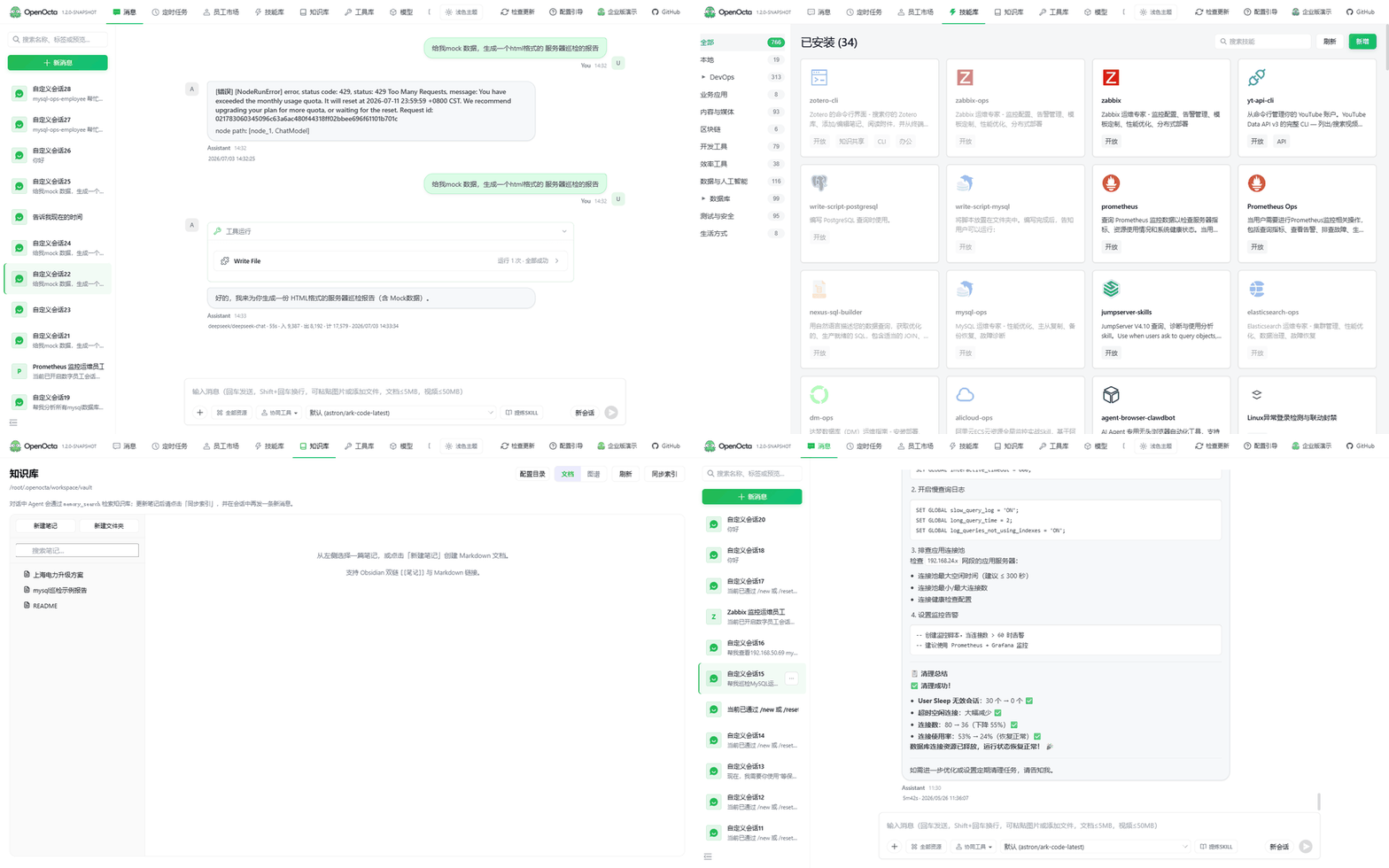
Product demo · chat → skills → knowledge → ops agent (pending)
---
## First-time setup (~2 min)
Connect a model before your first chat:
**Option A — UI (recommended)**
Open the **Models** tab or follow the **setup wizard** on first launch, then enter your API key and choose a model.

**Option B — Config file**
| Platform | Config path |
|----------|-------------|
| Linux / macOS | `~/.openocta/openocta.json` |
| Windows | `%APPDATA%\openocta\openocta.json` |
Minimal example ([Moonshot CN](https://platform.moonshot.cn/); see [model providers](./docs/model-providers.md) for DeepSeek, Qwen, etc.):
```json
{
"env": {
"vars": {
"MOONSHOT_API_KEY": "sk-your-key"
}
},
"agents": {
"defaults": {
"model": { "primary": "moonshot-cn/kimi-k2.5" }
}
}
}
```
Restart the client, then try in **Chat**:
> List files in the current working directory and tell me the 3 largest
---
## Why OpenOcta
| | |
|---|---|
| **Personal desktop** | Built for your PC — files, terminal, browser, and local projects, not just a chat box |
| **Self-developed Go runtime** | Gateway, Agent, Channels fully built in Go; **single binary**, no Node/Python in production |
| **China's first open source** | Maintained by a Chinese team; 100% Apache-2.0 — auditable, forkable, intranet-deployable |
| **IM remote control** | Drive tasks from WeChat, WeCom, DingTalk, Feishu, and more |
| **Lightweight** | ~30MB installers, low memory footprint for 24/7 use |
| **Skills & MCP** | Built-in tools, MCP servers, and a marketplace for digital employees |
| **Four-tier memory + L4 evolution** | **Knowledge Vault** and **L4 Evolution** for self-curated memory ([docs](./docs/knowledge-vault.md)) |
> OpenOcta takes design cues from [OpenClaw](https://github.com/openclaw/openclaw) Gateway protocol and Control UI, and is **fully reimplemented in Go**.
---
## Download & install
Visit **[openocta.com/download](https://openocta.com/#download)**:
| Platform | Package |
|----------|---------|
| Windows | `OpenOcta-amd64-installer.exe` |
| macOS (Apple Silicon) | `OpenOcta-arm64.dmg` |
| macOS (Intel) | `OpenOcta-amd64.dmg` |
| Linux | `.deb` / `.rpm` / `.tar.gz` (amd64 / arm64) |
Config is initialized on first run:
| Platform | Default config path |
|----------|---------------------|
| Linux / macOS | `~/.openocta/openocta.json` |
| Windows | `%APPDATA%\openocta\openocta.json` |
On macOS, install from the `.dmg` into Applications — see [`deploy/dist-README.md`](./deploy/dist-README.md).
**Links**
- **Website**: https://openocta.com
- **Quick start**: platform guides on the download page
- **Skills / MCP marketplace**: https://resource.openocta.com
- **Enterprise (AMC)**: https://amc.openocta.com
---
## Build from source (developers)
For self-hosting Gateway and Control UI (end users can use the installers above without building).
### Requirements
- **Go 1.24+**
- **Node ≥18** (frontend build only — **not required in production**)
- **`ANTHROPIC_API_KEY`** (for `agent` CLI)
### Build and run
```bash
make build
./openocta gateway run
```
Gateway listens on `http://127.0.0.1:18900` by default. The Control UI is **embedded via go:embed** — open that URL in a browser.
### Dev mode (frontend HMR)
```bash
./openocta gateway run # terminal 1
make run-ui # terminal 2 → http://localhost:5173
```
### Agent CLI
```bash
export ANTHROPIC_API_KEY=your-key
./openocta agent -m "Hello, echo test"
```
---
## Documentation
| Doc | Description |
|-----|-------------|
| [architecture.md](./docs/architecture.md) | Layered design |
| [configuration.md](./docs/configuration.md) | Config reference |
| [channels-overview.md](./docs/channels-overview.md) | Messaging channels |
| [mcp-configuration.md](./docs/mcp-configuration.md) | MCP setup |
| [skills.md](./docs/skills.md) | Skills system |
| [tools.md](./docs/tools.md) | Built-in tools |
| [digital-employees.md](./docs/digital-employees.md) | Digital employees |
| [webhooks.md](./docs/webhooks.md) | Webhook endpoints |
| [compare-openclaw-hermes.en.md](./docs/compare-openclaw-hermes.en.md) | Full comparison |
| [src/README.md](./src/README.md) | Backend |
| [ui/README.md](./ui/README.md) | Control UI |
### 简体中文
- [README.md](./README.md)
Upstream: [OpenClaw](https://github.com/openclaw/openclaw) · [docs.openclaw.ai](https://docs.openclaw.ai)
---
## Project layout
```text
OpenOcta/
├── src/ # Go backend
├── ui/ # Control UI
├── deploy/ # Installers, Docker, systemd
├── docs/ # Documentation
└── imgs/ # Logo, screenshots, community QR
├── readmePIC/ # README feature screenshots
└── screenshots/ # Demo GIF and UI screenshots
```
---
## Community
- **Star the repo**: [⭐ Star](https://github.com/openocta/openocta/stargazers) and Watch for updates
- **Good first issues**: [Issues for newcomers](https://github.com/openocta/openocta/issues?q=is%3Aissue+is%3Aopen+label%3A%22good+first+issue%22)
- **Contribute**: [CONTRIBUTING.md](./CONTRIBUTING.md) — Pull Requests welcome
- **Issues**: [GitHub Issues](https://github.com/openocta/openocta/issues)
- **Community chat**: scan the QR code below or visit [openocta.com](https://openocta.com)
Scan to join the OpenOcta community group
---
## License
This project is licensed under ** Apache-2.0**.