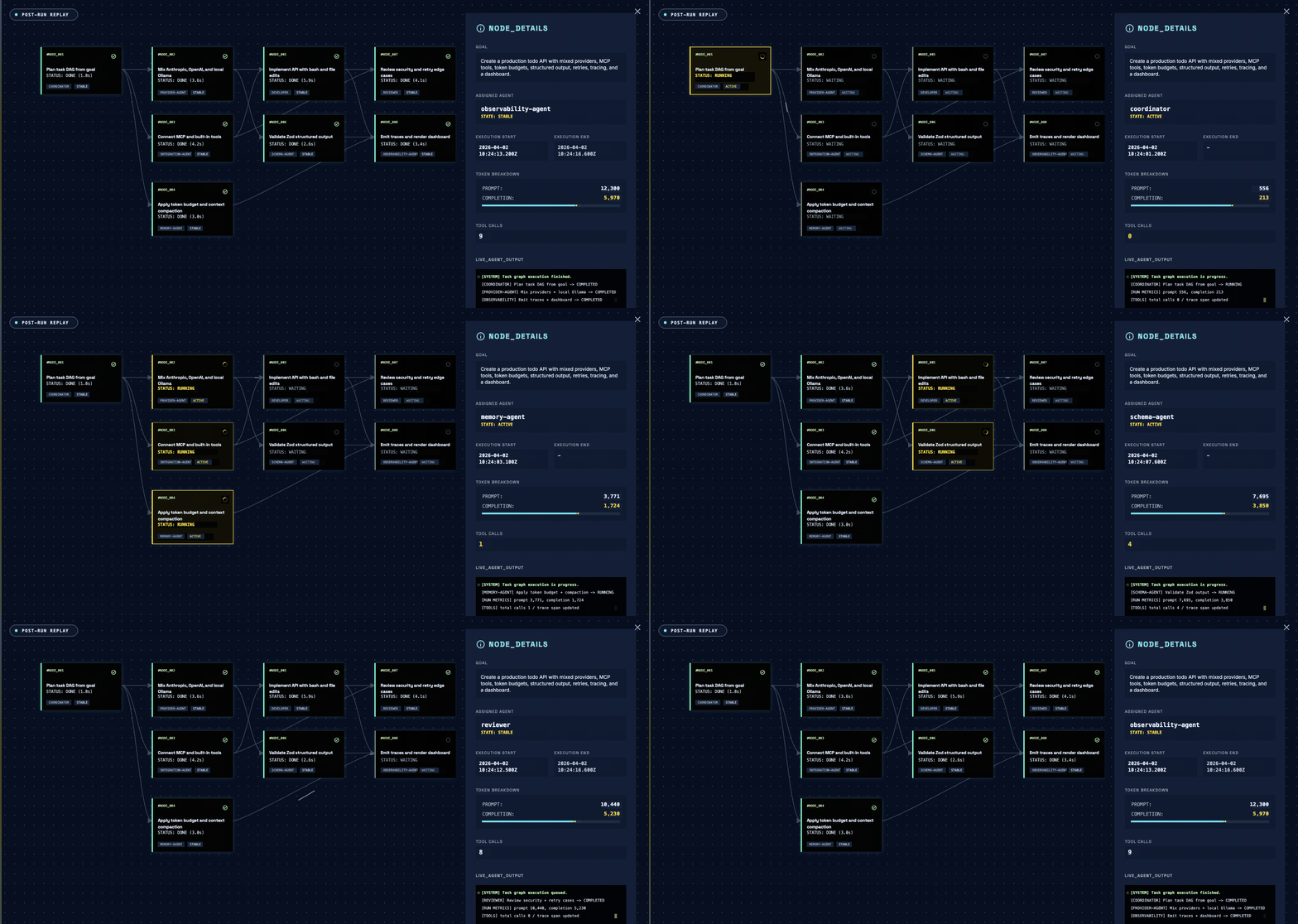
`open-multi-agent` is a multi-agent orchestration framework for TypeScript backends. Give it a goal; a coordinator agent decomposes it into a task DAG, parallelizes independents, and synthesizes the result. Drops into any Node.js backend.
> **Your engineers describe the goal, not the graph.**
Graph-first frameworks make you enumerate every node and edge up front. OMA runs a **dynamic workflow**: the task DAG is built at runtime, so it adapts to the goal instead of being hand-wired for one. The coordinator emits that plan as data for a deterministic scheduler to execute, so the plan is inspectable and replayable.
`@open-multi-agent/core` keeps a lightweight core. The orchestration engine plus the mainstream model providers (Anthropic, OpenAI, and any OpenAI-compatible endpoint) work out of the box; additional providers (Gemini, Bedrock), MCP, and the Vercel AI SDK bridge are opt-in peer dependencies you install only when you use them.
## Get started
One command scaffolds a project and starts a multi-agent DAG:
```bash
npm create oma-app@latest
```
Answer one prompt; the first run shows the coordinator turn one goal into a multi-agent DAG and opens a dashboard of the run (OpenAI or any OpenAI-compatible provider). To add the library to your own project:
```bash
npm install @open-multi-agent/core
```
The full quickstart, the three ways to run, provider setup, the production checklist, and the complete API reference live on the package page:
**→ [`packages/core/README.md`](packages/core/README.md)**
Other ways to run: clone the repo and run any [example](packages/core/examples/) with `npx tsx packages/core/examples/basics/team-collaboration.ts`, or embed OMA in a real backend with the [Express](packages/core/examples/integrations/express-customer-support/) and [Next.js](packages/core/examples/integrations/with-vercel-ai-sdk/) apps. To skip local setup, the [Next.js starter](https://github.com/open-multi-agent/oma-nextjs-starter) deploys to Vercel in one click; local models via [Ollama](https://github.com/open-multi-agent/open-multi-agent/blob/main/docs/providers.md) need no API key.
## How is this different from X?
Most TypeScript teams picking a multi-agent layer are really choosing between OMA, LangGraph JS, and Mastra. The mechanism is what differs.
**vs. LangGraph JS.** LangGraph has you design a declarative graph (nodes, edges, conditional routing) up front, then compiles it into an invokable; OMA's Coordinator decomposes the goal into a task DAG at runtime and auto-parallelizes independents. Both checkpoint and resume, though LangGraph's persistence ecosystem runs deeper. Reach for OMA when the plan should adapt to the goal instead of being wired ahead of time.
**vs. Mastra.** Both are TypeScript-native; the difference is who drives orchestration. Mastra has you wire the workflow by hand. OMA is goal-driven: hand its Coordinator a goal and it builds the task DAG at runtime. `runTeam(team, goal)` in one call.
**vs. CrewAI.** CrewAI is the established multi-agent option in Python. OMA brings goal-driven decomposition to TypeScript backends with a lean runtime (three core dependencies, plus opt-in peers you install only when you use them) and direct Node.js embedding, with no separate Python service to stand up alongside your stack.
**vs. Vercel AI SDK.** AI SDK is the LLM-call layer (provider abstraction, streaming, tool calls, and structured outputs), not a multi-agent orchestrator. Use it alone for single-agent calls; reach for OMA the moment you need a coordinated team. OMA even ships an optional AI SDK bridge.
## Ecosystem
`open-multi-agent` launched 2026-04-01 under MIT. Known users and integrations to date:
**Built with OMA**
- **[temodar-agent](https://github.com/xeloxa/temodar-agent)** (~60 stars). WordPress security analysis platform by [Ali Sünbül](https://github.com/xeloxa). Uses our built-in tools (`bash`, `file_*`, `grep`) directly inside a Docker runtime. Confirmed production use.
- **[Mark Galyan](https://github.com/apollo-mg)** runs OMA fully offline on local quantized models, using the Coordinator and context compaction to keep autonomous agent loops alive under tight VRAM limits. Contributor since the framework's first month, across compaction, sampling, and tool-call parsing.
- **[PR-Copilot](https://github.com/kidoom/PR-Copilot)**. AI pull-request review assistant by [kidoom](https://github.com/kidoom). Runs an OMA review team (coordinator + scoped reviewer agents), defines repo-context tools with `defineTool`, and adds a custom `ContextStrategy` for token-aware PR-diff compression. Public code on `@open-multi-agent/core`.
- **[StuFlow](https://github.com/znc15/StuFlow)** by [znc15](https://github.com/znc15). Terminal AI coding assistant on OMA's orchestration core: builds a team and drives it through `runAgent` / `runTasks` / `runTeam` with a custom `RunTeamOptions` coordinator, paired with DeepSeek. Public code on `@open-multi-agent/core`.
**Integrations**
- **[Engram](https://www.engram-memory.com)** — "Git for AI memory." Syncs knowledge across agents instantly and flags conflicts. ([repo](https://github.com/Agentscreator/engram-memory))
- **[@agentsonar/oma](https://github.com/agentsonar/agentsonar-oma)** — Sidecar detecting cross-run delegation cycles, repetition, and rate bursts.
- **[CodingScaffold](https://github.com/JRS1986/CodingScaffold)** — Agentic-coding scaffold that lists OMA as an optional orchestration backend, with a `runTeam` workflow template.
**Provider community offers** — limited-time, not paid endorsements.
- **[MiniMax](https://platform.minimax.io/subscribe/coding-plan?code=6ZoOY13DDV&source=link)** — Use MiniMax M3 in OMA's TypeScript multi-agent workflows. OMA users get 12% off the MiniMax Token Plan until 2026-06-30. See the [MiniMax setup guide](https://github.com/open-multi-agent/open-multi-agent/blob/main/docs/providers/minimax.md).
Using `open-multi-agent` in production or a side project? [Open a discussion](https://github.com/open-multi-agent/open-multi-agent/discussions) and we will list it here. For a deep integration, see the [Featured partner program](https://github.com/open-multi-agent/open-multi-agent/blob/main/docs/featured-partner.md).
## Repository
This is a monorepo. The published package is **`@open-multi-agent/core`**, and it lives in [`packages/core/`](packages/core/) — the source of truth for the library, its tests, examples, and the npm package page.
```
open-multi-agent/
├── packages/
│ └── core/ # @open-multi-agent/core — the published library
│ ├── src/ # framework source
│ ├── tests/ # vitest suite
│ └── examples/ # runnable examples (npx tsx packages/core/examples/.ts)
└── docs/ # subsystem documentation
```
Build, lint, and test orchestrate across the workspace from the repo root:
```bash
npm install # install all workspaces
npm run build # compile packages/core
npm run lint # type-check
npm test # run the test suite
```
## Documentation
- [Providers](https://github.com/open-multi-agent/open-multi-agent/blob/main/docs/providers.md) — env vars, model examples, local tool-calling, timeouts, troubleshooting.
- [Tool configuration](https://github.com/open-multi-agent/open-multi-agent/blob/main/docs/tool-configuration.md) — tool presets, custom tools, the filesystem sandbox, and MCP.
- [Observability](https://github.com/open-multi-agent/open-multi-agent/blob/main/docs/observability.md) — `onProgress` events, `onTrace` spans, and the post-run dashboard.
- [Shared memory](https://github.com/open-multi-agent/open-multi-agent/blob/main/docs/shared-memory.md) — the default store and custom `MemoryStore` backends.
- [Checkpoint & resume](https://github.com/open-multi-agent/open-multi-agent/blob/main/docs/checkpoint.md) — opt-in per-run snapshot/resume over any `MemoryStore`; survive crashes and restarts.
- [Context management](https://github.com/open-multi-agent/open-multi-agent/blob/main/docs/context-management.md) — sliding window, summarization, compaction, and custom compressors.
- [CLI](https://github.com/open-multi-agent/open-multi-agent/blob/main/docs/cli.md) — the JSON-first `oma` binary for shell and CI.
- [Consensus](https://github.com/open-multi-agent/open-multi-agent/blob/main/docs/consensus.md) — the `runConsensus` proposer→judge primitive, the per-task `verify` hook, and the budget invariant.
- [Model routing](https://github.com/open-multi-agent/open-multi-agent/blob/main/docs/model-routing.md) — the opt-in `modelRouting` policy: match by phase / agent / role / priority / leaf, first match wins.
## Contributing
Issues, feature requests, and PRs are welcome. Some areas where contributions would be especially valuable:
- **Production examples.** Real-world end-to-end workflows. See [`packages/core/examples/production/README.md`](packages/core/examples/production/README.md) for the acceptance criteria and submission format.
- **Documentation.** Guides, tutorials, and API docs.
- **Translations.** Help translate the docs into other languages. [Open a PR](https://github.com/open-multi-agent/open-multi-agent/pulls).
## Contributors
Full credits by area are on the [package page](packages/core/README.md#contributors).
## License
MIT