
**An OpenAI-compatible LLM gateway you own and run.**
Route one endpoint to 40+ providers, issue virtual keys, enforce budgets, and
track usage.
[](https://github.com/mozilla-ai/otari/actions/workflows/otari-tests.yml)
[](https://github.com/mozilla-ai/otari/actions/workflows/otari-lint.yml)
[](https://github.com/mozilla-ai/otari/actions/workflows/otari-typecheck.yml)
[](https://github.com/mozilla-ai/otari/actions/workflows/otari-docker.yml)

[Docs](docs/index.md) · [otari.ai](https://otari.ai) ·
[Launch blog](https://blog.mozilla.ai/otari-own-your-ai-stack/) ·
[Discord](https://discord.gg/ZfZPfTdtSe)
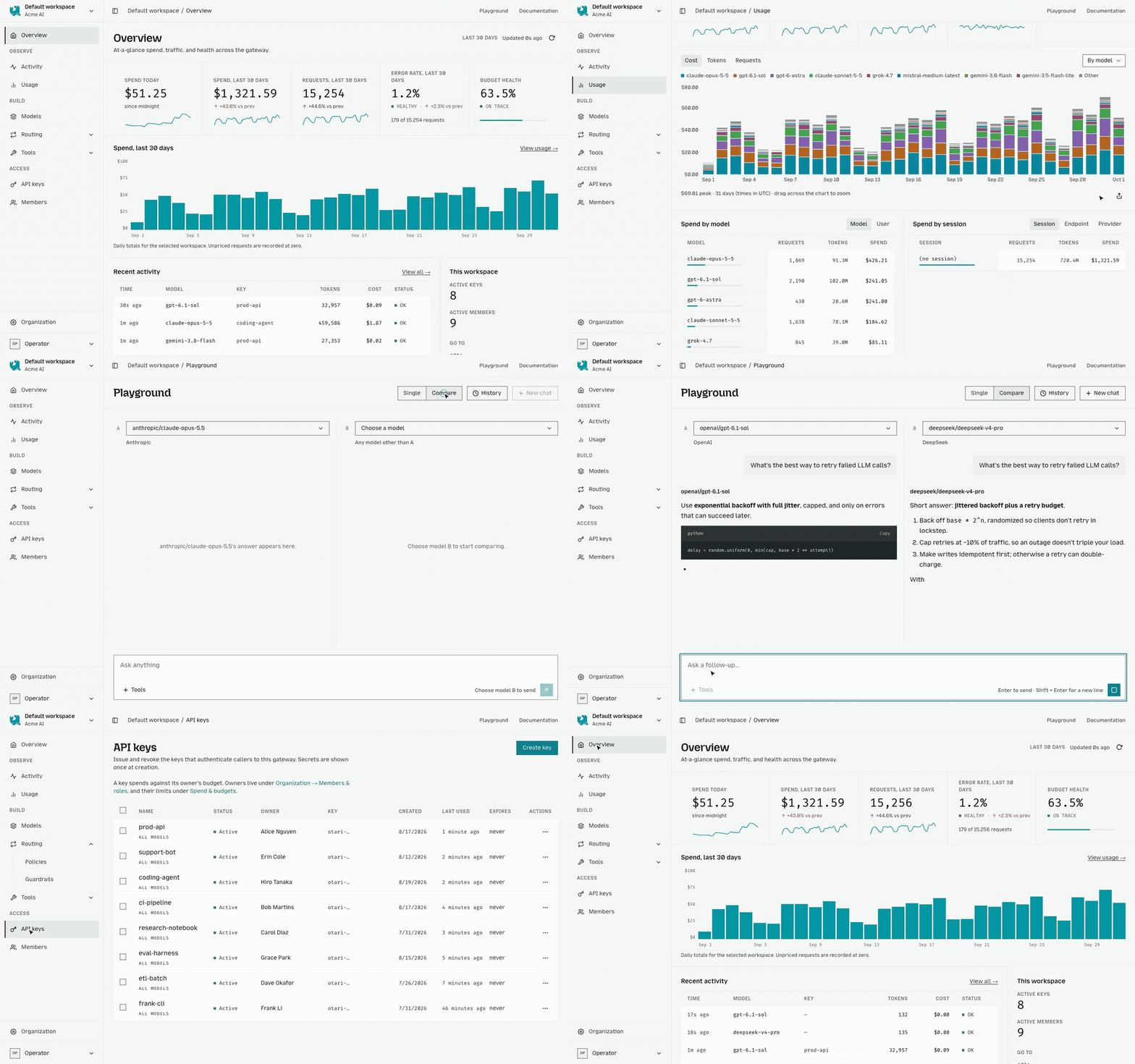
Otari sits between your applications and model providers. It authenticates
requests, resolves provider credentials, enforces budgets before dispatch, and
records usage afterwards. Provider calls go through
[any-llm](https://github.com/mozilla-ai/any-llm).
Run Otari with your own database and provider keys.
## Why Otari
- One OpenAI and Anthropic-compatible endpoint for many providers
- Provider credentials stay behind the gateway
- Revocable API keys with user, workspace, and model scope
- Budget checks before spend and usage records after settlement
- Local routing policies for failover, weighting, and learned selection
- Optional code execution, web search, MCP, inference guardrails, and file understanding
## Quickstart
Run an ephemeral gateway with Docker:
```bash
docker run --rm -p 8000:8000 \
-e OTARI_MASTER_KEY=SET_A_MASTER_KEY \
-e OPENAI_API_KEY=YOUR_OPENAI_KEY \
-e OTARI_CONFIG_YAML='
default_pricing: true
providers:
openai:
api_key: ${OPENAI_API_KEY}
' \
mzdotai/otari:latest \
otari serve
```
On the first empty database, Otari creates an API key and prints it once:
```text
No API keys found. Created bootstrap key for first run. Save this key now:
tk-...
```
Send a request with that key:
```bash
curl http://localhost:8000/api/v1/chat/completions \
-H "Authorization: Bearer tk-..." \
-H "Content-Type: application/json" \
-d '{
"model": "openai:gpt-4o-mini",
"messages": [{"role": "user", "content": "Say hello."}]
}'
```
OpenAI clients work by setting `base_url` to
`http://localhost:8000/api/v1`.
This container uses SQLite inside the container and is deleted when it stops.
Use the Compose setup below for persistent data.
The command a developer runs next to a coding agent (`otari hook`,
`otari import claude-code`) installs on its own, without the server:
```bash
brew install mozilla-ai/tap/otari
```
See [Agent Guardrails](docs/agent-guardrails.md) and
[Use with Claude Code](docs/use-with-claude-code.md).
## Run the full stack
```bash
git clone https://github.com/mozilla-ai/otari
cd otari
cp config.example.yml config.yml
# Set a master key, provider credentials, and pricing in config.yml.
# Provider copies of attached files need a pepper of their own. Compose reads .env.
grep -qs OTARI_PROVIDER_ACCOUNT_PEPPER .env || echo "OTARI_PROVIDER_ACCOUNT_PEPPER=$(openssl rand -base64 32)" >> .env
docker compose pull
docker compose up -d
```
Compose runs Otari with PostgreSQL. Optional profiles add the code sandbox,
web search, and guardrail services:
```bash
docker compose --profile code-exec --profile web-search --profile guardrails up -d
```
The dashboard is served at `http://localhost:8000/`. To store provider keys
through the dashboard, set `OTARI_SECRET_KEY` to a Fernet key generated by
`otari gen-secret-key`.
A one-click deployment template is available for
[Railway](deploy/railway/README.md).
## API and dashboard
The core completion routes are:
- `POST /api/v1/chat/completions`
- `POST /api/v1/messages`
- `POST /api/v1/responses`
Otari also serves the broader OpenAI-compatible and management APIs. The
running server publishes Swagger UI at `/api/v1/docs` and OpenAPI at
`/api/v1/openapi.json`. See [API reference](docs/api-reference.md).
The dashboard manages providers, models, routing, tools, keys, members, budgets,
settings, activity, and usage. Its navigation adapts to the signed-in person's
authority. See [Admin dashboard](docs/dashboard.md).
## Development
```bash
git clone https://github.com/mozilla-ai/otari
cd otari
uv sync --dev
cp config.example.yml config.yml
uv run otari serve --config config.yml
```
For local development without PostgreSQL, change `database_url` to
`sqlite+aiosqlite:///./otari.db`.
Common checks:
```bash
make test
make lint
make typecheck
```
See [CONTRIBUTING.md](CONTRIBUTING.md) before opening a pull request.
## Documentation
- [Quickstart](docs/quickstart.md)
- [Deployment](docs/deployment.md)
- [Configuration](docs/configuration.md)
- [Models](docs/models.md)
- [Routing](docs/routing.md)
- [Access control](docs/access-control.md)
- [Built-in tools](docs/tools.md)
- [Agent Guardrails](docs/agent-guardrails.md)
- [SDK and agent integrations](docs/index.md#for-integrators)
- [Architecture](ARCHITECTURE.md)
## License
Apache 2.0. See [LICENSE](LICENSE).