
MoeKoe Music





一款开源简洁高颜值的酷狗第三方客户端
🌎 GitHub仓库 |
📦️ 下载安装包 |
💬 访问博客 |
🏠 项目主页
🇨🇳 简体中文 |
🇨🇳 繁体中文 |
🇯🇵 日本語 |
🇺🇸 English |
🇰🇷 한국어 |
🇷🇺 Русский

## ❤️ 前言
早在10年前后的样子,那会在用网页版QQ的时候我就已经开始使用酷狗音乐了(也是十来年的老粉了),所以这些年收藏的歌曲全部都在上面.后来我也尝试开始使用网易云或QQ音乐,也尝试把酷狗的歌单导入进去,但是效果都不尽人意.我听的大多是日漫OP,好多歌曲都没办法找到.
兜兜转转最后还是回到酷狗,但是在Mac端的酷狗,时常可能会出现不能播放的情况,虽说界面没什么功能,但也挺好的.在网友的安利下,我现在一直是在酷狗的[概念版](https://t1.kugou.com/d2tBza3CSV2)上听歌,并且是市面上为数不多能免费听VIP歌曲的音乐播放软件了,力推.
我在我的个人介绍页面说我特别喜欢听歌,尤其是日漫OP.怎么证明呢?(之前我网页版歌单也年久失修了)那就自己开发一个音乐播放器.
## ✨ 特性
- ✅ 使用 Vue.js 全家桶开发
- 🔴 酷狗账号登录(扫码/手机/账号登录)
- 📃 支持歌词显示
- 📻 每日推荐歌曲
- 🔕 无任何社交功能
- 🔗 官方服务器直连
- ✔️ 每日自动领取VIP,登录就是VIP
- 🎨 主题色切换
- 👋 启动问候语
- ⚙️ 多平台支持
- 🧩 超级插件系统
- 🧭 布局个性化设置
- 🥚 隐藏功能与彩蛋系统
- 🚀 新手引导系统
- ✨ 更多特性由你来探索
## 📢 Todo List
- [x] 📺 支持 MV 播放
- [x] 🌚 Light/Dark Mode 自动切换
- [x] 👆 支持 Touch Bar
- [x] 🖥️ 支持 PWA
- [x] ⌨️ 全局快捷键
- [x] 🤟 多语言支持
- [x] 📻 桌面歌词
- [x] ⚙️ 系统架构优化
- [x] 🎶 歌曲、歌单/收藏、取消
更新日志请查看 [Commits](https://github.com/iAJue/MoeKoeMusic/commits/main/)
## 📦️ 安装
### 1. 客户端安装
访问本项目的 [Releases](https://github.com/iAJue/MoeKoeMusic/releases) 页面下载安装包。
### 2. WEB端安装(docker)
* 注意:部署后请开放服务器对应端口才可使用,或者使用反向代理实现域名访问。
1. 方式一:快速启动(推荐)
```
git clone https://github.com/iAJue/MoeKoeMusic.git
cd MoeKoeMusic
git submodule update --init --recursive
docker compose up -d &
```
2. ~~方式二:使用docker-compose一键安装 (镜像暂未上传官方)~~
```
docker run -d --name MoeKoeMusic -p 8080:8080 -p 6521:6521 -e PORT=6521 -e platform=lite iajue/moekoe-music:latest
```
3. 方式三:宝塔容器编排
* 远程镜像,版本可能会落后于官方
```
version: '3.3'
services:
moekoe-music:
# 镜像地址
image: registry.cn-wulanchabu.aliyuncs.com/youngxj/moekoe-music:latest
container_name: moekoe-music # 容器名
restart: unless-stopped # 自动重启
build:
context: .
dockerfile: Dockerfile
environment:
- PORT=6521
- platform=lite
ports: # 端口映射
- "8080:8080" # 前端服务
- "6521:6521" # 接口服务
```
复制内容上面的内容,粘贴到宝塔面板的容器编排里面,编排名称为MoeKoeMusic,点击部署即可。
### 3. 一键部署
[](https://edgeone.ai/pages/new?template=https://github.com/iAJue/moekoemusic&install-command=npm%20install&output-directory=dist&root-directory=.%2F&build-command=npm%20run%20build&env=VITE_APP_API_URL)
需在环境变量(VITE_APP_API_URL)中填写自己的API地址
## ⚙️ 开发
1. 克隆本仓库
```sh
git clone --recurse-submodules https://github.com/iAJue/MoeKoeMusic.git
```
2. 进入目录并安装依赖
```sh
cd MoeKoeMusic
npm run install-all
```
3. 启动开发者模式
```sh
npm run dev
```
4. 打包项目
```sh
npm run build
```
5. 编译项目
- Windows:
```sh
npm run electron:build:win [默认 NSIS 安装包]
```
- Linux:
```sh
npm run electron:build:linux [默认 AppImage 格式]
```
- macOS:
```sh
npm run electron:build:macos [默认 macOS 双架构]
```
更多命令请查看 `package.json` 文件 `scripts`
## 👷♂️ 编译客户端
如果在 Release 页面没有找到适合你的设备的安装包的话,你可以根据下面的步骤来打包自己的客户端。
1. 安装 [Node.js](https://nodejs.org/en/),并确保 `Node.js` 版本 >= 18.0.0。
2. 使用 `git clone https://github.com/iAJue/MoeKoeMusic.git` 克隆本仓库到本地。
3. 使用 `npm install` 安装项目依赖。
4. 编译API服务端
- Windows:
```sh
npm run build:api:win
```
- Linux:
```sh
npm run build:api:linux
```
- macOS:
```sh
npm run build:api:macos
```
5. 选择下列的命令来打包适合的你的安装包,打包出来的文件在 `/dist_electron` 目录下。了解更多信息可访问 [electron-builder 文档](https://www.electron.build/cli)
#### 1. 打包 macOS 平台
- 通用的 macOS 包(Intel 和 Apple Silicon 双架构):
```
npm run electron:build -- --mac --universal
```
- 仅 Intel 架构:
```
npm run electron:build -- --mac --x64
```
- 仅 Apple Silicon 架构:
```
npm run electron:build -- --mac --arm64
```
#### 2. 打包 Windows 平台
- 默认 NSIS 安装包(适合大多数 Windows 用户):
```
npm run electron:build -- --win
```
- 为 Windows 创建 EXE 文件和 Squirrel 安装包:
```
npm run electron:build -- --win --ia32 --x64 --arm64 --target squirrel
```
- --ia32 为 32 位 Windows 架构。
- --x64 为 64 位 Windows 架构。
- --arm64 为 ARM Windows 架构(Surface 等设备)。
- 为 Windows 生成便携式的 EXE 文件(免安装):
```
npm run electron:build -- --win --portable
```
#### 3. 打包 Linux 平台
- 默认 AppImage 格式(适用于大多数 Linux 发行版):
```
npm run electron:build -- --linux
```
- snap(适用于 Ubuntu 和支持 snap 的发行版):
```
npm run electron:build -- --linux --target snap
```
- deb(适用于 Debian/Ubuntu 系列):
```
npm run electron:build -- --linux --target deb
```
- rpm(适用于 Red Hat/Fedora 系列):
```
npm run electron:build -- --linux --target rpm
```
- ARM64架构(ARM v8+):
```
npm run build:api:linux-arm64 //编译API
npm run electron:build:linux-arm64 //编译主程序
```
#### 4. 打包所有平台
如果需要同时生成 Windows、macOS 和 Linux 的安装包,可以使用以下命令:
```
npm run electron:build -- -mwl
```
#### 5. 自定义编译设置
您可以根据需要添加其他选项来进一步自定义打包,例如指定 x64 和 arm64 架构,或选择不同的目标格式。
## ⭐ 支持项目
如果您觉得这个项目对您有帮助,欢迎给我们一个 Star!您的支持是我们持续改进的动力。
[](https://github.com/iAJue/MoeKoeMusic)
## ✅ 反馈
如有任何问题或建议,欢迎提交 issue 或 pull request。
## ⚠️ 免责声明
0. 本程序是酷狗第三方客户端,并非酷狗官方,需要更完善的功能请下载官方客户端体验.
1. 本项目仅供学习使用,请尊重版权,请勿利用此项目从事商业行为及非法用途!
2. 使用本项目的过程中可能会产生版权数据。对于这些版权数据,本项目不拥有它们的所有权。为了避免侵权,使用者务必在 24 小时内清除使用本项目的过程中所产生的版权数据。
3. 由于使用本项目产生的包括由于本协议或由于使用或无法使用本项目而引起的任何性质的任何直接、间接、特殊、偶然或结果性损害(包括但不限于因商誉损失、停工、计算机故障或故障引起的损害赔偿,或任何及所有其他商业损害或损失)由使用者负责。
1. 禁止在违反当地法律法规的情况下使用本项目。对于使用者在明知或不知当地法律法规不允许的情况下使用本项目所造成的任何违法违规行为由使用者承担,本项目不承担由此造成的任何直接、间接、特殊、偶然或结果性责任。
2. 音乐平台不易,请尊重版权,支持正版。
3. 本项目仅用于对技术可行性的探索及研究,不接受任何商业(包括但不限于广告等)合作及捐赠。
4. 如果官方音乐平台觉得本项目不妥,可联系本项目更改或移除。
## 📜 开源许可
本项目仅供个人学习研究使用,禁止用于商业及非法用途。
基于 [GNU General Public License v2.0 (GPL-2.0)](https://github.com/iAJue/MoeKoeMusic/blob/main/LICENSE) 许可进行开源。
## 👍 灵感来源
API 源代码来自 [MakcRe/KuGouMusicApi](https://github.com/MakcRe/KuGouMusicApi)
- [Apple Music](https://music.apple.com)
- [YouTube Music](https://music.youtube.com)
- [YesPlayMusic](https://github.com/qier222/YesPlayMusic)
- [酷狗音乐](https://kugou.com/)
## 🖼️ 截图


## 🗓️ Star History
[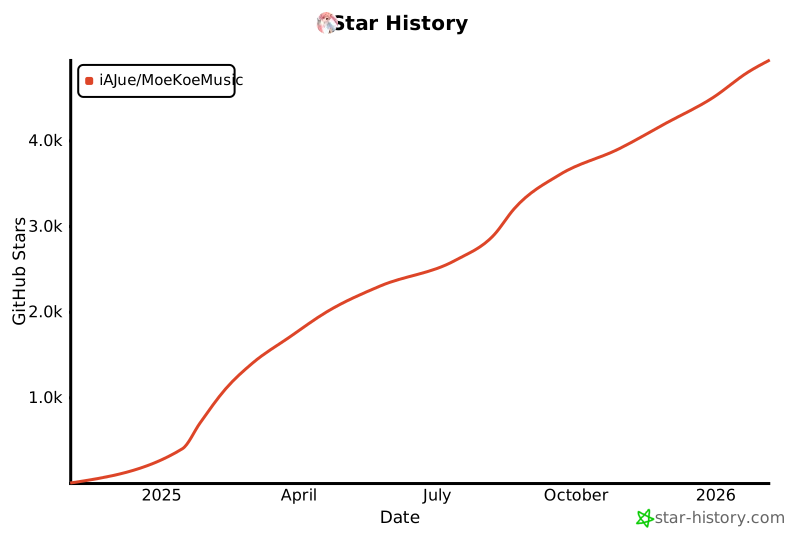](https://www.star-history.com/#iAJue/MoeKoeMusic&Date)