<div align="center">
  <h3 style="color: white;"> ⚠️ Temporary Limited Interaction Notice ⚠️</h3>
  (Please check <a href="https://github.com/jvalen/pixel-art-react#contributing">Contributing</a>)
</div>
<br>
<br>
<p align="center">
  <img width="200" src="screenshots/tree-pixelartcss.png">
</p>
<h1 align="center">Pixel Art to CSS</h1>
<p align="center">
  <h3 align="center">  
    Animate pixel art and get CSS
  </h3>
</p>
<p align="center">
  <a target='_blank' href='http://www.recurse.com' title='Made at the Recurse Center'><img src='https://cloud.githubusercontent.com/assets/2883345/11325206/336ea5f4-9150-11e5-9e90-d86ad31993d8.png' height='20px'/></a>
  <a href="https://travis-ci.com/jvalen/pixel-art-react"><img src="https://travis-ci.com/jvalen/pixel-art-react.svg?branch=master" alt="travis ci"></a>
</p>

## Did you know that you can create pixel art using CSS?

**Pixel Art to CSS** is an online editor that helps you with that task.

Combining the power of both **box-shadow** and **keyframes** CSS properties, you will get CSS code ready to use in your site.

Furthermore, you can download your work in different formats such as a static image, animated GIF or sprite like image.

:pencil2: [Try it out](https://www.pixelartcss.com/)

<p align="center">
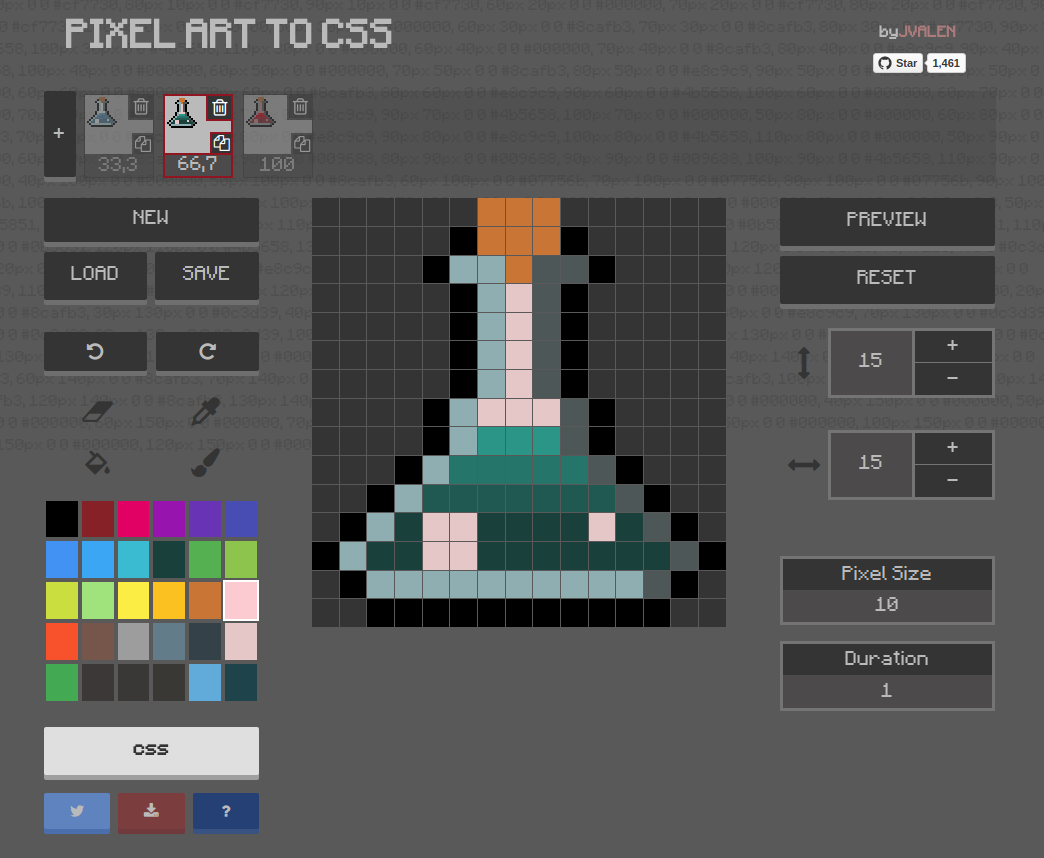
  <img width="600" src="screenshots/screenshot-potion.png">
</p>

**Pixel Art to CSS** aims to be an intuitive tool by its simplicity, however it is equipped with a wide range of features: customize your color palette, go back and forth in time, modify animation settings, save or load your projects, among others.

## Example

By default, you will find the following project within the <b>LOAD</b> section:

![Cat animation example](screenshots/animation-cat.gif)

See it live at [pixelartcss](https://www.pixelartcss.com/)

You can also import it directly submitting [this](examples/import-export/cat.txt) code.

## Technical overview

This application has been built with the following technologies:

- [React](https://facebook.github.io/react/): Library to build the UI.
- [Redux](http://redux.js.org/): Implements a Flux like architecture.
- [ImmutableJS](https://facebook.github.io/immutable-js/) Helps to keep the data immutable aiming to avoid side effects.
- [PostCSS](https://github.com/postcss/postcss) Handle the app CSS.

## Installation

```bash
npm install
```

## Development

```bash
npm run development
```

## Deploy

Create the production build.

```bash
npm run deploy
```

## Lint

There are several libraries used in the project that help us to keep our codebase healthy:

- [ESlint](https://eslint.org/)
- [Stylelint](https://stylelint.io/)
- [Prettier](https://prettier.io/)

Every time we commit something it will execute the linters and format the staged files if needed.

If you want to check them individually you could execute the following scripts:

```bash
npm run lint
npm run csslint
npm run format
```

## Testing

We are using [Jest](https://jestjs.io/) as the testing platform.

```bash
npm run test
```

## Contributing

<div>
  <p style="color: white;">
    ⚠️ <strong>Please Note:</strong> This repository is currently in a temporary idle state due to a refactor and tech upgrade. I am not accepting new Pull Requests or Issues at the moment. Sorry for the inconveniences.
  </p>
</div>

~~#### Help me to improve it :seedling:~~

~~Create a GitHub issue if there is something wrong or to be improved.~~

~~Pull requests are also welcome, please take the following requirements as a checklist before opening one:~~

~~- [x] The PR does fix a problem or adds a new feature, not just cosmetic or syntactic sugar changes.~~
~~- [x] It would be great to open an issue in advance.~~
~~- [x] The PR should be issued to the **develop** branch.~~
~~- [x] The PR should have a explanation or be related to an issue.~~

~~Thank you!~~

## License

[MIT](https://opensource.org/licenses/mit-license.php)
Copyright © 2016 Javier Valencia Romero (@jvalen)