 **Every Code** (Code for short) is a fast, local coding agent for your terminal. It's a community-driven fork of `openai/codex` focused on real developer ergonomics: Browser integration, multi-agents, theming, and reasoning control — all while staying compatible with upstream.
## What's new
- **Latest long-session stability sweep** (post-0.6): Auto Drive and Auto Review are now decoupled so background reviews no longer block the command flow. `Esc` returns control immediately and typing works while review finalization continues.
- **Operational upgrades in this cycle**
- Auto Review metadata (branch/worktree context) remains queryable through the active Auto Drive session after completion.
- Terminal agents are compacted and archived so heavy payloads are reduced while review linkage is preserved.
- Core `core`, coordinator, and TUI state maps now have hard caps with bounded drop/trim behavior.
- Auto Drive conversation/update queues are bounded in the coordinator; TUI has bounded prompt/agent/runtime caches.
- Background review notes are added as non-blocking history-visible notes instead of foreground task-injection.
- TUI housekeeping lifecycle is bounded with deterministic stop control.
- Stress tests now cover heavy agent churn plus concurrent Auto Review + Esc/typing responsiveness.
- **New/updated models and agents**
- Auto Drive CLI model support defaults to `gpt-5.5` (planning/problem-solving) and `gpt-5.4-mini` (fast coding/fix loops), with `medium | high | xhigh` reasoning controls.
- Frontline and alias-aware agent model handling now includes `code-gpt-5.5`, `code-gpt-5.4`, `claude-opus-4.8`, and `claude-sonnet-4.6`, with compatibility aliases for older model names where supported.
- Auto Drive decision schema and coordinator payloads now enforce bounded history while preserving goal and recent context.
See commit `60727b068` and related Auto Drive hardening commits in git history for details.
- **Auto Review** – background ghost-commit watcher runs reviews in a separate worktree whenever a turn changes code; uses `codex-5.1-mini-high` and reports issues plus ready-to-apply fixes without blocking the main thread.
- **Code Bridge** – Sentry-style local bridge that streams errors, console, screenshots, and control from running apps into Code; ships an MCP server; install by asking Code to pull `https://github.com/just-every/code-bridge`.
- **Plays well with Auto Drive** – reviews run in parallel with long Auto Drive tasks so quality checks land while the flow keeps moving.
- **Quality-first focus** – the release shifts emphasis from "can the model write this file" to "did we verify it works".
- _From v0.5.0:_ rename to Every Code, upgraded `/auto` planning/recovery, unified `/settings`, faster streaming/history with card-based activity, and more reliable `/resume` + `/undo`.
[Read the full notes in RELEASE_NOTES.md](docs/release-notes/RELEASE_NOTES.md)
## Why Every Code
- 🚀 **Auto Drive orchestration** – Multi-agent automation that now self-heals and ships complete tasks.
- 🌐 **Browser Integration** – CDP support, headless browsing, screenshots captured inline.
- 🤖 **Multi-agent commands** – `/plan`, `/code` and `/solve` coordinate multiple CLI agents.
- 🧭 **Unified settings hub** – `/settings` overlay for limits, theming, approvals, and provider wiring.
- 🎨 **Theme system** – Switch between accessible presets, customize accents, and preview live via `/themes`.
- 🔌 **MCP support** – Extend with filesystem, DBs, APIs, or your own tools.
- 🔒 **Safety modes** – Read-only, approvals, and workspace sandboxing.
## AI Videos
**Every Code** (Code for short) is a fast, local coding agent for your terminal. It's a community-driven fork of `openai/codex` focused on real developer ergonomics: Browser integration, multi-agents, theming, and reasoning control — all while staying compatible with upstream.
## What's new
- **Latest long-session stability sweep** (post-0.6): Auto Drive and Auto Review are now decoupled so background reviews no longer block the command flow. `Esc` returns control immediately and typing works while review finalization continues.
- **Operational upgrades in this cycle**
- Auto Review metadata (branch/worktree context) remains queryable through the active Auto Drive session after completion.
- Terminal agents are compacted and archived so heavy payloads are reduced while review linkage is preserved.
- Core `core`, coordinator, and TUI state maps now have hard caps with bounded drop/trim behavior.
- Auto Drive conversation/update queues are bounded in the coordinator; TUI has bounded prompt/agent/runtime caches.
- Background review notes are added as non-blocking history-visible notes instead of foreground task-injection.
- TUI housekeeping lifecycle is bounded with deterministic stop control.
- Stress tests now cover heavy agent churn plus concurrent Auto Review + Esc/typing responsiveness.
- **New/updated models and agents**
- Auto Drive CLI model support defaults to `gpt-5.5` (planning/problem-solving) and `gpt-5.4-mini` (fast coding/fix loops), with `medium | high | xhigh` reasoning controls.
- Frontline and alias-aware agent model handling now includes `code-gpt-5.5`, `code-gpt-5.4`, `claude-opus-4.8`, and `claude-sonnet-4.6`, with compatibility aliases for older model names where supported.
- Auto Drive decision schema and coordinator payloads now enforce bounded history while preserving goal and recent context.
See commit `60727b068` and related Auto Drive hardening commits in git history for details.
- **Auto Review** – background ghost-commit watcher runs reviews in a separate worktree whenever a turn changes code; uses `codex-5.1-mini-high` and reports issues plus ready-to-apply fixes without blocking the main thread.
- **Code Bridge** – Sentry-style local bridge that streams errors, console, screenshots, and control from running apps into Code; ships an MCP server; install by asking Code to pull `https://github.com/just-every/code-bridge`.
- **Plays well with Auto Drive** – reviews run in parallel with long Auto Drive tasks so quality checks land while the flow keeps moving.
- **Quality-first focus** – the release shifts emphasis from "can the model write this file" to "did we verify it works".
- _From v0.5.0:_ rename to Every Code, upgraded `/auto` planning/recovery, unified `/settings`, faster streaming/history with card-based activity, and more reliable `/resume` + `/undo`.
[Read the full notes in RELEASE_NOTES.md](docs/release-notes/RELEASE_NOTES.md)
## Why Every Code
- 🚀 **Auto Drive orchestration** – Multi-agent automation that now self-heals and ships complete tasks.
- 🌐 **Browser Integration** – CDP support, headless browsing, screenshots captured inline.
- 🤖 **Multi-agent commands** – `/plan`, `/code` and `/solve` coordinate multiple CLI agents.
- 🧭 **Unified settings hub** – `/settings` overlay for limits, theming, approvals, and provider wiring.
- 🎨 **Theme system** – Switch between accessible presets, customize accents, and preview live via `/themes`.
- 🔌 **MCP support** – Extend with filesystem, DBs, APIs, or your own tools.
- 🔒 **Safety modes** – Read-only, approvals, and workspace sandboxing.
## AI Videos
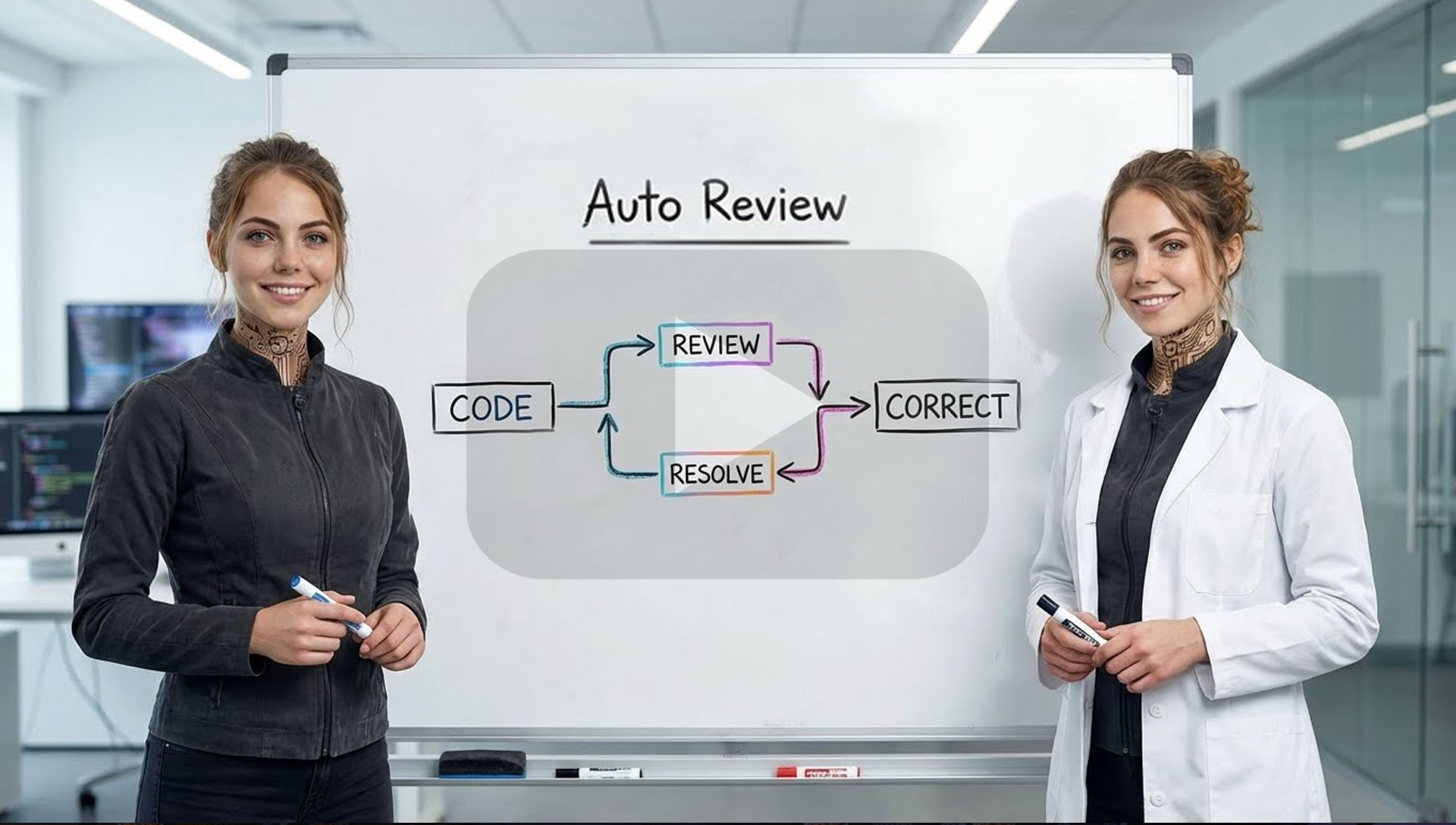
Auto Review

Auto Drive Overview

Multi-Agent Promo
## Quickstart
### Run
```bash
npx -y @just-every/code
```
### Install & Run
```bash
npm install -g @just-every/code
code // or `coder` if you're using VS Code
```
Note: If another tool already provides a `code` command (e.g. VS Code), our CLI is also installed as `coder`. Use `coder` to avoid conflicts.
**Authenticate** (one of the following):
- **Sign in with ChatGPT** (Plus/Pro/Team; uses models available to your plan)
- Run `code` and pick "Sign in with ChatGPT"
- **API key** (usage-based)
- Set `export OPENAI_API_KEY=xyz` and run `code`
### Install Claude, Antigravity & Gemini (optional)
Every Code supports orchestrating other AI CLI tools. Install these and config to use alongside Code.
```bash
# Ensure Node.js 20+ is available locally (installs into ~/.n)
npm install -g n
export N_PREFIX="$HOME/.n"
export PATH="$N_PREFIX/bin:$PATH"
n 20.18.1
# Install the companion CLIs
export npm_config_prefix="${npm_config_prefix:-$HOME/.npm-global}"
mkdir -p "$npm_config_prefix/bin"
export PATH="$npm_config_prefix/bin:$PATH"
npm install -g @anthropic-ai/claude-code @google/gemini-cli @qwen-code/qwen-code
curl -fsSL https://antigravity.google/cli/install.sh | bash
# Quick smoke tests
claude --version
agy --version
gemini --version
qwen --version
```
> ℹ️ Add `export N_PREFIX="$HOME/.n"` and `export PATH="$N_PREFIX/bin:$PATH"` (plus the `npm_config_prefix` bin path) to your shell profile so the CLIs stay on `PATH` in future sessions.
## Commands
### Browser
```bash
# Connect code to external Chrome browser (running CDP)
/chrome # Connect with auto-detect port
/chrome 9222 # Connect to specific port
# Switch to internal browser mode
/browser # Use internal headless browser
/browser https://example.com # Open URL in internal browser
```
### Agents
```bash
# Plan code changes (Claude, Gemini and GPT-5 consensus)
# All agents review task and create a consolidated plan
/plan "Stop the AI from ordering pizza at 3AM"
# Solve complex problems (Claude, Gemini and GPT-5 race)
# Fastest preferred (see https://arxiv.org/abs/2505.17813)
/solve "Why does deleting one user drop the whole database?"
# Write code! (Claude, Gemini and GPT-5 consensus)
# Creates multiple worktrees then implements the optimal solution
/code "Show dark mode when I feel cranky"
```
### Auto Drive
```bash
# Hand off a multi-step task; Auto Drive will coordinate agents and approvals
/auto "Refactor the auth flow and add device login"
# Resume or inspect an active Auto Drive run
/auto status
```
### General
```bash
# Try a new theme!
/themes
# Change reasoning level
/reasoning low|medium|high
# Switch models or effort presets
/model
# Start new conversation
/new
```
## CLI reference
```shell
code [options] [prompt]
Options:
--model Override the model for the active provider (e.g. gpt-5.1)
--read-only Prevent file modifications
--no-approval Skip approval prompts (use with caution)
--config Override config values
--oss Use local open source models
--sandbox Set sandbox level (read-only, workspace-write, etc.)
--help Show help information
--debug Log API requests and responses to file
--version Show version number
```
Note: `--model` only changes the model name sent to the active provider. To use a different provider, set `model_provider` in `config.toml`. Providers must expose an OpenAI-compatible API (Chat Completions or Responses).
## Memory & project docs
Every Code can remember context across sessions:
1. **Create an `AGENTS.md` or `CLAUDE.md` file** in your project root:
```markdown
# Project Context
This is a React TypeScript application with:
- Authentication via JWT
- PostgreSQL database
- Express.js backend
## Key files:
- `/src/auth/` - Authentication logic
- `/src/api/` - API client code
- `/server/` - Backend services
```
2. **Session memory**: Every Code maintains conversation history
3. **Codebase analysis**: Automatically understands project structure
## Non-interactive / CI mode
For automation and CI/CD:
```shell
# Run a specific task
code --no-approval "run tests and fix any failures"
# Generate reports
code --read-only "analyze code quality and generate report"
# Batch processing
code --config output_format=json "list all TODO comments"
```
## Model Context Protocol (MCP)
Every Code supports MCP for extended capabilities:
- **File operations**: Advanced file system access
- **Database connections**: Query and modify databases
- **API integrations**: Connect to external services
- **Custom tools**: Build your own extensions
Configure MCP in `~/.code/config.toml` Define each server under a named table like `[mcp_servers.]` (this maps to the JSON `mcpServers` object used by other clients):
```toml
[mcp_servers.filesystem]
command = "npx"
args = ["-y", "@modelcontextprotocol/server-filesystem", "/path/to/project"]
```
## Configuration
Main config file: `~/.code/config.toml`
> [!NOTE]
> Every Code reads from both `~/.code/` and `~/.codex/` for backwards compatibility, but it only writes updates to `~/.code/`. If you switch back to Codex and it fails to start, remove `~/.codex/config.toml`. If Every Code appears to miss settings after upgrading, copy your legacy `~/.codex/config.toml` into `~/.code/`.
```toml
# Model settings
model = "gpt-5.1"
model_provider = "openai"
# Behavior
approval_policy = "on-request" # untrusted | on-failure | on-request | never
model_reasoning_effort = "medium" # low | medium | high
sandbox_mode = "workspace-write"
# UI preferences see THEME_CONFIG.md
[tui.theme]
name = "light-photon"
# Add config for specific models
[profiles.gpt-5]
model = "gpt-5.1"
model_provider = "openai"
approval_policy = "never"
model_reasoning_effort = "high"
model_reasoning_summary = "detailed"
```
### Environment variables
- `CODE_HOME`: Override config directory location
- `OPENAI_API_KEY`: Use API key instead of ChatGPT auth
- `OPENAI_BASE_URL`: Use OpenAI-compatible API endpoints (chat or responses)
- `OPENAI_WIRE_API`: Force the built-in OpenAI provider to use `chat` or `responses` wiring
## FAQ
**How is this different from the original?**
> This fork adds browser integration, multi-agent commands (`/plan`, `/solve`, `/code`), theme system, and enhanced reasoning controls while maintaining full compatibility.
**Can I use my existing Codex configuration?**
> Yes. Every Code reads from both `~/.code/` (primary) and legacy `~/.codex/` directories. We only write to `~/.code/`, so Codex will keep running if you switch back; copy or remove legacy files if you notice conflicts.
**Does this work with ChatGPT Plus?**
> Absolutely. Use the same "Sign in with ChatGPT" flow as the original.
**Is my data secure?**
> Yes. Authentication stays on your machine, and we don't proxy your credentials or conversations.
## Contributing
We welcome contributions! Every Code maintains compatibility with upstream while adding community-requested features.
### Development workflow
```bash
# Clone and setup
git clone https://github.com/just-every/code.git
cd code
npm install
# Build (use fast build for development)
./build-fast.sh
# Run locally
./code-rs/target/dev-fast/code
```
#### Git hooks
This repo ships shared hooks under `.githooks/`. To enable them locally:
```bash
git config core.hooksPath .githooks
```
The `pre-push` hook runs `./pre-release.sh` automatically when pushing to `main`.
### Opening a pull request
1. Fork the repository
2. Create a feature branch: `git checkout -b feature/amazing-feature`
3. Make your changes
4. Run tests: `cargo test`
5. Build successfully: `./build-fast.sh`
6. Submit a pull request
## Legal & Use
### License & attribution
- This project is a community fork of `openai/codex` under **Apache-2.0**. We preserve upstream LICENSE and NOTICE files.
- **Every Code** (Code) is **not** affiliated with, sponsored by, or endorsed by OpenAI.
### Your responsibilities
Using OpenAI, Anthropic or Google services through Every Code means you agree to **their Terms and policies**. In particular:
- **Don't** programmatically scrape/extract content outside intended flows.
- **Don't** bypass or interfere with rate limits, quotas, or safety mitigations.
- Use your **own** account; don't share or rotate accounts to evade limits.
- If you configure other model providers, you're responsible for their terms.
### Privacy
- Your auth file lives at `~/.code/auth.json`
- Inputs/outputs you send to AI providers are handled under their Terms and Privacy Policy; consult those documents (and any org-level data-sharing settings).
### Subject to change
AI providers can change eligibility, limits, models, or authentication flows. Every Code supports **both** ChatGPT sign-in and API-key modes so you can pick what fits (local/hobby vs CI/automation).
## License
Apache 2.0 - See [LICENSE](LICENSE) file for details.
Every Code is a community fork of the original Codex CLI. We maintain compatibility while adding enhanced features requested by the developer community.
---
**Need help?** Open an issue on [GitHub](https://github.com/just-every/code/issues) or check our documentation.