🎈 Pluto demo inside your browser 🎈
 ### Input
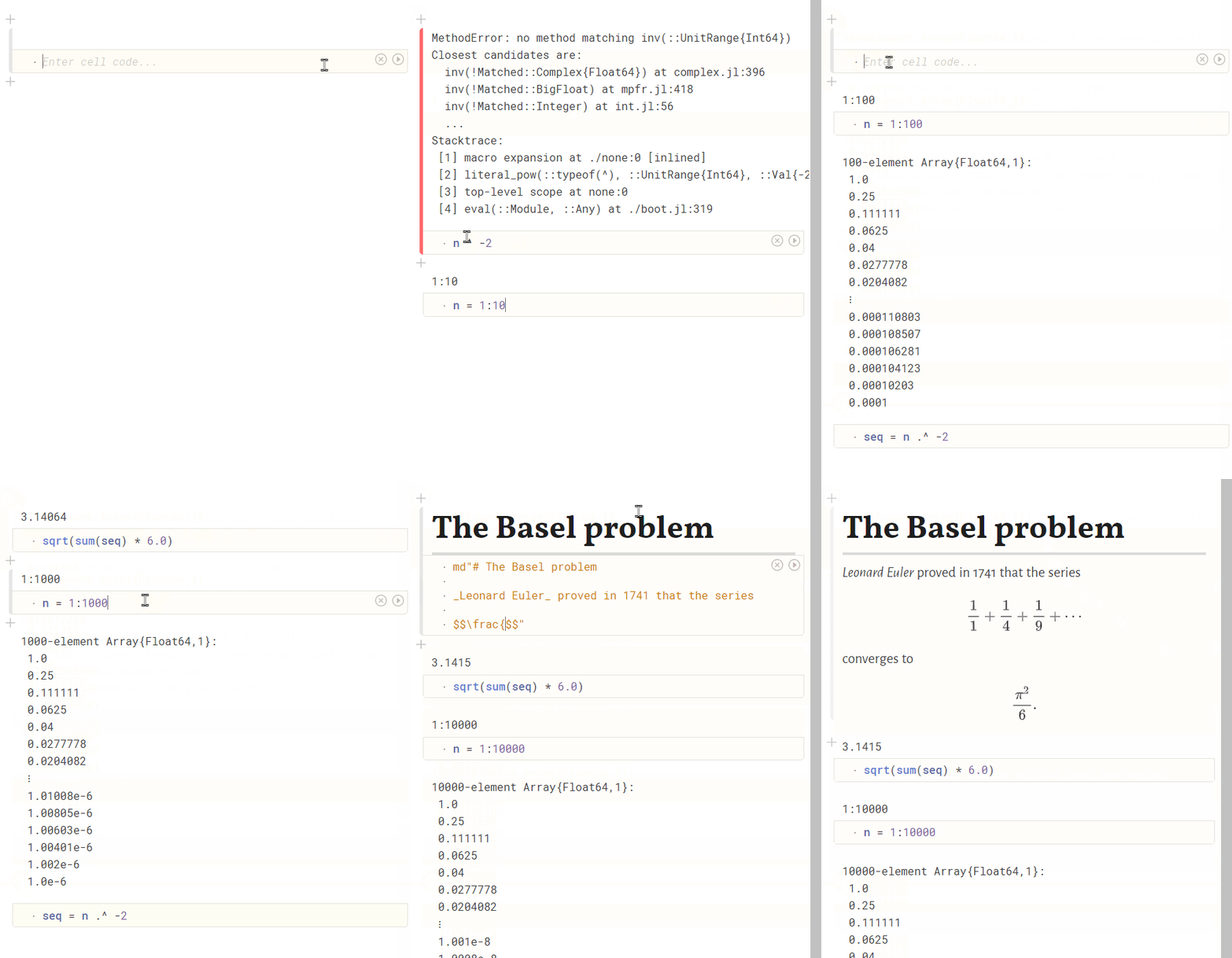
A Pluto notebook is made up of small blocks of Julia code (_cells_) and together they form a [**_reactive_** notebook](https://medium.com/@mbostock/a-better-way-to-code-2b1d2876a3a0).
When you change a variable, Pluto automatically re-runs the cells that refer to it. Cells can even be placed in arbitrary order - intelligent syntax analysis figures out the dependencies between them and takes care of execution.
Cells can contain _arbitrary_ Julia code, and you can use external libraries. There are no code rewrites or wrappers, Pluto just looks at your code once before evaluation.
### Output
Your notebooks are **saved as pure Julia files** ([sample](https://github.com/JuliaPluto/Pluto.jl/blob/main/sample/Basic.jl)), which you can then import as if you had been programming in a regular editor all along. You can also export your notebook with cell outputs as attractive HTML and PDF documents. By reordering cells and hiding code, you have full control over how you tell your story.
### Input
A Pluto notebook is made up of small blocks of Julia code (_cells_) and together they form a [**_reactive_** notebook](https://medium.com/@mbostock/a-better-way-to-code-2b1d2876a3a0).
When you change a variable, Pluto automatically re-runs the cells that refer to it. Cells can even be placed in arbitrary order - intelligent syntax analysis figures out the dependencies between them and takes care of execution.
Cells can contain _arbitrary_ Julia code, and you can use external libraries. There are no code rewrites or wrappers, Pluto just looks at your code once before evaluation.
### Output
Your notebooks are **saved as pure Julia files** ([sample](https://github.com/JuliaPluto/Pluto.jl/blob/main/sample/Basic.jl)), which you can then import as if you had been programming in a regular editor all along. You can also export your notebook with cell outputs as attractive HTML and PDF documents. By reordering cells and hiding code, you have full control over how you tell your story.
🎈 Pluto – introduction (20 min) at Juliacon 2020 🎈
🌐 Pluto – one year later (25 min) at Juliacon 2021 🌐
🪐 Pluto – reactive and reproducible (25 min) at JupyterCon 2023 🪐
🌝 Pluto 1.0 release announcement (10 min read) on Discourse 2026 🪐
At any instant, the program state is completely described by the code you see.No hidden state, no hidden bugs. ### Interactivity Your programming environment becomes interactive by splitting your code into multiple cells! Changing one cell **instantly shows effects** on all other cells, giving you a fast and fun way to experiment with your model. In the example below, changing the parameter `A` and running the first cell will directly re-evaluate the second cell and display the new plot.


Interested in learning Julia, Pluto and applied mathematics? Join the open MIT course taught by Alan Edelman, David P. Sanders & Grant Sanderson (3blue1brown) (and a bit of me): Introduction to Computational Thinking, Spring 2021.
 ## License
Pluto.jl is open source! Specifically, it is [MIT Licensed](https://github.com/JuliaPluto/Pluto.jl/blob/main/LICENSE). Pluto.jl is built by gluing together open source software:
- `Julia` - [license](https://github.com/JuliaLang/julia/blob/master/LICENSE.md)
- `CodeMirror` - [license](https://github.com/codemirror/codemirror.next/blob/master/LICENSE-MIT)
- `HTTP.jl` - [license](https://github.com/JuliaWeb/HTTP.jl/blob/master/LICENSE.md)
- `MsgPack.jl` - [license](https://github.com/JuliaIO/MsgPack.jl)
- `msgpack-lite` - [license](https://github.com/kawanet/msgpack-lite/blob/master/LICENSE)
- `observablehq/stdlib` - [license](https://github.com/observablehq/stdlib/blob/master/LICENSE)
- `preact` - [license](https://github.com/preactjs/preact/blob/master/LICENSE)
- `developit/htm` - [license](https://github.com/developit/htm/blob/master/LICENSE)
- `MathJax` - [license](https://github.com/mathjax/MathJax-src/blob/master/LICENSE)
If you want to reference Pluto.jl in scientific writing, you can use our DOI: [](https://doi.org/10.5281/zenodo.4792401)
### Featured notebooks
Unless otherwise specified, the included featured notebooks have a more permissive license: the [Unlicense](https://github.com/JuliaPluto/Pluto.jl/blob/main/sample/LICENSE). This means that you can use them however you like - you do not need to credit us!
Your notebook files are _yours_, you also do not need to credit us. Have fun!
## From the authors
The Pluto project is an ambition to [_rethink what a programming environment should be_](http://worrydream.com/#!/LearnableProgramming). We believe that scientific computing can be a lot simpler and more accessible. If you feel the same, give Pluto a try! We would love to hear what you think. 😊
### You can chat with us
- talk with fellow Pluto users in the **[Zulip chat room](https://gist.github.com/fonsp/db7d00fd3fe5bc0b379b4af9ec6674b6)** (_search for the `pluto.jl` stream_)
- use Pluto's **[built-in feedback system:](https://github.com/JuliaPluto/Pluto.jl/issues/182#issue-637726414)**
- contact fons **[via email](mailto:fons@plutojl.org)**
| The free online course _[Introduction to Computational Thinking](https://computationalthinking.mit.edu)_ at **MIT** uses Pluto notebooks to teach scientific computing in a new way. Homeworks react to the student in realtime, with _live answer checks and visualizations_ while you solve problems. |
|
## License
Pluto.jl is open source! Specifically, it is [MIT Licensed](https://github.com/JuliaPluto/Pluto.jl/blob/main/LICENSE). Pluto.jl is built by gluing together open source software:
- `Julia` - [license](https://github.com/JuliaLang/julia/blob/master/LICENSE.md)
- `CodeMirror` - [license](https://github.com/codemirror/codemirror.next/blob/master/LICENSE-MIT)
- `HTTP.jl` - [license](https://github.com/JuliaWeb/HTTP.jl/blob/master/LICENSE.md)
- `MsgPack.jl` - [license](https://github.com/JuliaIO/MsgPack.jl)
- `msgpack-lite` - [license](https://github.com/kawanet/msgpack-lite/blob/master/LICENSE)
- `observablehq/stdlib` - [license](https://github.com/observablehq/stdlib/blob/master/LICENSE)
- `preact` - [license](https://github.com/preactjs/preact/blob/master/LICENSE)
- `developit/htm` - [license](https://github.com/developit/htm/blob/master/LICENSE)
- `MathJax` - [license](https://github.com/mathjax/MathJax-src/blob/master/LICENSE)
If you want to reference Pluto.jl in scientific writing, you can use our DOI: [](https://doi.org/10.5281/zenodo.4792401)
### Featured notebooks
Unless otherwise specified, the included featured notebooks have a more permissive license: the [Unlicense](https://github.com/JuliaPluto/Pluto.jl/blob/main/sample/LICENSE). This means that you can use them however you like - you do not need to credit us!
Your notebook files are _yours_, you also do not need to credit us. Have fun!
## From the authors
The Pluto project is an ambition to [_rethink what a programming environment should be_](http://worrydream.com/#!/LearnableProgramming). We believe that scientific computing can be a lot simpler and more accessible. If you feel the same, give Pluto a try! We would love to hear what you think. 😊
### You can chat with us
- talk with fellow Pluto users in the **[Zulip chat room](https://gist.github.com/fonsp/db7d00fd3fe5bc0b379b4af9ec6674b6)** (_search for the `pluto.jl` stream_)
- use Pluto's **[built-in feedback system:](https://github.com/JuliaPluto/Pluto.jl/issues/182#issue-637726414)**
- contact fons **[via email](mailto:fons@plutojl.org)**
| The free online course _[Introduction to Computational Thinking](https://computationalthinking.mit.edu)_ at **MIT** uses Pluto notebooks to teach scientific computing in a new way. Homeworks react to the student in realtime, with _live answer checks and visualizations_ while you solve problems. |
|  | **QuEra Computing** uses a Pluto notebook as an online dashboard to control their _quantum computer_! |
|
| **QuEra Computing** uses a Pluto notebook as an online dashboard to control their _quantum computer_! |
|  | [**JuliaHub**](https://juliahub.com) enables the creation and editing of Pluto notebooks *on the cloud*! |
|
| [**JuliaHub**](https://juliahub.com) enables the creation and editing of Pluto notebooks *on the cloud*! |
|  | The mission of **NumFOCUS** is to promote open practices in research, data, and scientific computing by serving as a fiscal sponsor for open source projects and organizing community-driven educational programs. |
|
| The mission of **NumFOCUS** is to promote open practices in research, data, and scientific computing by serving as a fiscal sponsor for open source projects and organizing community-driven educational programs. |
|  | Fons works at **TU Eindhoven** to make the course [Bayesian Machine Learning and Information Processing](https://bmlip.nl/) interactive. |
_Created by [**Fons van der Plas**](https://github.com/fonsp), [**Mikołaj Bochenski**](https://github.com/malyvsen), [**Michiel Dral**](https://github.com/dralletje), [**Παναγιώτης (Panagiotis) Γεωργακόπουλος**](https://github.com/pankgeorg), [**Paul Berg**](https://github.com/Pangoraw) and friends. Inspired by [Observable](https://observablehq.com/)._
| Fons works at **TU Eindhoven** to make the course [Bayesian Machine Learning and Information Processing](https://bmlip.nl/) interactive. |
_Created by [**Fons van der Plas**](https://github.com/fonsp), [**Mikołaj Bochenski**](https://github.com/malyvsen), [**Michiel Dral**](https://github.com/dralletje), [**Παναγιώτης (Panagiotis) Γεωργακόπουλος**](https://github.com/pankgeorg), [**Paul Berg**](https://github.com/Pangoraw) and friends. Inspired by [Observable](https://observablehq.com/)._