<?xml version="1.0" encoding="utf-8"?>
<feed xmlns="http://www.w3.org/2005/Atom">
  <title>Ji2xpro Blog</title>
  
  <subtitle>ji2xpro</subtitle>
  <link href="/atom.xml" rel="self"/>
  
  <link href="https://ji2xpro.github.io/"/>
  <updated>2021-01-21T11:57:08.817Z</updated>
  <id>https://ji2xpro.github.io/</id>
  
  <author>
    <name>Ji2xpro</name>
    
  </author>
  
  <generator uri="https://hexo.io/">Hexo</generator>
  
  <entry>
    <title>blog备份|待整理</title>
    <link href="https://ji2xpro.github.io/d1c0bae4/"/>
    <id>https://ji2xpro.github.io/d1c0bae4/</id>
    <published>2021-01-21T11:12:17.000Z</published>
    <updated>2021-01-21T11:57:08.817Z</updated>
    
    <content type="html"><![CDATA[<blockquote><p>摘要<br>首页显示摘要内容（替换成自己的）</p></blockquote><a id="more"></a><p>正文内容（替换成自己的）</p><p>参考文章:<br><a href="https://ji2xpro.coding.net/login?redirect=https%253A%252F%252Fji2xpro.coding.net%252Fuser">CODING</a><br><a href="https://docs.github.com/en/articles/custom-404-Pages">GitHub 404</a><br><a href="https://www.simon96.online/2018/10/12/hexo-tutorial/">最全Hexo博客搭建+主题优化+插件配置+常用操作+错误分析</a><br><a href="https://linghucong.js.org/2016/04/15/2016-04-15-hexo-github-pages-blog/">手把手教你使用Hexo + Github Pages搭建个人独立博客</a><br><a href="https://xuanwo.io/2015/03/26/hexo-intor/">史上最详细的Hexo博客搭建图文教程</a><br><a href="https://zespia.tw/blog/2015/01/21/continuous-deployment-to-github-with-travis/">用 Travis CI 自動部署網站到 GitHub</a><br><a href="https://notes.iissnan.com/2016/publishing-github-pages-with-travis-ci/">使用 Travis CI 自动更新 GitHub Pages</a><br><a href="https://farseerfc.me/travis-push-to-github-pages-blog.html">用 Travis-CI 生成 Github Pages 博客</a><br><a href="https://kchen.cc/2016/11/12/hexo-instructions/">基于 Hexo 的全自动博客构建部署系统</a><br><a href="https://hexo.io/zh-cn/docs/github-pages">将 Hexo 部署到 GitHub Pages</a></p><p>已整理<br><a href="https://www.jianshu.com/p/141abf1700da">如何搭建一个独立博客——简明Github Pages与Hexo教程</a><br><a href="https://blog.csdn.net/poem_of_sunshine/article/details/29369785/">如何搭建一个独立博客——简明Github Pages与Hexo教程</a></p><article class="message message-immersive is-warning"><div class="message-body"><i class="fas fa-question-circle mr-2"></i>文章内容有误？请点击<a href="替换成自己的url">此处</a>提交修改。</div></article>]]></content>
    
    <summary type="html">
    
      &lt;blockquote&gt;
&lt;p&gt;摘要&lt;br&gt;首页显示摘要内容（替换成自己的）&lt;/p&gt;
&lt;/blockquote&gt;
    
    </summary>


  </entry>
  
  <entry>
    <title>Hexo博客指南|第十四篇:Icarus配置 - 其他插件</title>
    <link href="https://ji2xpro.github.io/51e57588/"/>
    <id>https://ji2xpro.github.io/51e57588/</id>
    <published>2020-06-08T03:46:07.000Z</published>
    <updated>2020-06-09T07:19:57.976Z</updated>
    
    <content type="html"><![CDATA[<blockquote><p>本文介绍Icarus 3支持的其他插件的安装配置。</p></blockquote><a id="more"></a><article class="message message-immersive is-primary"><div class="message-body"><i class="fas fa-info-circle mr-2"></i>下面的插件由<a href="https://github.com/ppoffice/hexo-component-inferno">ppoffice/hexo-component-inferno</a>提供，完整的支持插件列表和配置详情以其为准。</div></article><h2 id="画廊"><a href="#画廊" class="headerlink" title="画廊"></a>画廊</h2><p><strong>安装指南</strong></p><p>Icarus的画廊插件同时包含了<a href="https://sachinchoolur.github.io/lightGallery/">lightGallery</a>与<br><a href="https://miromannino.github.io/Justified-Gallery/">Justified Gallery</a>两种插件。<br>若要启用画廊插件，请将主题配置中<code>plugins</code> &gt; <code>gallery</code>的值设置为<code>true</code>。</p><figure class="highlight yaml"><figcaption><span>themes/icarus/_config.yml</span></figcaption><table><tr><td class="gutter"><pre><span class="line">1</span><br><span class="line">2</span><br></pre></td><td class="code"><pre><span class="line"><span class="attr">plugins:</span></span><br><span class="line">    <span class="attr">gallery:</span> <span class="literal">true</span></span><br></pre></td></tr></table></figure><p>此外，若要使用Justified Gallery，请将你的图片包裹在<code>&lt;div class=&quot;justified-gallery&quot;&gt;</code>与<code>&lt;/div&gt;</code>的HTML标签对中。<br>并且如果你使用的是Markdown语法来引用图片的话，请在HTML标签和Markdown之间添加空行。<br>例如，下方画廊预览的Markdown代码为：</p><figure class="highlight markdown"><figcaption><span>Justified-Gallery-Markdown.md >folded</span></figcaption><table><tr><td class="gutter"><pre><span class="line">1</span><br><span class="line">2</span><br><span class="line">3</span><br><span class="line">4</span><br><span class="line">5</span><br><span class="line">6</span><br><span class="line">7</span><br><span class="line">8</span><br><span class="line">9</span><br><span class="line">10</span><br></pre></td><td class="code"><pre><span class="line"><span class="xml"><span class="tag">&lt;<span class="name">div</span> <span class="attr">class</span>=<span class="string">"justified-gallery"</span>&gt;</span></span></span><br><span class="line"></span><br><span class="line">![<span class="string">Elephant</span>](<span class="link">https://cdn.jsdelivr.net/gh/ji2xpro/blog_image/Hexo/Plugins/Other/Gallery/elephant.jpeg</span>)</span><br><span class="line">![<span class="string">Dog</span>](<span class="link">https://cdn.jsdelivr.net/gh/ji2xpro/blog_image/Hexo/Plugins/Other/Gallery/dog.jpeg</span>)</span><br><span class="line">![<span class="string">Birds</span>](<span class="link">https://cdn.jsdelivr.net/gh/ji2xpro/blog_image/Hexo/Plugins/Other/Gallery/birds.jpeg</span>)</span><br><span class="line">![<span class="string">Fox</span>](<span class="link">https://cdn.jsdelivr.net/gh/ji2xpro/blog_image/Hexo/Plugins/Other/Gallery/fox.jpeg</span>)</span><br><span class="line">![<span class="string">Horse</span>](<span class="link">https://cdn.jsdelivr.net/gh/ji2xpro/blog_image/Hexo/Plugins/Other/Gallery/horse.jpeg</span>)</span><br><span class="line">![<span class="string">Leopard</span>](<span class="link">https://cdn.jsdelivr.net/gh/ji2xpro/blog_image/Hexo/Plugins/Other/Gallery/leopard.jpeg</span>)</span><br><span class="line"></span><br><span class="line"><span class="xml"><span class="tag">&lt;/<span class="name">div</span>&gt;</span></span></span><br></pre></td></tr></table></figure><p>同样，我们也可使用纯HTML来创建Justified Gallery。<br>这种情况下HTML标签之间就不需要添加空行了：</p><figure class="highlight html"><figcaption><span>Justified-Gallery-HTML.md >folded</span></figcaption><table><tr><td class="gutter"><pre><span class="line">1</span><br><span class="line">2</span><br><span class="line">3</span><br><span class="line">4</span><br><span class="line">5</span><br><span class="line">6</span><br><span class="line">7</span><br><span class="line">8</span><br></pre></td><td class="code"><pre><span class="line"><span class="tag">&lt;<span class="name">div</span> <span class="attr">class</span>=<span class="string">"justified-gallery"</span>&gt;</span></span><br><span class="line"><span class="tag">&lt;<span class="name">img</span> <span class="attr">src</span>=<span class="string">"https://cdn.jsdelivr.net/gh/ji2xpro/blog_image/Hexo/Plugins/Other/Gallery/elephant.jpeg"</span> <span class="attr">alt</span>=<span class="string">"Elephant"</span> /&gt;</span></span><br><span class="line"><span class="tag">&lt;<span class="name">img</span> <span class="attr">src</span>=<span class="string">"https://cdn.jsdelivr.net/gh/ji2xpro/blog_image/Hexo/Plugins/Other/Gallery/dog.jpeg"</span> <span class="attr">alt</span>=<span class="string">"Dog"</span> /&gt;</span></span><br><span class="line"><span class="tag">&lt;<span class="name">img</span> <span class="attr">src</span>=<span class="string">"https://cdn.jsdelivr.net/gh/ji2xpro/blog_image/Hexo/Plugins/Other/Gallery/birds.jpeg"</span> <span class="attr">alt</span>=<span class="string">"Birds"</span> /&gt;</span></span><br><span class="line"><span class="tag">&lt;<span class="name">img</span> <span class="attr">src</span>=<span class="string">"https://cdn.jsdelivr.net/gh/ji2xpro/blog_image/Hexo/Plugins/Other/Gallery/fox.jpeg"</span> <span class="attr">alt</span>=<span class="string">"Fox"</span> /&gt;</span></span><br><span class="line"><span class="tag">&lt;<span class="name">img</span> <span class="attr">src</span>=<span class="string">"https://cdn.jsdelivr.net/gh/ji2xpro/blog_image/Hexo/Plugins/Other/Gallery/horse.jpeg"</span> <span class="attr">alt</span>=<span class="string">"Horse"</span> /&gt;</span></span><br><span class="line"><span class="tag">&lt;<span class="name">img</span> <span class="attr">src</span>=<span class="string">"https://cdn.jsdelivr.net/gh/ji2xpro/blog_image/Hexo/Plugins/Other/Gallery/leopard.jpeg"</span> <span class="attr">alt</span>=<span class="string">"Leopard"</span> /&gt;</span></span><br><span class="line"><span class="tag">&lt;/<span class="name">div</span>&gt;</span></span><br></pre></td></tr></table></figure><p><strong>效果预览</strong></p><p>下面是Justified Gallery实现的图片网格。<br>你也可以点击其中的任意图片查看lightGallery的全图展示效果。</p><article class="message message-immersive is-primary"><div class="message-body"><i class="fas fa-info-circle mr-2"></i>下面的图片来源于<a href="https://www.pexels.com">pexel.com</a></div></article><div class="justified-gallery"><p><img src="https://cdn.jsdelivr.net/gh/ji2xpro/blog_image/Hexo/Plugins/Other/Gallery/elephant.jpeg" alt="Elephant"><br><img src="https://cdn.jsdelivr.net/gh/ji2xpro/blog_image/Hexo/Plugins/Other/Gallery/dog.jpeg" alt="Dog"><br><img src="https://cdn.jsdelivr.net/gh/ji2xpro/blog_image/Hexo/Plugins/Other/Gallery/birds.jpeg" alt="Birds"><br><img src="https://cdn.jsdelivr.net/gh/ji2xpro/blog_image/Hexo/Plugins/Other/Gallery/fox.jpeg" alt="Fox"><br><img src="https://cdn.jsdelivr.net/gh/ji2xpro/blog_image/Hexo/Plugins/Other/Gallery/horse.jpeg" alt="Horse"><br><img src="https://cdn.jsdelivr.net/gh/ji2xpro/blog_image/Hexo/Plugins/Other/Gallery/leopard.jpeg" alt="Leopard"></p></div><h2 id="KaTeX"><a href="#KaTeX" class="headerlink" title="KaTeX"></a>KaTeX</h2><p><strong>安装指南</strong></p><p>你可以使用KaTeX插件来渲染\(\TeX\)数学公式。<br>若要启用KaTeX插件，请将主题配置中<code>plugins</code> &gt; <code>katex</code>的值设置为<code>true</code>。</p><figure class="highlight yaml"><figcaption><span>themes/icarus/_config.yml</span></figcaption><table><tr><td class="gutter"><pre><span class="line">1</span><br><span class="line">2</span><br></pre></td><td class="code"><pre><span class="line"><span class="attr">plugins:</span></span><br><span class="line">    <span class="attr">katex:</span> <span class="literal">true</span></span><br></pre></td></tr></table></figure><p>请使用<code>\\(</code>和<code>\\)</code>包裹你的行内公式，使用<code>$$</code>或<code>\\[</code>与<code>\\]</code>标签对包裹块状公式。<br>例如：</p><figure class="highlight markdown"><figcaption><span>Some-Post.md >folded</span></figcaption><table><tr><td class="gutter"><pre><span class="line">1</span><br><span class="line">2</span><br><span class="line">3</span><br><span class="line">4</span><br><span class="line">5</span><br><span class="line">6</span><br><span class="line">7</span><br><span class="line">8</span><br><span class="line">9</span><br></pre></td><td class="code"><pre><span class="line">这是一个行内公式：\\(ax^2+bx+c=0\\)。</span><br><span class="line"></span><br><span class="line">这是一个块状公式：</span><br><span class="line">$$\displaystyle \frac&#123;1&#125;&#123;\Bigl(\sqrt&#123;\phi \sqrt&#123;5&#125;&#125;-\phi\Bigr) e^&#123;\frac25 \pi&#125;&#125; = </span><br><span class="line">1+\frac&#123;e^&#123;-2\pi&#125;&#125; &#123;1+\frac&#123;e^&#123;-4\pi&#125;&#125; &#123;1+\frac&#123;e^&#123;-6\pi&#125;&#125; </span><br><span class="line">&#123;1+\frac&#123;e^&#123;-8\pi&#125;&#125; &#123;1+\cdots&#125; &#125; &#125; &#125;$$</span><br><span class="line"></span><br><span class="line">这是另一个块状公式：</span><br><span class="line">\\[f(x) = \int_&#123;-\infty&#125;^\infty\hat f(\xi)e^&#123;2 \pi i \xi x&#125;d\xi\\]</span><br></pre></td></tr></table></figure><p>有时你的\(\TeX\)语法会被错认为Markdown语法而导致公式渲染异常。<br>例如，下面的公式不会渲染成功，因为其中包含多个<code>_</code>(下划线)而被Markdown渲染器错误的认成Markdown的斜体字语法：</p><figure class="highlight tex"><figcaption><span>Some-Post.md</span></figcaption><table><tr><td class="gutter"><pre><span class="line">1</span><br><span class="line">2</span><br><span class="line">3</span><br></pre></td><td class="code"><pre><span class="line"><span class="formula">$$</span></span><br><span class="line"><span class="formula"><span class="tag">\<span class="name">hat</span><span class="string">&#123;x&#125;</span></span>_&#123;k&#125;=<span class="tag">\<span class="name">hat</span><span class="string">&#123;x&#125;</span></span>_&#123;k&#125;^&#123;-&#125;+K_&#123;t&#125;<span class="tag">\<span class="name">left</span></span>(y_&#123;k&#125;<span class="tag">\<span class="name">right</span></span>)</span></span><br><span class="line"><span class="formula">$$</span></span><br></pre></td></tr></table></figure><p>在这种情况下，你可以选择转义每个可能导致歧义的字符：</p><figure class="highlight tex"><figcaption><span>Some-Post.md</span></figcaption><table><tr><td class="gutter"><pre><span class="line">1</span><br><span class="line">2</span><br><span class="line">3</span><br></pre></td><td class="code"><pre><span class="line"><span class="formula">$$</span></span><br><span class="line"><span class="formula"><span class="tag">\<span class="name">hat</span><span class="string">&#123;x&#125;</span></span><span class="tag">\<span class="name">_</span><span class="string">&#123;k&#125;</span>=</span><span class="tag">\<span class="name">hat</span><span class="string">&#123;x&#125;</span></span><span class="tag">\<span class="name">_</span><span class="string">&#123;k&#125;</span></span>^&#123;-&#125;+K<span class="tag">\<span class="name">_</span><span class="string">&#123;t&#125;</span></span><span class="tag">\<span class="name">left</span></span>(y<span class="tag">\<span class="name">_</span><span class="string">&#123;k&#125;</span></span><span class="tag">\<span class="name">right</span></span>)</span></span><br><span class="line"><span class="formula">$$</span></span><br></pre></td></tr></table></figure><p>或是简单地将整个公式用一个额外的HTML标签对包裹起来：</p><figure class="highlight tex"><figcaption><span>Some-Post.md</span></figcaption><table><tr><td class="gutter"><pre><span class="line">1</span><br><span class="line">2</span><br><span class="line">3</span><br><span class="line">4</span><br><span class="line">5</span><br></pre></td><td class="code"><pre><span class="line">&lt;div&gt;</span><br><span class="line"><span class="formula">$$</span></span><br><span class="line"><span class="formula"><span class="tag">\<span class="name">hat</span><span class="string">&#123;x&#125;</span></span>_&#123;k&#125;=<span class="tag">\<span class="name">hat</span><span class="string">&#123;x&#125;</span></span>_&#123;k&#125;^&#123;-&#125;+K_&#123;t&#125;<span class="tag">\<span class="name">left</span></span>(y_&#123;k&#125;<span class="tag">\<span class="name">right</span></span>)</span></span><br><span class="line"><span class="formula">$$</span></span><br><span class="line">&lt;/div&gt;</span><br></pre></td></tr></table></figure><h2 id="MathJax"><a href="#MathJax" class="headerlink" title="MathJax"></a>MathJax</h2><p><strong>安装指南</strong></p><p>你可以使用MathJax插件来渲染\(\TeX\)，MathML，或AsciiMath数学公式。<br>若要启用MathJax插件，请将主题配置中<code>plugins</code> &gt; <code>mathjax</code>的值设置为<code>true</code>。</p><figure class="highlight yaml"><figcaption><span>themes/icarus/_config.yml</span></figcaption><table><tr><td class="gutter"><pre><span class="line">1</span><br><span class="line">2</span><br></pre></td><td class="code"><pre><span class="line"><span class="attr">plugins:</span></span><br><span class="line">    <span class="attr">mathjax:</span> <span class="literal">true</span></span><br></pre></td></tr></table></figure><p>当使用\(\TeX\)语法时，请使用<code>$</code>或<code>\\(</code>与<code>\\)</code>包裹行内公式，<code>$$</code>或<code>\\[</code>与<code>\\]</code>标签对包裹块状公式。<br>或者使用\(\LaTeX\)环境。例如：</p><figure class="highlight markdown"><figcaption><span>Tex-Example.md >folded</span></figcaption><table><tr><td class="gutter"><pre><span class="line">1</span><br><span class="line">2</span><br><span class="line">3</span><br><span class="line">4</span><br><span class="line">5</span><br><span class="line">6</span><br><span class="line">7</span><br><span class="line">8</span><br><span class="line">9</span><br><span class="line">10</span><br><span class="line">11</span><br><span class="line">12</span><br><span class="line">13</span><br><span class="line">14</span><br><span class="line">15</span><br><span class="line">16</span><br><span class="line">17</span><br><span class="line">18</span><br></pre></td><td class="code"><pre><span class="line">这是一个行内公式：\\(ax^2+bx+c=0\\)。这是另一个行内公式：$ax^2+bx+c&gt;0$。</span><br><span class="line"></span><br><span class="line">这是一个块状公式：</span><br><span class="line">$$\displaystyle \frac&#123;1&#125;&#123;\Bigl(\sqrt&#123;\phi \sqrt&#123;5&#125;&#125;-\phi\Bigr) e^&#123;\frac25 \pi&#125;&#125; = </span><br><span class="line">1+\frac&#123;e^&#123;-2\pi&#125;&#125; &#123;1+\frac&#123;e^&#123;-4\pi&#125;&#125; &#123;1+\frac&#123;e^&#123;-6\pi&#125;&#125; </span><br><span class="line">&#123;1+\frac&#123;e^&#123;-8\pi&#125;&#125; &#123;1+\cdots&#125; &#125; &#125; &#125;$$</span><br><span class="line"></span><br><span class="line">这是另一个块状公式：</span><br><span class="line">\\[f(x) = \int_&#123;-\infty&#125;^\infty\hat f(\xi)e^&#123;2 \pi i \xi x&#125;d\xi\\]</span><br><span class="line"></span><br><span class="line">或者使用\\(\LaTeX\\)环境：</span><br><span class="line">\\begin&#123;equation&#125;</span><br><span class="line">A =</span><br><span class="line">\\begin&#123;bmatrix&#125;</span><br><span class="line">  a &amp; b \\\\</span><br><span class="line">  c &amp; c</span><br><span class="line">\\end&#123;bmatrix&#125;</span><br><span class="line">\\end&#123;equation&#125;</span><br></pre></td></tr></table></figure><p>或者直接使用MathML语法。例如：</p><figure class="highlight html"><figcaption><span>MathML-Example.md >folded</span></figcaption><table><tr><td class="gutter"><pre><span class="line">1</span><br><span class="line">2</span><br><span class="line">3</span><br><span class="line">4</span><br><span class="line">5</span><br><span class="line">6</span><br><span class="line">7</span><br><span class="line">8</span><br><span class="line">9</span><br><span class="line">10</span><br><span class="line">11</span><br><span class="line">12</span><br><span class="line">13</span><br><span class="line">14</span><br><span class="line">15</span><br><span class="line">16</span><br><span class="line">17</span><br><span class="line">18</span><br><span class="line">19</span><br><span class="line">20</span><br><span class="line">21</span><br><span class="line">22</span><br><span class="line">23</span><br><span class="line">24</span><br><span class="line">25</span><br><span class="line">26</span><br><span class="line">27</span><br><span class="line">28</span><br><span class="line">29</span><br><span class="line">30</span><br><span class="line">31</span><br><span class="line">32</span><br><span class="line">33</span><br><span class="line">34</span><br><span class="line">35</span><br><span class="line">36</span><br><span class="line">37</span><br><span class="line">38</span><br><span class="line">39</span><br><span class="line">40</span><br><span class="line">41</span><br><span class="line">42</span><br><span class="line">43</span><br><span class="line">44</span><br><span class="line">45</span><br><span class="line">46</span><br><span class="line">47</span><br><span class="line">48</span><br><span class="line">49</span><br><span class="line">50</span><br></pre></td><td class="code"><pre><span class="line">当</span><br><span class="line"><span class="tag">&lt;<span class="name">math</span> <span class="attr">xmlns</span>=<span class="string">"http://www.w3.org/1998/Math/MathML"</span>&gt;</span></span><br><span class="line">    <span class="tag">&lt;<span class="name">mi</span>&gt;</span>a<span class="tag">&lt;/<span class="name">mi</span>&gt;</span></span><br><span class="line">    <span class="tag">&lt;<span class="name">mo</span>&gt;</span>≠<span class="tag">&lt;/<span class="name">mo</span>&gt;</span></span><br><span class="line">    <span class="tag">&lt;<span class="name">mn</span>&gt;</span>0<span class="tag">&lt;/<span class="name">mn</span>&gt;</span></span><br><span class="line"><span class="tag">&lt;/<span class="name">math</span>&gt;</span>，</span><br><span class="line">方程</span><br><span class="line"><span class="tag">&lt;<span class="name">math</span> <span class="attr">xmlns</span>=<span class="string">"http://www.w3.org/1998/Math/MathML"</span>&gt;</span></span><br><span class="line">    <span class="tag">&lt;<span class="name">mi</span>&gt;</span>a<span class="tag">&lt;/<span class="name">mi</span>&gt;</span></span><br><span class="line">    <span class="tag">&lt;<span class="name">msup</span>&gt;</span></span><br><span class="line">        <span class="tag">&lt;<span class="name">mi</span>&gt;</span>x<span class="tag">&lt;/<span class="name">mi</span>&gt;</span></span><br><span class="line">        <span class="tag">&lt;<span class="name">mn</span>&gt;</span>2<span class="tag">&lt;/<span class="name">mn</span>&gt;</span></span><br><span class="line">    <span class="tag">&lt;/<span class="name">msup</span>&gt;</span></span><br><span class="line">    <span class="tag">&lt;<span class="name">mo</span>&gt;</span>+<span class="tag">&lt;/<span class="name">mo</span>&gt;</span></span><br><span class="line">    <span class="tag">&lt;<span class="name">mi</span>&gt;</span>b<span class="tag">&lt;/<span class="name">mi</span>&gt;</span></span><br><span class="line">    <span class="tag">&lt;<span class="name">mi</span>&gt;</span>x<span class="tag">&lt;/<span class="name">mi</span>&gt;</span></span><br><span class="line">    <span class="tag">&lt;<span class="name">mo</span>&gt;</span>+<span class="tag">&lt;/<span class="name">mo</span>&gt;</span></span><br><span class="line">    <span class="tag">&lt;<span class="name">mi</span>&gt;</span>c<span class="tag">&lt;/<span class="name">mi</span>&gt;</span></span><br><span class="line">    <span class="tag">&lt;<span class="name">mo</span>&gt;</span>=<span class="tag">&lt;/<span class="name">mo</span>&gt;</span></span><br><span class="line">    <span class="tag">&lt;<span class="name">mn</span>&gt;</span>0<span class="tag">&lt;/<span class="name">mn</span>&gt;</span></span><br><span class="line"><span class="tag">&lt;/<span class="name">math</span>&gt;</span> </span><br><span class="line">有两个解，它们是</span><br><span class="line"><span class="tag">&lt;<span class="name">math</span> <span class="attr">xmlns</span>=<span class="string">"http://www.w3.org/1998/Math/MathML"</span> <span class="attr">display</span>=<span class="string">"block"</span>&gt;</span></span><br><span class="line">    <span class="tag">&lt;<span class="name">mi</span>&gt;</span>x<span class="tag">&lt;/<span class="name">mi</span>&gt;</span></span><br><span class="line">    <span class="tag">&lt;<span class="name">mo</span>&gt;</span>=<span class="tag">&lt;/<span class="name">mo</span>&gt;</span></span><br><span class="line">    <span class="tag">&lt;<span class="name">mrow</span>&gt;</span></span><br><span class="line">        <span class="tag">&lt;<span class="name">mfrac</span>&gt;</span></span><br><span class="line">            <span class="tag">&lt;<span class="name">mrow</span>&gt;</span></span><br><span class="line">                <span class="tag">&lt;<span class="name">mo</span>&gt;</span>-<span class="tag">&lt;/<span class="name">mo</span>&gt;</span></span><br><span class="line">                <span class="tag">&lt;<span class="name">mi</span>&gt;</span>b<span class="tag">&lt;/<span class="name">mi</span>&gt;</span></span><br><span class="line">                <span class="tag">&lt;<span class="name">mo</span>&gt;</span>±<span class="tag">&lt;/<span class="name">mo</span>&gt;</span></span><br><span class="line">                <span class="tag">&lt;<span class="name">msqrt</span>&gt;</span></span><br><span class="line">                    <span class="tag">&lt;<span class="name">msup</span>&gt;</span></span><br><span class="line">                        <span class="tag">&lt;<span class="name">mi</span>&gt;</span>b<span class="tag">&lt;/<span class="name">mi</span>&gt;</span></span><br><span class="line">                        <span class="tag">&lt;<span class="name">mn</span>&gt;</span>2<span class="tag">&lt;/<span class="name">mn</span>&gt;</span></span><br><span class="line">                    <span class="tag">&lt;/<span class="name">msup</span>&gt;</span></span><br><span class="line">                    <span class="tag">&lt;<span class="name">mo</span>&gt;</span>-<span class="tag">&lt;/<span class="name">mo</span>&gt;</span></span><br><span class="line">                    <span class="tag">&lt;<span class="name">mn</span>&gt;</span>4<span class="tag">&lt;/<span class="name">mn</span>&gt;</span></span><br><span class="line">                    <span class="tag">&lt;<span class="name">mi</span>&gt;</span>a<span class="tag">&lt;/<span class="name">mi</span>&gt;</span></span><br><span class="line">                    <span class="tag">&lt;<span class="name">mi</span>&gt;</span>c<span class="tag">&lt;/<span class="name">mi</span>&gt;</span></span><br><span class="line">                <span class="tag">&lt;/<span class="name">msqrt</span>&gt;</span></span><br><span class="line">            <span class="tag">&lt;/<span class="name">mrow</span>&gt;</span></span><br><span class="line">            <span class="tag">&lt;<span class="name">mrow</span>&gt;</span></span><br><span class="line">                <span class="tag">&lt;<span class="name">mn</span>&gt;</span>2<span class="tag">&lt;/<span class="name">mn</span>&gt;</span></span><br><span class="line">                <span class="tag">&lt;<span class="name">mi</span>&gt;</span>a<span class="tag">&lt;/<span class="name">mi</span>&gt;</span></span><br><span class="line">            <span class="tag">&lt;/<span class="name">mrow</span>&gt;</span></span><br><span class="line">        <span class="tag">&lt;/<span class="name">mfrac</span>&gt;</span></span><br><span class="line">    <span class="tag">&lt;/<span class="name">mrow</span>&gt;</span></span><br><span class="line">    <span class="tag">&lt;<span class="name">mtext</span>&gt;</span>.<span class="tag">&lt;/<span class="name">mtext</span>&gt;</span></span><br><span class="line"><span class="tag">&lt;/<span class="name">math</span>&gt;</span></span><br></pre></td></tr></table></figure><p>同样地，你也可以使用MathJax支持的AsciiMath。<br>公式需包裹在<code>\`</code>内。</p><figure class="highlight markdown"><figcaption><span>AsciiMath-Example.md >folded</span></figcaption><table><tr><td class="gutter"><pre><span class="line">1</span><br></pre></td><td class="code"><pre><span class="line">当\<span class="code">`a != 0\`</span>，方程\<span class="code">`ax^2 + bx + c = 0\`</span>有两个解，它们是<span class="xml"><span class="tag">&lt;<span class="name">p</span> <span class="attr">style</span>=<span class="string">"text-align:center"</span>&gt;</span></span>\<span class="code">`x = (-b +- sqrt(b^2-4ac))/(2a)\`</span>.<span class="xml"><span class="tag">&lt;/<span class="name">p</span>&gt;</span></span></span><br></pre></td></tr></table></figure><p>有时你的\(\TeX\)语法会被错认为Markdown语法而导致公式渲染异常。<br>请参照<a href="#KaTeX">KaTeX</a>一节来查看解决方案。</p><p><strong>效果预览(\(\TeX\) &amp; \(\LaTeX\))</strong></p><p>这是一个行内公式：\(ax^2+bx+c=0\)。这是另一个行内公式：$ax^2+bx+c&gt;0$。</p><p>这是一个块状公式：<br>$$\displaystyle \frac{1}{\Bigl(\sqrt{\phi \sqrt{5}}-\phi\Bigr) e^{\frac25 \pi}} =<br>1+\frac{e^{-2\pi}} {1+\frac{e^{-4\pi}} {1+\frac{e^{-6\pi}}<br>{1+\frac{e^{-8\pi}} {1+\cdots} } } }$$</p><p>这是另一个块状公式：<br>\[f(x) = \int_{-\infty}^\infty\hat f(\xi)e^{2 \pi i \xi x}d\xi\]</p><p>或者使用\(\LaTeX\)环境：<br>\begin{equation}<br>A =<br>\begin{bmatrix}<br>  a &amp; b \\<br>  c &amp; c<br>\end{bmatrix}<br>\end{equation}</p><p><strong>效果预览(MathML)</strong></p><p>当<br><math xmlns="http://www.w3.org/1998/Math/MathML"><br>    <mi>a</mi><br>    <mo>≠</mo><br>    <mn>0</mn><br></math>，<br>方程<br><math xmlns="http://www.w3.org/1998/Math/MathML"><br>    <mi>a</mi><br>    <msup><br>        <mi>x</mi><br>        <mn>2</mn><br>    </msup><br>    <mo>+</mo><br>    <mi>b</mi><br>    <mi>x</mi><br>    <mo>+</mo><br>    <mi>c</mi><br>    <mo>=</mo><br>    <mn>0</mn><br></math><br>有两个解，它们是<br><math xmlns="http://www.w3.org/1998/Math/MathML" display="block"><br>    <mi>x</mi><br>    <mo>=</mo><br>    <mrow><br>        <mfrac><br>            <mrow><br>                <mo>-</mo><br>                <mi>b</mi><br>                <mo>±</mo><br>                <msqrt><br>                    <msup><br>                        <mi>b</mi><br>                        <mn>2</mn><br>                    </msup><br>                    <mo>-</mo><br>                    <mn>4</mn><br>                    <mi>a</mi><br>                    <mi>c</mi><br>                </msqrt><br>            </mrow><br>            <mrow><br>                <mn>2</mn><br>                <mi>a</mi><br>            </mrow><br>        </mfrac><br>    </mrow><br>    <mtext>.</mtext><br></math></p><p><strong>效果预览(AsciiMath)</strong></p><p>当`a != 0`，方程`ax^2 + bx + c = 0`有两个解，它们是<p style="text-align:center">`x = (-b +- sqrt(b^2-4ac))/(2a)`.</p></p><h2 id="浏览器升级提醒-Outdated-Browser"><a href="#浏览器升级提醒-Outdated-Browser" class="headerlink" title="浏览器升级提醒 (Outdated Browser)"></a>浏览器升级提醒 (Outdated Browser)</h2><p><strong>安装指南</strong></p><p>你可以使用浏览器升级提醒(Outdated Browser)插件来检测你的网站访客使用的老旧浏览器，并提醒他们升级浏览器。<br>若要启用此插件，请将主题配置中<code>plugins</code> &gt; <code>outdated_browser</code>的值设置为<code>true</code>。<br>点击<a href="https://bestvpn.org/outdatedbrowser/en">此处</a>即可预览插件开启效果。</p><figure class="highlight yaml"><figcaption><span>themes/icarus/_config.yml</span></figcaption><table><tr><td class="gutter"><pre><span class="line">1</span><br><span class="line">2</span><br></pre></td><td class="code"><pre><span class="line"><span class="attr">plugins:</span></span><br><span class="line">    <span class="attr">outdated_browser:</span> <span class="literal">true</span></span><br></pre></td></tr></table></figure><h2 id="网页载入动画"><a href="#网页载入动画" class="headerlink" title="网页载入动画"></a>网页载入动画</h2><p><strong>安装指南</strong></p><p>Icarus默认启用网页载入动画。<br>若需禁止载入动画，请在你的主题配置中将<code>plugins</code> &gt; <code>animejs</code>设置为<code>false</code>。</p><figure class="highlight yaml"><figcaption><span>themes/icarus/_config.yml</span></figcaption><table><tr><td class="gutter"><pre><span class="line">1</span><br><span class="line">2</span><br></pre></td><td class="code"><pre><span class="line"><span class="attr">plugins:</span></span><br><span class="line">    <span class="attr">animejs:</span> <span class="literal">false</span></span><br></pre></td></tr></table></figure><p>另外，若需禁用网页载入进度条，请在你的主题配置中将<code>plugins</code> &gt; <code>progressbar</code>设置为<code>false</code>。</p><figure class="highlight yaml"><figcaption><span>themes/icarus/_config.yml</span></figcaption><table><tr><td class="gutter"><pre><span class="line">1</span><br><span class="line">2</span><br></pre></td><td class="code"><pre><span class="line"><span class="attr">plugins:</span></span><br><span class="line">    <span class="attr">progressbar:</span> <span class="literal">false</span></span><br></pre></td></tr></table></figure><p>参考文章:<br><a href="">参考链接</a></p><article class="message message-immersive is-warning"><div class="message-body"><i class="fas fa-question-circle mr-2"></i>文章内容有误？请点击<a href="https://github.com/ji2xpro/ji2xpro.github.io/edit/sourceCode/source/_posts/hexo/Hexo博客指南-第十四篇-Icarus配置-其他插件.md">此处</a>提交修改。</div></article>]]></content>
    
    <summary type="html">
    
      &lt;blockquote&gt;
&lt;p&gt;本文介绍Icarus 3支持的其他插件的安装配置。&lt;/p&gt;
&lt;/blockquote&gt;
    
    </summary>
    
    
      <category term="Hexo教程" scheme="https://ji2xpro.github.io/categories/Hexo%E6%95%99%E7%A8%8B/"/>
    
      <category term="主题配置" scheme="https://ji2xpro.github.io/categories/Hexo%E6%95%99%E7%A8%8B/%E4%B8%BB%E9%A2%98%E9%85%8D%E7%BD%AE/"/>
    
    
      <category term="Icarus主题配置" scheme="https://ji2xpro.github.io/tags/Icarus%E4%B8%BB%E9%A2%98%E9%85%8D%E7%BD%AE/"/>
    
  </entry>
  
  <entry>
    <title>Hexo博客指南|第十三篇:Icarus配置 - 网站搜索插件</title>
    <link href="https://ji2xpro.github.io/ea684c22/"/>
    <id>https://ji2xpro.github.io/ea684c22/</id>
    <published>2020-06-08T03:44:24.000Z</published>
    <updated>2020-06-09T07:19:51.355Z</updated>
    
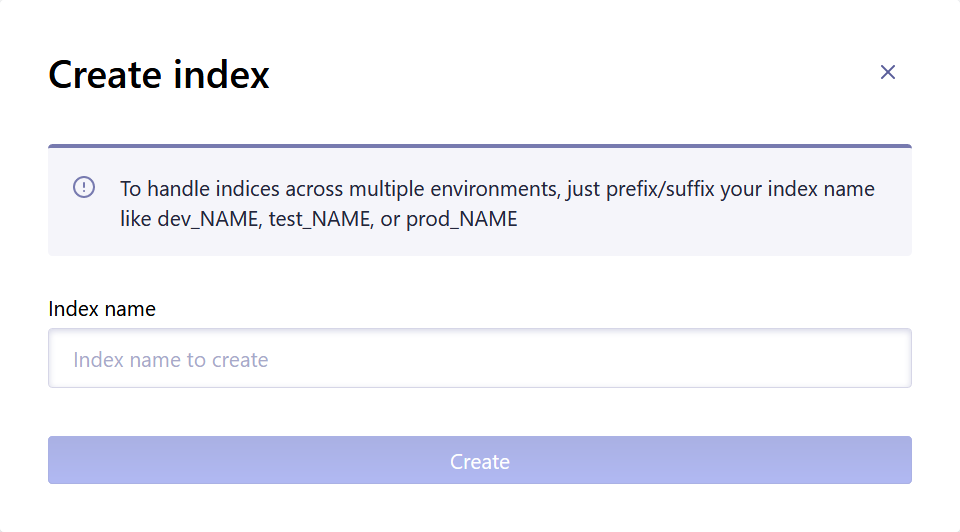
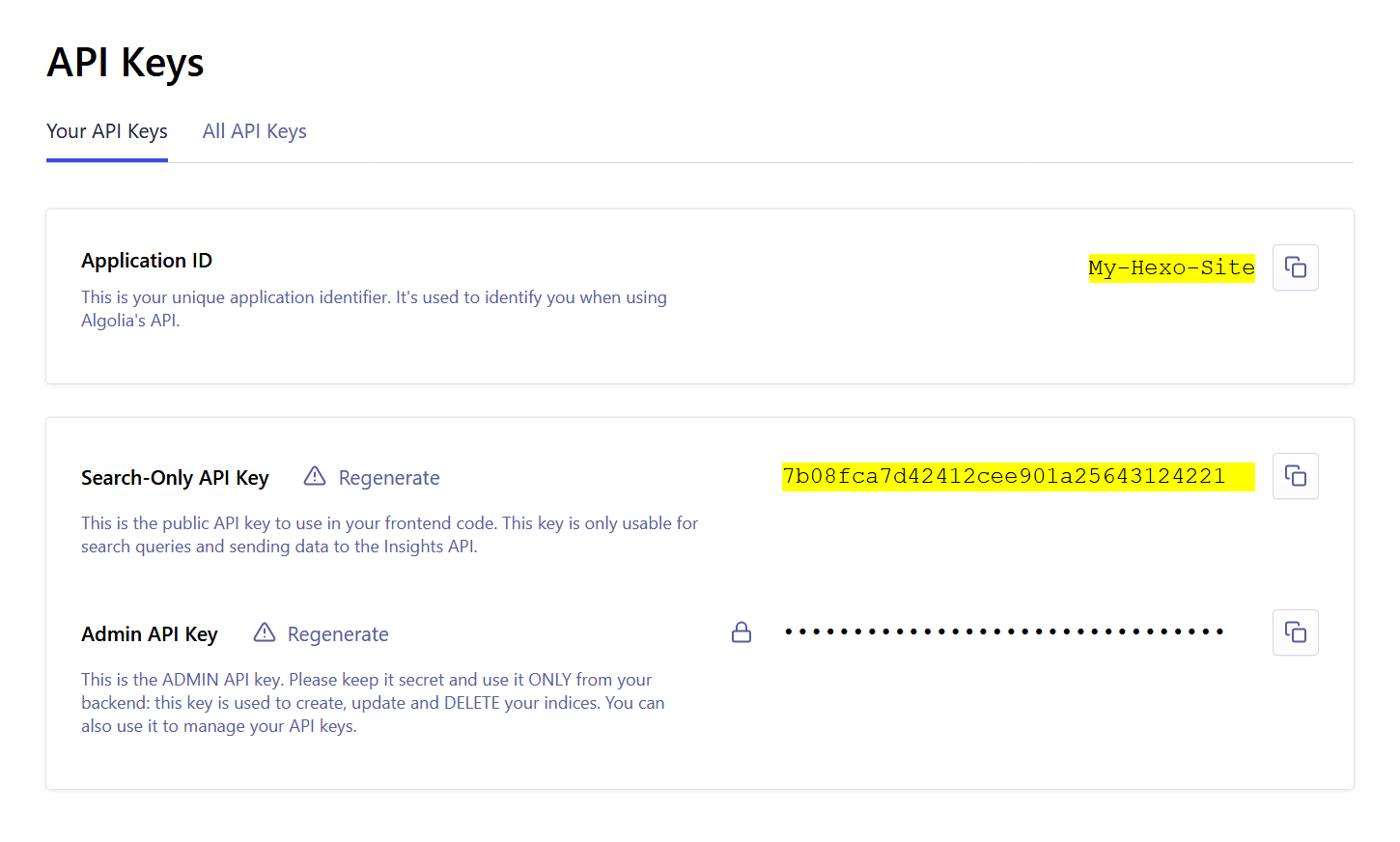
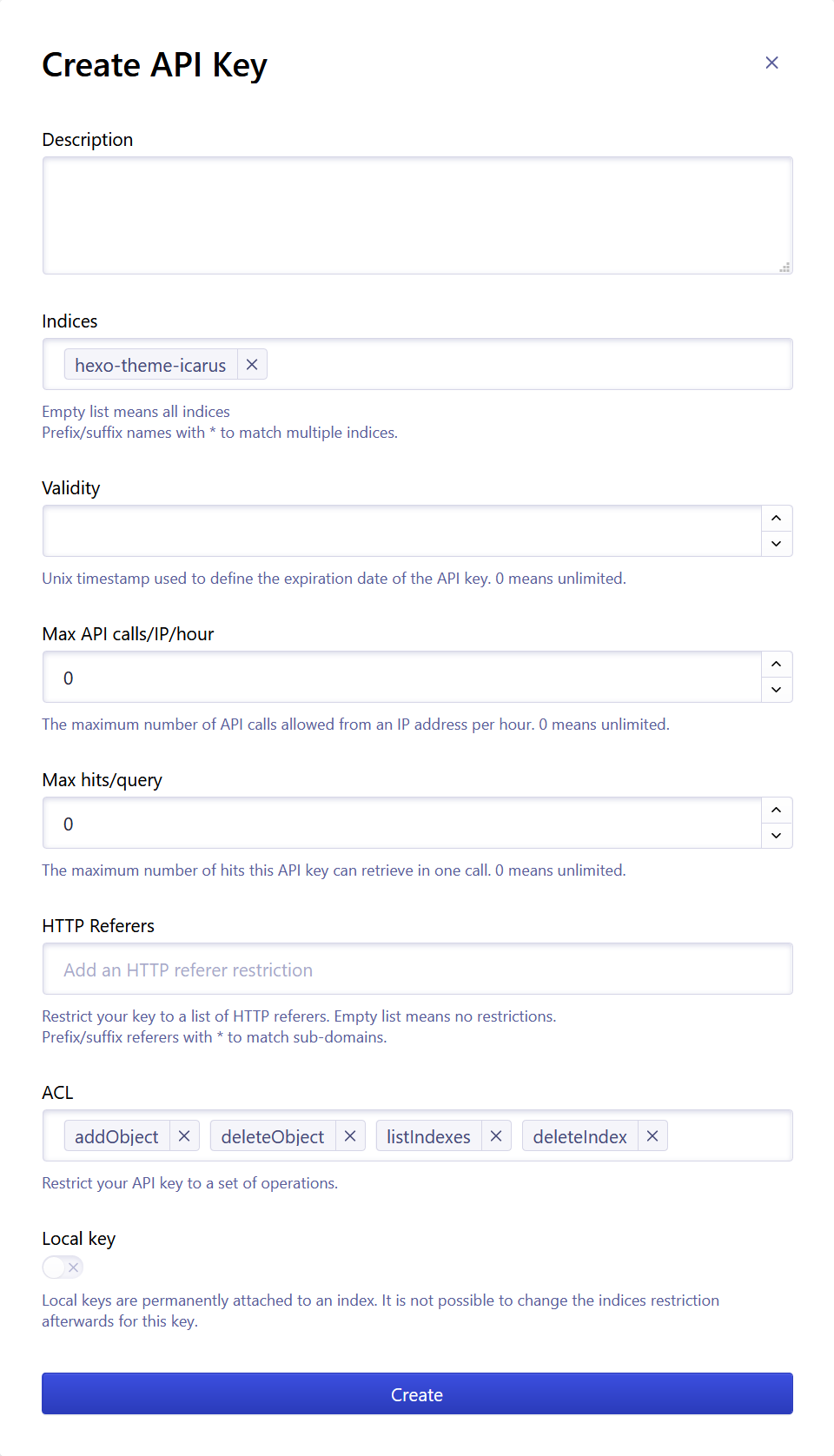
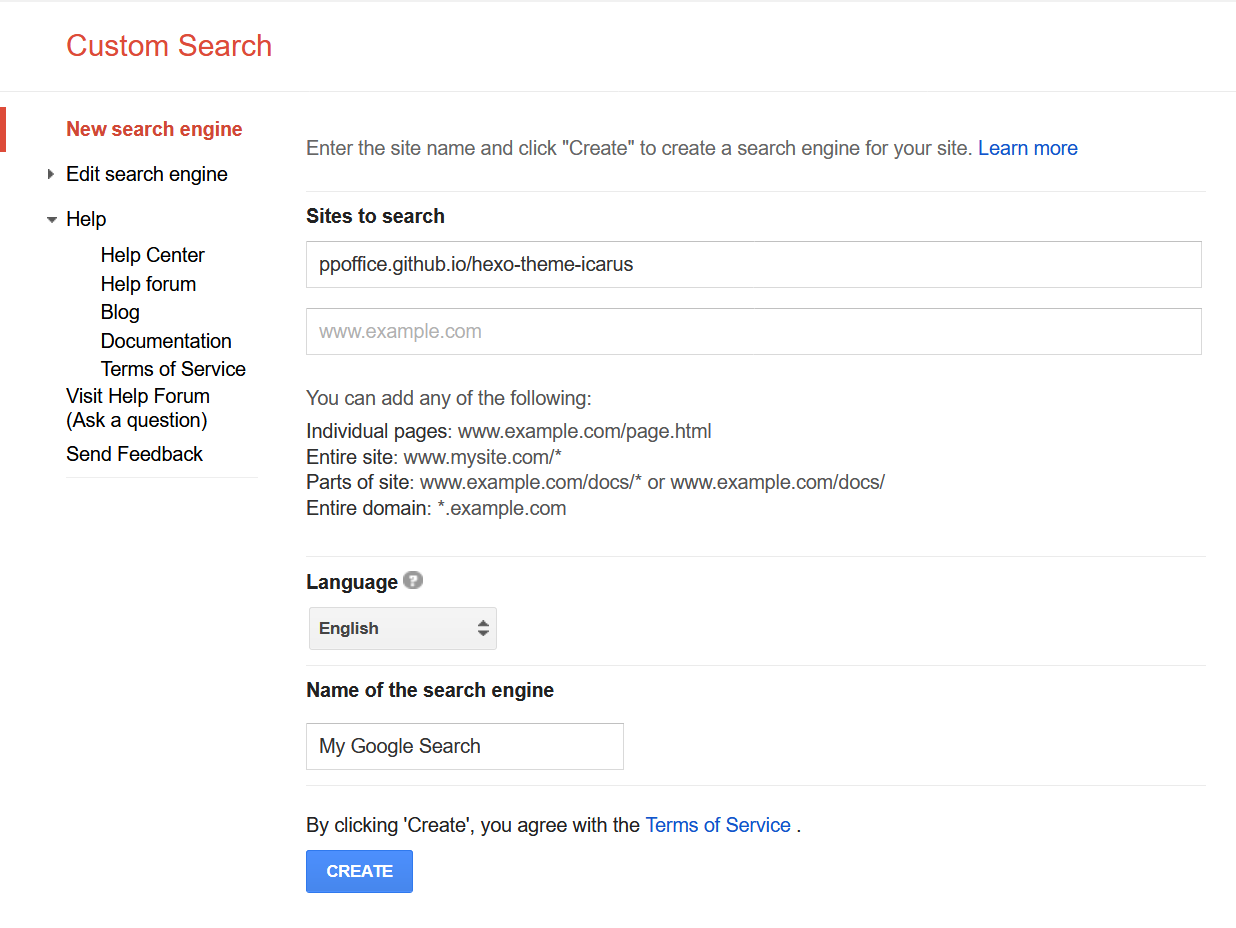
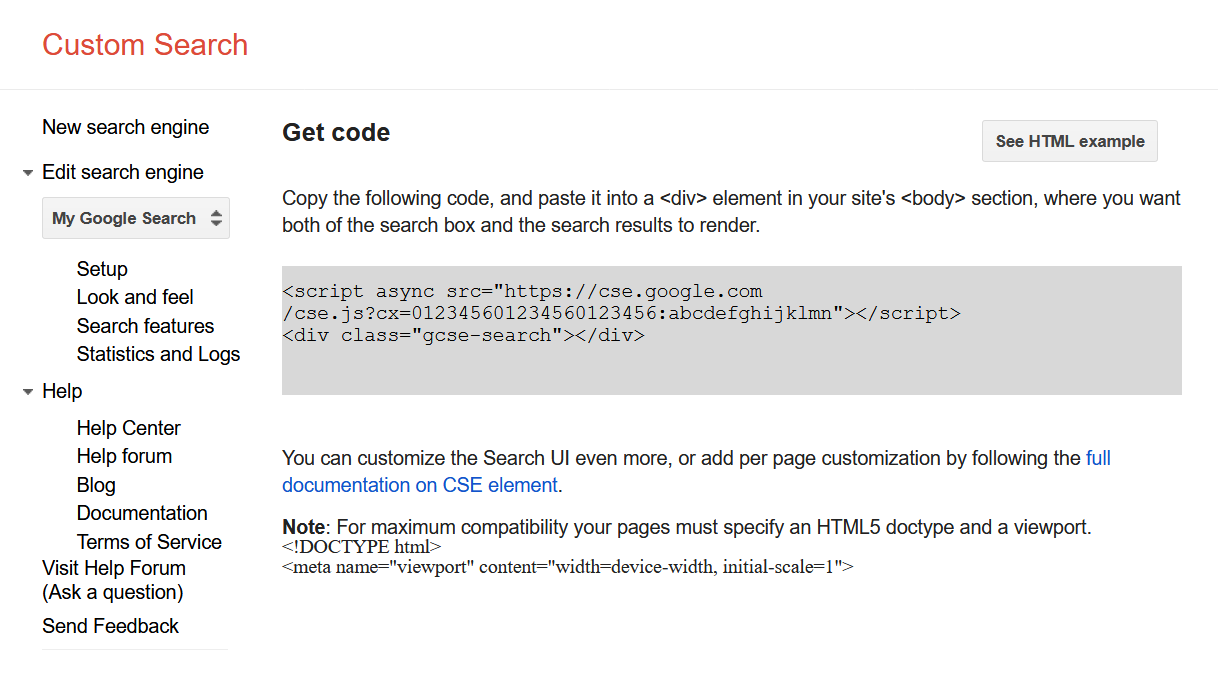
    <content type="html"><![CDATA[<blockquote><p>本文介绍Icarus 3支持的站内搜索插件的安装配置。</p></blockquote><a id="more"></a><article class="message message-immersive is-primary"><div class="message-body"><i class="fas fa-info-circle mr-2"></i>下面的站内搜索插件由<a href="https://github.com/ppoffice/hexo-component-inferno">ppoffice/hexo-component-inferno</a>提供，完整的支持插件列表和配置详情以其为准。</div></article><style>.content ol:not([type]) {    list-style-type: simp-chinese-informal;}</style><h2 id="Algolia"><a href="#Algolia" class="headerlink" title="Algolia"></a>Algolia</h2><div><strong>安装指南</strong><a class="tag is-success" style="margin-left:.8em" href="">在线预览</a></div><ol><li><p>在Hexo站点的根目录安装<a href="https://github.com/oncletom/hexo-algolia">hexo-algolia</a>插件。</p></li><li><p>注册并登录<a href="https://www.algolia.com/">Algolia</a>。<br>首次登录控制面板(Dashboard)时点击页面上的“创建索引”(Create Index)按钮。<br>然后，输入”索引名称“(Index name)并点击“创建”(Create)完成索引创建。</p><img src="https://cdn.jsdelivr.net/gh/ji2xpro/blog_image/Hexo/Plugins/Search/Algolia/algolia-create-index.png" class="box px-0 py-0 ml-auto mr-auto" width="500" title="创建索引 - Algolia" alt="创建索引 - Algolia"><br></li><li><p>下一步，点击右侧导航栏上的”API密钥“(API Keys)，复制页面上的“应用ID”(Application ID)和“仅限搜索的API Key”<br>(Search-Only API Key)。<br>打开Hexo站点根目录下的站点配置文件<code>_config.yml</code>，填入上面复制的信息到hexo-algolia插件的配置中。</p><img src="https://cdn.jsdelivr.net/gh/ji2xpro/blog_image/Hexo/Plugins/Search/Algolia/algolia-api-keys.png" class="box px-0 py-0 ml-auto mr-auto" width="500" title="API密钥 - Algolia" alt="API密钥 - Algolia"><br><p>例如，下面的Algolia索引信息：</p> <figure class="highlight plain"><figcaption><span>Algolia索引信息</span></figcaption><table><tr><td class="gutter"><pre><span class="line">1</span><br><span class="line">2</span><br><span class="line">3</span><br></pre></td><td class="code"><pre><span class="line">Algolia索引名称: My-Hexo-Site</span><br><span class="line">Application ID: ABCDEFGHIJKL</span><br><span class="line">Search-Only API Key: 7b08fca7d42412cee901a25643124221</span><br></pre></td></tr></table></figure><p> 对应的站点配置为：</p> <figure class="highlight yaml"><figcaption><span>_config.yml</span></figcaption><table><tr><td class="gutter"><pre><span class="line">1</span><br><span class="line">2</span><br><span class="line">3</span><br><span class="line">4</span><br></pre></td><td class="code"><pre><span class="line"><span class="attr">algolia:</span></span><br><span class="line">    <span class="attr">applicationID:</span> <span class="string">My-Hexo-Site</span></span><br><span class="line">    <span class="attr">indexName:</span> <span class="string">ABCDEFGHIJKL</span></span><br><span class="line">    <span class="attr">apiKey:</span> <span class="string">7b08fca7d42412cee901a25643124221</span></span><br></pre></td></tr></table></figure></li><li><p>回到Algolia控制面板的”API密钥“(API Keys)页面并切换到“所有API Keys”(All API Keys)标签页。<br>点击“新建API Key”(New API Key)按钮。<br>在弹出的“创建API Key”(Create API Key)对话框中，在”索引“(Indices)处选择你在上一步中创建的“索引”(Indices)。<br>然后，“ACL”项中添加<code>addObject</code>，<code>deleteObject</code>，<code>listIndexes</code>， <code>deleteIndex</code>。<br>点击“创建”(Create)完成密钥的创建。<br>复制刚刚创建的API Key，例如<code>727fbd8c998fe419318fa350db6793ca</code>。</p><img src="https://cdn.jsdelivr.net/gh/ji2xpro/blog_image/Hexo/Plugins/Search/Algolia/algolia-create-api-key.png" class="box px-0 py-0 ml-auto mr-auto" width="500" title="创建API密钥 - Algolia" alt="创建API密钥 - Algolia"><br></li><li><p>打开一个Windows命令行(CMD)或Linux/macOS终端并切换当前目录到你的Hexo站点的根目录。<br>设置环境变量<code>HEXO_ALGOLIA_INDEXING_KEY</code>为上一步中创建的API Key。<br>hexo-algolia插件上传网站索引时会用到这个变量。</p><p>Windows下：</p> <figure class="highlight cmd"><figcaption><span>Windows命令行(CMD)</span></figcaption><table><tr><td class="gutter"><pre><span class="line">1</span><br><span class="line">2</span><br></pre></td><td class="code"><pre><span class="line"><span class="function">C:\<span class="title">Users</span>\<span class="title">you</span>&gt; <span class="title">cd</span> <span class="title">path</span>/<span class="title">to</span>/<span class="title">your</span>/<span class="title">hexo</span>/<span class="title">site</span></span></span><br><span class="line"><span class="function"><span class="title">C</span>:\<span class="title">Users</span>\<span class="title">you</span>&gt; <span class="title">set</span> <span class="title">HEXO_ALGOLIA_INDEXING_KEY</span>="727<span class="title">fbd8c998fe419318fa350db6793ca</span>"</span></span><br></pre></td></tr></table></figure><p>Linux/macOS下：</p> <figure class="highlight shell"><figcaption><span>Linux/macOS终端</span></figcaption><table><tr><td class="gutter"><pre><span class="line">1</span><br><span class="line">2</span><br></pre></td><td class="code"><pre><span class="line"><span class="meta">$</span><span class="bash"> <span class="built_in">cd</span> path/to/your/hexo/site</span></span><br><span class="line"><span class="meta">$</span><span class="bash"> <span class="built_in">export</span> HEXO_ALGOLIA_INDEXING_KEY=<span class="string">"727fbd8c998fe419318fa350db6793ca"</span></span></span><br></pre></td></tr></table></figure><p> 然后，运行下面的命令来清理站点并上传网站索引到Algolia：</p> <figure class="highlight shell"><figcaption><span>Windows命令行(CMD)或Linux/macOS终端</span></figcaption><table><tr><td class="gutter"><pre><span class="line">1</span><br><span class="line">2</span><br></pre></td><td class="code"><pre><span class="line"><span class="meta">$</span><span class="bash"> hexo clean</span></span><br><span class="line"><span class="meta">$</span><span class="bash"> hexo algolia</span></span><br></pre></td></tr></table></figure></li><li><p>最后，在主题配置中设置搜索引擎为Algolia：</p> <figure class="highlight yaml"><figcaption><span>themes/icarus/_config.yml</span></figcaption><table><tr><td class="gutter"><pre><span class="line">1</span><br><span class="line">2</span><br></pre></td><td class="code"><pre><span class="line"><span class="attr">search:</span></span><br><span class="line">    <span class="attr">type:</span> <span class="string">algolia</span></span><br></pre></td></tr></table></figure></li></ol><h2 id="百度搜索"><a href="#百度搜索" class="headerlink" title="百度搜索"></a>百度搜索</h2><p><strong>安装指南</strong></p><ol><li><p>打开主题配置文件并设置搜索为百度搜索：</p> <figure class="highlight yaml"><figcaption><span>themes/icarus/_config.yml</span></figcaption><table><tr><td class="gutter"><pre><span class="line">1</span><br><span class="line">2</span><br></pre></td><td class="code"><pre><span class="line"><span class="attr">search:</span></span><br><span class="line">    <span class="attr">type:</span> <span class="string">baidu</span></span><br></pre></td></tr></table></figure></li></ol><h2 id="谷歌自定义搜索"><a href="#谷歌自定义搜索" class="headerlink" title="谷歌自定义搜索"></a>谷歌自定义搜索</h2><div><strong>安装指南</strong><a class="tag is-success" style="margin-left:.8em" href="">在线预览</a></div><ol><li><p>登录你的谷歌账户并访问<a href="https://cse.google.com/cse/create/new">Google CSE</a>来创建自定义搜索。<br>在“需要搜索的站点”(Sites to Search)中填入你的Hexo站点域名。<br>在“语言”(Language)选择框中选择正确的语言。<br>然后填写自定义“搜索引擎名称”(Name of the search engine)。<br>点击“创建”(Create)按钮完成引擎的创建。</p><img src="https://cdn.jsdelivr.net/gh/ji2xpro/blog_image/Hexo/Plugins/Search/Google/google-cse-create.png" class="box px-0 py-0 ml-auto mr-auto" width="500" title="创建自定义搜索 - Google CSE" alt="创建自定义搜索 - Google CSE"><br></li><li><p>然后，点击页面上的“添加到你的站点”(Add it to your site)右侧的“获取代码”(Get code)按钮。<br>从HTML代码中复制<code>cx</code>的值填入到对应主题配置项中。</p><img src="https://cdn.jsdelivr.net/gh/ji2xpro/blog_image/Hexo/Plugins/Search/Google/google-cse-code.png" class="box px-0 py-0 ml-auto mr-auto" width="500" title="获取代码 - Google CSE" alt="获取代码 - Google CSE"><br><p>例如，下面的HTML代码：</p> <figure class="highlight html"><figcaption><span>Google CSE HTML代码</span></figcaption><table><tr><td class="gutter"><pre><span class="line">1</span><br><span class="line">2</span><br></pre></td><td class="code"><pre><span class="line"><span class="tag">&lt;<span class="name">script</span> <span class="attr">async</span> <span class="attr">src</span>=<span class="string">"https://cse.google.com/cse.js?cx=012345601234560123456:abcdefghijklmn"</span>&gt;</span><span class="tag">&lt;/<span class="name">script</span>&gt;</span></span><br><span class="line"><span class="tag">&lt;<span class="name">div</span> <span class="attr">class</span>=<span class="string">"gcse-search"</span>&gt;</span><span class="tag">&lt;/<span class="name">div</span>&gt;</span></span><br></pre></td></tr></table></figure><p> 对应下面的主题配置：</p> <figure class="highlight yaml"><figcaption><span>themes/icarus/_config.yml</span></figcaption><table><tr><td class="gutter"><pre><span class="line">1</span><br><span class="line">2</span><br><span class="line">3</span><br></pre></td><td class="code"><pre><span class="line"><span class="attr">search:</span></span><br><span class="line">    <span class="attr">type:</span> <span class="string">google_cse</span></span><br><span class="line">    <span class="attr">cx:</span> <span class="number">012345601234560123456</span><span class="string">:abcdefghijklmn</span></span><br></pre></td></tr></table></figure></li></ol><h2 id="Insight"><a href="#Insight" class="headerlink" title="Insight"></a>Insight</h2><p><strong>安装指南</strong></p><ol><li><p>Insight为本站默认的站内搜索引擎。<br>你可以通过下面的主题配置来启用它：</p> <figure class="highlight yaml"><figcaption><span>themes/icarus/_config.yml</span></figcaption><table><tr><td class="gutter"><pre><span class="line">1</span><br><span class="line">2</span><br></pre></td><td class="code"><pre><span class="line"><span class="attr">search:</span></span><br><span class="line">    <span class="attr">type:</span> <span class="string">insight</span></span><br></pre></td></tr></table></figure></li></ol><p>参考文章:<br><a href="">参考链接</a></p><article class="message message-immersive is-warning"><div class="message-body"><i class="fas fa-question-circle mr-2"></i>文章内容有误？请点击<a href="https://github.com/ji2xpro/ji2xpro.github.io/edit/sourceCode/source/_posts/hexo/Hexo博客指南-第十三篇-Icarus配置-网站搜索插件.md">此处</a>提交修改。</div></article>]]></content>
    
    <summary type="html">
    
      &lt;blockquote&gt;
&lt;p&gt;本文介绍Icarus 3支持的站内搜索插件的安装配置。&lt;/p&gt;
&lt;/blockquote&gt;
    
    </summary>
    
    
      <category term="Hexo教程" scheme="https://ji2xpro.github.io/categories/Hexo%E6%95%99%E7%A8%8B/"/>
    
      <category term="主题配置" scheme="https://ji2xpro.github.io/categories/Hexo%E6%95%99%E7%A8%8B/%E4%B8%BB%E9%A2%98%E9%85%8D%E7%BD%AE/"/>
    
    
      <category term="Icarus主题配置" scheme="https://ji2xpro.github.io/tags/Icarus%E4%B8%BB%E9%A2%98%E9%85%8D%E7%BD%AE/"/>
    
  </entry>
  
  <entry>
    <title>Hexo博客指南|第十二篇:Icarus配置 - 网站分析插件</title>
    <link href="https://ji2xpro.github.io/88bd6454/"/>
    <id>https://ji2xpro.github.io/88bd6454/</id>
    <published>2020-06-08T03:40:05.000Z</published>
    <updated>2020-06-09T07:19:46.759Z</updated>
    
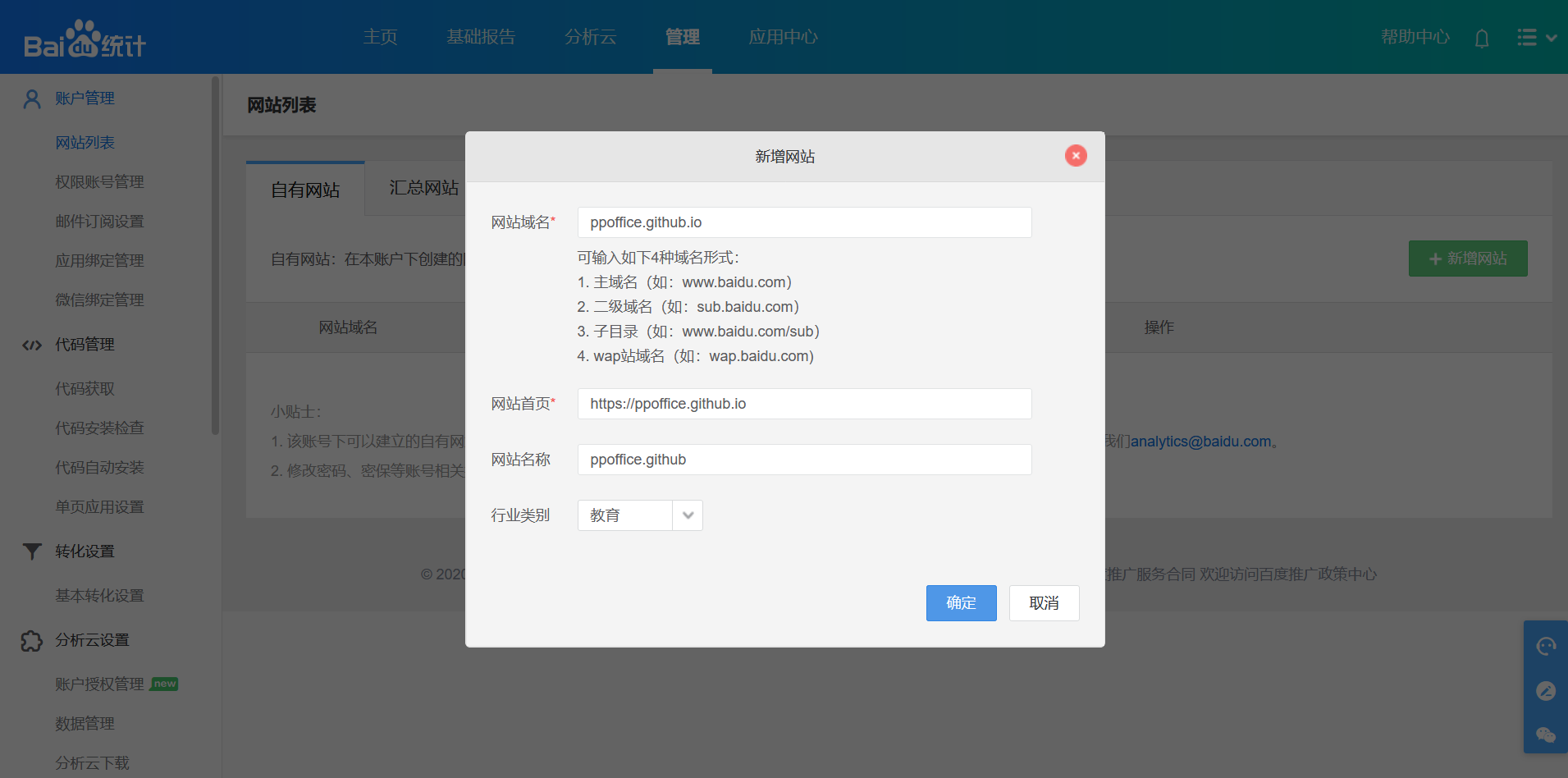
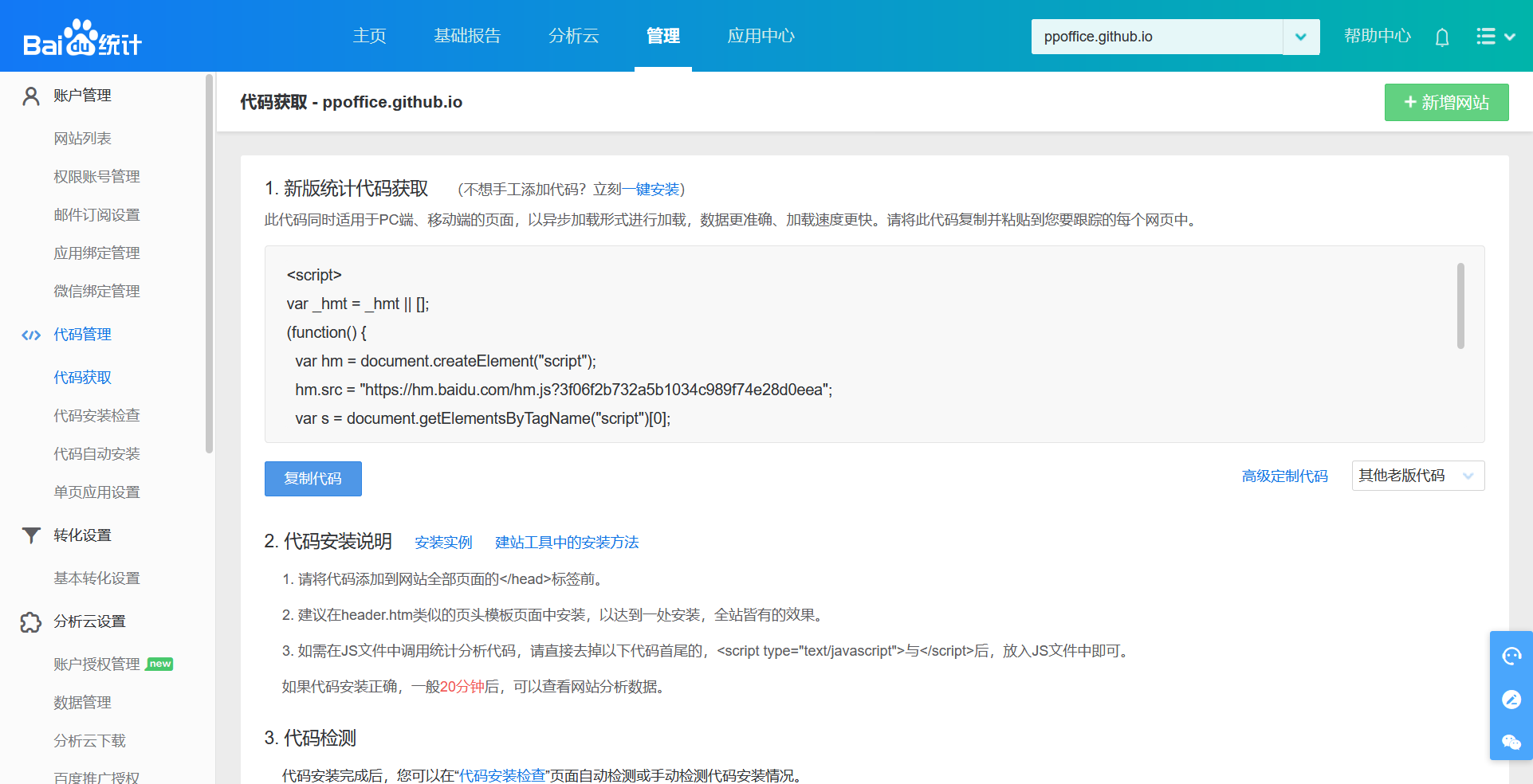
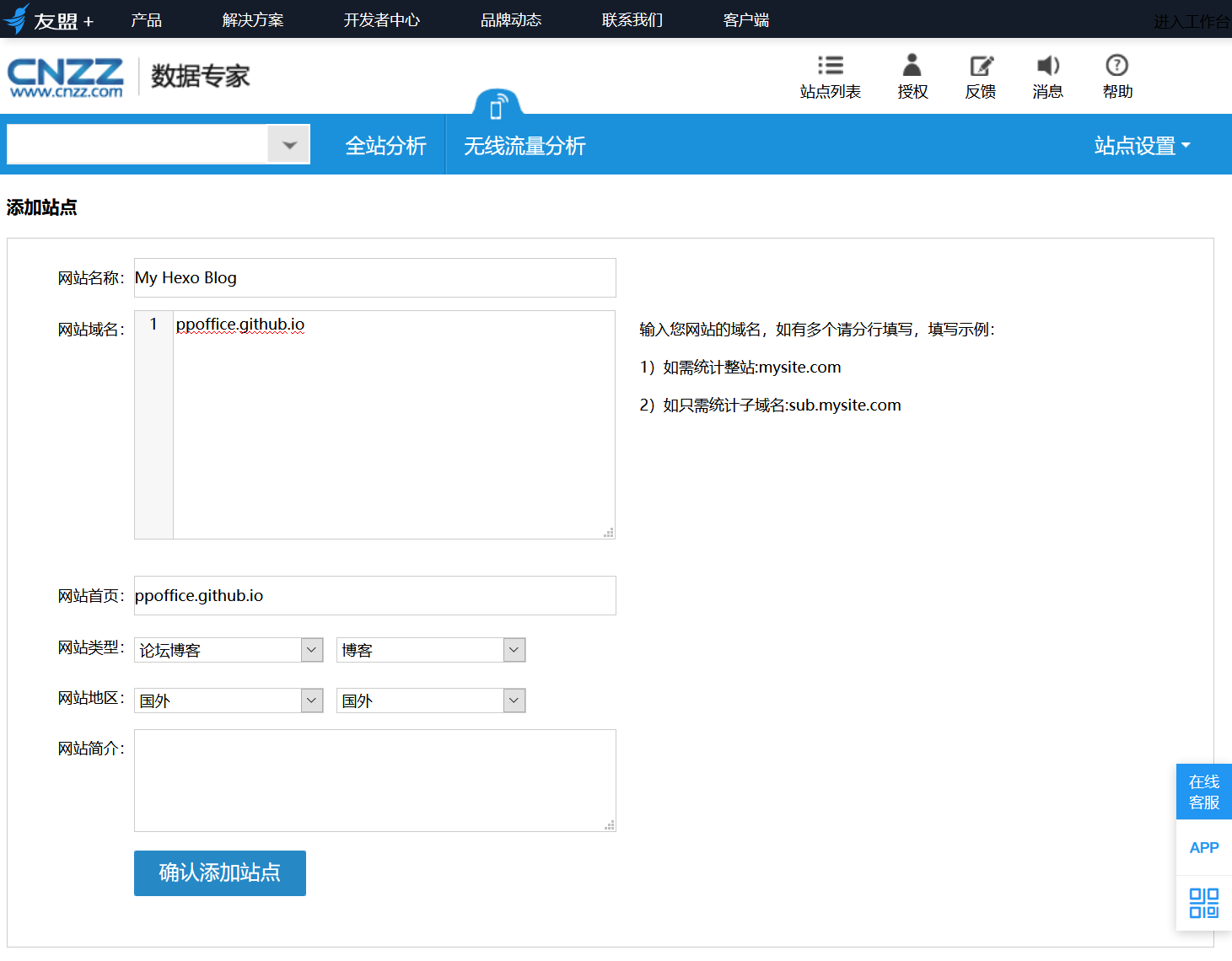
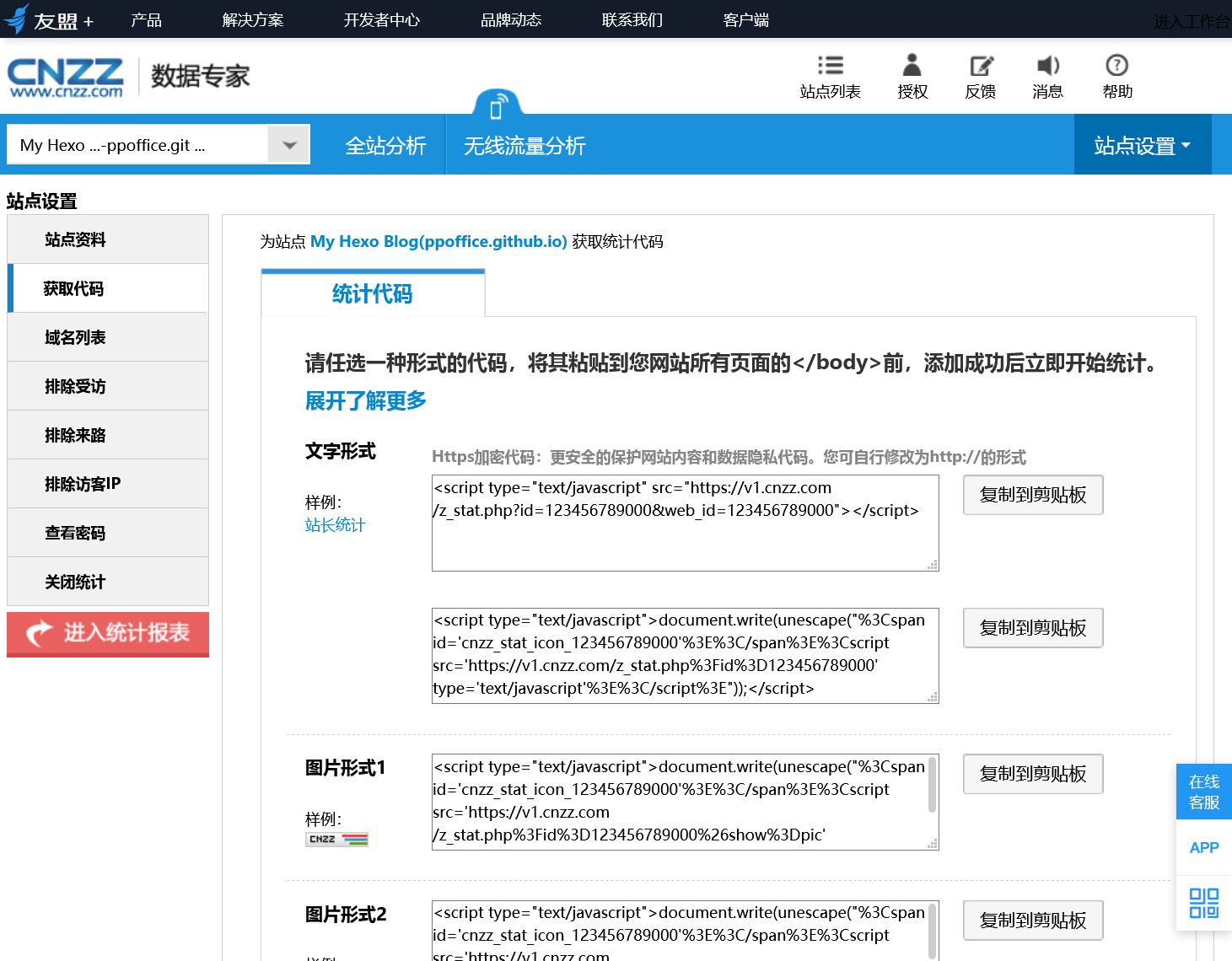
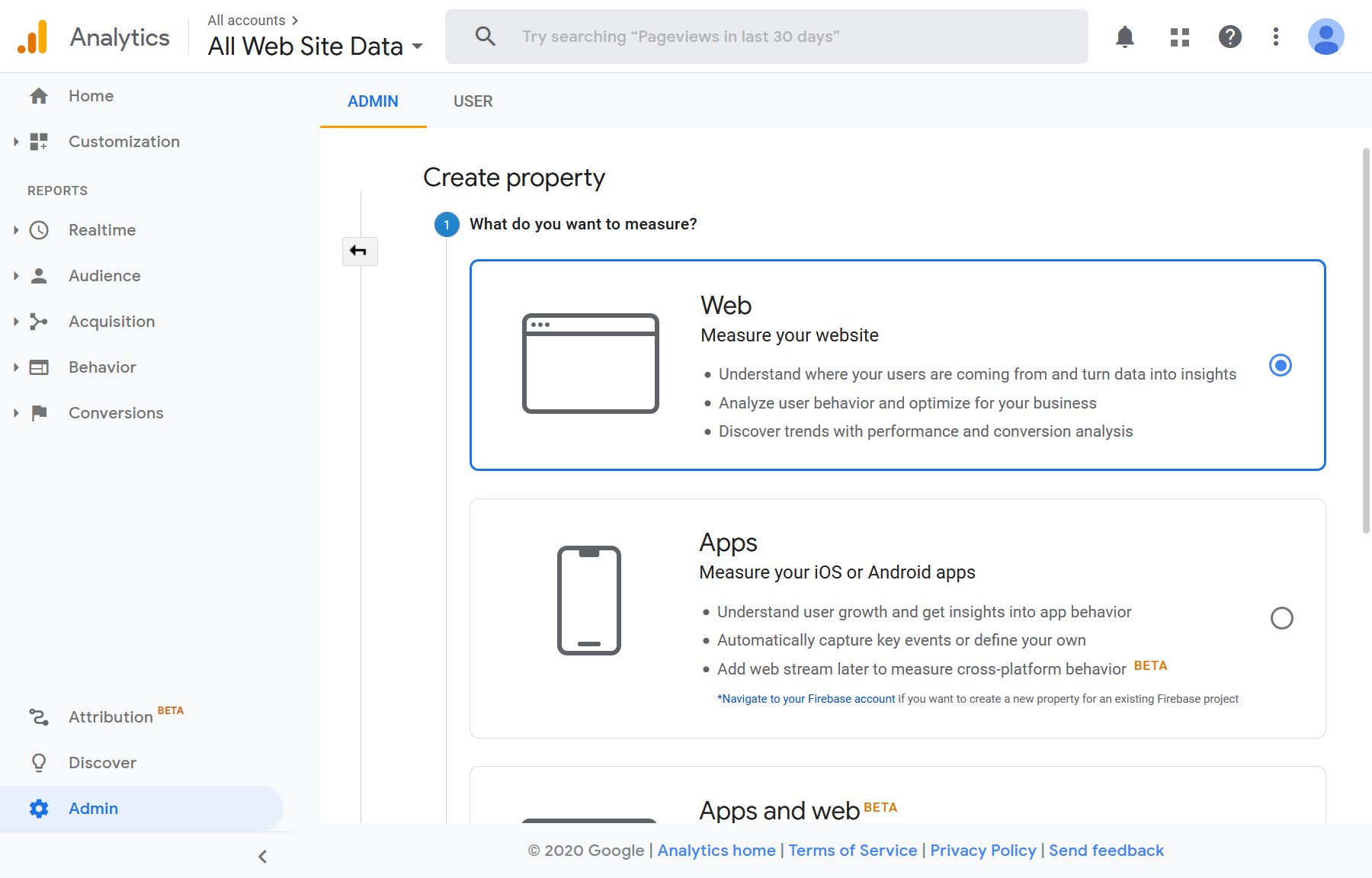
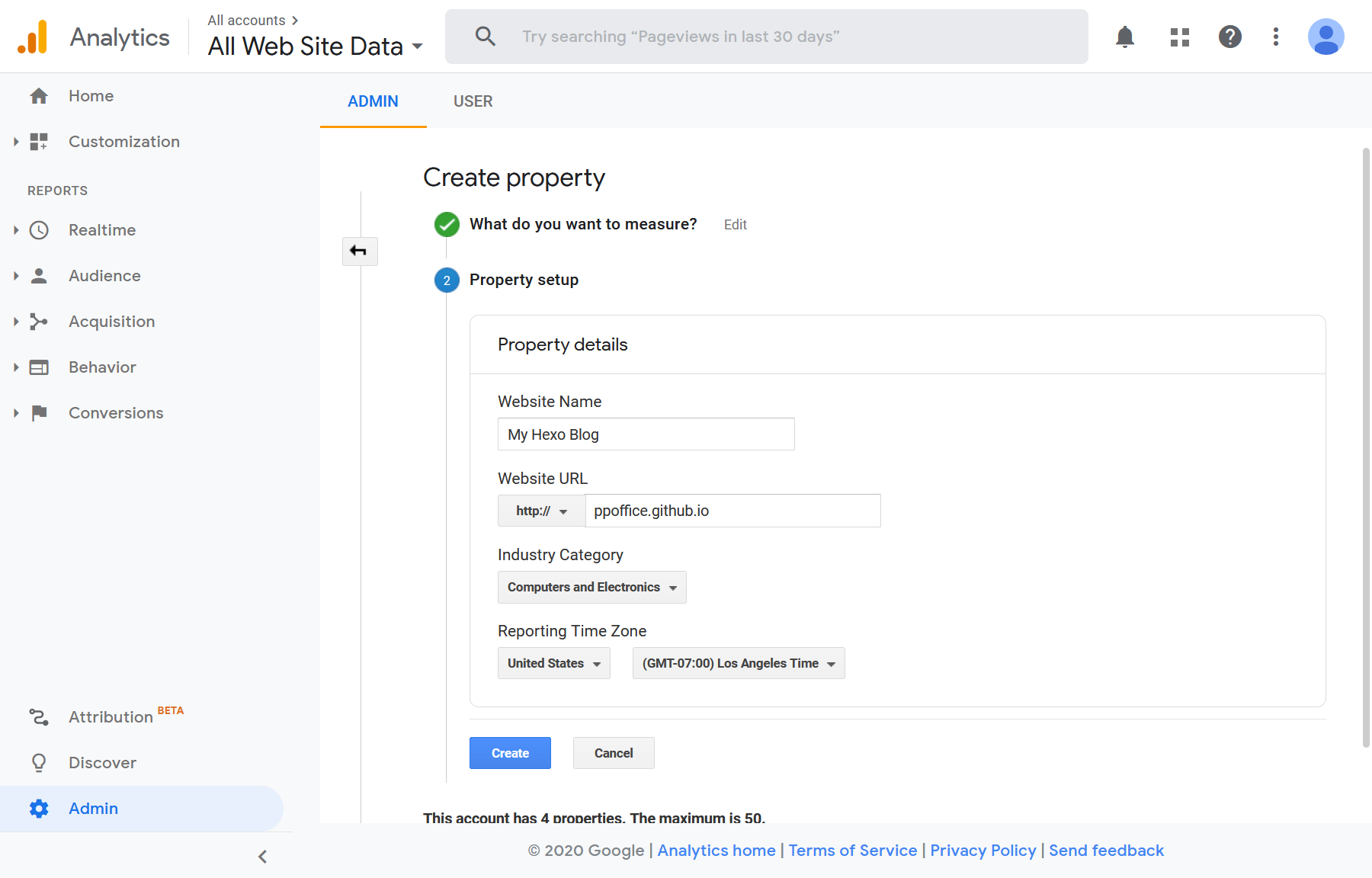
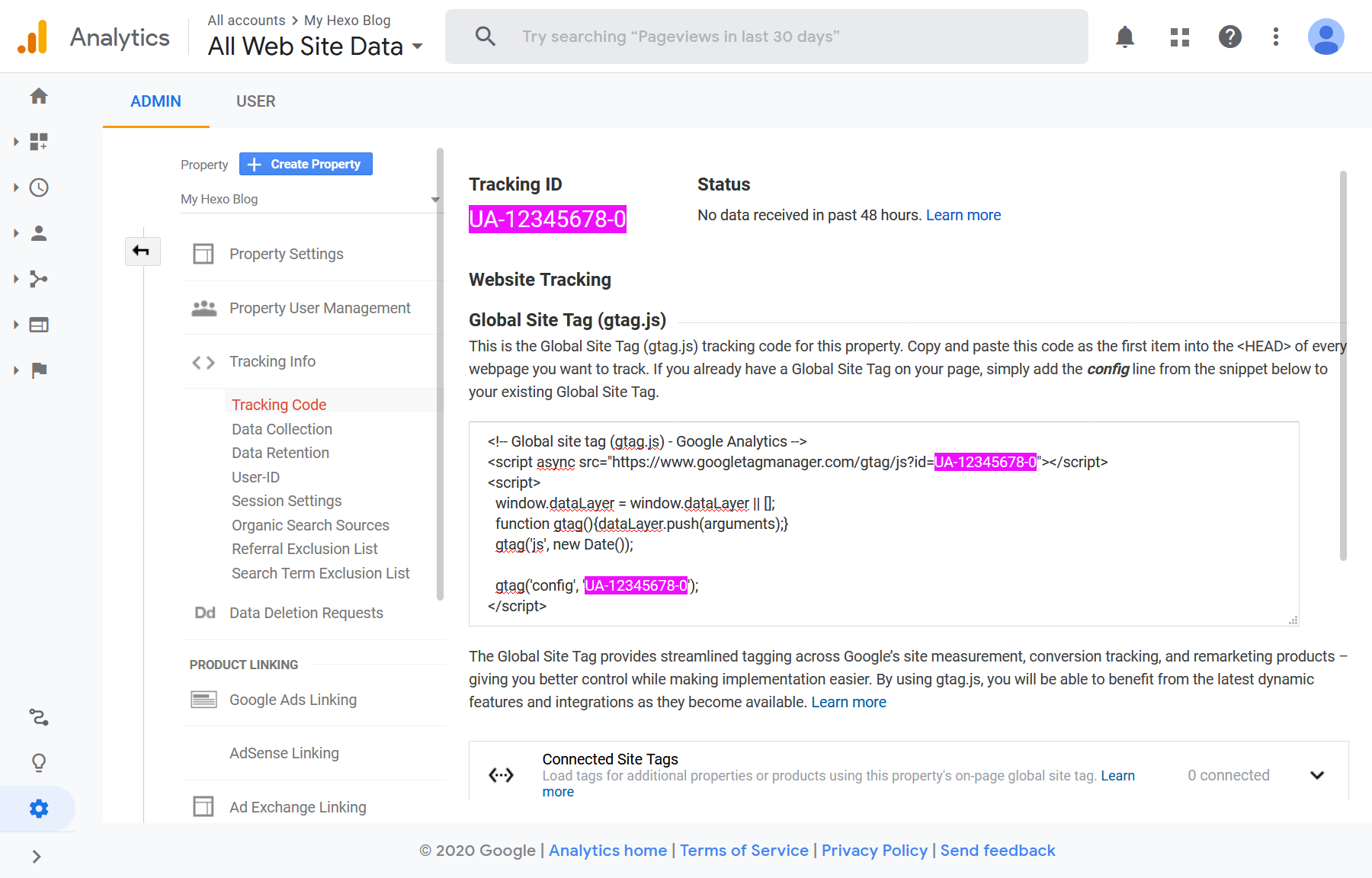
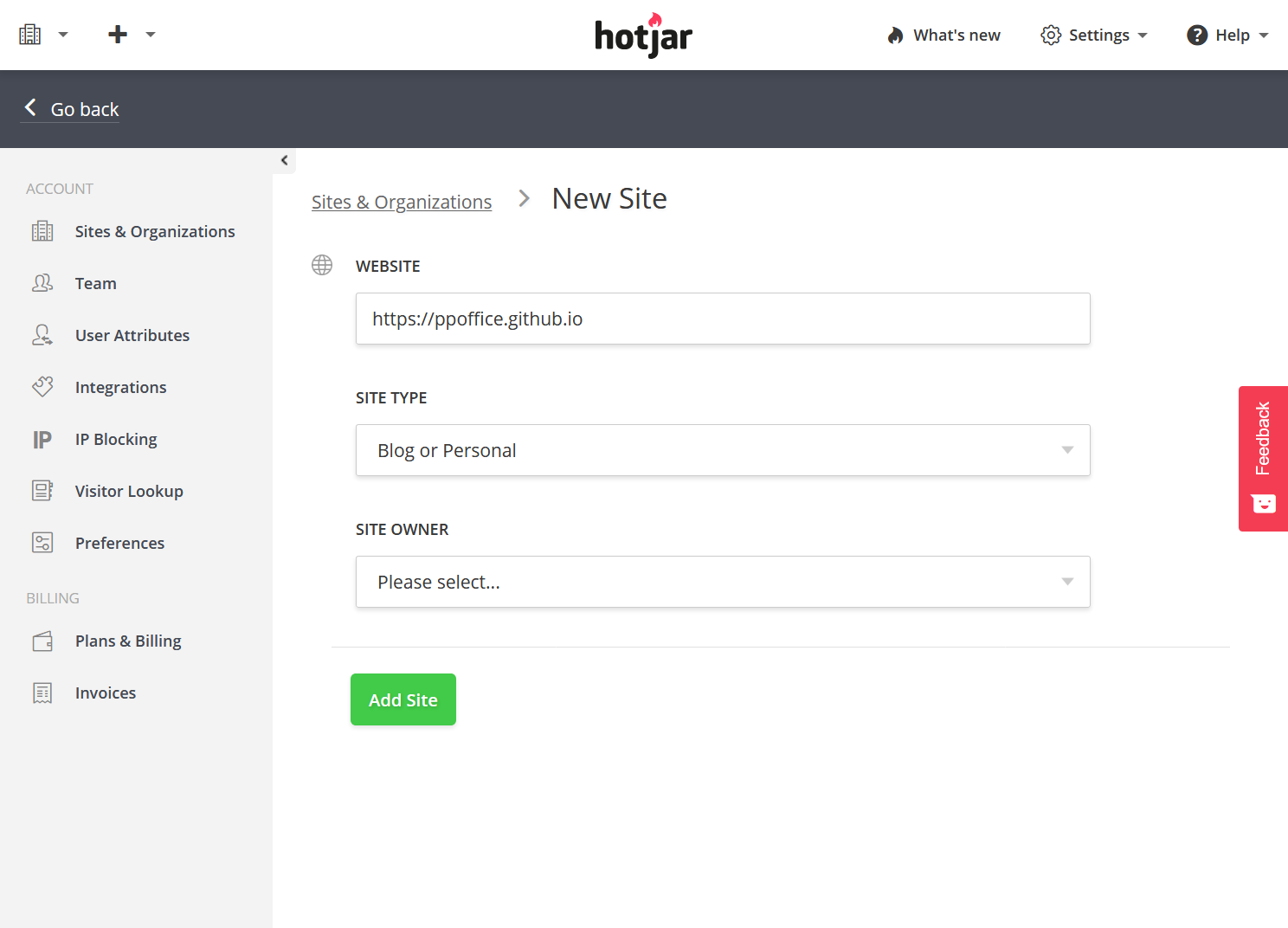
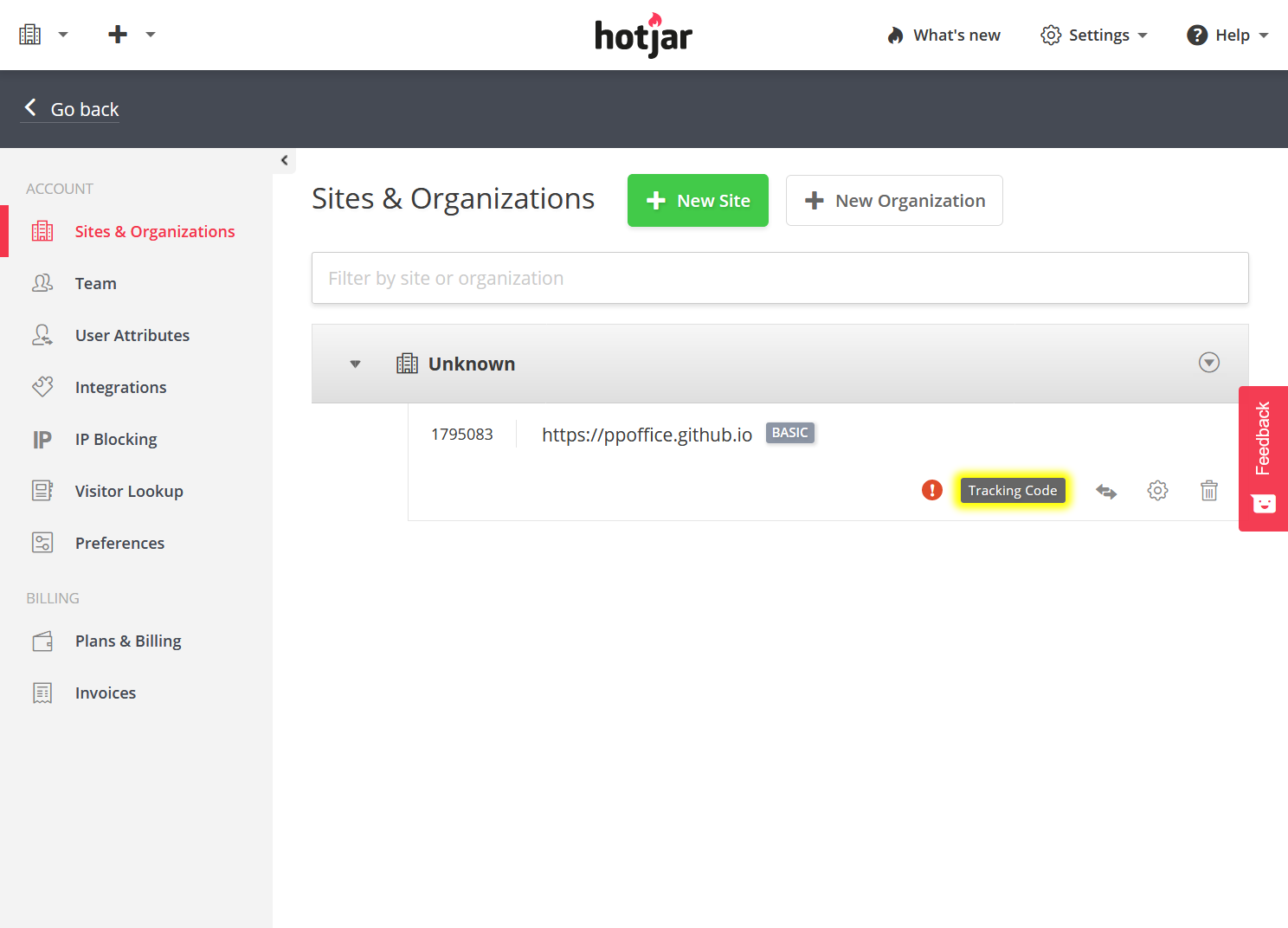
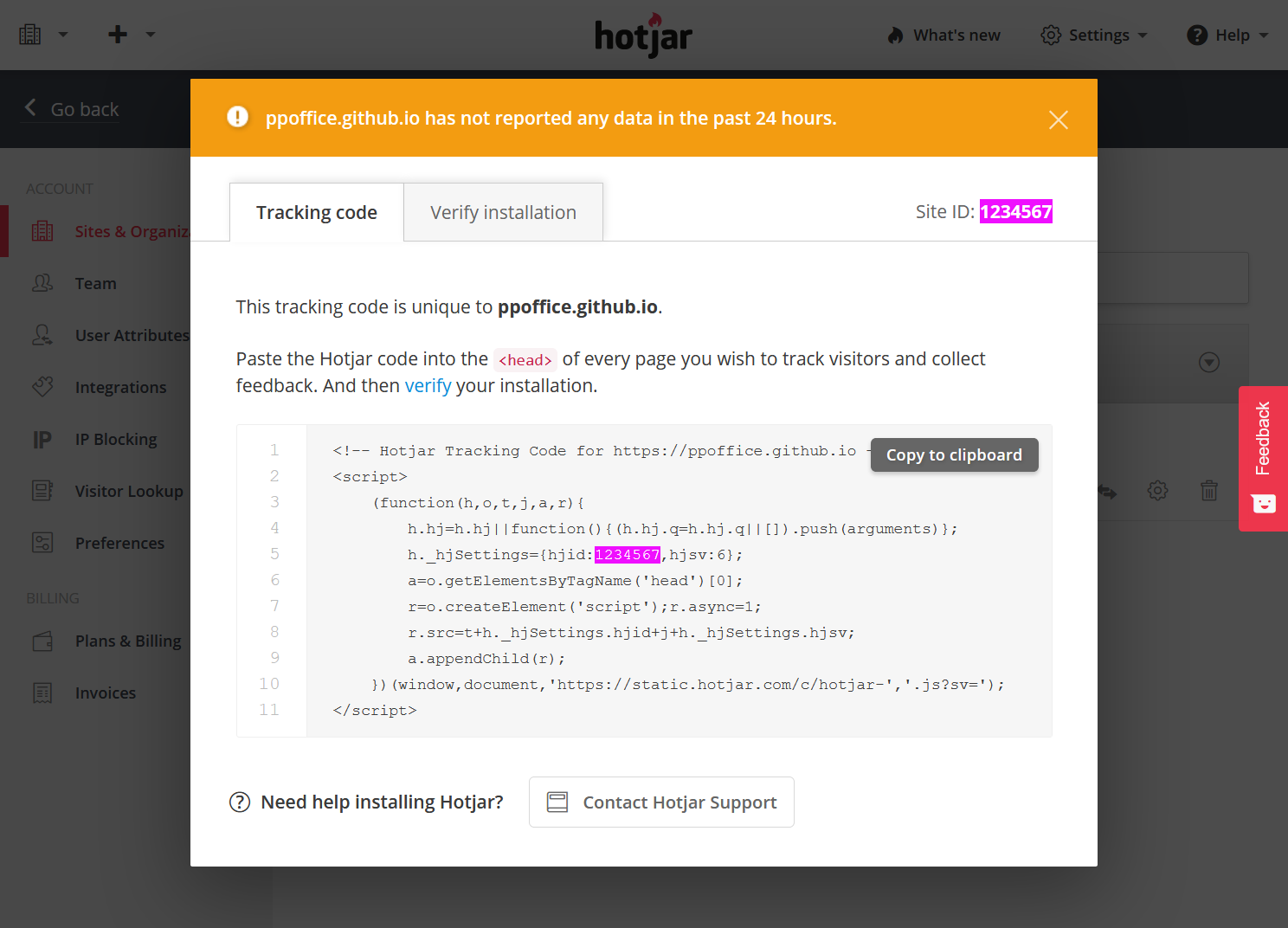
    <content type="html"><![CDATA[<blockquote><p>本文介绍Icarus 3支持的网站统计与分析插件的安装配置。</p></blockquote><a id="more"></a><article class="message message-immersive is-primary"><div class="message-body"><i class="fas fa-info-circle mr-2"></i>下面的网站统计与分析插件由<a href="https://github.com/ppoffice/hexo-component-inferno">ppoffice/hexo-component-inferno</a>提供，完整的支持插件列表和配置详情以其为准。</div></article><article class="message message-immersive is-danger"><div class="message-body"><i class="fas fa-exclamation-triangle mr-2"></i>本文中涉及的所有插件均可能被部分广告拦截浏览器扩展拦截，请酌情使用。</div></article><h2 id="百度统计"><a href="#百度统计" class="headerlink" title="百度统计"></a>百度统计</h2><p><strong>安装指南</strong></p><ol><li><p>登录<a href="https://tongji.baidu.com">百度统计</a>。<br>在“管理 &gt; 网站列表”页面上点击“新增网站”按钮并填写“网站域名”，“网站首页”等站点信息。<br>点击“确定”完成站点创建。</p><img src="https://cdn.jsdelivr.net/gh/ji2xpro/blog_image/Hexo/Plugins/WebAnalytics/Baidu/baidu-analytics-add-site.png" class="box px-0 py-0 ml-auto mr-auto" width="500" title="新增站点 - Baidu Analytics" alt="新增站点 - Baidu Analytics"><br></li><li><p>在下一页面上找到<code>hm.baidu.com/hm.js?</code>后的ID并填写到主题配置的<code>plugins</code> &gt; <code>baidu_analytics</code> &gt;<br><code>tracking_id</code>值中。</p><img src="https://cdn.jsdelivr.net/gh/ji2xpro/blog_image/Hexo/Plugins/WebAnalytics/Baidu/baidu-analytics-get-code.png" class="box px-0 py-0 ml-auto mr-auto" width="500" title="获取代码 - Baidu Analytics" alt="获取代码 - Baidu Analytics"><br><p>例如，如下的统计代码：</p> <figure class="highlight html"><figcaption><span>百度统计代码</span></figcaption><table><tr><td class="gutter"><pre><span class="line">1</span><br><span class="line">2</span><br><span class="line">3</span><br><span class="line">4</span><br><span class="line">5</span><br><span class="line">6</span><br><span class="line">7</span><br><span class="line">8</span><br><span class="line">9</span><br></pre></td><td class="code"><pre><span class="line"><span class="tag">&lt;<span class="name">script</span>&gt;</span></span><br><span class="line"><span class="actionscript"><span class="keyword">var</span> _hmt = _hmt || [];</span></span><br><span class="line"><span class="actionscript">(<span class="function"><span class="keyword">function</span><span class="params">()</span> </span>&#123;</span></span><br><span class="line"><span class="javascript"><span class="keyword">var</span> hm = <span class="built_in">document</span>.createElement(<span class="string">"script"</span>);</span></span><br><span class="line"><span class="actionscript">hm.src = <span class="string">"https://hm.baidu.com/hm.js?3f06f2b732a5b1034c989f74e28d0eea"</span>;</span></span><br><span class="line"><span class="javascript"><span class="keyword">var</span> s = <span class="built_in">document</span>.getElementsByTagName(<span class="string">"script"</span>)[<span class="number">0</span>]; </span></span><br><span class="line">s.parentNode.insertBefore(hm, s);</span><br><span class="line">&#125;)();</span><br><span class="line"><span class="tag">&lt;/<span class="name">script</span>&gt;</span></span><br></pre></td></tr></table></figure><p> 对应的主题配置为：</p> <figure class="highlight yaml"><figcaption><span>themes/icarus/_config.yml</span></figcaption><table><tr><td class="gutter"><pre><span class="line">1</span><br><span class="line">2</span><br><span class="line">3</span><br></pre></td><td class="code"><pre><span class="line"><span class="attr">plugins:</span></span><br><span class="line">    <span class="attr">baidu_analytics:</span></span><br><span class="line">        <span class="attr">tracking_id:</span> <span class="string">3f06f2b732a5b1034c989f74e28d0eea</span></span><br></pre></td></tr></table></figure></li></ol><h2 id="不蒜子网页计数器"><a href="#不蒜子网页计数器" class="headerlink" title="不蒜子网页计数器"></a>不蒜子网页计数器</h2><p><strong>安装指南</strong></p><ol><li><p>将<code>plugins</code> &gt; <code>busuanzi</code>设置为<code>true</code>来开启不蒜子访客计数器并在网页尾部和每篇博文的头部展示访问次数。</p> <figure class="highlight yaml"><figcaption><span>themes/icarus/_config.yml</span></figcaption><table><tr><td class="gutter"><pre><span class="line">1</span><br><span class="line">2</span><br></pre></td><td class="code"><pre><span class="line"><span class="attr">plugins:</span></span><br><span class="line">    <span class="attr">busuanzi:</span> <span class="literal">true</span></span><br></pre></td></tr></table></figure></li></ol><h2 id="CNZZ统计"><a href="#CNZZ统计" class="headerlink" title="CNZZ统计"></a>CNZZ统计</h2><p><strong>安装指南</strong></p><ol><li><p>登录<a href="https://www.umeng.com/">友盟+</a>。<br>在友盟+工作台首页点击“创建新应用” &gt; “Web应用”。<br>然后输入“网站名称”，“网站域名”，“网站首页”等站点信息信息。<br>完成后点击“确认添加站点”。</p><img src="https://cdn.jsdelivr.net/gh/ji2xpro/blog_image/Hexo/Plugins/WebAnalytics/CNZZ/cnzz-add-site.png" class="box px-0 py-0 ml-auto mr-auto" width="500" title="添加站点 - CNZZ" alt="添加站点 - CNZZ"><br></li><li><p>在获取统计代码界面找到“文字样式”一栏下的HTML代码。<br>分别将其中<code>id</code>与<code>web_id</code>的值复制到主题配置的<code>plugins</code> &gt; <code>cnzz</code> &gt; <code>id</code>和<code>web_id</code>中。</p><img src="https://cdn.jsdelivr.net/gh/ji2xpro/blog_image/Hexo/Plugins/WebAnalytics/CNZZ/cnzz-get-code.png" class="box px-0 py-0 ml-auto mr-auto" width="500" title="获取代码 - CNZZ" alt="获取代码 - CNZZ"><br><p>例如，如下的统计安装代码：</p> <figure class="highlight html"><figcaption><span>CNZZ统计代码</span></figcaption><table><tr><td class="gutter"><pre><span class="line">1</span><br></pre></td><td class="code"><pre><span class="line"><span class="tag">&lt;<span class="name">script</span> <span class="attr">type</span>=<span class="string">"text/javascript"</span> <span class="attr">src</span>=<span class="string">"https://s9.cnzz.com/z_stat.php?id=123456789000&amp;web_id=123456789000"</span>&gt;</span><span class="tag">&lt;/<span class="name">script</span>&gt;</span></span><br></pre></td></tr></table></figure><p> 对应的主题配置为：</p> <figure class="highlight yaml"><figcaption><span>themes/icarus/_config.yml</span></figcaption><table><tr><td class="gutter"><pre><span class="line">1</span><br><span class="line">2</span><br><span class="line">3</span><br><span class="line">4</span><br></pre></td><td class="code"><pre><span class="line"><span class="attr">plugins:</span></span><br><span class="line">    <span class="attr">cnzz:</span></span><br><span class="line">        <span class="attr">id:</span> <span class="number">123456789000</span></span><br><span class="line">        <span class="attr">web_id:</span> <span class="number">123456789000</span></span><br></pre></td></tr></table></figure></li></ol><h2 id="Google-Analytics"><a href="#Google-Analytics" class="headerlink" title="Google Analytics"></a>Google Analytics</h2><p><strong>安装指南</strong></p><ol><li><p>登录<a href="https://analytics.google.com/">Google Analytics</a>并点击左侧的”管理“(Admin)进入管理界面。</p></li><li><p>在管理界面上点击”创建资产“(Create Property)按钮，选择“测量的应用类型”(What do you want to measure?)为Web。<br>然后点击”继续“(Continue)按钮。</p><img src="https://cdn.jsdelivr.net/gh/ji2xpro/blog_image/Hexo/Plugins/WebAnalytics/Google/google-analytics-create-property.png" class="box px-0 py-0 ml-auto mr-auto" width="500" title="创建资产 - Google Analytics" alt="创建资产 - Google Analytics"><br></li><li><p>然后，填写“网站名称”(Website Name)，“URL地址”(Website URL)，“行业分类”(Industry Category)，以及“报告时区”<br>(Reporting Time Zone)等信息。<br>点击”创建“(Create)按钮完成资产创建。</p><img src="https://cdn.jsdelivr.net/gh/ji2xpro/blog_image/Hexo/Plugins/WebAnalytics/Google/google-analytics-property-setup.png" class="box px-0 py-0 ml-auto mr-auto" width="500" title="资产设置 - Google Analytics" alt="资产设置 - Google Analytics"><br></li><li><p>在”追踪代码“(Tracking Code)界面上找到”Tracking ID”的值，例如”UA-12345678-0”.<br>将其填写到主题配置的<code>plugins</code> &gt; <code>google_analytics</code> &gt; <code>tracking_id</code>即可开启Google Analytics插件。</p><img src="https://cdn.jsdelivr.net/gh/ji2xpro/blog_image/Hexo/Plugins/WebAnalytics/Google/google-analytics-get-code.png" class="box px-0 py-0 ml-auto mr-auto" width="500" title="获取代码 - Google Analytics" alt="获取代码 - Google Analytics"><br> <figure class="highlight yaml"><figcaption><span>themes/icarus/_config.yml</span></figcaption><table><tr><td class="gutter"><pre><span class="line">1</span><br><span class="line">2</span><br><span class="line">3</span><br></pre></td><td class="code"><pre><span class="line"><span class="attr">plugins:</span></span><br><span class="line">    <span class="attr">google_analytics:</span></span><br><span class="line">        <span class="attr">tracking_id:</span> <span class="string">UA-12345678-0</span></span><br></pre></td></tr></table></figure></li></ol><h2 id="Hotjar"><a href="#Hotjar" class="headerlink" title="Hotjar"></a>Hotjar</h2><p><strong>安装指南</strong></p><ol><li><p>登录<a href="https://www.hotjar.com/">Hotjar</a>，点击页面左上角的➕(加号) &gt; ”添加新站点“(Add new site)链接。</p></li><li><p>填写”网站地址“(WEBSITE)，”站点类型“(SITE TYPE)，和”站点所有者“(SITE OWNER)，然后点击”添加站点“(Add Site)按钮。</p><img src="https://cdn.jsdelivr.net/gh/ji2xpro/blog_image/Hexo/Plugins/WebAnalytics/Hotjar/hotjar-new-site.png" class="box px-0 py-0 ml-auto mr-auto" width="500" title="新建站点 - Hotjar" alt="新建站点 - Hotjar"><br></li><li><p>在重定向到的”站点&amp;组织“(Sites &amp; Organizations)页面找到新建的站点。<br>点击右侧的”追踪代码“(Tracking Code)按钮。</p><img src="https://cdn.jsdelivr.net/gh/ji2xpro/blog_image/Hexo/Plugins/WebAnalytics/Hotjar/hotjar-site-list.png" class="box px-0 py-0 ml-auto mr-auto" width="500" title="站点列表 - Hotjar" alt="站点列表 - Hotjar"><br></li><li><p>复制弹出对话框中”Site ID”的值(如”1234567”)到主题配置的<code>plugins</code> &gt; <code>hotjar</code> &gt; <code>site_id</code>来启用Hotjar插件。</p><img src="https://cdn.jsdelivr.net/gh/ji2xpro/blog_image/Hexo/Plugins/WebAnalytics/Hotjar/hotjar-get-code.png" class="box px-0 py-0 ml-auto mr-auto" width="500" title="获取代码 - Hotjar" alt="获取代码 - Hotjar"><br> <figure class="highlight yaml"><figcaption><span>themes/icarus/_config.yml</span></figcaption><table><tr><td class="gutter"><pre><span class="line">1</span><br><span class="line">2</span><br><span class="line">3</span><br></pre></td><td class="code"><pre><span class="line"><span class="attr">plugins:</span></span><br><span class="line">    <span class="attr">hotjar:</span></span><br><span class="line">        <span class="attr">site_id:</span> <span class="number">1234567</span></span><br></pre></td></tr></table></figure></li></ol><p>参考文章:<br><a href="">参考链接</a></p><article class="message message-immersive is-warning"><div class="message-body"><i class="fas fa-question-circle mr-2"></i>文章内容有误？请点击<a href="https://github.com/ji2xpro/ji2xpro.github.io/edit/sourceCode/source/_posts/hexo/Hexo博客指南-第十二篇-Icarus配置-网站分析插件.md">此处</a>提交修改。</div></article>]]></content>
    
    <summary type="html">
    
      &lt;blockquote&gt;
&lt;p&gt;本文介绍Icarus 3支持的网站统计与分析插件的安装配置。&lt;/p&gt;
&lt;/blockquote&gt;
    
    </summary>
    
    
      <category term="Hexo教程" scheme="https://ji2xpro.github.io/categories/Hexo%E6%95%99%E7%A8%8B/"/>
    
      <category term="主题配置" scheme="https://ji2xpro.github.io/categories/Hexo%E6%95%99%E7%A8%8B/%E4%B8%BB%E9%A2%98%E9%85%8D%E7%BD%AE/"/>
    
    
      <category term="Icarus主题配置" scheme="https://ji2xpro.github.io/tags/Icarus%E4%B8%BB%E9%A2%98%E9%85%8D%E7%BD%AE/"/>
    
  </entry>
  
  <entry>
    <title>Hexo博客指南|第十一篇:Icarus配置 - 分享按钮插件</title>
    <link href="https://ji2xpro.github.io/14fbeb99/"/>
    <id>https://ji2xpro.github.io/14fbeb99/</id>
    <published>2020-06-08T03:39:17.000Z</published>
    <updated>2020-06-09T07:19:41.135Z</updated>
    
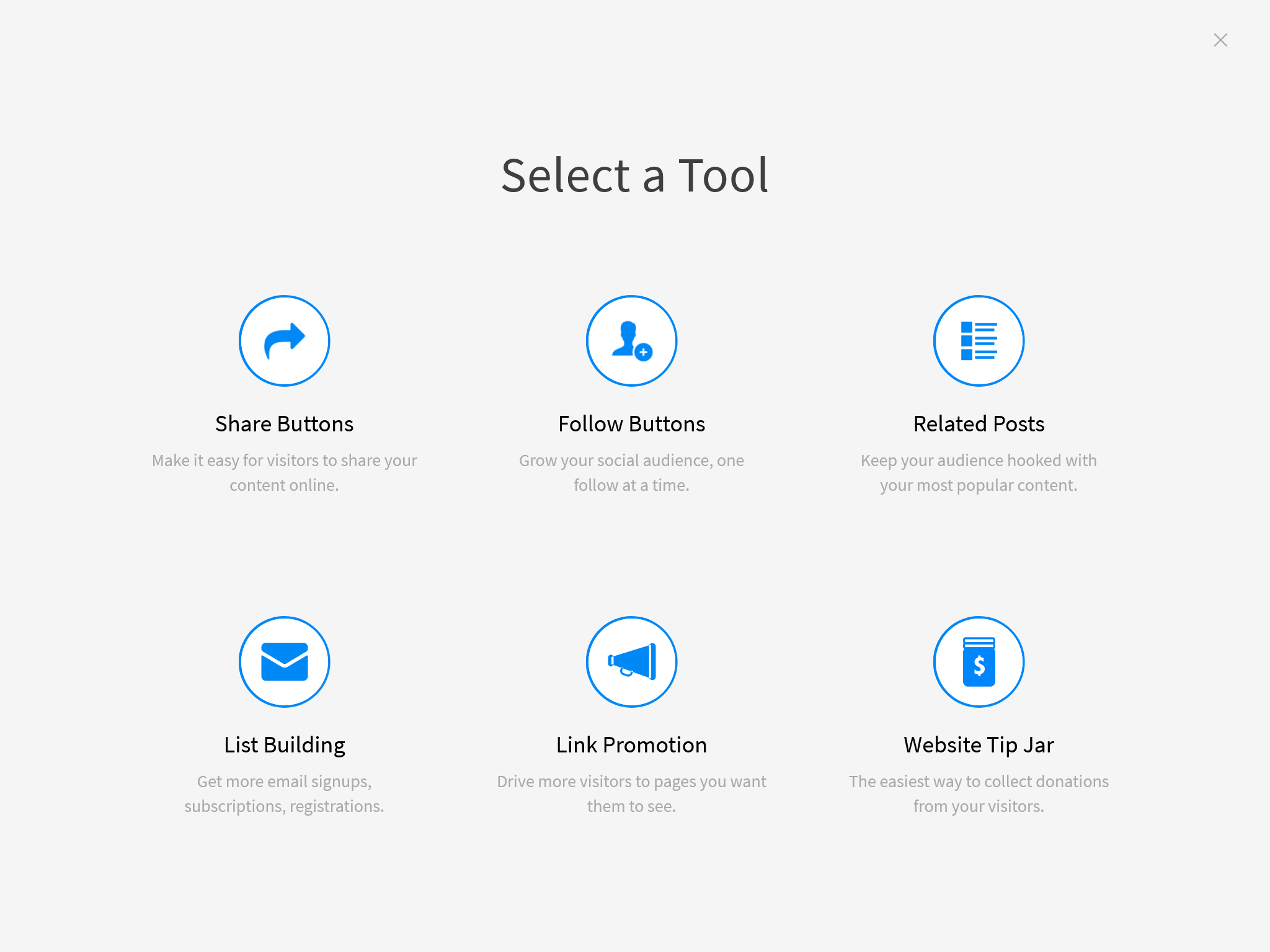
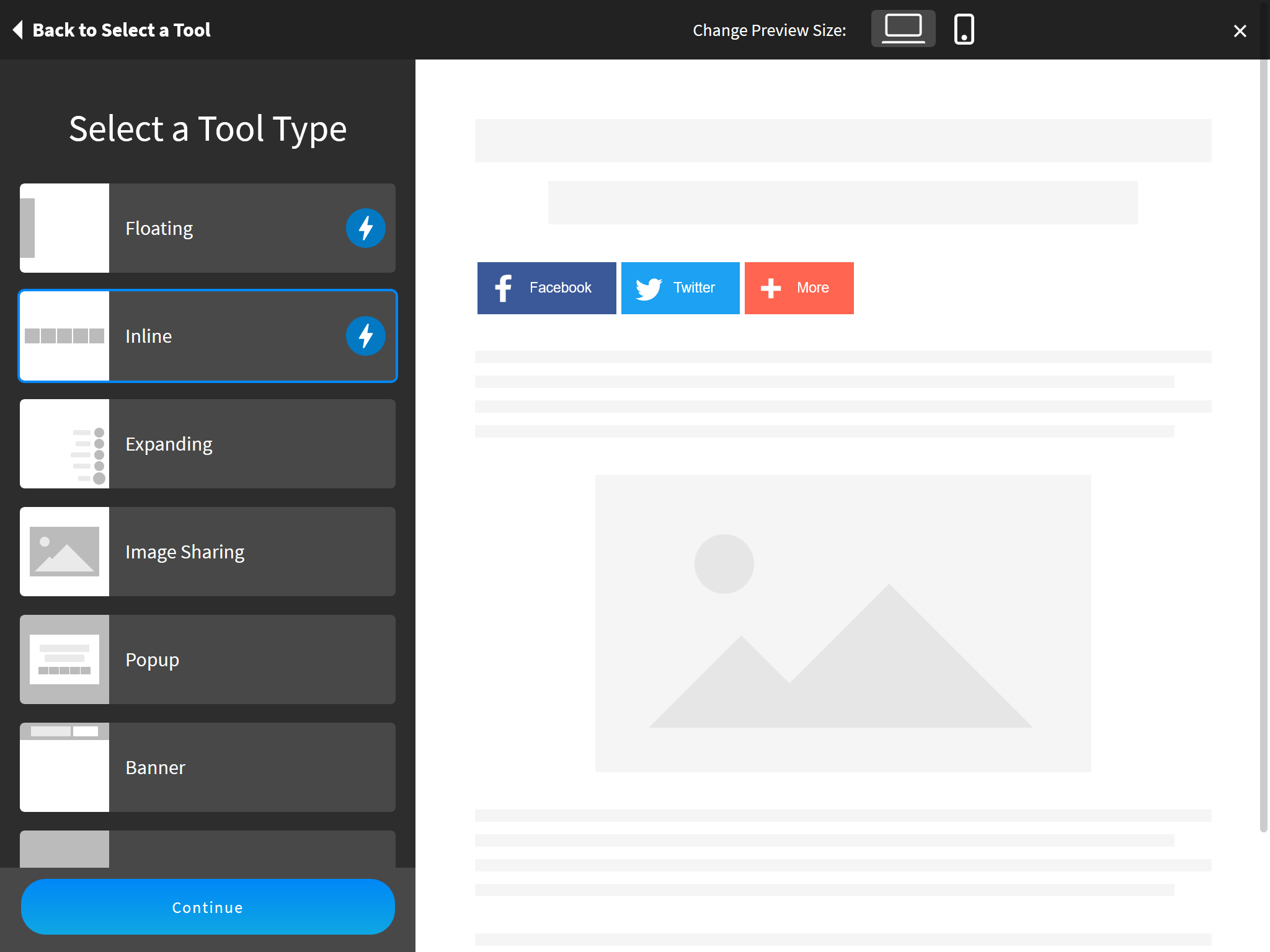
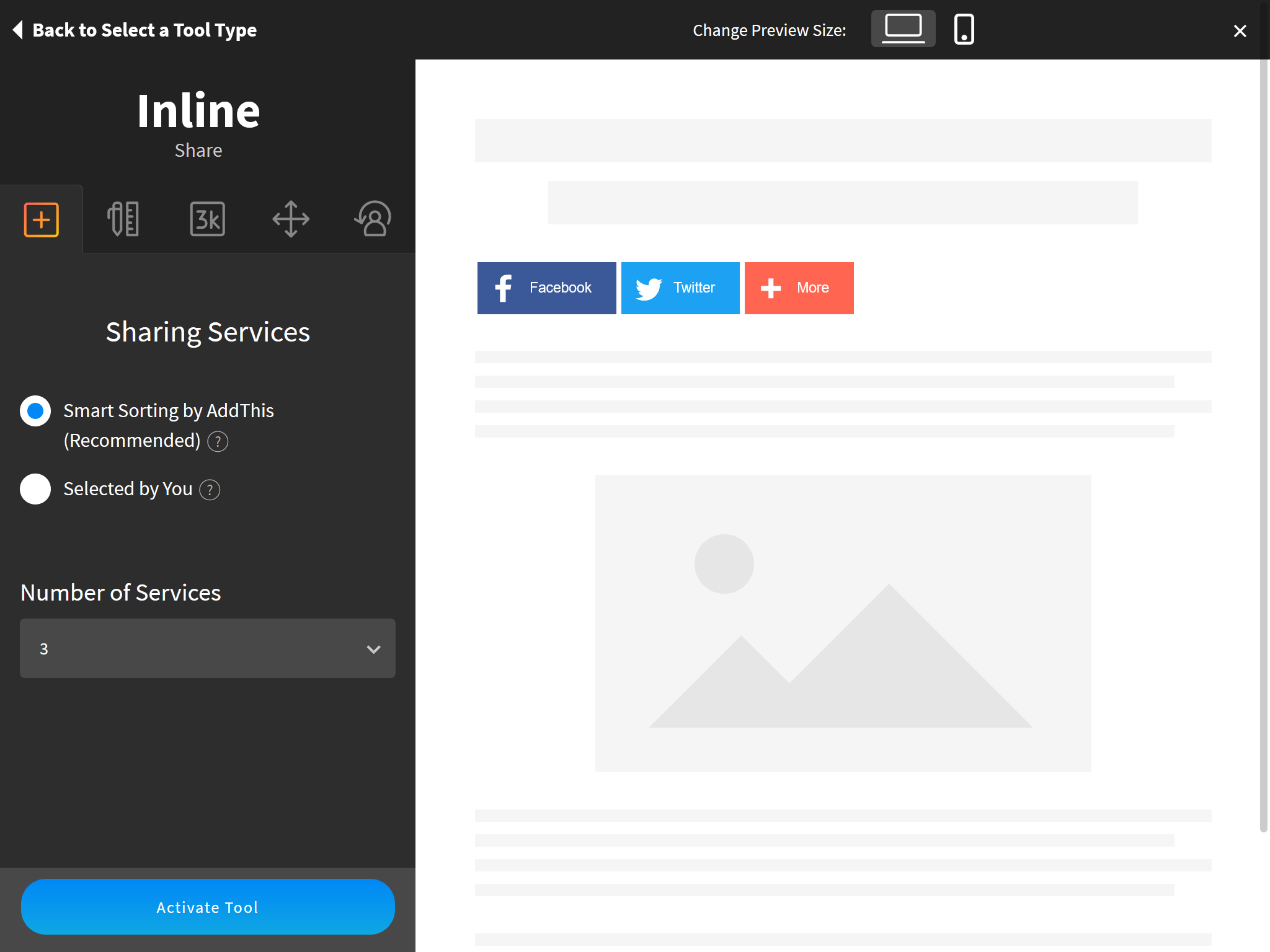
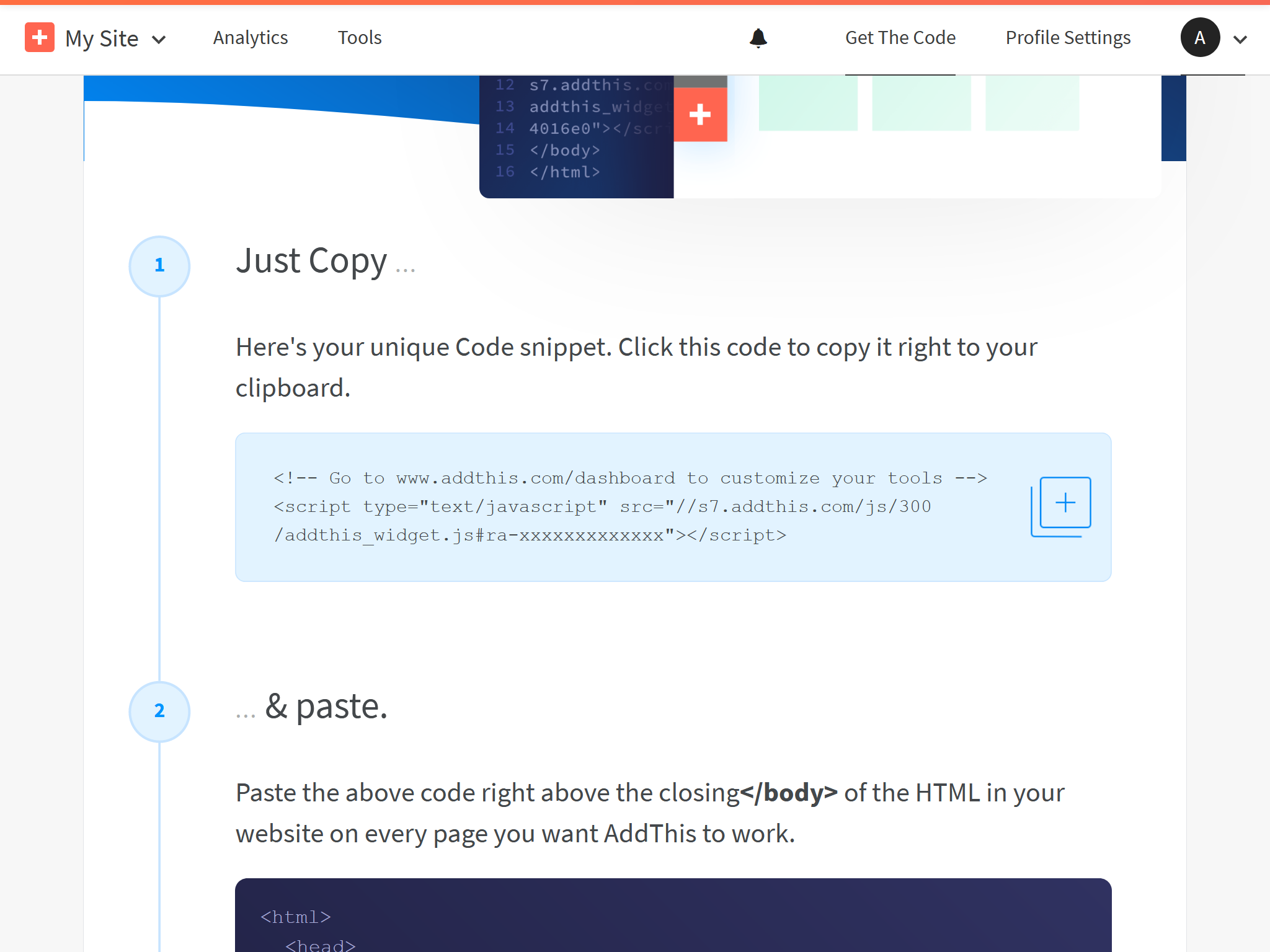
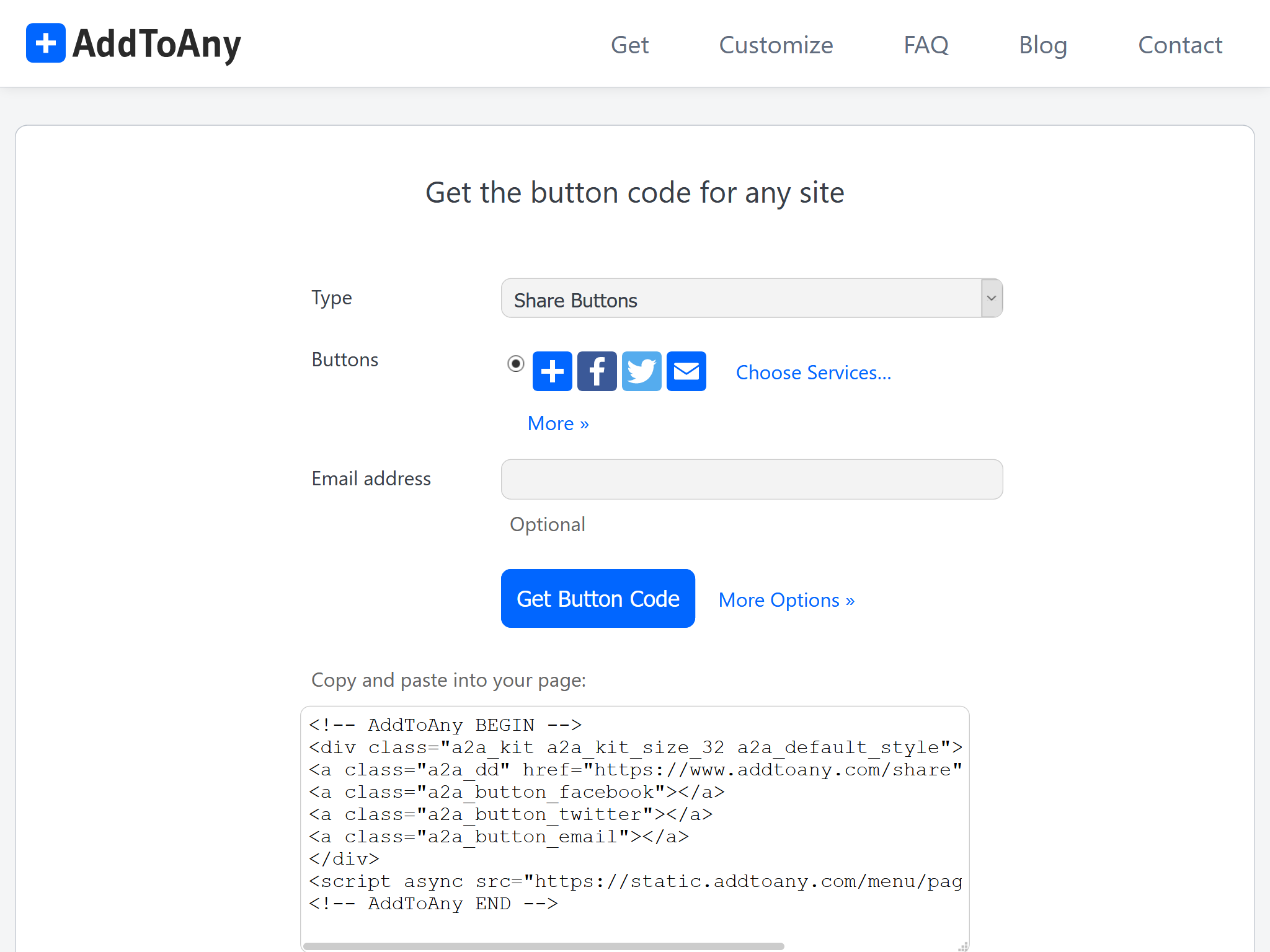
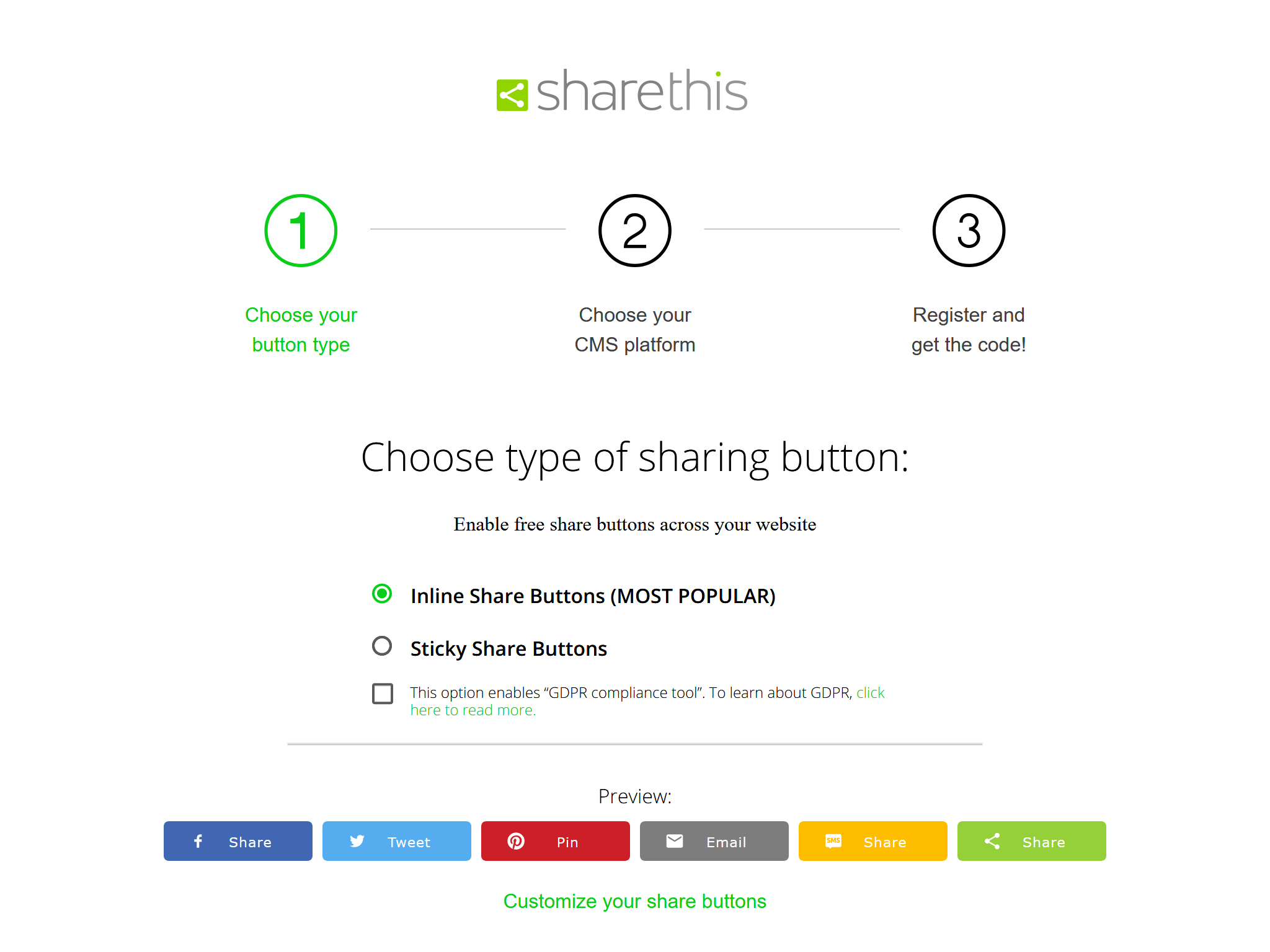
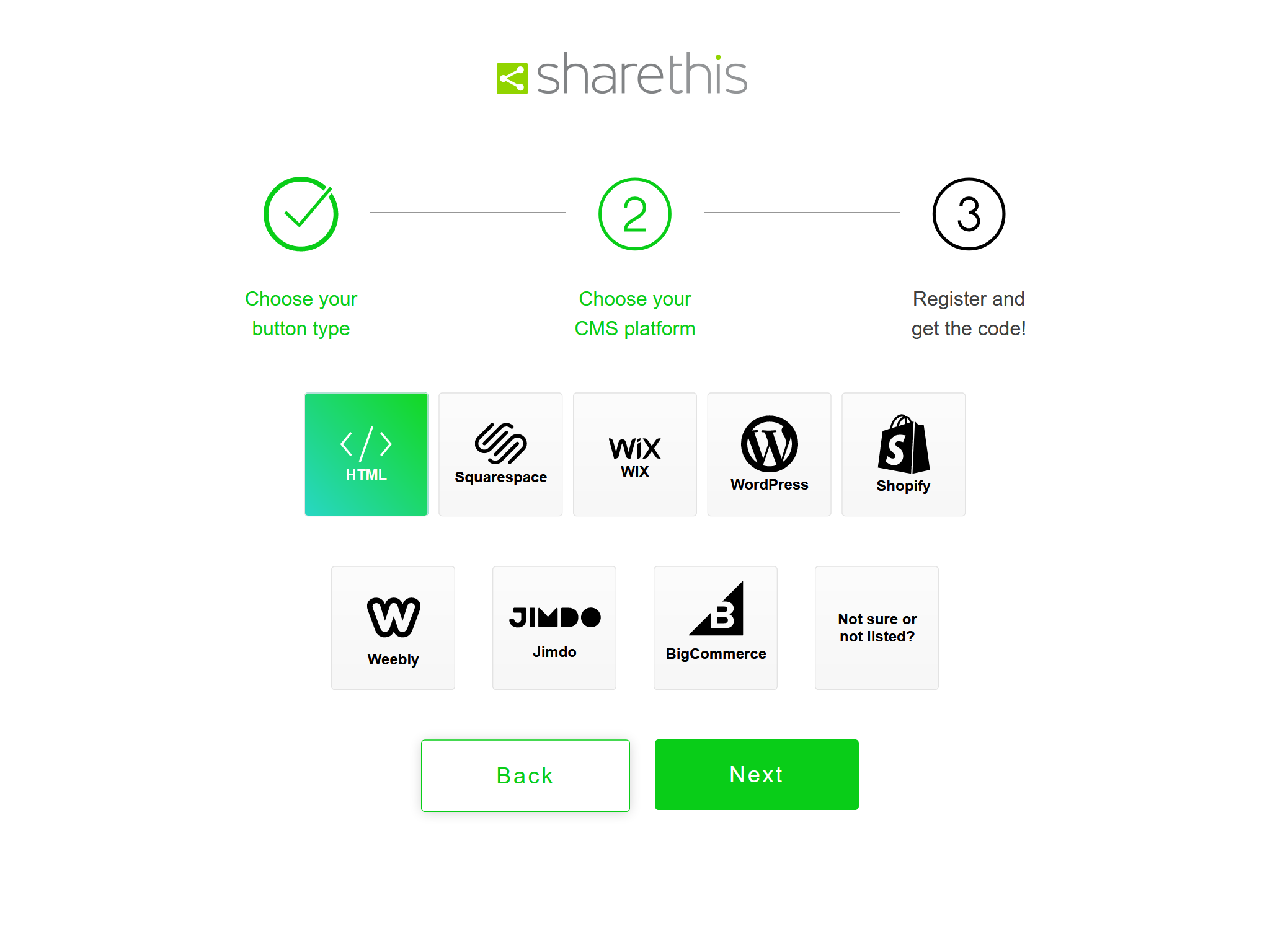
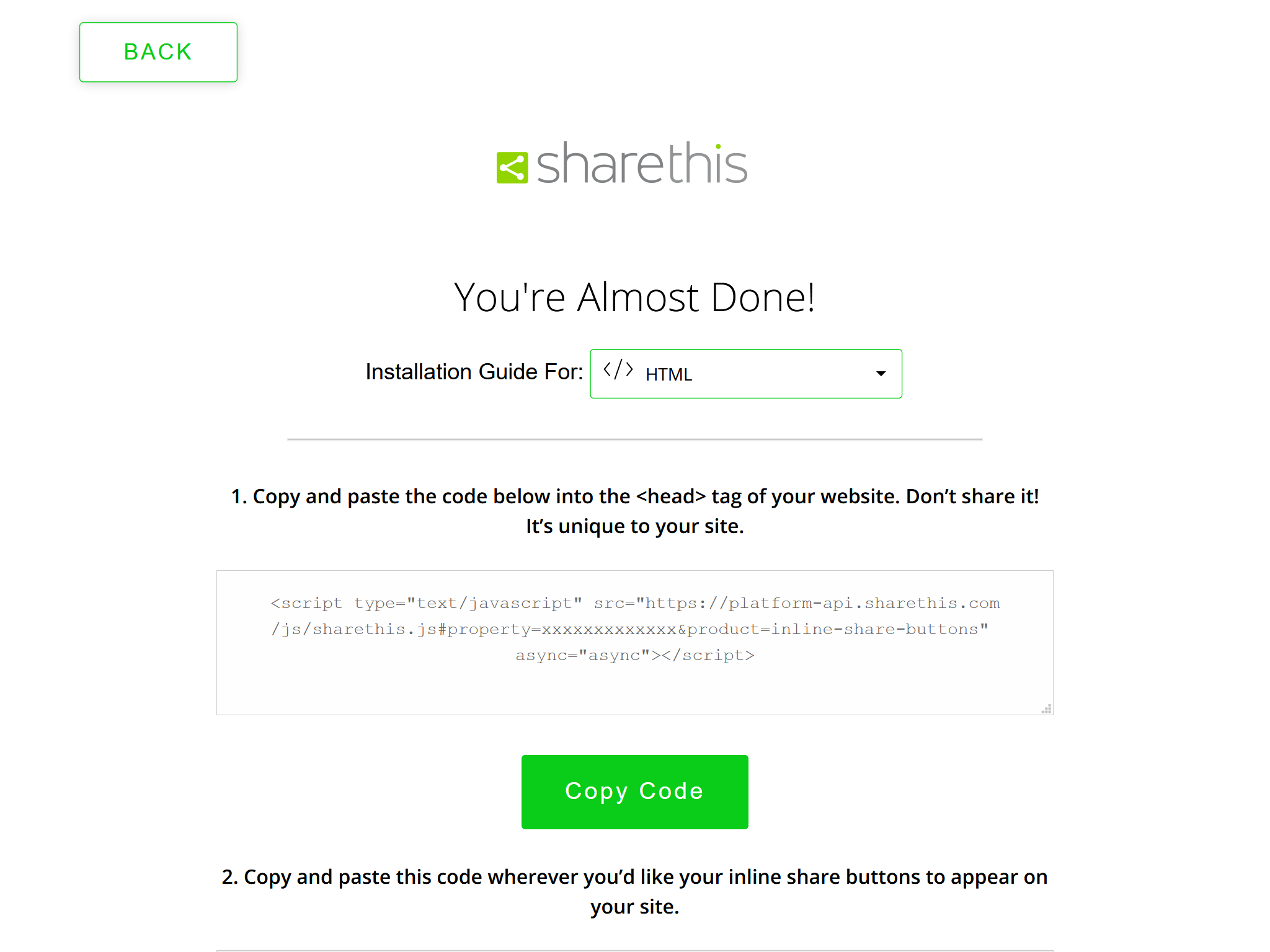
    <content type="html"><![CDATA[<blockquote><p>本文介绍Icarus 3支持的分享按钮的安装配置。</p></blockquote><a id="more"></a><article class="message message-immersive is-primary"><div class="message-body"><i class="fas fa-info-circle mr-2"></i>下面的分享按钮由<a href="https://github.com/ppoffice/hexo-component-inferno">ppoffice/hexo-component-inferno</a>提供，完整的支持按钮列表和配置详情以其为准。</div></article><style>.content ol:not([type]) {    list-style-type: simp-chinese-informal;}</style><h2 id="AddThis"><a href="#AddThis" class="headerlink" title="AddThis"></a>AddThis</h2><article class="message message-immersive is-danger"><div class="message-body"><i class="fas fa-exclamation-triangle mr-2"></i>此分享按钮可能会被部分广告拦截浏览器扩展拦截，请酌情使用。</div></article><div><strong>安装指南</strong><a class="tag is-success" style="margin-left:.8em" href="">在线预览</a></div><ol><li><p>注册<a href="https://www.addthis.com/">AddThis</a>。<br>在提交注册表单后的“选择工具”(Select a Tool)页面选择“分享按钮”(Share Buttons)。</p><img src="https://cdn.jsdelivr.net/gh/ji2xpro/blog_image/Hexo/Plugins/Share/AddThis/addthis-select-tool.png" class="box px-0 py-0 ml-auto mr-auto" width="500" title="选择工具 - AddThis" alt="选择工具 - AddThis"><br></li><li><p>在“选择工具类型”(Select a Tool Type)界面选择样式和按钮，点击“继续”(Continue)。</p><img src="https://cdn.jsdelivr.net/gh/ji2xpro/blog_image/Hexo/Plugins/Share/AddThis/addthis-select-tool-type.png" class="box px-0 py-0 ml-auto mr-auto" width="500" title="选择工具类型 Type - AddThis" alt="选择工具类型 Type - AddThis"><br></li><li><p>在下一页面中进一步自定义分享按钮，完成时点击“激活工具”(Activate Tool)按钮。</p><img src="https://cdn.jsdelivr.net/gh/ji2xpro/blog_image/Hexo/Plugins/Share/AddThis/addthis-customize-share.png" class="box px-0 py-0 ml-auto mr-auto" width="500" title="自定义分享按钮 - AddThis" alt="自定义分享按钮 - AddThis"><br></li><li><p>在”获取代码“(Get The Code)页面找到HTML代码，复制<code>src</code>属性值中的URL地址并填入分享按钮配置中。</p><img src="https://cdn.jsdelivr.net/gh/ji2xpro/blog_image/Hexo/Plugins/Share/AddThis/addthis-get-code.png" class="box px-0 py-0 ml-auto mr-auto" width="500" title="获取代码 - AddThis" alt="获取代码 - AddThis"><br><p>例如，下面AddThis代码中的URL：</p> <figure class="highlight html"><figcaption><span>AddThis代码</span></figcaption><table><tr><td class="gutter"><pre><span class="line">1</span><br><span class="line">2</span><br></pre></td><td class="code"><pre><span class="line"><span class="comment">&lt;!-- Go to www.addthis.com/dashboard to customize your tools --&gt;</span></span><br><span class="line"><span class="tag">&lt;<span class="name">script</span> <span class="attr">type</span>=<span class="string">"text/javascript"</span> <span class="attr">src</span>=<span class="string">"//s7.addthis.com/js/300/addthis_widget.js#pubid=ra-xxxxxxxxxxxxx"</span>&gt;</span><span class="tag">&lt;/<span class="name">script</span>&gt;</span></span><br></pre></td></tr></table></figure><p> 对应如下的主题配置：</p> <figure class="highlight yaml"><figcaption><span>themes/icarus/_config.yml</span></figcaption><table><tr><td class="gutter"><pre><span class="line">1</span><br><span class="line">2</span><br><span class="line">3</span><br></pre></td><td class="code"><pre><span class="line"><span class="attr">share:</span></span><br><span class="line">    <span class="attr">type:</span> <span class="string">addthis</span></span><br><span class="line">    <span class="attr">install_url:</span> <span class="string">//s7.addthis.com/js/300/addthis_widget.js#pubid=ra-xxxxxxxxxxxxx</span></span><br></pre></td></tr></table></figure></li></ol><h2 id="AddToAny"><a href="#AddToAny" class="headerlink" title="AddToAny"></a>AddToAny</h2><div><strong>安装指南</strong><a class="tag is-success" style="margin-left:.8em" href="">在线预览</a></div><ol><li><p>你可以启用AddToAny而无需注册用户。<br>仅需将下面的代码放到你的主题配置中：</p> <figure class="highlight yaml"><figcaption><span>themes/icarus/_config.yml</span></figcaption><table><tr><td class="gutter"><pre><span class="line">1</span><br><span class="line">2</span><br></pre></td><td class="code"><pre><span class="line"><span class="attr">share:</span></span><br><span class="line">    <span class="attr">type:</span> <span class="string">addtoany</span></span><br></pre></td></tr></table></figure></li></ol><p>如果你想自定义分享按钮，请采用如下步骤：</p><ol><li><p>访问<a href="https://www.addtoany.com/">AddToAny</a>官网并点击“获取分享按钮”(Get the Share Button)。</p></li><li><p>然后，选择“任意网站”(Any Website)并完成按钮的配置。</p><img src="https://cdn.jsdelivr.net/gh/ji2xpro/blog_image/Hexo/Plugins/Share/AddToAny/addtoany-select-platform.png" class="box px-0 py-0 ml-auto mr-auto" width="500" title="选择平台 - AddToAny" alt="选择平台 - AddToAny"><br></li><li><p>完成后点击“获取按钮代码”(Get Button Code)。</p><img src="https://cdn.jsdelivr.net/gh/ji2xpro/blog_image/Hexo/Plugins/Share/AddToAny/addtoany-get-code.png" class="box px-0 py-0 ml-auto mr-auto" width="500" title="获取代码 - AddToAny" alt="获取代码 - AddToAny"><br></li><li><p>由于分享按钮是由<a href="https://github.com/ppoffice/hexo-component-inferno">ppoffice/hexo-component-inferno</a><br>提供，你需要将AddToAny的布局文件<a href="https://github.com/ppoffice/hexo-component-inferno/blob/0.2.2/src/view/share/addtoany.jsx">src/view/share/addtoany.jsx</a>从这个仓库中复制到<code>themes/icarus/layout/share/addtoany.jsx</code>。<br>然后，替换<code>addtoany.jsx</code>中AddToAny代码并修正文件头部的包引用。</p><p>例如，假设下面的代码是你从上一步获得的代码：</p> <figure class="highlight html"><figcaption><span>AddToAny代码 >folded</span></figcaption><table><tr><td class="gutter"><pre><span class="line">1</span><br><span class="line">2</span><br><span class="line">3</span><br><span class="line">4</span><br><span class="line">5</span><br><span class="line">6</span><br><span class="line">7</span><br><span class="line">8</span><br><span class="line">9</span><br></pre></td><td class="code"><pre><span class="line"><span class="comment">&lt;!-- AddToAny BEGIN --&gt;</span></span><br><span class="line"><span class="tag">&lt;<span class="name">div</span> <span class="attr">class</span>=<span class="string">"a2a_kit a2a_kit_size_32 a2a_default_style"</span>&gt;</span></span><br><span class="line"><span class="tag">&lt;<span class="name">a</span> <span class="attr">class</span>=<span class="string">"a2a_dd"</span> <span class="attr">href</span>=<span class="string">"https://www.addtoany.com/share"</span>&gt;</span><span class="tag">&lt;/<span class="name">a</span>&gt;</span></span><br><span class="line"><span class="tag">&lt;<span class="name">a</span> <span class="attr">class</span>=<span class="string">"a2a_button_facebook"</span>&gt;</span><span class="tag">&lt;/<span class="name">a</span>&gt;</span></span><br><span class="line"><span class="tag">&lt;<span class="name">a</span> <span class="attr">class</span>=<span class="string">"a2a_button_twitter"</span>&gt;</span><span class="tag">&lt;/<span class="name">a</span>&gt;</span></span><br><span class="line"><span class="tag">&lt;<span class="name">a</span> <span class="attr">class</span>=<span class="string">"a2a_button_email"</span>&gt;</span><span class="tag">&lt;/<span class="name">a</span>&gt;</span></span><br><span class="line"><span class="tag">&lt;/<span class="name">div</span>&gt;</span></span><br><span class="line"><span class="tag">&lt;<span class="name">script</span> <span class="attr">async</span> <span class="attr">src</span>=<span class="string">"https://static.addtoany.com/menu/page.js"</span>&gt;</span><span class="tag">&lt;/<span class="name">script</span>&gt;</span></span><br><span class="line"><span class="comment">&lt;!-- AddToAny END --&gt;</span></span><br></pre></td></tr></table></figure><p> 那么你需要对<code>addtoany.jsx</code>做出如下修改：</p> <figure class="highlight diff"><figcaption><span>themes/icarus/layout/share/addtoany.jsx >folded</span></figcaption><table><tr><td class="gutter"><pre><span class="line">1</span><br><span class="line">2</span><br><span class="line">3</span><br><span class="line">4</span><br><span class="line">5</span><br><span class="line">6</span><br><span class="line">7</span><br><span class="line">8</span><br><span class="line">9</span><br><span class="line">10</span><br><span class="line">11</span><br><span class="line">12</span><br><span class="line">13</span><br><span class="line">14</span><br><span class="line">15</span><br><span class="line">16</span><br><span class="line">17</span><br><span class="line">18</span><br><span class="line">19</span><br><span class="line">20</span><br><span class="line">21</span><br><span class="line">22</span><br><span class="line">23</span><br><span class="line">24</span><br></pre></td><td class="code"><pre><span class="line">const &#123; Component, Fragment &#125; = require('inferno');</span><br><span class="line"><span class="deletion">- const &#123; cacheComponent &#125; = require('../../util/cache');</span></span><br><span class="line"><span class="addition">+ const &#123; cacheComponent &#125; = require('hexo-component-inferno/lib/util/cache');</span></span><br><span class="line"></span><br><span class="line">...中间省略部分代码...</span><br><span class="line"></span><br><span class="line">class AddToAny extends Component &#123;</span><br><span class="line">    render() &#123;</span><br><span class="line">        return &lt;Fragment&gt;</span><br><span class="line"><span class="deletion">-            &lt;div class="a2a_kit a2a_kit_size_32 a2a_default_style"&gt;</span></span><br><span class="line"><span class="deletion">-                &lt;a class="a2a_dd" href="https://www.addtoany.com/share"&gt;&lt;/a&gt;</span></span><br><span class="line"><span class="deletion">-                &lt;a class="a2a_button_facebook"&gt;&lt;/a&gt;</span></span><br><span class="line"><span class="deletion">-                &lt;a class="a2a_button_twitter"&gt;&lt;/a&gt;</span></span><br><span class="line"><span class="deletion">-                &lt;a class="a2a_button_telegram"&gt;&lt;/a&gt;</span></span><br><span class="line"><span class="deletion">-                &lt;a class="a2a_button_whatsapp"&gt;&lt;/a&gt;</span></span><br><span class="line"><span class="deletion">-                &lt;a class="a2a_button_reddit"&gt;&lt;/a&gt;</span></span><br><span class="line"><span class="deletion">-            &lt;/div&gt;</span></span><br><span class="line"><span class="addition">+           刚刚获取的AddToAny HTML代码替换到这里</span></span><br><span class="line">            &lt;script src="https://static.addtoany.com/menu/page.js" defer=&#123;true&#125;&gt;&lt;/script&gt;</span><br><span class="line">        &lt;/Fragment&gt;;</span><br><span class="line">    &#125;</span><br><span class="line">&#125;</span><br><span class="line"></span><br><span class="line">...下面省略部分代码...</span><br></pre></td></tr></table></figure></li></ol><h2 id="百度分享"><a href="#百度分享" class="headerlink" title="百度分享"></a>百度分享</h2><article class="message message-immersive is-danger"><div class="message-body"><i class="fas fa-exclamation-triangle mr-2"></i>此分享按钮可能会被部分广告拦截浏览器扩展拦截，请酌情使用。</div></article><article class="message message-immersive is-danger"><div class="message-body"><i class="fas fa-exclamation-triangle mr-2"></i>百度分享按钮服务似乎已下线，建议使用其他分享按钮服务作为替代。</div></article><div><strong>安装指南</strong><a class="tag is-success" style="margin-left:.8em" href="">在线预览</a></div><ol><li><p>你可以启用百度分享按钮而无需注册用户。<br>直接将下面的代码添加到你的主题配置中：</p> <figure class="highlight yaml"><figcaption><span>themes/icarus/_config.yml</span></figcaption><table><tr><td class="gutter"><pre><span class="line">1</span><br><span class="line">2</span><br></pre></td><td class="code"><pre><span class="line"><span class="attr">share:</span></span><br><span class="line">    <span class="attr">type:</span> <span class="string">bdshare</span></span><br></pre></td></tr></table></figure></li></ol><h2 id="Share-js"><a href="#Share-js" class="headerlink" title="Share.js"></a>Share.js</h2><article class="message message-immersive is-danger"><div class="message-body"><i class="fas fa-exclamation-triangle mr-2"></i>Share.js服务已停止维护，建议使用其他分享按钮服务作为替代。</div></article><div><strong>安装指南</strong><a class="tag is-success" style="margin-left:.8em" href="">在线预览</a></div><ol><li><p>你可以启用百度分享按钮而无需用户注册。<br>直接将下面代码添加到主题配置中：</p> <figure class="highlight yaml"><figcaption><span>themes/icarus/_config.yml</span></figcaption><table><tr><td class="gutter"><pre><span class="line">1</span><br><span class="line">2</span><br></pre></td><td class="code"><pre><span class="line"><span class="attr">share:</span></span><br><span class="line">    <span class="attr">type:</span> <span class="string">sharejs</span></span><br></pre></td></tr></table></figure></li><li><p>(可选)请参照<a href="#AddToAny">AddToAny</a>部分的个性化步骤与<a href="https://github.com/overtrue/share.js">share.js主页</a><br>来了解更多关于自定义分享按钮的信息。</p></li></ol><h2 id="ShareThis"><a href="#ShareThis" class="headerlink" title="ShareThis"></a>ShareThis</h2><div><strong>安装指南</strong><a class="tag is-success" style="margin-left:.8em" href="">在线预览</a></div><ol><li><p>访问<a href="https://sharethis.com/">ShareThis</a>并点击页面上的“从分享按钮开始”(Start with Share Buttons)按钮。</p></li><li><p>在“选择分享按钮类型”(Choose type of sharing button)页面选择你需要的按钮类型。<br>不要启用”GDPR规范工具“，否则可能会导致一些问题。<br>你也可以点击“自定义你的分享按钮”(Customize your share buttons)链接来进行按钮的进一步配置。<br>完成后点击“下一步”(Next)。</p><img src="https://cdn.jsdelivr.net/gh/ji2xpro/blog_image/Hexo/Plugins/Share/ShareThis/sharethis-choose-button-type.png" class="box px-0 py-0 ml-auto mr-auto" width="500" title="选择按钮类型 - ShareThis" alt="选择按钮类型 - ShareThis"><br></li><li><p>在”选择你的CMS平台“(Choose your CMS platform)页面选择”HTML“并点击”下一步“(Next)。</p><img src="https://cdn.jsdelivr.net/gh/ji2xpro/blog_image/Hexo/Plugins/Share/ShareThis/sharethis-choose-platform.png" class="box px-0 py-0 ml-auto mr-auto" width="500" title="选择平台 - ShareThis" alt="选择平台 - ShareThis"><br></li><li><p>在“注册并获取代码”(Register and get the code!)页面输入邮箱和密码完成ShareThis的注册。</p></li><li><p>最后，从HTML代码段中复制<code>src</code>中的URL地址到分享按钮配置中。</p><img src="https://cdn.jsdelivr.net/gh/ji2xpro/blog_image/Hexo/Plugins/Share/ShareThis/sharethis-get-code.png" class="box px-0 py-0 ml-auto mr-auto" width="500" title="获取代码 - ShareThis" alt="获取代码 - ShareThis"><br><p>例如，下面的ShareThis代码：</p> <figure class="highlight html"><figcaption><span>AddThis代码</span></figcaption><table><tr><td class="gutter"><pre><span class="line">1</span><br></pre></td><td class="code"><pre><span class="line"><span class="tag">&lt;<span class="name">script</span> <span class="attr">type</span>=<span class="string">"text/javascript"</span> <span class="attr">src</span>=<span class="string">"https://platform-api.sharethis.com/js/sharethis.js#property=xxxxxxxxxxxxx&amp;product=inline-share-buttons"</span> <span class="attr">async</span>=<span class="string">"async"</span>&gt;</span><span class="tag">&lt;/<span class="name">script</span>&gt;</span></span><br></pre></td></tr></table></figure><p> 对应下面的主题配置：</p> <figure class="highlight yaml"><figcaption><span>themes/icarus/_config.yml</span></figcaption><table><tr><td class="gutter"><pre><span class="line">1</span><br><span class="line">2</span><br><span class="line">3</span><br></pre></td><td class="code"><pre><span class="line"><span class="attr">share:</span></span><br><span class="line">    <span class="attr">type:</span> <span class="string">sharethis</span></span><br><span class="line">    <span class="attr">install_url:</span> <span class="string">https://platform-api.sharethis.com/js/sharethis.js#property=xxxxxxxxxxxxx&amp;product=inline-share-buttons</span></span><br></pre></td></tr></table></figure></li></ol><p>参考文章:<br><a href="">参考链接</a></p><article class="message message-immersive is-warning"><div class="message-body"><i class="fas fa-question-circle mr-2"></i>文章内容有误？请点击<a href="https://github.com/ji2xpro/ji2xpro.github.io/edit/sourceCode/source/_posts/hexo/Hexo博客指南-第十一篇-Icarus配置-分享按钮插件.md">此处</a>提交修改。</div></article>]]></content>
    
    <summary type="html">
    
      &lt;blockquote&gt;
&lt;p&gt;本文介绍Icarus 3支持的分享按钮的安装配置。&lt;/p&gt;
&lt;/blockquote&gt;
    
    </summary>
    
    
      <category term="Hexo教程" scheme="https://ji2xpro.github.io/categories/Hexo%E6%95%99%E7%A8%8B/"/>
    
      <category term="主题配置" scheme="https://ji2xpro.github.io/categories/Hexo%E6%95%99%E7%A8%8B/%E4%B8%BB%E9%A2%98%E9%85%8D%E7%BD%AE/"/>
    
    
      <category term="Icarus主题配置" scheme="https://ji2xpro.github.io/tags/Icarus%E4%B8%BB%E9%A2%98%E9%85%8D%E7%BD%AE/"/>
    
  </entry>
  
  <entry>
    <title>Hexo博客指南|第十篇:Icarus配置 - 赞赏按钮插件</title>
    <link href="https://ji2xpro.github.io/7a270e6f/"/>
    <id>https://ji2xpro.github.io/7a270e6f/</id>
    <published>2020-06-05T10:17:04.000Z</published>
    <updated>2020-06-09T07:19:37.319Z</updated>
    
    <content type="html"><![CDATA[<blockquote><p>本文介绍Icarus 3支持的赞赏按钮的安装配置。<br>若需同时展示多个按钮，只需像如下这样在主题配置的<code>donates</code>数组中添加多个按钮配置：</p></blockquote><figure class="highlight yaml"><figcaption><span>themes/icarus/_config.yml</span></figcaption><table><tr><td class="gutter"><pre><span class="line">1</span><br><span class="line">2</span><br><span class="line">3</span><br><span class="line">4</span><br><span class="line">5</span><br><span class="line">6</span><br><span class="line">7</span><br></pre></td><td class="code"><pre><span class="line"><span class="attr">donates:</span></span><br><span class="line">    <span class="bullet">-</span></span><br><span class="line">        <span class="attr">type:</span> <span class="string">...</span> <span class="comment"># 按钮1</span></span><br><span class="line">        <span class="string">...</span></span><br><span class="line">    <span class="bullet">-</span></span><br><span class="line">        <span class="attr">type:</span> <span class="string">...</span> <span class="comment"># 按钮2</span></span><br><span class="line">        <span class="string">...</span></span><br></pre></td></tr></table></figure><a id="more"></a><article class="message message-immersive is-primary"><div class="message-body"><i class="fas fa-info-circle mr-2"></i>下面的赞赏按钮由<a href="https://github.com/ppoffice/hexo-component-inferno">ppoffice/hexo-component-inferno</a>提供，完整的支持按钮列表和配置详情以其为准。</div></article><style>.content ol:not([type]) {    list-style-type: simp-chinese-informal;}</style><h2 id="支付宝"><a href="#支付宝" class="headerlink" title="支付宝"></a>支付宝</h2><p><strong>安装指南</strong></p><ol><li><p>登录支付宝并导出个人支付二维码图片。</p></li><li><p>将二维码图片保存到你的Hexo网站的附件文件夹下，或将它上传至图床。</p></li><li><p>向主题配置中添加如下配置：</p> <figure class="highlight yaml"><figcaption><span>themes/icarus/_config.yml</span></figcaption><table><tr><td class="gutter"><pre><span class="line">1</span><br><span class="line">2</span><br><span class="line">3</span><br><span class="line">4</span><br><span class="line">5</span><br></pre></td><td class="code"><pre><span class="line"><span class="attr">donates:</span></span><br><span class="line">    <span class="bullet">-</span></span><br><span class="line">        <span class="attr">type:</span> <span class="string">alipay</span></span><br><span class="line">        <span class="comment"># 支付宝二维码图片地址</span></span><br><span class="line">        <span class="attr">qrcode:</span> <span class="string">/path/to/alipay/qrcode.png</span></span><br></pre></td></tr></table></figure></li></ol><h2 id="Buy-me-a-Coffee"><a href="#Buy-me-a-Coffee" class="headerlink" title="Buy me a Coffee"></a>Buy me a Coffee</h2><p><strong>安装指南</strong></p><ol><li><p>注册<a href="https://www.buymeacoffee.com/">Buy me a Coffee</a>并复制个人页面的地址。</p></li><li><p>将如下配置添加到主题配置中：</p> <figure class="highlight yaml"><figcaption><span>themes/icarus/_config.yml</span></figcaption><table><tr><td class="gutter"><pre><span class="line">1</span><br><span class="line">2</span><br><span class="line">3</span><br><span class="line">4</span><br><span class="line">5</span><br></pre></td><td class="code"><pre><span class="line"><span class="attr">donates:</span></span><br><span class="line">    <span class="bullet">-</span></span><br><span class="line">        <span class="attr">type:</span> <span class="string">buymeacoffee</span></span><br><span class="line">        <span class="comment"># 个人赞助页面的地址</span></span><br><span class="line">        <span class="attr">url:</span> <span class="string">/path/to/buymeacoffee/personal/page</span></span><br></pre></td></tr></table></figure></li></ol><h2 id="Paypal"><a href="#Paypal" class="headerlink" title="Paypal"></a>Paypal</h2><p><strong>安装指南</strong></p><ol><li><p>登录Paypal，点击<a href="https://www.paypal.com/donate/buttons/">此处</a>来创建一个Paypal捐赠按钮。</p></li><li><p>在“选择按钮样式”(Choose button style)页面选择“国家/地区”(Country/Region)和“语言”(Language)，点击“继续”(Continue)<br>进入下一页面。</p><img src="https://cdn.jsdelivr.net/gh/ji2xpro/blog_image/Hexo/Plugins/Donation/Paypal/paypal-button-style.png" class="box px-0 py-0 ml-auto mr-auto" width="500" title="选择按钮样式 - Paypal" alt="选择按钮样式 - Paypal"><br></li><li><p>在“添加机构详情”(Add organization details)页面中，选择“使用账号ID”(Use account ID)或“使用Email地址”(Use email address)<br>作为唯一账号标识符。<br>然后点击“继续”(Continue)进入下一页面。</p><img src="https://cdn.jsdelivr.net/gh/ji2xpro/blog_image/Hexo/Plugins/Donation/Paypal/paypal-organization-details.png" class="box px-0 py-0 ml-auto mr-auto" width="500" title="添加机构详情 - Paypal" alt="添加机构详情 - Paypal"><br></li><li><p>在“设置捐赠数额”(Set donation amounts)页面选择“接收的货币种类”(Currency you’ll receive donations in)，捐赠数额选择<br>“任意数额”(Any amount)。<br>此捐赠按钮暂不支持“指定数额”的捐赠选项。<br>点击“结束并获取代码”(Finish and Get Code)按钮进入下一页面。</p><img src="https://cdn.jsdelivr.net/gh/ji2xpro/blog_image/Hexo/Plugins/Donation/Paypal/paypal-donation-amount.png" class="box px-0 py-0 ml-auto mr-auto" width="500" title="设置捐赠数额 - Paypal" alt="设置捐赠数额 - Paypal"><br></li><li><p>从“按钮HTML代码”(Button HTML)页面中复制<code>business</code>和<code>currency_code</code>两项的值。<br>将它们填写到主题配置的<code>business</code>和<code>currency_code</code>设置中。</p><img src="https://cdn.jsdelivr.net/gh/ji2xpro/blog_image/Hexo/Plugins/Donation/Paypal/paypal-get-code.png" class="box px-0 py-0 ml-auto mr-auto" width="500" title="获取代码 - Paypal" alt="获取代码 - Paypal"><br><p>例如，下方的Paypal捐赠按钮代码：</p> <figure class="highlight html"><figcaption><span>Paypal按钮HTML代码</span></figcaption><table><tr><td class="gutter"><pre><span class="line">1</span><br><span class="line">2</span><br><span class="line">3</span><br><span class="line">4</span><br><span class="line">5</span><br><span class="line">6</span><br></pre></td><td class="code"><pre><span class="line"><span class="tag">&lt;<span class="name">form</span> <span class="attr">action</span>=<span class="string">"https://www.paypal.com/cgi-bin/webscr"</span> <span class="attr">...</span>&gt;</span></span><br><span class="line"><span class="tag">&lt;<span class="name">input</span> <span class="attr">type</span>=<span class="string">"hidden"</span> <span class="attr">name</span>=<span class="string">"cmd"</span> <span class="attr">value</span>=<span class="string">"_donations"</span> /&gt;</span></span><br><span class="line"><span class="tag">&lt;<span class="name">input</span> <span class="attr">type</span>=<span class="string">"hidden"</span> <span class="attr">name</span>=<span class="string">"business"</span> <span class="attr">value</span>=<span class="string">"XXXXXXXXXXXXX"</span> /&gt;</span></span><br><span class="line"><span class="tag">&lt;<span class="name">input</span> <span class="attr">type</span>=<span class="string">"hidden"</span> <span class="attr">name</span>=<span class="string">"currency_code"</span> <span class="attr">value</span>=<span class="string">"USD"</span> /&gt;</span></span><br><span class="line">...</span><br><span class="line"><span class="tag">&lt;/<span class="name">form</span>&gt;</span></span><br></pre></td></tr></table></figure><p> 对应的主题配置为:</p> <figure class="highlight yaml"><figcaption><span>themes/icarus/_config.yml</span></figcaption><table><tr><td class="gutter"><pre><span class="line">1</span><br><span class="line">2</span><br><span class="line">3</span><br><span class="line">4</span><br><span class="line">5</span><br></pre></td><td class="code"><pre><span class="line"><span class="attr">donates:</span></span><br><span class="line">    <span class="bullet">-</span></span><br><span class="line">        <span class="attr">type:</span> <span class="string">paypal</span></span><br><span class="line">        <span class="attr">business:</span> <span class="string">XXXXXXXXXXXXX</span></span><br><span class="line">        <span class="attr">currency_code:</span> <span class="string">USD</span></span><br></pre></td></tr></table></figure></li></ol><h2 id="Patreon"><a href="#Patreon" class="headerlink" title="Patreon"></a>Patreon</h2><p><strong>安装指南</strong></p><ol><li><p>注册<a href="https://www.patreon.com/">Patreon</a>并复制个人页面的URL地址。</p></li><li><p>将如下配置添加到主题配置中：</p> <figure class="highlight yaml"><figcaption><span>themes/icarus/_config.yml</span></figcaption><table><tr><td class="gutter"><pre><span class="line">1</span><br><span class="line">2</span><br><span class="line">3</span><br><span class="line">4</span><br><span class="line">5</span><br></pre></td><td class="code"><pre><span class="line"><span class="attr">donate:</span></span><br><span class="line">    <span class="bullet">-</span></span><br><span class="line">        <span class="attr">type:</span> <span class="string">patreon</span></span><br><span class="line">        <span class="comment"># 个人赞助页面的地址</span></span><br><span class="line">        <span class="attr">url:</span> <span class="string">/path/to/patreon/personal/page</span></span><br></pre></td></tr></table></figure></li></ol><h2 id="微信"><a href="#微信" class="headerlink" title="微信"></a>微信</h2><p><strong>安装指南</strong></p><ol><li><p>登录微信并导出个人支付二维码图片。</p></li><li><p>将二维码图片保存到你的Hexo网站的附件文件夹下，或将它上传至图床。</p></li><li><p>向主题配置中添加如下配置：</p> <figure class="highlight yaml"><figcaption><span>themes/icarus/_config.yml</span></figcaption><table><tr><td class="gutter"><pre><span class="line">1</span><br><span class="line">2</span><br><span class="line">3</span><br><span class="line">4</span><br><span class="line">5</span><br></pre></td><td class="code"><pre><span class="line"><span class="attr">donates:</span></span><br><span class="line">    <span class="bullet">-</span></span><br><span class="line">        <span class="attr">type:</span> <span class="string">wechat</span></span><br><span class="line">        <span class="comment"># 微信二维码图片地址</span></span><br><span class="line">        <span class="attr">qrcode:</span> <span class="string">/path/to/wechat/qrcode.png</span></span><br></pre></td></tr></table></figure></li></ol><p>参考文章:<br><a href="">参考链接</a></p><article class="message message-immersive is-warning"><div class="message-body"><i class="fas fa-question-circle mr-2"></i>文章内容有误？请点击<a href="https://github.com/ji2xpro/ji2xpro.github.io/edit/sourceCode/source/_posts/hexo/Hexo博客指南-第十篇-Icarus配置-赞赏按钮插件.md">此处</a>提交修改。</div></article>]]></content>
    
    <summary type="html">
    
      &lt;blockquote&gt;
&lt;p&gt;本文介绍Icarus 3支持的赞赏按钮的安装配置。&lt;br&gt;若需同时展示多个按钮，只需像如下这样在主题配置的&lt;code&gt;donates&lt;/code&gt;数组中添加多个按钮配置：&lt;/p&gt;
&lt;/blockquote&gt;
&lt;figure class=&quot;highlight yaml&quot;&gt;&lt;figcaption&gt;&lt;span&gt;themes/icarus/_config.yml&lt;/span&gt;&lt;/figcaption&gt;&lt;table&gt;&lt;tr&gt;&lt;td class=&quot;gutter&quot;&gt;&lt;pre&gt;&lt;span class=&quot;line&quot;&gt;1&lt;/span&gt;&lt;br&gt;&lt;span class=&quot;line&quot;&gt;2&lt;/span&gt;&lt;br&gt;&lt;span class=&quot;line&quot;&gt;3&lt;/span&gt;&lt;br&gt;&lt;span class=&quot;line&quot;&gt;4&lt;/span&gt;&lt;br&gt;&lt;span class=&quot;line&quot;&gt;5&lt;/span&gt;&lt;br&gt;&lt;span class=&quot;line&quot;&gt;6&lt;/span&gt;&lt;br&gt;&lt;span class=&quot;line&quot;&gt;7&lt;/span&gt;&lt;br&gt;&lt;/pre&gt;&lt;/td&gt;&lt;td class=&quot;code&quot;&gt;&lt;pre&gt;&lt;span class=&quot;line&quot;&gt;&lt;span class=&quot;attr&quot;&gt;donates:&lt;/span&gt;&lt;/span&gt;&lt;br&gt;&lt;span class=&quot;line&quot;&gt;    &lt;span class=&quot;bullet&quot;&gt;-&lt;/span&gt;&lt;/span&gt;&lt;br&gt;&lt;span class=&quot;line&quot;&gt;        &lt;span class=&quot;attr&quot;&gt;type:&lt;/span&gt; &lt;span class=&quot;string&quot;&gt;...&lt;/span&gt; &lt;span class=&quot;comment&quot;&gt;# 按钮1&lt;/span&gt;&lt;/span&gt;&lt;br&gt;&lt;span class=&quot;line&quot;&gt;        &lt;span class=&quot;string&quot;&gt;...&lt;/span&gt;&lt;/span&gt;&lt;br&gt;&lt;span class=&quot;line&quot;&gt;    &lt;span class=&quot;bullet&quot;&gt;-&lt;/span&gt;&lt;/span&gt;&lt;br&gt;&lt;span class=&quot;line&quot;&gt;        &lt;span class=&quot;attr&quot;&gt;type:&lt;/span&gt; &lt;span class=&quot;string&quot;&gt;...&lt;/span&gt; &lt;span class=&quot;comment&quot;&gt;# 按钮2&lt;/span&gt;&lt;/span&gt;&lt;br&gt;&lt;span class=&quot;line&quot;&gt;        &lt;span class=&quot;string&quot;&gt;...&lt;/span&gt;&lt;/span&gt;&lt;br&gt;&lt;/pre&gt;&lt;/td&gt;&lt;/tr&gt;&lt;/table&gt;&lt;/figure&gt;
    
    </summary>
    
    
      <category term="Hexo教程" scheme="https://ji2xpro.github.io/categories/Hexo%E6%95%99%E7%A8%8B/"/>
    
      <category term="主题配置" scheme="https://ji2xpro.github.io/categories/Hexo%E6%95%99%E7%A8%8B/%E4%B8%BB%E9%A2%98%E9%85%8D%E7%BD%AE/"/>
    
    
      <category term="Icarus主题配置" scheme="https://ji2xpro.github.io/tags/Icarus%E4%B8%BB%E9%A2%98%E9%85%8D%E7%BD%AE/"/>
    
  </entry>
  
  <entry>
    <title>Hexo博客指南|第九篇:Icarus配置 - 评论扩展:Gitalk/Gitment评论自动初始化</title>
    <link href="https://ji2xpro.github.io/1b3e8d7b/"/>
    <id>https://ji2xpro.github.io/1b3e8d7b/</id>
    <published>2020-06-04T09:31:21.000Z</published>
    <updated>2020-06-09T07:19:31.395Z</updated>
    
    <content type="html"><![CDATA[<blockquote><p>摘要<br>首页显示摘要内容（替换成自己的）</p></blockquote><a id="more"></a><p>正文内容（替换成自己的）</p><p>参考文章:<br><a href="https://www.dazhuanlan.com/2020/02/02/5e364c203203c/">博客更新与Gitalk插件初始化</a><br><a href="https://daihaoxin.github.io/post/322747ae.html">nodejs版本的Gitalk/Gitment评论自动初始化</a><br><a href="https://phantomt.github.io/2019/05/02/Hexo-001-sitemap/">Hexo进行SEO优化，添加Sitemap</a><br><a href="https://madordie.github.io/post/blog-gitment-auto-setup/">Gitment/Gitalk自动初始化</a><br><a href="https://draveness.me/git-comments-initialize/">自动初始化 Gitalk 和 Gitment 评论</a><br><a href="https://llss6887.github.io/2018/09/21/gitalkauto/">Gitalk的自动初始化</a></p><article class="message message-immersive is-warning"><div class="message-body"><i class="fas fa-question-circle mr-2"></i>文章内容有误？请点击<a href="https://github.com/ji2xpro/ji2xpro.github.io/edit/sourceCode/source/_posts/hexo/Hexo博客指南-第九篇-Icarus配置-评论扩展-Gitalk-Gitment评论自动初始化.md">此处</a>提交修改。</div></article>]]></content>
    
    <summary type="html">
    
      &lt;blockquote&gt;
&lt;p&gt;摘要&lt;br&gt;首页显示摘要内容（替换成自己的）&lt;/p&gt;
&lt;/blockquote&gt;
    
    </summary>
    
    
      <category term="Hexo教程" scheme="https://ji2xpro.github.io/categories/Hexo%E6%95%99%E7%A8%8B/"/>
    
      <category term="主题配置" scheme="https://ji2xpro.github.io/categories/Hexo%E6%95%99%E7%A8%8B/%E4%B8%BB%E9%A2%98%E9%85%8D%E7%BD%AE/"/>
    
    
      <category term="Icarus主题配置" scheme="https://ji2xpro.github.io/tags/Icarus%E4%B8%BB%E9%A2%98%E9%85%8D%E7%BD%AE/"/>
    
  </entry>
  
  <entry>
    <title>Hexo博客指南|第八篇:Icarus配置 - 用户评论插件</title>
    <link href="https://ji2xpro.github.io/a9423429/"/>
    <id>https://ji2xpro.github.io/a9423429/</id>
    <published>2020-06-04T09:11:56.000Z</published>
    <updated>2020-06-09T07:19:20.451Z</updated>
    
    <content type="html"><![CDATA[<blockquote><p>本文介绍Icarus 3支持的用户评论插件的安装配置。</p></blockquote><a id="more"></a><article class="message message-immersive is-primary"><div class="message-body"><i class="fas fa-info-circle mr-2"></i>下面的用户评论插件由<a href="https://github.com/ppoffice/hexo-component-inferno">ppoffice/hexo-component-inferno</a>提供，完整的支持插件列表和配置详情以其为准。</div></article><style>.content ol:not([type]) {    list-style-type: simp-chinese-informal;}</style><h2 id="畅言"><a href="#畅言" class="headerlink" title="畅言"></a>畅言</h2><article class="message message-immersive is-danger"><div class="message-body"><i class="fas fa-exclamation-triangle mr-2"></i>畅言云评要求站长对使用其评论服务的网站进行备案，详情请参阅<a href="http://changyan.kuaizhan.com/static/help/o-beian.html">ICP备案</a>。</div></article><p><strong>安装指南</strong></p><ol><li><p>首先，登录<a href="http://changyan.kuaizhan.com">畅言云评</a>，<br>并按照<a href="http://changyan.kuaizhan.com/static/help/index.html">PC端通用代码接入</a>文档获取评论HTML代码。</p></li><li><p>复制<code>appid</code>与<code>conf</code>的值到主题配置的对应配置项中。<br>例如，如下的HTML代码：</p> <figure class="highlight html"><figcaption><span>畅言安装代码 >folded</span></figcaption><table><tr><td class="gutter"><pre><span class="line">1</span><br><span class="line">2</span><br><span class="line">3</span><br><span class="line">4</span><br><span class="line">5</span><br><span class="line">6</span><br><span class="line">7</span><br><span class="line">8</span><br><span class="line">9</span><br></pre></td><td class="code"><pre><span class="line"><span class="comment">&lt;!--PC版--&gt;</span></span><br><span class="line"><span class="tag">&lt;<span class="name">div</span> <span class="attr">id</span>=<span class="string">"SOHUCS"</span> <span class="attr">sid</span>=<span class="string">"..."</span>&gt;</span><span class="tag">&lt;/<span class="name">div</span>&gt;</span></span><br><span class="line"><span class="tag">&lt;<span class="name">script</span> <span class="attr">charset</span>=<span class="string">"utf-8"</span> <span class="attr">type</span>=<span class="string">"text/javascript"</span> <span class="attr">src</span>=<span class="string">"https://cy-cdn.kuaizhan.com/upload/changyan.js"</span> &gt;</span><span class="tag">&lt;/<span class="name">script</span>&gt;</span></span><br><span class="line"><span class="tag">&lt;<span class="name">script</span> <span class="attr">type</span>=<span class="string">"text/javascript"</span>&gt;</span></span><br><span class="line"><span class="javascript"><span class="built_in">window</span>.changyan.api.config(&#123;</span></span><br><span class="line"><span class="actionscript">    appid: <span class="string">'????appid????'</span>,</span></span><br><span class="line"><span class="actionscript">    conf: <span class="string">'prod_xxxxxxxxxxxxxxxxxxxxxxx'</span></span></span><br><span class="line">&#125;);</span><br><span class="line"><span class="tag">&lt;/<span class="name">script</span>&gt;</span></span><br></pre></td></tr></table></figure><p> 对应到主题配置为：</p> <figure class="highlight yaml"><figcaption><span>themes/icarus/_config.yml</span></figcaption><table><tr><td class="gutter"><pre><span class="line">1</span><br><span class="line">2</span><br><span class="line">3</span><br><span class="line">4</span><br></pre></td><td class="code"><pre><span class="line"><span class="attr">comment:</span></span><br><span class="line">    <span class="attr">type:</span> <span class="string">changyan</span></span><br><span class="line">    <span class="attr">app_id:</span> <span class="string">????appid????</span></span><br><span class="line">    <span class="attr">conf:</span> <span class="string">prod_xxxxxxxxxxxxxxxxxxxxxxx</span></span><br></pre></td></tr></table></figure></li></ol><h2 id="Disqus"><a href="#Disqus" class="headerlink" title="Disqus"></a>Disqus</h2><div><strong>安装指南</strong><a class="tag is-success ml-2" href="">在线预览</a></div><ol><li><p>首先，登录<a href="https://disqus.com/">Disqus</a>。<br>点击首页的“开始”(GET STARTED)按钮或者访问<br><a href="https://disqus.com/profile/signup/intent/">此处</a>并点击“我想要将Disqus安装到我的站点”<br>(I want to install Disqus on my site)来创建新的站点评论服务。</p><img src="https://cdn.jsdelivr.net/gh/ji2xpro/blog_image/Hexo/Plugins/Comment/Disqus/disqus-get-started.png" class="box px-0 py-0 ml-auto mr-auto" width="500" title="开始页面 - Disqus" alt="开始页面 - Disqus"><br></li><li><p>在创建新站点页面中填写“网站名称”(Website Name)以及“网站类型”(Category)，然后点击“创建站点”(Create Site)。</p><img src="https://cdn.jsdelivr.net/gh/ji2xpro/blog_image/Hexo/Plugins/Comment/Disqus/disqus-create-site.png" class="box px-0 py-0 ml-auto mr-auto" width="500" title="创建站点 - Disqus" alt="创建站点 - Disqus"><br></li><li><p>如果你愿意的话，选择一个付费订阅。<br>你也可以点击左侧的“安装Disqus”(Install Disqus)来跳过此步。</p></li><li><p>下一步，选择Disqus的安装平台。<br>此处选择页面底部的“上面没有列出我使用的平台，使用通用代码安装”<br> (I don’t see my platform listed, install manually with Universal Code)。</p><img src="https://cdn.jsdelivr.net/gh/ji2xpro/blog_image/Hexo/Plugins/Comment/Disqus/disqus-select-platform.png" class="box px-0 py-0 ml-auto mr-auto" width="500" title="选择平台 - Disqus" alt="选择平台 - Disqus"><br></li><li><p>点击页面底部的“配置”(Configure)按钮跳过“通用代码安装指南”(Universal Code install instructions)。</p></li><li><p>在“配置Disqus”(Configure Disqus)页面中按需填写Disqus个性化配置。<br>然后，点击“完成安装”(Complete Setup)和“关闭配置”(Dismiss Setup)按钮来结束配置。</p></li><li><p>下一步，在评论服务首页的右上角点击“编辑配置”(Edit Settings)按钮。</p><img src="https://cdn.jsdelivr.net/gh/ji2xpro/blog_image/Hexo/Plugins/Comment/Disqus/disqus-service-homepage.png" class="box px-0 py-0 ml-auto mr-auto" width="500" title="评论服务首页 - Disqus" alt="评论服务首页 - Disqus"><br></li><li><p>在“为你的站点配置Disqus”(Configure Disqus for Your Site)页面上找到“Shortname”的值，<br>复制到主题配置的评论配置项中。<br>例如，下面截图中的“Shortname”为<code>my-hexo-blog-1</code>：</p><img src="https://cdn.jsdelivr.net/gh/ji2xpro/blog_image/Hexo/Plugins/Comment/Disqus/disqus-get-shortname.png" class="box px-0 py-0 ml-auto mr-auto" width="500" title="配置Disqus - Disqus" alt="配置Disqus - Disqus"><br><p>对应的主题配置为：</p> <figure class="highlight yaml"><figcaption><span>themes/icarus/_config.yml</span></figcaption><table><tr><td class="gutter"><pre><span class="line">1</span><br><span class="line">2</span><br><span class="line">3</span><br></pre></td><td class="code"><pre><span class="line"><span class="attr">comment:</span></span><br><span class="line">    <span class="attr">type:</span> <span class="string">disqus</span></span><br><span class="line">    <span class="attr">shortname:</span> <span class="string">my-hexo-blog-1</span></span><br></pre></td></tr></table></figure></li><li><p>（可选）你可以在文章的front-matter中加入<code>disqusId</code>来为文章添加Disqus唯一标识。<br>这样，你可以在未来更改文章的位置而不会丢失所有评论。</p> <figure class="highlight markdown"><figcaption><span>source/_post/some-post.md</span></figcaption><table><tr><td class="gutter"><pre><span class="line">1</span><br><span class="line">2</span><br><span class="line">3</span><br><span class="line">4</span><br><span class="line">5</span><br></pre></td><td class="code"><pre><span class="line">title: 我的第一篇文章</span><br><span class="line">date: 2015-01-01 00:00:01</span><br><span class="line">disqusId: some-disqus-id</span><br><span class="line">---</span><br><span class="line"><span class="section"># Hello world</span></span><br></pre></td></tr></table></figure></li></ol><h2 id="DisqusJS"><a href="#DisqusJS" class="headerlink" title="DisqusJS"></a>DisqusJS</h2><p>在Disqus服务访问受限的地区可使用DisqusJS作为替代。<br>关于DisqusJS的配置过程可参考<a href="https://github.com/SukkaW/DisqusJS">https://github.com/SukkaW/DisqusJS</a>。</p><div><strong>安装指南</strong><a class="tag is-success ml-2" href="">在线预览</a></div><ol><li><p>登录Disqus并访问<a href="https://disqus.com/api/applications/">此链接</a>。<br>点击“注册新应用”(Register new application)或者“注册应用”(registering an application)来创建新的Disqus应用。</p><img src="https://cdn.jsdelivr.net/gh/ji2xpro/blog_image/Hexo/Plugins/Comment/DisqusJS/disqusjs-api-applications.png" class="box px-0 py-0 ml-auto mr-auto" width="500" title="应用 - Disqus" alt="应用 - Disqus"><br></li><li><p>在下一页面中填写”应用名称“(Label)，”介绍“(Description)，以及”网站地址“(Website)。<br>然后点击“注册我的应用”(Register my application)。</p><img src="https://cdn.jsdelivr.net/gh/ji2xpro/blog_image/Hexo/Plugins/Comment/DisqusJS/disqusjs-register-application.png" class="box px-0 py-0 ml-auto mr-auto" width="500" title="注册应用 - Disqus" alt="注册应用 - Disqus"><br></li><li><p>应用创建完毕后，进入应用的”设置“(Settings)界面，在”域名“(Domains)输入框中填入你Hexo站点的域名，例如ppoffice.github.io。<br>然后点击页面底部的“保存更改”(Save Changes)按钮。</p><img src="https://cdn.jsdelivr.net/gh/ji2xpro/blog_image/Hexo/Plugins/Comment/DisqusJS/disqusjs-application-settings.png" class="box px-0 py-0 ml-auto mr-auto" width="500" title="应用设置 - Disqus" alt="应用设置 - Disqus"><br></li><li><p>点击当前页面中的“详情”(Details)链接切换到当前应用的主页。<br>从”OAuth设置“(OAuth Settings)部分中复制”API Key“到相应的主题配置项中。</p><p>例如，下面截图中的”API Key“：</p><img src="https://cdn.jsdelivr.net/gh/ji2xpro/blog_image/Hexo/Plugins/Comment/DisqusJS/disqusjs-api-key.png" class="box px-0 py-0 ml-auto mr-auto" width="500" title="应用详情 - Disqus" alt="应用详情 - Disqus"><br><p>对应为下面的主题配置：</p> <figure class="highlight yaml"><figcaption><span>themes/icarus/_config.yml</span></figcaption><table><tr><td class="gutter"><pre><span class="line">1</span><br><span class="line">2</span><br><span class="line">3</span><br><span class="line">4</span><br><span class="line">5</span><br><span class="line">6</span><br><span class="line">7</span><br><span class="line">8</span><br></pre></td><td class="code"><pre><span class="line"><span class="attr">comment:</span></span><br><span class="line">    <span class="attr">type:</span> <span class="string">disqusjs</span></span><br><span class="line">    <span class="attr">shortname:</span> <span class="string">my-hexo-blog-1</span></span><br><span class="line">    <span class="attr">api_key:</span> <span class="string">xxxxxxxxxxxxxxxxxxxxxxxxxxxxx</span></span><br><span class="line">    <span class="attr">api:</span> <span class="string">https://disqus.skk.moe/disqus/</span>     <span class="comment"># 可选填</span></span><br><span class="line">    <span class="attr">admin:</span> <span class="string">ppoffice</span>                         <span class="comment"># 可选填</span></span><br><span class="line">    <span class="attr">admin_label:</span> <span class="string">Admin</span>                      <span class="comment"># 可选填</span></span><br><span class="line">    <span class="attr">nesting:</span> <span class="number">4</span>                              <span class="comment"># 可选填</span></span><br></pre></td></tr></table></figure></li><li><p>如要更多了解DisqusJS和它的配置，请访问<a href="https://github.com/SukkaW/DisqusJS">SukkaW/DisqusJS文档</a>或<br><a href="https://github.com/ppoffice/hexo-component-inferno/blob/0.2.1/src/schema/comment/disqusjs.json">hexo-component-inferno</a>。</p></li></ol><h2 id="Facebook"><a href="#Facebook" class="headerlink" title="Facebook"></a>Facebook</h2><article class="message message-immersive is-danger"><div class="message-body"><i class="fas fa-exclamation-triangle mr-2"></i>此评论插件可能会被部分广告拦截扩展拦截，请酌情使用。</div></article><div><strong>安装指南</strong><a class="tag is-success ml-2" href="">在线预览</a></div><ol><li><p>如要开启Facebook评论服务，将<code>comment</code>的<code>type</code>设置为<code>facebook</code>即可。</p> <figure class="highlight yaml"><figcaption><span>themes/icarus/_config.yml</span></figcaption><table><tr><td class="gutter"><pre><span class="line">1</span><br><span class="line">2</span><br></pre></td><td class="code"><pre><span class="line"><span class="attr">comment:</span></span><br><span class="line">    <span class="attr">type:</span> <span class="string">facebook</span></span><br></pre></td></tr></table></figure></li></ol><h2 id="Gitalk"><a href="#Gitalk" class="headerlink" title="Gitalk"></a>Gitalk</h2><div><strong>安装指南</strong><a class="tag is-success ml-2" href="">在线预览</a></div><ol><li><p>登录GitHub并<a href="https://github.com/settings/applications/new">点此注册</a>一个新的OAuth应用。<br>填写”应用名称“(Application name)，”应用主页“(Homepage URL)，”应用描述“(Application description)。<br>然后，在”认证回调地址“(Authorization callback URL)填写你的博客的根URL地址。<br>点击“注册应用”(Register application)按钮来跳转到应用详情界面。</p><img src="https://cdn.jsdelivr.net/gh/ji2xpro/blog_image/Hexo/Plugins/Comment/Gitalk/gitalk-register-application.png" class="box px-0 py-0 ml-auto mr-auto" width="500" title="注册OAuth应用 - GitHub" alt="注册OAuth应用 - GitHub"><br></li><li><p>复制”Client ID“与”Client Secret“的值并填入主题配置的相应配置项中。</p><img src="https://cdn.jsdelivr.net/gh/ji2xpro/blog_image/Hexo/Plugins/Comment/Gitalk/gitalk-application-settings.png" class="box px-0 py-0 ml-auto mr-auto" width="500" title="OAuth应用设置 - GitHub" alt="OAuth应用设置 - GitHub"><br><p>例如，对于下面的”Client ID“和”Client Secret“：</p> <figure class="highlight plain"><figcaption><span>GitHub OAuth应用</span></figcaption><table><tr><td class="gutter"><pre><span class="line">1</span><br><span class="line">2</span><br><span class="line">3</span><br><span class="line">4</span><br></pre></td><td class="code"><pre><span class="line">Client ID</span><br><span class="line">xxxxxxxxxxxxxxxxxxxx</span><br><span class="line">Client Secret</span><br><span class="line">xxxxxxxxxxxxxxxxxxxxxxxxxxxxxxxxxxxxxxxx</span><br></pre></td></tr></table></figure><p>对应如下的Gitalk的配置：</p> <figure class="highlight yaml"><figcaption><span>themes/icarus/_config.yml</span></figcaption><table><tr><td class="gutter"><pre><span class="line">1</span><br><span class="line">2</span><br><span class="line">3</span><br><span class="line">4</span><br><span class="line">5</span><br><span class="line">6</span><br><span class="line">7</span><br><span class="line">8</span><br><span class="line">9</span><br><span class="line">10</span><br><span class="line">11</span><br><span class="line">12</span><br><span class="line">13</span><br><span class="line">14</span><br><span class="line">15</span><br></pre></td><td class="code"><pre><span class="line"><span class="attr">comment:</span></span><br><span class="line">    <span class="attr">type:</span> <span class="string">gitalk</span></span><br><span class="line">    <span class="attr">client_id:</span> <span class="string">xxxxxxxxxxxxxxxxxxxx</span></span><br><span class="line">    <span class="attr">client_secret:</span> <span class="string">xxxxxxxxxxxxxxxxxxxxxxxxxxxxxxxxxxxxxxxx</span></span><br><span class="line">    <span class="attr">repo:</span> <span class="string">Some-of-Your-GitHub-Repo</span></span><br><span class="line">    <span class="attr">owner:</span> <span class="string">you_github_name</span></span><br><span class="line">    <span class="attr">admin:</span></span><br><span class="line">        <span class="bullet">-</span> <span class="string">you_github_name</span></span><br><span class="line">    <span class="attr">per_page:</span> <span class="number">20</span>                    <span class="comment"># 可选填</span></span><br><span class="line">    <span class="attr">distraction_free_mode:</span> <span class="literal">false</span>    <span class="comment"># 可选填</span></span><br><span class="line">    <span class="attr">pager_direction:</span> <span class="string">last</span>           <span class="comment"># 可选填</span></span><br><span class="line">    <span class="attr">create_issue_manually:</span> <span class="literal">false</span>    <span class="comment"># 可选填</span></span><br><span class="line">    <span class="attr">proxy:</span>                          <span class="comment"># 可选填</span></span><br><span class="line">    <span class="attr">flip_move_options:</span>              <span class="comment"># 可选填</span></span><br><span class="line">    <span class="attr">enable_hotkey:</span> <span class="literal">true</span>             <span class="comment"># 可选填</span></span><br></pre></td></tr></table></figure></li><li><p>关于上述配置的含义和可选值，请参考<a href="https://github.com/gitalk/gitalk">Gitalk文档</a>或<br><a href="https://github.com/ppoffice/hexo-component-inferno/blob/0.2.1/src/schema/comment/gitalk.json">hexo-component-inferno</a>。</p></li></ol><h2 id="Gitment"><a href="#Gitment" class="headerlink" title="Gitment"></a>Gitment</h2><article class="message message-immersive is-danger"><div class="message-body"><i class="fas fa-exclamation-triangle mr-2"></i>Gitment似乎已停止维护。你可以选择Gitalk或utterances作为基于GitHub Issues的评论系统的替代。</div></article><p><strong>安装指南</strong></p><ol><li><p>参照Gitalk中的步骤注册GitHub OAuth应用。</p></li><li><p>复制”Client ID“与”Client Secret“的值到主题配置的相应配置项中。</p><p>下面是Gitment的示例配置：</p> <figure class="highlight yaml"><figcaption><span>themes/icarus/_config.yml</span></figcaption><table><tr><td class="gutter"><pre><span class="line">1</span><br><span class="line">2</span><br><span class="line">3</span><br><span class="line">4</span><br><span class="line">5</span><br><span class="line">6</span><br><span class="line">7</span><br><span class="line">8</span><br><span class="line">9</span><br></pre></td><td class="code"><pre><span class="line"><span class="attr">comment:</span></span><br><span class="line">    <span class="attr">type:</span> <span class="string">gitment</span></span><br><span class="line">    <span class="attr">owner:</span> <span class="string">you_github_name</span></span><br><span class="line">    <span class="attr">repo:</span> <span class="string">Some-of-Your-GitHub-Repo</span></span><br><span class="line">    <span class="attr">client_id:</span> <span class="string">xxxxxxxxxxxxxxxxxxxx</span></span><br><span class="line">    <span class="attr">client_secret:</span> <span class="string">xxxxxxxxxxxxxxxxxxxxxxxxxxxxxxxxxxxxxxxx</span></span><br><span class="line">    <span class="attr">theme:</span> <span class="string">gitment.defaultTheme</span>     <span class="comment"># 可选填</span></span><br><span class="line">    <span class="attr">per_page:</span> <span class="number">20</span>                    <span class="comment"># 可选填</span></span><br><span class="line">    <span class="attr">max_comment_height:</span> <span class="number">250</span>         <span class="comment"># 可选填</span></span><br></pre></td></tr></table></figure></li><li><p>关于上述配置的含义，请参考<a href="https://github.com/imsun/gitment">Gitment文档</a>或<br><a href="https://github.com/ppoffice/hexo-component-inferno/blob/0.2.1/src/schema/comment/gitment.json">hexo-component-inferno</a>。</p></li></ol><h2 id="Isso"><a href="#Isso" class="headerlink" title="Isso"></a>Isso</h2><p>如果你希望自己搭建一个评论系统而不是依赖第三方的评论服务时，Isso是一个可行的选择。<br>然而，不同于第三方评论系统，你需要准备一个Web服务器用来运行Isso服务端程序。</p><p><strong>安装指南</strong></p><ol><li><p>请参照<a href="https://posativ.org/isso/docs/install/">Isso文档</a>安装并启动Isso服务器。</p></li><li><p>将Isso服务器的HTTP URL填入到主题配置的相应配置项中。<br>例如，如果你的Isso服务地址为<code>https://posativ.org/isso/api/</code>，你会有如下的评论配置：</p> <figure class="highlight yaml"><figcaption><span>themes/icarus/_config.yml</span></figcaption><table><tr><td class="gutter"><pre><span class="line">1</span><br><span class="line">2</span><br><span class="line">3</span><br></pre></td><td class="code"><pre><span class="line"><span class="attr">comment:</span></span><br><span class="line">    <span class="attr">type:</span> <span class="string">isso</span></span><br><span class="line">    <span class="attr">url:</span> <span class="string">posativ.org/isso/api</span></span><br></pre></td></tr></table></figure></li></ol><h2 id="LiveRe"><a href="#LiveRe" class="headerlink" title="LiveRe"></a>LiveRe</h2><article class="message message-immersive is-danger"><div class="message-body"><i class="fas fa-exclamation-triangle mr-2"></i>此评论插件可能会被部分广告拦截扩展拦截，请酌情使用。</div></article><div><strong>安装指南</strong><a class="tag is-success ml-2" href="">在线预览</a></div><ol><li><p>首先，登录<a href="https://livere.com/">LiveRe</a>。<br>点击导航栏上的“安装”(Install)链接，进入安装界面。</p></li><li><p>选择免费”City“选项下方的“现在安装”(Install Now)按钮。</p><img src="https://cdn.jsdelivr.net/gh/ji2xpro/blog_image/Hexo/Plugins/Comment/LiveRe/livere-select-plan.png" class="box px-0 py-0 ml-auto mr-auto" width="500" title="选择付费方案 - LiveRe" alt="选择付费方案 - LiveRe"><br></li><li><p>在”获取LiveRe City代码“(Get LiveRe City code)页面填写”站点地址“(Site URL)，”网站名称“(Name of website)，<br>和”网站类别“(Choose site category)。<br>勾选“同意广告协议”(I have check the advertising terms…)并点击”获取代码“(Get code)按钮来跳转到LiveRe HTML代码页面。</p><img src="https://cdn.jsdelivr.net/gh/ji2xpro/blog_image/Hexo/Plugins/Comment/LiveRe/livere-configure-service.png" class="box px-0 py-0 ml-auto mr-auto" width="500" title="配置服务 - LiveRe" alt="配置服务 - LiveRe"><br></li><li><p>复制<code>data-uid=&quot;...&quot;</code>引号内的值到主题配置中的相应配置项中。</p><img src="https://cdn.jsdelivr.net/gh/ji2xpro/blog_image/Hexo/Plugins/Comment/LiveRe/livere-get-code.png" class="box px-0 py-0 ml-auto mr-auto" width="500" title="获取代码 - LiveRe" alt="获取代码 - LiveRe"><br><p>例如，下方的LiveRe代码：</p><figure class="highlight html"><figcaption><span>LiveRe安装代码 >folded</span></figcaption><table><tr><td class="gutter"><pre><span class="line">1</span><br><span class="line">2</span><br><span class="line">3</span><br><span class="line">4</span><br><span class="line">5</span><br><span class="line">6</span><br><span class="line">7</span><br><span class="line">8</span><br><span class="line">9</span><br><span class="line">10</span><br><span class="line">11</span><br><span class="line">12</span><br><span class="line">13</span><br><span class="line">14</span><br><span class="line">15</span><br><span class="line">16</span><br><span class="line">17</span><br><span class="line">18</span><br></pre></td><td class="code"><pre><span class="line"><span class="comment">&lt;!-- LiveRe City install code --&gt;</span></span><br><span class="line"><span class="tag">&lt;<span class="name">div</span> <span class="attr">id</span>=<span class="string">"lv-container"</span> <span class="attr">data-id</span>=<span class="string">"city"</span> <span class="attr">data-uid</span>=<span class="string">"ABCD1234O0OxxxxXXXX000=="</span>&gt;</span></span><br><span class="line">   <span class="tag">&lt;<span class="name">script</span> <span class="attr">type</span>=<span class="string">"text/javascript"</span>&gt;</span></span><br><span class="line"><span class="actionscript">   (<span class="function"><span class="keyword">function</span><span class="params">(d, s)</span> </span>&#123;</span></span><br><span class="line"><span class="actionscript">      <span class="keyword">var</span> j, e = d.getElementsByTagName(s)[<span class="number">0</span>];</span></span><br><span class="line"></span><br><span class="line"><span class="actionscript">      <span class="keyword">if</span> (<span class="keyword">typeof</span> LivereTower === <span class="string">'function'</span>) &#123; <span class="keyword">return</span>; &#125;</span></span><br><span class="line"></span><br><span class="line">      j = d.createElement(s);</span><br><span class="line"><span class="actionscript">      j.src = <span class="string">'https://cdn-city.livere.com/js/embed.dist.js'</span>;</span></span><br><span class="line"><span class="actionscript">      j.async = <span class="literal">true</span>;</span></span><br><span class="line"></span><br><span class="line">      e.parentNode.insertBefore(j, e);</span><br><span class="line"><span class="javascript">   &#125;)(<span class="built_in">document</span>, <span class="string">'script'</span>);</span></span><br><span class="line">   <span class="tag">&lt;/<span class="name">script</span>&gt;</span></span><br><span class="line"><span class="tag">&lt;<span class="name">noscript</span>&gt;</span> Please activate JavaScript for write a comment in LiveRe<span class="tag">&lt;/<span class="name">noscript</span>&gt;</span></span><br><span class="line"><span class="tag">&lt;/<span class="name">div</span>&gt;</span></span><br><span class="line"><span class="comment">&lt;!-- completed City install code --&gt;</span></span><br></pre></td></tr></table></figure><p>对应的主题配置为：</p> <figure class="highlight yaml"><figcaption><span>themes/icarus/_config.yml</span></figcaption><table><tr><td class="gutter"><pre><span class="line">1</span><br><span class="line">2</span><br><span class="line">3</span><br></pre></td><td class="code"><pre><span class="line"><span class="attr">comment:</span></span><br><span class="line">    <span class="attr">type:</span> <span class="string">livere</span></span><br><span class="line">    <span class="attr">uid:</span> <span class="string">ABCD1234O0OxxxxXXXX000==</span></span><br></pre></td></tr></table></figure></li></ol><h2 id="utterances"><a href="#utterances" class="headerlink" title="utterances"></a>utterances</h2><div><strong>安装指南</strong><a class="tag is-success ml-2" href="">在线预览</a></div><ol><li><p>准备一个公开的GitHub仓库(Repository)。</p></li><li><p>访问<a href="https://github.com/apps/utterances">GitHub Apps - utterances</a>并点击”安装“(Install)。</p><img src="https://cdn.jsdelivr.net/gh/ji2xpro/blog_image/Hexo/Plugins/Comment/utterances/utterances-github-app.png" class="box px-0 py-0 ml-auto mr-auto" width="500" title="GitHub应用页 - utterances" alt="GitHub应用页 - utterances"><br></li><li><p>(可选)如果你的账号下有组织账号，在下一页中选择需要安装utterances的用户。</p><img src="https://cdn.jsdelivr.net/gh/ji2xpro/blog_image/Hexo/Plugins/Comment/utterances/utterances-select-user.png" class="box px-0 py-0 ml-auto mr-auto" width="500" title="选择用户 - utterances" alt="选择用户 - utterances"><br></li><li><p>在下一页面选择将utterances安装到”所有仓库“(All repositories)或是”选定的仓库“(Only select repositories)。<br>然后点击“安装”(Install)按钮。</p><img src="https://cdn.jsdelivr.net/gh/ji2xpro/blog_image/Hexo/Plugins/Comment/utterances/utterances-select-repo.png" class="box px-0 py-0 ml-auto mr-auto" width="500" title="选择仓库 - utterances" alt="选择仓库 - utterances"><br></li><li><p>若安装成功，网页将跳转到<a href="https://utteranc.es/">utterances官网</a>。<br>你可以阅读每个的配置项的说明，并按照配置你的utterances安装。</p></li><li><p>完成配置后，转到页面上的”开启utterances“(Enable Utterances)并从utterances的HTML代码中复制属性值到主题配置的对应配置项中。</p><img src="https://cdn.jsdelivr.net/gh/ji2xpro/blog_image/Hexo/Plugins/Comment/utterances/utterances-get-code.png" class="box px-0 py-0 ml-auto mr-auto" width="500" title="获取代码 - utterances" alt="获取代码 - utterances"><br><p>例如下面的utterances代码：</p><figure class="highlight html"><figcaption><span>utterances安装代码 >folded</span></figcaption><table><tr><td class="gutter"><pre><span class="line">1</span><br><span class="line">2</span><br><span class="line">3</span><br><span class="line">4</span><br><span class="line">5</span><br><span class="line">6</span><br><span class="line">7</span><br></pre></td><td class="code"><pre><span class="line"><span class="tag">&lt;<span class="name">script</span> <span class="attr">src</span>=<span class="string">"https://utteranc.es/client.js"</span></span></span><br><span class="line"><span class="tag">      <span class="attr">repo</span>=<span class="string">"Your-GitHub-Username/Your-Public-Repo-Name"</span></span></span><br><span class="line"><span class="tag">      <span class="attr">issue-term</span>=<span class="string">"pathname"</span></span></span><br><span class="line"><span class="tag">      <span class="attr">theme</span>=<span class="string">"github-light"</span></span></span><br><span class="line"><span class="tag">      <span class="attr">crossorigin</span>=<span class="string">"anonymous"</span></span></span><br><span class="line"><span class="tag">      <span class="attr">async</span>&gt;</span></span><br><span class="line"><span class="tag">&lt;/<span class="name">script</span>&gt;</span></span><br></pre></td></tr></table></figure><p>对应下面的主题配置：</p> <figure class="highlight yaml"><figcaption><span>themes/icarus/_config.yml</span></figcaption><table><tr><td class="gutter"><pre><span class="line">1</span><br><span class="line">2</span><br><span class="line">3</span><br><span class="line">4</span><br><span class="line">5</span><br><span class="line">6</span><br><span class="line">7</span><br></pre></td><td class="code"><pre><span class="line"><span class="attr">comment:</span></span><br><span class="line">    <span class="attr">type:</span> <span class="string">utterances</span></span><br><span class="line">    <span class="attr">repo:</span> <span class="string">Your-GitHub-Username/Your-Public-Repo-Name</span></span><br><span class="line">    <span class="attr">issue_term:</span> <span class="string">pathname</span>        <span class="comment"># 必填项，与issue_number二选一填写</span></span><br><span class="line">    <span class="attr">issue_number:</span> <span class="number">100</span>           <span class="comment"># 必填项，与issue_term二选一填写，每篇文章对应一个issue，填写前需要手动创建issue</span></span><br><span class="line">    <span class="attr">label:</span> <span class="string">some-issue-label</span>     <span class="comment"># 可选填</span></span><br><span class="line">    <span class="attr">theme:</span> <span class="string">github-light</span>         <span class="comment"># 可选填</span></span><br></pre></td></tr></table></figure></li></ol><h2 id="Valine"><a href="#Valine" class="headerlink" title="Valine"></a>Valine</h2><div><strong>安装指南</strong><a class="tag is-success ml-2" href="">在线预览</a></div><ol><li><p>按照<a href="https://valine.js.org/quickstart.html">快速开始文档</a>创建LeanCloud应用。</p></li><li><p>将你LeanCloud应用的”App ID“和”App Key“复制到主题配置的对应配置项中。<br>此外，你可以参考<a href="https://valine.js.org/configuration.html">配置项</a>来了解可选配置项的详情和可能的配置值。<br>下面是示例配置：</p> <figure class="highlight yaml"><figcaption><span>themes/icarus/_config.yml</span></figcaption><table><tr><td class="gutter"><pre><span class="line">1</span><br><span class="line">2</span><br><span class="line">3</span><br><span class="line">4</span><br><span class="line">5</span><br><span class="line">6</span><br><span class="line">7</span><br><span class="line">8</span><br><span class="line">9</span><br><span class="line">10</span><br><span class="line">11</span><br><span class="line">12</span><br><span class="line">13</span><br><span class="line">14</span><br><span class="line">15</span><br><span class="line">16</span><br><span class="line">17</span><br><span class="line">18</span><br></pre></td><td class="code"><pre><span class="line"><span class="attr">comment:</span></span><br><span class="line">    <span class="attr">type:</span> <span class="string">valine</span></span><br><span class="line">    <span class="attr">app_id:</span> <span class="string">xxxxxxxxxxxxxxxxxxxxxxxxxxxxxxxxxxxxx</span></span><br><span class="line">    <span class="attr">app_key:</span> <span class="string">xxxxxxxxxxxxxxxxxxxxxx</span></span><br><span class="line">    <span class="attr">placeholder:</span> <span class="string">""</span>                 <span class="comment"># 可选填</span></span><br><span class="line">    <span class="attr">avatar:</span> <span class="string">mm</span>                      <span class="comment"># 可选填</span></span><br><span class="line">    <span class="attr">avatar_force:</span> <span class="literal">false</span>             <span class="comment"># 可选填</span></span><br><span class="line">    <span class="attr">meta:</span> <span class="string">["nick",</span> <span class="string">"mail"</span><span class="string">,</span> <span class="string">"link"</span><span class="string">]</span>  <span class="comment"># 可选填</span></span><br><span class="line">    <span class="attr">page_size:</span> <span class="number">10</span>                   <span class="comment"># 可选填</span></span><br><span class="line">    <span class="attr">lang:</span> <span class="string">zh-CN</span>                     <span class="comment"># 可选填</span></span><br><span class="line">    <span class="attr">visitor:</span> <span class="literal">false</span>                  <span class="comment"># 可选填</span></span><br><span class="line">    <span class="attr">highlight:</span> <span class="literal">true</span>                 <span class="comment"># 可选填</span></span><br><span class="line">    <span class="attr">record_ip:</span> <span class="literal">false</span>                <span class="comment"># 可选填</span></span><br><span class="line">    <span class="attr">server_urls:</span>                    <span class="comment"># 可选填</span></span><br><span class="line">    <span class="attr">emoji_cdn:</span>                      <span class="comment"># 可选填</span></span><br><span class="line">    <span class="attr">emoji_maps:</span>                     <span class="comment"># 可选填</span></span><br><span class="line">    <span class="attr">enable_qq:</span> <span class="literal">false</span>                <span class="comment"># 可选填</span></span><br><span class="line">    <span class="attr">required_fields:</span> <span class="string">[]</span>             <span class="comment"># 可选填</span></span><br></pre></td></tr></table></figure></li></ol><p>参考文章:<br><a href="">参考链接</a></p><article class="message message-immersive is-warning"><div class="message-body"><i class="fas fa-question-circle mr-2"></i>文章内容有误？请点击<a href="https://github.com/ji2xpro/ji2xpro.github.io/edit/sourceCode/source/_posts/hexo/Hexo博客指南-第八篇-Icarus配置-用户评论插件">此处</a>提交修改。</div></article>]]></content>
    
    <summary type="html">
    
      &lt;blockquote&gt;
&lt;p&gt;本文介绍Icarus 3支持的用户评论插件的安装配置。&lt;/p&gt;
&lt;/blockquote&gt;
    
    </summary>
    
    
      <category term="Hexo教程" scheme="https://ji2xpro.github.io/categories/Hexo%E6%95%99%E7%A8%8B/"/>
    
      <category term="主题配置" scheme="https://ji2xpro.github.io/categories/Hexo%E6%95%99%E7%A8%8B/%E4%B8%BB%E9%A2%98%E9%85%8D%E7%BD%AE/"/>
    
    
      <category term="Icarus主题配置" scheme="https://ji2xpro.github.io/tags/Icarus%E4%B8%BB%E9%A2%98%E9%85%8D%E7%BD%AE/"/>
    
  </entry>
  
  <entry>
    <title>Hexo博客指南|第七篇:Icarus配置 - 挂件</title>
    <link href="https://ji2xpro.github.io/3e3a147e/"/>
    <id>https://ji2xpro.github.io/3e3a147e/</id>
    <published>2020-06-04T08:43:17.000Z</published>
    <updated>2020-06-09T07:21:32.883Z</updated>
    
    <content type="html"><![CDATA[<blockquote><p>本文介绍Icarus 3支持的页面挂件的安装配置。<br>若要同时展示多个挂件，只需在主题配置的<code>widgets</code>数组中添加多个挂件配置。<br>它们会按照定义的顺序出现。<br>每个挂件必须包含<code>type</code>(挂件类型)与<code>position</code>(挂件展示位置)设置项。<br>示例如下：</p></blockquote><figure class="highlight yaml"><figcaption><span>themes/icarus/_config.yml</span></figcaption><table><tr><td class="gutter"><pre><span class="line">1</span><br><span class="line">2</span><br><span class="line">3</span><br><span class="line">4</span><br><span class="line">5</span><br><span class="line">6</span><br><span class="line">7</span><br><span class="line">8</span><br><span class="line">9</span><br></pre></td><td class="code"><pre><span class="line"><span class="attr">widgets:</span></span><br><span class="line">    <span class="bullet">-</span></span><br><span class="line">        <span class="attr">type:</span> <span class="string">...</span> <span class="comment"># 挂件1</span></span><br><span class="line">        <span class="attr">position:</span> <span class="string">left</span></span><br><span class="line">        <span class="string">...</span></span><br><span class="line">    <span class="bullet">-</span></span><br><span class="line">        <span class="attr">type:</span> <span class="string">...</span> <span class="comment"># 挂件2</span></span><br><span class="line">        <span class="attr">position:</span> <span class="string">right</span></span><br><span class="line">        <span class="string">...</span></span><br></pre></td></tr></table></figure><a id="more"></a><article class="message message-immersive is-primary"><div class="message-body"><i class="fas fa-info-circle mr-2"></i>下面的挂件由<a href="https://github.com/ppoffice/hexo-component-inferno">ppoffice/hexo-component-inferno</a>提供，完整的支持挂件列表和配置详情以其为准。</div></article><h2 id="作者资料卡"><a href="#作者资料卡" class="headerlink" title="作者资料卡"></a>作者资料卡</h2><p>你可以启用作者资料卡挂件来展示文章作者/网站站长的信息。<br>资料卡的配置如下所示：</p><figure class="highlight yaml"><figcaption><span>themes/icarus/_config.yml</span></figcaption><table><tr><td class="gutter"><pre><span class="line">1</span><br><span class="line">2</span><br><span class="line">3</span><br><span class="line">4</span><br><span class="line">5</span><br><span class="line">6</span><br><span class="line">7</span><br><span class="line">8</span><br><span class="line">9</span><br><span class="line">10</span><br><span class="line">11</span><br><span class="line">12</span><br><span class="line">13</span><br><span class="line">14</span><br><span class="line">15</span><br><span class="line">16</span><br><span class="line">17</span><br><span class="line">18</span><br><span class="line">19</span><br><span class="line">20</span><br><span class="line">21</span><br><span class="line">22</span><br><span class="line">23</span><br><span class="line">24</span><br></pre></td><td class="code"><pre><span class="line"><span class="attr">widgets:</span></span><br><span class="line">    <span class="bullet">-</span></span><br><span class="line">        <span class="attr">position:</span> <span class="string">right</span></span><br><span class="line">        <span class="attr">type:</span> <span class="string">profile</span></span><br><span class="line">        <span class="comment"># 作者名称</span></span><br><span class="line">        <span class="attr">author:</span> <span class="string">hulatocat</span></span><br><span class="line">        <span class="comment"># 作者头衔</span></span><br><span class="line">        <span class="attr">author_title:</span> <span class="string">A</span> <span class="string">GitHub</span> <span class="string">Octocat</span></span><br><span class="line">        <span class="comment"># 作者所在地/公司</span></span><br><span class="line">        <span class="attr">location:</span> <span class="string">GitHub</span> <span class="string">Inc.</span></span><br><span class="line">        <span class="comment"># 头像图片地址</span></span><br><span class="line">        <span class="attr">avatar:</span> <span class="string">https://octodex.github.com/images/hula_loop_octodex03.gif</span></span><br><span class="line">        <span class="comment"># 是否显示圆形头像</span></span><br><span class="line">        <span class="attr">avatar_rounded:</span> <span class="literal">false</span></span><br><span class="line">        <span class="comment"># Gravatar邮箱(如不设置`avatar`项)</span></span><br><span class="line">        <span class="attr">gravatar:</span></span><br><span class="line">        <span class="comment"># 关注按钮链接地址</span></span><br><span class="line">        <span class="attr">follow_link:</span> <span class="string">'https://octodex.github.com/hulatocat'</span></span><br><span class="line">        <span class="comment"># 社交媒体链接</span></span><br><span class="line">        <span class="attr">social_links:</span></span><br><span class="line">            <span class="attr">Github:</span></span><br><span class="line">                <span class="attr">icon:</span> <span class="string">fab</span> <span class="string">fa-github</span></span><br><span class="line">                <span class="attr">url:</span> <span class="string">'https://github.com/'</span></span><br><span class="line">            <span class="attr">Icarus:</span> <span class="string">'https://github.com/ppoffice/hexo-theme-icarus'</span></span><br></pre></td></tr></table></figure><p>需要注意的是：</p><ul><li><p>如果你希望使用<a href="https://en.gravatar.com/">Gravatar</a>而不是<code>avatar</code>配置项作为头像图片，请在<code>gravatar</code>项填入<br>你的Gravatar邮箱地址并在<code>avatar</code>一项中留空；</p></li><li><p><code>social_links</code>可以采用如下两种格式：</p><p>  <strong>图标形式</strong>：</p>  <figure class="highlight yaml"><figcaption><span>social_links</span></figcaption><table><tr><td class="gutter"><pre><span class="line">1</span><br><span class="line">2</span><br><span class="line">3</span><br></pre></td><td class="code"><pre><span class="line"><span class="string">&lt;链接名称&gt;:</span></span><br><span class="line">    <span class="attr">icon:</span> <span class="string">&lt;FontAwesome5_图标的_HTML_class名称&gt;</span></span><br><span class="line">    <span class="attr">url:</span> <span class="string">&lt;链接的URL地址&gt;</span></span><br></pre></td></tr></table></figure><p>  <strong>文字形式</strong>：</p>  <figure class="highlight yaml"><figcaption><span>social_links</span></figcaption><table><tr><td class="gutter"><pre><span class="line">1</span><br></pre></td><td class="code"><pre><span class="line"><span class="string">&lt;链接名称&gt;:</span> <span class="string">&lt;链接的URL地址&gt;</span></span><br></pre></td></tr></table></figure></li></ul><h2 id="文章目录"><a href="#文章目录" class="headerlink" title="文章目录"></a>文章目录</h2><p>若要展示文章目录，请在主题配置中添加如下挂件配置：</p><figure class="highlight yaml"><figcaption><span>themes/icarus/_config.yml</span></figcaption><table><tr><td class="gutter"><pre><span class="line">1</span><br><span class="line">2</span><br><span class="line">3</span><br><span class="line">4</span><br></pre></td><td class="code"><pre><span class="line"><span class="attr">widgets:</span></span><br><span class="line">    <span class="bullet">-</span></span><br><span class="line">        <span class="attr">type:</span> <span class="string">toc</span></span><br><span class="line">        <span class="attr">position:</span> <span class="string">left</span></span><br></pre></td></tr></table></figure><p>然后，在需要开启目录的文章头部加入<code>toc: true</code>：</p><figure class="highlight yaml"><figcaption><span>Post.md</span></figcaption><table><tr><td class="gutter"><pre><span class="line">1</span><br><span class="line">2</span><br><span class="line">3</span><br><span class="line">4</span><br></pre></td><td class="code"><pre><span class="line"><span class="attr">title:</span> <span class="string">一篇有目录的文章</span></span><br><span class="line"><span class="attr">toc:</span> <span class="literal">true</span></span><br><span class="line"><span class="meta">---</span></span><br><span class="line"><span class="string">文章内容...</span></span><br></pre></td></tr></table></figure><h2 id="友站链接"><a href="#友站链接" class="headerlink" title="友站链接"></a>友站链接</h2><p>你可以使用友站链接挂件来展示外部网站的列表。<br>示例配置如下所示：</p><figure class="highlight yaml"><figcaption><span>themes/icarus/_config.yml</span></figcaption><table><tr><td class="gutter"><pre><span class="line">1</span><br><span class="line">2</span><br><span class="line">3</span><br><span class="line">4</span><br><span class="line">5</span><br><span class="line">6</span><br><span class="line">7</span><br><span class="line">8</span><br></pre></td><td class="code"><pre><span class="line"><span class="attr">widgets:</span></span><br><span class="line">    <span class="bullet">-</span></span><br><span class="line">        <span class="attr">position:</span> <span class="string">left</span></span><br><span class="line">        <span class="attr">type:</span> <span class="string">links</span></span><br><span class="line">        <span class="comment"># 友站名称与链接</span></span><br><span class="line">        <span class="attr">links:</span></span><br><span class="line">            <span class="attr">Hexo:</span> <span class="string">'https://hexo.io'</span></span><br><span class="line">            <span class="attr">Bulma:</span> <span class="string">'https://bulma.io'</span></span><br></pre></td></tr></table></figure><h2 id="最新文章"><a href="#最新文章" class="headerlink" title="最新文章"></a>最新文章</h2><p>使用如下挂件配置来开启最新文章挂件：</p><figure class="highlight yaml"><figcaption><span>themes/icarus/_config.yml</span></figcaption><table><tr><td class="gutter"><pre><span class="line">1</span><br><span class="line">2</span><br><span class="line">3</span><br><span class="line">4</span><br></pre></td><td class="code"><pre><span class="line"><span class="attr">widgets:</span></span><br><span class="line">    <span class="bullet">-</span></span><br><span class="line">        <span class="attr">position:</span> <span class="string">right</span></span><br><span class="line">        <span class="attr">type:</span> <span class="string">recent_posts</span></span><br></pre></td></tr></table></figure><h2 id="文章归档"><a href="#文章归档" class="headerlink" title="文章归档"></a>文章归档</h2><p>使用如下挂件配置来开启文章归档挂件：</p><figure class="highlight yaml"><figcaption><span>themes/icarus/_config.yml</span></figcaption><table><tr><td class="gutter"><pre><span class="line">1</span><br><span class="line">2</span><br><span class="line">3</span><br><span class="line">4</span><br></pre></td><td class="code"><pre><span class="line"><span class="attr">widgets:</span></span><br><span class="line">    <span class="bullet">-</span></span><br><span class="line">        <span class="attr">position:</span> <span class="string">right</span></span><br><span class="line">        <span class="attr">type:</span> <span class="string">archives</span></span><br></pre></td></tr></table></figure><h2 id="文章分类"><a href="#文章分类" class="headerlink" title="文章分类"></a>文章分类</h2><p>使用如下挂件配置来开启文章分类挂件：</p><figure class="highlight yaml"><figcaption><span>themes/icarus/_config.yml</span></figcaption><table><tr><td class="gutter"><pre><span class="line">1</span><br><span class="line">2</span><br><span class="line">3</span><br><span class="line">4</span><br></pre></td><td class="code"><pre><span class="line"><span class="attr">widgets:</span></span><br><span class="line">    <span class="bullet">-</span></span><br><span class="line">        <span class="attr">position:</span> <span class="string">right</span></span><br><span class="line">        <span class="attr">type:</span> <span class="string">categories</span></span><br></pre></td></tr></table></figure><h2 id="文章标签"><a href="#文章标签" class="headerlink" title="文章标签"></a>文章标签</h2><p>使用如下挂件配置来开启文章标签挂件：</p><figure class="highlight yaml"><figcaption><span>themes/icarus/_config.yml</span></figcaption><table><tr><td class="gutter"><pre><span class="line">1</span><br><span class="line">2</span><br><span class="line">3</span><br><span class="line">4</span><br></pre></td><td class="code"><pre><span class="line"><span class="attr">widgets:</span></span><br><span class="line">    <span class="bullet">-</span></span><br><span class="line">        <span class="attr">position:</span> <span class="string">right</span></span><br><span class="line">        <span class="attr">type:</span> <span class="string">tags</span></span><br></pre></td></tr></table></figure><h2 id="邮件订阅"><a href="#邮件订阅" class="headerlink" title="邮件订阅"></a>邮件订阅</h2><p>Icarus的邮件订阅功能由Google Feedburner提供。<br>按照如下步骤即可启用此插件：</p><ol><li><p>首先，使用诸如<a href="https://github.com/hexojs/hexo-generator-feed">hexo-generator-feed</a>此类的Hexo插件生成<br>你的Hexo网站的RSS源。</p></li><li><p>然后登录<a href="https://feedburner.google.com">Google Feedburner</a>，在输入框内输入你的RSS地址并点击“下一步”(Next)<br>来添加你的RSS源。</p><img src="https://cdn.jsdelivr.net/gh/ji2xpro/blog_image/Hexo/Widgets/Feedburner/feedburner-homepage.png" class="box px-0 py-0 ml-auto mr-auto" width="500" title="主页 - Feedburner" alt="主页 - Feedburner"><br></li><li><p>然后，在下一页中填写“源标题”。<br>点击“下一步”(Next)来继续自定义你的源，或者点击“直接跳到源管理”(Skip directly to feed management)来完成配置。</p><img src="https://cdn.jsdelivr.net/gh/ji2xpro/blog_image/Hexo/Widgets/Feedburner/feedburner-add-feed.png" class="box px-0 py-0 ml-auto mr-auto" width="500" title="添加源 - Feedburner" alt="添加源 - Feedburner"><br></li><li><p>完成添加源后，点击网页顶部的”我的源“(My Feeds)链接。<br>点击“我的源”(My Feeds)页面上新添加的源。</p><img src="https://cdn.jsdelivr.net/gh/ji2xpro/blog_image/Hexo/Widgets/Feedburner/feedburner-feed-list.png" class="box px-0 py-0 ml-auto mr-auto" width="500" title="源列表 - Feedburner" alt="源列表 - Feedburner"><br></li><li><p>切换到”宣传“(Publicize)标签页并点击页面左侧的”邮件订阅“(Email Subscription)链接。<br>点击“激活”(Activate)按钮来开启“邮件订阅”(Email Subscription)功能。</p><img src="https://cdn.jsdelivr.net/gh/ji2xpro/blog_image/Hexo/Widgets/Feedburner/feedburner-activate-email.png" class="box px-0 py-0 ml-auto mr-auto" width="500" title="激活邮件订阅 - Feedburner" alt="激活邮件订阅 - Feedburner"><br></li><li><p>在”邮件订阅“(Email Subscription)页面上从HTML代码中找到如下信息：</p><figure class="highlight plain"><figcaption><span>Google Feedburner URL</span></figcaption><table><tr><td class="gutter"><pre><span class="line">1</span><br></pre></td><td class="code"><pre><span class="line">https:&#x2F;&#x2F;feedburner.google.com&#x2F;fb&#x2F;a&#x2F;mailverify?uri&#x3D;******</span><br></pre></td></tr></table></figure><img src="https://cdn.jsdelivr.net/gh/ji2xpro/blog_image/Hexo/Widgets/Feedburner/feedburner-get-code.png" class="box px-0 py-0 ml-auto mr-auto" width="500" title="获取代码 - Feedburner" alt="获取代码 - Feedburner"><br><p>复制<code>uri=</code>后的ID(如<code>feedforall/ABCD</code>)到挂件配置的<code>feedburner_id</code>设置中：</p> <figure class="highlight yaml"><figcaption><span>themes/icarus/_config.yml</span></figcaption><table><tr><td class="gutter"><pre><span class="line">1</span><br><span class="line">2</span><br><span class="line">3</span><br><span class="line">4</span><br><span class="line">5</span><br><span class="line">6</span><br><span class="line">7</span><br></pre></td><td class="code"><pre><span class="line"><span class="attr">widgets:</span></span><br><span class="line">    <span class="bullet">-</span></span><br><span class="line">        <span class="attr">position:</span> <span class="string">left</span></span><br><span class="line">        <span class="attr">type:</span> <span class="string">subscribe_email</span></span><br><span class="line">        <span class="comment"># (可选) 描述文字</span></span><br><span class="line">        <span class="attr">description:</span> <span class="string">邮件订阅，更新早知道</span></span><br><span class="line">        <span class="attr">feedburner_id:</span> <span class="string">feedforall/ABCD</span></span><br></pre></td></tr></table></figure></li></ol><h2 id="Google-AdSense"><a href="#Google-AdSense" class="headerlink" title="Google AdSense"></a>Google AdSense</h2><p>在<a href="https://www.google.com/adsense">Google AdSense</a>上新建广告。<br>然后，复制广告HTML代码中的<code>data-ad-client</code>和<code>data-ad-slot</code>值分别填入到挂件配置的<code>client_id</code>和<code>slot_id</code>项中。<br>示例如下：</p><figure class="highlight yaml"><figcaption><span>themes/icarus/_config.yml</span></figcaption><table><tr><td class="gutter"><pre><span class="line">1</span><br><span class="line">2</span><br><span class="line">3</span><br><span class="line">4</span><br><span class="line">5</span><br><span class="line">6</span><br></pre></td><td class="code"><pre><span class="line"><span class="attr">widgets:</span></span><br><span class="line">    <span class="bullet">-</span></span><br><span class="line">        <span class="attr">position:</span> <span class="string">left</span></span><br><span class="line">        <span class="attr">type:</span> <span class="string">adsense</span></span><br><span class="line">        <span class="attr">client_id:</span> <span class="string">ca-pub-xxxxxxxx</span></span><br><span class="line">        <span class="attr">slot_id:</span> <span class="string">xxxxxxx</span></span><br></pre></td></tr></table></figure><p>参考文章:<br><a href="">参考链接</a></p><article class="message message-immersive is-warning"><div class="message-body"><i class="fas fa-question-circle mr-2"></i>文章内容有误？请点击<a href="https://github.com/ji2xpro/ji2xpro.github.io/edit/sourceCode/source/_posts/hexo/Hexo博客指南-第七篇-Icarus配置-挂件.md">此处</a>提交修改。</div></article>]]></content>
    
    <summary type="html">
    
      &lt;blockquote&gt;
&lt;p&gt;本文介绍Icarus 3支持的页面挂件的安装配置。&lt;br&gt;若要同时展示多个挂件，只需在主题配置的&lt;code&gt;widgets&lt;/code&gt;数组中添加多个挂件配置。&lt;br&gt;它们会按照定义的顺序出现。&lt;br&gt;每个挂件必须包含&lt;code&gt;type&lt;/code&gt;(挂件类型)与&lt;code&gt;position&lt;/code&gt;(挂件展示位置)设置项。&lt;br&gt;示例如下：&lt;/p&gt;
&lt;/blockquote&gt;
&lt;figure class=&quot;highlight yaml&quot;&gt;&lt;figcaption&gt;&lt;span&gt;themes/icarus/_config.yml&lt;/span&gt;&lt;/figcaption&gt;&lt;table&gt;&lt;tr&gt;&lt;td class=&quot;gutter&quot;&gt;&lt;pre&gt;&lt;span class=&quot;line&quot;&gt;1&lt;/span&gt;&lt;br&gt;&lt;span class=&quot;line&quot;&gt;2&lt;/span&gt;&lt;br&gt;&lt;span class=&quot;line&quot;&gt;3&lt;/span&gt;&lt;br&gt;&lt;span class=&quot;line&quot;&gt;4&lt;/span&gt;&lt;br&gt;&lt;span class=&quot;line&quot;&gt;5&lt;/span&gt;&lt;br&gt;&lt;span class=&quot;line&quot;&gt;6&lt;/span&gt;&lt;br&gt;&lt;span class=&quot;line&quot;&gt;7&lt;/span&gt;&lt;br&gt;&lt;span class=&quot;line&quot;&gt;8&lt;/span&gt;&lt;br&gt;&lt;span class=&quot;line&quot;&gt;9&lt;/span&gt;&lt;br&gt;&lt;/pre&gt;&lt;/td&gt;&lt;td class=&quot;code&quot;&gt;&lt;pre&gt;&lt;span class=&quot;line&quot;&gt;&lt;span class=&quot;attr&quot;&gt;widgets:&lt;/span&gt;&lt;/span&gt;&lt;br&gt;&lt;span class=&quot;line&quot;&gt;    &lt;span class=&quot;bullet&quot;&gt;-&lt;/span&gt;&lt;/span&gt;&lt;br&gt;&lt;span class=&quot;line&quot;&gt;        &lt;span class=&quot;attr&quot;&gt;type:&lt;/span&gt; &lt;span class=&quot;string&quot;&gt;...&lt;/span&gt; &lt;span class=&quot;comment&quot;&gt;# 挂件1&lt;/span&gt;&lt;/span&gt;&lt;br&gt;&lt;span class=&quot;line&quot;&gt;        &lt;span class=&quot;attr&quot;&gt;position:&lt;/span&gt; &lt;span class=&quot;string&quot;&gt;left&lt;/span&gt;&lt;/span&gt;&lt;br&gt;&lt;span class=&quot;line&quot;&gt;        &lt;span class=&quot;string&quot;&gt;...&lt;/span&gt;&lt;/span&gt;&lt;br&gt;&lt;span class=&quot;line&quot;&gt;    &lt;span class=&quot;bullet&quot;&gt;-&lt;/span&gt;&lt;/span&gt;&lt;br&gt;&lt;span class=&quot;line&quot;&gt;        &lt;span class=&quot;attr&quot;&gt;type:&lt;/span&gt; &lt;span class=&quot;string&quot;&gt;...&lt;/span&gt; &lt;span class=&quot;comment&quot;&gt;# 挂件2&lt;/span&gt;&lt;/span&gt;&lt;br&gt;&lt;span class=&quot;line&quot;&gt;        &lt;span class=&quot;attr&quot;&gt;position:&lt;/span&gt; &lt;span class=&quot;string&quot;&gt;right&lt;/span&gt;&lt;/span&gt;&lt;br&gt;&lt;span class=&quot;line&quot;&gt;        &lt;span class=&quot;string&quot;&gt;...&lt;/span&gt;&lt;/span&gt;&lt;br&gt;&lt;/pre&gt;&lt;/td&gt;&lt;/tr&gt;&lt;/table&gt;&lt;/figure&gt;
    
    </summary>
    
    
      <category term="Hexo教程" scheme="https://ji2xpro.github.io/categories/Hexo%E6%95%99%E7%A8%8B/"/>
    
      <category term="主题配置" scheme="https://ji2xpro.github.io/categories/Hexo%E6%95%99%E7%A8%8B/%E4%B8%BB%E9%A2%98%E9%85%8D%E7%BD%AE/"/>
    
    
      <category term="Icarus主题配置" scheme="https://ji2xpro.github.io/tags/Icarus%E4%B8%BB%E9%A2%98%E9%85%8D%E7%BD%AE/"/>
    
  </entry>
  
  <entry>
    <title>Hexo博客指南|第六篇:图床神器PicGo</title>
    <link href="https://ji2xpro.github.io/73d224e9/"/>
    <id>https://ji2xpro.github.io/73d224e9/</id>
    <published>2020-05-29T03:27:46.000Z</published>
    <updated>2020-06-09T07:21:30.803Z</updated>
    
    <content type="html"><![CDATA[<blockquote><p>所谓图床工具，就是自动把本地图片转换成链接的一款工具，网络上有很多图床工具，就目前使用种类而言，PicGo 算得上一款比较优秀的图床工具。它是一款用 Electron-vue 开发的软件，可以支持微博，七牛云，腾讯云COS，又拍云，GitHub，阿里云 OSS，SM.MS，imgur 等8种常用图床，功能强大，简单易用。</p></blockquote><a id="more"></a><h1 id="安装"><a href="#安装" class="headerlink" title="安装"></a>安装</h1><ul><li>安装包安装<br><a href="https://github.com/Molunerfinn/PicGo/releases">PicGo下载</a></li></ul><blockquote><p>注意：github网站提供三个版本的下载：mac 系统选择 dmg 安装包，windows 选择 exe 安装包，如果不是下载安装包，想看源码的话，可以选择 <code>git clone https://github.com/Molunerfinn/PicGo.git</code> 克隆到本地</p></blockquote><ul><li>特别的：mac 用户<br>直接使用brew cask来安装PicGo，简单方便：<figure class="highlight plain"><figcaption><span>命令行</span></figcaption><table><tr><td class="gutter"><pre><span class="line">1</span><br></pre></td><td class="code"><pre><span class="line">brew cask install picgo</span><br></pre></td></tr></table></figure></li></ul><h1 id="配置"><a href="#配置" class="headerlink" title="配置"></a>配置</h1><blockquote><p>目前主要拿 Github 作为图床进行介绍，后续持续补充其他图床。<br>由于在国内访问 GitHub 速度不是很快，不过如果你有特殊工具或者适应这样的速度的话，那就不妨使用一下，这是个不错的选择，关于加速访问 GitHub 图床的方法请参考文章：<a href="/91a14ab9/"> Hexo博客指南|第四篇:github page网站cdn优化加速</a></p></blockquote><h3 id="1-Github"><a href="#1-Github" class="headerlink" title="1. Github"></a>1. Github</h3><ul><li><p>创建 GitHub 仓库</p><ul><li>首先新建一个仓库或者也可以使用一个已有仓库</li></ul><img src="https://cdn.jsdelivr.net/gh/ji2xpro/blog_image/Hexo/PicGo/picgo-create-github-repo.png" class="box px-0 py-0 ml-auto mr-auto" width="500" title="github - 新建仓库" alt="github - 新建仓库"><br><ul><li>创建好后，需要在 GitHub 上生成一个 token 以便 PicGo 来操作我们的仓库，来到个人中心（点击网页右上角的个人头像，选 Settings ），选择 Developer settings 就能看到 Personal access tokens，选择此 tab ，我们在这里创建需要的 token</li><li>点击 Generate new token 创建一个新 token，选择 repo，同时它会把包含其中的都会勾选上，我们勾选这些就可以了。然后拉到最下方点击绿色按钮，Generate token 即可。之后就会生成一个 token ，记得复制保存到其他地方，这个 token 只显示一次！！</li></ul><img src="https://cdn.jsdelivr.net/gh/ji2xpro/blog_image/Hexo/PicGo/picgo-generate-github-token-1.png" class="box px-0 py-0 ml-auto mr-auto" width="500" title="github - 生成token" alt="github - 生成token"><br><img src="https://cdn.jsdelivr.net/gh/ji2xpro/blog_image/Hexo/PicGo/picgo-generate-github-token-2.png" class="box px-0 py-0 ml-auto mr-auto" width="500" title="github - 生成token" alt="github - 生成token"><br></li><li><p>PicGo配置(使用github图传，免费方便，同时配合github.io博客真是方便)</p><blockquote><p>必填的内容填写完整后就ok</p></blockquote><ul><li>仓库名格式为 用户名/仓库名</li><li>分支名：master</li><li>token：上一步我们创建的token</li><li>存储路径：可指定生成在仓库的某个路径下，默认为仓库根目录</li></ul><img src="https://cdn.jsdelivr.net/gh/ji2xpro/blog_image/Hexo/PicGo/picgo-github-configuration.png" class="box px-0 py-0 ml-auto mr-auto" width="500" title="github - GitHub设置" alt="github - GitHub设置"><br></li></ul><p>然后点击确定即可完成绑定，并设置成默认图床</p><h1 id="使用"><a href="#使用" class="headerlink" title="使用"></a>使用</h1><ul><li>上传区（三种上传方式）<ul><li>menubar 图标拖拽上传（仅支持 macOS）</li><li>主窗口拖拽或者选择图片上传</li><li>剪贴板图片（最常见的是截图）上传（支持自定义快捷键）</li></ul></li></ul><blockquote><p>其中前两种都是可以明确获得文件名，而第三种无法获取文件名（因为剪贴板里有些图片比如截图根本就不存在文件名）</p></blockquote><img src="https://cdn.jsdelivr.net/gh/ji2xpro/blog_image/Hexo/PicGo/picgo-pic-upload.png" class="box px-0 py-0 ml-auto mr-auto" width="500" title="github - 上传区" alt="github - 上传区"><br><p>链接格式：选择需要的格式，默认选项：Markdown</p><ul><li>相册区</li></ul><img src="https://cdn.jsdelivr.net/gh/ji2xpro/blog_image/Hexo/PicGo/picgo-album.png" class="box px-0 py-0 ml-auto mr-auto" width="500" title="github - 相册区" alt="github - 相册区"><br><p>上传完成之后，我们到相册就会看到上传成功后的照片，另外在自己的仓库里，也能够看到上传的图片。</p><p>接着在相册区点击复制时，你会发现，它会给我们复制为 Markdown 的样式（如果你是在写 Markdown 的话，就不再需要再转化格式了）。</p><p><strong>建议</strong></p><article class="message message-immersive is-primary"><div class="message-body"><i class="fas fa-info-circle mr-2"></i>加速访问 GitHub 图床的方法可参考博客：<a href="/91a14ab9/">Hexo博客指南|第四篇:github page网站cdn优化加速</a>，完整的配置详情以其为准。</div></article><blockquote><p>PicGo 上传动图 gif 时注意：如果直接复制网页上的动图，去上传的话是截取的某帧，是静图。应该下载到本地，然后在拖进去上传就可以了。</p></blockquote><ul><li>其他功能<br>可在PicGo中依次设置，比较常见的：自定义链接格式，重命名，时间戳重命名等</li></ul><img src="https://cdn.jsdelivr.net/gh/ji2xpro/blog_image/Hexo/PicGo/picgo-configuration-1.png" class="box px-0 py-0 ml-auto mr-auto" width="500" title="github - PicGo设置1" alt="github - PicGo设置1"><br><img src="https://cdn.jsdelivr.net/gh/ji2xpro/blog_image/Hexo/PicGo/picgo-configuration-2.png" class="box px-0 py-0 ml-auto mr-auto" width="500" title="github - PicGo设置2" alt="github - PicGo设置2"><br><h1 id="扩展"><a href="#扩展" class="headerlink" title="扩展"></a>扩展</h1><p>PicGo 的配置文件在不同系统里是不一样的。</p><ul><li>Windows: <code>%APPDATA%\picgo\data.json</code></li><li>Linux: <code>$XDG_CONFIG_HOME/picgo/data.json</code> or <code>~/.config/picgo/data.json</code></li><li>macOS: <code>~/Library/Application\ Support/picgo/data.json</code></li></ul><blockquote><p>举例：<br>在windows里你可以在：<br><code>C:\Users\你的用户名\AppData\Roaming\picgo\data.json</code> 找到它。<br>在linux里你可以在：<br><code>~/.config/picgo/data.json</code> 里找到它。</p></blockquote><h1 id="参考文章"><a href="#参考文章" class="headerlink" title="参考文章"></a>参考文章</h1><p><a href="https://github.com/Molunerfinn/PicGo">PicGo源码</a><br><a href="https://www.jianshu.com/p/5c8a0072f3fc">一个开源的图床软件PicGo</a><br><a href="https://www.jianshu.com/p/9d91355e8418">图床工具的使用—PicGo</a></p><article class="message message-immersive is-warning"><div class="message-body"><i class="fas fa-question-circle mr-2"></i>文章内容有误？请点击<a href="https://github.com/ji2xpro/ji2xpro.github.io/edit/sourceCode/source/_posts/hexo/Hexo博客指南-第六篇-图床神器PicGo.md">此处</a>提交修改。</div></article>]]></content>
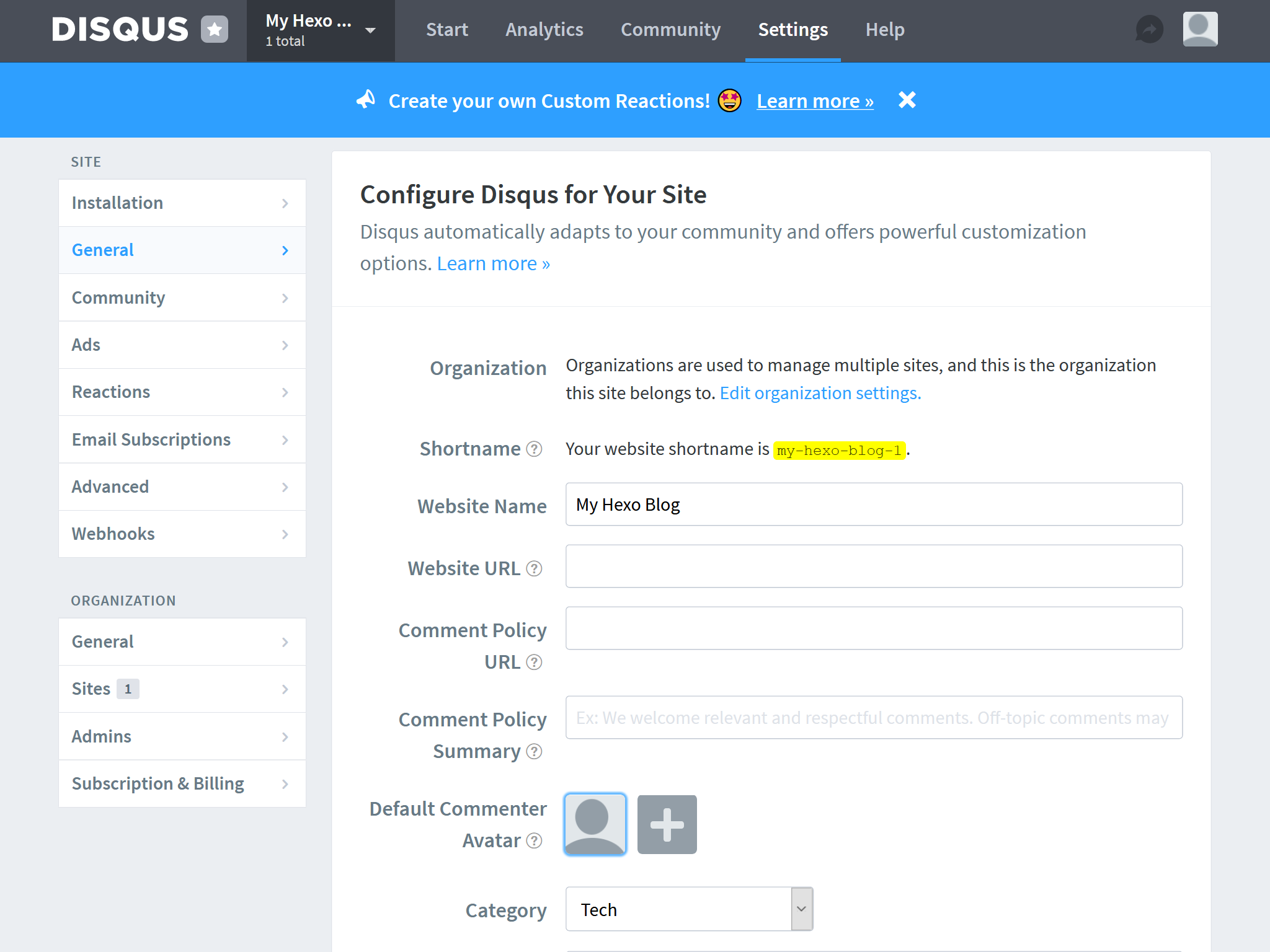
    
    <summary type="html">
    
      &lt;blockquote&gt;
&lt;p&gt;所谓图床工具，就是自动把本地图片转换成链接的一款工具，网络上有很多图床工具，就目前使用种类而言，PicGo 算得上一款比较优秀的图床工具。它是一款用 Electron-vue 开发的软件，可以支持微博，七牛云，腾讯云COS，又拍云，GitHub，阿里云 OSS，SM.MS，imgur 等8种常用图床，功能强大，简单易用。&lt;/p&gt;
&lt;/blockquote&gt;
    
    </summary>
    
    
      <category term="Hexo教程" scheme="https://ji2xpro.github.io/categories/Hexo%E6%95%99%E7%A8%8B/"/>
    
      <category term="博客搭建" scheme="https://ji2xpro.github.io/categories/Hexo%E6%95%99%E7%A8%8B/%E5%8D%9A%E5%AE%A2%E6%90%AD%E5%BB%BA/"/>
    
    
      <category term="hexo博客" scheme="https://ji2xpro.github.io/tags/hexo%E5%8D%9A%E5%AE%A2/"/>
    
  </entry>
  
  <entry>
    <title>Hexo博客指南|第五篇:github page网站cdn优化加速</title>
    <link href="https://ji2xpro.github.io/91a14ab9/"/>
    <id>https://ji2xpro.github.io/91a14ab9/</id>
    <published>2020-05-27T08:25:12.000Z</published>
    <updated>2020-06-09T07:21:23.277Z</updated>
    
    <content type="html"><![CDATA[<blockquote><p>CDN的全称是 Content Delivery Network ，即内容分发网络。CDN是构建在网络之上的内容分发网络，依靠部署在各地的边缘服务器，通过中心平台的负载均衡、内容分发、调度等功能模块，使用户就近获取所需内容，降低网络拥塞，提高用户访问响应速度和命中率。CDN 的关键技术主要有内容存储和分发技术。——<a href="https://baike.baidu.com/item/CDN">百度百科</a></p></blockquote><p>放在Github的资源在国内加载速度比较慢，因此需要使用 CDN 加速来优化网站打开速度，jsDelivr + Github 便是免费且好用的 CDN ，非常适合博客网站使用。</p><a id="more"></a><h1 id="前言"><a href="#前言" class="headerlink" title="前言"></a>前言</h1><p>因为 Github 服务器在国外，且服务器带宽小，导致静态资源请求速度慢，最终导致全站访问速度被拖慢。最常用的解决方案是使用国内 IDC 厂商提供的对象存储(镜像回源)+ CDN 来提升静态资源访问速度，但这难免会产生费用。就算是付费的，也有一定的限制。那有没有一款造福人类的，或者造福中国大陆的公用 CDN 呢？</p><h1 id="JSDelivr"><a href="#JSDelivr" class="headerlink" title="JSDelivr"></a>JSDelivr</h1><p>先来看下<a href="https://www.jsdelivr.com/">官网</a>的介绍:</p><img src="https://cdn.jsdelivr.net/gh/ji2xpro/blog_image/Hexo/JSDelivr/jsdelivr-in-china.png" class="box px-0 py-0 ml-auto mr-auto" width="500" title="JSDelivr - 官网" alt="JSDelivr - 官网"><br><blockquote><p>Wow, Awesome!</p></blockquote><p>jsDelivr由ProspectOne维护的公共库，使用的融合CDN技术，由Cloudflare、Fastly、StackPath、QUANTIL等CDN供应商提供了全球超过<strong>750个CDN节点</strong>。最重要的是，jsDelivr在<strong>中国大陆</strong>也拥有超过数百个节点，因为jsDelivr拥有<strong>正规的ICP备案</strong>，解决了中国大陆的访问速度优化，实现真正的<strong>全球极速低延迟体验</strong>。</p><p>jsDelivr是<strong>免费</strong>的、<strong>不限制带宽</strong>的，可以加速<strong>NPM</strong>、<strong>Github</strong>、<strong>WordPress</strong>内的文件。</p><img src="https://cdn.jsdelivr.net/gh/ji2xpro/blog_image/Hexo/JSDelivr/jsdelivr-network-map.png" class="box px-0 py-0 ml-auto mr-auto" width="500" title="JSDelivr - 全球节点分布地图" alt="JSDelivr - 全球节点分布地图"><br><p>本文采用的方法就是将静态文件资源放到Github的仓库内，再使用jsDelivr进行加速访问，达到完全零成本优化访问速度。相当于一个高速访问的图床！</p><h1 id="使用"><a href="#使用" class="headerlink" title="使用"></a>使用</h1><blockquote><p>jsDelivr官网提供了<strong>NPM</strong>、<strong>Github</strong>、<strong>WordPress</strong>三种方法，有兴趣的可以去<a href="https://www.jsdelivr.com/">官网</a>了解，本博客重点介绍Github的使用</p></blockquote><h3 id="创建github仓库"><a href="#创建github仓库" class="headerlink" title="创建github仓库"></a>创建github仓库</h3><p>在Github新建一个公开仓库，用于存放我们的静态文件资源。这里不再过多赘述，下面的链接是我的静态文件资源仓库。<br><a href="https://github.com/ji2xpro/image">https://github.com/ji2xpro/image</a></p><h3 id="使用jsDelivr访问资源"><a href="#使用jsDelivr访问资源" class="headerlink" title="使用jsDelivr访问资源"></a>使用jsDelivr访问资源</h3><h5 id="访问github的用法"><a href="#访问github的用法" class="headerlink" title="访问github的用法"></a>访问github的用法</h5><figure class="highlight plain"><figcaption><span>链接</span></figcaption><table><tr><td class="gutter"><pre><span class="line">1</span><br></pre></td><td class="code"><pre><span class="line">https:&#x2F;&#x2F;cdn.jsdelivr.net&#x2F;gh&#x2F;用户名称&#x2F;仓库名称@版本号&#x2F;目录</span><br></pre></td></tr></table></figure><blockquote><p>//加载资源(版本号不填的话，默认引用最新)<br><a href="https://cdn.jsdelivr.net/gh/ji2xpro/blog_image/Hexo/JSDelivr/jsdelivr-in-china.png">https://cdn.jsdelivr.net/gh/ji2xpro/blog_image/Hexo/JSDelivr/jsdelivr-in-china.png</a><br>//打开目录（后面的”/“是必要的，不然的话，打不开）<br><a href="https://cdn.jsdelivr.net/gh/ji2xpro/image/">https://cdn.jsdelivr.net/gh/ji2xpro/image/</a></p></blockquote><p>注意：版本号不是必需的，是为了区分新旧资源，如果不使用版本号，将会直接引用最新资源，除此之外还可以使用某个范围内的版本，查看所有资源等，具体使用方法如下：</p><blockquote><p>// 加载任何Github发布、提交或分支<br><a href="https://cdn.jsdelivr.net/gh/user/repo@version/file">https://cdn.jsdelivr.net/gh/user/repo@version/file</a><br>// 加载 jQuery v3.2.1<br><a href="https://cdn.jsdelivr.net/gh/jquery/jquery@3.2.1/dist/jquery.min.js">https://cdn.jsdelivr.net/gh/jquery/jquery@3.2.1/dist/jquery.min.js</a><br>// 使用版本范围而不是特定版本<br><a href="https://cdn.jsdelivr.net/gh/jquery/jquery@3.2/dist/jquery.min.js">https://cdn.jsdelivr.net/gh/jquery/jquery@3.2/dist/jquery.min.js</a><br><a href="https://cdn.jsdelivr.net/gh/jquery/jquery@3/dist/jquery.min.js">https://cdn.jsdelivr.net/gh/jquery/jquery@3/dist/jquery.min.js</a><br>// 完全省略该版本以获取最新版本<br><a href="https://cdn.jsdelivr.net/gh/jquery/jquery/dist/jquery.min.js">https://cdn.jsdelivr.net/gh/jquery/jquery/dist/jquery.min.js</a><br>// 将“.min”添加到任何JS/CSS文件中以获取缩小版本，如果不存在，将为会自动生成<br><a href="https://cdn.jsdelivr.net/gh/jquery/jquery@3.2.1/src/core.min.js">https://cdn.jsdelivr.net/gh/jquery/jquery@3.2.1/src/core.min.js</a><br>// 在末尾添加 / 以获取资源目录列表<br><a href="https://cdn.jsdelivr.net/gh/jquery/jquery/">https://cdn.jsdelivr.net/gh/jquery/jquery/</a></p></blockquote><p><strong>扩展</strong></p><ul><li><p>打开github文件列表，可查看指定分支，列表结构简单实用：<br>文件列表：<a href="https://cdn.jsdelivr.net/gh/user/repo/">https://cdn.jsdelivr.net/gh/user/repo/</a><br>比如参考：<a href="https://cdn.jsdelivr.net/gh/ji2xpro/ji2xpro.github.io@sourceCode/">https://cdn.jsdelivr.net/gh/ji2xpro/ji2xpro.github.io@sourceCode/</a></p><img src="https://cdn.jsdelivr.net/gh/ji2xpro/blog_image/Hexo/JSDelivr/jsdelivr-get-user-repo.png" class="box px-0 py-0 ml-auto mr-auto" width="500" title="github - 文件列表" alt="github - 文件列表"><br></li><li><p>访问统计github文件（github必须存在release发布后才有数据）<br>访问统计：<a href="https://www.jsdelivr.com/package/gh/user/repo">https://www.jsdelivr.com/package/gh/user/repo</a><br>比如参考：<a href="https://www.jsdelivr.com/package/gh/Molunerfinn/PicGo">https://www.jsdelivr.com/package/gh/Molunerfinn/PicGo</a></p><img src="https://cdn.jsdelivr.net/gh/ji2xpro/blog_image/Hexo/JSDelivr/jsdelivr-get-user-package.png" class="box px-0 py-0 ml-auto mr-auto" width="500" title="github - 统计" alt="github - 统计"><br></li></ul><p><strong>补充</strong></p><article class="message message-immersive is-primary"><div class="message-body"><i class="fas fa-info-circle mr-2"></i>关于 GitHub 作为图床的使用方法可参考博客：<a href="/73d224e9/">Hexo博客指南|第六篇:图床神器PicGo</a>，完整的配置详情以其为准。</div></article><h5 id="访问npm的用法"><a href="#访问npm的用法" class="headerlink" title="访问npm的用法"></a>访问npm的用法</h5><figure class="highlight plain"><figcaption><span>链接</span></figcaption><table><tr><td class="gutter"><pre><span class="line">1</span><br></pre></td><td class="code"><pre><span class="line">https:&#x2F;&#x2F;cdn.jsdelivr.net&#x2F;npm&#x2F;包名@版本号&#x2F;目录</span><br></pre></td></tr></table></figure><blockquote><p>//加载资源<br><a href="https://cdn.jsdelivr.net/npm/lw_firewords@1.0.3/index.js">https://cdn.jsdelivr.net/npm/lw_firewords@1.0.3/index.js</a><br>//打开目录（后面的”/“是必要的，不然的话，打不开）<br><a href="https://cdn.jsdelivr.net/npm/lw_firewords/">https://cdn.jsdelivr.net/npm/lw_firewords/</a></p></blockquote><h5 id="访问wordpress的用法"><a href="#访问wordpress的用法" class="headerlink" title="访问wordpress的用法"></a>访问wordpress的用法</h5><blockquote><p>// 加载任何插件从WordPress.org插件SVN repo<br><a href="https://cdn.jsdelivr.net/wp/plugins/project/tags/version/file">https://cdn.jsdelivr.net/wp/plugins/project/tags/version/file</a><br>// 加载精确版本<br><a href="https://cdn.jsdelivr.net/wp/plugins/wp-slimstat/tags/4.6.5/wp-slimstat.js">https://cdn.jsdelivr.net/wp/plugins/wp-slimstat/tags/4.6.5/wp-slimstat.js</a><br>// 加载最新版本<br><a href="https://cdn.jsdelivr.net/wp/plugins/wp-slimstat/trunk/wp-slimstat.js">https://cdn.jsdelivr.net/wp/plugins/wp-slimstat/trunk/wp-slimstat.js</a><br>// 从WordPress.org的主题SVN repo加载任何主题<br><a href="https://cdn.jsdelivr.net/wp/themes/project/version/file">https://cdn.jsdelivr.net/wp/themes/project/version/file</a><br>// 加载精确版本<br><a href="https://cdn.jsdelivr.net/wp/themes/twenty-eightteen/1.7/assets/js/html5.js">https://cdn.jsdelivr.net/wp/themes/twenty-eightteen/1.7/assets/js/html5.js</a></p></blockquote><h1 id="参考文章"><a href="#参考文章" class="headerlink" title="参考文章:"></a>参考文章:</h1><p><a href="https://www.jsdelivr.com/">jsDelivr官网</a><br><a href="https://blog.csdn.net/qq_36759224/article/details/86936453">免费CDN：jsDelivr+Github 使用方法</a><br><a href="https://blog.csdn.net/qq_36759224/article/details/98058240">Github+jsDelivr+PicGo 打造稳定快速、高效免费图床</a></p><article class="message message-immersive is-warning"><div class="message-body"><i class="fas fa-question-circle mr-2"></i>文章内容有误？请点击<a href="https://github.com/ji2xpro/ji2xpro.github.io/edit/sourceCode/source/_posts/hexo/Hexo博客指南-第五篇-github-page网站cdn优化加速.md">此处</a>提交修改。</div></article>]]></content>
    
    <summary type="html">
    
      &lt;blockquote&gt;
&lt;p&gt;CDN的全称是 Content Delivery Network ，即内容分发网络。CDN是构建在网络之上的内容分发网络，依靠部署在各地的边缘服务器，通过中心平台的负载均衡、内容分发、调度等功能模块，使用户就近获取所需内容，降低网络拥塞，提高用户访问响应速度和命中率。CDN 的关键技术主要有内容存储和分发技术。——&lt;a href=&quot;https://baike.baidu.com/item/CDN&quot;&gt;百度百科&lt;/a&gt;&lt;/p&gt;
&lt;/blockquote&gt;
&lt;p&gt;放在Github的资源在国内加载速度比较慢，因此需要使用 CDN 加速来优化网站打开速度，jsDelivr + Github 便是免费且好用的 CDN ，非常适合博客网站使用。&lt;/p&gt;
    
    </summary>
    
    
      <category term="Hexo教程" scheme="https://ji2xpro.github.io/categories/Hexo%E6%95%99%E7%A8%8B/"/>
    
      <category term="博客搭建" scheme="https://ji2xpro.github.io/categories/Hexo%E6%95%99%E7%A8%8B/%E5%8D%9A%E5%AE%A2%E6%90%AD%E5%BB%BA/"/>
    
    
      <category term="hexo博客" scheme="https://ji2xpro.github.io/tags/hexo%E5%8D%9A%E5%AE%A2/"/>
    
  </entry>
  
  <entry>
    <title>Hexo博客指南|第四篇:永久链接之abbrlink</title>
    <link href="https://ji2xpro.github.io/f41f3eae/"/>
    <id>https://ji2xpro.github.io/f41f3eae/</id>
    <published>2020-05-27T08:24:53.000Z</published>
    <updated>2020-06-09T07:21:18.563Z</updated>
    
    <content type="html"><![CDATA[<blockquote><p>唯一永久文章链接<br>Hexo-abbrlink 是一个 hexo 博客链接永久化的解决方案</p></blockquote><a id="more"></a><h1 id="前言"><a href="#前言" class="headerlink" title="前言"></a>前言</h1><p>hexo的默认永久链接是在 _config.yml 里配置的，其生成规则是permalink: :year/:month/:day/:title/，是按照年、月、日、标题来生成的。</p><p>这种默认配置有个很不能接受的缺点，当文件名为中文时，会导致url链接中也出现中文。复制后的链接会编码，非常不利于阅读，也不简洁。</p><p>为此可以使用一个比较方便好用的解决方案：hexo-abbrlink 插件。</p><p>Hexo-abbrlink 支持使用不同的算法和进制对文章链接进行转换：</p><table><thead><tr><th>算法</th><th>进制</th><th>生成链接</th></tr></thead><tbody><tr><td>crc16</td><td>hex</td><td><a href="https://post.zz173.com/posts/3ab2.html">https://post.zz173.com/posts/3ab2.html</a></td></tr><tr><td>crc16</td><td>dec</td><td><a href="https://post.zz173.com/posts/12345.html">https://post.zz173.com/posts/12345.html</a></td></tr><tr><td>crc32</td><td>hex</td><td><a href="https://post.zz173.com/posts/9a8b6c4d.html">https://post.zz173.com/posts/9a8b6c4d.html</a></td></tr><tr><td>crc32</td><td>dec</td><td><a href="https://post.zz173.com/posts/1690090958.html">https://post.zz173.com/posts/1690090958.html</a></td></tr></tbody></table><h1 id="安装"><a href="#安装" class="headerlink" title="安装"></a>安装</h1><ul><li><p>方法1</p><figure class="highlight plain"><figcaption><span>命令行</span></figcaption><table><tr><td class="gutter"><pre><span class="line">1</span><br></pre></td><td class="code"><pre><span class="line">npm install hexo-abbrlink --save</span><br></pre></td></tr></table></figure></li><li><p>方法2：<br>在 package.json 中配置所需的安装包「”hexo-abbrlink”: “^2.0.5”」，重新执行一次 npm install 即可</p></li></ul><h1 id="配置"><a href="#配置" class="headerlink" title="配置"></a>配置</h1><ol><li><p>修改根目录站点配置文件_config.yml：</p><figure class="highlight yaml"><figcaption><span>_config.yml</span></figcaption><table><tr><td class="gutter"><pre><span class="line">1</span><br><span class="line">2</span><br><span class="line">3</span><br><span class="line">4</span><br><span class="line">5</span><br><span class="line">6</span><br></pre></td><td class="code"><pre><span class="line"><span class="comment"># 可选 permalink: abbrlink 短链接模式</span></span><br><span class="line"><span class="attr">permalink:</span> <span class="string">:abbrlink/</span> <span class="comment">#文章的永久链接 或者 permalink: posts/:abbrlink.html 如：http://localhost:4000/post/abaf7e89.html</span></span><br><span class="line"><span class="comment"># abbrlink config</span></span><br><span class="line"><span class="attr">abbrlink:</span></span><br><span class="line">  <span class="attr">alg:</span> <span class="string">crc32</span>  <span class="comment">#算法: crc16(default) and crc32</span></span><br><span class="line">  <span class="attr">rep:</span> <span class="string">hex</span>    <span class="comment">#进制: dec(default) and hex</span></span><br></pre></td></tr></table></figure></li><li><p>使用 hexo g 会自动在你的文章中加上 abbrlink: fbf5310d</p></li></ol><blockquote><p>可能存在的问题：<br>配置完成后，存在老文章的链接都变成了 undefined ，而新的文章没问题。这个问题其实我们仔细想一下就能明白，我们首先要执行 hexo clean 清除掉以前生成的文章缓存，然后 hexo g 重新渲染就可以了。</p></blockquote><h1 id="参考文章"><a href="#参考文章" class="headerlink" title="参考文章:"></a>参考文章:</h1><p>参考github：<a href="https://github.com/Rozbo/hexo-abbrlink">hexo-abbrlink</a></p><article class="message message-immersive is-warning"><div class="message-body"><i class="fas fa-question-circle mr-2"></i>文章内容有误？请点击<a href="https://github.com/ji2xpro/ji2xpro.github.io/edit/sourceCode/source/_posts/hexo/Hexo博客指南-第四篇-永久链接之abbrlink.md">此处</a>提交修改。</div></article>]]></content>
    
    <summary type="html">
    
      &lt;blockquote&gt;
&lt;p&gt;唯一永久文章链接&lt;br&gt;Hexo-abbrlink 是一个 hexo 博客链接永久化的解决方案&lt;/p&gt;
&lt;/blockquote&gt;
    
    </summary>
    
    
      <category term="Hexo教程" scheme="https://ji2xpro.github.io/categories/Hexo%E6%95%99%E7%A8%8B/"/>
    
      <category term="博客搭建" scheme="https://ji2xpro.github.io/categories/Hexo%E6%95%99%E7%A8%8B/%E5%8D%9A%E5%AE%A2%E6%90%AD%E5%BB%BA/"/>
    
    
      <category term="hexo博客" scheme="https://ji2xpro.github.io/tags/hexo%E5%8D%9A%E5%AE%A2/"/>
    
  </entry>
  
  <entry>
    <title>Hexo博客指南|第三篇:常见问题</title>
    <link href="https://ji2xpro.github.io/22d1bb0/"/>
    <id>https://ji2xpro.github.io/22d1bb0/</id>
    <published>2020-05-27T08:22:52.000Z</published>
    <updated>2020-06-09T07:21:10.165Z</updated>
    
    <content type="html"><![CDATA[<blockquote><p>本文解答了一些Icarus常见问题。<br>如果你的问题没有在这里得到解答，也请阅读<br><a href="/hexo-theme-icarus/tags/Icarus用户指南/">Icarus用户指南</a>，<br><a href="https://hexo.io/zh-cn/docs/index.html">Hexo中文文档</a>，<br>以及<a href="https://github.com/ppoffice/hexo-theme-icarus/issues?q=">GitHub Issues</a>。<br>此外，你也可以在<a href="https://gitter.im/hexo-theme-icarus/">Gitter</a>上向其他Icarus用户请求帮助。</p></blockquote><a id="more"></a><h2 id="站点"><a href="#站点" class="headerlink" title="站点"></a>站点</h2><article class="message is-primary" style="font-size:1em"><div class="message-body">我无法生成我的站点。 / 我在生成站点时遇到错误。</div></article><p>Icarus运行在Node.js 8.3.0或更新的版本上。<br>它同时依赖Hexo 4.2.0或更新版本。<br>除此之外，请确保所有的Node.js依赖已安装。<br>你可以在<a href="https://github.com/ppoffice/hexo-theme-icarus/blob/master/package.json"><code>themes/icarus/package.json</code></a><br>文件的<code>peerDependencies</code>部分下找到这些依赖。<br>同时，从你的站点中移除所有无用的Node.js依赖，否则它们可能会导致Icarus出现奇怪的问题。</p><article class="message is-primary" style="font-size:1em"><div class="message-body">如何更改我的站点的语言？</div></article><p>打开站点根目录下的站点配置文件<code>_config.yml</code>，修改如下设置：</p><figure class="highlight diff"><figcaption><span>_config.yml</span></figcaption><table><tr><td class="gutter"><pre><span class="line">1</span><br><span class="line">2</span><br></pre></td><td class="code"><pre><span class="line"><span class="deletion">- language: en</span></span><br><span class="line"><span class="addition">+ language: &lt;语言名&gt;</span></span><br></pre></td></tr></table></figure><p>你可以在<code>themes/icarus/languages</code>目录下找到所有可用的翻译。<br><code>&lt;语言名&gt;</code>为不带后缀名的翻译文件名。</p><h2 id="布局"><a href="#布局" class="headerlink" title="布局"></a>布局</h2><article class="message is-primary" style="font-size:1em"><div class="message-body">我如何改变页面的宽度？我如何使用单栏/双栏/三栏布局？</div></article><p>如要改变页面的宽度，编辑<code>themes/icarus/include/style/responsive.styl</code>这个样式文件。<br>此文件定义了不同屏幕尺寸下的页面容器宽度。</p><p>如要改变挂件或主内容宽度，编辑<code>themes/icarus/layout/common/widgets.jsx</code>和<code>themes/icarus/layout/layout.jsx</code>。<br>在这些文件中找到诸如<code>is-12</code>，<code>is-8-tablet</code>，和<code>is-4-widescreen</code>这样的CSS类名。<br>CSS类名中的数字标志着一个挂件或主内容所占据的栏数量。<br>数字后的屏幕尺寸，如<code>tablet</code>和<code>widescreen</code>，指代着栏数量生效的屏幕尺寸条件。<br>修改类名中的数字使主内容栏的栏数量和所有挂件栏的栏数量在相同屏幕尺寸下相加等于12。</p><p>例如，为使主内容栏在宽屏(<code>widescreen</code>)下更宽，你可以做出如下修改：</p><figure class="highlight diff"><figcaption><span>themes/icarus/layout/layout.jsx >folded</span></figcaption><table><tr><td class="gutter"><pre><span class="line">1</span><br><span class="line">2</span><br><span class="line">3</span><br><span class="line">4</span><br><span class="line">5</span><br><span class="line">6</span><br><span class="line">7</span><br><span class="line">8</span><br></pre></td><td class="code"><pre><span class="line"> &lt;div class=&#123;classname(&#123;</span><br><span class="line">     column: true,</span><br><span class="line">     'order-2': true,</span><br><span class="line">     'column-main': true,</span><br><span class="line">     'is-12': columnCount <span class="comment">=== 1,</span></span><br><span class="line"><span class="deletion">-    'is-8-tablet is-8-desktop is-8-widescreen': columnCount === 2,</span></span><br><span class="line"><span class="addition">+    'is-8-tablet is-8-desktop is-9-widescreen': columnCount === 2,</span></span><br><span class="line">     'is-8-tablet is-8-desktop is-6-widescreen': columnCount <span class="comment">=== 3</span></span><br></pre></td></tr></table></figure><figure class="highlight diff"><figcaption><span>themes/icarus/layout/common/widgets.jsx >folded</span></figcaption><table><tr><td class="gutter"><pre><span class="line">1</span><br><span class="line">2</span><br><span class="line">3</span><br><span class="line">4</span><br><span class="line">5</span><br><span class="line">6</span><br><span class="line">7</span><br></pre></td><td class="code"><pre><span class="line"> function getColumnSizeClass(columnCount) &#123;</span><br><span class="line">     switch (columnCount) &#123;</span><br><span class="line">         case 2:</span><br><span class="line"><span class="deletion">-            return 'is-4-tablet is-4-desktop is-4-widescreen';</span></span><br><span class="line"><span class="addition">+            return 'is-4-tablet is-4-desktop is-3-widescreen';</span></span><br><span class="line">         case 3:</span><br><span class="line">             return 'is-4-tablet is-4-desktop is-3-widescreen';</span><br></pre></td></tr></table></figure><p>你可以参考<a href="https://bulma.io/documentation/columns/sizes/">Bulma文档</a>来获取更多关于布局系统的细节。</p><p>下面时一些创建单栏/双栏/三栏布局的提示：</p><ul><li>你可以从主题配置中移除所有的挂件来创建单栏布局。</li><li>你可以将所有的挂件移动到页面的一侧来创建双栏布局。</li><li>你可以将挂件放在页面两边来创建三栏布局。</li></ul><p>若要更改单个文章或页面的布局，请参考<a href="/hexo-theme-icarus/Configuration/icarus用户指南-主题配置/#配置文件与优先级">配置文件与优先级</a>。</p><article class="message is-primary" style="font-size:1em"><div class="message-body">挂件/评论插件/分享按钮...的布局文件在哪里？我如何个性化内置的挂件/评论插件/分享按钮...？</div></article><p>插件和挂件的布局文件已被移至一个单独的Node.js库中——<a href="https://github.com/ppoffice/hexo-component-inferno"><code>hexo-component-inferno</code></a>。<br>这样，主题开发者可以更好地在不同主题之间复用这些通用组件，并且普通用户可以更简便地覆盖这些内置组件。</p><p>若要自定义这些组件，从<code>hexo-component-inferno</code>仓库中拷贝布局文件并把它们放入<code>themes/icarus/layout</code>下的的相应目录中。<br>例如，如果你想要自定义Valine评论插件，你可以从<code>hexo-component-inferno</code>仓库中拷贝<br><a href="https://github.com/ppoffice/hexo-component-inferno/blob/0.2.4/src/view/comment/valine.jsx"><code>src/view/comment/valine.jsx</code></a><br>到<code>themes/icarus/layout/comment/valine.jsx</code>。<br>同时像下面这样改正此文件头部的一些Node.js引用：</p><figure class="highlight diff"><figcaption><span>themes/icarus/layout/comment/valine.jsx</span></figcaption><table><tr><td class="gutter"><pre><span class="line">1</span><br><span class="line">2</span><br></pre></td><td class="code"><pre><span class="line"><span class="deletion">- const &#123; cacheComponent &#125; = require('../../util/cache');</span></span><br><span class="line"><span class="addition">+ const &#123; cacheComponent &#125; = require('hexo-component-inferno/lib/util/cache');</span></span><br></pre></td></tr></table></figure><p>最后，用<code>hexo clean</code>清理你的站点并重新生成HTML文件。</p><p>类似的，你可以用同样的方式覆盖主题内置的静态文件，如<br><a href="https://github.com/ppoffice/hexo-component-inferno/blob/0.2.4/asset/js/insight.js"><code>asset/js/insight.js</code></a> 。</p><article class="message is-primary" style="font-size:1em"><div class="message-body">为什么我的改变的布局文件在我刷新页面时没有生效（假设我正在使用<code>hexo server</code>）？</div></article><p>当你使用<code>hexo server</code>启动本地Hexo服务器时，Icarus会缓存布局文件。<br>如要使布局文件的修改生效，请重启本地服务其。</p><p>其他情况下临时生成的数据会被Hexo缓存在内存或者<code>db.json</code>数据库中。<br>在运行<code>hexo server</code>或<code>hexo generate</code>之前执行<code>hexo clean</code>应该可以解决此问题。</p><h2 id="内容"><a href="#内容" class="headerlink" title="内容"></a>内容</h2><article class="message is-primary" style="font-size:1em"><div class="message-body">我的图片没有正确显示。 / 我的图片仅在首页显示，却无法在文章页面显示。</div></article><p>请确保你使用了图片的绝对路径。<br>例如，你的站点位于你域名的子目录下，如<code>https://ppoffice.github.io/hexo-theme-icarus</code>，<br>并且你的图片<code>image.jpg</code>放在了<code>source/gallery/</code>目录下。<br>那么你应该用<code>/hexo-theme-icarus/gallery/image.jpg</code>来引用你的图片。</p><p>你也可以像下面这样使用<code>{% img %}</code>这个Hexo标签来自动引用图片：</p><figure class="highlight plain"><table><tr><td class="gutter"><pre><span class="line">1</span><br></pre></td><td class="code"><pre><span class="line">&#123;% img &#x2F;gallery&#x2F;image.jpg &quot;Image title&quot; %&#125;</span><br></pre></td></tr></table></figure><p>在这种情况下，你可以从图片路径中省略网站子目录。<br>你可以参考<a href="https://hexo.io/zh-cn/docs/index.html">Hexo文档</a>来了解更多详情。</p><article class="message is-primary" style="font-size:1em"><div class="message-body">如何为文章添加摘要？如何显示“阅读更多”按钮？</div></article><p>在你的文章中添加<code>&lt;!-- more --&gt;</code>标签。<br>标签前面的文章内容会被标记为摘要，而其后的内容不会显示在文章列表上。</p><p>你也可以在文章的front-matter中设置自定义摘要。</p><figure class="highlight yaml"><figcaption><span>some-post.md</span></figcaption><table><tr><td class="gutter"><pre><span class="line">1</span><br><span class="line">2</span><br><span class="line">3</span><br><span class="line">4</span><br><span class="line">5</span><br></pre></td><td class="code"><pre><span class="line"><span class="attr">title:</span> <span class="string">一篇文章</span></span><br><span class="line"><span class="attr">date:</span> <span class="number">2020</span><span class="number">-01</span><span class="number">-01</span></span><br><span class="line"><span class="attr">excerpt:</span> <span class="string">这是一篇关于...</span></span><br><span class="line"><span class="meta">---</span></span><br><span class="line"><span class="comment"># 文章内容...</span></span><br></pre></td></tr></table></figure><article class="message is-primary" style="font-size:1em"><div class="message-body">我如何加密文章？</div></article><p>使用如<a href="https://github.com/MikeCoder/hexo-blog-encrypt">hexo-blog-encrypt</a>这样的第三方的Hexo插件。</p><article class="message is-primary" style="font-size:1em"><div class="message-body">我如何像这篇文章一样使用炫酷的页面元素？</div></article><p>请参考<a href="https://bulma.io/documentation/">Bulma文档</a>来了解所有可选的元素和样式。<br>复制其中的HTML代码段并直接放入你的Markdown文件中。</p><h2 id="挂件与插件"><a href="#挂件与插件" class="headerlink" title="挂件与插件"></a>挂件与插件</h2><article class="message is-primary" style="font-size:1em"><div class="message-body">我如何才能移除页面上警告我一些配置值没有设置的红色警示信息？</div></article><p>这些警示信息通常在你遗漏一些插件或挂件的配置设置时出现。<br>如果你不想开启某个插件或挂件，把它们从你的主题配置中删掉或注释掉。</p><p>例如，注释掉这几行来禁用掉评论插件：</p><figure class="highlight diff"><figcaption><span>themes/icarus/_config.yml</span></figcaption><table><tr><td class="gutter"><pre><span class="line">1</span><br><span class="line">2</span><br><span class="line">3</span><br><span class="line">4</span><br><span class="line">5</span><br><span class="line">6</span><br></pre></td><td class="code"><pre><span class="line"><span class="deletion">- comment:</span></span><br><span class="line"><span class="deletion">-     type: disqus</span></span><br><span class="line"><span class="deletion">-     shortname: </span></span><br><span class="line"><span class="addition">+ # comment:</span></span><br><span class="line"><span class="addition">+ #     type: disqus</span></span><br><span class="line"><span class="addition">+ #     shortname: </span></span><br></pre></td></tr></table></figure><p>参考文章:<br><a href="">参考链接</a></p><article class="message message-immersive is-warning"><div class="message-body"><i class="fas fa-question-circle mr-2"></i>文章内容有误？请点击<a href="https://github.com/ji2xpro/ji2xpro.github.io/edit/sourceCode/source/_posts/hexo/Hexo博客指南-第三篇-常见问题.md">此处</a>提交修改。</div></article>]]></content>
    
    <summary type="html">
    
      &lt;blockquote&gt;
&lt;p&gt;本文解答了一些Icarus常见问题。&lt;br&gt;如果你的问题没有在这里得到解答，也请阅读&lt;br&gt;&lt;a href=&quot;/hexo-theme-icarus/tags/Icarus用户指南/&quot;&gt;Icarus用户指南&lt;/a&gt;，&lt;br&gt;&lt;a href=&quot;https://hexo.io/zh-cn/docs/index.html&quot;&gt;Hexo中文文档&lt;/a&gt;，&lt;br&gt;以及&lt;a href=&quot;https://github.com/ppoffice/hexo-theme-icarus/issues?q=&quot;&gt;GitHub Issues&lt;/a&gt;。&lt;br&gt;此外，你也可以在&lt;a href=&quot;https://gitter.im/hexo-theme-icarus/&quot;&gt;Gitter&lt;/a&gt;上向其他Icarus用户请求帮助。&lt;/p&gt;
&lt;/blockquote&gt;
    
    </summary>
    
    
      <category term="Hexo教程" scheme="https://ji2xpro.github.io/categories/Hexo%E6%95%99%E7%A8%8B/"/>
    
      <category term="博客搭建" scheme="https://ji2xpro.github.io/categories/Hexo%E6%95%99%E7%A8%8B/%E5%8D%9A%E5%AE%A2%E6%90%AD%E5%BB%BA/"/>
    
    
      <category term="hexo博客" scheme="https://ji2xpro.github.io/tags/hexo%E5%8D%9A%E5%AE%A2/"/>
    
  </entry>
  
  <entry>
    <title>Hexo博客指南|第二篇:主题配置</title>
    <link href="https://ji2xpro.github.io/f96960e6/"/>
    <id>https://ji2xpro.github.io/f96960e6/</id>
    <published>2020-05-27T08:22:42.000Z</published>
    <updated>2020-06-09T07:20:58.835Z</updated>
    
    <content type="html"><![CDATA[<blockquote><p>Icarus的默认主题配置文件为<code>themes/icarus/_config.yml</code>。<br>此文件定义了站点全局的布局与样式设置，同时也控制了例如插件与挂件等外部功能的配置。<br>本文详细介绍了本主题的一般配置，并且解释了Icarus使用哪些配置文件和它是如何生成并验证这些配置。</p></blockquote><a id="more"></a><style>.content ol:not([type]) {    list-style-type: simp-chinese-informal;}</style><h2 id="一般主题配置"><a href="#一般主题配置" class="headerlink" title="一般主题配置"></a>一般主题配置</h2><h3 id="配置文件版本"><a href="#配置文件版本" class="headerlink" title="配置文件版本"></a>配置文件版本</h3><p>这个版本号与主题版本号相关却不总是相同。<br>Icarus使用此版本号来决定是否升级默认主题配置文件。<br>请不要自己更改这个版本号。</p><figure class="highlight yaml"><figcaption><span>themes/icarus/_config.yml</span></figcaption><table><tr><td class="gutter"><pre><span class="line">1</span><br></pre></td><td class="code"><pre><span class="line"><span class="attr">version:</span> <span class="number">3.0</span><span class="number">.0</span></span><br></pre></td></tr></table></figure><h3 id="主题变体"><a href="#主题变体" class="headerlink" title="主题变体"></a>主题变体</h3><p>通过此设置为Icarus更换”皮肤“。<br>此设置目前支持”<code>default</code>“和”<code>cyberpunk</code>“两种值。<br>你可以在查看Cyberpunk变体的效果。</p><figure class="highlight yaml"><figcaption><span>themes/icarus/_config.yml</span></figcaption><table><tr><td class="gutter"><pre><span class="line">1</span><br></pre></td><td class="code"><pre><span class="line"><span class="attr">variant:</span> <span class="string">default</span></span><br></pre></td></tr></table></figure><h3 id="Logo"><a href="#Logo" class="headerlink" title="Logo"></a>Logo</h3><p>设置你站点的logo。<br>此logo会显示在导航栏和页面尾部。<br><code>logo</code>配置的值既可以是你的logo图片的路径或URL地址：</p><figure class="highlight yaml"><figcaption><span>themes/icarus/_config.yml</span></figcaption><table><tr><td class="gutter"><pre><span class="line">1</span><br></pre></td><td class="code"><pre><span class="line"><span class="attr">logo:</span> <span class="string">/img/logo.svg</span></span><br></pre></td></tr></table></figure><p>也可以像下面这样设置成文字：</p><figure class="highlight yaml"><figcaption><span>themes/icarus/_config.yml</span></figcaption><table><tr><td class="gutter"><pre><span class="line">1</span><br><span class="line">2</span><br></pre></td><td class="code"><pre><span class="line"><span class="attr">logo:</span></span><br><span class="line">    <span class="attr">text:</span> <span class="string">My</span> <span class="string">Beautiful</span> <span class="string">Site</span></span><br></pre></td></tr></table></figure><h3 id="Favicon"><a href="#Favicon" class="headerlink" title="Favicon"></a>Favicon</h3><p>你可以在<code>head</code>配置中指定你的网站favicon的路径或URL地址。</p><figure class="highlight yaml"><figcaption><span>themes/icarus/_config.yml</span></figcaption><table><tr><td class="gutter"><pre><span class="line">1</span><br><span class="line">2</span><br></pre></td><td class="code"><pre><span class="line"><span class="attr">head:</span></span><br><span class="line">    <span class="attr">favicon:</span> <span class="string">/img/favicon.svg</span></span><br></pre></td></tr></table></figure><h3 id="Open-Graph"><a href="#Open-Graph" class="headerlink" title="Open Graph"></a>Open Graph</h3><p>你可以在<code>head</code>配置中设置Open Graph。<br>你应该在配置文件中将绝大部分配置留空。<br>仅在需要的时候在文章的front-matter中为这些设置赋值。<br>请参考<a href="https://hexo.io/zh-cn/docs/helpers.html#open-graph">Hexo文档</a>来详细了解每个配置项。</p><figure class="highlight yaml"><figcaption><span>themes/icarus/_config.yml >folded</span></figcaption><table><tr><td class="gutter"><pre><span class="line">1</span><br><span class="line">2</span><br><span class="line">3</span><br><span class="line">4</span><br><span class="line">5</span><br><span class="line">6</span><br><span class="line">7</span><br><span class="line">8</span><br><span class="line">9</span><br><span class="line">10</span><br><span class="line">11</span><br><span class="line">12</span><br><span class="line">13</span><br><span class="line">14</span><br><span class="line">15</span><br><span class="line">16</span><br><span class="line">17</span><br><span class="line">18</span><br><span class="line">19</span><br><span class="line">20</span><br><span class="line">21</span><br><span class="line">22</span><br><span class="line">23</span><br><span class="line">24</span><br><span class="line">25</span><br><span class="line">26</span><br><span class="line">27</span><br><span class="line">28</span><br><span class="line">29</span><br><span class="line">30</span><br><span class="line">31</span><br><span class="line">32</span><br><span class="line">33</span><br><span class="line">34</span><br><span class="line">35</span><br></pre></td><td class="code"><pre><span class="line"><span class="attr">head:</span></span><br><span class="line">    <span class="attr">open_graph:</span></span><br><span class="line">        <span class="comment"># 页面标题 (og:title) (可选)</span></span><br><span class="line">        <span class="comment"># 大部分情况下请留空</span></span><br><span class="line">        <span class="attr">title:</span> </span><br><span class="line">        <span class="comment"># 页面类型 (og:type) (可选)</span></span><br><span class="line">        <span class="comment"># 大部分情况下请留空</span></span><br><span class="line">        <span class="attr">type:</span> <span class="string">blog</span></span><br><span class="line">        <span class="comment"># 页面URL地址 (og:url) (可选)</span></span><br><span class="line">        <span class="comment"># 大部分情况下请留空</span></span><br><span class="line">        <span class="attr">url:</span> </span><br><span class="line">        <span class="comment"># 页面封面图 (og:image) (可选)</span></span><br><span class="line">        <span class="comment"># 大部分情况下请留空</span></span><br><span class="line">        <span class="attr">image:</span> </span><br><span class="line">        <span class="comment"># 站点名称 (og:site_name) (可选)</span></span><br><span class="line">        <span class="comment"># 大部分情况下请留空</span></span><br><span class="line">        <span class="attr">site_name:</span> </span><br><span class="line">        <span class="comment"># 页面作者 (article:author) (可选)</span></span><br><span class="line">        <span class="comment"># 大部分情况下请留空</span></span><br><span class="line">        <span class="attr">author:</span> </span><br><span class="line">        <span class="comment"># 页面描述 (og:description) (可选)</span></span><br><span class="line">        <span class="comment"># 大部分情况下请留空</span></span><br><span class="line">        <span class="attr">description:</span> </span><br><span class="line">        <span class="comment"># Twitter卡片类型 (twitter:card)</span></span><br><span class="line">        <span class="attr">twitter_card:</span> </span><br><span class="line">        <span class="comment"># Twitter ID (twitter:creator)</span></span><br><span class="line">        <span class="attr">twitter_id:</span> </span><br><span class="line">        <span class="comment"># Twitter站点 (twitter:site)</span></span><br><span class="line">        <span class="attr">twitter_site:</span> </span><br><span class="line">        <span class="comment"># Google+个人主页链接 (已弃用)</span></span><br><span class="line">        <span class="attr">google_plus:</span> </span><br><span class="line">        <span class="comment"># Facebook admin ID</span></span><br><span class="line">        <span class="attr">fb_admins:</span> </span><br><span class="line">        <span class="comment"># Facebook App ID</span></span><br><span class="line">        <span class="attr">fb_app_id:</span> </span><br></pre></td></tr></table></figure><h3 id="Google-Structured-Data"><a href="#Google-Structured-Data" class="headerlink" title="Google Structured Data"></a>Google Structured Data</h3><p>你可以在<code>head</code>配置中设置Google Structured Data。<br>你应该在配置文件中将绝大部分配置留空。<br>仅在需要的时候在文章的front-matter中为这些设置赋值。<br>请参考<a href="https://developers.google.com/search/docs/guides/intro-structured-data">Search for Developers</a>来详细了解每个配置项。</p><figure class="highlight yaml"><figcaption><span>themes/icarus/_config.yml >folded</span></figcaption><table><tr><td class="gutter"><pre><span class="line">1</span><br><span class="line">2</span><br><span class="line">3</span><br><span class="line">4</span><br><span class="line">5</span><br><span class="line">6</span><br><span class="line">7</span><br><span class="line">8</span><br><span class="line">9</span><br><span class="line">10</span><br><span class="line">11</span><br><span class="line">12</span><br><span class="line">13</span><br><span class="line">14</span><br><span class="line">15</span><br><span class="line">16</span><br><span class="line">17</span><br></pre></td><td class="code"><pre><span class="line"><span class="attr">head:</span></span><br><span class="line">    <span class="attr">structured_data:</span></span><br><span class="line">        <span class="comment"># 页面标题 (可选)</span></span><br><span class="line">        <span class="comment"># 大部分情况下请留空</span></span><br><span class="line">        <span class="attr">title:</span> </span><br><span class="line">        <span class="comment"># 页面描述 (可选)</span></span><br><span class="line">        <span class="comment"># 大部分情况下请留空</span></span><br><span class="line">        <span class="attr">description:</span> </span><br><span class="line">        <span class="comment"># 页面URL地址 (可选)</span></span><br><span class="line">        <span class="comment"># 大部分情况下请留空</span></span><br><span class="line">        <span class="attr">url:</span> </span><br><span class="line">        <span class="comment"># 页面作者 (article:author) (可选)</span></span><br><span class="line">        <span class="comment"># 大部分情况下请留空</span></span><br><span class="line">        <span class="attr">author:</span> </span><br><span class="line">        <span class="comment"># 页面图片 (可选)</span></span><br><span class="line">        <span class="comment"># 大部分情况下请留空</span></span><br><span class="line">        <span class="attr">image:</span> </span><br></pre></td></tr></table></figure><h3 id="页面元信息"><a href="#页面元信息" class="headerlink" title="页面元信息"></a>页面元信息</h3><p>你可以通过<code>head</code>部分的<code>meta</code>设置来向生成的HTML中添加自定义<code>&lt;meta&gt;</code>标签。<br>每一个meta标签应作为<code>meta</code>数组中的一个元素出现。<br><code>meta</code>设置每一个元素的值应为<code>&lt;属性名&gt;=&lt;属性值&gt;</code>的格式，其中<code>属性名</code>和<code>属性值</code>分别代表着<code>&lt;meta&gt;</code>标签的属性和值。<br>如果<code>&lt;meta&gt;</code>标签有多个属性和值，请使用<code>;</code>来分隔<code>&lt;属性名&gt;=&lt;属性值&gt;</code>。</p><figure class="highlight yaml"><figcaption><span>themes/icarus/_config.yml</span></figcaption><table><tr><td class="gutter"><pre><span class="line">1</span><br><span class="line">2</span><br><span class="line">3</span><br><span class="line">4</span><br></pre></td><td class="code"><pre><span class="line"><span class="attr">head:</span></span><br><span class="line">    <span class="attr">meta:</span></span><br><span class="line">        <span class="bullet">-</span> <span class="string">'name=theme-color;content=#123456'</span></span><br><span class="line">        <span class="bullet">-</span> <span class="string">'name=generator;content="Hexo 4.2.0"'</span></span><br></pre></td></tr></table></figure><h3 id="RSS"><a href="#RSS" class="headerlink" title="RSS"></a>RSS</h3><p>你可以通过<code>head</code>部分的<code>rss</code>设置来添加RSS链接信息。</p><figure class="highlight yaml"><figcaption><span>themes/icarus/_config.yml</span></figcaption><table><tr><td class="gutter"><pre><span class="line">1</span><br><span class="line">2</span><br></pre></td><td class="code"><pre><span class="line"><span class="attr">head:</span></span><br><span class="line">    <span class="attr">rss:</span> <span class="string">/path/to/atom.xml</span></span><br></pre></td></tr></table></figure><h3 id="导航栏"><a href="#导航栏" class="headerlink" title="导航栏"></a>导航栏</h3><p><code>navbar</code>部分定义了导航栏中的菜单与链接。<br>你可以通过向<code>menu</code>设置项中添加<code>&lt;链接名&gt;: &lt;链接URL&gt;</code>的方式添加任意导航栏菜单链接。<br>如要向导航栏右侧添加链接，请向<code>links</code>设置项中添加<code>&lt;链接名&gt;: &lt;链接URL&gt;</code>。</p><figure class="highlight yaml"><figcaption><span>themes/icarus/_config.yml</span></figcaption><table><tr><td class="gutter"><pre><span class="line">1</span><br><span class="line">2</span><br><span class="line">3</span><br><span class="line">4</span><br><span class="line">5</span><br><span class="line">6</span><br><span class="line">7</span><br><span class="line">8</span><br><span class="line">9</span><br><span class="line">10</span><br><span class="line">11</span><br><span class="line">12</span><br><span class="line">13</span><br><span class="line">14</span><br></pre></td><td class="code"><pre><span class="line"><span class="attr">navbar:</span></span><br><span class="line">    <span class="comment"># 导航栏菜单项</span></span><br><span class="line">    <span class="attr">menu:</span></span><br><span class="line">        <span class="attr">Home:</span> <span class="string">/</span></span><br><span class="line">        <span class="attr">Archives:</span> <span class="string">/archives</span></span><br><span class="line">        <span class="attr">Categories:</span> <span class="string">/categories</span></span><br><span class="line">        <span class="attr">Tags:</span> <span class="string">/tags</span></span><br><span class="line">        <span class="attr">About:</span> <span class="string">/about</span></span><br><span class="line">    <span class="comment"># 导航栏右侧的链接</span></span><br><span class="line">    <span class="attr">links:</span></span><br><span class="line">        <span class="attr">GitHub:</span> <span class="string">'https://github.com'</span></span><br><span class="line">        <span class="attr">Download on GitHub:</span></span><br><span class="line">            <span class="attr">icon:</span> <span class="string">fab</span> <span class="string">fa-github</span></span><br><span class="line">            <span class="attr">url:</span> <span class="string">'https://github.com/ppoffice/hexo-theme-icarus'</span></span><br></pre></td></tr></table></figure><p>你也可以使用FontAwesome图标来作为纯文字链接的替换，格式如下：</p><figure class="highlight yaml"><figcaption><span>链接格式</span></figcaption><table><tr><td class="gutter"><pre><span class="line">1</span><br><span class="line">2</span><br><span class="line">3</span><br></pre></td><td class="code"><pre><span class="line"><span class="string">&lt;链接名&gt;:</span></span><br><span class="line">    <span class="attr">icon:</span> <span class="string">&lt;FontAwesome图标的class名&gt;</span></span><br><span class="line">    <span class="attr">url:</span> <span class="string">&lt;链接URL&gt;</span></span><br></pre></td></tr></table></figure><h3 id="页面尾部"><a href="#页面尾部" class="headerlink" title="页面尾部"></a>页面尾部</h3><p><code>footer</code>部分定义了页面尾部右侧的链接。<br>链接的配置格式与<code>navbar</code>中<code>links</code>的配置格式完全一致。</p><figure class="highlight yaml"><figcaption><span>themes/icarus/_config.yml</span></figcaption><table><tr><td class="gutter"><pre><span class="line">1</span><br><span class="line">2</span><br><span class="line">3</span><br><span class="line">4</span><br><span class="line">5</span><br><span class="line">6</span><br><span class="line">7</span><br><span class="line">8</span><br><span class="line">9</span><br><span class="line">10</span><br><span class="line">11</span><br></pre></td><td class="code"><pre><span class="line"><span class="attr">footer:</span></span><br><span class="line">    <span class="attr">links:</span></span><br><span class="line">        <span class="attr">Creative Commons:</span></span><br><span class="line">            <span class="attr">icon:</span> <span class="string">fab</span> <span class="string">fa-creative-commons</span></span><br><span class="line">            <span class="attr">url:</span> <span class="string">'https://creativecommons.org/'</span></span><br><span class="line">        <span class="attr">Attribution 4.0 International:</span></span><br><span class="line">            <span class="attr">icon:</span> <span class="string">fab</span> <span class="string">fa-creative-commons-by</span></span><br><span class="line">            <span class="attr">url:</span> <span class="string">'https://creativecommons.org/licenses/by/4.0/'</span></span><br><span class="line">        <span class="attr">Download on GitHub:</span></span><br><span class="line">            <span class="attr">icon:</span> <span class="string">fab</span> <span class="string">fa-github</span></span><br><span class="line">            <span class="attr">url:</span> <span class="string">'https://github.com/ppoffice/hexo-theme-icarus'</span></span><br></pre></td></tr></table></figure><h3 id="代码高亮"><a href="#代码高亮" class="headerlink" title="代码高亮"></a>代码高亮</h3><p>如果你已在Hexo中启用了代码高亮功能，你可以通过<code>article</code>中的<code>highlight</code>设置来自定义代码块。<br>请从<a href="https://github.com/highlightjs/highlight.js/tree/9.18.1/src/styles">highlight.js/src/styles</a>下列出的所有主题中<br>选择一个主题。<br>然后，复制文件名（不带<code>.css</code>后缀）到<code>theme</code>设置项中。</p><p>如要隐藏复制代码按钮，将<code>clipboard</code>设置为<code>false</code>。<br>如果你希望折叠或展开所有代码块，将<code>fold</code>设置为<code>&quot;folded&quot;</code>或<code>&quot;unfolded&quot;</code>。<br>你也可以将<code>fold</code>设置为空来禁止代码块折叠。</p><figure class="highlight yaml"><figcaption><span>themes/icarus/_config.yml</span></figcaption><table><tr><td class="gutter"><pre><span class="line">1</span><br><span class="line">2</span><br><span class="line">3</span><br><span class="line">4</span><br><span class="line">5</span><br><span class="line">6</span><br><span class="line">7</span><br><span class="line">8</span><br><span class="line">9</span><br></pre></td><td class="code"><pre><span class="line"><span class="attr">article:</span></span><br><span class="line">    <span class="attr">highlight:</span></span><br><span class="line">        <span class="comment"># 代码高亮主题</span></span><br><span class="line">        <span class="comment"># https://github.com/highlightjs/highlight.js/tree/master/src/styles</span></span><br><span class="line">        <span class="attr">theme:</span> <span class="string">atom-one-light</span></span><br><span class="line">        <span class="comment"># 显示复制代码按钮</span></span><br><span class="line">        <span class="attr">clipboard:</span> <span class="literal">true</span></span><br><span class="line">        <span class="comment"># 代码块的默认折叠状态。可以是"", "folded", "unfolded"</span></span><br><span class="line">        <span class="attr">fold:</span> <span class="string">unfolded</span></span><br></pre></td></tr></table></figure><p>此外，你可以在Markdown文件中使用下面的语法来折叠单独的代码块：</p><figure class="highlight plain"><table><tr><td class="gutter"><pre><span class="line">1</span><br><span class="line">2</span><br><span class="line">3</span><br></pre></td><td class="code"><pre><span class="line">&#123;% codeblock &quot;可选文件名&quot; lang:代码语言 &gt;folded %&#125;</span><br><span class="line">...代码块内容...</span><br><span class="line">&#123;% endcodeblock %&#125;</span><br></pre></td></tr></table></figure><h3 id="缩略图"><a href="#缩略图" class="headerlink" title="缩略图"></a>缩略图</h3><p>你可以通过两步来为你的文章添加缩略图：</p><ol><li><p>确保主题配置中缩略图功能已启用：</p> <figure class="highlight yaml"><figcaption><span>themes/icarus/_config.yml</span></figcaption><table><tr><td class="gutter"><pre><span class="line">1</span><br><span class="line">2</span><br></pre></td><td class="code"><pre><span class="line"><span class="attr">article:</span></span><br><span class="line">    <span class="attr">thumbnail:</span> <span class="literal">true</span></span><br></pre></td></tr></table></figure></li><li><p>在你的文章的front-matter中提供缩略图的路径或URL地址：</p> <figure class="highlight yaml"><figcaption><span>post.md</span></figcaption><table><tr><td class="gutter"><pre><span class="line">1</span><br><span class="line">2</span><br><span class="line">3</span><br><span class="line">4</span><br></pre></td><td class="code"><pre><span class="line"><span class="attr">title:</span> <span class="string">Icarus快速上手</span></span><br><span class="line"><span class="attr">thumbnail:</span> <span class="string">/gallery/thumbnails/desert.jpg</span></span><br><span class="line"><span class="meta">---</span></span><br><span class="line"><span class="string">文章内容...</span></span><br></pre></td></tr></table></figure><p> 如果你在front-matter中使用的是图片的路径，你需要确保它是绝对或者相对于你的source目录的路径。<br> 例如，为使用<code>&lt;your blog&gt;/source/gallery/image.jpg</code>作为缩略图，你需要在front-matter中使用<code>/gallery/image.jpg</code>作为图片路径。</p></li></ol><h3 id="文章阅读时间"><a href="#文章阅读时间" class="headerlink" title="文章阅读时间"></a>文章阅读时间</h3><p>你可以将<code>article</code>部分的<code>readtime</code>设置为<code>true</code>来显示文章字数统计以及预计阅读时间。</p><figure class="highlight yaml"><figcaption><span>themes/icarus/_config.yml</span></figcaption><table><tr><td class="gutter"><pre><span class="line">1</span><br><span class="line">2</span><br></pre></td><td class="code"><pre><span class="line"><span class="attr">article:</span></span><br><span class="line">    <span class="attr">readtime:</span> <span class="literal">true</span></span><br></pre></td></tr></table></figure><h3 id="侧边栏"><a href="#侧边栏" class="headerlink" title="侧边栏"></a>侧边栏</h3><p>设置<code>sidebar</code>中某个侧边栏的<code>sticky</code>为<code>true</code>来让它的位置固定而不跟随页面滚动。</p><figure class="highlight yaml"><figcaption><span>themes/icarus/_config.yml</span></figcaption><table><tr><td class="gutter"><pre><span class="line">1</span><br><span class="line">2</span><br><span class="line">3</span><br><span class="line">4</span><br><span class="line">5</span><br></pre></td><td class="code"><pre><span class="line"><span class="attr">sidebar:</span></span><br><span class="line">    <span class="attr">left:</span></span><br><span class="line">        <span class="attr">sticky:</span> <span class="literal">false</span></span><br><span class="line">    <span class="attr">right:</span></span><br><span class="line">        <span class="attr">sticky:</span> <span class="literal">true</span></span><br></pre></td></tr></table></figure><h3 id="其他配置"><a href="#其他配置" class="headerlink" title="其他配置"></a>其他配置</h3><p>你可以参考<a href="/hexo-theme-icarus/tags/Icarus用户指南/">Icarus用户指南</a>来了解更多第三方的插件、挂件、以及CDN提供商的配置。</p><h2 id="配置文件与优先级"><a href="#配置文件与优先级" class="headerlink" title="配置文件与优先级"></a>配置文件与优先级</h2><p>除了在<code>themes/icarus/_config.yml</code>的默认主题配置文件外，Icarus也会从如下位置获取替代配置：</p><ul><li><code>themes/icarus/_config.post.yml</code>和<code>themes/icarus/_config.page.yml</code></li><li>文章/页面的<a href="https://hexo.io/docs/front-matter.html">front-matter</a></li><li>根目录下的站点配置文件<code>_config.yml</code></li></ul><p><code>_config.post.yml</code>和<code>_config.page.yml</code>与默认配置文件有着相同的格式和配置定义。<br>你可以在<code>_config.post.yml</code>中设置仅对所有文章生效的配置，而这些配置将覆盖默认配置文件中的配置。<br>例如，你可以在此配置文件中把所有的挂件放置在页面一侧来实现所有文章两栏布局，同时其他页面仍保持三栏布局：</p><figure class="highlight yaml"><figcaption><span>themes/icarus/_config.yml</span></figcaption><table><tr><td class="gutter"><pre><span class="line">1</span><br><span class="line">2</span><br><span class="line">3</span><br><span class="line">4</span><br><span class="line">5</span><br><span class="line">6</span><br><span class="line">7</span><br><span class="line">8</span><br><span class="line">9</span><br><span class="line">10</span><br></pre></td><td class="code"><pre><span class="line"><span class="attr">widgets:</span></span><br><span class="line">    <span class="bullet">-</span></span><br><span class="line">        <span class="attr">type:</span> <span class="string">recent_posts</span></span><br><span class="line">        <span class="attr">position:</span> <span class="string">left</span></span><br><span class="line">    <span class="bullet">-</span></span><br><span class="line">        <span class="attr">type:</span> <span class="string">categories</span></span><br><span class="line">        <span class="attr">position:</span> <span class="string">right</span></span><br><span class="line">    <span class="bullet">-</span></span><br><span class="line">        <span class="attr">type:</span> <span class="string">tags</span></span><br><span class="line">        <span class="attr">position:</span> <span class="string">right</span></span><br></pre></td></tr></table></figure><figure class="highlight yaml"><figcaption><span>themes/icarus/_config.post.yml</span></figcaption><table><tr><td class="gutter"><pre><span class="line">1</span><br><span class="line">2</span><br><span class="line">3</span><br><span class="line">4</span><br><span class="line">5</span><br><span class="line">6</span><br><span class="line">7</span><br><span class="line">8</span><br><span class="line">9</span><br><span class="line">10</span><br></pre></td><td class="code"><pre><span class="line"><span class="attr">widgets:</span></span><br><span class="line">    <span class="bullet">-</span></span><br><span class="line">        <span class="attr">type:</span> <span class="string">recent_posts</span></span><br><span class="line">        <span class="attr">position:</span> <span class="string">left</span></span><br><span class="line">    <span class="bullet">-</span></span><br><span class="line">        <span class="attr">type:</span> <span class="string">categories</span></span><br><span class="line">        <span class="attr">position:</span> <span class="string">left</span></span><br><span class="line">    <span class="bullet">-</span></span><br><span class="line">        <span class="attr">type:</span> <span class="string">tags</span></span><br><span class="line">        <span class="attr">position:</span> <span class="string">left</span></span><br></pre></td></tr></table></figure><p>类似的，<code>_config.page.yml</code>中的配置仅对所有Hexo页面(Pages)生效并覆盖默认配置文件中的配置。</p><p>如果你想要在某个文章/页面中覆盖默认配置，你可以把这些配置放在那个文章/页面的front-matter中。<br>例如，你可以像下面这样在一篇文章的front-matter中更改某篇文章的代码高亮主题：</p><figure class="highlight yaml"><figcaption><span>source/_post/some-post.md</span></figcaption><table><tr><td class="gutter"><pre><span class="line">1</span><br><span class="line">2</span><br><span class="line">3</span><br><span class="line">4</span><br><span class="line">5</span><br><span class="line">6</span><br><span class="line">7</span><br></pre></td><td class="code"><pre><span class="line"><span class="attr">title:</span> <span class="string">我的第一篇文章</span></span><br><span class="line"><span class="attr">date:</span> <span class="string">'2015-01-01 00:00:01'</span></span><br><span class="line"><span class="attr">article:</span></span><br><span class="line">    <span class="attr">highlight:</span></span><br><span class="line">        <span class="attr">theme:</span> <span class="string">atom-one-dark</span></span><br><span class="line"><span class="meta">---</span></span><br><span class="line"><span class="comment"># 文章标题</span></span><br></pre></td></tr></table></figure><p>上面的配置总为那篇文章覆盖掉<code>_config.post.yml</code>和<code>_config.yml</code>中的<code>article.highlight</code>。<br>这种层次化的配置系统对于在页面个性化与优化上差异化对待不同访客十分有效。<br>比如，你可以为根据你页面目标访客的国家和语言来开启更快的CDN或本地化的评论服务。<br>然而需要注意的是，一些Hexo内定义的文章或页面属性不会覆盖掉其他配置源中的同名配置，例如：</p><ul><li><code>title</code></li><li><code>date</code></li><li><code>updated</code></li><li><code>comments</code> (not <code>comment</code>)</li><li><code>layout</code></li><li><code>source</code></li><li><code>photos</code></li><li><code>excerpt</code></li></ul><p>最后，上面列出的所有配置源中Icarus用到的配置项都会覆盖站点配置文件<code>_config.yml</code>中的同名配置项。<br>例如，<code>themes/icarus/_config.yml</code>中的<code>title</code>设置会覆盖掉<code>_config.yml</code>中的<code>title</code>，但<code>new_post_name</code>却不会，因为<br>Icarus没有用到这个配置项。</p><p>总而言之，配置源的作用范围和优先级如下：</p><ul><li><p>对于某个文章或页面</p><ul><li>front-matter覆盖所有下面的配置源。</li><li><code>themes/icarus/_config.post.yml</code>和<code>themes/icarus/_config.page.yml</code>覆盖所有下面的配置源。</li><li><code>themes/icarus/_config.yml</code>覆盖所有下面的配置源。</li><li><code>_config.yml</code>。</li></ul></li><li><p>对于所有的文章或页面</p><ul><li><code>themes/icarus/_config.post.yml</code>或<code>themes/icarus/_config.page.yml</code>覆盖所有下面的配置源。</li><li><code>themes/icarus/_config.yml</code>覆盖所有下面的配置源。</li><li><code>_config.yml</code>。</li></ul></li><li><p>对于所有的文章，页面，和索引页</p><ul><li><code>themes/icarus/_config.yml</code>覆盖所有下面的配置源。</li><li><code>_config.yml</code>。</li></ul></li></ul><h2 id="配置生成与校验"><a href="#配置生成与校验" class="headerlink" title="配置生成与校验"></a>配置生成与校验</h2><p>所有的Icarus主题配置均采用<a href="https://yaml.org/">YAML语言</a>。<br>当Hexo加载主题时，Icarus会通过一系列<a href="https://json-schema.org/">JSON Schema</a>来自动生成默认的配置文件<code>themes/icarus/_config.yml</code>。<br>这也是为什么你在主题目录下找不到示例配置文件(<code>_config.yml.example</code>)。<br>大多数的JSON Schema存放在<code>themes/icarus/include/schema</code>目录下，而其他的则存放在<br><a href="https://github.com/ppoffice/hexo-component-inferno">ppoffice/hexo-component-inferno</a>仓库中。<br>你可以在你的<code>hexo</code>命令后附上<code>--icarus-dont-generate-config</code>来避免配置文件的自动生成。</p><p>当你每次运行<code>hexo</code>命令时，主题也会对比JSON Schema来校验你的配置文件。<br>如果校验中出现任何错误，Icarus会将错误位置与错误类型打印在屏幕上。<br>例如，如下的错误信息告诉我们<code>logo</code>配置值应该为字符串或是对象，而不是一个整型数。<br>你可以在你的<code>hexo</code>命令后附上<code>--icarus-dont-check-config</code>来跳过校验，但并不推荐这么做。</p><figure class="highlight plain"><figcaption><span>hexo日志</span></figcaption><table><tr><td class="gutter"><pre><span class="line">1</span><br><span class="line">2</span><br><span class="line">3</span><br><span class="line">4</span><br><span class="line">5</span><br><span class="line">6</span><br><span class="line">7</span><br><span class="line">8</span><br><span class="line">9</span><br><span class="line">10</span><br><span class="line">11</span><br><span class="line">12</span><br><span class="line">13</span><br><span class="line">14</span><br></pre></td><td class="code"><pre><span class="line">INFO  &#x3D;&#x3D;&#x3D; Checking package dependencies &#x3D;&#x3D;&#x3D;</span><br><span class="line">INFO  &#x3D;&#x3D;&#x3D; Checking the configuration file &#x3D;&#x3D;&#x3D;</span><br><span class="line">WARN  Configuration file failed one or more checks.</span><br><span class="line">WARN  Icarus may still run, but you will encounter unexcepted results.</span><br><span class="line">WARN  Here is some information for you to correct the configuration file.</span><br><span class="line">WARN  [</span><br><span class="line">  &#123;</span><br><span class="line">    keyword: &#39;type&#39;,</span><br><span class="line">    dataPath: &#39;.logo&#39;,</span><br><span class="line">    schemaPath: &#39;#&#x2F;properties&#x2F;logo&#x2F;type&#39;,</span><br><span class="line">    params: &#123; type: &#39;string,object&#39; &#125;,</span><br><span class="line">    message: &#39;should be string,object&#39;</span><br><span class="line">  &#125;</span><br><span class="line">]</span><br></pre></td></tr></table></figure><p>此外，如果你的默认主题配置文件不是最新版本的话，Icarus会运行迁移脚本将它升级到最新版本。<br>这些脚本存放在<code>themes/icarus/include/migration</code>目录。<br>你可以在你的<code>hexo</code>命令后附上<code>--icarus-dont-upgrade-config</code>来禁止配置升级。<br>最后，Icarus也会检查主题依赖的Node.js库是否安装并提醒你安装缺失的库。</p><p>参考文章:<br><a href="">参考链接</a></p><article class="message message-immersive is-warning"><div class="message-body"><i class="fas fa-question-circle mr-2"></i>文章内容有误？请点击<a href="https://github.com/ji2xpro/ji2xpro.github.io/edit/sourceCode/source/_posts/hexo/Hexo博客指南-第二篇-主题配置.md">此处</a>提交修改。</div></article>]]></content>
    
    <summary type="html">
    
      &lt;blockquote&gt;
&lt;p&gt;Icarus的默认主题配置文件为&lt;code&gt;themes/icarus/_config.yml&lt;/code&gt;。&lt;br&gt;此文件定义了站点全局的布局与样式设置，同时也控制了例如插件与挂件等外部功能的配置。&lt;br&gt;本文详细介绍了本主题的一般配置，并且解释了Icarus使用哪些配置文件和它是如何生成并验证这些配置。&lt;/p&gt;
&lt;/blockquote&gt;
    
    </summary>
    
    
      <category term="Hexo教程" scheme="https://ji2xpro.github.io/categories/Hexo%E6%95%99%E7%A8%8B/"/>
    
      <category term="博客搭建" scheme="https://ji2xpro.github.io/categories/Hexo%E6%95%99%E7%A8%8B/%E5%8D%9A%E5%AE%A2%E6%90%AD%E5%BB%BA/"/>
    
    
      <category term="hexo博客" scheme="https://ji2xpro.github.io/tags/hexo%E5%8D%9A%E5%AE%A2/"/>
    
  </entry>
  
  <entry>
    <title>Hexo博客指南|第一篇:环境搭建</title>
    <link href="https://ji2xpro.github.io/d5e96cb9/"/>
    <id>https://ji2xpro.github.io/d5e96cb9/</id>
    <published>2020-05-27T08:22:32.000Z</published>
    <updated>2020-06-09T07:21:01.294Z</updated>
    
    <content type="html"><![CDATA[<blockquote><p>欢迎使用Icarus！<br>Icarus是静态网站生成器Hexo的一款简单，精致，而现代的主题。<br>它力求设计上的优雅，但也不抛弃使用上的简单明了。<br>它灵活且多功能的配置系统让资深用户也能极尽细节地装饰他们的站点。<br>Icarus同时也提供了超多插件与挂件来满足你的多元的站点个性化和优化需求。<br>除此以外，它的崭新实现使得更好的IDE支持和第三方接入成为可能，并提供了更多未来的优化空间。</p></blockquote><a id="more"></a><p>在你继续安装Icarus之前，请先花些时间阅览<a href="https://hexo.io">Hexo文档</a>。<br>如要安装Icarus，从GitHub的仓库中下载源码的压缩包并解压到你Hexo站点的主题目录中。<br>或者，你可以使用Git来克隆Icarus的代码仓库到<code>themes</code>目录下：</p><figure class="highlight plain"><figcaption><span>Git Bash命令行</span></figcaption><table><tr><td class="gutter"><pre><span class="line">1</span><br></pre></td><td class="code"><pre><span class="line">git clone https:&#x2F;&#x2F;github.com&#x2F;ppoffice&#x2F;hexo-theme-icarus.git themes&#x2F;icarus -b &lt;version number&gt; --depth 1</span><br></pre></td></tr></table></figure><p>你可以省略<code>-b &lt;version number&gt;</code>来获取Icarus的最新开发版本。<br>如果你想同时下载Git仓库的完整提交历史，请同时省略<code>--depth 1</code>。<br>另外，你也可以使用下面的命令将Icarus安装为Git子模块(submodule)：</p><figure class="highlight plain"><figcaption><span>Git Bash命令行</span></figcaption><table><tr><td class="gutter"><pre><span class="line">1</span><br></pre></td><td class="code"><pre><span class="line">git submodule add https:&#x2F;&#x2F;github.com&#x2F;ppoffice&#x2F;hexo-theme-icarus.git themes&#x2F;icarus</span><br></pre></td></tr></table></figure><p>接下来，在你的站点的<code>_config.yml</code>文件中的开启Icarus：</p><figure class="highlight yaml"><figcaption><span>_config.yml</span></figcaption><table><tr><td class="gutter"><pre><span class="line">1</span><br></pre></td><td class="code"><pre><span class="line"><span class="attr">theme:</span> <span class="string">icarus</span></span><br></pre></td></tr></table></figure><p>或使用<code>hexo</code>命令修改主题为Icarus:</p><figure class="highlight plain"><figcaption><span>命令行</span></figcaption><table><tr><td class="gutter"><pre><span class="line">1</span><br></pre></td><td class="code"><pre><span class="line">hexo config theme icarus</span><br></pre></td></tr></table></figure><p>最后，使用如下命令来启动Hexo本地测试服务器并开始创作。</p><figure class="highlight plain"><figcaption><span>命令行</span></figcaption><table><tr><td class="gutter"><pre><span class="line">1</span><br></pre></td><td class="code"><pre><span class="line">hexo server</span><br></pre></td></tr></table></figure><p>如需了解更多主题、挂件、和插件相关的信息，请查看<br><a href="/hexo-theme-icarus/tags/Icarus用户指南/">Icarus用户指南</a>。<br>你也可以参考本站的源代码来获取更多的使用示例。<br>本站源代码位于GitHub上Icarus代码仓库的<a href="https://github.com/ppoffice/hexo-theme-icarus/tree/site"><code>site</code>分支</a>。<br>此外，你也可能在<a href="https://gitter.im/hexo-theme-icarus/">Gitter</a>上获得其他Icarus用户的帮助。</p><p><strong>额外资源</strong></p><p>参考文章:<br><a href="">参考链接</a></p><p>下面是一些帮助你进一步个性化你的站点的其他资源。<br>你也可以<a href="https://github.com/ppoffice/hexo-theme-icarus/edit/site/source/_posts/zh-CN/Getting-Started.md">点击此处</a>来提交你的Icarus教程。</p><div class="menu-list is-size-6"><a href="https://hexo.io/zh-cn/docs/index.html"><i class="fas fa-bookmark mr-2"></i> Hexo中文文档</a><a href="https://removeif.github.io/theme/%E5%8D%9A%E5%AE%A2%E6%BA%90%E7%A0%81%E5%88%86%E4%BA%AB.html"><i class="fas fa-bookmark mr-2"></i> 博客源码分享 by 辣椒の酱</a><a href="https://www.imaegoo.com/2020/icarus-3-guide/"><i class="fas fa-bookmark mr-2"></i> hexo-theme-icarus 3 食用经验分享 by iMaeGoo</a><a href="https://www.imaegoo.com/2020/icarus-with-bulma/"><i class="fas fa-bookmark mr-2"></i> 活用 Bulma 美化 Icarus 文章 by iMaeGoo</a></div><br><article class="message message-immersive is-warning"><div class="message-body"><i class="fas fa-question-circle mr-2"></i>文章内容有误？点击<a href="https://github.com/ji2xpro/ji2xpro.github.io/edit/sourceCode/source/_posts/hexo/Hexo博客指南-第一篇-环境搭建.md">此处</a>提交修改。</div></article><p><a style="background-color:black;color:white;text-decoration:none;padding:4px 6px;font-size:12px;line-height:1.2;display:inline-block;border-radius:3px" href="https://www.dpm.org.cn/collection/paint/228354.html" target="_blank" rel="noopener noreferrer"><span style="display:inline-block;padding:2px 3px"><svg xmlns="http://www.w3.org/2000/svg" style="height:12px;width:auto;position:relative;vertical-align:middle;top:-1px;fill:white" viewBox="0 0 32 32"><title>unsplash-logo</title><path d="M20.8 18.1c0 2.7-2.2 4.8-4.8 4.8s-4.8-2.1-4.8-4.8c0-2.7 2.2-4.8 4.8-4.8 2.7.1 4.8 2.2 4.8 4.8zm11.2-7.4v14.9c0 2.3-1.9 4.3-4.3 4.3h-23.4c-2.4 0-4.3-1.9-4.3-4.3v-15c0-2.3 1.9-4.3 4.3-4.3h3.7l.8-2.3c.4-1.1 1.7-2 2.9-2h8.6c1.2 0 2.5.9 2.9 2l.8 2.4h3.7c2.4 0 4.3 1.9 4.3 4.3zm-8.6 7.5c0-4.1-3.3-7.5-7.5-7.5-4.1 0-7.5 3.4-7.5 7.5s3.3 7.5 7.5 7.5c4.2-.1 7.5-3.4 7.5-7.5z"></path></svg></span><span style="display:inline-block;padding:2px 3px">王希孟 千里江山图卷</span></a></p>]]></content>
    
    <summary type="html">
    
      &lt;blockquote&gt;
&lt;p&gt;欢迎使用Icarus！&lt;br&gt;Icarus是静态网站生成器Hexo的一款简单，精致，而现代的主题。&lt;br&gt;它力求设计上的优雅，但也不抛弃使用上的简单明了。&lt;br&gt;它灵活且多功能的配置系统让资深用户也能极尽细节地装饰他们的站点。&lt;br&gt;Icarus同时也提供了超多插件与挂件来满足你的多元的站点个性化和优化需求。&lt;br&gt;除此以外，它的崭新实现使得更好的IDE支持和第三方接入成为可能，并提供了更多未来的优化空间。&lt;/p&gt;
&lt;/blockquote&gt;
    
    </summary>
    
    
      <category term="Hexo教程" scheme="https://ji2xpro.github.io/categories/Hexo%E6%95%99%E7%A8%8B/"/>
    
      <category term="博客搭建" scheme="https://ji2xpro.github.io/categories/Hexo%E6%95%99%E7%A8%8B/%E5%8D%9A%E5%AE%A2%E6%90%AD%E5%BB%BA/"/>
    
    
      <category term="hexo博客" scheme="https://ji2xpro.github.io/tags/hexo%E5%8D%9A%E5%AE%A2/"/>
    
  </entry>
  
  <entry>
    <title>Telegram汇总分享</title>
    <link href="https://ji2xpro.github.io/74ef0370/"/>
    <id>https://ji2xpro.github.io/74ef0370/</id>
    <published>2020-05-27T06:53:19.000Z</published>
    <updated>2020-05-29T08:34:17.044Z</updated>
    
    <content type="html"><![CDATA[<blockquote><p>摘要<br>转载请注明原文出处:<a href="https://congcong0806.github.io/2018/04/24/Telegram">Telegram 群组、频道、机器人 - 汇总分享</a></p></blockquote><a id="more"></a><h5 id="推荐"><a href="#推荐" class="headerlink" title="推荐"></a>推荐</h5><ul><li>Telegram 中文 NEWS:<a href="https://t.me/YinxiangBiji_News">https://t.me/YinxiangBiji_News</a></li><li>Telegram 中文社群:<a href="https://t.me/yxbjx">https://t.me/yxbjx</a></li><li>Telegram 中文群组频道搜索机器人: <a href="https://t.me/ququn_bot">https://t.me/ququn_bot</a></li><li>Bear 熊掌记用户群:<a href="https://t.me/joinchat/Ag98FxRIKr7UkwUPqKKmfw">https://t.me/joinchat/Ag98FxRIKr7UkwUPqKKmfw</a></li><li>RSS 交流群:<a href="https://t.me/joinchat/Ag98F0evTbZwY8HB7oH4fA">https://t.me/joinchat/Ag98F0evTbZwY8HB7oH4fA</a></li><li>笔记软件交流讨论:<a href="https://t.me/joinchat/Ag98F0DdcZr1X1xS6lJsyA">https://t.me/joinchat/Ag98F0DdcZr1X1xS6lJsyA</a></li><li>幕布用户群:<a href="https://t.me/joinchat/Ag98F01tRQ2RIk_icHhiyA">https://t.me/joinchat/Ag98F01tRQ2RIk_icHhiyA</a></li><li>为知笔记用户群:<a href="https://t.me/joinchat/Ag98F1MLJji5WC5OpjAcHQ">https://t.me/joinchat/Ag98F1MLJji5WC5OpjAcHQ</a></li><li>有道云笔记用户群:<a href="https://t.me/joinchat/Ag98F1C2ip5g0Bac_KCJ2A">https://t.me/joinchat/Ag98F1C2ip5g0Bac_KCJ2A</a></li><li>Todoist 用户群:<a href="https://t.me/joinchat/Ag98F1DuGqE_dIiNkeM2uA">https://t.me/joinchat/Ag98F1DuGqE_dIiNkeM2uA</a></li><li>Simplenote 用户群:<a href="https://t.me/joinchat/Ag98F0f7fjEKqZKVHNW0aA">https://t.me/joinchat/Ag98F0f7fjEKqZKVHNW0aA</a></li><li>MarginNote 用户群:<a href="https://t.me/joinchat/Ag98F0ZLDrJZOSBWXAEiow">https://t.me/joinchat/Ag98F0ZLDrJZOSBWXAEiow</a></li><li>iMazing 用户群:<a href="https://t.me/joinchat/Ag98F07KJmIlmwSCfTOKxQ">https://t.me/joinchat/Ag98F07KJmIlmwSCfTOKxQ</a></li><li>Typora 用户群:<a href="https://t.me/joinchat/Ag98FxBSO7eJ9mMwxxUIPw">https://t.me/joinchat/Ag98FxBSO7eJ9mMwxxUIPw</a></li></ul><h5 id="群组-Group"><a href="#群组-Group" class="headerlink" title="群组 Group"></a>群组 Group</h5><h6 id="软件"><a href="#软件" class="headerlink" title="软件"></a>软件</h6><ul><li>落格输入法:<a href="https://t.me/joinchat/DGZalT6pMAHNNg8JyfPLXw">https://t.me/joinchat/DGZalT6pMAHNNg8JyfPLXw</a></li><li>Microsoft users:<a href="https://t.me/Microsofthelp">https://t.me/Microsofthelp</a></li><li>捷径 Shortcuts:<a href="https://t.me/SiriShortcuts">https://t.me/SiriShortcuts</a></li><li>捷径社区:<a href="https://t.me/shortcuts_cn">https://t.me/shortcuts_cn</a></li><li>Snipaste:<a href="https://t.me/joinchat/BGyWwD9ZNqE3pLbhXc-VgQ">https://t.me/joinchat/BGyWwD9ZNqE3pLbhXc-VgQ</a></li><li>Snipaste Discuss:<a href="https://t.me/joinchat/BGyWwEDqrqiwizDA6gt16g">https://t.me/joinchat/BGyWwEDqrqiwizDA6gt16g</a></li><li>Price Tag:<a href="https://t.me/pricetagapp">https://t.me/pricetagapp</a></li><li>App 种草群:<a href="https://t.me/appfoundgroup">https://t.me/appfoundgroup</a></li><li>版本控:<a href="https://t.me/appscon">https://t.me/appscon</a></li><li>Chrome:<a href="https://t.me/ChromeCN">https://t.me/ChromeCN</a></li><li>MWeb 及相关讨论:<a href="https://t.me/mwebapp">https://t.me/mwebapp</a></li><li>MOZE 官方群:<a href="https://t.me/mozeapp">https://t.me/mozeapp</a></li><li>岁寒输入法交流:<a href="https://t.me/SuiHanIME">https://t.me/SuiHanIME</a></li><li>HyperApp:<a href="https://t.me/hyperapp">https://t.me/hyperapp</a></li><li>Plus Messenger Support:<a href="https://t.me/plusmsgrchat">https://t.me/plusmsgrchat</a></li><li>[ Offtopic ] Plus Messenger Chat:<a href="https://t.me/offTopicPlusChat">https://t.me/offTopicPlusChat</a></li><li>Plus Messenger 中文討論區:<a href="https://t.me/plusfgc">https://t.me/plusfgc</a></li><li>Unigram Insiders:<a href="https://t.me/unigraminsiders">https://t.me/unigraminsiders</a></li><li>Docker:<a href="https://t.me/dockertutorial">https://t.me/dockertutorial</a></li><li>Pin:<a href="https://t.me/PinTG">https://t.me/PinTG</a></li><li>奇点:<a href="https://t.me/jidian">https://t.me/jidian</a></li><li>Thor:<a href="https://t.me/thorshu">https://t.me/thorshu</a></li><li>Thor/HTTP/JSBox/捷径/Cydia交流群:<a href="https://t.me/yqc_666">https://t.me/yqc_666</a></li><li>Pythonista 3:<a href="https://t.me/Pythonista3jiaoliuqun">https://t.me/Pythonista3jiaoliuqun</a></li><li>iTools:<a href="https://t.me/toolinbox">https://t.me/toolinbox</a></li><li>X.cat:<a href="https://t.me/PcatApp">https://t.me/PcatApp</a></li><li>Drafts:<a href="https://t.me/drafts4">https://t.me/drafts4</a></li><li>Aria2 中文交流群:<a href="https://t.me/Aria2_CN">https://t.me/Aria2_CN</a></li><li>Lucis（优雅的第三方 Tumblr 客户端）:<a href="https://t.me/LucisApp">https://t.me/LucisApp</a></li><li>LyricsX:<a href="https://t.me/LyricsXTestFlight">https://t.me/LyricsXTestFlight</a></li><li>PureWriter’s Friends:<a href="https://t.me/purewriter/">https://t.me/purewriter/</a></li><li>码农群英会:<a href="https://t.me/devmanman">https://t.me/devmanman</a></li><li>EOS:<a href="https://t.me/EOSproject">https://t.me/EOSproject</a></li><li>Sifter:<a href="https://t.me/sifterapp">https://t.me/sifterapp</a></li><li>IINA 中文:<a href="https://t.me/IINAUsersZH">https://t.me/IINAUsersZH</a></li><li>IINA:<a href="https://t.me/IINAUsers">https://t.me/IINAUsers</a></li><li>RSSHub:<a href="https://t.me/rsshub">https://t.me/rsshub</a></li><li>PPHub 官方群:<a href="https://t.me/joinchat/Jn89QxI2MWt9hgTLQQW2Gg">https://t.me/joinchat/Jn89QxI2MWt9hgTLQQW2Gg</a></li><li>Cuto 壁纸:<a href="https://t.me/joinchat/BC6PtD89sEGgHKR28OtQVA">https://t.me/joinchat/BC6PtD89sEGgHKR28OtQVA</a></li><li>UpperSoft-讨论组:<a href="https://t.me/UpperSoftDiscuss">https://t.me/UpperSoftDiscuss</a></li><li>Mac玩儿法茶馆:<a href="https://t.me/waerfa">https://t.me/waerfa</a></li><li>软件技术资源共享:<a href="https://t.me/SharedResourcesplus">https://t.me/SharedResourcesplus</a></li><li>TelePlus 官方討論組:<a href="https://t.me/TelePlus_Group">https://t.me/TelePlus_Group</a></li><li>MK播放器:<a href="https://t.me/MKPlayerApp">https://t.me/MKPlayerApp</a></li><li>畅邮（Cymail）电子邮箱客户端:<a href="https://t.me/cyemail">https://t.me/cyemail</a></li><li>记账应用讨论:<a href="https://t.me/accountingapps">https://t.me/accountingapps</a></li><li>Mixin Network (XIN):<a href="https://t.me/MixinCommunity">https://t.me/MixinCommunity</a></li><li>Unigram Insiders:<a href="https://t.me/joinchat/AAAAAD851oqVwhp9oy9WbQ">https://t.me/joinchat/AAAAAD851oqVwhp9oy9WbQ</a></li><li>52破解信息:<a href="https://t.me/wuaipojie">https://t.me/wuaipojie</a></li><li>Launch Center Pro 交流分享:<a href="https://t.me/lcpapp">https://t.me/lcpapp</a></li><li>Reddigram:<a href="https://t.me/reddigram">https://t.me/reddigram</a></li><li>Nicegram Chat:<a href="https://t.me/nicegramchat">https://t.me/nicegramchat</a></li><li>AdGuard Chat:<a href="https://t.me/adguard_en">https://t.me/adguard_en</a></li><li>Gridea 群组:<a href="https://t.me/joinchat/IDY0ahRqb8NPodv95BNpBg">https://t.me/joinchat/IDY0ahRqb8NPodv95BNpBg</a></li><li>Office Tool Group:<a href="https://t.me/joinchat/GdsEL0ejcWZ-T-koyW4Wug">https://t.me/joinchat/GdsEL0ejcWZ-T-koyW4Wug</a></li><li>Excel学习群:<a href="https://t.me/excellearner">https://t.me/excellearner</a></li><li>VShareCloud:<a href="https://t.me/VShareCloud">https://t.me/VShareCloud</a></li><li>VVebo:<a href="https://t.me/VVebo">https://t.me/VVebo</a></li><li>MoonFM:<a href="https://t.me/joinchat/FLWvJhDhXGAQO5SGDg87nw">https://t.me/joinchat/FLWvJhDhXGAQO5SGDg87nw</a></li><li>Telegreat 中文支援區:<a href="https://t.me/TelegreatX">https://t.me/TelegreatX</a></li><li>Instagram:<a href="https://t.me/joinchat/AAAAAFL_lXy0yPL754j5CQ">https://t.me/joinchat/AAAAAFL_lXy0yPL754j5CQ</a></li><li>PanDownload交流群:<a href="https://t.me/joinchat/Lz9fSlOgUUyinc5N7Gv6tg">https://t.me/joinchat/Lz9fSlOgUUyinc5N7Gv6tg</a></li><li>APKs, ROMs &amp; Tools:<a href="https://t.me/r3l3as3s">https://t.me/r3l3as3s</a></li><li>dotPlayer 小点播放器:<a href="https://t.me/dotplayer">https://t.me/dotplayer</a></li><li>期待APP:<a href="https://t.me/angeliachat">https://t.me/angeliachat</a></li><li>Adguard:<a href="https://t.me/adguard_cn">https://t.me/adguard_cn</a></li><li>Elpass:<a href="https://t.me/ElpassApp">https://t.me/ElpassApp</a></li><li>uTools:<a href="https://t.me/u_tools">https://t.me/u_tools</a></li><li>ttte for Twitter:<a href="https://t.me/ttteapp">https://t.me/ttteapp</a></li><li>Here内测群:<a href="https://t.me/HereApp">https://t.me/HereApp</a></li><li>Pigeon Insiders:<a href="https://t.me/pigeon_app">https://t.me/pigeon_app</a></li><li>VNoteX:<a href="https://t.me/vnotex">https://t.me/vnotex</a></li><li>VVebo官方群:<a href="https://t.me/vvebogroup">https://t.me/vvebogroup</a></li><li>VVeboX非官方群:<a href="https://t.me/VVeboX_unofficial">https://t.me/VVeboX_unofficial</a></li></ul><h6 id="番羽土番"><a href="#番羽土番" class="headerlink" title="番羽土番"></a>番羽土番</h6><ul><li>Surge 交流:<a href="https://t.me/loveapps">https://t.me/loveapps</a></li><li>Surge Pro:<a href="https://t.me/SurgePro">https://t.me/SurgePro</a></li><li>Quantumult (X):<a href="https://t.me/QuanXApp">https://t.me/QuanXApp</a></li><li>Quantumult:<a href="https://t.me/quantumult">https://t.me/quantumult</a></li><li>Quantumult X小白群:<a href="https://t.me/QuanX_App">https://t.me/QuanX_App</a></li><li>Shadowrocket:<a href="https://t.me/ShadowrocketApp">https://t.me/ShadowrocketApp</a></li><li>lhie1/Rules:<a href="https://t.me/lhie1x">https://t.me/lhie1x</a></li><li>DivineEngine Chat:<a href="https://t.me/joinchat/BlP48kmUGY-iR41Iq11-3w">https://t.me/joinchat/BlP48kmUGY-iR41Iq11-3w</a></li><li>Quantumult X、Surge、Loon的脚本讨论:<a href="https://t.me/joinchat/JikZ61Y-WyLUu6dBFPfu6w">https://t.me/joinchat/JikZ61Y-WyLUu6dBFPfu6w</a></li><li>thor，Quantumult X，小火箭 JSBox交流群:<a href="https://t.me/weixiaoge777">https://t.me/weixiaoge777</a></li><li>Loon:<a href="https://t.me/Loon0x00">https://t.me/Loon0x00</a></li><li>rixCloud 用户群:<a href="https://t.me/rixCloudbot">https://t.me/rixCloudbot</a> (绑定账号后,发送’/joingroup’获取群链接)</li><li>Dler Cloud 用户群:<a href="https://t.me/DlerCloud_bot">https://t.me/DlerCloud_bot</a> (绑定账号后,会给你发送群链接)</li><li>YoYu - Global Accelerate:<a href="https://t.me/YoYuBot">https://t.me/YoYuBot</a> (发送’/bind’绑定账号后,会给你发送群链接)</li><li>喵帕斯用户群:<a href="https://t.me/npsBoostbot">https://t.me/npsBoostbot</a> (绑定账号后,发送’/joingroup’获取群链接)</li><li>歪兔YTOO:<a href="https://t.me/YToo_bot">https://t.me/YToo_bot</a> (绑定账号后,获取群链接)</li><li>N3RO Network:<a href="https://t.me/nnn3ro">https://t.me/nnn3ro</a></li><li>科学上网技术研究会:<a href="https://t.me/kxswjs">https://t.me/kxswjs</a></li><li>神机规则群:<a href="https://t.me/joinchat/BlP48kmUGY_cBYVpkgLj-A">https://t.me/joinchat/BlP48kmUGY_cBYVpkgLj-A</a></li><li>科学上网，科技分享:<a href="https://t.me/qiankeji">https://t.me/qiankeji</a></li><li>老王用户群:<a href="https://t.me/wangvpn_users">https://t.me/wangvpn_users</a></li><li>老王讨论群:<a href="https://t.me/wangvpn_user_chat">https://t.me/wangvpn_user_chat</a></li><li>神机规则群:</li><li>LAMP交流群:<a href="https://t.me/qiushui2018">https://t.me/qiushui2018</a></li><li>V1blog交流群:<a href="https://t.me/V1blog_g">https://t.me/V1blog_g</a></li><li>BGP测速:<a href="https://t.me/hxisj8whsv">https://t.me/hxisj8whsv</a></li><li>机场测速频道:<a href="https://t.me/jcfast">https://t.me/jcfast</a></li><li>自用机场测速:<a href="https://t.me/shangguanhongxin">https://t.me/shangguanhongxin</a></li><li>Speedtest by Delected Account:<a href="https://t.me/delspeedtest">https://t.me/delspeedtest</a></li><li>Surge/Quantumult X Script:<a href="https://t.me/scriptgroup">https://t.me/scriptgroup</a></li><li>Shadowsocks:<a href="https://t.me/joinchat/A1lxzDuvcioTtic84c12vQ">https://t.me/joinchat/A1lxzDuvcioTtic84c12vQ</a></li><li>ShadowsocksR 讨论组:<a href="https://t.me/ssrunofficial">https://t.me/ssrunofficial</a></li><li>ShadowsocksR 讨论组 2群:<a href="https://t.me/chatssr">https://t.me/chatssr</a></li><li>ShadowsocksRR 讨论组:<a href="https://t.me/ssrrchat">https://t.me/ssrrchat</a></li><li>Netch 游戏加速工具:<a href="https://t.me/Netch_Discuss_Group">https://t.me/Netch_Discuss_Group</a></li><li>Clash:</li><li>Clash for Windows:</li><li>Clash for Android:<a href="https://t.me/clash_android_discuss">https://t.me/clash_android_discuss</a></li><li>Clash 交流群:<a href="https://t.me/Clashclient">https://t.me/Clashclient</a></li><li>ClashR 交流群组:</li><li>ClashW:<a href="https://t.me/joinchat/AAAAAFHaKhGQaovvfpKr4g">https://t.me/joinchat/AAAAAFHaKhGQaovvfpKr4g</a></li><li>Pharos Pro For iOS:<a href="https://t.me/Shadow_x_user_support">https://t.me/Shadow_x_user_support</a></li><li>Pharos Pro For Android:<a href="https://t.me/joinchat/EthDYRQ80Clo_dj8e3PJnQ">https://t.me/joinchat/EthDYRQ80Clo_dj8e3PJnQ</a></li><li>Trojan Qt5:<a href="https://t.me/TrojanQt5">https://t.me/TrojanQt5</a></li><li>Dashboard更新发布:<a href="https://t.me/db4cm">https://t.me/db4cm</a></li><li>ShadowRay:<a href="https://t.me/ShadowRay">https://t.me/ShadowRay</a></li><li>Project V(V2Ray):<a href="https://t.me/projectv2ray">https://t.me/projectv2ray</a></li><li>Netch 游戏加速工具:<a href="https://t.me/Netch">https://t.me/Netch</a></li><li>V2fly Official:<a href="https://t.me/v2fly_chat">https://t.me/v2fly_chat</a></li><li>V2Fly #Off-Topic:<a href="https://t.me/joinchat/GhXX_0zQFLOkjy9z81eQqg">https://t.me/joinchat/GhXX_0zQFLOkjy9z81eQqg</a></li><li>v2rayN&amp;G:<a href="https://t.me/v2rayN">https://t.me/v2rayN</a></li><li>老毛子Padavan固件自助交流群:<a href="https://t.me/pdcn2">https://t.me/pdcn2</a></li><li>老毛子Padavan固件iOS自助交流群:<a href="https://t.me/pdcn3">https://t.me/pdcn3</a></li><li>Wingy Halal Group:<a href="https://t.me/wingytg">https://t.me/wingytg</a></li><li>魅影极速:<a href="https://t.me/joinchat/HOQoQ09I100ke8sAxlxv0g">https://t.me/joinchat/HOQoQ09I100ke8sAxlxv0g</a></li><li>魅影极速轻量站ARK:<a href="https://t.me/joinchat/HOQoQ0gXFKNdjqQ1S5ymfA">https://t.me/joinchat/HOQoQ0gXFKNdjqQ1S5ymfA</a></li><li>CordCloud泡面交流群:<a href="https://t.me/joinchat/DsPjq0KEVl6saO_62MHEDA">https://t.me/joinchat/DsPjq0KEVl6saO_62MHEDA</a></li><li>Nexitally 的老年人活动中心:<a href="https://t.me/nexitallyusers">https://t.me/nexitallyusers</a></li><li>AmyTelecom官方群:<a href="https://t.me/amytelecomgroup">https://t.me/amytelecomgroup</a></li><li>IPLC.cloud:<a href="https://t.me/joinchat/Kt2jPxWr4SxT4M40CKDfjA">https://t.me/joinchat/Kt2jPxWr4SxT4M40CKDfjA</a></li><li>WireGuard:<a href="https://t.me/WireGuard">https://t.me/WireGuard</a></li><li>VPN讨论群:<a href="https://t.me/gouwu">https://t.me/gouwu</a></li><li>202Net:<a href="https://t.me/chatwith202">https://t.me/chatwith202</a></li><li>海豚湾の三温暖:<a href="https://t.me/joinchat/IVfY9w2yQbtFtuyjcS7i6w">https://t.me/joinchat/IVfY9w2yQbtFtuyjcS7i6w</a></li><li>Surfboard 交流群:<a href="https://t.me/surfboardapp">https://t.me/surfboardapp</a></li><li>SockBoom 咕咕咕交流群:<a href="https://t.me/sockboom">https://t.me/sockboom</a></li><li>CCCAT Madhouse:<a href="https://t.me/joinchat/AwB5ckAQb8s9Ev9c6shndg">https://t.me/joinchat/AwB5ckAQb8s9Ev9c6shndg</a></li><li>CCCAT Helpdesk:<a href="https://t.me/joinchat/AwB5ckdlwjLKRARW0nac2A">https://t.me/joinchat/AwB5ckdlwjLKRARW0nac2A</a></li><li>Python云-一个学习py的公益机场:<a href="https://t.me/pythonyun">https://t.me/pythonyun</a></li><li>忍者云:<a href="https://t.me/joinchat/JzPmF0Vpbn30D36D9_Ja_w">https://t.me/joinchat/JzPmF0Vpbn30D36D9_Ja_w</a></li><li>几鸡:<a href="https://t.me/ngcss">https://t.me/ngcss</a></li><li>梦迪mdssCloud:<a href="https://t.me/MdCloud">https://t.me/MdCloud</a></li><li>梦迪mdssCloud:<a href="https://t.me/mdssios">https://t.me/mdssios</a></li><li>ssrcloud:<a href="https://t.me/ssrcloud">https://t.me/ssrcloud</a></li><li>次元链接:<a href="https://t.me/cylink">https://t.me/cylink</a></li><li>星愿云加速:<a href="https://t.me/starwishss">https://t.me/starwishss</a></li><li>百草园:<a href="https://t.me/baicaoyuan">https://t.me/baicaoyuan</a></li><li>星愿云SWcloud:<a href="https://t.me/starwishss">https://t.me/starwishss</a></li><li>不拘阁:<a href="https://t.me/bujuyige">https://t.me/bujuyige</a></li><li>NF^2影视交流群:<a href="https://t.me/nfnfgroup">https://t.me/nfnfgroup</a></li><li>MunClolud:<a href="https://t.me/MunCloudSSR">https://t.me/MunCloudSSR</a></li><li>NSL NetWork:<a href="https://t.me/nsl_ssr">https://t.me/nsl_ssr</a></li><li>飞云flycloud:<a href="https://t.me/FeiYunGroup">https://t.me/FeiYunGroup</a></li><li>I·SSR·do:<a href="https://t.me/i_SSR">https://t.me/i_SSR</a></li><li>LSJ AirPort:<a href="https://t.me/lsjairport">https://t.me/lsjairport</a></li><li>PoiCloud:<a href="https://t.me/PoiCloud">https://t.me/PoiCloud</a></li><li>良辰云:<a href="https://t.me/liangchenyunss">https://t.me/liangchenyunss</a></li><li>ZCSSR:<a href="https://t.me/zcssr">https://t.me/zcssr</a></li><li>qazCloud:<a href="https://t.me/qazcloud">https://t.me/qazcloud</a></li><li>陆玖:<a href="https://t.me/GroupFor69">https://t.me/GroupFor69</a></li><li>Conair:<a href="https://t.me/conairme">https://t.me/conairme</a></li><li>Flysocks-Server:<a href="https://t.me/flysocks">https://t.me/flysocks</a></li><li>X-Air T3航站楼:<a href="https://t.me/xssr_booster">https://t.me/xssr_booster</a></li><li>FHV站(antei):<a href="https://t.me/FHVHKHK">https://t.me/FHVHKHK</a></li><li>loriCloud:<a href="https://t.me/loricloud">https://t.me/loricloud</a></li><li>928Net购物小车:<a href="https://t.me/net928">https://t.me/net928</a></li><li>贼船:<a href="https://t.me/zeichuan">https://t.me/zeichuan</a></li><li>AAEX:<a href="https://t.me/AAEX_CLOUD">https://t.me/AAEX_CLOUD</a></li><li>GLaDOS 中文社区:<a href="https://t.me/glados_network">https://t.me/glados_network</a></li><li>盈科數碼動力 Pacific Century CyberWorks Limited:<a href="https://t.me/ssrcloud">https://t.me/ssrcloud</a></li><li>GeekCloud:<a href="https://t.me/joinchat/Ky2VFBBt2S5uRDbF3bJfQg">https://t.me/joinchat/Ky2VFBBt2S5uRDbF3bJfQg</a></li><li>THE.SSR官方售后群(BLINKLOAD):<a href="https://t.me/thessrgroup">https://t.me/thessrgroup</a></li><li>浪花云:<a href="https://t.me/langhuayun">https://t.me/langhuayun</a></li><li>SunCloud萌妹吃瓜:<a href="https://t.me/Mengmm">https://t.me/Mengmm</a></li><li>永久公益机场:<a href="https://t.me/AC_FFree">https://t.me/AC_FFree</a></li><li>大水比交流群:<a href="https://t.me/hxisj8whsv">https://t.me/hxisj8whsv</a></li><li>大佬吹牛群:<a href="https://t.me/xddos0">https://t.me/xddos0</a></li><li>少数人TG交流群:<a href="https://t.me/shaoshurenx">https://t.me/shaoshurenx</a></li><li>WestCloud养生之道:<a href="https://t.me/joinchat/LM3Mm061YantoLHzgOs41Q">https://t.me/joinchat/LM3Mm061YantoLHzgOs41Q</a></li><li>DLK的奔放交流时间:<a href="https://t.me/dlkvpn">https://t.me/dlkvpn</a></li><li>McatCloud - V2ray:<a href="https://t.me/McatCloud">https://t.me/McatCloud</a></li><li>Qatar Airways:<a href="https://t.me/qatar00">https://t.me/qatar00</a></li><li>Mac-SSR:<a href="https://t.me/MacSSR">https://t.me/MacSSR</a></li><li>Mac翻墙 · SpechtLite交流群:<a href="https://t.me/SpechtLite">https://t.me/SpechtLite</a></li><li>GFW 吐槽 &amp;&amp; 翻墙方法讨论:<a href="https://t.me/DiscussCrossGFW">https://t.me/DiscussCrossGFW</a></li><li>Alice:<a href="https://t.me/joinchat/AAAAAEAKmMX609B2f_Z9iQ">https://t.me/joinchat/AAAAAEAKmMX609B2f_Z9iQ</a></li><li>AnyFlow:<a href="https://t.me/AnyFlowApp">https://t.me/AnyFlowApp</a></li><li>极客公园:<a href="https://t.me/geekpark">https://t.me/geekpark</a></li><li>SSR V2ray 讨论分享:<a href="https://t.me/joinchat/HHeAr1ELdNEKXdOhr1yXkw">https://t.me/joinchat/HHeAr1ELdNEKXdOhr1yXkw</a></li><li>路由器梅林固件交流群:<a href="https://t.me/joinchat/AAAAAEC7pgV9vPdPcJ4dJw">https://t.me/joinchat/AAAAAEC7pgV9vPdPcJ4dJw</a></li><li>XX-Net:<a href="https://t.me/xxnet">https://t.me/xxnet</a></li><li>pipesocks:<a href="https://t.me/pipesocks">https://t.me/pipesocks</a></li><li>SocksCap64官方群:<a href="https://t.me/tarolab">https://t.me/tarolab</a></li><li>NICO Homemade “CupSS”:<a href="https://t.me/niconode">https://t.me/niconode</a></li><li>VPS全球主機交流:<a href="https://t.me/VPSchat">https://t.me/VPSchat</a></li><li>BIS科学上网:<a href="https://t.me/BISproject">https://t.me/BISproject</a></li><li>glzjinmod:<a href="https://t.me/glzjinmod">https://t.me/glzjinmod</a></li><li>代理「配置·规则」分享:<a href="https://t.me/RuleConfig">https://t.me/RuleConfig</a></li><li>狸猫加速器活动交流群:<a href="https://t.me/joinchat/AAAAAEQuL_IYR9I0wuLnfQ">https://t.me/joinchat/AAAAAEQuL_IYR9I0wuLnfQ</a></li><li>Kitsunebi交流:<a href="https://t.me/Kitsunebi_funs">https://t.me/Kitsunebi_funs</a></li><li>精品免费翻墙app推荐:<a href="https://t.me/fuckyougfw">https://t.me/fuckyougfw</a></li><li>SSTap Rule:<a href="https://t.me/SSTapRule">https://t.me/SSTapRule</a></li><li>SSGlobal.co 官方群:<a href="https://t.me/joinchat/ESwgR0Ckp_zXMCuRKqykqA">https://t.me/joinchat/ESwgR0Ckp_zXMCuRKqykqA</a></li><li>Trojan:<a href="https://t.me/trojangfw">https://t.me/trojangfw</a></li><li>Lantern Beta:<a href="https://t.me/joinchat/BxT4KUg7B5HATgrFP22VXg">https://t.me/joinchat/BxT4KUg7B5HATgrFP22VXg</a></li><li>几鸡-小圈自用公益机场:<a href="https://t.me/lisuanlaoji">https://t.me/lisuanlaoji</a></li><li>Pharos User Support:<a href="https://t.me/Shadow_x_user_support">https://t.me/Shadow_x_user_support</a></li><li>Pharos-Android:<a href="https://t.me/joinchat/EthDYRQ80Clo_dj8e3PJnQ">https://t.me/joinchat/EthDYRQ80Clo_dj8e3PJnQ</a></li><li>SuJ-Tech公益SSR:<a href="https://t.me/joinchat/KKbIW0pwN0JfXI86groWNA">https://t.me/joinchat/KKbIW0pwN0JfXI86groWNA</a></li><li>SSRLittle小布机场:<a href="https://t.me/ssrli">https://t.me/ssrli</a></li><li>vAgent云计算加速服务:<a href="https://t.me/crossgreatfirewall">https://t.me/crossgreatfirewall</a></li><li>ss panel v3 mod 非官方水群:<a href="https://t.me/SSUnion">https://t.me/SSUnion</a></li><li>小布吉岛闲聊群:<a href="https://t.me/bujidaochat">https://t.me/bujidaochat</a></li><li>OKAB3吹水:<a href="https://t.me/OKAB3Script">https://t.me/OKAB3Script</a></li><li>Surgio 交流:<a href="https://t.me/surgiotg">https://t.me/surgiotg</a></li><li>nebula_net:<a href="https://t.me/nebula_net">https://t.me/nebula_net</a></li><li>Official Geph Users 迷霧通官方用戶群:<a href="https://t.me/gephusers">https://t.me/gephusers</a></li><li>ExCloud:<a href="https://t.me/excloud">https://t.me/excloud</a></li><li>AK’s Tech Studio:<a href="https://t.me/joinchat/GnoDABmvn-48g2PpaySbeQ">https://t.me/joinchat/GnoDABmvn-48g2PpaySbeQ</a></li><li>speedtest测速吹水群:<a href="https://t.me/del_speedtest">https://t.me/del_speedtest</a></li></ul><h6 id="社区-用户"><a href="#社区-用户" class="headerlink" title="社区/用户"></a>社区/用户</h6><ul><li>Telegram 中文社群:<a href="https://t.me/yxbjx">https://t.me/yxbjx</a></li><li>Newlearner水群:<a href="https://t.me/NewlearnerGroup">https://t.me/NewlearnerGroup</a></li><li>科技花:<a href="https://t.me/zaihuachat">https://t.me/zaihuachat</a></li><li>谷歌交流社区 • 科技圈:<a href="https://t.me/GoogleFans">https://t.me/GoogleFans</a></li><li>逗比根据地:<a href="https://t.me/doubi">https://t.me/doubi</a></li><li>逗比根据地:<a href="https://t.me/doubi2">https://t.me/doubi2</a></li><li>少数派 sspai 社群 非官方:<a href="https://t.me/sspai_group">https://t.me/sspai_group</a></li><li>iOS &amp; Mac · Free Talk:<a href="https://t.me/joinchat/BC6PtDwOzSNWFpXosJUnYw">https://t.me/joinchat/BC6PtDwOzSNWFpXosJUnYw</a></li><li>Android · Free Talk:<a href="https://t.me/joinchat/BC6PtDwBMhfDu6pnrg2wgw">https://t.me/joinchat/BC6PtDwBMhfDu6pnrg2wgw</a></li><li>Tech·Free Talk:<a href="https://t.me/joinchat/Ag98FzveUjPyDL-fMVNuXg">https://t.me/joinchat/Ag98FzveUjPyDL-fMVNuXg</a></li><li>Android &amp; iOS 相爱群:<a href="https://t.me/iosandandroidlove">https://t.me/iosandandroidlove</a></li><li>Apple Talk 交流群:<a href="https://t.me/apple_talk">https://t.me/apple_talk</a></li><li>Apple Park:<a href="https://t.me/apple_park">https://t.me/apple_park</a></li><li>APPLE 交流群:<a href="http://t.me/apple_cn">http://t.me/apple_cn</a></li><li>Apple 产品交流群:<a href="https://t.me/applepro2">https://t.me/applepro2</a></li><li>iBeta 尝鲜派 官方用户讨论群:<a href="https://t.me/ibetame">https://t.me/ibetame</a></li><li>库克的后厨 Cook’s Kitchen:<a href="https://t.me/OnlineAppleUserGroup">https://t.me/OnlineAppleUserGroup</a></li><li>Apple Watch 大集合:<a href="https://t.me/apple_watch">https://t.me/apple_watch</a></li><li>Apple TV+:<a href="https://t.me/AppleTVPlus">https://t.me/AppleTVPlus</a></li><li>Apple Arcade CN:<a href="https://t.me/applearcadecn">https://t.me/applearcadecn</a></li><li>电脑玩物:<a href="https://t.me/joinchat/CHRBlQyz8PjB_RzmdXTavQ">https://t.me/joinchat/CHRBlQyz8PjB_RzmdXTavQ</a></li><li>程序员技术资源分享群(陈皓(左耳朵耗子)创建的群):<a href="https://t.me/joinchat/FwAZpxdwmTHP2W1sPydPAQ">https://t.me/joinchat/FwAZpxdwmTHP2W1sPydPAQ</a></li><li>tinyfool的墙外群:<a href="https://t.me/joinchat/MqAAGRSeOCbZ1qDsOLBwig">https://t.me/joinchat/MqAAGRSeOCbZ1qDsOLBwig</a></li><li>高可用技术研究:<a href="https://t.me/joinchat/FiMK0A5tQhJxLu9tBb0QTA">https://t.me/joinchat/FiMK0A5tQhJxLu9tBb0QTA</a></li><li>PixelExperience - Official chat:<a href="https://t.me/pixelexperiencechat">https://t.me/pixelexperiencechat</a></li><li>🔍telegram🇨🇳综合搜索:<a href="https://t.me/sssoou_resource">https://t.me/sssoou_resource</a></li><li>🐑telegram🇨🇳羊毛自助搜索:<a href="https://t.me/sssoou_yangmao">https://t.me/sssoou_yangmao</a></li><li>一加手机/OnePlus:<a href="https://t.me/oneplus666">https://t.me/oneplus666</a></li><li>GIF 群聚地:<a href="https://t.me/GIFgroupTW">https://t.me/GIFgroupTW</a></li><li>貼圖群 Sticker Group:<a href="https://t.me/StickerGroup">https://t.me/StickerGroup</a></li><li>V2EX 后花园:<a href="https://t.me/joinchat/Bg3MFjv5FgYrWI0WqHDo8Q">https://t.me/joinchat/Bg3MFjv5FgYrWI0WqHDo8Q</a></li><li>V2EX 后花园 v2.0:<a href="https://t.me/goV2EX">https://t.me/goV2EX</a></li><li>V2EX 交流群:<a href="https://t.me/v2exchat">https://t.me/v2exchat</a></li><li>V2EX-修仙:<a href="https://t.me/xiuxian">https://t.me/xiuxian</a></li><li>Appinn Talk (小众软件):<a href="https://t.me/appinn">https://t.me/appinn</a></li><li>Setapp 开车群:<a href="https://t.me/joinchat/AacydhT79JJBmDj68rCC9w">https://t.me/joinchat/AacydhT79JJBmDj68rCC9w</a></li><li>Setapp 拼车群:<a href="https://t.me/setapp_di">https://t.me/setapp_di</a></li><li>SetApp - Mac玩儿法开车群:<a href="https://t.me/setappondrive">https://t.me/setappondrive</a></li><li>JS神技能:<a href="https://t.me/joinchat/IH5XJktzBKU7RptjDo9fXQ">https://t.me/joinchat/IH5XJktzBKU7RptjDo9fXQ</a></li><li>BIGdongdongGroup:<a href="https://t.me/bigdongdongGroup">https://t.me/bigdongdongGroup</a></li><li>CODEKON 抗压能力研究所:<a href="https://t.me/WhiteBoard2019">https://t.me/WhiteBoard2019</a></li><li>YouTube—ImShuker:<a href="https://t.me/shukerz">https://t.me/shukerz</a></li><li>Notion 中文社区:<a href="https://t.me/Notionso">https://t.me/Notionso</a></li><li>Notion爱好者交流:<a href="https://t.me/Notionfans">https://t.me/Notionfans</a></li><li>NotionPlus:<a href="https://t.me/joinchat/Grv3kRuQAtl7ZuY3JpUhsg">https://t.me/joinchat/Grv3kRuQAtl7ZuY3JpUhsg</a></li><li>电报人:<a href="https://t.me/three001">https://t.me/three001</a></li><li>Google Drive 无限容量:<a href="https://t.me/google_drive">https://t.me/google_drive</a></li><li>Google Drive 交流群:<a href="https://t.me/GoogleDriveStore">https://t.me/GoogleDriveStore</a></li><li>搬瓦工 (BandwagonHost):<a href="https://t.me/BandwagonHostGroup">https://t.me/BandwagonHostGroup</a></li><li>跳蚤市场-科学上网交流等:<a href="http://t.me/PharosMarketShopping">http://t.me/PharosMarketShopping</a></li><li>读舍 - 享受阅读时光:<a href="https://t.me/shufm">https://t.me/shufm</a></li><li>iGame 游戏交流群:<a href="https://t.me/gamecn">https://t.me/gamecn</a></li><li>读书会:<a href="https://t.me/readingclub1984">https://t.me/readingclub1984</a></li><li>读书会众议院:<a href="https://t.me/readingclubhouse">https://t.me/readingclubhouse</a></li><li>鲸发现:<a href="https://t.me/whalediscovery">https://t.me/whalediscovery</a></li><li>无限月读Group:<a href="https://t.me/la4ji">https://t.me/la4ji</a></li><li>NF^2 影视交流群:<a href="https://t.me/joinchat/M8iUbkx2I_gi-wGusMqDUA">https://t.me/joinchat/M8iUbkx2I_gi-wGusMqDUA</a></li><li>4K影视屋-蓝光无损 Chat:<a href="https://t.me/yingshiwu">https://t.me/yingshiwu</a></li><li>PayPal交流群:<a href="http://t.me/paypal_us">http://t.me/paypal_us</a></li><li>游戏交流群:<a href="https://t.me/cngame">https://t.me/cngame</a></li><li>kindle电子书读书会:<a href="https://t.me/zebook">https://t.me/zebook</a></li><li>创造者们:<a href="https://t.me/joinchat/DNc0EECuTl_xs0O30bvCWQ">https://t.me/joinchat/DNc0EECuTl_xs0O30bvCWQ</a></li><li>数码养生:<a href="https://t.me/joinchat/KN3lR1QT8tGXImuc8L8k3g">https://t.me/joinchat/KN3lR1QT8tGXImuc8L8k3g</a></li><li>编程随想读者群:<a href="https://t.me/programthinkreader">https://t.me/programthinkreader</a></li><li>码力全开 Friends:<a href="http://t.me/forcecoder">http://t.me/forcecoder</a></li><li>OpenWRT 编译官方大群:<a href="https://t.me/joinchat/JhKgAA6Hx1uiihA7RaTW1w">https://t.me/joinchat/JhKgAA6Hx1uiihA7RaTW1w</a></li><li>OpenWRT LEDE/Wireless Routers:<a href="https://t.me/OpenWRT_Routers">https://t.me/OpenWRT_Routers</a></li><li>koolshare OpenWRT X64:<a href="https://t.me/joinchat/ERO9vEMMVu1dzQ-F8nP6kA">https://t.me/joinchat/ERO9vEMMVu1dzQ-F8nP6kA</a></li><li>老毛子Padavan固件自助交流群:<a href="http://t.me/pdcn2">http://t.me/pdcn2</a></li><li>老毛子Padavan固件IOS自助交流群:<a href="http://t.me/pdcn3">http://t.me/pdcn3</a></li><li>安卓手机交流圈:<a href="https://t.me/androidsee">https://t.me/androidsee</a></li><li>暗网市场:<a href="https://t.me/heise888">https://t.me/heise888</a></li><li>暗网交流群:<a href="https://t.me/ANWANG00">https://t.me/ANWANG00</a></li><li>暗网交流群:<a href="https://t.me/CreditCardSell">https://t.me/CreditCardSell</a></li><li>Google Fi 交流群:<a href="https://t.me/google_fi">https://t.me/google_fi</a></li><li>YouTube Music:<a href="https://t.me/YTMusicCN">https://t.me/YTMusicCN</a></li><li>字谈字畅听众群:<a href="https://t.me/TypeChat">https://t.me/TypeChat</a></li><li>Ruby 中文圈:<a href="https://t.me/rubycn">https://t.me/rubycn</a></li><li>polyhedron:<a href="https://t.me/polyhedron">https://t.me/polyhedron</a></li><li>聽世界:<a href="https://t.me/listentotheworld">https://t.me/listentotheworld</a></li><li>Vap0rVVave:<a href="https://t.me/Vap0rVVave">https://t.me/Vap0rVVave</a></li><li>NickTalk:<a href="https://t.me/nicktalk">https://t.me/nicktalk</a></li><li>iTunes Gift Card:<a href="http://t.me/iTunesGift">http://t.me/iTunesGift</a></li><li>iOS:<a href="https://t.me/iOSdevotee">https://t.me/iOSdevotee</a></li><li>iPad:<a href="https://t.me/aboutipad">https://t.me/aboutipad</a></li><li>MacGG:<a href="https://t.me/macgg">https://t.me/macgg</a></li><li>macOS 交流组:<a href="https://t.me/macoser">https://t.me/macoser</a></li><li>macOS:<a href="https://t.me/getosx">https://t.me/getosx</a></li><li>iOS 交流群:<a href="https://t.me/iOS_cn">https://t.me/iOS_cn</a></li><li>iPadOS 交流群:<a href="https://t.me/iPadOS">https://t.me/iPadOS</a></li><li>APPLE 用户交流群:<a href="https://t.me/apple_cn">https://t.me/apple_cn</a></li><li>macOS 用户交流群:<a href="https://t.me/mac_cn">https://t.me/mac_cn</a></li><li>IT之家 群组:<a href="https://t.me/iOS1314">https://t.me/iOS1314</a></li><li>黑苹果与白苹果用户交流群:<a href="https://t.me/Balancer996">https://t.me/Balancer996</a></li><li>233Blog:<a href="https://t.me/blog233">https://t.me/blog233</a></li><li>悟空的日常粉丝:<a href="https://t.me/wkongsvlog">https://t.me/wkongsvlog</a></li><li>synology/黑群晖用户交流群:<a href="https://t.me/nasfan">https://t.me/nasfan</a></li><li>ssgobal:<a href="https://t.me/joinchat/ESwgR0Ckp_zXMCuRKqykqA">https://t.me/joinchat/ESwgR0Ckp_zXMCuRKqykqA</a></li><li>GroupHub_Chat:<a href="https://t.me/GroupHub_Chat">https://t.me/GroupHub_Chat</a></li><li>中国数字时代读者群:<a href="https://t.me/cdtchinese">https://t.me/cdtchinese</a></li><li>掘金 iOS 开发交流群:<a href="https://t.me/joinchat/BAjjKkLl8h5wfynrpFvOwQ">https://t.me/joinchat/BAjjKkLl8h5wfynrpFvOwQ</a></li><li>掘金 Android 开发交流群:<a href="https://t.me/joinchat/BAjjKkMXyR2_SrASapNZ0A">https://t.me/joinchat/BAjjKkMXyR2_SrASapNZ0A</a></li><li>Google Voice 交流群:<a href="https://t.me/googlevoice">https://t.me/googlevoice</a></li><li>Google Voice 互拨交流群:<a href="https://t.me/zh_GV">https://t.me/zh_GV</a></li><li>Google Play Party:<a href="https://t.me/joinchat/AAAAAEQyqqFfIeHCsuQe5w">https://t.me/joinchat/AAAAAEQyqqFfIeHCsuQe5w</a></li><li>Google Fans Club 中文:<a href="https://t.me/googlecn">https://t.me/googlecn</a></li><li>Ingress Prime 讨论群:<a href="https://t.me/joinchat/BJY4f03cl_8YHMdUrVDxuw">https://t.me/joinchat/BJY4f03cl_8YHMdUrVDxuw</a></li><li>RedSoloCup’s League of Ingress Agents:<a href="https://t.me/joinchat/DEqMlRFr-nH2lu73mP7_9Q">https://t.me/joinchat/DEqMlRFr-nH2lu73mP7_9Q</a></li><li>GTD Users Base:<a href="https://t.me/gtdusersbase">https://t.me/gtdusersbase</a></li><li>小米手机讨论群:<a href="https://t.me/M_Phone">https://t.me/M_Phone</a></li><li>MIUI Beta Team - China:<a href="https://t.me/joinchat/DdB-ZxL__BxfXlQCGJUUmg">https://t.me/joinchat/DdB-ZxL__BxfXlQCGJUUmg</a></li><li>M-Team official chat - Chinese:<a href="https://t.me/M_Team_Chat">https://t.me/M_Team_Chat</a></li><li>Nexus Users:<a href="https://t.me/nexususers">https://t.me/nexususers</a></li><li>One Plus:<a href="https://t.me/oneplus3tt">https://t.me/oneplus3tt</a></li><li>Google交流群:<a href="https://t.me/GoogleFans">https://t.me/GoogleFans</a></li><li>生活 读书 新知:<a href="https://t.me/joinchat/BZKdbj1dAu5m8X48JV2gYg">https://t.me/joinchat/BZKdbj1dAu5m8X48JV2gYg</a></li><li>主机测评(zhujiceping.com):<a href="https://t.me/zhujiceping">https://t.me/zhujiceping</a></li><li>BTSynChina中文资源分享:<a href="https://t.me/btsynchina">https://t.me/btsynchina</a></li><li>Sync资源分享讨论:<a href="https://t.me/joinchat/Drwnmz6wvT8wpIcFEBI57g">https://t.me/joinchat/Drwnmz6wvT8wpIcFEBI57g</a></li><li>NAS私有云技术交流:<a href="https://t.me/NASteam">https://t.me/NASteam</a></li><li>路由器固件玩家群:<a href="https://t.me/sbxsw">https://t.me/sbxsw</a></li><li>Dev. iOS/macOS/watchOS/tvOS:<a href="https://t.me/AppleDevCN">https://t.me/AppleDevCN</a></li><li>Java 编程语言:<a href="https://t.me/Javaer">https://t.me/Javaer</a></li><li>Java Programming Chat:<a href="http://t.me/javaprogrammingchat">http://t.me/javaprogrammingchat</a></li><li>IT人的生活日常:<a href="https://t.me/it_normal_life">https://t.me/it_normal_life</a></li><li>Android Develop 中文讨论群:<a href="https://t.me/AndroidDevCn">https://t.me/AndroidDevCn</a></li><li>Android Delicious:<a href="https://t.me/AndroidDiscuss">https://t.me/AndroidDiscuss</a></li><li>Android Dress:<a href="https://t.me/AndroidDress">https://t.me/AndroidDress</a></li><li>Android Dev:<a href="https://t.me/AndroidDevChat">https://t.me/AndroidDevChat</a></li><li>Android Dev[CN]:<a href="https://t.me/AndroidDevCn">https://t.me/AndroidDevCn</a></li><li>网易云音乐:<a href="https://t.me/NetEaseMusic">https://t.me/NetEaseMusic</a></li><li>Geeks Chat:<a href="https://t.me/geeksChat">https://t.me/geeksChat</a></li><li>Nintendo Switch 闲聊群:<a href="https://t.me/NintendoSwitchCN">https://t.me/NintendoSwitchCN</a></li><li>红红火火恍恍惚惚:<a href="https://t.me/joinchat/DfC7Q0HhtNTA5R53WfAZyQ">https://t.me/joinchat/DfC7Q0HhtNTA5R53WfAZyQ</a></li><li>香港 IT 群:<a href="https://t.me/din_lo_it">https://t.me/din_lo_it</a></li><li>酷友交流群:<a href="https://t.me/coolapkchina">https://t.me/coolapkchina</a></li><li>ZeroNet[zh]:<a href="https://t.me/joinchat/AAAAAAtSeltSs7ffxR0wzw">https://t.me/joinchat/AAAAAAtSeltSs7ffxR0wzw</a></li><li>Beijing GNU/Linux User Group:<a href="https://t.me/beijinglug">https://t.me/beijinglug</a></li><li>MAT - 广场（My Android Tools）:<a href="https://t.me/MyAndroidTools">https://t.me/MyAndroidTools</a></li><li>美剧交流群:<a href="https://t.me/SSKMJBTS">https://t.me/SSKMJBTS</a></li><li>Tg攝影社群:<a href="https://t.me/photographyintelegram">https://t.me/photographyintelegram</a></li><li>知日讀者群:<a href="https://t.me/zhijapan">https://t.me/zhijapan</a></li><li>fibjs 交流:<a href="https://t.me/fibjs">https://t.me/fibjs</a></li><li>加密货币与区块链讨论群:<a href="https://t.me/onBlockchain">https://t.me/onBlockchain</a></li><li>第欧根尼俱乐部 The Diogenes Club:<a href="https://t.me/TheDiogenesClub">https://t.me/TheDiogenesClub</a></li><li>Netflix迷:<a href="https://t.me/NetflixFun">https://t.me/NetflixFun</a></li><li>Netflix 讨论群:<a href="https://t.me/netflixchina">https://t.me/netflixchina</a></li><li>Netflix 讨论:<a href="https://t.me/joinchat/C94vkUP2WbygEhA59U4mZA">https://t.me/joinchat/C94vkUP2WbygEhA59U4mZA</a></li><li>Netflix-剧天堂:<a href="https://t.me/NetflixGod">https://t.me/NetflixGod</a></li><li>Netflix等App解锁:<a href="https://t.me/happy_dns">https://t.me/happy_dns</a></li><li>解锁大会员的世界:<a href="https://t.me/bili_bi">https://t.me/bili_bi</a></li><li>莓友会:<a href="https://t.me/bbfans">https://t.me/bbfans</a></li><li>群晖壕技术交流:<a href="https://t.me/joinchat/BzNX6A2jzj1nMBlltYKbEg">https://t.me/joinchat/BzNX6A2jzj1nMBlltYKbEg</a></li><li>社工库机器人CCTV认证群:<a href="https://t.me/shegroup">https://t.me/shegroup</a></li><li>gate.io的小伙伴们:<a href="https://t.me/gate_io">https://t.me/gate_io</a></li><li>Steam:<a href="https://t.me/SteamCN">https://t.me/SteamCN</a></li><li>the speechless $$ apexidea:<a href="https://t.me/thespeechless">https://t.me/thespeechless</a></li><li>DEW官方中文群:<a href="https://t.me/dew_cn">https://t.me/dew_cn</a></li><li>DEW Offical EnglishGroup:<a href="https://t.me/dew_en">https://t.me/dew_en</a></li><li>DEW 日本語グループ:<a href="https://t.me/dew_jp">https://t.me/dew_jp</a></li><li>DEW 공식 한국어 그룹:<a href="https://t.me/dew_kr">https://t.me/dew_kr</a></li><li>Python数据社群,数据分析大数据相关知识交流:<a href="https://t.me/datapy">https://t.me/datapy</a></li><li>TechCrunch中文版讨论组:<a href="https://t.me/techcrunchcngroup">https://t.me/techcrunchcngroup</a></li><li>锤子科技 Smartisan 讨论组:<a href="https://t.me/smartisan_unofficial">https://t.me/smartisan_unofficial</a></li><li>内涵段子:<a href="https://t.me/duanzige">https://t.me/duanzige</a></li><li>TeFuir 自渡:<a href="https://t.me/TeFuirZIDu">https://t.me/TeFuirZIDu</a></li><li>Dribbble 设计交流:<a href="https://t.me/dribbbletalk">https://t.me/dribbbletalk</a></li><li>Android Plaza:<a href="https://t.me/AndroidPlaza">https://t.me/AndroidPlaza</a></li><li>[ZH/EN] 摄影:<a href="https://t.me/cnphotog">https://t.me/cnphotog</a></li><li>加速吧小宝（koolshare merlin firmware）:<a href="https://t.me/xbchat">https://t.me/xbchat</a></li><li>软路由综合交流群:<a href="https://t.me/Balancer66">https://t.me/Balancer66</a></li><li>软路由交流群:<a href="https://t.me/ruanlu">https://t.me/ruanlu</a></li><li>eSir PlayGround:<a href="https://t.me/joinchat/JjxmyRZZXJWb74I-sCrryA">https://t.me/joinchat/JjxmyRZZXJWb74I-sCrryA</a></li><li>eSir Playground固件&amp;插件交流群:<a href="https://t.me/joinchat/JjxmyUrN3utQKXt_5LD54g">https://t.me/joinchat/JjxmyUrN3utQKXt_5LD54g</a></li><li>机场联萌-Linux&amp;vps@SSpanel:<a href="http://t.me/supermarket666">http://t.me/supermarket666</a></li><li>阿里云交流群:<a href="https://t.me/Balancer985">https://t.me/Balancer985</a></li><li>微软云(Azure)交流群:<a href="https://t.me/Balancer211">https://t.me/Balancer211</a></li><li>谷歌云(Gcp)交流群:<a href="https://t.me/Balancer166">https://t.me/Balancer166</a></li><li>博客搭建交流群:<a href="https://t.me/Balancer863">https://t.me/Balancer863</a></li><li>Tasker中文交流群组:<a href="https://t.me/taskercn">https://t.me/taskercn</a></li><li>简信用户群:<a href="https://t.me/mailtime">https://t.me/mailtime</a></li><li>Rime&amp;iRime交流群:<a href="https://t.me/joinchat/F2HuOQpBU2NjUrg8ybQMDg">https://t.me/joinchat/F2HuOQpBU2NjUrg8ybQMDg</a></li><li>Vim 用户交流群:<a href="http://t.me/vimhub">http://t.me/vimhub</a></li><li>iOS 越狱讨论群:<a href="https://t.me/iOS_Jailbreak">https://t.me/iOS_Jailbreak</a></li><li>iOS 越狱交流群:<a href="https://t.me/iOS_jailbreaking">https://t.me/iOS_jailbreaking</a></li><li>Jailbreak Chat:<a href="https://t.me/joinchat/AAAAAD161xTKVMuu-bOaxg">https://t.me/joinchat/AAAAAD161xTKVMuu-bOaxg</a></li><li>Telegram Hath Group:<a href="https://t.me/telehathgroup">https://t.me/telehathgroup</a></li><li>Vps交流:<a href="https://t.me/talkvps">https://t.me/talkvps</a></li><li>自由世界之声:<a href="https://t.me/TetgramC">https://t.me/TetgramC</a></li><li>今日我地唔倾健身倾人生:<a href="https://t.me/telegrc">https://t.me/telegrc</a></li><li>Product Hunt 分享讨论:<a href="https://t.me/joinchat/CreGnBZN4DGqRb4HiBkm9g">https://t.me/joinchat/CreGnBZN4DGqRb4HiBkm9g</a></li><li>wikipedia-zh:<a href="https://t.me/wikipedia_zh_n">https://t.me/wikipedia_zh_n</a></li><li>RetroShare:<a href="https://t.me/cnretroshare">https://t.me/cnretroshare</a></li><li>MoeUnion:<a href="https://t.me/MoeUnion">https://t.me/MoeUnion</a></li><li>Vediotalk:<a href="https://t.me/VedioTalkGroup">https://t.me/VedioTalkGroup</a></li><li>利器 👨🏻‍💻👩‍💻 🧤:<a href="https://t.me/fun_makers">https://t.me/fun_makers</a></li><li>Developer 中文圈:<a href="https://t.me/coderzh">https://t.me/coderzh</a></li><li>酷安闲聊群:<a href="https://t.me/coolapkxianliao">https://t.me/coolapkxianliao</a></li><li>酷安:<a href="https://t.me/cool_apk">https://t.me/cool_apk</a></li><li>Telegram蛤丝总群:<a href="https://t.me/joinchat/EgReJ0BeLkTPKtZLJ1HipA">https://t.me/joinchat/EgReJ0BeLkTPKtZLJ1HipA</a></li><li>Licenses Group 合租 美剧讨论 薅羊毛:<a href="https://t.me/Licensess">https://t.me/Licensess</a></li><li>[合租] Netflix Spotify office365 YouTube Hulu Surge等音乐影视:<a href="https://t.me/hezu1">https://t.me/hezu1</a></li><li>合租小车�:<a href="https://t.me/TogetherHub">https://t.me/TogetherHub</a></li><li>Ben先生的闲聊群:<a href="https://t.me/Ben_zahuopu">https://t.me/Ben_zahuopu</a></li><li>netflix spotify hulu账号交流:<a href="https://t.me/zxc1017yyfx">https://t.me/zxc1017yyfx</a></li><li>NETFLIX极乐世界:<a href="https://t.me/duxiangNF">https://t.me/duxiangNF</a></li><li>Netflix/Spo/Hulu/HBO低价体验车:<a href="https://t.me/FreetrialStore">https://t.me/FreetrialStore</a></li><li>Ben先生的杂货铺:<a href="https://t.me/joinchat/K1vTsBMebnPn7mLwR6KGmA">https://t.me/joinchat/K1vTsBMebnPn7mLwR6KGmA</a></li><li>EhViewer・DEPRECATED・交流群:<a href="https://t.me/ehviewer">https://t.me/ehviewer</a></li><li>谈股论金:<a href="https://t.me/CNFinance">https://t.me/CNFinance</a></li><li>三家村:<a href="https://t.me/platoer">https://t.me/platoer</a></li><li>谷歌、微软云盘讨论群:<a href="https://t.me/google_win">https://t.me/google_win</a></li><li>黑洞资源交流群:<a href="https://t.me/debated">https://t.me/debated</a></li><li>好棒 羊毛福利站 自助查:<a href="https://t.me/dajiajia">https://t.me/dajiajia</a></li><li>优质 淘宝 京东 隐藏优惠券 福利推荐:<a href="https://t.me/taobaojuan">https://t.me/taobaojuan</a></li><li>频道🏆资源福利分享 Chat:<a href="https://t.me/freemorebestchat">https://t.me/freemorebestchat</a></li><li>VIA Official Group:<a href="https://t.me/viatg">https://t.me/viatg</a></li><li>Magisk中文讨论群组:<a href="https://t.me/magiskCNshare">https://t.me/magiskCNshare</a></li><li>LetITFly’s Group:<a href="https://t.me/joinchat/DnJ2K0An6XhI3N-5EK2FtA">https://t.me/joinchat/DnJ2K0An6XhI3N-5EK2FtA</a></li><li>Spotify Addict Group:<a href="https://t.me/spotifyaddict">https://t.me/spotifyaddict</a></li><li>Spotify使用者:<a href="https://t.me/joinchat/DlW6BkAiT7ReIIADtANzYw">https://t.me/joinchat/DlW6BkAiT7ReIIADtANzYw</a></li><li>Apple Music:<a href="https://t.me/amthings">https://t.me/amthings</a></li><li>远鉴字幕组官方交流群:<a href="https://t.me/joinchat/KmUaGRU5OgWsuv27BABIDg">https://t.me/joinchat/KmUaGRU5OgWsuv27BABIDg</a></li><li>奈菲影视求片专用群:<a href="https://t.me/joinchat/KmUaGRMWdO29JVd3wcCHCg">https://t.me/joinchat/KmUaGRMWdO29JVd3wcCHCg</a></li><li>峰哥分享技术交流超级群:<a href="https://t.me/fengsharegroup">https://t.me/fengsharegroup</a></li><li>TG技术党:<a href="https://t.me/MRHXPJ">https://t.me/MRHXPJ</a></li><li>真是药丸:<a href="https://t.me/joinchat/L5ipUhYff4tk98bOrdqutQ">https://t.me/joinchat/L5ipUhYff4tk98bOrdqutQ</a></li><li>Telegram中文:<a href="https://t.me/Chat_CN">https://t.me/Chat_CN</a></li><li>网络中文圈:<a href="https://t.me/CN_Internet">https://t.me/CN_Internet</a></li><li>Bitcron 中文圈:<a href="https://t.me/bitcron">https://t.me/bitcron</a></li><li>小点播放器+m3u8直播源交流群:<a href="https://t.me/conchplayer">https://t.me/conchplayer</a></li><li>SaoDaye - TG总群:<a href="https://t.me/saodaye">https://t.me/saodaye</a></li><li>SaoDaye - TG飙车:<a href="https://t.me/yiqisao">https://t.me/yiqisao</a></li><li>Pi&amp;N1玩家交流群,专业:<a href="https://t.me/PIN1Group">https://t.me/PIN1Group</a></li><li>eBooksPlan小声读书:<a href="https://t.me/what_youread">https://t.me/what_youread</a></li><li>读书分享:<a href="https://t.me/dushufenxiang_chat">https://t.me/dushufenxiang_chat</a></li><li>zread 读书会:<a href="https://t.me/zread">https://t.me/zread</a></li><li>i-Book.in 讨论组:<a href="https://t.me/i_book_in">https://t.me/i_book_in</a></li><li>Chinese Developers:<a href="https://t.me/ChineseDevelopers">https://t.me/ChineseDevelopers</a></li><li>BAT 大家庭:<a href="https://t.me/china_net_group">https://t.me/china_net_group</a></li><li>三人行中文群(工作生活学习交流平台):<a href="https://t.me/three001">https://t.me/three001</a></li><li>996.ICU:<a href="https://t.me/anti996">https://t.me/anti996</a></li><li>流浪防区 /r/China_irl 官方群:<a href="https://t.me/China_irl">https://t.me/China_irl</a></li><li>流浪防区 666游戏厅:<a href="https://t.me/China_irl_Games">https://t.me/China_irl_Games</a></li><li>Mi Video feedback group:<a href="https://t.me/MiVideoFeedback">https://t.me/MiVideoFeedback</a></li><li>Telegramd中文技术交流群:<a href="https://t.me/cntelegramd">https://t.me/cntelegramd</a></li><li>主机贴士:<a href="https://t.me/BWH1NET">https://t.me/BWH1NET</a></li><li>二进制/sudo:<a href="https://t.me/huochesiji">https://t.me/huochesiji</a></li><li>Google Voice讨论组:<a href="https://t.me/swatpc1">https://t.me/swatpc1</a></li><li>Ssrconnect:<a href="https://t.me/ssrconnect">https://t.me/ssrconnect</a></li><li>专业Linux/运维/虚拟化讨论:<a href="https://t.me/professionallinux">https://t.me/professionallinux</a></li><li>酸奶ssr2.0:<a href="https://t.me/ssruSSR">https://t.me/ssruSSR</a></li><li>浪漫生活群:<a href="https://t.me/llmsh">https://t.me/llmsh</a></li><li>软件源TG:<a href="https://t.me/appcgntg">https://t.me/appcgntg</a></li><li>趣·享:<a href="https://t.me/peekfun">https://t.me/peekfun</a></li><li>免费DDOS群:<a href="https://t.me/joinchat/Ma3VglCDtwnOGNPbKAl5Mw">https://t.me/joinchat/Ma3VglCDtwnOGNPbKAl5Mw</a></li><li>TYPCN Group:<a href="https://t.me/joinchat/BoV2zj_WY5j8BxC98_6MCQ">https://t.me/joinchat/BoV2zj_WY5j8BxC98_6MCQ</a></li><li>今天的砼与钢(建筑群):<a href="https://t.me/jintiandetongyugang">https://t.me/jintiandetongyugang</a></li><li>苹果旧版交流:<a href="https://t.me/xinapp">https://t.me/xinapp</a></li><li>特斯拉 Tesla 交流群:<a href="https://t.me/teslafast">https://t.me/teslafast</a></li><li>网络技术交流–AE:<a href="https://t.me/joinchat/KvkGoxAJywGVPq7LVUAXug">https://t.me/joinchat/KvkGoxAJywGVPq7LVUAXug</a></li><li>Amazon 海淘购物交流群:<a href="https://t.me/firstAmazon">https://t.me/firstAmazon</a></li><li>Apple Boy:<a href="https://t.me/joinchat/BJpk_BFL2deF7841fGKEbQ">https://t.me/joinchat/BJpk_BFL2deF7841fGKEbQ</a></li><li>Google Suite 交流群:<a href="http://t.me/googlesuite">http://t.me/googlesuite</a></li><li>libra 区块链大中华交流:<a href="https://t.me/joinchat/Lfx59xaZjZfOm8BEJXgSGQ">https://t.me/joinchat/Lfx59xaZjZfOm8BEJXgSGQ</a></li><li>夸吧·夸夸群:<a href="https://t.me/kuaba">https://t.me/kuaba</a></li><li>谷歌云端GCP交流群:<a href="http://t.me/Google_CloudPlatform">http://t.me/Google_CloudPlatform</a></li><li>Cloudflare在中国:<a href="https://t.me/CN_Cloudflare">https://t.me/CN_Cloudflare</a></li><li>月光博客IT技术交流群:<a href="https://t.me/yueguangqun">https://t.me/yueguangqun</a></li><li>Pixel 3 小窝:<a href="https://t.me/Pixel3House">https://t.me/Pixel3House</a></li><li>戒赌吧2.0:<a href="https://t.me/joinchat/FHxB4lkIZ3IjoCt3_Yh3aw">https://t.me/joinchat/FHxB4lkIZ3IjoCt3_Yh3aw</a></li><li>Tbo 粉丝群:<a href="https://t.me/TboJiangGroup">https://t.me/TboJiangGroup</a></li><li>GDrive , INFUSE , SYNOLOGY , PLEX:<a href="https://t.me/infusetv">https://t.me/infusetv</a></li><li>Our Bittorrents Club:<a href="https://t.me/joinchat/IST_uFF7P-u5oecKl3uvFg">https://t.me/joinchat/IST_uFF7P-u5oecKl3uvFg</a></li><li>戒赌吧2.0:<a href="https://t.me/joinchat/L6o3d1kIZ3JCcg2ki2SGsg">https://t.me/joinchat/L6o3d1kIZ3JCcg2ki2SGsg</a></li><li>群组检索导航:<a href="https://t.me/Groups_cn">https://t.me/Groups_cn</a></li><li>日本語学習Japanese Study:<a href="https://t.me/joinchat/BGDV_Qcq7MTcpiFkB2n7Fw">https://t.me/joinchat/BGDV_Qcq7MTcpiFkB2n7Fw</a></li><li>ZUOLUOTV 专属交流群:<a href="https://t.me/zuoluotv">https://t.me/zuoluotv</a></li><li>不知名科技吐槽:<a href="https://t.me/ApexIdeaTech">https://t.me/ApexIdeaTech</a></li><li>Kevin自留地:<a href="https://t.me/mrkevinh">https://t.me/mrkevinh</a></li><li>主机百科:<a href="https://t.me/zhujiwiki">https://t.me/zhujiwiki</a></li><li>Affyun.com:<a href="https://t.me/pingcat">https://t.me/pingcat</a></li><li>91yun.co 大海航行靠舵手:<a href="https://t.me/im91yun">https://t.me/im91yun</a></li><li>Leonn:<a href="https://t.me/zhenggui">https://t.me/zhenggui</a></li><li>古博-VPS仓交流群/VPS推荐实测:<a href="https://t.me/guboorg">https://t.me/guboorg</a></li><li>如有乐享:<a href="https://t.me/joinchat/EqJkBQ4FsPUuWoN8HsOjNg">https://t.me/joinchat/EqJkBQ4FsPUuWoN8HsOjNg</a></li><li>Technical Blog 技術博客:<a href="https://t.me/Technical_Blog">https://t.me/Technical_Blog</a></li><li>GigsGigsCloud.com 意见交流:<a href="http://t.me/gigsgigscloudgroup">http://t.me/gigsgigscloudgroup</a></li><li>TenVM/ToSpeed 交流群:<a href="https://t.me/tenvmgroup">https://t.me/tenvmgroup</a></li><li>微基主机讨论组 - 原50KVM/50VZ:<a href="https://t.me/network50_chat">https://t.me/network50_chat</a></li><li>Nathosts主机交流群:<a href="https://t.me/nathosts">https://t.me/nathosts</a></li><li>HKServerSolution 交流&amp;建议:<a href="https://t.me/hkserversolution">https://t.me/hkserversolution</a></li><li>爱听歌交流群:<a href="https://t.me/musictools666">https://t.me/musictools666</a></li><li>利器社群在 TG 上的分支:<a href="http://t.me/fun_makers">http://t.me/fun_makers</a></li><li>圆角水群:<a href="https://t.me/UoVzCloud">https://t.me/UoVzCloud</a></li><li>中文独立博客:<a href="https://t.me/indieBlogs">https://t.me/indieBlogs</a></li><li>Telegram蛤丝总群:<a href="https://t.me/joinchat/EgReJ0BeLkTPKtZLJ1HipA">https://t.me/joinchat/EgReJ0BeLkTPKtZLJ1HipA</a></li><li>黑苹果osx86项目中文讨论/Hackintosh CHN Discussion:<a href="https://t.me/osx86zh">https://t.me/osx86zh</a></li><li>Chromebook CN:<a href="https://t.me/chromebook_cn">https://t.me/chromebook_cn</a></li><li>C 语言中文交流:<a href="https://t.me/Clanguagezh">https://t.me/Clanguagezh</a></li><li>C++ 中文交流:<a href="https://t.me/cpluspluszh">https://t.me/cpluspluszh</a></li><li>CSS 討論區:<a href="https://t.me/csstw">https://t.me/csstw</a></li><li>Haskell 中文交流:<a href="https://t.me/haskellzh">https://t.me/haskellzh</a></li><li>JavaScript 中文交流:<a href="https://t.me/javascriptzh">https://t.me/javascriptzh</a></li><li>Julia 编程语言交流:<a href="https://t.me/julialangzh">https://t.me/julialangzh</a></li><li>Perl 中文交流:<a href="https://t.me/perlzh">https://t.me/perlzh</a></li><li>Python:<a href="https://t.me/Python">https://t.me/Python</a></li><li>Python中文社区:<a href="https://t.me/PyChina">https://t.me/PyChina</a></li><li>Python 中文交流:<a href="https://t.me/pythonzh">https://t.me/pythonzh</a></li><li>R 语言中文交流:<a href="https://t.me/rprojectzh">https://t.me/rprojectzh</a></li><li>Scala 中文群组:<a href="https://t.me/scala_zh">https://t.me/scala_zh</a></li><li>TypeScript 中文交流:<a href="https://t.me/typescriptzh">https://t.me/typescriptzh</a></li><li>Kali / BlackArch Linux 中文交流:<a href="https://t.me/hackerzh">https://t.me/hackerzh</a></li><li>CentOS 中文:<a href="https://t.me/centoszh">https://t.me/centoszh</a></li><li>Ubuntu 中文:<a href="https://t.me/ubuntuzh">https://t.me/ubuntuzh</a></li><li>SublimeText用户组:<a href="https://t.me/sublimecn">https://t.me/sublimecn</a></li><li>Java/Android开发交流:<a href="https://t.me/java_android_dev">https://t.me/java_android_dev</a></li><li>大数据杂谈:<a href="https://t.me/bigdatazh">https://t.me/bigdatazh</a></li><li>Frontend 前端中文技术交流:<a href="https://t.me/frontend_talk">https://t.me/frontend_talk</a></li><li>iOS Dev CN:<a href="https://t.me/iOS_Dev_CN">https://t.me/iOS_Dev_CN</a></li><li>Stone Server 中文交流:<a href="https://t.me/stone_server">https://t.me/stone_server</a></li><li>Hexo 博客交流:<a href="https://t.me/hexozh">https://t.me/hexozh</a></li><li>Hugo 博客交流:<a href="https://t.me/hugoblog">https://t.me/hugoblog</a></li><li>Dat 中文交流:<a href="https://t.me/datzh">https://t.me/datzh</a></li><li>ZeroNet 中文交流:<a href="https://t.me/zeronetzh">https://t.me/zeronetzh</a></li><li>Google Play 交流:<a href="https://t.me/googleplay_cn">https://t.me/googleplay_cn</a></li><li>体育爱好者/足球/篮球/NBA/CBA 交流:<a href="https://t.me/tiyu365">https://t.me/tiyu365</a></li><li>Wallpapers 壁纸:<a href="https://t.me/G_Wallpapers">https://t.me/G_Wallpapers</a></li><li>SM.MS 图床粉丝群:<a href="https://t.me/smms_images">https://t.me/smms_images</a></li><li>博物館愛好者 Museum lovers:<a href="https://t.me/PakMyotKuanh">https://t.me/PakMyotKuanh</a></li><li>ios黑科技交流群:<a href="https://t.me/ioshkj007">https://t.me/ioshkj007</a></li><li>HN 中文社区:<a href="https://t.me/hn_china">https://t.me/hn_china</a></li><li>树莓派:<a href="https://t.me/shumeipai">https://t.me/shumeipai</a></li><li>中英語言学习:<a href="https://t.me/LinguisticAcademy">https://t.me/LinguisticAcademy</a></li><li>TechCrunch中文讨论组:<a href="https://t.me/tcchinese">https://t.me/tcchinese</a></li><li>LotteryHelperBot 抽奖群:<a href="https://t.me/Lottery_Group">https://t.me/Lottery_Group</a></li><li>🀄️ Fedora 中文用户组:<a href="https://t.me/fedorazh">https://t.me/fedorazh</a></li><li>iOS软件学习交流:<a href="https://t.me/ChujiuGGG">https://t.me/ChujiuGGG</a></li><li>家庭网络资源共享群:<a href="https://t.me/homenet6">https://t.me/homenet6</a></li><li>UoL BSc讨论组:<a href="https://t.me/uolbsc">https://t.me/uolbsc</a></li><li>「韵味科技」TG技术交流群:<a href="https://t.me/ywadmin">https://t.me/ywadmin</a></li><li>PS4:<a href="https://t.me/ps4cn2">https://t.me/ps4cn2</a></li><li>Nintendo Switch 娱乐 - 动森:<a href="https://t.me/nintendoswitch_cn">https://t.me/nintendoswitch_cn</a></li><li>财经幽灵电报群:<a href="https://t.me/financial_ghostGroup">https://t.me/financial_ghostGroup</a></li><li>Tg云音乐:<a href="https://t.me/Tgsongs">https://t.me/Tgsongs</a></li><li>中文音樂討論群組:<a href="https://t.me/joinchat/AyylyVG1Gf-53dJgnjjq9A">https://t.me/joinchat/AyylyVG1Gf-53dJgnjjq9A</a></li><li>智能家居交流群:<a href="https://t.me/homeassiant666">https://t.me/homeassiant666</a></li><li>Handshake中文社区:<a href="https://t.me/handshake_cn">https://t.me/handshake_cn</a></li><li>第二现场:<a href="https://t.me/dearlive">https://t.me/dearlive</a></li><li>Surge for Android:<a href="https://t.me/SurgeforAndroid">https://t.me/SurgeforAndroid</a></li><li>翼起乐:<a href="https://t.me/YiQiLe">https://t.me/YiQiLe</a></li><li>PanoanDrive(离线下载自动转存Google Drive):<a href="https://t.me/PanoanDriveBasic">https://t.me/PanoanDriveBasic</a></li><li>数字移民讨论群:<a href="https://t.me/shuziyimin_group">https://t.me/shuziyimin_group</a></li><li>Anytype community:<a href="https://t.me/anytype">https://t.me/anytype</a></li><li>GraphQL China:<a href="https://t.me/graphql_china">https://t.me/graphql_china</a></li><li>今日热榜:<a href="https://t.me/joinchat/IL6n4w9xiRMvHaU1YpVFog">https://t.me/joinchat/IL6n4w9xiRMvHaU1YpVFog</a></li><li>品品品品葱葱葱葱:<a href="https://t.me/pcfanzei">https://t.me/pcfanzei</a></li><li>茶馆Teahouse:<a href="https://t.me/aTeaHouse">https://t.me/aTeaHouse</a></li><li>柯基犬的日常 - 吹水群:<a href="https://t.me/UntitledGroup">https://t.me/UntitledGroup</a></li><li>希饭 学习&amp;技术&amp;分享:<a href="https://t.me/idcmoe">https://t.me/idcmoe</a></li><li>荔枝木上荔枝果，荔枝木下你和我:<a href="https://t.me/lycheewood_discuss">https://t.me/lycheewood_discuss</a></li><li>西西书屋 精校电子书:<a href="https://t.me/xixishuwu">https://t.me/xixishuwu</a></li><li>读者中心:<a href="https://t.me/duzhe">https://t.me/duzhe</a></li><li>今天你动森了吗:<a href="https://t.me/AnimalCrossingX">https://t.me/AnimalCrossingX</a></li><li>Life &amp; Knowledge.:<a href="https://t.me/LifeAndKnowledge">https://t.me/LifeAndKnowledge</a></li></ul><h6 id="播客"><a href="#播客" class="headerlink" title="播客"></a>播客</h6><ul><li>Checked.FM 听众群:<a href="https://t.me/joinchat/Ag98Fw0TEeBh2Xz8s0d9mg">https://t.me/joinchat/Ag98Fw0TEeBh2Xz8s0d9mg</a></li><li>一天世界:<a href="https://t.me/ipn_yitianshijie">https://t.me/ipn_yitianshijie</a></li><li>○△□（不鳥萬通讯）:<a href="https://t.me/igiveafuck">https://t.me/igiveafuck</a></li><li>灭茶苦茶 听众群:<a href="https://t.me/ipn_miechakucha">https://t.me/ipn_miechakucha</a></li><li>选・美 听众群:<a href="https://t.me/joinchat/At5ANzwvTWoETwagE5S09w">https://t.me/joinchat/At5ANzwvTWoETwagE5S09w</a></li><li>《内核恐慌》听众群:<a href="https://t.me/pan_icu">https://t.me/pan_icu</a></li><li>博物志 听众群:<a href="https://t.me/museelogue">https://t.me/museelogue</a></li><li>太医来了 听众群:<a href="https://t.me/taiyilaile">https://t.me/taiyilaile</a></li><li>味之道 听众群:<a href="https://t.me/joinchat/At5ANzuy5JM9yhPrmuGrcQ">https://t.me/joinchat/At5ANzuy5JM9yhPrmuGrcQ</a></li><li>流行通信 听众群:<a href="https://t.me/joinchat/At5ANzuiD519i5bvwvZprA">https://t.me/joinchat/At5ANzuiD519i5bvwvZprA</a></li><li>硬影像 听众群:<a href="https://t.me/joinchat/BpH28D58cUGp1jXFHWvpww">https://t.me/joinchat/BpH28D58cUGp1jXFHWvpww</a></li><li>無次元 听众群:<a href="https://t.me/joinchat/A4fzlAC1AatZACa_NSKqwg">https://t.me/joinchat/A4fzlAC1AatZACa_NSKqwg</a></li><li>(Hi)story 听众群:<a href="https://t.me/HistoryCheap">https://t.me/HistoryCheap</a></li><li>壁下观 听众群:<a href="https://t.me/ipn_bixiaguan">https://t.me/ipn_bixiaguan</a></li><li>疯投圈 听众群:<a href="https://t.me/crazycapital">https://t.me/crazycapital</a></li><li>时尚怪物 听众群:<a href="https://t.me/ipn_fashionmonster">https://t.me/ipn_fashionmonster</a></li><li>科技聚变 TechFusion 听众群:<a href="https://t.me/TechFusionChat">https://t.me/TechFusionChat</a></li><li>播客大家谈:<a href="https://t.me/bokecn">https://t.me/bokecn</a></li><li>「得意忘形」听众群:<a href="https://t.me/joinchat/Bx8JqQ33oVCrKSul-cHJGQ">https://t.me/joinchat/Bx8JqQ33oVCrKSul-cHJGQ</a></li><li>津津乐道听友交流:<a href="https://t.me/htnpodcast">https://t.me/htnpodcast</a></li></ul><h6 id="Telegram"><a href="#Telegram" class="headerlink" title="Telegram"></a>Telegram</h6><ul><li>官方翻译支持群 English:<a href="https://t.me/translation_en">https://t.me/translation_en</a></li><li>官方翻译支持群 简体中文 (聪聪):<a href="https://t.me/translation_zhcncc">https://t.me/translation_zhcncc</a></li><li>官方翻译支持群 简体中文:<a href="https://t.me/translation_zh_hans">https://t.me/translation_zh_hans</a></li><li>官方翻译支持群 简体中文(@zh_CN 版):<a href="https://t.me/translation_classic_zh_cn">https://t.me/translation_classic_zh_cn</a></li><li>官方翻译支持群 简体中文(langCN):<a href="https://t.me/translation_zhlangcn">https://t.me/translation_zhlangcn</a></li><li>官方翻译支持群 瓜体中文:<a href="https://t.me/translation_duang_zh_hans">https://t.me/translation_duang_zh_hans</a></li><li>官方翻译支持群 繁体中文(香港):<a href="https://t.me/translation_zh_hant">https://t.me/translation_zh_hant</a></li><li>官方翻译支持群 繁体中文(台湾):<a href="https://t.me/translation_taiwan">https://t.me/translation_taiwan</a></li><li>官方翻译支持群 喵体中文 （ @MiaoCN ）:<a href="https://t.me/translation_meowcn">https://t.me/translation_meowcn</a></li><li>官方翻译支持群 郭桓桓的繁體中文語言包:<a href="https://t.me/translation_zhong_taiwan_traditional">https://t.me/translation_zhong_taiwan_traditional</a></li><li>官方翻译支持群 文言:<a href="https://t.me/translation_chinese_ancient">https://t.me/translation_chinese_ancient</a></li><li>TG 简中交流（水）群:<a href="https://t.me/cnpub">https://t.me/cnpub</a></li><li>Telegram 討論區:<a href="https://t.me/PublicGroupForzh">https://t.me/PublicGroupForzh</a></li><li>Telegram 新手帮助:<a href="https://t.me/newbie_chat">https://t.me/newbie_chat</a></li><li>Telegram X iOS:<a href="https://t.me/tgiostests">https://t.me/tgiostests</a></li><li>Telegram iOS Talk:<a href="https://t.me/TelegramiOStalk">https://t.me/TelegramiOStalk</a></li><li>Telegram Android Talk:<a href="https://t.me/TelegramAndroidTalk">https://t.me/TelegramAndroidTalk</a></li><li>Telegram X Android:<a href="https://t.me/tgandroidtests">https://t.me/tgandroidtests</a></li><li>Telegram macOS:<a href="https://t.me/macswift">https://t.me/macswift</a></li><li>Telegram macOS Talk:<a href="https://t.me/TelegramMacOsTalk">https://t.me/TelegramMacOsTalk</a></li><li>Telegram Desktop Talk:<a href="https://t.me/TelegramDesktopTalk">https://t.me/TelegramDesktopTalk</a></li><li>Telegram Windows Phone Talk:<a href="https://t.me/TelegramWPtalk">https://t.me/TelegramWPtalk</a></li><li>Telegram Bot Talk:<a href="https://t.me/BotTalk">https://t.me/BotTalk</a></li><li>Telegram Party:<a href="https://t.me/PublicTestGroup">https://t.me/PublicTestGroup</a></li><li>Telegram Android Themes:<a href="https://t.me/AndroidThemesGroup">https://t.me/AndroidThemesGroup</a></li><li>Telegram Desktop Themes:<a href="https://t.me/TelegramThemes">https://t.me/TelegramThemes</a></li><li>Telegram X: Themes:<a href="http://t.me/tgx_perfection">http://t.me/tgx_perfection</a></li><li>Telegram Beta Chat:<a href="https://t.me/tgbetachat">https://t.me/tgbetachat</a></li><li>Tentang Telegram:<a href="https://t.me/tentangtelegram">https://t.me/tentangtelegram</a></li><li>Instant View Platform Chat:<a href="https://t.me/IVpublic">https://t.me/IVpublic</a></li><li>Telegram 新手問答區:<a href="https://t.me/TGQNA">https://t.me/TGQNA</a></li><li>電報群推廣:<a href="https://t.me/joinchat/FAir4j15AV8Q_x5zzoc8yw">https://t.me/joinchat/FAir4j15AV8Q_x5zzoc8yw</a></li><li>KeralaGram:<a href="https://t.me/keralagram">https://t.me/keralagram</a></li><li>Telegram 新手频道讨论组:<a href="https://t.me/newbie_tele_discussion">https://t.me/newbie_tele_discussion</a></li><li>CNBlacklistR 交流群:<a href="https://t.me/joinchat/FfbG_g9eWFL1-8vEhY4xlQ">https://t.me/joinchat/FfbG_g9eWFL1-8vEhY4xlQ</a></li></ul><h6 id="地区群"><a href="#地区群" class="headerlink" title="地区群"></a>地区群</h6><ul><li>成都:<a href="https://t.me/cheng_du">https://t.me/cheng_du</a></li><li>深圳:<a href="https://t.me/shenzhenbot?start=join">https://t.me/shenzhenbot?start=join</a></li><li>深圳:<a href="https://t.me/shenzhentg">https://t.me/shenzhentg</a></li><li>北京:<a href="https://t.me/beijingz">https://t.me/beijingz</a></li><li>上海:<a href="https://t.me/shanghai_tg">https://t.me/shanghai_tg</a></li><li>广州:<a href="https://t.me/GuangzhouIT">https://t.me/GuangzhouIT</a></li><li>四川:<a href="https://t.me/civhuanglaoxiao">https://t.me/civhuanglaoxiao</a></li><li>川渝:<a href="https://t.me/chongqing_sichuang">https://t.me/chongqing_sichuang</a></li><li>西安:<a href="https://t.me/XianCity">https://t.me/XianCity</a></li><li>南宁:<a href="https://t.me/NanNingTG">https://t.me/NanNingTG</a></li><li>滕州:<a href="https://t.me/tengzhou">https://t.me/tengzhou</a></li><li>徐州:<a href="https://t.me/tgdxz">https://t.me/tgdxz</a></li><li>烟台:<a href="https://t.me/yantaiinfo">https://t.me/yantaiinfo</a></li><li>湖南:<a href="https://t.me/hunantg">https://t.me/hunantg</a></li><li>济南:<a href="https://t.me/jinan_tg">https://t.me/jinan_tg</a></li><li>郑州:<a href="https://t.me/zhengzhoutg">https://t.me/zhengzhoutg</a></li><li>武汉:<a href="https://t.me/joinchat/AAAAAEPsBibY4oIaHgjIwg">https://t.me/joinchat/AAAAAEPsBibY4oIaHgjIwg</a></li><li>西安:<a href="https://t.me/joinchat/FY1SJkRF6ubEQzU-3Mq3cw">https://t.me/joinchat/FY1SJkRF6ubEQzU-3Mq3cw</a></li><li>温州:<a href="https://t.me/joinchat/AAAAAApGjPVlDbXwYSj1IA">https://t.me/joinchat/AAAAAApGjPVlDbXwYSj1IA</a></li><li>宁波:<a href="https://t.me/joinchat/IDzvnxAU9yCEh6vx4RQrPg">https://t.me/joinchat/IDzvnxAU9yCEh6vx4RQrPg</a></li></ul><h6 id="新冠肺炎"><a href="#新冠肺炎" class="headerlink" title="新冠肺炎"></a>新冠肺炎</h6><ul><li>#nCoV 主群（疫区疫情新闻/互助）:<a href="https://t.me/joinchat/OElQrFZiBp5If1A90UCnsg">https://t.me/joinchat/OElQrFZiBp5If1A90UCnsg</a></li><li>#nCoV 武汉封城自由讨论区:<a href="https://t.me/joinchat/OElQrFKWIz_B1qtkNwE7qA">https://t.me/joinchat/OElQrFKWIz_B1qtkNwE7qA</a></li><li>#nCoV English discussion:<a href="https://t.me/WuhanCorona">https://t.me/WuhanCorona</a></li><li>#nCoV 粤语/HK/繁體疫區疫情:<a href="https://t.me/joinchat/OElQrBQ_WvPb4juxJAJkgw">https://t.me/joinchat/OElQrBQ_WvPb4juxJAJkgw</a></li><li>#nCoV 美国疫情讨论区:<a href="https://t.me/US2019nCOV">https://t.me/US2019nCOV</a></li><li>武汉肺炎新型病毒交流群:<a href="https://t.me/zhaook">https://t.me/zhaook</a></li><li>武汉肺炎疫情交流:<a href="https://t.me/wuhangroup">https://t.me/wuhangroup</a></li><li>武汉肺炎疫情交流讨论:<a href="https://t.me/SARSnew">https://t.me/SARSnew</a></li><li>新冠肺炎(COVID-19)讨论群:<a href="https://t.me/CoronavirusDiscuss">https://t.me/CoronavirusDiscuss</a></li></ul><h6 id="其他"><a href="#其他" class="headerlink" title="其他"></a>其他</h6><ul><li>中文频道群组导航:<a href="https://t.me/hao123f">https://t.me/hao123f</a></li><li>Telegram频道群组大全:<a href="https://t.me/hao1234fuck">https://t.me/hao1234fuck</a></li><li>群組導航 - 分享/推廣:<a href="https://t.me/navi_group_share">https://t.me/navi_group_share</a></li><li>Telegram Channels(以英文居多):<a href="https://en.tgchannels.org/categories">https://en.tgchannels.org/categories</a></li><li>联盟世界:<a href="https://t.me/lmzhpd">https://t.me/lmzhpd</a></li><li>暗网联盟:<a href="https://t.me/awlmq">https://t.me/awlmq</a></li><li>亚洲联盟:<a href="https://t.me/bcrmq">https://t.me/bcrmq</a></li><li>摄影联盟:<a href="https://t.me/sylmq">https://t.me/sylmq</a></li><li>摄影联盟作品馆:<a href="https://t.me/sylmzpg">https://t.me/sylmzpg</a></li><li>藏书联盟:<a href="https://t.me/cslmq">https://t.me/cslmq</a></li><li>联盟藏书阁:<a href="https://t.me/lmcsg">https://t.me/lmcsg</a></li><li>联盟音乐馆:<a href="https://t.me/lmyyg">https://t.me/lmyyg</a></li><li>音乐联盟:<a href="https://t.me/joinchat/KQva3kroHfHyJPhuO1PVUg">https://t.me/joinchat/KQva3kroHfHyJPhuO1PVUg</a></li><li>幻想联盟:<a href="https://t.me/hrzyq">https://t.me/hrzyq</a></li><li>亚洲事业联盟:<a href="https://t.me/joinchat/KQva3hMKNAPrWu4z4utU4w">https://t.me/joinchat/KQva3hMKNAPrWu4z4utU4w</a></li><li>友情联盟群组:<a href="https://t.me/coder_zh">https://t.me/coder_zh</a></li><li>中文telegram 群组:<a href="https://t.me/cn1949">https://t.me/cn1949</a></li><li>Coder Offtopic 中文群:<a href="https://t.me/coder_ot">https://t.me/coder_ot</a></li><li>BoastTG:<a href="https://t.me/BoastTG">https://t.me/BoastTG</a></li><li>deep web 暗网交流:<a href="https://t.me/deepwebchina">https://t.me/deepwebchina</a></li><li>中文维基百科:<a href="https://t.me/wikipedia_zh">https://t.me/wikipedia_zh</a></li><li>Steam&amp;PlayStation&amp;Xbox&amp;Switch:<a href="https://t.me/ps4cn2">https://t.me/ps4cn2</a></li><li>维基百科公开群组 wikipedia-zh:<a href="https://t.me/wikipedia_zh">https://t.me/wikipedia_zh</a></li><li>wikipedia-zh-science&amp;technology:<a href="https://t.me/wikipedia_zh_science_and_tech">https://t.me/wikipedia_zh_science_and_tech</a></li><li>數字權利 Digital rights:<a href="https://t.me/digital_rights">https://t.me/digital_rights</a></li><li>绿岛之谜:<a href="https://t.me/joinchat/AAAAAELn2imDDoj2w9ueMQ">https://t.me/joinchat/AAAAAELn2imDDoj2w9ueMQ</a></li><li>KoolProxy:<a href="https://t.me/joinchat/AAAAAD-tO7GPvfOU131_vg">https://t.me/joinchat/AAAAAD-tO7GPvfOU131_vg</a></li><li>图话天下:<a href="https://t.me/joinchat/Ap7Q_zvEXX48wixHbtg79A">https://t.me/joinchat/Ap7Q_zvEXX48wixHbtg79A</a></li><li>要開/做/做開IT Projects嘅人:<a href="https://t.me/IT_projects_people">https://t.me/IT_projects_people</a></li><li>烧饼博客粉丝群:<a href="https://t.me/sbfans">https://t.me/sbfans</a></li><li>圍觀設計師現場:<a href="https://t.me/lookingforqoli">https://t.me/lookingforqoli</a></li><li>PureWriter’s Friends:<a href="https://t.me/joinchat/BSLnXkP8kEMg66CBcsUNGQ">https://t.me/joinchat/BSLnXkP8kEMg66CBcsUNGQ</a></li><li>Cryptocurrency:<a href="https://t.me/joinchat/AAAAAENKOpO9tmbe5etMnA">https://t.me/joinchat/AAAAAENKOpO9tmbe5etMnA</a></li><li>Rabi Coffee:<a href="https://t.me/rabicoffee">https://t.me/rabicoffee</a></li><li>Official Counterparty Chat:<a href="https://t.me/Counterparty_XCP">https://t.me/Counterparty_XCP</a></li><li>Casual ENGLISH Chat:<a href="https://t.me/joinchat/AAAAAEBz8Owuzgri6kB2UA">https://t.me/joinchat/AAAAAEBz8Owuzgri6kB2UA</a></li><li>一起玩「狼人」:<a href="https://t.me/cnwolf">https://t.me/cnwolf</a></li><li>愚民小鎮:<a href="https://t.me/twWolf">https://t.me/twWolf</a></li><li>GPlusCard 交流群（非官方）:<a href="https://t.me/GPluscard">https://t.me/GPluscard</a></li><li>IT之家:<a href="https://t.me/joinchat/0575a16a008fa17ec5457b81a4f15abe">https://t.me/joinchat/0575a16a008fa17ec5457b81a4f15abe</a></li><li>Gentoo-zh:<a href="https://t.me/joinchat/0557494901586680e50d77eebd2986d2">https://t.me/joinchat/0557494901586680e50d77eebd2986d2</a></li><li>PDA 的Discovery版块:<a href="https://t.me/discoverys">https://t.me/discoverys</a></li><li>元朗區Pokemon:<a href="https://t.me/joinchat/DGASnj7QdwuW1LIo-5-80g">https://t.me/joinchat/DGASnj7QdwuW1LIo-5-80g</a></li><li>今天你健身了吗:<a href="https://t.me/joinchat/AAAAAA6h4cV3PLgFQYrnCA">https://t.me/joinchat/AAAAAA6h4cV3PLgFQYrnCA</a></li><li>骇客邦:<a href="https://t.me/hihackers">https://t.me/hihackers</a></li><li>S&amp;D两位先生:<a href="https://t.me/Science_Democracy">https://t.me/Science_Democracy</a></li><li>欧美生活影视音乐圈Europe America:<a href="https://t.me/AJSCIEAA">https://t.me/AJSCIEAA</a></li><li>RDR2 Group:<a href="https://t.me/HKRDR2">https://t.me/HKRDR2</a></li><li>抽奖机器人交流、反馈:<a href="https://t.me/BotFeedback">https://t.me/BotFeedback</a></li><li>共享资源站点翻车群:<a href="https://t.me/gxzyzd">https://t.me/gxzyzd</a></li><li>Sdorica 萬象物語:<a href="https://t.me/sdorica">https://t.me/sdorica</a></li><li>Sit and Date:<a href="https://t.me/SitandRelaxGroup">https://t.me/SitandRelaxGroup</a></li><li>红米Note3交流群:<a href="https://t.me/Kenzo_CN">https://t.me/Kenzo_CN</a></li><li>CuniqUK电话卡交流群:<a href="https://t.me/CuniqUK">https://t.me/CuniqUK</a></li><li>MTP代理自助分享群:<a href="https://t.me/mtppubg">https://t.me/mtppubg</a></li><li>MTP代理服务聊天吹水防走失群:<a href="https://t.me/joinchat/Li3nUVe9NvfwCsxZIhUtkQ">https://t.me/joinchat/Li3nUVe9NvfwCsxZIhUtkQ</a></li><li>tg夸夸群:<a href="http://t.me/tgkkq">http://t.me/tgkkq</a></li><li>黑产市场资源项目:<a href="https://t.me/heise888">https://t.me/heise888</a></li><li>ACGN☆Taiwan:<a href="http://t.me/TaiwanAnime">http://t.me/TaiwanAnime</a></li><li>真是药丸:<a href="https://t.me/Allshadiao">https://t.me/Allshadiao</a></li><li>UpperDoc Group:<a href="https://t.me/UpperDocGroup">https://t.me/UpperDocGroup</a></li><li>倒水,然后吹:<a href="https://t.me/joinchat/K5hKwle9NvfbSLOViD7M7g">https://t.me/joinchat/K5hKwle9NvfbSLOViD7M7g</a></li><li>iBreaking:<a href="https://t.me/iBreaking">https://t.me/iBreaking</a></li><li>内涵段子之狼人杀:<a href="https://t.me/werewolfcn">https://t.me/werewolfcn</a></li><li>内涵段子 · 咕咕娱乐:<a href="https://t.me/DuanziGame">https://t.me/DuanziGame</a></li><li>内涵段子之闲聊群:<a href="https://t.me/OverseasChinese">https://t.me/OverseasChinese</a></li><li>上帝是女孩:<a href="https://t.me/Godaregirls">https://t.me/Godaregirls</a></li><li>Telegram 狼人杀群:<a href="https://t.me/langrensha888">https://t.me/langrensha888</a></li><li>For Work 系列-裙子群:<a href="https://t.me/DressFW">https://t.me/DressFW</a>        </li><li>For Work 系列-日麻群:<a href="https://t.me/MahjongFW">https://t.me/MahjongFW</a></li><li>For Work 系列-反馈投稿摸鱼群:<a href="https://t.me/FishingFW">https://t.me/FishingFW</a></li><li>闲聊NBA:<a href="http://t.me/bbNBA">http://t.me/bbNBA</a></li><li>TSU守望者调度交流群:<a href="https://t.me/yy688go_2019">https://t.me/yy688go_2019</a></li><li>RSS屋:<a href="https://t.me/joinchat/HiIOAxV7g9JwNuLuThUsyQ">https://t.me/joinchat/HiIOAxV7g9JwNuLuThUsyQ</a></li><li>@igapps 绿色应用:<a href="https://t.me/igapps">https://t.me/igapps</a></li><li>Tg音乐站:<a href="https://t.me/konghou">https://t.me/konghou</a></li><li>Tg云音乐:<a href="https://t.me/TgGeQu">https://t.me/TgGeQu</a></li><li>电报唱吧:<a href="https://t.me/changba_tg">https://t.me/changba_tg</a></li><li>你自己的歌单群:<a href="https://t.me/laitingge">https://t.me/laitingge</a></li><li>柚酱的小屋:<a href="https://t.me/joinchat/I4oUNxLdCH4yj1cI7cvx-w">https://t.me/joinchat/I4oUNxLdCH4yj1cI7cvx-w</a></li><li>THKPGM’s 聊天群:<a href="https://t.me/thkpgmchat">https://t.me/thkpgmchat</a></li><li>SPhard交流群:<a href="https://t.me/sphard">https://t.me/sphard</a></li><li>LoreFree知识共享社区(CN/EN):<a href="https://t.me/lorefreecom">https://t.me/lorefreecom</a></li><li>ios黑科技交流群:<a href="http://t.me/iosX007">http://t.me/iosX007</a></li><li>Netflix卡片小站:<a href="https://t.me/Leye166">https://t.me/Leye166</a></li><li>回形针PaperClip粉丝群:<a href="https://t.me/paperclipfans">https://t.me/paperclipfans</a></li><li>瘟疫难民254营:<a href="https://t.me/ckhunter254">https://t.me/ckhunter254</a></li><li>iShare 爱分享:<a href="https://t.me/iShareTG">https://t.me/iShareTG</a></li><li>✈️ limboPro 🅥 TG 后花园里:<a href="https://t.me/limboprogroup">https://t.me/limboprogroup</a></li><li>璃颜&amp;红尘，伊人笑:<a href="https://t.me/liyanhongchen">https://t.me/liyanhongchen</a></li><li>影视APP交流群:<a href="https://t.me/ysjlq">https://t.me/ysjlq</a></li><li>搞笑视频:<a href="https://t.me/joinchat/AAAAAFe-j4P9-B1VgdAmJw">https://t.me/joinchat/AAAAAFe-j4P9-B1VgdAmJw</a></li><li>Hanan’s Group:<a href="https://t.me/hanhans2">https://t.me/hanhans2</a></li><li>创造者日报:<a href="https://t.me/creatorsdaily">https://t.me/creatorsdaily</a></li><li>TG云音乐:<a href="https://t.me/Tgsongss">https://t.me/Tgsongss</a></li><li>Tg唱吧总站:<a href="https://t.me/changba_tg">https://t.me/changba_tg</a></li><li>尖叫指令:<a href="https://t.me/joinchat/LzJ_QBZg1QRICpNlKwZi4g">https://t.me/joinchat/LzJ_QBZg1QRICpNlKwZi4g</a></li><li>4K影视屋-蓝光无损 Chat:<a href="https://t.me/yinshiwu">https://t.me/yinshiwu</a></li><li>Zapro · 杂铺 HAPPY:<a href="https://t.me/tmioeTG">https://t.me/tmioeTG</a></li><li>科技无意义听众讨论组:<a href="https://t.me/technical_with_love8">https://t.me/technical_with_love8</a></li><li>不求甚解诊所Fakeye Clinic:<a href="https://t.me/fakeye_clinic">https://t.me/fakeye_clinic</a></li><li>路亚🎣+养🌿🐚🦠🐟:<a href="https://t.me/fishlure">https://t.me/fishlure</a></li><li>Outage! Staging:<a href="https://t.me/OutageChat">https://t.me/OutageChat</a></li><li>Faangbbs 北美程序员大群:<a href="https://t.me/faangbbs">https://t.me/faangbbs</a></li><li>移民路上:<a href="https://t.me/OutOfTheSiege">https://t.me/OutOfTheSiege</a></li><li>EmperorTian吹水群:<a href="https://t.me/iOSAppJLQ">https://t.me/iOSAppJLQ</a></li><li>Count To 1 Million:<a href="https://t.me/CountToOneMillion">https://t.me/CountToOneMillion</a></li><li>No U:<a href="https://t.me/NoUGroup">https://t.me/NoUGroup</a></li><li>\o/:<a href="https://t.me/HuzzahGroup">https://t.me/HuzzahGroup</a></li><li><em>(ツ)</em>:<a href="https://t.me/ShrugGroup">https://t.me/ShrugGroup</a></li><li>bboysoul:<a href="https://t.me/bboysoulcn">https://t.me/bboysoulcn</a></li><li>APPDO 数字生活指南:<a href="https://t.me/appdododo">https://t.me/appdododo</a></li><li>中国ChineseMasks口罩进出口:<a href="https://t.me/chinamasks">https://t.me/chinamasks</a></li><li>FriendChCodeList:<a href="https://t.me/FriendChCodeList">https://t.me/FriendChCodeList</a></li><li>科学上网保护者:<a href="https://t.me/mango_channel">https://t.me/mango_channel</a></li><li>动物森友会—无人岛串门计划:<a href="https://t.me/AnimalCrossing_CN">https://t.me/AnimalCrossing_CN</a></li><li>JoyMusic:<a href="https://t.me/NetYunCunMusic">https://t.me/NetYunCunMusic</a></li><li>Anime GIFs Collections:<a href="https://t.me/animationfans">https://t.me/animationfans</a></li><li>美股交流分享:<a href="https://t.me/USBullStock">https://t.me/USBullStock</a></li><li>中国知识分子&amp;海外华人华侨&amp;聊天吹水:<a href="https://t.me/OpenNewWorld">https://t.me/OpenNewWorld</a></li><li>局 勢 分 析:<a href="https://t.me/joinchat/JLoGIlWLw06_eA6eHNp1Jg">https://t.me/joinchat/JLoGIlWLw06_eA6eHNp1Jg</a></li><li>oooooohmygosh &amp; friends:<a href="https://t.me/omgfriends">https://t.me/omgfriends</a></li><li>阿里云国际Alibaba Cloud:<a href="https://t.me/AlibabaCloudHK">https://t.me/AlibabaCloudHK</a></li><li>TingTalk - Group:<a href="https://t.me/tingtalkgroup">https://t.me/tingtalkgroup</a></li><li>Apple/经济学人/纽约时报/卫报/端传媒/WSJ/财新/机场VPS合租群:<a href="https://t.me/HZQAM4">https://t.me/HZQAM4</a></li><li>Apps推广/抽奖/活动:<a href="https://t.me/AppsSweepstakes">https://t.me/AppsSweepstakes</a></li><li>全球主机服务器交流中心群:<a href="https://t.me/chgggggg">https://t.me/chgggggg</a></li><li>有价值与无价值-读者交流群:<a href="https://t.me/jiazhigroup">https://t.me/jiazhigroup</a></li><li>No.1 Manila_服务器<em>优秀的服务器_服务器托管租用</em>:<a href="https://t.me/PHmanila">https://t.me/PHmanila</a></li><li>影音宝:<a href="https://t.me/joinchat/SLnVYRyWVJgxhPFaPcxOsA">https://t.me/joinchat/SLnVYRyWVJgxhPFaPcxOsA</a></li></ul><h6 id="互喷群"><a href="#互喷群" class="headerlink" title="互喷群"></a>互喷群</h6><ul><li>爱国粉红民主斗士互喷群:<a href="https://t.me/Stateanddemocracy">https://t.me/Stateanddemocracy</a></li><li>大陆与港台澳互喷群:<a href="https://t.me/DLGTA">https://t.me/DLGTA</a></li><li>大陆香港互喷群:<a href="https://t.me/cn0101">https://t.me/cn0101</a></li><li>装逼群(成功人士交流大本营):<a href="https://t.me/zhuangbicn">https://t.me/zhuangbicn</a></li><li>地域黑互喷群:<a href="https://t.me/cityblackcn">https://t.me/cityblackcn</a></li><li>男生女生互喷群:<a href="https://t.me/boygirlVS">https://t.me/boygirlVS</a></li><li>锤粉锤黑互喷群:<a href="https://t.me/SmartisanClub">https://t.me/SmartisanClub</a></li><li>ssr与v2ray互喷群:<a href="https://t.me/joinchat/F_8vnkfFaoivwpZdGPt0ww">https://t.me/joinchat/F_8vnkfFaoivwpZdGPt0ww</a></li><li>前端后端程序员互喷群:<a href="https://t.me/joinchat/F_8vnkziKlPTn2PVzL2Vbg">https://t.me/joinchat/F_8vnkziKlPTn2PVzL2Vbg</a></li><li>苹果华为小米oppovivo三星一加互喷群:<a href="https://t.me/joinchat/F_8vnlBNAdh4EwXc4H-ufg">https://t.me/joinchat/F_8vnlBNAdh4EwXc4H-ufg</a></li><li>简体字正體字互喷群:<a href="https://t.me/joinchat/F_8vnkzmGs23y1IOyiWKXA">https://t.me/joinchat/F_8vnkzmGs23y1IOyiWKXA</a></li><li>淘宝京东互喷群:<a href="https://t.me/joinchat/F_8vnk6ABOTwIT9aWTKgTQ">https://t.me/joinchat/F_8vnk6ABOTwIT9aWTKgTQ</a></li><li>梅西C罗互喷群:<a href="https://t.me/joinchat/F_8vnkzMMVLfK0LQV2O1ag">https://t.me/joinchat/F_8vnkzMMVLfK0LQV2O1ag</a></li><li>TG微信互喷群:<a href="https://t.me/joinchat/F_8vnkc6mvUHAozhrPIQPQ">https://t.me/joinchat/F_8vnkc6mvUHAozhrPIQPQ</a></li><li>肯德基麦当劳互喷群:<a href="https://t.me/joinchat/F_8vnkzTklgCJwjP1OM15Q">https://t.me/joinchat/F_8vnkzTklgCJwjP1OM15Q</a></li><li>网易云音乐QQ音乐互喷群:<a href="https://t.me/joinchat/F_8vnlFVJpjm0SkkW7-W7w">https://t.me/joinchat/F_8vnlFVJpjm0SkkW7-W7w</a></li><li>主播互喷群:<a href="https://t.me/joinchat/F_8vnkrADCFwPB3j9o2C5A">https://t.me/joinchat/F_8vnkrADCFwPB3j9o2C5A</a></li><li>快手主播互喷群:<a href="https://t.me/joinchat/F_8vnk32rLM7pHbydfmndQ">https://t.me/joinchat/F_8vnk32rLM7pHbydfmndQ</a></li><li>甜粽子咸粽子互喷群:<a href="https://t.me/joinchat/F_8vnkeiez7WnnJmocLS7w">https://t.me/joinchat/F_8vnkeiez7WnnJmocLS7w</a></li><li>甜豆腐脑咸豆腐脑互喷群:<a href="https://t.me/joinchat/F_8vnkY4nSALn2MNZyN98g">https://t.me/joinchat/F_8vnkY4nSALn2MNZyN98g</a></li><li>普通话与方言互喷群:<a href="https://t.me/joinchat/F_8vnkxxFhaoapKVxSHKLQ">https://t.me/joinchat/F_8vnkxxFhaoapKVxSHKLQ</a></li><li>Old school and trap互喷群:<a href="https://t.me/joinchat/F_8vnk1GIc8bmuMUAOWjRQ">https://t.me/joinchat/F_8vnk1GIc8bmuMUAOWjRQ</a></li><li>国产合资车互喷群:<a href="https://t.me/joinchat/F_8vnkoSC-PzKLkLOtEU6g">https://t.me/joinchat/F_8vnkoSC-PzKLkLOtEU6g</a></li><li>无神论者与有神论者互喷群:<a href="https://t.me/joinchat/F_8vnkhMagnwTcVjHy-GGQ">https://t.me/joinchat/F_8vnkhMagnwTcVjHy-GGQ</a></li><li>崔永元冯小刚互喷群:<a href="https://t.me/joinchat/F_8vnk47qc56WbNaRI92uw">https://t.me/joinchat/F_8vnk47qc56WbNaRI92uw</a></li><li>抖音快手互喷群:<a href="https://t.me/joinchat/F_8vnkeNYulaLdv6lvEajA">https://t.me/joinchat/F_8vnkeNYulaLdv6lvEajA</a></li><li>Adidas Nike互喷群:<a href="https://t.me/joinchat/F_8vnkn5hgP6l1KGSE8ngg">https://t.me/joinchat/F_8vnkn5hgP6l1KGSE8ngg</a></li><li>汤达人康师傅互喷群:<a href="https://t.me/joinchat/F_8vnkZOHonzN1n6URfBow">https://t.me/joinchat/F_8vnkZOHonzN1n6URfBow</a></li><li>农夫山朱怡宝互喷群:<a href="https://t.me/joinchat/F_8vnkxe96gSJUL-eybUKg">https://t.me/joinchat/F_8vnkxe96gSJUL-eybUKg</a></li><li>可口可乐百事互喷群:<a href="https://t.me/joinchat/F_8vnkXyJIchDu6lqAvViw">https://t.me/joinchat/F_8vnkXyJIchDu6lqAvViw</a></li><li>长发短发互喷群:<a href="https://t.me/joinchat/F_8vnkSi7hRX4ZYWIR7m1w">https://t.me/joinchat/F_8vnkSi7hRX4ZYWIR7m1w</a></li><li>摩拜ofo互喷群:<a href="https://t.me/joinchat/F_8vnkv6DO-NW8PAB6_yLg">https://t.me/joinchat/F_8vnkv6DO-NW8PAB6_yLg</a></li><li>饿了么美团互喷群:<a href="https://t.me/joinchat/F_8vnkuyQEOJy6oRL2A82w">https://t.me/joinchat/F_8vnkuyQEOJy6oRL2A82w</a></li><li>全国喷北京群:<a href="https://t.me/joinchat/F_8vnlMFVp1iIId4M66uSg">https://t.me/joinchat/F_8vnlMFVp1iIId4M66uSg</a></li><li>低端人口群:<a href="https://t.me/joinchat/F_8vnlE3eWQmDx2CUX31LQ">https://t.me/joinchat/F_8vnlE3eWQmDx2CUX31LQ</a></li><li>打击流氓软件及APP群:<a href="https://t.me/joinchat/F_8vnlIqQCbjdhhMhwIu6w">https://t.me/joinchat/F_8vnlIqQCbjdhhMhwIu6w</a></li><li>东西方文明互喷群:<a href="https://t.me/joinchat/F_8vnkS5h2ZktRJNO1d8_Q">https://t.me/joinchat/F_8vnkS5h2ZktRJNO1d8_Q</a></li><li>老板员工互喷群:<a href="https://t.me/joinchat/F_8vnlMpNxpMSOyAeznmaQ">https://t.me/joinchat/F_8vnlMpNxpMSOyAeznmaQ</a></li><li>文科生理科生互喷群:<a href="https://t.me/joinchat/F_8vnlIVh0S1UHhRw2Hx6w">https://t.me/joinchat/F_8vnlIVh0S1UHhRw2Hx6w</a></li><li>中餐西餐互喷群:<a href="https://t.me/joinchat/F_8vnkweHskaXX2b4bcASw">https://t.me/joinchat/F_8vnkweHskaXX2b4bcASw</a></li><li>中医西医互喷群:<a href="https://t.me/joinchat/F_8vnkN1o4g8_cJV84fNiw">https://t.me/joinchat/F_8vnkN1o4g8_cJV84fNiw</a></li><li>12星座互喷群:<a href="https://t.me/joinchat/F_8vnk2RDL3LCVKlfXCH8A">https://t.me/joinchat/F_8vnk2RDL3LCVKlfXCH8A</a></li><li>电信移动联通互喷群:<a href="https://t.me/joinchat/F_8vnkZcnV8IYQe1MvH7pw">https://t.me/joinchat/F_8vnkZcnV8IYQe1MvH7pw</a></li></ul><h5 id="频道-Channel"><a href="#频道-Channel" class="headerlink" title="频道 Channel"></a>频道 Channel</h5><h6 id="Telegram-1"><a href="#Telegram-1" class="headerlink" title="Telegram"></a>Telegram</h6><ul><li>Durov’s Channel（Telegram 创始人兼CEO 的频道）:<a href="https://t.me/durov">https://t.me/durov</a></li><li>Telegram 官方诈骗举报:<a href="https://t.me/notoscam">https://t.me/notoscam</a></li><li>Telegram-zh_CN Project:<a href="https://t.me/zh_CN">https://t.me/zh_CN</a></li><li>Telegram 简体中文:<a href="https://t.me/Tele_zh_CN">https://t.me/Tele_zh_CN</a></li><li>Telegram 繁体中文:<a href="https://t.me/Tele_zh_TW">https://t.me/Tele_zh_TW</a></li><li>Telegram News:<a href="https://t.me/telegram">https://t.me/telegram</a></li><li>Telegram Features:<a href="https://t.me/features">https://t.me/features</a></li><li>Telegram Geeks:<a href="https://t.me/geekschannel">https://t.me/geekschannel</a></li><li>Telegram Apps:<a href="https://t.me/tgfiles">https://t.me/tgfiles</a></li><li>Telegram APKs for Android:<a href="https://t.me/TAndroidAPK">https://t.me/TAndroidAPK</a></li><li>Telegram Stable Releases:<a href="https://t.me/tgstable">https://t.me/tgstable</a></li><li>Telegram Beta:<a href="https://t.me/tgbeta">https://t.me/tgbeta</a></li><li>Telegram X:<a href="https://t.me/tgx_android">https://t.me/tgx_android</a></li><li>Telegram Beta Blog:<a href="https://t.me/tgrambeta">https://t.me/tgrambeta</a></li><li>Telegram Designers:<a href="https://t.me/designers">https://t.me/designers</a></li><li>Telegram Contests:<a href="https://t.me/contest">https://t.me/contest</a></li><li>Instant View Contest News:<a href="https://t.me/IVcontest">https://t.me/IVcontest</a></li><li>Telegram BotNews:<a href="https://t.me/BotNews">https://t.me/BotNews</a></li><li>Katalog Telegram:<a href="https://t.me/katalogtelegram">https://t.me/katalogtelegram</a></li><li>Telegram iOS Beta Slots:<a href="https://t.me/tgslots">https://t.me/tgslots</a></li><li>Telegram 新手指南:<a href="https://t.me/newbie_guide">https://t.me/newbie_guide</a></li><li>Telegram 种植园:<a href="https://t.me/TelePlanting">https://t.me/TelePlanting</a></li><li>Telegram 新手入口:<a href="https://t.me/StartTG">https://t.me/StartTG</a></li><li>Desktop Themes Channel:<a href="https://t.me/themes">https://t.me/themes</a></li><li>Telegram Desktop Themes:<a href="https://t.me/desktopThemes">https://t.me/desktopThemes</a></li><li>Telegram Themes:<a href="https://t.me/themechannel">https://t.me/themechannel</a></li><li>Telegram Themes:<a href="https://t.me/themeschannel">https://t.me/themeschannel</a></li><li>ThemeTelegram X:<a href="https://t.me/ThemeTelegram_X">https://t.me/ThemeTelegram_X</a></li><li>Android Themes Channel:<a href="https://t.me/AndroidThemes">https://t.me/AndroidThemes</a></li><li>Telegram Theme By Shana:<a href="https://t.me/ShanaThemes">https://t.me/ShanaThemes</a></li><li>Cancer Themes:<a href="https://t.me/cancerthemes">https://t.me/cancerthemes</a></li><li>VANILLA TELEGRAM THEMES:<a href="https://t.me/VanillaTG">https://t.me/VanillaTG</a></li><li>Telegram Stickers:<a href="https://t.me/TgSticker">https://t.me/TgSticker</a></li><li>Telegram 新手频道:<a href="https://t.me/newbie_tele">https://t.me/newbie_tele</a></li><li>Telegram 文言翻譯之官方頻道:<a href="https://t.me/classical_chinese">https://t.me/classical_chinese</a></li><li>電報群組廣播:<a href="https://t.me/FOCUSTELEGRAMGROUPLINK">https://t.me/FOCUSTELEGRAMGROUPLINK</a></li><li>電報新群推送:<a href="https://t.me/linkpush">https://t.me/linkpush</a></li><li>tg机器人推荐:<a href="https://t.me/tgbotlist">https://t.me/tgbotlist</a></li><li>Telegram Passport:<a href="https://t.me/TelegramPassport">https://t.me/TelegramPassport</a></li><li>Plus Messenger official:<a href="https://t.me/plusmsgr">https://t.me/plusmsgr</a></li><li>KeralaGram [Official]®:<a href="https://t.me/KeralaGramChannel">https://t.me/KeralaGramChannel</a></li><li>Challegram:<a href="https://t.me/Challegram">https://t.me/Challegram</a></li><li>X Plus Channel:<a href="https://t.me/XPlus_Channel">https://t.me/XPlus_Channel</a></li><li>Nicegram:<a href="https://t.me/nicegramapp">https://t.me/nicegramapp</a></li><li>Nicegram Dev:<a href="https://t.me/nicegramdev">https://t.me/nicegramdev</a></li><li>捷报 News:<a href="https://t.me/JieBaoNews">https://t.me/JieBaoNews</a></li></ul><h6 id="软件-1"><a href="#软件-1" class="headerlink" title="软件"></a>软件</h6><ul><li>App 限免精选:<a href="https://t.me/appfans">https://t.me/appfans</a></li><li>App 资讯聚合:<a href="https://t.me/app_news_cn">https://t.me/app_news_cn</a></li><li>iOS Releases:<a href="https://t.me/iOSUpdates">https://t.me/iOSUpdates</a></li><li>限時免費 LimitFree:<a href="https://t.me/limitfree">https://t.me/limitfree</a></li><li>App限免&amp;TestFlight&amp;资讯聚合:<a href="https://t.me/Appcn">https://t.me/Appcn</a></li><li>Appinn Feed:<a href="https://t.me/appinnfeed">https://t.me/appinnfeed</a></li><li>Thor 日常消息:<a href="https://t.me/thornotice">https://t.me/thornotice</a></li><li>Shu 使用技巧:<a href="https://t.me/shuskill">https://t.me/shuskill</a></li><li>Anubis 网络调试技巧:<a href="https://t.me/anubisskill">https://t.me/anubisskill</a></li><li>Google Play Public:<a href="https://t.me/GooglePlayPublic">https://t.me/GooglePlayPublic</a></li><li>Snipaste:<a href="https://t.me/snipaste">https://t.me/snipaste</a></li><li>Snipaste-Mac-Bugs:<a href="https://t.me/joinchat/BGyWwD-l6rbaO5NEsfYRQQ">https://t.me/joinchat/BGyWwD-l6rbaO5NEsfYRQQ</a></li><li>iTele App:<a href="https://t.me/iteleofficial">https://t.me/iteleofficial</a></li><li>GitHub Trending:<a href="https://t.me/githubtrending">https://t.me/githubtrending</a></li><li>python-telegram-bot:<a href="https://t.me/pythontelegrambotchannel">https://t.me/pythontelegrambotchannel</a></li><li>Markdownrobot Info:<a href="https://t.me/mrkdwnrbt">https://t.me/mrkdwnrbt</a></li><li>简悦-SimpRead:<a href="https://t.me/simpread">https://t.me/simpread</a></li><li>MarginNote Channel:<a href="https://t.me/MarginNote">https://t.me/MarginNote</a></li><li>Vivaldi Browser:<a href="https://t.me/vivaldibrowser">https://t.me/vivaldibrowser</a></li><li>Z-Turns:<a href="https://t.me/Z_Turns">https://t.me/Z_Turns</a></li><li>Thor 过滤器集散中心:<a href="https://t.me/f4thor">https://t.me/f4thor</a></li><li>Pythonista 3 脚本通知频道:<a href="https://t.me/pythonista3jiaoben">https://t.me/pythonista3jiaoben</a></li><li>Google Play限免信息:<a href="https://t.me/playsales">https://t.me/playsales</a></li><li>UpperSoft软件发布: <a href="https://t.me/UpperSoft">https://t.me/UpperSoft</a></li><li>单向历:<a href="https://t.me/ows_calendar">https://t.me/ows_calendar</a></li><li>ShortcutsCN 捷径社区:<a href="https://t.me/ShortcutsCN">https://t.me/ShortcutsCN</a></li><li>Xposed框架:<a href="https://t.me/XposedCN">https://t.me/XposedCN</a></li><li>Magisk-CN:<a href="https://t.me/magiskCN">https://t.me/magiskCN</a></li><li>软件技术资源共享:<a href="https://t.me/SharedResources">https://t.me/SharedResources</a></li><li>TelePlus - 免翻牆電報:<a href="https://t.me/TelePlus_Channel">https://t.me/TelePlus_Channel</a></li><li>Notion Twitter Bot:<a href="https://t.me/notion_twitter_bot">https://t.me/notion_twitter_bot</a></li><li>TestFlight:<a href="https://t.me/TestFlightX">https://t.me/TestFlightX</a></li><li>TestFlight:<a href="https://t.me/testflight_apps">https://t.me/testflight_apps</a></li><li>TestFlight.Center:<a href="https://t.me/TestFlightCenter">https://t.me/TestFlightCenter</a></li><li>Pan Download官方频道:<a href="https://t.me/pandownload">https://t.me/pandownload</a></li><li>Notion News:<a href="https://t.me/NotionNews">https://t.me/NotionNews</a></li><li>Unigram News:<a href="https://t.me/unigram">https://t.me/unigram</a></li><li>tg生态观察:<a href="https://t.me/tgsucks">https://t.me/tgsucks</a></li><li>TGgeek TG极客:<a href="https://t.me/TGgeek">https://t.me/TGgeek</a></li><li>TGgeek 新闻:<a href="https://t.me/TGgeekNews">https://t.me/TGgeekNews</a></li><li>TGgeek TG极客软件站:<a href="https://t.me/joinchat/AAAAAEeOCvpM8JSknojYeQ">https://t.me/joinchat/AAAAAEeOCvpM8JSknojYeQ</a></li><li>老司机必备工具箱:<a href="https://t.me/theguideoftelegram">https://t.me/theguideoftelegram</a></li><li>闲置软路由信息发布:<a href="https://t.me/supermarket66">https://t.me/supermarket66</a></li><li>阿里云频道:<a href="https://t.me/supermarket985">https://t.me/supermarket985</a></li><li>微软云频道:<a href="https://t.me/supermarket211">https://t.me/supermarket211</a></li><li>谷歌云(GCP)供需对接市场:<a href="https://t.me/supermarket999">https://t.me/supermarket999</a></li><li>利器部落 VIP 资源分享:<a href="https://t.me/Powerful_Tools">https://t.me/Powerful_Tools</a></li><li>AppStoreCN:<a href="https://t.me/AppStore_CN">https://t.me/AppStore_CN</a></li><li>watchOS 应用推荐:<a href="http://t.me/watchOS_cn">http://t.me/watchOS_cn</a></li><li>tvOS 应用推荐:<a href="http://t.me/tvOS_cn">http://t.me/tvOS_cn</a></li><li>AdGuard:<a href="https://t.me/adguarden">https://t.me/adguarden</a></li><li>Office Tool Channel:<a href="https://t.me/otp_channel">https://t.me/otp_channel</a></li><li>OpenWRT编译官方频道:<a href="https://t.me/opbypd">https://t.me/opbypd</a></li><li>openwrt固件收藏:<a href="https://t.me/openwrtx86">https://t.me/openwrtx86</a></li><li>「Meeta」share:<a href="https://t.me/meetashare">https://t.me/meetashare</a></li><li>Mac 应用推荐:<a href="https://t.me/mas_cn">https://t.me/mas_cn</a></li><li>App Store 应用推荐:<a href="http://t.me/AppStore_cn">http://t.me/AppStore_cn</a></li><li>App Store 游戏推荐:<a href="http://t.me/AppStore_Games">http://t.me/AppStore_Games</a></li><li>Aescripts Channel:<a href="https://t.me/joinchat/AAAAAEysxC5w5mYhEI-1VA">https://t.me/joinchat/AAAAAEysxC5w5mYhEI-1VA</a></li><li>Pi&amp;N1交流群新频道:<a href="https://t.me/NewPiN1Channel">https://t.me/NewPiN1Channel</a></li><li>App 种草:<a href="https://t.me/appscao">https://t.me/appscao</a></li><li>Adguard News:<a href="https://t.me/AdguardNews">https://t.me/AdguardNews</a></li><li>Elpass News:<a href="https://t.me/elpassnews">https://t.me/elpassnews</a></li><li>Hi DerekCoder:<a href="https://t.me/Hi_DerekCoder">https://t.me/Hi_DerekCoder</a></li><li>x86_64软路由passwall固件:<a href="https://t.me/passwall">https://t.me/passwall</a></li><li>笔记软件交流讨论 - 频道:<a href="https://t.me/joinchat/AAAAAFPA6feibNtwoeiZcw">https://t.me/joinchat/AAAAAFPA6feibNtwoeiZcw</a></li><li>App Store、Google Play礼品卡:<a href="https://t.me/iTunesGiftNews">https://t.me/iTunesGiftNews</a></li><li>Zuragram:<a href="https://t.me/zuragram">https://t.me/zuragram</a></li></ul><h6 id="番羽土番-1"><a href="#番羽土番-1" class="headerlink" title="番羽土番"></a>番羽土番</h6><ul><li>毒药机场测速 SS/SSR:<a href="https://t.me/DuyaoSS">https://t.me/DuyaoSS</a></li><li>V1 Blog 科技 生活 SpeedTest 主机评测:<a href="https://t.me/V1_BLOG">https://t.me/V1_BLOG</a></li><li>V1 机场优惠通知:<a href="https://t.me/discount_share">https://t.me/discount_share</a></li><li>BGP线路测试频道:<a href="https://t.me/BGP2019">https://t.me/BGP2019</a></li><li>機場海外測速中心:<a href="https://t.me/BlacklotusChannel">https://t.me/BlacklotusChannel</a></li><li>外星人测速频道:<a href="https://t.me/waixingrenspeed">https://t.me/waixingrenspeed</a></li><li>Net云评测:<a href="https://t.me/cloudtest">https://t.me/cloudtest</a></li><li>秋水逸冰的个人频道:<a href="https://t.me/qiushuiyibing">https://t.me/qiushuiyibing</a></li><li>Surge Official:<a href="https://t.me/surgeofficial">https://t.me/surgeofficial</a></li><li>Surge News:<a href="https://t.me/surgenews">https://t.me/surgenews</a></li><li>Surge去广告:<a href="https://t.me/SurgeAdBlock">https://t.me/SurgeAdBlock</a></li><li>Dler Cloud News:<a href="https://t.me/dlercloud_news">https://t.me/dlercloud_news</a></li><li>Shadowrocket News:<a href="https://t.me/ShadowrocketNews">https://t.me/ShadowrocketNews</a></li><li>Quantumult News:<a href="https://t.me/QuanXNews">https://t.me/QuanXNews</a></li><li>Qure for Quantumult X 图标:<a href="https://t.me/QureIconSet">https://t.me/QureIconSet</a></li><li>mini图标包 for Quantumult X:<a href="https://t.me/Orzmini">https://t.me/Orzmini</a></li><li>Quantumult 的规则频道:<a href="https://t.me/useConfig">https://t.me/useConfig</a></li><li>QuantumultX &amp; Surge脚本收集:<a href="https://t.me/NobyDa">https://t.me/NobyDa</a></li><li>Quantumult X JS 收集分享:<a href="https://t.me/QuanXJS">https://t.me/QuanXJS</a></li><li>Quantumult X 功能教学:<a href="https://t.me/HellCellZC123">https://t.me/HellCellZC123</a></li><li>QuantumultX 教程&amp;API&amp;解析器 更新通知频道:<a href="https://t.me/QuanX_API">https://t.me/QuanX_API</a></li><li>LiangYi�重写规则&amp;脚本:<a href="https://t.me/liangyiA">https://t.me/liangyiA</a></li><li>nzw9314通知频道:<a href="https://t.me/nzw9314News">https://t.me/nzw9314News</a></li><li>NeteaseUnlock Channel:<a href="https://t.me/jiaowoy">https://t.me/jiaowoy</a></li><li>OKAB3脚本:<a href="https://t.me/OKAB3_Script_Channel">https://t.me/OKAB3_Script_Channel</a></li><li>神机规则:<a href="https://t.me/DivineEngine_Profiles">https://t.me/DivineEngine_Profiles</a></li><li>TG规则脚本信息分享器:<a href="https://t.me/MRHXPJGG">https://t.me/MRHXPJGG</a></li><li>Project V 官方公告:<a href="https://t.me/v2msg">https://t.me/v2msg</a></li><li>ExCloud News:<a href="https://t.me/ExCloudNews">https://t.me/ExCloudNews</a></li><li>Netch 版本发布频道:<a href="https://t.me/NetchXChannel">https://t.me/NetchXChannel</a></li><li>Potatso Channel:<a href="https://t.me/potatso">https://t.me/potatso</a></li><li>SSR Backup Channel:<a href="https://t.me/ssr_backup">https://t.me/ssr_backup</a></li><li>lhie1/Rules Channel:<a href="https://t.me/rulenews">https://t.me/rulenews</a></li><li>rixCloud Channel:<a href="https://t.me/rixCloud">https://t.me/rixCloud</a></li><li>ServerCat 主机喵:<a href="https://t.me/servercat">https://t.me/servercat</a></li><li>Hyper SSR:<a href="https://t.me/hyperssr">https://t.me/hyperssr</a></li><li>Surfboard News:<a href="https://t.me/surfboardnews">https://t.me/surfboardnews</a></li><li>逗比根据地 News:<a href="https://t.me/doubi_a">https://t.me/doubi_a</a></li><li>老王公告区:<a href="https://t.me/wangvpn_user">https://t.me/wangvpn_user</a></li><li>魅影极速官方频道:<a href="https://t.me/myjstw">https://t.me/myjstw</a></li><li>魅影极速轻量站ARK频道:<a href="https://t.me/arktochannel">https://t.me/arktochannel</a></li><li>喵帕斯通知频道:<a href="https://t.me/joinchat/AAAAAD-w0xtKH55HW8GBCQ">https://t.me/joinchat/AAAAAD-w0xtKH55HW8GBCQ</a></li><li>Fndroid的日常(Clash for Windows):<a href="https://t.me/fndroid_news">https://t.me/fndroid_news</a></li><li>Clash for Android Channel:<a href="https://t.me/clash_for_android_channel">https://t.me/clash_for_android_channel</a></li><li>clashR 公告:<a href="https://t.me/clashR_channel">https://t.me/clashR_channel</a></li><li>Clash(R) for Windows 公告板:<a href="https://t.me/ClashR_for_Windows_Channel">https://t.me/ClashR_for_Windows_Channel</a></li><li>ACL4SSR:<a href="https://t.me/ACL4SSR">https://t.me/ACL4SSR</a></li><li>Stick Rules:<a href="https://t.me/usestick">https://t.me/usestick</a></li><li>爱兔联盟公告通知:<a href="https://t.me/tuClubNews">https://t.me/tuClubNews</a></li><li>每日免费节点分发:<a href="https://t.me/freessr">https://t.me/freessr</a></li><li>shadowsocks公益组织:<a href="https://t.me/ssfree">https://t.me/ssfree</a></li><li>无题（非clowwindy本人）:<a href="https://t.me/clowwindy">https://t.me/clowwindy</a></li><li>ESU.TV:<a href="https://t.me/esutv">https://t.me/esutv</a></li><li>Socks5最新代理发布:<a href="https://t.me/socks5list">https://t.me/socks5list</a></li><li>SS节点免费发放:<a href="https://t.me/sslist">https://t.me/sslist</a></li><li>SSR节点免费发放:<a href="https://t.me/ssrlist">https://t.me/ssrlist</a></li><li>SSR节点国际共享:<a href="https://t.me/ShadowsocksRssr">https://t.me/ShadowsocksRssr</a></li><li>V2ray节点免费发放:<a href="https://t.me/v2list">https://t.me/v2list</a></li><li>SSR SHARE 免费SSR:<a href="https://t.me/gyjclub">https://t.me/gyjclub</a></li><li>Google Hosts:<a href="https://t.me/googlehosts">https://t.me/googlehosts</a></li><li>Google Hosts 广播频道:<a href="https://t.me/googlehostsnews">https://t.me/googlehostsnews</a></li><li>Google Hosts Official Channel:<a href="https://t.me/googlehosts_news">https://t.me/googlehosts_news</a></li><li>机场物价局:<a href="https://t.me/JCFBI">https://t.me/JCFBI</a></li><li>MTP发布 tg代理:<a href="https://t.me/mtppub">https://t.me/mtppub</a></li><li>MTPROTO公益代理发放频道:<a href="https://t.me/onessr">https://t.me/onessr</a></li><li>Pharos Announcements:<a href="https://t.me/Pharos_x_Announcements">https://t.me/Pharos_x_Announcements</a></li><li>SSRPanel:<a href="https://t.me/ssrpanel">https://t.me/ssrpanel</a></li><li>Free Telegram proxy:<a href="https://t.me/proxyme">https://t.me/proxyme</a></li><li>vAgent官方福利资源发布频道:<a href="https://t.me/everythingjustbegin">https://t.me/everythingjustbegin</a></li><li>ss panel v3 mod 魔改修改版 News:<a href="https://t.me/sspanel_Uim">https://t.me/sspanel_Uim</a></li><li>ss panel v3 mod 非官方水群:<a href="https://t.me/SSUnion">https://t.me/SSUnion</a></li><li>BosLife:<a href="https://t.me/boslifenews">https://t.me/boslifenews</a></li><li>Coel SSR BroadCast:<a href="https://t.me/joinchat/AAAAAFiwPBlDTJJ-6xbWSg">https://t.me/joinchat/AAAAAFiwPBlDTJJ-6xbWSg</a></li><li>STC_API:<a href="https://t.me/niconewbeeeapi">https://t.me/niconewbeeeapi</a></li><li>从纯小白开始的翻墙冒险:<a href="https://t.me/chunxiaobai">https://t.me/chunxiaobai</a></li><li>SubConverter 更新频道:<a href="https://t.me/subconverter">https://t.me/subconverter</a></li><li>VPN测评-各类VPN相关资讯+真实测评:<a href="https://t.me/VPNceping">https://t.me/VPNceping</a></li><li>火箭空间站 (TG代理):<a href="https://t.me/Rocketcool">https://t.me/Rocketcool</a></li><li>杂物:<a href="https://t.me/gugugugomi">https://t.me/gugugugomi</a></li></ul><h6 id="媒体"><a href="#媒体" class="headerlink" title="媒体"></a>媒体</h6><ul><li>Telegram 中文 NEWS:<a href="https://t.me/YinxiangBiji_News">https://t.me/YinxiangBiji_News</a></li><li>Telegram 抽奖活动导航: <a href="https://t.me/Lottery_home">https://t.me/Lottery_home</a></li><li>Stair Speedtest 更新频道:<a href="https://t.me/stairspeedtest">https://t.me/stairspeedtest</a></li><li>科技花（TestFlight）:<a href="https://t.me/TestFlightCN">https://t.me/TestFlightCN</a></li><li>小道消息:<a href="https://t.me/WebNotesBackup">https://t.me/WebNotesBackup</a></li><li>小道消息:<a href="https://t.me/WebNotes2">https://t.me/WebNotes2</a></li><li>比特新声:<a href="https://t.me/bitvoice">https://t.me/bitvoice</a></li><li>海龙说:<a href="https://t.me/haotalk">https://t.me/haotalk</a></li><li>卖桃者说（池建强）:<a href="https://t.me/mactalk">https://t.me/mactalk</a></li><li>澳门政府官方Telegram頻道:<a href="https://t.me/leehsienloong">https://t.me/leehsienloong</a></li><li>《澳門日報》官方Telegram頻道:<a href="https://t.me/macaodaily">https://t.me/macaodaily</a></li><li>台灣隊長蔡英文:<a href="https://t.me/iingtw">https://t.me/iingtw</a></li><li>PixelExperience - News:<a href="https://t.me/PixelExperience">https://t.me/PixelExperience</a></li><li>果核  Apple Nuts:<a href="https://t.me/AppleNuts">https://t.me/AppleNuts</a></li><li>数码荔枝 lizhi.io:<a href="https://t.me/shumalizhi">https://t.me/shumalizhi</a></li><li>程序员技术资源分享:<a href="https://t.me/gotoshare">https://t.me/gotoshare</a></li><li>MIUI 12 Updates:<a href="https://t.me/MIUI11_Updates">https://t.me/MIUI11_Updates</a></li><li>IPN 播客网络:<a href="https://t.me/ipnpodcast">https://t.me/ipnpodcast</a></li><li>一分世界:<a href="https://t.me/yifenshijie">https://t.me/yifenshijie</a></li><li>《無次元》博客:<a href="https://t.me/wuciyuan">https://t.me/wuciyuan</a></li><li>一天世界 博客:<a href="https://t.me/yitianshijie">https://t.me/yitianshijie</a></li><li>津津乐道播客:<a href="https://t.me/jinjinledao">https://t.me/jinjinledao</a></li><li>剩余价值:<a href="https://t.me/surplusvalueclub">https://t.me/surplusvalueclub</a></li><li>kindle电子书读书会:<a href="https://t.me/zebookpush">https://t.me/zebookpush</a></li><li>『得到』电子书:<a href="https://t.me/dedao_eBook">https://t.me/dedao_eBook</a></li><li>读舍 Channel:<a href="https://t.me/bookcn">https://t.me/bookcn</a></li><li>新蛤社TG膜蛤专栏:<a href="https://t.me/XinHaNewsAgency">https://t.me/XinHaNewsAgency</a></li><li>电脑玩物:<a href="https://t.me/playpcesor">https://t.me/playpcesor</a></li><li>回形针PaperClip&amp;灵光灯泡:<a href="https://t.me/papercliphub">https://t.me/papercliphub</a></li><li>Ingress官方频道:<a href="https://t.me/NianticOfficial">https://t.me/NianticOfficial</a></li><li>Steam快讯:<a href="https://t.me/steamsteam">https://t.me/steamsteam</a></li><li>Libra - Facebook Coin:<a href="https://t.me/Libra_info">https://t.me/Libra_info</a></li><li>Programmer Jokes:<a href="https://t.me/programmerjokes">https://t.me/programmerjokes</a></li><li>BooksThief:<a href="https://t.me/BooksThief">https://t.me/BooksThief</a></li><li>Creative Motion:<a href="https://t.me/creativemotion">https://t.me/creativemotion</a></li><li>Google:<a href="https://t.me/google">https://t.me/google</a></li><li>Solidot（奇客的资讯,重要的东西）:<a href="https://t.me/solidot">https://t.me/solidot</a></li><li>ReadHub:<a href="https://t.me/readhub_cn">https://t.me/readhub_cn</a></li><li>Product Hunt Hot:<a href="https://t.me/product_hunt_hot">https://t.me/product_hunt_hot</a></li><li>少数派:<a href="https://t.me/sspai">https://t.me/sspai</a></li><li>XDA-Developers Hub:<a href="https://t.me/xdadevelopershub">https://t.me/xdadevelopershub</a></li><li>中国互联网交换中心 China-Internet-Exchange:<a href="https://t.me/googlessrr">https://t.me/googlessrr</a></li><li>Linux中国:<a href="https://t.me/linuxdotcn">https://t.me/linuxdotcn</a></li><li>BIGDONGDONG 频道:<a href="https://t.me/bigdongdongchannel">https://t.me/bigdongdongchannel</a></li><li>GroupHub广播站:<a href="https://t.me/GroupHub">https://t.me/GroupHub</a></li><li>数字优惠:<a href="https://t.me/DigitalSpecialDeals">https://t.me/DigitalSpecialDeals</a></li><li>One Pie:<a href="https://t.me/ssp1p">https://t.me/ssp1p</a></li><li>Telegram安全使用方案:<a href="https://t.me/protecttelegram">https://t.me/protecttelegram</a></li><li>NyanChan’s Notebook (次糖糖):<a href="https://t.me/nyanchansnotebook">https://t.me/nyanchansnotebook</a></li><li>Hitiko’s Channel:<a href="https://t.me/Hitiko">https://t.me/Hitiko</a></li><li>WooMai’s Channel:<a href="https://t.me/WooMaiChannel">https://t.me/WooMaiChannel</a></li><li>MrKevin博客 资讯 分享 测评:<a href="https://t.me/hilinuxcn">https://t.me/hilinuxcn</a></li><li>Leonn的博客:<a href="https://t.me/liyuans">https://t.me/liyuans</a></li><li>VPS仓-推荐/补货提醒:<a href="https://t.me/vpscang">https://t.me/vpscang</a></li><li>Vps推荐:<a href="https://t.me/VPSRSS">https://t.me/VPSRSS</a></li><li>unwire.hk 生活科技頻道:<a href="https://t.me/unwire">https://t.me/unwire</a></li><li>好奇心日报:<a href="https://t.me/qdaily">https://t.me/qdaily</a></li><li>好奇心日报:<a href="https://t.me/qdaily001">https://t.me/qdaily001</a></li><li>互联网从业者充电站:<a href="https://t.me/https1024">https://t.me/https1024</a></li><li>cnBeta.COM中文业界资讯站(简中):<a href="https://t.me/cnbeta_com">https://t.me/cnbeta_com</a></li><li>cnBeta.COM中文業界資訊站(繁中):<a href="http://t.me/cnbeta_com_hk">http://t.me/cnbeta_com_hk</a></li><li>中国数字时代消息推送:<a href="https://t.me/cdtchinesefeed">https://t.me/cdtchinesefeed</a></li><li>PSA-安全公告专栏:<a href="https://t.me/TGCNPSA">https://t.me/TGCNPSA</a></li><li>网络安全事件SecEvents:<a href="https://t.me/SecEvents">https://t.me/SecEvents</a></li><li>安全威胁收集和福利:<a href="https://t.me/safe2you">https://t.me/safe2you</a></li><li>网络安全技术频道:<a href="https://t.me/tg_InternetSecurity">https://t.me/tg_InternetSecurity</a></li><li>Affyun.com - 每日offers优选:<a href="https://t.me/affyunpush">https://t.me/affyunpush</a></li><li>Google Drive 资源:<a href="https://t.me/gdurl">https://t.me/gdurl</a></li><li>帮找资源:<a href="https://t.me/lovesource">https://t.me/lovesource</a></li><li>书籍共享计划:<a href="https://t.me/booksharingplan">https://t.me/booksharingplan</a></li><li>Licenses Channel:<a href="https://t.me/Licensesss">https://t.me/Licensesss</a></li><li>[合租通知] Netflix YouTube Spotify office365 Hbo Surge 美剧:<a href="https://t.me/hezu2">https://t.me/hezu2</a></li><li>netflix spotify hulu vpn账号:<a href="https://t.me/zxc1017">https://t.me/zxc1017</a></li><li>FreeTrial.Store:<a href="https://t.me/freetrialsell">https://t.me/freetrialsell</a></li><li>New Hollywood English Movies HD:<a href="https://t.me/hollywood_new_english_hd_movies">https://t.me/hollywood_new_english_hd_movies</a></li><li>Telegram movies II:<a href="https://t.me/TMoviesOfficial2">https://t.me/TMoviesOfficial2</a></li><li>NF^2 经典剧集频道:<a href="https://t.me/joinchat/AAAAAE3C8ftAes4Hlwdq1Q">https://t.me/joinchat/AAAAAE3C8ftAes4Hlwdq1Q</a></li><li>NF^2 在播剧集频道:<a href="https://t.me/joinchat/AAAAAFV5bPMRFezYw2bdTw">https://t.me/joinchat/AAAAAFV5bPMRFezYw2bdTw</a></li><li>NF^2 原电影频道:<a href="https://t.me/joinchat/AAAAAEkxsGoVvgfKGi_QBA">https://t.me/joinchat/AAAAAEkxsGoVvgfKGi_QBA</a></li><li>NF^2 iOS 电影频道:<a href="https://t.me/joinchat/AAAAAFFZ44zzfAGVxxLkGw">https://t.me/joinchat/AAAAAFFZ44zzfAGVxxLkGw</a></li><li>NF^2 Google Drive 发布频道:<a href="https://t.me/joinchat/AAAAAFFQ9jJ_upG0y6xKyg">https://t.me/joinchat/AAAAAFFQ9jJ_upG0y6xKyg</a></li><li>4K影视资源:<a href="https://t.me/Remux_2160P">https://t.me/Remux_2160P</a></li><li>4K影视屋-蓝光无损电影:<a href="https://t.me/dianying4K">https://t.me/dianying4K</a></li><li>Discuss That!:<a href="https://t.me/DiscussThis">https://t.me/DiscussThis</a></li><li>YouTube-ImShuker文件及公告:<a href="https://t.me/shukerxiaoxi">https://t.me/shukerxiaoxi</a></li><li>Reddit 精选:<a href="https://t.me/RedditTop">https://t.me/RedditTop</a></li><li>METO 的涂鸦板:<a href="https://t.me/metooooo">https://t.me/metooooo</a></li><li>Apple Upgrade:<a href="https://t.me/AppleUpgrade">https://t.me/AppleUpgrade</a></li><li>Linux Update:<a href="https://t.me/linuxUpdate">https://t.me/linuxUpdate</a></li><li>跑路快讯:<a href="https://t.me/runningfaster">https://t.me/runningfaster</a></li><li>电报时报:<a href="https://t.me/times001">https://t.me/times001</a></li><li>PUSH科技快讯:<a href="https://t.me/Pushings">https://t.me/Pushings</a></li><li>逆风社:<a href="https://t.me/nifengpress">https://t.me/nifengpress</a></li><li>新纪元 新闻中心:<a href="https://t.me/xinjiyuan9">https://t.me/xinjiyuan9</a></li><li>长安街日报:<a href="https://t.me/thecaajournal">https://t.me/thecaajournal</a></li><li>噫~这世界:<a href="https://t.me/yizheshijie">https://t.me/yizheshijie</a></li><li>羊毛收割机 • 好物:<a href="https://t.me/ZHwool">https://t.me/ZHwool</a></li><li>羊王�频道:<a href="https://t.me/yangwangpindao">https://t.me/yangwangpindao</a></li><li>吾爱资源 薅羊毛·资讯中心:<a href="https://t.me/Pojieapp">https://t.me/Pojieapp</a></li><li>�「 彼岸情报�！」�薅羊毛情报见闻社:<a href="https://t.me/BaccanoSoul">https://t.me/BaccanoSoul</a></li><li>好物 • 羊毛信息发布:<a href="https://t.me/Yiwushop">https://t.me/Yiwushop</a></li><li>随手薅毛毛:<a href="https://t.me/get_cheap_goods">https://t.me/get_cheap_goods</a></li><li>�ihaiba资源羊毛分享�:<a href="https://t.me/lihaiba">https://t.me/lihaiba</a></li><li>频道�资源福利分享:<a href="https://t.me/freemorebest">https://t.me/freemorebest</a></li><li>Google Play限免信息:<a href="https://t.me/playsales">https://t.me/playsales</a></li><li>Discovery探索频道:<a href="https://t.me/tele_event_share">https://t.me/tele_event_share</a></li><li>扫地僧笔记:<a href="https://t.me/lover_links">https://t.me/lover_links</a></li><li>今日头条:<a href="https://t.me/jinritoutiao">https://t.me/jinritoutiao</a></li><li>Science:<a href="https://t.me/science">https://t.me/science</a></li><li>Untitled TechTalk:<a href="https://t.me/UntitledTechTalk">https://t.me/UntitledTechTalk</a></li><li>中国地震台网速报:<a href="https://t.me/BC_CEIC">https://t.me/BC_CEIC</a></li><li>中国地震速报（≥4.5级）:<a href="https://t.me/dizhen">https://t.me/dizhen</a></li><li>公共交通部落:<a href="https://t.me/fhs_publictransport_zone">https://t.me/fhs_publictransport_zone</a></li><li>地铁服务信息更新:<a href="https://t.me/Metro_Service_Update">https://t.me/Metro_Service_Update</a></li><li>药丸时报:<a href="https://t.me/PillNews">https://t.me/PillNews</a></li><li>Gif Center:<a href="https://t.me/gifcenter">https://t.me/gifcenter</a></li><li>暗网教学频道:<a href="https://t.me/torurl">https://t.me/torurl</a></li><li>Wallpapers:<a href="https://t.me/AR72014">https://t.me/AR72014</a></li><li>Wallpapers By Arthwork:<a href="https://t.me/arthwork">https://t.me/arthwork</a></li><li>WallPapers:<a href="https://t.me/WallpapersForYou_8k">https://t.me/WallpapersForYou_8k</a></li><li>壁纸 wallpapers:<a href="https://t.me/bizhi123">https://t.me/bizhi123</a></li><li>Hk3ToN:<a href="https://t.me/Hk3To">https://t.me/Hk3To</a></li><li>Wallpaper@Winn 手工壁纸分享:<a href="https://t.me/WallpaperWinn">https://t.me/WallpaperWinn</a></li><li>最美壁纸©极简派:<a href="https://t.me/yidu520">https://t.me/yidu520</a></li><li>Wallpapers:<a href="https://t.me/awsiiq">https://t.me/awsiiq</a></li><li>iWallpaper PC:<a href="https://t.me/iWallpaperPC">https://t.me/iWallpaperPC</a></li><li>AE Documents Room:<a href="https://t.me/joinchat/AAAAAEI59b4dQOYGvZdZRw">https://t.me/joinchat/AAAAAEI59b4dQOYGvZdZRw</a></li><li>Tech Guide:<a href="https://t.me/TechGuide">https://t.me/TechGuide</a></li><li>Boring Class:<a href="https://t.me/BoringClass">https://t.me/BoringClass</a></li><li>Think Positive Words:<a href="https://t.me/thinkpositivewords">https://t.me/thinkpositivewords</a></li><li>小牛课堂之股市新手手册:<a href="https://t.me/KYWsharetraining">https://t.me/KYWsharetraining</a></li><li>燎原:<a href="https://t.me/liaoyuan">https://t.me/liaoyuan</a></li><li>胖客十袋:<a href="https://t.me/pankt">https://t.me/pankt</a></li><li>涂抹:<a href="https://t.me/paint_film">https://t.me/paint_film</a></li><li>跑路快讯:<a href="https://t.me/runrunkuaixun">https://t.me/runrunkuaixun</a></li><li>TechCrunch中文版:<a href="https://t.me/techcrunchcn">https://t.me/techcrunchcn</a></li><li>突发新闻:<a href="https://t.me/breakingnews_t">https://t.me/breakingnews_t</a></li><li>鳥的日用美學:<a href="https://t.me/Feuilletons">https://t.me/Feuilletons</a></li><li>乙烷日报:<a href="https://t.me/OverDaily">https://t.me/OverDaily</a></li><li>碎琼乱玉 背风而行:<a href="https://t.me/ruanyuww">https://t.me/ruanyuww</a></li><li>LetITFly News:<a href="https://t.me/LetITFlyW">https://t.me/LetITFlyW</a></li><li>猪圈净化快讯:<a href="https://t.me/zhujuan2018">https://t.me/zhujuan2018</a></li><li>科技圈广播:<a href="https://t.me/InternetNewsCN">https://t.me/InternetNewsCN</a></li><li>安全上网,注意事项:<a href="https://t.me/anquanshangwang">https://t.me/anquanshangwang</a></li><li>360互联网安全中心:<a href="https://t.me/InternetSecurityCenterOf360">https://t.me/InternetSecurityCenterOf360</a></li><li>苹果旧版应用发布频道:<a href="https://t.me/guoold">https://t.me/guoold</a></li><li>HackerNews中文站:<a href="https://t.me/China_HackerNews">https://t.me/China_HackerNews</a></li><li>竹新社:<a href="https://t.me/tnews365">https://t.me/tnews365</a></li><li>海外媒体的中文新闻:<a href="https://t.me/chinanews001">https://t.me/chinanews001</a></li><li>Reuters:World:<a href="https://t.me/ReutersWorldChannel">https://t.me/ReutersWorldChannel</a></li><li>内涵段子:<a href="https://t.me/duanzitg">https://t.me/duanzitg</a></li><li>糗事百科:<a href="https://t.me/qiushibaike">https://t.me/qiushibaike</a></li><li>句子迷:<a href="https://t.me/kuaikanmanhua">https://t.me/kuaikanmanhua</a></li><li>PUSH科学快讯:<a href="https://t.me/pushings">https://t.me/pushings</a></li><li>少数人知道的消息:<a href="https://t.me/csrinfo">https://t.me/csrinfo</a></li><li>科技圈的日常:<a href="https://t.me/misakatech">https://t.me/misakatech</a></li><li>博闻社:<a href="https://t.me/bowenpress">https://t.me/bowenpress</a></li><li>湾区日报 Official:<a href="https://t.me/wanqu_official">https://t.me/wanqu_official</a></li><li>逗比据地根 (频道):<a href="https://t.me/ToyooMessage">https://t.me/ToyooMessage</a></li><li>免費資源網路社群 Free Group:<a href="https://t.me/Free_Group">https://t.me/Free_Group</a></li><li>好物 · 羊毛收割机:<a href="https://t.me/ZH_wool">https://t.me/ZH_wool</a></li><li>三家村Flow:人文+科技:<a href="https://t.me/GoReading">https://t.me/GoReading</a></li><li>菲兹定律:<a href="https://t.me/prefocuson">https://t.me/prefocuson</a></li><li>网络安全中心:<a href="https://t.me/tgdailigg">https://t.me/tgdailigg</a></li><li>61 的私人无主题分享:<a href="https://t.me/thisis61speaking">https://t.me/thisis61speaking</a></li><li>iOS 越狱插件更新信息:<a href="https://t.me/Jailbreak_Tweaks">https://t.me/Jailbreak_Tweaks</a></li><li>Jailbreak:<a href="https://t.me/jailbreak">https://t.me/jailbreak</a></li><li>Jailbreak Notifications:<a href="https://t.me/jailbreaknotifications">https://t.me/jailbreaknotifications</a></li><li>Cydia Updates:<a href="https://t.me/cydiaupdate">https://t.me/cydiaupdate</a></li><li>Spotify News:<a href="https://t.me/spotifynews">https://t.me/spotifynews</a></li><li>全网福利收集:<a href="https://t.me/AlltheChannel">https://t.me/AlltheChannel</a></li><li>无限月读:<a href="https://t.me/moecao">https://t.me/moecao</a></li><li>每日 AWESOME 观察:<a href="https://t.me/awesomeopensource">https://t.me/awesomeopensource</a></li><li>IT 那点事:<a href="https://t.me/InternetNewsCN">https://t.me/InternetNewsCN</a></li><li>即刻精选:<a href="https://t.me/jike_collection">https://t.me/jike_collection</a></li><li>996 码农的觉醒:<a href="https://t.me/Awakenedeveloper">https://t.me/Awakenedeveloper</a></li><li>远鉴字幕组发布频道:<a href="https://t.me/VisionarySub">https://t.me/VisionarySub</a></li><li>流浪防区 新闻台:<a href="https://t.me/China_irl_News">https://t.me/China_irl_News</a></li><li>Daily News:<a href="https://t.me/daily73">https://t.me/daily73</a></li><li>机场防御测压实验室:<a href="https://t.me/ssrcy">https://t.me/ssrcy</a></li><li>XDDOS压力测试:<a href="https://t.me/xddos2">https://t.me/xddos2</a></li><li>网站防御测试频道:<a href="https://t.me/webyc">https://t.me/webyc</a></li><li>悟空干货集中营:<a href="https://t.me/daily5kong">https://t.me/daily5kong</a></li><li>LIFETIME视界:<a href="https://t.me/lifetimecn">https://t.me/lifetimecn</a></li><li>电视机顶盒&amp;手机影视APP:<a href="https://t.me/tvbox001">https://t.me/tvbox001</a></li><li>Cloudflare在中国频道:<a href="https://t.me/Cloudflare_CN">https://t.me/Cloudflare_CN</a></li><li>TikTok:<a href="https://t.me/tiktok">https://t.me/tiktok</a></li><li>PT资讯频道:<a href="https://t.me/privatetrackernews">https://t.me/privatetrackernews</a></li><li>Iyouport:<a href="https://t.me/iyouport">https://t.me/iyouport</a></li><li>主机百科资讯分享:<a href="https://t.me/zhujiwiki_info">https://t.me/zhujiwiki_info</a></li><li>o1xhack &amp; friends� 分享 思考 科技 生活:<a href="https://t.me/o1xhackInsight">https://t.me/o1xhackInsight</a></li><li>Newlearnerの自留地:<a href="https://t.me/NewlearnerChannel">https://t.me/NewlearnerChannel</a></li><li>Awesome Collection:<a href="https://t.me/awesome_collection">https://t.me/awesome_collection</a></li><li>Picacomic News:<a href="https://t.me/PicACG">https://t.me/PicACG</a></li><li>Apple Tech News:<a href="https://t.me/appletechnews">https://t.me/appletechnews</a></li><li>码力全开工作室:<a href="https://t.me/maliquankai">https://t.me/maliquankai</a></li><li>一碗毒鸡汤:<a href="https://t.me/ywdjt">https://t.me/ywdjt</a></li><li>数字移民:<a href="https://t.me/shuziyimin">https://t.me/shuziyimin</a></li><li>值物志:<a href="https://t.me/zhiwuzhi">https://t.me/zhiwuzhi</a></li><li>路透中文网:<a href="https://t.me/lutouzhongwen_rss">https://t.me/lutouzhongwen_rss</a></li><li>纽约时报:<a href="https://t.me/niuyueshibao_rss">https://t.me/niuyueshibao_rss</a></li><li>美国之音:<a href="https://t.me/meiguozhiyin_rss">https://t.me/meiguozhiyin_rss</a></li><li>知乎日报:<a href="https://t.me/zhihuribao_rss">https://t.me/zhihuribao_rss</a></li><li>BBC中文:<a href="https://t.me/bbczhongwen_rss">https://t.me/bbczhongwen_rss</a></li><li>FT中文网:<a href="https://t.me/ftzhongwen_rss">https://t.me/ftzhongwen_rss</a></li><li>双语新闻:<a href="https://t.me/shuangyunews_rss">https://t.me/shuangyunews_rss</a></li><li>法国 国际广播电台:<a href="https://t.me/rfi_rss">https://t.me/rfi_rss</a></li><li>德国 德国之声:<a href="https://t.me/dw_rss">https://t.me/dw_rss</a></li><li>澳大利亚 广播公司:<a href="https://t.me/abc_rss">https://t.me/abc_rss</a></li><li>俄罗斯 卫星通讯社:<a href="https://t.me/ru_rss">https://t.me/ru_rss</a></li><li>新加坡 联合早报:<a href="https://t.me/sg_rss">https://t.me/sg_rss</a></li><li>韩国 中央日报:<a href="https://t.me/korea_rss">https://t.me/korea_rss</a></li><li>日本 日经中文网:<a href="https://t.me/jp_rss">https://t.me/jp_rss</a></li><li>台湾香港 当地日报:<a href="https://t.me/ttww_rss">https://t.me/ttww_rss</a></li><li>每日早间新闻:<a href="https://t.me/zaobaoNews">https://t.me/zaobaoNews</a></li><li>经济信息联播:<a href="https://t.me/eco_cn">https://t.me/eco_cn</a></li><li>Learn SwiftUI:<a href="https://t.me/learnswiftui">https://t.me/learnswiftui</a></li><li>媒奇葩说:<a href="https://t.me/mtalk">https://t.me/mtalk</a></li><li>看理想 vistopia:<a href="https://t.me/ikanlixiang">https://t.me/ikanlixiang</a></li><li>Streaming Link Station:<a href="https://t.me/streaming_link_station">https://t.me/streaming_link_station</a></li><li>方可成的新闻实验室:<a href="https://t.me/newslab2020">https://t.me/newslab2020</a></li><li>Wolley News:<a href="https://t.me/wolleynews">https://t.me/wolleynews</a></li><li>Justf News:<a href="https://t.me/justfNew">https://t.me/justfNew</a></li><li>Hacker News:<a href="https://t.me/hacker_news_feed">https://t.me/hacker_news_feed</a></li></ul><h6 id="新冠肺炎-1"><a href="#新冠肺炎-1" class="headerlink" title="新冠肺炎"></a>新冠肺炎</h6><ul><li>2019-nCoV疫情实时播报�:<a href="https://t.me/nCoV2019">https://t.me/nCoV2019</a></li><li>新型冠状病毒最新疫情推送频道:<a href="https://t.me/CoronavirusNews">https://t.me/CoronavirusNews</a></li><li>丁香园肺炎疫情播报:<a href="https://t.me/ncovPneumonia">https://t.me/ncovPneumonia</a></li><li>霍金斯大学nCoV全球实时数据:<a href="https://t.me/JHU_nCoV_API">https://t.me/JHU_nCoV_API</a></li><li>Wuhan Quarantine #nCoV #武汉封城:<a href="https://t.me/wuhanquarantinefrom20200123">https://t.me/wuhanquarantinefrom20200123</a></li><li>2019-nCoV实况:<a href="https://t.me/CN2019nCoV">https://t.me/CN2019nCoV</a></li><li>2019-nCoV疫情相关资讯发布:<a href="https://t.me/WuHan2019nCoV">https://t.me/WuHan2019nCoV</a></li><li>Financial Times: Coronavirus news:<a href="https://t.me/financialtimes">https://t.me/financialtimes</a></li><li>全平台口罩放货监控:<a href="https://t.me/jdkzjk">https://t.me/jdkzjk</a></li><li>新型冠狀病毒肺炎疫情頻道:<a href="https://t.me/NCVMacao">https://t.me/NCVMacao</a></li><li>疫情趋势图&amp;信息图:<a href="https://t.me/nCoV2019Graph">https://t.me/nCoV2019Graph</a></li><li>Coronavirus Info:<a href="https://t.me/corona">https://t.me/corona</a></li><li>印度:<a href="https://t.me/MyGovCoronaNewsdesk">https://t.me/MyGovCoronaNewsdesk</a></li><li>以色列:<a href="https://t.me/MOHreport">https://t.me/MOHreport</a></li><li>哈萨克斯坦:<a href="https://t.me/coronavirus2020_kz">https://t.me/coronavirus2020_kz</a></li><li>马来西亚:<a href="https://t.me/cprckkm">https://t.me/cprckkm</a></li><li>乌兹别克斯坦:<a href="https://t.me/koronavirusinfouz">https://t.me/koronavirusinfouz</a></li><li>沙特:<a href="https://t.me/LiveWellMOH">https://t.me/LiveWellMOH</a></li><li>新加坡:<a href="https://t.me/govsg">https://t.me/govsg</a></li><li>西班牙:<a href="https://t.me/sanidadgob">https://t.me/sanidadgob</a></li><li>乌克兰:<a href="https://t.me/COVID19_Ukraine">https://t.me/COVID19_Ukraine</a></li><li>俄罗斯:<a href="https://t.me/stopcoronavirusrussia">https://t.me/stopcoronavirusrussia</a></li><li>香港:<a href="https://t.me/HKFIGHTCOVID19">https://t.me/HKFIGHTCOVID19</a></li><li>德国:<a href="https://t.me/corona_infokanal_bmg">https://t.me/corona_infokanal_bmg</a></li></ul><h6 id="其他-1"><a href="#其他-1" class="headerlink" title="其他"></a>其他</h6><ul><li>频道/群组/机器人分享:<a href="https://t.me/hao123f">https://t.me/hao123f</a></li><li>Animated Stickers:<a href="https://t.me/AnimatedStickers">https://t.me/AnimatedStickers</a></li><li>Animated Emojis:<a href="https://t.me/AnimatedEmojis">https://t.me/AnimatedEmojis</a></li><li>本土創作的貼圖:<a href="https://t.me/LocalStickers">https://t.me/LocalStickers</a></li><li>Stickers Channel:<a href="https://t.me/stickersChannel">https://t.me/stickersChannel</a></li><li>ACG Stickers:<a href="https://t.me/ACGStickers">https://t.me/ACGStickers</a></li><li>TestFlight News:<a href="https://t.me/testflights">https://t.me/testflights</a></li><li>English learners:<a href="https://t.me/English">https://t.me/English</a></li><li>一加手机/OnePlus频道:<a href="https://t.me/onepluscn">https://t.me/onepluscn</a></li><li>My Desctop（Cool 4k, HD wallpapers）:<a href="https://t.me/PhoneDesctop">https://t.me/PhoneDesctop</a></li><li>BTSynChina中文资源分享:<a href="https://t.me/btsynchinese">https://t.me/btsynchinese</a></li><li>Btsync keys:<a href="https://t.me/btsync">https://t.me/btsync</a></li><li>Gramip Channel:<a href="https://t.me/Gramip">https://t.me/Gramip</a></li><li>秘密文摘:<a href="https://t.me/secretofbody_degist">https://t.me/secretofbody_degist</a></li><li>Sync资源更新:<a href="https://t.me/shenkey">https://t.me/shenkey</a></li><li>91yun优惠快讯:<a href="https://t.me/express91yun">https://t.me/express91yun</a></li><li>zrj766的频道:<a href="https://t.me/zrj96">https://t.me/zrj96</a></li><li>雷罗笔记:<a href="https://t.me/coolci">https://t.me/coolci</a></li><li>OuterShare 独乐乐不如众乐乐:<a href="https://t.me/outershare">https://t.me/outershare</a></li><li>VPS.TF 资讯聚合:<a href="https://t.me/joinchat/AAAAAFNDKWzkp5wyCL86jw">https://t.me/joinchat/AAAAAFNDKWzkp5wyCL86jw</a></li><li>Host Testing and evaluation:<a href="https://t.me/HostEvaluate">https://t.me/HostEvaluate</a></li><li>Free網絡信息自由門:<a href="https://t.me/todayfreedom">https://t.me/todayfreedom</a></li><li>EH Forwarder Bot Support:<a href="https://t.me/EFBSupport">https://t.me/EFBSupport</a></li><li>维基百科wikipedia-zh patrol:<a href="https://t.me/wikipedia_zh_patrol">https://t.me/wikipedia_zh_patrol</a></li><li>今天份的微软药丸:<a href="https://t.me/microshit">https://t.me/microshit</a></li><li>LWL 的基地台:<a href="https://t.me/lwlbase">https://t.me/lwlbase</a></li><li>Ingress 中文:<a href="https://t.me/IngressChinese">https://t.me/IngressChinese</a></li><li>Ingress Chengdu&amp;Chongqing:<a href="https://t.me/IngressChengduChongqing">https://t.me/IngressChengduChongqing</a></li><li>tsear.ch - Telegram SearchEngine:<a href="https://t.me/tgchans">https://t.me/tgchans</a></li><li>FindYanot Ch:<a href="https://t.me/findyanotch">https://t.me/findyanotch</a></li><li>各种奇奇怪怪的优惠和专卖活动:<a href="https://t.me/joinchat/AAAAAEDHaeh76nlGWM6zhg">https://t.me/joinchat/AAAAAEDHaeh76nlGWM6zhg</a></li><li>DoggyStyle journal of U:<a href="https://t.me/djoyou">https://t.me/djoyou</a></li><li>北京空气质量每天推送:<a href="https://t.me/BeijingAir">https://t.me/BeijingAir</a></li><li>豆瓣精选:<a href="https://t.me/douban_read">https://t.me/douban_read</a></li><li>文杏馆（藏书分享）:<a href="https://t.me/BooksThatMakeYouThink">https://t.me/BooksThatMakeYouThink</a></li><li>【程序员之家】软件项目百例:<a href="https://t.me/useless_project_ideas">https://t.me/useless_project_ideas</a></li><li>新闻播报PDF:<a href="https://t.me/news_pdf">https://t.me/news_pdf</a></li><li>好书分享:<a href="https://t.me/haoshufenxiang">https://t.me/haoshufenxiang</a></li><li>每周一书:<a href="https://t.me/weekly_books">https://t.me/weekly_books</a></li><li>机械工业出版社资源:<a href="https://t.me/bookusefor1">https://t.me/bookusefor1</a></li><li>机械工业出版社计算机书籍:<a href="https://t.me/bookusefor3">https://t.me/bookusefor3</a></li><li>中信、清华大学、电子工业书籍资源:<a href="https://t.me/bookusefor2">https://t.me/bookusefor2</a></li><li>编程随想推荐书籍（非官方）:<a href="https://t.me/programthinkbook">https://t.me/programthinkbook</a></li><li>電書攤Ƹ̵̡Ӝ̵̨Ʒ:<a href="https://t.me/telebookstall">https://t.me/telebookstall</a></li><li>好书分享频道:<a href="https://t.me/haoshufenxiang">https://t.me/haoshufenxiang</a></li><li>山巅出版社:<a href="https://t.me/shandian2084">https://t.me/shandian2084</a></li><li>zread (推) - 什么书值得读:<a href="https://t.me/zreadpush">https://t.me/zreadpush</a></li><li>微信搬运工:<a href="https://t.me/WeChatEssence">https://t.me/WeChatEssence</a></li><li>蛋挞报:<a href="https://t.me/pincongessence">https://t.me/pincongessence</a></li><li>台湾的一个可爱Sticker Channel:<a href="https://t.me/sticker_tw">https://t.me/sticker_tw</a></li><li>发猫频道猫奴必备:<a href="https://t.me/miaowu">https://t.me/miaowu</a></li><li>一个小圈子的画猫:<a href="https://t.me/miaopang">https://t.me/miaopang</a></li><li>今天 tg 打掉了几个ISIS bot:<a href="https://t.me/ISISwatch">https://t.me/ISISwatch</a></li><li>老毛子Padavan固件发布:<a href="https://t.me/pdcn1">https://t.me/pdcn1</a></li><li>eSir Playground固件&amp;插件发布频道:<a href="https://t.me/joinchat/AAAAAE-8dVyO8ljrgQ5yCw">https://t.me/joinchat/AAAAAE-8dVyO8ljrgQ5yCw</a></li><li>王者荣耀:<a href="https://t.me/joinchat/Ddz9QT36eAcOR-AX7gHZdw">https://t.me/joinchat/Ddz9QT36eAcOR-AX7gHZdw</a></li><li>图拉鼎的所见、所闻、所想:<a href="https://t.me/tualatrix_says">https://t.me/tualatrix_says</a></li><li>Better Naming:<a href="https://t.me/rebornix">https://t.me/rebornix</a></li><li>scuinfo:<a href="https://t.me/scuinfo">https://t.me/scuinfo</a></li><li>Producter Cast:<a href="https://t.me/producter_cast">https://t.me/producter_cast</a></li><li>ZeroNet Feed:<a href="https://t.me/ZeroNet">https://t.me/ZeroNet</a></li><li>某不科学的DIYgod:<a href="https://t.me/awesomeDIYgod">https://t.me/awesomeDIYgod</a></li><li>美剧资源推送:<a href="https://t.me/SSKMJBTS">https://t.me/SSKMJBTS</a></li><li>Kindle 电子书降价信息:<a href="https://t.me/kindlePrice">https://t.me/kindlePrice</a></li><li>Kindle 特价书:<a href="https://t.me/KindleBookDeals">https://t.me/KindleBookDeals</a></li><li>Amazon 降价信息:<a href="https://t.me/amazondrop">https://t.me/amazondrop</a></li><li>Premium � � ��:<a href="https://t.me/Premiumpro">https://t.me/Premiumpro</a></li><li>白板（一些有趣的文字、图片、视频）:<a href="https://t.me/mastergogogo">https://t.me/mastergogogo</a></li><li>共青团中央:<a href="https://t.me/comyouth">https://t.me/comyouth</a></li><li>嘴炮:<a href="https://t.me/zuipao">https://t.me/zuipao</a></li><li>GMF:<a href="https://t.me/theGMF">https://t.me/theGMF</a></li><li>Entdaily:<a href="https://t.me/entdaily">https://t.me/entdaily</a></li><li>Hacker News:<a href="https://t.me/another_hacker_news">https://t.me/another_hacker_news</a></li><li>饭否每日精选:<a href="https://t.me/fanfou_daily">https://t.me/fanfou_daily</a></li><li>饭否每周精选:<a href="https://t.me/fanfou_weekly">https://t.me/fanfou_weekly</a></li><li>Scale system:<a href="https://t.me/scalesystem">https://t.me/scalesystem</a></li><li>Fireball Newsletter:<a href="https://t.me/fireballnewsletter">https://t.me/fireballnewsletter</a></li><li>一任阶前点滴到天明:<a href="https://t.me/hearrain">https://t.me/hearrain</a></li><li>有趣的物有趣的事情:<a href="https://t.me/superli">https://t.me/superli</a></li><li>Classic Drama &amp; Novel:<a href="https://t.me/Drama">https://t.me/Drama</a></li><li>暗之城 - 科学之城:<a href="https://t.me/cityofsciencechannel">https://t.me/cityofsciencechannel</a></li><li>Inbox收集箱:<a href="https://t.me/inbox_all">https://t.me/inbox_all</a></li><li>冷眼向洋:<a href="https://t.me/lengyanxiangyang">https://t.me/lengyanxiangyang</a></li><li>内涵段子TV:<a href="https://t.me/duanzizhijia">https://t.me/duanzizhijia</a></li><li>Dribbble Popular Design 每日流行设计:<a href="https://t.me/designtaalk">https://t.me/designtaalk</a></li><li>Google Voice 靓号:<a href="https://t.me/voice_google">https://t.me/voice_google</a></li><li>Apper:<a href="https://t.me/iappliance">https://t.me/iappliance</a></li><li>书店官方公告栏:<a href="https://t.me/bookshopleaf">https://t.me/bookshopleaf</a></li><li>浮生笔记:<a href="https://t.me/fabulousleaf">https://t.me/fabulousleaf</a></li><li>Airplanes:<a href="https://t.me/Airplanese">https://t.me/Airplanese</a></li><li>每日一句:<a href="https://t.me/meiriyiju">https://t.me/meiriyiju</a></li><li>开源游戏服务器框架 skynet 项目:<a href="https://t.me/skynetlua">https://t.me/skynetlua</a></li><li>Jailbreak News:<a href="https://t.me/jailbreaknotifications">https://t.me/jailbreaknotifications</a></li><li>碎嘴老鼠:<a href="https://t.me/dms_share">https://t.me/dms_share</a></li><li>看看就好:<a href="https://t.me/swiminthedream">https://t.me/swiminthedream</a></li><li>线路爆炸:<a href="https://t.me/boomagain">https://t.me/boomagain</a></li><li>川普推文即时同步:<a href="https://t.me/realDonaldTrumpTwitter">https://t.me/realDonaldTrumpTwitter</a></li><li>三仙炒面:<a href="https://t.me/sanxian">https://t.me/sanxian</a></li><li>大咕咕咕鸡:<a href="https://t.me/tgdaguguguji">https://t.me/tgdaguguguji</a></li><li>荔枝木:<a href="https://t.me/lycheewood">https://t.me/lycheewood</a></li><li>Ruich97 Notice:<a href="https://t.me/ruich97_base">https://t.me/ruich97_base</a></li><li>Ruich97 Notice:<a href="https://t.me/gabriel_channel">https://t.me/gabriel_channel</a></li><li>GroupOwnerBots:<a href="https://t.me/GroupOwnerBots">https://t.me/GroupOwnerBots</a></li><li>一休儿的哲学讲座:<a href="https://t.me/yixiuer">https://t.me/yixiuer</a></li><li>小破不入渠:<a href="https://t.me/forwardlikehell">https://t.me/forwardlikehell</a></li><li>吾聊世界:<a href="https://t.me/wuliaoworld">https://t.me/wuliaoworld</a></li><li>Netflix高分好剧推介:<a href="https://t.me/NetflixFans">https://t.me/NetflixFans</a></li><li>Netflix 影片介绍:<a href="https://t.me/NetflixFirst">https://t.me/NetflixFirst</a></li><li>财经快讯:<a href="https://t.me/fnnew">https://t.me/fnnew</a></li><li>黑洞资源共享:<a href="https://t.me/tieliu">https://t.me/tieliu</a></li><li>翻车频道:<a href="https://t.me/banyungong666">https://t.me/banyungong666</a></li><li>neoFelhz’s Channel 山雨欲来风满楼:<a href="https://t.me/neoFelhzW">https://t.me/neoFelhzW</a></li><li>AlPlank:<a href="https://t.me/NaAlOH4_Jokes">https://t.me/NaAlOH4_Jokes</a></li><li>AlPlank Ver Sion:<a href="https://t.me/NaAlOH4_Jokes_plus">https://t.me/NaAlOH4_Jokes_plus</a></li><li>Privacy Rules:<a href="https://t.me/PrivacyRules">https://t.me/PrivacyRules</a></li><li>No Bug In:<a href="https://t.me/NoBugIn">https://t.me/NoBugIn</a></li><li>老梦杂货铺:<a href="https://t.me/littlesh0p">https://t.me/littlesh0p</a></li><li>SitandRelax’s Channel~NSFW:<a href="https://t.me/SitandRelaxLabs">https://t.me/SitandRelaxLabs</a></li><li>坐和云音乐:<a href="https://t.me/SitandMusic">https://t.me/SitandMusic</a></li><li>SitandRelax’s Channel:<a href="https://t.me/SitandRelaxLab">https://t.me/SitandRelaxLab</a></li><li>红米Note3吐槽频道:<a href="https://t.me/RIP_Kenzo">https://t.me/RIP_Kenzo</a></li><li>Jerry Zhāng 的频道:<a href="https://t.me/JerryZhang">https://t.me/JerryZhang</a></li><li>SaoDaye - TG频道:<a href="https://t.me/infosaodaye">https://t.me/infosaodaye</a></li><li>EMK Public Channel:<a href="https://t.me/JacobEMK">https://t.me/JacobEMK</a></li><li>摄神取念:<a href="https://t.me/Legolimens">https://t.me/Legolimens</a></li><li>TG中文资源库共享中心:<a href="https://t.me/anruan123">https://t.me/anruan123</a></li><li>Drakeets:<a href="https://t.me/drakeets">https://t.me/drakeets</a></li><li>UpperDoc:<a href="https://t.me/UpperDoc">https://t.me/UpperDoc</a></li><li>诚换通-二手交易频道:<a href="https://t.me/chenghuitongpindao">https://t.me/chenghuitongpindao</a></li><li>For Work 系列-梗频道:<a href="https://t.me/JISFW">https://t.me/JISFW</a>             </li><li>For Work 系列-图频道:<a href="https://t.me/GfWR16">https://t.me/GfWR16</a></li><li>For Work 系列-读频道:<a href="https://t.me/NewsFW">https://t.me/NewsFW</a>         </li><li>For Work 系列-妹频道:<a href="https://t.me/GFW3DS">https://t.me/GFW3DS</a></li><li>For Work 系列-NLP频道:<a href="https://t.me/NLPfW">https://t.me/NLPfW</a>      </li><li>For Work 系列-轨道群:<a href="https://t.me/RailwayFW">https://t.me/RailwayFW</a></li><li>@ATGWall ‘s Channel:<a href="https://t.me/ATGWall_Channel">https://t.me/ATGWall_Channel</a></li><li>Sukka’s Notebook:<a href="https://t.me/SukkaChannel">https://t.me/SukkaChannel</a></li><li>David’s YouTube 频道推荐:<a href="https://t.me/davidsyoutube">https://t.me/davidsyoutube</a></li><li>tesla特斯拉/科技NEWS:<a href="https://t.me/Tesla_share">https://t.me/Tesla_share</a></li><li>saber的万事屋:<a href="https://t.me/sabershome">https://t.me/sabershome</a></li><li>鱼塔嘅台:<a href="https://t.me/Trumeet">https://t.me/Trumeet</a></li><li>芝士和培根:<a href="https://t.me/KnowledgeHan">https://t.me/KnowledgeHan</a></li><li>中国辟谣:<a href="https://t.me/piyao">https://t.me/piyao</a></li><li>学习网安知识:<a href="https://t.me/cy6ersec">https://t.me/cy6ersec</a></li><li>搞机日记:<a href="https://t.me/gcjiriji">https://t.me/gcjiriji</a></li><li>烤苹果(专业收集 bug):<a href="https://t.me/AppleCooked">https://t.me/AppleCooked</a></li><li>Foolish TraceWind:<a href="https://t.me/FoolishTraceWind">https://t.me/FoolishTraceWind</a></li><li>tg机器人推荐:<a href="https://t.me/tgbotlist">https://t.me/tgbotlist</a></li><li>Netflix卡片小站频道:<a href="https://t.me/Leye169">https://t.me/Leye169</a></li><li>物与民胞:<a href="https://t.me/unicorn4kk">https://t.me/unicorn4kk</a></li><li>DLK搞笑趣闻情报站:<a href="https://t.me/dlkqingbaozhan">https://t.me/dlkqingbaozhan</a></li><li>蝉鸣:<a href="https://t.me/chanming">https://t.me/chanming</a></li><li>毒奶频道 � limboPro.xyz:<a href="https://t.me/limboprossr">https://t.me/limboprossr</a></li><li>ACG/萌系/二次元资源、福利、资讯发放频道:<a href="https://t.me/MoeTheTG">https://t.me/MoeTheTG</a></li><li>�win10密匙windows10激活码分享 微软:<a href="https://t.me/win10keymax">https://t.me/win10keymax</a></li><li>OurBits RSS频道:<a href="https://t.me/OurBits_RSS">https://t.me/OurBits_RSS</a></li><li>365知中国:<a href="https://t.me/knowchina365">https://t.me/knowchina365</a></li><li>影视APP分享频道:<a href="https://t.me/ysapp">https://t.me/ysapp</a></li><li>ZUOLUOTV官方频道:<a href="https://t.me/zuoluotvofficial">https://t.me/zuoluotvofficial</a></li><li>不求甚解:<a href="https://t.me/fakeye">https://t.me/fakeye</a></li><li>好书集:<a href="https://t.me/haoshuji">https://t.me/haoshuji</a></li><li>煎蛋无聊图:<a href="https://t.me/jiandan_bored">https://t.me/jiandan_bored</a></li><li>dotplayer订阅列表:<a href="https://t.me/dotplayerlists">https://t.me/dotplayerlists</a></li><li>思想:<a href="https://t.me/sixiang">https://t.me/sixiang</a></li><li>每日沙雕墙:<a href="https://t.me/shadiaooo">https://t.me/shadiaooo</a></li><li>上班划水之沙雕图:<a href="https://t.me/goworkbitch">https://t.me/goworkbitch</a></li><li>心惊报:<a href="https://t.me/xinjingdaily">https://t.me/xinjingdaily</a></li><li>�����:<a href="https://t.me/WeShareSome">https://t.me/WeShareSome</a></li><li>微博热搜:<a href="https://t.me/weibo_hot">https://t.me/weibo_hot</a></li><li>�世界宇:<a href="https://t.me/sharedworld">https://t.me/sharedworld</a></li><li>土味生活:<a href="https://t.me/tuweishenghuo">https://t.me/tuweishenghuo</a></li><li>初恋的感觉:<a href="https://t.me/chuliandeganjue">https://t.me/chuliandeganjue</a></li><li>笑掉大牙:<a href="https://t.me/xiaodiaodaya">https://t.me/xiaodiaodaya</a></li><li>读者书摘:<a href="https://t.me/duzheshuzhai">https://t.me/duzheshuzhai</a></li><li>Zapro Notice:<a href="https://t.me/zaproshare">https://t.me/zaproshare</a></li><li>The Sociologist:<a href="https://t.me/thesoc">https://t.me/thesoc</a></li><li>科技无意义:<a href="https://t.me/technical_with_love">https://t.me/technical_with_love</a></li><li>� � � � � - 針:<a href="https://t.me/oz_sensei">https://t.me/oz_sensei</a></li><li>Sean:<a href="https://t.me/SeanChannel">https://t.me/SeanChannel</a></li><li>VanHelSing Notification:<a href="https://t.me/Chujiugg">https://t.me/Chujiugg</a></li><li>Outvivid:<a href="https://t.me/outvivid">https://t.me/outvivid</a></li><li>Rss™:<a href="https://t.me/hubssr">https://t.me/hubssr</a></li><li>LEAPS Hedge:<a href="https://t.me/leapstrade">https://t.me/leapstrade</a></li><li>Reuters: World:<a href="https://t.me/ReutersWorldChannel">https://t.me/ReutersWorldChannel</a></li><li>zrj766的频道:<a href="https://t.me/zrj96">https://t.me/zrj96</a></li><li>IMG2D:<a href="https://t.me/IMG2D">https://t.me/IMG2D</a></li><li>家庭网络资源共享频道:<a href="https://t.me/homenet9">https://t.me/homenet9</a></li><li>科研萌新的日常生活:<a href="https://t.me/records_of_my_daily_life">https://t.me/records_of_my_daily_life</a></li><li>PT资讯频道:<a href="https://t.me/privatetrackernews">https://t.me/privatetrackernews</a></li><li>Rachel 碎碎念:<a href="https://t.me/RachelBlahblah">https://t.me/RachelBlahblah</a></li><li>Rachel 的消息发布站点:<a href="https://t.me/RachelNotice">https://t.me/RachelNotice</a></li><li>京东优惠:<a href="https://t.me/jdbuy">https://t.me/jdbuy</a></li><li>Telegram China News:<a href="https://t.me/tgchinanews">https://t.me/tgchinanews</a></li><li>� Polls Channel:<a href="https://t.me/polls_channel">https://t.me/polls_channel</a></li><li>GoogoCC:<a href="https://t.me/googocc">https://t.me/googocc</a></li><li>EmperorTian资源推送:<a href="https://t.me/iOSAppTS">https://t.me/iOSAppTS</a></li><li>往生路:<a href="https://t.me/wangshenglu">https://t.me/wangshenglu</a></li><li>翼起乐News:<a href="https://t.me/YiQiLeNews">https://t.me/YiQiLeNews</a></li><li>小艾先生说:<a href="https://t.me/xiaoaixianshengshuo">https://t.me/xiaoaixianshengshuo</a></li><li>福利线报:<a href="https://t.me/xiaoaixiansheng_fulixianbao">https://t.me/xiaoaixiansheng_fulixianbao</a></li><li>影视资源:<a href="https://t.me/xiaoaixiansheng_yingshizhuanqu">https://t.me/xiaoaixiansheng_yingshizhuanqu</a></li><li>浅影随想:<a href="https://t.me/lightFantasy">https://t.me/lightFantasy</a></li><li>杂物:<a href="https://t.me/zaawuu">https://t.me/zaawuu</a></li><li>螺莉莉的黑板报:<a href="https://t.me/im_RORIRI">https://t.me/im_RORIRI</a></li><li>锤子�丨网球�丨圈❎:<a href="https://t.me/ThorHCC">https://t.me/ThorHCC</a></li><li>APPDO 数字生活指南:<a href="https://t.me/appdodo">https://t.me/appdodo</a></li><li>PanoanDrive(离线下载自动转存Google Drive):<a href="https://t.me/PanoanChannel">https://t.me/PanoanChannel</a></li><li>资源垃圾佬:<a href="https://t.me/allfree123">https://t.me/allfree123</a></li><li>Telegram China News:<a href="https://t.me/tgchinanews">https://t.me/tgchinanews</a></li><li>「每日更新」視頻分享频道:<a href="https://t.me/BLADE_CLUB_Media">https://t.me/BLADE_CLUB_Media</a></li><li>英语外刊推送:<a href="https://t.me/ENmagazine_push">https://t.me/ENmagazine_push</a></li><li>萦纡 / 潮过广陵半江愁 如何解思念瘦:<a href="https://t.me/huangxinn">https://t.me/huangxinn</a></li><li>老梁故事汇:<a href="https://t.me/Laoliang666">https://t.me/Laoliang666</a></li><li>科学上网资源整合:<a href="https://t.me/ysl_channel">https://t.me/ysl_channel</a></li><li>自留 ������� &gt; ������ / �����:<a href="https://t.me/who_channel">https://t.me/who_channel</a></li><li>美剧←→blahblah (&amp; etc.):<a href="https://t.me/mytvseries">https://t.me/mytvseries</a></li><li>澡堂随笔:<a href="https://t.me/showerblah">https://t.me/showerblah</a></li><li>政治哲学片段摘录:<a href="https://t.me/poliphy">https://t.me/poliphy</a></li><li>酷喵无损音乐:<a href="https://t.me/kugoumusic">https://t.me/kugoumusic</a></li><li>All About RSS:<a href="https://t.me/aboutrss">https://t.me/aboutrss</a></li><li>NS新闻转报:<a href="https://t.me/SwitchNewCN">https://t.me/SwitchNewCN</a></li><li>rynco libkadence:<a href="https://t.me/rynif">https://t.me/rynif</a></li><li>TingTalk - Channel:<a href="https://t.me/tingtalk">https://t.me/tingtalk</a></li><li>Telegram (非官方)香港支援頻道:<a href="https://t.me/tlgrmHK_ch">https://t.me/tlgrmHK_ch</a></li><li>PDF资料:<a href="https://t.me/pdf_001">https://t.me/pdf_001</a></li><li>我们的歌�:<a href="https://t.me/DDDDDDzi">https://t.me/DDDDDDzi</a></li><li>Apps推广/抽奖/活动:<a href="https://t.me/AppsSweepstakesNews">https://t.me/AppsSweepstakesNews</a></li><li>有价值与无价值-科技数码:<a href="https://t.me/wuyongzhiyong">https://t.me/wuyongzhiyong</a></li></ul><h5 id="机器人-Bot"><a href="#机器人-Bot" class="headerlink" title="机器人 Bot"></a>机器人 Bot</h5><h6 id="官方认证-Bot"><a href="#官方认证-Bot" class="headerlink" title="官方认证 Bot"></a>官方认证 Bot</h6><ul><li><a href="https://t.me/BotFather">BotFather</a> 是所有机器人的 god 了,Telegram 官方管理；可以用它创建机器人和管理机器人,你可以利用机器人 API,帮你自己很多事情</li><li><a href="https://t.me/IFTTT">IFTTT</a> ifttt 的官方机器人,可以很方便的和ifttt 里的其他服务连接,比如订阅某个网站的RSS,如果有更新就会自动把RSS内容推送到这个机器人,减少了频繁刷新网站来获取新的内容</li><li><a href="https://t.me/GmailBot">GmailBot</a> 可以在这里就方便的收发Gmail</li><li><a href="https://t.me/discussbot">DiscussBot</a> 官方出的评论机器人, 可以在频道每条消息下面点击添加评论</li><li><a href="https://t.me/MTProxybot">MTProxy Admin Bot</a> 设置和管理 Telegram MTProto 服务器.</li><li><a href="https://t.me/Stickers">Stickers</a> 使用此机器人创建贴纸并获取贴纸的使用统计数据.</li><li><a href="https://t.me/SpamBot">SpamBot</a>  官方处理 spam 事务的机器人</li><li><a href="https://t.me/telegraph">Telegraph</a> This bot can help you log in on Telegra.ph, manage your articles, and get page view statistics.</li><li><a href="https://t.me/previews">Previews</a> Use this bot to leave feedback about webpage previews generated for Telegram’s Instant View feature.</li><li><a href="https://t.me/design_bot">Designers Bot</a> This bot accepts UI layouts and animations intended to improve Telegram. Best contributions are published in @designers</li><li><a href="https://t.me/jobs_bot">Jobs Bot</a> This bot lists career opportunities at Telegram and accepts candidates’ applications. Available at telegram.org/jobs</li><li><a href="https://t.me/gdprbot">GDPR Bot</a> Telegram’s Official GDPR bot.</li><li><a href="https://t.me/gamebot">GameBot</a> I’m a demo bot for the Telegram Gaming Platform. I can get you a few fun sample games to play.</li><li><a href="https://t.me/ContestBot">ContestBot</a> ContestBot is a way for Telegram to hold online competitions and find new members for the Telegram team.</li><li><a href="https://t.me/QuizBot">QuizBot</a> Create a quiz with several multiple choice questions and test your friends.</li></ul><h6 id="其他-2"><a href="#其他-2" class="headerlink" title="其他"></a>其他</h6><ul><li><a href="https://t.me/congcongx_bot">聪聪 Bot</a> Telegram 知识/中文汉化,机场推荐,SS/SSR 下载,数码荔枝优惠劵,少数派 Power+ 2.0 优惠劵,Office 365 靠谱拼车,正版软件折扣…</li><li><a href="https://t.me/keyword_reply_bot">这个我知道</a> 本机器人能够自动回复关键词对应的内容</li><li><a href="https://t.me/groups_cnbot">新频道群组导航</a> 新频道群组导航</li><li><a href="https://t.me/TranslateFather_bot">Translate Father</a> 翻译消息</li><li><a href="https://t.me/YTranslateBot">Yandex.Translate</a> 翻译消息</li><li><a href="https://t.me/ang_translate_bot">Language Translator</a> 翻译消息</li><li><a href="https://t.me/en_to_tw_bot">中英翻譯(English Chinese(Mandarin) translation)</a> 翻译消息</li><li><a href="https://t.me/Sticker2GIFBot">Sticker To GIF</a> 贴纸下载,支持动态贴纸</li><li><a href="https://t.me/Stickerdownloadbot">Sticker Downloader</a> 贴纸下载</li><li><a href="https://t.me/stickerset2packbot">StickerSetBot</a> 贴纸下载</li><li><a href="https://t.me/GIFDownloader_bot">TG Downloader</a> GIF和贴纸下载</li><li><a href="https://t.me/Manybot">Manybot</a> 一款不需要敲代码就能用的 Telegram bot，你可以用它控制你的 bot 给群组、频道发消息、自动发送 RSS 内容、创建菜单、定时发消息、指定内容自动回复等功能。 俗称：用机器人控制机器人。</li><li><a href="https://t.me/ControllerBot">ControllerBot</a> Awesome bot for channel owners that helps you to create rich posts, view stats and more.</li><li><a href="https://t.me/vote">vote</a> 投票机器人,新建一个投票发布在群里,每一次投票都是实时显示结果的,结果会以十分直观的方式展示</li><li><a href="https://t.me/PTRankBot">PTRankBot</a> 可以帮助你搜索和分享 iOS/macOS 应用,只需要在聊天框输入 @PTRankBot 和关键字,等待几秒就会出现搜索结果.支持命令查看 Store 各种排名,如 /top_free 查看每周免费排行榜</li><li><a href="https://t.me/EFBSupport">ehForwarderBot</a> ehForwarderBot能够将微信和 Telegram 连接在一起,你可以在 Telegram 上收发微信消息,详情查看:<a href="https://meta.appinn.net/t/efb-v2-telegram-docker/10888">https://meta.appinn.net/t/efb-v2-telegram-docker/10888</a>.GitHub 地址: <a href="https://github.com/blueset/ehForwarderBot">https://github.com/blueset/ehForwarderBot</a></li><li><a href="https://t.me/AirPollution_Bot">AirPollution_Bot</a> 查询空气质量(AQI),数据来源为 aqicn.org,比如发送“/aqi 成都”就会立即返回你成都的空气质量</li><li><a href="https://t.me/temp_mail_bot">temp_mail_bot</a>  有效期10分钟临时邮箱服务,当你想要临时注册一个网站的账号时就可以用这种临时邮箱服务,避免自己的邮箱泄露也免于各种垃圾广告骚扰</li><li><a href="https://t.me/utubebot">utubebot</a>  YouTube 视频下载或者音频转换服务,把YouTube 的链接发过去它就会帮你转换格式并为你提供文件,便于你下载此视频</li><li><a href="https://t.me/apkdl_bot">apkdl_bot</a>  Android APK 搜索和下载,输入App 名即可提供多个来自国外网站APK 下载链接,点Preview 可以查看图标</li><li><a href="https://t.me/LikeBot">LikeBot</a> 一个很酷的机器人,用基于表情符号的按钮创建帖子,可以点击表情符号投票.</li><li><a href="https://t.me/Instasave_bot">Instasave_bot</a> 下载Instagram 和YouTube 的图片和视频</li><li><a href="https://t.me/getidsbot">getidsbot</a> 这个机器人可以告诉你”你的tg ID和注册时间”</li><li><a href="https://t.me/TGSoBot">TGSoBot</a> Telegram 中文圈内容搜索引擎,主要用于支持官方不友好的中文搜索,有任何资源该引擎可以做到秒回.</li><li><a href="https://www.teleme.io">TeleMe</a> TeleMe is simple management &amp; analytics software for Telegram communities. TeleMe 是一个方便好用的Telegram 社群管理和统计Bot.</li><li><a href="https://t.me/DrWebBot">Dr.Web</a> 用于检测群组内的网页链接和文件,并在包含潜在威胁时发出警告.</li><li><a href="https://t.me/daixiahu_bot">daixiahu_bot</a> 智能合租机器人.合租 求租 智能机器人, 方便用户以最快的速度找到合适的车, 支持 Netflix, Spotify, Youtube 等</li><li><a href="https://t.me/cnLottery_bot">cnLottery_bot</a> 抽奖助手:便好用、公平公正的 Telegram 群组抽奖工具.适用于群里抽奖、抽签抓阄等场景.</li><li><a href="https://t.me/tgLotteryBot">tgLotteryBot</a> 抽奖机器人</li><li><a href="https://t.me/sauweenbot">sauweenbot</a> 一个中文群组管理机器人, 内置一些全中文得简单操作</li><li><a href="https://t.me/letmebot">letmebot</a> Teach those pricks how to use a search engine properly.</li><li><a href="https://t.me/jpg_dog_bot">Doge Bot</a> JPG.DOG 的上线 Doge Bot 图床机器人,只需私聊发送图片,即可自动上传图床并返回链接！</li><li><a href="https://t.me/areply_bot">areply_bot</a> 自动解除频道消息在群组的同步置顶，附带群组日常维护常用小功能</li><li><a href="https://t.me/WuhanPneumoniaBot">WuhanPneumoniaBot</a> 武汉新型冠状病毒感染肺炎查询</li><li><a href="https://t.me/haoyybot">haoyybot</a> 歌曲音乐搜索机器人，输入歌曲名或者歌手名，把TG变成音乐播放器！</li><li><a href="https://t.me/CorsaBot">InstantViewBot</a> 可以把文章都生成支持Instant View</li><li><a href="https://t.me/tgcnjoincaptchabot">tgcnjoincaptchabot</a> TGCN-CAPTCHA加群验证</li><li><a href="https://t.me/Jqs7ZweiBot">Jqs7ZweiBot</a> 加群验证</li><li><a href="https://t.me/Captchat_Bot">Captchat_Bot</a> 加群验证</li><li><a href="https://t.me/WatchDoorBot">WatchDoorBot</a> 加群验证</li><li><a href="https://t.me/WooMaiBot">WooMaiBot</a> 加群验证</li><li><a href="https://t.me/VideoTubeBot">VideoTubeBot</a> Downloads audio/video from YouTube.</li><li><a href="https://t.me/PronunciationBot">PronunciationBot</a> 可以将84种语言文字转换成对应的语音 学习外语发音的利器</li><li><a href="https://t.me/referbot">Shorten URL</a> 提供短网址 ShortenURL 服务,使用的网址为 ume.la</li><li><a href="https://t.me/TransferRobot">TransferRobot</a> 上传文件后提供下载链接,适合做图床和文件分享</li><li><a href="https://t.me/SpotifyMusicDownloaderBot">SpotifyMusicDownloaderBot</a> Spotify Music Downloader</li><li><a href="https://t.me/mine_sweeper_bot">Minesweeper</a> 扫雷游戏</li><li><a href="https://t.me/combot">Combot</a> 统计群消息情况,群成员情况</li><li><a href="https://t.me/NodeRSS_bot">NodeRSSBot</a> A RSSBot written in Node.js <a href="https://github.com/fengkx/NodeRSSBot">https://github.com/fengkx/NodeRSSBot</a> feel free to post issue or pull request</li><li><a href="https://t.me/RustRssBot">RustRssBot</a> 中文 Telegram RSS 机器人</li><li><a href="https://t.me/TheFeedReaderBot">TheFeedReaderBot</a> RSS 机器人</li><li><a href="https://t.me/RSSchina_bot">RSSchina_bot</a> rss订阅机器人</li><li><a href="https://t.me/PdoRSS_bot">PdoRSS_bot</a> 一个勤勤恳恳的RSS订阅器</li><li><a href="https://t.me/ComenBot">ComenBot</a> 留言/评论机器人</li><li><a href="https://t.me/CommentsBot">CommentsBot</a> 留言/评论机器人</li><li><a href="https://t.me/get_id_bot">get_id_bot</a> get your telegram’s chat ID</li><li><a href="https://t.me/zh_groups_bot">zh_groups_bot</a> TGCN-群组频道狼</li><li><a href="https://t.me/GroupHub_bot">GroupHub_bot</a> tg中文圈优质群组</li><li><a href="https://t.me/TWBlackList_bot">TWBlackList_bot</a> 登爺的名單,辅助管理群成员,帮你ban人</li><li><a href="https://t.me/CNBlackListRBot">CNBlackListRBot</a> 辅助管理群成员,帮你ban人</li><li><a href="https://t.me/GroupButler_bot">GroupButler</a> This bot can help you in managing your group with rules, anti-flood, description, custom triggers, and much more!</li><li><a href="https://t.me/AntiServiceMessageBot">AntiServiceMessageBot</a> 自动把入群和退群通知删除</li><li><a href="https://t.me/Anonymous_telegram_bot">Anonymous Telegram Bot</a> 群组匿名消息机器人.将机器人加入群组后,私聊机器人,可以通过机器人将文本、视频等匿名发送到群组内.</li><li><a href="https://t.me/AntiHyperlinkBot">AntiHyperlinkBot</a> 自动删除包含有链接的消息</li><li><a href="https://t.me/AntiCommandBot">AntiCommandBot</a> 自动删除 /命令 的消息</li><li><a href="https://t.me/AntiArabicScriptBot">AntiArabicScriptBot</a> removes all messages which contain arabic script</li><li><a href="https://t.me/gif">Giphy GIF Search</a> GIF 搜索</li><li><a href="https://t.me/wiki">Wikipedia Search</a> Wikipedia 搜索</li><li><a href="https://t.me/Bold">Markdown Bot</a> Markdown 格式编辑消息</li><li><a href="https://t.me/JPEGreenBot">JPEGreenBot</a> 图片劣化</li><li><a href="https://t.me/imagebot">ImageBot</a> This simple bot can fetch images and GIFs upon request.</li><li><a href="https://t.me/imdb">IMDb</a> This bot automatically works in all your chats and groups, no need to add it anywhere. Simply type @imdb in any chat</li><li><a href="https://t.me/music">Classical Music</a> This bot can help you find beautiful classical music.</li><li><a href="https://t.me/youtube">YouTube Bot</a> This bot can help you find and share YouTube videos.</li><li><a href="https://t.me/githubbot">GitHub</a> Get notifications about events in your public GitHub repositories and post comments directly from Telegram.</li><li><a href="https://t.me/shopbot">Shop Bot</a> Try out the new Telegram Payments without actually paying anything.</li><li><a href="https://t.me/sticker">StickerBot</a> This bot will help you find new relevant stickers for your favorite emoji.</li><li><a href="https://t.me/gamee">Gamee</a> The best games on Telegram! Pick a game and challenge your friends </li><li><a href="https://t.me/hotorbot">Hot Or Bot</a> Like others and let others like you.</li><li><a href="https://getmediabot">GetMediaBot</a> Get any media file from any where…</li><li><a href="https://t.me/nosticker_bot">NoSticker</a> 自动删除群里的Stickers</li><li><a href="https://t.me/SpamMeNotBot">SpamMeNotBot</a> 保护您的组免受垃圾邮件/攻击</li><li><a href="https://t.me/socks5_bot">socks5_bot</a> 免费获得Socks5 代理</li><li><a href="https://t.me/MahoNato_bot">MahoNato_bot</a> 森近真帆</li><li><a href="https://t.me/telegraph">telegraph</a> 管理Telegra.ph文章</li><li><a href="https://t.me/mdrobot">mdrobot</a> Markdown 机器人</li><li><a href="https://t.me/referbot">referbot</a> 提供短网址 Shorten URL 服务,使用的网址为ume.la</li><li><a href="https://t.me/LinkGeneratorBot">LinkGeneratorBot</a> 短地址服务</li><li><a href="https://t.me/QRCodeRoBot">QRCodeRoBot</a> 二维码识别机器人,通过拍照和上传图片的方式识别</li><li><a href="https://t.me/thesafebot">thesafebot</a>  一个利用 telegram 存储功能实现额外加密的云存储服务</li><li><a href="https://t.me/MyTeleCloudBot">MyTeleCloudBot</a>  另一个云存储服务,没有额外加密,不过功能还行</li><li><a href="https://t.me/topdf_bot">topdf_bot</a>  转换文件为 PDF 格式ss</li><li><a href="https://t.me/Instasave_bot">Instasave_bot</a> 用来下载 instagram 的 bot</li><li><a href="https://t.me/my_ali_bot">my_ali_bot</a> 用来在 AliExpress 上购物</li><li><a href="https://t.me/TrustedSleepBot">TrustedSleepBot</a> 可信睡眠机器人</li><li><a href="https://t.me/ddoc_bot">ddoc_bot</a> DDOS攻击器</li><li><a href="https://t.me/storebot">storebot</a> 机器人商店,索引了各种机器人,可以寻找自己感兴趣的</li><li><a href="https://t.me/tchannelsbot">tchannelsbot</a> 索引了很多 Channel,可以寻找自己感兴趣的 Channel</li><li><a href="https://t.me/CostflowCryptoBot">CostflowCryptoBot</a> Cryptocurrencies</li><li><a href="https://t.me/CostflowCurrencyBot">CostflowCurrencyBot</a> Real world currency rates/convention</li><li><a href="https://t.me/stockprice_bot">stockprice_bot</a> 中文股票机器人,A股 / 美股 / 港股</li><li><a href="https://t.me/LotteryBot">LotteryBot</a> 一个比特币抽奖的机器人</li><li><a href="https://t.me/todobot">todobot</a> To do list manager</li><li><a href="https://t.me/rJailbreakBot">rJailbreakBot</a> Jailbreak Bot</li><li><a href="https://t.me/iqdb_org_bot">iqdb_org_bot</a> IQDB Bot</li><li><a href="https://t.me/ascii2d_bot">ascii2d_bot</a> Ascii2d Bot</li><li><a href="https://t.me/wangjingze_bot">wangjingze_bot</a> 王境泽 Bot</li><li><a href="https://t.me/yaplus_bot">yaplus_bot</a> Yaplus Bot</li><li><a href="https://t.me/kunsu_bot">kunsu_bot</a> HandsUp Bot</li><li><a href="https://t.me/youqianbot">youqianbot</a> 为所欲为 Bot</li><li><a href="https://t.me/redpack_bot">redpack_bot</a> 红包 Bot</li><li><a href="https://t.me/penle_bot">penle_bot</a> 喷了 Bot</li><li><a href="https://t.me/jichou_bot">jichou_bot</a> 记仇 Bot</li><li><a href="https://t.me/bugele_bot">bugele_bot</a> 不鸽了 Bot</li><li><a href="https://t.me/jidubot">jidubot</a> 嫉妒 Bot</li><li><a href="https://t.me/favorite_stickers_bot">favorite_stickers_bot</a> 贴纸包 Bot</li><li><a href="https://t.me/hao1234bot">hao1234bot</a> 群组/频道/机器人搜索大全 - TG上的Hao123</li><li><a href="https://storebot.me">Telegram Bot Store</a></li><li><a href="https://blog.rawstack.co/post/telegram-bots">Telegram Bots</a></li></ul><p>（排名不分先后）</p><h5 id="Telegram-相关链接"><a href="#Telegram-相关链接" class="headerlink" title="Telegram 相关链接"></a>Telegram 相关链接</h5><ul><li><a href="https://congcong0806.github.io/2019/04/11/Telegram">Telegram 知识</a></li><li><a href="https://congcong0806.github.io/2019/02/21/Telegram">Telegram 官方客户端支持中文语言</a></li><li><a href="https://congcong0806.github.io/2019/01/08/Telegram">Telegram 各个系统客户端地址</a></li><li><a href="https://congcong0806.github.io/2018/04/24/Telegram">Telegram 群组、频道、机器人 - 汇总分享</a></li><li><a href="https://congcong0806.github.io/2019/11/04/TelegramSearch">Telegram 中文搜索解决方案</a></li></ul><blockquote><p>转载请注明原文出处:<a href="https://congcong0806.github.io/2018/04/24/Telegram">Telegram 群组、频道、机器人 - 汇总分享</a></p></blockquote><hr><ul><li>Telegram 私聊:<a href="https://t.me/congcongx_bot">https://t.me/congcongx_bot</a></li><li>Telegram 社群:<a href="https://t.me/YinxiangBiji">https://t.me/YinxiangBiji</a></li><li>Telegram 频道:<a href="https://t.me/YinxiangBiji_News">https://t.me/YinxiangBiji_News</a></li></ul><p>参考文章:<br><a href="">参考链接</a></p>]]></content>
    
    <summary type="html">
    
      &lt;blockquote&gt;
&lt;p&gt;摘要&lt;br&gt;转载请注明原文出处:&lt;a href=&quot;https://congcong0806.github.io/2018/04/24/Telegram&quot;&gt;Telegram 群组、频道、机器人 - 汇总分享&lt;/a&gt;&lt;/p&gt;
&lt;/blockquote&gt;
    
    </summary>


  </entry>
  
  <entry>
    <title>Hello World</title>
    <link href="https://ji2xpro.github.io/4a17b156/"/>
    <id>https://ji2xpro.github.io/4a17b156/</id>
    <published>2020-05-21T10:11:09.759Z</published>
    <updated>2020-05-27T07:22:03.207Z</updated>
    
    <content type="html"><![CDATA[<p>Welcome to <a href="https://hexo.io/">Hexo</a>! This is your very first post. Check <a href="https://hexo.io/docs/">documentation</a> for more info. If you get any problems when using Hexo, you can find the answer in <a href="https://hexo.io/docs/troubleshooting.html">troubleshooting</a> or you can ask me on <a href="https://github.com/hexojs/hexo/issues">GitHub</a>.</p><h2 id="Quick-Start"><a href="#Quick-Start" class="headerlink" title="Quick Start"></a>Quick Start</h2><h3 id="Create-a-new-post"><a href="#Create-a-new-post" class="headerlink" title="Create a new post"></a>Create a new post</h3><figure class="highlight bash"><table><tr><td class="gutter"><pre><span class="line">1</span><br></pre></td><td class="code"><pre><span class="line">$ hexo new <span class="string">"My New Post"</span></span><br></pre></td></tr></table></figure><p>More info: <a href="https://hexo.io/docs/writing.html">Writing</a></p><h3 id="Run-server"><a href="#Run-server" class="headerlink" title="Run server"></a>Run server</h3><figure class="highlight bash"><table><tr><td class="gutter"><pre><span class="line">1</span><br></pre></td><td class="code"><pre><span class="line">$ hexo server</span><br></pre></td></tr></table></figure><p>More info: <a href="https://hexo.io/docs/server.html">Server</a></p><h3 id="Generate-static-files"><a href="#Generate-static-files" class="headerlink" title="Generate static files"></a>Generate static files</h3><figure class="highlight bash"><table><tr><td class="gutter"><pre><span class="line">1</span><br></pre></td><td class="code"><pre><span class="line">$ hexo generate</span><br></pre></td></tr></table></figure><p>More info: <a href="https://hexo.io/docs/generating.html">Generating</a></p><h3 id="Deploy-to-remote-sites"><a href="#Deploy-to-remote-sites" class="headerlink" title="Deploy to remote sites"></a>Deploy to remote sites</h3><figure class="highlight bash"><table><tr><td class="gutter"><pre><span class="line">1</span><br></pre></td><td class="code"><pre><span class="line">$ hexo deploy</span><br></pre></td></tr></table></figure><p>More info: <a href="https://hexo.io/docs/one-command-deployment.html">Deployment</a></p>]]></content>
    
    <summary type="html">


        &lt;p&gt;Welcome to &lt;a href=&quot;https://hexo.io/&quot;&gt;Hexo&lt;/a&gt;! This is your very first post. Check &lt;a href=&quot;https://hexo.io/docs/&quot;&gt;documentation&lt;/a&gt; for
      
    
    </summary>


  </entry>
  
</feed>