# Typora Themeable

[![GitHub release (latest by date)](https://img.shields.io/github/v/release/jhildenbiddle/typora-themeable?style=flat-square)](https://github.com/jhildenbiddle/typora-themeable/releases)
[![GitHub Workflow Status (main)](https://img.shields.io/github/actions/workflow/status/jhildenbiddle/typora-themeable/test.yml?branch=main&label=checks&style=flat-square)](https://github.com/jhildenbiddle/typora-themeable/actions?query=branch%3Amain+)

![GitHub all releases](https://img.shields.io/github/downloads/jhildenbiddle/typora-themeable/total?style=flat-square)
[![jsDelivr hits (GitHub)](https://img.shields.io/jsdelivr/gh/hm/jhildenbiddle/typora-themeable?style=flat-square)](https://www.jsdelivr.com/package/gh/jhildenbiddle/typora-themeable)
[![License: MIT](https://img.shields.io/badge/License-MIT-yellow.svg?style=flat-square)](https://github.com/jhildenbiddle/typora-themeable/blob/main/LICENSE)
[![Sponsor this project](https://img.shields.io/static/v1?style=flat-square&label=Sponsor&message=%E2%9D%A4&logo=GitHub&color=%23fe8e86)](https://github.com/sponsors/jhildenbiddle)
[![Add a star on GitHub](https://img.shields.io/github/stars/jhildenbiddle/typora-themeable?style=social)](https://github.com/jhildenbiddle/typora-themeable)
[![Tweet](https://img.shields.io/twitter/url/http/shields.io.svg?style=social)](https://twitter.com/intent/tweet?url=https%3A%2F%2Fgithub.com%2Fjhildenbiddle%2Ftypora-themeable&hashtags=developers,frontend,javascript)

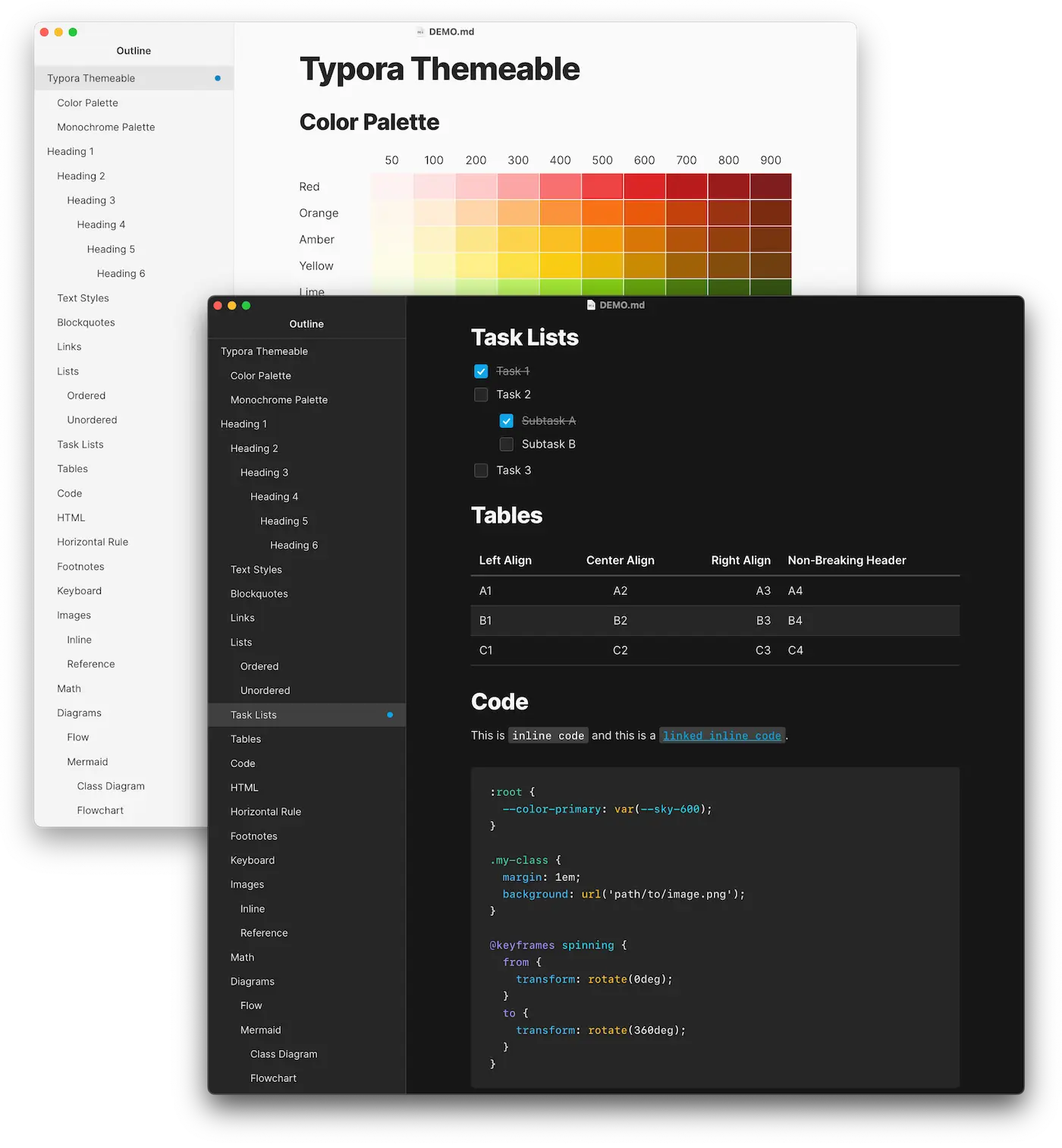
A clean, customizable, typography-focused theme for the markdown editor, [Typora](https://typora.io).

<figure>
  <picture>
    <source srcset="assets/img/screenshot-dark.webp" width="700" media="(prefers-color-scheme:dark)">
    <img src="assets/img/screenshot-light.webp" width="700" alt="">
  </picture>
  <figcaption>Light and dark theme examples</figcaption>
</figure>

## Features

- Fast and flexible customization using CSS custom properties
- Light, dark, and auto-switching light/dark mode theme variants
- Based on the [Inter](https://rsms.me/inter/) typeface family and the [Tailwind CSS](https://tailwindcss.com/docs/customizing-colors) color palette
- Compatible with all Typora platforms (macOS, Windows, Linux)

## Screenshots

The screenshot below illustrates how Typora Themeable renders various markdown elements. The markdown document used to create this screenshot is included with Typora Themeable.

<figure>
  <picture class="screenshot-scroll">
    <source srcset="assets/img/screenshot-dark-full.jpg" width="871" media="(prefers-color-scheme:dark)">
    <img src="assets/img/screenshot-light-full.jpg" width="872" loading="lazy" alt="">
  </picture>
  <figcaption>Typora Themeable markdown demo</figcaption>
</figure>

## Installation

1. Download the latest [release](https://github.com/jhildenbiddle/typora-themeable/releases) of Typora Themeable: <a href="https://github.com/jhildenbiddle/typora-themeable/releases/latest/download/typora-themeable.zip" download>typora-themeable.zip</a>
2. Extract files from the ZIP archive
3. Open Typora's `themes` directory:
   - Open Typora's preferences
   - Select **Appearance**
   - Click **Open Theme Folder**
4. Copy the extracted files (including the `themeable` directory) into Typora's `themes` directory
5. Delete the ZIP archive
6. Restart Typora
7. Select a **Themeable** theme  from Typora's **Preferences** or **Themes** menu

Alternatively, command line users can perform the same download, extract, copy, and delete actions in a single step using one of the following commands:

<!-- tabs:start -->

#### **macOS**

```shell
cd ~/Library/Application\ Support/abnerworks.Typora/themes/ \
  && curl -L https://github.com/jhildenbiddle/typora-themeable/releases/latest/download/typora-themeable.zip -o typora-themeable.zip \
  && unzip typora-themeable.zip \
  && rm typora-themeable.zip \
  && echo "\nInstallation complete. Please restart Typora."
```

#### **Windows**

Command Prompt:

```shell
cd /d "%USERPROFILE%\AppData\Roaming\Typora\themes" ^
  && curl -L https://github.com/jhildenbiddle/typora-themeable/releases/latest/download/typora-themeable.zip -o typora-themeable.zip ^
  && tar -xf typora-themeable.zip ^
  && del typora-themeable.zip ^
  && echo. && echo Installation complete. Please restart Typora.
```

Powershell:

```shell
cd ~\AppData\Roaming\Typora\themes;
if ($?) { curl https://github.com/jhildenbiddle/typora-themeable/releases/latest/download/typora-themeable.zip -o typora-themeable.zip };
if ($?) { tar -xf typora-themeable.zip };
if ($?) { rm typora-themeable.zip };
if ($?) { echo "`nInstallation complete. Please restart Typora.`n" };
```

#### **Linux**

If Typora was [installed](https://support.typora.io/Typora-on-Linux/) via `apt-get`:

```shell
cd ~/.config/Typora/themes/ \
  && curl -L https://github.com/jhildenbiddle/typora-themeable/releases/latest/download/typora-themeable.zip -o typora-themeable.zip \
  && unzip typora-themeable.zip \
  && rm typora-themeable.zip \
  && echo -e "\nInstallation complete. Please restart Typora.\n"
```

If Typora was [installed](https://support.typora.io/Snap/#limitations-for-the-snap-version) via `snap`:

```shell
cd ~/snap/typora/current/.config/Typora/themes/ \
  && curl -L https://github.com/jhildenbiddle/typora-themeable/releases/latest/download/typora-themeable.zip -o typora-themeable.zip \
  && unzip typora-themeable.zip \
  && rm typora-themeable.zip \
  && echo -e "\nInstallation complete. Please restart Typora.\n"
```

<!-- tabs:end -->

!> **Don't forget to update Typora Themeable!**<br>Typora currently does not auto-update third-party themes when new versions are released. To ensure you are running the latest version of Typora Themeable, check this site periodically or follow **@jhildenbiddle** on [Twitter](https://twitter.com/jhildenbiddle) or [GitHub](https://github.com/jhildenbiddle) for update notifications.

## Customization

### Setup

Typora provides built-in support for custom theme styles using a `[theme].user.css` stylesheet. This stylesheet is automatically loaded *after* the `[theme].css` stylesheet, allowing custom styles to be stored separately from and without modification to a theme's CSS (see [official documentation](https://support.typora.io/Add-Custom-CSS/) for details).

1. Add a `[theme].user.css` stylesheet in Typora's theme directory:
   - For **Themeable**, create or download <a href="data:text/plain;charset=utf-8,%3Aroot%20%7B%0A%0A%7D%0A%0A%2F%2A%20Dark%20Mode%20%28OS-level%29%20%2A%2F%0A%40media%20screen%20and%20%28prefers-color-scheme%3A%20dark%29%20%7B%0A%20%20%3Aroot%20%7B%0A%0A%20%20%7D%0A%7D" download="themeable.user.css" title="Download CSS">themeable.user.css</a>
   - For **Themeable Dark**, create or download <a href="data:text/plain;charset=utf-8,%3Aroot%20%7B%0A%0A%7D%0A%0A%2F%2A%20Dark%20Mode%20%28OS-level%29%20%2A%2F%0A%40media%20screen%20and%20%28prefers-color-scheme%3A%20dark%29%20%7B%0A%20%20%3Aroot%20%7B%0A%0A%20%20%7D%0A%7D" download="themeable-dark.user.css" title="Download CSS">themeable-dark.user.css</a>
   - For **Themeable Light**, create or download <a href="data:text/plain;charset=utf-8,%3Aroot%20%7B%0A%0A%7D%0A%0A%2F%2A%20Dark%20Mode%20%28OS-level%29%20%2A%2F%0A%40media%20screen%20and%20%28prefers-color-scheme%3A%20dark%29%20%7B%0A%20%20%3Aroot%20%7B%0A%0A%20%20%7D%0A%7D" download="themeable-light.user.css" title="Download CSS">themeable-light.user.css</a>
2. Review the [Color Palette](#color-palette) and [Theme Properties](#theme-properties) sections below.
3. Set custom values within the `:root` selector. These values will be applied regardless of the operating system's light/dark mode setting.

   ```css
   :root {
     --color-primary: var(--pink-500);
   }
   ```

4. Custom styles that should only be applied in dark mode must be nested within the corresponding `@media` rule:

   ```css
   /* Dark Mode (OS-level) */
   @media screen and (prefers-color-scheme: dark) {
     :root {
         --color-primary: var(--violet-500);
     }
   }
   ```

5. Note that because this is a standard stylesheet you are free to `@import` other stylesheets, declare `@font-face` rules, override theme declarations, and create new CSS rulesets as needed.

   ```css
   @import url('https://fonts.googleapis.com/css2?family=Fira+Code:wght@300;400;500;600;700&display=swap');

   :root {
     --font-family-mono: "Fira Code", monospace;
   }
   ```

### Add-ons

Theme add-ons are stylesheets that contain ready-to-use styles for Typora Themeable. Add-ons are applied using a CSS `@import` rule within your `[theme].user.css` stylesheet (see [Setup](#setup) for details).

?> Do you have a new add-on that you'd like to share? Add-on [contributions](https://github.com/jhildenbiddle/typora-themeable/pulls) are welcome!

- **Material Design**: Dark syntax highlighting theme

  ```css
  @import "themeable/addons/code-material.css";
  ```

- **Mermaid:** Typora Themeable color palette applied to Mermaid diagrams (work-in-progress)

  ```css
  @import "themeable/addons/mermaid.css";
  ```

### Color Palette

Typora Themeable's color palette is based on the same [palette](https://tailwindcss.com/docs/customizing-colors) provided by [Tailwind CSS](https://tailwindcss.com). Color property names are based on the color name followed by a numeric value based on a color range ordered from light to dark (where 50 is light and 900 is dark):

<div class="swatch-grid">
  <div></div>
  <div>50</div>
  <div>100</div>
  <div>200</div>
  <div>300</div>
  <div>400</div>
  <div>500</div>
  <div>600</div>
  <div>700</div>
  <div>800</div>
  <div>900</div>
  <div>Blue</div>
  <div style="background: var(--blue-50);" title="Blue 50"></div>
  <div style="background: var(--blue-100);" title="Blue 100"></div>
  <div style="background: var(--blue-200);" title="Blue 200"></div>
  <div style="background: var(--blue-300);" title="Blue 300"></div>
  <div style="background: var(--blue-400);" title="Blue 400"></div>
  <div style="background: var(--blue-500);" title="Blue 500"></div>
  <div style="background: var(--blue-600);" title="Blue 600"></div>
  <div style="background: var(--blue-700);" title="Blue 700"></div>
  <div style="background: var(--blue-800);" title="Blue 800"></div>
  <div style="background: var(--blue-900);" title="Blue 900"></div>
</div>

In dark mode or when using the **Themeable Dark** variant, monochrome color ranges are reversed causing them to be ordered from dark to light (where 50 is dark and 900 is light). This allows monochrome tints and shades to auto-adjust to their light/dark environment.

<div class="swatch-grid" style="padding: 0 0.5em 0.5em 1em; background: #fff; color: #404040;">
  <div style="min-width: 12ch;"></div>
  <div>50</div>
  <div>100</div>
  <div>200</div>
  <div>300</div>
  <div>400</div>
  <div>500</div>
  <div>600</div>
  <div>700</div>
  <div>800</div>
  <div>900</div>
  <div>Neutral (Light)</div>

  <div class="light-mode" style="background: var(--neutral-50);" title="Neutral 50"></div>
  <div class="light-mode" style="background: var(--neutral-100);" title="Neutral 100"></div>
  <div class="light-mode" style="background: var(--neutral-200);" title="Neutral 200"></div>
  <div class="light-mode" style="background: var(--neutral-300);" title="Neutral 300"></div>
  <div class="light-mode" style="background: var(--neutral-400);" title="Neutral 400"></div>
  <div class="light-mode" style="background: var(--neutral-500);" title="Neutral 500"></div>
  <div class="light-mode" style="background: var(--neutral-600);" title="Neutral 600"></div>
  <div class="light-mode" style="background: var(--neutral-700);" title="Neutral 700"></div>
  <div class="light-mode" style="background: var(--neutral-800);" title="Neutral 800"></div>
  <div class="light-mode" style="background: var(--neutral-900);" title="Neutral 900"></div>
  <div class="dark-mode" style="background: var(--neutral-900);" title="Neutral 50"></div>
  <div class="dark-mode" style="background: var(--neutral-800);" title="Neutral 100"></div>
  <div class="dark-mode" style="background: var(--neutral-700);" title="Neutral 200"></div>
  <div class="dark-mode" style="background: var(--neutral-600);" title="Neutral 300"></div>
  <div class="dark-mode" style="background: var(--neutral-500);" title="Neutral 400"></div>
  <div class="dark-mode" style="background: var(--neutral-400);" title="Neutral 500"></div>
  <div class="dark-mode" style="background: var(--neutral-300);" title="Neutral 600"></div>
  <div class="dark-mode" style="background: var(--neutral-200);" title="Neutral 700"></div>
  <div class="dark-mode" style="background: var(--neutral-100);" title="Neutral 800"></div>
  <div class="dark-mode" style="background: var(--neutral-50);" title="Neutral 900"></div>
</div>

<div class="swatch-grid" style="padding: 0 0.5em 0.5em 1em; background: #000; color: #e7e5e4;">
  <div style="min-width: 12ch;"></div>
  <div>50</div>
  <div>100</div>
  <div>200</div>
  <div>300</div>
  <div>400</div>
  <div>500</div>
  <div>600</div>
  <div>700</div>
  <div>800</div>
  <div>900</div>
  <div>Neutral (Dark)</div>
  <div class="light-mode" style="background: var(--neutral-900);" title="Neutral 50"></div>
  <div class="light-mode" style="background: var(--neutral-800);" title="Neutral 100"></div>
  <div class="light-mode" style="background: var(--neutral-700);" title="Neutral 200"></div>
  <div class="light-mode" style="background: var(--neutral-600);" title="Neutral 300"></div>
  <div class="light-mode" style="background: var(--neutral-500);" title="Neutral 400"></div>
  <div class="light-mode" style="background: var(--neutral-400);" title="Neutral 500"></div>
  <div class="light-mode" style="background: var(--neutral-300);" title="Neutral 600"></div>
  <div class="light-mode" style="background: var(--neutral-200);" title="Neutral 700"></div>
  <div class="light-mode" style="background: var(--neutral-100);" title="Neutral 800"></div>
  <div class="light-mode" style="background: var(--neutral-50);" title="Neutral 900"></div>
  <div class="dark-mode" style="background: var(--neutral-50);" title="Neutral 50"></div>
  <div class="dark-mode" style="background: var(--neutral-100);" title="Neutral 100"></div>
  <div class="dark-mode" style="background: var(--neutral-200);" title="Neutral 200"></div>
  <div class="dark-mode" style="background: var(--neutral-300);" title="Neutral 300"></div>
  <div class="dark-mode" style="background: var(--neutral-400);" title="Neutral 400"></div>
  <div class="dark-mode" style="background: var(--neutral-500);" title="Neutral 500"></div>
  <div class="dark-mode" style="background: var(--neutral-600);" title="Neutral 600"></div>
  <div class="dark-mode" style="background: var(--neutral-700);" title="Neutral 700"></div>
  <div class="dark-mode" style="background: var(--neutral-800);" title="Neutral 800"></div>
  <div class="dark-mode" style="background: var(--neutral-900);" title="Neutral 900"></div>
</div>

```css
:root {
   /* Same color in light and dark mode */
   --color-primary: var(--blue-500);

   /* Lightest tint in light mode, darkest shade in dark mode */
   --background-color: var(--mono-50);
}
```

<!-- tabs:start -->

#### **Swatches**

<div class="swatch-grid">
  <div></div>
  <div>50</div>
  <div>100</div>
  <div>200</div>
  <div>300</div>
  <div>400</div>
  <div>500</div>
  <div>600</div>
  <div>700</div>
  <div>800</div>
  <div>900</div>
  <div>Red</div>
  <div style="background: var(--red-50);" title="Red 50"></div>
  <div style="background: var(--red-100);" title="Red 100"></div>
  <div style="background: var(--red-200);" title="Red 200"></div>
  <div style="background: var(--red-300);" title="Red 300"></div>
  <div style="background: var(--red-400);" title="Red 400"></div>
  <div style="background: var(--red-500);" title="Red 500"></div>
  <div style="background: var(--red-600);" title="Red 600"></div>
  <div style="background: var(--red-700);" title="Red 700"></div>
  <div style="background: var(--red-800);" title="Red 800"></div>
  <div style="background: var(--red-900);" title="Red 900"></div>
  <div>Orange</div>
  <div style="background: var(--orange-50);" title="Orange 50"></div>
  <div style="background: var(--orange-100);" title="Orange 100"></div>
  <div style="background: var(--orange-200);" title="Orange 200"></div>
  <div style="background: var(--orange-300);" title="Orange 300"></div>
  <div style="background: var(--orange-400);" title="Orange 400"></div>
  <div style="background: var(--orange-500);" title="Orange 500"></div>
  <div style="background: var(--orange-600);" title="Orange 600"></div>
  <div style="background: var(--orange-700);" title="Orange 700"></div>
  <div style="background: var(--orange-800);" title="Orange 800"></div>
  <div style="background: var(--orange-900);" title="Orange 900"></div>
  <div>Amber</div>
  <div style="background: var(--amber-50);" title="Amber 50"></div>
  <div style="background: var(--amber-100);" title="Amber 100"></div>
  <div style="background: var(--amber-200);" title="Amber 200"></div>
  <div style="background: var(--amber-300);" title="Amber 300"></div>
  <div style="background: var(--amber-400);" title="Amber 400"></div>
  <div style="background: var(--amber-500);" title="Amber 500"></div>
  <div style="background: var(--amber-600);" title="Amber 600"></div>
  <div style="background: var(--amber-700);" title="Amber 700"></div>
  <div style="background: var(--amber-800);" title="Amber 800"></div>
  <div style="background: var(--amber-900);" title="Amber 900"></div>
  <div>Yellow</div>
  <div style="background: var(--yellow-50);" title="Yellow 50"></div>
  <div style="background: var(--yellow-100);" title="Yellow 100"></div>
  <div style="background: var(--yellow-200);" title="Yellow 200"></div>
  <div style="background: var(--yellow-300);" title="Yellow 300"></div>
  <div style="background: var(--yellow-400);" title="Yellow 400"></div>
  <div style="background: var(--yellow-500);" title="Yellow 500"></div>
  <div style="background: var(--yellow-600);" title="Yellow 600"></div>
  <div style="background: var(--yellow-700);" title="Yellow 700"></div>
  <div style="background: var(--yellow-800);" title="Yellow 800"></div>
  <div style="background: var(--yellow-900);" title="Yellow 900"></div>
  <div>Lime</div>
  <div style="background: var(--lime-50);" title="Lime 50"></div>
  <div style="background: var(--lime-100);" title="Lime 100"></div>
  <div style="background: var(--lime-200);" title="Lime 200"></div>
  <div style="background: var(--lime-300);" title="Lime 300"></div>
  <div style="background: var(--lime-400);" title="Lime 400"></div>
  <div style="background: var(--lime-500);" title="Lime 500"></div>
  <div style="background: var(--lime-600);" title="Lime 600"></div>
  <div style="background: var(--lime-700);" title="Lime 700"></div>
  <div style="background: var(--lime-800);" title="Lime 800"></div>
  <div style="background: var(--lime-900);" title="Lime 900"></div>
  <div>Green</div>
  <div style="background: var(--green-50);" title="Green 50"></div>
  <div style="background: var(--green-100);" title="Green 100"></div>
  <div style="background: var(--green-200);" title="Green 200"></div>
  <div style="background: var(--green-300);" title="Green 300"></div>
  <div style="background: var(--green-400);" title="Green 400"></div>
  <div style="background: var(--green-500);" title="Green 500"></div>
  <div style="background: var(--green-600);" title="Green 600"></div>
  <div style="background: var(--green-700);" title="Green 700"></div>
  <div style="background: var(--green-800);" title="Green 800"></div>
  <div style="background: var(--green-900);" title="Green 900"></div>
  <div>Emerald</div>
  <div style="background: var(--emerald-50);" title="Emerald 50"></div>
  <div style="background: var(--emerald-100);" title="Emerald 100"></div>
  <div style="background: var(--emerald-200);" title="Emerald 200"></div>
  <div style="background: var(--emerald-300);" title="Emerald 300"></div>
  <div style="background: var(--emerald-400);" title="Emerald 400"></div>
  <div style="background: var(--emerald-500);" title="Emerald 500"></div>
  <div style="background: var(--emerald-600);" title="Emerald 600"></div>
  <div style="background: var(--emerald-700);" title="Emerald 700"></div>
  <div style="background: var(--emerald-800);" title="Emerald 800"></div>
  <div style="background: var(--emerald-900);" title="Emerald 900"></div>
  <div>Teal</div>
  <div style="background: var(--teal-50);" title="Teal 50"></div>
  <div style="background: var(--teal-100);" title="Teal 100"></div>
  <div style="background: var(--teal-200);" title="Teal 200"></div>
  <div style="background: var(--teal-300);" title="Teal 300"></div>
  <div style="background: var(--teal-400);" title="Teal 400"></div>
  <div style="background: var(--teal-500);" title="Teal 500"></div>
  <div style="background: var(--teal-600);" title="Teal 600"></div>
  <div style="background: var(--teal-700);" title="Teal 700"></div>
  <div style="background: var(--teal-800);" title="Teal 800"></div>
  <div style="background: var(--teal-900);" title="Teal 900"></div>
  <div>Cyan</div>
  <div style="background: var(--cyan-50);" title="Cyan 50"></div>
  <div style="background: var(--cyan-100);" title="Cyan 100"></div>
  <div style="background: var(--cyan-200);" title="Cyan 200"></div>
  <div style="background: var(--cyan-300);" title="Cyan 300"></div>
  <div style="background: var(--cyan-400);" title="Cyan 400"></div>
  <div style="background: var(--cyan-500);" title="Cyan 500"></div>
  <div style="background: var(--cyan-600);" title="Cyan 600"></div>
  <div style="background: var(--cyan-700);" title="Cyan 700"></div>
  <div style="background: var(--cyan-800);" title="Cyan 800"></div>
  <div style="background: var(--cyan-900);" title="Cyan 900"></div>
  <div>Sky</div>
  <div style="background: var(--sky-50);" title="Sky 50"></div>
  <div style="background: var(--sky-100);" title="Sky 100"></div>
  <div style="background: var(--sky-200);" title="Sky 200"></div>
  <div style="background: var(--sky-300);" title="Sky 300"></div>
  <div style="background: var(--sky-400);" title="Sky 400"></div>
  <div style="background: var(--sky-500);" title="Sky 500"></div>
  <div style="background: var(--sky-600);" title="Sky 600"></div>
  <div style="background: var(--sky-700);" title="Sky 700"></div>
  <div style="background: var(--sky-800);" title="Sky 800"></div>
  <div style="background: var(--sky-900);" title="Sky 900"></div>
  <div>Blue</div>
  <div style="background: var(--blue-50);" title="Blue 50"></div>
  <div style="background: var(--blue-100);" title="Blue 100"></div>
  <div style="background: var(--blue-200);" title="Blue 200"></div>
  <div style="background: var(--blue-300);" title="Blue 300"></div>
  <div style="background: var(--blue-400);" title="Blue 400"></div>
  <div style="background: var(--blue-500);" title="Blue 500"></div>
  <div style="background: var(--blue-600);" title="Blue 600"></div>
  <div style="background: var(--blue-700);" title="Blue 700"></div>
  <div style="background: var(--blue-800);" title="Blue 800"></div>
  <div style="background: var(--blue-900);" title="Blue 900"></div>
  <div>Indigo</div>
  <div style="background: var(--indigo-50);" title="Indigo 50"></div>
  <div style="background: var(--indigo-100);" title="Indigo 100"></div>
  <div style="background: var(--indigo-200);" title="Indigo 200"></div>
  <div style="background: var(--indigo-300);" title="Indigo 300"></div>
  <div style="background: var(--indigo-400);" title="Indigo 400"></div>
  <div style="background: var(--indigo-500);" title="Indigo 500"></div>
  <div style="background: var(--indigo-600);" title="Indigo 600"></div>
  <div style="background: var(--indigo-700);" title="Indigo 700"></div>
  <div style="background: var(--indigo-800);" title="Indigo 800"></div>
  <div style="background: var(--indigo-900);" title="Indigo 900"></div>
  <div>Violet</div>
  <div style="background: var(--violet-50);" title="Violet 50"></div>
  <div style="background: var(--violet-100);" title="Violet 100"></div>
  <div style="background: var(--violet-200);" title="Violet 200"></div>
  <div style="background: var(--violet-300);" title="Violet 300"></div>
  <div style="background: var(--violet-400);" title="Violet 400"></div>
  <div style="background: var(--violet-500);" title="Violet 500"></div>
  <div style="background: var(--violet-600);" title="Violet 600"></div>
  <div style="background: var(--violet-700);" title="Violet 700"></div>
  <div style="background: var(--violet-800);" title="Violet 800"></div>
  <div style="background: var(--violet-900);" title="Violet 900"></div>
  <div>Purple</div>
  <div style="background: var(--purple-50);" title="Purple 50"></div>
  <div style="background: var(--purple-100);" title="Purple 100"></div>
  <div style="background: var(--purple-200);" title="Purple 200"></div>
  <div style="background: var(--purple-300);" title="Purple 300"></div>
  <div style="background: var(--purple-400);" title="Purple 400"></div>
  <div style="background: var(--purple-500);" title="Purple 500"></div>
  <div style="background: var(--purple-600);" title="Purple 600"></div>
  <div style="background: var(--purple-700);" title="Purple 700"></div>
  <div style="background: var(--purple-800);" title="Purple 800"></div>
  <div style="background: var(--purple-900);" title="Purple 900"></div>
  <div>Fuchsia</div>
  <div style="background: var(--fuchsia-50);" title="Fuchsia 50"></div>
  <div style="background: var(--fuchsia-100);" title="Fuchsia 100"></div>
  <div style="background: var(--fuchsia-200);" title="Fuchsia 200"></div>
  <div style="background: var(--fuchsia-300);" title="Fuchsia 300"></div>
  <div style="background: var(--fuchsia-400);" title="Fuchsia 400"></div>
  <div style="background: var(--fuchsia-500);" title="Fuchsia 500"></div>
  <div style="background: var(--fuchsia-600);" title="Fuchsia 600"></div>
  <div style="background: var(--fuchsia-700);" title="Fuchsia 700"></div>
  <div style="background: var(--fuchsia-800);" title="Fuchsia 800"></div>
  <div style="background: var(--fuchsia-900);" title="Fuchsia 900"></div>
  <div>Pink</div>
  <div style="background: var(--pink-50);" title="Pink 50"></div>
  <div style="background: var(--pink-100);" title="Pink 100"></div>
  <div style="background: var(--pink-200);" title="Pink 200"></div>
  <div style="background: var(--pink-300);" title="Pink 300"></div>
  <div style="background: var(--pink-400);" title="Pink 400"></div>
  <div style="background: var(--pink-500);" title="Pink 500"></div>
  <div style="background: var(--pink-600);" title="Pink 600"></div>
  <div style="background: var(--pink-700);" title="Pink 700"></div>
  <div style="background: var(--pink-800);" title="Pink 800"></div>
  <div style="background: var(--pink-900);" title="Pink 900"></div>
  <div>Rose</div>
  <div style="background: var(--rose-50);" title="Rose 50"></div>
  <div style="background: var(--rose-100);" title="Rose 100"></div>
  <div style="background: var(--rose-200);" title="Rose 200"></div>
  <div style="background: var(--rose-300);" title="Rose 300"></div>
  <div style="background: var(--rose-400);" title="Rose 400"></div>
  <div style="background: var(--rose-500);" title="Rose 500"></div>
  <div style="background: var(--rose-600);" title="Rose 600"></div>
  <div style="background: var(--rose-700);" title="Rose 700"></div>
  <div style="background: var(--rose-800);" title="Rose 800"></div>
  <div style="background: var(--rose-900);" title="Rose 900"></div>
</div>

#### Monochrome

<div class="swatch-grid">
  <div></div>
  <div>50</div>
  <div>100</div>
  <div>200</div>
  <div>300</div>
  <div>400</div>
  <div>500</div>
  <div>600</div>
  <div>700</div>
  <div>800</div>
  <div>900</div>
  <div>Slate</div>
  <div style="background: var(--slate-50);" title="Slate 50"></div>
  <div style="background: var(--slate-100);" title="Slate 100"></div>
  <div style="background: var(--slate-200);" title="Slate 200"></div>
  <div style="background: var(--slate-300);" title="Slate 300"></div>
  <div style="background: var(--slate-400);" title="Slate 400"></div>
  <div style="background: var(--slate-500);" title="Slate 500"></div>
  <div style="background: var(--slate-600);" title="Slate 600"></div>
  <div style="background: var(--slate-700);" title="Slate 700"></div>
  <div style="background: var(--slate-800);" title="Slate 800"></div>
  <div style="background: var(--slate-900);" title="Slate 900"></div>
  <div>Gray</div>
  <div style="background: var(--gray-50);" title="Gray 50"></div>
  <div style="background: var(--gray-100);" title="Gray 100"></div>
  <div style="background: var(--gray-200);" title="Gray 200"></div>
  <div style="background: var(--gray-300);" title="Gray 300"></div>
  <div style="background: var(--gray-400);" title="Gray 400"></div>
  <div style="background: var(--gray-500);" title="Gray 500"></div>
  <div style="background: var(--gray-600);" title="Gray 600"></div>
  <div style="background: var(--gray-700);" title="Gray 700"></div>
  <div style="background: var(--gray-800);" title="Gray 800"></div>
  <div style="background: var(--gray-900);" title="Gray 900"></div>
  <div>Zinc</div>
  <div style="background: var(--zinc-50);" title="Zinc 50"></div>
  <div style="background: var(--zinc-100);" title="Zinc 100"></div>
  <div style="background: var(--zinc-200);" title="Zinc 200"></div>
  <div style="background: var(--zinc-300);" title="Zinc 300"></div>
  <div style="background: var(--zinc-400);" title="Zinc 400"></div>
  <div style="background: var(--zinc-500);" title="Zinc 500"></div>
  <div style="background: var(--zinc-600);" title="Zinc 600"></div>
  <div style="background: var(--zinc-700);" title="Zinc 700"></div>
  <div style="background: var(--zinc-800);" title="Zinc 800"></div>
  <div style="background: var(--zinc-900);" title="Zinc 900"></div>
  <div>Neutral</div>
  <div style="background: var(--neutral-50);" title="Neutral 50"></div>
  <div style="background: var(--neutral-100);" title="Neutral 100"></div>
  <div style="background: var(--neutral-200);" title="Neutral 200"></div>
  <div style="background: var(--neutral-300);" title="Neutral 300"></div>
  <div style="background: var(--neutral-400);" title="Neutral 400"></div>
  <div style="background: var(--neutral-500);" title="Neutral 500"></div>
  <div style="background: var(--neutral-600);" title="Neutral 600"></div>
  <div style="background: var(--neutral-700);" title="Neutral 700"></div>
  <div style="background: var(--neutral-800);" title="Neutral 800"></div>
  <div style="background: var(--neutral-900);" title="Neutral 900"></div>
  <div>Stone</div>
  <div style="background: var(--stone-50);" title="Stone 50"></div>
  <div style="background: var(--stone-100);" title="Stone 100"></div>
  <div style="background: var(--stone-200);" title="Stone 200"></div>
  <div style="background: var(--stone-300);" title="Stone 300"></div>
  <div style="background: var(--stone-400);" title="Stone 400"></div>
  <div style="background: var(--stone-500);" title="Stone 500"></div>
  <div style="background: var(--stone-600);" title="Stone 600"></div>
  <div style="background: var(--stone-700);" title="Stone 700"></div>
  <div style="background: var(--stone-800);" title="Stone 800"></div>
  <div style="background: var(--stone-900);" title="Stone 900"></div>
</div>

#### **CSS**

[vars-palette.css](https://cdn.jsdelivr.net/gh/jhildenbiddle/typora-themeable/src/core/vars-palette.css ':include')

**Dark Mode / Themeable Dark**

[vars-palette-dark.css](https://cdn.jsdelivr.net/gh/jhildenbiddle/typora-themeable/src/core/vars-palette-dark.css ':include')

<!-- tabs:end -->

### Theme Properties

Typora Themeable offers customizable theme properties defined using [CSS custom properties](https://jhildenbiddle.github.io/docsify-themeable/#/customization). These properties allow style changes to be made without the need to navigate and modify complex CSS.

The following CSS represents a complete list of available theme properties. The values shown are those applied in light mode or when using the **Themeable Light** variant.

[vars-theme.css](https://cdn.jsdelivr.net/gh/jhildenbiddle/typora-themeable/src/core/vars-theme.css ':include')

**Dark Mode / Themeable Dark**

The following CSS contains the modified theme properties that are applied in dark mode or when using the **Themeable Dark** variant.

[vars-theme.css](https://cdn.jsdelivr.net/gh/jhildenbiddle/typora-themeable/src/core/vars-theme-dark.css ':include')

## Sponsorship

A [sponsorship](https://github.com/sponsors/jhildenbiddle) is more than just a way to show appreciation for the open-source authors and projects we rely on; it can be the spark that ignites the next big idea, the inspiration to create something new, and the motivation to share so that others may benefit.

If you benefit from this project, please consider lending your support and encouraging future efforts by [becoming a sponsor](https://github.com/sponsors/jhildenbiddle).

Thank you! 🙏🏻

<iframe src="https://github.com/sponsors/jhildenbiddle/button" title="Sponsor jhildenbiddle" height="35" width="116" style="border: 0; margin: 0;"></iframe>

## Contact & Support

- Follow 👨🏻‍💻 **@jhildenbiddle** on [Twitter](https://twitter.com/jhildenbiddle) and [GitHub](https://github.com/jhildenbiddle) for announcements
- Create a 💬 [GitHub issue](https://github.com/jhildenbiddle/typora-themeable/issues) for bug reports, feature requests, or questions
- Add a ⭐️ [star on GitHub](https://github.com/jhildenbiddle/typora-themeable) and 🐦 [tweet](https://twitter.com/intent/tweet?url=https%3A%2F%2Fgithub.com%2Fjhildenbiddle%2Ftypora-themeable&hashtags=typora,markdown,css,developers) to promote the project
- Become a 💖 [sponsor](https://github.com/sponsors/jhildenbiddle) to support the project and future efforts

## License

This project is licensed under the MIT License. See the [LICENSE](https://github.com/jhildenbiddle/typora-themeable/blob/master/LICENSE) for details.

Copyright (c) John Hildenbiddle ([@jhildenbiddle](https://twitter.com/jhildenbiddle))