# AccessibleWeb Widget

[![npm](https://img.shields.io/npm/v/accessible-web-widget)](https://www.npmjs.com/package/accessible-web-widget)
[![jsDelivr hits](https://img.shields.io/jsdelivr/gh/hm/ifrederico/accessible-web-widget)](https://www.jsdelivr.com/package/gh/ifrederico/accessible-web-widget)

[![CI](https://github.com/ifrederico/accessible-web-widget/actions/workflows/ci.yml/badge.svg)](https://github.com/ifrederico/accessible-web-widget/actions/workflows/ci.yml)
[![license](https://img.shields.io/npm/l/accessible-web-widget)](LICENSE)

Most accessibility overlays promise to magically fix your site. This isn't that.

This is a small floating panel that gives your visitors controls they actually want — font sizing, contrast modes, a dyslexia-friendly font, animation pausing, text-to-speech, and more, in 54 languages. Think of it as the browser's built-in accessibility settings, just easier to find.

Real accessibility means semantic HTML, proper ARIA, keyboard navigation, and alt text baked into your code. No widget replaces that work. We support the [Overlay Factsheet](https://overlayfactsheet.com/) and built this as a complement, not a substitute. To find the issues actually worth fixing, run the companion [Accessible Web Scanner](https://github.com/ifrederico/accessible-web-scanner) over your sitemap.

<p align="center">
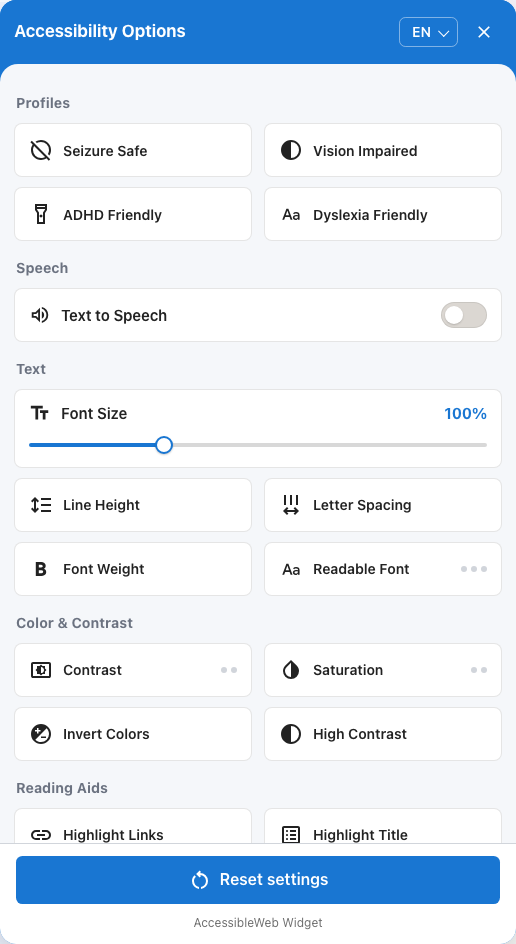
  <img src="docs/media/menu.png" width="380" alt="The widget panel: accessibility profiles, text-to-speech, font size, contrast, and reading controls">
</p>

**[See the demo →](https://accessibleweb.pages.dev/)**

> **⚠️** This widget does not guarantee compliance with WCAG, ADA, Section 508, or any other standard. See the full [DISCLAIMER](DISCLAIMER.md).

## Quick start

Drop this into your HTML and you're done:

```html
<script src="https://cdn.jsdelivr.net/gh/ifrederico/accessible-web-widget@latest/dist/accessible-web-widget.min.js"></script>
```

It initializes on page load. No config needed.

For production, pin a specific version — `@latest` ships new releases to your site without review:

```html
<script src="https://cdn.jsdelivr.net/gh/ifrederico/accessible-web-widget@1.6.0/dist/accessible-web-widget.min.js"></script>
```

Also on npm for bundler setups:

```bash
npm install accessible-web-widget
```

```js
import 'accessible-web-widget'; // auto-initializes, same as the script tag
```

Or self-host — just download `dist/accessible-web-widget.min.js` and serve it yourself.

## What you get

- **Profiles** — One-tap presets: Seizure Safe, Vision Impaired, ADHD Friendly, Dyslexia Friendly
- **Text** — Font size, bold, line height, letter spacing, readable font
- **Color** — Contrast (light/dark), invert, saturation controls, high contrast
- **Reading** — readable fonts (OpenDyslexic, Atkinson Hyperlegible, Lexend), reading guide, link/title highlighting, reader mode, text-to-speech, text magnifier, page structure navigator (headings/landmarks/links)
- **Interaction** — Large cursor, pause animations (including videos and animated GIFs), hide images, mute sounds

Plus: 54 languages (including RTL Arabic, Hebrew, Persian, and Urdu), persistent settings, system preference detection (`prefers-reduced-motion`, `prefers-contrast`), screen-reader announcements for every toggle, keyboard accessible, and mobile friendly. The widget UI lives in a shadow root, so your site's CSS can't break it and its styles can't leak into your page.

Platform wrappers for WordPress and Shopify live in [`platforms/`](platforms/).

## Configuration

Everything below is optional. The widget works with zero config.

### Position, size, and language

```html
<div data-acc-position="bottom-right"></div>  <!-- bottom-right (default) | bottom-left | top-left | top-right -->
<div data-acc-offset="24,24"></div>           <!-- x, y in pixels -->
<div data-acc-size="44"></div>                <!-- px, rem, or any CSS unit -->
<div data-acc-lang="en"></div>
<div data-acc-icon="default"></div>           <!-- default | icon-2 | icon-3 | icon-4 -->
```

Language resolves in this order: the visitor's own pick in the widget menu → `data-acc-lang` / `options.lang` → the page's `<html lang>` → the browser language → English.

### Hide the button, open the panel from your own UI

If you already have a toolbar or footer link for accessibility, hide the floating button and drive the panel yourself:

```html
<script src="…/accessible-web-widget.min.js" data-acc-hide-button="true" defer></script>

<button type="button" onclick="AccessibleWebWidget.instance.open()">Accessibility options</button>
```

`AccessibleWebWidget.instance` exposes `open()`, `close()`, and `toggle()`. They also work with the default button visible.

### Content Security Policy

In modern browsers the widget works under a strict CSP with no configuration — styles are applied through constructable stylesheets, which `style-src` doesn't block. For older browsers, pass your page's nonce so the `<style>`-element fallback is allowed. The widget picks it up automatically from its own script tag's `nonce` attribute, or you can pass it explicitly:

```html
<script nonce="YOUR_NONCE" src="…/accessible-web-widget.min.js" defer></script>
<!-- or: data-acc-nonce="YOUR_NONCE" / window.AccessibleWebWidgetOptions = { nonce: "YOUR_NONCE" } -->
```

If your policy locks down remote requests, also allow `font-src https://accessibleweb.pages.dev` for the dyslexia font (or self-host it via `dyslexiaFontUrl`), and — dev mode only — `script-src https://cdn.jsdelivr.net` for axe-core.

### Text-to-speech voices

TTS uses native browser voices. When enabled, visitors click any text block to hear it read aloud.

```html
<script>
  window.AccessibleWebWidgetOptions = {
    ttsNativeVoiceName: "Samantha",  // best-effort match
    ttsNativeVoiceLang: "en-US",
    ttsRate: 1.0,                    // 0.5 – 2.0
    ttsPitch: 1.0                    // 0 – 2.0
  };
</script>
```

### Readable font sources

The "Readable Font" control cycles through three fonts — OpenDyslexic, Atkinson Hyperlegible, and Lexend — loaded from accessibleweb.pages.dev by default (all three are SIL OFL licensed). To self-host any of them, point the widget at your own copies:

```html
<script>
  window.AccessibleWebWidgetOptions = {
    readableFontUrls: {
      dyslexic: "/fonts/OpenDyslexic3-Regular.woff",
      legible: "/fonts/AtkinsonHyperlegible-Regular.woff2",
      lexend: "/fonts/Lexend-Regular.woff2"
    }
    // dyslexiaFontUrl: "..." still works as a shorthand for the dyslexic entry
  };
</script>
```

### Dev tools

Add `?acc-dev=true` to any page URL to get inline annotation markers and a full accessibility report powered by axe-core. Useful for development, not meant for production.

The audit engine (axe-core) loads from the jsDelivr CDN by default, pinned to a specific version with subresource integrity. To self-host it instead:

```html
<script>
  window.AccessibleWebWidgetOptions = {
    axeCoreUrl: "/js/axe.min.js",        // absolute or relative URL
    axeCoreIntegrity: ""                 // optional SRI hash for your copy
  };
</script>
```

## Browser support

Chrome/Edge 88+, Firefox 78+, Safari 14+, iOS Safari 14+, Chrome for Android.

## Contributing

Want to help? See [CONTRIBUTING.md](CONTRIBUTING.md) for setup, testing, and how to submit a PR.

## Bugs

[Open an issue](https://github.com/ifrederico/accessible-web-widget/issues) — include your browser/version, repro steps, expected vs. actual behavior, and screenshots if you can.

## License

MIT — see [LICENSE](LICENSE).

## Acknowledgments

- Icons: [Google Material Icons](https://fonts.google.com/icons)
- Fonts: [OpenDyslexic](https://opendyslexic.org/) by Abbie Gonzalez, [Atkinson Hyperlegible](https://brailleinstitute.org/freefont) by the Braille Institute, [Lexend](https://www.lexend.com/) by the Lexend Project