<p align="center">
  <picture>
    <source media="(prefers-color-scheme: dark)" srcset="https://raw.githubusercontent.com/iamgio/quarkdown/project-files/images/tbanner-light.svg">
    <source media="(prefers-color-scheme: light)" srcset="https://raw.githubusercontent.com/iamgio/quarkdown/project-files/images/tbanner-dark.svg">
    <img alt="Quarkdown banner" src="https://github.com/user-attachments/assets/68dfb3bf-9466-44f3-b220-7067322c4887">
  </picture>
  <br>
  <a href="https://quarkdown.com/wiki"><img alt="Wiki" src="https://img.shields.io/badge/wiki-read-darkcyan"></a>
  <a href="https://quarkdown.com/docs"><img alt="Docs" src="https://img.shields.io/badge/docs-read-blue"></a>
  <a href="https://github.com/iamgio/quarkdown/releases/latest"><img alt="Release" src="https://img.shields.io/github/v/release/iamgio/quarkdown?color=mediumseagreen"></a>
  <a href="https://marketplace.visualstudio.com/items?itemName=quarkdown.quarkdown-vscode"><img alt="Visual Studio Code Extension Version" src="https://img.shields.io/github/v/release/quarkdown-labs/quarkdown-vscode?color=blue&label=vscode"></a>
  <a href="https://pinterest.github.io/ktlint"><img alt="FMT: Ktlint" src="https://img.shields.io/badge/fmt-ktlint-7f52ff?logo=kotlin&logoColor=f5f5f5"></a>
  <a href="https://www.codefactor.io/repository/github/iamgio/quarkdown"><img alt="CodeFactor" src="https://www.codefactor.io/repository/github/iamgio/quarkdown/badge/main"></a>
  <br><br>
  <a href="https://trendshift.io/repositories/13945" target="_blank"><img src="https://trendshift.io/api/badge/repositories/13945" alt="iamgio%2Fquarkdown | Trendshift" style="width: 250px; height: 55px;" width="250" height="55"/></a>
  <br>
  <a href="https://www.producthunt.com/products/quarkdown?embed=true&amp;utm_source=badge-featured&amp;utm_medium=badge&amp;utm_campaign=badge-quarkdown" target="_blank" rel="noopener noreferrer"><img alt="Quarkdown - Markdown with superpowers: from ideas to stunning documents. | Product Hunt" width="250" height="54" src="https://api.producthunt.com/widgets/embed-image/v1/featured.svg?post_id=1130470&amp;theme=light&amp;t=1777150043744"></a>
  <br>
</p>

  <p align="center">
  <strong>Releases</strong>
  <br>
  <a href="https://github.com/iamgio/quarkdown/releases/tag/latest">Latest</a>
  &nbsp; | &nbsp;
  <strong><a href="https://github.com/iamgio/quarkdown/releases/latest">Stable</a></strong>&nbsp;
  <br>
  <hr>
</p>

# Table of contents

1. [About](#about)
2. [Demo](#as-simple-as-you-expect)
3. [Targets](#targets)
4. [Comparison](#comparison)
5. [Getting started](#getting-started)
    1. [Installation](#installation)
    2. [Quickstart](#quickstart-)
    3. [Creating a project](#creating-a-project)
    4. [Compiling](#compiling)
6. [Mock document](#mock-document)
7. [Contributing](#contributing)
8. [Sponsors](#sponsors)
9. [Concept](#concept)
10. [License](#license)

&nbsp;

# About

Quarkdown is a modern Markdown-based typesetting system designed for **versatility**. It allows a single project to compile seamlessly into a print-ready book, academic paper, knowledge base, or interactive presentation.
All through an incredibly powerful Turing-complete extension of Markdown, ensuring your ideas flow automatically into paper.

&nbsp;

<p align="center">
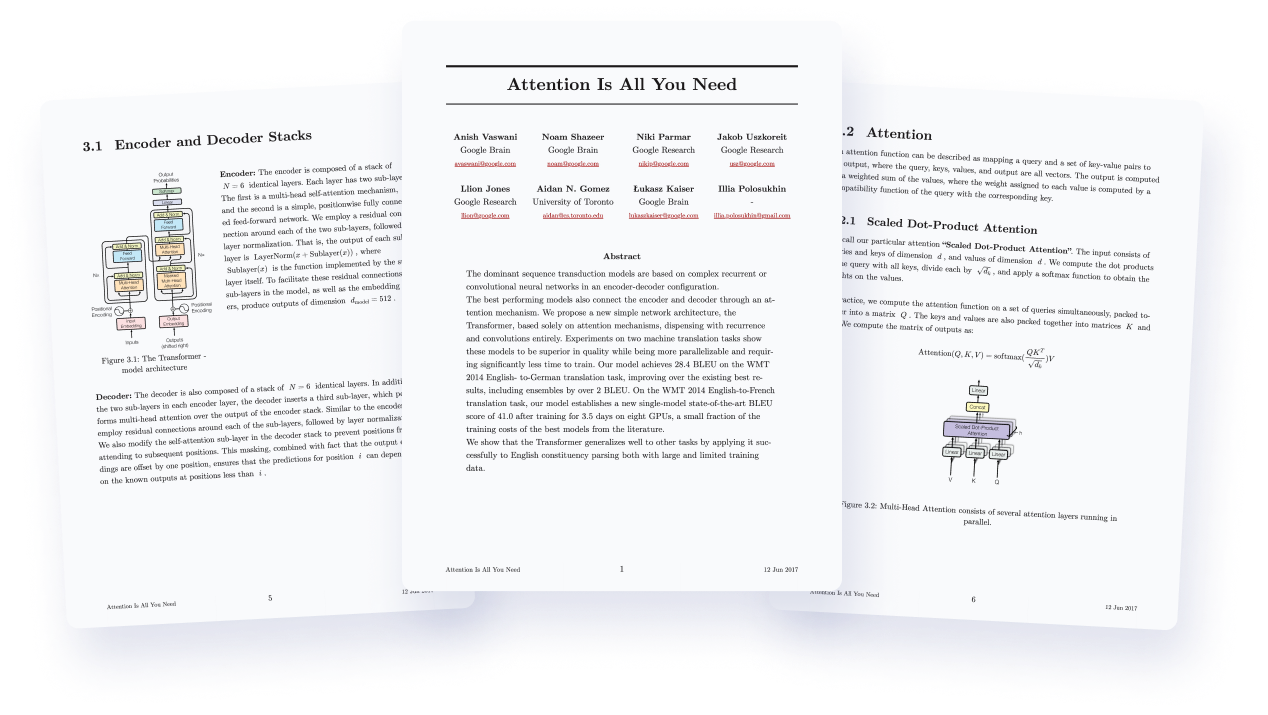
  <img src="https://raw.githubusercontent.com/iamgio/quarkdown/project-files/images/paged-demo.png" alt="Paper demo">
  <p align="center"><em>Original credits: <a href="https://arxiv.org/abs/1706.03762v7">Attention Is All You Need</a></em></p>
</p>

<br>

Born as an extension of CommonMark and GFM, the Quarkdown Flavor brings **functions** to Markdown, along with many other syntax extensions.

<br>

> This is a function call:
> ```
> .somefunction {arg1} {arg2}
>     Body argument
> ```

<br>

**Possibilities are unlimited** thanks to an ever-expanding [standard library](quarkdown-stdlib/src/main/kotlin/com/quarkdown/stdlib),
which offers layout builders, I/O, math, conditional statements and loops.

**Not enough?** You can still define your own functions and variables, all within Markdown.
You can even create awesome libraries for everyone to use.

<br>

> ```
> .function {greet}
>     to from:
>     **Hello, .to** from .from!
>
> .greet {world} from:{iamgio}
> ```
> Result: **Hello, world** from iamgio!

<br>

This out-of-the-box scripting support opens doors to complex and dynamic content that would be otherwise impossible
to achieve with vanilla Markdown.

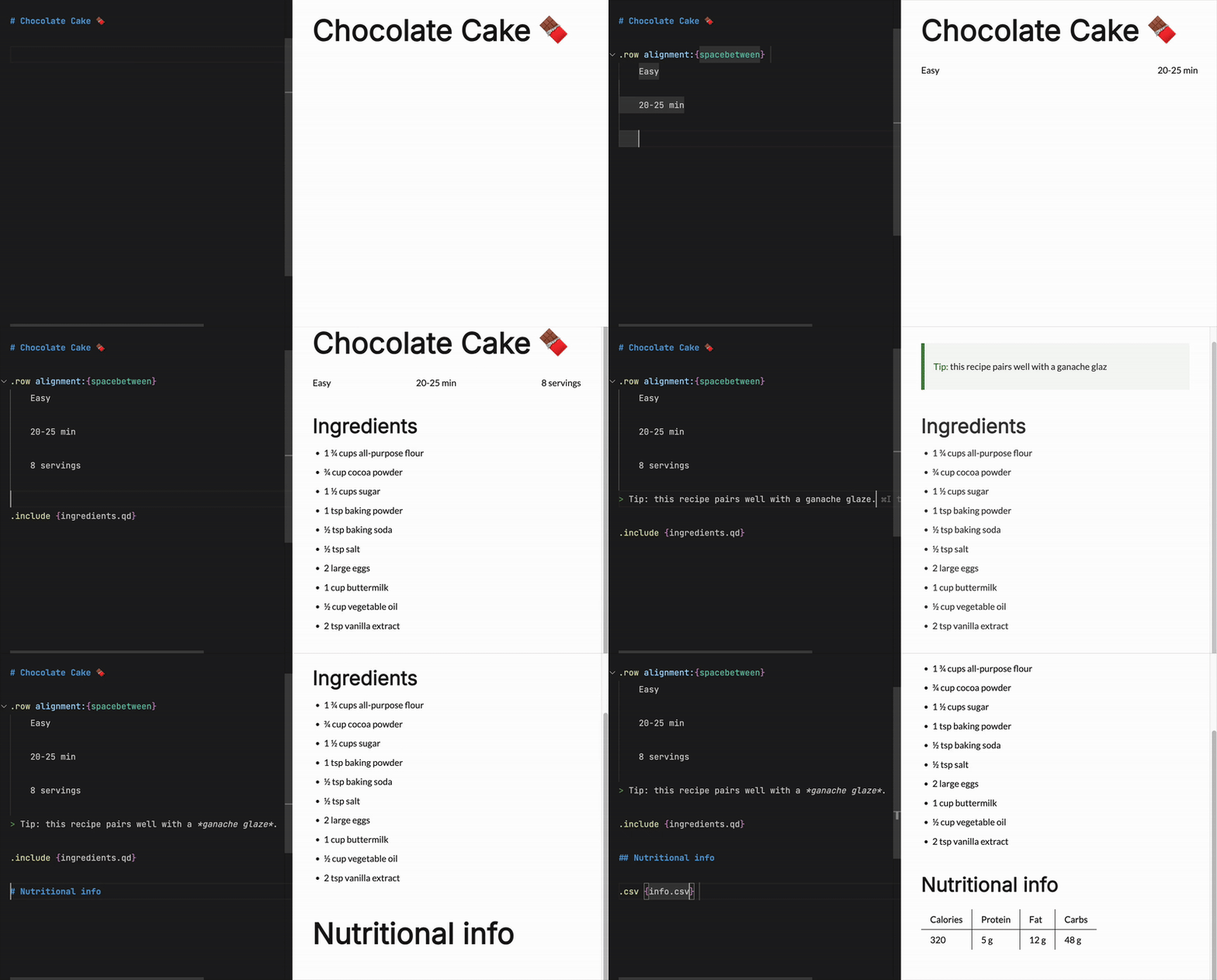
Combined with live preview, :zap: fast compilation speed and a powerful [VS Code extension](https://marketplace.visualstudio.com/items?itemName=quarkdown.quarkdown-vscode), Quarkdown simply gets the work done,
whether it's an academic paper, book, knowledge base or interactive presentation.

&nbsp;

<p align="center">
<img src="https://raw.githubusercontent.com/quarkdown-labs/quarkdown-vscode/refs/heads/project-files/live-preview.gif" alt="Live preview" />
</p>

&nbsp;

*In a nutshell, Quarkdown is...*

- **Familiar:** built on the well-known Markdown syntax, for a flat learning curve
- **Elegant:** produces output that matches the quality of industry-leading tools
- **Agent-friendly:** comes with a built-in skill for idiomatic fluency of your coding agents ([read the eval](https://quarkdown.com/blog/agent-skill/))
- **Customizable:** full control over document layout, aesthetics, and properties
- **Secure by default:** a restrictive permission system limits access to system resources
- **Versatile:** a single source compiles to multiple targets
- **Reactive:** low-latency live previews for rapid iteration. The official wiki (100+ pages) compiles in ~2 seconds
- **Reusable:** repeated content can be turned into one-line function calls
- **Easily deployable:** set a CD workflow up in under 3 minutes ([example](https://github.com/iamgio/iamgio.github.io/blob/main/.github/workflows/build.yml))

&nbsp;

---

<h2 align="center">Looking for something?</h2>
<p align="center">
  <strong>
    Check out the <a href="https://quarkdown.com/wiki" target="_blank">wiki</a>
  </strong>
  to get started and learn more about the language and its features!
</p>

---

&nbsp;

## As simple as you expect...

<p align="center">
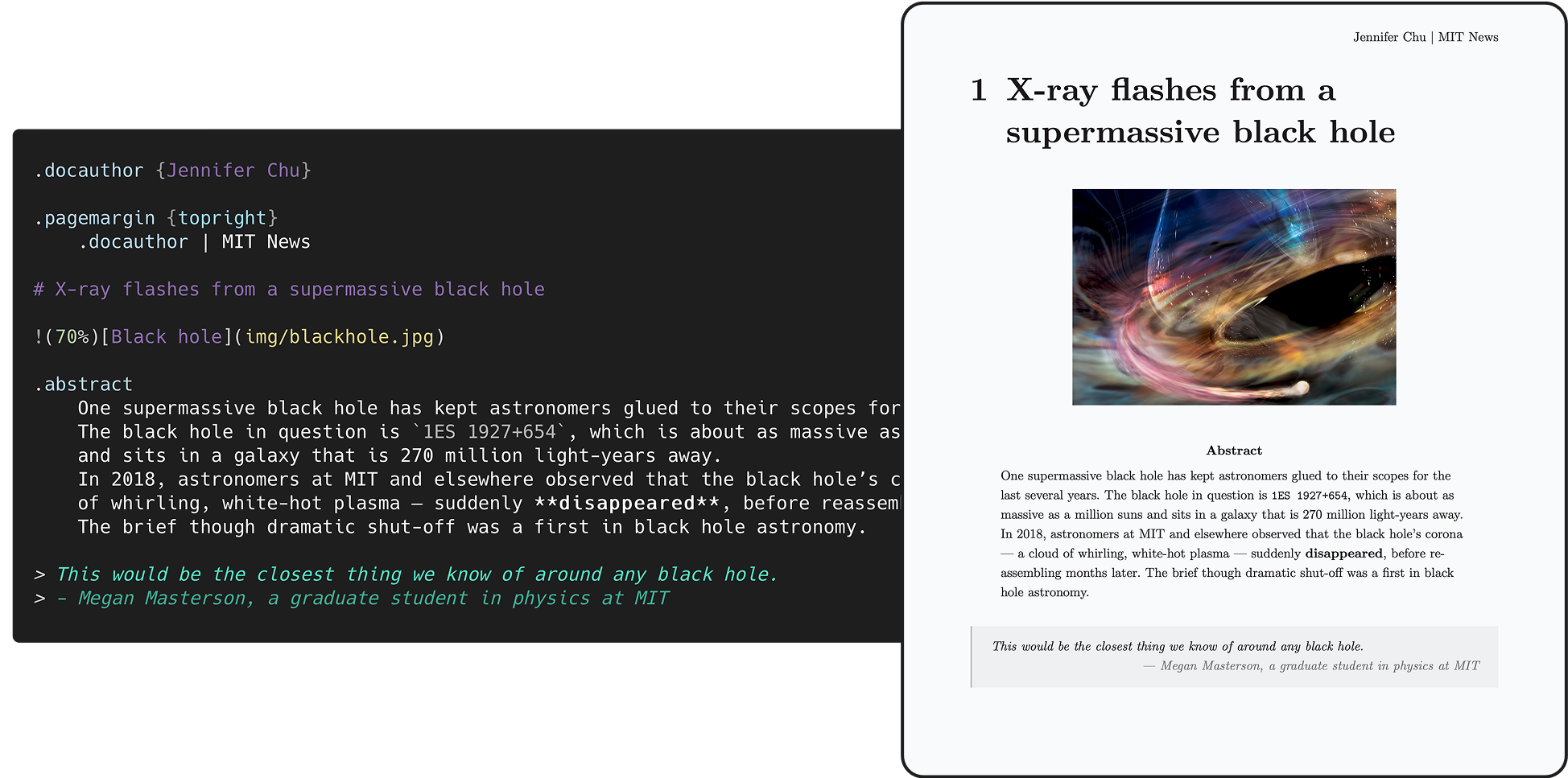
  <img src="https://raw.githubusercontent.com/iamgio/quarkdown/project-files/images/code-paper.png" alt="Paper code demo">
  <p align="center"><em>Inspired by: <a href="https://news.mit.edu/2025/x-ray-flashes-nearby-supermassive-black-hole-accelerate-mysteriously-0113">X-ray flashes from a nearby supermassive black hole accelerate mysteriously</a></em></p>
</p>

&nbsp;

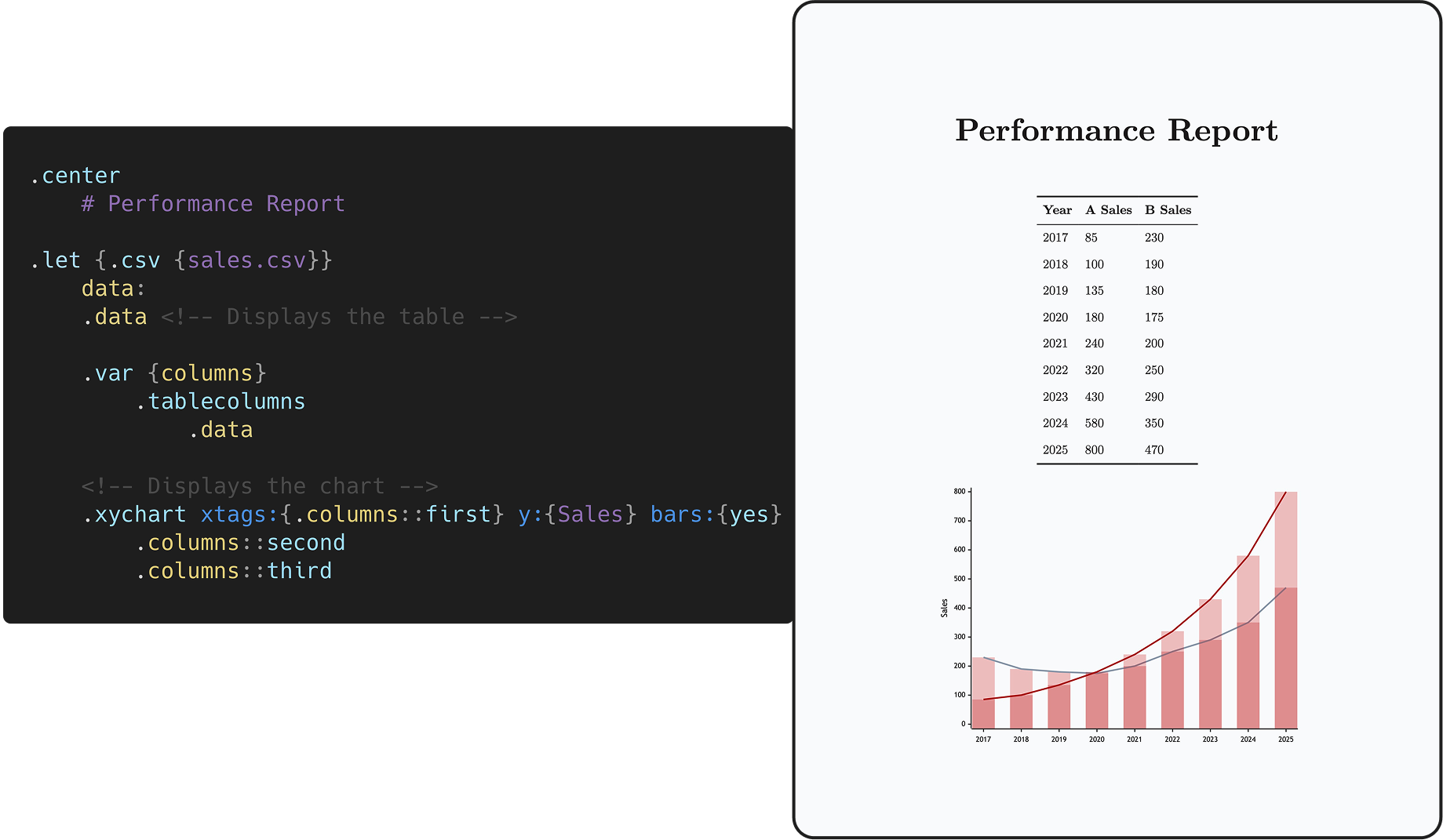
<h2 align="right">...as complex as you need.</h2>

<p align="center">
  <img src="https://raw.githubusercontent.com/iamgio/quarkdown/project-files/images/code-chart.png" alt="Chart code demo">
</p>

# Targets

- **HTML**
  - [X] **Plain**  
    Continuous flow like Notion/Obsidian, perfect for static websites and knowledge management - check out the author's [personal website](https://iamgio.eu/).

  - [X] **Paged** <sup>via [paged.js](https://pagedjs.org)</sup>  
    Perfect for papers, articles and books - check out the [demo document](https://github.com/quarkdown-labs/generated/blob/main/mock/paperwhite_latex.pdf).

  - [X] **Slides** <sup>via [reveal.js](https://revealjs.com)</sup>  
    Perfect for interactive presentations.
  
  - [X] **Docs**  
    Perfect for wikis, technical documentation and large knowledge bases - check out [Quarkdown's wiki](https://quarkdown.com/wiki).

- **PDF**
  - [X] All document types and features supported by HTML are also supported when exporting to PDF.

- **Plain text**

The desired document type can be set by calling the [`.doctype` function](https://quarkdown.com/wiki/document-types) within the source itself:
- `.doctype {plain}` (default)
- `.doctype {paged}`
- `.doctype {slides}`
- `.doctype {docs}`

# Comparison

|                       |     Quarkdown      |       LaTeX        |       Typst        |      AsciiDoc      |        MDX         |
|-----------------------|:------------------:|:------------------:|:------------------:|:------------------:|:------------------:|
| Concise and readable  | :white_check_mark: |        :x:         | :white_check_mark: | :white_check_mark: | :white_check_mark: |
| Full document control[^control] | :white_check_mark: | :white_check_mark: | :white_check_mark: |        :x:         |        :x:         |
| Scripting             | :white_check_mark: |      Partial       | :white_check_mark: |        :x:         | :white_check_mark: |
| Book/article export   | :white_check_mark: | :white_check_mark: | :white_check_mark: | :white_check_mark: |    Third-party     |
| Presentation export   | :white_check_mark: | :white_check_mark: | :white_check_mark: | :white_check_mark: |    Third-party     |
| Static site export    | :white_check_mark: |        :x:         |    Experimental    | :white_check_mark: | :white_check_mark: |
| Docs/wiki export      | :white_check_mark: |        :x:         |        :x:         | :white_check_mark: | :white_check_mark: |
| Learning curve        |   :green_circle:   |    :red_circle:    |  :orange_circle:   |   :green_circle:   |   :green_circle:   |
| Targets               |   HTML, PDF, TXT   |  PDF, PostScript   |     HTML, PDF      |  HTML, PDF, ePub   |        HTML        |

[^control]: The ability to customize the properties of the document and of its output artifact through the language itself.

<table>
  <thead>
    <tr>
      <th>LaTeX</th>
      <th>Quarkdown</th>
    </tr>
  </thead>
  <tbody>
    <tr>
      <td>

```latex
\tableofcontents

\section{Section}

\subsection{Subsection}

\begin{enumerate}
    \item \textbf{First} item
    \item \textbf{Second} item
\end{itemize}

\begin{center}
    This text is \textit{centered}.
\end{center}

\begin{figure}[!h]
    \centering
    \begin{subfigure}[b]
        \includegraphics[width=0.3\linewidth]{img1.png}
    \end{subfigure}
    \begin{subfigure}[b]
        \includegraphics[width=0.3\linewidth]{img2.png}
    \end{subfigure}
    \begin{subfigure}[b]
        \includegraphics[width=0.3\linewidth]{img3.png}
    \end{subfigure}
\end{figure}
```

</td>
<td>

```markdown
.tableofcontents

# Section

## Subsection

1. **First** item
2. **Second** item

.center
    This text is _centered_.

.row alignment:{spacebetween}
    ![Image 1](img1.png)

    ![Image 2](img2.png)
    
    ![Image 3](img3.png)
```

</td>
</tr>
</tbody>
</table>

&nbsp;

# Getting started

## Installation

### Install script (Linux/macOS)

```shell
curl -fsSL https://raw.githubusercontent.com/quarkdown-labs/get-quarkdown/refs/heads/main/install.sh | sudo env "PATH=$PATH" bash
```

Root privileges let the script install Quarkdown into `/opt/quarkdown` and its wrapper script into `/usr/local/bin/quarkdown`.  
If missing, Node.js will be installed automatically using the system's package manager.

For more installation options, check out [get-quarkdown](https://github.com/quarkdown-labs/get-quarkdown).

### Homebrew (Linux/macOS)

```shell
brew install quarkdown-labs/quarkdown/quarkdown
```

### Install script (Windows)

```powershell
irm https://raw.githubusercontent.com/quarkdown-labs/get-quarkdown/refs/heads/main/install.ps1 | iex
```

### Scoop (Windows)

```shell
scoop bucket add quarkdown https://github.com/quarkdown-labs/scoop-quarkdown; scoop install quarkdown
```

### GitHub Actions

See [setup-quarkdown](https://github.com/quarkdown-labs/setup-quarkdown) to easily integrate Quarkdown into your GitHub Actions workflows.

### Manual installation

<details>
<summary>Instructions for manual installation</summary>

Download `quarkdown.zip` from the [latest stable release](https://github.com/iamgio/quarkdown/releases/latest) and unzip it,
or build it with `gradlew installDist`.

Optionally, adding `<install_dir>/bin` to your `PATH` allows you easier access Quarkdown.

Requirements:
- (Only for PDF export) Node.js, npm, Puppeteer. See [*PDF export*](https://quarkdown.com/wiki/pdf-export) for details.

</details>

&nbsp;

## Quickstart

New user? You'll find **everything you need** in the **[Quickstart guide](https://quarkdown.com/wiki/quickstart)** to bring your first document to life!

&nbsp;

## Creating a project

**`quarkdown create [directory]`** will launch the prompt-based project wizard, making it quicker than ever
to set up a new Quarkdown project, with all [metadata](https://quarkdown.com/wiki/document-metadata) and initial content already present.

&nbsp;

## Compiling

Running **`quarkdown c file.qd`** will compile the given file and save the output to file.

> If the project is composed by multiple source files, the target file must be the root one, i.e. the one that includes the other files.
>
> - [How to include other files?](https://quarkdown.com/wiki/including-other-quarkdown-files)

If you would like to familiarize yourself with Quarkdown instead, `quarkdown repl` lets you play with an interactive REPL mode.

#### Options

The most commonly used options are:

- **`-p`** or **`--preview`**: enables automatic content reloading after compiling.

- **`-w`** or **`--watch`**: recompiles the source every time a file from the source directory is changed.

> [!TIP]
> Combine `-p -w` to achieve ***live preview***!

- **`--pdf`**: produces a PDF file. Learn more in the wiki's [*PDF export*](https://quarkdown.com/wiki/pdf-export) page.

For the full list of options, check out the [CLI options](https://quarkdown.com/wiki/cli-options) wiki page.

&nbsp;

---

&nbsp;

## Mock document

&nbsp;

<p align="center">
  <img width="550" src="https://raw.githubusercontent.com/iamgio/quarkdown/project-files/images/mock-demo.png" alt="Mock document demo">
</p>

***Mock***, written in Quarkdown, is a comprehensive collection of visual elements offered by the language,
making it ideal for exploring and understanding its key features — all while playing and experimenting hands-on with a concrete outcome in the form of pages or slides.

- The document's source files are available in the [`mock`](mock) directory, and can be compiled via `quarkdown c mock/main.qd -p`.
- The PDF artifacts generated for all possible theme combinations are available and can be viewed in the [`generated`](https://github.com/quarkdown-labs/generated) repo.  

## Contributing

Contributions are welcome! Please check [CONTRIBUTING.md](CONTRIBUTING.md) to know how contribute via issues or pull requests.

## Sponsors

A special thanks to all the sponsors who [supported this project](https://github.com/sponsors/iamgio)!

<p align="center">
<a href="https://falconer.com"><img src="https://raw.githubusercontent.com/iamgio/quarkdown/project-files/images/sponsors/falconer.jpeg" alt="Falconer" width="350"></a>
</p>

<p align="center">
  <a href="https://github.com/RayOffiah"><img src="https://avatars.githubusercontent.com/u/77050471?v=4" alt="RayOffiah" width="90"></a>
</p>

<p align="center">
  <a href="https://github.com/vitto4"><img src="https://avatars.githubusercontent.com/u/128498605?v=4" alt="vitto4" width="60"></a>
  <a href="https://github.com/aaditkamat"><img src="https://avatars.githubusercontent.com/u/30969577?v=4" alt="aaditkamat" width="60"></a>
</p>

<p align="center">
  <a href="https://github.com/LunaBluee"><img src="https://avatars.githubusercontent.com/u/145209701?v=4" alt="LunaBluee" width="35"></a>&nbsp;
  <a href="https://github.com/dcopia"><img src="https://avatars.githubusercontent.com/u/162327812?v=4" alt="dcopia" width="35"></a>
  <a href="https://github.com/Pallandos"><img src="https://avatars.githubusercontent.com/u/146179143?v=4" alt="Pallandos" width="35"></a>
  <a href="https://github.com/imogenxingren"><img src="https://avatars.githubusercontent.com/u/36161957?v=4" alt="imogenxingren" width="35"></a>
  <a href="https://github.com/serkonda7"><img src="https://avatars.githubusercontent.com/u/40118727?v=4" alt="serkonda7" width="35"></a>
</p>

## Concept

The logo resembles the original [Markdown icon](https://github.com/dcurtis/markdown-mark), with focus on Quarkdown's completeness,
richness of features and customization options, emphasized by the revolving arrow all around the sphere.

<p align="center">
  <picture>
    <source media="(prefers-color-scheme: dark)" srcset="https://raw.githubusercontent.com/iamgio/quarkdown/project-files/images/ticon-light.svg">
    <source media="(prefers-color-scheme: light)" srcset="https://raw.githubusercontent.com/iamgio/quarkdown/project-files/images/ticon-dark.svg">
    <img alt="Quarkdown icon" src="https://raw.githubusercontent.com/iamgio/quarkdown/project-files/images/ticon-dark.svg">
  </picture>
</p>

What could be mistaken for a planet is actually a **quark** or, more specifically, a **down quark**,
an elementary particle that is a major constituent of matter: they give life to every complex structure we know of,
while also being one of the lightest objects in existence.

This is, indeed, the concept **Quarkdown** is built upon. 

## License

By default, Quarkdown and its modules are licensed under [GNU GPLv3](./LICENSE), except for modules that include their own `LICENSE` file:
the CLI (`quarkdown-cli`) and Language Server (`quarkdown-lsp`) modules and binaries are licensed under GNU AGPLv3.

## Footnotes