 [![gitter][gitter-image]][gitter-url]
[![NPM version][npm-image]][npm-url]
[![build status][travis-image]][travis-url]
[![Test coverage][coveralls-image]][coveralls-url]
[![PR's Welcome][pr-welcoming-image]][pr-welcoming-url]
[![gitter][gitter-image]][gitter-url]
[![NPM version][npm-image]][npm-url]
[![build status][travis-image]][travis-url]
[![Test coverage][coveralls-image]][coveralls-url]
[![PR's Welcome][pr-welcoming-image]][pr-welcoming-url]
[![gitter][gitter-image]][gitter-url]
[![NPM version][npm-image]][npm-url]
[![build status][travis-image]][travis-url]
[![Test coverage][coveralls-image]][coveralls-url]
[![PR's Welcome][pr-welcoming-image]][pr-welcoming-url]
[![gitter][gitter-image]][gitter-url]
[![NPM version][npm-image]][npm-url]
[![build status][travis-image]][travis-url]
[![Test coverage][coveralls-image]][coveralls-url]
[![PR's Welcome][pr-welcoming-image]][pr-welcoming-url]
INACTIVE: iMove 是一个逻辑可复用的,面向函数的,流程可视化的 JavaScript 工具库。
[English](./README.en-US.md) | 简体中文 iMove是一个面向前端开发者的逻辑编排工具,核心解决的是复杂逻辑复用的问题。 iMove由2部分组成:画布和imove-sdk。通过本地起一个http服务运行画布,在画布上完成代码编写和节点编排,最终将流程导出dsl,放到项目中,通过imove-sdk调用执行。 ## 特性 - [x] **流程可视化**:上手简单,绘图方便,逻辑表达更直观,易于理解 - [x] **逻辑复用**:iMove 节点支持复用,单节点支持参数配置 - [x] **灵活可扩展**:仅需写一个函数,节点可扩展,支持插件集成 - [x] **适用于JavaScript所有场景**:比如前端点击事件,Ajax 请求和 Node.js 后端 API等 - [ ] **多语言编译**:无语言编译出码限制(例:支持 JavaScript, Java 编译出码) ## 使用场景 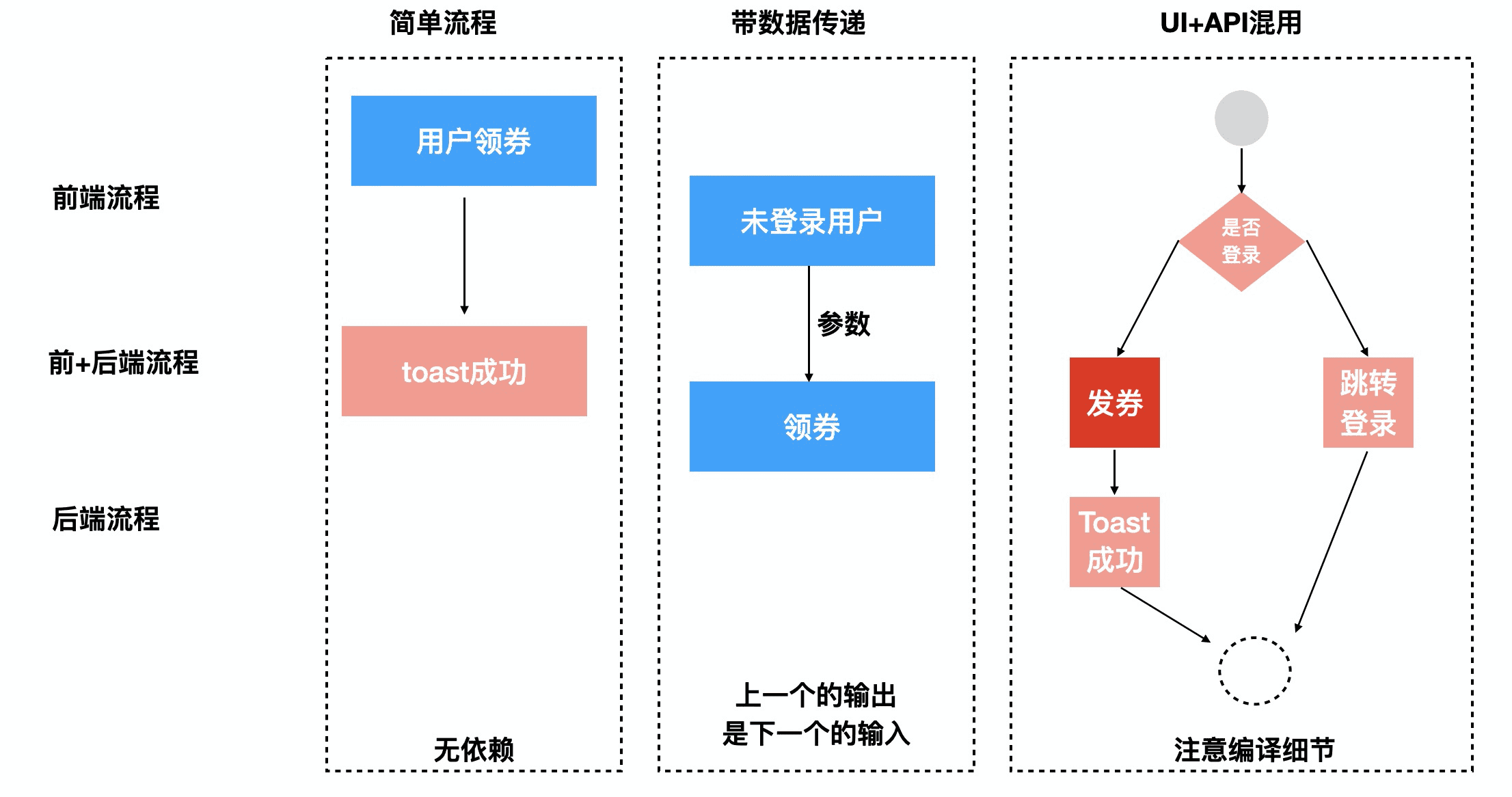 1. 前端流程:比如点击事件,组件生命周期回调等。 1. 后端流程:比如 Node.js 或 Serverless 领域。 1. 前端+后端:比如前端点击事件,Ajax 请求和后端 API。 ## 快速开始 ### 步骤 1. 准备 下载仓库,安装并启动 ```bash $ git clone https://github.com/ykfe/imove.git $ cd imove/example $ npm install $ npm start ``` 此时浏览器会自动打开 `http://localhost:8000/` ,可以看到运行效果。 ### 步骤 2. 绘制流程图 从左侧拖动节点至中央画布,绘制流程图 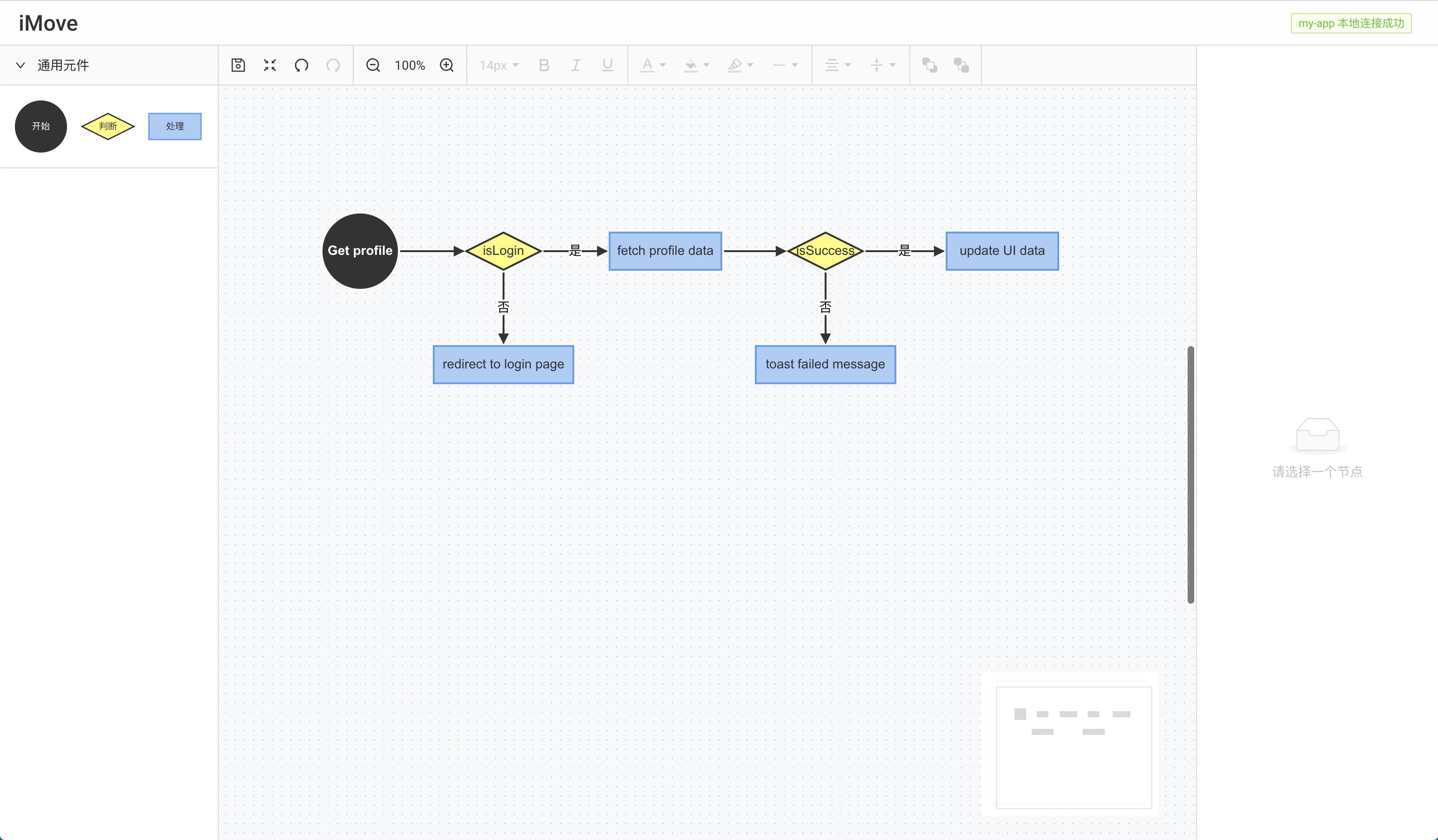 ### 步骤 3. 配置节点 选择节点,修改节点名,编辑节点代码 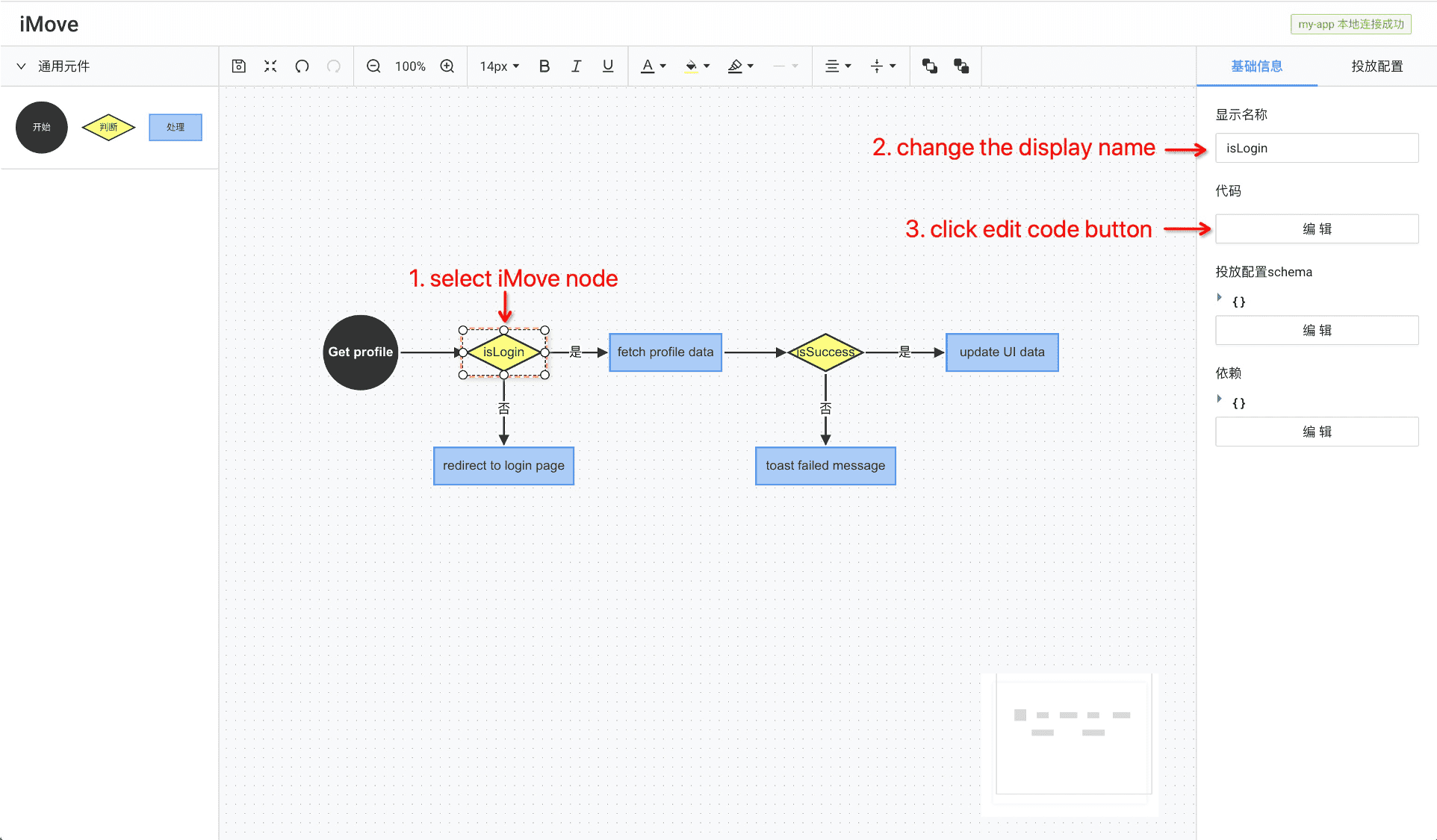 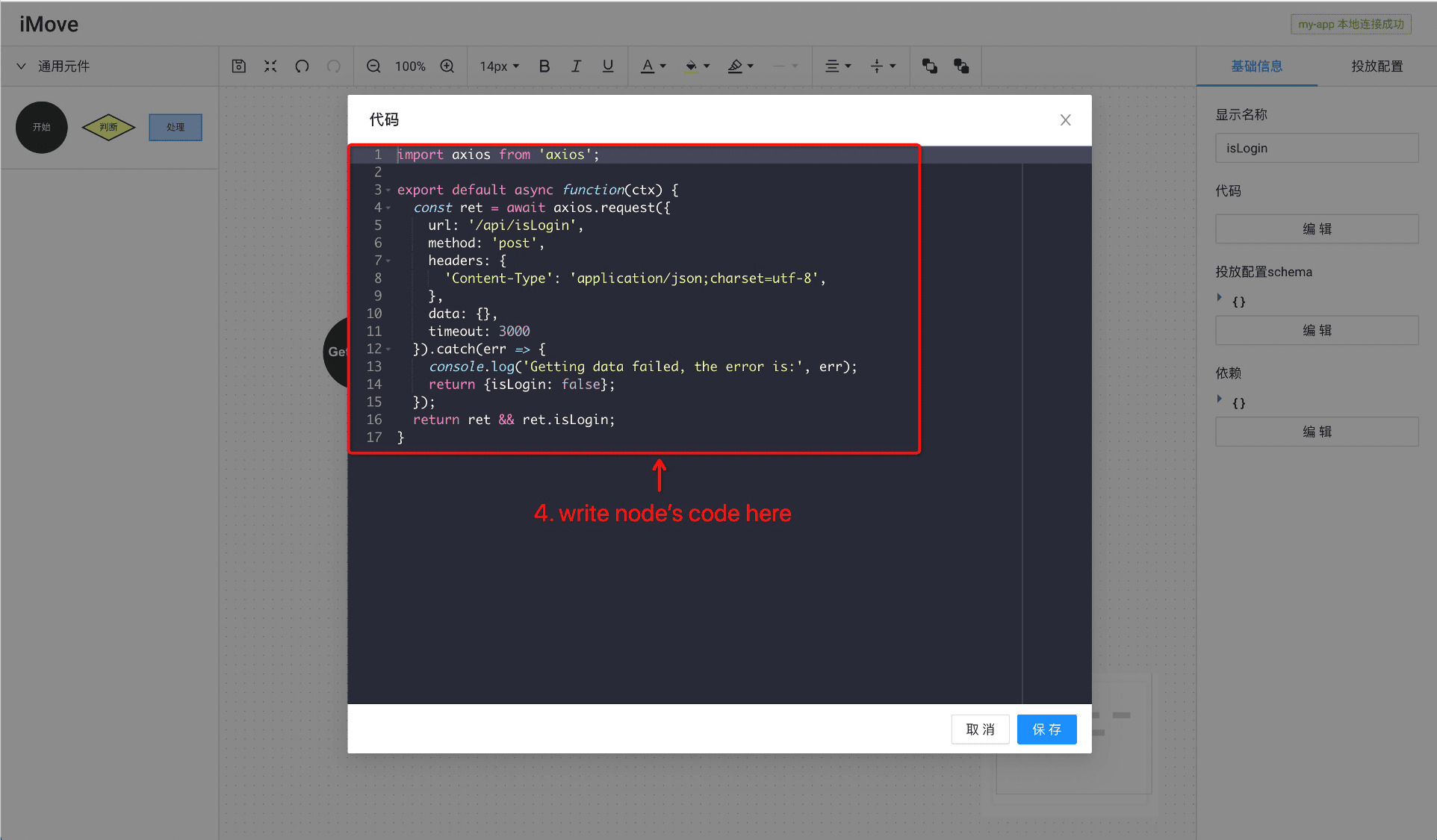 ## Authors * qilei0529 - 飞羽「Leader」 * SmallStoneSK - 菉竹「Core Team」 * suanmei - 拾邑「Core Team」 * iloveyou11 - 冷卉「Core Team」 * i5ting - 狼叔「Core Team」 团队博客,各种原理,设计初衷,实现,思考等都在这里: https://www.yuque.com/imove/blog See also the list of [contributors](https://github.com/imgcook/imove/graphs/contributors) who participated in this project. ## 贡献 1. Fork 仓库 2. 创建分支 (`git checkout -b my-new-feature`) 3. 提交修改 (`git commit -am 'Add some feature'`) 4. 推送 (`git push origin my-new-feature`) 5. 创建 PR ## 欢迎 fork 和反馈 如有建议或意见,欢迎在 github [issues](https://github.com/imgcook/imove/issues) 区提问 ## 协议 本仓库遵循 [MIT 协议](http://www.opensource.org/licenses/MIT) ## 贡献者 ✨ 感谢 [蚂蚁 X6 团队](https://github.com/antvis/X6) 提供的绘图引擎 感谢所有贡献的人 ([emoji key](https://allcontributors.org/docs/en/emoji-key)): 本仓库遵循 [all-contributors](https://github.com/all-contributors/all-contributors) 规范,欢迎贡献! [npm-image]: https://img.shields.io/npm/v/@imove/core.svg?style=flat-square [npm-url]: https://www.npmjs.com/package/@imove/core [travis-image]: https://img.shields.io/travis/imgcook/imove/master.svg?style=flat-square [travis-url]: https://travis-ci.org/imgcook/imove/ [coveralls-image]: https://img.shields.io/codecov/c/github/imgcook/imove.svg?style=flat-square [coveralls-url]: https://codecov.io/github/imgcook/imove?branch=master [backers-image]: https://opencollective.com/imgcook/imove/backers/badge.svg?style=flat-square [sponsors-image]: https://opencollective.com/imgcook/imove/sponsors/badge.svg?style=flat-square [gitter-image]: https://img.shields.io/gitter/room/i5ting/imove.svg?style=flat-square [gitter-url]: https://gitter.im/i5ting/imove?utm_source=badge&utm_medium=badge&utm_campaign=pr-badge&utm_content=badge [#imgcook/imove]: https://webchat.freenode.net/?channels=#imgcook/imove [pr-welcoming-image]: https://img.shields.io/badge/PRs-welcome-brightgreen.svg?style=flat-square [pr-welcoming-url]: https://github.com/imgcook/imove/pull/new ## 项目 Star 数增长趋势 [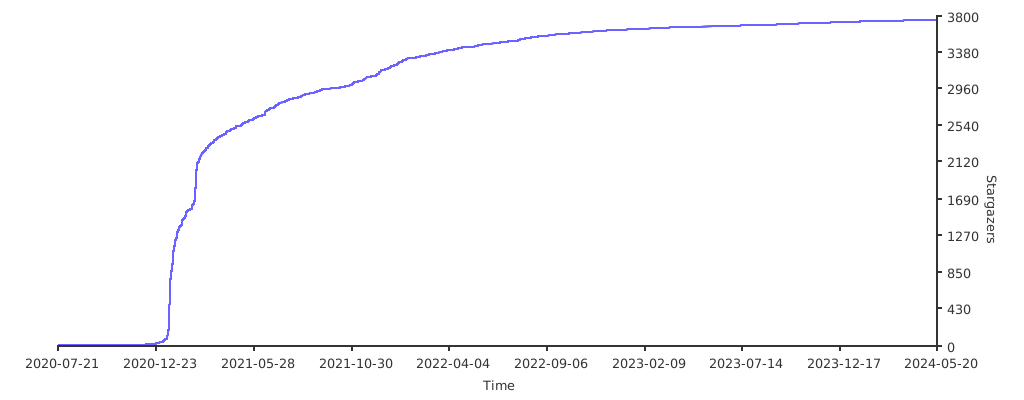](https://starchart.cc/ykfe/imove)