# ORCΛ
 Orca is an [esoteric programming language](https://en.wikipedia.org/wiki/Esoteric_programming_language) designed to quickly create procedural sequencers, in which every letter of the alphabet is an operation, where lowercase letters operate on bang, uppercase letters operate each frame.
This application **is not a synthesizer, but a livecoding environment** capable of sending MIDI, OSC & UDP to your audio/visual interfaces, like Ableton, Renoise, VCV Rack or SuperCollider.
If you need **help**, visit the [chatroom](https://discord.gg/F7W98pXKd7), the [mailing list](https://lists.sr.ht/~rabbits/orca), join the [forum](https://llllllll.co/t/orca-live-coding-tool/17689) or watch a [tutorial](https://www.youtube.com/watch?v=ktcWOLeWP-g).
- [Download builds](https://hundredrabbits.itch.io/orca), available for **Linux, Windows and OSX**.
- Use [in your browser](https://hundredrabbits.github.io/Orca/), requires **webMidi**.
- Use [in a terminal](https://git.sr.ht/~rabbits/orca), written in C.
- Use [on small computers](https://git.sr.ht/~rabbits/orca-toy), written in assembly.
- Use [on the Monome Norns](https://llllllll.co/t/orca/22492), written in Lua.
## Install & Run
If you wish to use Orca inside of [Electron](https://electronjs.org/), follow these steps:
```
git clone https://github.com/hundredrabbits/Orca.git
cd Orca/desktop/
npm install
npm start
```
Orca is an [esoteric programming language](https://en.wikipedia.org/wiki/Esoteric_programming_language) designed to quickly create procedural sequencers, in which every letter of the alphabet is an operation, where lowercase letters operate on bang, uppercase letters operate each frame.
This application **is not a synthesizer, but a livecoding environment** capable of sending MIDI, OSC & UDP to your audio/visual interfaces, like Ableton, Renoise, VCV Rack or SuperCollider.
If you need **help**, visit the [chatroom](https://discord.gg/F7W98pXKd7), the [mailing list](https://lists.sr.ht/~rabbits/orca), join the [forum](https://llllllll.co/t/orca-live-coding-tool/17689) or watch a [tutorial](https://www.youtube.com/watch?v=ktcWOLeWP-g).
- [Download builds](https://hundredrabbits.itch.io/orca), available for **Linux, Windows and OSX**.
- Use [in your browser](https://hundredrabbits.github.io/Orca/), requires **webMidi**.
- Use [in a terminal](https://git.sr.ht/~rabbits/orca), written in C.
- Use [on small computers](https://git.sr.ht/~rabbits/orca-toy), written in assembly.
- Use [on the Monome Norns](https://llllllll.co/t/orca/22492), written in Lua.
## Install & Run
If you wish to use Orca inside of [Electron](https://electronjs.org/), follow these steps:
```
git clone https://github.com/hundredrabbits/Orca.git
cd Orca/desktop/
npm install
npm start
```
 ## Operators
To display the list of operators inside of Orca, use `CmdOrCtrl+G`.
- `A` **add**(*a* b): Outputs sum of inputs.
- `B` **subtract**(*a* b): Outputs difference of inputs.
- `C` **clock**(*rate* mod): Outputs modulo of frame.
- `D` **delay**(*rate* mod): Bangs on modulo of frame.
- `E` **east**: Moves eastward, or bangs.
- `F` **if**(*a* b): Bangs if inputs are equal.
- `G` **generator**(*x* *y* *len*): Writes operands with offset.
- `H` **halt**: Halts southward operand.
- `I` **increment**(*step* mod): Increments southward operand.
- `J` **jumper**(*val*): Outputs northward operand.
- `K` **konkat**(*len*): Reads multiple variables.
- `L` **less**(*a* *b*): Outputs smallest of inputs.
- `M` **multiply**(*a* b): Outputs product of inputs.
- `N` **north**: Moves Northward, or bangs.
- `O` **read**(*x* *y* read): Reads operand with offset.
- `P` **push**(*len* *key* val): Writes eastward operand.
- `Q` **query**(*x* *y* *len*): Reads operands with offset.
- `R` **random**(*min* max): Outputs random value.
- `S` **south**: Moves southward, or bangs.
- `T` **track**(*key* *len* val): Reads eastward operand.
- `U` **uclid**(*step* max): Bangs on Euclidean rhythm.
- `V` **variable**(*write* read): Reads and writes variable.
- `W` **west**: Moves westward, or bangs.
- `X` **write**(*x* *y* val): Writes operand with offset.
- `Y` **jymper**(*val*): Outputs westward operand.
- `Z` **lerp**(*rate* target): Transitions operand to input.
- `*` **bang**: Bangs neighboring operands.
- `#` **comment**: Halts a line.
### IO
- `:` **midi**(channel octave note velocity length): Sends a MIDI note.
- `%` **mono**(channel octave note velocity length): Sends monophonic MIDI note.
- `!` **cc**(channel knob value): Sends MIDI control change.
- `?` **pb**(channel value): Sends MIDI pitch bench.
- `;` **udp**: Sends UDP message.
- `=` **osc**(*path*): Sends OSC message.
- `$` **self**: Sends [ORCA command](#Commands).
## MIDI
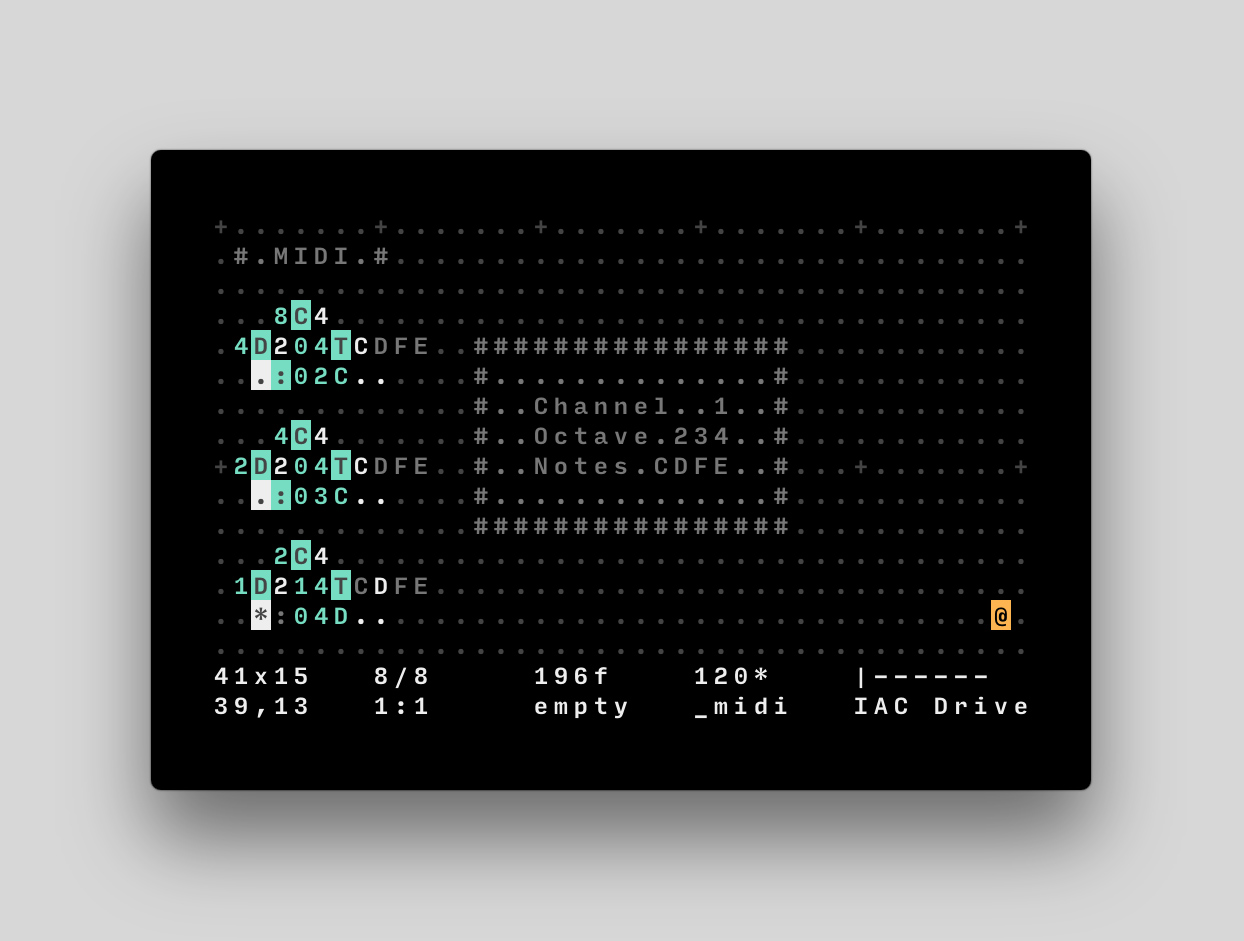
The [MIDI](https://en.wikipedia.org/wiki/MIDI) operator `:` takes up to 5 inputs('channel, 'octave, 'note, velocity, length).
For example, `:25C`, is a **C note, on the 5th octave, through the 3rd MIDI channel**, `:04c`, is a **C# note, on the 4th octave, through the 1st MIDI channel**. Velocity is an optional value from `0`(0/127) to `g`(127/127). Note length is the number of frames during which a note remains active. See it in action with [midi.orca](https://git.sr.ht/~rabbits/orca-examples/tree/master/basics/_midi.orca).
## MIDI MONO
The [MONO](https://en.wikipedia.org/wiki/Monophony) operator `%` takes up to 5 inputs('channel, 'octave, 'note, velocity, length).
This operator is very similar to the default Midi operator, but **each new note will stop the previously playing note**, would its length overlap with the new one. Making certain that only a single note is ever played at once, this is ideal for monophonic analog synthesisers that might struggle to dealing with chords and note overlaps.
## MIDI CC
The [MIDI CC](https://www.sweetwater.com/insync/continuous-controller/) operator `!` takes 3 inputs('channel, 'knob, 'value).
It sends a value **between 0-127**, where the value is calculated as a ratio of 36, over a maximum of 127. For example, `!008`, is sending **28**, or `(8/36)*127` through the first channel, to the control mapped with `id0`. You can press **enter**, with the `!` operator selected, to assign it to a controller. By default, the operator sends to `CC64` [and up](https://nickfever.com/Music/midi-cc-list), the offset can be changed with the [command](#commands) `cc:0`, to set the offset to 0.
## MIDI PITCHBEND
The [MIDI PB](https://www.sweetwater.com/insync/pitch-bend/) operator `?` takes 3 inputs('channel, 'lsb, 'msb).
It sends two different values **between 0-127**, where the value is calculated as a ratio of 36, over a maximum of 127. For example, `?008`, is sending an MSB of **28**, or `(8/36)*127` and an LSB of 0 through the first midi channel.
## MIDI BANK SELECT / PROGRAM CHANGE
This is a command (see below) rather than an operator and it combines the [MIDI program change and bank select functions](https://www.sweetwater.com/sweetcare/articles/6-what-msb-lsb-refer-for-changing-banks-andprograms/).
The syntax is `pg:channel;msb;lsb;program`. Channel is 0-15, msb/lsb/program are 0-127, but program will automatically be translated to 1-128 by the MIDI driver. `program` typically corresponds to a "patch" selection on a synth. Note that `msb` may also be identified as "bank" and `lsb` as "sub" in some applications (like Ableton Live).
`msb` and `lsb` can be left blank if you only want to send a simple program change. For example, `pg:0;;;63` will set the synth to patch number 64 (without changing the bank)
## UDP
The [UDP](https://nodejs.org/api/dgram.html#dgram_socket_send_msg_offset_length_port_address_callback) operator `;` locks each consecutive eastwardly ports. For example, `;hello`, will send the string "hello", on bang, to the port `49160` on `localhost`. In commander, use `udp:7777` to select the **custom UDP port 7777**, and `ip:127.0.0.12` to change the target IP. UDP is not available in the browser version of Orca.
You can use the [listener.js](https://github.com/hundredrabbits/Orca/blob/master/resources/listener.js) to test UDP messages. See it in action with [udp.orca](https://git.sr.ht/~rabbits/orca-examples/tree/master/basics/_udp.orca).
## OSC
The [OSC](https://github.com/MylesBorins/node-osc) operator `=` locks each consecutive eastwardly ports. The first character is used for the path, the following characters are sent as integers using the [base36 Table](https://github.com/hundredrabbits/Orca#base36-table). In commander, use `osc:7777` to select the **custom OSC port 7777**, and `ip:127.0.0.12` to change the target IP. OSC is not available in the browser version of Orca.
For example, `=1abc` will send `10`, `11` and `12` to `/1`, via the port `49162` on `localhost`; `=a123` will send `1`, `2` and `3`, to the path `/a`. You can use the [listener.js](https://github.com/hundredrabbits/Orca/blob/master/resources/listener.js) to test OSC messages. See it in action with [osc.orca](https://git.sr.ht/~rabbits/orca-examples/tree/master/basics/_osc.orca) or try it with [SonicPi](https://github.com/hundredrabbits/Orca/blob/master/resources/TUTORIAL.md#sonicpi).
## Operators
To display the list of operators inside of Orca, use `CmdOrCtrl+G`.
- `A` **add**(*a* b): Outputs sum of inputs.
- `B` **subtract**(*a* b): Outputs difference of inputs.
- `C` **clock**(*rate* mod): Outputs modulo of frame.
- `D` **delay**(*rate* mod): Bangs on modulo of frame.
- `E` **east**: Moves eastward, or bangs.
- `F` **if**(*a* b): Bangs if inputs are equal.
- `G` **generator**(*x* *y* *len*): Writes operands with offset.
- `H` **halt**: Halts southward operand.
- `I` **increment**(*step* mod): Increments southward operand.
- `J` **jumper**(*val*): Outputs northward operand.
- `K` **konkat**(*len*): Reads multiple variables.
- `L` **less**(*a* *b*): Outputs smallest of inputs.
- `M` **multiply**(*a* b): Outputs product of inputs.
- `N` **north**: Moves Northward, or bangs.
- `O` **read**(*x* *y* read): Reads operand with offset.
- `P` **push**(*len* *key* val): Writes eastward operand.
- `Q` **query**(*x* *y* *len*): Reads operands with offset.
- `R` **random**(*min* max): Outputs random value.
- `S` **south**: Moves southward, or bangs.
- `T` **track**(*key* *len* val): Reads eastward operand.
- `U` **uclid**(*step* max): Bangs on Euclidean rhythm.
- `V` **variable**(*write* read): Reads and writes variable.
- `W` **west**: Moves westward, or bangs.
- `X` **write**(*x* *y* val): Writes operand with offset.
- `Y` **jymper**(*val*): Outputs westward operand.
- `Z` **lerp**(*rate* target): Transitions operand to input.
- `*` **bang**: Bangs neighboring operands.
- `#` **comment**: Halts a line.
### IO
- `:` **midi**(channel octave note velocity length): Sends a MIDI note.
- `%` **mono**(channel octave note velocity length): Sends monophonic MIDI note.
- `!` **cc**(channel knob value): Sends MIDI control change.
- `?` **pb**(channel value): Sends MIDI pitch bench.
- `;` **udp**: Sends UDP message.
- `=` **osc**(*path*): Sends OSC message.
- `$` **self**: Sends [ORCA command](#Commands).
## MIDI
The [MIDI](https://en.wikipedia.org/wiki/MIDI) operator `:` takes up to 5 inputs('channel, 'octave, 'note, velocity, length).
For example, `:25C`, is a **C note, on the 5th octave, through the 3rd MIDI channel**, `:04c`, is a **C# note, on the 4th octave, through the 1st MIDI channel**. Velocity is an optional value from `0`(0/127) to `g`(127/127). Note length is the number of frames during which a note remains active. See it in action with [midi.orca](https://git.sr.ht/~rabbits/orca-examples/tree/master/basics/_midi.orca).
## MIDI MONO
The [MONO](https://en.wikipedia.org/wiki/Monophony) operator `%` takes up to 5 inputs('channel, 'octave, 'note, velocity, length).
This operator is very similar to the default Midi operator, but **each new note will stop the previously playing note**, would its length overlap with the new one. Making certain that only a single note is ever played at once, this is ideal for monophonic analog synthesisers that might struggle to dealing with chords and note overlaps.
## MIDI CC
The [MIDI CC](https://www.sweetwater.com/insync/continuous-controller/) operator `!` takes 3 inputs('channel, 'knob, 'value).
It sends a value **between 0-127**, where the value is calculated as a ratio of 36, over a maximum of 127. For example, `!008`, is sending **28**, or `(8/36)*127` through the first channel, to the control mapped with `id0`. You can press **enter**, with the `!` operator selected, to assign it to a controller. By default, the operator sends to `CC64` [and up](https://nickfever.com/Music/midi-cc-list), the offset can be changed with the [command](#commands) `cc:0`, to set the offset to 0.
## MIDI PITCHBEND
The [MIDI PB](https://www.sweetwater.com/insync/pitch-bend/) operator `?` takes 3 inputs('channel, 'lsb, 'msb).
It sends two different values **between 0-127**, where the value is calculated as a ratio of 36, over a maximum of 127. For example, `?008`, is sending an MSB of **28**, or `(8/36)*127` and an LSB of 0 through the first midi channel.
## MIDI BANK SELECT / PROGRAM CHANGE
This is a command (see below) rather than an operator and it combines the [MIDI program change and bank select functions](https://www.sweetwater.com/sweetcare/articles/6-what-msb-lsb-refer-for-changing-banks-andprograms/).
The syntax is `pg:channel;msb;lsb;program`. Channel is 0-15, msb/lsb/program are 0-127, but program will automatically be translated to 1-128 by the MIDI driver. `program` typically corresponds to a "patch" selection on a synth. Note that `msb` may also be identified as "bank" and `lsb` as "sub" in some applications (like Ableton Live).
`msb` and `lsb` can be left blank if you only want to send a simple program change. For example, `pg:0;;;63` will set the synth to patch number 64 (without changing the bank)
## UDP
The [UDP](https://nodejs.org/api/dgram.html#dgram_socket_send_msg_offset_length_port_address_callback) operator `;` locks each consecutive eastwardly ports. For example, `;hello`, will send the string "hello", on bang, to the port `49160` on `localhost`. In commander, use `udp:7777` to select the **custom UDP port 7777**, and `ip:127.0.0.12` to change the target IP. UDP is not available in the browser version of Orca.
You can use the [listener.js](https://github.com/hundredrabbits/Orca/blob/master/resources/listener.js) to test UDP messages. See it in action with [udp.orca](https://git.sr.ht/~rabbits/orca-examples/tree/master/basics/_udp.orca).
## OSC
The [OSC](https://github.com/MylesBorins/node-osc) operator `=` locks each consecutive eastwardly ports. The first character is used for the path, the following characters are sent as integers using the [base36 Table](https://github.com/hundredrabbits/Orca#base36-table). In commander, use `osc:7777` to select the **custom OSC port 7777**, and `ip:127.0.0.12` to change the target IP. OSC is not available in the browser version of Orca.
For example, `=1abc` will send `10`, `11` and `12` to `/1`, via the port `49162` on `localhost`; `=a123` will send `1`, `2` and `3`, to the path `/a`. You can use the [listener.js](https://github.com/hundredrabbits/Orca/blob/master/resources/listener.js) to test OSC messages. See it in action with [osc.orca](https://git.sr.ht/~rabbits/orca-examples/tree/master/basics/_osc.orca) or try it with [SonicPi](https://github.com/hundredrabbits/Orca/blob/master/resources/TUTORIAL.md#sonicpi).
 ## Advanced Controls
Some of Orca's features can be **controlled externally** via UDP though port `49160`, or via its own command-line interface. To activate the command-line prompt, press `CmdOrCtrl+K`. The prompt can also be used to inject patterns or change settings.
### Project Mode
You can **quickly inject orca files** into the currently active file, by using the command-line prompt — Allowing you to navigate across multiple files like you would a project. Press `CmdOrCtrl+L` to load multiple orca files, then press `CmdOrCtrl+B` and type the name of a loaded `.orca` file to inject it.
### Default Ports
| UDP Input | OSC Input | UDP Output | OSC Output |
| ---------- | ---------- | ---------- | -----------|
| 49160 | None | 49161 | 49162
### Commands
All commands have a shorthand equivalent to their first two characters, for example, `write` can also be called using `wr`. You can see the full list of commands [here](https://github.com/hundredrabbits/Orca/blob/master/desktop/sources/scripts/commander.js).
- `play` Plays program.
- `stop` Stops program.
- `run` Runs current frame.
- `bpm:140` Sets bpm speed to `140`.
- `apm:160` Animates bpm speed to `160`.
- `frame:0` Sets the frame value to `0`.
- `skip:2` Adds `2`, to the current frame value.
- `rewind:2` Removes `2`, to the current frame value.
- `color:f00;0f0;00f` Colorizes the interface.
- `find:aV` Sends cursor to string `aV`.
- `select:3;4;5;6` Move cursor to position `3,4`, and select size `5:6`(optional).
- `inject:pattern;12;34` Inject the local file `pattern.orca`, at `12,34`(optional).
- `write:H;12;34` Writes glyph `H`, at `12,34`(optional).
- `time` Prints the time, in minutes seconds, since `0f`.
- `midi:1;2` Set Midi output device to `#1`, and input device to `#2`.
- `udp:1234;5678` Set UDP output port to `1234`, and input port to `5678`.
- `osc:1234` Set OSC output port to `1234`.
## Base36 Table
Orca operates on a base of **36 increments**. Operators using numeric values will typically also operate on letters and convert them into values as per the following table. For instance `Do` will bang every *24th frame*.
| **0** | **1** | **2** | **3** | **4** | **5** | **6** | **7** | **8** | **9** | **A** | **B** |
| :-: | :-: | :-: | :-: | :-: | :-: | :-: | :-: | :-: | :-: | :-: | :-: |
| 0 | 1 | 2 | 3 | 4 | 5 | 6 | 7 | 8 | 9 | 10 | 11 |
| **C** | **D** | **E** | **F** | **G** | **H** | **I** | **J** | **K** | **L** | **M** | **N** |
| 12 | 13 | 14 | 15 | 16 | 17 | 18 | 19 | 20 | 21 | 22 | 23 |
| **O** | **P** | **Q** | **R** | **S** | **T** | **U** | **V** | **W** | **X** | **Y** | **Z** |
| 24 | 25 | 26 | 27 | 28 | 29 | 30 | 31 | 32 | 33 | 34 | 35 |
## Transpose Table
The midi operator interprets any letter above the chromatic scale as a transpose value, for instance `3H`, is equivalent to `4A`.
| **0** | **1** | **2** | **3** | **4** | **5** | **6** | **7** | **8** | **9** | **A** | **B** |
| :-: | :-: | :-: | :-: | :-: | :-: | :-: | :-: | :-: | :-: | :-: | :-: |
| _ | _ | _ | _ | _ | _ | _ | _ | _ | _ | A0 | B0 |
| **C** | **D** | **E** | **F** | **G** | **H** | **I** | **J** | **K** | **L** | **M** | **N** |
| C0 | D0 | E0 | F0 | G0 | A0 | B0 | C1 | D1 | E1 | F1 | G1 |
| **O** | **P** | **Q** | **R** | **S** | **T** | **U** | **V** | **W** | **X** | **Y** | **Z** |
| A1 | B1 | C2 | D2 | E2 | F2 | G2 | A2 | B2 | C3 | D3 | E3 |
## Companion Applications
- [Pilot](https://github.com/hundredrabbits/pilot), a companion synth tool.
- [Aioi](https://github.com/MAKIO135/aioi), a companion to send complex OSC messages.
- [Estra](https://github.com/kyleaedwards/estra), a companion sampler tool.
- [Gull](https://github.com/qleonetti/gull), a companion sampler, slicer and synth tool.
- [Sonic Pi](https://in-thread.sonic-pi.net/t/using-orca-to-control-sonic-pi-with-osc/2381/), a livecoding environment.
- [Remora](https://github.com/martinberlin/Remora), a ESP32 Led controller firmware.
## Links
- [Overview Video](https://www.youtube.com/watch?v=RaI_TuISSJE)
- [Orca Podcast](https://futureofcoding.org/episodes/045)
- [Ableton & Unity3D](https://www.elizasj.com/unity_live_orca/)
- [Japanese Tutorial](https://qiita.com/rucochanman/items/98a4ea988ae99e04b333)
- [German Tutorial](http://tropone.de/2019/03/13/orca-ein-sequenzer-der-kryptischer-nicht-aussehen-kann-und-ein-versuch-einer-anleitung/)
- [French Tutorial](http://makingsound.fr/blog/orca-sequenceur-modulaire/)
- [Examples & Templates](https://git.sr.ht/~rabbits/orca-examples)
## Extras
- This application supports the [Ecosystem Theme](https://github.com/hundredrabbits/Themes).
- Download and share your patches on [PatchStorage](http://patchstorage.com/platform/orca/).
- Support this project through [Patreon](https://www.patreon.com/hundredrabbits).
- See the [License](LICENSE.md) file for license rights and limitations (MIT).
- Pull Requests are welcome!
## Advanced Controls
Some of Orca's features can be **controlled externally** via UDP though port `49160`, or via its own command-line interface. To activate the command-line prompt, press `CmdOrCtrl+K`. The prompt can also be used to inject patterns or change settings.
### Project Mode
You can **quickly inject orca files** into the currently active file, by using the command-line prompt — Allowing you to navigate across multiple files like you would a project. Press `CmdOrCtrl+L` to load multiple orca files, then press `CmdOrCtrl+B` and type the name of a loaded `.orca` file to inject it.
### Default Ports
| UDP Input | OSC Input | UDP Output | OSC Output |
| ---------- | ---------- | ---------- | -----------|
| 49160 | None | 49161 | 49162
### Commands
All commands have a shorthand equivalent to their first two characters, for example, `write` can also be called using `wr`. You can see the full list of commands [here](https://github.com/hundredrabbits/Orca/blob/master/desktop/sources/scripts/commander.js).
- `play` Plays program.
- `stop` Stops program.
- `run` Runs current frame.
- `bpm:140` Sets bpm speed to `140`.
- `apm:160` Animates bpm speed to `160`.
- `frame:0` Sets the frame value to `0`.
- `skip:2` Adds `2`, to the current frame value.
- `rewind:2` Removes `2`, to the current frame value.
- `color:f00;0f0;00f` Colorizes the interface.
- `find:aV` Sends cursor to string `aV`.
- `select:3;4;5;6` Move cursor to position `3,4`, and select size `5:6`(optional).
- `inject:pattern;12;34` Inject the local file `pattern.orca`, at `12,34`(optional).
- `write:H;12;34` Writes glyph `H`, at `12,34`(optional).
- `time` Prints the time, in minutes seconds, since `0f`.
- `midi:1;2` Set Midi output device to `#1`, and input device to `#2`.
- `udp:1234;5678` Set UDP output port to `1234`, and input port to `5678`.
- `osc:1234` Set OSC output port to `1234`.
## Base36 Table
Orca operates on a base of **36 increments**. Operators using numeric values will typically also operate on letters and convert them into values as per the following table. For instance `Do` will bang every *24th frame*.
| **0** | **1** | **2** | **3** | **4** | **5** | **6** | **7** | **8** | **9** | **A** | **B** |
| :-: | :-: | :-: | :-: | :-: | :-: | :-: | :-: | :-: | :-: | :-: | :-: |
| 0 | 1 | 2 | 3 | 4 | 5 | 6 | 7 | 8 | 9 | 10 | 11 |
| **C** | **D** | **E** | **F** | **G** | **H** | **I** | **J** | **K** | **L** | **M** | **N** |
| 12 | 13 | 14 | 15 | 16 | 17 | 18 | 19 | 20 | 21 | 22 | 23 |
| **O** | **P** | **Q** | **R** | **S** | **T** | **U** | **V** | **W** | **X** | **Y** | **Z** |
| 24 | 25 | 26 | 27 | 28 | 29 | 30 | 31 | 32 | 33 | 34 | 35 |
## Transpose Table
The midi operator interprets any letter above the chromatic scale as a transpose value, for instance `3H`, is equivalent to `4A`.
| **0** | **1** | **2** | **3** | **4** | **5** | **6** | **7** | **8** | **9** | **A** | **B** |
| :-: | :-: | :-: | :-: | :-: | :-: | :-: | :-: | :-: | :-: | :-: | :-: |
| _ | _ | _ | _ | _ | _ | _ | _ | _ | _ | A0 | B0 |
| **C** | **D** | **E** | **F** | **G** | **H** | **I** | **J** | **K** | **L** | **M** | **N** |
| C0 | D0 | E0 | F0 | G0 | A0 | B0 | C1 | D1 | E1 | F1 | G1 |
| **O** | **P** | **Q** | **R** | **S** | **T** | **U** | **V** | **W** | **X** | **Y** | **Z** |
| A1 | B1 | C2 | D2 | E2 | F2 | G2 | A2 | B2 | C3 | D3 | E3 |
## Companion Applications
- [Pilot](https://github.com/hundredrabbits/pilot), a companion synth tool.
- [Aioi](https://github.com/MAKIO135/aioi), a companion to send complex OSC messages.
- [Estra](https://github.com/kyleaedwards/estra), a companion sampler tool.
- [Gull](https://github.com/qleonetti/gull), a companion sampler, slicer and synth tool.
- [Sonic Pi](https://in-thread.sonic-pi.net/t/using-orca-to-control-sonic-pi-with-osc/2381/), a livecoding environment.
- [Remora](https://github.com/martinberlin/Remora), a ESP32 Led controller firmware.
## Links
- [Overview Video](https://www.youtube.com/watch?v=RaI_TuISSJE)
- [Orca Podcast](https://futureofcoding.org/episodes/045)
- [Ableton & Unity3D](https://www.elizasj.com/unity_live_orca/)
- [Japanese Tutorial](https://qiita.com/rucochanman/items/98a4ea988ae99e04b333)
- [German Tutorial](http://tropone.de/2019/03/13/orca-ein-sequenzer-der-kryptischer-nicht-aussehen-kann-und-ein-versuch-einer-anleitung/)
- [French Tutorial](http://makingsound.fr/blog/orca-sequenceur-modulaire/)
- [Examples & Templates](https://git.sr.ht/~rabbits/orca-examples)
## Extras
- This application supports the [Ecosystem Theme](https://github.com/hundredrabbits/Themes).
- Download and share your patches on [PatchStorage](http://patchstorage.com/platform/orca/).
- Support this project through [Patreon](https://www.patreon.com/hundredrabbits).
- See the [License](LICENSE.md) file for license rights and limitations (MIT).
- Pull Requests are welcome!