
The Computer for You and Your Agent
Run any agent — Claude Code, Codex, or holaOS — in one local-first workspace, over your
tools, your files, and one shared memory. Frontier models built in, or
bring your own keys.







Website ·
Docs ·
Sign in ·
Quick Start
⭐ If holaOS is useful, a star helps more builders find it.

---
## ✨ What makes it different
### 🔀 Run any agent, one workspace
Claude Code, Codex, and the built-in holaOS agent — side by side, no switching. Whichever you run, it shares the same memory, tools, skills, and apps. Use the best agent for the job without rebuilding your setup every time.
- **No lock-in** — bring the agent you already trust.
- **Shared everything** — one context, one set of tools, one workspace.
- **Consistent results** — the same skills and integrations, whatever's driving.
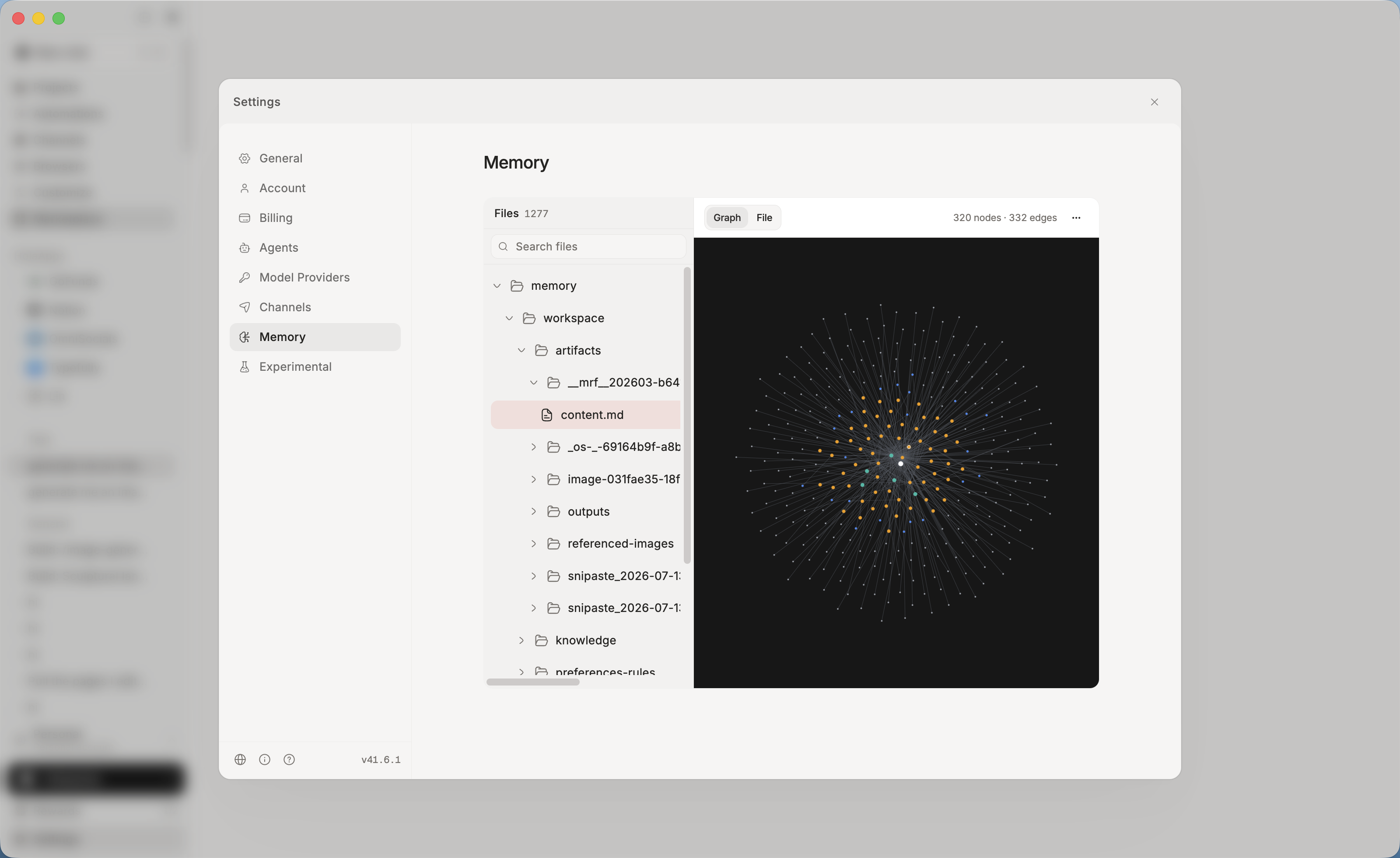
### 🧠 One memory, every agent
Context, preferences, and project history live in a single shared memory — stored **locally, as plain files you can read and edit.** Switch agents, close the app, come back next week: it already knows where you left off.
- **Never start from zero** — durable memory across sessions _and_ agents.
- **Local-first & yours** — on your machine, visible and editable, not locked in someone else's cloud.
- **Actually recallable** — structured and embedded, so the right context returns when it's needed.
### 💸 Models your way — built in, or bring your own
One account, every model — no keys, no setup, no switching between providers. The latest frontier models are **built in**: cost-efficient **Kimi K3** and **GLM 5.2** for everyday volume, plus top-tier **GPT 5.6**, **Claude Opus 5**, and **Fable 5** for the hard problems. Prefer your own provider? **Bring your own keys** for OpenAI, Anthropic, or any OpenAI- or Anthropic-compatible endpoint — those run on _your_ account, not your holaOS plan.
- **Zero-setup default** — one account, every SOTA model, no API keys to manage.
- **BYOK when you want it** — your keys, your providers, your rates.
- **Right model per task** — pick per job, per agent.
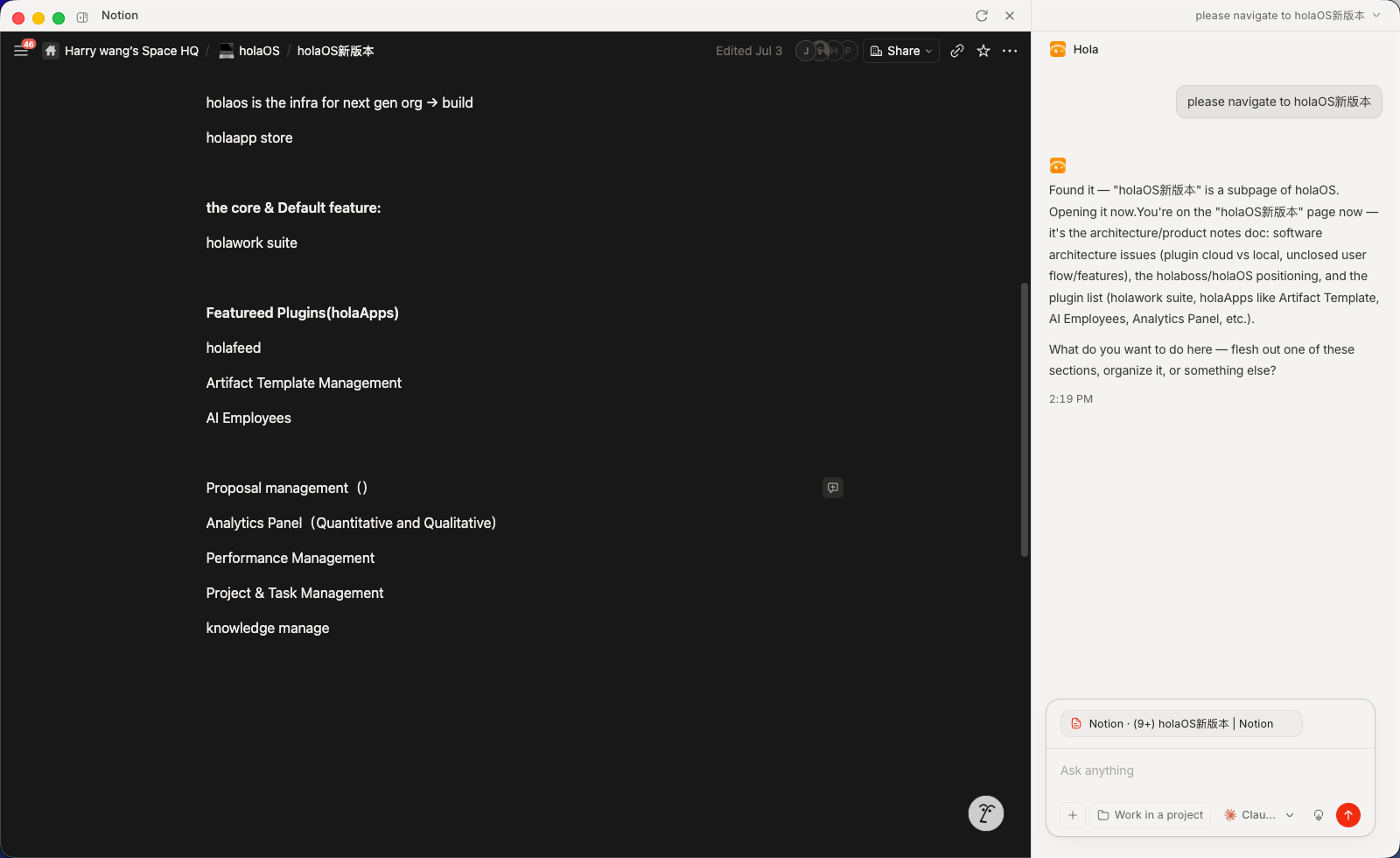
### 🪟 HolaApps — apps and agent, side by side
Install apps from the in-workspace marketplace and they open as **real, interactive surfaces right beside your agent.** Watch it work inside the app, step in whenever you want, and the result lands in place — not a wall of chat text, but the actual app, driven by the agent, next to the agent.
- **Real surfaces, not chat** — every app is a live UI (Notion, a browser, your own app), not a transcript.
- **Side-by-side by design** — app and agent share the screen, so you always see what's happening and can take over.
- **One click to install** — browse the in-workspace marketplace and open any app instantly.
- **Bring your own** — point a HolaApp at any URL and MCP server; it lives on your machine, yours to open and drive.
### 🧩 Skills, Integrations & MCP — teach it once, reuse everywhere
- **Integrations** — connect Gmail, Notion, Slack, GitHub, Linear and 50+ more with one-click OAuth. Agents read and act across your tools, no glue code — and every agent inherits the same connections.
- **MCP** — plug in any Model Context Protocol server to give your agents new tools. Bring your own, or install community MCP servers in one click.
- **Skills** — package a workflow once; any agent runs it on demand.
- **Combos** — bundle skills and integrations into a single one-click install.

### 🛠️ Your entire workstation, agent-operable
- **🌐 A real browser, driven by agents** — signed-in browsers your agents drive to browse, click, and extract — under your control.
- **🎨 Frontier generation built in** — the latest image, video, and audio models inside every agent. Storyboard a video, design a poster, voice a script — one prompt.
- **📄 Real deliverables** — reports, spreadsheets, and slides saved as real `.xlsx`, `.pptx`, and `.docx` files you can send, not text stuck in a chat.
- **💬 Reach it from anywhere you chat** — Feishu, WeChat, Slack, Telegram. Send a task from any thread; the result comes back to the same thread.
- **⏰ Automation** — run on a schedule or a trigger. Digests, monitors, and reports finish and file themselves.
---
## 🚀 Run it your way
| | |
| ------------------- | ---------------------------------------------------------------------------------------------------------------------------------------------------------------------- |
| **🖥️ Desktop app** | Download and go. Nothing to set up — frontier models built in, free to start. |
| **🔓 Open source** | Self-host it. Modified Apache 2.0, bring your own keys, run it entirely on your machine. |
| **🏢 Enterprise** | SSO with per-role permissions for every agent, skill, and app. Connect internal systems without exposing them. Audit logs on every action. On-prem or your own cloud. |
---
## Table of Contents
- [Quick Start](#quick-start)
- [Manual Install](#manual-install)
- [OSS Release Notes](#oss-release-notes)
## Quick Start
### One-Line Install
For a fresh-machine bootstrap on macOS, Linux, or WSL, use the repository installer:
```bash
curl -fsSL https://raw.githubusercontent.com/holaboss-ai/holaOS/refs/heads/main/scripts/install.sh | bash -s -- --launch
```
You can also follow the manual path if you want to control each setup step.
## Star the Repository

If holaOS is useful or interesting, a GitHub Star would be greatly appreciated.
## Manual Install
You likely will not need this section because One-Line Install runs the same setup. Use Manual Install when you want to inspect or control each step. If you use the manual path, verify the usual prerequisites first:
```bash
git --version
node --version
npm --version
```
### One-Line Agent Setup
If you use Codex, Claude Code, Cursor, Windsurf, or another coding agent, you can hand it the setup instructions in one sentence:
```text
Run the holaOS install script from https://raw.githubusercontent.com/holaboss-ai/holaOS/refs/heads/main/scripts/install.sh. It should install git and Node.js 24.14.1/npm if they are missing, clone or update the repo into ~/holaboss-ai unless I specify another --dir, run desktop:install, create apps/desktop/.env from apps/desktop/.env.example if needed, run desktop:prepare-runtime:local and desktop:typecheck, and only run desktop:dev if I ask for --launch. If Electron cannot open, stop after verification and tell me the next manual step.
```
That handoff keeps the installation flow self-contained while leaving the detailed bootstrap steps in the repo-local [INSTALL.md](INSTALL.md) runbook.
This is the baseline installation flow for local desktop development.
1. Install the desktop dependencies from the repository root:
```bash
npm run desktop:install
```
2. Create your local environment file:
```bash
cp apps/desktop/.env.example apps/desktop/.env
```
If you are following the repo exactly, keep the file close to the template and only change the values that your provider or machine needs.
The canonical path is `apps/desktop/.env`. Existing legacy `desktop/.env` files are still accepted for now, but new setups should use `apps/desktop/.env`.
3. Prepare the local runtime bundle:
```bash
npm run desktop:prepare-runtime:local
```
4. If you want a quick validation pass before launching Electron, run:
```bash
npm run desktop:typecheck
```
5. Start the desktop app in development mode:
```bash
npm run desktop:dev
```
The `predev` hook will validate the environment, rebuild native modules, and make sure a staged runtime bundle exists.
If you want to stage the runtime before opening the desktop app, there are two common paths:
Build from local runtime:
```bash
npm run desktop:prepare-runtime:local
```
Fetch the latest published runtime:
```bash
npm run desktop:prepare-runtime
```
Use the local path when you are actively changing runtime code. Use the published bundle when you want to verify the desktop against a known release artifact.
Use `One-Line Install` when you want the fastest path to a working local desktop environment. Use `Manual Install` when you need to inspect or control each setup step yourself.
## OSS Release Notes
- License: modified Apache 2.0 with additional commercial-distribution and branding conditions. See [LICENSE](LICENSE).
- Security issues: report privately to `admin@holaboss.ai`. See [SECURITY.md](SECURITY.md).