# Live2D Widget






## 特性 Feature
在网页中添加 Live2D 看板娘。兼容 PJAX,支持无刷新加载。
Add Live2D widget to web page. Compatible with PJAX.
**警告:本项目使用了大量 ES6 语法,不支持 IE 11 等老旧浏览器。**
**WARNING: This project does not support legacy browsers such as IE 11.**
## 示例 Demo
在[米米的博客](https://zhangshuqiao.org)的左下角可查看效果。(注:以下人物模型仅供展示之用,本仓库并不包含任何模型。)
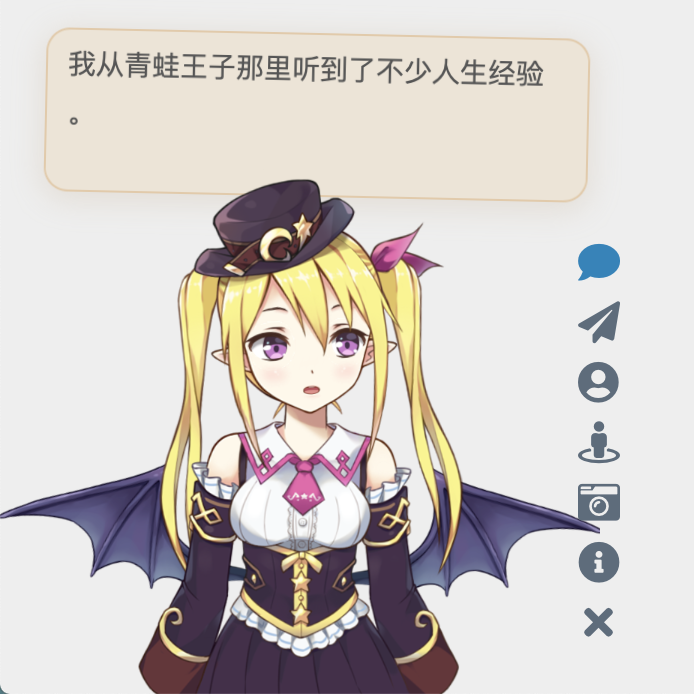

 你也可以在允许的范围内进行二次开发,这里有一些示例
- [demo.html](https://mi.js.org/live2d-widget/demo/demo.html) ,展现基础效果
- [login.html](https://mi.js.org/live2d-widget/demo/login.html) ,仿 NPM 的登陆界面
## 依赖 Dependencies
本插件需要 Font Awesome (v4 或 v5) 图标支持,请确保相关样式表已在页面中加载。以 Font Awesome v4 为例,请在 `` 中加入:
Font Awesome (v4 or v5) is required for this plugin. Take Font Awesome v4 as an example, please add the following in ``:
```xml
```
否则图标将无法正常显示。(如果网页中已经加载了任何版本的 Font Awesome,就不要重复加载了)
## 使用 Usage
将这一行代码加入 `` 或 ``,即可展现出效果:
```xml
```
如果网站启用了 PJAX,由于看板娘不必每页刷新,因此要注意将相关脚本放到 PJAX 刷新区域之外。
换句话说,如果你是小白,或者只需要最基础的功能,就只用把这一行代码,连同前面加载 Font Awesome 的一行代码,一起放到 html 的 `` 中即可。
对于用各种模版引擎(例如 Nunjucks,Jinja 或者 PHP)生成的页面,也要自行修改,方法类似,只是可能略为麻烦。以 [Hexo](https://hexo.io) 为例,需要在主题相关的 ejs 或 njk 模版中正确配置路径,才可以加载。
**但是!我们强烈推荐自己进行配置,否则很多功能是不完整的,并且可能产生问题!**
如果你有兴趣自己折腾的话,请看下面的详细说明。
### Using CDN
要自定义有关内容,可以把这个仓库 Fork 一份,然后进行修改。这时,使用方法对应地变为
```xml
```
将此处的 `username` 替换为你的 GitHub 用户名。为了使 CDN 的内容正常刷新,需要创建新的 git tag 并推送至 GitHub 仓库中,否则此处的 `@latest` 仍然指向更新前的文件。此外 CDN 本身存在缓存,因此改动可能需要一定的时间生效。相关文档:
- [Git Basics - Tagging](https://git-scm.com/book/en/v2/Git-Basics-Tagging)
- [Managing releases in a repository](https://help.github.com/en/github/administering-a-repository/managing-releases-in-a-repository)
### Self-host
你也可以直接把这些文件放到服务器上,而不是通过 CDN 加载。
- 如果你能够通过 `ssh` 访问你的主机,请把整个仓库克隆到服务器上。执行:
```bash
cd /path/to/your/webroot
# Clone this repository
git clone https://github.com/stevenjoezhang/live2d-widget.git
```
- 如果你的主机无法用 `ssh` 连接(例如一般的虚拟主机),请选择 `Download ZIP`,然后通过 `ftp` 等方式上传到主机上,再解压到网站的目录下。
- 如果你是通过 Hexo 等工具部署的静态博客,请在博客源文件(即 `source`)目录下,执行前述的 `git clone` 命令。重新部署博客时,相关文件就会自动上传到对应的路径下。为了避免这些文件被 Hexo 插件错误地修改,可能需要设置 `skip_render`。
这样,整个项目就可以通过你的服务器 IP 或者域名从公网访问了。不妨试试能否正常地通过浏览器打开 `autoload.js` 和 `live2d.min.js` 等文件,并确认这些文件的内容是完整和正确的。
一切正常的话,接下来修改一些配置就行了。(需要通过服务器上的文本编辑器修改;你也可以先在本地完成这一步骤,再上传到服务器上)
修改 `autoload.js` 中的常量 `live2d_path` 为 `live2d-widget` 这一目录的 URL。比如说,如果你能够通过
```
https://example.com/path/to/live2d-widget/live2d.min.js
```
访问到 `live2d.min.js`,那么就把 `live2d_path` 的值修改为
```
https://example.com/path/to/live2d-widget/
```
路径末尾的 `/` 一定要加上。具体可以参考 `autoload.js` 内的注释。
完成后,在你要添加看板娘的界面加入
```xml
```
就可以加载了。
## 后端 API
`initWidget` 方法接受名为 `apiPath` 和 `cdnPath` 的参数,两者设置其中一项即可。其中 `apiPath` 为后端 API 的 URL,可以自行搭建,并增加模型(需要修改的内容比较多,此处不再赘述)。而 `cdnPath` 则是通过 jsDelivr 这样的 CDN 服务加载资源,更加稳定。
## 目录结构 Files
- `waifu-tips.js` 包含了按钮和对话框的逻辑;
- `waifu-tips.json` 中定义了触发条件(`selector`,CSS 选择器)和触发时显示的文字(`text`);
- `waifu.css` 是看板娘的样式表。
源文件是对 Hexo 的 [NexT 主题](http://github.com/next-theme/hexo-theme-next)有效的,为了适用于你自己的网页,可能需要自行修改,或增加新内容。
**警告:作者不对包括但不限于 `waifu-tips.js` 和 `waifu-tips.json` 文件中的内容负责,请自行确保它们是合适的。**
如果有任何疑问,欢迎提 Issue。如果有任何修改建议,欢迎提 Pull Request。
## 鸣谢 Thanks
你也可以在允许的范围内进行二次开发,这里有一些示例
- [demo.html](https://mi.js.org/live2d-widget/demo/demo.html) ,展现基础效果
- [login.html](https://mi.js.org/live2d-widget/demo/login.html) ,仿 NPM 的登陆界面
## 依赖 Dependencies
本插件需要 Font Awesome (v4 或 v5) 图标支持,请确保相关样式表已在页面中加载。以 Font Awesome v4 为例,请在 `` 中加入:
Font Awesome (v4 or v5) is required for this plugin. Take Font Awesome v4 as an example, please add the following in ``:
```xml
```
否则图标将无法正常显示。(如果网页中已经加载了任何版本的 Font Awesome,就不要重复加载了)
## 使用 Usage
将这一行代码加入 `` 或 ``,即可展现出效果:
```xml
```
如果网站启用了 PJAX,由于看板娘不必每页刷新,因此要注意将相关脚本放到 PJAX 刷新区域之外。
换句话说,如果你是小白,或者只需要最基础的功能,就只用把这一行代码,连同前面加载 Font Awesome 的一行代码,一起放到 html 的 `` 中即可。
对于用各种模版引擎(例如 Nunjucks,Jinja 或者 PHP)生成的页面,也要自行修改,方法类似,只是可能略为麻烦。以 [Hexo](https://hexo.io) 为例,需要在主题相关的 ejs 或 njk 模版中正确配置路径,才可以加载。
**但是!我们强烈推荐自己进行配置,否则很多功能是不完整的,并且可能产生问题!**
如果你有兴趣自己折腾的话,请看下面的详细说明。
### Using CDN
要自定义有关内容,可以把这个仓库 Fork 一份,然后进行修改。这时,使用方法对应地变为
```xml
```
将此处的 `username` 替换为你的 GitHub 用户名。为了使 CDN 的内容正常刷新,需要创建新的 git tag 并推送至 GitHub 仓库中,否则此处的 `@latest` 仍然指向更新前的文件。此外 CDN 本身存在缓存,因此改动可能需要一定的时间生效。相关文档:
- [Git Basics - Tagging](https://git-scm.com/book/en/v2/Git-Basics-Tagging)
- [Managing releases in a repository](https://help.github.com/en/github/administering-a-repository/managing-releases-in-a-repository)
### Self-host
你也可以直接把这些文件放到服务器上,而不是通过 CDN 加载。
- 如果你能够通过 `ssh` 访问你的主机,请把整个仓库克隆到服务器上。执行:
```bash
cd /path/to/your/webroot
# Clone this repository
git clone https://github.com/stevenjoezhang/live2d-widget.git
```
- 如果你的主机无法用 `ssh` 连接(例如一般的虚拟主机),请选择 `Download ZIP`,然后通过 `ftp` 等方式上传到主机上,再解压到网站的目录下。
- 如果你是通过 Hexo 等工具部署的静态博客,请在博客源文件(即 `source`)目录下,执行前述的 `git clone` 命令。重新部署博客时,相关文件就会自动上传到对应的路径下。为了避免这些文件被 Hexo 插件错误地修改,可能需要设置 `skip_render`。
这样,整个项目就可以通过你的服务器 IP 或者域名从公网访问了。不妨试试能否正常地通过浏览器打开 `autoload.js` 和 `live2d.min.js` 等文件,并确认这些文件的内容是完整和正确的。
一切正常的话,接下来修改一些配置就行了。(需要通过服务器上的文本编辑器修改;你也可以先在本地完成这一步骤,再上传到服务器上)
修改 `autoload.js` 中的常量 `live2d_path` 为 `live2d-widget` 这一目录的 URL。比如说,如果你能够通过
```
https://example.com/path/to/live2d-widget/live2d.min.js
```
访问到 `live2d.min.js`,那么就把 `live2d_path` 的值修改为
```
https://example.com/path/to/live2d-widget/
```
路径末尾的 `/` 一定要加上。具体可以参考 `autoload.js` 内的注释。
完成后,在你要添加看板娘的界面加入
```xml
```
就可以加载了。
## 后端 API
`initWidget` 方法接受名为 `apiPath` 和 `cdnPath` 的参数,两者设置其中一项即可。其中 `apiPath` 为后端 API 的 URL,可以自行搭建,并增加模型(需要修改的内容比较多,此处不再赘述)。而 `cdnPath` 则是通过 jsDelivr 这样的 CDN 服务加载资源,更加稳定。
## 目录结构 Files
- `waifu-tips.js` 包含了按钮和对话框的逻辑;
- `waifu-tips.json` 中定义了触发条件(`selector`,CSS 选择器)和触发时显示的文字(`text`);
- `waifu.css` 是看板娘的样式表。
源文件是对 Hexo 的 [NexT 主题](http://github.com/next-theme/hexo-theme-next)有效的,为了适用于你自己的网页,可能需要自行修改,或增加新内容。
**警告:作者不对包括但不限于 `waifu-tips.js` 和 `waifu-tips.json` 文件中的内容负责,请自行确保它们是合适的。**
如果有任何疑问,欢迎提 Issue。如果有任何修改建议,欢迎提 Pull Request。
## 鸣谢 Thanks
 > 感谢 BrowserStack 容许我们在真实的浏览器中测试此项目。
> Thanks to [BrowserStack](https://www.browserstack.com/) for providing the infrastructure that allows us to test in real browsers!
> 感谢 BrowserStack 容许我们在真实的浏览器中测试此项目。
> Thanks to [BrowserStack](https://www.browserstack.com/) for providing the infrastructure that allows us to test in real browsers!
 > 感谢 jsDelivr 提供的 CDN 服务。
> Thanks jsDelivr for providing public CDN service.
代码自这篇博文魔改而来:
https://www.fghrsh.net/post/123.html
点击看板娘的纸飞机按钮时,会出现一个彩蛋,这来自于 [WebsiteAsteroids](http://www.websiteasteroids.com)。
## 更多 More
更多内容可以参考:
https://imjad.cn/archives/lab/add-dynamic-poster-girl-with-live2d-to-your-blog-02
https://github.com/xiazeyu/live2d-widget.js
https://github.com/summerscar/live2dDemo
关于后端 API 模型:
https://github.com/fghrsh/live2d_api
https://github.com/xiazeyu/live2d-widget-models
https://github.com/xiaoski/live2d_models_collection
除此之外,还有桌面版本:
https://github.com/amorist/platelet
https://github.com/akiroz/Live2D-Widget
https://github.com/zenghongtu/PPet
https://github.com/LikeNeko/L2dPetForMac
以及 Wallpaper Engine:
https://github.com/guansss/nep-live2d
## 许可证 License
Released under the GNU General Public License v3
http://www.gnu.org/licenses/gpl-3.0.html
本仓库并不包含任何模型,用作展示的所有 Live2D 模型、图片、动作数据等版权均属于其原作者,仅供研究学习,不得用于商业用途。
Live2D 官方网站:
https://www.live2d.com/en/
https://live2d.github.io
Live2D Cubism Core は Live2D Proprietary Software License で提供しています。
https://www.live2d.com/eula/live2d-proprietary-software-license-agreement_en.html
Live2D Cubism Components は Live2D Open Software License で提供しています。
http://www.live2d.com/eula/live2d-open-software-license-agreement_en.html
> The terms and conditions do prohibit modification, but obfuscating in `live2d.min.js` would not be considered illegal modification.
https://community.live2d.com/discussion/140/webgl-developer-licence-and-javascript-question
## 更新 Update
2018年10月31日,由 fghrsh 提供的原 API 停用,请更新至新地址。参考文章:
https://www.fghrsh.net/post/170.html
2020年1月1日起,本项目不再依赖于 jQuery。
> 感谢 jsDelivr 提供的 CDN 服务。
> Thanks jsDelivr for providing public CDN service.
代码自这篇博文魔改而来:
https://www.fghrsh.net/post/123.html
点击看板娘的纸飞机按钮时,会出现一个彩蛋,这来自于 [WebsiteAsteroids](http://www.websiteasteroids.com)。
## 更多 More
更多内容可以参考:
https://imjad.cn/archives/lab/add-dynamic-poster-girl-with-live2d-to-your-blog-02
https://github.com/xiazeyu/live2d-widget.js
https://github.com/summerscar/live2dDemo
关于后端 API 模型:
https://github.com/fghrsh/live2d_api
https://github.com/xiazeyu/live2d-widget-models
https://github.com/xiaoski/live2d_models_collection
除此之外,还有桌面版本:
https://github.com/amorist/platelet
https://github.com/akiroz/Live2D-Widget
https://github.com/zenghongtu/PPet
https://github.com/LikeNeko/L2dPetForMac
以及 Wallpaper Engine:
https://github.com/guansss/nep-live2d
## 许可证 License
Released under the GNU General Public License v3
http://www.gnu.org/licenses/gpl-3.0.html
本仓库并不包含任何模型,用作展示的所有 Live2D 模型、图片、动作数据等版权均属于其原作者,仅供研究学习,不得用于商业用途。
Live2D 官方网站:
https://www.live2d.com/en/
https://live2d.github.io
Live2D Cubism Core は Live2D Proprietary Software License で提供しています。
https://www.live2d.com/eula/live2d-proprietary-software-license-agreement_en.html
Live2D Cubism Components は Live2D Open Software License で提供しています。
http://www.live2d.com/eula/live2d-open-software-license-agreement_en.html
> The terms and conditions do prohibit modification, but obfuscating in `live2d.min.js` would not be considered illegal modification.
https://community.live2d.com/discussion/140/webgl-developer-licence-and-javascript-question
## 更新 Update
2018年10月31日,由 fghrsh 提供的原 API 停用,请更新至新地址。参考文章:
https://www.fghrsh.net/post/170.html
2020年1月1日起,本项目不再依赖于 jQuery。