
Capek is a self-hosted conversational AI platform.
> [!WARNING]
> This project began as an experiment and remains a work in progress. Breaking changes are expected.
## Features
- Multi-user support with RBAC and Row Level Security (RLS).
- Single-user, OpenID Connect (OIDC) and proxy authentication modes.
- Agent orchestration with triage and specialist patterns.
- OpenAI-compatible LLM provider integration.
- MCP server integration.
- Skills with a sandboxed code interpreter.
- Dark/Light theme.
- Customizable branding.
- Internationalization.
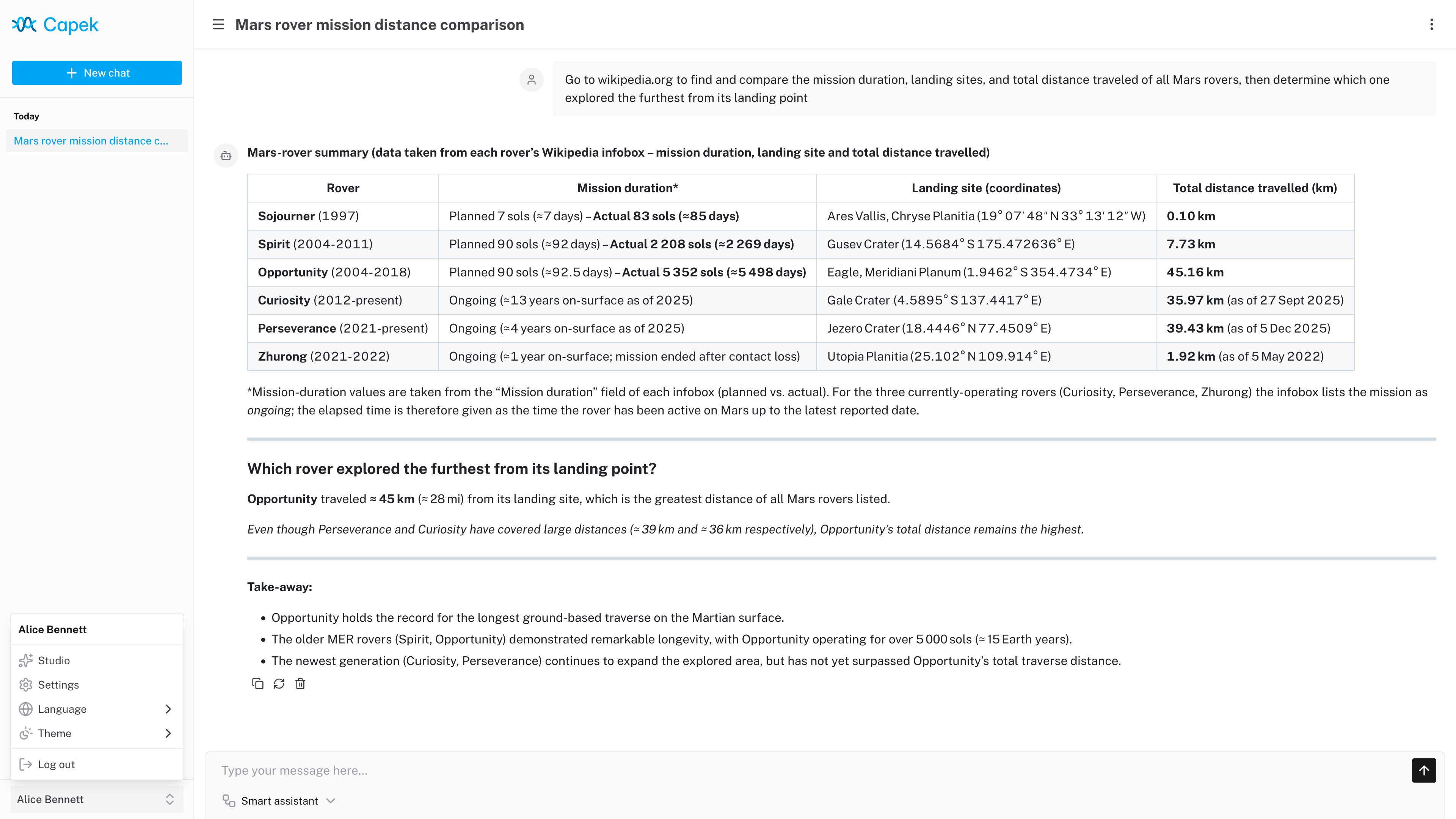 Running locally with llama.cpp (gpt-oss-120b) and a Playwright skill.
## Tech stack
| Layer | Technology |
| --------- | ------------------------------------------- |
| Framework | Nuxt |
| Frontend | Nuxt UI, Tailwind CSS, Pinia |
| API | tRPC, Zod |
| Database | PostgreSQL, Kysely (PGlite for development) |
| Testing | Vitest, Playwright |
## Code interpreter
The code interpreter runs JavaScript code in a [QuickJS](https://bellard.org/quickjs/) WASM build with memory and execution time constraints.
Each chat session has its own in-memory Virtual File System (VFS). The `/workspace` directory is writable; other paths are read-only. A Node.js-like `fs` API is available for file operations.
Skills and MCP tools are exposed as ES modules under `/skills/index.js` and `/servers/index.js`:
```js
const { $mySkill } = await import("/skills/index.js");
const { $myTool } = await import("/servers/myServer/index.js");
```
The agent is provided with usage context and can dynamically discover available tools and skills by exploring the VFS (e.g., reading `SKILL.md` files for documentation).
## Development
### Setup
```sh
pnpm install
pnpm dev
```
The application runs in single-user mode at `http://localhost:3000` and automatically logs in as the admin user.
### Configuration
Copy `.env.example` to `.env` and adjust as needed. Key variables:
| Variable | Description | Default |
| ------------------- | ---------------------------------------------------- | ----------------------- |
| `NUXT_DATABASE_URL` | PostgreSQL connection string or PGlite file path | `file://./.data/pglite` |
| `NUXT_AUTH_MODE` | Authentication mode: `single-user`, `oidc`, `proxy` | `single-user` |
| `NUXT_LOG_LEVEL` | Log level: `fatal`, `error`, `warn`, `info`, `debug` | `info` |
See `.env.example` for all available configuration options.
## Deployment
### Production build
```sh
pnpm build
pnpm start
```
### Docker
```sh
docker build -t localhost/capek:latest ./
docker run -it --rm -p 127.0.0.1:3000:3000/tcp localhost/capek:latest
```
### Docker Compose
The project includes example Compose configurations for reference:
- `compose.base.yaml`: core services (Traefik, PostgreSQL, MCP servers).
- `compose.keycloak.yaml`: extends base with Keycloak for OIDC.
- `compose.dex.yaml`: extends base with Dex for OIDC.
- `compose.proxy.yaml`: extends base with proxy authentication.
Start the full stack:
```sh
docker compose -f ./compose.keycloak.yaml up -d
```
The application is accessible at `https://capek.localhost`.
## License
Licensed under the [European Union Public Licence v. 1.2 or later](./LICENSE) © [Héctor Molinero Fernández](https://hector.molinero.dev). Review the license conditions before use or distribution.
Running locally with llama.cpp (gpt-oss-120b) and a Playwright skill.
## Tech stack
| Layer | Technology |
| --------- | ------------------------------------------- |
| Framework | Nuxt |
| Frontend | Nuxt UI, Tailwind CSS, Pinia |
| API | tRPC, Zod |
| Database | PostgreSQL, Kysely (PGlite for development) |
| Testing | Vitest, Playwright |
## Code interpreter
The code interpreter runs JavaScript code in a [QuickJS](https://bellard.org/quickjs/) WASM build with memory and execution time constraints.
Each chat session has its own in-memory Virtual File System (VFS). The `/workspace` directory is writable; other paths are read-only. A Node.js-like `fs` API is available for file operations.
Skills and MCP tools are exposed as ES modules under `/skills/index.js` and `/servers/index.js`:
```js
const { $mySkill } = await import("/skills/index.js");
const { $myTool } = await import("/servers/myServer/index.js");
```
The agent is provided with usage context and can dynamically discover available tools and skills by exploring the VFS (e.g., reading `SKILL.md` files for documentation).
## Development
### Setup
```sh
pnpm install
pnpm dev
```
The application runs in single-user mode at `http://localhost:3000` and automatically logs in as the admin user.
### Configuration
Copy `.env.example` to `.env` and adjust as needed. Key variables:
| Variable | Description | Default |
| ------------------- | ---------------------------------------------------- | ----------------------- |
| `NUXT_DATABASE_URL` | PostgreSQL connection string or PGlite file path | `file://./.data/pglite` |
| `NUXT_AUTH_MODE` | Authentication mode: `single-user`, `oidc`, `proxy` | `single-user` |
| `NUXT_LOG_LEVEL` | Log level: `fatal`, `error`, `warn`, `info`, `debug` | `info` |
See `.env.example` for all available configuration options.
## Deployment
### Production build
```sh
pnpm build
pnpm start
```
### Docker
```sh
docker build -t localhost/capek:latest ./
docker run -it --rm -p 127.0.0.1:3000:3000/tcp localhost/capek:latest
```
### Docker Compose
The project includes example Compose configurations for reference:
- `compose.base.yaml`: core services (Traefik, PostgreSQL, MCP servers).
- `compose.keycloak.yaml`: extends base with Keycloak for OIDC.
- `compose.dex.yaml`: extends base with Dex for OIDC.
- `compose.proxy.yaml`: extends base with proxy authentication.
Start the full stack:
```sh
docker compose -f ./compose.keycloak.yaml up -d
```
The application is accessible at `https://capek.localhost`.
## License
Licensed under the [European Union Public Licence v. 1.2 or later](./LICENSE) © [Héctor Molinero Fernández](https://hector.molinero.dev). Review the license conditions before use or distribution.
