Abstract

TODO

Introduction

With this thesis I describe RAJE (acronym for RAsh Javascript Editor), a WYSIWYG (What You See Is What You Get) editor, which generates HTML document. In particular it generates in output a subset of HTML elements called RASH (Research Articles in Semplified HTML). RAJE allows authors to write research papers by means of a user-friendly interface, instead of writing raw markup with a IDE or text editors. In addition it guarantees users the benefits of a word processor combined with the ones given by a HTML-based format which are interactiveness, usability and easiness to be processed by calculators.

Currently the most used format in publications is PDF, which has strenghts that make it the De Facto standard in document sharing. Among them we can find the hard formatting style, to ensure that every device is able to visualise the file in the way it was created, as is. But PDF has also important problems, which are: the lack of interactivity, its unuptitude of to be shared via web, and the complicated readability by screen readers, to help authors with disabilities.

In order to create a PDF file, users need to create a document that will be exported as PDF after. These documents are written with an editor or word processor. Microsoft Word and OpenOffice are the most popular word processors. They produce DOC(X) and ODT files, and authors are allowed to export the document in PDF. Another way is using LaTeX i.e. a typesetting format that can be compiled to create the corrispondant PDF file. This method is different because users have to use a markup editor instead of a word-processor like one (there are also WYSIWYG LaTeX editors).

Recently, expecially inside Semantic Web community, reasearchers started to talk about HTML publication. Publication modes have not changed everywhere, they still accept PDF, but few entities such as PeerJ, EKAW and Springer now accept also HTML articles. The biggest part of HTML articles shared now are generated with online editors. Among them we can find Authorea, Fidus Writer, Dokieli and TinyMCE, that are the most populars.

RAJE is placed inside the last group, with the difference that it is developed on a format i.e. RASH, and all its framework can comes in aid for handling conversions. Having only a univocal subset of HTML can help a lot with problems such as an unimplemented structural restriction, where same result can be reached with different structures (e.g. <b>lorem</b> element is different of <span style="font-wight:bold">lorem</span>, but they are displayed equal). RAJE will be placed inside the RASH framework. It will come in aid of those authors which do not use other editors but need a tool that help write RASH with an interface, not as raw markup, especially for long documents. The whole project is created using web technologies as HTML, CSS and JavaScript, which is the RAJE's beating heart.

This thesis is written using RAJE itself, and this is a good testing, but other tests are made. In particular a Task Driven Test was organized with 3 researchers of the deparment of computer science and engineering at Bologna University. This test aims to discover the RAJE usability and inprove test question to do the same a wider population next. The results show difficulties on: editing metadata, find the button to add references (such as reference to images, tables and formulas, bibliographic links and footnotes). The feedbacks given by testers show also that some interface settings are better to be moved in other places, because they are a bit hard to find. The "add a footnote" reference must be moved in a single button in the editor's toolbar. In addition testers have found very useful the mathematical formula editor, maybe with a link to its syntax. All issues are currently under fix.

The rest of the thesis is organised as follows. In ​ i describe the specific context where RAJE operates, and it is useful to grant an outline of how publications work, pros and cons about PDF and EPUB and description of the most popular format and HTML editors. In  ​ I give few high-level information about what RAJE allows author to do, how interface is arranged and its strenghts such as Github integration and the formulas editor. In  ​ are wrapped all the low-level descriptions of RAJE. About the technologies and external libraries to develop it, and how I have deployed the whole software for MacOSX, Windows and Linux. In  ​ I describe the evaluation process: the population background, tasks implementation, development of results and conclusion.

Literature review

Before talking about RAJE I must describe the domain where it operates.

First of all I introduce the submission workflow , for creation, evaluation and publication, and few words about HTML publication. Then I will give an overall about popular editors and formats today, which are mainly PDF and ePub as formats, and the WYSIWYG for what concern the editors. At last I describe the RASH framework, where RAJE will be placed in.

Submission workflow

More than 400 years passed, but the structure which sustain scientific papers is still the same of Galieo Galilei— A. Pepe Authore Co-Founder.

This, described below, is the academic submission workflow.

When a researcher, or a group of them, wants to submit a paper to a technical journal, workshop or conference they, first of all, need an editor. If we are talking about a more than one author, they probably set up a communication link among them, to exchange and share the new changes; To have always the last release. The editor can be a WYSIWYG word processor or a markdown one (that will be described in ), and in some case it has a collaboration system directly integrated inside.

When the article is finally ready, it must be submitted to the conference, answering to the call of papers. Before the deadline only the abstract must be sent, and then the whole article. Only one requirement is asked: the article is accepted only in PDF format, but sometimes, in few specific conferences also EPUB is accepted. Not only the format is required, but also the TeX layout (such as LNCS, ACM and others).

This step can be called evaluation. Here a commission of peers researchers or conference chairs have to review all submitted articles, with annotations and comments. Every article can be accepted or rejected, but sometimes changes are required. This step can take up to 3 months.

When a paper is accepted the second phase comes: publication. Authors, now, have to send an archive containing source code of written paper (e.g. if LaTeX is used, inside the archive can be found .tex markdown files) and a the PDF corrispondent document, to the nominated editor house. They will create a new PDF file starting fromthe sent one. The source code will be consulted only for doubts.

HTML and publication

The main format widely used to submit academic articles is PDF. It usage has many problems (that will belisted after) however the worst one, in this case, is about the difficulty to be ridden by machines. For this reason the web scientific community propose the adoption of HTML for submitting and sharing scientific articles. In addition to the ability to be easily ridden by machines or browsers, it is not static as PDF, e.g. the RASH format allows reading users to change beetwen the different supported styles only interacting with specific button placed at the bottom of the article.

Enhancements are multiple. Videos, SVG images, user interactions are all things that PDF does not have.

As just said, HTML is currently not used to publication, but instead many reasearchers already use this format because they use web-first editors.

Elsevier, that is a world-leading provider of web-based solutions, has posed a series of questions online to a group of 500 researchers about which one do they prefer beetwen HTML or PDF to create research articles. First they asked few question about pros and cons and then, after a video regarding the article of the future​, they asked if the video changed its perception . The 60% of the interviewed researcherers changed its mind about a HTML based article, instead a few more than a third of them was little sceptical about maintainig costs, offline reading and how much this features arerelevant. At least 50% of interviewed people declared that maybe in future, HTML can be the next way to create, share and navigate the future research articles.

Editors and formats

All the research articles are created with at least one editor or word processor.The choice is all about the author's preferred one.

The major used editors are word processors, which are computer programs that allow users to do more actions than common text editors (as WordPad). Them are used to write down those kind of document such as Microsoft Word,OpenOffice and LibreOffice. Thesethree processors create files with their own format: .doc(x). They share the biggest amount of the market. MS Word, which cames with MS Office suit, during his apex was the most used one.

LaTeX (a format), i.e. a typesetting system to create technical and scientific documentation, is popular enough to be the most adopted format for drawing scientific documents in a markdown-like way.Of course it comes with many editors (both markup and WYSIWYG styles), which shares more or less equally the market. One of the LaTeX's strenghts are the mathematical notation and the wide number of packages and styles useable. Mathematical notation is pretty simplier than other editors, because it uses a well defined syntax .

In this chapter I talk about PDF and ePub formats (the most required from publishers), the WYSIWYG editors and, atleast, I will spend some words to describe HTML-based editors.

PDF: de facto standard

The Portable Document Format (also known as PDF) is a format created by Adobe Systems in the first 90s [5]. It was born to facilitate the exchange of documents. It became popular because it is independent of software, hardware, or operating system, and now it is de facto standard. In other words, documents looked always the same everywhere, regardless of which device or Operating System are opened.

After its first release, the new versione PDF 1.1 came out, with more new interesting features such as links, notes and so on. Year over year new releases has been published until, in the 2008, PDF 1.7 became an official ISO-standard (ISO 32000-1:2008).

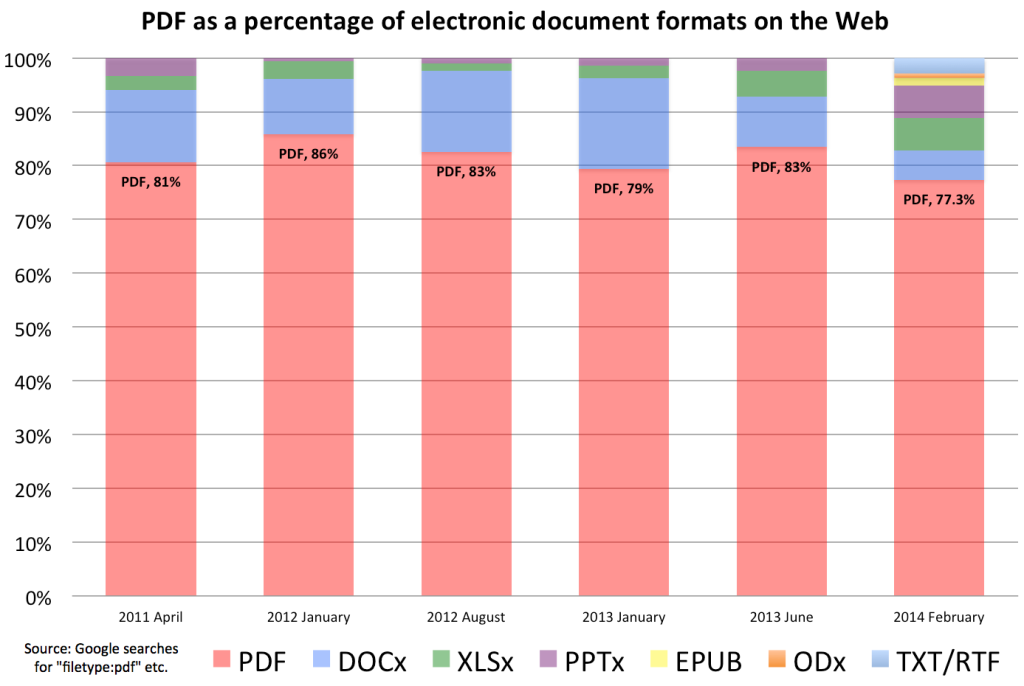
Everyone use it: businesses, universities and publishers (as written in ​). In ​ is shown that from April 2011 to February 2014, the most format searched with Google search engine is PDF. The percentage decreased in 2014, reaching 77 points degree. In the same year the ePub format usage, which was not there in previous years, is grown up.

A PDF file is made up combining three different technologies:

  1. A PostScript part to generate layout and graphics.

  2. A font-embedding system that aggregate used fonts inside the document.

  3. A storage system which embeds all elements (also the two listed above, images and other external things) togheter, in one single file.
2014-02-pdf-vs2-1024x686.png

PDF dominance ​http://duff-johnson.com/2014/02/17/the-8-most-popular-document-formats-on-the-web/.

PDF files did not succeed because of its technical supremacy, but mostly because Adobe, in 1993, realized that this format has to became free of charges, unlike its competitors . This move is the architect of future popularity.

The accessibility is a problem since PDF format's focus was more characterized by graphical rappresentation than semantical. When, in 2012, a new standard has been released (PDF/UA,Universal Accessibility) PDF files can be created specifically to be accessible for disabled people, with additional informations like XML tags, captions and audio descriptions. The PDF/UA standard is deeply different from the PDF one,this means that a PDF file can or cannot be compatible with the accessible standard. Moreover the only one program that allows users to modify compliance issues on a PDF file is Adobe Acrobat Reader Pro, where its license has a significant cost [6] ​.

The last problem is that PDF is a static format, good to be read form humans, but (because is shared as binary) is less good to be read from machines.

EPUB format

The EPUB (short for​ electronic publication) format is a open standard published by the International Digital Publishing Forum. It is a format for e-bookfiles ​. It can be used to send and publish a single file, while it contains a set of structured assets, including XHTML, CSS, SVG, images, and other resources​.

EPUB is the most widely supported vendor-independent XML-based (as opposed to PDF) e-book format; that is, it issupported by the largest number of hardware readers.

In October 2007 was realeased, with an expansion in 2010, EPUB 2. The version 3.0 became effective in October 2011(it was also re-updated in June 2014 to the version 3.0.1). EPUB 3.0.1 granted specialized formatting (for documentslike graphic novels and comic books), support for MathML, and enhanced accessibility features. From Junuary 5 2017, the current version is EPUB 3.1 and its purpose is to simplify digital books specifications and align itself to the Open Web Platform (also because the alliance beetwen IDPF and W3C dated 2017). Right now, IDPF is developing a new common specifications for allowing users to open publications online,with the help of a simple browser without lose any features.

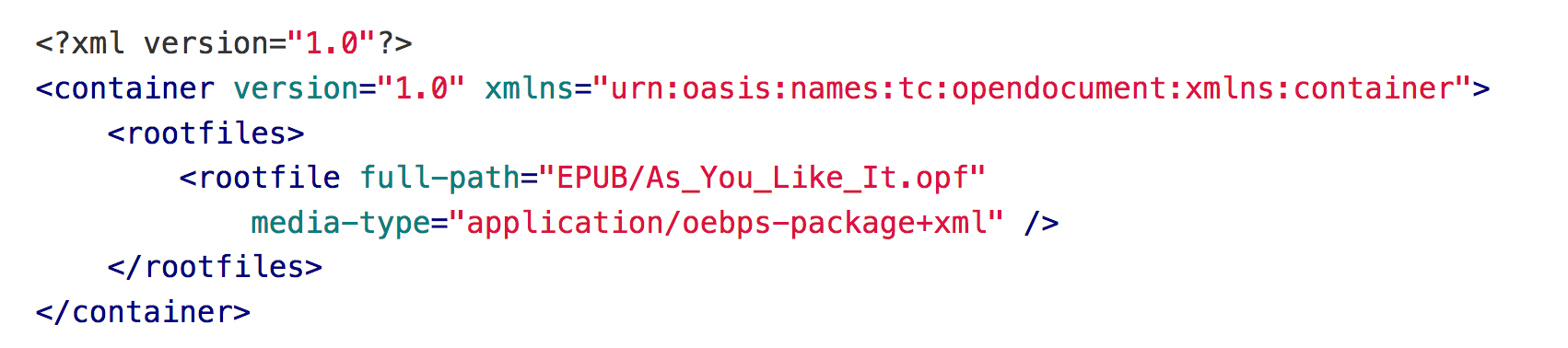
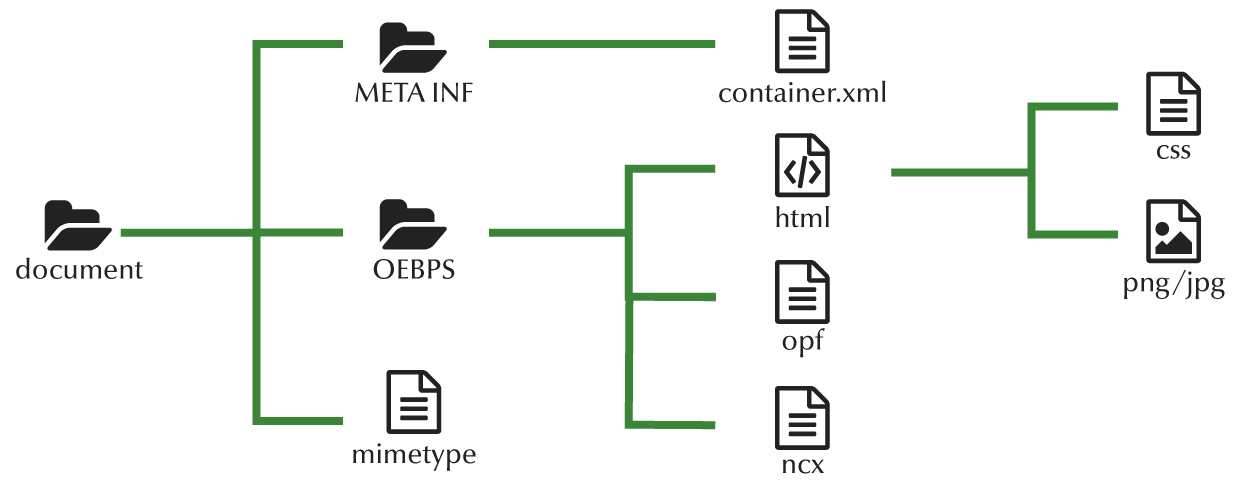
An EPUB file is ZIP archive containing HTML5 files (with the last release), CSS and other needed assets. As said before, an EPUB is delivered as a single file to facilitate sharing, but it can be unzipped to see his internal structure ( ​). Inside the root folder there are two directories and a mimetype that must be included in. The mimetype is only needed to reveal what kind of ZIP is, in this case it only contains application/epub+zip​. The META-INF directory must contains the reserved files suchas encryption.xml, signatures.xml and container.xml whichis the main one. It has a rootfile element for each one asset inside the EPUB ( ​ show its contents).

container.xml.png

​Example of a container.xml file.

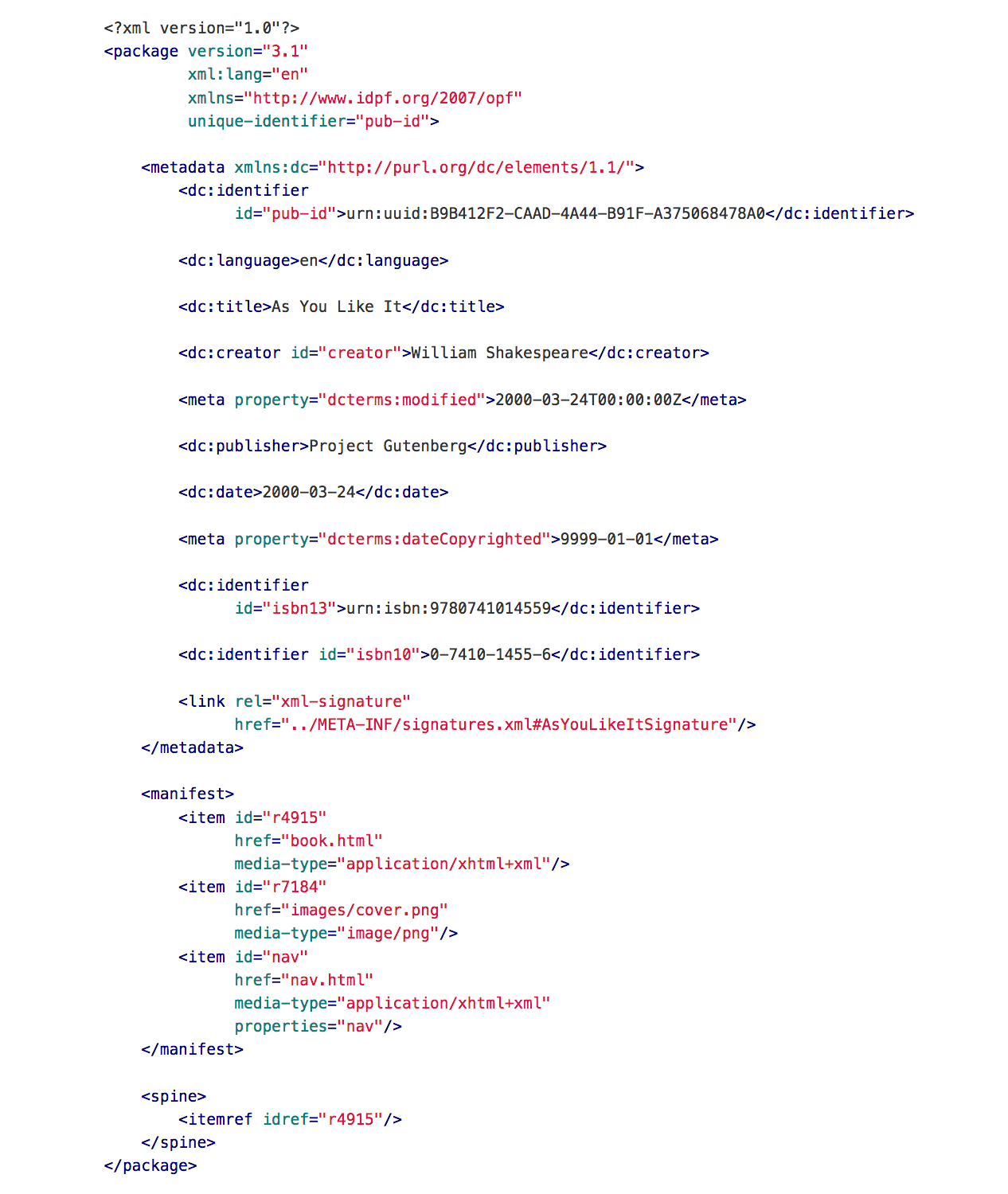
Then there is the OEBPS ​directory that contains: ncx, opf and other required assets. Among them, OPF integrates all metadata normally required as the unique-identifier or other dublin core metadata (whichare dc:language, dc:creator and others). The manifest node wraps every needed assets, in  are the entire book in HTML format, a cover image and the table of content which is nav.html.
opf.png

​OPF example from EPUB specification in W3C.

structure-epub.png

​EPUB 3.1 structure.​

An EPUB file, like a web page (which is basically what an EPUB is), is completely responsive. This mean that, istead of the PDF format (which is shown in the same way with any devides), its structure is different beetwen a full width monitor and a smartphone. That is because its core documents are HTML5. This is compatibility is very useful if a publisher has already produced a content in HTML or HTML5 because the conversion to EPUB 3 should be minimal 

This would likely point to HTML5 as the future for online and mobile content formats. EPUB should certainly becounted in that future, since the specification was drawn from existing and emerging web standards, in particular HTML5. [7]

EPUB and PDF formats can be used for the same purposes. But right now PDF still the one most used​ format (also required by publishers). in the  ​ below, I listed pros and cons about the two formats.

- EPUB PDF
PROS
  • Written in XHTML and XML, easy to master form developers.

  • Developer as a unique ZIP file, there are not overhead inside the document.

  • Articles written in XML (XHTML and HTML5) can be easily transformed in EPUB

  • Documents are resized to fit with the screen reader.

  • Good accessibility features

  • MathML support to attach formulas

  • Control over layout and fonts.

  • Hard structure, always the same with every devices.

  • Free royalties, owned by Adobe.

  • Standard De Facto, to share and print documents

  • Specific knowledments are not required (every editor can export to PDF)

CONS
  • Defined structure: needed elements inside the ZIP archive

  • Knowledgement about XML syntax needed.

  • Generated code is complex, difficult to master by developers.

  • Conversion to web-friendly is difficult.

  • Not adaptive to various displays and devices.

  • Is difficult to read some articles with small screens (such as smartphones)

  • Browser loading time

  • Very bad accessibility

EPUB vs PDF  ​. ​

WYSIWYG and HTML-based editors

WYSIWYG, acronym of What You See Is What You Get, is a kind of editors or word processors that allows developers to see what the end result will look like during the creation of the document interface. In other words users can modify directly the output itself.

A WYSIWYG editor can add bold and italic, change text position, use undo and redo, create lists, links, anchors andimages  .

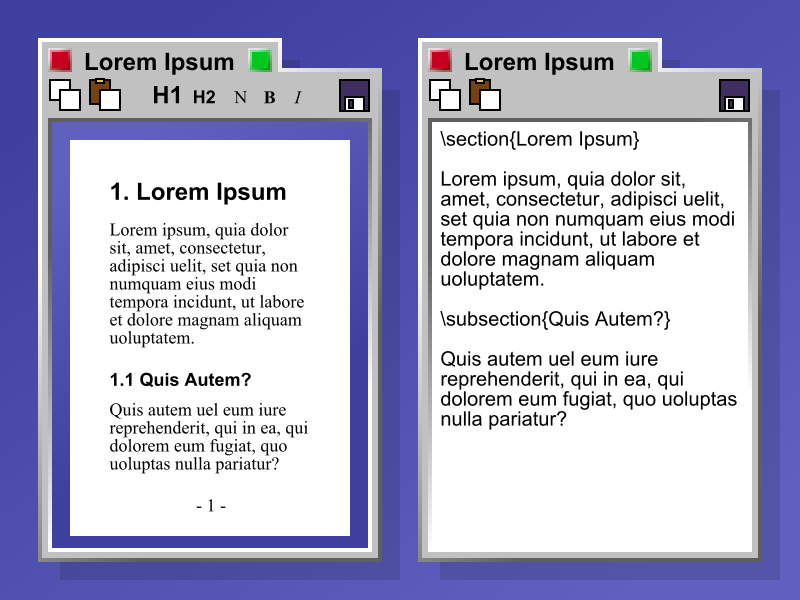
The first difference that can comes in mind is beetwen a LaTeX processor ( ​). In this image leap out that the left editor allows users to edit directly the output interface, instead the right one is simply a code that will be processed after, to compile an interface similar to the left one. The output is the same (more or less) but the input in deeply different. The editor comes with a toolbar, which hasbuttons to insert HTML elements <h1><h2>​ and so on. In the other side LaTeX basics are needed to write markdown instructions.​

800px-Lorem_Ipsum_-_WYSIWYG_en_Latex_-_tekst_als_paden.svg.png

​Difference beetwen a WYSIWYG editor and LaTeX code.

Popular WYSIWYG editors are MS Word, OpenOffice, LibreOffice (explained above) but also Google Docs and Dropbox Paper. These are word processors, which can give also style and structure to a document, not only text. Everyone has its own document structure, but this typology is largely used to work with HTML. 

Now I describe what are the most used and interesting, for my case, HTML-based editors.

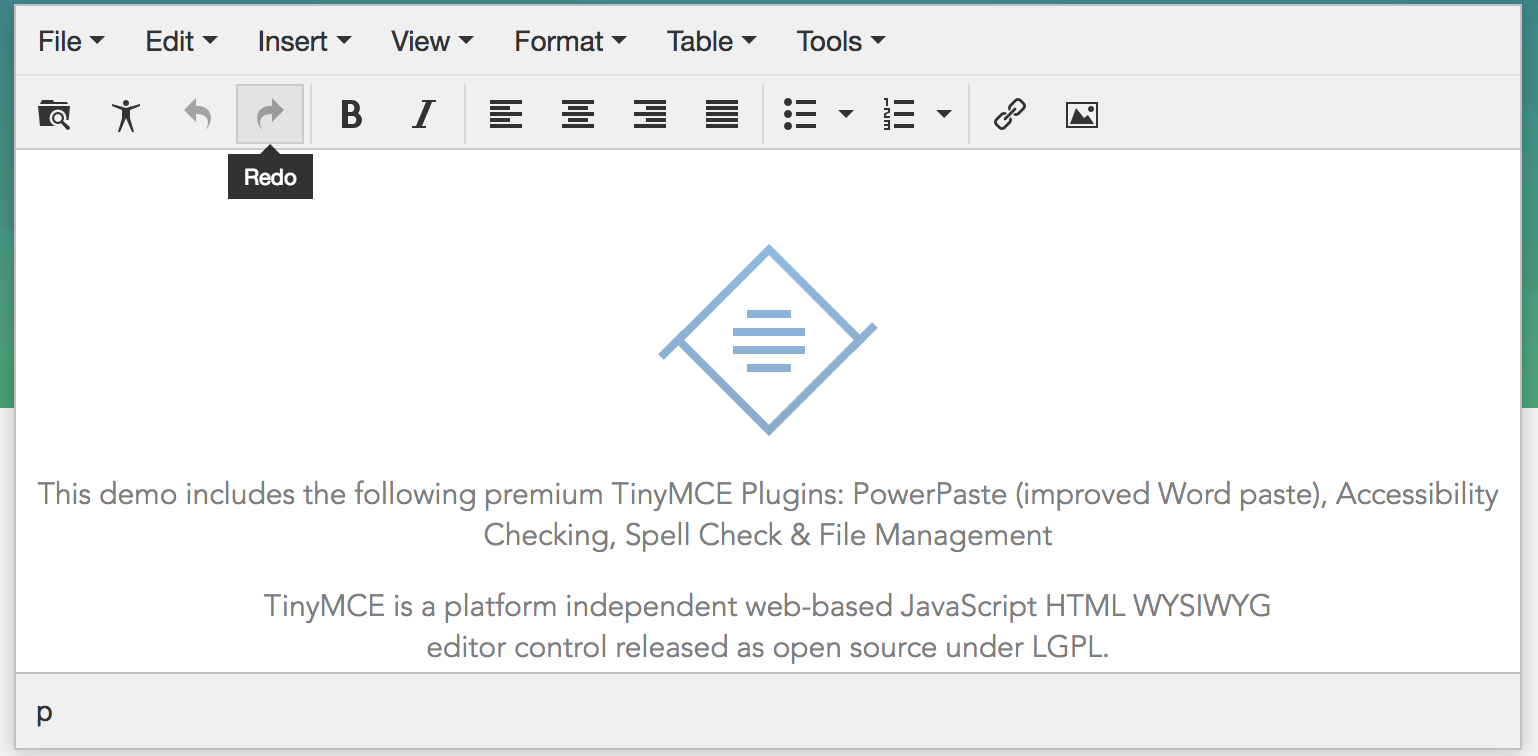
TinyMCE Is an Open Source library that can integrate a WYSIWYG HTML-based editor inside a website. Is a large project that involve 130 contributors with almost 5000 commits on Github. Among its features there are formatting, table insertion, image editing, customizable themes and it is accesible for users with disabilities because it follows WAI-ARIA specification making it compatible with screen readers such as JAWS and NVDA.

Another strenght is that TinyMCE can be integrated everywhere. Can be found from CDN and package managers (NPM, Bower,NuGet), and integrated with frameworks such as JQuery and Angular.js, or inside common CMS like Wordpress or Joomla. Its community and contributors ar lively on networks, issues and enhancements are fastly fixed.
tinymce.png

​TinyMCE interface.

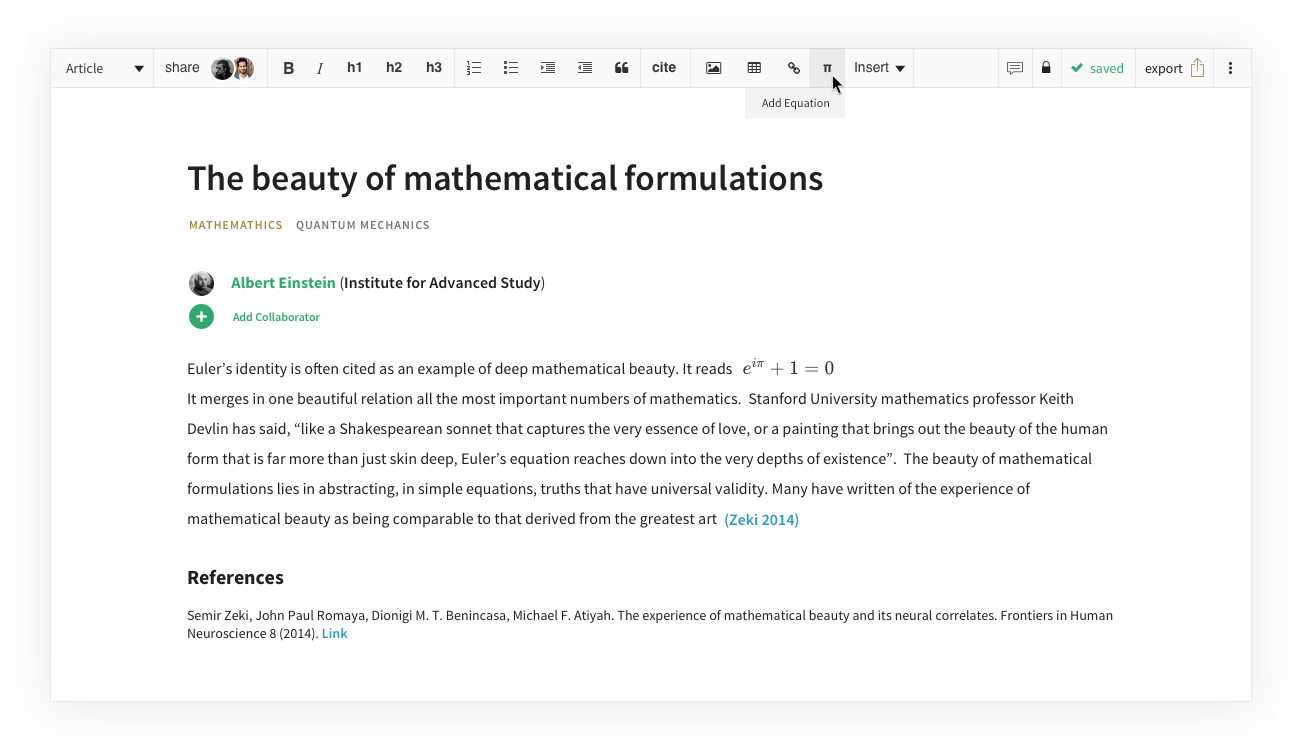
Authorea is created and developed in 2013 by two reasearcherers A. Pepe and N. Jenkins. They believed to fix collarative problems that went out during the creation of technical, scholarlyand scientific writings. The first problem is the complex workflow to follow due to write a paper (). It is very popular among physicists and astronomers which are the biggest categories of users.

Authorea is an online platform ( ), for that reason a paper is an HTML file, actually an article is a git repository  . In fact authors can take advantages of using its versioning system, without any installations, to keep track of every single change displayed in the same screen window of the project. Everyone, which has the right permissions, can undo specific commit and revert to its previous version. Every article in accessible anywhere, from any device connected to the Internet, and any TeX installations are not required. About tables and formulas itis very advanced. Authorea lets anyone write mathematical notations, tables, plots and fgures in each LaTeX and MathML.
authorea.png

​Authorea interface.

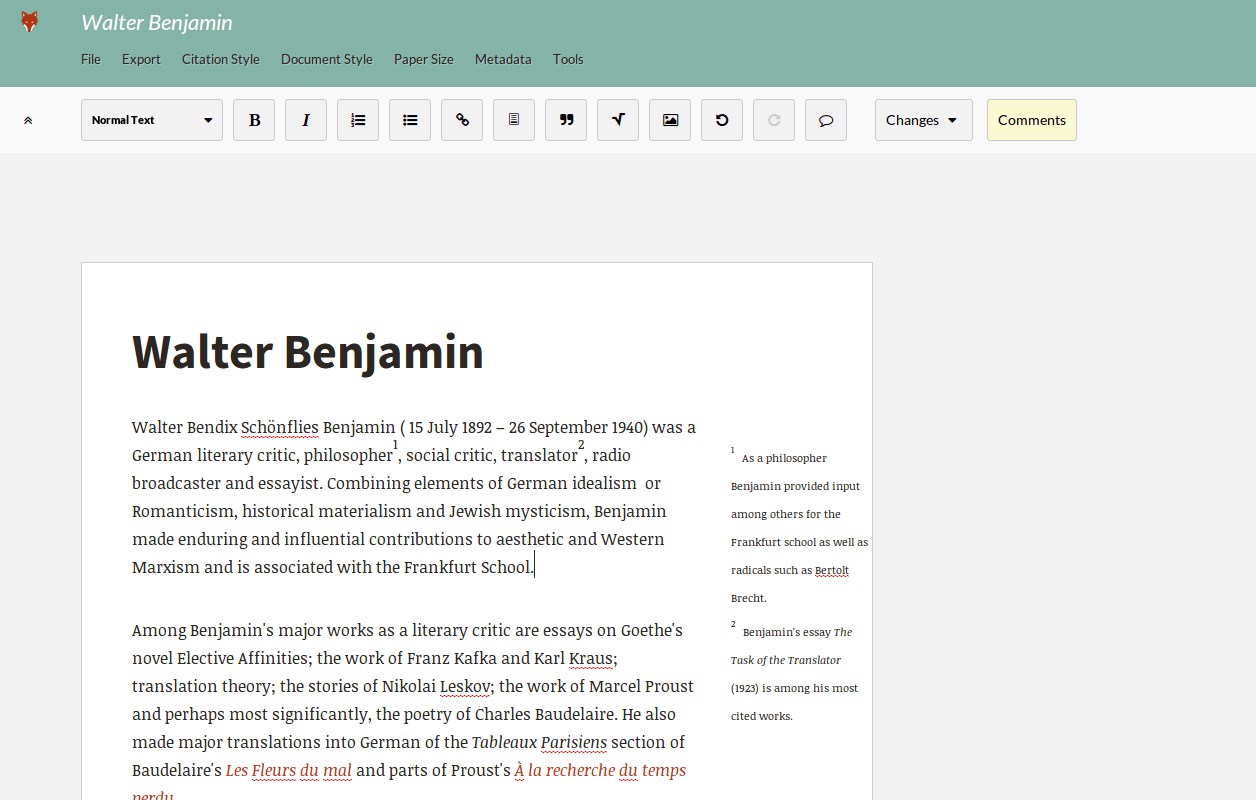
Fidus Writer is an open source WYSIWYG collaborative HTML-based word processor made for academics who need to use citations and formulas within papers. All articles can be exported in more ways: website, paper or ebook. In each case the focus is the content, layouts can be choose during publication. FidusWriter supports LaTeX  ​ for adding footnotes and citations directly inside the documents.

It is also collaborative in real-time, which means that FidusWriter aims to fix sharing problemsfor many-authors papers  ​, and everyone can automatically see and write the document in the same time.

Its formula system works hand by hand with MathJax, MathType and LaTeX.
fidus-writer_358563_full.png

​Fidus Writer interface.

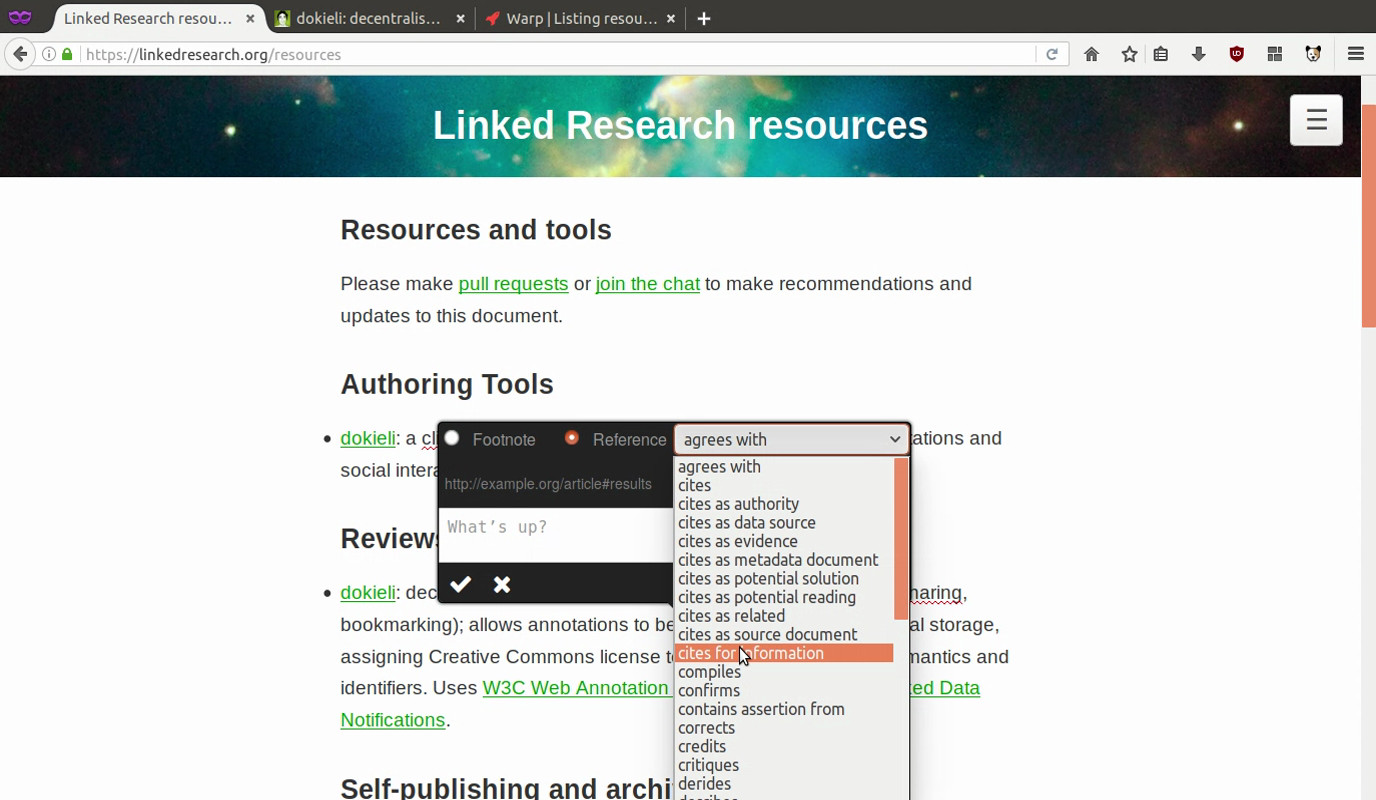
Dokieli is a client side editor for decentralised article publishing, annotations and social interactions. Is strongly based on decentralization, authors can publish wherever they want to. Authors can edit any HTML files just importing Dokieli CSS and JavaScripts. 

In this case Dokieli is not a real WYSIWYG word processor, but instead is more a special module that can turn a browser-rendered paper into a in-browser editable, and annotateable, HTML document. It works same way shown in  ​.

Dokieli allows authenticated authors to create in-text annotations and, of course, reply to them with the W3C web annotation specifications. It also implements Linked Data Notifications for notifications about entire or part of articles. Now it grants notifications for annotations, replies, shares, reviews, citations/links, bookmarks and likes.

A big Dokieli's strenght is its full compatibility with HTML5. All HTML5 elements can be attached and inserted with it, and now some new UI features to do that are under development. For that reason the entire view style can be customized with just some CSS lines, or if needed style can be changed directly with Dokieli (e.g. passing fromnative visualization to Springer LNCS view).
dokieli-citation.jpg

Adding a reference inside a document which has Dokieli imported in.

RASH

RASH is a Web-first format for writing HTML-based scholarly papers. RASH is acronym for Research Articles in Simplified HTML,and it consists in a subset of 32 HTML elements in  . This format is placed inside the RASH framework, i.e. a set of specifications and tools for RASH documents.

RASH, because is HTML, has been designed to be easy to learn and use ​, and it works well with sharing scholarly documents (and embedding semantic annotations) through the web.For the same reason more articles can be semantically linked each other, with interactive behaviours granted by JavaScriptand web browsers.

RASH is strictly focused on content writing, every other needed actions like validation, visualization and conversion are all leaved to its framework.

RASH is based on WAI-ARIA Module 1.0, which grants complete accesibility for commonly used screen readers like JAWS,NVDA and VoiceOver

Pattern RASH element

inline

a, code, em,math, q, span,strong,sub, sup,svg

block

figcaption, h1, p,pre, th

popup

none

container

blockquote, body,figure, head,html, li,ol,section, table,td, tr, ul

atom

none

field

script, title

milestone

img

meta

link, meta

The use of structural patterns in RASH ​ 

RASH framework

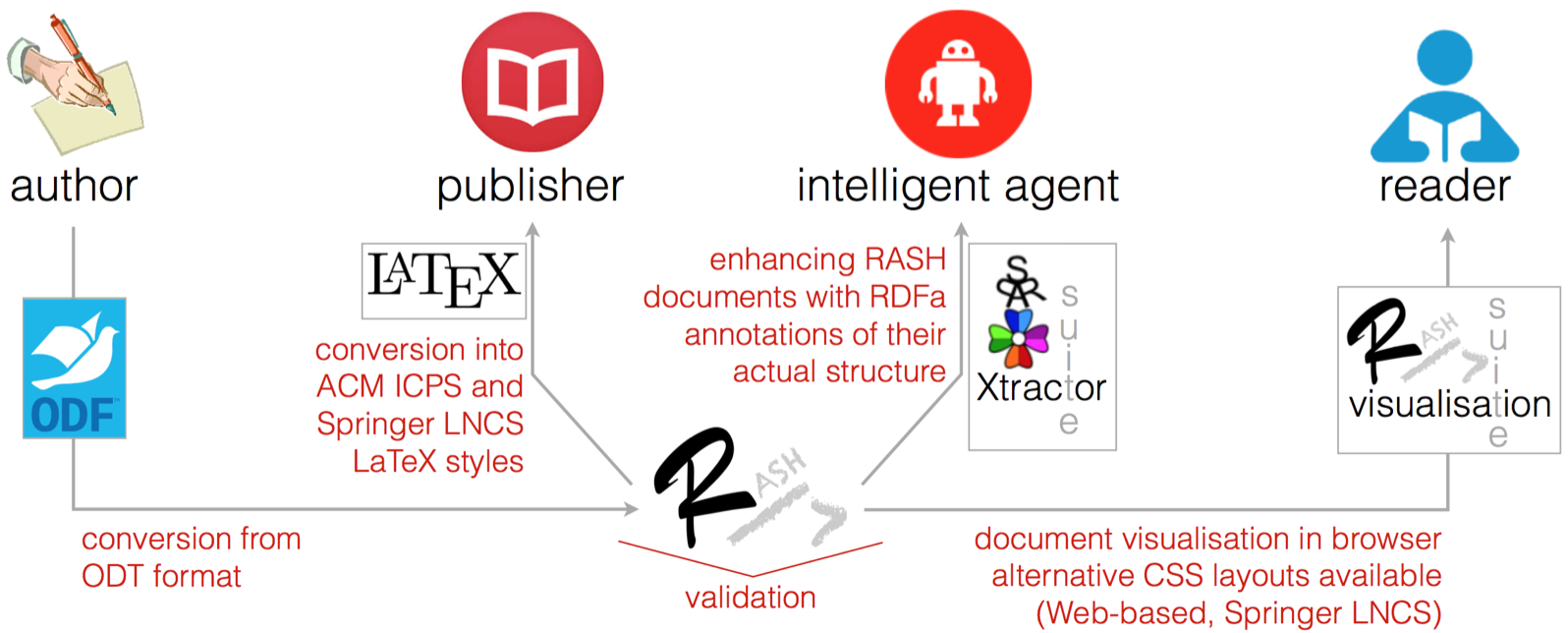
Every new proposed markup language, in general, has some issue. RASH, in order to fix them and facilitate its utilization, has its own framework. The main idea is to allow each author to keep using her/his preferred tools, a liberal approach.

The RASH framework is a set of specifications and writing/conversion/extraction tools for writing articles in RASH. All softwares are releases with ISC license.

RASH is based on RelaxNG grammar, a well-known schema language for XML documents, which is fully compatiblewith HTML5 specifications. The first element that we can find inside the framework is the validation,using the HTML5 validator (W3C Nu HTML Checker). Checking the document,the developed script will alert RASH users about potential mistakes about each HTML5 and RASH togheter.

Also visualization is a framework's duty. A browser can display a RASH document (in the same wayit displays common HTML documents), and wrapped CSS and JavaScript libraries render the article itself. Actuallyit uses external libraries (Bootstrap and JQuery)in order to guarantee the correct visualization. The paper layout can be easily changed, passing beetwen native visualization and other requested LaTeX-style layout, immediatly in browser. Articles also have a footbar with statistics about the paper (e.g. number of words, figures and other blocks).
rash-framework.png

​The RASH framework.

As said before, the RASH framework, is fully based on a liberal approach, this means that conversion system must be implemented.

A RASH document can be turned into different LaTeX styles (RASH2TEX), such as ACM ICPSSpringer LNCS andothers, with the usage of corrispondant XSLT 2.0 documents. This is the crucial step in order to guarantee theuse of RASH. As documented in  ​ LaTeX and PDF in the most common pattern to write articles, without this conversion no one would use RASH.

A ODT file can produce a RASH (ODT2RASH) with Another XSLT stylesheet is used in this case. OpenOffice, with its standard features like styles, elements and formulas, can be used for writing scientific documents which can be converted into RASH formatted articles. Inside the RASH suite there is a web-based service and a java application for online and online conversion process.

The last released conversion process is DOCX2RASH developed by Nicoletti A. This software allows authors of scientific documents to use Microsoft Word as word processor to write its works, having at the sametime the benefits of a HTML-based format. It has been thought because MS Word users were no covered by RASH conversions. Also to develop this process, XSLT 2.0 stylesheets has been used to convert XML (which is the base of DOCX) into HTML.

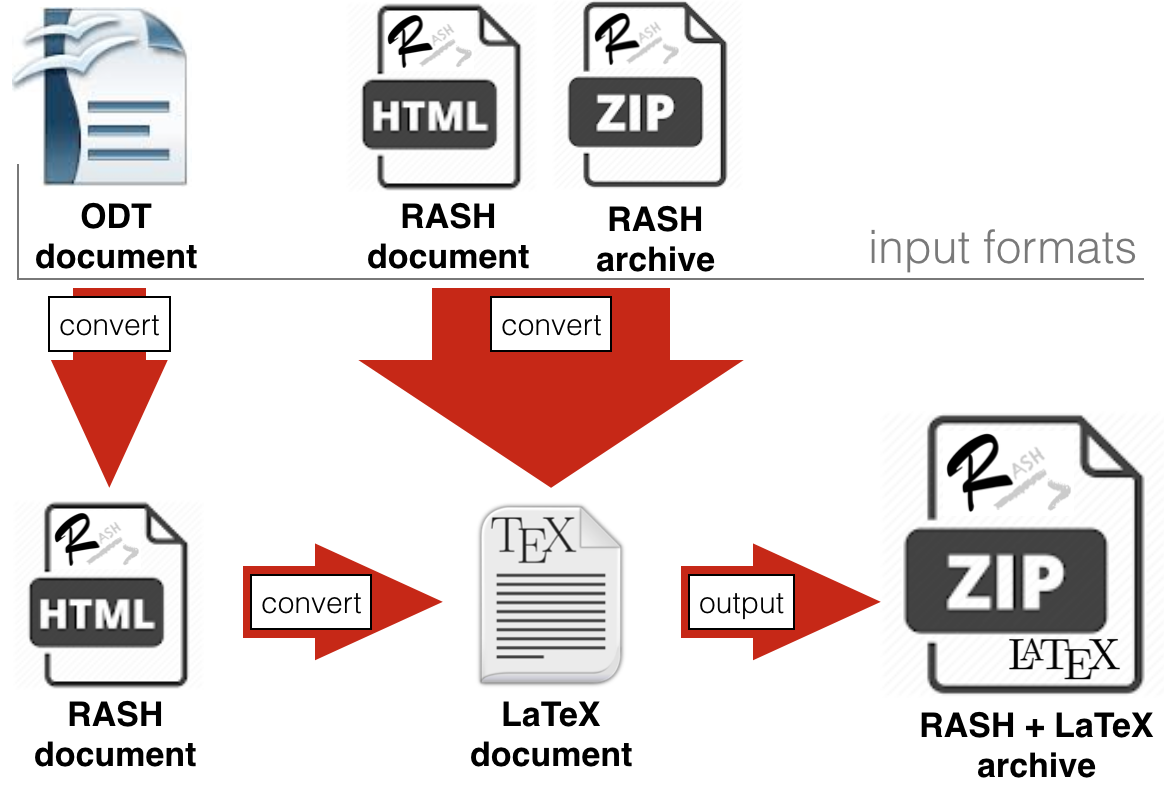
Very important is ROCS (RASH Online Conversion Service) i.e., the online conversion tool for supporting authors to write RASH documents and preprearing submission that can be easily processed by current journals or conferences. ROCS integrates all the conversion tools listed above.

Its architecture is described with the  ​. It allows turning a document in ODT or DOCX format into a RASH document, and then into LaTeX according to Spinger LNCS or AMC IPCS layouts.

Users can upload four different files, ODT, DOCX, RASH or a RASH archive (which has also related asset files). The output is a ZIP containing the original document plus the LaTeX-converted file, because is useful, if authors uploaded ODT or DOCX article, to have both RASH and LaTeX.
rocs.png

ROCS abstract architecture.​

RAJE: RAsh Javascript Editor

Most of this project is centered on the development of a HTML-based editor named RAJE (RAsh Javascript Editor), whichis no more than a WYSIWYG editor (these kinds are largely discussed in ​). It Is based on HTML, but for more precision it uses a subset, called RASH ().

Inside this chapter i will explain what RAJE is and all the functionalities grant to users (like the splash window, toolbars and other things) and than I will describe the strenghts, extolling the reasons for which it was created.

Functionalities

Among the main functions that RAJE provides we can find out some obvious and universal needed in a editor such as toolbarand software menu; Other, instead, are specific to the format in which the editor is based on (e.g. swap beetwen preview and editor modes). I will also talk about the header editability, that deserves to have an entire dedicatedsection because its managment is different from the one of the body. In the end I will talk of the secret shortcutsthat I have implemented to speed up the writing of.

Splash window

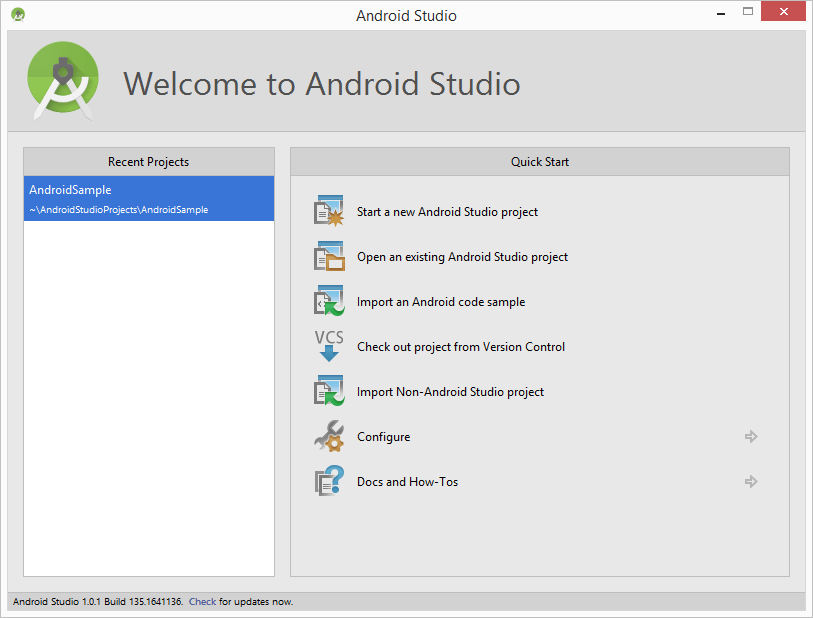
An high number of editors, not only the text ones (e.g. Android studio and his welcome window shown in ​), integrate as first screen a window commonly named splash window or welcome window.During the editor development I found out how is necessary a splash window, as first screen of a software thatrequire to modify multiple projects. RAJE, in fact, allows you to edit and create articles, where an article isactually a folder containing all assets normally required by every RASH document. Of course is permissible to thinkthat every users wants to create more than one article, in fact the idea in which I created RAJE allows to managemultiple files, simply knowing the absolute path of its folder.

http:,,www.techotopia.com,images,9,97,Android_studio_welcome_screen_one_proj2.png

​Welcome window of Android Studio.

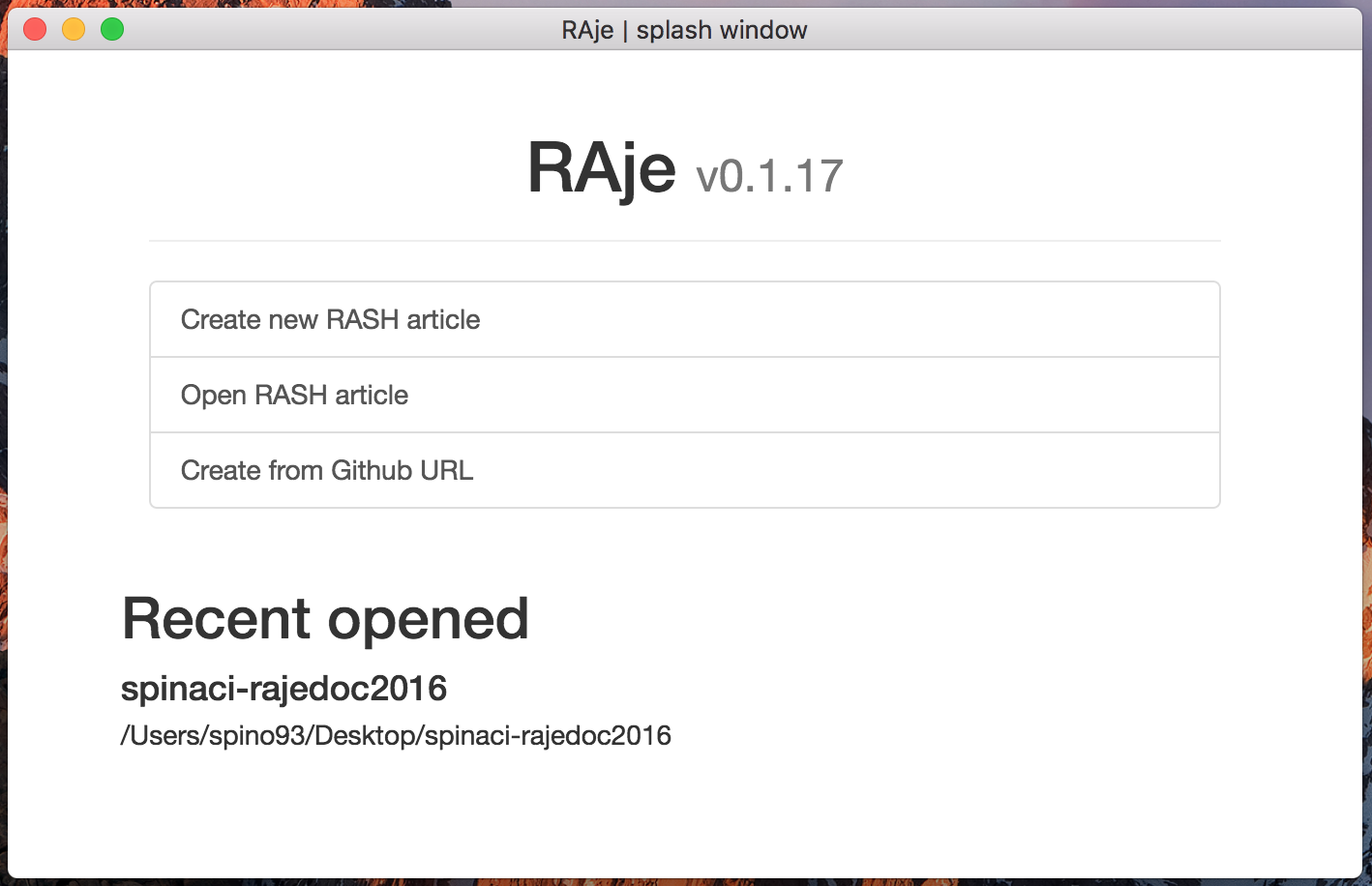
The RAJE splash window in
​ has been developed following a similar scheme of ​. Is naturally presents a list of recent articles, disposed in order from the more recent to the less one.For every element of this list, important informations to correctly visualize the article are saved. It is alsopossible delete elements from the list, especially if we are talking about obsolete articles, or not present inthe machine anymore. Recent projects are not updatable, is I opened the article X and then I change its positionin another folder, I will not be able anymore to use its "recent article" to open it, and will be obligatory tofind manually the new folder position.

There are 3 buttons in the splash. The first one needs to create a new article choosing the destination folder andthe name, with the created article will be called (can not be edited next). The opening of an already created article(e.g. one sent by a colleague) is related to the pressure of the second button Open RASH article. In thiscase is necessary to have physically the folder on the machine.

Finally the third button is something more particular, starting from a URL like this this one: https://github.com/{author}/{repository}​containing a RASH repository, is possible download into the personal machine and edit directly with RAJE. Descrivethis modality will be my task in the​.

splash.png

​RAJE splash window.

Toolbar and elements

As anticipated before, RAJE is a WYSIWYG HTML-based editor, for this reason exaclty as the others RAJE has a toolbarthat wrap a large amount of actions allowed on the article, if not all of them, at least the mosr importants. Asof this important component in the initial phase of the development, I adopted a minimalistic style, recoveringwhat are the graphic guidelines of Bootstrap. Then will be my task to transform this toolbar more similar to themost famous and commercial editors.

In this section, my purpose is to give a description of the toolbar with screenshots.

This toolbar is made up with a set of buttons grouped and divided by category, following the RASH specs is possibleto notice the difference beetwen the categories of element or action that should be applied to the document, whenthe user press the corrispondent button. Is also possible invoke a tooltip that shows up the common name to recognizethe button ( ).

tooltip.png

​Tooltip shown on button hover.

Refersto the ​ starting from left to right we find the first two buttons: respectively undo and redo.The behaviour hide behind these special button is strictly necessary for what concern drafting of the document.Without its presence, drawing the article would be more complex and difficult, furthermore the revision time wouldsoar. Thus the introduction of these functions was a bound choice.

The third and fourth button are another great classic of the editors, i.e. bold and italic,that can transform the selected text.

From the fourth button onwards, we found instead some special behaviours about RASH, ever inside the inlinecategory (behaviours applied only to plain text) that are: code, link, cross reference,quote, subscript and superscript . Among the various, noteworthy is the cross reference one (represented with ad anchor) that shows a modalwindow with which to choose exaclty on what element refers, and is also allowed to create a new referenceor footnote. These buttons need to have a portion of text selected.

toolbar.png

​Editor's toolbar.

The second group includes the blocks​, that are, as you can find in the ufficial RASH documentation:codeblock, blockquote, ordered list and unordered list.

The element codeblock is very important to insert some code snippets, and is allowed wrote down some codelines (also in HTML format) without interpretation and are shown as a web page. In other words everything is wrappedinside the opening and closing of the code tag is only graphical code, but is text at all effects.

About the quotes, the blockquote element comes in our aid. A quote can be added, and instead the normalquote (that creates a inline citation), it is extended to all line. This kind of citation are very important, alsoto give more emphasis than the ones inserted in text.

Is acceptable and predictable decide to insert lists in the draft document, about that list buttons come in aid tousers. The most used and popular naturally are the ordered and unordered. Every users can have the possibilityto add the list more in line with his will.

Then, inside the block called figure we find out table, figure and formula. Always following thedirections inside the RASH documentation, we can notice the importance of using these three blocks (consideredmain for writing research articles).

The tables are inserted with a small configuration button, positioned at their left. The table can be modified thanksto this button and, among the aother permitted operations, we can resize ti and change his heading. Another importantfunctionality, permitted by RASH but not implemented yet in RAJE, is the expantion of cells or the entire column.Will be one of the first new operations permitted in the next releases of the editor.

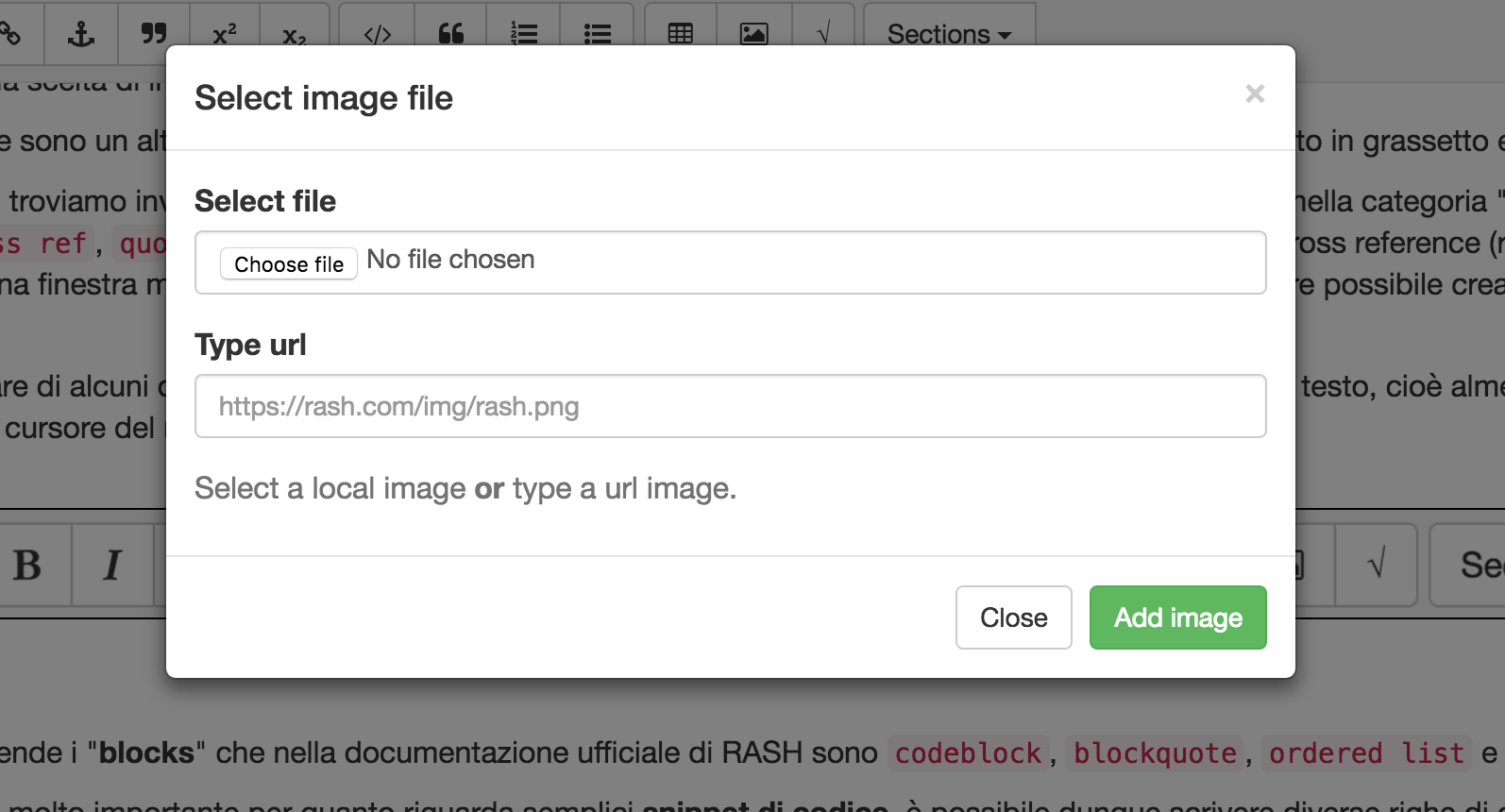
The insertion, with the corrisponding button, of the images is entrusted to the second button of the block: figure.After pressing the button, will be immedialty visible a modal window ( ) that permits to chosse beetwen two different modality: selection a local image file or typing an URL. Bothimport physically the image inside the project folder.

figure_modal.png

​Modal window to insert images.

One of the most important buttons is surely the one to add a new formula in the selected position. This action takesplace with the invocation of a simple asciiMath editor, that at all effects create an environment where set andselect the formula. I will discuss this after, in the Section 3.2.1.

I developed the dropdown section to grant the possibility to add new sections such the special abstact andacknowledgement or common sections. The only special section that can be added in this way are the twoquoted above. If these are already inserted inside the document, the screen will reposition exaclty at the beginof the section, showing its contents. Insted will be executed the real insertion in the order describer by RASH.

Every time that the caret position change, the dropdown content will be updated with the insertable sections. Ifthe caret is inside af a first level section, will be possible add both a top-level section or a sub sections asshown in the code.

<section><h1>Top level section</h1>[caret]
</section>​ ​

Is very important remember that this is not the only one way for the user to add sections, instead it is for theabstract and acknowledgement (more informations about shortcuts in the)

Software menu

RAJE is a software, and such as, is served with a menu. Its implementation has been chosen to my utter discretion.Is very important to say also that the visualization can considerably change beetwen the different Operating Systems,in particular passing from Unix systems to Windows. Inside this section I will not explain step by step every singlebutton inside the dropdowns, because now the project, in particular this module, is undergoing updates. My taskis to explain, with some examples, why and how i devided and group the multiple actors of the menu.

Sincerely I did not started from a development without foundations, instead I followed few guidelines and advicesfounded on the Internet. In particular I was inspired by the composition of some editing softwares menu. Amongthe various Visual Studio Code, Atom text editor (both used during the makingof) and Open Office as shown in ​.

menubar.png

​Open Office menu bar.

The kind of organization i followed was in line with this schema. Omitting the button with the name of the software,that is one of the features only visible on Unix systems, File and Modify hasbeen introducted in RAJE.

File is necessary to work with multiple documents, it gives the opportunity to apen a new window about another article.Modify, instead, encloses a great number of actions allowed inside an editor: undo, redo, cut,paste and copy. Moreover there is a button to save file and others used to modify the header.

Header

The header of a RASH file is made up with more elements, needed to contextualize the entire article. Titleand authors list are obviously very important for what concern documents of scientific mold and,in this case, also keywords and ACM subject categories.

Thank RASH you can have articles written by many authors, for this reason RAJE permits the insertion, modificationand deletion of authors. Among the other things is reasonable wanting to change the author's order, triggeringthe corrispondent action from software menu. Now you can move them simply with a Drag & Drop technology.As for what concerns the deletion of authors, you need to choose the relative behaviour from the menu.

As well as the other elements that make up the header, they are easily editable with a double click. I choseto restrict the editing permissions of this crucial part because it has been structured very more complex thanthe rest of the document, so also a small structural edit would have foreclosed the possibility of saving (andthen render) the RASH document correclty. Besides the double click is a banal action, and is the main action toexpress the willingness to interc with a graphic element or text modification (same as rename action on windows).

Categories and keyword can be editable also after the double click event, the only one difference is thatthe behaviour is the same as the inline code elements: space button will insert a space insidethe element, instead the enter key will insert a space after the element (it indicates theend).

The title is usually accompanied with a subtitle. If during the title editing you want to add the subtitle, you cando it simply pressing the enter key.

So, for what concern the header of a scientific document in RASH format, you can modify it with the most absolutlycompatibility. The only exclamation mark is the different editing way other than the body, with a lesser degreeof restriction.


Shortcuts

In this subsection, I am here to describe and create the list of all the keyboard shortcuts that i decided to implement.The implementation modalities will be deeply explained in.

Inside the list the key mod is to say ctrl for Windows and Linux,and cmd for OSX.

  1. mod+s is the local save. All changes that will occur to the document will be viewable inside theHTML source document.

  2. mod+shift+s​ is the push to Github. It shows a modal window to insert the comment which it willbe labelled.

  3. mod+c​, mod+v​ and mod+x are copy, paste and cut.

  4. mod+z and mod+shift+z​ are the shortcuts for undo and redo actions.

  5. # enter​ permits to create a new section. Based on the number of the characters #you can choose the deepness of the section.

  6. * enter​​ add an unordered list.

  7. 1. enter add an ordered list.

  8. | enter add blockquote element.

  9. ` enter add codeblock element.

Strenghts

RAJE has been created to remedy the problem: having a WYSIWYG editor of research scientific articles structed in RASHformat, furthermore to have a centralized placeacessible to everyone where to store documents. During all the presentationof this section, will be my task describe the strenghts of this project.

During the development period, with my Co-supervisor we defined another need, related to the document accessibility (issue widely described inside the ), a math formulas editor with asciiMath as input, which generates rendered formulas with MathJax process.

The second pro that I will present is integration with Github, in particular I will talk about how I tought to managethe interconnetion beetwen more authors of same documents.

Mathjax and Mathml

Starting from the release 0.6 di RASH,thanks to work performed by my colleague Vincenzo Rubano (@falcon03),is not possible render asciiMath formulas with MathJax processor.

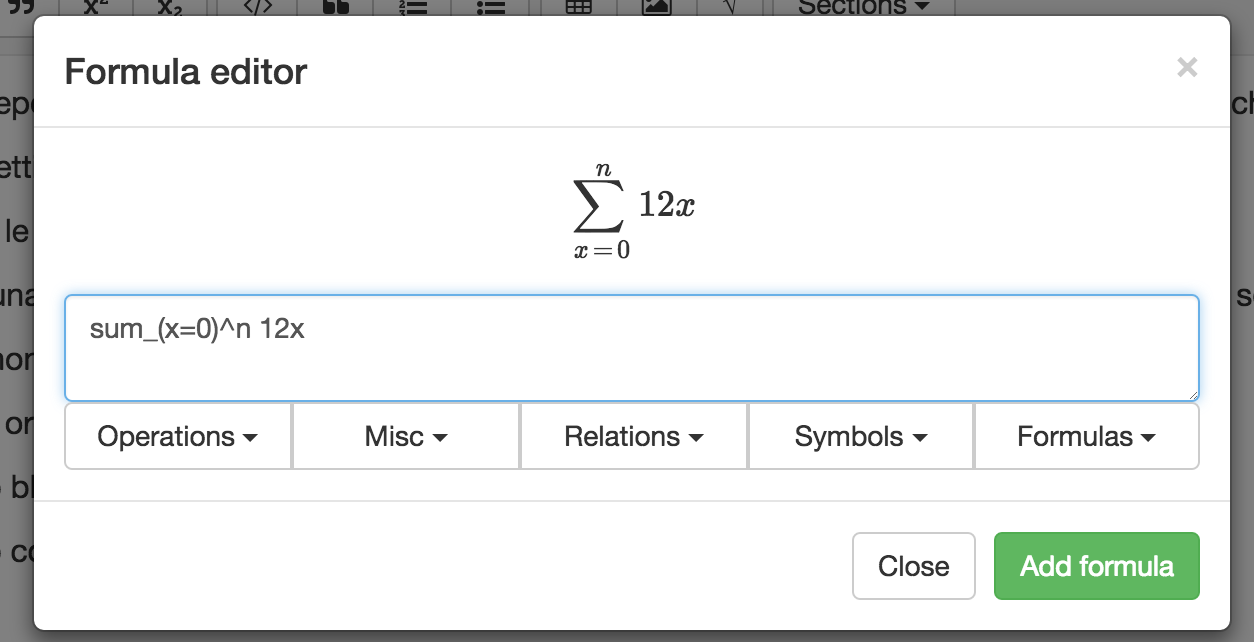
A significant challeng of this work was to introduce an environment tought to be easy to use, with all tools aviabile,so that also who do not know the key sequence can think of build the mathematical formula. The editor (Figure 7)is a modal window. It has a textbox for ascii input characters, and a screen preparedto render it in real time. In fact another challeng that I charge was the refresh speed of the formule, that happensevery time a character or a set are typed.

For those not familiar with the syntax necessary to add particular symbols or functions, they can always use buttonsthat i tought to add immediatly under the input textbox. The arrangement of the elements was designed crossingthe asciiMath syntax and the OpenOffice editor layout.

formulaeditor.png

​RAJE formula editor.

Marriage with Github

As already mentioned more times before, RAJE is strictly wired with a cloud-like system in such a way to easy upthe communication and sharing of articles beetwen its stakeholders (which are, in addition to the authors, reviewersin charge of reviewing).

Github is the most popular network for Open Source projects, known and utilized from million of developer all overthe world. Its beating heart is Git, a version control system built by Linus Torvald during thedevelopment of the operating system called with the name of Linux. Now is a must for the Open Source Developershaving a Github profile. Not only for curriculum purposes, but also for appreciations and improvements of its ownprojects. To every user is allowed to work with people around the world to built project more and more completeand complex, with the only bond, know English. All texts are entirely in English.

Why this powerful system like this is not popular also for sharing textual material? To answer this questionwe need to know that Git has been built with the purpose of sharing code, and that simplify all things. Code needsto be interpreted by a machine, that's why it needs to define where every instruction starts and ends. This becauseevery machine read, understand and elaborate only one row at time.

If RASH would be raw text, probably other version control sources would be more suitable. But a RASH document isnot only plain text, these documents are HTML; Thanks this small difference we can say that RASH and Github theygo perfectly in tune each other.

After this introduction we acn describe the real integration beetwen the editor and the network.

In this section, after give some basic informations about what is Github, we can extend the discourse started in​ describing the last button behaviour. Pushing it you can create a new folder to the choosen path, that willbe immediatly filled with code and assets of the article corrispondent to the typed URL. To all effect is the samethings to open a document previously created, with the only difference that this time we are talking about thehttps://github.com/{author}/{repository}​ repository.

When a user wants to save online the content of a document, to do it, he needs to be logged in with its personalGithub profile. These types of requeste are not allowed without authentication, which certifies the user identity.

Omitting the authentication mode, o better the development of the predisposed module for handling authentication,the user has the option to save the document online, on Github servers. The action can be executed with the shortcutmod+shit+s​ or the appropriate button in software menu.​ Will be viewed a simple modal that permitsthe user to label up the entire sets of changes under an unique comment. When the upload is done will be showna success message, noninvasively, on the screen. Now the push has been executed with success.

The mangement of sharing documents needs that all repository contributors are always updated to the latest articleversion, to avoid merge conflicts. In the RAJE current version this functionality has not been introduced yet,but is a crucial fact of distributed system management, will be implemented soon.

These, listed above, are the reasons of the perfect union beetwen Github and RAJE, that precisely is one of the reasonswhich it was born.

RAJE in deep

In this chapter I introduce tell the technologies and the development process i have adopted to create RAJE.

The editor is multiplatform, but it has been created as unique project, with the libraries made available from Electron,Also Known As Atom shell.

In this chapter I will describe what Eletron is, and how I used the File System's API to create this software.Next I will introduce the beating heart of RAJE, the script raje.js that I personally built with the aid ofJQuery and some other modules, like @TimDown's rangyused to abstract the selection elements and Mousetrap to simplify the manageofshortcuts. Finally, regarding Electron, I will explain how I have made different deploys for the different OperatingSystems supported by RAJE: OSX, Windows and Linux.

How Electron works

Electron is a Open Source framework created by Github developers. Based on the already famous node.js API, it is avery lively project and it can obtain more and more supporters. Today we can count near 13.000 commits dividedbeetwen the 500 total contributors.

Electron is pratically a browser wrapper, it utilize Chromium as browser to create multi platform softwares. Thanksto this framework is guaranteed the development with technologies like HTML, CSS and Javascript.

Two are the important processes in a Electron-based software: The Main process and the Renderer process.

The Main process is a node.js script, that includes every kind of necessary information and setting to guarantee thesmooth progress of the software, e.g. it creates and shows the windows, uses node.js modules and can accesto databases.

Instead the Renderer process is a script imported directly in the document with the classical syntax <script src="rendered.js"></script>​.itallows RAJE to utilize NPM packages (the manager of node.js modules) and can communicate in an Async orSyncway with the main process to exchange messages. ​

After this general presentation, I describe in detail the main API that I have adopted during the project development,andhow I handled the communication beetwen processes.

File system API

The File System APIs were required, expecially for a software that can do CRUD operations on files, indeed. In myaid, in this case, the FS library of node.js has intervened.

This is one of the most important library, because it is inside the package of libraries inserted inside the officialdistribution of node, then it was enough to import it with the next line of code: const fs = require("fs").

Inside this module, we can find out some very useful methods such as readDir, writeFileand readFile,which are asynchronous, but the corrispondent method that ends with Sync (e.g.readDirSync)is its sync counterpart.

When a new article is created, RAJE creates the new directory and copy inside every necessary asset with this code:

copyAssetFolder: function (assetFolderName, folderPath) {fs.mkdir(`${folderPath}/${assetFolderName}`, (err) => {if (err) console.log(err)fs.readdirSync(`${assetFolderName}`).forEach((file) => {let fullFilePath = `${assetFolderName}/${file}`if (fs.lstatSync(fullFilePath).isFile())fs.createReadStream(fullFilePath).pipe(fs.createWriteStream(`${folderPath}/${assetFolderName}/${file}`))})})
}​ ​ ​ ​

Inside the method signature there are two input variables: assetFolderName and folderPath. The first one is the nameof the directory that contains the necessary assets for visualising a RASH document, while the second is the absolutepath of the article's directory, where the assets will be saved.

The asynchronous mehod fs.mkdir()​ show us that it has a callback function (in this case is very simplyand it return a not empty variable only if there is an error). Then the directories readed and the names of itscontents are written inside an array, and each element in the folder is a variable inside the array. Finally aread stream is createdto read the content of the assets and to write a new file with the same content, to the destinationfolder.​

Inside the below code snippet I used the fs package to do some easy operation with the FS API.

Another example that i can show is when the user express to open a new article. The editor wants to be sure thatthefolder has been created before with RAJE.

checkIfRaje: function (dirPath) {let isRaje = falsefs.readdirSync(dirPath).forEach((file) => {if (file == '.raje')isRaje = true})return isRaje
},

One of the main reasons that has guided me to create a real software was the need to interface with file system,and thatis not allowed by all browsers , so the development has been hijacked to this way.

Github API

The APIs to communicate with Github are implemented using a wrapper: Octonode.

The interfaces that Github provides are updated to the version v3, I think that these API allows a lot of actionson contents, users and repositories. Of course it provides also OAuth2 login.

To set up a project and arrange to have login, first of all is necessary that the developer applicationis already created, as shown in ​, and be in possession of the two necessary codes: client ID and secret ID.

github.png

​RAJE developer application.

As soon the application is created, it is now possible to use some code lines to authenticate users with the protocolOAuth2. The Octonode library also serves a different method to authenticate with Github. I implemented the authenticationas follows: ​you can store all needed functions inside a client variable, that is created passingthe token generated by Github when a user make the request to be logged in with its account.

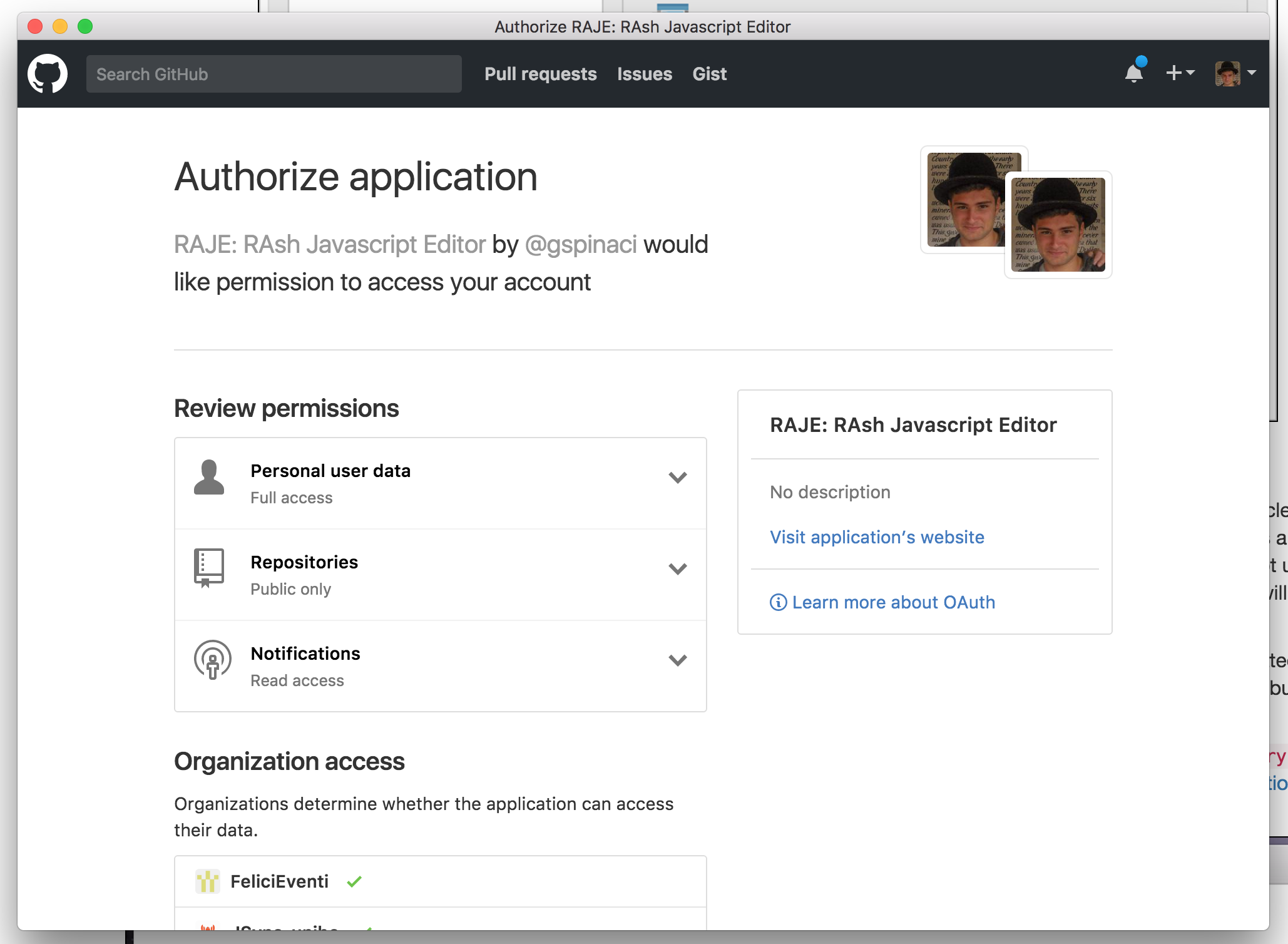
In order to obtain this token, having each the client and secret ID, the user needs to press the login button. Thenthe request in will be shown. This window will describe what kind of permissions RAJE needs, it can read all public informationabout the user (such as email, name, biography and so on) and about public repositories (the ones which are importantfor RAJE). Another permission is to read the notifications, but now nothing about that is yet implemented.

authorization.png

​Github authorization window.

Once authorizations are given by the use, a message is sent to Github servers, and a result comes back in return.Normally Github needs an URL callback, so the token can be directly sent there, where it will be elaborated. RAJE,instead, as a browser can handle the navigation events. It can listen for the callback and decode the URL as shownbelow.

First of all I use a regular expression to decode and extract the code from URL (as shown in code block).

var raw_code = /code=([^&]*)/.exec(url) || null
var code = (raw_code && raw_code.length > 1) ? raw_code[1] : null

Then I will elaborate the code to get the user token directly from the Github API with the method requestGithubToken(githubOptions, code)​.This method needs as input the options (which are the IDs explained before) and the code extracted from the callbackURL.

function requestGithubToken(githubOptions, code) {apiRequests.post('https://github.com/login/oauth/access_token', {client_id: githubOptions.client_id,client_secret: githubOptions.client_secret,code: code,}).end(function (err, response) {if (response && response.ok) {/** Save github token to settings */storage.set('githubSettings', { 'token': response.body.access_token }, (err) => {if (err) throw errgetUserInfo()})} else {// Error - Show messages.console.log(err)}})
}

The method above uses a node.js module called superagent, an high level wrapper for ajax requests. Withthis module we can make a POST request, passing all needed informations to get, after, the token.In this snippet the token is saved inside the electron_storage, i.e. a simple environment JSON storagefor the current machine.

The login workflow is the following:

  1. The user express the will to be logged in.

  2. RAJE shows athe authorization modal.

  3. The user eccept authorization requirements.

  4. Github send the URL callback containing the code.

  5. RAJE extract the code and request the token.

  6. Github send the token in return.

  7. RAJE stores the token for next requests.

When the token is stored, every future requests (such as create a repository or push a commit)are instantly served, as we discussed before, with the variable client​, that is created with in inputthe token stored.

When a new article is opened, a local folder is created with the document and all the needed assets. When the userwants to push changes and the repository does not exists, it needs to be created with all needed folders and files.

Every time a push is requested we needs the SHA of the HTML file to update it and, if no repositories are foundedRAJE needs to create it. Inside the client variable we can find the method .me()​ which returns aninstance of the logged user. The me object has inside all allowed operations to users, and among them, the creationof a new repository. With the method client.me().repo({},callback)​ in our aid, a new repository iscreated, the first parameter is an object that contains properties like name, description and other less importantinformation.

Once the repository is created we need to push also the assets, which are Javascript scripts, CSS style files andfonts​ (required by FontAwesome). The current versione of RAJE needsto synchronize these files one after another (synchronous paradigm).

Those two are the most important examples of integration with the big API of Github, but they give us the proof ofwhat it can be possible to do.

Communication beetwen processes

Electron needs to ran with two processes: Main and Renderer. Main allow to use node.js syntax and manages the softwarebehaviour, instead the Renderer one can be imported inside the HTML document, as like happens with RAJE.

Rendered process is stored inside the raje.js script, that is concatenated with gulp.js.Said that, there are a lot of behaviours triggered by the Renderer process and executed by the Main, such as theone which is triggered when user wants to close the editor, when changes are not saved yet. To know that changesare unsaved there are some steps to explain. First, when the editor is opened, the entire body of the editabledocument is saved in a global variable inside the Renderer process. When the event input is triggered(it happens when some kind of input has been added in the editor), the system check if the saved body is differentfrom the current body, and if they are it means that something has changed, and the editor state is set to changed.

At this point the Renderer need to send this information to the Main process, to handle unexpected quit without savingchanges. We need to instantiate the ipcRenderer module in the Renderer process, to handle and make requestsdestinated to the Main process. I set a function to do that, setEditState.

function setEditState() {ipcRenderer.send('setEditState', edit_state)
}

It send the edit_state variable (that is a boolean) directly to the Main process, to be stored there. Right now weneed to do the specular thing inside the Main process, but with the mainProcess module:

ipcMain.on('setEditState', (event, state) => {edit_state = state
})

The event parameter inside the callback bring with it a lot of information about the trigger event, instead the statevariable is what is passed from the Renderer process, i.e. the boolean that describe the state.

Thank to this now we do not need to ask, from the Main, to the Renderer in Synchronous way (which is not possible)to know if the document has been changed before, but instead we can inform the Main every time a change took place,using the asynchronous paradigm.

In the other way, there are some cases which need to communicate from Main to Process. The entire menu is createdad setted up by the Main, and the behaviour behind the editor mode and preview mode buttons needto change the visualization of the Renderer one.

In this case we use the webContent object in this way to communicate with the Renderer.

{label: 'Editor mode',click() {mainWindow.webContents.send('setEditorMode')}
},
{label: 'Preview mode',click() {mainWindow.webContents.send('setPreviewMode')}
},

And inside the Renderer process we have something like this to set the way how the editor will display the article.

ipcRenderer.on('setPreviewMode', (event) => {$(rash_inline_selector).setNotEditable()
})ipcRenderer.on('setEditorMode', (event) => {$(rash_inline_selector).setEditable()
})

These above are examples of asynchronous communications, but for example when the user wants to add a image insidethe article, the communication needs to be Synchronous. That is because first the editor save the file, then thefile can be displayed with the img element.

The message is sent with a sync function, passing some informations about the file.

function sendWriteFigure(file) {ipcRenderer.sendSync('writeFigureSync', { 'name': file.name, 'path': file.path })
}

In the Main process is pretty similar as the asynchronous behaviour, the only difference is when it need to sendback the result to let know, at the sender process, that it finished its job.

ipcMain.on('writeFigureSync', (event, image) => {storage.getRecentArticles((err, recentArticles) => {fsUtils.writeFigureSync(recentArticles[recentArticles.length - 1], image, (err) => {if (err) throw errevent.returnValue = true})})
})
In this case I send only a boolean in return, it notify to the renderer ​​that it can stop the blocking behavior,and resume from the last util instruction. In this case the last one is the one that creates the img element.

Web-based technologies

As mentioned before, RAJE in built on Electron, which uses web technologies as Javascript and CSS to give at client-sidebehaviours and styles. First, the splash activity (section) is only a html file with its own Javascript and CSS,rendered by the Main process. The editor itself is the HTML file stored inside the article folder. When it is viewedby a browser (Chromium in our case) it has rash.js script that built, into the RASH schema, thedocument. With the addition of raje.js a RASH document can be turned into a editable document with toolbar and otherelements.

For this reason, the core of this editor is not the software itself, but insted is the script imported, but the softwaregives some important wiring behaviors (FS and Github APIs).

By the way, if the editor is inside the document stored as a script, why we do not use a normal web browser to edit?If someone try to open the file with a normal browser, he can view only a normal RASH file, because the editor behaviourwill be shown and added only if the document is opened with RAJE. In other words, this is very useful to send read-onlydocuments or show it with rawgit.

Here, in this section, I will explain everything about the "client side" editor, describing the raje.js script, contenteditableelement and the issues jumped out using it.

Raje.js: the core script

All the RAJE project flow around the raje.js script. It is built concatenating more scripts with gulp.js.

Gulp is a toolkit that helps to automate tasks during development, and i used it to write raje.js when one of theinner scripts change. I created a task called watch that listens for saved changes, to build upthe output.

Raje.js is made up of eight different files:

  1. init.js

  2. caret.js

  3. const.js

  4. raje.js

  5. shortcuts.js

  6. toolbar.js

  7. derash.js

  8. rendered.js

Init.js is the initialization script, it initializes the variables (like bodyContent or edit_state),extends JQuery object adding more new functions, handle the creation of figures and call the $(document).ready()function to set up the editor. Two important functions added to the JQuery object are: setEditable andsetNotEditable, both act on the document editability. Very important is what happen to the sections: themare detached from the body and after attached to the editor section (i.e. the section with conteeditableattribute sets to true, i will explain its behaviour in the next section).

The second script, that is caret.js, provides some utility methods about the caret and its position.Here we can find functions to check if the caret is inside some elements (e.g. if is inside the editor), or tocreate a selection that wraps entirely the node where the caret is. All the methods here are based on rangy.

Sometimes i felt the need to use some constants to store numbers and string called multiple times. Those are wrappedinside the const script, in orde to aware of magic numbers anti-pattern.

Then we find raje.js, that is a set of actions to add elements directly onto the body. More of themuses the contenteditable APIs (see undo and redo) or the method document.execCommand('insertHTML')​that add a HTML string to the caret (as shown in figure right below). All figure elements and crossrefare intended as classes, where a new element is a new object​. There are also methods to add sections of any kind,from normals to specials.

insertCodeBlock: function () {document.execCommand("insertHTML", false,'<pre><code><br/></code></pre>')
}

All shortcuts are stored in shortcuts.js script. All shortcuts are binded inside an init functioncalled when the document is ready. Those are all implemented using the Mousetrap module, and needed to triggera different behaviour from the normal one. Over that the enter key press event, may triggers different behaviourbased on where the caret is (e.g. when user press enter inside a figure, he wants to add a new paragraph next tothe figure, so he can write down a new text line).

I wrapped every graphical elements, that will be added, inside toolbar.js. Here there are some variableswhich contain HTML strings that need to be added after. Among them there is the toolbar and all other modals, eachwith its own method to show it.

Because the rendered document is different from the stored one, and rash.js deals with transformation beetwenthe stored and rendered article, the editor needed some kind of mechanism that do the specular thing, in otherwords derash.js. This comes in aid when we save the article, because it creates and beautify theHTML string that is the file. When it creates the string, is minified, for this reason I created a function thatmantains the multi line property and tabulation.

At least rendered.js contains everything to handle communication with the Main process.

Next, always with gulp.js, I will build raje.js also with all client-side modules (e.g. rangy and Mousetrap).

Contenteditable and issues with different browsers

When the document is ready all sections are detached from the body, and a new section is added instead (using thefollowing code shown after).

<section id="rashEditor" class="cgen editgen container mousetrap" contenteditable="true"></section>​ ​​

This mean that the entire body is inside this new section#rashEditor​, which grants editability thanksto the attribute contenteditablesetted as true.​

Contenteditable is an attribute, which can be true or false. If this section has contenteditable set to true, itis editable. This means that text can be added directly inside it, and it comes with some powerfulAPIs which give us important manageable skills (such as transform selection into bold text or add new line paragraph).

This technology is very powerful, but have a so many exploits and, as the browser war shown us,every one decided to implement every function in his mid. For instance, after pressing the enter key, InternetExplorer will add a <p> element, Chrome will insert a <p> or <div>depending of the situation and finally Firefox will attach a <div>.

This is only one of the issues jumped out during the development. A RASH article needs a specific set of elementwhich comprends strong and em, but all browsers (without counting on IE) handle boldand italic instead. For this reason, inside the derash script, I added a function that convert a boldinto strong.

In the first instance, RASH should not be a software, but a simple script that could be imported directly as script,granting users to edit and save directly using a common browser. Then, according to the impossibility of use FileWriterAPI from all browsers, I choose to use a technology that allowed that. Right now raje.js works on Chromium, becausethat everything inside the raje core is intended for it.

All issues listed above are based on the one idea that I always need to use contenteditable because it implementsalso undo and redo behaviours. Becuase if i broke the contenteditable changes buffer (e.g. if I used JQuery toadd directly a strong element), I will not be able anymore to know the order of changes to revert or do again.On the Internet I have not find anything that would aid me, neither the APIs to access the undo buffer.

Another important problem (and well documented on Github) is about the need to insert a sibling element. This wentout when I was developing for Chrome and Firefox, so I found a common solution for both. In particular if the userwants to add a new section below the current one (a sibling one) when he is in this situation, where the caretis at the end of the paragraph.

<section><h1>heading</h1><p><br/>[caret]</p></section>

Now, we probally want to add a new section after the current one, not inside. To do that we need to move the caretright at the end, because adding custom HTML need to call the method execCommand("insertHTML", false, string)​,and it will add the passed string where the caret is positioned. There is a function to do that and this is itcaret.moveAfterNode(node)​.

Here is where the problem comes out, not if you are using Firefox. For Chrome users (and RAJE indeed), this willmove the caret at the end of the element, not outside but inside instead.

<section><h1>heading</h1><p><br/></p>[caret]</section> //Chrome<section><h1>heading</h1><p><br/></p></section>[caret] //Firefox

​​With Chrome, after that, attaching the new section, will not add a sibling but a child instead. After few researchesonline, i foud out a special character: the Zero Space character i.e. "&#8203"​​. ​ Addingthis after the current section, will be possible move the caret outside

<section><h1>heading</h1><p><br/></p></section>[caret]&#8203

The only one thing remained here is to sanitize the current section's parent element, and remove all plain text thatis not wrapped in elements.

That was the contenteditable and some examples of what can be the compatibility issues.

Modules

Inside this section I will describe the third-part modules and packages that I used to easy up the usage of particularpackages. Rangy is the most used one which comprends also two of its submodules, another one is Mousetrap that Iused to handle the keyboard shortcuts.

Rangy

@TimDown's rangy is very popular, and it has also a active community(obviusly leaded by his founder Tim Down), on StackOverflowis a question of an enormus quantity of answers about contenteditable and selection management.

Every browser implements a naïve selection interface, and for a wider spectrum of methods, I personally think that rangy grants a lot of useful operations. In aparticular way, I used that to know where the caret is when is needed to know, or the caret position inside its parent.It can also allow to move the caret to start or the end of an element.

Otherwise I imported also a submodule, that is rangy-selectionsaverestore. It can save the current caret position to be restored after.E.g. when the user wants to add an image inside the article, after clicking the button, a modal is shown. Is herewhere the editor needs to save the current selection, because next he probably change the focus to a button, a textboxor directly with a single click in anywhere else position. When he chose file and it is saved, RAJE will restorethe selection to move the caret where it was before and then add the new image element.

The other subpackage is rangy-textrange, and can allows to move the caret ahead or behind of some characters.This behaviour is used to exit from inline elements. From inside a code element spaces are allowed, instead if youpress enter you will exit from it (and the caret will be moved by a character to right).

Mousetrap and shortcuts

All the shortcuts are attached directly to the section#rashEditor​, because it have the mousetrapclass, which is the one recognized by Mousetrap. This script is reallyeasy yo use, is only about to connect somehow a character or a sequence of them.

As shown in everythig is referred to a Mousetrap class, and only the function bind iscalled. The signature means that it accepts a string (that is the sequence to trigger the event) and a callbackcalled when the event is triggered.

I used the same functions of the Mousetrap object to bind ctrl+b or cmd+b(the plus indicates that the two buttons need to be pressent at the same time) to handle the bold behaviour, handledin another script.

Mousetrap.bind('mod+b', function (event) {rashEditor.insertBold();return false;
});

mousetrap.png

​Mousetrap bind function.

The deploy phase

When RAJE was ready for the first release, and I looked up for some tutorials to deploy the application.

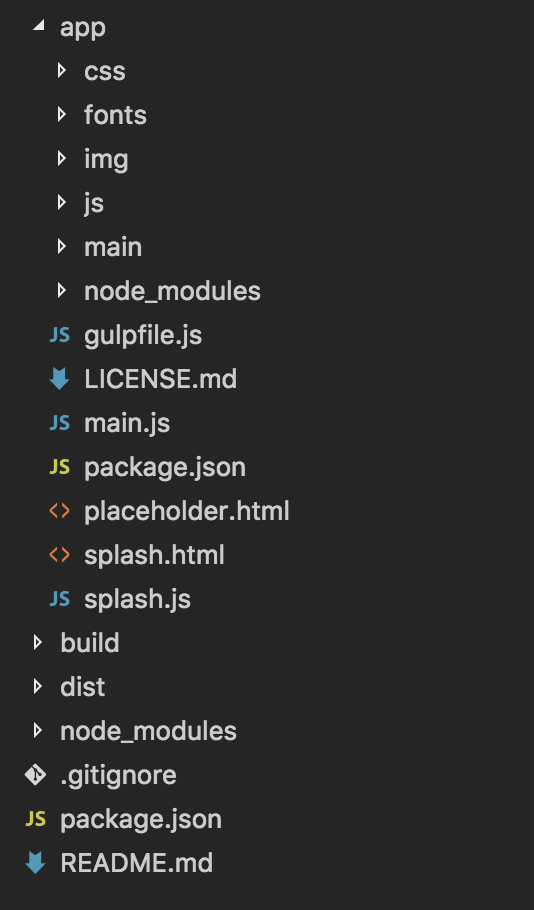
First of all I changed the entire structure of the application in ​. The business core is moved inside the new app folder, with his own package.json with all modulesneeded by the software itself. There is another package.json. It is used to create the distributions forthe differents Operating Systems.

In ​ we can find build and dist folders. Dist is where the distributions will be stored, build instead containsfew relevant build assets like icons (in every needed format).

structure.png

​New structure ready to deploy.

Inside the node_modules folder in the root, which is the development one, there are electron-packager andelectron-prebuilt packages. Inside the development package.json we can find out the deploy scripts "dist": "electron-packager ./app --all --out=./dist --overwrite"​.

According with this article, wrote on Electron ROCKS,electron-packager is a module that allows developers to package a software in more distributions for theOSs. For Unix systems is very simply. In particular way for MacOSx, which is the one that I used to develop, andLinux (this one needs the author written in the following schema: Name Surname <email>​ else willnot be executed). Windows is another thing, it need Wine and Mono libraries (i.e.the open source counterpart of .NET libraries) installedinside the developer machine​.

Now is allowed package executables only by typing the line npm run dist​.​

Evaluation

Now, after the description of what RAJE is and how it is implemented, the last step is about testing the software to highlight critical issues and usability. The test survey is made with eSurv.org, findable here. This test is a DUT, i.e. Discount Usability Test. These kind of tests are made involving only few people, because with 3 to 5 people up to 80% of bugs (the main ones) can be easily found  . The test is built online withe free tool eSurv.org. It is very useful to build up complex survey and it helps to recover and export results in xcell format. The test is a task driven test, i.e. a list of tasks are submitted to testers in order to fill a questionnaire with feedbacks. Feedbacks and form results are elaborated to reach the SUS index. In results I show the results and the list of feedbacks received. The last question is about ask to testers advices and suggestions to expand the expand and fix the test for next usages.

Before start with the text, there are two prerequisites to be satisfied:

  1. The RAJE executable must be downloaded and unzipped.

  2. The tester needs a Github account.

Once the requirements are satisfied, testers are redirected to the background form.

Profiling

The test is organized with 3 researchers of the deparment of computer science and engineering at Bologna University, in line with the DUT principles. To each are submitted the same assertion categorised as expertise with: 

  1. Formats (e.g. DOC(X), ODT...)

  2. Word processors and HTML-based editors

  3. Research articles publication

  4. Control version systems

In total are 17 assertion, with the following format: "I have strong experience with DOC(X) files", needs to be answered with: Strongly Agree, Agree, Neutral, Disagree and Strongly Disagree. With this answers is possible to create profiles of the testers' background, which are used before to generate the results with the SUS answers. In order to complete the testers' background, one of them has Linux and two of them have MacOSX.

Tasks

In order to capture the usability the first task is to create this PDF document using RAJE. To obtain this document I followed the normal RASH workflow. I created the test document using RAJE, and with ROCS I converted the output document in TeX with the Springer LNCS style. The TeX document is then compiled in PDF. The second task aims to evaluate the integration beetwen RAJE and Github, with commit and push of the repository.

Inside the document of the first task there is the whole set of elements and actions that a user can execute. In the abstract section there are some few text elements and a list. In the next sections there are tables, figures and formulas. The file also contains a footnote and a bibliography.

The last task need testers to be logged in with Github. Then they have to push the created document, with the comment. When the article is saved online as a repository, testers have to navigate to the RawGit link and save it inside the document. After that the output folder must be compressed into a archive and send to my email, in order to evaluate the HTML given in output.

Results

The last two pages of the survey are the final questionnaire and for feedback given by the users. A task-based test is very useful to extrapolate quantitative measures about usability of the tool. Usability is described usingthe final questionnaire which is the SUS (System Usability Scale), i.e. a reliable and valid measure of perceived usability. The SUS is a 10 item questionnaire with 5 response options  ​. It give a final number (the SUS index) which can be higher or lower than 68, and it is not percentage points, but an absolute number. A SUS score above a 68 would be considered above average and anything below 68 is below average. 

Instead, user feedback are four open answers to create the ground analysis. It consist of a syntactical analysis of the answers in order to create a table with the number of times a users spoke in favor or against a tool feature. For this thesis I choose not to act the ground analysis, but only report the most important answers.

System Usability Scale

Before describe the mode I used to find out the SUS score, I must remind that the figure on which the test is made is made up of 3 people, all kind of statistics on this population are not completely trustworthy.

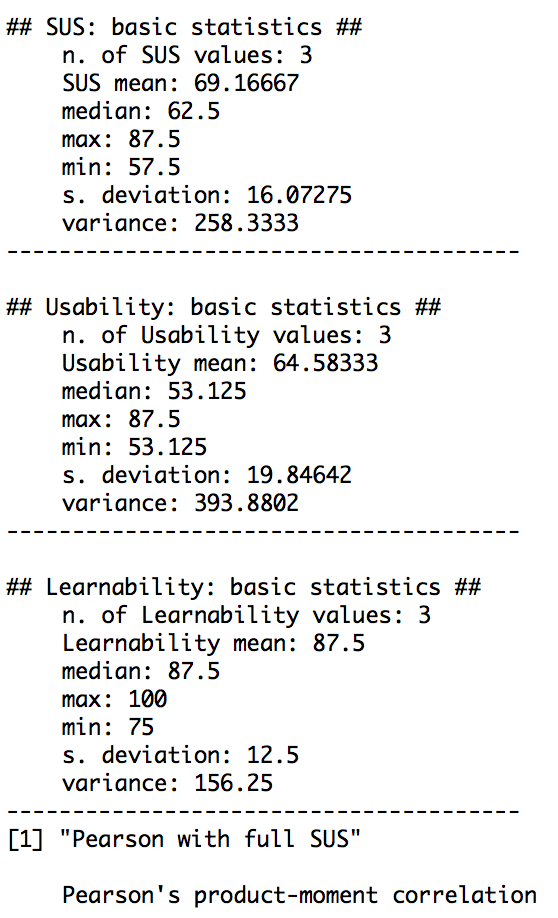
In order to extract the SUS score, I used a script written in R which calculates the score and give in output a plot about the usability. The final scores are in  ​. The figure shows that usability is 64.58, and learnability is 87.5. Usability is little lower than the average value, it means that RAJE usability is little bad. Instead learnability is pretty high. RAJE is very easy to use when user know how it works, it indicates that RAJE has high entry barriers.

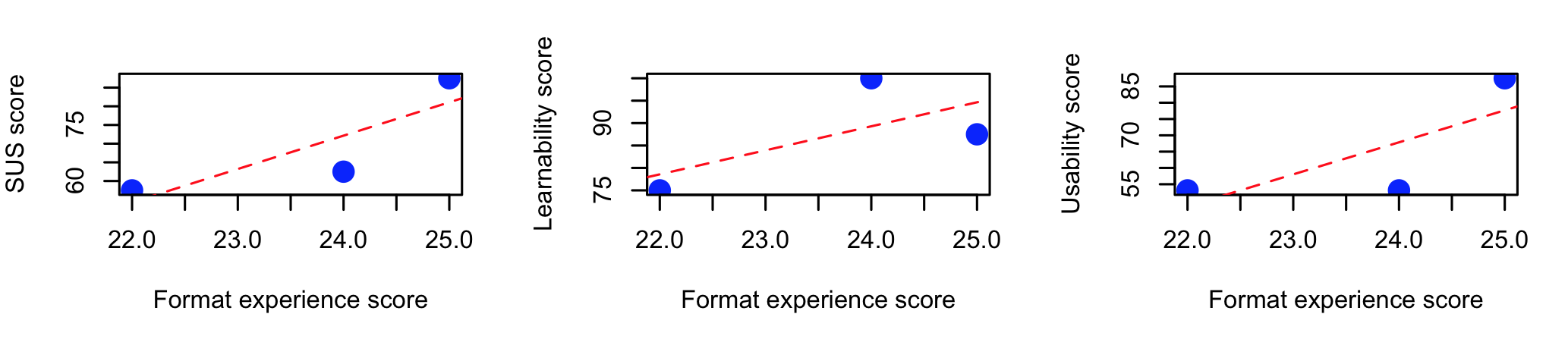
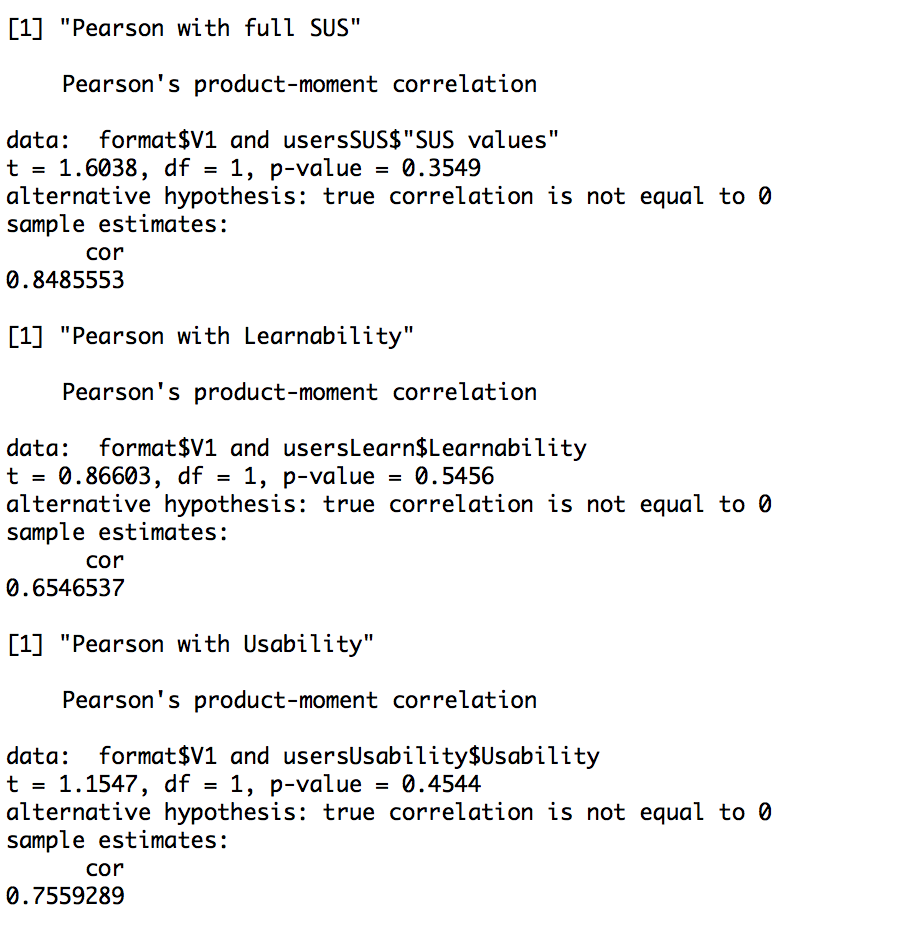
Crossing the values with users background a trend can be find out. In  ​ the SUS answers are crossed with experience of users with different formats, and show a positive trend. Is visible in  ​ that the p-value is very high, because it is higher that 0.1 points. If the p-value is under the threshold of 0.1, the plot has a statistic importance. With only 3 people is not possible have statistic relevance.

img/sus.png

​SUS statistics.

img/susplot.png

​SUS, learnability and usability of users experience with formats.

img/susresults.png

Correlation and p-value of users' format experience and SUS answers.

Feedback

The users noticed few problems about usability and interface arrangement. All of the are agree upon the difficulty for finding the cross-reference button, and the tooltip shown on click is not much intuitive, it show "cross-ref". Also the button to log in with Github is hard to find. The edit of metadata is difficult, and sometimes the caret disappear, and the focus can be lost. They found out that user can break well-formed structure, maybe inserting tables directly inside heading elements. Another needed feature is the possibility of convert an element into another, e.g. a text line can be converted into a list or a heading. This feature must be implemented soon. They noticed also some minor interface issues such as some similar toolbar icons or buttons without behaviour not disabled.

There is one more question after the fourth. It asks suggestions about extending or change in any way the test. Among them there are few interesting ideas. One is to plan the test also with other editors in order to perform a comparison, and use a real reasearch paper as test. Moreover also a hint about background questions came out: ask the expertice that the tester has with the RASH format.

Personally I tested the project with a substantial document, i.e. this thesis. This test is very useful, and it helped me to find other hidden bugs, and increment the todo list. The whole set of bugs found in currently in "fix phase".

Conclusion and future developments

In this thesis I talked about how the Semantic Web community and few publishers, are starting to talk about HTML submissions. It is thought as solution for the problems of the PDF format described above. The advantages that HTML bring with it are easiness to be understanded by machines and the interactiveness granted by browsers. PDF files and HTML documents are easily created with visual editors and word processors. Most of them are WYSIWYG, that allow authors to editate directly the output.

HTML wraps a huge amount of elements which can have ambiguity. Two elements can be different, but visualised as same. RASH fix this problem. It is a subset of 32 HTML elements, which grants that every element is univocal. Another streght of RASH is its framework. Validation, visualization and conversion are all actions that RASH framework can do. But it needs a tool to semplify the creation of a RASH file, hiding all the technical facts about the markup structure. RAJE will be placed inside the RASH framework, in order to cover this need. RAJE is a HTML-based WYSIWYG editor, with generates RASH well-formed documents.

I described the most popular and used HTML-based editors and word processors, and then I discussed the functionalities and the development process in order to create RAJE, with JavaScript libraries, CSS styles and HTML files, and deploy the software packages.

In addition of fixing bugs, some new features are needed to be added. The most interesting feature are the annotations, that will be integrated using hypothesis. I also noticed the necessity of a table of content, to navigate in a better way long documents. I also thought to expand RAJE to allow chairs to create conferences and manage peer reviewing directly with RAJE, or its hypotetical web site. These are just few way in how we can next expand RAJE.

References

  1. Using PDF files. (2009) http://www.siamcomm.com/website-design/using-pdf-files-pros-and-cons/

  2. Peroni S. (2017). RASH: Research Articles in Simplified HTMLhttps://rawgit.com/essepuntato/rash/master/documentation/index.html

  3. PDF history. https://it.wikipedia.org/wiki/Portable_Document_Format

  4. Knowles S. How did the PDF become so popular? https://www.pdfpro.co/blog/2015/how-did-the-pdf-become-so-popular

  5. Rubano V. L’(IN)ACCESSIBILITÀ DEGLI ARTICOLI SCIENTIFICI SUL WEB E L’USO DI RASH E EPUB. http://amslaurea.unibo.it/12281/

  6. Carpenter T. Is It Time for Scholarly Journal Publishers to Begin Distributing Articles Using EPUB 3? https://scholarlykitchen.sspnet.org/2013/03/19/is-it-time-for-scholarly-journal-publishers-to-begin-distributing-articles-using-epub-3/

  7. Ferrara D. EPUB versus PDF -The Pros and Cons for E-Publishing. http://webdesign.about.com/od/epub/a/epub-versus-pdf.htm

  8. What is WYSIWYG and How does it work? https://www.aspedia.net/faq/what-wysiwyg-and-how-does-it-work

  9. Why should I use Authorea to write my papers? http://www.astrobetter.com/blog/2015/07/13/why-should-i-use-authorea-to-write-my-papers/

  10. Mott N. Fidus Writer is a collaborative writing tool custom-built for academia. https://pando.com/2013/04/24/fidus-writer-is-a-collaborative-writing-tool-custom-built-for-academia/

  11. Fidus Writer, how it works. https://www.fiduswriter.org/how-it-works/

  12. Aalbersberg I. PDF versus HTML — which do researchers prefer? https://www.elsevier.com/connect/pdf-versus-html-which-do-researchers-prefer

  13. Peroni S., Osborne F., Di Iorio A., Nuzzolese A., Poggi F., Vitali F. Research Articles in Simplified HTML: a Web-firstformat for HTML-based scholarly articles https://essepuntato.github.io/papers/rash-peerj2016.html

  14. Nielsen J. Discount Usability: 20 Years (2009) https://www.nngroup.com/articles/discount-usability-20-years/

  15. Sauro J. Measuring Usability with the System Usability Scale (SUS) (2011) https://measuringu.com/sus/

In real-time, without any compilation or interpretation.

LaTeX Math Symbols http://web.ift.uib.no/Teori/KURS/WRK/TeX/symALL.html.

All kind of files with .epub extension.

Developed by the IDPF EPUB Working Group, consisting of IDPF members and Invited Experts.

Evaluation section show that RASH can be quickly learnt by researchers who are familiar with HTML​.

FileWriter API compatibility with commercial browsers.