Bindu






English |
Deutsch |
Español |
Français |
हिंदी |
বাংলা |
中文 |
Nederlands |
தமிழ்
AI agent-களுக்கான அடையாளம், தொடர்பு மற்றும் கட்டண அடுக்கு.
நிலைமை இதுதான். நீங்கள் ஒரு agent உருவாக்கினீர்கள். அது வேலை செய்கிறது. ஆனால் அதை உண்மையாக வெளியே விட — மற்ற agent-களுடன் பேச, தான் யார் என்பதை நிரூபிக்க, வேலைக்கு பணம் வாங்க — நீங்கள் ஒரு பெரிய தொகுதி சலிப்பான plumbing-ஐ நீங்களே தைக்க வேண்டும். ஒரு DID library-ஐ ஒருங்கிணைப்பது. ஒரு OAuth flow அமைப்பது. கட்டண middleware. மற்றும் ஒரு HTTP அடுக்கு — agent உலகின் மற்ற பகுதி இப்போது எந்த protocol-ஐ பயன்படுத்துகிறதோ அதை பேசுவது.
Bindu என்பது இந்த அனைத்து plumbing-ஐயும் ஒரே function call-உக்குப் பின் வைத்திருக்கும். உங்கள் handler-ஐ `bindufy()`-உடன் சுற்றுங்கள், சில நொடிகளில் உங்கள் agent online — தனது சொந்த cryptographic அடையாளத்துடன், [A2A](https://github.com/a2aproject/A2A) (மற்ற agent-கள் ஏற்கனவே பேசும் protocol) பேசிக்கொண்டு, மற்றும் எந்த வேலையும் செய்வதற்கு முன் எந்த EVM chain-ல் வேண்டுமானாலும் USDC கேட்க தயாராக ([x402](https://github.com/coinbase/x402)). உங்கள் handler `(messages) -> response` என்ற அளவுக்கே சிறியதாக இருக்கும். handler-க்குள் என்ன framework — Agno, LangChain, CrewAI, அல்லது உங்கள் சொந்தம் — Bindu கவலைப்படவில்லை.
Python, TypeScript, Kotlin-உக்கான SDK-கள் உள்ளன, அனைத்தும் ஒரே gRPC core-ஐ பகிர்ந்து கொள்கின்றன. மொழி ஒரு தேர்வு; protocol-உம் அடையாளமும் எப்படியும் அதே. ஆழமாக போக நீங்கள் தயாராக இருக்கும்போது, [docs](https://docs.getbindu.com) அடுத்த நிறுத்தம்.
## நிறுவல்
உங்களுக்கு Python 3.12+ மற்றும் [uv](https://github.com/astral-sh/uv) தேவைப்படும்.
```bash
uv add bindu
```
Bindu-வை வெறுமனே பயன்படுத்துவதற்கு பதிலாக அதன் மீது வேலை செய்தால்:
```bash
git clone https://github.com/getbindu/Bindu.git
cd Bindu
uv sync --dev
```
உதாரணங்களை இயக்க, குறைந்தபட்சம் ஒரு LLM வழங்குநருக்கான API key வேண்டும் — `OPENROUTER_API_KEY`, `OPENAI_API_KEY`, அல்லது `MINIMAX_API_KEY`.
## விரைவு தொடக்கம்
நீங்கள் விரும்பும் agent-ஐ உருவாக்குங்கள், அதை `bindufy()`-க்கு கொடுங்கள், அது online. கீழே உள்ள block-தான் முழுதும் — ஒரு file-ல் நகலெடுங்கள், உங்கள் `OPENAI_API_KEY`-ஐ அமைக்கவும், இயக்கவும்.
```python
import os
from bindu.penguin.bindufy import bindufy
from agno.agent import Agent
from agno.models.openai import OpenAIChat
from agno.tools.duckduckgo import DuckDuckGoTools
agent = Agent(
instructions="You are a research assistant.",
model=OpenAIChat(id="gpt-4o"),
tools=[DuckDuckGoTools()],
)
config = {
"author": "you@example.com",
"name": "research_agent",
"description": "Research assistant with web search.",
"deployment": {"url": "http://localhost:3773", "expose": True},
"skills": ["skills/question-answering"],
}
def handler(messages: list[dict[str, str]]):
return agent.run(input=messages)
bindufy(config, handler)
```
Agent இப்போது `http://localhost:3773`-ல் live. `expose: True` ஒரு FRP tunnel-ஐ திறக்கிறது, இதனால் port forwarding அமைக்காமலேயே மற்ற இணையம் அதை அணுக முடியும்.
TypeScript சமமான வடிவம்
```typescript
import { bindufy } from "@bindu/sdk";
import OpenAI from "openai";
const openai = new OpenAI();
bindufy({
author: "you@example.com",
name: "research_agent",
description: "Research assistant.",
deployment: { url: "http://localhost:3773", expose: true },
skills: ["skills/question-answering"],
}, async (messages) => {
const response = await openai.chat.completions.create({
model: "gpt-4o",
messages: messages.map(m => ({ role: m.role as "user" | "assistant" | "system", content: m.content })),
});
return response.choices[0].message.content || "";
});
```
TypeScript SDK Python core-ஐ பின்னணியில் spawn செய்கிறது — நீங்கள் அதை பார்க்க மாட்டீர்கள், மேலும் உங்கள் சொந்த codebase-ல் ஒரு Python வரி கூட தேவையில்லை. அதே protocol, அதே DID. முழு உதாரணம் [`examples/typescript-openai-agent/`](../examples/typescript-openai-agent/)-ல்.
curl-உடன் agent-ஐ அழைப்பது
```bash
curl -X POST http://localhost:3773/ \
-H 'Content-Type: application/json' \
-d '{
"jsonrpc": "2.0",
"method": "message/send",
"id": "",
"params": {
"message": {
"role": "user",
"kind": "message",
"parts": [{"kind": "text", "text": "Hello"}],
"messageId": "",
"contextId": "",
"taskId": ""
}
}
}'
```
பிறகு அதே `taskId`-உடன் `tasks/get`-ஐ poll செய்யவும் — state `completed`-ஐ அடையும் வரை.
## அம்சங்கள்
ஒவ்வொரு வரியும் உண்மையில் ஆழமாக போகும் வழிகாட்டிக்கு இணைப்பு கொடுக்கிறது.
| அம்சம் | என்ன செய்கிறது | Docs |
|---|---|---|
| **A2A JSON-RPC** | மற்ற agent-கள் ஏற்கனவே பேசும் protocol. `message/send`, `tasks/get`, `message/stream` — port 3773-ல். | — |
| **DID அடையாளம்** | உங்கள் agent அனுப்பும் ஒவ்வொரு பதிலும் Ed25519 key-உடன் கையெழுத்திடப்படுகிறது. அழைப்பாளர்கள் W3C DID-உடன் சரிபார்க்கிறார்கள் — leak ஆக கூடிய பகிரப்பட்ட secret எதுவும் இல்லை. | [DID.md](../docs/DID.md) |
| **Hydra வழியான OAuth2** | scope உள்ள token-கள் (`agent:read`, `agent:write`, `agent:execute`) — அனைத்து கதவுகளையும் திறக்கும் ஒரே bearer-க்கு பதிலாக. | [AUTHENTICATION.md](../docs/AUTHENTICATION.md) |
| **x402 கட்டணங்கள்** | ஒரு flag-ஐ எழுப்புங்கள், உங்கள் handler request-ஐ பார்ப்பதற்கு முன்பே agent USDC கேட்க ஆரம்பிக்கும். **5 chains முன்பே கட்டமைக்கப்பட்டுள்ளன** — Base, Base Sepolia, Ethereum, Ethereum Sepolia, SKALE Europa — மற்றும் வேறு எந்த EVM chain (Polygon, Avalanche, Arbitrum, …)-ம் ஒரே `extra_networks` entry-ல் வரும். | [PAYMENT.md](../docs/PAYMENT.md) |
| **Push அறிவிப்புகள்** | Task நிலை மாறும்போது agent உங்களை webhook மூலம் அறிவிக்கிறது. polling-ஐ நிறுத்துங்கள். | [NOTIFICATIONS.md](../docs/NOTIFICATIONS.md) |
| **Skills முறை** | உங்கள் agent என்ன செய்ய முடியும் என்பதை அறிவிக்கவும்; அழைப்பாளர்கள் ஒரு token செலவழித்து கேட்பதற்கு முன்பே அதை agent card-ல் காண்கிறார்கள். | [SKILLS.md](../docs/SKILLS.md) |
| **தனிப்பட்ட skills** | உங்கள் வணிக skill விளக்கங்களை பொது catalog-ல் இருந்து தள்ளி வைக்கவும். பொது crawler-கள் ஒரு பொதுவான "நாங்கள் X செய்கிறோம்" மட்டுமே பார்க்கின்றன — allowlist-ல் உள்ள partner DID-கள் உங்கள் உண்மையான menu-ஐ இரண்டாவது auth-gate செய்யப்பட்ட endpoint-ல் காண்கிறார்கள். உங்கள் skill விளக்கங்களே உங்கள் product roadmap ஆக இருக்கும்போது பயனுள்ளது. | [PRIVATE_SKILLS.md](../docs/PRIVATE_SKILLS.md) |
| **Agent பேச்சுவார்த்தை** | இரண்டு agent-கள் விலை, latency, SLA என எல்லாவற்றையும் முன்கூட்டியே ஒப்பிக்கொள்கின்றன. surprise bill-கள் இல்லை. | [NEGOTIATION.md](../docs/NEGOTIATION.md) |
| **சேமிப்பு** | task-கள் மற்றும் message-களுக்கு Postgres. விருப்பம் இருந்தால் backend-ஐ மாற்றலாம். | [STORAGE.md](../docs/STORAGE.md) |
| **Scheduler** | Redis-ஐ அடிப்படையாக கொண்ட retry, timeout, மற்றும் மீண்டும் வரும் task-கள். | [SCHEDULER.md](../docs/SCHEDULER.md) |
| **பொது tunnel** | `expose: true` உங்கள் laptop-ஐ இணையத்தில் வைக்கிறது. port forwarding இல்லை, router கட்டமைப்பு இல்லை. | [TUNNELING.md](../docs/TUNNELING.md) |
| **பல மொழி SDK** | Python, TypeScript, Kotlin — அடியில் அதே gRPC core, அதே DID, அதே auth. | [GRPC_LANGUAGE_AGNOSTIC.md](../docs/GRPC_LANGUAGE_AGNOSTIC.md) |
| **Cloud வரிசைப்படுத்தல்** | `bindu deploy agent.py --runtime=boxd` உங்கள் script-ஐ ஒரு microVM-உக்கு அனுப்பி HTTPS URL-ஐ print செய்கிறது. Dockerfile இல்லை. | [runtime/quickstart.md](../docs/runtime/quickstart.md) |
| **Gateway** | A2A வழியாக agent-களின் fleet-ஐ orchestrate செய்து முடிவை stream செய்து திருப்பி அனுப்பும் planner LLM. | [GATEWAY.md](../docs/GATEWAY.md) |
| **Observability** | OpenTelemetry trace, Sentry error, ஒரு health endpoint. அதிகாலை 2 மணிக்கு உங்களை காப்பாற்றும் சலிப்பான விஷயங்கள். | [OBSERVABILITY.md](../docs/OBSERVABILITY.md) |
## Demo
[`inbox/`](../inbox/)-ல் ஒரு Gmail வடிவ operator inbox-ம் உள்ளது. `cd inbox && npm run dev` இயக்கி `http://localhost:3775`-ஐ திறக்கவும்.
## உதாரணங்கள்
[`examples/`](../examples/)-ல் இருந்து சில:
| உதாரணம் | என்ன காட்டுகிறது |
|---|---|
| [Agent Swarm](../examples/agent_swarm/) | ஒன்றுக்கொன்று வேலையை கடத்தும் Agno agent-களின் ஒரு சிறிய சமூகம். |
| [Premium Advisor](../examples/premium-advisor/) | x402 நடைமுறையில் — எதுவும் தொடங்குவதற்கு முன் அழைப்பாளர் USDC செலுத்த வேண்டும். |
| [Hermes via Bindu](../examples/hermes_agent/) | Nous Research-இன் Hermes agent, ~90 வரிகளில் bindufied. |
| [Gateway Test Fleet](../examples/gateway_test_fleet/) | ஐந்து agent-கள் ஒரு gateway — multi-agent கதை முழுவதும். |
| [TypeScript OpenAI Agent](../examples/typescript-openai-agent/) | TS-மட்டுமே agent — உங்கள் repo-ல் Python-ன் ஒரு வரியும் இல்லை. |
CSV பகுப்பாய்வு, PDF Q&A, speech-to-text, web scraping, பல மொழி ஒத்துழைப்பு, blog எழுதுதல் என 20+ மேலும் உள்ளன. [`examples/`](../examples/)-ஐ உலாவவும்.
## நாங்கள் Bindu-ஐ ஏன் கட்டினோம்
நாங்கள் Bindu-ஐ production-ல் பயன்படுத்தி **Trade Compliance OS**-ஐ உருவாக்குகிறோம் — CBAM, EUDR, HS கோட்கள் மற்றும் Digital Product Passport-களை கையாளும் agent-களின் ஒரு திரள், ஒரு SMB-க்கு கொஞ்சம் காபி, ஜவுளி, அல்லது இரும்பை எல்லைகள் கடந்து அனுப்ப — ஒரு law firm-க்கு ஆறு இலக்க காசோலை எழுதாமல். அந்த திரளில் உள்ள ஒவ்வொரு agent-ம் bindufied. protocol, அடையாளம், கட்டண rail-கள் — Bindu-ஐ முதலில் தீர்க்க வேண்டியதே இவற்றைத்தான்.
நீங்கள் இவற்றில் எதையேனும் தொடும் ஒரு agent-ஐ உருவாக்கியிருந்தால் — customs கடதாசி, supplier audit, materials sourcing, regulatory filing, அக்கம்-பக்கத்தில் எதுவாக இருந்தாலும் — அதை network-ல் வைத்திருக்க விரும்புகிறோம். [Discord-ல் எங்களை சந்திக்கவும்](https://discord.gg/3w5zuYUuwt), பேசுவோம்.
## ஆதரிக்கப்படும் framework-கள்
agent-களை எழுத ஏற்கனவே உங்களுக்கு பிடித்த எதையும் கொண்டு வாருங்கள். handler-க்குள் என்ன இருக்கிறது என்பதை Bindu கவலைப்படவில்லை.
| மொழி | இந்த repo-ல் சோதிக்கப்பட்ட framework-கள் |
|---|---|
| **Python** | [AG2](https://github.com/ag2ai/ag2), [Agno](https://github.com/agno-agi/agno), [CrewAI](https://github.com/joaomdmoura/crewAI), [Hermes Agent](https://github.com/NousResearch/hermes-agent), [LangChain](https://github.com/langchain-ai/langchain), [LangGraph](https://github.com/langchain-ai/langgraph), [Notte](https://github.com/nottelabs/notte) |
| **TypeScript** | [OpenAI SDK](https://github.com/openai/openai-node), [LangChain.js](https://github.com/langchain-ai/langchainjs) |
| **Kotlin** | [OpenAI Kotlin SDK](https://github.com/aallam/openai-kotlin) |
| **வேறு எந்த மொழி** | [gRPC core](../docs/grpc/) வழியாக — ஒரு புதிய SDK பொதுவாக சில நூறு வரிகள் |
உங்கள் model வழங்குநர் OpenAI அல்லது Anthropic API பேசினால், அது வேலை செய்யும் — [OpenRouter](https://openrouter.ai/), [OpenAI](https://platform.openai.com/), [MiniMax](https://platform.minimaxi.com), மற்றும் மற்றவை.
## ஆவணப்படுத்தல்
- [முழு docs தளம்](https://docs.getbindu.com)
- [பாதுகாக்கப்பட்ட agent-ஐ அழைப்பது](../docs/AUTHENTICATION.md) — DID signing மற்றும் Hydra token-கள் கொண்ட auth flow, வேலை செய்யும் ஒரு Python client உடன்
- [Cloud வரிசைப்படுத்தல்](../docs/runtime/quickstart.md) — `bindu deploy` walkthrough
- [Gateway](../docs/GATEWAY.md) — multi-agent orchestration
- [தனிப்பட்ட skills](../docs/PRIVATE_SKILLS.md) — பொது catalog-ல் இருந்து உங்கள் வணிக menu-ஐ மறை; அதை allowlist-ல் உள்ள partner DID-களுக்கு மட்டுமே காட்டு
- [gRPC கட்டிடக்கலை](../docs/grpc/) — புதிய மொழி SDK கட்டுபவர்களுக்காக
- [அறியப்பட்ட பிரச்சினைகள்](../bugs/known-issues.md) — production-க்கு push செய்யும் முன் படியுங்கள்
- [பிரச்சினை தீர்த்தல்](../docs/AUTHENTICATION.md#troubleshooting) — நீங்கள் சந்திக்கப்போகும் பிழைகள், அவற்றை கடப்பது எப்படி
## சோதனை
```bash
uv run pytest tests/unit/ -v # வேகமான unit test-கள்
uv run pytest tests/integration/grpc/ -v -m e2e # gRPC E2E
uv run pytest -n auto --cov=bindu --cov-report=term-missing # முழு suite
```
## பங்களிப்பு
```bash
git clone https://github.com/getbindu/Bindu.git
cd Bindu
uv venv --python 3.12.9 && source .venv/bin/activate
uv sync --dev
pre-commit run --all-files
```
முழு வழிகாட்டி [`.github/contributing.md`](../.github/contributing.md)-ல். அன்றாட பேச்சு-வார்த்தைகள் பெரும்பாலும் [Discord](https://discord.gg/3w5zuYUuwt)-ல் நடக்கின்றன — வந்து வணக்கம் சொல்லுங்கள்.
## பராமரிப்பாளர்கள்
## நன்றியுரை
Bindu பல நல்ல open source-களின் தோள்களில் நின்றுள்ளது:
[FastA2A](https://github.com/pydantic/fasta2a) · [A2A](https://github.com/a2aproject/A2A) · [x402](https://github.com/coinbase/x402) · [Hugging Face chat-ui](https://github.com/huggingface/chat-ui) · [12 Factor Agents](https://github.com/humanlayer/12-factor-agents) · [OpenCode](https://github.com/anomalyco/opencode) · [OpenMoji](https://openmoji.org/) · [ASCII Space Art](https://www.asciiart.eu/space/other)
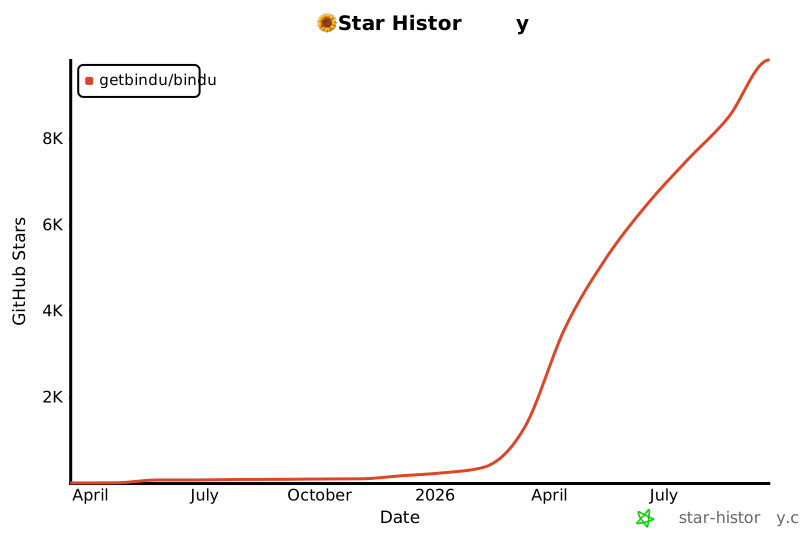
## Star வரலாறு
## உரிமம்
Apache 2.0. [LICENSE.md](../LICENSE.md)-ஐ பார்க்கவும்.
"நாங்கள் சூரியகாந்தி கோட்பாட்டில் நம்பிக்கை கொண்டுள்ளோம் — ஒன்றாக நிமிர்ந்து நின்று, Agent-களின் இணையத்திற்கு நம்பிக்கையும் ஒளியும் கொண்டுவருகிறோம்."