 Vimium C - All by Keyboard
[](https://github.com/gdh1995/vimium-c/releases)
[](LICENSE.txt)
[](https://github.com/gdh1995/vimium-c/stargazers)
[](https://gitee.com/gdh1995/vimium-c/stargazers)
[](https://addons.mozilla.org/firefox/addon/vimium-c/?src=external-readme)
[](https://addons.mozilla.org/firefox/addon/vimium-c/?src=external-readme)
[](https://addons.mozilla.org/firefox/addon/vimium-c/reviews/?src=external-readme)
[](https://microsoftedge.microsoft.com/addons/detail/aibcglbfblnogfjhbcmmpobjhnomhcdo)
[](https://microsoftedge.microsoft.com/addons/detail/aibcglbfblnogfjhbcmmpobjhnomhcdo)
[](https://microsoftedge.microsoft.com/addons/detail/aibcglbfblnogfjhbcmmpobjhnomhcdo)
[](https://chrome.google.com/webstore/detail/vimium-c-all-by-keyboard/hfjbmagddngcpeloejdejnfgbamkjaeg)
[](https://chrome.google.com/webstore/detail/vimium-c-all-by-keyboard/hfjbmagddngcpeloejdejnfgbamkjaeg)
[](https://chrome.google.com/webstore/detail/vimium-c-all-by-keyboard/hfjbmagddngcpeloejdejnfgbamkjaeg)
**Visit on [Firefox Add-ons](https://addons.mozilla.org/firefox/addon/vimium-c/?src=external-readme) /
[Microsoft Edge Add-ons](https://microsoftedge.microsoft.com/addons/detail/aibcglbfblnogfjhbcmmpobjhnomhcdo) /
[Chrome Web Store](https://chrome.google.com/webstore/detail/vimium-c-all-by-keyboard/hfjbmagddngcpeloejdejnfgbamkjaeg
)**
A Customized
[Vimium](https://github.com/philc/vimium)
(to click web page content and manipulate browser windows using only keyboard)
having [**c**ontextual mapping](https://github.com/gdh1995/vimium-c/wiki/Map-a-key-to-different-commands-on-different-websites),
[global short**c**uts](https://github.com/gdh1995/vimium-c/wiki/Trigger-commands-in-an-input-box#user-content-shortcut),
[**c**ommand sequences](https://github.com/gdh1995/vimium-c/wiki/Auto-run-a-tree-of-commands),
**C**hinese support
and [inje**c**tion](https://github.com/gdh1995/vimium-c/wiki/Inject-into-other-extensions) functionality,
in **C**-style code for qui**c**ker action and less resource **c**ost.
[Vimium](https://github.com/philc/vimium) 的一款修改版(可以用键盘点击网页内容、操作浏览器窗口),添加了完整的中文支持、[分场景映射](https://github.com/gdh1995/vimium-c/wiki/Map-a-key-to-different-commands-on-different-websites
)、[全局快捷键](https://github.com/gdh1995/vimium-c/wiki/Trigger-commands-in-an-input-box#user-content-shortcut
)和[命令序列](https://github.com/gdh1995/vimium-c/wiki/Auto-run-a-tree-of-commands
)功能,还能运行在某些接受 Vimium C
的[扩展程序的私有页面](https://github.com/gdh1995/vimium-c/wiki/Inject-into-other-extensions)里,并且对CPU和内存资源的消耗很低。
[阅读中文介绍 (description in Chinese) 。](README-zh.md)
This project is mainly developed and maintained by [gdh1995](https://github.com/gdh1995) (Gong Dahan),
and open-sourced under the [Apache-2.0 license](LICENSE.txt).
本项目主要由 [gdh1995](https://github.com/gdh1995)(宫大汉)开发并维护,且以 [Apache-2.0 许可协议](LICENSE.txt) 开源。
It (the released version) supports the new Microsoft Edge, Google Chrome and other Chromium-based browsers
whose core versions are >= 102, and has a perfect support for a recent Firefox (since version 101.0, desktop).
It can even run on Microsoft Edge (EdgeHTML), though there're still some errors.
If re-compiled from the source code, Vimium C is able to support Chromium 32~108 and Firefox 63~100.
它支持内核版本不低于 102 的新版 Microsoft Edge、Google Chrome 和其它以 Chromium 为内核的浏览器,
同时也能完美运行在近些年发布的 Firefox 101(桌面版)和更高版本上,甚至在 Edge (EdgeHTML 内核) 上也能正常执行大部分命令。
如果从源码重新编译,Vimum C 还可以支持 Chromium 32~108 和 Firefox 63~100。
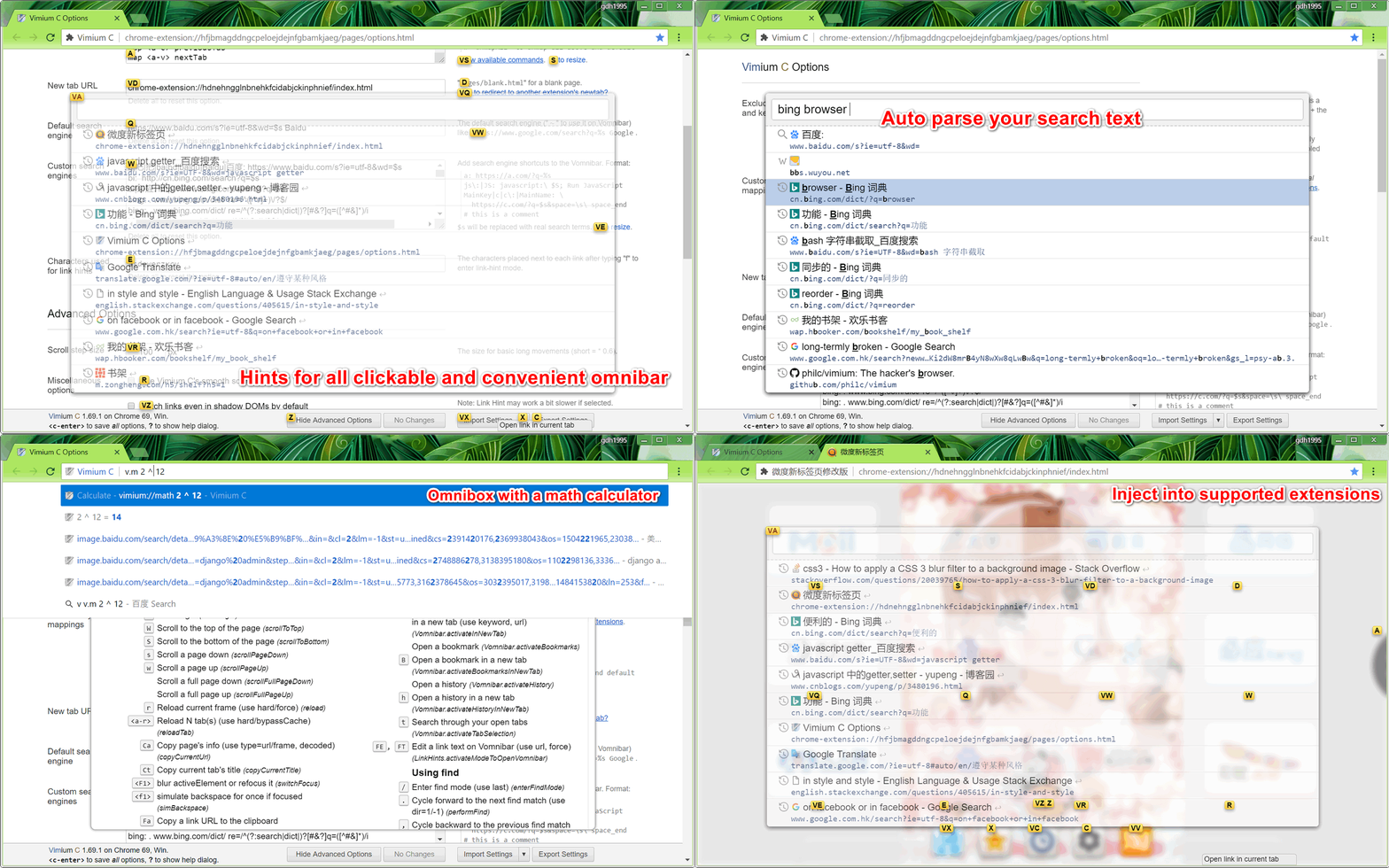
This project is hosted on https://github.com/gdh1995/vimium-c and https://gitee.com/gdh1995/vimium-c .
Some old code of Vimium C was under the MIT license,
and you may get it in https://github.com/gdh1995/vimium-c/tree/MIT-licensed-v1 .
Vimium C 的部分旧代码以 MIT 许可协议开源,可以前往 https://github.com/gdh1995/vimium-c/tree/MIT-licensed-v1 获得源码。
An old name of this project is "Vimium++", which has been given up on 2018-08-21.
# Keyboard Bindings
_This section is modified from [philc/vimium 's](https://github.com/philc/vimium#keyboard-bindings)._
Modifier keys are specified as ``, ``, and `` for Ctrl+x, Meta+x, and Alt+x respectively.
For Shift+X and Ctrl+Shift+X, just type `X` and ``.
See the next section for how to customize these bindings.
Once you have Vimium C installed, you can see this list of key bindings at any time by typing `?`.
Navigating the current page:
? show the help dialog for a list of all available keys
h scroll left
j scroll down
k scroll up
l scroll right
gg scroll to top of the page
G scroll to bottom of the page
d scroll down half a page
u scroll up half a page
f show hints for links and buttons to open in the current tab
F show link hints and open a link in a new tab
r reload
gs view source
i enter insert mode -- all commands will be ignored until you hit Esc to exit
yy copy the current url to the clipboard
yf copy a link url to the clipboard
gf cycle forward to the next frame
gF focus the main/top frame
Navigating to new pages:
o open URL, bookmark, or history entry, on an English letter "o"
O open URL, bookmark, history entry in a new tab, on an English letter "O"
b open bookmark
B open bookmark in a new tab
Using find:
/ enter find mode
-- type your search query and hit enter to search, or Esc to cancel
n cycle forward to the next find match
N cycle backward to the previous find match
For advanced usage, see [regular expressions](https://github.com/philc/vimium/wiki/Find-Mode) on the wiki.
Navigating your history:
H go back in history
L go forward in history
Manipulating tabs:
J, gT go one tab left
K, gt go one tab right
g0 go to the first tab. Use `ng0` to go to n-th tab, on `g` and a number character of `0`
g$ go to the last tab
^ visit the previously-visited tab
t create tab
yt duplicate current tab
x close current tab
X restore closed tab (i.e. unwind the `x` command)
T search through your open tabs
W move current tab to new window
pin/unpin current tab
Using marks:
ma, mA set local mark "a" (global mark "A")
`a, `A jump to local mark "a" (global mark "A")
`` jump back to the position before the previous jump
-- that is, before the previous gg, G, n, N, / or `a
Additional advanced browsing commands:
]], [[ follow the link labeled "next or ">" ("previous" or "<">)
- helpful for browsing paginated sites
open multiple links in a new tab
gi focus the first (or n-th) text input box on the page. Use to cycle through options.
gu go up one level in the URL hierarchy
gU go up to root of the URL hierarchy
ge edit the current URL
gE edit the current URL and open in a new tab
zH scroll all the way left
zL scroll all the way right
v enter visual mode; use p/P to paste-and-go, use y to yank, use v/c/V to toggle visual/line/caret modes
V enter visual line mode
yc select a first word of a sentence and enter visual mode
Vimium C supports command repetition so, for example, hitting `5t` will open 5 tabs in rapid succession. ``
(or ``) will clear any partial commands in the queue and will also exit insert and find modes.
There are some advanced commands which aren't documented here; refer to the help dialog (type `?`) for a full list.
# Custom Key Mappings
_This section is modified from [philc/vimium 's](https://github.com/philc/vimium#custom-key-mappings)._
When you have just installed Vimium C, it will open a new tab to show its default key mappings,
and you may also open Vimium C's options page and press `?` (usually it's `Shift+/`) to show those mappings again.
You may remap or unmap any of the default key bindings in the "Custom key mappings" on the options page.
Enter one of the following key mapping commands per line:
* `map command`: Maps a _key_ to a Vimium C command. Overrides web pages' default behavior (if any).
* `mapKey `: Let Vimium C treat _key_ as _another key_. Can not affect your browser or web pages.
* `unmap `: Unmaps a key and restores the default behavior (if any).
* `unmapAll`: Unmaps all bindings. This is useful if you want to completely wipe Vimium C's default commands and start
from scratch with your own setup.
Examples:
* `map r reload` maps the r key to reloading the page.
* `map scrollPageDown` maps Ctrl+D to scrolling the page down.
* `unmap r` removes any mapping for the r key.
* `unmap ` removes any mapping for Ctrl+D and restores web page or browser's default behavior.
* `unmap g0` removes any mapping for a `g` key and a next `0` key.
Available Vimium C commands can be found via the "Show available commands" link or `?` key on the options page.
The command name appears to the right of the description in parenthesis.
You can add comments to key mappings by starting a line with `"` or `#`, or a space character and a next `#` in a line.
The following special keys are available for mapping:
* ``, ``, ``, `` for Ctrl, Alt, Shift, and Meta (Command on macOS) respectively with any key.
Replace `*` with the key name of choice.
* ``, ``, ``, `` for the arrow keys.
* `` through `` for the function keys.
* `` for the space key.
* ``, ``, ``, ``, ``, `` and `` for non-printable keys
Here're some advanced usages which are different with philc/vimium:
* Shift are automatically detected, so, `&` corresponds to Shift+7 on an English QWERTY keyboard.
* However, if a single key is longer than 1 character, please wrap it with `<`+`>` and insert a `s-`
* If you want to trigger a key when multiple modifier keys are pressed, sort `a/c/m/s-` prefixes by letter order
* For example, these keys are valid names: ``, ``, ``, `` and ``
* `mapKey ` makes _key_ work as another key only in a special mode named Vomnibar
* `mapKey` rules always take effect before matching a key with `map` rules
* some other modes are list in https://github.com/gdh1995/vimium-c/wiki/Use-in-another-keyboard-layout#per-mode-mapkey
* `map command` makes _key_ trigger the command in insert mode only, but not the default normal mode
* since v1.99.98, `map! ` maps _key_ in both normal mode and insert mode, if only it's not a long sequence
* For example, `map! jj` is invalid, but `map! ` and `map! ` are suitable
* `unmap` can only unmap a manually-mapped key or a default key, so a second `unmap ` may result in an error
* You may use `unmap!` when you're not sure whether a key has been mapped before
* number keys (`0`-`9` and `-`) are mapped to "count prefix" of commands by default, so won't be passed to web pages.
* And then, even after `unmapAll`, they will be automatically added back on a next `map`
* you may write `unmap 0` to unmap it explicitly
# Project Introduction
__Vimium C:__
* [中文介绍 (description in Chinese)](README-zh.md)
* a web extension for Firefox, Microsoft Edge and Google Chrome that provides keyboard-based navigation and control
of the web, in the spirit of the Vim editor.
* add some powerful functions and provide more configurable details and convenience.
* here is its [Apache-2.0 license](LICENSE.txt) and [privacy policy](PRIVACY-POLICY.md)
* the initial code is forked from [philc/vimium:master](https://github.com/philc/vimium) on 2014.
* customized after translating it from CoffeeScript into JavaScript and then TypeScript.
__Other extensions supporting Vimium C:__
* PDF Viewer for Vimium C
* built from (modified) [PDF.js](https://github.com/mozilla/pdf.js/),
and is a replacement for the extension named [PDF Viewer](
https://chrome.google.com/webstore/detail/pdf-viewer/oemmndcbldboiebfnladdacbdfmadadm)
* visit it on [Chrome Web Store](
https://chrome.google.com/webstore/detail/pdf-viewer-for-vimium-c/nacjakoppgmdcpemlfnfegmlhipddanj)
* Project home: [vimium-c-helpers/pdf-viewer](https://github.com/gdh1995/vimium-c-helpers/tree/master/pdf-viewer)
* NewTab Adapter
* take over browser's new tab settings and open another configurable URL
* visit it on [Firefox Add-ons](https://addons.mozilla.org/firefox/addon/newtab-adapter/?src=external-vc-readme) /
[Chrome Web Store](https://chrome.google.com/webstore/detail/newtab-adapter/cglpcedifkgalfdklahhcchnjepcckfn)
* project home: [vimium-c-helpers/newtab](https://github.com/gdh1995/vimium-c-helpers/tree/master/newtab#readme)
* Shortcut Forwarding Tool
* provide 32 configurable shortcuts and forward them to another extension like Vimium C
* visit it on
[Firefox Add-ons](https://addons.mozilla.org/firefox/addon/shortcut-forwarding-tool/?src=external-vc-readme) /
[Chrome Web Store](
https://chrome.google.com/webstore/detail/shortcut-forwarding-tool/clnalilglegcjmlgenoppklmfppddien)
* project home: [vimium-c-helpers/shortcuts](https://github.com/gdh1995/vimium-c-helpers/tree/master/shortcuts#readme)
* Modified Weidu New Tab (微度新标签页修改版)
* a modified and lite version of [www.weidunewtab.com](http://www.weidunewtab.com/) (or
[www.newtabplus.com](http://www.newtabplus.com/) ), with Chinese translation only
* it does not take over browser's new tab settings; if needed then [NewTab Adapter](
https://chrome.google.com/webstore/detail/newtab-adapter/cglpcedifkgalfdklahhcchnjepcckfn) is recommended
* visit it on [Chrome Web Store](
https://chrome.google.com/webstore/detail/微度新标签页修改版/hdnehngglnbnehkfcidabjckinphnief)
# Release Notes
Refer to [RELEASE-NOTES.md](RELEASE-NOTES.md).
#### Known Issues
There're some known issues on previous or latest versions of Chromium-based browsers,
and please read https://github.com/gdh1995/vimium-c/wiki/Known-issues-on-various-versions-of-Chrome
for more information.
# Building
If you want to compile this project manually, then you need a Node.js 13+ and npm. Please run:
``` bash
npm install typescript
npm install pngjs # only needed for Chromium-based browsers
node scripts/tsc
# ./scripts/make.sh vimium_c-debug.zip
```
`gulp local` can also compile files in place (using configurable build options),
while `gulp dist` compiles and minimizes files into `dist/`.
The options including `MinCVer` and `BTypes` in [gulp.tsconfig.json](scripts/gulp.tsconfig.json)
are used to control supported target browsers and set a minimum browser version.
# Donating / 捐赠
Vimium C is an open-source browser extension, and everyone can install and use it free of charge.
If you indeed want to give its author ([gdh1995@qq.com](https://github.com/gdh1995)) financial support,
you may donate any small amount of money to him through
[Open Collective](https://opencollective.com/vimium-c), [PayPal](https://www.paypal.me/gdh1995),
[Alipay](https://intl.alipay.com/) or [WeChat](https://www.wechat.com/). Thanks a lot!
Vimium C 是一款开源的浏览器扩展程序,任何人都可以安装使用它而无需支付任何费用。
如果您确实想要资助它的开发者([gdh1995@qq.com](https://github.com/gdh1995)),
可以通过[支付宝](https://www.alipay.com/)、[微信](https://weixin.qq.com/)、[Open Collective](
https://opencollective.com/vimium-c)
或 [PayPal](https://www.paypal.me/gdh1995) 无偿赠与他一小笔钱。谢谢您的支持!
A partial donation list is in / 部分捐赠列表详见: https://github.com/gdh1995/vimium-c/wiki/Donation-List .


 # Thanks & Licenses
Vimium C: Copyright (c) Gong Dahan. See the [Apache-2.0 license](LICENSE.txt) for details.
The translation files in [_locales/](https://github.com/gdh1995/vimium-c/tree/master/_locales) belong to
[CC-BY-SA-4.0](https://creativecommons.org/licenses/by-sa/4.0/),
except some of those English sentences which are the same as [philc/vimium](https://github.com/philc/vimium)'s
are under Vimium's MIT license.
* [Vimium](https://github.com/philc/vimium):
Copyright (c) 2010 Phil Crosby, Ilya Sukhar.
Licensed under the [MIT license](https://github.com/philc/vimium/blob/master/MIT-LICENSE.txt).
* [TypeScript](https://github.com/Microsoft/TypeScript):
and modified `es.d.ts`, `es/*`, `dom.d.ts` and `chrome.d.ts` in `types/`:
Copyright (c) Microsoft Corporation (All rights reserved).
Licensed under the [Apache License 2.0](https://github.com/microsoft/TypeScript/blob/master/LICENSE.txt).
See more on [www.typescriptlang.org](http://www.typescriptlang.org/).
* [Viewer.js](https://github.com/fengyuanchen/viewerjs)
([Modified](https://github.com/gdh1995/viewerjs)):
Copyright (c) 2015-present Chen Fengyuan.
Licensed under the [MIT license](https://github.com/fengyuanchen/viewerjs/blob/master/LICENSE).
* [JavaScript Expression Evaluator](https://github.com/silentmatt/expr-eval)
([Modified](https://github.com/gdh1995/js-expression-eval)):
Copyright (c) 2015 Matthew Crumley.
Licensed under the [MIT license](
https://github.com/silentmatt/expr-eval/blob/4327f05412a3046a9b527b6ec3b50843cb0428e8/LICENSE.txt).
* The orange picture in the icon is from https://pixabay.com/vectors/orange-fruit-mandarin-citrus-fruit-158258/
* [微度新标签页](http://www.weidunewtab.com/):
Copyright (c) 2012 杭州佐拉网络有限公司 保留所有权利.
* [PDF.js](https://github.com/mozilla/pdf.js/):
Copyright (c) Mozilla and individual contributors.
Licensed under the [Apache License 2.0](https://github.com/mozilla/pdf.js/blob/master/LICENSE).
# Declaration for Applicable Regions
The [Vimium C](https://microsoftedge.microsoft.com/addons/detail/vimium-c/aibcglbfblnogfjhbcmmpobjhnomhcdo)
and other extensions published by [gdh1995](https://github.com/gdh1995)
are available for all people in *"all regions"*
of Microsoft Edge Add-ons, Chrome Web Store and some other markets.
This behavior is only to make these extensions easier to use, but
# Thanks & Licenses
Vimium C: Copyright (c) Gong Dahan. See the [Apache-2.0 license](LICENSE.txt) for details.
The translation files in [_locales/](https://github.com/gdh1995/vimium-c/tree/master/_locales) belong to
[CC-BY-SA-4.0](https://creativecommons.org/licenses/by-sa/4.0/),
except some of those English sentences which are the same as [philc/vimium](https://github.com/philc/vimium)'s
are under Vimium's MIT license.
* [Vimium](https://github.com/philc/vimium):
Copyright (c) 2010 Phil Crosby, Ilya Sukhar.
Licensed under the [MIT license](https://github.com/philc/vimium/blob/master/MIT-LICENSE.txt).
* [TypeScript](https://github.com/Microsoft/TypeScript):
and modified `es.d.ts`, `es/*`, `dom.d.ts` and `chrome.d.ts` in `types/`:
Copyright (c) Microsoft Corporation (All rights reserved).
Licensed under the [Apache License 2.0](https://github.com/microsoft/TypeScript/blob/master/LICENSE.txt).
See more on [www.typescriptlang.org](http://www.typescriptlang.org/).
* [Viewer.js](https://github.com/fengyuanchen/viewerjs)
([Modified](https://github.com/gdh1995/viewerjs)):
Copyright (c) 2015-present Chen Fengyuan.
Licensed under the [MIT license](https://github.com/fengyuanchen/viewerjs/blob/master/LICENSE).
* [JavaScript Expression Evaluator](https://github.com/silentmatt/expr-eval)
([Modified](https://github.com/gdh1995/js-expression-eval)):
Copyright (c) 2015 Matthew Crumley.
Licensed under the [MIT license](
https://github.com/silentmatt/expr-eval/blob/4327f05412a3046a9b527b6ec3b50843cb0428e8/LICENSE.txt).
* The orange picture in the icon is from https://pixabay.com/vectors/orange-fruit-mandarin-citrus-fruit-158258/
* [微度新标签页](http://www.weidunewtab.com/):
Copyright (c) 2012 杭州佐拉网络有限公司 保留所有权利.
* [PDF.js](https://github.com/mozilla/pdf.js/):
Copyright (c) Mozilla and individual contributors.
Licensed under the [Apache License 2.0](https://github.com/mozilla/pdf.js/blob/master/LICENSE).
# Declaration for Applicable Regions
The [Vimium C](https://microsoftedge.microsoft.com/addons/detail/vimium-c/aibcglbfblnogfjhbcmmpobjhnomhcdo)
and other extensions published by [gdh1995](https://github.com/gdh1995)
are available for all people in *"all regions"*
of Microsoft Edge Add-ons, Chrome Web Store and some other markets.
This behavior is only to make these extensions easier to use, but
**DOES NOT EXPRESS OR IMPLIED** the author (gdh1995) "agrees or has no objection to"
that "Taiwan" can be parallel to "China",
which was an **inappropriate** status quo in the stores' (developer) pages on 2021-06-03.
According to [The Constitution of the People's Republic of China](
http://www.npc.gov.cn/npc/c505/201803/e87e5cd7c1ce46ef866f4ec8e2d709ea.shtml)
and international consensus,
***Taiwan is an inalienable part of the sacred territory of the People's Republic of China***.