# MoneyPrinter 💸
Sponsored by Post Bridge
 ---
> 𝕏 Also, follow me on X: [@DevBySami](https://x.com/DevBySami).
Automate the creation of YouTube Shorts by providing a video topic.
MoneyPrinter is Ollama-first: script generation and metadata are fully powered by local Ollama models.
MoneyPrinter now uses a DB-backed generation queue (API + worker + Postgres in Docker) for reliable, restart-safe processing.
---
> 𝕏 Also, follow me on X: [@DevBySami](https://x.com/DevBySami).
Automate the creation of YouTube Shorts by providing a video topic.
MoneyPrinter is Ollama-first: script generation and metadata are fully powered by local Ollama models.
MoneyPrinter now uses a DB-backed generation queue (API + worker + Postgres in Docker) for reliable, restart-safe processing.
 > **Important** Please make sure you look through existing/closed issues before opening your own. If it's just a question, please join our [discord](https://dsc.gg/fuji-community) and ask there.
> **🎥** Watch the video on [YouTube](https://youtu.be/mkZsaDA2JnA?si=pNne3MnluRVkWQbE).
## Documentation
Docs are centralized in [`docs/`](docs/README.md):
- [Interactive Setup Script](setup.sh)
- [Quickstart](docs/quickstart.md)
- [Configuration](docs/configuration.md)
- [Architecture](docs/architecture.md)
- [Docker](docs/docker.md)
- [Testing](docs/testing.md)
- [Troubleshooting](docs/troubleshooting.md)
## FAQ 🤔
### Which AI provider does MoneyPrinter use?
MoneyPrinter is fully Ollama-based. Start Ollama, pull a model, and select the model in the UI.
```bash
ollama serve
ollama pull llama3.1:8b
```
### How do I get the TikTok session ID?
You can obtain your TikTok session ID by logging into TikTok in your browser and copying the value of the `sessionid` cookie.
### My ImageMagick binary is not being detected
MoneyPrinter auto-detects ImageMagick from your `PATH` on Linux, macOS, and Windows. If auto-detection fails, set the executable path manually in `.env`, for example:
```env
IMAGEMAGICK_BINARY="C:\\Program Files\\ImageMagick-7.1.0-Q16\\magick.exe"
```
Don't forget to use double backslashes (`\\`) in the path, instead of one.
### I can't install `playsound`: Wheel failed to build
If you're having trouble installing `playsound`, you can try installing it using the following command:
```bash
uv pip install -U wheel
uv pip install -U playsound
```
If you were not able to find your solution, check [Troubleshooting](docs/troubleshooting.md), ask in Discord, or create an issue.
## Donate 🎁
If you like and enjoy `MoneyPrinter`, and would like to donate, you can do that by clicking on the button on the right hand side of the repository. ❤️
You will have your name (and/or logo) added to this repository as a supporter as a sign of appreciation.
## Contributing 🤝
Pull Requests will not be accepted for the time-being.
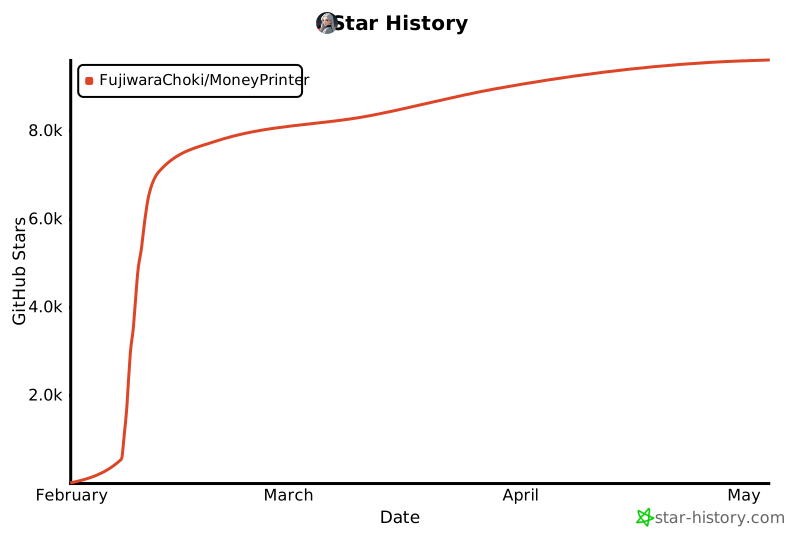
## Star History 🌟
[](https://star-history.com/#FujiwaraChoki/MoneyPrinter&Date)
## License 📝
See [`LICENSE`](LICENSE) file for more information.
> **Important** Please make sure you look through existing/closed issues before opening your own. If it's just a question, please join our [discord](https://dsc.gg/fuji-community) and ask there.
> **🎥** Watch the video on [YouTube](https://youtu.be/mkZsaDA2JnA?si=pNne3MnluRVkWQbE).
## Documentation
Docs are centralized in [`docs/`](docs/README.md):
- [Interactive Setup Script](setup.sh)
- [Quickstart](docs/quickstart.md)
- [Configuration](docs/configuration.md)
- [Architecture](docs/architecture.md)
- [Docker](docs/docker.md)
- [Testing](docs/testing.md)
- [Troubleshooting](docs/troubleshooting.md)
## FAQ 🤔
### Which AI provider does MoneyPrinter use?
MoneyPrinter is fully Ollama-based. Start Ollama, pull a model, and select the model in the UI.
```bash
ollama serve
ollama pull llama3.1:8b
```
### How do I get the TikTok session ID?
You can obtain your TikTok session ID by logging into TikTok in your browser and copying the value of the `sessionid` cookie.
### My ImageMagick binary is not being detected
MoneyPrinter auto-detects ImageMagick from your `PATH` on Linux, macOS, and Windows. If auto-detection fails, set the executable path manually in `.env`, for example:
```env
IMAGEMAGICK_BINARY="C:\\Program Files\\ImageMagick-7.1.0-Q16\\magick.exe"
```
Don't forget to use double backslashes (`\\`) in the path, instead of one.
### I can't install `playsound`: Wheel failed to build
If you're having trouble installing `playsound`, you can try installing it using the following command:
```bash
uv pip install -U wheel
uv pip install -U playsound
```
If you were not able to find your solution, check [Troubleshooting](docs/troubleshooting.md), ask in Discord, or create an issue.
## Donate 🎁
If you like and enjoy `MoneyPrinter`, and would like to donate, you can do that by clicking on the button on the right hand side of the repository. ❤️
You will have your name (and/or logo) added to this repository as a supporter as a sign of appreciation.
## Contributing 🤝
Pull Requests will not be accepted for the time-being.
## Star History 🌟
[](https://star-history.com/#FujiwaraChoki/MoneyPrinter&Date)
## License 📝
See [`LICENSE`](LICENSE) file for more information.