
ACE-Step UI
The Ultimate Open Source Suno Alternative
Seamless integration with ACE-Step 1.5 - The Open Source AI Music Generation Model


Demo •
Why ACE-Step •
Features •
Installation •
Usage •
Contributing






---
## 🎬 Demo

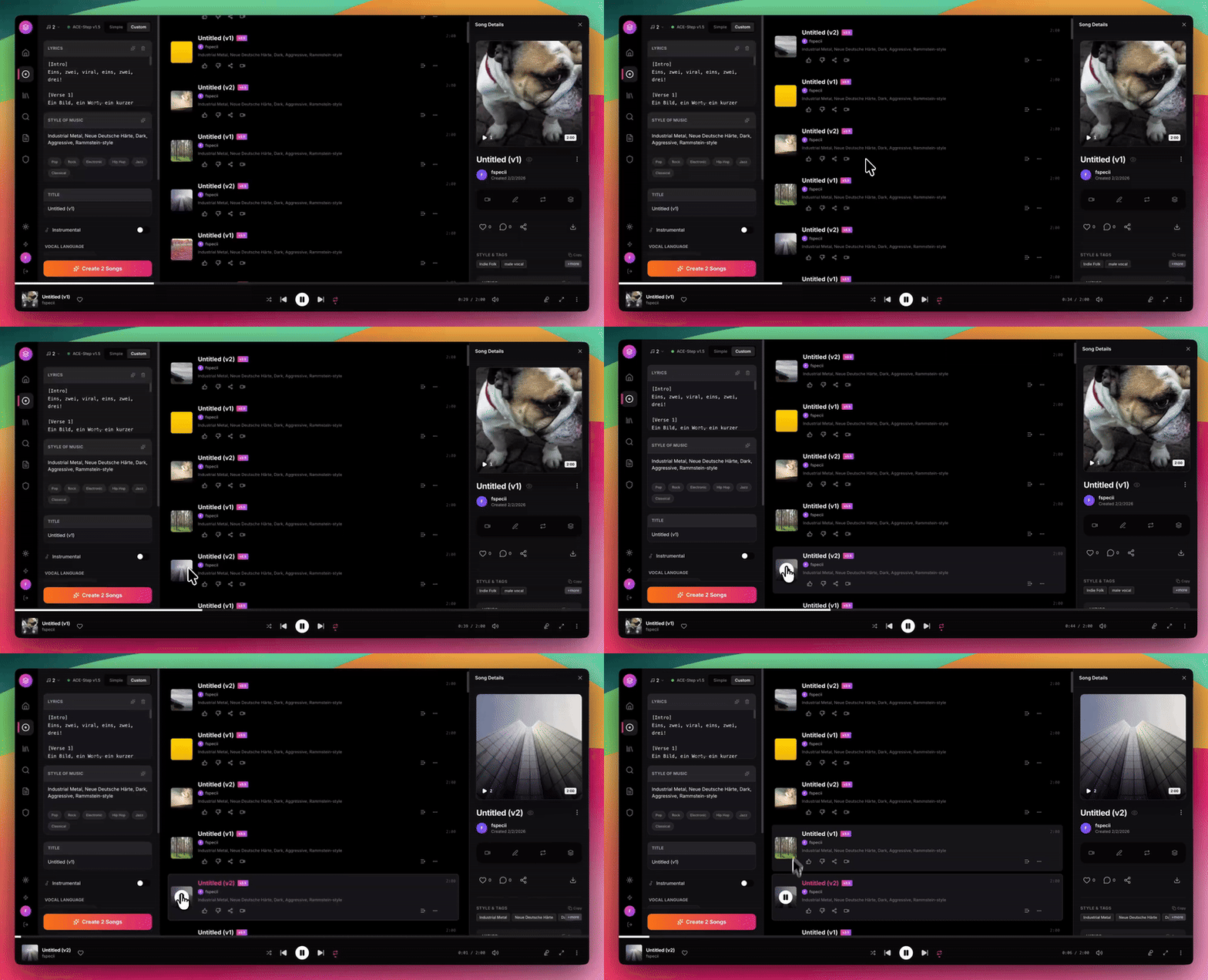
Generate professional AI music with a Spotify-like interface - 100% free and local
---
## 🚀 Why ACE-Step UI?
**Tired of paying $10+/month for Suno or Udio?** ACE-Step 1.5 is the **open source Suno killer** that runs locally on your own GPU - and ACE-Step UI gives you a **beautiful, professional interface** to harness its full power.
| Feature | Suno/Udio | ACE-Step UI |
|---------|-----------|-------------|
| **Cost** | $10-50/month | **FREE forever** |
| **Privacy** | Cloud-based | **100% local** |
| **Ownership** | Licensed | **You own everything** |
| **Customization** | Limited | **Full control** |
| **Queue Limits** | Restricted | **Unlimited** |
| **Commercial Use** | Expensive tiers | **No restrictions** |
### What Makes ACE-Step 1.5 Special?
- **State-of-the-art quality** rivaling commercial services
- **Full song generation** up to 4+ minutes with vocals
- **Runs locally** - no internet required after setup
- **Open source** - inspect, modify, improve
- **Active development** - constant improvements
---
## ✨ Features
### 🎵 AI Music Generation
| Feature | Description |
|---------|-------------|
| **Full Song Generation** | Create complete songs with vocals and lyrics up to 4+ minutes |
| **Instrumental Mode** | Generate instrumental tracks without vocals |
| **Custom Mode** | Fine-tune BPM, key, time signature, and duration |
| **Style Tags** | Define genre, mood, tempo, and instrumentation |
| **Batch Generation** | Generate multiple variations at once |
| **AI Enhance** | Enrich genre tags into detailed captions with proper BPM/key/time |
| **Thinking Mode** | Let AI reason about structure and generate audio codes |
### 🎨 Advanced Parameters
| Feature | Description |
|---------|-------------|
| **Reference Audio** | Use any audio file as a style reference |
| **Audio Cover** | Transform existing audio with new styles |
| **Repainting** | Regenerate specific sections of a track |
| **Seed Control** | Reproduce exact generations for consistency |
| **Inference Steps** | Control quality vs speed tradeoff |
### 🎤 Lyrics & Prompts
| Feature | Description |
|---------|-------------|
| **Lyrics Editor** | Write and format lyrics with structure tags |
| **Format Assistant** | AI-powered caption and lyrics formatting |
| **Prompt Templates** | Quick-start with genre presets |
| **Reuse Prompts** | Clone settings from any previous generation |
### 🎧 Professional Interface
| Feature | Description |
|---------|-------------|
| **Spotify-Inspired UI** | Clean, modern design with dark/light mode |
| **Bottom Player** | Full-featured player with waveform and progress |
| **Library Management** | Browse, search, and organize all your tracks |
| **Likes & Playlists** | Organize favorites into custom playlists |
| **Real-time Progress** | Live generation progress with queue position |
| **LAN Access** | Use from any device on your local network |
### 🛠️ Built-in Tools
| Feature | Description |
|---------|-------------|
| **Audio Editor** | Trim, fade, and apply effects with AudioMass |
| **Stem Extraction** | Separate vocals, drums, bass, and other with Demucs |
| **Video Generator** | Create music videos with Pexels backgrounds |
| **Gradient Covers** | Beautiful procedural album art (no internet needed) |
---
## 💻 Tech Stack
| Layer | Technologies |
|-------|-------------|
| **Frontend** | React 18, TypeScript, TailwindCSS, Vite |
| **Backend** | Express.js, SQLite, better-sqlite3 |
| **AI Engine** | [ACE-Step 1.5](https://github.com/ace-step/ACE-Step-1.5) (Gradio API) |
| **Audio Tools** | AudioMass, Demucs, FFmpeg |
---
## 📋 Requirements
| Requirement | Specification |
|-------------|---------------|
| **Node.js** | 18 or higher |
| **Python** | 3.10+ (3.11 recommended) OR Windows Portable Package |
| **NVIDIA GPU** | 4GB+ VRAM (works without LLM), 12GB+ recommended (with LLM) |
| **CUDA** | 12.8 (for Windows Portable Package) |
| **FFmpeg** | For audio processing |
| **uv** | Python package manager (recommended for standard install) |
---
## ⚡ Quick Start
### 🎯 Pinokio - 1-Click Install (Recommended for All Users!)
The easiest way to get ACE-Step UI up and running on **any platform** — no terminal, no manual setup:

> **[Pinokio](https://pinokio.computer)** handles everything automatically: Python, Node.js, dependencies, model downloads, and launching. Just click install and start making music.
---
### 🪟 Windows - One-Click Start (Easiest!)
```batch
cd ace-step-ui
start-all.bat
```
**That's it!** This starts everything: API + Backend + Frontend in one command.
> **Note:** By default, it looks for ACE-Step in `..\ACE-Step-1.5`.
> If yours is elsewhere, set `ACESTEP_PATH` first:
> ```batch
> set ACESTEP_PATH=C:\path\to\ACE-Step-1.5
> start-all.bat
> ```
### 🪟 Windows - Manual Start
```batch
REM 1. Start ACE-Step Gradio (with API endpoints)
cd C:\ACE-Step-1.5
python_embeded\python -m acestep --port 8001 --enable-api --backend pt --server-name 127.0.0.1
REM 2. Start ACE-Step UI (in another terminal)
cd ace-step-ui
start.bat
```
### Linux / macOS - One-Click Start (Easiest!)
```bash
cd ace-step-ui
./start-all.sh
```
**That's it!** This starts everything: Gradio + Backend + Frontend in one command.
> **Note:** By default, it looks for ACE-Step in `../ACE-Step-1.5`.
> If yours is elsewhere, set `ACESTEP_PATH` first:
> ```bash
> export ACESTEP_PATH=/path/to/ACE-Step-1.5
> ./start-all.sh
> ```
> **To stop:** `./stop-all.sh`
### Linux / macOS - Manual Start
```bash
# 1. Start ACE-Step Gradio with API (in ACE-Step-1.5 directory)
cd /path/to/ACE-Step-1.5
uv run acestep --port 8001 --enable-api --backend pt --server-name 127.0.0.1
# 2. Start ACE-Step UI (in another terminal)
cd ace-step-ui
./start.sh
```
### Windows (Standard Installation)
```batch
REM 1. Start ACE-Step Gradio with API (in ACE-Step-1.5 directory)
cd C:\path\to\ACE-Step-1.5
uv run acestep --port 8001 --enable-api --backend pt --server-name 127.0.0.1
REM 2. Start ACE-Step UI (in another terminal)
cd ace-step-ui
start.bat
```
Open **http://localhost:3000** and start creating!
---
## 📦 Installation
### 1. Install ACE-Step (The AI Engine)
#### 🪟 Windows Portable Package (Recommended for Windows)
**The easiest way to get started on Windows!** This package includes everything pre-configured:
1. **Download** [ACE-Step-1.5.7z](https://files.acemusic.ai/acemusic/win/ACE-Step-1.5.7z) (~5GB)
2. **Extract** to `C:\ACE-Step-1.5` (or your preferred location)
3. **Done!** The package includes `python_embeded` with all dependencies
✅ **Works with 4GB GPU** - No LLM installation required
✅ **CUDA 12.8** included
✅ **Zero setup hassle**
> **Note:** Thinking Mode (LLM features) is automatically disabled on GPUs with <12GB VRAM. You can still enable it manually if you have 12GB+.
#### Standard Installation (All Platforms)
```bash
# Clone ACE-Step 1.5 - the open source Suno alternative
git clone https://github.com/ace-step/ACE-Step-1.5
cd ACE-Step-1.5
# Create virtual environment and install
uv venv
uv pip install -e .
# Models download automatically on first run (~5GB)
cd ..
```
### 2. Install ACE-Step UI (This Repository)
#### Linux / macOS
```bash
# Clone the UI
git clone https://github.com/fspecii/ace-step-ui
cd ace-step-ui
# Run setup script (installs all dependencies)
./setup.sh
```
#### Windows
```batch
REM Clone the UI
git clone https://github.com/fspecii/ace-step-ui
cd ace-step-ui
REM Run setup script (installs all dependencies)
setup.bat
```
#### Manual Installation (All Platforms)
```bash
# Install frontend dependencies
npm install
# Install server dependencies
cd server
npm install
cd ..
# Copy environment file
# Linux/macOS:
cp server/.env.example server/.env
# Windows:
copy server\.env.example server\.env
```
---
## 🎮 Usage
### Step 1: Start ACE-Step Gradio Server
**🪟 Windows Portable Package:**
```batch
cd C:\ACE-Step-1.5
python_embeded\python -m acestep --port 8001 --enable-api --backend pt --server-name 127.0.0.1
```
**Linux / macOS:**
```bash
cd /path/to/ACE-Step-1.5
uv run acestep --port 8001 --enable-api --backend pt --server-name 127.0.0.1
```
**Windows (Standard Installation):**
```batch
cd C:\path\to\ACE-Step-1.5
uv run acestep --port 8001 --enable-api --backend pt --server-name 127.0.0.1
```
Wait for "API endpoints enabled" before proceeding.
### Step 2: Start ACE-Step UI
**Linux / macOS:**
```bash
cd ace-step-ui
./start.sh
```
**Windows:**
```batch
cd ace-step-ui
start.bat
```
### Step 3: Create Music!
| Access | URL |
|--------|-----|
| Local | http://localhost:3000 |
| LAN (other devices) | http://YOUR_IP:3000 |
---
## ⚙️ Configuration
Edit `server/.env`:
```env
# Server
PORT=3001
# ACE-Step Gradio URL (must match --port used when starting ACE-Step)
ACESTEP_API_URL=http://localhost:8001
# Database (local-first, no cloud)
DATABASE_PATH=./data/acestep.db
# Optional: Pexels API for video backgrounds
PEXELS_API_KEY=your_key_here
```
---
## 🎼 Generation Modes
### Simple Mode
Just describe what you want. ACE-Step handles the rest.
> "An upbeat pop song about summer adventures with catchy hooks"
### Custom Mode
Full control over every parameter:
| Parameter | Description |
|-----------|-------------|
| **Lyrics** | Full lyrics with `[Verse]`, `[Chorus]` tags |
| **Style** | Genre, mood, instruments, tempo |
| **Duration** | 30-240 seconds |
| **BPM** | 60-200 beats per minute |
| **Key** | Musical key (C major, A minor, etc.) |
### AI Enhance & Thinking Mode
| Mode | What it does | Speed impact |
|------|-------------|--------------|
| **AI Enhance OFF** | Sends your style tags directly to the model | Fastest |
| **AI Enhance ON** | LLM enriches your tags into a detailed caption and generates proper BPM, key, time signature | +10-20s |
| **Thinking Mode** | Full LLM reasoning with audio code generation | Slowest, best quality |
> **Tip:** If your genre tags (e.g. "pop, rock") produce ballad-like output, turn on **AI Enhance** for much better genre accuracy. No extra VRAM needed — the LLM runs on CPU with the PT backend.
### Batch Size & Bulk Generation
| Setting | Description |
|---------|-------------|
| **Batch Size** | Number of variations generated per job (1-4). Default is **1** for broad GPU compatibility. Higher values generate more variations but use more VRAM. **8GB GPU users should keep this at 1.** |
| **Bulk Generate** | Queue multiple independent generation jobs (1-10). Each job runs sequentially, so this is safe for any GPU. |
| **LM Backend** | Choose between **PT** (~1.6 GB VRAM) and **VLLM** (~9.2 GB VRAM). PT is the default and works on most GPUs. |
> **Tip:** Both batch size and bulk count are remembered in your browser — set them once and they stick for future sessions.
---
## 🔧 Built-in Tools
| Tool | Description |
|------|-------------|
| **🎚️ Audio Editor** | Cut, trim, fade, and apply effects |
| **🎤 Stem Extraction** | Separate vocals, drums, bass, other |
| **🎬 Video Generator** | Create music videos with stock footage |
| **🎨 Album Art** | Auto-generated gradient covers |
---
## 🐛 Troubleshooting
| Issue | Solution |
|-------|----------|
| **ACE-Step not reachable** | Ensure Gradio server is running with `--enable-api` flag (see Usage section) |
| **CUDA out of memory** | Use `--backend pt` (default), set batch size to **1**, reduce duration, or disable Thinking Mode |
| **4GB GPU - Out of memory** | Use **PT** backend (default), batch size **1**, and keep **Thinking Mode OFF**. LLM features require 12GB+ |
| **Genre always sounds like ballad** | Enable **AI Enhance** toggle in the Style section — it enriches your tags with proper metadata |
| **AttributeError: 'NoneType'** | Update to latest ACE-Step-1.5 (fix merged in PR #109) |
| **Songs show 0:00 duration** | Install FFmpeg: `sudo apt install ffmpeg` (Linux) or download from [ffmpeg.org](https://ffmpeg.org) (Windows) |
| **LAN access not working** | Check firewall allows ports 3000 and 3001 |
---
## 🤝 Contributing
**We need your help to make ACE-Step UI even better!**
This is a community-driven project and contributions are what make open source amazing. Whether you're fixing bugs, adding features, improving documentation, or sharing ideas - every contribution counts!
### Ways to Contribute
- 🐛 **Report bugs** - Found an issue? Open a GitHub issue
- 💡 **Suggest features** - Have an idea? We'd love to hear it
- 🔧 **Submit PRs** - Code contributions are always welcome
- 📖 **Improve docs** - Help others get started
- ⭐ **Star the repo** - Show your support!
### How to Contribute
1. Fork the repository
2. Create a feature branch (`git checkout -b feature/amazing-feature`)
3. Commit your changes (`git commit -m 'Add amazing feature'`)
4. Push to the branch (`git push origin feature/amazing-feature`)
5. Open a Pull Request
---
## 📣 Stay Connected

-Follow_for_Updates-1DA1F2?style=for-the-badge&logo=x&logoColor=white)
Subscribe and follow for:
🎥 Video tutorials and demos
🚀 New feature announcements
💡 Tips and tricks
🎵 AI music generation news
---
## 💼 Need a Website Like This?
If you like the engineering and design behind ACE-Step UI and want something similar built for your business, the same team offers professional web development services.
**We build:**
- 🌐 Custom websites & web apps — Next.js, Astro, WordPress, React
- 🤖 AI integrations & automations — OpenAI, Anthropic, custom LLM workflows
- 📱 Mobile apps — iOS, Android, React Native
- 🎨 UI/UX design tailored to your brand

From the makers of ACE-Step UI — we ship production-grade web experiences.
---
## 🙏 Credits
- **[ACE-Step](https://github.com/ace-step/ACE-Step-1.5)** - The revolutionary open source AI music generation model
- **[AudioMass](https://github.com/pkalogiros/AudioMass)** - Web audio editor
- **[Demucs](https://github.com/facebookresearch/demucs)** - Audio source separation
- **[Pexels](https://www.pexels.com)** - Stock video backgrounds
---
## 📄 License
This project is open source under the [MIT License](LICENSE).
---
⭐ If ACE-Step UI helps you create amazing music, please star this repo! ⭐
Made with ❤️ for the open-source AI music community
Stop paying for Suno. Start creating with ACE-Step.