







 ## Why Velith?
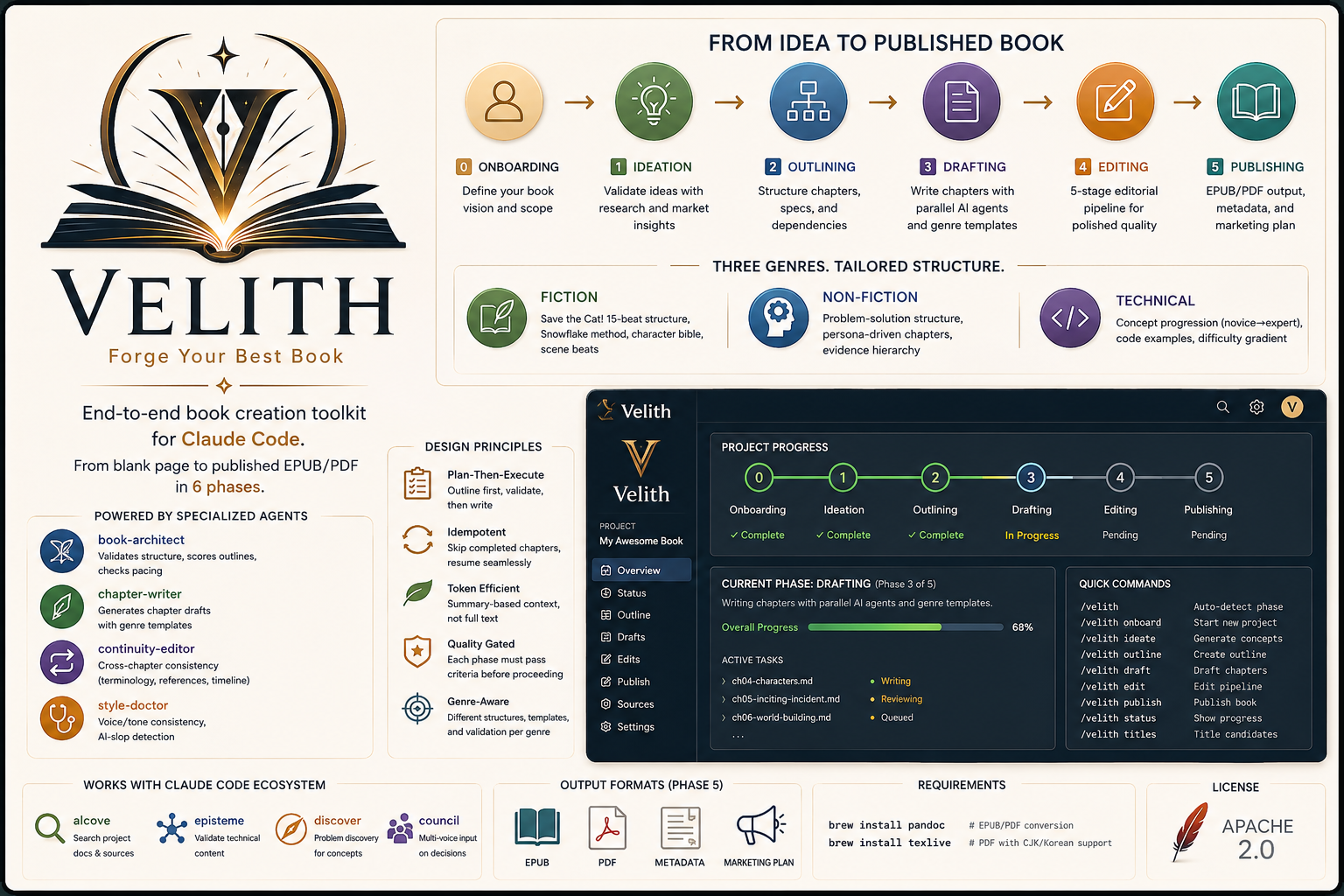
Most AI "writing tools" are a single prompt and a blank page — they give you disconnected chapters, drifting voice, and no structure. Velith is the opposite: a **plan-then-execute pipeline** that validates before it writes, gates quality at every stage, and keeps the whole manuscript coherent end to end.
You wouldn't ship code without a spec, tests, and review — so don't ship a book (or an RFC, or a whitepaper) without an outline, continuity checks, and an edit pass. Velith brings software-engineering discipline to long-form knowledge.
## Benchmark
What the pipeline does to unstructured input — [try it yourself →](https://huggingface.co/spaces/epicsaga/Velith)
> **Note:** the live demo and the numbers below are produced by the HF Space's
> **open-source NLP heuristics** (no LLM calls) — they illustrate the kind of
> transformation each phase targets, not measured output of a full LLM run.
> End-to-end LLM-produced books live in the author's vault.
| Metric | Raw Input | After Velith Pipeline |
|--------|-----------|----------------------|
| Structure score | 2–4 / 10 | 6–9 / 10 |
| Redundancy | 20–45% n-gram overlap | < 10% after consolidation |
| AI-slop markers | 6–20 per 1K words | Flagged & removed by style-doctor |
| Chapter hierarchy | None | Detected + mapped with cross-references |
| Coherence score | 0.3–1.5 / 10 | Improved with section restructuring |
| | Feature | Why it matters |
|--|---------|----------------|
| 📋 | 6-phase pipeline | Each phase validates before moving on — no rework |
| 📖 | 7 genre templates | Fiction, non-fiction, technical, screenplay, poetry, game, academic (+ custom via genre-creator) |
| 🤖 | 8 specialized agents | Architecture, drafting, scene generation, continuity, style, cover, illustrations, marketing |
| ✏️ | 5-stage editing | Assessment → Developmental → Line → Copy → Proofread |
| 🔄 | Resume anywhere | Skip completed chapters, pick up from where you left off |
| 📦 | EPUB, PDF, MOBI, TXT, Markdown | Publish-ready files via Pandoc + Calibre |
## One pipeline, many artifacts
Velith ships as a book pipeline — but the same 6 phases apply to **any long-form structured knowledge**. It doesn't matter whether the artifact is a 300-page novel or a 12-page RFC; the plan-then-execute flow, quality gates, and agents are identical.
| Artifact | Genre skill | Typical output |
|----------|-------------|----------------|
| Novel / Story | `book-fiction` | EPUB / PDF / MOBI |
| Non-fiction book | `book-nonfiction` | EPUB / PDF |
| RFC / Design doc | `book-technical` | Markdown / PDF |
| Whitepaper / Research report | `book-academic` | PDF (citations) |
| Course material / Tutorial | `book-technical` | EPUB / PDF |
| Game scenario / Lore bible | `book-game` | Markdown / EPUB |
## Comparison
| | Velith | Raw prompts | Notion AI | Jasper / Sudowrite | Scrivener |
|--|-----------|-------------|-----------|-------------------|-----------|
| Structure validation | Phase-gated pipeline | None | None | Basic templates | Manual |
| Cross-chapter continuity | Dedicated agent | Manual | None | Limited | Manual |
| AI-slop detection | Built-in (style-doctor) | None | None | None | None |
| Genre awareness | 8 genre systems + custom | Prompt-dependent | None | Fiction-focused | None |
| Output format | EPUB, PDF, MOBI, TXT, Markdown | Copy-paste | Markdown / PDF | DOCX, limited | DOCX, PDF |
| Quality gates | Every phase | None | None | None | None |
| Requires | Claude Code, Codex CLI, Agy, Cursor, Cline, or Aider | Any LLM | Notion subscription | Subscription | License |
| Full control | Prompt-level | Full | Black box | Black box | Full |
## Installation
### Claude Code
```
/plugin marketplace add epicsagas/plugins
/plugin install velith@epicsagas
```
All 17 skills and 8 agents are available immediately. No further steps needed.
Updates with `/plugin update velith@epicsagas`.
**Prerequisites:** [Claude Code](https://claude.ai/code) CLI installed and authenticated.
### Codex CLI (OpenAI)
```bash
codex plugin marketplace add epicsagas/plugins
```
Velith provides 17 skills (via `.agents/skills/`) and 8 custom subagents (via `.codex/agents/`):
| Subagent | Role |
|----------|------|
| `book-architect` | Structure validation, outline scoring |
| `chapter-writer` | Chapter draft generation |
| `scene-generator` | Scene-level GMC+RDD breakdown (fiction) |
| `continuity-editor` | Cross-chapter consistency checks |
| `style-doctor` | AI-slop detection, voice consistency |
| `cover-designer` | Cover concepts + image prompts |
| `illustrator` | Interior illustrations + style-consistent prompts |
| `marketing-expert` | Reader personas, launch strategy |
Codex auto-discovers skills from `.agents/skills/` and subagents from `.codex/agents/*.toml`. No extra configuration needed.
Updates with `codex plugin update velith@epicsagas`.
**Prerequisites:** [Codex CLI](https://github.com/openai/codex) installed and configured with an OpenAI API key.
### Agy (Antigravity)
```bash
agy plugin install https://github.com/epicsagas/Velith
```
Agy auto-discovers skills and agents from the repository root. No extra configuration needed.
**Prerequisites:** [Agy](https://antigravity.google/docs/cli-install) installed and configured.
### Cursor
Velith provides context rules in `.cursor/rules/` that give Cursor's agent full awareness of the book publishing pipeline, genre patterns, and editing standards.
| Rule File | Loaded When |
|-----------|-------------|
| `velith-pipeline.mdc` | Always (phases, router, agents, quality gates) |
| `velith-genres.mdc` | Editing drafts, outlines, or PRD files |
| `velith-editing.mdc` | Working on edits or STYLE.md |
Rules are automatically loaded when you open a Velith book project in Cursor. No installation needed — just clone or copy the `.cursor/rules/` directory into your project.
**Prerequisites:** [Cursor](https://cursor.sh) installed.
### Cline
Velith provides project-level instructions in `.clinerules` at the repository root. Cline reads this file automatically when working in the project directory — no extra configuration needed.
**Prerequisites:** [Cline](https://github.com/cline/cline) extension installed in VS Code or JetBrains.
### Aider
Velith provides writing conventions in `CONVENTIONS.md`, auto-loaded via `.aider.conf.yml`.
```bash
aider # CONVENTIONS.md is auto-loaded
```
**Prerequisites:** [Aider](https://aider.chat) installed and configured with an API key.
## Quick Start
```bash
# Start a new book project
> /book-init
# Auto-detect your current phase and continue
> /loom
```
The plugin guides you through:
1. **Onboarding** — Genre, audience, language, source material, style guide
2. **Ideation** — Market research, concept distillation, competing titles
3. **Outlining** — Full chapter outline with specs, dependencies, cross-references
4. **Drafting** — Chapter-by-chapter generation with parallel subagents
5. **Editing** — 5-stage pipeline: Assessment → Developmental → Line → Copy → Proofread
6. **Publishing** — EPUB/PDF/MOBI conversion, metadata, marketing plan
## Skills
| Skill | Phase | Description |
|-------|-------|-------------|
| `/loom` | Router | Auto-detect phase and route to the next step |
| `/book-init` | 0 | Start new book project — genre, audience, style guide |
| `/book-ideation` | 1 | Generate and validate concepts, competitive analysis |
| `/book-outline` | 2 | Create chapter outline with dependencies |
| `/book-draft` | 3 | Draft chapters (all/specific/resume) with parallel agents |
| `/book-edit` | 4 | 5-stage editing pipeline |
| `/book-publish` | 5 | Format to EPUB/PDF/MOBI, cover, marketing |
| `/book-illustrate` | 3-5 | Interior illustrations — scene extraction, style-consistent prompts, placement plan |
| `/book-status` | — | Terminal dashboard + `--ui` for browser dashboard |
| `/book-fiction` | — | Fiction patterns (15-beat, Snowflake, character bible) |
| `/book-nonfiction` | — | Non-fiction patterns (problem-solution, evidence hierarchy) |
| `/book-technical` | — | Technical book patterns (concept gradient, code, labs) |
| `/book-screenplay` | — | Screenplay patterns (3-act + sequence, dialogue, A/B story) |
| `/book-poetry` | — | Poetry patterns (form types, imagery, collection arc) |
| `/book-game` | — | Game scenario patterns (quest trees, branching, lore bible) |
| `/book-academic` | — | Academic patterns (IMRAD, lit review, argument chains) |
| `/book-genre-creator` | — | Meta-skill for genre selection and custom genre creation |
## Agents
| Agent | Role |
|-------|------|
| `book-architect` | Validates structure, scores outlines, checks pacing |
| `chapter-writer` | Generates chapter drafts with genre templates |
| `continuity-editor` | Cross-chapter consistency (terminology, references, timeline) |
| `style-doctor` | Voice/tone consistency, AI-slop detection |
| `scene-generator` | Scene-level breakdown with GMC+RDD structure (fiction only) |
| `cover-designer` | Cover concepts + Midjourney/DALL-E image prompts |
| `illustrator` | Interior illustrations — scene extraction, style bible, prompt generation |
| `marketing-expert` | Reader personas, channel strategy, 12-week launch calendar |
## Visual Dashboard
## Why Velith?
Most AI "writing tools" are a single prompt and a blank page — they give you disconnected chapters, drifting voice, and no structure. Velith is the opposite: a **plan-then-execute pipeline** that validates before it writes, gates quality at every stage, and keeps the whole manuscript coherent end to end.
You wouldn't ship code without a spec, tests, and review — so don't ship a book (or an RFC, or a whitepaper) without an outline, continuity checks, and an edit pass. Velith brings software-engineering discipline to long-form knowledge.
## Benchmark
What the pipeline does to unstructured input — [try it yourself →](https://huggingface.co/spaces/epicsaga/Velith)
> **Note:** the live demo and the numbers below are produced by the HF Space's
> **open-source NLP heuristics** (no LLM calls) — they illustrate the kind of
> transformation each phase targets, not measured output of a full LLM run.
> End-to-end LLM-produced books live in the author's vault.
| Metric | Raw Input | After Velith Pipeline |
|--------|-----------|----------------------|
| Structure score | 2–4 / 10 | 6–9 / 10 |
| Redundancy | 20–45% n-gram overlap | < 10% after consolidation |
| AI-slop markers | 6–20 per 1K words | Flagged & removed by style-doctor |
| Chapter hierarchy | None | Detected + mapped with cross-references |
| Coherence score | 0.3–1.5 / 10 | Improved with section restructuring |
| | Feature | Why it matters |
|--|---------|----------------|
| 📋 | 6-phase pipeline | Each phase validates before moving on — no rework |
| 📖 | 7 genre templates | Fiction, non-fiction, technical, screenplay, poetry, game, academic (+ custom via genre-creator) |
| 🤖 | 8 specialized agents | Architecture, drafting, scene generation, continuity, style, cover, illustrations, marketing |
| ✏️ | 5-stage editing | Assessment → Developmental → Line → Copy → Proofread |
| 🔄 | Resume anywhere | Skip completed chapters, pick up from where you left off |
| 📦 | EPUB, PDF, MOBI, TXT, Markdown | Publish-ready files via Pandoc + Calibre |
## One pipeline, many artifacts
Velith ships as a book pipeline — but the same 6 phases apply to **any long-form structured knowledge**. It doesn't matter whether the artifact is a 300-page novel or a 12-page RFC; the plan-then-execute flow, quality gates, and agents are identical.
| Artifact | Genre skill | Typical output |
|----------|-------------|----------------|
| Novel / Story | `book-fiction` | EPUB / PDF / MOBI |
| Non-fiction book | `book-nonfiction` | EPUB / PDF |
| RFC / Design doc | `book-technical` | Markdown / PDF |
| Whitepaper / Research report | `book-academic` | PDF (citations) |
| Course material / Tutorial | `book-technical` | EPUB / PDF |
| Game scenario / Lore bible | `book-game` | Markdown / EPUB |
## Comparison
| | Velith | Raw prompts | Notion AI | Jasper / Sudowrite | Scrivener |
|--|-----------|-------------|-----------|-------------------|-----------|
| Structure validation | Phase-gated pipeline | None | None | Basic templates | Manual |
| Cross-chapter continuity | Dedicated agent | Manual | None | Limited | Manual |
| AI-slop detection | Built-in (style-doctor) | None | None | None | None |
| Genre awareness | 8 genre systems + custom | Prompt-dependent | None | Fiction-focused | None |
| Output format | EPUB, PDF, MOBI, TXT, Markdown | Copy-paste | Markdown / PDF | DOCX, limited | DOCX, PDF |
| Quality gates | Every phase | None | None | None | None |
| Requires | Claude Code, Codex CLI, Agy, Cursor, Cline, or Aider | Any LLM | Notion subscription | Subscription | License |
| Full control | Prompt-level | Full | Black box | Black box | Full |
## Installation
### Claude Code
```
/plugin marketplace add epicsagas/plugins
/plugin install velith@epicsagas
```
All 17 skills and 8 agents are available immediately. No further steps needed.
Updates with `/plugin update velith@epicsagas`.
**Prerequisites:** [Claude Code](https://claude.ai/code) CLI installed and authenticated.
### Codex CLI (OpenAI)
```bash
codex plugin marketplace add epicsagas/plugins
```
Velith provides 17 skills (via `.agents/skills/`) and 8 custom subagents (via `.codex/agents/`):
| Subagent | Role |
|----------|------|
| `book-architect` | Structure validation, outline scoring |
| `chapter-writer` | Chapter draft generation |
| `scene-generator` | Scene-level GMC+RDD breakdown (fiction) |
| `continuity-editor` | Cross-chapter consistency checks |
| `style-doctor` | AI-slop detection, voice consistency |
| `cover-designer` | Cover concepts + image prompts |
| `illustrator` | Interior illustrations + style-consistent prompts |
| `marketing-expert` | Reader personas, launch strategy |
Codex auto-discovers skills from `.agents/skills/` and subagents from `.codex/agents/*.toml`. No extra configuration needed.
Updates with `codex plugin update velith@epicsagas`.
**Prerequisites:** [Codex CLI](https://github.com/openai/codex) installed and configured with an OpenAI API key.
### Agy (Antigravity)
```bash
agy plugin install https://github.com/epicsagas/Velith
```
Agy auto-discovers skills and agents from the repository root. No extra configuration needed.
**Prerequisites:** [Agy](https://antigravity.google/docs/cli-install) installed and configured.
### Cursor
Velith provides context rules in `.cursor/rules/` that give Cursor's agent full awareness of the book publishing pipeline, genre patterns, and editing standards.
| Rule File | Loaded When |
|-----------|-------------|
| `velith-pipeline.mdc` | Always (phases, router, agents, quality gates) |
| `velith-genres.mdc` | Editing drafts, outlines, or PRD files |
| `velith-editing.mdc` | Working on edits or STYLE.md |
Rules are automatically loaded when you open a Velith book project in Cursor. No installation needed — just clone or copy the `.cursor/rules/` directory into your project.
**Prerequisites:** [Cursor](https://cursor.sh) installed.
### Cline
Velith provides project-level instructions in `.clinerules` at the repository root. Cline reads this file automatically when working in the project directory — no extra configuration needed.
**Prerequisites:** [Cline](https://github.com/cline/cline) extension installed in VS Code or JetBrains.
### Aider
Velith provides writing conventions in `CONVENTIONS.md`, auto-loaded via `.aider.conf.yml`.
```bash
aider # CONVENTIONS.md is auto-loaded
```
**Prerequisites:** [Aider](https://aider.chat) installed and configured with an API key.
## Quick Start
```bash
# Start a new book project
> /book-init
# Auto-detect your current phase and continue
> /loom
```
The plugin guides you through:
1. **Onboarding** — Genre, audience, language, source material, style guide
2. **Ideation** — Market research, concept distillation, competing titles
3. **Outlining** — Full chapter outline with specs, dependencies, cross-references
4. **Drafting** — Chapter-by-chapter generation with parallel subagents
5. **Editing** — 5-stage pipeline: Assessment → Developmental → Line → Copy → Proofread
6. **Publishing** — EPUB/PDF/MOBI conversion, metadata, marketing plan
## Skills
| Skill | Phase | Description |
|-------|-------|-------------|
| `/loom` | Router | Auto-detect phase and route to the next step |
| `/book-init` | 0 | Start new book project — genre, audience, style guide |
| `/book-ideation` | 1 | Generate and validate concepts, competitive analysis |
| `/book-outline` | 2 | Create chapter outline with dependencies |
| `/book-draft` | 3 | Draft chapters (all/specific/resume) with parallel agents |
| `/book-edit` | 4 | 5-stage editing pipeline |
| `/book-publish` | 5 | Format to EPUB/PDF/MOBI, cover, marketing |
| `/book-illustrate` | 3-5 | Interior illustrations — scene extraction, style-consistent prompts, placement plan |
| `/book-status` | — | Terminal dashboard + `--ui` for browser dashboard |
| `/book-fiction` | — | Fiction patterns (15-beat, Snowflake, character bible) |
| `/book-nonfiction` | — | Non-fiction patterns (problem-solution, evidence hierarchy) |
| `/book-technical` | — | Technical book patterns (concept gradient, code, labs) |
| `/book-screenplay` | — | Screenplay patterns (3-act + sequence, dialogue, A/B story) |
| `/book-poetry` | — | Poetry patterns (form types, imagery, collection arc) |
| `/book-game` | — | Game scenario patterns (quest trees, branching, lore bible) |
| `/book-academic` | — | Academic patterns (IMRAD, lit review, argument chains) |
| `/book-genre-creator` | — | Meta-skill for genre selection and custom genre creation |
## Agents
| Agent | Role |
|-------|------|
| `book-architect` | Validates structure, scores outlines, checks pacing |
| `chapter-writer` | Generates chapter drafts with genre templates |
| `continuity-editor` | Cross-chapter consistency (terminology, references, timeline) |
| `style-doctor` | Voice/tone consistency, AI-slop detection |
| `scene-generator` | Scene-level breakdown with GMC+RDD structure (fiction only) |
| `cover-designer` | Cover concepts + Midjourney/DALL-E image prompts |
| `illustrator` | Interior illustrations — scene extraction, style bible, prompt generation |
| `marketing-expert` | Reader personas, channel strategy, 12-week launch calendar |
## Visual Dashboard
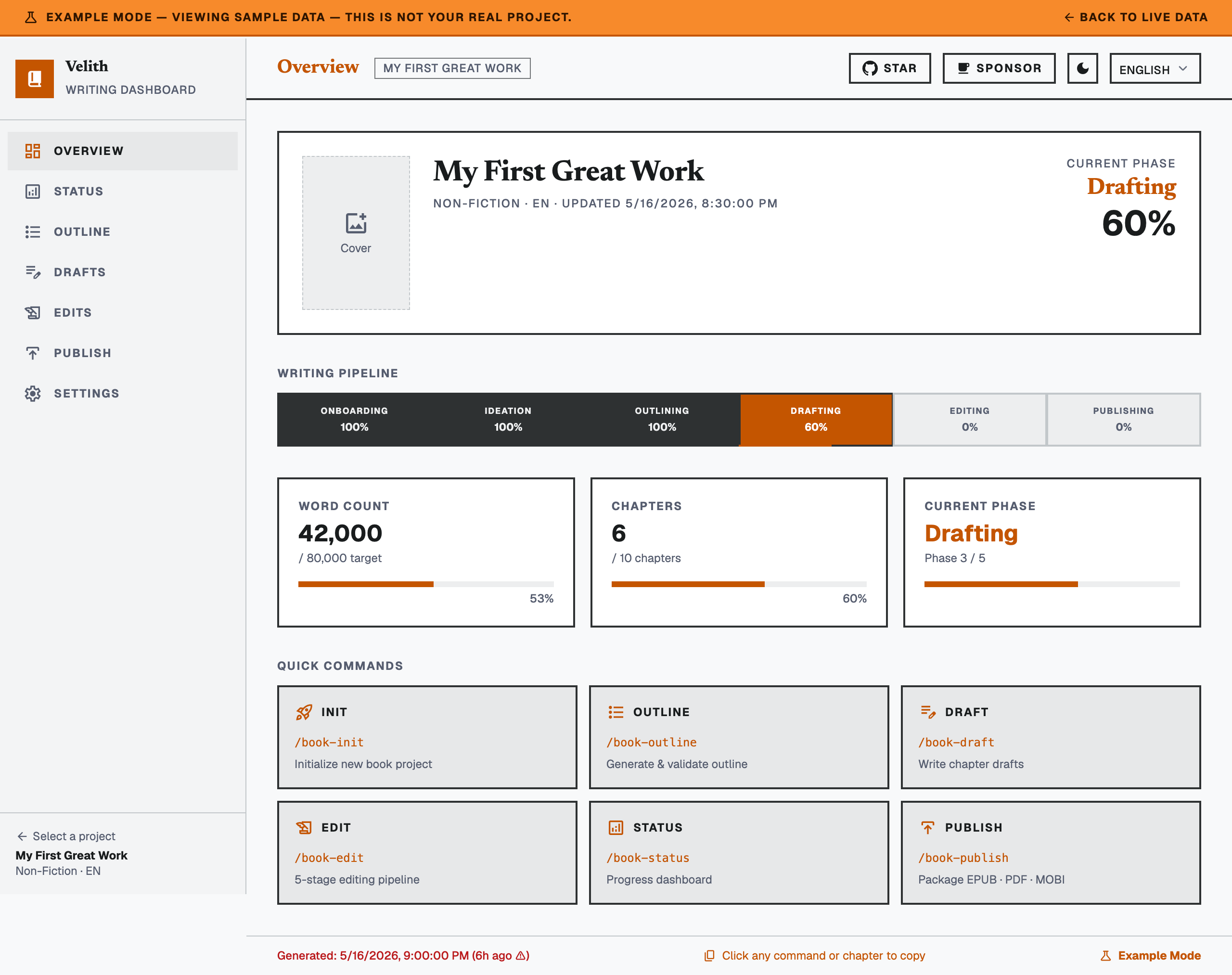 `/book-status --ui` opens a Svelte-based progress dashboard in your browser. The dashboard auto-refreshes every 5 seconds:
- 6-phase pipeline tracker (Onboarding → Ideation → Outlining → Drafting → Editing → Publishing)
- 8 agent status cards (book-architect, chapter-writer, continuity-editor, cover-designer, illustrator, marketing-expert, scene-generator, style-doctor)
- Chapter outline, drafts table, and 5-stage editing kanban
- Output file status (EPUB/PDF/MOBI/TXT/MD) with publish checklist
- Project settings and command reference
The dashboard reads from per-project `status.json` files dynamically. The pre-built `dist/` is included — no build step required for plugin users.
To run locally for development:
```bash
cd dashboard
npm install
npm run dev # http://localhost:5173
npm run build # rebuild dist/
```
## Design Principles
- **Plan-Then-Execute** — Outline first, validate, then write
- **Idempotent** — Skip completed chapters, resume from where you left off
- **Token Efficient** — Summary-based context, not full text
- **Genre-Aware** — Different structures, templates, and validation per genre
- **Quality Gated** — Each phase must pass criteria before proceeding
## External Dependencies
For EPUB/PDF output (Phase 5):
```bash
brew install pandoc # EPUB/PDF conversion
brew install texlive # PDF with CJK/Korean support
brew install --cask calibre # MOBI (Kindle) conversion — optional
```
### Troubleshooting
`/book-status --ui` opens a Svelte-based progress dashboard in your browser. The dashboard auto-refreshes every 5 seconds:
- 6-phase pipeline tracker (Onboarding → Ideation → Outlining → Drafting → Editing → Publishing)
- 8 agent status cards (book-architect, chapter-writer, continuity-editor, cover-designer, illustrator, marketing-expert, scene-generator, style-doctor)
- Chapter outline, drafts table, and 5-stage editing kanban
- Output file status (EPUB/PDF/MOBI/TXT/MD) with publish checklist
- Project settings and command reference
The dashboard reads from per-project `status.json` files dynamically. The pre-built `dist/` is included — no build step required for plugin users.
To run locally for development:
```bash
cd dashboard
npm install
npm run dev # http://localhost:5173
npm run build # rebuild dist/
```
## Design Principles
- **Plan-Then-Execute** — Outline first, validate, then write
- **Idempotent** — Skip completed chapters, resume from where you left off
- **Token Efficient** — Summary-based context, not full text
- **Genre-Aware** — Different structures, templates, and validation per genre
- **Quality Gated** — Each phase must pass criteria before proceeding
## External Dependencies
For EPUB/PDF output (Phase 5):
```bash
brew install pandoc # EPUB/PDF conversion
brew install texlive # PDF with CJK/Korean support
brew install --cask calibre # MOBI (Kindle) conversion — optional
```
### Troubleshooting