< Back to all GCSE Cheat Sheets
OCR J277 Computer Science Paper 2 Complete Cheat Sheet
Written by Oliver Ling (@draggie306).
Latest general update: 24/09/2025 22:18.
Last content addition: 23/06/2025 21:46
Looking to smash your exams with easy-to-access, free 1:1 advice from exam survivors? Chat with students, developers, teachers and exam survivors in the Baguette Brigade Discord server who can answer all your questions and give you tips and tricks!
Plus, you can opt to receive automatic notifications whenever new content is added here!
READ THIS FIRST:
Please use your class notes, if you have any, as well as this, to aid your revision. I’ve tried to make it as packed full of only the most useful stuff as possible which will come up in the exam. This covers 15 pages of specification content and 210 hours of lesson time, consolidated into one place, so it might not cover everything in 100% detail, but I have written more for the things which people may find more confusing. If there are any errors then please let me know immediately. I have tried my best to make it as easy as possible to understand and get a grade 9😉
This cheat sheet covers all of the specification for: J277/02: Computational thinking, algorithms and programming. Check the Cheat Sheets page to see Paper 1.
This paper is worth 50% of the GCSE.
All of the Cheat Sheets and revision material on iBaguette are made as 1:1 compliments to their corresponding specification. The J277 spec is available here.
You need to know how to create, interpret the results of, complete and refine algorithms in these languages. If you can’t code Python, you can use an online tool like Replit (where you can code with friends at the same time too!) or use an IDE like IDLE or VS Code and just start coding something random. You will find my examples at the bottom for inspiration.
2.1 Algorithms
2.1.1 Computational thinking

There are 3 words to describe ‘computational thinking’:
- Abstraction: filtering out and ignoring the parts of problems which are not needed to solve a specific problem. It is effectively a general overview of the program with specific details removed, for example, the London Underground map - this map shows the stops and lines to get to a destination, but not exact geographical details as they’re not needed.
- Decomposition: breaking down a problem into smaller parts which are easier to understand. Smaller parts are easier to comprehend, for example creating an app would need graphics, audio, software used to create it, testers, a user interface. It’s much easier to say “Create a sub-program to handle the audio” than “make the whole app from scratch”.
- Algorithmic thinking: thinking logically, just as a computer does. Usually works back from how an intended solution can be reached by working out the steps needed to get there. If you can work out the exact steps and decisions needed to solve a problem, you can produce a coded solution. Flowcharts are good visualisations of this.
It is only when a problem is decomposed and abstracted, that the creation of the solution can begin.
2.1.2 Designing algorithms
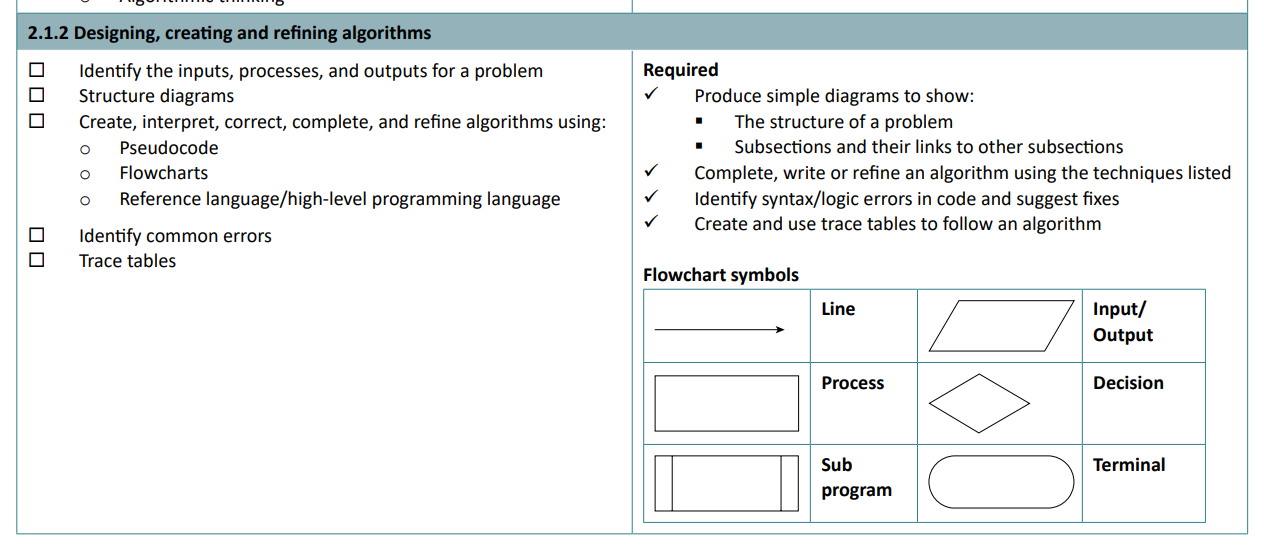
An algorithm is a step-by-step set of instructions used to solve a problem. Before designing an algorithm, it must be decomposed into its inputs, outputs and the order of instructions, and whether any decisions need to be made.
Algorithms are made in three different ways: pseudocode, flowcharts and Python (or another high-level language/OCR reference language).
Flowchart symbols
- Lines represent the flow of the program.
- Parallelograms show inputs and outputs.
- A rectangle shows a process, for example,
x = x + 10 - A diamond represents a decision, for example, if
x > y. Then there would be 2 lines coming from this, one for yes and one for no. - A rectangle with curved sides represents a terminal, such as the start or end of the program.
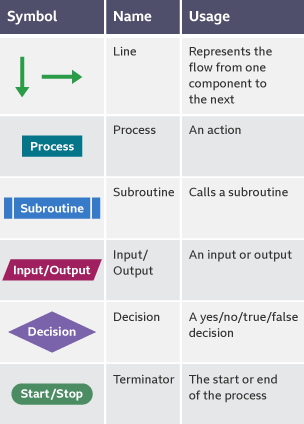
Make sure you know this. Credit BBC
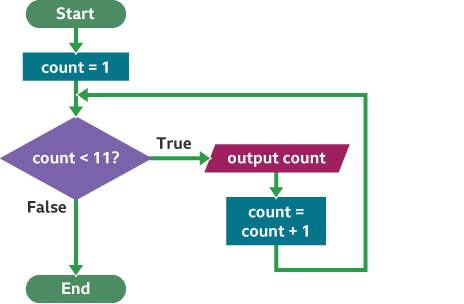
Example use. Credit BBC
Creating programs
Advantages of using flowcharts include the fact that they show a step-by-step method of how to solve a program, which can be easily written. Disadvantages of flowcharts include that they may be time-consuming to make and not easily drawn.
The advantages of using pseudocode (looks like real code but won’t execute) include it acts as the foundation for transcribing it into an actual programming language like Python, and is easy to understand with an English-like syntax, like Python, making it easy for non-programmers as well, like Python. Errors in the design will not affect the program as it is obvious what the intended result is, and if there is an obvious error this can be easily changed.
Disadvantages include that it can be harder to see how a program flows with indentation, and is just more time-consuming to make than a flowchart, so you might as well use Python for that.
Pseudocode example:
while answer_inputted != 'valorant'
	answer_inputted = input("What is the worst game?")
		if answer_inputted == "valorant" then
			print("Correct! you got it right.")
		else
			if answer_inputted == "clash of clans" then
				print("Nah, that's a good one")
			else
				print("Wrong")
			endif
	    endif
endwhile
It’s relatively easy to tell what this ‘code’ does:
- Line 1 says the loop will repeat
whiletheanswer_inputtedis not'valorant'. - Line 2 sets variable
answer_inputtedto the outcome of theinput - Line 3 checks
ifanswer_inputtedis'valorant' - Line 4
printsa response - Line 5 is
elseso this will be used when the previous statement is nottrue(if theanswer_inputtedis not ‘valorant’) - Line 6 will checks
ifanswer_inputtedisclash of clans - Line 7 will
print“Nah, that’s a good one” if the aboveifstatement istrue - Line 8 is another
else, so will be used ifanswer_inputtedis notclash of clans - Line 9 will print
Wrong - Line 10 will end the inner (second)
ifstatement - Line 11 will end the outer (first)
ifstatement - Line 12 marks the end of the
whilesection of the code.
Notice how there is an if statement inside another if statement? This is called nesting. It can also be used for iteration statements (loops).
Trace tables
A trace table is a table used to show how values in variables change throughout instructions occurring.
In the columns goes the variable name. In the rows, the instruction number is written. Below the variable names, in the table, are the expected values of what each instruction does.
A logic error occurs if the expected value on paper does not equal the received value when executed by the program.
They enable a programmer to compare what the value of each variable should be against what a program actually produces. Where the two differ is the point in the program where a logic error has occurred.
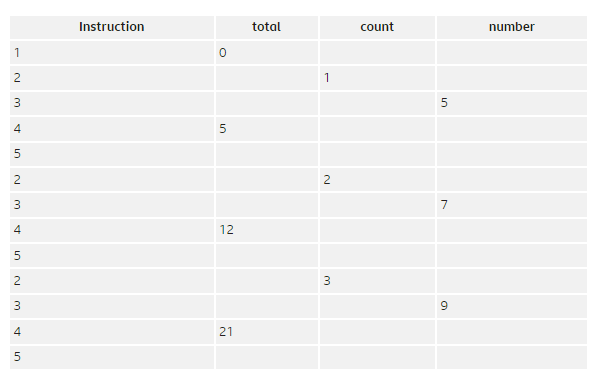
From Bitesize.
2.1.3 Searching and sorting algorithms
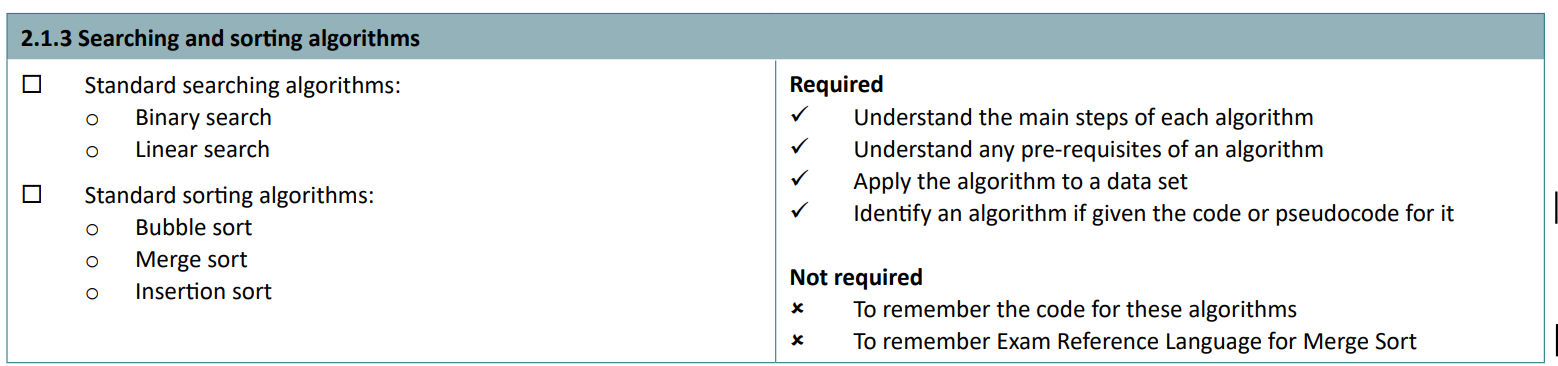
Linear search
The simplest method of searching through a dataset. It gets the length of a dataset and sets it counter to 0. It looks at the position of its counter and sees if it matches the search. If not, the counter is incremented by 1 and the process is repeated
Linear searches work on unordered lists. On ordered lists, they will take a long time if the value to search for is a large number.
Binary search
Binary search is used on a dataset of pre-ordered numbers. It works by:
- getting the midpoint in the list, getting the value, and if it is the target value the search ends.
- If not, it will compare the received value. If the value is less than the value to be found, it will disregard the lower half of the list, as it knows it cannot be lower than the midpoint value.
- The remaining part of the list is divided in half again, and the process is repeated.
- When the value is found, the search has succeeded.
Note: rounding applies. If there are 7 items in the list, the midpoint would be 3.5. In this case, the search would start from 4.
Binary searches are much more efficient than linear searches, especially on large datasets.
In an ordered list of every number from 0 to 100, a linear search would take 99 steps to find the value 99. A binary search would only require seven steps.
Bubble sort
- Start at the beginning of the list, compare the value at position 1 to the next one up (at position 2).
- Swap the positions of these if the second is bigger than the first.
- Then, move both positions up one, to position 2 and 3.
- Swap if they are in the wrong order.
- Repeat until the end of the list.
- Start back from the beginning and repeat this until it is in order.
https://www.bbc.co.uk/bitesize/guides/zjdkw6f/revision/4
Merge sort
Very simplified version:
- Split the list in half repeatedly until all values are separate
- Compares two values next to each other and organise.
- Go to the next pair of values and repeat. If something is smaller than the existing smallest value, then place it there instead. (Same with biggest values)
- Repeat until all values are in order
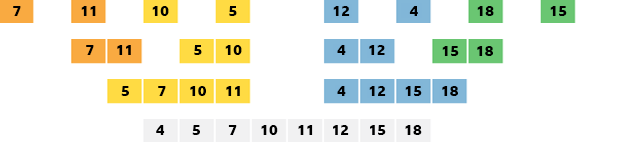
Bitesize’s version
Large data sets are better with merge sorts as they are more efficient.
https://www.bbc.co.uk/bitesize/guides/zjdkw6f/revision/5
Insertion sort
More efficient than bubble sort, but less complex and efficient than a merge sort
- Compare values of 1 and 2.
- If 1 is bigger than 2, then 2 is moved to the start.
- Compare the values of 2 and 3. Move 3 to the left until it cannot be moved any more as the number is smaller than it.
- Repeat for all values.
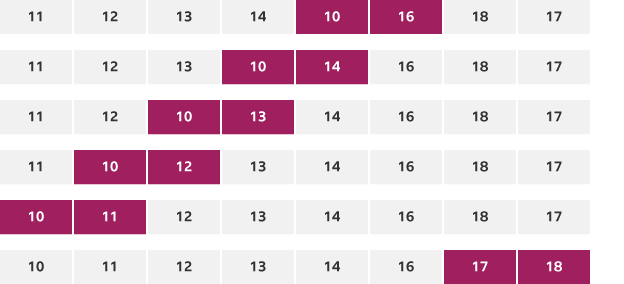
Bitesize’s version
Insertion sorts work best when used with smaller data sets.
https://www.bbc.co.uk/bitesize/guides/zjdkw6f/revision/6
2.2 Programming fundamentals
2.2.1 Programming fundamentals
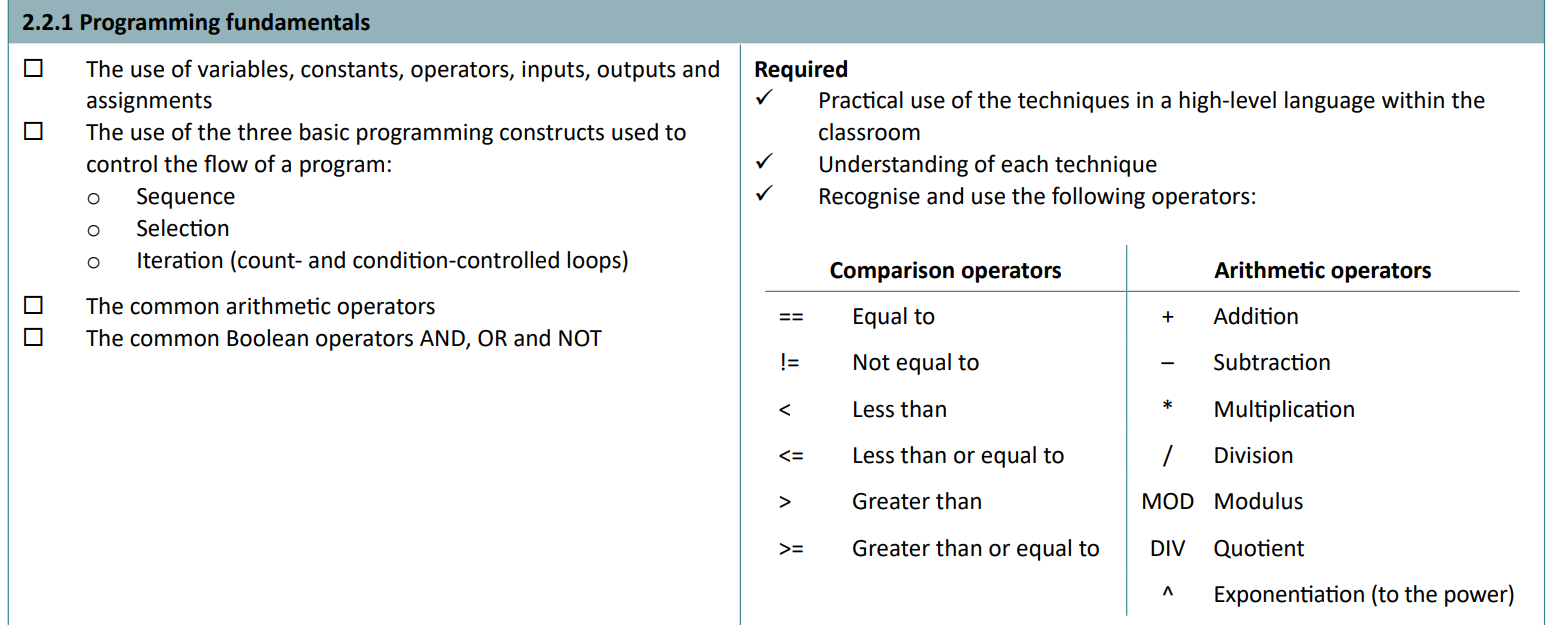
Basic programming definitions
- Variables: A value stored in memory that can change.
- Constants: A value stored in memory that cannot change once defined.
- Operators: Logic applied to numbers, e.g. equal, subtract, less than.
- Inputs: data inputted to programs. In Python,
x = input("enter string: ") - Outputs: data the program shows to users.
print("output") - Assignment: giving a value data. e.g. x = 2. You are assigning the value
xto the data, which is2, an integer.
Sequence refers to the order in which the code is executed.
Selection is a part of the code that is run, or if statements. When these statements are encountered, it ‘selects’ which part to run!
Iteration is a loop. There are count and condition-controlled loops.
- Count-controlled loops are controlled by a number. For example,
if x > 10:will run until the value ofxis greater than10. - Condition-controlled loops are controlled by a specific value. This is most often
TrueorFalse; these will run until this value is changed. For example,if x == True:will run the code until the value ofxis no longer equal toTrue.
Operators
There are comparison and arithmetic operators. (They will give the Boolean value of True if their criteria are met)
Comparison operators:
==- Equal to. Used only to check if a value is something else. Do not get confused with a single equals which is used to specify a value.
!=- Not equal to. Only
Truewhen the value it is comparing against is NOT the first value.
- Not equal to. Only
<- Less than. Only
Truewhen the value in front of it is less than the value after it.if x < 3means if x is less than 3.
- Less than. Only
<=- Less than or equal to. Only
Truewhen the value in front of it is less OR equal to the value after it.
- Less than or equal to. Only
>- Greater than. Only
Truewhen the value in front of it is more than the value after it.if x > 3means if x is greater than 3.
- Greater than. Only
>=- Greater than or equal to. Only
Truewhen the value in front of it is more OR equal to the value after it.
- Greater than or equal to. Only
Arithmetic operators:
+- Addition. 9 + 10 = 21
-- Subtraction.
*- Multiplication.
/- Division.
MOD- Modulo. Gives the remainder. 20 mod 8 = 4. (16 remainder 4)
DIV- Quotient. Gives how many times the number can be fully divided. 20 div 8 = 2. (20 divided by 8 is 2 remainder 4.)
^- Exponentiation. To the power of. 2^8 = 256.
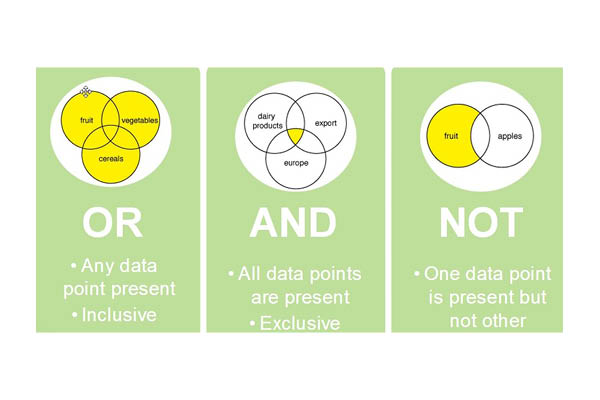
Boolean operators
- AND - only True when the two values are True.
- OR - only True if one or more values are True.
- NOT - everything that is not the value.
2.2.2 Data types

- Integer: Positive or negative whole numbers
- Real/float: Numbers with decimal places
- Boolean: True or False (1 or 0)
- Character: A single character
- String: Numbers and letters together.
Casting is a method used to convert between these data types. For example, if you want to compare a user’s input to a value, you must change it to an integer first. The way to do this is by using:
x = input("how much cake do you want from 1 to 10? >>")
if int(x) > 5:
	print("you really want cake lol")
You use int(x) to change x to an integer.
Or, str() for strings, or float() for floating point data.
You can turn the above into two lines by using this:
if int(input("how much cake do you want from 1 to 10? >>")) > 5:
	print("you really want cake lol")
2.2.3 Additional programming techniques
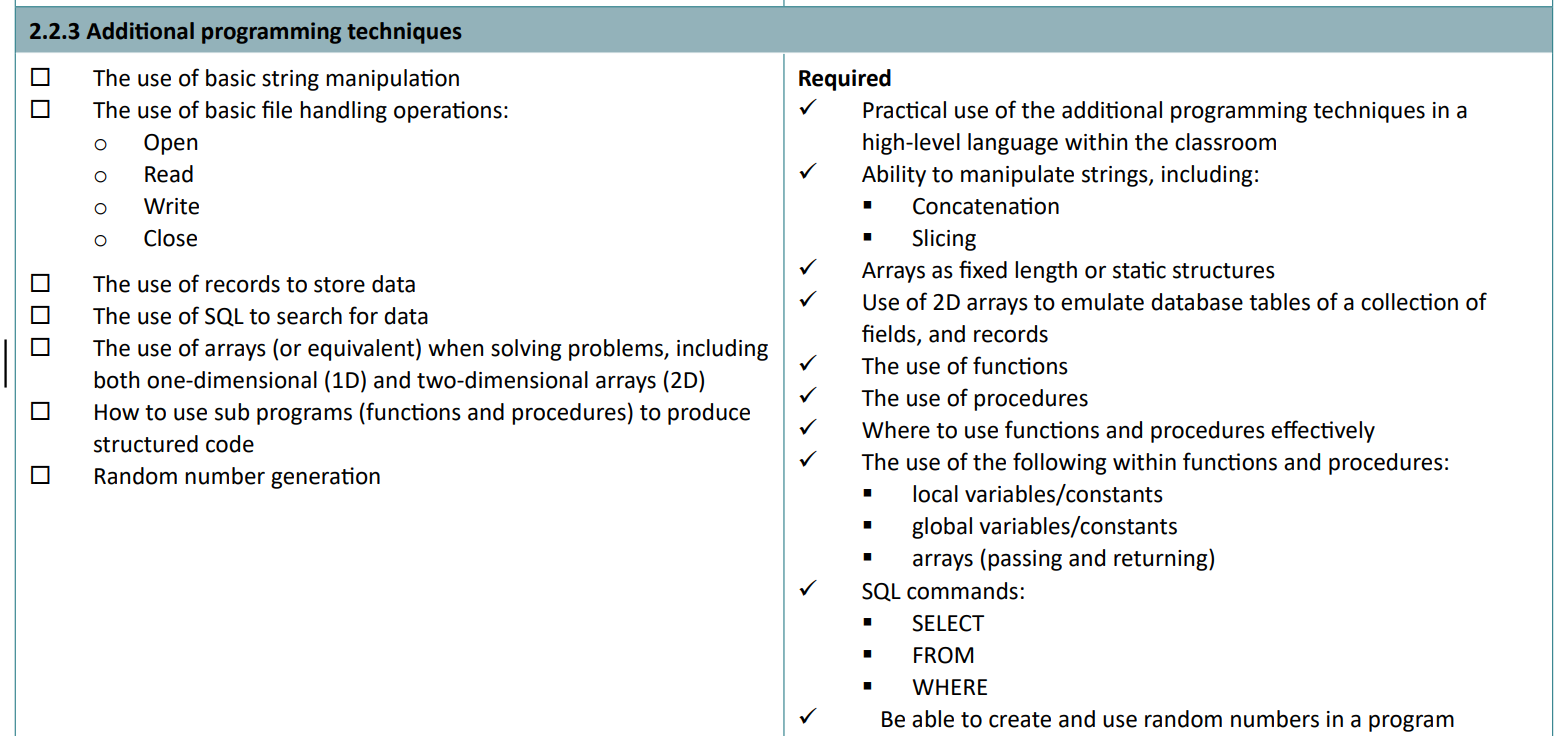
There’s a lot of content here, so make sure you are comfortable with it.
String manipulation
Not manipulating surds, or abusing strings, but just messing about with the string instead.
The length of a string can be obtained by doing len(string), where string is a variable holding a string value.
You can also get the characters at a specific point in a string. If x = ‘Baguette’, then x[3] would be ‘u’. Remember that 0 is your first value in a list/array.
To get the characters from positions 0 and 3 (not included), the syntax is this: x[0:3] = would be ‘Bag’. This is known as ‘slicing’.
You can also manipulate the casing of everything in a string. If x = ‘Baguette’, then x = x.upper() would result in x being ‘BAGUETTE’. Likewise, x.lower()would be ‘baguette’.
Finally, concatenation is joining two strings together.
If one = "Baguette" and two = "Brigade", then one + " " + two would print Baguette Brigade.
If you feel comfortable with f-strings then you could get the same by using
print(f"{one.lower()} {two.upper()}")to output ‘baguette BRIGADE’.
(2D) Arrays
Arrays (interchangeable with lists, at least for GCSE) store lots of stuff and are denoted by their square brackets, like [4, 5, 3, 6, 9] or with strings as ["Yes", "No", "Baguettes", "Beans", "Haram"]. Elements can be accessed using by the list variable’s name, and the element’s location in the list in square brackets. If the above list with strings is called random_words, then to print the word ‘Baguettes’ I would call print(random_words[2]).
2D arrays take this principle and make it more complicated. Basically, this means there is an array inside an array.
list_of_cars_and_prices = [["beans car", "bozo car", "fresh car"], [20, 30, 55]]
Notice how inside the outer list, there are actually 2 smaller lists? This is a 2D array. To get the value of ‘55’ from the second array, we do print(list_of_cars_and_prices[1][2]. This gets the third value from the second array, inside the list called ‘list_of_cars_and_prices’. This is useful to store related values next to each other.
To change the value of an item in an array/list, do:
list_name[index] = "thing_to_change_it_to"
Functions and procedures
A procedure performs a task, whereas a function produces (returns) information.
Parameters can be invoked into both functions and procedures. For example, beans(number_of_beans) will result in the function or procedure using the invoked value of number_of_beans to perform a calculation.
Functions return a value. You can assign a value to a variable and set this value to the result of a function, like x = beans(), where beans is a defined function.
It could return a number, string, or any data type, so after running this, x could have the value 4 - or whatever beans() has been defined to do.
Programming languages have their own built-in functions and procedures. When you type
print("text"), you are actually passing in yourtextas a parameter used to display something on your screen! User-defined functions and procedures are the ones that the user creates.
File handling
writing:
file1 = open("file.txt")
x = file1.write("Hello! This is a file!")
file1.close()
Reading back the contents:
file1 = open("file.txt")
x = file1.read()
file1.close()

print(x)

>>> Hello! This is a file!
Note: it’s best practice to always do file.close() after finishing reading/performing file actions to avoid corruption.
Locals and globals
Global variables can be accessed by every subroutine at all times. Present in memory during execution. They aren’t good because if it gets maliciously changed, or changes unintentionally, then it will affect the entire code and every subroutine. Also, it can use a lot of memory if many variables are used at once - normal in big programs and games. The scope of these is the entire program.
Local variables are declared in one subroutine or function. The value of this is only held in memory whilst that specific part of the code (i.e. the subroutine) is being executed. Therefore, it’s more efficient. The scope of these is the sub-program of declaration.
Parameter passing - allows the values of local variables within the main program to be passed to sub-programs without the need to use global variables. The value of these variables (or a copy of the value of these variables) is passed as a parameter to and from sub-programs as necessary.
You can read more about the scope, lifespan and implications of memory scopes on the A Level Cheat Sheet!
SQL
SQL is a programming language used for interrogating a database.
Data can be retrieved using the commands SELECT, FROM and WHERE
* stands for wildcard, which means all records.
from the iBaguette emails database:
SELECT *
FROM "Users"
WHERE "Email Address" LIKE "admin" OR "owner"
might retrieve:
| ID | User | Surname | Email Address |
|---|---|---|---|
| 1 | Draggie | 306 | admin@geog.uk |
| 6 | Joe | Smith | admin@ibaguette.com |
| 7 | John | Doe | owner@geog.uk |
Randoms
You must import random at the start of the program for this to work (it is a module).
random.randint(lower_bound, upper_bound) is used to generate a random number between bounds. Assign this to a variable and you have your randomly generated number.
2.3 Producing robust programs
2.3.1 Defensive design
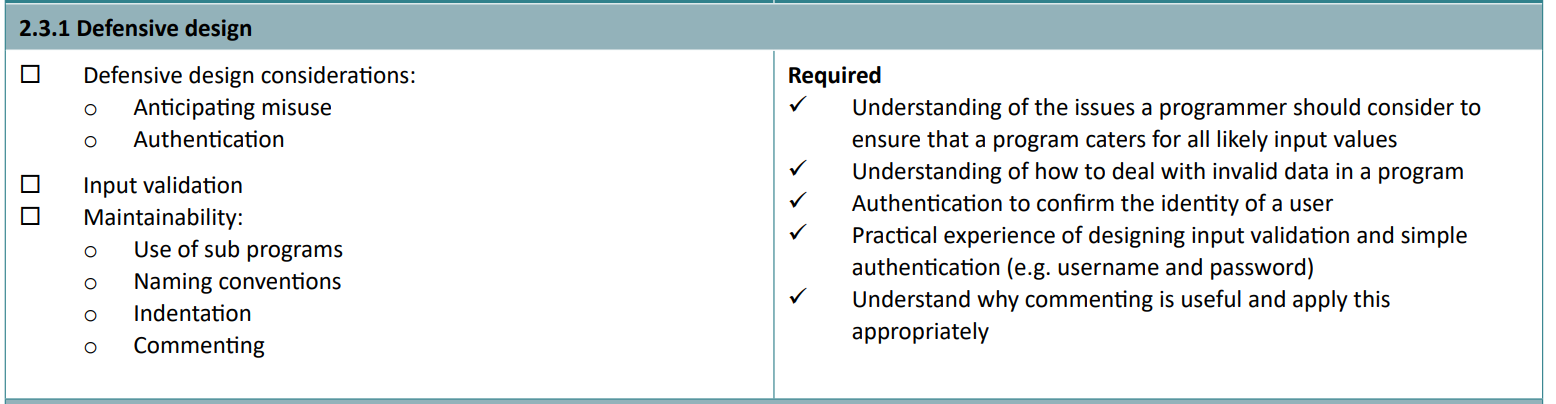
A program must be able to handle all likely input values, not just the intended one. If valid data is inputted which might affect functionality, for example entering -10 to an age question will probably produce logic errors. To accommodate for this, there can be a range of things added to a program to ensure these do not occur.
- Anticipating misuse
- A way of making sure age is not negative could be by adding a selection (if) statement that requires certain criteria to be met. For example,
if age > 10 AND age < 100. This is an example of input validation.
- A way of making sure age is not negative could be by adding a selection (if) statement that requires certain criteria to be met. For example,
- Authentication
- Usernames and passwords. This can be easily implemented by adding
password = input("enter password")and using double equals to check if it matches a previously defined variable, or even decrypted from an external file. - Only a subset of registered users may be permitted to make changes (think user access levels!)
- Usernames and passwords. This can be easily implemented by adding
Code written must also be maintainable in the future. There are several ways of ensuring this.
- Subroutines. These are parts of the main program. If one part of the program needs to be changed, it can be in the subroutine which is called, so other parts of the code are not affected by changes. Also, it can reduce the amount of clutter in code: if something needs to happen multiple times, code can just link back to a pre-existing subroutine.
Real example: In my Discord bot, whenever someone is active in the Discord server and earns XP, one subroutine takes care of this, instead of the algorithm to update a balance being defined whenever someone asks for their balance, joins voice chat, sends a message, etc.
- Naming conventions. There should be a set of rules you should follow when naming variables and subroutines. For example, naming something
xdoesn’t really tell you what it does, whereasvalue_inputtedwill. (I’m very guilty of this!) - Indentation. Essential for legibility, indentation also defines
ifstatements in Python. It also makes it easier to read what parts of the program do, as indented levels show that everything on that indent is a result of something previously. In other programming languages, indentation is optional, but can make reading code significantly easier. - Commenting. Helps people read your code by inserting natural language statements, and can help you if you come back to it later. Denoted by either
#,"""or//, depending on the language. The first two are for Pythion.
2.3.2 Testing
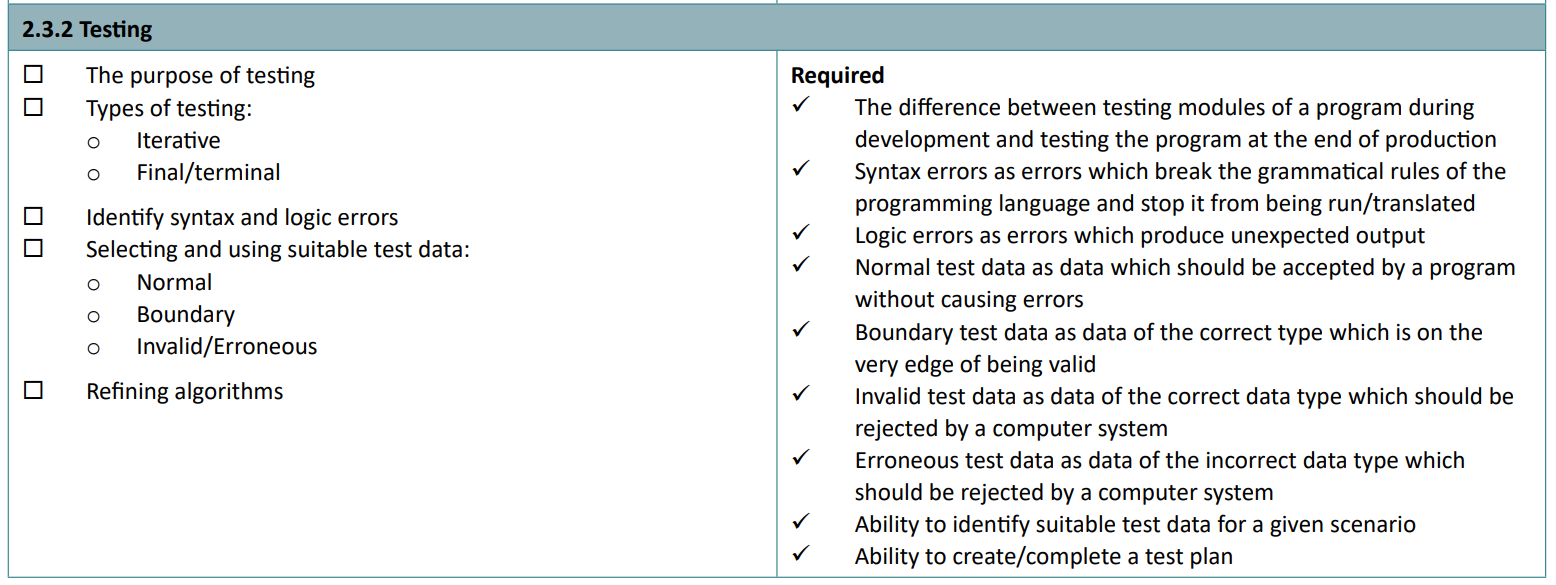
Testing is used to make sure there are no bugs or unexpected events when the code is run. You don’t want to send your code to a client if it doesn’t work!
Logic errors result in the program still executing, but producing unexpected results.
Syntax errors are errors which break the grammatical rules of the programming language and stop it from being run/translated into machine code.
Test types
Il existe deux exemples de tests :
- Iterative testing. This is testing the code, or parts of it, during development to ensure there are no seriously buggy things happening as a result of a typo. It may be easier to identify the mistake if the code is run every few minutes, as the programmer will remember what they’ve changed.
- Final/terminal testing. This is testing which occurs at the end of production of some code, before being sent to clients, and can help catch errors that arise only when multiple parts of the system are put together.
Normal test data is data which should be accepted by a program, without causing errors.
Boundary test data is data of the correct type which is on the very edge of being valid. For example, in the statement if x > 10, the boundary would be 10.
Invalid test data is data of the correct data type which should be rejected by a computer system. This could be like if an age is -100 years old.
Erroneous test data is data of the incorrect data type which should be rejected by a computer system. This could be entering a string name when an age is expected.
You need to know how to identify suitable test data for a scenario, and how to create and complete a test plan. By putting in ‘erroneous’, ‘boundary’ and ‘valid’ during iterative testing and final testing, this will get you full marks.
2.4 Boolean logic
2.4.1 Boolean logic
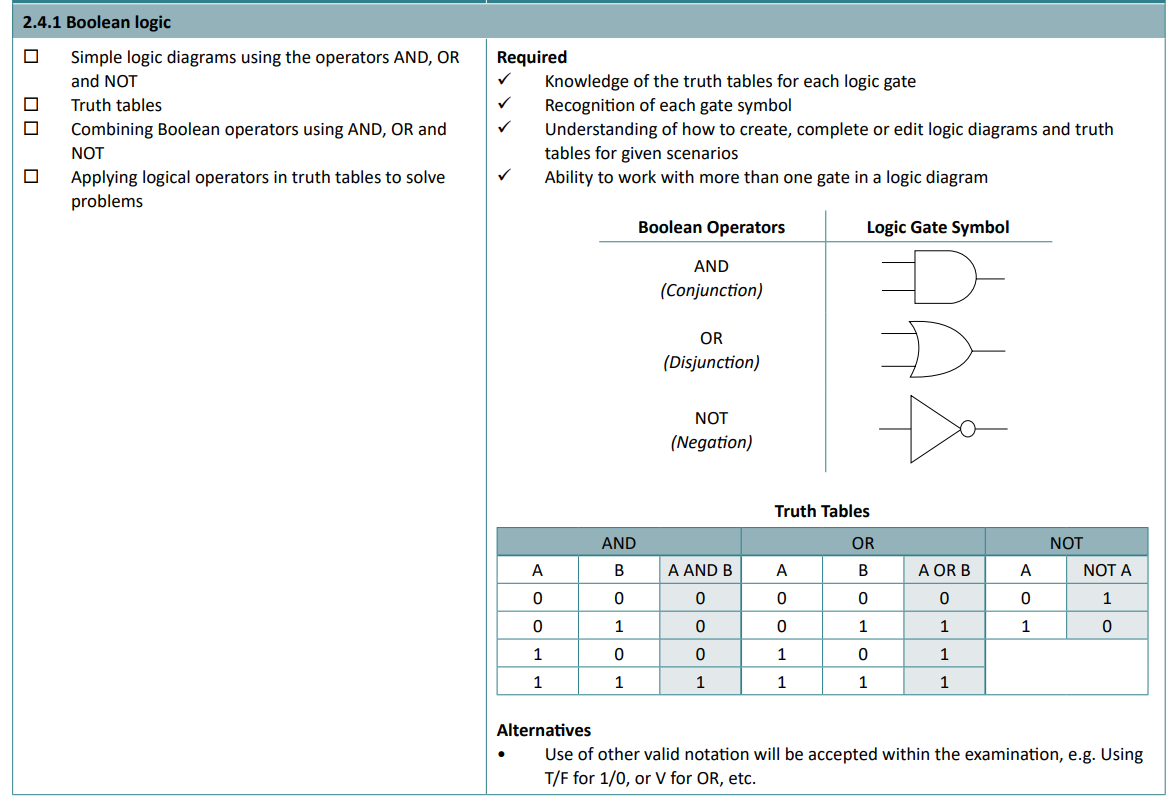
Ahhh… logic diagrams and truth tables. My worst enemy. There’s always a tricksy little 1 or 0 that I always put in the wrong place and there goes my full marks for the test. Grrrr!
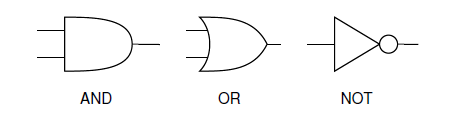
Your AND, OR and NOT gates.
You must be able to follow the lines in a truth table, and the interactions these have at these gates.
- An AND gate will only output 1 if both its inputs are 1 as well.
- An OR gate will only output 1 if one or more of its inputs are 1.
- A NOT gate will only output 1 if its input is 0. (Essentially reversing the input)
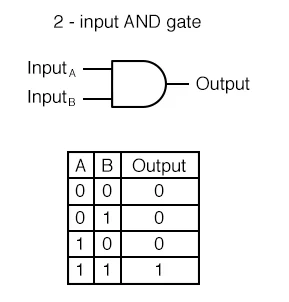
AND gate outputs
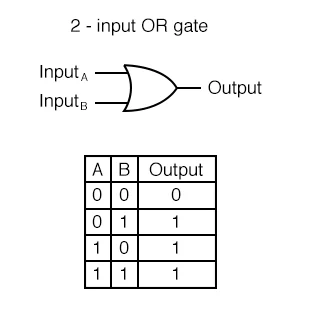
OR gate outputs
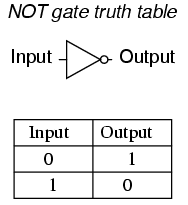
Deez NOTs
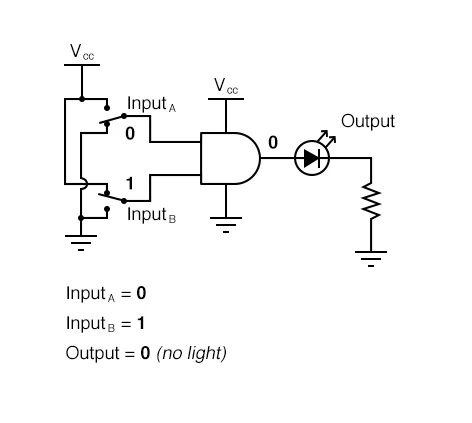
You don’t have to know this lol
2.5 Languages and IDEs
2.5.1 Languages
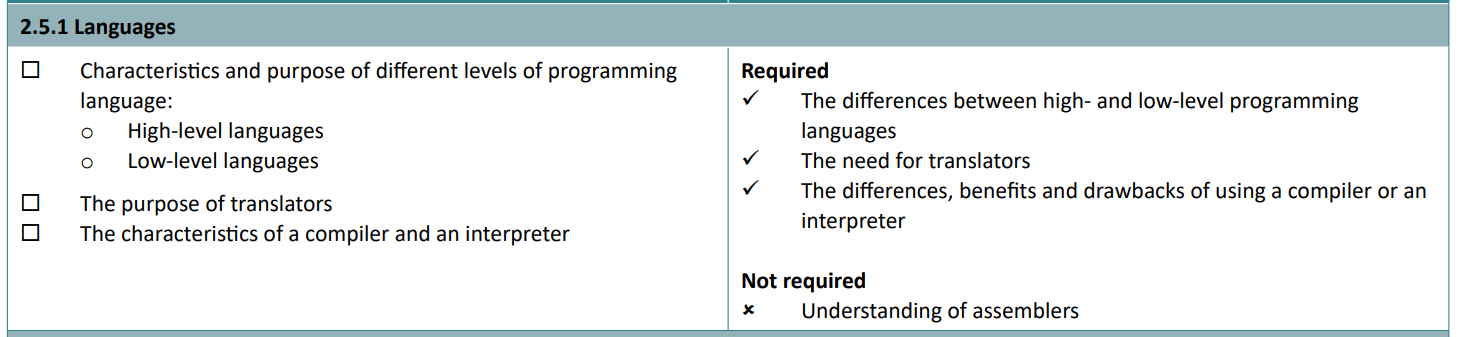
There are two categories of programming language: high and low-level languages.
- High-level languages are those which sensible people code in, like Python, JavaScript, and HTML. They are easy to read and write, and some have a human-like syntax. They also do not depend on the physical architecture of the processors executing them. However, as they are machine independent, they must be translated in order to run.
- Low-level languages are assembly code and machine code. They must be changed depending on the make and model of the CPU. As they run ‘closer’ to the CPU itself, they often require less overhead on tasks, and machine code does not require translation as it is written purely in binary.
Assembly code, although is a low-level language, is not quite machine code. Machine code is what everything must be translated into to be executed.
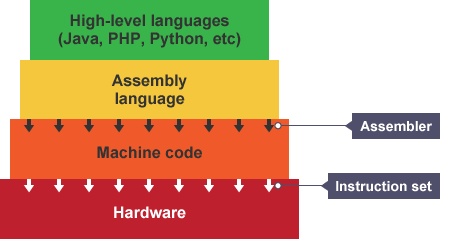
Taken from here
A compiler parses the source code once, translates it into machine code, and saves the results as a binary file. An interpreter reads the source code line by line and converts it to executable while executing.
Compiled code runs faster, as it has already been translated. If the code has no logic or syntax errors and does not need to be debugged, then compiled code is always better. The compiler optimises code too, allowing it to take up less memory. For example, comments are removed when generating compiled code. However, compiled code only works on the hardware and OS it is targeted to. You can’t run an EXE file on your phone without an IDE.
Interpreted code is executed slower, as the CPU must wait for every line to be translated, but has the potential to run on multiple kinds of hardware, running different operating systems. It simply executes code, without saving a machine code version. They generally require less memory as they do not translate the entire file.
Interpreters can be built with a REPL, or a Read Execute Print Loop. Hence the name of the coding platform, Replit.
2.5.2 The IDE

The IDE (integrated development environment) has a wide range of tools to help programmers develop programs. These include:
- Editors. Code can be edited.
- Error diagnostics. Tracebacks can show what caused exactly what to fail at the exact line.
- Providing a run-time environment. This allows a program to run on a computer even if it was not designed to, allowing the programmer to just use their known high-level language, and the RTE will do the rest.
- Translators. They translate code to be executed.
You can also write about:
- Breakpoints - code can be stopped at a specific line and variables can be checked for logic errors
- Auto-correction and indentation, to reduce silly mistakes
- Autosuggestion - can sometimes fix a problem automatically, speeding up coding
- Syntax highlighting - similar declarations can be coloured to see them better. For example, all variables could be yellow while classes are blue.
- Linting - the IDE can analyse the code you’re writing as you’re writing it for errors. For example, it may recognise that you used a double equals instead of a singular equals for setting the value of a variable.
That’s it! Go get a grade 9! Of course, you need to do some of your own programming, so a few examples are below for you to have a go at.
Programming examples
Level: Easy
- Randomly generate a number and have the user guess it. If the user makes an incorrect guess, then say how far out the user is. The maximum amount it can be is the user’s input. Maximum 20 lines.
Level: Warm
- Write a program using functions and subroutines that checks an inputted age, through a menu. The function which checks the age must have a condition controlled
whileloop and the age must be between 10 and 100 years old. When done, return to the original function and print the age in a piece of text. Maximum 25 lines.
Level: Spicy
- Create a list of cars, each with a cost. The user can buy a certain amount of cars, with 100 coins. The user cannot buy the same car twice. Display these cars at the end when the user has no money left. Use a singular 2d list to store the available cars, the costs and owned cars. Maximum 20 lines.
Answers
Answer 1
My example.
Download Python / txt
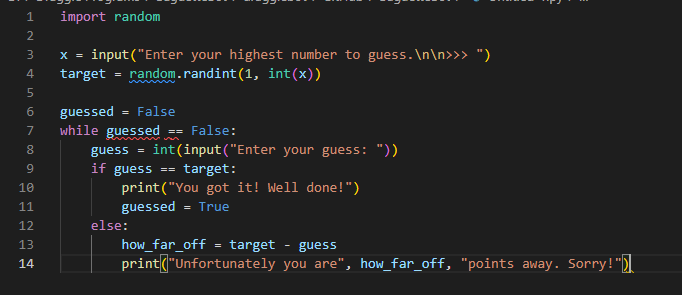
import random

x = input("Enter your highest number to guess.\n\n>>> ")
target = random.randint(1, int(x))

guessed = False
while guessed == False:
    guess = int(input("Enter your guess: "))
    if guess == target:
        print("You got it! Well done!")
        guessed = True
    else:
        how_far_off = target - guess
        print("Unfortunately you are", how_far_off, "points away. Sorry!")
Answer 2
My example.
Download Python / txt
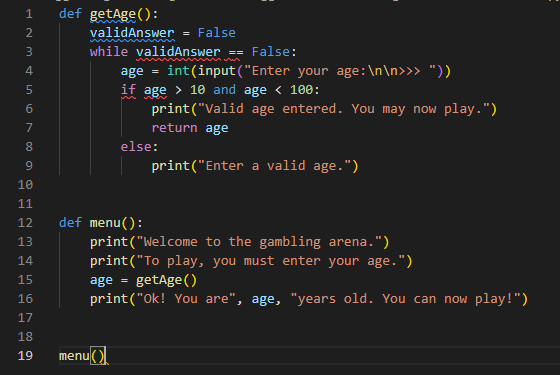
def getAge():
    validAnswer = False
    while validAnswer == False:
        age = int(input("Enter your age:\n\n>>> "))
        if age > 10 and age < 100:
            print("Valid age entered. You may now play.")
            return age
        else:
            print("Enter a valid age.")

def menu():
    print("Welcome to the gambling arena.")
    print("To play, you must enter your age.")
    age = getAge()
    print("Ok! You are", age, "years old. You can now play!")


menu()
Answer 3
Here’s my example.
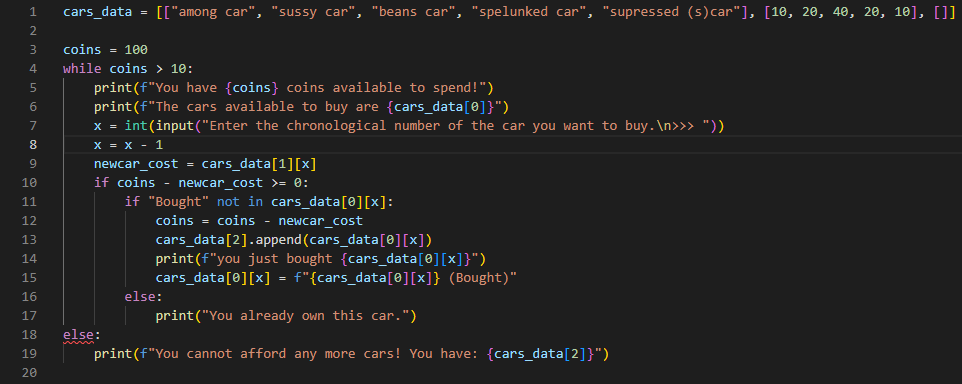
I also used “f-strings” and more to make it look more complicated.
Download Python / txt
cars_data = [["among car", "sussy car", "beans car", "spelunked car", "supressed (s)car"], [10, 20, 40, 20, 10], []]

coins = 100
while coins > 10:
    print(f"You have {coins} coins available to spend!")
    print(f"The cars available to buy are {cars_data[0]}")
    x = int(input("Enter the chronological number of the car you want to buy.\n>>> "))
    x = x - 1
    newcar_cost = cars_data[1][x]
    if coins - newcar_cost >= 0:
        if "Bought" not in cars_data[0][x]:
            coins = coins - newcar_cost
            cars_data[2].append(cars_data[0][x])
            print(f"you just bought {cars_data[0][x]}")
            cars_data[0][x] = f"{cars_data[0][x]} (Bought)"
        else:
            print("You already own this car.")
	else:
	    print(f"You cannot afford any more cars! You have: {cars_data[2]}")
Want more coding examples?
Come back to the GCSE Computer Science Cheat Sheet page soon, and I’ll have created 50+ free coding exercises to get you coding, just like the ones above, for a huge variety of different levels, complete with tutorials and exemplar responses.
You’ve made it to the end!
Good luck with your exams!
Feel free to share this Cheat Sheet with friends, family and teachers.
Made with 💕 by Draggie