
# Agent Orcha
Agent Orcha is a declarative framework for building, managing, and scaling multi-agent AI systems. Define agents, workflows, and knowledge stores in YAML — Orcha handles the rest. Run locally on bare metal for maximum performance, in Docker for cloud providers, or download a native desktop app for macOS, Windows, and Linux.
**[Documentation](https://agentorcha.com)** | **[NPM Package](https://www.npmjs.com/package/agent-orcha)** | **[Docker Hub](https://hub.docker.com/r/ddalcu/agent-orcha)** | **[Native Apps](https://github.com/ddalcu/agent-orcha/releases)**
```bash
# Native app (macOS, Windows, Linux) — download from Releases
# https://github.com/ddalcu/agent-orcha/releases
# With npx (local inference — uses your GPU / Apple Silicon directly)
npx agent-orcha
# With Docker (cloud LLM providers)
docker run -p 3333:3333 -v ./my-workspace:/data ddalcu/agent-orcha
```
## Why Agent Orcha?
- **Declarative AI**: Define agents, workflows, and infrastructure in clear, version-controlled YAML files
- **P2P Agent & LLM Sharing**: Share agents and LLM engines across your team or organization over an encrypted peer-to-peer network — no API keys exposed, no central server required, with per-peer rate limiting and private network keys
- **Native Desktop Apps**: Download pre-built binaries for macOS (.app), Windows (.exe), and Linux from [GitHub Releases](https://github.com/ddalcu/agent-orcha/releases) — system tray, auto-updates, zero setup
- **Model Agnostic**: Seamlessly swap between OpenAI, Gemini, Anthropic, or local LLMs (Omni native, Ollama, LM Studio) without rewriting logic
- **Published Agents**: Share agents via standalone chat pages at `/chat/` with optional per-agent password protection
- **Universal Tooling**: Leverage the **Model Context Protocol (MCP)** to connect agents to any external service, API, or database
- **Knowledge Stores**: Built-in SQLite-based vector store with optional **direct mapping** for knowledge graphs — semantic search and graph analysis as a first-class citizen
- **Robust Workflow Engine**: Orchestrate complex multi-agent sequences with parallel execution, conditional logic, and state management — or use **ReAct** for autonomous prompt-driven workflows with multi-turn continuations
- **Browser Sandbox**: Full Chromium browser with CDP control, Xvfb, and noVNC — plus an experimental **Vision Browser** for pixel-coordinate control with vision LLMs
- **Conversation Memory**: Built-in session-based memory for multi-turn dialogues with automatic message management and TTL cleanup
- **Security**: Rate limiting on auth endpoints, SSRF protection, SQL injection hardening, sandboxed execution
- **Extensible Functions**: Drop in simple JavaScript functions to extend agent capabilities with zero boilerplate
## Agent Orcha Studio
Built-in web dashboard at `http://localhost:3333` with agent testing, knowledge browsing, workflow execution, real-time monitoring, and an in-browser IDE with visual agent composer.


- **Agents** — Browse, invoke, stream responses, manage sessions
- **Knowledge** — Browse, search, view entities and graph structure
- **MCP** — Browse servers, view and call tools
- **Skills** — Browse and inspect skills
- **Monitor** — Real-time LLM call logs, P2P task tracking, ReAct loop metrics, and activity feed
- **IDE** — File editor with syntax highlighting, hot-reload, and **visual agent composer** for `.agent.yaml` files
- **Local LLM** — Download, activate, and manage local models (Omni native, Ollama, LM Studio)
- **P2P** — Browse peers, test remote agents and LLMs, configure sharing and rate limits
- **Organizations** — Create and manage autonomous AI organizations with tickets, routines, and CEO agents
## Architecture
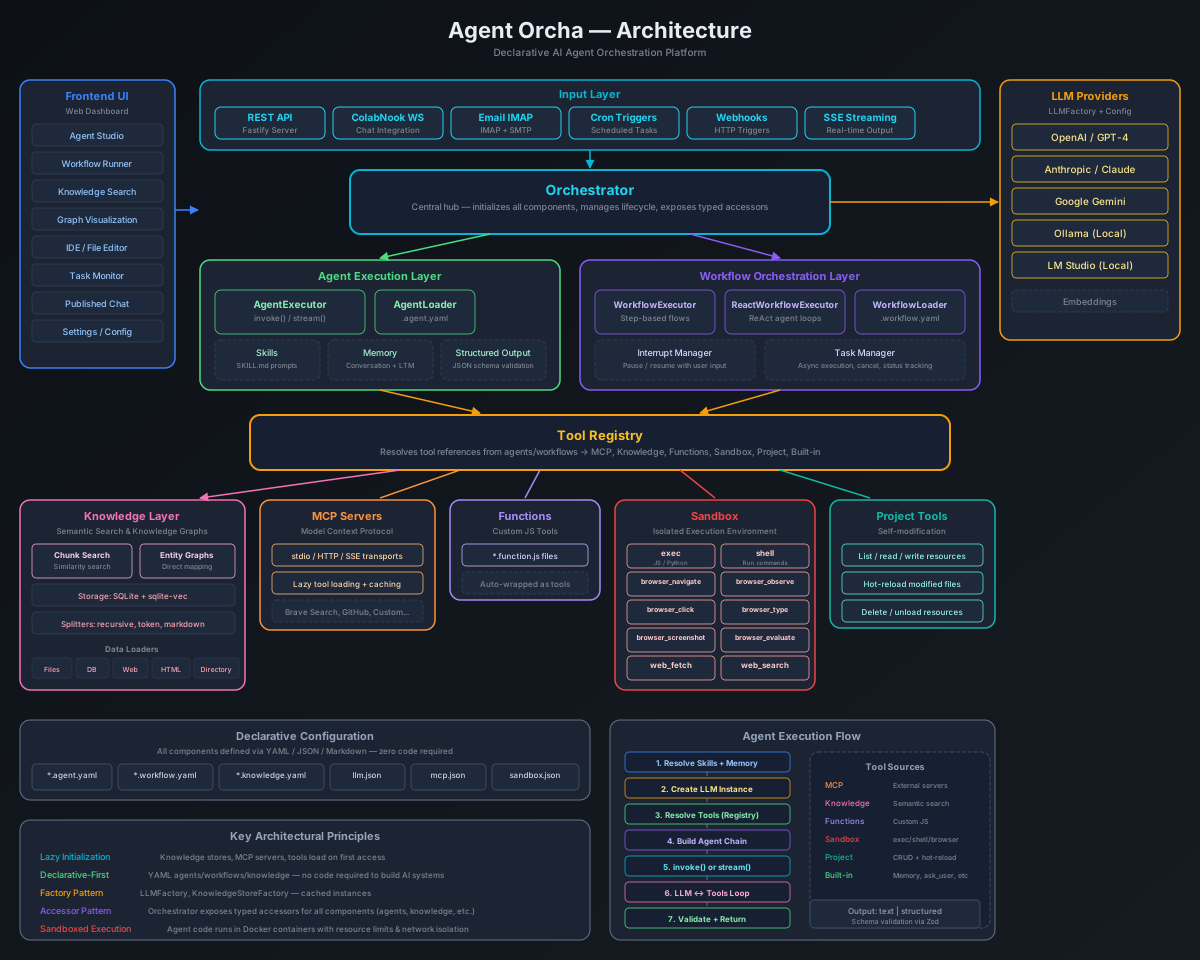
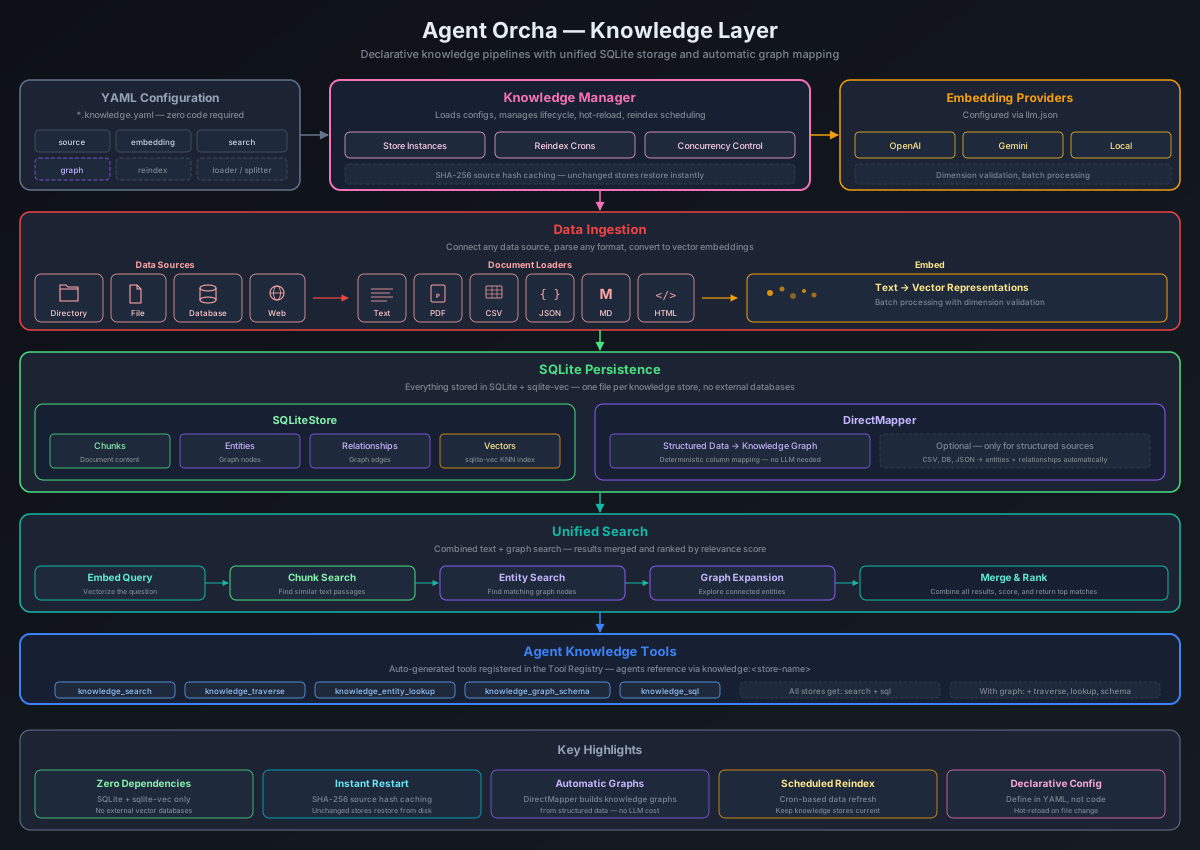
### Knowledge Layer
## Usage
Agent Orcha can be used in multiple ways:
1. **Native Desktop App** — Download from [GitHub Releases](https://github.com/ddalcu/agent-orcha/releases) (macOS .app, Windows .exe, Linux binary) with system tray integration
2. **CLI Tool** — `npx agent-orcha` to start the server (auto-scaffolds workspace on first run)
3. **Docker Image** — Official image at [ddalcu/agent-orcha](https://hub.docker.com/r/ddalcu/agent-orcha)
4. **Backend API Server** — REST API for your existing frontends
**Requirements:** Node.js >= 24.0.0 (for CLI/library) or Docker
## Quick Start
### Native App (Recommended)
Download the latest release for your platform from [GitHub Releases](https://github.com/ddalcu/agent-orcha/releases). Launch the app — it auto-scaffolds a workspace at `~/.orcha/workspace` with example agents and configurations. A system tray icon provides quick access to the Studio UI.
### CLI
Run directly on your machine to take advantage of bare metal GPU / Apple Silicon performance for local models (Omni native, Ollama, LM Studio).
```bash
# Start the server (auto-scaffolds ~/.orcha/workspace on first run)
npx agent-orcha
# Or point to a custom workspace
WORKSPACE=./my-project npx agent-orcha
```
### Docker
Best when using cloud LLM providers (OpenAI, Anthropic, Gemini) or connecting to an LLM server running on the host. Docker does not have direct access to the host GPU, so local inference engines will not be available inside the container.
```bash
docker run -p 3333:3333 -e AUTH_PASSWORD=mypass -v ./my-project:/data ddalcu/agent-orcha
```
An empty workspace is automatically scaffolded with example agents, workflows, and configurations.
## Configuration
### Model Configuration (models.yaml)
All model configs live in `models.yaml` (YAML format) with sections: `llm` (chat models), `embeddings`, `image`, `tts`, `video`. Each section has named configs pointing to a provider + model combination. Agents and knowledge stores reference configs by name. The `default` key is a pointer to the active config.
```yaml
# models.yaml
llm:
default: omni
omni:
provider: omni
model: gemma-4-E2B-it-IQ4_NL
contextSize: 32768
ollama:
provider: local
engine: ollama
baseUrl: http://localhost:11434/v1
model: qwen3.5:latest
reasoningBudget: 0
anthropic:
provider: anthropic
apiKey: ${ANTHROPIC_API_KEY}
model: claude-sonnet-4-6
embeddings:
default: omni
omni:
provider: omni
model: nomic-embed-text-v1.5.Q4_K_M
image:
default: flux
flux:
provider: omni
model: FLUX.2-Klein
tts:
default: qwen-tts
qwen-tts:
provider: omni
model: Qwen3-TTS
```
- **`default`** — Pointer string (e.g., `"omni"`) that selects the active config
- **`provider`** — `omni`, `openai`, `anthropic`, or `gemini`
- **`contextSize`** — Context window size (local models)
- **`reasoningBudget`** / **`thinkingBudget`** — Token budget for reasoning (0 to disable)
- **`share`** — Share this model on the P2P network (`true`)
- **`image`**, **`tts`**, **`video`** — Sections for image generation, text-to-speech, and video models (same structure as `llm`)
- **`${ENV_VAR}`** — Environment variable substitution (works in all config files)
### Environment Variables
```bash
PORT=3333 # Server port
HOST=0.0.0.0 # Server host (SEA default: 127.0.0.1)
WORKSPACE=/path/to/project # Workspace directory (default: ~/.orcha/workspace)
AUTH_PASSWORD=your-secret-password # Password auth for all API routes and Studio
CORS_ORIGIN=https://your-frontend.com # Cross-origin policy (default: same-origin)
LOG_LEVEL=debug # Pino log level (default: info)
EXPERIMENTAL_VISION=false # Enable vision browser tools
BROWSER_SANDBOX=true # Enable browser sandbox (Docker)
BROWSER_VERBOSE=false # Show Chromium logs
P2P_ENABLED=false # Disable P2P swarm network (enabled by default)
P2P_PEER_NAME=my-peer # Display name on the P2P network (default: hostname)
P2P_NETWORK_KEY=agent-orcha-default # Shared key for peer discovery (configurable in UI)
P2P_SHARE_LLMS=true # Share all active LLM models on P2P (overrides per-model flag)
P2P_RATE_LIMIT=60 # Max incoming P2P requests per minute (0 = unlimited)
```
All config files (`.yaml`, `.json`, `.env`) support `${ENV_VAR}` substitution for secrets and environment-specific values.
## Agents
Agents are AI-powered units defined in YAML within the `agents/` directory.
```yaml
# agents/researcher.agent.yaml
name: researcher
description: Researches topics using web fetch and knowledge search
version: "1.0.0"
model:
llm: default
temperature: 0.5
prompt:
system: |
You are a thorough researcher. Search knowledge bases,
fetch web information, and synthesize findings.
inputVariables:
- topic
- context
tools:
- mcp:fetch
- knowledge:transcripts
output:
format: text
maxIterations: 50 # Override default iteration limit (optional)
memory: true # Enable persistent memory (optional)
skills: # Skills to attach (optional)
- skill-name
publish: true # Standalone chat at /chat/researcher (optional)
p2p: # P2P network config (optional)
share: true # Share this agent to peers
leverage: local-first # P2P model leverage mode (see below)
```
### Conversation Memory
Pass a `sessionId` to maintain context across interactions:
```typescript
const result = await orchestrator.runAgent('chatbot', { message: 'My name is Alice' }, 'session-123');
const result2 = await orchestrator.runAgent('chatbot', { message: 'What is my name?' }, 'session-123');
```
### Structured Output
```yaml
output:
format: structured
schema:
type: object
properties:
sentiment:
type: string
enum: [positive, negative, neutral]
confidence:
type: number
required: [sentiment, confidence]
```
## Workflows
Workflows orchestrate multiple agents. Two types: **step-based** and **ReAct**.
### Step-Based
Sequential/parallel agent orchestration with explicit step definitions.
```yaml
name: research-paper
description: Research a topic and write a paper
type: steps
input:
schema:
topic:
type: string
required: true
steps:
- id: research
agent: researcher
input:
topic: "{{input.topic}}"
- id: write
agent: writer
input:
research: "{{steps.research.output}}"
output:
paper: "{{steps.write.output}}"
```
### ReAct
Autonomous, prompt-driven workflows with multi-turn conversation support. The agent decides which tools and agents to call. Thread state is preserved after completion for follow-up questions.
```yaml
name: react-research
type: react
input:
schema:
topic:
type: string
required: true
prompt:
system: |
You are a research assistant with access to tools and agents.
Identify all tools you need, call them in parallel, then synthesize results.
goal: "Research and analyze: {{input.topic}}"
graph:
model: default
executionMode: single-turn # or: react (multi-round)
tools:
mode: all
sources: [mcp, knowledge, function, builtin]
agents:
mode: all
maxIterations: 10
chatOutputFormat: text # Controls chat UI rendering (text or markdown)
sampleQuestions: # Example prompts shown in Studio UI
- "Research quantum computing"
- "Analyze market trends in AI"
output:
analysis: "{{state.messages[-1].content}}"
```
## P2P Network
Share agents and LLM engines across machines using an encrypted peer-to-peer swarm network powered by [Hyperswarm](https://github.com/holepunchto/hyperswarm). No central server, no cloud dependency — peers discover each other directly using a shared network key. P2P is enabled by default; set `P2P_ENABLED=false` to disable.
All communication is encrypted end-to-end via Noise protocol handshakes. No API keys, secrets, or model weights are ever transmitted — only inference requests and responses flow over the wire. Per-peer rate limiting protects against abuse.
The **P2P tab** in Studio provides a settings panel to enable/disable P2P, change the machine name, set a private network key, configure rate limiting, and view what you're sharing.
### Sharing Agents
Add `p2p: true` to any agent YAML:
```yaml
name: my-agent
p2p: true
```
### Sharing LLM Engines
Add `share: true` to a model in `models.yaml`, or use the P2P share toggle on each provider in the LLM tab. Only active models with `share: true` are shared:
```yaml
# models.yaml
llm:
omni:
provider: omni
model: gemma-4-E2B-it-IQ4_NL
share: true # Share on P2P network
```
No API keys or secrets are shared — only the model name and provider.
### Using Remote Resources
There are three ways to use remote P2P resources:
1. **Direct LLM chat (P2P tab)** — Select a remote peer's LLM from the P2P tab and chat with it directly. Pure LLM inference with no agent or tools involved.
2. **Remote agent invocation (P2P tab)** — Invoke a peer's shared agent. The agent runs entirely on the host — their LLM, their tools, their knowledge stores. You receive the streamed output.
3. **Local agent with remote LLM** — Configure your agent with `model: "p2p"` (auto-select) or `model: "p2p:model-name"`. The agent runs locally with your tools, react loop, memory, and knowledge stores, while only the LLM inference happens on the remote peer. Tool calling is fully supported — the remote LLM generates `tool_calls`, your local agent executes them, and results feed back over the wire.
### P2P Model Leverage
Control how agents use remote peer models for image, TTS, and video tasks via the `p2p.leverage` field:
```yaml
p2p:
leverage: local-first # Try local, fall back to P2P peers (default)
leverage: remote-first # Try P2P peers first, fall back to local
leverage: remote-only # Only use P2P peers, skip local entirely
```
| Mode | Behavior |
|------|----------|
| `false` | P2P disabled for this agent (default) |
| `local-first` | Use local models; fall back to P2P if local fails or is unavailable |
| `remote-first` | Try P2P peers first for model tasks (image, TTS); fall back to local if no peers respond |
| `remote-only` | Only use P2P peers for model tasks — skip local models entirely |
The `leverage` modes apply to **model tools** (image generation, TTS, video). For explicit P2P LLM chat routing, use `model: p2p` or `model: p2p:model-name`.
### Load Balancing
When multiple peers share the same model, Agent Orcha automatically distributes requests across them using a **least-loaded** selection strategy:
- **Client-side tracking** — Each node tracks how many in-flight requests it has sent to each peer. New requests are routed to the peer with the fewest outstanding requests.
- **Peer-reported load** — Peers broadcast their current task load via catalog updates. When a peer starts or finishes processing a task, it broadcasts its updated load so other nodes can factor it into their selection.
- **Tie-breaking** — When multiple peers have equal load scores, one is chosen at random to avoid clustering.
This ensures requests spread evenly across peers without requiring a central coordinator.
### Rate Limiting
Incoming P2P requests are rate-limited to 60 requests/minute by default. Configure via `P2P_RATE_LIMIT` env var or the P2P tab UI. Set to `0` for unlimited.
### Private Networks
By default all instances join the same public network. To create a private network, set `P2P_NETWORK_KEY` to a custom value (or configure in the P2P tab). The key is SHA-256 hashed before joining — only peers with the same key can discover each other.
## Organizations
Create autonomous AI-managed organizations. Each org is an isolated workspace with tickets, routines, an org chart, and a CEO agent that runs on scheduled heartbeats.
### CEO Strategies
Two strategies for autonomous management:
- **Agent CEO** — Uses an ORCHA agent (defined in YAML) to triage tickets, delegate work, and review outputs
- **Claude Code CEO** — Uses Claude directly with ORCHA API tools to manage the org autonomously
### Tickets
Full lifecycle: `backlog` → `todo` → `in_progress` → `in_review` → `blocked` → `done`. Tickets carry priority, labels, agent assignment, and activity history.
### Routines
Cron-based recurring agent execution per organization. Schedule agents to run automatically with full run history tracking.
### Heartbeats
Scheduled CEO triage runs. The CEO reviews the ticket board, delegates tasks to team members, and tracks progress — all on a configurable cron schedule.
## Knowledge Stores
Semantic search and RAG using **SQLite + sqlite-vec** — no external vector databases required. Define in the `knowledge/` directory.
```yaml
name: transcripts
description: Meeting transcripts
source:
type: directory
path: knowledge/sample-data
pattern: "*.txt"
loader:
type: pdf # Optional — defaults to html (web) or text (file/directory)
splitter:
type: character
chunkSize: 1000
chunkOverlap: 200
embedding: default
reindex:
schedule: "0 */6 * * *" # Cron expression for automatic periodic reindexing
search:
defaultK: 4
scoreThreshold: 0.2
```
### Data Sources
- **directory/file** — Local files with glob patterns
- **database** — PostgreSQL/MySQL via SQL queries
- **web** — HTML scraping, JSON APIs (with `jsonPath` for nested arrays), raw text
**Loader types:** `text`, `pdf`, `csv`, `json`, `markdown`, `html`. The `loader` field is optional — defaults to `html` for web sources, `text` for file/directory. Web sources also support `jsonPath` (dot-notation, e.g., `data.results`) to extract a nested array from the JSON response before parsing.
### Knowledge Graph (Direct Mapping)
Add `graph.directMapping` to build entity graphs from structured data:
```yaml
graph:
directMapping:
entities:
- type: Post
idColumn: id
nameColumn: title
properties: [title, slug, content]
- type: Author
idColumn: author_email
nameColumn: author_name
relationships:
- type: WROTE
source: Author
target: Post
sourceIdColumn: author_email
targetIdColumn: id
```
Stores with entities get additional graph tools: `entity_lookup`, `traverse`, `graph_schema`, `sql`.
## Functions
Custom JavaScript tools in `functions/`:
```javascript
// functions/fibonacci.function.mjs
export default {
name: 'fibonacci',
description: 'Returns the nth Fibonacci number',
parameters: {
n: { type: 'number', description: 'The index (0-based, max 100)' },
},
execute: async ({ n }) => {
let prev = 0, curr = 1;
for (let i = 2; i <= n; i++) [prev, curr] = [curr, prev + curr];
return `Fibonacci(${n}) = ${n < 2 ? n : curr}`;
},
};
```
Reference in agents with `function:fibonacci`.
## MCP Servers
Configure in `mcp.json`:
```json
{
"version": "1.0.0",
"servers": {
"fetch": {
"transport": "streamable-http",
"url": "https://remote.mcpservers.org/fetch/mcp"
},
"filesystem": {
"transport": "stdio",
"command": "npx",
"args": ["-y", "@modelcontextprotocol/server-filesystem", "/tmp"]
}
}
}
```
Reference in agents with `mcp:fetch`.
## Tool Types
| Prefix | Description |
|--------|-------------|
| `mcp:` | External tools from MCP servers |
| `knowledge:` | Semantic search on knowledge stores |
| `function:` | Custom JavaScript functions |
| `builtin:` | Framework tools (`ask_user`, `memory_save`, `canvas_write`, `canvas_append`) |
| `sandbox:exec` | JavaScript execution in sandboxed VM |
| `sandbox:shell` | Shell commands (non-root sandbox user) |
| `sandbox:web_fetch` | URL fetching with SSRF protection |
| `sandbox:web_search` | Web search |
| `sandbox:browser_*` | CDP-based Chromium control (navigate, observe, click, type, screenshot, evaluate) |
| `sandbox:vision_*` | Pixel-coordinate browser control for vision LLMs (navigate, click, type, scroll, key, drag, screenshot) |
| `sandbox:file_*` | Sandboxed file tools (read, write, edit, insert, replace_lines) scoped to `/tmp` |
| `org:` | Organization tools (list_tickets, update_ticket, assign_agent, etc.) |
| `workspace:read/write/delete/list/list_resources/diagnostics` | Workspace file and resource access |
### Vision Browser (Experimental)
Pixel-coordinate browser control for vision LLMs. Requires `EXPERIMENTAL_VISION=true` environment variable to enable:
| Tool | Description |
|------|-------------|
| `sandbox_vision_screenshot` | Capture JPEG screenshot |
| `sandbox_vision_navigate` | Navigate to URL |
| `sandbox_vision_click` | Click at x,y coordinates |
| `sandbox_vision_type` | Type text |
| `sandbox_vision_scroll` | Scroll page |
| `sandbox_vision_key` | Press keyboard key |
| `sandbox_vision_drag` | Drag between coordinates |
Every action tool auto-captures a screenshot, cutting the screenshot-infer-act loop to one call per action.
## API
Full API documentation is available at [agentorcha.com](https://agentorcha.com). Key endpoint groups:
| Group | Base Path | Description |
|-------|-----------|-------------|
| Health | `GET /health` | Health check |
| Auth | `/api/auth/*` | Login, logout, session check |
| Agents | `/api/agents/*` | List, invoke, stream, session management |
| Chat | `/api/chat/*` | Published agent standalone chat |
| Workflows | `/api/workflows/*` | List, run, stream |
| Knowledge | `/api/knowledge/*` | List, search, refresh, graph entities/edges |
| LLM | `/api/llm/*` | List configs, chat, stream |
| Functions | `/api/functions/*` | List, call |
| MCP | `/api/mcp/*` | List servers, list tools, call tools |
| Skills | `/api/skills/*` | List, inspect |
| Tasks | `/api/tasks/*` | Submit, track, cancel |
| Files | `/api/files/*` | File tree, read, write |
| Local LLM | `/api/local-llm/*` | Engine management, model download/activation |
| Graph | `/api/graph/*` | Multi-store graph aggregation |
| Logs | `/api/logs/*` | Real-time log streaming |
| P2P | `/api/p2p/*` | P2P network status, settings, config, remote agents/LLMs |
| Organizations | `/api/organizations/*` | Orgs, tickets, routines, org chart, CEO runs |
| VNC | `/api/vnc/*` | Browser sandbox VNC status |
## Directory Structure
```
~/.orcha/workspace/
├── agents/ # Agent definitions (YAML)
├── workflows/ # Workflow definitions (YAML)
├── knowledge/ # Knowledge store configs and data
├── functions/ # Custom function tools (JavaScript .mjs)
├── skills/ # Skill prompt files (Markdown)
├── models.yaml # Model and embedding configurations
├── mcp.json # MCP server configuration
└── .env # Environment variables
```
## FAQ
### Local LLM fails on Linux with "no CPU backend found"
On minimal Linux installations, the llama-cpp CPU backends require `libgomp` (GCC OpenMP runtime) which may not be installed by default. Install it with:
```bash
# Debian / Ubuntu
sudo apt install libgomp1
# Fedora / RHEL
sudo dnf install libgomp
# Arch
sudo pacman -S gcc-libs
```
After installing, restart the server. You can verify the fix with:
```bash
ldd templates/.llama-server/linux-x64/libggml-cpu-x64.so | grep "not found"
```
If nothing is printed, all dependencies are satisfied.
## Development
```bash
npm run dev # Dev server with auto-reload (uses ~/.orcha/workspace)
WORKSPACE=./templates npm run dev # Dev with local templates
npm run build # Build
npm start # Run build
npm run lint # ESLint
npm run typecheck # TypeScript type checking
```
## License
MIT