



Skill and MCP server for Microsoft Fabric CLI
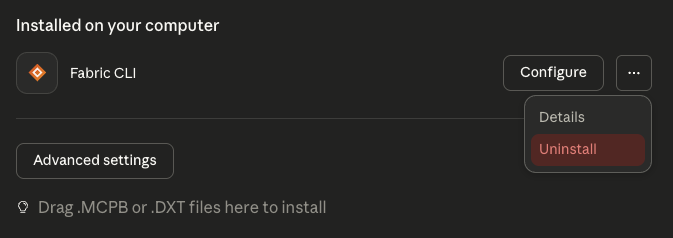 ### Skill (Fabric CLI context)
1. Download [`fabric-cli-skill.zip`](claude-desktop/fabric-cli-skill.zip)
2. Open Claude Desktop > **Settings** > **Capabilities** > **Skills** > *Upload skill*
3. Click **Upload skill** > select the ZIP
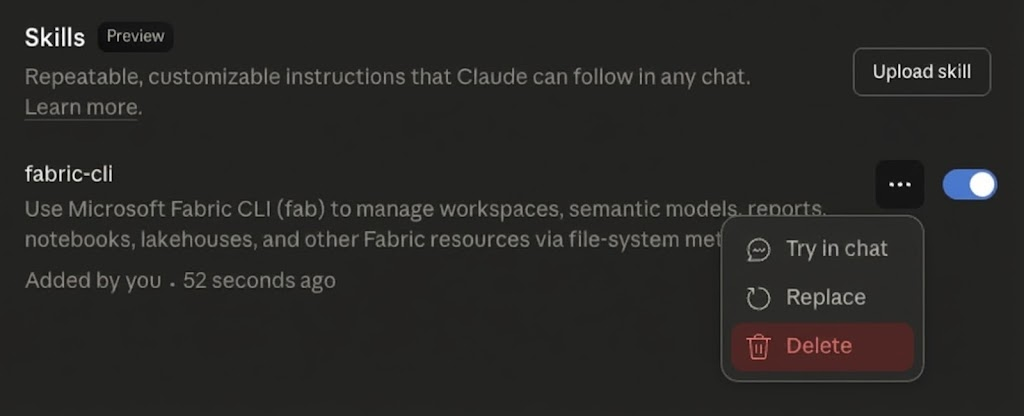
4. *(To remove)* (Reopen) Settings > Skills > fabric-cli (...) > Delete
### Skill (Fabric CLI context)
1. Download [`fabric-cli-skill.zip`](claude-desktop/fabric-cli-skill.zip)
2. Open Claude Desktop > **Settings** > **Capabilities** > **Skills** > *Upload skill*
3. Click **Upload skill** > select the ZIP
4. *(To remove)* (Reopen) Settings > Skills > fabric-cli (...) > Delete
 Requires: Pro, Max, Team, or Enterprise plan
[Extensions Docs](https://docs.anthropic.com/en/docs/claude-desktop/extensions) | [Skills Docs](https://support.claude.com/en/articles/12512198-how-to-create-custom-skills)
## Requirements
- [uv](https://docs.astral.sh/uv/) for MCP server
- macOS: `brew install uv`
- Windows: `winget install astral-sh.uv`
- [fab CLI](https://pypi.org/project/fabric-cli/) authenticated via `fab auth login`
- Windows: may need `PYTHONIOENCODING=utf-8` with some fab commands
## Testing
- **macOS** (15.6.1): Claude Code 2.0.55, Claude Desktop 1.0.1217 - 2025-11-27
- **Windows** (11 25H2): Claude Code 2.0.55, Claude Desktop 1.0.1217 - 2025-11-27
## What's Included
- **Skill**: Fab CLI guidance and patterns
- **Commands**: `/audit-context` for reviewing project context files
- **Agent Template**: CLAUDE.md template for Power BI/Fabric projects
- **Fabric CLI MCP**: 17 tools for Fabric operations (Claude Desktop only)
- **Power BI Modeling MCP**: Semantic model operations (Windows only)
- **Microsoft Docs MCP**: Search official Microsoft/Azure documentation
## Additional Resources
The following resources aren't included but might be useful:
- [DAX Performance Tuner MCP](https://github.com/microsoft/fabric-toolbox/tree/main/tools/DAXPerformanceTunerMCPServer) - AI-assisted DAX query optimization (requires build)
Requires: Pro, Max, Team, or Enterprise plan
[Extensions Docs](https://docs.anthropic.com/en/docs/claude-desktop/extensions) | [Skills Docs](https://support.claude.com/en/articles/12512198-how-to-create-custom-skills)
## Requirements
- [uv](https://docs.astral.sh/uv/) for MCP server
- macOS: `brew install uv`
- Windows: `winget install astral-sh.uv`
- [fab CLI](https://pypi.org/project/fabric-cli/) authenticated via `fab auth login`
- Windows: may need `PYTHONIOENCODING=utf-8` with some fab commands
## Testing
- **macOS** (15.6.1): Claude Code 2.0.55, Claude Desktop 1.0.1217 - 2025-11-27
- **Windows** (11 25H2): Claude Code 2.0.55, Claude Desktop 1.0.1217 - 2025-11-27
## What's Included
- **Skill**: Fab CLI guidance and patterns
- **Commands**: `/audit-context` for reviewing project context files
- **Agent Template**: CLAUDE.md template for Power BI/Fabric projects
- **Fabric CLI MCP**: 17 tools for Fabric operations (Claude Desktop only)
- **Power BI Modeling MCP**: Semantic model operations (Windows only)
- **Microsoft Docs MCP**: Search official Microsoft/Azure documentation
## Additional Resources
The following resources aren't included but might be useful:
- [DAX Performance Tuner MCP](https://github.com/microsoft/fabric-toolbox/tree/main/tools/DAXPerformanceTunerMCPServer) - AI-assisted DAX query optimization (requires build)
All code and context are shared without any warranty or guarantees for any fellow using Microsoft Fabric.
Built with assistance from Claude Code donkeys. AI-generated code has been reviewed but may contain errors. Use at your own risk.
Context files are human-written and revised by Claude Code after iterative use. No AI-generated creative assets used.
---Kurt Buhler · Data Goblins · part of Tabular Editor