
English ·
中文








# ✨ 功能
- 🖥️ **UI 与体验**:受 ChatGPT 启发,并具备更强的设计与功能。
- 🤖 **AI 模型选择**:
- Anthropic (Claude), AWS Bedrock, OpenAI, Azure OpenAI, Google, Vertex AI, OpenAI Responses API (包含 Azure)
- [自定义端点 (Custom Endpoints)](https://www.librechat.ai/docs/quick_start/custom_endpoints):LibreChat 支持任何兼容 OpenAI 规范的 API,无需代理。
- 兼容[本地与远程 AI 服务商](https://www.librechat.ai/docs/configuration/librechat_yaml/ai_endpoints):
- Ollama, groq, Cohere, Mistral AI, Apple MLX, koboldcpp, together.ai,
- OpenRouter, Helicone, Perplexity, ShuttleAI, Deepseek, Qwen 等。
- 🔧 **[代码解释器 (Code Interpreter) API](https://www.librechat.ai/docs/features/code_interpreter)**:
- 安全的沙箱执行环境,支持 Python, Node.js (JS/TS), Go, C/C++, Java, PHP, Rust 和 Fortran。
- 无缝文件处理:直接上传、处理并下载文件。
- 隐私无忧:完全隔离且安全的执行环境。
- 🔦 **智能体与工具集成**:
- **[LibreChat 智能体 (Agents)](https://www.librechat.ai/docs/features/agents)**:
- 无代码定制助手:无需编程即可构建专业化的 AI 驱动助手。
- 智能体市场:发现并部署社区构建的智能体。
- 协作共享:与特定用户和群组共享智能体。
- 灵活且可扩展:支持 MCP 服务器、工具、文件搜索、代码执行等。
- [Skills](https://www.librechat.ai/docs/features/skills):创建可复用的 `SKILL.md` 指令包,用于手动、自动或始终启用的智能体工作流。
- [Subagents](https://www.librechat.ai/docs/features/subagents):将专门任务委派给拥有独立上下文窗口的隔离子智能体运行。
- 兼容自定义端点、OpenAI, Azure, Anthropic, AWS Bedrock, Google, Vertex AI, Responses API 等。
- [支持模型上下文协议 (MCP)](https://modelcontextprotocol.io/clients#librechat) 用于工具调用。
- 🔍 **网页搜索**:
- 搜索互联网并检索相关信息以增强 AI 上下文。
- 结合搜索提供商、内容爬虫和结果重排序,确保最佳检索效果。
- **可定制 Jina 重排序**:配置自定义 Jina API URL 用于重排序服务。
- **[了解更多 →](https://www.librechat.ai/docs/features/web_search)**
- 🪄 **支持代码 Artifacts 的生成式 UI**:
- [代码 Artifacts](https://youtu.be/GfTj7O4gmd0?si=WJbdnemZpJzBrJo3) 允许在对话中直接创建 React 组件、HTML 页面和 Mermaid 图表。
- 🎨 **图像生成与编辑**:
- 使用 [GPT-Image-1](https://www.librechat.ai/docs/features/image_gen#1--openai-image-tools-recommended) 进行文生图与图生图。
- 支持 [DALL-E (3/2)](https://www.librechat.ai/docs/features/image_gen#2--dalle-legacy), [Stable Diffusion](https://www.librechat.ai/docs/features/image_gen#3--stable-diffusion-local), [Flux](https://www.librechat.ai/docs/features/image_gen#4--flux) 或任何 [MCP 服务器](https://www.librechat.ai/docs/features/image_gen#5--model-context-protocol-mcp)。
- 根据提示词生成惊艳的视觉效果,或通过指令精修现有图像。
- 💾 **预设与上下文管理**:
- 创建、保存并分享自定义预设。
- 在对话中随时切换 AI 端点和预设。
- 编辑、重新提交并通过对话分支继续消息。
- 创建并与特定用户和群组共享提示词。
- [消息与对话分叉 (Fork)](https://www.librechat.ai/docs/features/fork) 以实现高级上下文控制。
- 💬 **多模态与文件交互**:
- 使用 Claude 3, GPT-4.5, GPT-4o, o1, Llama-Vision 和 Gemini 上传并分析图像 📸。
- 支持通过自定义端点、OpenAI, Azure, Anthropic, AWS Bedrock 和 Google 进行文件对话 🗃️。
- 🌎 **多语言 UI**:
- English, 中文 (简体), 中文 (繁體), العربية, Deutsch, Español, Français, Italiano
- Polski, Português (PT), Português (BR), Русский, 日本語, Svenska, 한국어, Tiếng Việt
- Türkçe, Nederlands, עברית, Català, Čeština, Dansk, Eesti, فارسی
- Suomi, Magyar, Հայերեն, Bahasa Indonesia, ქართული, Latviešu, ไทย, ئۇيغۇرچە
- 🧠 **推理 UI**:
- 针对 DeepSeek-R1 等思维链/推理 AI 模型的动态推理 UI。
- 🎨 **可定制界面**:
- 可定制的下拉菜单和界面,同时适配高级用户和初学者。
- 🌊 **[可恢复流 (Resumable Streams)](https://www.librechat.ai/docs/features/resumable_streams)**:
- 永不丢失响应:AI 响应在连接中断后自动重连并继续。
- 多标签页与多设备同步:在多个标签页打开同一对话,或在另一设备上继续。
- 生产级可靠性:支持从单机部署到基于 Redis 的水平扩展。
- 🗣️ **语音与音频**:
- 通过语音转文字和文字转语音实现免提对话。
- 自动发送并播放音频。
- 支持 OpenAI, Azure OpenAI 和 Elevenlabs。
- 📥 **导入与导出对话**:
- 从 LibreChat, ChatGPT, Chatbot UI 导入对话。
- 将对话导出为截图、Markdown、文本、JSON。
- 🔍 **搜索与发现**:
- 搜索所有消息和对话。
- 👥 **多用户与安全访问**:
- 支持 OAuth2, LDAP 和电子邮件登录的多用户安全认证。
- 内置审核系统和 Token 消耗管理工具。
- ⚙️ **配置与部署**:
- 支持代理、反向代理、Docker 及多种部署选项。
- 使用 [S3 与 CloudFront](https://www.librechat.ai/docs/configuration/cdn/cloudfront) 获得稳定的媒体链接、边缘分发、签名 Cookie 和安全下载。
- 可完全本地运行或部署在云端。
- 📖 **开源与社区**:
- 完全开源且在公众监督下开发。
- 社区驱动的开发、支持与反馈。
[查看我们的文档了解更多功能详情](https://docs.librechat.ai/) 📚
## 🪶 LibreChat:全方位的 AI 对话平台
LibreChat 是一个自托管的 AI 对话平台,在一个注重隐私的统一界面中整合了所有主流 AI 服务商。
除了对话功能外,LibreChat 还提供 AI 智能体、模型上下文协议 (MCP) 支持、Artifacts、代码解释器、自定义操作、对话搜索,以及企业级多用户认证。
开源、活跃开发中,专为重视 AI 基础设施自主可控的用户而构建。
---
## 🌐 资源
**GitHub 仓库:**
- **RAG API:** [github.com/danny-avila/rag_api](https://github.com/danny-avila/rag_api)
- **网站:** [github.com/LibreChat-AI/librechat.ai](https://github.com/LibreChat-AI/librechat.ai)
**其他:**
- **官方网站:** [librechat.ai](https://librechat.ai)
- **帮助文档:** [librechat.ai/docs](https://librechat.ai/docs)
- **博客:** [librechat.ai/blog](https://librechat.ai/blog)
---
## 📝 更新日志
访问发布页面和更新日志以了解最新动态:
- [发布页面 (Releases)](https://github.com/danny-avila/LibreChat/releases)
- [更新日志 (Changelog)](https://www.librechat.ai/changelog)
**⚠️ 在更新前请务必查看[更新日志](https://www.librechat.ai/changelog)以了解破坏性更改。**
---
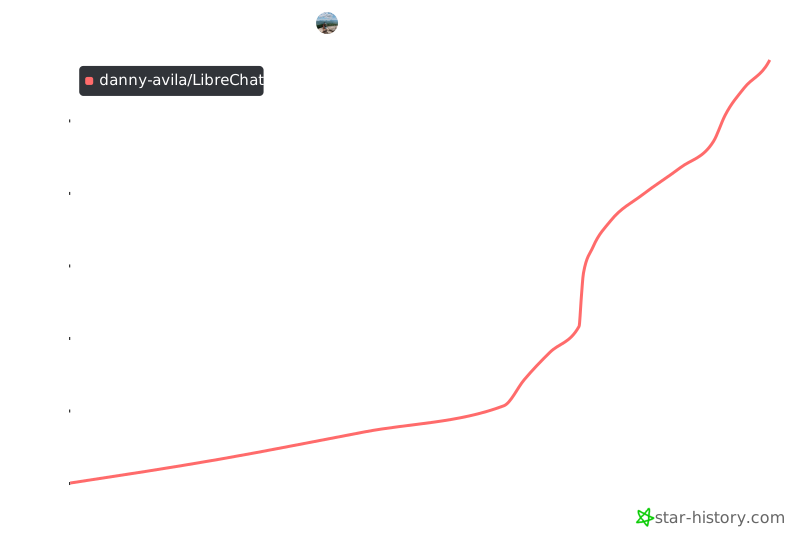
## ⭐ Star 历史


---
## ✨ 贡献
欢迎任何形式的贡献、建议、错误报告和修复!
对于新功能、组件或扩展,请在发送 PR 前开启 issue 进行讨论。
如果您想帮助我们将 LibreChat 翻译成您的母语,我们非常欢迎!改进翻译不仅能让全球用户更轻松地使用 LibreChat,还能提升整体用户体验。请查看我们的[翻译指南](https://www.librechat.ai/docs/translation)。
---
## 💖 感谢所有贡献者
 ---
## 🎉 特别鸣谢
感谢 [Locize](https://locize.com) 提供的翻译管理工具,支持 LibreChat 的多语言功能。
---
## 🎉 特别鸣谢
感谢 [Locize](https://locize.com) 提供的翻译管理工具,支持 LibreChat 的多语言功能。
