


Concierge Agentic Web Interfaces
Expose your service to Agents
Concierge is a declarative framework that allows LLMs to interact with your applications and navigate through complex service hierarchies. Build applications for AI/LLM use exposed over the web to guide agents towards domain specific goals.
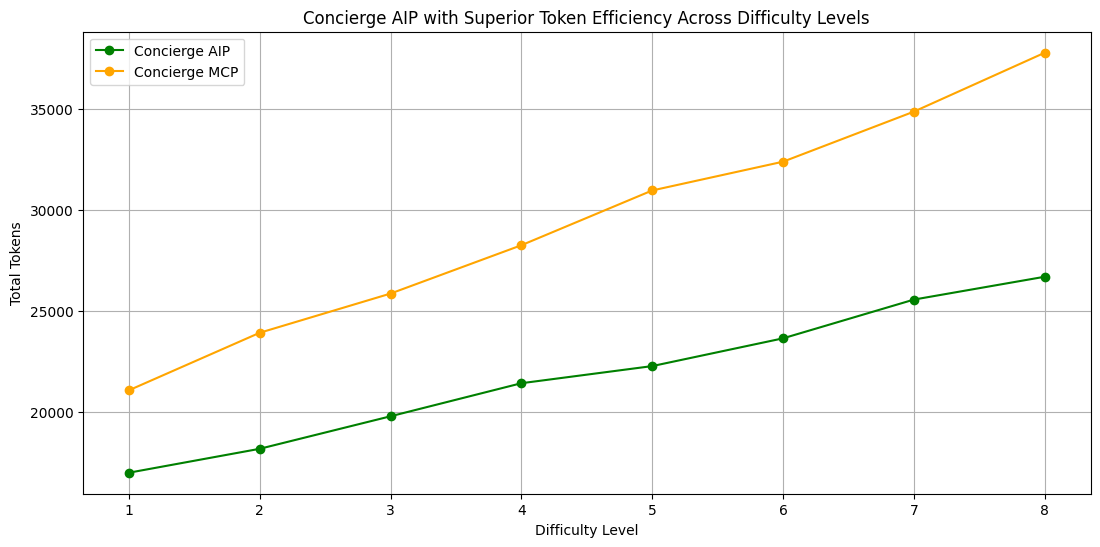
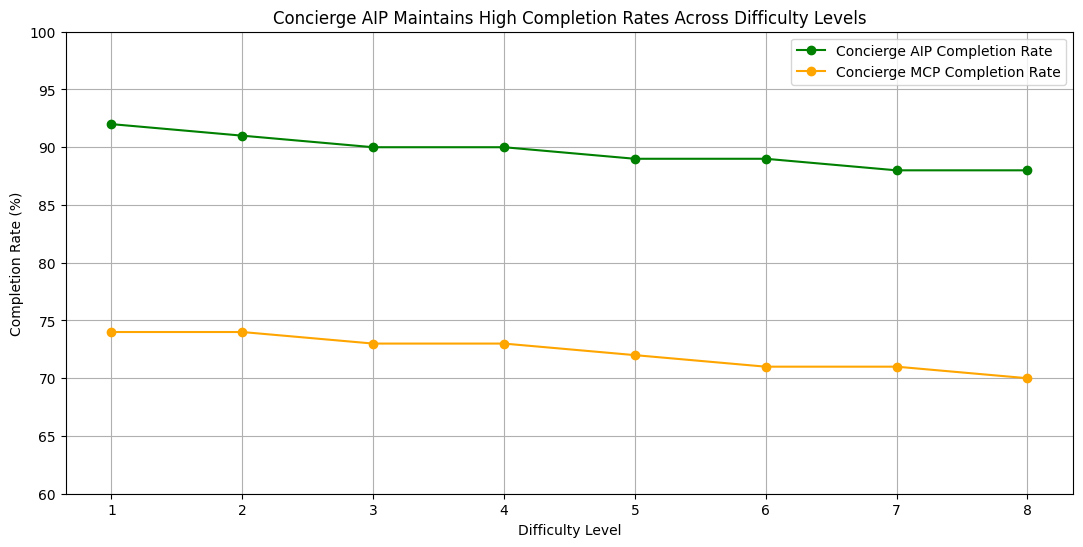
Concierge token efficiency across increasing difficulty levels of tasks.

## Quick Start
### 1. ChatGPT Apps
```bash
# Install MCP SDK
pip install openmcp-sdk
# Initialize with ChatGPT Apps support
openmcp init --chatgpt
# Deploy your service
openmcp deploy
```
Example: Interactive Applications rendering in ChatGPT
```python
from openmcp import OpenMCP
mcp = OpenMCP("my-app", stateless_http=True)
@mcp.widget(uri="widget://chart", html="Chart Widget
")
def show_chart(data: str):
"""Display a chart widget."""
return {"data": data}
```
Concierge OpenMCP provides it's own abstractions like `widgets` and OpenAI emulator that emulates the `window.openai` in the inspector enabling app creation in seconds.
Use https://getconcierge.app/docs to get started.
### 2. MCP Servers
```bash
# Install MCP Core
pip install openmcp-sdk
# Initialize your MCP project
openmcp init
# Deploy your service
openmcp deploy
```
Example: Convert your existing MCPs to OpenMCP
```python
from mcp.server.fastmcp import FastMCP
from openmcp import OpenMCP
# Enable OpenMCP on FastMCP
mcp = OpenMCP(FastMCP("my-server")) # 1 line replacement
@mcp.tool()
def get_user(user_id: int):
"""Get user by ID."""
return {"id": user_id, "name": "John"}
if __name__ == "__main__":
mcp.run()
```
Your existing MCP tools work unchanged. OpenMCP adds widget support, inspector debugging, and ChatGPT Apps compatibility.
Use https://getconcierge.app/docs to get started.
### 3. Concierge Multistage Workflows
```bash
# Install MCP Core with all features
pip install openmcp-sdk[all]
# Initialize concierge project
openmcp init
# Deploy with enhanced capabilities
openmcp deploy
```
Example: Enable OpenMCP Search Backend
```python
from openmcp import OpenMCP, Config, ProviderType
mcp = OpenMCP("my-app", config=Config(provider_type=ProviderType.SEARCH))
@mcp.tool()
def add(a: int, b: int):
"""Add two numbers together."""
return a + b
@mcp.tool()
def subtract(a: int, b: int):
"""Subtract b from a."""
return a - b
# Automatically adds search_tools and call_tool!
```
## Protocols Supported
| Protocol | Status | Description |
|-----------|---------|-------------|
| **AIP (Agentic Interactive Protocol)** | ✅ Supported | Concierge natively implements the Agentic Interactive Protocol (AIP) for connecting agents to web-exposed services. Tools are served dynamically, preventing model context bloat, saving cost and latency. |
| **MCP (Model Context Protocol)** | ✅ Supported | Now express Concierge workflows through MCP |
## Core Concepts
Developers define workflows with explicit rules and prerequisites. You control agent autonomy by specifying legal tasks at each stage and valid transitions between stages. For example: agents cannot checkout before adding items to cart. Concierge enforces these rules, validates prerequisites before task execution, and ensures agents follow your defined path through the application.

### **Tasks**
Tasks are the smallest granularity of callable business logic. Several tasks can be defined within 1 stage. Ensuring these tasks are avialable or callable at the stage.
```python
@task(description="Add product to shopping cart")
def add_to_cart(self, state: State, product_id: str, quantity: int) -> dict:
"""Adds item to cart and updates state"""
cart_items = state.get("cart.items", [])
cart_items.append({"product_id": product_id, "quantity": quantity})
state.set("cart.items", cart_items)
return {"success": True, "cart_size": len(cart_items)}
```
### **Stages**
A stage is a logical sub-step towards a goal, Stage can have several tasks grouped together, that an agent can call at a given point.
```python
@stage(name="product")
class ProductStage:
@task(description="Add product to shopping cart")
def add_to_cart(self, state: State, product_id: str, quantity: int) -> dict:
"""Adds item to cart"""
@task(description="Save product to wishlist")
def add_to_wishlist(self, state: State, product_id: str) -> dict:
"""Saves item for later"""
```
### **State**
A state is a global context that is maintained by Concierge, parts of which can get propagated to other stages as the agent transitions and navigates through stages.
```python
# State persists across stages and tasks
state.set("cart.items", [{"product_id": "123", "quantity": 2}])
state.set("user.email", "user@example.com")
state.set("cart.total", 99.99)
# Retrieve state values
items = state.get("cart.items", [])
user_email = state.get("user.email")
```
### **Workflow**
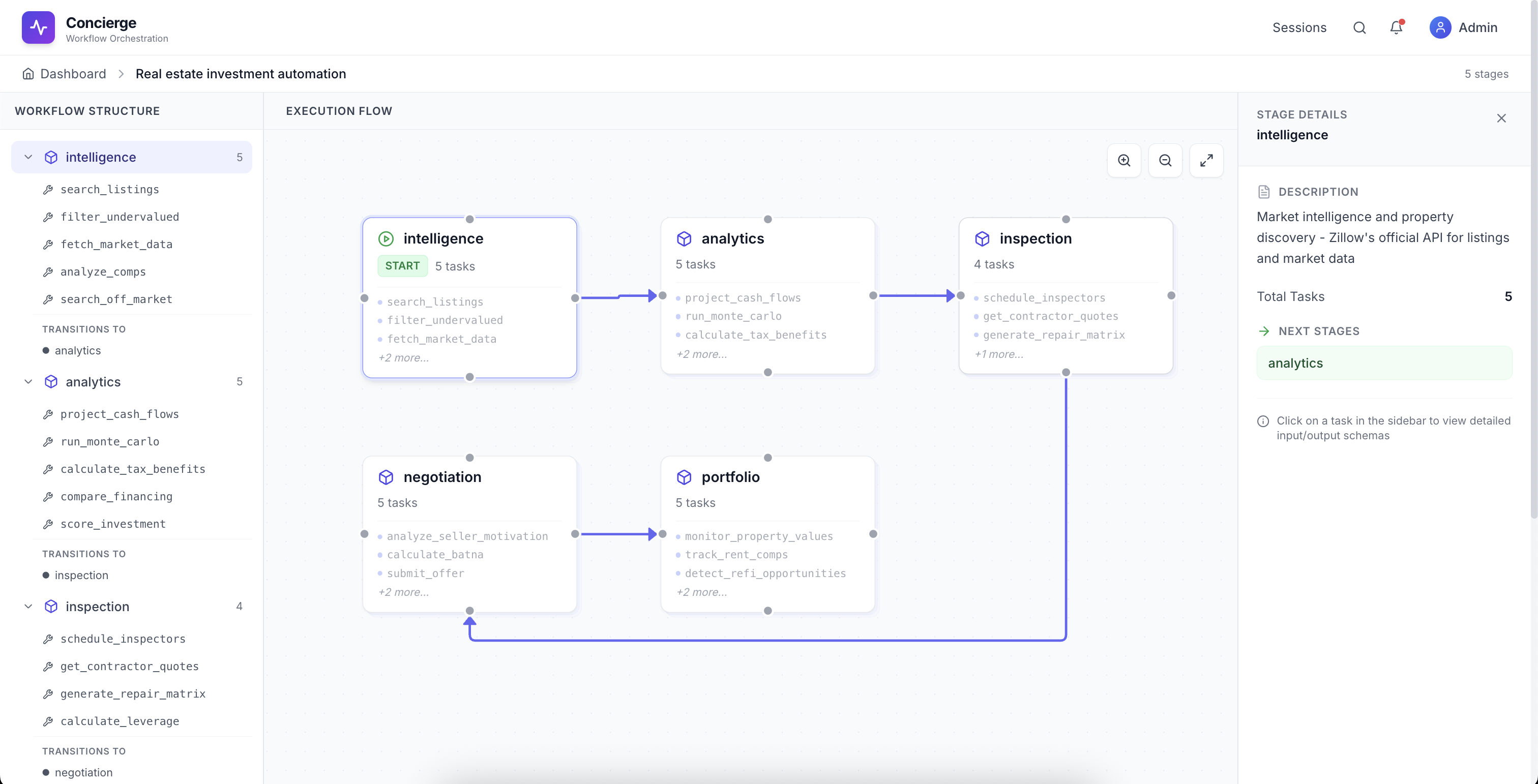
A workflow is a logic grouping of several stages, you can define graphs of stages which represent legal moves to other stages within workflow.
```python
@workflow(name="shopping")
class ShoppingWorkflow:
discovery = DiscoveryStage # Search and filter products
product = ProductStage # View product details
selection = SelectionStage # Add to cart/wishlist
cart = CartStage # Manage cart items
checkout = CheckoutStage # Complete purchase
transitions = {
discovery: [product, selection],
product: [selection, discovery],
selection: [cart, discovery, product],
cart: [checkout, selection, discovery],
checkout: []
}
```
**Dashboard**
## Examples
### Multi-Stage Workflow
```python
@workflow(name="amazon_shopping")
class AmazonShoppingWorkflow:
browse = BrowseStage # Search and filter products
select = SelectStage # Add items to cart
checkout = CheckoutStage # Complete transaction
transitions = {
browse: [select],
select: [browse, checkout],
checkout: []
}
```
### Stage with Tasks
```python
@stage(name="browse")
class BrowseStage:
@task(description="Search for products by keyword")
def search_products(self, state: State, query: str) -> dict:
"""Returns matching products"""
@task(description="Filter products by price range")
def filter_by_price(self, state: State, min_price: float, max_price: float) -> dict:
"""Filters current results by price"""
@task(description="Sort products by rating or price")
def sort_products(self, state: State, sort_by: str) -> dict:
"""Sorts: 'rating', 'price_low', 'price_high'"""
@stage(name="select")
class SelectStage:
@task(description="Add product to shopping cart")
def add_to_cart(self, state: State, product_id: str, quantity: int) -> dict:
"""Adds item to cart"""
@task(description="Save product to wishlist")
def add_to_wishlist(self, state: State, product_id: str) -> dict:
"""Saves item for later"""
@task(description="Star product for quick access")
def star_product(self, state: State, product_id: str) -> dict:
"""Stars item as favorite"""
@task(description="View product details")
def view_details(self, state: State, product_id: str) -> dict:
"""Shows full product information"""
```
### Prerequisites
```python
@stage(name="checkout", prerequisites=["cart.items", "user.payment_method"])
class CheckoutStage:
@task(description="Apply discount code")
def apply_discount(self, state: State, code: str) -> dict:
"""Validates and applies discount"""
@task(description="Complete purchase")
def complete_purchase(self, state: State) -> dict:
"""Processes payment and creates order"""
```
**We are building the agentic web. Come join us.**
Interested in contributing or building with Concierge? [Reach out](mailto:arnavbalyan1@gmail.com).
## Contributing
Contributions are welcome. Please open an issue or submit a pull request.