[](https://addons.mozilla.org/firefox/addon/clearurls/) [](https://microsoftedge.microsoft.com/addons/detail/mdkdmaickkfdekbjdoojfalpbkgaddei)
# ClearURLs
**ClearURLs** is an add-on based on the new WebExtensions technology and is optimized for *Firefox* and some *Chrome* based browsers.
This extension will automatically remove tracking elements from URLs to help protect your privacy when browsing the Internet,
which is regularly updated by us and can be found [here](https://gitlab.com/anti-tracking/ClearURLs/rules/-/raw/master/data.min.json).
## Application
Many websites use tracking elements in the URL (e.g. `https://example.com?utm_source=newsletter1&utm_medium=email&utm_campaign=sale`) to mark your online activity.
All that tracking code is not necessary for a website to be displayed or work correctly and can therefore be removed—that is exactly what ClearURLs does.
Another common example are Amazon URLs. If you search for a product on Amazon you will see a very long URL, such as:
```
https://www.amazon.com/dp/exampleProduct/ref=sxin_0_pb?__mk_de_DE=ÅMÅŽÕÑ&keywords=tea&pd_rd_i=exampleProduct&pd_rd_r=8d39e4cd-1e4f-43db-b6e7-72e969a84aa5&pd_rd_w=1pcKM&pd_rd_wg=hYrNl&pf_rd_p=50bbfd25-5ef7-41a2-68d6-74d854b30e30&pf_rd_r=0GMWD0YYKA7XFGX55ADP&qid=1517757263&rnid=2914120011
```
Indeed most of the above URL is tracking code. Once ClearURLs has cleaned the address, it will look like this:
`https://www.amazon.com/dp/exampleProduct`
## Features
* Removes tracking from URLs automatically in the background
* Blocks some common ad domains (optional)
* Has a built-in tool to clean up multiple URLs at once
* Supports redirection to the destination, without tracking services as middleman
* Adds an entry to the context menu so that links can be copied quickly and cleanly
* Blocks hyperlink auditing, also known as *ping tracking* (see also [this article](https://html.spec.whatwg.org/multipage/links.html#hyperlink-auditing))
* Prevents ETag tracking
* Prevents tracking injection over history API (see also: [The replaceState() method](https://developer.mozilla.org/en-US/docs/Web/API/History_API#The_replaceState()_method))
* Prevents Google from rewriting the search results (to include tracking elements)
* Prevents Yandex from rewriting the search results (to include tracking elements)
## Permissons
Reasoning for needed permissions can be found under [here](https://gitlab.com/ClearURLs/ClearUrls/issues/159).
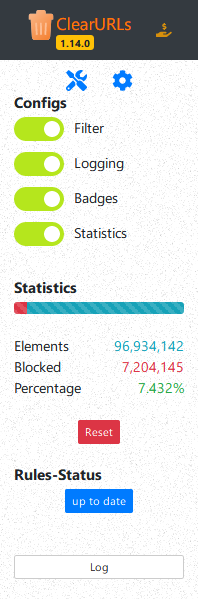
## Screenshot
## CI/CD Artifacts Download (for Firefox- and Chrome-Dev only)
Here you can download the packed files for the Firefox- and Chrome-Dev:
- [ClearURLs.zip](https://gitlab.com/ClearURLs/ClearUrls/-/jobs/artifacts/master/raw/ClearURLs.zip?job=bundle%20addon)
## Test
If you want to test whether ClearURLs works correctly on your system, you can go to this test page: [https://test.clearurls.xyz/](https://test.clearurls.xyz/)
## Contribute
If you have any suggestions or complaints, please [create an issue.](https://gitlab.com/ClearURLs/ClearUrls/issues/new)
**Note: If you have any suggestions or complaints regarding the rules, please [create an issue in this repo](https://gitlab.com/anti-tracking/ClearURLs/rules/-/issues/new) or email us rules.support (at) clearurls.xyz (this mail will automatically create a new issue in this repo).**
### Translate ClearURLs
You want to help translating ClearURLs into many languages? – Nice
You can choose between two options to contribute. You can create a merge request, or you can use the POEditor to translate ClearURLs.
*Hint: The description field in the translation files are only an information for what the translation is used.
It is not necessary to translate the description field; in the most cases it is empty.*
#### Merge request
If you want to create a merge request, you must open the path [`_locales/en/messages.json`](https://gitlab.com/ClearURLs/ClearUrls/-/blob/master/_locales/en/messages.json) in the ClearURLs repo
and translate the english terms into terms of your language. Once you have translated all the terms, you make a pull request of your translation.
Please push your translation into the folder `_locales/{language code}/messages.json`.
#### POEditor
[](https://poeditor.com/join/project/vKTpQWWvk2)
## Projects that use parts of ClearURLs
* [Uroute](https://github.com/walterl/uroute) used ClearURLs to filter/clean URL before launching browser
* [Scrub](https://gitlab.com/CrunchBangDev/cbd-cogs/-/tree/master/Scrub) used ClearURLs to filter/clean URLs as cog for the Red Discord bot
* [Unalix](https://github.com/AmanoTeam/Unalix) small, dependency-free, fast Python package for removing tracking fields from URLs
* [Unalix-nim](https://github.com/AmanoTeam/Unalix-nim) small, dependency-free, fast Nim package and CLI tool for removing tracking fields from URLs
* [UnalixAndroid](https://github.com/AmanoTeam/UnalixAndroid) simple Android app that removes link masking/tracking and optionally resolves shortened links
* [pl-fe](https://github.com/mkljczk/pl-fe) is a Fediverse client which uses ClearURLs code to clean URLs from displayed posts and recommend cleaning URLs from created posts
* [URLCheck](https://github.com/TrianguloY/URLCheck) is an Android app to review and edit URLs before opening them. Allows to use the ClearURLs catalog.
## Recommended by...
* [ghacks-user.js](https://github.com/ghacksuserjs/ghacks-user.js/wiki/4.1-Extensions)
* [Awesome Humane Tech List](https://github.com/humanetech-community/awesome-humane-tech#tracking)
* [PrivacyTools](https://www.privacytools.io/browsers/#addons)
* [New York Times Wirecutter](https://www.nytimes.com/wirecutter/reviews/our-favorite-ad-blockers-and-browser-extensions-to-protect-privacy/#cleaner-links-clearurls)
* ClearURLs is part of Mozilla's recommended extensions program
## Permissions
Reasoning for needed permissions you can find under [this wiki page](https://docs.clearurls.xyz/latest/permissions/).
## Copyright
We use some third-party scripts in our add-on. The authors and licenses are listed below.
- [WebExtension browser API Polyfill](https://github.com/mozilla/webextension-polyfill) |
Copyright by Mozilla |
[MPL-2.0](https://github.com/mozilla/webextension-polyfill/blob/master/LICENSE)
- [Bootstrap](https://github.com/twbs/bootstrap) |
Copyright 2011-2016 Twitter, Inc. |
[MIT](https://github.com/twbs/bootstrap/blob/master/LICENSE)
- [jQuery](https://github.com/jquery/jquery/) |
Copyright JS Foundation and other contributors |
[MIT](https://jquery.org/license/)
- [DataTables](https://github.com/DataTables/DataTables/tree/master) | Copyright (c) 2008-2015 SpryMedia Limited | [MIT](https://datatables.net/license/)
- [Pickr](https://github.com/Simonwep/pickr/) | Copyright (c) 2018 - 2020 Simon Reinisch |
[MIT](https://github.com/Simonwep/pickr/blob/master/LICENSE)
- [Font Awesome](https://github.com/FortAwesome/Font-Awesome/) | Copyright (c) @fontawesome |
[Font Awesome Free License](https://github.com/FortAwesome/Font-Awesome/blob/master/LICENSE.txt)
## Star History

 [
[ ](https://addons.mozilla.org/firefox/addon/clearurls/) [
 ](https://microsoftedge.microsoft.com/addons/detail/mdkdmaickkfdekbjdoojfalpbkgaddei)
#
](https://microsoftedge.microsoft.com/addons/detail/mdkdmaickkfdekbjdoojfalpbkgaddei)
#  ClearURLs
**ClearURLs** is an add-on based on the new WebExtensions technology and is optimized for *Firefox* and some *Chrome* based browsers.
This extension will automatically remove tracking elements from URLs to help protect your privacy when browsing the Internet,
which is regularly updated by us and can be found [here](https://gitlab.com/anti-tracking/ClearURLs/rules/-/raw/master/data.min.json).
## Application
Many websites use tracking elements in the URL (e.g. `https://example.com?utm_source=newsletter1&utm_medium=email&utm_campaign=sale`) to mark your online activity.
All that tracking code is not necessary for a website to be displayed or work correctly and can therefore be removed—that is exactly what ClearURLs does.
Another common example are Amazon URLs. If you search for a product on Amazon you will see a very long URL, such as:
```
https://www.amazon.com/dp/exampleProduct/ref=sxin_0_pb?__mk_de_DE=ÅMÅŽÕÑ&keywords=tea&pd_rd_i=exampleProduct&pd_rd_r=8d39e4cd-1e4f-43db-b6e7-72e969a84aa5&pd_rd_w=1pcKM&pd_rd_wg=hYrNl&pf_rd_p=50bbfd25-5ef7-41a2-68d6-74d854b30e30&pf_rd_r=0GMWD0YYKA7XFGX55ADP&qid=1517757263&rnid=2914120011
```
Indeed most of the above URL is tracking code. Once ClearURLs has cleaned the address, it will look like this:
`https://www.amazon.com/dp/exampleProduct`
## Features
* Removes tracking from URLs automatically in the background
* Blocks some common ad domains (optional)
* Has a built-in tool to clean up multiple URLs at once
* Supports redirection to the destination, without tracking services as middleman
* Adds an entry to the context menu so that links can be copied quickly and cleanly
* Blocks hyperlink auditing, also known as *ping tracking* (see also [this article](https://html.spec.whatwg.org/multipage/links.html#hyperlink-auditing))
* Prevents ETag tracking
* Prevents tracking injection over history API (see also: [The replaceState() method](https://developer.mozilla.org/en-US/docs/Web/API/History_API#The_replaceState()_method))
* Prevents Google from rewriting the search results (to include tracking elements)
* Prevents Yandex from rewriting the search results (to include tracking elements)
## Permissons
Reasoning for needed permissions can be found under [here](https://gitlab.com/ClearURLs/ClearUrls/issues/159).
## Screenshot

## CI/CD Artifacts Download (for Firefox- and Chrome-Dev only)
Here you can download the packed files for the Firefox- and Chrome-Dev:
- [ClearURLs.zip](https://gitlab.com/ClearURLs/ClearUrls/-/jobs/artifacts/master/raw/ClearURLs.zip?job=bundle%20addon)
## Test
If you want to test whether ClearURLs works correctly on your system, you can go to this test page: [https://test.clearurls.xyz/](https://test.clearurls.xyz/)
## Contribute
If you have any suggestions or complaints, please [create an issue.](https://gitlab.com/ClearURLs/ClearUrls/issues/new)
**Note: If you have any suggestions or complaints regarding the rules, please [create an issue in this repo](https://gitlab.com/anti-tracking/ClearURLs/rules/-/issues/new) or email us rules.support (at) clearurls.xyz (this mail will automatically create a new issue in this repo).**
### Translate ClearURLs
You want to help translating ClearURLs into many languages? – Nice
You can choose between two options to contribute. You can create a merge request, or you can use the POEditor to translate ClearURLs.
*Hint: The description field in the translation files are only an information for what the translation is used.
It is not necessary to translate the description field; in the most cases it is empty.*
#### Merge request
If you want to create a merge request, you must open the path [`_locales/en/messages.json`](https://gitlab.com/ClearURLs/ClearUrls/-/blob/master/_locales/en/messages.json) in the ClearURLs repo
and translate the english terms into terms of your language. Once you have translated all the terms, you make a pull request of your translation.
Please push your translation into the folder `_locales/{language code}/messages.json`.
#### POEditor
[
ClearURLs
**ClearURLs** is an add-on based on the new WebExtensions technology and is optimized for *Firefox* and some *Chrome* based browsers.
This extension will automatically remove tracking elements from URLs to help protect your privacy when browsing the Internet,
which is regularly updated by us and can be found [here](https://gitlab.com/anti-tracking/ClearURLs/rules/-/raw/master/data.min.json).
## Application
Many websites use tracking elements in the URL (e.g. `https://example.com?utm_source=newsletter1&utm_medium=email&utm_campaign=sale`) to mark your online activity.
All that tracking code is not necessary for a website to be displayed or work correctly and can therefore be removed—that is exactly what ClearURLs does.
Another common example are Amazon URLs. If you search for a product on Amazon you will see a very long URL, such as:
```
https://www.amazon.com/dp/exampleProduct/ref=sxin_0_pb?__mk_de_DE=ÅMÅŽÕÑ&keywords=tea&pd_rd_i=exampleProduct&pd_rd_r=8d39e4cd-1e4f-43db-b6e7-72e969a84aa5&pd_rd_w=1pcKM&pd_rd_wg=hYrNl&pf_rd_p=50bbfd25-5ef7-41a2-68d6-74d854b30e30&pf_rd_r=0GMWD0YYKA7XFGX55ADP&qid=1517757263&rnid=2914120011
```
Indeed most of the above URL is tracking code. Once ClearURLs has cleaned the address, it will look like this:
`https://www.amazon.com/dp/exampleProduct`
## Features
* Removes tracking from URLs automatically in the background
* Blocks some common ad domains (optional)
* Has a built-in tool to clean up multiple URLs at once
* Supports redirection to the destination, without tracking services as middleman
* Adds an entry to the context menu so that links can be copied quickly and cleanly
* Blocks hyperlink auditing, also known as *ping tracking* (see also [this article](https://html.spec.whatwg.org/multipage/links.html#hyperlink-auditing))
* Prevents ETag tracking
* Prevents tracking injection over history API (see also: [The replaceState() method](https://developer.mozilla.org/en-US/docs/Web/API/History_API#The_replaceState()_method))
* Prevents Google from rewriting the search results (to include tracking elements)
* Prevents Yandex from rewriting the search results (to include tracking elements)
## Permissons
Reasoning for needed permissions can be found under [here](https://gitlab.com/ClearURLs/ClearUrls/issues/159).
## Screenshot

## CI/CD Artifacts Download (for Firefox- and Chrome-Dev only)
Here you can download the packed files for the Firefox- and Chrome-Dev:
- [ClearURLs.zip](https://gitlab.com/ClearURLs/ClearUrls/-/jobs/artifacts/master/raw/ClearURLs.zip?job=bundle%20addon)
## Test
If you want to test whether ClearURLs works correctly on your system, you can go to this test page: [https://test.clearurls.xyz/](https://test.clearurls.xyz/)
## Contribute
If you have any suggestions or complaints, please [create an issue.](https://gitlab.com/ClearURLs/ClearUrls/issues/new)
**Note: If you have any suggestions or complaints regarding the rules, please [create an issue in this repo](https://gitlab.com/anti-tracking/ClearURLs/rules/-/issues/new) or email us rules.support (at) clearurls.xyz (this mail will automatically create a new issue in this repo).**
### Translate ClearURLs
You want to help translating ClearURLs into many languages? – Nice
You can choose between two options to contribute. You can create a merge request, or you can use the POEditor to translate ClearURLs.
*Hint: The description field in the translation files are only an information for what the translation is used.
It is not necessary to translate the description field; in the most cases it is empty.*
#### Merge request
If you want to create a merge request, you must open the path [`_locales/en/messages.json`](https://gitlab.com/ClearURLs/ClearUrls/-/blob/master/_locales/en/messages.json) in the ClearURLs repo
and translate the english terms into terms of your language. Once you have translated all the terms, you make a pull request of your translation.
Please push your translation into the folder `_locales/{language code}/messages.json`.
#### POEditor
[ ](https://poeditor.com/join/project/vKTpQWWvk2)
## Projects that use parts of ClearURLs
* [Uroute](https://github.com/walterl/uroute) used ClearURLs to filter/clean URL before launching browser
* [Scrub](https://gitlab.com/CrunchBangDev/cbd-cogs/-/tree/master/Scrub) used ClearURLs to filter/clean URLs as cog for the Red Discord bot
* [Unalix](https://github.com/AmanoTeam/Unalix) small, dependency-free, fast Python package for removing tracking fields from URLs
* [Unalix-nim](https://github.com/AmanoTeam/Unalix-nim) small, dependency-free, fast Nim package and CLI tool for removing tracking fields from URLs
* [UnalixAndroid](https://github.com/AmanoTeam/UnalixAndroid) simple Android app that removes link masking/tracking and optionally resolves shortened links
* [pl-fe](https://github.com/mkljczk/pl-fe) is a Fediverse client which uses ClearURLs code to clean URLs from displayed posts and recommend cleaning URLs from created posts
* [URLCheck](https://github.com/TrianguloY/URLCheck) is an Android app to review and edit URLs before opening them. Allows to use the ClearURLs catalog.
## Recommended by...
* [ghacks-user.js](https://github.com/ghacksuserjs/ghacks-user.js/wiki/4.1-Extensions)
* [Awesome Humane Tech List](https://github.com/humanetech-community/awesome-humane-tech#tracking)
* [PrivacyTools](https://www.privacytools.io/browsers/#addons)
* [New York Times Wirecutter](https://www.nytimes.com/wirecutter/reviews/our-favorite-ad-blockers-and-browser-extensions-to-protect-privacy/#cleaner-links-clearurls)
* ClearURLs is part of Mozilla's recommended extensions program
## Permissions
Reasoning for needed permissions you can find under [this wiki page](https://docs.clearurls.xyz/latest/permissions/).
## Copyright
We use some third-party scripts in our add-on. The authors and licenses are listed below.
- [WebExtension browser API Polyfill](https://github.com/mozilla/webextension-polyfill) |
Copyright by Mozilla |
[MPL-2.0](https://github.com/mozilla/webextension-polyfill/blob/master/LICENSE)
- [Bootstrap](https://github.com/twbs/bootstrap) |
Copyright 2011-2016 Twitter, Inc. |
[MIT](https://github.com/twbs/bootstrap/blob/master/LICENSE)
- [jQuery](https://github.com/jquery/jquery/) |
Copyright JS Foundation and other contributors |
[MIT](https://jquery.org/license/)
- [DataTables](https://github.com/DataTables/DataTables/tree/master) | Copyright (c) 2008-2015 SpryMedia Limited | [MIT](https://datatables.net/license/)
- [Pickr](https://github.com/Simonwep/pickr/) | Copyright (c) 2018 - 2020 Simon Reinisch |
[MIT](https://github.com/Simonwep/pickr/blob/master/LICENSE)
- [Font Awesome](https://github.com/FortAwesome/Font-Awesome/) | Copyright (c) @fontawesome |
[Font Awesome Free License](https://github.com/FortAwesome/Font-Awesome/blob/master/LICENSE.txt)
## Star History
](https://poeditor.com/join/project/vKTpQWWvk2)
## Projects that use parts of ClearURLs
* [Uroute](https://github.com/walterl/uroute) used ClearURLs to filter/clean URL before launching browser
* [Scrub](https://gitlab.com/CrunchBangDev/cbd-cogs/-/tree/master/Scrub) used ClearURLs to filter/clean URLs as cog for the Red Discord bot
* [Unalix](https://github.com/AmanoTeam/Unalix) small, dependency-free, fast Python package for removing tracking fields from URLs
* [Unalix-nim](https://github.com/AmanoTeam/Unalix-nim) small, dependency-free, fast Nim package and CLI tool for removing tracking fields from URLs
* [UnalixAndroid](https://github.com/AmanoTeam/UnalixAndroid) simple Android app that removes link masking/tracking and optionally resolves shortened links
* [pl-fe](https://github.com/mkljczk/pl-fe) is a Fediverse client which uses ClearURLs code to clean URLs from displayed posts and recommend cleaning URLs from created posts
* [URLCheck](https://github.com/TrianguloY/URLCheck) is an Android app to review and edit URLs before opening them. Allows to use the ClearURLs catalog.
## Recommended by...
* [ghacks-user.js](https://github.com/ghacksuserjs/ghacks-user.js/wiki/4.1-Extensions)
* [Awesome Humane Tech List](https://github.com/humanetech-community/awesome-humane-tech#tracking)
* [PrivacyTools](https://www.privacytools.io/browsers/#addons)
* [New York Times Wirecutter](https://www.nytimes.com/wirecutter/reviews/our-favorite-ad-blockers-and-browser-extensions-to-protect-privacy/#cleaner-links-clearurls)
* ClearURLs is part of Mozilla's recommended extensions program
## Permissions
Reasoning for needed permissions you can find under [this wiki page](https://docs.clearurls.xyz/latest/permissions/).
## Copyright
We use some third-party scripts in our add-on. The authors and licenses are listed below.
- [WebExtension browser API Polyfill](https://github.com/mozilla/webextension-polyfill) |
Copyright by Mozilla |
[MPL-2.0](https://github.com/mozilla/webextension-polyfill/blob/master/LICENSE)
- [Bootstrap](https://github.com/twbs/bootstrap) |
Copyright 2011-2016 Twitter, Inc. |
[MIT](https://github.com/twbs/bootstrap/blob/master/LICENSE)
- [jQuery](https://github.com/jquery/jquery/) |
Copyright JS Foundation and other contributors |
[MIT](https://jquery.org/license/)
- [DataTables](https://github.com/DataTables/DataTables/tree/master) | Copyright (c) 2008-2015 SpryMedia Limited | [MIT](https://datatables.net/license/)
- [Pickr](https://github.com/Simonwep/pickr/) | Copyright (c) 2018 - 2020 Simon Reinisch |
[MIT](https://github.com/Simonwep/pickr/blob/master/LICENSE)
- [Font Awesome](https://github.com/FortAwesome/Font-Awesome/) | Copyright (c) @fontawesome |
[Font Awesome Free License](https://github.com/FortAwesome/Font-Awesome/blob/master/LICENSE.txt)
## Star History