# UE Asset Toolkit
[](https://github.com/bradenleague/UE-Agent-Asset-Toolkit/actions/workflows/test.yml)
[](LICENSE)
An MCP server that lets AI coding agents inspect Unreal Engine assets without launching the Editor. Parses `.uasset` binaries directly, builds a search index, and exposes two tools — `unreal_search` and `inspect_asset` — over MCP.
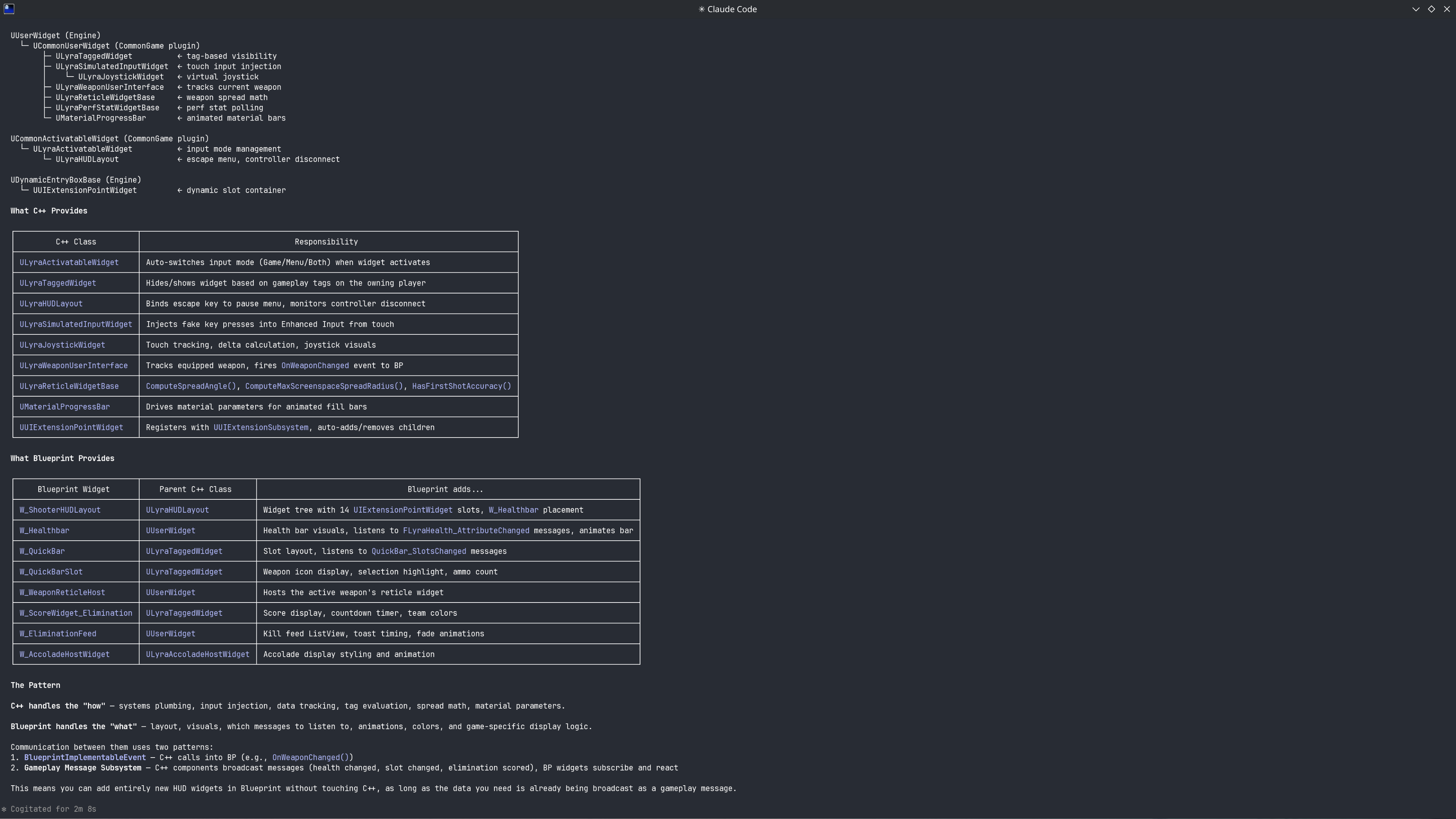
### In Action (Lyra Starter Game)



## Requirements
- .NET 8 SDK or later (for the C# asset parser)
- Python 3.10+
## Installation
```bash
git clone --recursive https://github.com/bradenleague/UE-Agent-Asset-Toolkit
cd UE-Agent-Asset-Toolkit
python -m venv .venv
source .venv/bin/activate # macOS/Linux
# .venv\Scripts\activate # Windows
pip install -e .
```
This installs two CLI entry points:
- `unreal-agent-toolkit` — index management
- `unreal-agent-mcp` — MCP server
Note: the `UAssetAPI` submodule is ~70MB, so the initial clone can take a minute. For build details, see [CONTRIBUTING.md](CONTRIBUTING.md).
### Optional dependencies
```bash
pip install -e ".[embeddings]" # vector embeddings (sentence-transformers)
pip install -e ".[dev]" # pytest + coverage
```
## Quick Start
```bash
# 1. Build the parser and configure your project
python setup.py /path/to/YourProject.uproject
# 2. Build the search index
unreal-agent-toolkit
# 3. Connect to your MCP client (see below)
```
`setup.py` builds the C# parser, installs Python packages, and registers your `.uproject`. Add `--index` to combine steps 1 and 2.
## MCP Client Setup
Register the server in your MCP client config:
```json
{
"mcpServers": {
"unreal": {
"command": "unreal-agent-mcp"
}
}
}
```
If you didn't `pip install -e .`, use the full Python path instead:
```json
{
"mcpServers": {
"unreal": {
"command": "/path/to/.venv/bin/python",
"args": ["/path/to/UE-Agent-Asset-Toolkit/unreal_agent/mcp_server.py"]
}
}
}
```
See [`mcp-config.example.json`](mcp-config.example.json) for a copy-paste template.
## MCP Tools
### `unreal_search`
Search assets and C++ source code. The search mode is auto-detected:
| Query | Mode |
|-------|------|
| `"BP_Player"` | Exact name match |
| `"player health widget"` | Semantic / full-text search |
| `"where is BP_Enemy used"` | Reference search |
| `"inherits:LyraGameplayAbility"` | Inheritance search |
| `"tag:Ability.Melee.*"` | GameplayTag search |
### `inspect_asset`
Returns structured data for a specific asset:
- **Blueprint**: parent class, components, functions, variables, graph
- **WidgetBlueprint**: widget tree hierarchy, bindings
- **Material**: parameters (scalar, vector, texture), domain
- **DataTable**: row structure, columns, sample data
## Indexing
```bash
unreal-agent-toolkit # full index (default)
unreal-agent-toolkit --plugins # include plugin content
unreal-agent-toolkit --plugins --embed # + vector embeddings
unreal-agent-toolkit --source # C++ source (UCLASS, UPROPERTY)
unreal-agent-toolkit --profile quick # high-value types only
unreal-agent-toolkit --path UI # only Content/UI/
unreal-agent-toolkit --force # re-index everything
unreal-agent-toolkit --status # show index stats
```
The `--path` option uses Unreal virtual paths (`UI` maps to `Content/UI/`).
## Multi-Project Setup
```bash
unreal-agent-toolkit add "/path/to/MyGame.uproject"
unreal-agent-toolkit list
unreal-agent-toolkit use mygame
```
Each project gets an isolated SQLite database at `unreal_agent/data/.db`.
## Architecture
```
MCP Client (Claude Desktop, Claude Code, etc.)
│
▼
MCP Server (Python, stdio)
├── unreal_search → SQLite FTS5 index
└── inspect_asset → C# AssetParser → .uasset binaries
```
The C# parser ([UAssetAPI](https://github.com/atenfyr/UAssetAPI)) reads `.uasset` files directly. The Python layer builds an FTS5 search index and serves results over MCP.
## Known Limitations
- **Read-only** — cannot modify assets
- **UE version coverage** — tested against UE 5.5; newer versions may have unsupported formats
- **Type detection** — uses naming conventions (BP_, WBP_, DT_) by default; create a profile in `unreal_agent/profiles/` for project-specific types
## License
- **AssetParser / unreal_agent**: MIT
- **UAssetAPI**: See [UAssetAPI/LICENSE](UAssetAPI/LICENSE)