> [!IMPORTANT]
>
> `master主分支`最新动态(2026.1.25): 新GUI前端测试中,Coming Soon
> `master主分支`最新动态(2025.8.23): Dockerfile构建效率大幅优化
> 2025.2.2: 三分钟快速接入最强qwen2.5-max[视频](https://www.bilibili.com/video/BV1LeFuerEG4)
> 2025.2.1: 支持自定义字体
> 2024.10.10: 突发停电,紧急恢复了提供[whl包](https://drive.google.com/drive/folders/14kR-3V-lIbvGxri4AHc8TpiA1fqsw7SK?usp=sharing)的文件服务器
> 2024.5.1: 加入Doc2x翻译PDF论文的功能,[查看详情](https://github.com/binary-husky/gpt_academic/wiki/Doc2x)
> 2024.3.11: 全力支持Qwen、GLM、DeepseekCoder等中文大语言模型! SoVits语音克隆模块,[查看详情](https://www.bilibili.com/video/BV1Rp421S7tF/)
> 2024.1.17: 安装依赖时,请选择`requirements.txt`中**指定的版本**。 安装命令:`pip install -r requirements.txt`。
 GPT 学术优化 (GPT Academic)
[![Github][Github-image]][Github-url]
[![License][License-image]][License-url]
[![Releases][Releases-image]][Releases-url]
[![Installation][Installation-image]][Installation-url]
[![Wiki][Wiki-image]][Wiki-url]
[![PR][PRs-image]][PRs-url]
[Github-image]: https://img.shields.io/badge/github-12100E.svg?style=flat-square
[License-image]: https://img.shields.io/github/license/binary-husky/gpt_academic?label=License&style=flat-square&color=orange
[Releases-image]: https://img.shields.io/github/release/binary-husky/gpt_academic?label=Release&style=flat-square&color=blue
[Installation-image]: https://img.shields.io/badge/dynamic/json?color=blue&url=https://raw.githubusercontent.com/binary-husky/gpt_academic/master/version&query=$.version&label=Installation&style=flat-square
[Wiki-image]: https://img.shields.io/badge/wiki-项目文档-black?style=flat-square
[PRs-image]: https://img.shields.io/badge/PRs-welcome-pink?style=flat-square
[Github-url]: https://github.com/binary-husky/gpt_academic
[License-url]: https://github.com/binary-husky/gpt_academic/blob/master/LICENSE
[Releases-url]: https://github.com/binary-husky/gpt_academic/releases
[Installation-url]: https://github.com/binary-husky/gpt_academic#installation
[Wiki-url]: https://github.com/binary-husky/gpt_academic/wiki
[PRs-url]: https://github.com/binary-husky/gpt_academic/pulls
**如果喜欢这个项目,请给它一个Star;如果您发明了好用的快捷键或插件,欢迎发pull requests!**
If you like this project, please give it a Star.
Read this in [English](docs/README.English.md) | [日本語](docs/README.Japanese.md) | [한국어](docs/README.Korean.md) | [Русский](docs/README.Russian.md) | [Français](docs/README.French.md). All translations have been provided by the project itself. To translate this project to arbitrary language with GPT, read and run [`multi_language.py`](multi_language.py) (experimental).
> [!NOTE]
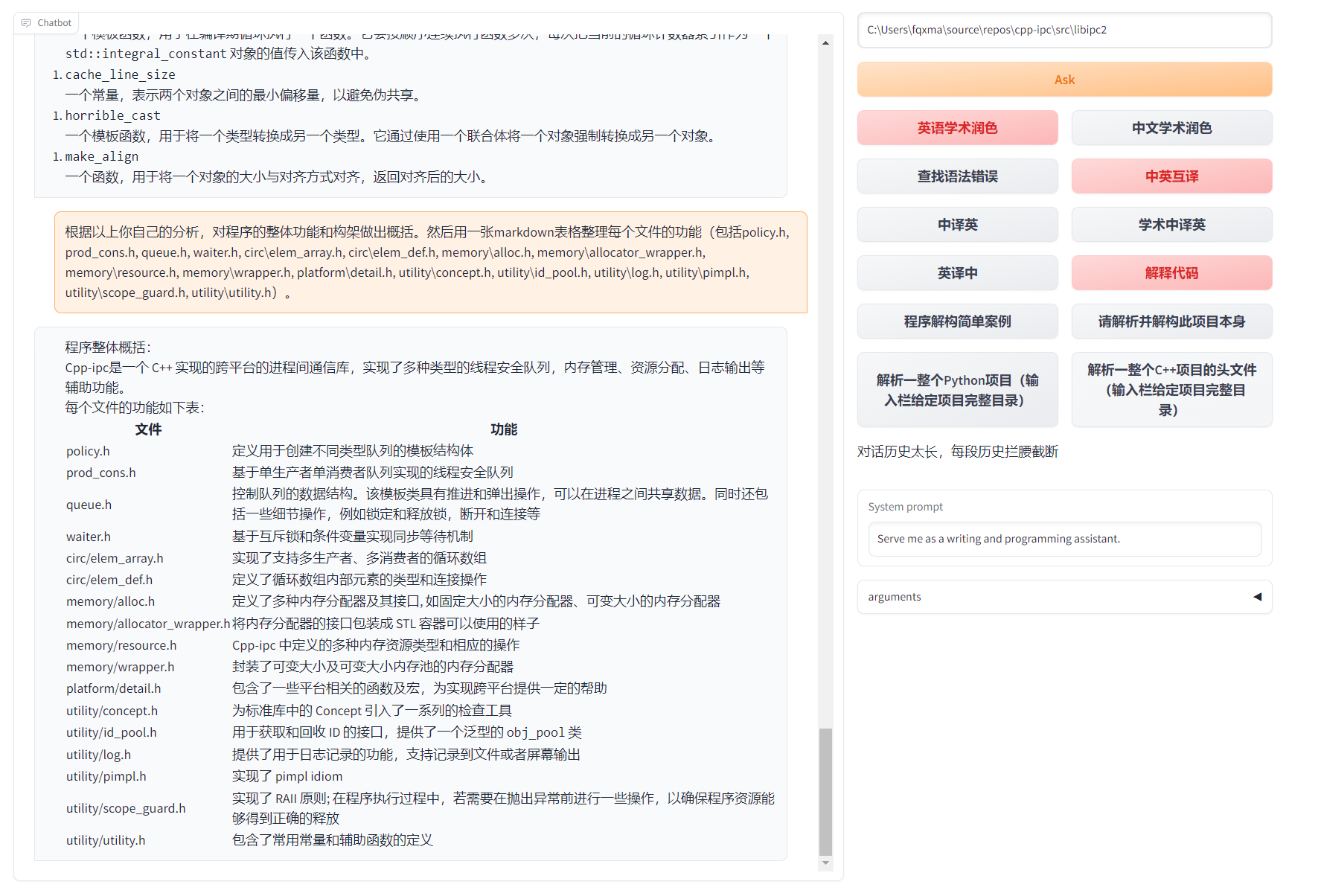
> 1.本项目中每个文件的功能都在[自译解报告](https://github.com/binary-husky/gpt_academic/wiki/GPT‐Academic项目自译解报告)`self_analysis.md`详细说明。随着版本的迭代,您也可以随时自行点击相关函数插件,调用GPT重新生成项目的自我解析报告。常见问题请查阅wiki。
> [](#installation) [](https://github.com/binary-husky/gpt_academic/releases) [](https://github.com/binary-husky/gpt_academic/wiki/项目配置说明) []([https://github.com/binary-husky/gpt_academic/wiki/项目配置说明](https://github.com/binary-husky/gpt_academic/wiki))
>
> 2.本项目兼容并鼓励尝试国内中文大语言基座模型如通义千问,智谱GLM等。支持多个api-key共存,可在配置文件中填写如`API_KEY="openai-key1,openai-key2,azure-key3,api2d-key4"`。需要临时更换`API_KEY`时,在输入区输入临时的`API_KEY`然后回车键提交即可生效。
功能(⭐= 近期新增功能) | 描述
--- | ---
⭐[接入新模型](https://github.com/binary-husky/gpt_academic/wiki/%E5%A6%82%E4%BD%95%E5%88%87%E6%8D%A2%E6%A8%A1%E5%9E%8B) | 百度[千帆](https://cloud.baidu.com/doc/WENXINWORKSHOP/s/Nlks5zkzu)与文心一言, 通义千问[Qwen](https://modelscope.cn/models/qwen/Qwen-7B-Chat/summary),上海AI-Lab[书生](https://github.com/InternLM/InternLM),讯飞[星火](https://xinghuo.xfyun.cn/),[LLaMa2](https://huggingface.co/meta-llama/Llama-2-7b-chat-hf),[智谱GLM4](https://open.bigmodel.cn/),DALLE3, [DeepseekCoder](https://coder.deepseek.com/)
⭐支持mermaid图像渲染 | 支持让GPT生成[流程图](https://www.bilibili.com/video/BV18c41147H9/)、状态转移图、甘特图、饼状图、GitGraph等等(3.7版本)
⭐Arxiv论文精细翻译 ([Docker](https://github.com/binary-husky/gpt_academic/pkgs/container/gpt_academic_with_latex)) | [插件] 一键[以超高质量翻译arxiv论文](https://www.bilibili.com/video/BV1dz4y1v77A/),目前最好的论文翻译工具
⭐[实时语音对话输入](https://github.com/binary-husky/gpt_academic/blob/master/docs/use_audio.md) | [插件] 异步[监听音频](https://www.bilibili.com/video/BV1AV4y187Uy/),自动断句,自动寻找回答时机
⭐虚空终端插件 | [插件] 能够使用自然语言直接调度本项目其他插件
润色、翻译、代码解释 | 一键润色、翻译、查找论文语法错误、解释代码
[自定义快捷键](https://www.bilibili.com/video/BV14s4y1E7jN) | 支持自定义快捷键
模块化设计 | 支持自定义强大的[插件](https://github.com/binary-husky/gpt_academic/tree/master/crazy_functions),插件支持[热更新](https://github.com/binary-husky/gpt_academic/wiki/%E5%87%BD%E6%95%B0%E6%8F%92%E4%BB%B6%E6%8C%87%E5%8D%97)
[程序剖析](https://www.bilibili.com/video/BV1cj411A7VW) | [插件] 一键剖析Python/C/C++/Java/Lua/...项目树 或 [自我剖析](https://www.bilibili.com/video/BV1cj411A7VW)
读论文、[翻译](https://www.bilibili.com/video/BV1KT411x7Wn)论文 | [插件] 一键解读latex/pdf论文全文并生成摘要
Latex全文[翻译](https://www.bilibili.com/video/BV1nk4y1Y7Js/)、[润色](https://www.bilibili.com/video/BV1FT411H7c5/) | [插件] 一键翻译或润色latex论文
批量注释生成 | [插件] 一键批量生成函数注释
Markdown[中英互译](https://www.bilibili.com/video/BV1yo4y157jV/) | [插件] 看到上面5种语言的[README](https://github.com/binary-husky/gpt_academic/blob/master/docs/README.English.md)了吗?就是出自他的手笔
[PDF论文全文翻译功能](https://www.bilibili.com/video/BV1KT411x7Wn) | [插件] PDF论文提取题目&摘要+翻译全文(多线程)
[Arxiv小助手](https://www.bilibili.com/video/BV1LM4y1279X) | [插件] 输入arxiv文章url即可一键翻译摘要+下载PDF
Latex论文一键校对 | [插件] 仿Grammarly对Latex文章进行语法、拼写纠错+输出对照PDF
[谷歌学术统合小助手](https://www.bilibili.com/video/BV19L411U7ia) | [插件] 给定任意谷歌学术搜索页面URL,让gpt帮你[写relatedworks](https://www.bilibili.com/video/BV1GP411U7Az/)
互联网信息聚合+GPT | [插件] 一键[让GPT从互联网获取信息](https://www.bilibili.com/video/BV1om4y127ck)回答问题,让信息永不过时
公式/图片/表格显示 | 可以同时显示公式的[tex形式和渲染形式](https://user-images.githubusercontent.com/96192199/230598842-1d7fcddd-815d-40ee-af60-baf488a199df.png),支持公式、代码高亮
启动暗色[主题](https://github.com/binary-husky/gpt_academic/issues/173) | 在浏览器url后面添加```/?__theme=dark```可以切换dark主题
[多LLM模型](https://www.bilibili.com/video/BV1wT411p7yf)支持 | 同时被GPT3.5、GPT4、[清华ChatGLM2](https://github.com/THUDM/ChatGLM2-6B)、[复旦MOSS](https://github.com/OpenLMLab/MOSS)伺候的感觉一定会很不错吧?
更多LLM模型接入,支持[huggingface部署](https://huggingface.co/spaces/qingxu98/gpt-academic) | 加入Newbing接口(新必应),引入清华[Jittorllms](https://github.com/Jittor/JittorLLMs)支持[LLaMA](https://github.com/facebookresearch/llama)和[盘古α](https://openi.org.cn/pangu/)
⭐[void-terminal](https://github.com/binary-husky/void-terminal) pip包 | 脱离GUI,在Python中直接调用本项目的所有函数插件(开发中)
更多新功能展示 (图像生成等) …… | 见本文档结尾处 ……
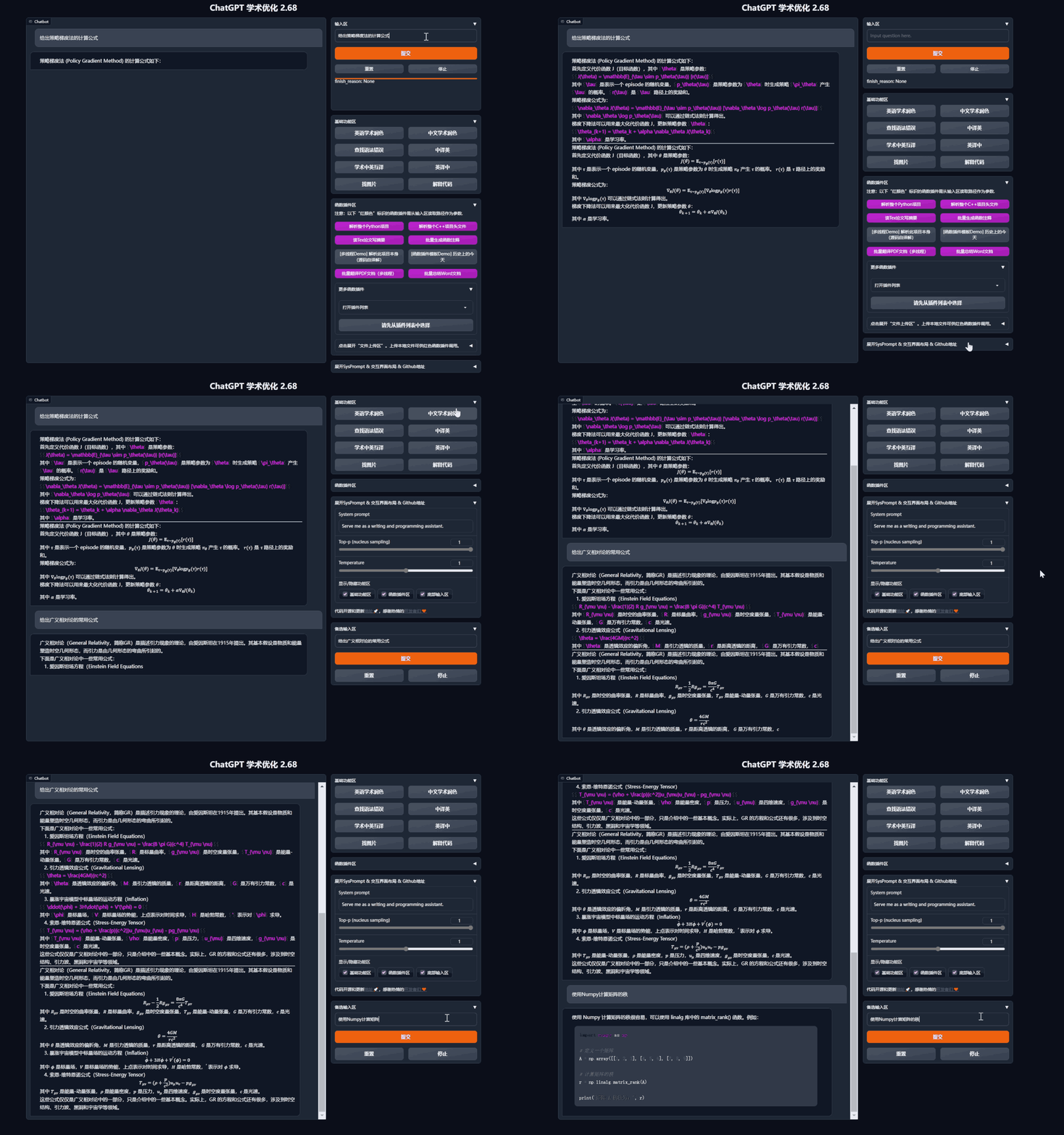
- 新界面(修改`config.py`中的LAYOUT选项即可实现“左右布局”和“上下布局”的切换)


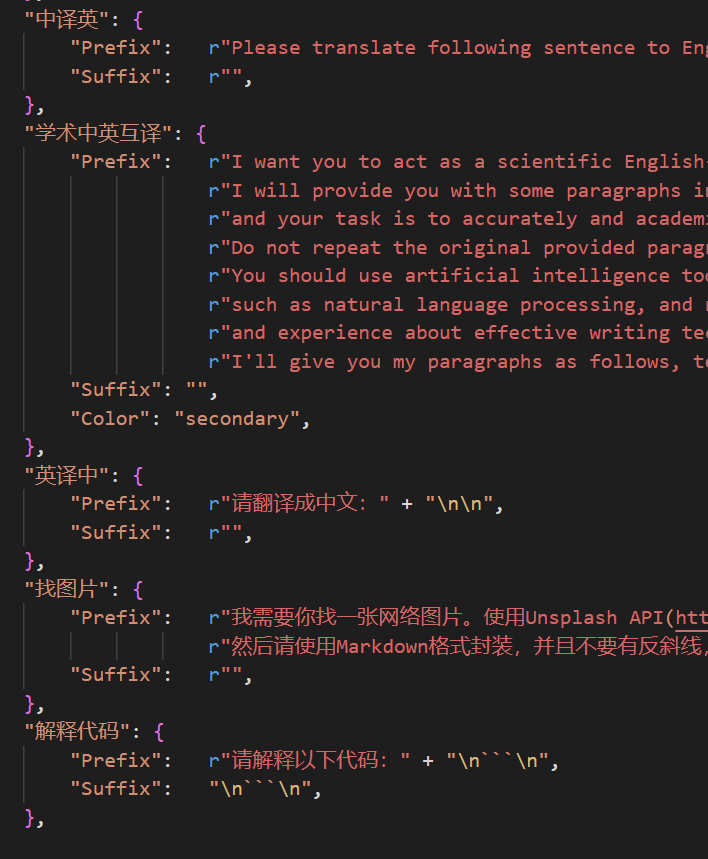
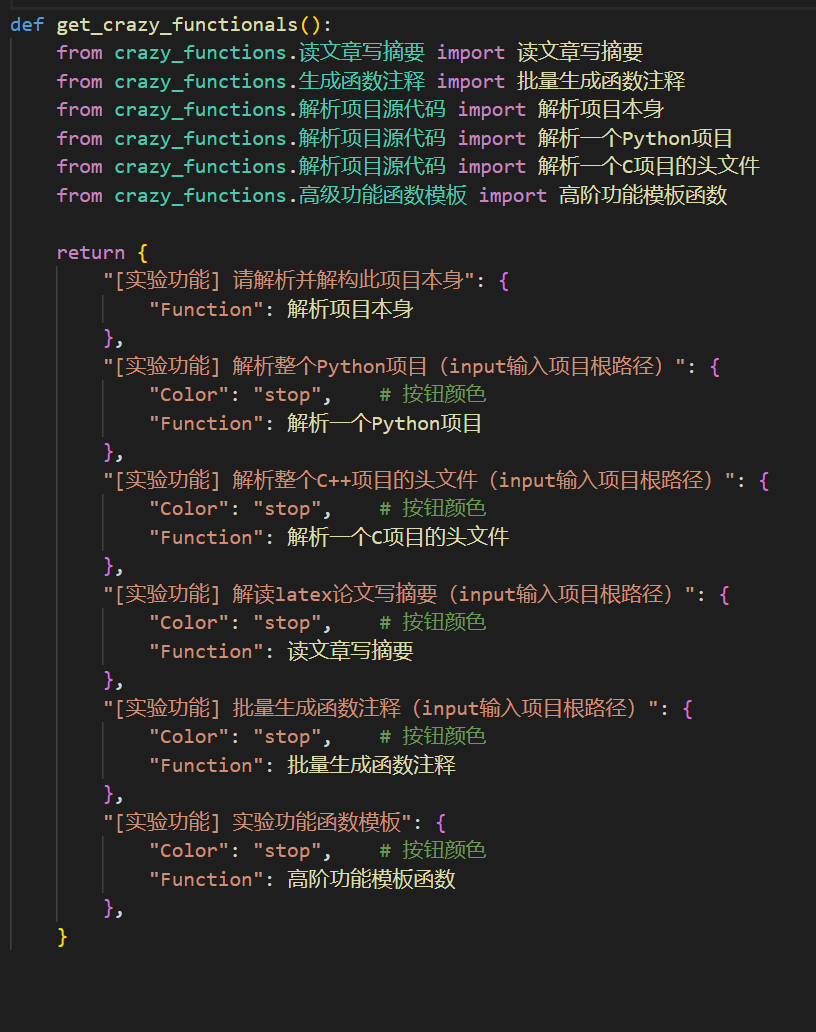
- 所有按钮都通过读取functional.py动态生成,可随意加自定义功能,解放剪贴板
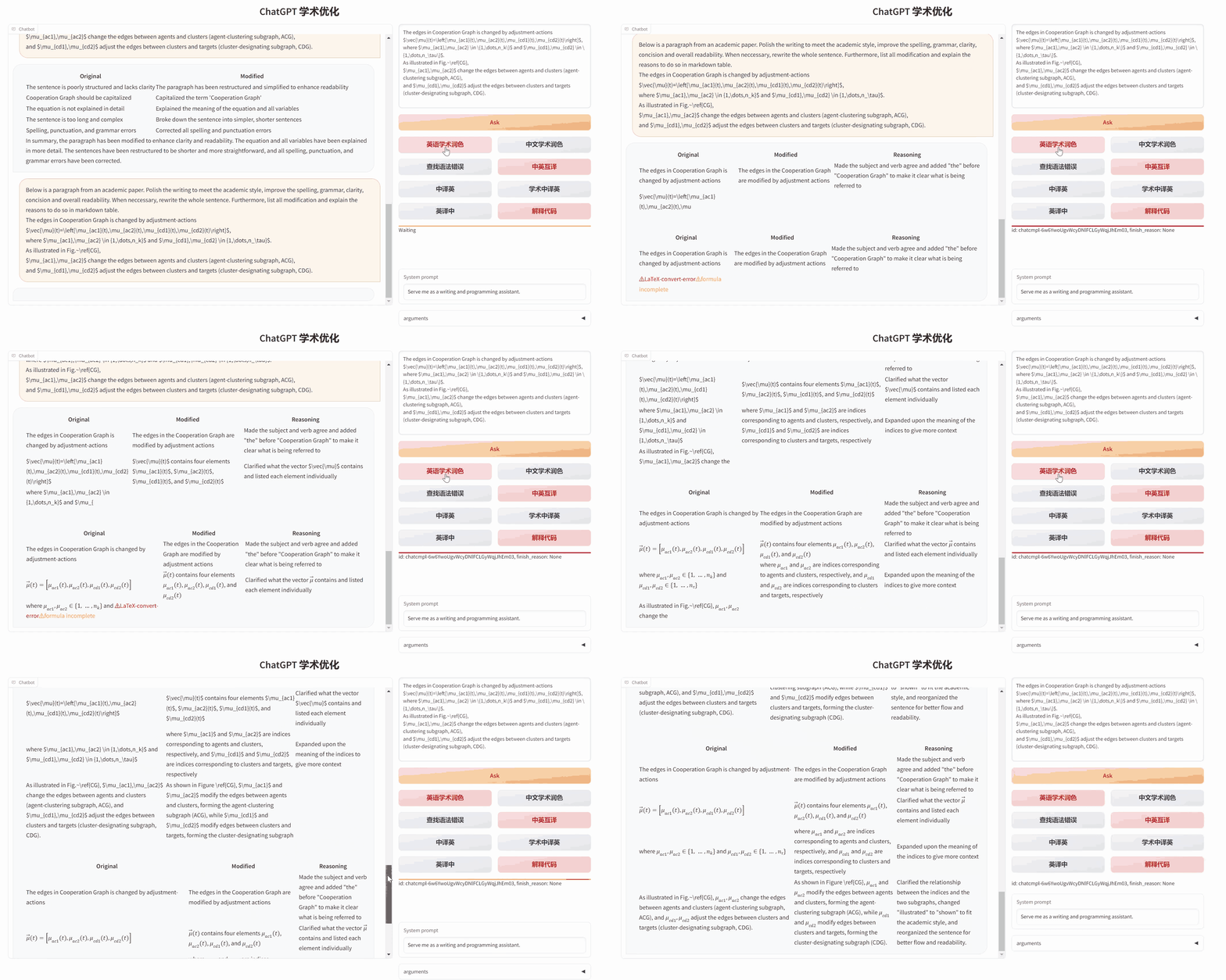
- 润色/纠错
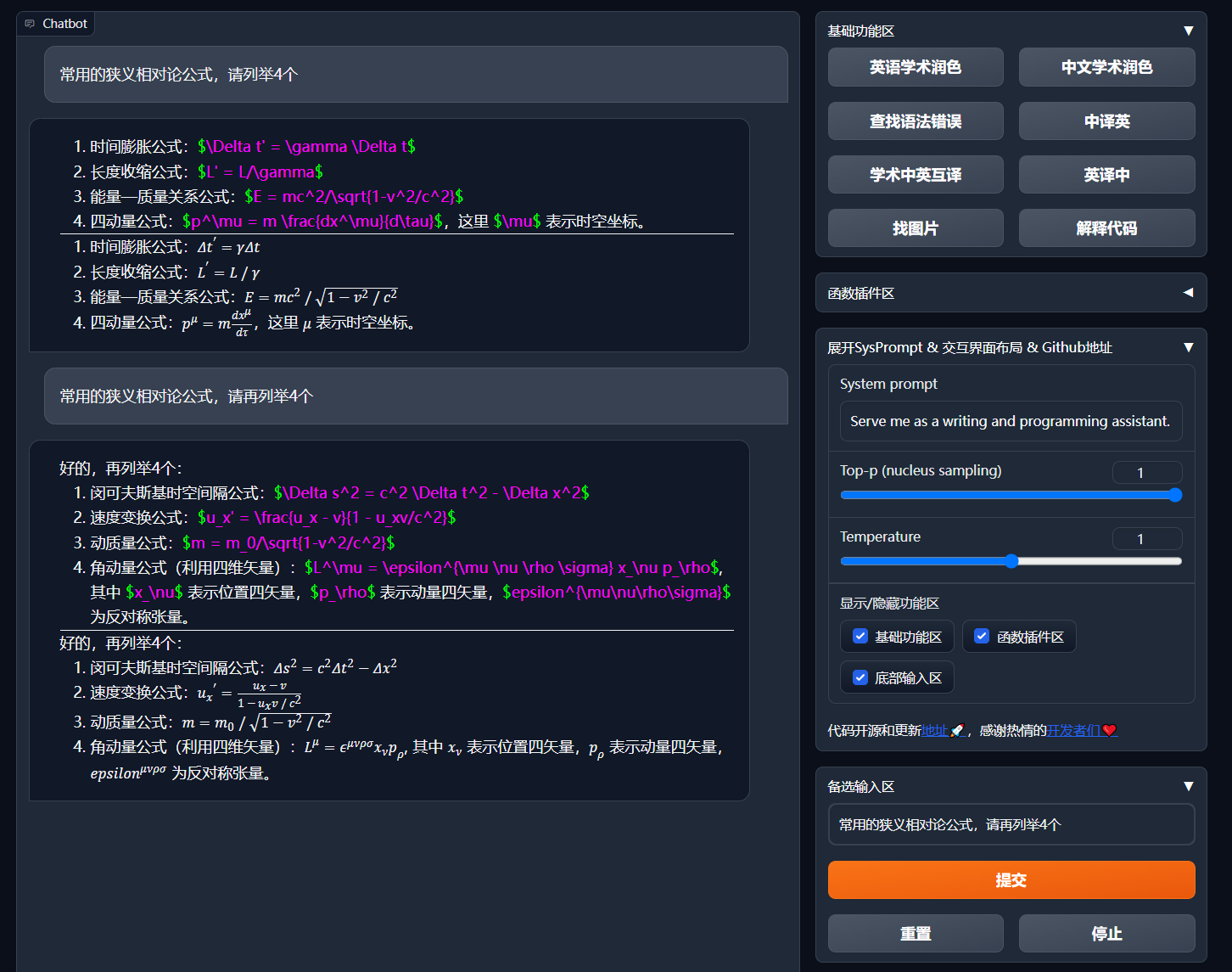
- 如果输出包含公式,会以tex形式和渲染形式同时显示,方便复制和阅读
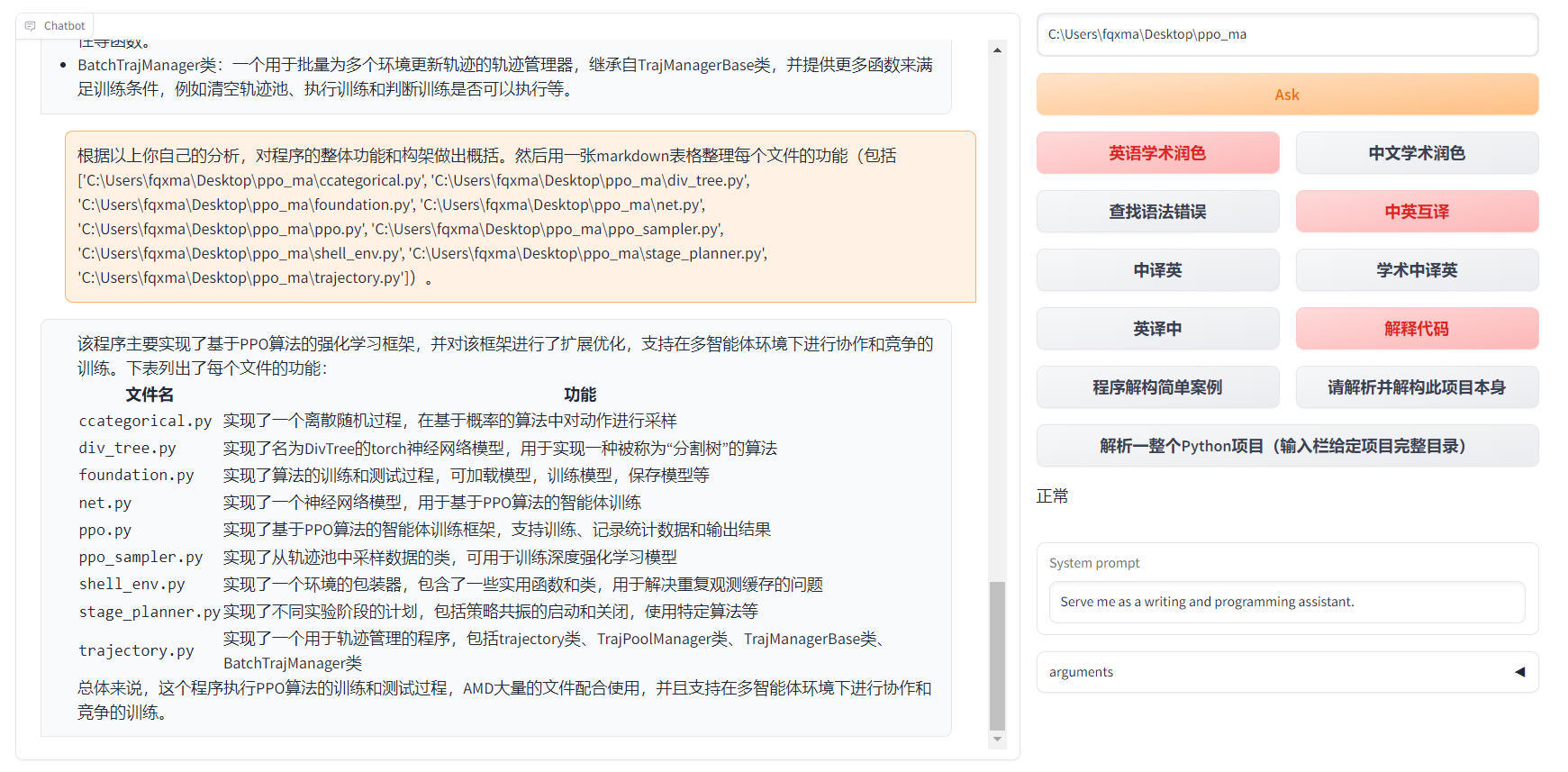
- 懒得看项目代码?直接把整个工程炫ChatGPT嘴里
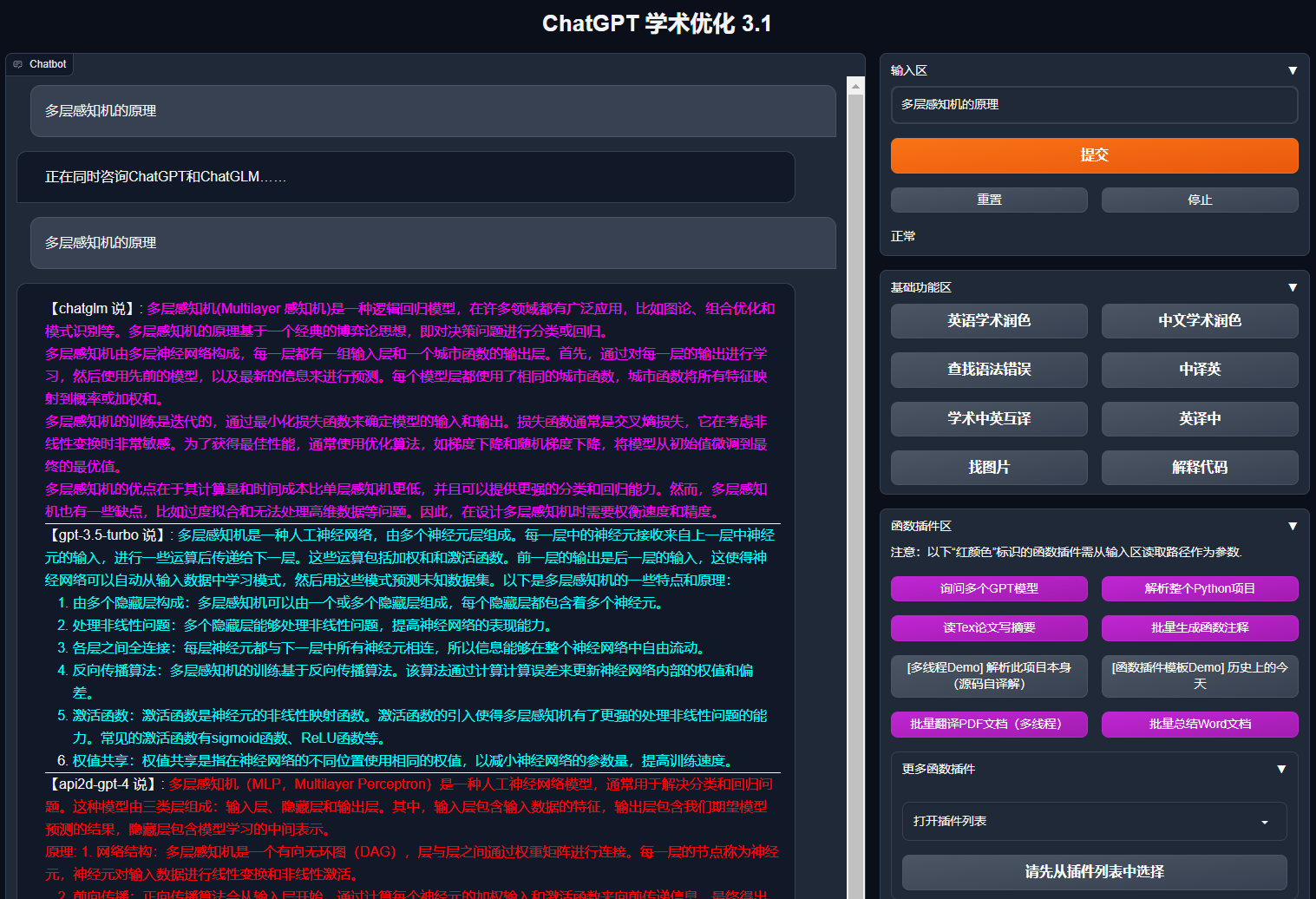
- 多种大语言模型混合调用(ChatGLM + OpenAI-GPT3.5 + GPT4)
# Installation
```mermaid
flowchart TD
A{"安装方法"} --> W1("I 🔑直接运行 (Windows, Linux or MacOS)")
W1 --> W11["1 Python pip包管理依赖"]
W1 --> W12["2 Anaconda包管理依赖(推荐⭐)"]
A --> W2["II 🐳使用Docker (Windows, Linux or MacOS)"]
W2 --> k1["1 部署项目全部能力的大镜像(推荐⭐)"]
W2 --> k2["2 仅在线模型(GPT, GLM4等)镜像"]
W2 --> k3["3 在线模型 + Latex的大镜像"]
A --> W4["IV 🚀其他部署方法"]
W4 --> C1["1 Windows/MacOS 一键安装运行脚本(推荐⭐)"]
W4 --> C2["2 Huggingface, Sealos远程部署"]
W4 --> C4["3 其他 ..."]
```
### 安装方法I:直接运行 (Windows, Linux or MacOS)
1. 下载项目
```sh
git clone --depth=1 https://github.com/binary-husky/gpt_academic.git
cd gpt_academic
```
2. 配置API_KEY等变量
在`config.py`中,配置API KEY等变量。[特殊网络环境设置方法](https://github.com/binary-husky/gpt_academic/issues/1)、[Wiki-项目配置说明](https://github.com/binary-husky/gpt_academic/wiki/项目配置说明)。
「 程序会优先检查是否存在名为`config_private.py`的私密配置文件,并用其中的配置覆盖`config.py`的同名配置。如您能理解以上读取逻辑,我们强烈建议您在`config.py`同路径下创建一个名为`config_private.py`的新配置文件,并使用`config_private.py`配置项目,从而确保自动更新时不会丢失配置 」。
「 支持通过`环境变量`配置项目,环境变量的书写格式参考`docker-compose.yml`文件或者我们的[Wiki页面](https://github.com/binary-husky/gpt_academic/wiki/项目配置说明)。配置读取优先级: `环境变量` > `config_private.py` > `config.py` 」。
3. 安装依赖
```sh
# (选择I: 如熟悉python, python推荐版本 3.9 ~ 3.11)备注:使用官方pip源或者阿里pip源, 临时换源方法:python -m pip install -r requirements.txt -i https://mirrors.aliyun.com/pypi/simple/
python -m pip install -r requirements.txt
# (选择II: 使用Anaconda)步骤也是类似的 (https://www.bilibili.com/video/BV1rc411W7Dr):
conda create -n gptac_venv python=3.11 # 创建anaconda环境
conda activate gptac_venv # 激活anaconda环境
python -m pip install -r requirements.txt # 这个步骤和pip安装一样的步骤
# (选择III: 使用uv):
uv venv --python=3.11 # 创建虚拟环境
source ./.venv/bin/activate # 激活虚拟环境
uv pip install --verbose -r requirements.txt -i https://mirrors.aliyun.com/pypi/simple/ # 安装依赖
```
如果需要支持清华ChatGLM系列/复旦MOSS/RWKV作为后端,请点击展开此处
【可选步骤】如果需要支持清华ChatGLM系列/复旦MOSS作为后端,需要额外安装更多依赖(前提条件:熟悉Python + 用过Pytorch + 电脑配置够强):
```sh
# 【可选步骤I】支持清华ChatGLM3。清华ChatGLM备注:如果遇到"Call ChatGLM fail 不能正常加载ChatGLM的参数" 错误,参考如下: 1:以上默认安装的为torch+cpu版,使用cuda需要卸载torch重新安装torch+cuda; 2:如因本机配置不够无法加载模型,可以修改request_llm/bridge_chatglm.py中的模型精度, 将 AutoTokenizer.from_pretrained("THUDM/chatglm-6b", trust_remote_code=True) 都修改为 AutoTokenizer.from_pretrained("THUDM/chatglm-6b-int4", trust_remote_code=True)
python -m pip install -r request_llms/requirements_chatglm.txt
# 【可选步骤II】支持清华ChatGLM4 注意:此模型至少需要24G显存
python -m pip install -r request_llms/requirements_chatglm4.txt
# 可使用modelscope下载ChatGLM4模型
# pip install modelscope
# modelscope download --model ZhipuAI/glm-4-9b-chat --local_dir ./THUDM/glm-4-9b-chat
# 【可选步骤III】支持复旦MOSS
python -m pip install -r request_llms/requirements_moss.txt
git clone --depth=1 https://github.com/OpenLMLab/MOSS.git request_llms/moss # 注意执行此行代码时,必须处于项目根路径
# 【可选步骤IV】支持RWKV Runner
参考wiki:https://github.com/binary-husky/gpt_academic/wiki/%E9%80%82%E9%85%8DRWKV-Runner
# 【可选步骤V】确保config.py配置文件的AVAIL_LLM_MODELS包含了期望的模型,目前支持的全部模型如下(jittorllms系列目前仅支持docker方案):
AVAIL_LLM_MODELS = ["gpt-3.5-turbo", "api2d-gpt-3.5-turbo", "gpt-4", "api2d-gpt-4", "chatglm", "moss"] # + ["jittorllms_rwkv", "jittorllms_pangualpha", "jittorllms_llama"]
# 【可选步骤VI】支持本地模型INT8,INT4量化(这里所指的模型本身不是量化版本,目前deepseek-coder支持,后面测试后会加入更多模型量化选择)
pip install bitsandbyte
# windows用户安装bitsandbytes需要使用下面bitsandbytes-windows-webui
python -m pip install bitsandbytes --prefer-binary --extra-index-url=https://jllllll.github.io/bitsandbytes-windows-webui
pip install -U git+https://github.com/huggingface/transformers.git
pip install -U git+https://github.com/huggingface/accelerate.git
pip install peft
```
# Advanced Usage
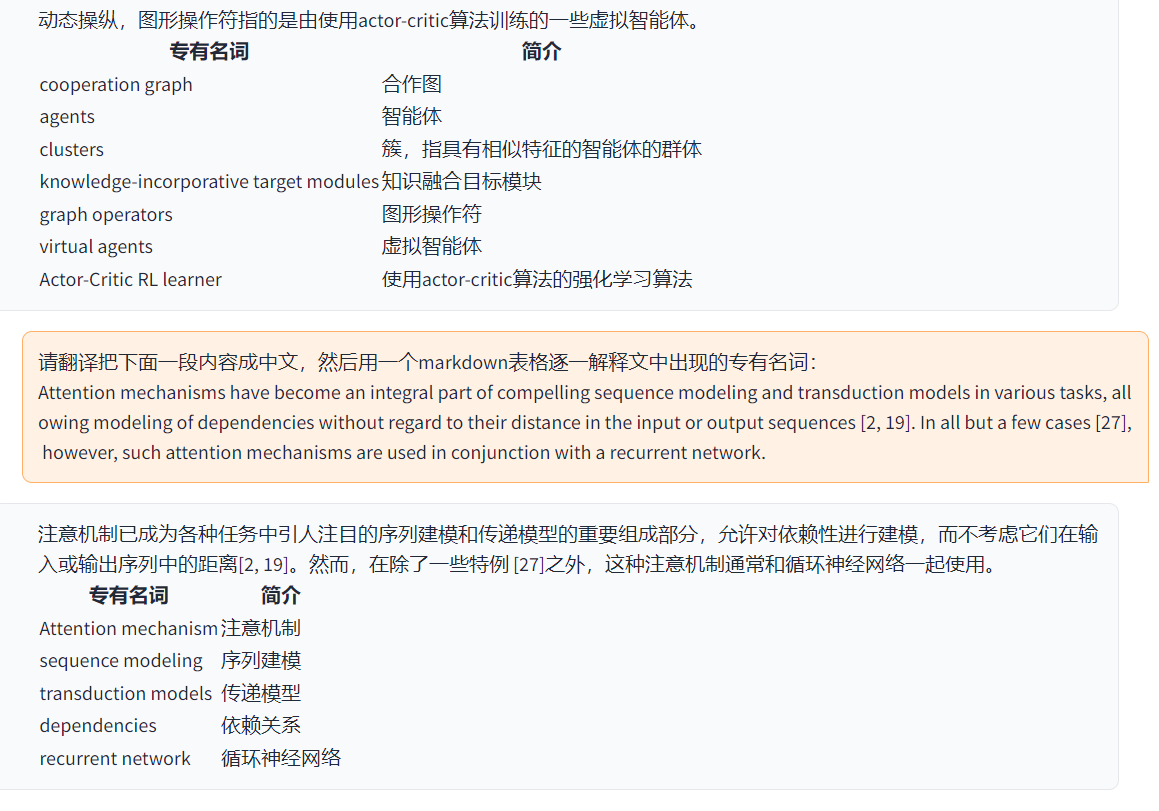
### I:自定义新的便捷按钮(学术快捷键)
现在已可以通过UI中的`界面外观`菜单中的`自定义菜单`添加新的便捷按钮。如果需要在代码中定义,请使用任意文本编辑器打开`core_functional.py`,添加如下条目即可:
```python
"超级英译中": {
# 前缀,会被加在你的输入之前。例如,用来描述你的要求,例如翻译、解释代码、润色等等
"Prefix": "请翻译把下面一段内容成中文,然后用一个markdown表格逐一解释文中出现的专有名词:\n\n",
# 后缀,会被加在你的输入之后。例如,配合前缀可以把你的输入内容用引号圈起来。
"Suffix": "",
},
```
### II:自定义函数插件
编写强大的函数插件来执行任何你想得到的和想不到的任务。
本项目的插件编写、调试难度很低,只要您具备一定的python基础知识,就可以仿照我们提供的模板实现自己的插件功能。
详情请参考[函数插件指南](https://github.com/binary-husky/gpt_academic/wiki/%E5%87%BD%E6%95%B0%E6%8F%92%E4%BB%B6%E6%8C%87%E5%8D%97)。
# Updates
### I:动态
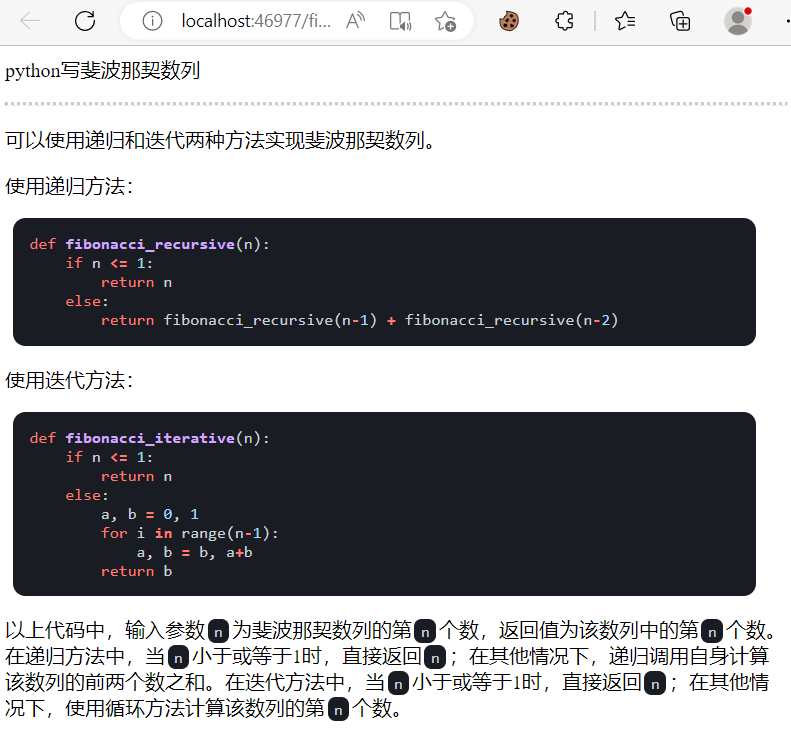
1. 对话保存功能。在函数插件区调用 `保存当前的对话` 即可将当前对话保存为可读+可复原的html文件,
另外在函数插件区(下拉菜单)调用 `载入对话历史存档` ,即可还原之前的会话。
Tip:不指定文件直接点击 `载入对话历史存档` 可以查看历史html存档缓存。
2. ⭐Latex/Arxiv论文翻译功能⭐

===>

3. 虚空终端(从自然语言输入中,理解用户意图+自动调用其他插件)
- 步骤一:输入 “ 请调用插件翻译PDF论文,地址为https://openreview.net/pdf?id=rJl0r3R9KX ”
- 步骤二:点击“虚空终端”
4. 模块化功能设计,简单的接口却能支持强大的功能
5. 译解其他开源项目
6. 装饰[live2d](https://github.com/fghrsh/live2d_demo)的小功能(默认关闭,需要修改`config.py`)
7. OpenAI图像生成
8. 基于mermaid的流图、脑图绘制
9. Latex全文校对纠错

===>

10. 语言、主题切换
### II:版本:
- version 3.80(TODO): 优化AutoGen插件主题并设计一系列衍生插件
- version 3.70: 引入Mermaid绘图,实现GPT画脑图等功能
- version 3.60: 引入AutoGen作为新一代插件的基石
- version 3.57: 支持GLM3,星火v3,文心一言v4,修复本地模型的并发BUG
- version 3.56: 支持动态追加基础功能按钮,新汇报PDF汇总页面
- version 3.55: 重构前端界面,引入悬浮窗口与菜单栏
- version 3.54: 新增动态代码解释器(Code Interpreter)(待完善)
- version 3.53: 支持动态选择不同界面主题,提高稳定性&解决多用户冲突问题
- version 3.50: 使用自然语言调用本项目的所有函数插件(虚空终端),支持插件分类,改进UI,设计新主题
- version 3.49: 支持百度千帆平台和文心一言
- version 3.48: 支持阿里达摩院通义千问,上海AI-Lab书生,讯飞星火
- version 3.46: 支持完全脱手操作的实时语音对话
- version 3.45: 支持自定义ChatGLM2微调模型
- version 3.44: 正式支持Azure,优化界面易用性
- version 3.4: +arxiv论文翻译、latex论文批改功能
- version 3.3: +互联网信息综合功能
- version 3.2: 函数插件支持更多参数接口 (保存对话功能, 解读任意语言代码+同时询问任意的LLM组合)
- version 3.1: 支持同时问询多个gpt模型!支持api2d,支持多个apikey负载均衡
- version 3.0: 对chatglm和其他小型llm的支持
- version 2.6: 重构了插件结构,提高了交互性,加入更多插件
- version 2.5: 自更新,解决总结大工程源代码时文本过长、token溢出的问题
- version 2.4: 新增PDF全文翻译功能; 新增输入区切换位置的功能
- version 2.3: 增强多线程交互性
- version 2.2: 函数插件支持热重载
- version 2.1: 可折叠式布局
- version 2.0: 引入模块化函数插件
- version 1.0: 基础功能
GPT Academic开发者QQ群:`610599535`
- 已知问题
- 某些浏览器翻译插件干扰此软件前端的运行
- 官方Gradio目前有很多兼容性问题,请**务必使用`requirement.txt`安装Gradio**
```mermaid
timeline LR
title GPT-Academic项目发展历程
section 2.x
1.0~2.2: 基础功能: 引入模块化函数插件: 可折叠式布局: 函数插件支持热重载
2.3~2.5: 增强多线程交互性: 新增PDF全文翻译功能: 新增输入区切换位置的功能: 自更新
2.6: 重构了插件结构: 提高了交互性: 加入更多插件
section 3.x
3.0~3.1: 对chatglm支持: 对其他小型llm支持: 支持同时问询多个gpt模型: 支持多个apikey负载均衡
3.2~3.3: 函数插件支持更多参数接口: 保存对话功能: 解读任意语言代码: 同时询问任意的LLM组合: 互联网信息综合功能
3.4: 加入arxiv论文翻译: 加入latex论文批改功能
3.44: 正式支持Azure: 优化界面易用性
3.46: 自定义ChatGLM2微调模型: 实时语音对话
3.49: 支持阿里达摩院通义千问: 上海AI-Lab书生: 讯飞星火: 支持百度千帆平台 & 文心一言
3.50: 虚空终端: 支持插件分类: 改进UI: 设计新主题
3.53: 动态选择不同界面主题: 提高稳定性: 解决多用户冲突问题
3.55: 动态代码解释器: 重构前端界面: 引入悬浮窗口与菜单栏
3.56: 动态追加基础功能按钮: 新汇报PDF汇总页面
3.57: GLM3, 星火v3: 支持文心一言v4: 修复本地模型的并发BUG
3.60: 引入AutoGen
3.70: 引入Mermaid绘图: 实现GPT画脑图等功能
3.80(TODO): 优化AutoGen插件主题: 设计衍生插件
```
### III:主题
可以通过修改`THEME`选项(config.py)变更主题
1. `Chuanhu-Small-and-Beautiful` [网址](https://github.com/GaiZhenbiao/ChuanhuChatGPT/)
### IV:本项目的开发分支
1. `master` 分支: 主分支,稳定版
2. `frontier` 分支: 开发分支,测试版
3. 如何[接入其他大模型](request_llms/README.md)
### V:参考与学习
```
代码中参考了很多其他优秀项目中的设计,顺序不分先后:
# 清华ChatGLM2-6B:
https://github.com/THUDM/ChatGLM2-6B
# 清华JittorLLMs:
https://github.com/Jittor/JittorLLMs
# ChatPaper:
https://github.com/kaixindelele/ChatPaper
# Edge-GPT:
https://github.com/acheong08/EdgeGPT
# ChuanhuChatGPT:
https://github.com/GaiZhenbiao/ChuanhuChatGPT
# Oobabooga one-click installer:
https://github.com/oobabooga/one-click-installers
# More:
https://github.com/gradio-app/gradio
https://github.com/fghrsh/live2d_demo
```