
#
![release][release] ![homebrew][homebrew] ![macports][macports] ![scoop][scoop]
Top-like interface for container metrics
`ctop` provides a concise and condensed overview of real-time metrics for multiple containers:
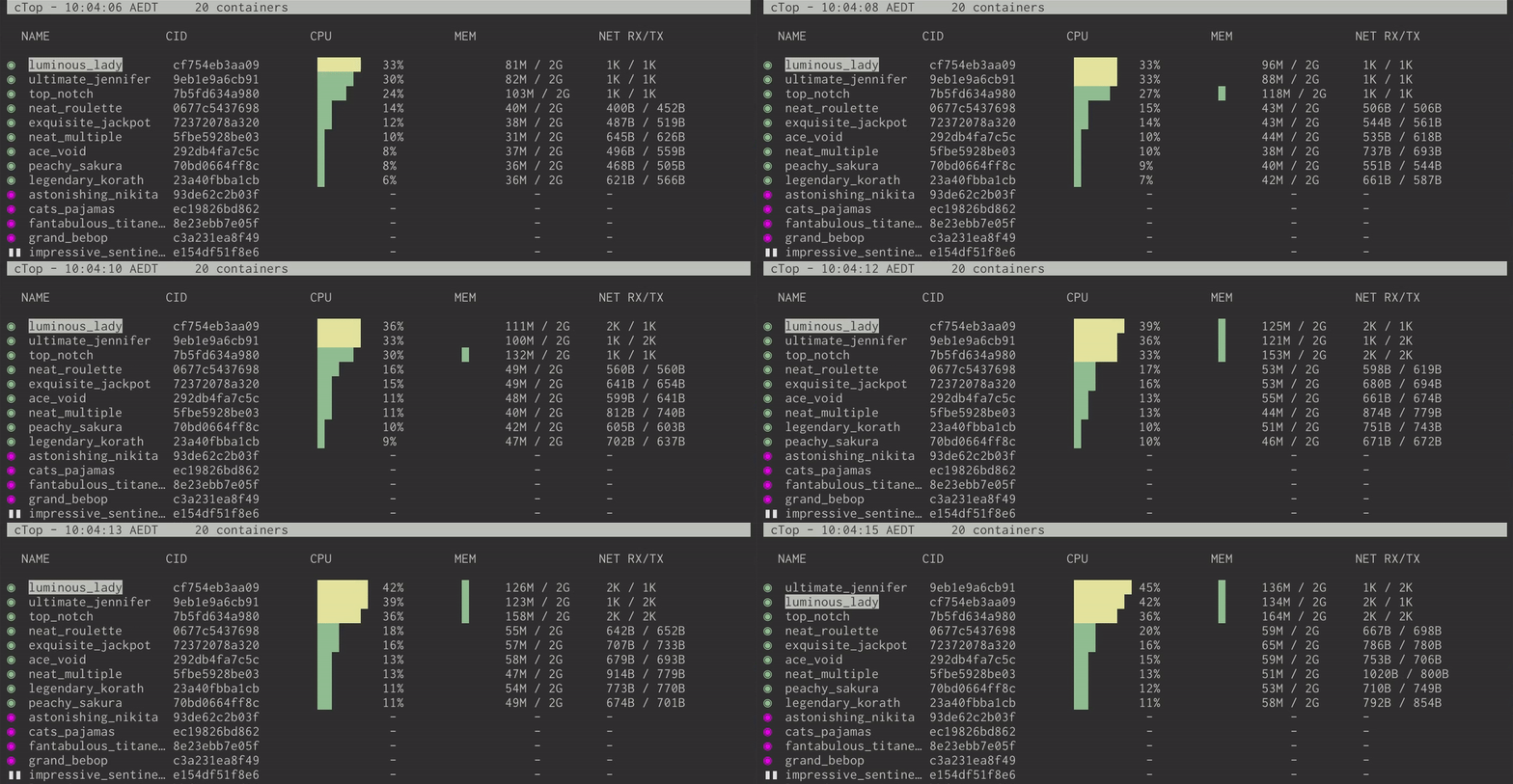
as well as a [single container view][single_view] for inspecting a specific container.
`ctop` comes with built-in support for Docker and runC; connectors for other container and cluster systems are planned for future releases.
## Install
Fetch the [latest release](https://github.com/bcicen/ctop/releases) for your platform:
#### Debian/Ubuntu
Maintained by a [third party](https://packages.azlux.fr/)
```bash
sudo apt-get install ca-certificates curl gnupg lsb-release
curl -fsSL https://azlux.fr/repo.gpg.key | sudo gpg --dearmor -o /usr/share/keyrings/azlux-archive-keyring.gpg
echo \
"deb [arch=$(dpkg --print-architecture) signed-by=/usr/share/keyrings/azlux-archive-keyring.gpg] http://packages.azlux.fr/debian \
$(lsb_release -cs) main" | sudo tee /etc/apt/sources.list.d/azlux.list >/dev/null
sudo apt-get update
sudo apt-get install docker-ctop
```
#### Arch
```bash
sudo pacman -S ctop
```
_`ctop` is also available for Arch in the [AUR](https://aur.archlinux.org/packages/ctop-bin/)_
#### Linux (Generic)
```bash
sudo wget https://github.com/bcicen/ctop/releases/download/v0.7.7/ctop-0.7.7-linux-amd64 -O /usr/local/bin/ctop
sudo chmod +x /usr/local/bin/ctop
```
#### OS X
```bash
brew install ctop
```
or
```bash
sudo port install ctop
```
or
```bash
sudo curl -Lo /usr/local/bin/ctop https://github.com/bcicen/ctop/releases/download/v0.7.7/ctop-0.7.7-darwin-amd64
sudo chmod +x /usr/local/bin/ctop
```
#### Windows
`ctop` is available in [scoop](https://scoop.sh/):
```powershell
scoop install ctop
```
#### Docker
```bash
docker run --rm -ti \
--name=ctop \
--volume /var/run/docker.sock:/var/run/docker.sock:ro \
quay.io/vektorlab/ctop:latest
```
## Building
Build steps can be found [here][build].
## Usage
`ctop` requires no arguments and uses Docker host variables by default. See [connectors][connectors] for further configuration options.
### Config file
While running, use `S` to save the current filters, sort field, and other options to a default config path (`~/.config/ctop/config` on XDG systems, else `~/.ctop`).
Config file values will be loaded and applied the next time `ctop` is started.
### Options
Option | Description
--- | ---
`-a` | show active containers only
`-f ` | set an initial filter string
`-h` | display help dialog
`-i` | invert default colors
`-r` | reverse container sort order
`-s` | select initial container sort field
`-v` | output version information and exit
### Keybindings
| Key | Action |
| :----------------------: | ---------------------------------------------------------- |
| <ENTER> | Open container menu |
| a | Toggle display of all (running and non-running) containers |
| f | Filter displayed containers (`esc` to clear when open) |
| H | Toggle ctop header |
| h | Open help dialog |
| s | Select container sort field |
| r | Reverse container sort order |
| o | Open single view |
| l | View container logs (`t` to toggle timestamp when open) |
| e | Exec Shell |
| c | Configure columns |
| S | Save current configuration to file |
| q | Quit ctop |
[build]: _docs/build.md
[connectors]: _docs/connectors.md
[single_view]: _docs/single.md
[release]: https://img.shields.io/github/release/bcicen/ctop.svg "ctop"
[homebrew]: https://img.shields.io/homebrew/v/ctop.svg "ctop"
[macports]: https://repology.org/badge/version-for-repo/macports/ctop.svg?header=macports "ctop"
[scoop]: https://img.shields.io/scoop/v/ctop?bucket=main "ctop"
## Alternatives
See [Awesome Docker list](https://github.com/veggiemonk/awesome-docker/blob/master/README.md#terminal) for similar tools to work with Docker.