# NestedViewerExtension
[Demo](https://forge-extensions.autodesk.io/?extension=NestedViewerExtension)
Forge Viewer extension showing viewables related to the currently loaded model in another instance of the viewer.
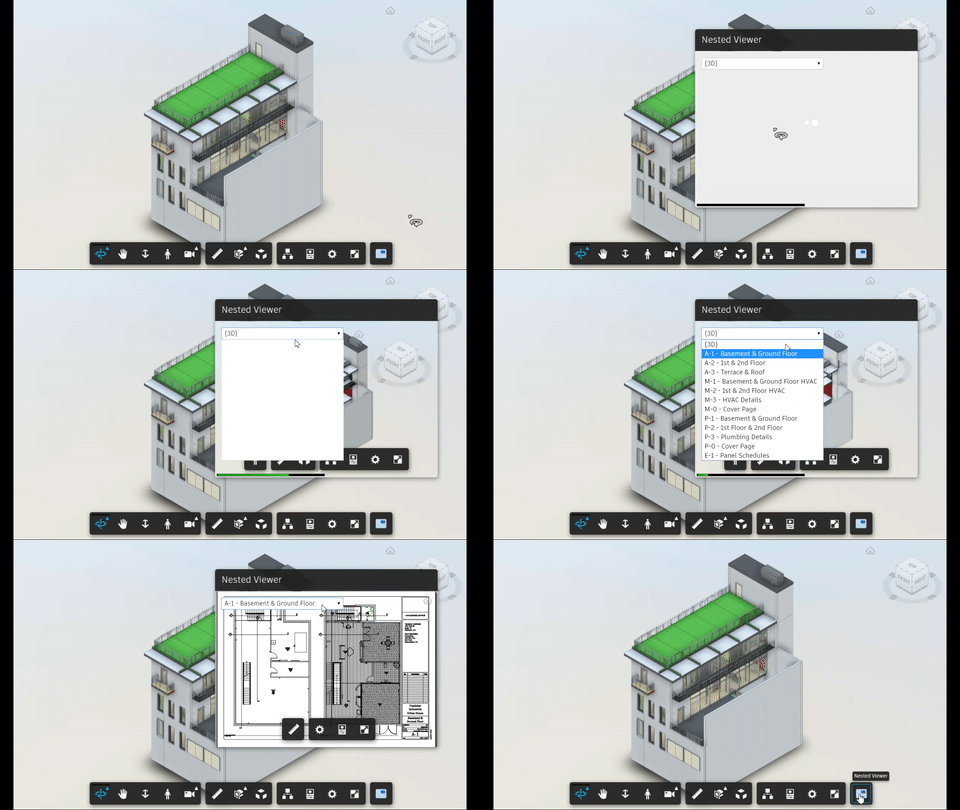
## Usage
- Load the extension in the viewer
- Click the icon in the toolbar
- New dialog will open, showing a dropdown list of all viewables available for the currently loaded model
## Setup
Include the CSS & JS file on your page. This CDN is compatible with the lastest Viewer version (v7).
```xml
```
After Viewer is ready, preferable inside `onDocumentLoadSuccess`, load the extension
```javascript
viewer.loadExtension("NestedViewerExtension", { filter: ["2d", "3d"], crossSelection: true })
```
## Configuration
The extension accepts an optional _options_ object with the following properties:
- `filter` - array of allowed viewable "roles" ("2d", "3d", or both), by default: `["2d", "3d"]`
- `crossSelection` - boolean flag for cross-selecting elements after they're selected in the main or the nested viewer, `false` by default
## How it works
The extension uses another instance of [GuiViewer3D](https://forge.autodesk.com/en/docs/viewer/v7/reference/Viewing/GuiViewer3D/)
and places it in a custom [DockingPanel](https://forge.autodesk.com/en/docs/viewer/v7/reference/UI/DockingPanel/).
Whenever the "main" viewer loads a different model (observed via the `Autodesk.Viewing.MODEL_ROOT_LOADED_EVENT` event),
the extension collects all viewables available in this model (using `doc.getRoot().search({ type: 'geometry' })`),
and makes them available in the docking panel's dropdown.
 icon in the toolbar
- New dialog will open, showing a dropdown list of all viewables available for the currently loaded model
## Setup
Include the CSS & JS file on your page. This CDN is compatible with the lastest Viewer version (v7).
```xml
```
After Viewer is ready, preferable inside `onDocumentLoadSuccess`, load the extension
```javascript
viewer.loadExtension("NestedViewerExtension", { filter: ["2d", "3d"], crossSelection: true })
```
## Configuration
The extension accepts an optional _options_ object with the following properties:
- `filter` - array of allowed viewable "roles" ("2d", "3d", or both), by default: `["2d", "3d"]`
- `crossSelection` - boolean flag for cross-selecting elements after they're selected in the main or the nested viewer, `false` by default
## How it works
The extension uses another instance of [GuiViewer3D](https://forge.autodesk.com/en/docs/viewer/v7/reference/Viewing/GuiViewer3D/)
and places it in a custom [DockingPanel](https://forge.autodesk.com/en/docs/viewer/v7/reference/UI/DockingPanel/).
Whenever the "main" viewer loads a different model (observed via the `Autodesk.Viewing.MODEL_ROOT_LOADED_EVENT` event),
the extension collects all viewables available in this model (using `doc.getRoot().search({ type: 'geometry' })`),
and makes them available in the docking panel's dropdown.
icon in the toolbar
- New dialog will open, showing a dropdown list of all viewables available for the currently loaded model
## Setup
Include the CSS & JS file on your page. This CDN is compatible with the lastest Viewer version (v7).
```xml
```
After Viewer is ready, preferable inside `onDocumentLoadSuccess`, load the extension
```javascript
viewer.loadExtension("NestedViewerExtension", { filter: ["2d", "3d"], crossSelection: true })
```
## Configuration
The extension accepts an optional _options_ object with the following properties:
- `filter` - array of allowed viewable "roles" ("2d", "3d", or both), by default: `["2d", "3d"]`
- `crossSelection` - boolean flag for cross-selecting elements after they're selected in the main or the nested viewer, `false` by default
## How it works
The extension uses another instance of [GuiViewer3D](https://forge.autodesk.com/en/docs/viewer/v7/reference/Viewing/GuiViewer3D/)
and places it in a custom [DockingPanel](https://forge.autodesk.com/en/docs/viewer/v7/reference/UI/DockingPanel/).
Whenever the "main" viewer loads a different model (observed via the `Autodesk.Viewing.MODEL_ROOT_LOADED_EVENT` event),
the extension collects all viewables available in this model (using `doc.getRoot().search({ type: 'geometry' })`),
and makes them available in the docking panel's dropdown.