


<p align="center">
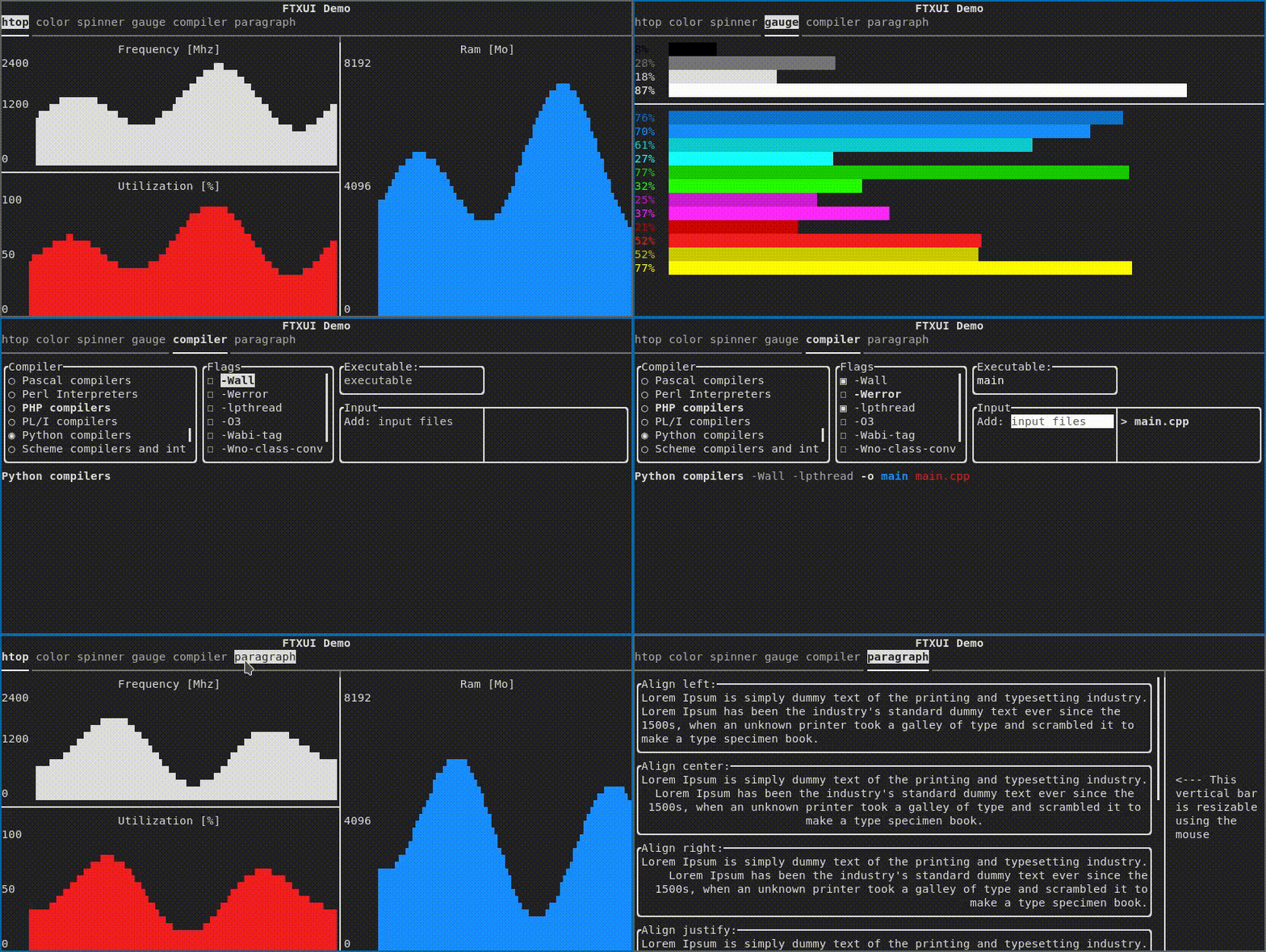
  <img src="https://github.com/ArthurSonzogni/FTXUI/assets/4759106/6925b6da-0a7e-49d9-883c-c890e1f36007" alt="Demo image"></img>
  <br/>
  <a href="#"><img src="https://img.shields.io/badge/c++-%2300599C.svg?style=flat&logo=c%2B%2B&logoColor=white"></img></a>
  <a href="http://opensource.org/licenses/MIT"><img src="https://img.shields.io/github/license/arthursonzogni/FTXUI?color=black"></img></a>
  <a href="#"><img src="https://img.shields.io/github/stars/ArthurSonzogni/FTXUI"></img></a>
  <a href="#"><img src="https://img.shields.io/github/forks/ArthurSonzogni/FTXUI"></img></a>
  <a href="#"><img src="https://img.shields.io/github/repo-size/ArthurSonzogni/FTXUI"></img></a>
  <a href="https://github.com/ArthurSonzogni/FTXUI/graphs/contributors"><img src="https://img.shields.io/github/contributors/arthursonzogni/FTXUI?color=blue"></img></a>
  <br/>
  <a href="https://github.com/ArthurSonzogni/FTXUI/issues"><img src="https://img.shields.io/github/issues/ArthurSonzogni/FTXUI"></img></a>
  <a href="https://repology.org/project/ftxui/versions"><img src="https://repology.org/badge/latest-versions/ftxui.svg" alt="latest packaged version(s)"></a>
  <a href="https://codecov.io/gh/ArthurSonzogni/FTXUI">
    <img src="https://codecov.io/gh/ArthurSonzogni/FTXUI/branch/master/graph/badge.svg?token=C41FdRpNVA"/>
  </a>

  
  <br/>
  <a href="https://arthursonzogni.github.io/FTXUI/">Documentation</a> ·
  <a href="https://github.com/ArthurSonzogni/FTXUI/issues">Report a Bug</a> ·
  <a href="https://arthursonzogni.github.io/FTXUI/examples/">Examples</a> .
  <a href="https://github.com/ArthurSonzogni/FTXUI/issues">Request Feature</a> ·
  <a href="https://github.com/ArthurSonzogni/FTXUI/pulls">Send a Pull Request</a>
  
  <br/>
  Doc:
  <a href="https://github.com/ArthurSonzogni/">English</a> |
  <a href="https://arthursonzogni.github.io/FTXUI/fr/index.html">Français</a> |
  <a href="https://arthursonzogni.github.io/FTXUI/es/index.html">Español</a> |
  <a href="https://arthursonzogni.github.io/FTXUI/zh-TW/index.html">繁體中文</a> |
  <a href="https://arthursonzogni.github.io/FTXUI/zh-CH/index.html">简体中文</a> |
  <a href="https://arthursonzogni.github.io/FTXUI/ja/index.html">日本語</a> |

</p>

# FTXUI

<i>Functional Terminal (X) User interface</i>

A simple cross-platform C++ library for terminal based user interfaces!

## Feature
 * Functional style. Inspired by
   [1](https://hackernoon.com/building-reactive-terminal-interfaces-in-c-d392ce34e649?gi=d9fb9ce35901)
   and [React](https://reactjs.org/)
 * Simple and elegant syntax (in my opinion)
 * Keyboard & mouse navigation.
 * Support for [UTF8](https://en.wikipedia.org/wiki/UTF-8) and [fullwidth chars](https://en.wikipedia.org/wiki/Halfwidth_and_fullwidth_forms) (→ 测试)
 * Support for animations. [Demo 1](https://arthursonzogni.github.io/FTXUI/examples/?file=component/menu_underline_animated_gallery), [Demo 2](https://arthursonzogni.github.io/FTXUI/examples/?file=component/button_style)
 * Support for drawing. [Demo](https://arthursonzogni.github.io/FTXUI/examples/?file=component/canvas_animated)
 * No dependencies.
 * [C++20 Module support](https://arthursonzogni.github.io/FTXUI/cpp20-modules.html)
 * **Cross platform**: Linux/MacOS (main target), WebAssembly, Windows (Thanks to contributors!).
 * Learn by [examples](#documentation), and [tutorials](#documentation)
 * Multiple packages:
     - CMake [FetchContent]([https://bewagner.net/programming/2020/05/02/cmake-fetchcontent/](https://cmake.org/cmake/help/latest/module/FetchContent.html)) (preferred)
     - [Bazel](https://registry.bazel.build/modules/ftxui)
     - [vcpkg](https://vcpkg.link/ports/ftxui)
     - [Conan](https://conan.io/center/recipes/ftxui) [Debian package](https://tracker.debian.org/pkg/ftxui)
     - [Ubuntu package](https://launchpad.net/ubuntu/+source/ftxui)
     - [Arch Linux](https://aur.archlinux.org/packages/ftxui/)
    - [OpenSUSE](https://build.opensuse.org/package/show/devel:libraries:c_c++/ftxui)
    - [XMake](https://xmake.io) repository [package](https://github.com/xmake-io/xmake-repo/blob/dev/packages/f/ftxui/xmake.lua)
    - [Nix](https://github.com/ArthurSonzogni/FTXUI/blob/main/flake.nix)
    - [Amalgamated (single-header/source)](https://arthursonzogni.github.io/FTXUI/installation_amalgamated.html) (from 7.0.0)
    - [conda-forge](https://anaconda.org/channels/conda-forge/packages/ftxui/overview)
 * Good practices: documentation, tests, fuzzers, performance tests, automated CI, automated packaging, etc...

## Documentation

- [Starter CMake](https://github.com/ArthurSonzogni/ftxui-starter)
- [Starter Bazel](https://github.com/ArthurSonzogni/ftxui-bazel)
- [Documentation](https://arthursonzogni.github.io/FTXUI/)
- [Examples (WebAssembly)](https://arthursonzogni.github.io/FTXUI/examples/)
- [Build using CMake](https://arthursonzogni.github.io/FTXUI/#build-cmake)
- [Build using Bazel](https://arthursonzogni.github.io/FTXUI/#build-bazel)
- [Build using Meson](doc/installation_meson.md)

## Example
~~~cpp
#include <ftxui/ftxui.hpp>
using namespace ftxui;

int main() {
  auto document =
    vbox({
      hbox({
        text("one") | border,
        text("two") | border | flex,
        text("three") | border | flex,
      }),

      gauge(0.25) | color(Color::Red),
      gauge(0.50) | color(Color::White),
      gauge(0.75) | color(Color::Blue),
    });

  auto screen = Screen::Create(Dimension::Full());
  Render(screen, document);
  screen.Print();

  return 0;
}
~~~

![image](https://github.com/ArthurSonzogni/FTXUI/assets/4759106/569bf043-4e85-4245-aad5-2324572135c4)

## Short gallery

FTXUI is organized into three modules:
1.  **screen**: Low-level rendering (colors, pixels, terminal)
2.  **dom**: Layout and composition (hierarchical elements)
3.  **component**: User interaction (widgets, events, main loop)

For most users, including everything at once is the simplest way to start:
- Header: `#include <ftxui/ftxui.hpp>`
- CMake target: `ftxui::ftxui`
- Bazel target: `@ftxui//:ftxui`

#### DOM

This module defines a hierarchical set of `Element`. An `Element` manages layout and can be responsive to the terminal dimensions.

They are declared in [`<ftxui/dom/elements.hpp>`](https://arthursonzogni.github.io/FTXUI/elements_8hpp_source.html
)
  
<details><summary>Layout</summary>

`Element` can be arranged together:
  - horizontally with `hbox`
  - vertically with `vbox`
  - inside a grid with `gridbox`
  - wrap along one direction using the `flexbox`.
  
`Element` can become flexible using the `flex` decorator.
  
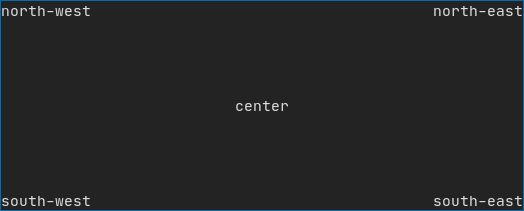
[Example](https://arthursonzogni.github.io/FTXUI/examples_2dom_2vbox_hbox_8cpp-example.html) using `hbox`, `vbox` and `filler`.
![image](https://user-images.githubusercontent.com/4759106/147242524-7103b5d9-1a92-4e2d-ac70-b3d6740061e3.png)
  
  
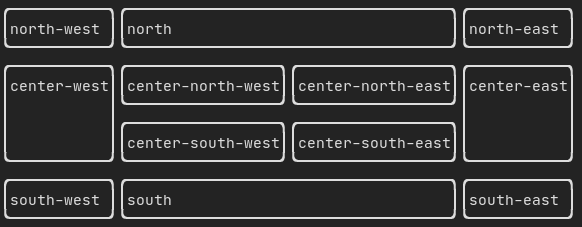
[Example](https://arthursonzogni.github.io/FTXUI/examples_2dom_2gridbox_8cpp-example.html) using gridbox:
![image](https://user-images.githubusercontent.com/4759106/147242972-0db1f2e9-0790-496f-86e6-ed2c604f7a73.png)

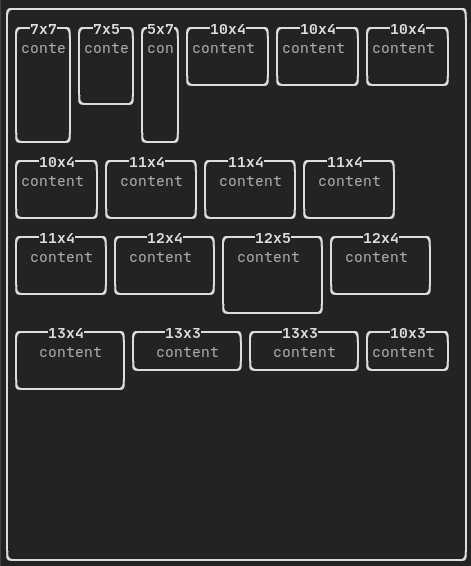
[Example](https://github.com/ArthurSonzogni/FTXUI/blob/master/examples/dom/hflow.cpp) using flexbox:
![image](https://user-images.githubusercontent.com/4759106/147243064-780ac7cc-605b-475f-94b8-cf7c4aed03a5.png)

[See](https://arthursonzogni.github.io/FTXUI/examples_2dom_2hflow_8cpp-example.html) also this [demo](https://arthursonzogni.github.io/FTXUI/examples/?file=component/flexbox).

</details>

<details><summary>Style</summary>

An element can be decorated using the functions:
  - `bold`
  - `italic`
  - `dim`
  - `inverted`
  - `underlined`
  - `underlinedDouble`
  - `blink`
  - `strikethrough`
  - `color`
  - `bgcolor`
  - `hyperlink`

[Example](https://arthursonzogni.github.io/FTXUI/examples_2dom_2style_gallery_8cpp-example.html)

![image](https://user-images.githubusercontent.com/4759106/147244118-380bf834-9e33-40df-9ff0-07c10f2598ef.png)
  
FTXUI supports the pipe operator. It means: `decorator1(decorator2(element))` and `element | decorator1 | decorator2` can be used.
  
</details>

<details><summary>Colors</summary>

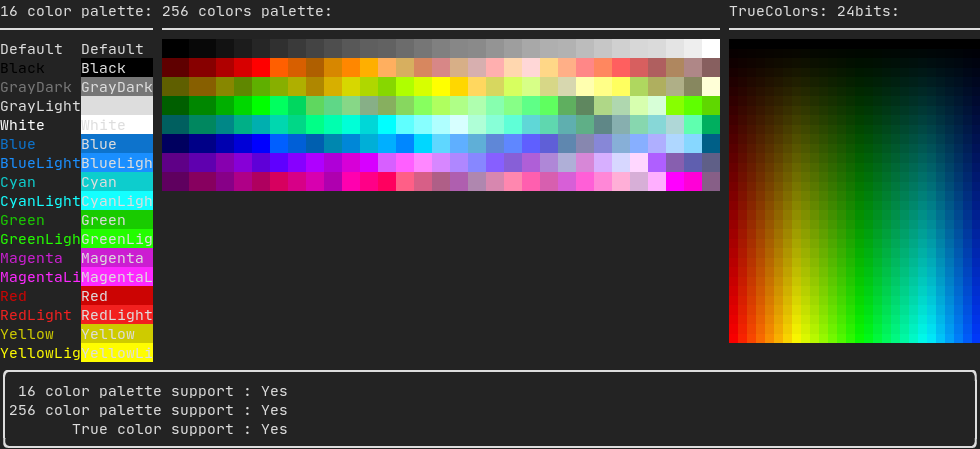
FTXUI supports every color palette:

Color [gallery](https://arthursonzogni.github.io/FTXUI/examples_2dom_2color_gallery_8cpp-example.html):
![image](https://user-images.githubusercontent.com/4759106/147248595-04c7245a-5b85-4544-809d-a5984fc6f9e7.png)

</details>
  
<details><summary>Border and separator</summary>

Use decorator `border` and element `separator()` to subdivide your UI:
  
```cpp
Element document = vbox({
    text("top"),
    separator(),
    text("bottom"),
}) | border;

```

[Demo](https://arthursonzogni.github.io/FTXUI/examples_2dom_2separator_8cpp-example.html):

  
![image](https://user-images.githubusercontent.com/4759106/147244514-4135f24b-fb8e-4067-8896-bc53545583f7.png)
  
</details>

<details><summary>Text and paragraph</summary>

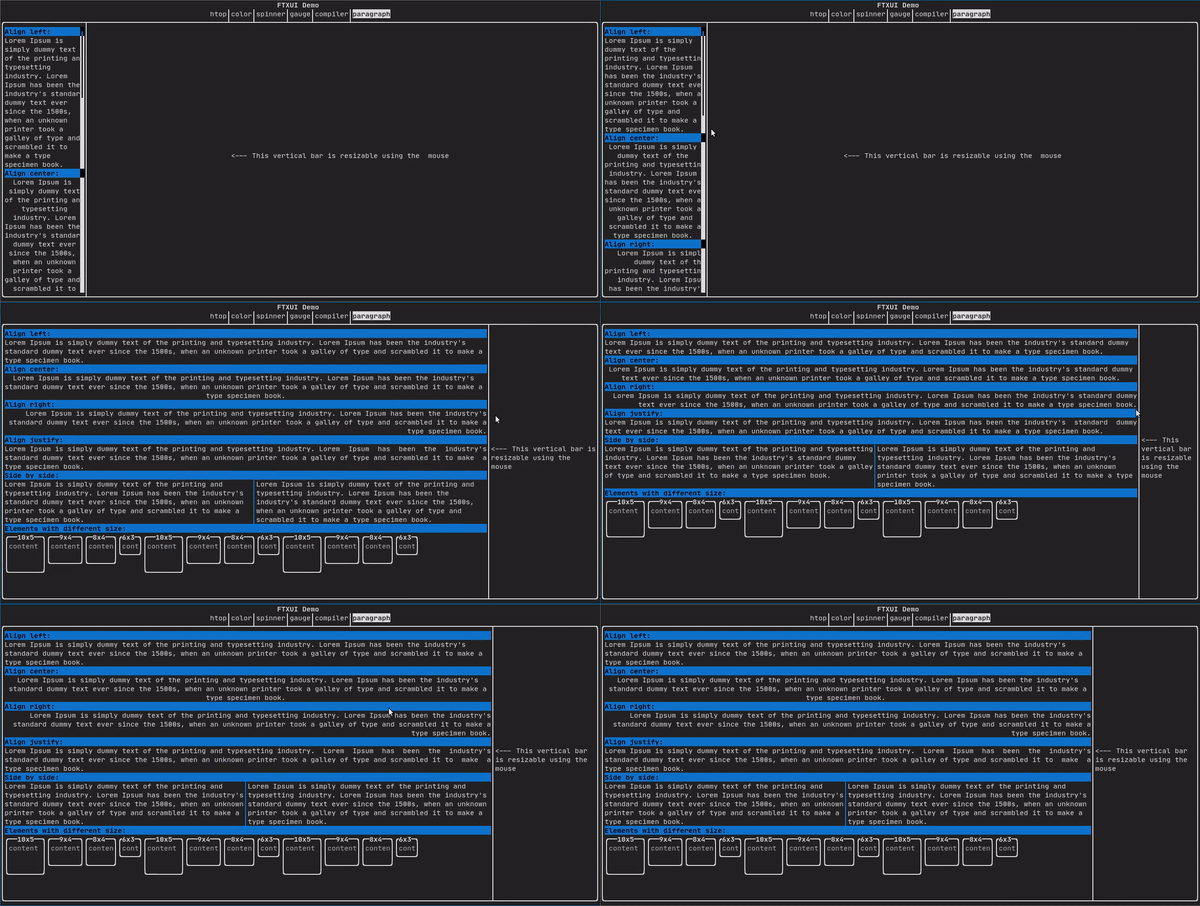
A simple piece of text is represented using `text("content")`.

To support text wrapping following spaces the following functions are provided:
```cpp
Element paragraph(string text);
Element paragraphAlignLeft(string text);
Element paragraphAlignRight(string text);
Element paragraphAlignCenter(string text);
Element paragraphAlignJustify(string text);
```
  
[Paragraph example](https://arthursonzogni.github.io/FTXUI/examples_2dom_2paragraph_8cpp-example.html)
  
![ezgif com-gif-maker (4)](https://user-images.githubusercontent.com/4759106/147251370-983a06e7-6f41-4113-92b8-942f43d34d06.gif)

</details>

<details><summary>Table</summary>

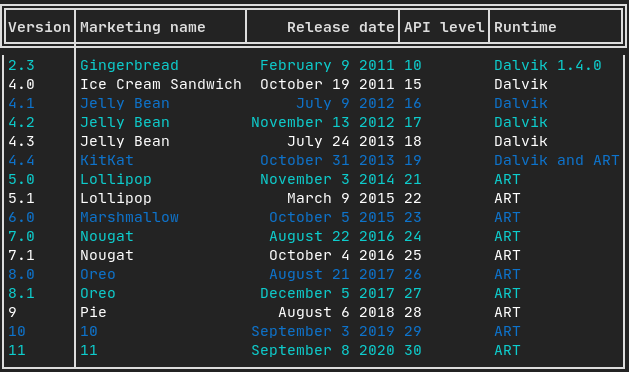
A class to easily style a table of data.

[Example](https://arthursonzogni.github.io/FTXUI/examples_2dom_2table_8cpp-example.html):
  
![image](https://user-images.githubusercontent.com/4759106/147250766-77d8ec9e-cf2b-486d-9866-1fd9f1bd2e6b.png)

</details>

<details><summary>Canvas</summary>

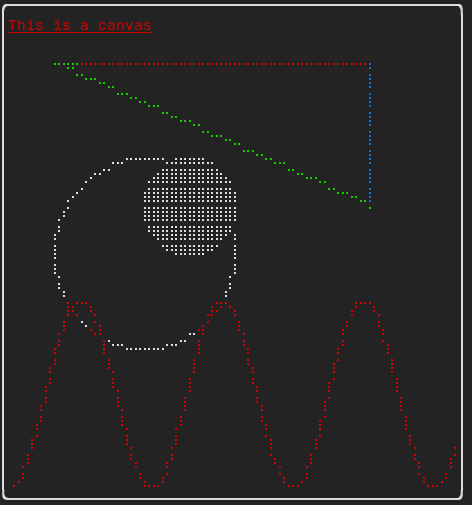
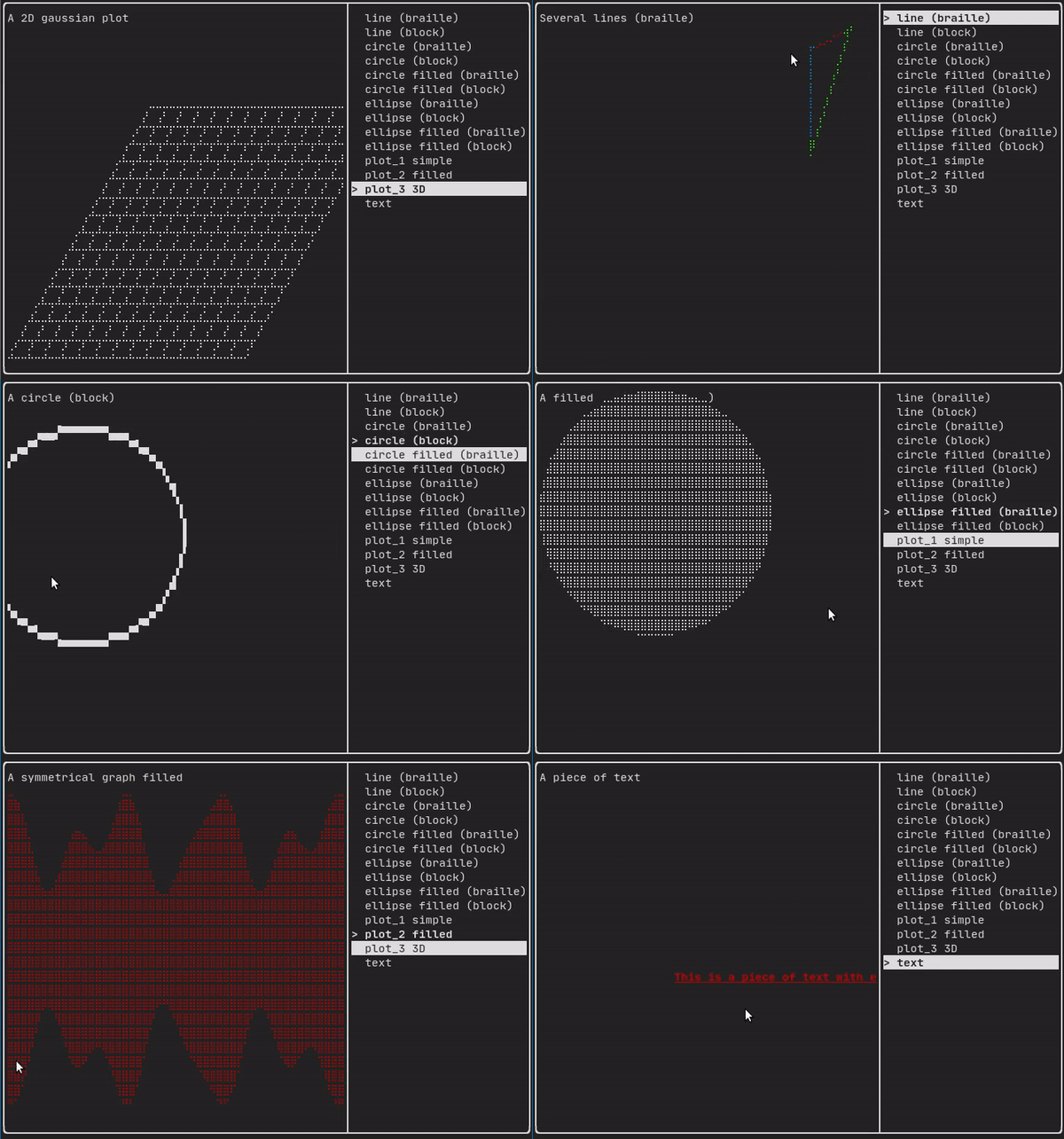
Drawing can be made on a `Canvas`, using braille, block, or simple characters:
  
Simple [example](https://github.com/ArthurSonzogni/FTXUI/blob/master/examples/dom/canvas.cpp):
  
![image](https://user-images.githubusercontent.com/4759106/147245843-76cc62fb-ccb4-421b-aacf-939f9afb42fe.png)

Complex [examples](https://github.com/ArthurSonzogni/FTXUI/blob/master/examples/component/canvas_animated.cpp):
  
![ezgif com-gif-maker (3)](https://user-images.githubusercontent.com/4759106/147250538-783a8246-98e0-4a25-b032-3bd3710549d1.gif)  
</details>

#### Component

`ftxui/component` produces dynamic UI, reactive to the user's input. It defines a set of `ftxui::Component`. A component reacts to `Event`s (keyboard, mouse, resize, ...) and `Render`s as an `Element` (see previous section).

Prebuilt components are declared in [`<ftxui/component/component.hpp>`](https://arthursonzogni.github.io/FTXUI/component_8hpp_source.html)

<details><summary>Gallery</summary>

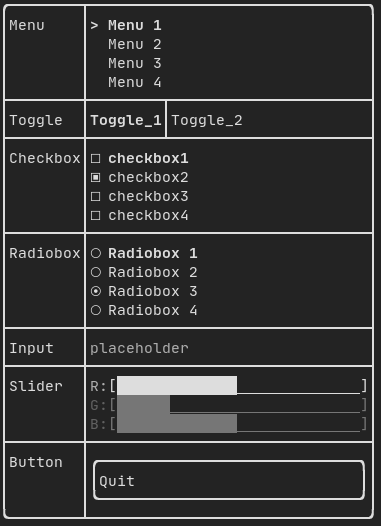
[Gallery](https://arthursonzogni.github.io/FTXUI/examples_2component_2gallery_8cpp-example.html) of multiple components. ([demo](https://arthursonzogni.github.io/FTXUI/examples/?file=component/gallery))
![image](https://user-images.githubusercontent.com/4759106/147247330-b60beb9f-e665-48b4-81c0-4b01ee95bc66.png)

</details>

<details><summary>Radiobox</summary>

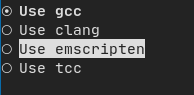
[Example](https://arthursonzogni.github.io/FTXUI/examples_2component_2radiobox_8cpp-example.html):
  
![image](https://user-images.githubusercontent.com/4759106/147246401-809d14a5-6621-4e36-8dd9-a2d75ef2a94e.png)

</details>

<details><summary>Checkbox</summary>

[Example](https://arthursonzogni.github.io/FTXUI/examples_2component_2checkbox_8cpp-example.html):
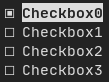
![image](https://user-images.githubusercontent.com/4759106/147246646-b86926a9-1ef9-4efb-af98-48a9b62acd81.png)

</details>

<details><summary>Input</summary>

[Example](https://arthursonzogni.github.io/FTXUI/examples_2component_2input_8cpp-example.html):
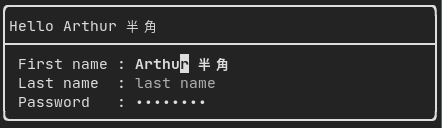
![image](https://user-images.githubusercontent.com/4759106/147247671-f1d6f606-1845-4e94-a4a0-d4273e9ae6bd.png)

</details>

<details><summary>Toggle</summary>

[Example](https://arthursonzogni.github.io/FTXUI/examples_2component_2toggle_8cpp-example.html):

![image](https://user-images.githubusercontent.com/4759106/147249383-e2201cf1-b7b8-4a5a-916f-d761e3e7ae40.png)

</details>


<details><summary>Slider</summary>

[Example](https://arthursonzogni.github.io/FTXUI/examples_2component_2slider_8cpp-example.html):
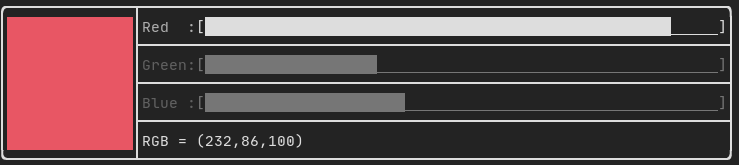
![image](https://user-images.githubusercontent.com/4759106/147249265-7e2cad75-082c-436e-affe-44a550c480ab.png)

</details>


<details><summary>Menu</summary>

[Example](https://arthursonzogni.github.io/FTXUI/examples_2component_2menu_8cpp-example.html):

![image](https://user-images.githubusercontent.com/4759106/147247822-0035fd6f-bb13-4b3a-b057-77eb9291582f.png)

</details>


<details><summary>ResizableSplit</summary>

[Example](https://arthursonzogni.github.io/FTXUI/examples_2component_2resizable_split_8cpp-example.html):
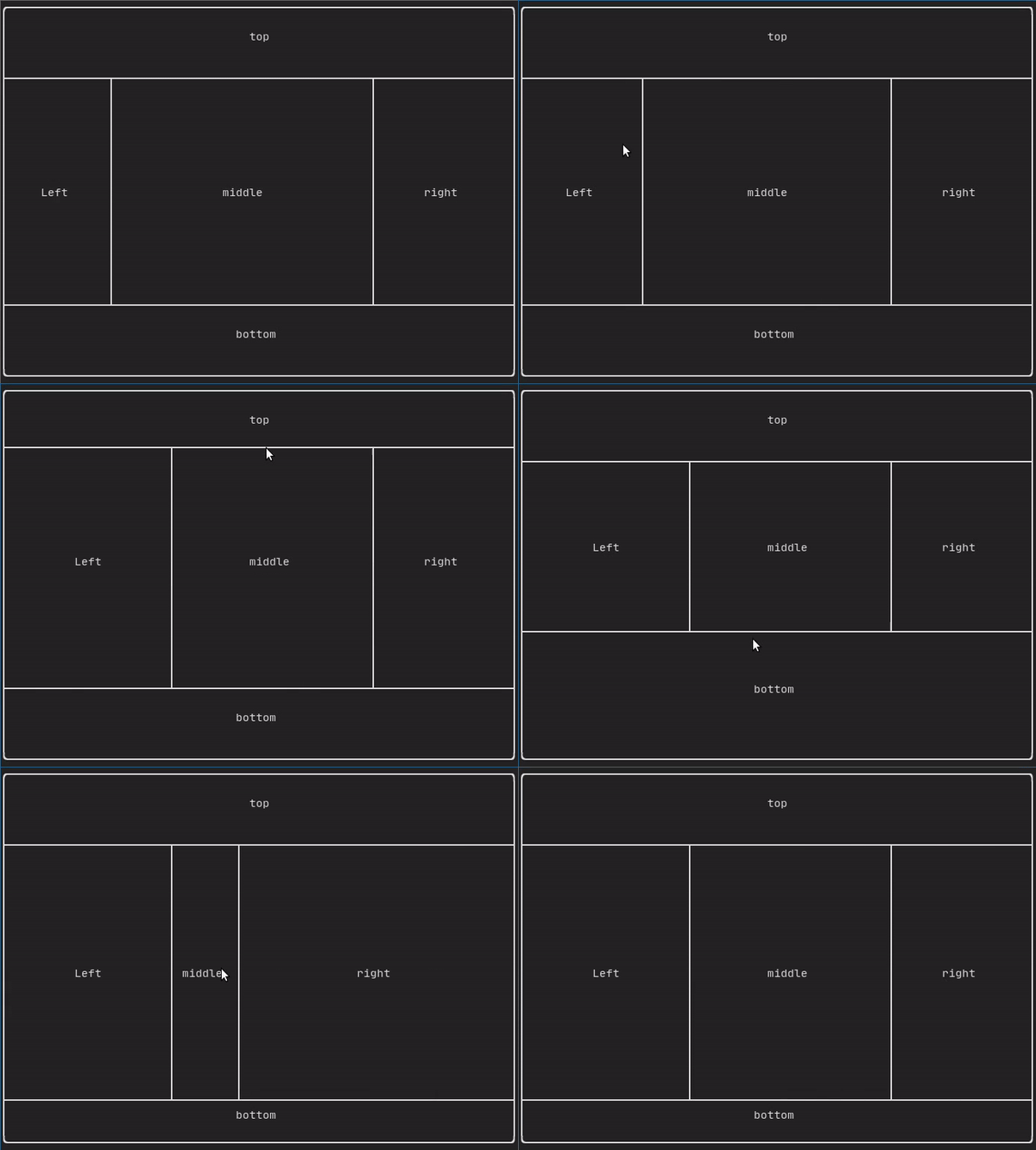
![ezgif com-gif-maker](https://user-images.githubusercontent.com/4759106/147248372-c55512fe-9b96-4b08-a1df-d05cf2cae431.gif)  
</details>


<details><summary>Dropdown</summary>

[Example](https://arthursonzogni.github.io/FTXUI/examples_2component_2dropdown_8cpp-example.html):

![youtube-video-gif (3)](https://user-images.githubusercontent.com/4759106/147246982-1e821751-531c-4e1f-bc37-2fa290e143cd.gif)

</details>

<details><summary>Tab</summary>

[Vertical](https://arthursonzogni.github.io/FTXUI/examples_2component_2tab_vertical_8cpp-example.html):
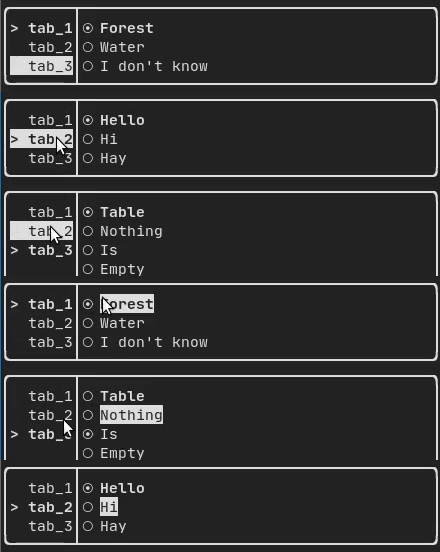
  
![ezgif com-gif-maker (1)](https://user-images.githubusercontent.com/4759106/147250144-22ff044a-4773-4ff7-a49c-12ba4034acb4.gif)

[Horizontal](https://arthursonzogni.github.io/FTXUI/examples_2component_2tab_horizontal_8cpp-example.html):
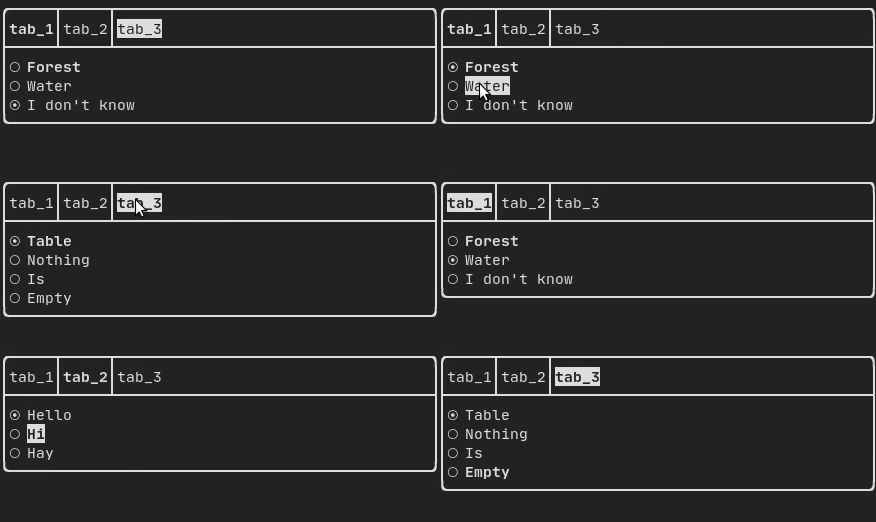
  
  ![ezgif com-gif-maker (2)](https://user-images.githubusercontent.com/4759106/147250217-fe447e0f-7a99-4e08-948a-995087d9b40e.gif)


</details>

## Libraries for FTXUI
- *Want to share a useful Component for FTXUI? Feel free to add yours here*
- [ftxui-grid-container](https://github.com/mingsheng13/grid-container-ftxui)
- [ftxui-ip-input](https://github.com/mingsheng13/ip-input-ftxui)
- [ftxui-image-view](https://github.com/ljrrjl/ftxui-image-view.git): For Image Display.
- [ftxui-navigation-tree](https://github.com/Appisolato/navigation-tree-ftxui)
- [MarkdownFTXUI](https://github.com/zvasilev/MarkdownFTXUI): Markdown Editor/Viewer for the terminal.


## Project using FTXUI

Feel free to add your projects here:
- [json-tui](https://github.com/ArthurSonzogni/json-tui)
- [git-tui](https://github.com/ArthurSonzogni/git-tui)
- [rgb-tui](https://github.com/ArthurSonzogni/rgb-tui)
- [chrome-log-beautifier](https://github.com/ArthurSonzogni/chrome-log-beautifier)
---
- [2048-cpp](https://github.com/Chessom/2048-cpp)
- [BestEdrOfTheMarket](https://github.com/Xacone/BestEdrOfTheMarket)
- [Captain's log](https://github.com/nikoladucak/caps-log)
- [Caravan](https://github.com/r3w0p/caravan)
- [CryptoCalculator](https://github.com/brevis/CryptoCalculator)
- [FTB - tertminal file browser](https://github.com/Cyxuan0311/FTB)
- [FTowerX](https://github.com/MhmRhm/FTowerX)
- [Fallout terminal hacking](https://github.com/gshigin/yet-another-fallout-terminal-hacking-game)
- [Lazylist](https://github.com/zhuyongqi9/lazylist)
- [Memory game](https://github.com/mikolajlubiak/memory)
- [Path Finder](https://github.com/Ruebled/Path_Finder)
- [Pigeon ROS TUI](https://github.com/PigeonSensei/Pigeon_ros_tui)
- [SHOOT!](https://github.com/ShingZhanho/ENGG1340-Project-25Spring)
- [StartUp](https://github.com/StubbornVegeta/StartUp)
- [Step-Writer](https://github.com/BrianAnakPintar/step-writer)
- [TUISIC](https://github.com/Dark-Kernel/tuisic)
- [Terminal Animation](https://github.com/mikolajlubiak/terminal_animation)
- [TimeAccumulator](https://github.com/asari555/TimeAccumulator)
- [UDP chat](https://github.com/Sergeydigl3/udp-chat-tui)
- [VerifySN (Fast Hash Tool)](https://github.com/d06i/verifySN)
- [XJ music](https://github.com/xjmusic/xjmusic)
- [beagle-config](https://github.com/SAtacker/beagle-config)
- [cachyos-cli-installer](https://github.com/cachyos/new-cli-installer)
- [eCAL monitor](https://github.com/eclipse-ecal/ecal)
- [ftxuiFileReader](https://github.com/J0sephDavis/ftxuiFileReader)
- [ftxui_CPUMeter](https://github.com/tzzzzzzzx/ftxui_CPUMeter)
- [hastur](https://github.com/robinlinden/hastur)
- [i3-termdialogs](https://github.com/mibli/i3-termdialogs)
- [inLimbo](https://github.com/nots1dd/inLimbo)
- [keywords](https://github.com/Oakamoore/keywords) ([Play web version :heart:](https://oakamoore.itch.io/keywords))
- [ltuiny](https://github.com/adrianoviana87/ltuiny)
- [openJuice](https://github.com/mikomikotaishi/openJuice)
- [ostree-tui](https://github.com/AP-Sensing/ostree-tui)
- [OvenbirdBT](https://github.com/ziptt/OvenbirdBT)
- [pciex](https://github.com/s0nx/pciex)
- [resource-monitor](https://github.com/catalincd/resource-monitor)
- [rw-tui](https://github.com/LeeKyuHyuk/rw-tui)
- [simpPRU](https://github.com/VedantParanjape/simpPRU)
- [sweeper](https://www.thomthom.net/thoughts/2026/01/sweeper-a-hat-tip-to-the-simple-fun-games/) ([Play web version :heart:](https://games.evilsoftwareempire.com/sweeper/play/))
- [tabdeeli](https://github.com/typon/tabdeeli)
- [terminal-rain](https://github.com/Oakamoore/terminal-rain)
- [tic-tac-toe](https://github.com/birland/tic-tac-toe)
- [tiles](https://github.com/tusharpm/tiles)
- [todoman](https://github.com/aaleino/todoman)
- [turing_cmd](https://github.com/DanArmor/turing_cmd)
- [typing-speed-test](https://codeberg.org/ymcx/typing-speed-test)
- [vantage](https://github.com/gokulmaxi/vantage)
- [x86-64 CPU Architecture Simulation](https://github.com/AnisBdz/CPU)
- [C++ Process Manager](https://github.com/ondrejhonus/cpp_proc)

### [cpp-best-practices/game_jam](https://github.com/cpp-best-practices/game_jam)

Several games using the FTXUI have been made during the Game Jam:
- [TermBreaker](https://github.com/ArthurSonzogni/termBreaker) [**[Play web version]**](https://arthursonzogni.com/TermBreaker/)
- [Minesweeper Marathon](https://github.com/cpp-best-practices/game_jam/blob/main/Jam1_April_2022/minesweeper_marathon.md) [**[Play web version]**](https://barlasgarden.com/minesweeper/index.html)
- [Grand Rounds](https://github.com/cpp-best-practices/game_jam/blob/main/Jam1_April_2022/grandrounds.md)
- [LightsRound](https://github.com/cpp-best-practices/game_jam/blob/main/Jam1_April_2022/LightsRound.v.0.1.0.md)
- [DanteO](https://github.com/cpp-best-practices/game_jam/blob/main/Jam1_April_2022/danteo.md)
- [Sumo](https://github.com/cpp-best-practices/game_jam/blob/main/Jam1_April_2022/sumo.md)
- [Drag Me aROUND](https://github.com/cpp-best-practices/game_jam/blob/main/Jam1_April_2022/drag_me_around.md)
- [DisarmSelfDestruct](https://github.com/cpp-best-practices/game_jam/blob/main/Jam1_April_2022/DisarmSelfDestruct.md)
- [TheWorld](https://github.com/cpp-best-practices/game_jam/blob/main/Jam1_April_2022/TheWorld.md)
- [smoothlife](https://github.com/cpp-best-practices/game_jam/blob/main/Jam1_April_2022/smoothlife.md)
- [Consu](https://github.com/cpp-best-practices/game_jam/blob/main/Jam1_April_2022/consu.md)


## Build using CMake

It is **highly** recommended to use CMake FetchContent to depend on FTXUI so you may specify which commit you would like to depend on.
```cmake
include(FetchContent)
FetchContent_Declare(ftxui
  GIT_REPOSITORY https://github.com/ArthurSonzogni/ftxui
  GIT_TAG v7.0.0
)
FetchContent_MakeAvailable(ftxui)

target_link_libraries(your_target PRIVATE
    # Use the umbrella target (recommended)
    ftxui::ftxui

    # Or chose a submodule
    # ftxui::component
    # ftxui::dom
    # ftxui::screen
)
```

# Build using Bazel

**MODULE.bazel**
```starlark
bazel_dep(
    name = "ftxui",
    version = "7.0.0",
)
```

**BUILD.bazel**
```starlark
cc_binary(
    name = "your_target",
    srcs = ["your_source.cc"],
    deps = [
        # Choose submodules
        "@ftxui//:component",
        "@ftxui//:dom",
        "@ftxui//:screen",
        
        # Or use the single ftxui target (includes all modules)
        # "@ftxui//:ftxui",
    ],
)
```

## Build using Meson

FTXUI can also be built using [Meson](https://mesonbuild.com/). See [doc/installation_meson.md](doc/installation_meson.md) for detailed instructions.

```bash
meson setup builddir
ninja -C builddir
```

To use FTXUI as a subproject in your Meson project, create a `subprojects/ftxui.wrap` file or use it as a dependency:
```meson
ftxui_dep = dependency('ftxui-component')
```


# Build with something else:
If you don't, FTXUI may be used from the following packages:
- CMake [FetchContent]([https://bewagner.net/programming/2020/05/02/cmake-fetchcontent/](https://cmake.org/cmake/help/latest/module/FetchContent.html)) (preferred),
- [Bazel](https://registry.bazel.build/modules/ftxui),
- [vcpkg](https://vcpkg.link/ports/ftxui),
- [Conan](https://conan.io/center/recipes/ftxui)
- [Debian package](https://tracker.debian.org/pkg/ftxui),
- [Ubuntu package](https://launchpad.net/ubuntu/+source/ftxui),
- [Arch Linux](https://aur.archlinux.org/packages/ftxui/),
- [OpenSUSE](https://build.opensuse.org/package/show/devel:libraries:c_c++/ftxui),
- [Nix](https://github.com/ArthurSonzogni/FTXUI/blob/main/flake.nix),

[![Packaging status](https://repology.org/badge/vertical-allrepos/libftxui.svg)](https://repology.org/project/libftxui/versions)


If you choose to build and link FTXUI yourself, `ftxui-component` must be first in the linking order relative to the other FTXUI libraries, i.e.
```bash
g++ . . . -lftxui-component -lftxui-dom -lftxui-screen . . .
```

To build FTXUI with modules, check [documentation](https://arthursonzogni.github.io/FTXUI/cpp20-modules.html)

## Contributors

<a href="https://github.com/ArthurSonzogni/FTXUI/graphs/contributors">
  <img src="https://contrib.rocks/image?repo=ArthurSonzogni/FTXUI" />
</a>